0

preview
F-Droid 2.0 ist endlich bei mir angekommen !! 😎😇🤗
F-Droid 2.0 ist endlich bei mir angekommen !! 😎😇🤗
posts tagged #fdroid
F-Droid 2.0 ist endlich bei mir angekommen !! 😎😇🤗
F-Droid 2.0 ist endlich bei mir angekommen !! 😎😇🤗

I’ve been building OctoLab, an unofficial GitLab client for Android. It works with gitlab.com and self-hosted GitLab (CE/EE), started as a GitLab-focused fork of OctoDroid, and is Apache 2.0 licensed.
What it does:
No tracking, no analytics, no proprietary services.
How it’s built: development happens on our own GitLab instance in small commits; each release is squash-merged into one commit on GitHub, so issue numbers in commit messages and changelogs refer to that internal tracker. Development is AI-assisted, as disclosed in the README; I review and test every change on my own devices before release, and the full changelog is in each GitHub release.
F-Droid: f-droid.org/packages/com.secninjaz.octolab/
GitHub (releases, Obtainium): github.com/secninjaz/OctoLab
Feedback and bug reports welcome.
I’ve been building OctoLab, an unofficial GitLab client for Android. It works with gitlab.com and self-hosted GitLab (CE/EE), started as a GitLab-focused fork of OctoDroid, and is Apache 2.0 licensed.
What it does:
No tracking, no analytics, no proprietary services.
How it’s built: development happens on our own GitLab instance in small commits; each release is squash-merged into one commit on GitHub, so issue numbers in commit messages and changelogs refer to that internal tracker. Development is AI-assisted, as disclosed in the README; I review and test every change on my own devices before release, and the full changelog is in each GitHub release.
F-Droid: f-droid.org/packages/com.secninjaz.octolab/
GitHub (releases, Obtainium): github.com/secninjaz/OctoLab
Feedback and bug reports welcome.

Searched if Imagetoolbox had that option, but didn’t find it.
Are there any good FOSS apps that can convert videos to gifs?
I remember Video transcoder from the past. It does not seem to be in Fdroid currently, as it is probably too old.
Searched if Imagetoolbox had that option, but didn’t find it.
Are there any good FOSS apps that can convert videos to gifs?
I remember Video transcoder from the past. It does not seem to be in Fdroid currently, as it is probably too old.
Checking out @fdroid in earnest for once (hope this is the Fdroid official account) and it looks a bit intimidating but still want to explore! Fastfrwrd could probably list ourselves there as a green social app. Anything to get away from Playstore!
Checking out @fdroid in earnest for once (hope this is the Fdroid official account) and it looks a bit intimidating but still want to explore! Fastfrwrd could probably list ourselves there as a green social app. Anything to get away from Playstore!

NeoStore is a pile of garbage
NeoStore is a pile of garbage
Hello, I’m looking for a gallery app that can tag images and can display pictures inside compressed files, mainly .zip and hopefully .kra.
Currently I’m using Aves, which is really good at tagging, but it can’t show images inside .zip or .kra.
Hello, I’m looking for a gallery app that can tag images and can display pictures inside compressed files, mainly .zip and hopefully .kra.
Currently I’m using Aves, which is really good at tagging, but it can’t show images inside .zip or .kra.
If you read scientific papers, you know how hard it is to keep up with the hundreds of new ones published every day. So I built a private app that learns your interests locally on your phone. Your data never leaves your device, and the app shows you the relevant new papers in your field: computer science, engineering, biology, medicine, chemistry, law and more.
Here’s the website and the code under GPL-3.0. I hope you find it useful as much as I do!
If you read scientific papers, you know how hard it is to keep up with the hundreds of new ones published every day. So I built a private app that learns your interests locally on your phone. Your data never leaves your device, and the app shows you the relevant new papers in your field: computer science, engineering, biology, medicine, chemistry, law and more.
Here’s the website and the code under GPL-3.0. I hope you find it useful as much as I do!
If you read scientific papers, you know how hard it is to keep up with the hundreds of new ones published every day. So I built a private app that learns your interests locally on your phone. Your data never leaves your device, and the app shows you the relevant new papers in your field: computer science, engineering, biology, medicine, chemistry, law and more.
Here’s the website and the code under GPL-3.0. I hope you find it useful as much as I do!
If you read scientific papers, you know how hard it is to keep up with the hundreds of new ones published every day. So I built a private app that learns your interests locally on your phone. Your data never leaves your device, and the app shows you the relevant new papers in your field: computer science, engineering, biology, medicine, chemistry, law and more.
Here’s the website and the code under GPL-3.0. I hope you find it useful as much as I do!
Dear @fdroid , why did you remove the information on app permissions? This is essential!!!
https://forum.f-droid.org/t/f-droid-basic-2-0-rc0-release-not-showing-permissions-dropdown/34690/6
Dear @fdroid , why did you remove the information on app permissions? This is essential!!!
https://forum.f-droid.org/t/f-droid-basic-2-0-rc0-release-not-showing-permissions-dropdown/34690/6
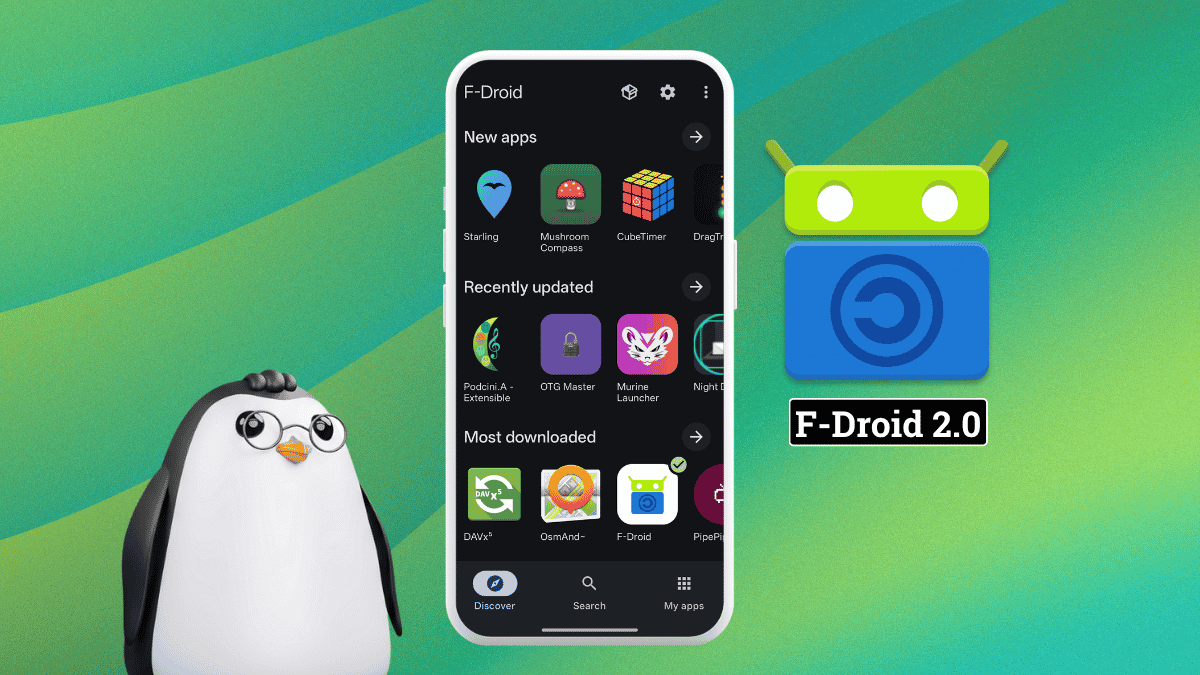
Since 2010, F-Droid has been the go-to place for downloading free and open source apps for Android. Its client app is the one people interact with the most, and it has received many upgrades over the years.
But now it’s time for a massive rewrite that has emerged from more than a year of development and numerous test releases.
A comprehensive redesign
Kotlin replaces the original Java codebase, and the interface has been rebuilt on Jetpack Compose. The result is an app that follows Material Design throughout, so that it looks and behaves like it belongs on a modern Android device.
The app’s bottom bar now has three sections: Discover for browsing, Search for queries and quick access to categories, and My Apps for tracking installed apps, updates, and issues.
You will also find that the Settings menu has moved to the top-right, being placed alongside the new Repositories menu.
Coming back to the Discover page, it has been configured to highlight newly added apps, recently updated ones, and the most downloaded ones in the repository. Related categories are grouped together, making it easier to browse the full catalog without getting lost in a long list.
Search now handles categories, app descriptions, and translated content in addition to app names, and results for Chinese, Japanese, and Korean queries have improved. Your search history is also saved for future queries.
Filtering has been reworked too; results can be narrowed by anti-features, device compatibility, and category all at once.
What else’s changed?
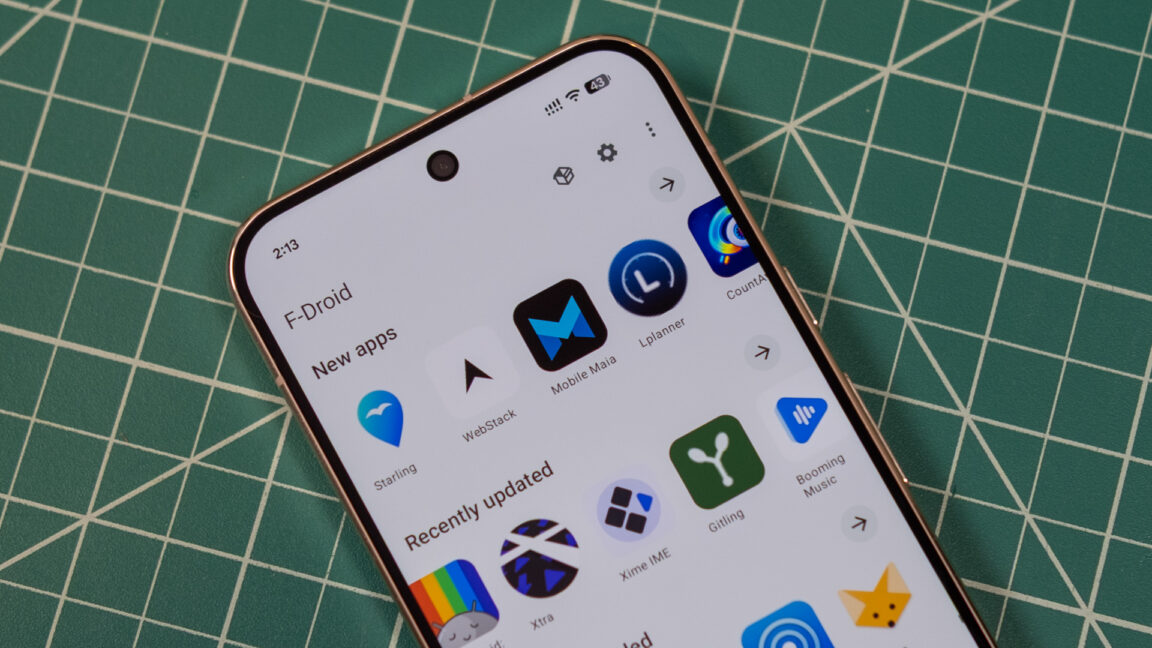
This is how the old F-Droid app looks in comparison.
The app now checks for updates in the background by default, removing the need for the pull-to-refresh gesture that used to trigger repository scans. Of course the manual check is still available from the My Apps page once you go into the three-dot menu.
Similarly, the app hiding feature for changing F-Droid’s logo to a calculator app has been moved into the Settings menu under “App Icon,” and the Nearby app sharing tool has been temporarily removed.
Concluding their announcement, F-Droid stated that:
F-Droid 2.0 represents a major milestone, but it is not the end of the story. Rebuilding the app has given us a stronger foundation, yet there is still plenty of work ahead.

As the rollout reaches more users, we expect to learn a great deal from real-world usage. Community feedback has shaped F-Droid 2.0 from its earliest design discussions through many alpha and RC releases, and it will continue to guide future improvements.
A looming threat
Last year in August, Google announced that starting 2027, every Android app developer would need to register with the company, providing government-issued ID, signing key evidence, and a fee.
This way, apps from unregistered developers would be blocked from running on certified Android devices.
Of course F-Droid didn’t sit by idly; one of their board members, Marc Prud’hommeaux, launched the Keep Android Open campaign in response, which has since brought together over 70 organizations from 20+ countries.
Its signatories include big names like the Electronic Frontier Foundation, the Free Software Foundation, KDE, Proton, Codeberg, VideoLAN, LineageOS, CryptPad and the Tor Project.
Seeing that we are shy of the 90-day mark for this absurd lockdown to occur, F-Droid introducing such a major update only strengthens their stance of not backing down to Google’s strongarming tactics. Get F-Droid 2.0
This revamp is rolling out gradually over the coming weeks, so if you haven’t received this on your existing installation, just wait. For new installations, it is a similar situation, as the latest stable release is still v1.23.2.
On the other hand, if you can’t be bothered with practicing the virtue of patience, then you could download the latest 2.0 beta build from the packages portal.
Since 2010, F-Droid has been the go-to place for downloading free and open source apps for Android. Its client app is the one people interact with the most, and it has received many upgrades over the years.
But now it’s time for a massive rewrite that has emerged from more than a year of development and numerous test releases.
A comprehensive redesign
Kotlin replaces the original Java codebase, and the interface has been rebuilt on Jetpack Compose. The result is an app that follows Material Design throughout, so that it looks and behaves like it belongs on a modern Android device.
The app’s bottom bar now has three sections: Discover for browsing, Search for queries and quick access to categories, and My Apps for tracking installed apps, updates, and issues.
You will also find that the Settings menu has moved to the top-right, being placed alongside the new Repositories menu.
Coming back to the Discover page, it has been configured to highlight newly added apps, recently updated ones, and the most downloaded ones in the repository. Related categories are grouped together, making it easier to browse the full catalog without getting lost in a long list.
Search now handles categories, app descriptions, and translated content in addition to app names, and results for Chinese, Japanese, and Korean queries have improved. Your search history is also saved for future queries.
Filtering has been reworked too; results can be narrowed by anti-features, device compatibility, and category all at once.
What else’s changed?
This is how the old F-Droid app looks in comparison.
The app now checks for updates in the background by default, removing the need for the pull-to-refresh gesture that used to trigger repository scans. Of course the manual check is still available from the My Apps page once you go into the three-dot menu.
Similarly, the app hiding feature for changing F-Droid’s logo to a calculator app has been moved into the Settings menu under “App Icon,” and the Nearby app sharing tool has been temporarily removed.
Concluding their announcement, F-Droid stated that:
F-Droid 2.0 represents a major milestone, but it is not the end of the story. Rebuilding the app has given us a stronger foundation, yet there is still plenty of work ahead.

As the rollout reaches more users, we expect to learn a great deal from real-world usage. Community feedback has shaped F-Droid 2.0 from its earliest design discussions through many alpha and RC releases, and it will continue to guide future improvements.
A looming threat
Last year in August, Google announced that starting 2027, every Android app developer would need to register with the company, providing government-issued ID, signing key evidence, and a fee.
This way, apps from unregistered developers would be blocked from running on certified Android devices.
Of course F-Droid didn’t sit by idly; one of their board members, Marc Prud’hommeaux, launched the Keep Android Open campaign in response, which has since brought together over 70 organizations from 20+ countries.
Its signatories include big names like the Electronic Frontier Foundation, the Free Software Foundation, KDE, Proton, Codeberg, VideoLAN, LineageOS, CryptPad and the Tor Project.
Seeing that we are shy of the 90-day mark for this absurd lockdown to occur, F-Droid introducing such a major update only strengthens their stance of not backing down to Google’s strongarming tactics. Get F-Droid 2.0
This revamp is rolling out gradually over the coming weeks, so if you haven’t received this on your existing installation, just wait. For new installations, it is a similar situation, as the latest stable release is still v1.23.2.
On the other hand, if you can’t be bothered with practicing the virtue of patience, then you could download the latest 2.0 beta build from the packages portal.

A numberlink-style game
Connect the colors to fill up the board
A numberlink-style game
Connect the colors to fill up the board
cross-posted from: feddit.org/post/35313839
I write to you from Germany, where I work. I use an android device.
The transportation authority I am in is called Mainzer Mobilität and because my employer only covers 50% of the transportation costs if I use the digital travel card, I’m basically forced to use google wallet, which I hate. This transportation authority doesn’t offer pkpass files I could use with FOSS Wallet or pdf cards with my full name and a small qr code I could download. It has to be google wallet or use a physical card (and pay double).
I used to take a screenshot of the qr code and download the receipt as a pdf each month. On the receipt everyone can see the relevant data, including my full name, address, expiry date of the travel document, type of travel card and what I paid, but 5 days ago a “Kontrolleur” (an employee who boards buses to identify passengers without valid travel documents) fined me for not showing him the google wallet app with my pass there.
Yo read that right, it MUST be google wallet, otherwise I’m not carrying a valid travel document. The qr code alone together with the receipt with all my data and my identity card are not enough.
Is there any FOSS wallet or application that would work in Germany like google wallet does?
I really hate being forced to use google crap like this, I really don’t want to trust them with my data but I need to save as much as I can.
Feel free to suggest other communities where I could ask this question.
cross-posted from: feddit.org/post/35313839
I write to you from Germany, where I work. I use an android device.
The transportation authority I am in is called Mainzer Mobilität and because my employer only covers 50% of the transportation costs if I use the digital travel card, I’m basically forced to use google wallet, which I hate. This transportation authority doesn’t offer pkpass files I could use with FOSS Wallet or pdf cards with my full name and a small qr code I could download. It has to be google wallet or use a physical card (and pay double).
I used to take a screenshot of the qr code and download the receipt as a pdf each month. On the receipt everyone can see the relevant data, including my full name, address, expiry date of the travel document, type of travel card and what I paid, but 5 days ago a “Kontrolleur” (an employee who boards buses to identify passengers without valid travel documents) fined me for not showing him the google wallet app with my pass there.
Yo read that right, it MUST be google wallet, otherwise I’m not carrying a valid travel document. The qr code alone together with the receipt with all my data and my identity card are not enough.
Is there any FOSS wallet or application that would work in Germany like google wallet does?
I really hate being forced to use google crap like this, I really don’t want to trust them with my data but I need to save as much as I can.
Feel free to suggest other communities where I could ask this question.
I’m running LineageOS without google. The default browser doesn’t have ad blocking. On my laptop I’ve gotten pretty used to an ad free experience with librewolf and uBlock origin. Anyone have a recommendation for a browser on F-Droid with a solid ad blocking experience?
I’m running LineageOS without google. The default browser doesn’t have ad blocking. On my laptop I’ve gotten pretty used to an ad free experience with librewolf and uBlock origin. Anyone have a recommendation for a browser on F-Droid with a solid ad blocking experience?

Remembered about this a Lemmy convo.
It is good. Animations or pictures beyond the selected size are replaced by a red border. Clicking it will load that image. Or you can temporarily turn it off for the website and reload the tab.
There is an option to exclude Websites from from it too. e.g. You can exclude Lemmy instances where you want to see images by default.
github.com/gorhill/uBlock/wiki/Per-site-switches#…
Sharing it here since I had heard that uBo with full capabilities is now only available in Firefox
Remembered about this a Lemmy convo.
It is good. Animations or pictures beyond the selected size are replaced by a red border. Clicking it will load that image. Or you can temporarily turn it off for the website and reload the tab.
There is an option to exclude Websites from from it too. e.g. You can exclude Lemmy instances where you want to see images by default.
github.com/gorhill/uBlock/wiki/Per-site-switches#…
Sharing it here since I had heard that uBo with full capabilities is now only available in Firefox
Pretty much what the title implies. I enjoy the feature itself and find it useful for browsing and discovering applications on F-Droid that I didn’t know existed, but there are certain categories of applications that I have no use for and would find it easier to filter them out rather than ignore.
Pretty much what the title implies. I enjoy the feature itself and find it useful for browsing and discovering applications on F-Droid that I didn’t know existed, but there are certain categories of applications that I have no use for and would find it easier to filter them out rather than ignore.
Hands off AI programs, where for example if I get a text message, without using my hands it read it to me, and I can use my voice to reply.
And any of other features like reading notifications, emails, whatever else! :-)
Hands off AI programs, where for example if I get a text message, without using my hands it read it to me, and I can use my voice to reply.
And any of other features like reading notifications, emails, whatever else! :-)

f-droid.org/packages/com.astroloop.game
This seems to have come out of nowhere (dev has no other repos) but very polished and addictive. Anyone else enjoying this new game?
f-droid.org/packages/com.astroloop.game
This seems to have come out of nowhere (dev has no other repos) but very polished and addictive. Anyone else enjoying this new game?

f-droid.org/packages/com.astroloop.game
This seems to have come out of nowhere (dev has no other repos) but very polished and addictive. Anyone else enjoying this new game?
f-droid.org/packages/com.astroloop.game
This seems to have come out of nowhere (dev has no other repos) but very polished and addictive. Anyone else enjoying this new game?
Parents live far away, so I sent them a qr code generated by my local SimpleX per email.
All they have to do is open their local SimpleX, go to one-time link and scan the qr code, right?
Once our devices have been connected, connection details remains saved in our local SimpleX and I don’t need to send a new qr code before I want to talk to them again, right?
Parents live far away, so I sent them a qr code generated by my local SimpleX per email.
All they have to do is open their local SimpleX, go to one-time link and scan the qr code, right?
Once our devices have been connected, connection details remains saved in our local SimpleX and I don’t need to send a new qr code before I want to talk to them again, right?
I hope you guys understand my question, as somebody who has used VOIP on very limited times.
On a regular phone call, there is a constant line of communication, meaning both sides could talk at the same time if they wanted. I thought VOIP would be like this, but in my experience VOIP is a short audio message you send, the other side hears it and sends you an answer, nothing wrong with that.
I want to talk to family, I don’t want to use whatsapp and I’m experimenting with SimpleX Chat. It allows me to send short audio files as audio messages, but it’s still not a continuous LOC. Would whatsapp be the same?
I want to convince family to use SimpleX, user experience would have to be as similar as possible to whatsapp
I hope you guys understand my question, as somebody who has used VOIP on very limited times.
On a regular phone call, there is a constant line of communication, meaning both sides could talk at the same time if they wanted. I thought VOIP would be like this, but in my experience VOIP is a short audio message you send, the other side hears it and sends you an answer, nothing wrong with that.
I want to talk to family, I don’t want to use whatsapp and I’m experimenting with SimpleX Chat. It allows me to send short audio files as audio messages, but it’s still not a continuous LOC. Would whatsapp be the same?
I want to convince family to use SimpleX, user experience would have to be as similar as possible to whatsapp
@fdroidorg @fdroid l felt the urge to take this up with you. I’m from Vishal Bakhai’s city. Now, a very tyrannical point number 13 exists in the TOS of the forum. It looks absolutely fine with a corporate, but it violates the spirit of a community. I believe that l’ve been done an injustice. I’ve always looked upon f-droid as an ally, but the forum team has treated me with great disdain.
@fdroidorg @fdroid l felt the urge to take this up with you. I’m from Vishal Bakhai’s city. Now, a very tyrannical point number 13 exists in the TOS of the forum. It looks absolutely fine with a corporate, but it violates the spirit of a community. I believe that l’ve been done an injustice. I’ve always looked upon f-droid as an ally, but the forum team has treated me with great disdain.

@gadgetbridge @fdroid what’s going on here? A new Gadgetbridge app in the fdroid store, from “zoop”?
Looks pretty strange to me.
@gadgetbridge @fdroid what’s going on here? A new Gadgetbridge app in the fdroid store, from “zoop”?
Looks pretty strange to me.

Peace be with you, F-Droid Community. 🌹
As many probably know, Google will block Android starting 2027.
Here is my hope: Google has shot itself in the foot with this Darth Vader move, because many People who loves privacy will now switch to de-googled systems, because ( Since to my knowledge), the blockade won’t affect those systems.
So this is just my Openion and my HOPE.
What’s your take on this?
And I kindly say to all developers: Please don’t register in Google.
There are so many people using de-googled systems now, including myself. Please keep going for us, and four you too. Please
Best wishes from Germany 🌹
Peace be with you, F-Droid Community. 🌹
As many probably know, Google will block Android starting 2027.
Here is my hope: Google has shot itself in the foot with this Darth Vader move, because many People who loves privacy will now switch to de-googled systems, because ( Since to my knowledge), the blockade won’t affect those systems.
So this is just my Openion and my HOPE.
What’s your take on this?
And I kindly say to all developers: Please don’t register in Google.
There are so many people using de-googled systems now, including myself. Please keep going for us, and four you too. Please
Best wishes from Germany 🌹

Train your brain with fun mini games that challenge your memory, focus, logic and math skills. Braincup offers 36 brain training exercises designed to sharpen your mind and improve concentration.
Train your brain with fun mini games that challenge your memory, focus, logic and math skills. Braincup offers 36 brain training exercises designed to sharpen your mind and improve concentration.
