I have a shortcut that I use regularly at work, and it has saved me so much time however, it appears the latest iPadOS update possibly broke file renaming.
The script runs fine until it reaches the renaming portion which used to work perfectly but now claims that “The file does not exist” and ends the script, I can confirm the files are being saved in the directories as intended just failing on the renaming.
By chance does anyone know a workaround that I could use temporarily? Apologies if the shortcut is a mess, I tried to comment along the way as best as I can.
Edit; appears the network drive is the issue here, saving the files locally on the tablet instead seems to work as intended, weird.
Morning y’all,
I have a shortcut that I use regularly at work, and it has saved me so much time however, it appears the latest iPadOS update possibly broke file renaming.
The script runs fine until it reaches the renaming portion which used to work perfectly but now claims that “The file does not exist” and ends the script, I can confirm the files are being saved in the directories as intended just failing on the renaming.
By chance does anyone know a workaround that I could use temporarily? Apologies if the shortcut is a mess, I tried to comment along the way as best as I can.
Edit; appears the network drive is the issue here, saving the files locally on the tablet instead seems to work as intended, weird.
I created this shortcut after seeing a Reddit post a few months ago.
It collects information like the current weather, location, and time of day, then asks Apple Intelligence to generate a prompt for an image generator. The shortcut sends that prompt to Apple Playground and sets the resulting image as the iPhone wallpaper*. Everything runs locally on the iPhone, with no data sent to the internet. I also set up some time-based automations to run the shortcut periodically.
you might need to manually configure the last step where it says Wallpaper 3 to something that is valid on your iPhone
I created this shortcut after seeing a Reddit post a few months ago.
It collects information like the current weather, location, and time of day, then asks Apple Intelligence to generate a prompt for an image generator. The shortcut sends that prompt to Apple Playground and sets the resulting image as the iPhone wallpaper*. Everything runs locally on the iPhone, with no data sent to the internet. I also set up some time-based automations to run the shortcut periodically.
Helloo, so I want to create a shortcut which brings me to the Whatsapp preferences in the settings App. For that, I need the Bundle ID which i found out to be “net.whatsapp.Whatsapp” via Method 1 of this guide. I created a “Open Url” shortcut using the “Settings For App” URL of this list, and this is the result: prefs:root=net.whatsapp.Whatsapp But it doesn’t work, it just sends me to the settings App wherever I left it. Anybody know what I’m doing wrong?:O
Helloo, so I want to create a shortcut which brings me to the Whatsapp preferences in the settings App. For that, I need the Bundle ID which i found out to be “net.whatsapp.Whatsapp” via Method 1 of this guide. I created a “Open Url” shortcut using the “Settings For App” URL of this list, and this is the result: prefs:root=net.whatsapp.Whatsapp But it doesn’t work, it just sends me to the settings App wherever I left it. Anybody know what I’m doing wrong?:O
On desktop we use a batch script to quickly search jobs however, I’m starting to make use of our companies iPads (since no one else does) to perform my tasks, I tried making up a script with shortcuts to search these directories for the job but it doesn’t seem to work with a wildcard sub-directory.
Any ideas are appreciated, I can’t install Scribtable on this iPad as the COO hasn’t fully set them up and it’s asking for a password for any installations.
Edit; the Batch script we use, hopefully explains it better than I did.
@echo off
cls

setlocal enableextensions enabledelayedexpansion

:UserInput
set /p UserInput=Enter job number:

REM Validate the input

REM Check if the input has exactly 5 characters
if not "!UserInput:~5!"=="" (
    echo Please enter a 5-digit number.
    color 0E
    goto UserInput
)

REM Check if the input contains only numeric characters
for /F "delims=0123456789" %%a in ("!UserInput!") do (
    echo Please enter a 5-digit number.
    color 0E
    goto UserInput
)

REM Check if the folder exists - Update 2025-07-24 Clears shell and text colour remains white after repeat.
set "Folder=N:\Drawings\Jobs\!UserInput:~0,3!00-!UserInput:~0,3!99\!UserInput!-*"
if not exist "!Folder!" (
    echo Job folder does not exist.
    color 0C
    timeout /t 2 >nul
    cls
    color 0F
    goto UserInput
)

REM Rest of the script - Update 2025-07-24 Script no longer automatially closes, instead repeats from the start. Also clears shell and text colour remains white after repeat.

for /D %%a in ("!Folder!") do (
    %SystemRoot%\explorer.exe "%%~a"
    echo Job folder found successfully.
    color 0A
    timeout /t 2 >nul
    cls
    color 0F
    goto UserInput
)

:end
Edit: Somehow this has sorted itself out despite me not changing anything.
Hopefully this is the right community for this as it’s definitely to do with a Siri shortcut setup… I’ll preface this by saying that I am not the best with stuff like this but I am so confused as to how it stopped working.
I set up a shortcut to add to a notion database a few weeks ago (to track exercise/playtime for my puppy) in an attempt to make tracking a bit easier. It took me a while to set up as I’ve not got any experience with any coding language, but I got it working! Until yesterday, when I started to get an Invalid Request URL error when trying to submit a new entry.
Notion API connection looks okay when I check that in Notion.
Checked authorisation today (secret API key matches what Notion says)
database ID is fine (checked again today, this is set up under ‘parent’ in the below screenshot)
no structural changes to the database since this was set ip
Notion API version hasn’t changed
I really don’t understand how I am suddenly getting this error after the shortcut working fine for a few weeks with tens of entries made!! Any ideas are welcome 😊
I often get flight or concert tickets that don’t come as Wallet entries, but I wan’t to treat them in the same way:
1. Easy Access (e.g., not searching back through emails or logging in to a service);
2. Not dependant on internet/phone connectivity (especially in airports!)
I now have a pair of shortcuts that more-or-less achieve this. In operation, I just open my iPhone, tap an app icon (shortcut to ‘LocalFileOpener’).
How it works:
‘→ Local iPhone’ Appears in the Share Menu and saves a file locally on my iPhone (i.e., I don’t need an internet/phone connection to access it as I would with iCloud storage).
‘LocalFileOpener’ Just opens the local iPhone folder.
Unclear to me if this is or isn’t old news—that I was just bad at searching for—but I wanted to let more[^1] people know regardless:
Context: I have set up safari to always open to specific tab groups on phone and iPad, to avoid losing tabs on inadvertent close and to ease pickup from Mac.
This is the safari that lives in my dock, but a large irritation was that on iPad it only worked to open safari fullscreen now (vs a drag onto screen split). So I was still having to go looking in the app switcher or use Spotlight (which I have on AssistiveTouch double tap) to find “real” safari
the split is actually with a generic new safari window rather than one with my desired tab group … but I’ll take it over nothing
it may behoove one to filter out the Shortcuts app explicitly rather than presume first is correct. It seems to list windows in opening order? I have only once so far (which isn’t zero times) ended up with a shortcuts/safari split closing something
It’d be fairly straightforward to add a branch for a 3 app count (if you pulled up to slide over on top of a split) and use open app as slideover there. I don’t do that much tho so haven’t bothered
It’s irritating that the type App drop down gives windows as an option but always returns an empty list (except on macOS), and “is frontmost” is there but it’s always false. So I’m not sure there’s a better detect than count without going to screenshot and quick image analysis ?
(Incidentally doing “view content graph” on a current app or visible apps appears to always freeze shortcuts - I have to lock and unlock to exit it)
If anyone has ideas about where to pull a split v slide over detection from lmk ; left v right detection would also be nice. Don’t think they are possible tho
[^1]: I couldn’t find such previously shown on /r/shortcuts, but when I tried sharing there its been spuriously automoded as mis-flaired question )for 3 hours & counting (beyond second attempt + modmail). Thats why above is quoted (although I added in alt text and title that cam from when:)
I posted it on masto and bsky where I have few followers let alone ones who are likely interested, but also - I saw the `shortcuts@lemmy.world` federation when I was checking what hashtags might get it seen by someone - so welcome to my first lemmy post

(I'd had an account on lemmy.ml since January 2022, but I've barely lurked let alone posed from there)
I am trying to create a shortcut to use the TubeArchivist api to archive YouTube videos. I’ve tried to send the request as text but it doesn’t work because it expects an array I guess? I’ve gotten the request to work using CURL on the command line but when I try to add a value to an array in shortcuts the field is locked and won’t accept any input.
I’ve done some searching across the wider internet for how to construct arrays in shortcuts but no matter what I attempt that field is always locked. Can it not accept any inputs? Confused how to actually put my structured data into it.
The URL that comes before it is the local host and port of the TubeArchivist server API endpoint.
Hello,
I am trying to create a shortcut to use the TubeArchivist api to archive YouTube videos. I’ve tried to send the request as text but it doesn’t work because it expects an array I guess? I’ve gotten the request to work using CURL on the command line but when I try to add a value to an array in shortcuts the field is locked and won’t accept any input.
I’ve done some searching across the wider internet for how to construct arrays in shortcuts but no matter what I attempt that field is always locked. Can it not accept any inputs? Confused how to actually put my structured data into it.
The URL that comes before it is the local host and port of the TubeArchivist server API endpoint.
I would love to activate an iOS shortcut that instantly begins dictation, allows me to tap to stop dictation, and then pastes the transcript into a specified text field. For an added benefit, it would be great to view the live transcript to help maintain my train of thought.
I would like it to use the best available free offline transcription software (e.g. OpenAI Whisper) as well.
Inspirations include:
Whisper shortcut by Giacomo Melzi - online, very inexpensive, but not offline/live. Requires OpenAI API key ($0.006 / minute, thirty-six cents an hour)
Ecco Dictate app - offline (private!), but not live nor able to be opened and autostart via shortcut
(Here I’ll mention… If you have never used dictation beyond Apple’s built-in offering, it may be hard for you to imagine just how much you are missing 🙂 If Apple doesn’t catch up by iOS 18 I will send them such a firm yet polite piece of feedback!)
Note: Because my ideal solution is all but guaranteed to require an app and not just a shortcut, I’m mainly wondering if there is an app that supports shortcuts as described. Planning to reach out to the author of Ecco Dictate, perhaps after checking with you friendly folks.
Thank you!
UPDATE:
Near perfection found.
Free offline OpenAI Whisper transcription to clipboard for easy pasting in any app!
Aiko (link is to the shortcuts the developer provides)
(Apparently if you’re not on iOS 17.5 you need to use a workaround when launching these shortcuts using Siri by voice… Have to add Dismiss Siri And Continue + Open App action and have it Open Shortcuts.)
All that’s missing is live transcription, which is available with online/paid transcription apps but no offline apps I’ve found on iOS. (MacWhisper does feature live offline transcription in any field, but only on Mac for $30+.)
Does this exist?
I would love to activate an iOS shortcut that instantly begins dictation, allows me to tap to stop dictation, and then pastes the transcript into a specified text field. For an added benefit, it would be great to view the live transcript to help maintain my train of thought.
I would like it to use the best available free offline transcription software (e.g. OpenAI Whisper) as well.
Inspirations include:
Whisper shortcut by Giacomo Melzi - online, very inexpensive, but not offline/live. Requires OpenAI API key ($0.006 / minute, thirty-six cents an hour)
Ecco Dictate app - offline (private!), but not live nor able to be opened and autostart via shortcut
(Here I’ll mention… If you have never used dictation beyond Apple’s built-in offering, it may be hard for you to imagine just how much you are missing 🙂 If Apple doesn’t catch up by iOS 18 I will send them such a firm yet polite piece of feedback!)
Note: Because my ideal solution is all but guaranteed to require an app and not just a shortcut, I’m mainly wondering if there is an app that supports shortcuts as described. Planning to reach out to the author of Ecco Dictate, perhaps after checking with you friendly folks.
Thank you!
UPDATE:
Near perfection found.
Free offline OpenAI Whisper transcription to clipboard for easy pasting in any app!
Aiko (link is to the shortcuts the developer provides)
(Apparently if you’re not on iOS 17.5 you need to use a workaround when launching these shortcuts using Siri by voice… Have to add Dismiss Siri And Continue + Open App action and have it Open Shortcuts.)
All that’s missing is live transcription, which is available with online/paid transcription apps but no offline apps I’ve found on iOS. (MacWhisper does feature live offline transcription in any field, but only on Mac for $30+.)
Is there a way to know which app triggered the shortcut call?
For instance, if I share files from the Files app, I could reference something to see “Files” or “iCloud Drive”. When it’s Mail, I’d see “Mail”. Etc.
I am trying to have one universal shortcut for file input but I need to specialize some actions depending on the app that provided the files.
I checked “Shortcut Input” but there aren’t a lot of choices to evaluate. “File Path” is inconsistent in what it will show: executing from the Shortcuts app and picking a file will shows “iCloudDrive/FolderName/Filename.ext” but sharing from the Files app will just show the filename.ext. Sharing from Mail shows the file content.
I found this nifty shortcut to backup all shortcuts. You can set it to an automation and do a rolling limited number of backups on a set schedule, like 10 zip files max, backed up weekly.
There’s a problem though. There’s an error on the Make Archive step.
I stripped the shortcut down to Get All Shortcuts, Make .zip of My Shortcuts. The error persists.
I’m not sure why it’s not working unless this is an existing Shortcuts bug at the moment.
Anyone know?
I found this nifty shortcut to backup all shortcuts. You can set it to an automation and do a rolling limited number of backups on a set schedule, like 10 zip files max, backed up weekly.
There’s a problem though. There’s an error on the Make Archive step.
I stripped the shortcut down to Get All Shortcuts, Make .zip of My Shortcuts. The error persists.
I’m not sure why it’s not working unless this is an existing Shortcuts bug at the moment.
Anyone know how to tag an Apple Note with multiple tags?
I can create the note, append to it, and tag it with a variable or straight text but I cannot figure how to add multiple tags.
I tried a list, dictionary values, comma separated, new lines. I even tried looping over Add Tag action with a single tag but everything results in an error on trying to tag multiple times to the note.
Let me know if you’ve figured it out!
Anyone know how to tag an Apple Note with multiple tags?
I can create the note, append to it, and tag it with a variable or straight text but I cannot figure how to add multiple tags.
I tried a list, dictionary values, comma separated, new lines. I even tried looping over Add Tag action with a single tag but everything results in an error on trying to tag multiple times to the note.
When you copy the URL for sharing in YouTube, it adds a query parameter now, so=blah, for tracking the source. This removes that. It could of course be smarter and stop at either the end or the next parameter, but since I haven’t seen any extras, I just remove everything after.
When you copy the URL for sharing in YouTube, it adds a query parameter now, so=blah, for tracking the source. This removes that. It could of course be smarter and stop at either the end or the next parameter, but since I haven’t seen any extras, I just remove everything after.
Just wanted to remind the Lemmy community that you can enable and disable portrait mode on a per app basis so you don’t need to manually do it and open the control center each time.
MacRumors has a guide for those interested in doing this: Link
Just wanted to remind the Lemmy community that you can enable and disable portrait mode on a per app basis so you don’t need to manually do it and open the control center each time.
MacRumors has a guide for those interested in doing this: Link
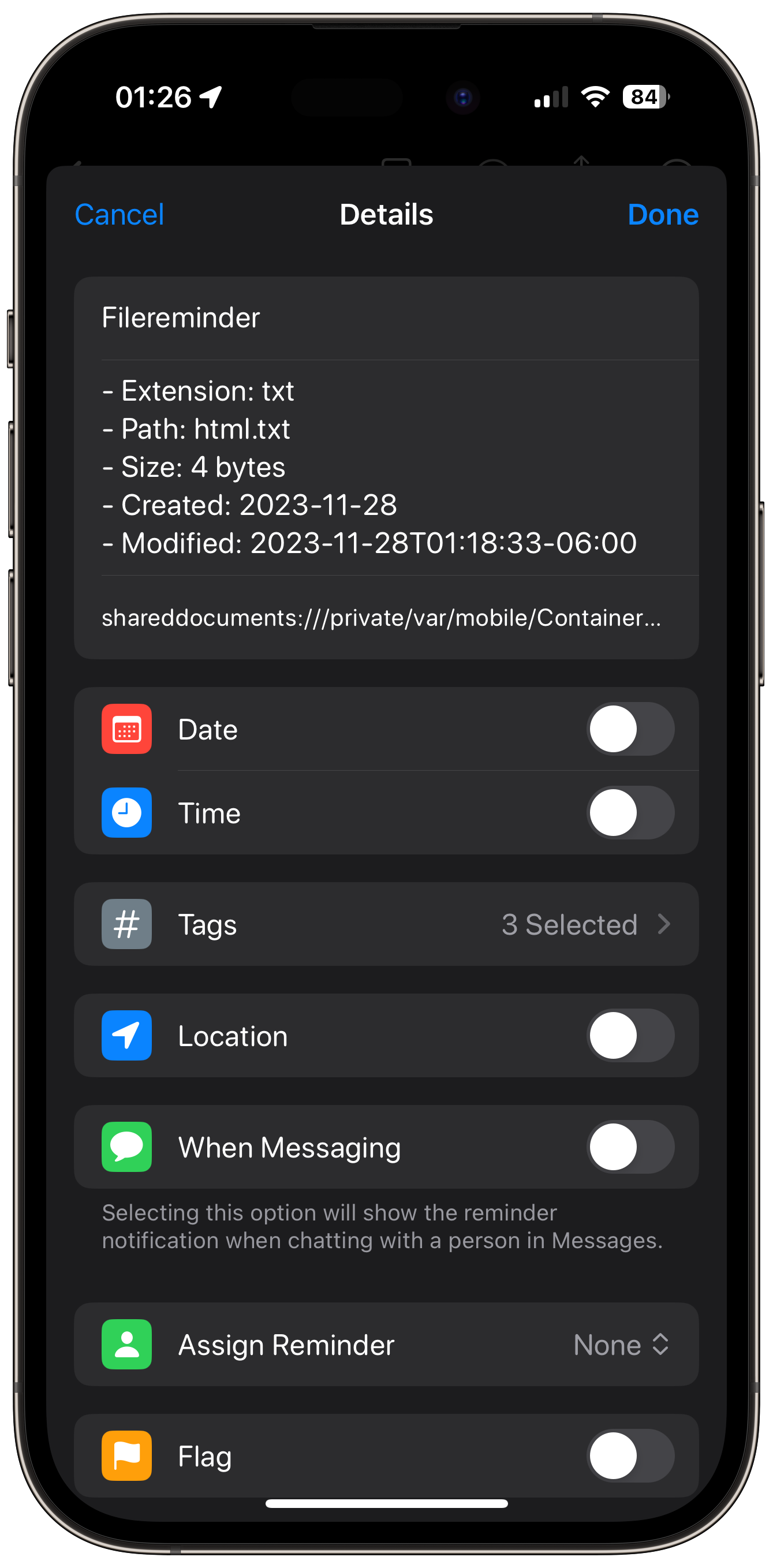
I created this Shortcut to address a long-present and costly need of my own: interlinked, visible task management per single files of all types. It has begun to assist me in slowing the accumulation of redundant/duplicate/forgotten/lost files across all of my various file systems.
Out of the box, this version requires Toolbox Pro for its whole function.
Choose a List in Apple Reminders in which to add the Reminder result. (Optional)
Choose whether or not the Reminder result will include an Alert. (Required)
Choose the priority of the Reminder result. (Optional)
Choose whether or not the Reminder result will be flagged. (Required)
Choose tags (in Apple Reminders) to attach to the Reminder result. (Optional)
I created this Shortcut to address a long-present and costly need of my own: interlinked, visible task management per single files of all types. It has begun to assist me in slowing the accumulation of redundant/duplicate/forgotten/lost files across all of my various file systems.
Out of the box, this version requires Toolbox Pro for its whole function.
Pretty straightforward ask: though Timery for Toggle new charting features + corresponding Shortcuts action are incredible and almost certainly all I’d ever need, I was wondering if anybody out there had ever taken the time to integrate Timery data with Charty via shortcuts actions.
Thanks!
Howdy folks!
Pretty straightforward ask: though Timery for Toggle new charting features + corresponding Shortcuts action are incredible and almost certainly all I’d ever need, I was wondering if anybody out there had ever taken the time to integrate Timery data with Charty via shortcuts actions.
Apologies in advance - I’ve tried searching but couldn’t find anything in here.
I’ve joined a community that provide updates and documentation via Google Sheets, Docs, etc. but when I try to open them on the browser on my iPhone (either Safari or Brave), I can’t edit them. As soon as I click on the Edit icon, I get a prompt to download the app.
I don’t have a Google account, nor do I use any of their services (consciously), so would like a way to open the documents in the MS Office equivalent (Word, Excel, etc.) so I can edit the documents successfully.
TIA.
Apologies in advance - I’ve tried searching but couldn’t find anything in here.
I’ve joined a community that provide updates and documentation via Google Sheets, Docs, etc. but when I try to open them on the browser on my iPhone (either Safari or Brave), I can’t edit them. As soon as I click on the Edit icon, I get a prompt to download the app.
I don’t have a Google account, nor do I use any of their services (consciously), so would like a way to open the documents in the MS Office equivalent (Word, Excel, etc.) so I can edit the documents successfully.
I use an iPad as my cash register for my business, I am looking for a way to change the Auto-Lock timer while the shop is open to keep the screen from sleeping, then when I close change it to allow it to sleep again.
I use an iPad as my cash register for my business, I am looking for a way to change the Auto-Lock timer while the shop is open to keep the screen from sleeping, then when I close change it to allow it to sleep again.
i have a shortcut tied to my speaker NFC tag that turns on the power strip they are connected to, and sets my phone’s airplay destination to the apple tv that they are plugged into. the apple tv automatically wakes my tv!
i think this is as close as you can get to that homepod handoff feature without being stuck with an overpriced siri machine.
hope someone finds this useful :)
i have a shortcut tied to my speaker NFC tag that turns on the power strip they are connected to, and sets my phone’s airplay destination to the apple tv that they are plugged into. the apple tv automatically wakes my tv!
i think this is as close as you can get to that homepod handoff feature without being stuck with an overpriced siri machine.
I’m trying to do something very simple, and I know I’m not doing it right.
I have datajar installed, and I’m just trying to store the current date in a variable in datajar.
“Set Value”. I can put it in the screen, and set the key path to the key path in datajar. That works.
But for the life of me, I cannot figure out how to set the “Value” to the current date! Every time I click on it (Mac) or press and hold (iOS, iPadOS ) it wants me to pick a file???
Agin…I know this is going to be an easy answer…just can’t get there.
thanks!
I’m trying to do something very simple, and I know I’m not doing it right.
I have datajar installed, and I’m just trying to store the current date in a variable in datajar.
“Set Value”. I can put it in the screen, and set the key path to the key path in datajar. That works.
But for the life of me, I cannot figure out how to set the “Value” to the current date! Every time I click on it (Mac) or press and hold (iOS, iPadOS ) it wants me to pick a file???
Agin…I know this is going to be an easy answer…just can’t get there.