0
preview
I’ve found how to block a community but can’t find how to block a user or a whole instance
I’ve found how to block a community but can’t find how to block a user or a whole instance

Not on this instance? Enter your own instance's domain to go straight to following c/alexandrite@lemmy.world there.
Saw that this had a number of upvotes in the issue tracker. Wanted to see here how much interest there might be in Alexandrite supporting Piefed? Doesn’t seem like there is any activity in the last 7 months in the repo but maybe folks are just off to other things for a while. I was just sorta looking into the state of threadiverse client apps and seeing what trends are going on. It seems the biggest lately is having apps support more then one backend.
Saw that this had a number of upvotes in the issue tracker. Wanted to see here how much interest there might be in Alexandrite supporting Piefed? Doesn’t seem like there is any activity in the last 7 months in the repo but maybe folks are just off to other things for a while. I was just sorta looking into the state of threadiverse client apps and seeing what trends are going on. It seems the biggest lately is having apps support more then one backend.
I’ve found how to block a community but can’t find how to block a user or a whole instance
I’ve found how to block a community but can’t find how to block a user or a whole instance
I haven’t been able to find where I can see posts that I’ve previously upvoted. Has that been implemented and I’m looking in the wrong places, or is it just not possible in this app yet?
I haven’t been able to find where I can see posts that I’ve previously upvoted. Has that been implemented and I’m looking in the wrong places, or is it just not possible in this app yet?
alexandrite.app - !alexandrite@lemmy.world - Github
The main feature of this release is just for moderators. If you’re the moderator of at least one community you’ll see a new “Vibe Check” section in the sidebar when viewing a user page which is meant to help you identify trolls. When you’re viewing a user’s profile page, as you scroll (loading additional posts and comments) it will total up everything you’ve loaded so far, and the scores in various communities. This might be useful if you’re trying to gauge the intentions of a commenter and you want to see if they’re frequently upvoted in certain communities, or if they’re frequently downvoted in other places.
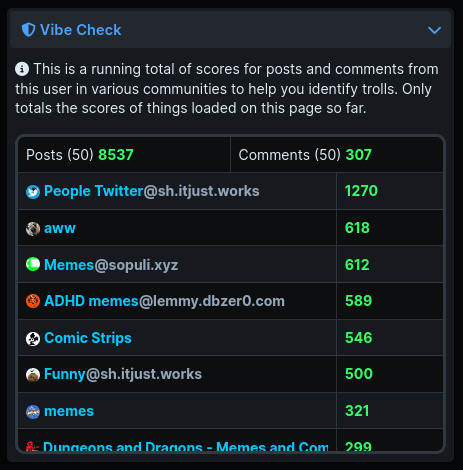
I’m limiting this to just a mod tool, because I know incentivizing paying attention to scores is frowned upon on Lemmy. That’s also why it doesn’t total up everything (unless you happen to scroll enough to load someone’s entire post history), as it’s just meant to give a ‘vibe check’.
Beyond that all that really changed was some theme changes. The frosted glass backgrounds on cards are more visible (especially in light mode where it did almost nothing), and in light mode the name of the user/community in the feed banner doesn’t have a very out of place looking dark text shadow.
That’s it for now! Let me know what you think, or if you have any other things that would help you as a moderator!
alexandrite.app - !alexandrite@lemmy.world - Github
The main feature of this release is just for moderators. If you’re the moderator of at least one community you’ll see a new “Vibe Check” section in the sidebar when viewing a user page which is meant to help you identify trolls. When you’re viewing a user’s profile page, as you scroll (loading additional posts and comments) it will total up everything you’ve loaded so far, and the scores in various communities. This might be useful if you’re trying to gauge the intentions of a commenter and you want to see if they’re frequently upvoted in certain communities, or if they’re frequently downvoted in other places.
I’m limiting this to just a mod tool, because I know incentivizing paying attention to scores is frowned upon on Lemmy. That’s also why it doesn’t total up everything (unless you happen to scroll enough to load someone’s entire post history), as it’s just meant to give a ‘vibe check’.
Beyond that all that really changed was some theme changes. The frosted glass backgrounds on cards are more visible (especially in light mode where it did almost nothing), and in light mode the name of the user/community in the feed banner doesn’t have a very out of place looking dark text shadow.
That’s it for now! Let me know what you think, or if you have any other things that would help you as a moderator!
alexandrite.app - !alexandrite@lemmy.world - Github
Hey, got some new updates for ya!
I added instance blocking, and completely redesigned the page for managing blocks. For all three categories you’re able to search, so you don’t have to go to someone’s profile or find a post by them to find a block button to click. Honestly this page looked awful before, the sizing was weird, if you blocked something with a long name the ‘unblock’ buttons would be huge. I mostly copied the features available on lemmy-ui (like the searching, and the fact that instance blocks are a thing now).
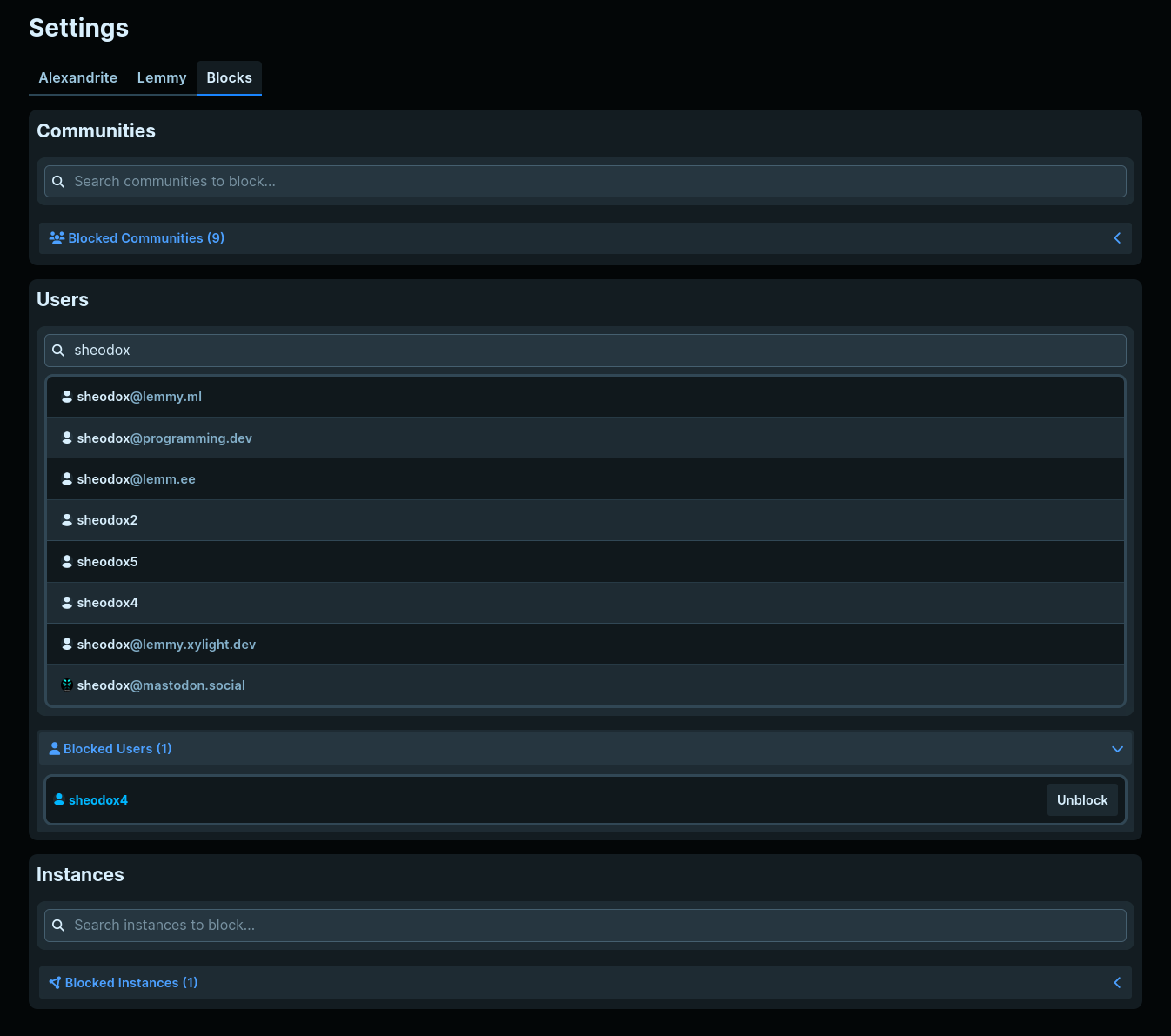
Tooltips in a couple places got some big upgrades!
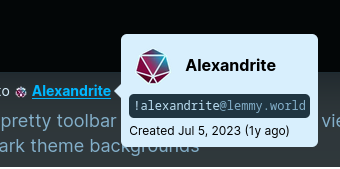
User tooltips now show the full ‘address’ of the user (which it did before, but it wasn’t super obvious what you were looking at), and you can now see when they made their account.

Community tooltips got the same address/origin date.
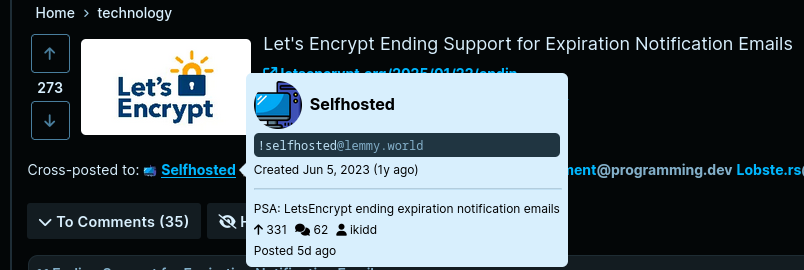
When you hover over a crosspost link it additionally shows the crosspost’s title, who posted, when, the score, and comment counts. This should make it a lot easier to see where other discussion is actually happening.
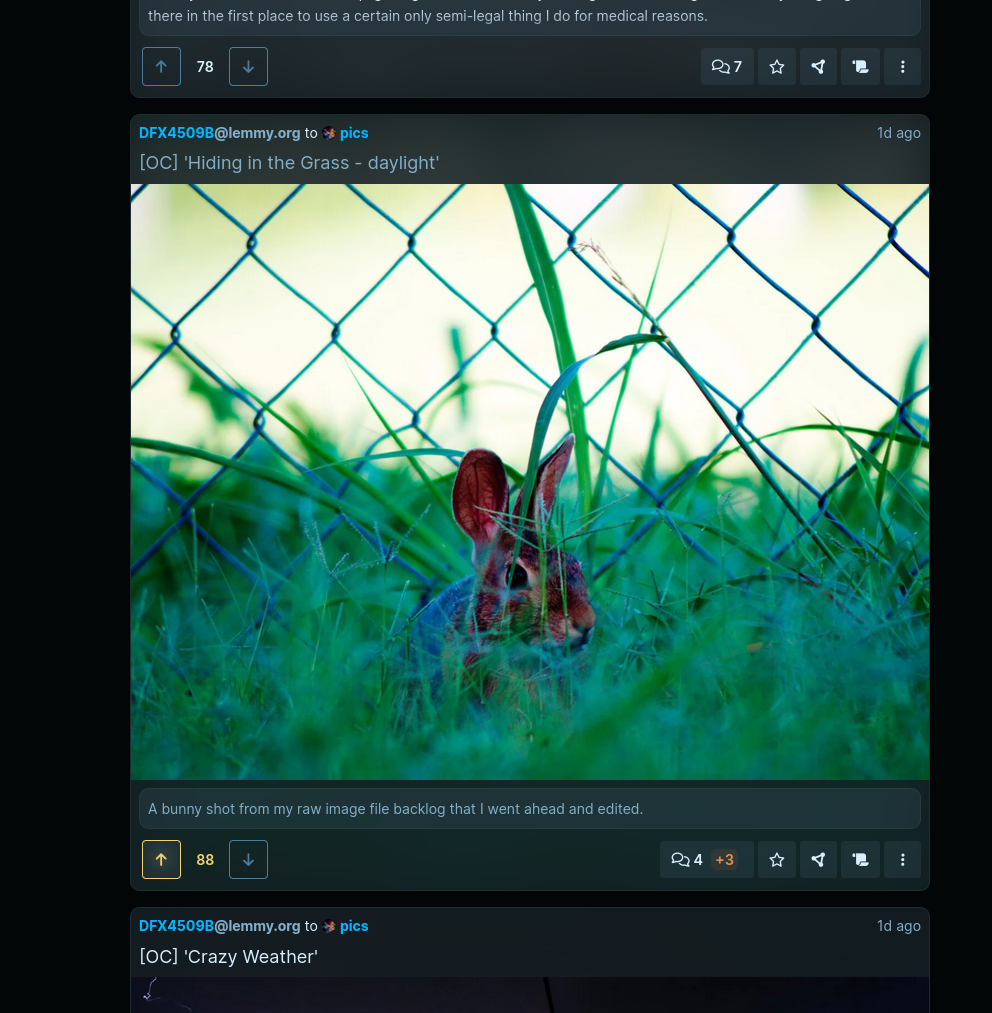
The card layout has a new feature, a nice frosted glass background. This looks similar to how Photon renders its link previews. If you’re not familiar with it, this is what I’m talking about.. The effect is fairly subtle because it stretches over the entire card and it could be distracting, I wanted to make sure a fully white image wouldn’t make the text too hard to read.
It’s on by default, but you can turn it off with the “Frosted glass background” checkbox in Alexandrite settings when your Feed Post Layout is set to Cards if you’d like. If you’re curious how it’s done, it loads a low resolution thumbnail, places it with a low opacity behind the card, and blurs it so it’s less distracting and hides how pixelated it is. It works because all the gray background colors on the site (like all the gray backgrounds on cards) are transparent so when stacked on other gray backgrounds there’s always a contrast in color without any extra work. If you don’t want to load extra images just for this, or if the blur makes the site lag on a low spec device (didn’t notice any impact on my pc), then you might want to turn this setting off.
Besides that, I bumped the node version the docker image uses, and I think that’s about it.
Let me know if there’s any features Alexandrite is missing that you’d really like! Especially interested in features you want that the default Lemmy UI has that I haven’t added yet (like instance blocks until now, community creation/editing, emojis, user/community search when typing a @ or ! in the markdown editor, etc).
alexandrite.app - !alexandrite@lemmy.world - Github
Hey, got some new updates for ya!
I added instance blocking, and completely redesigned the page for managing blocks. For all three categories you’re able to search, so you don’t have to go to someone’s profile or find a post by them to find a block button to click. Honestly this page looked awful before, the sizing was weird, if you blocked something with a long name the ‘unblock’ buttons would be huge. I mostly copied the features available on lemmy-ui (like the searching, and the fact that instance blocks are a thing now).
Tooltips in a couple places got some big upgrades!
User tooltips now show the full ‘address’ of the user (which it did before, but it wasn’t super obvious what you were looking at), and you can now see when they made their account.
Community tooltips got the same address/origin date.
When you hover over a crosspost link it additionally shows the crosspost’s title, who posted, when, the score, and comment counts. This should make it a lot easier to see where other discussion is actually happening.
The card layout has a new feature, a nice frosted glass background. This looks similar to how Photon renders its link previews. If you’re not familiar with it, this is what I’m talking about.. The effect is fairly subtle because it stretches over the entire card and it could be distracting, I wanted to make sure a fully white image wouldn’t make the text too hard to read.
It’s on by default, but you can turn it off with the “Frosted glass background” checkbox in Alexandrite settings when your Feed Post Layout is set to Cards if you’d like. If you’re curious how it’s done, it loads a low resolution thumbnail, places it with a low opacity behind the card, and blurs it so it’s less distracting and hides how pixelated it is. It works because all the gray background colors on the site (like all the gray backgrounds on cards) are transparent so when stacked on other gray backgrounds there’s always a contrast in color without any extra work. If you don’t want to load extra images just for this, or if the blur makes the site lag on a low spec device (didn’t notice any impact on my pc), then you might want to turn this setting off.
Besides that, I bumped the node version the docker image uses, and I think that’s about it.
Let me know if there’s any features Alexandrite is missing that you’d really like! Especially interested in features you want that the default Lemmy UI has that I haven’t added yet (like instance blocks until now, community creation/editing, emojis, user/community search when typing a @ or ! in the markdown editor, etc).
alexandrite.app - !alexandrite@lemmy.world - Github
This time it’s mostly UI changes I really wanted to make, and some things people have asked for.
All toolbar toggles and dropdowns are now these nicer looking dropdowns. They look a lot more consistently sized, everything has a label I also added “Moderator View” into that new dropdown.

The search page looks way nicer now, here’s the before:

And now:

Added an option that lets you toggle between relative and absolute dates


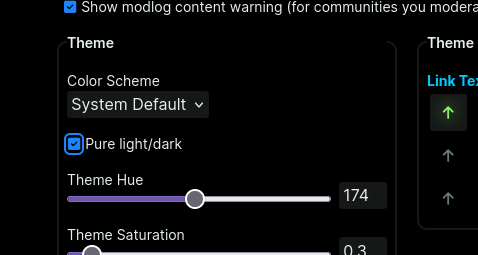
Added an option for completely white/black backgrounds
alexandrite.app - !alexandrite@lemmy.world - Github
This time it’s mostly UI changes I really wanted to make, and some things people have asked for.
All toolbar toggles and dropdowns are now these nicer looking dropdowns. They look a lot more consistently sized, everything has a label I also added “Moderator View” into that new dropdown.
The search page looks way nicer now, here’s the before:
And now:
Added an option that lets you toggle between relative and absolute dates
Added an option for completely white/black backgrounds
Smaller release, mostly focused on some styling changes and easy features.
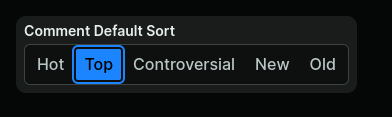
In the settings you can now set a default comment sort, also added “Controversial”
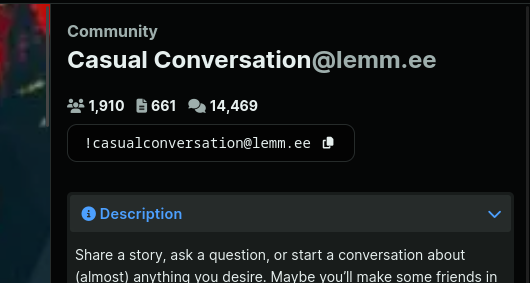
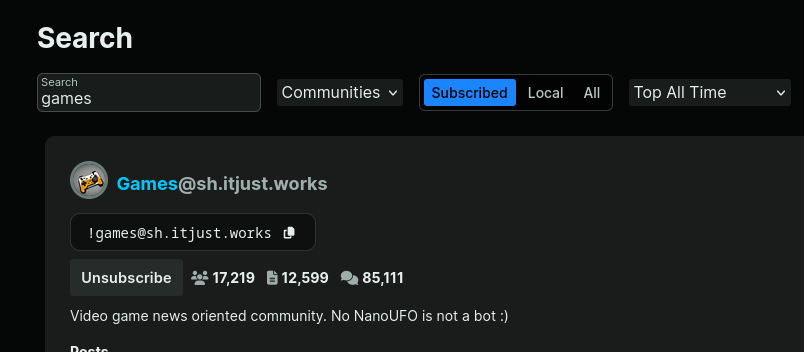
Now in the community/user sidebar and community search results you will see the full ‘address’ of a community/user. Clicking the text or the button on the right side copies it to your clipboard. In search results this makes it a lot easier to see what exactly the community is, not just what the display name says it is.
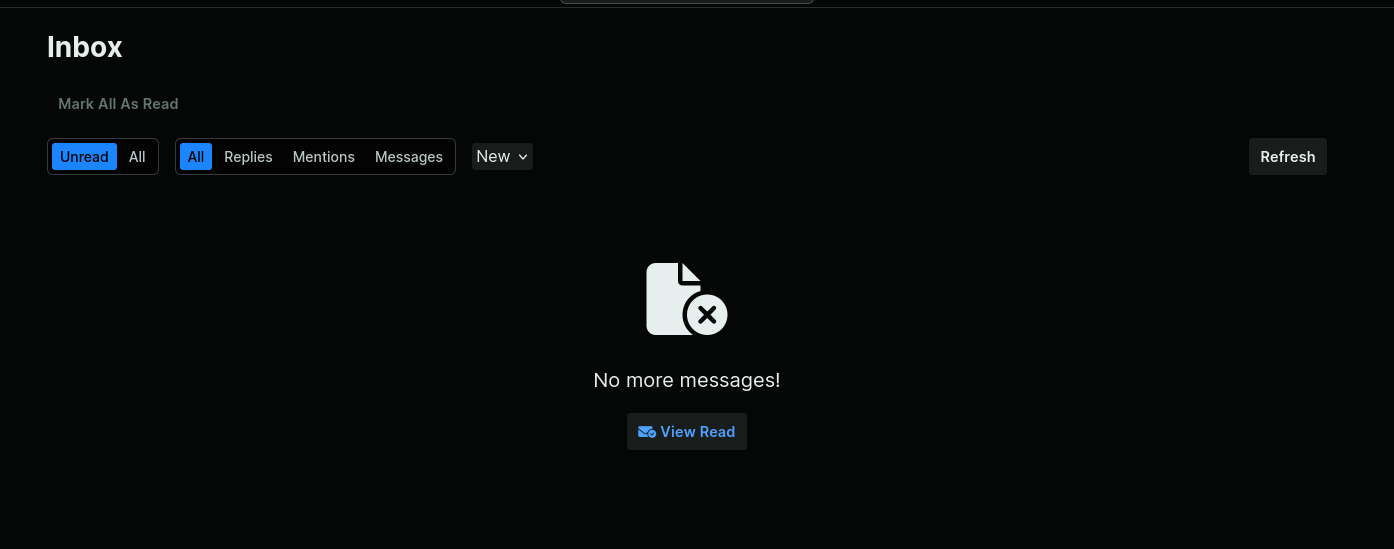
When viewing the inbox, the “No More Messages” message has a “View Read” button, so if you wanted to view an already read notification you’ve got a nice big button to get there.
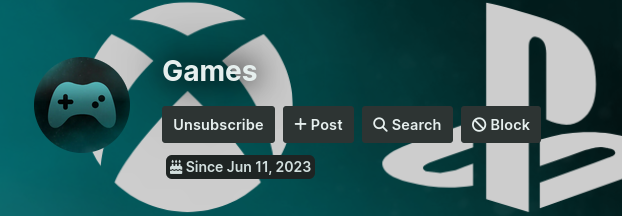
Buttons in the community header aren’t transparent anymore so they’re easier to see if the banner’s image is busy.
Smaller release, mostly focused on some styling changes and easy features.
In the settings you can now set a default comment sort, also added “Controversial”
Now in the community/user sidebar and community search results you will see the full ‘address’ of a community/user. Clicking the text or the button on the right side copies it to your clipboard. In search results this makes it a lot easier to see what exactly the community is, not just what the display name says it is.
When viewing the inbox, the “No More Messages” message has a “View Read” button, so if you wanted to view an already read notification you’ve got a nice big button to get there.
Buttons in the community header aren’t transparent anymore so they’re easier to see if the banner’s image is busy.
alexandrite.app - !alexandrite@lemmy.world - Github
Finally added image uploading, so this is going to be my first update post with images I’ll be able to write all on Alexandrite :D
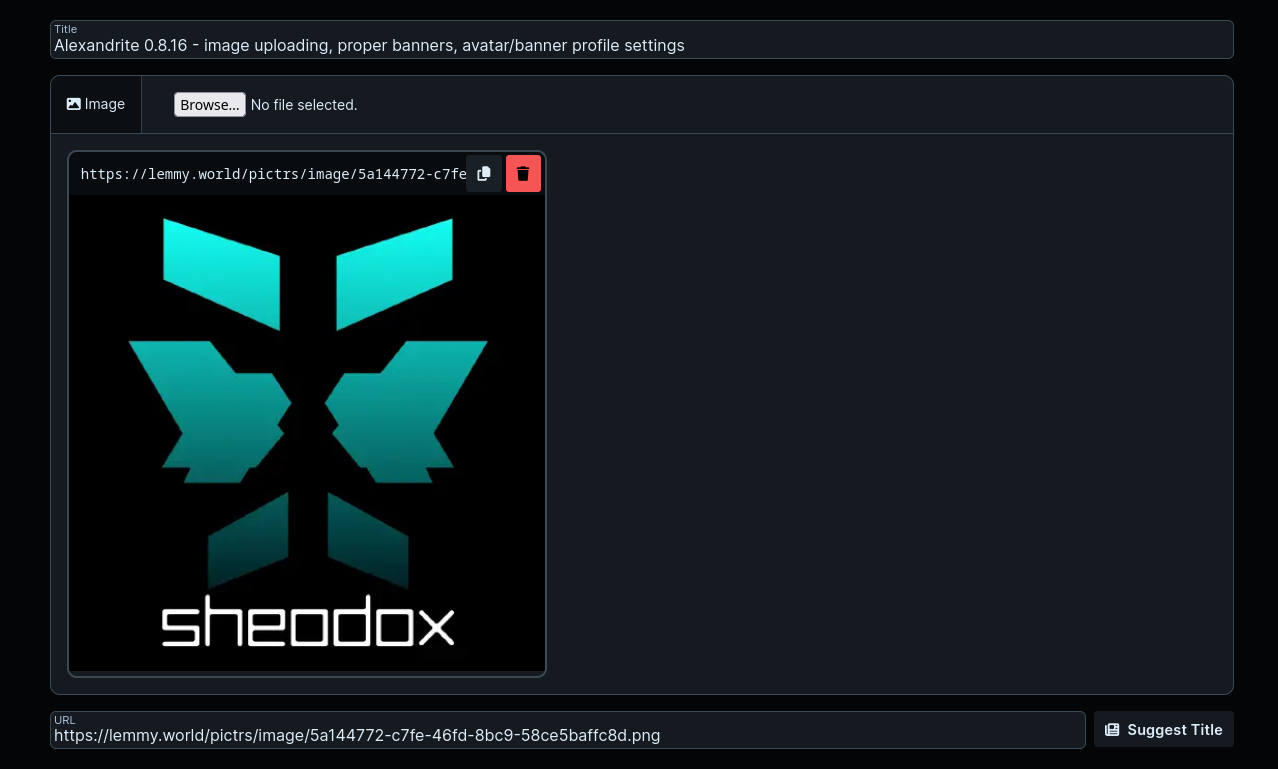
As mentioned in the post you can now attach images to things, this means both on the post via the file selector like on lemmy-ui:
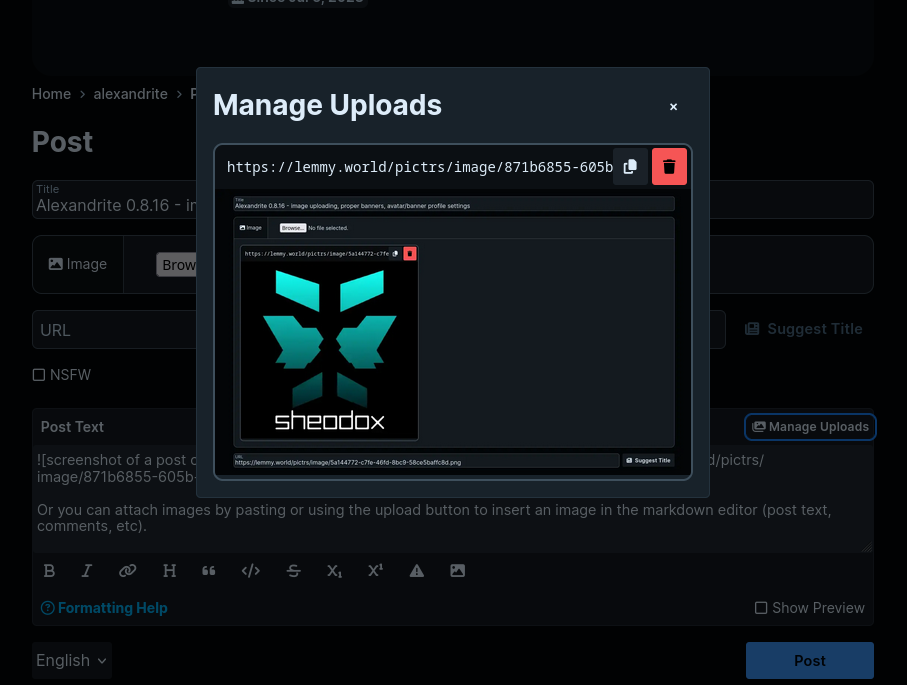
Or you can attach images by pasting or using the upload button to insert an image in the markdown editor (post text, comments, etc).
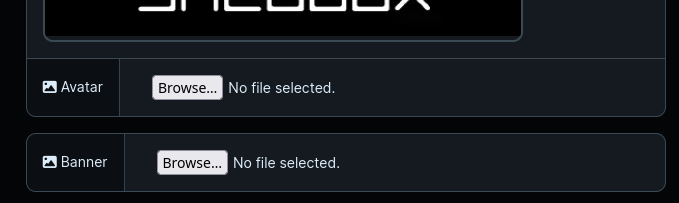
You can also set your avatar and banner on the Lemmy tab of Settings
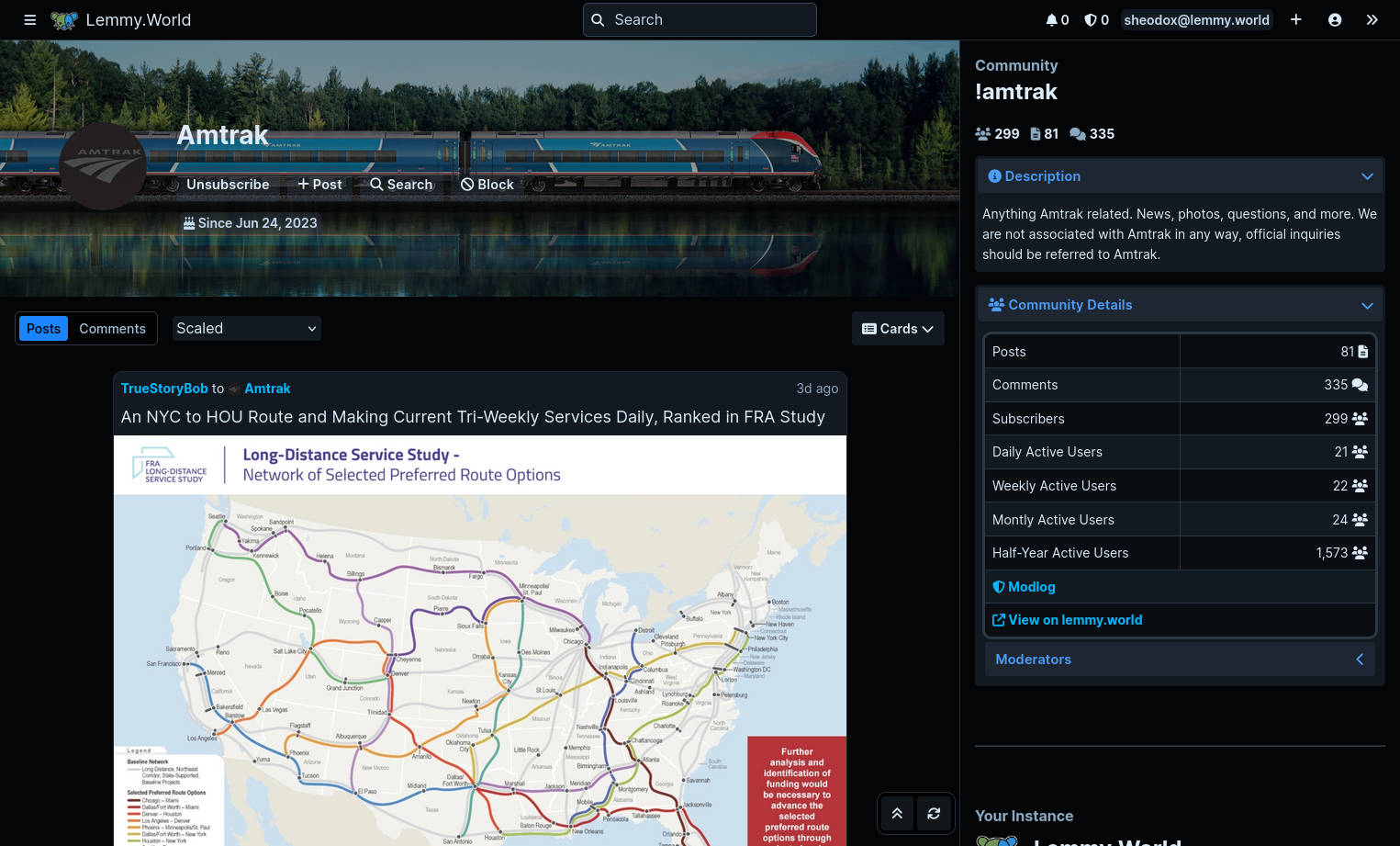
Banners on communities and users now show in the feed header instead of a smaller image at the top of the sidebar.
The sorting of communities when selecting one to make a new post (both the alphabetization of your subscribed communities and the popularity sorting of the search results) is better.
Fixed a 400 error that was happening when viewing modlog actions on a user.
This was the biggest change in quite a while, so please let me know if you have any issues with the update! Thanks for all the support, love hearing people like the stuff I’m making :)
alexandrite.app - !alexandrite@lemmy.world - Github
Finally added image uploading, so this is going to be my first update post with images I’ll be able to write all on Alexandrite :D
As mentioned in the post you can now attach images to things, this means both on the post via the file selector like on lemmy-ui:
Or you can attach images by pasting or using the upload button to insert an image in the markdown editor (post text, comments, etc).
You can also set your avatar and banner on the Lemmy tab of Settings
Banners on communities and users now show in the feed header instead of a smaller image at the top of the sidebar.
The sorting of communities when selecting one to make a new post (both the alphabetization of your subscribed communities and the popularity sorting of the search results) is better.
Fixed a 400 error that was happening when viewing modlog actions on a user.
This was the biggest change in quite a while, so please let me know if you have any issues with the update! Thanks for all the support, love hearing people like the stuff I’m making :)
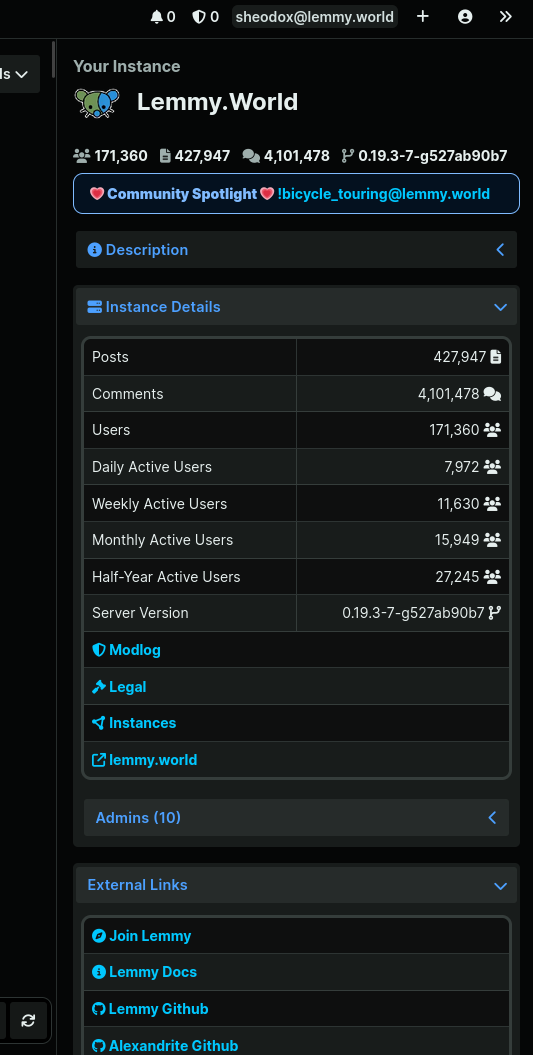
This release mostly is a redesign of the instance/community/user sidebars on the right side of those pages. Things are in clear sections, each in a collapsible section that remembers if it was open. So if you’re tired of seeing your instance’s description every time just close it and it’ll stay closed.
Instances and communities now show their full stats, and there are now pages for the legal info and linked/blocked instances. The instance sidebar also shows the list of admins.
If you use the ‘Redirect’ feed layout setting added in the previous release it now responds to clicks directly on the image or the background of cards.
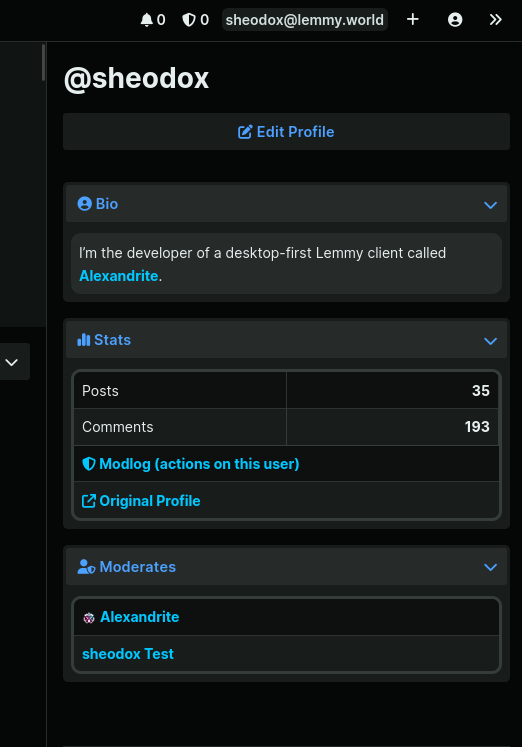
When looking at your own profile there will be an “Edit Profile” button at the top of the sidebar.
This release mostly is a redesign of the instance/community/user sidebars on the right side of those pages. Things are in clear sections, each in a collapsible section that remembers if it was open. So if you’re tired of seeing your instance’s description every time just close it and it’ll stay closed.
Instances and communities now show their full stats, and there are now pages for the legal info and linked/blocked instances. The instance sidebar also shows the list of admins.
If you use the ‘Redirect’ feed layout setting added in the previous release it now responds to clicks directly on the image or the background of cards.
When looking at your own profile there will be an “Edit Profile” button at the top of the sidebar.
Hello, it’s been a while!
I did most of this release like 6 months ago but never got around to finishing it up until yesterday.
There’s a bunch of small theme changes, biggest being a slightly different header bar, and in general a lighter light theme and darker dark theme.
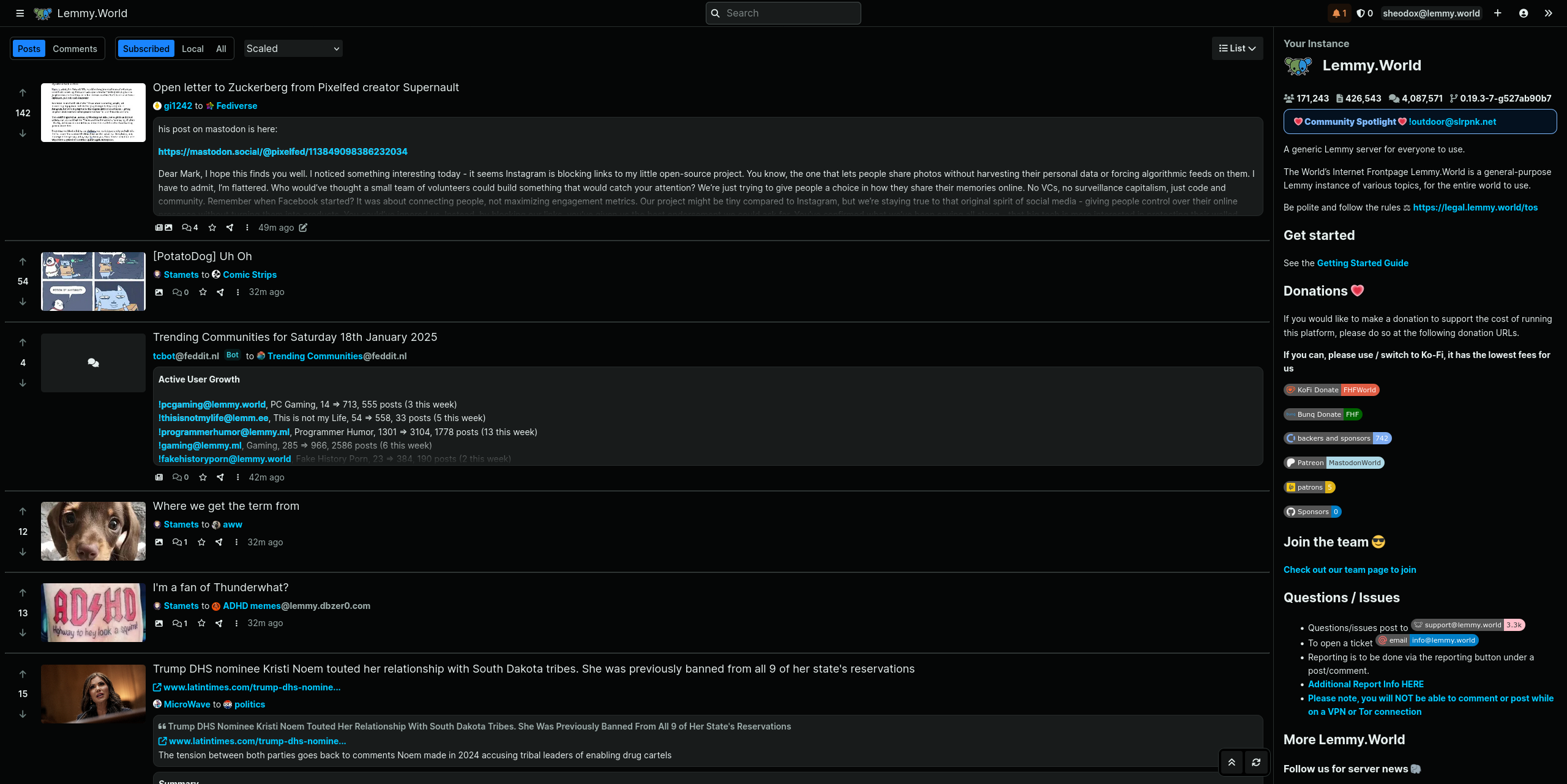
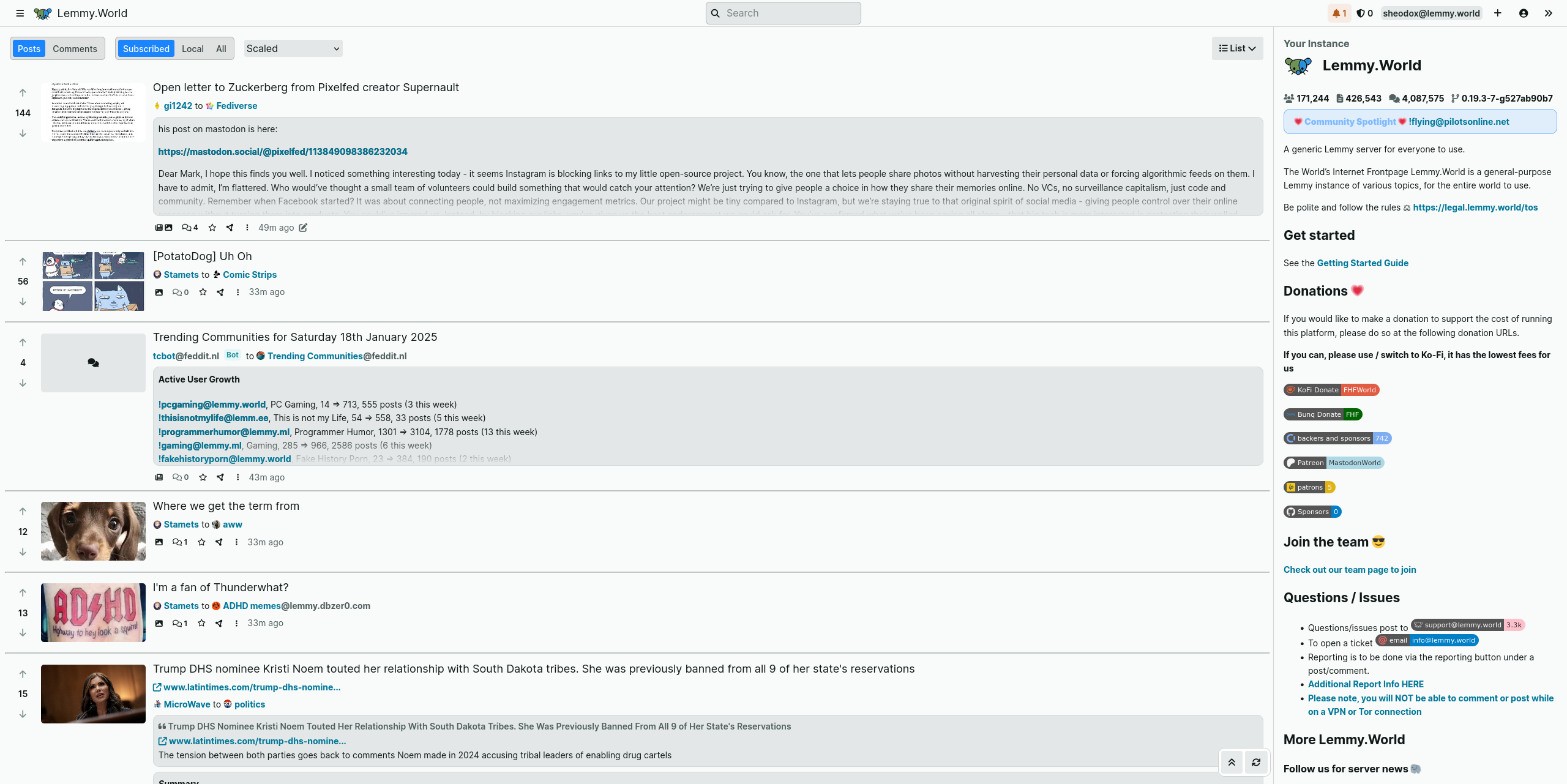
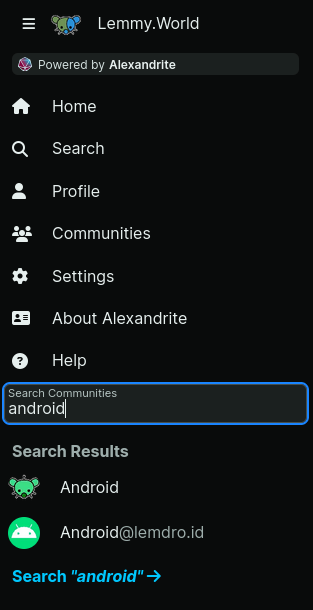
There’s now a search field in the sidebar which lets you quickly search through your subscriptions, with a link to a full community search. You can search for a community by name, or for example @lemmy.world to see all from a certain instance.
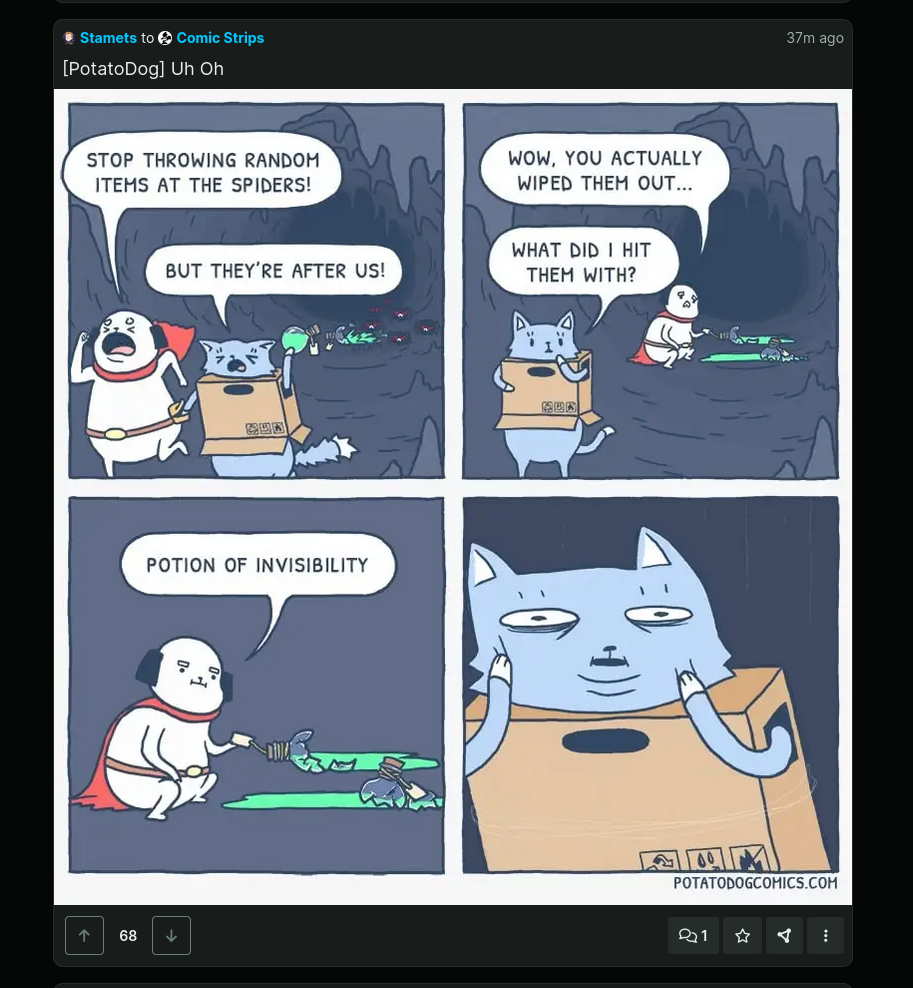
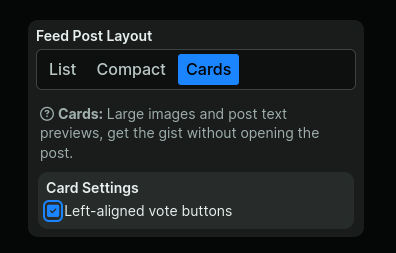
By default now when using the “Card” layout the vote buttons are on the left now and all the buttons on this layout are a bit larger. If you prefer the vote buttons on the right like it was you can change it back in the settings.
On all the feeds there’s now a refresh button on the bottom right so you don’t need to refresh the whole tab.

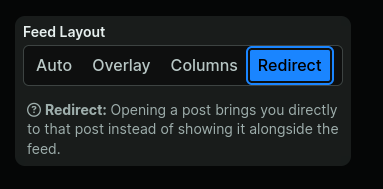
There’s a new “Feed Layout” option that makes it so clicking post links will bring you to that post page directly instead of opening it in the overlay or a second column.
That’s about it for now! I hope to add some more missing features soon!
Hello, it’s been a while!
I did most of this release like 6 months ago but never got around to finishing it up until yesterday.
There’s a bunch of small theme changes, biggest being a slightly different header bar, and in general a lighter light theme and darker dark theme.
There’s now a search field in the sidebar which lets you quickly search through your subscriptions, with a link to a full community search. You can search for a community by name, or for example @lemmy.world to see all from a certain instance.
By default now when using the “Card” layout the vote buttons are on the left now and all the buttons on this layout are a bit larger. If you prefer the vote buttons on the right like it was you can change it back in the settings.
On all the feeds there’s now a refresh button on the bottom right so you don’t need to refresh the whole tab.
There’s a new “Feed Layout” option that makes it so clicking post links will bring you to that post page directly instead of opening it in the overlay or a second column.
That’s about it for now! I hope to add some more missing features soon!
It took me way too long to get around to this, but with the release of Lemmy 0.19.0 I finally added support for how auth is done differently now. Everything should work the same, but you’ll now be able to use Alexandrite again on 0.19.0 servers.
There are some more features that 0.19.0 added, I’ll be adding those later, just wanted to make sure things still work first!
If you’re self hosting Alexandrite, the docker image probably won’t be available for another hour or so after this is posted, the build takes a while! The main Alexandrite site is already updated though!
It took me way too long to get around to this, but with the release of Lemmy 0.19.0 I finally added support for how auth is done differently now. Everything should work the same, but you’ll now be able to use Alexandrite again on 0.19.0 servers.
There are some more features that 0.19.0 added, I’ll be adding those later, just wanted to make sure things still work first!
If you’re self hosting Alexandrite, the docker image probably won’t be available for another hour or so after this is posted, the build takes a while! The main Alexandrite site is already updated though!
At the moment, it’s difficult to go to a community based on its link. For example, if I paste https://programming.dev/c/game_design into the search box, it shows some search results that mention that community, but no way to actually get there. I think the link to the community should appear prominently in the search results, or, even better, if you search for a community link, it should directly take you to that community. In my example, it would take me to https://a.lemmy.world/programming.dev/c/game_design
At the moment, it’s difficult to go to a community based on its link. For example, if I paste https://programming.dev/c/game_design into the search box, it shows some search results that mention that community, but no way to actually get there. I think the link to the community should appear prominently in the search results, or, even better, if you search for a community link, it should directly take you to that community. In my example, it would take me to https://a.lemmy.world/programming.dev/c/game_design
Hi :)
A small, not very important request, but at the moment if I want to edit the Sidebar of the Community I mod, I have to use the default UI to do so. Are there any plans to implement the edit button/link into the Alexandrite UI?
Hi :)
A small, not very important request, but at the moment if I want to edit the Sidebar of the Community I mod, I have to use the default UI to do so. Are there any plans to implement the edit button/link into the Alexandrite UI?
It would be great if there was an extra option under settings “Keep navigation sidebar open” that could hide the text and only showing the icons for subsciptions/settings etc. That would save a lot of space. Thanks for a awesome site!
It would be great if there was an extra option under settings “Keep navigation sidebar open” that could hide the text and only showing the icons for subsciptions/settings etc. That would save a lot of space. Thanks for a awesome site!

alexandrite.app - !alexandrite@lemmy.world - Github
Just a few things this time, the biggest is mod team management. You can now add and remove mods from the “…” menu on posts and comments. You can also find links to the modlog to see what actions have been taken against that user.
You can also remove mods or leave the mod team of a community from inside the “Moderation” area of the sidebar (note: the “Modlog” link moved inside this section too as it’s not useful to most people)

Alexandrite settings will now automatically update in every tab instantly, so if you change the theme in one tab, when you switch to another already open Alexandrite browser tab you’ll notice it’ll already be using your new theme.
When viewing reports, they will now be sorted by newest report first, instead of oldest post/comment first.
For the self hosters out there, Alexandrite should now have arm builds thanks to ismailkarsli on Github! (Thank you!) The image builds now take a little longer, and the build isn’t quite done yet so you might have to wait a bit until it’s available.
That’s it for now. Next release will probably be Lemmy 0.19 support, and I believe I’ll finally be able to add image uploading then too (it might be in the next release after 0.19 support).
alexandrite.app - !alexandrite@lemmy.world - Github
Just a few things this time, the biggest is mod team management. You can now add and remove mods from the “…” menu on posts and comments. You can also find links to the modlog to see what actions have been taken against that user.
You can also remove mods or leave the mod team of a community from inside the “Moderation” area of the sidebar (note: the “Modlog” link moved inside this section too as it’s not useful to most people)
Alexandrite settings will now automatically update in every tab instantly, so if you change the theme in one tab, when you switch to another already open Alexandrite browser tab you’ll notice it’ll already be using your new theme.
When viewing reports, they will now be sorted by newest report first, instead of oldest post/comment first.
For the self hosters out there, Alexandrite should now have arm builds thanks to ismailkarsli on Github! (Thank you!) The image builds now take a little longer, and the build isn’t quite done yet so you might have to wait a bit until it’s available.
That’s it for now. Next release will probably be Lemmy 0.19 support, and I believe I’ll finally be able to add image uploading then too (it might be in the next release after 0.19 support).

When navigating posts in the feed, the URL is changed to each active post. This means that when the page is reloaded, Alexandrite goes to that page instead of the active feed. In the above screenshot, I was browsing all, but refreshing the page left me on the post that was active.
Perhaps a fix might be to append the active post to the URL? Something like:
When navigating posts in the feed, the URL is changed to each active post. This means that when the page is reloaded, Alexandrite goes to that page instead of the active feed. In the above screenshot, I was browsing all, but refreshing the page left me on the post that was active.
Perhaps a fix might be to append the active post to the URL? Something like:
The linked post and discussion from the Photon dev re: the lemmy 0.19 release got me thinking about how Alexandrite will handle the migration since the release includes breaking changes.
@sheodox@lemmy.world thoughts?
The linked post and discussion from the Photon dev re: the lemmy 0.19 release got me thinking about how Alexandrite will handle the migration since the release includes breaking changes.
@sheodox@lemmy.world thoughts?
Am I misremembering or didn’t there used to be a way to block users in Alexandrite…from their profile I think? I don’t see a button for it now. I can block them in Eternity on mobile though.
Am I misremembering or didn’t there used to be a way to block users in Alexandrite…from their profile I think? I don’t see a button for it now. I can block them in Eternity on mobile though.
While I appreciate being able to block individual communities, I feel like being able to block while instances would be really helpful.
While I appreciate being able to block individual communities, I feel like being able to block while instances would be really helpful.
I’ve been away on vacation but I’m back with a new release of Alexandrite!
The mod log is now implemented! At the moment you can see a community’s modlog from the top of the community sidebar, and the instance modlog from the bottom of the instance sidebar (I’ll likely change where these links are at some point). Now moderators should be able to do even more stuff without leaving Alexandrite.
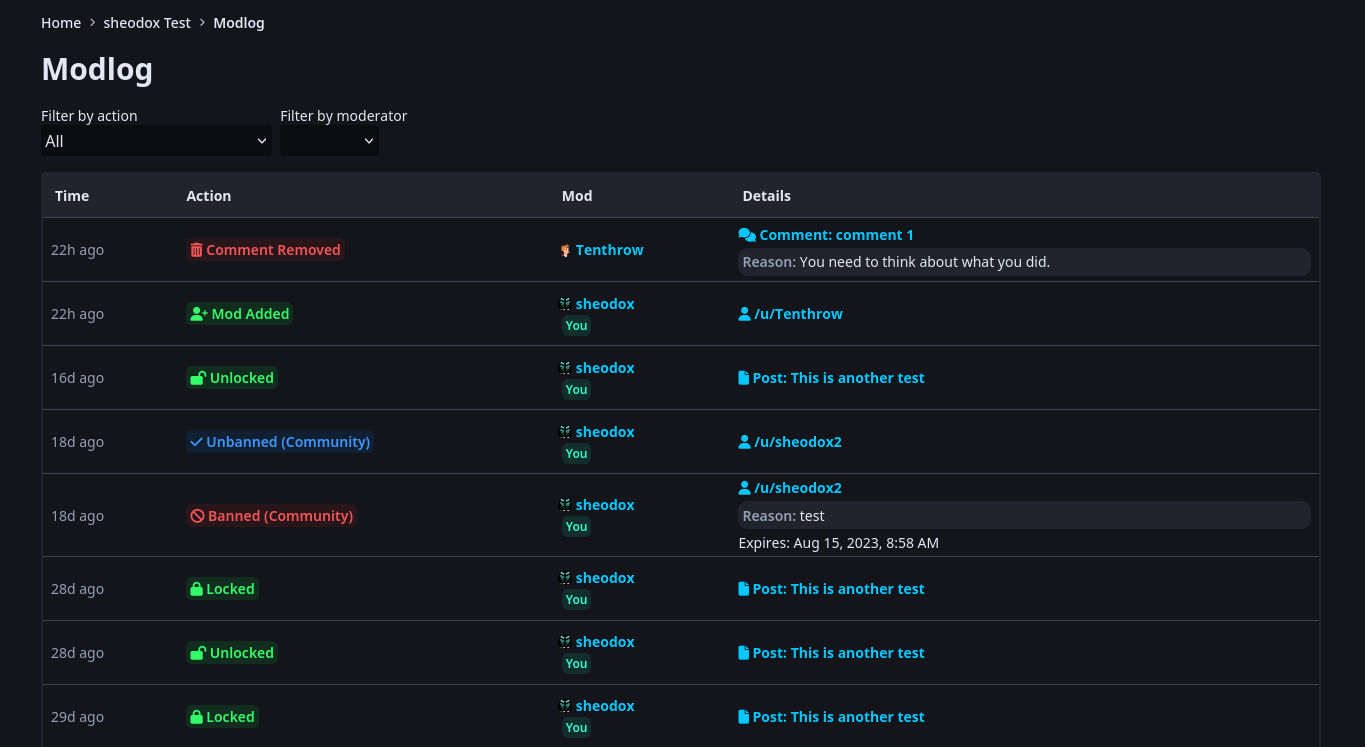
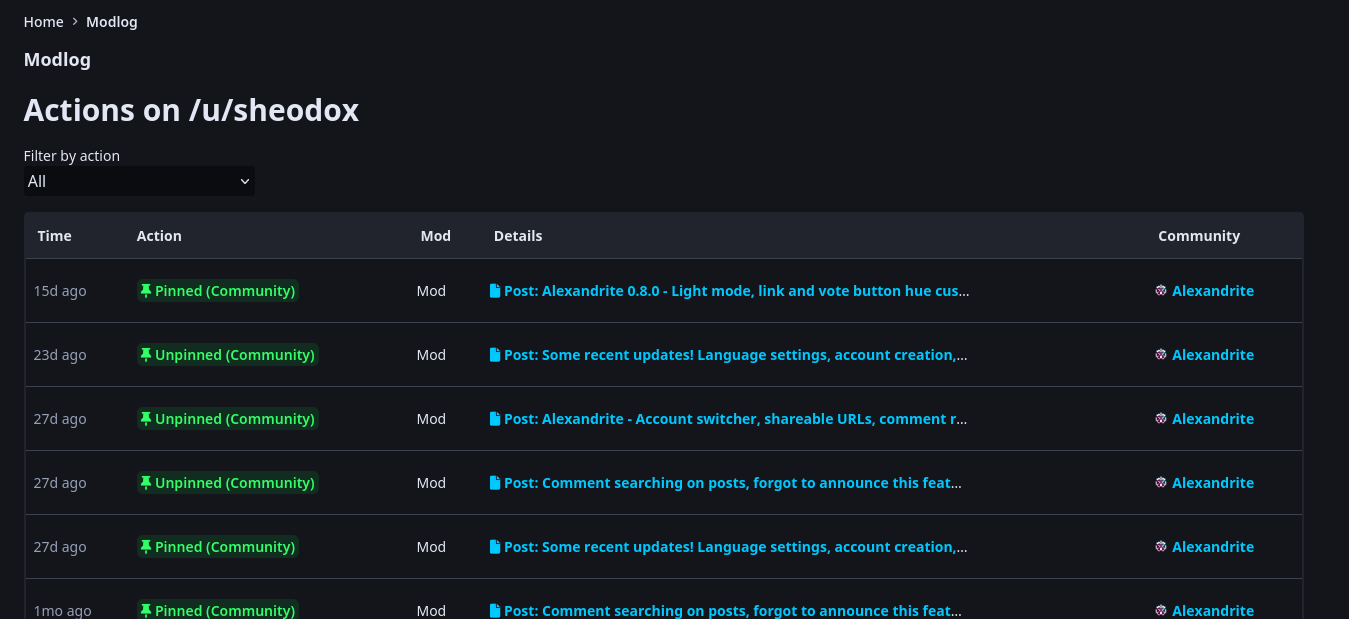
Additionally there’s a link to the modlog when viewing a user’s profile (also in the sidebar), which lets you see the mod actions that have been performed on them. This should help moderators identify problematic users.
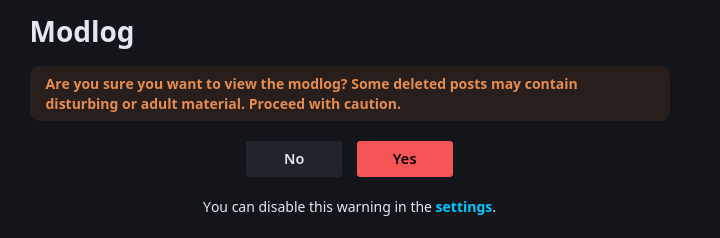
In both cases, you will see a content warning screen before being redirected to the actual modlog, but you can disable this for either all communities or for the ones you moderate in the settings.
Icons for NSFW communities will now be hidden unless you have “NSFW Thumbnails” set to “Show” in the settings. Previously it would just always show icons.
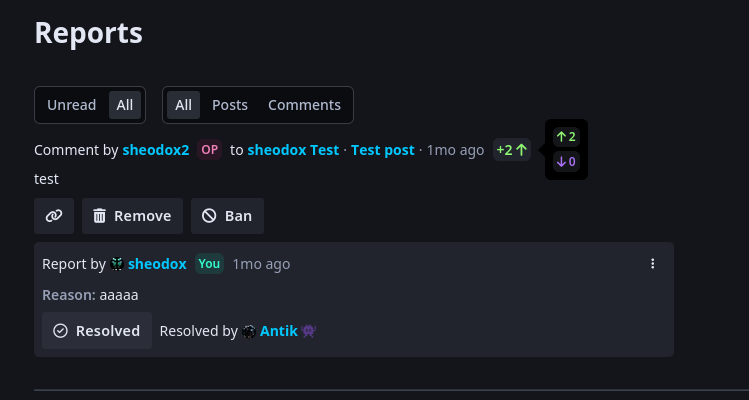
Moderators looking through reports will now see the post or comment’s score (and vote breakdown on hover) so you can see at a glance what the community thought about something. Additionally it also shows how long ago a report was made.
Then just some random improvements. The community header’s buttons now collapse into a “…” menu if the screen isn’t wide enough to fit them all, and the header at the top of the page is now darker (in dark mode) and lighter (in light mode) which I think looks a lot nicer.
I’ll soon release 0.8.5, but that’ll just be a quick bug fix, as I realized when writing this post that the “No” button on the modlog content warning doesn’t redirect to the right place sometimes. Edit: Nevermind it was 0.8.7, still that’s the only fix, I just kept messing up and releasing without the actual change.
I’ve been away on vacation but I’m back with a new release of Alexandrite!
The mod log is now implemented! At the moment you can see a community’s modlog from the top of the community sidebar, and the instance modlog from the bottom of the instance sidebar (I’ll likely change where these links are at some point). Now moderators should be able to do even more stuff without leaving Alexandrite.
Additionally there’s a link to the modlog when viewing a user’s profile (also in the sidebar), which lets you see the mod actions that have been performed on them. This should help moderators identify problematic users.
In both cases, you will see a content warning screen before being redirected to the actual modlog, but you can disable this for either all communities or for the ones you moderate in the settings.
Icons for NSFW communities will now be hidden unless you have “NSFW Thumbnails” set to “Show” in the settings. Previously it would just always show icons.
Moderators looking through reports will now see the post or comment’s score (and vote breakdown on hover) so you can see at a glance what the community thought about something. Additionally it also shows how long ago a report was made.
Then just some random improvements. The community header’s buttons now collapse into a “…” menu if the screen isn’t wide enough to fit them all, and the header at the top of the page is now darker (in dark mode) and lighter (in light mode) which I think looks a lot nicer.
I’ll soon release 0.8.5, but that’ll just be a quick bug fix, as I realized when writing this post that the “No” button on the modlog content warning doesn’t redirect to the right place sometimes. Edit: Nevermind it was 0.8.7, still that’s the only fix, I just kept messing up and releasing without the actual change.
Just some quick features!
When creating a post there’s now a button to suggest a title based on the URL you entered. Just enter a URL then click “Suggest Title”

Then if you want to use that title hit the button!

You can create a post without first visiting the community by clicking the new “+” button in the header. The menu looks a little bit empty right now, but I’ll add more stuff here later.

Also:
Just some quick features!
When creating a post there’s now a button to suggest a title based on the URL you entered. Just enter a URL then click “Suggest Title”
Then if you want to use that title hit the button!
You can create a post without first visiting the community by clicking the new “+” button in the header. The menu looks a little bit empty right now, but I’ll add more stuff here later.
Also:

I’ve been loving Alexandrite, it’s my go-to recommendation for Lemmy on desktop. Keep up the great work!
I’ve been loving Alexandrite, it’s my go-to recommendation for Lemmy on desktop. Keep up the great work!
Question for @sheodox@lemmy.world:
What’s your preferred way to receive feature requests?
I see people making posts here, which is nice because it allows community discussion, but you also have a github issue tracker, which may be handier for you to actually follow up the request. I have some ideas I’d like to put forward, and I would like to use the way that’s the least burdensome for you to manage.
Question for @sheodox@lemmy.world:
What’s your preferred way to receive feature requests?
I see people making posts here, which is nice because it allows community discussion, but you also have a github issue tracker, which may be handier for you to actually follow up the request. I have some ideas I’d like to put forward, and I would like to use the way that’s the least burdensome for you to manage.
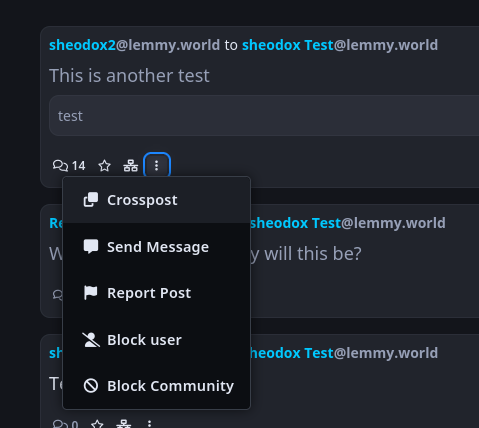
Alexandrite now has cross-posting! You can cross post from the ‘…’ menu on posts:
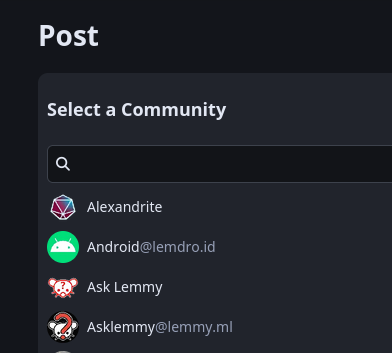
You then pick a community from your subscriptions, or search for any other community, or directly enter the full name like alexandrite@lemmy.world if you want a very specific one and don’t want to bother with searching.
And links to cross-posts will now show when viewing a posts:

Alexandrite now matches Lemmy-UI handling taglines. If an instance has any taglines set it will now pick a random one instead of showing all of them.

Lastly if you have NSFW thumbnail handling set to “Hide” or “Blur”, it will now hide/blur thumbnails when a post is in a NSFW community, even if the post itself isn’t marked NSFW, as the post is probably actually NSFW anyway and it’s better to be safe than sorry.
Alexandrite now has cross-posting! You can cross post from the ‘…’ menu on posts:
You then pick a community from your subscriptions, or search for any other community, or directly enter the full name like alexandrite@lemmy.world if you want a very specific one and don’t want to bother with searching.
And links to cross-posts will now show when viewing a posts:
Alexandrite now matches Lemmy-UI handling taglines. If an instance has any taglines set it will now pick a random one instead of showing all of them.
Lastly if you have NSFW thumbnail handling set to “Hide” or “Blur”, it will now hide/blur thumbnails when a post is in a NSFW community, even if the post itself isn’t marked NSFW, as the post is probably actually NSFW anyway and it’s better to be safe than sorry.
This looks like the future of using Lemmy, very beautiful UI
This looks like the future of using Lemmy, very beautiful UI
cross-posted from: lemmy.world/post/3256777
You’re now able to theme Alexandrite a lot more, I’m excited to see what color schemes you all can come up with!
alexandrite.app - !alexandrite@lemmy.world - Github
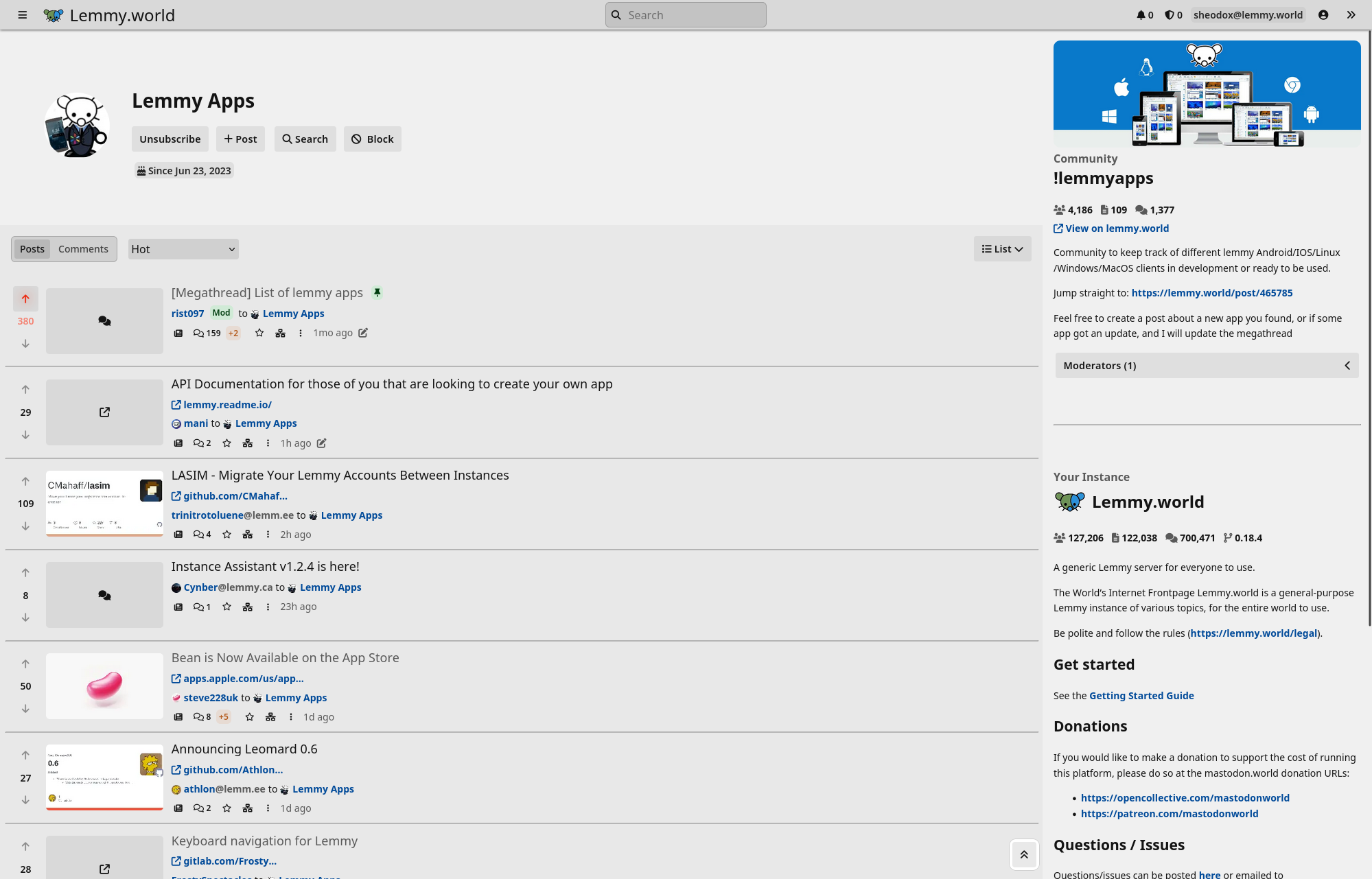
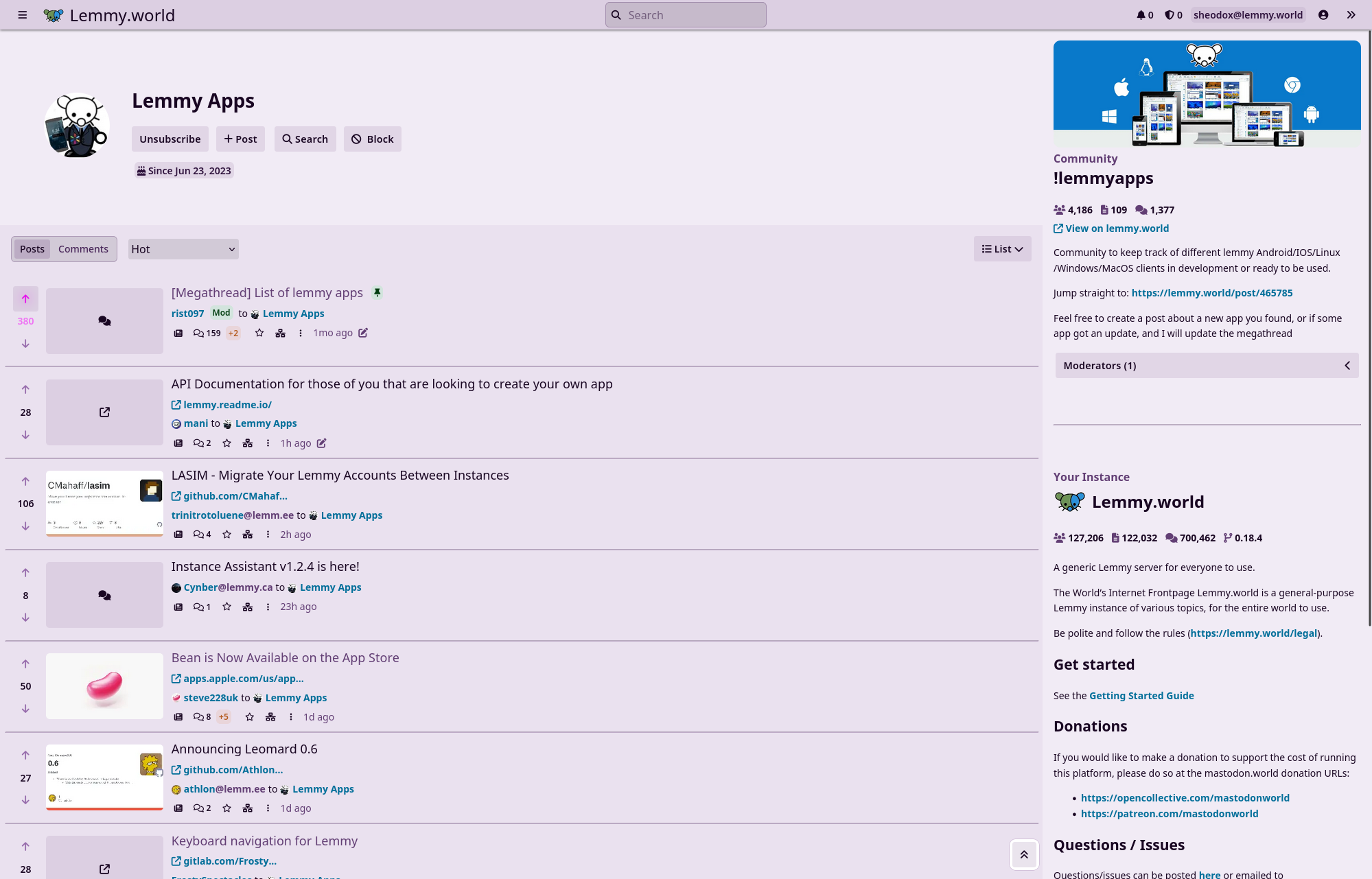
There’s now a light mode! Alexandrite will now detect your system’s default color scheme and use that, but you can force dark or light mode in the settings. This is the default hue/saturation on light mode:
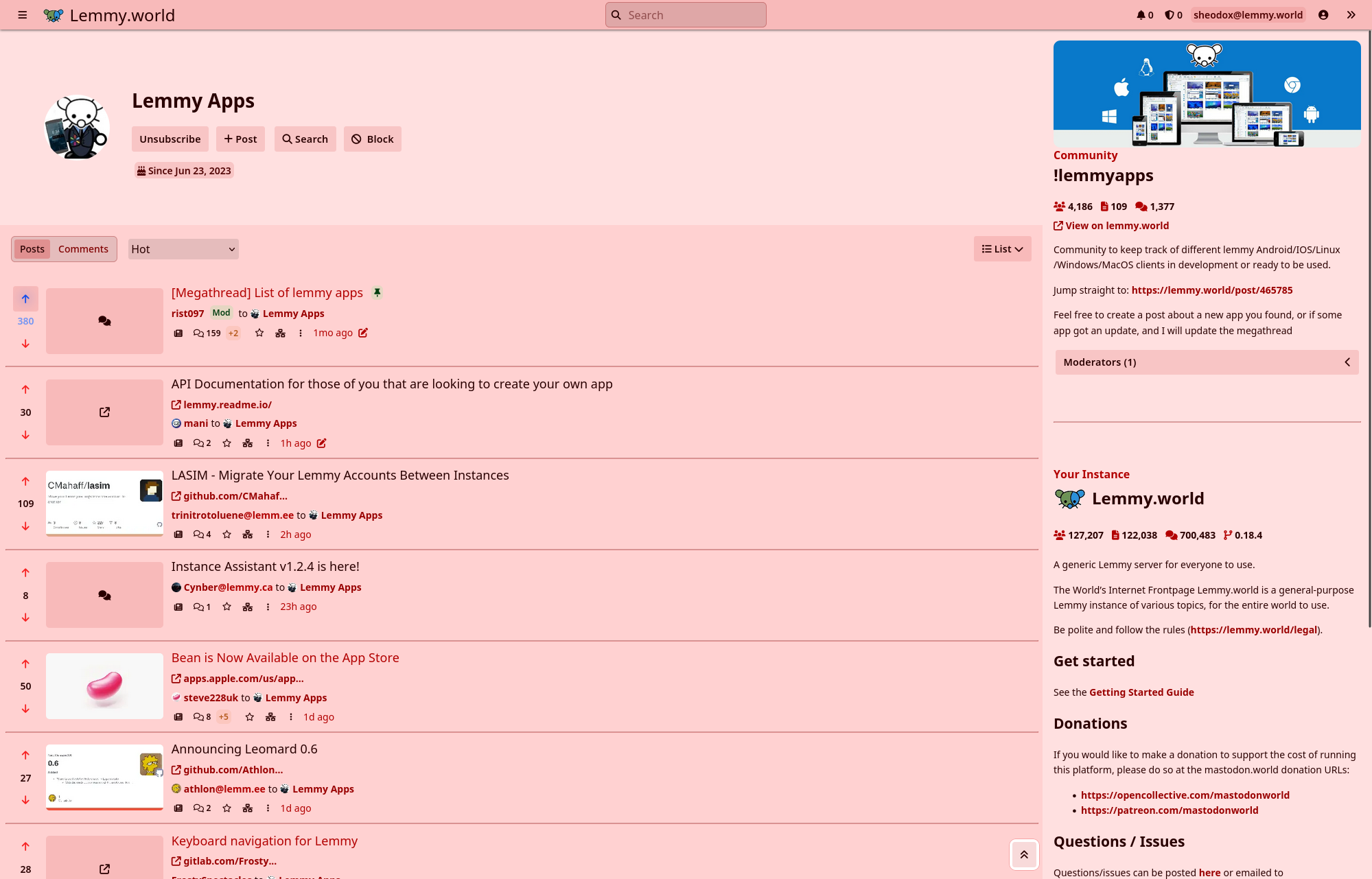
You can also change the saturation to make it as gray or as colorful as you want, plus you can customize the hues of links and up/downvote buttons (downvotes in screenshots just for demonstration!)
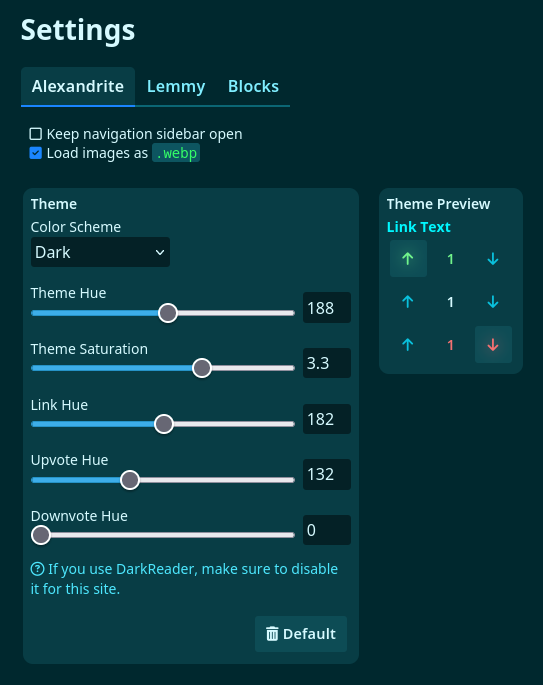
Here are the settings for themes now. There are numbers next to all the sliders to make it easier to share customizations! I might add a few presets in the future.
Posts look a little nicer. The content on them shows using similar styles to the previews on the cards. The “View Source” button is now a small button in the top right corner of the post.
Some 0.7.0 features I didn’t mention here before:
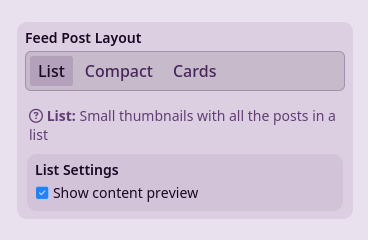
There’s an option when using the “List” post layout that shows a preview of the post content like the card layout does.
Oh speaking of version numbers Alexandrite now releases with version numbers! You can find the version number in use on the “About Alexandrite” page. You can read more on the version number announcement.
cross-posted from: lemmy.world/post/3256777
You’re now able to theme Alexandrite a lot more, I’m excited to see what color schemes you all can come up with!
alexandrite.app - !alexandrite@lemmy.world - Github
There’s now a light mode! Alexandrite will now detect your system’s default color scheme and use that, but you can force dark or light mode in the settings. This is the default hue/saturation on light mode:
You can also change the saturation to make it as gray or as colorful as you want, plus you can customize the hues of links and up/downvote buttons (downvotes in screenshots just for demonstration!)
Here are the settings for themes now. There are numbers next to all the sliders to make it easier to share customizations! I might add a few presets in the future.
Posts look a little nicer. The content on them shows using similar styles to the previews on the cards. The “View Source” button is now a small button in the top right corner of the post.
Some 0.7.0 features I didn’t mention here before:
There’s an option when using the “List” post layout that shows a preview of the post content like the card layout does.
Oh speaking of version numbers Alexandrite now releases with version numbers! You can find the version number in use on the “About Alexandrite” page. You can read more on the version number announcement.
EDIT: This is now released, see the 0.8.0 release announcement
Please let me know if you have any feedback or find bugs! Note, if you are just seeing a bunch of exclamation marks instead of images and are viewing on alexandrite.app, that’s a bug I just noticed, click the “Original Post” button on the post to view on lemmy.world. I’ll fix that bug tonight.
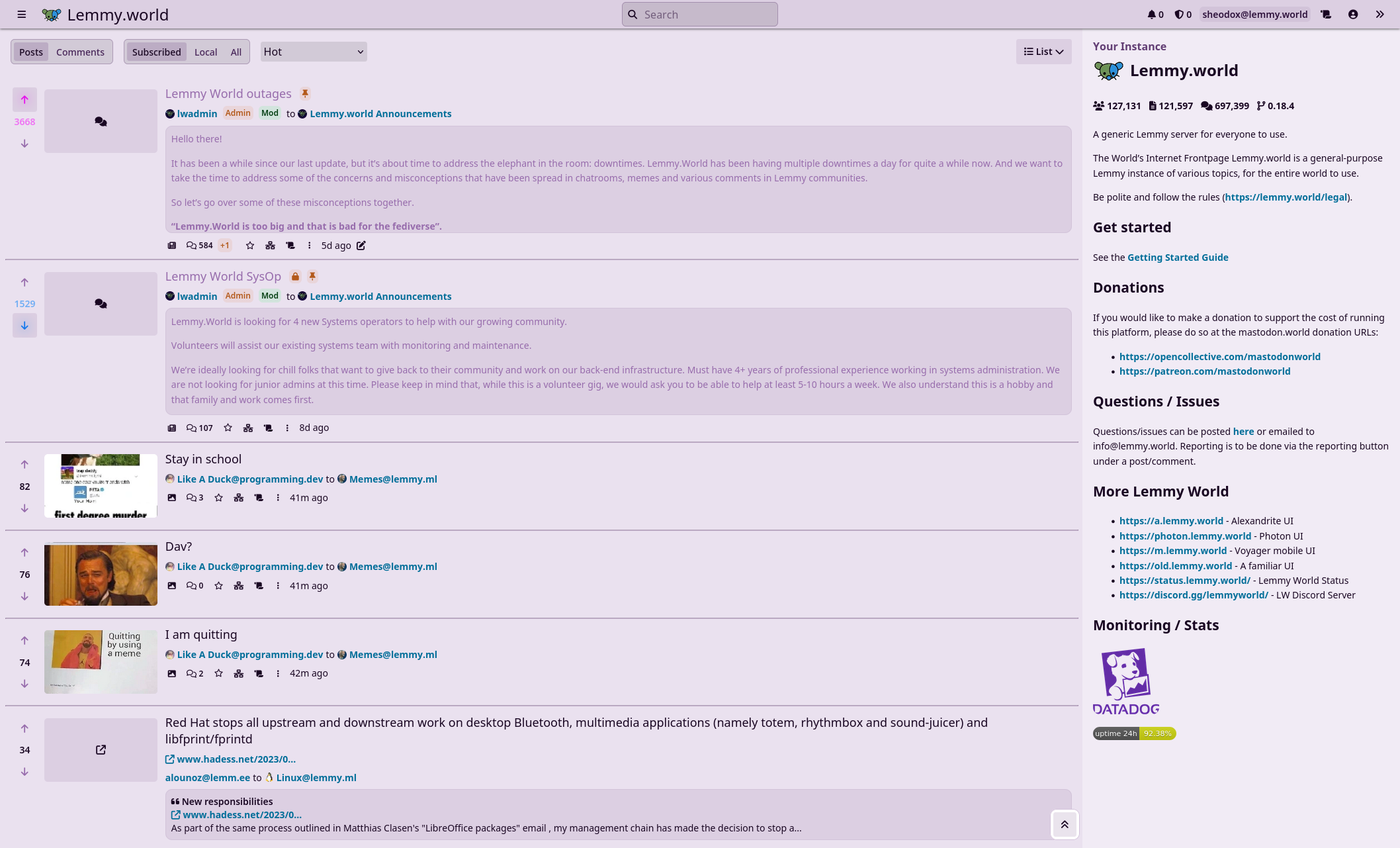
I’ve been working on a light mode, and I added hue customization for links and votes, plus you can customize the base theme saturation. Light/dark mode will be chosen based on your device’s preferred setting, but you can set one specifically on the settings page.
Here’s the default colors for light mode (up/down votes for illustrative purposes lol):

If you don’t want it to be so colorful, lower the saturation:
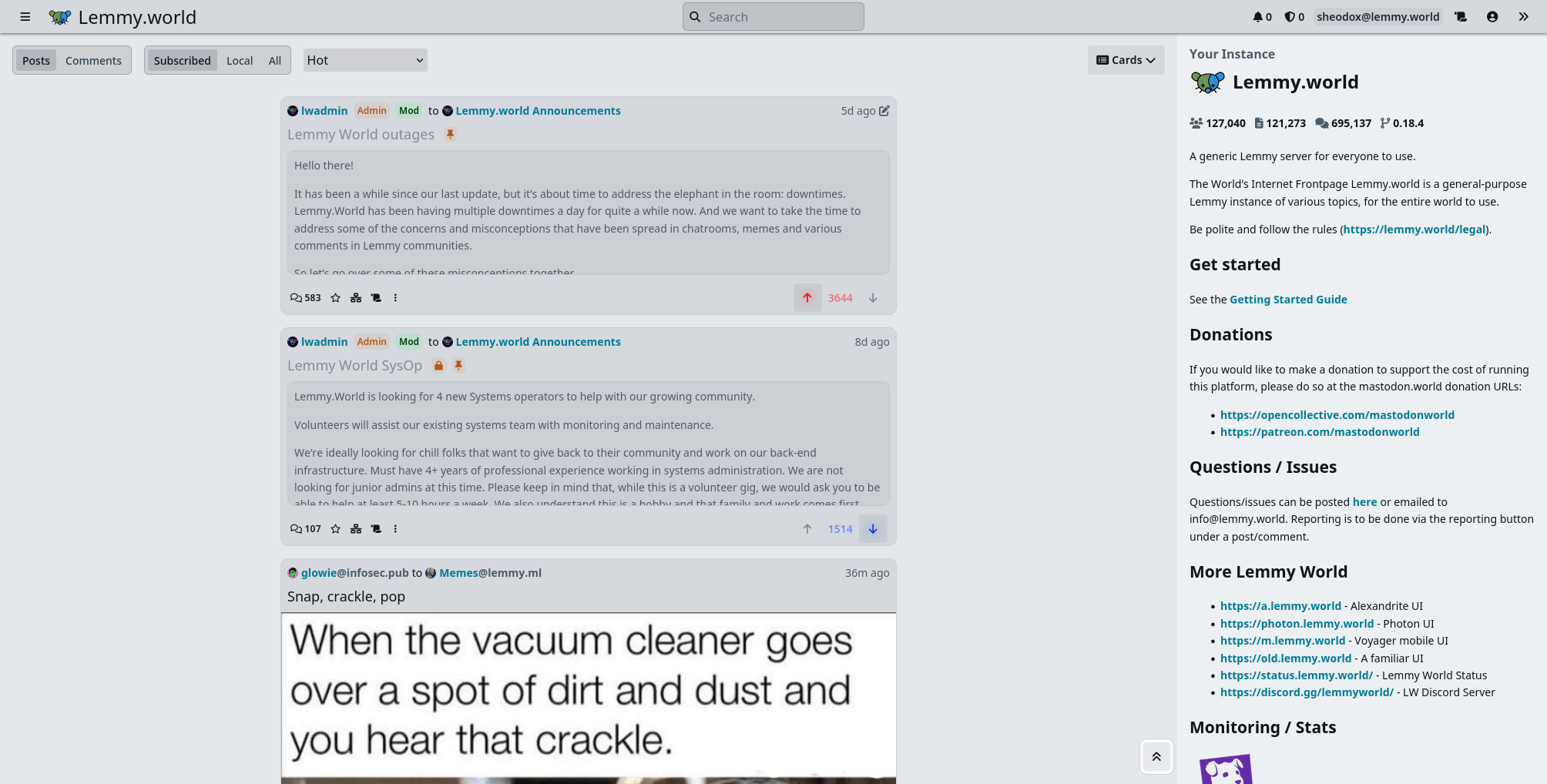
Or if you prefer a more ‘plain’ dark mode:
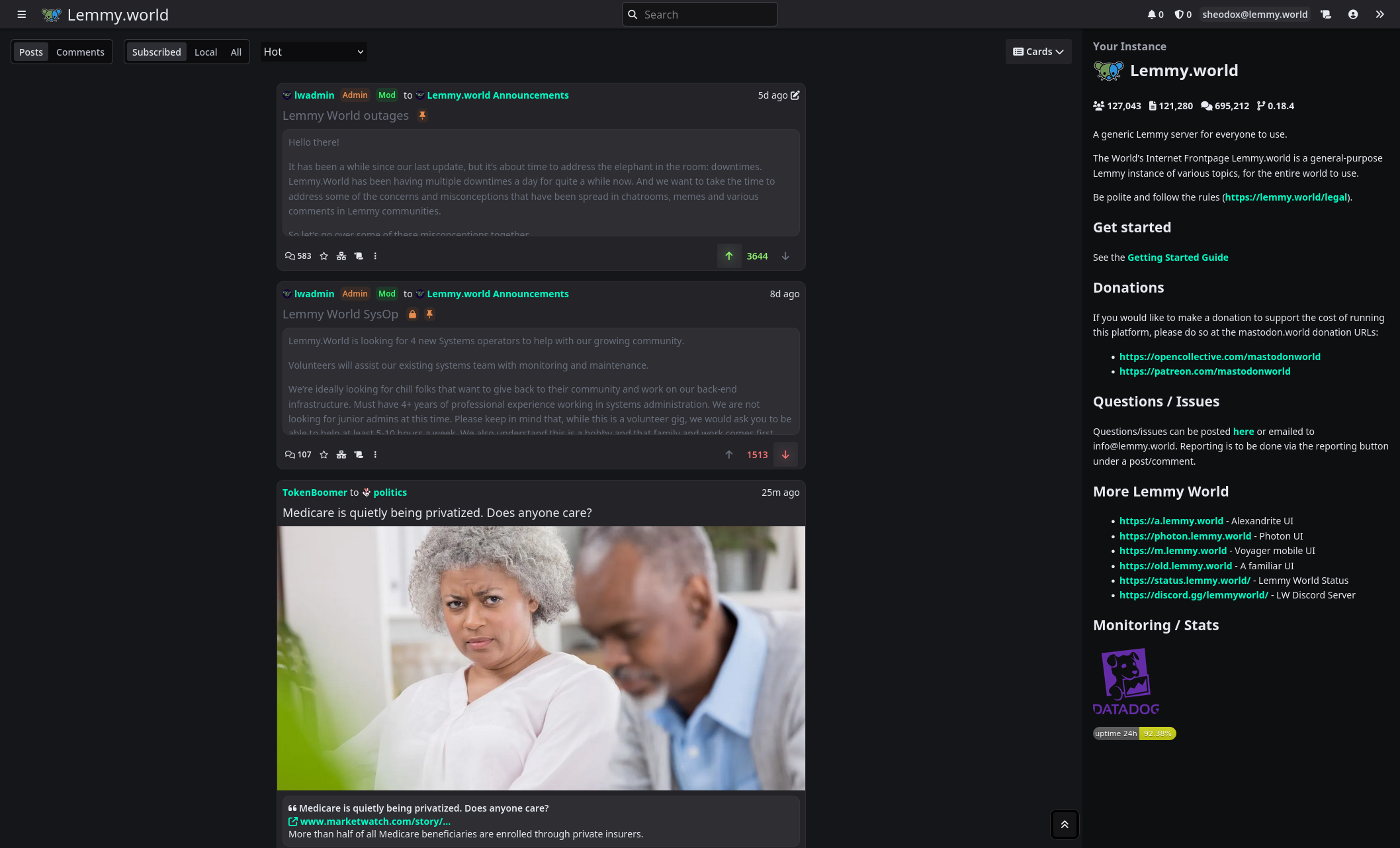
Here’s all the settings:

Another screenshot for good measure:
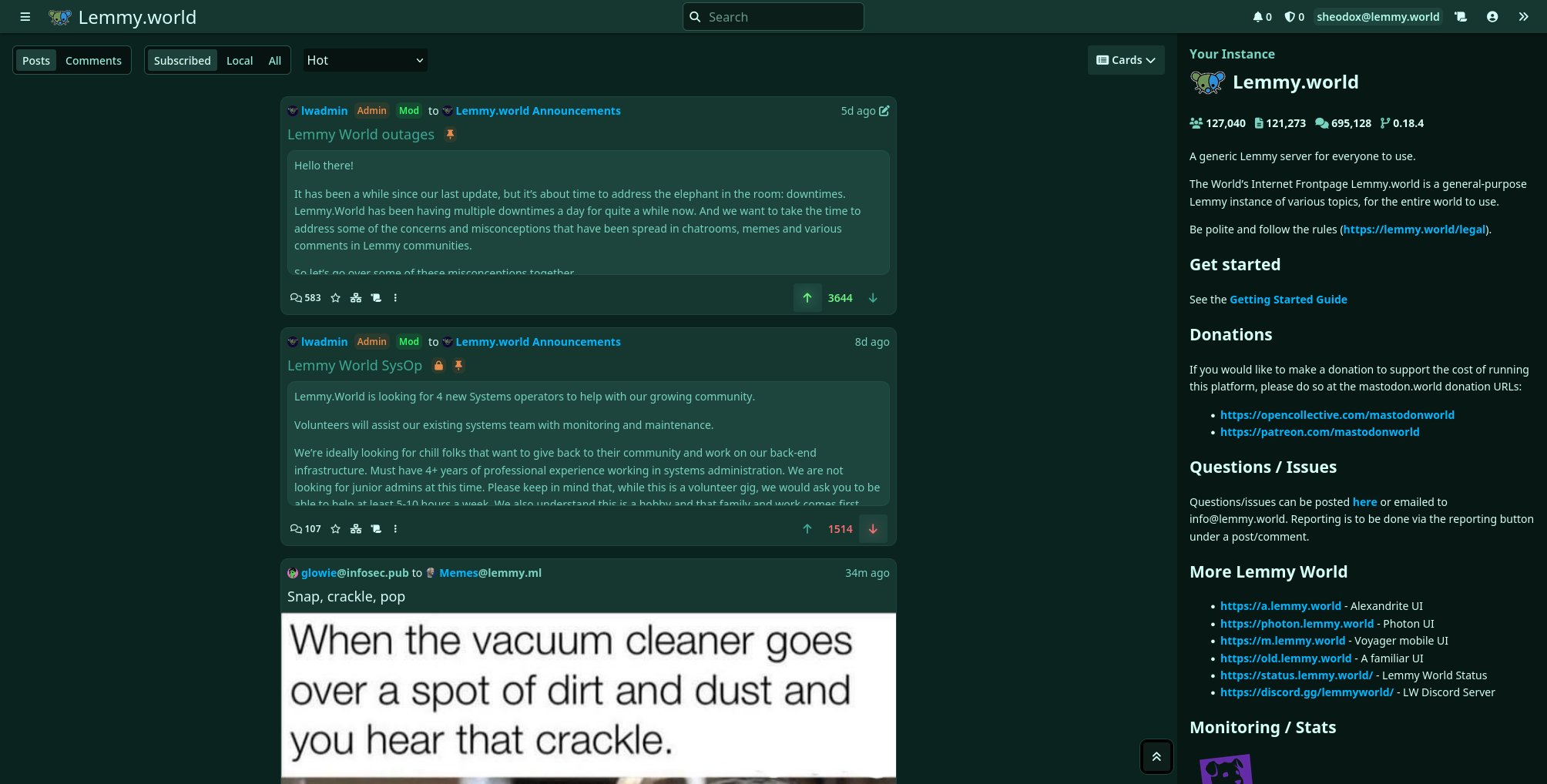 ___
EDIT: This is now released, see the 0.8.0 release announcement
Please let me know if you have any feedback or find bugs! Note, if you are just seeing a bunch of exclamation marks instead of images and are viewing on alexandrite.app, that’s a bug I just noticed, click the “Original Post” button on the post to view on lemmy.world. I’ll fix that bug tonight.
I’ve been working on a light mode, and I added hue customization for links and votes, plus you can customize the base theme saturation. Light/dark mode will be chosen based on your device’s preferred setting, but you can set one specifically on the settings page.
Here’s the default colors for light mode (up/down votes for illustrative purposes lol):
If you don’t want it to be so colorful, lower the saturation:
Or if you prefer a more ‘plain’ dark mode:
Here’s all the settings:
Another screenshot for good measure:
___
tl;dr: Alexandrite now has version numbers, new official docker images are built only when publishing a new release instead of with every change to the main branch, currently 0.7.0 is the only/newest version (if you’re using latest that’s fine, it’ll keep pointing to the newest version too). Now you’ll find a version number at the bottom of the “About Alexandrite” page. Alexandrite.app continues to run the latest code from the main branch.
For the technically inclined who want more background: the official site, alexandrite.app, has always been built off the main branch with auto-deploys. I can find a bug and within 5 minutes alexandrite.app can be updated with my fix. It’s really convenient because if I deploy something then realize I missed an edge case I can just fix it quick and probably not very many people were ever impacted.
When I first added self-hosting support I just made it publish images based on changes to main, and planned to add proper version numbers soon after (which I’ve now done). Now knowing people are self hosting using my docker images, and since I don’t control how quickly fixes are deployed or when they update, I’ve needed to be extra cautious to make sure everything works perfectly the first time (or as close as I can manage by myself). I just want to avoid a scenario where I release a big update at 6:00PM, notice a bug and fix it by 6:05PM, but someone’s self-hosted instance updates daily at 6:03PM and now that instance has to live with that bug for the next day.
That’s why I made this change. The main site can be the “bleeding edge” and then the official docker image releases might be slightly behind and hopefully be slightly more stable.
Besides that, I’ve been thinking about creating somewhere to chat and share news/ideas of Alexandrite updates besides just this community. Thinking about making either a Discord server or a room on Matrix. Thoughts?
tl;dr: Alexandrite now has version numbers, new official docker images are built only when publishing a new release instead of with every change to the main branch, currently 0.7.0 is the only/newest version (if you’re using latest that’s fine, it’ll keep pointing to the newest version too). Now you’ll find a version number at the bottom of the “About Alexandrite” page. Alexandrite.app continues to run the latest code from the main branch.
For the technically inclined who want more background: the official site, alexandrite.app, has always been built off the main branch with auto-deploys. I can find a bug and within 5 minutes alexandrite.app can be updated with my fix. It’s really convenient because if I deploy something then realize I missed an edge case I can just fix it quick and probably not very many people were ever impacted.
When I first added self-hosting support I just made it publish images based on changes to main, and planned to add proper version numbers soon after (which I’ve now done). Now knowing people are self hosting using my docker images, and since I don’t control how quickly fixes are deployed or when they update, I’ve needed to be extra cautious to make sure everything works perfectly the first time (or as close as I can manage by myself). I just want to avoid a scenario where I release a big update at 6:00PM, notice a bug and fix it by 6:05PM, but someone’s self-hosted instance updates daily at 6:03PM and now that instance has to live with that bug for the next day.
That’s why I made this change. The main site can be the “bleeding edge” and then the official docker image releases might be slightly behind and hopefully be slightly more stable.
Besides that, I’ve been thinking about creating somewhere to chat and share news/ideas of Alexandrite updates besides just this community. Thinking about making either a Discord server or a room on Matrix. Thoughts?
In my opinion, it would be nice to be able to search for communities on specific instances.
Also, would it be possible to have the option to sort or group my community list by instance?
In my opinion, it would be nice to be able to search for communities on specific instances.
Also, would it be possible to have the option to sort or group my community list by instance?
Not a nag or anything. I just checked alexandrite on mobile and it seemed better than I remember. It’s probably better than the default UI. The only issues I could see are some minor sizing wrinkles (relative sizes between fonts and buttons/elements seem to need some tweaking) but otherwise it’s looking pretty good already! (Posted from alexandrite on mobile).
Not a nag or anything. I just checked alexandrite on mobile and it seemed better than I remember. It’s probably better than the default UI. The only issues I could see are some minor sizing wrinkles (relative sizes between fonts and buttons/elements seem to need some tweaking) but otherwise it’s looking pretty good already! (Posted from alexandrite on mobile).

EDIT: This is now released.
Hey! I’m almost done with a new feature and was looking for some feedback. I’m adding alternate post layouts for when viewing posts in a feed. There’s a new setting for it:
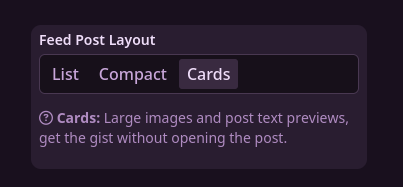
(List is the default, the only style until now)
Card layout shows the post’s image at full height, and the first few lines of the embedded description/post content (got some of the ideas from Sync).
Compact Layout uses smaller thumbnails and fonts to fit a bit more on screen.

With this I’m also working towards mobile support. You’ll find things generally work a bit better now with this.
Anyways, let me know how things go, if you find any bugs, or if you have any other feedback.
EDIT: This is now released.
Hey! I’m almost done with a new feature and was looking for some feedback. I’m adding alternate post layouts for when viewing posts in a feed. There’s a new setting for it:
(List is the default, the only style until now)
Card layout shows the post’s image at full height, and the first few lines of the embedded description/post content (got some of the ideas from Sync).
Compact Layout uses smaller thumbnails and fonts to fit a bit more on screen.
With this I’m also working towards mobile support. You’ll find things generally work a bit better now with this.
Anyways, let me know how things go, if you find any bugs, or if you have any other feedback.
Recently started using Alexandrite and am really enjoying the experience, but have questions.
I’m thinking of Alexandrite as the chocolate shell over my lemmy.world ice cream cone. Alexandrite is not an instance, correct?
I have not found a place on Alexandrite where my subscriptions (joined communities) are listed. Is this not yet available?
I assume that if I join a community in one (either Alexandrite or Lemmy.world) it will sync with the other. True?
I’ve joined communities in Alexandrite, but they don’t show in the list of subscribed communities in lemmy.world. That just may take more time. Yes?
Thanks!
Recently started using Alexandrite and am really enjoying the experience, but have questions.
I’m thinking of Alexandrite as the chocolate shell over my lemmy.world ice cream cone. Alexandrite is not an instance, correct?
I have not found a place on Alexandrite where my subscriptions (joined communities) are listed. Is this not yet available?
I assume that if I join a community in one (either Alexandrite or Lemmy.world) it will sync with the other. True?
I’ve joined communities in Alexandrite, but they don’t show in the list of subscribed communities in lemmy.world. That just may take more time. Yes?
Thanks!

Hey all, wanted to let you know about the stuff I’ve added in the last few days.
You can now configure your languages in the “Lemmy” tab in settings! Along with this Alexandrite now respects your instance/community’s configured discussion languages, as well as your language settings. If you ever saw a language_not_allowed error when trying to post or comment, this should fix it!

You can now create an account from within Alexandrite! From the login page just enter an instance and you’ll see a new button to create an account

And the account creation should have all the same things you’re used to seeing. Now if you’re introducing someone to Lemmy and send them a link to Alexandrite you won’t need to include a “well if you want to make an account go here first, then go back to this site” caveat.

Moderators! There are a couple changes for you too. First off when banning a user you can now do temporary bans, and can remove the user’s content just like in the official UI.

When viewing comments under a post, or when viewing posts on a community you will now see a badge next to comments/posts made by moderators. Note: the moderator list needs to be loaded separately for each community, which is why you won’t see the badges if you’re viewing from the home/search pages (it’s one server request to load a list of posts, if each list of post subsequently had to make 50 individual requests for communities that’d be pretty taxing on the servers so until you view a post from that community you won’t see “Mod” there).

A few bugs that were fixed:
Hey all, wanted to let you know about the stuff I’ve added in the last few days.
You can now configure your languages in the “Lemmy” tab in settings! Along with this Alexandrite now respects your instance/community’s configured discussion languages, as well as your language settings. If you ever saw a language_not_allowed error when trying to post or comment, this should fix it!
You can now create an account from within Alexandrite! From the login page just enter an instance and you’ll see a new button to create an account
And the account creation should have all the same things you’re used to seeing. Now if you’re introducing someone to Lemmy and send them a link to Alexandrite you won’t need to include a “well if you want to make an account go here first, then go back to this site” caveat.
Moderators! There are a couple changes for you too. First off when banning a user you can now do temporary bans, and can remove the user’s content just like in the official UI.
When viewing comments under a post, or when viewing posts on a community you will now see a badge next to comments/posts made by moderators. Note: the moderator list needs to be loaded separately for each community, which is why you won’t see the badges if you’re viewing from the home/search pages (it’s one server request to load a list of posts, if each list of post subsequently had to make 50 individual requests for communities that’d be pretty taxing on the servers so until you view a post from that community you won’t see “Mod” there).
A few bugs that were fixed:
I’d like to click the server logo or name in the top left to refresh the page. Not sure if it already does that, but it would be good to have some visual feedback so that it’s obvious when it started loading and when it finished. Thank you!
I’d like to click the server logo or name in the top left to refresh the page. Not sure if it already does that, but it would be good to have some visual feedback so that it’s obvious when it started loading and when it finished. Thank you!
Maybe I’ve missed it, but from what I can see cross posts aren’t displayed.
Hopefully it isn’t an issue adding them (don’t want to stress you out too much), but I do find it a nice feature of lemmy for keeping things connected.
Maybe I’ve missed it, but from what I can see cross posts aren’t displayed.
Hopefully it isn’t an issue adding them (don’t want to stress you out too much), but I do find it a nice feature of lemmy for keeping things connected.
When viewing a post, I have to click the X in the little bubble at the bottom, or scroll to the top to get the close post button. I keep pressing the ESC key, expecting it to close the post. Can this be added?
When viewing a post, I have to click the X in the little bubble at the bottom, or scroll to the top to get the close post button. I keep pressing the ESC key, expecting it to close the post. Can this be added?
EDIT: this has been released! Next I’m working on adding versions to the images published.
Self hosting support finally!
I have a branch up with self hosting instructions, a Dockerfile, and images published to Github’s container registry. If anyone wanted to help test it out it’s available on this branch (and the PR).
There are a few configuration options you can change as you wish to disable some of the login page links, change the default instance, and optionally only allow logins to a specific instance.
The published image is just slightly out of date since I changed the publish rules, but at the moment it’s only missing some extra validation to check if an instance url is valid.
Let me know if you run into any issues or have anything you think I should change or better explain.
EDIT: this has been released! Next I’m working on adding versions to the images published.
Self hosting support finally!
I have a branch up with self hosting instructions, a Dockerfile, and images published to Github’s container registry. If anyone wanted to help test it out it’s available on this branch (and the PR).
There are a few configuration options you can change as you wish to disable some of the login page links, change the default instance, and optionally only allow logins to a specific instance.
The published image is just slightly out of date since I changed the publish rules, but at the moment it’s only missing some extra validation to check if an instance url is valid.
Let me know if you run into any issues or have anything you think I should change or better explain.

cross-posted from: lemmy.world/post/2238542
alexandrite.app - !alexandrite@lemmy.world - Github
Some big updates just arrived!
First, the instance you’re on is now in the page URL, which means now you can send links to posts on Alexandrite to friends without them having to set an instance first (or know anything about Lemmy).
That helps to power the next feature which is an account switcher. This lets you switch between all of your accounts on the instance you’re browsing! You can also set a default account to use for that instance. Now you could be logged in on multiple accounts across multiple instances just in different browser tabs if you wanted.
Because the instance is now in the URL, if your main account is on
lemmy.worldbut you have an account onprogramming.devand a friend sends you a link to aprogramming.devpost on Alexandrite you’ll be signed in as yourprogramming.devuser in that browser tab.Two clicks to switch which instance you’re using (based on what accounts you have)
If you have accounts on more than one instance you can pick which instance you see by default when you go to
https://alexandrite.appwith no instance in the url, or chose to login on any of the accounts you’ve signed in as previously from the login page. (And in case anyone was curious, no it does not store passwords).
Another new feature I recently added is a little hint for what a comment is a reply to once you finish reading a deeper thread, easier to understand with a screenshot:
You can also favorite communities to make them show up on the top in the left hand sidebar.
Next I planned on working on stuff for self hosting, so stay tuned.
cross-posted from: lemmy.world/post/2238542
alexandrite.app - !alexandrite@lemmy.world - Github
Some big updates just arrived!
First, the instance you’re on is now in the page URL, which means now you can send links to posts on Alexandrite to friends without them having to set an instance first (or know anything about Lemmy).
That helps to power the next feature which is an account switcher. This lets you switch between all of your accounts on the instance you’re browsing! You can also set a default account to use for that instance. Now you could be logged in on multiple accounts across multiple instances just in different browser tabs if you wanted.
Because the instance is now in the URL, if your main account is on
lemmy.worldbut you have an account onprogramming.devand a friend sends you a link to aprogramming.devpost on Alexandrite you’ll be signed in as yourprogramming.devuser in that browser tab.Two clicks to switch which instance you’re using (based on what accounts you have)
If you have accounts on more than one instance you can pick which instance you see by default when you go to
https://alexandrite.appwith no instance in the url, or chose to login on any of the accounts you’ve signed in as previously from the login page. (And in case anyone was curious, no it does not store passwords).
Another new feature I recently added is a little hint for what a comment is a reply to once you finish reading a deeper thread, easier to understand with a screenshot:
You can also favorite communities to make them show up on the top in the left hand sidebar.
Next I planned on working on stuff for self hosting, so stay tuned.

I just realized I never mentioned in yesterday’s announcement that I improved the way searching in comments works earlier this week and thought I should mention it.
tl;dr: There’s a search bar next to the comment sort options, typing in there will highlight all the comments that contain your search text, and a second floating nav bar shows up which lets you click next/previous buttons to scroll between search matches.

If you’re curious: some technical background. Comments (and basically any other list in Alexandrite) are rendered using a “virtual list” or “virtualized rendering”, this is pretty complicated but really common optimization used on sites/apps that let you scroll infinitely as it lets you show a huge list of stuff without the site getting really laggy. It does this by only actually rendering as many comments (or posts etc) as can fit on screen, and skipping the rest, adjusting what’s shown to wherever you scroll. So if you’re on a post with 1000 comments and you’ve scrolled down quite a ways, instead of all 1000 comments being on the page maybe only comments 220-230 are there. To an end user you should usually never notice this, but if you scroll really fast, or hit the “scroll to top” button you might sometimes notice the page is blank before a post or comment pops in to fill the empty space a moment later.
The only issue with that, is if not all of the comments are actually on the page you can’t really Ctrl+f to search for something in comments, as only a few of the comments are on the page at once. So I needed an in-site way to search through comments, which is where this came in!
I just realized I never mentioned in yesterday’s announcement that I improved the way searching in comments works earlier this week and thought I should mention it.
tl;dr: There’s a search bar next to the comment sort options, typing in there will highlight all the comments that contain your search text, and a second floating nav bar shows up which lets you click next/previous buttons to scroll between search matches.
If you’re curious: some technical background. Comments (and basically any other list in Alexandrite) are rendered using a “virtual list” or “virtualized rendering”, this is pretty complicated but really common optimization used on sites/apps that let you scroll infinitely as it lets you show a huge list of stuff without the site getting really laggy. It does this by only actually rendering as many comments (or posts etc) as can fit on screen, and skipping the rest, adjusting what’s shown to wherever you scroll. So if you’re on a post with 1000 comments and you’ve scrolled down quite a ways, instead of all 1000 comments being on the page maybe only comments 220-230 are there. To an end user you should usually never notice this, but if you scroll really fast, or hit the “scroll to top” button you might sometimes notice the page is blank before a post or comment pops in to fill the empty space a moment later.
The only issue with that, is if not all of the comments are actually on the page you can’t really Ctrl+f to search for something in comments, as only a few of the comments are on the page at once. So I needed an in-site way to search through comments, which is where this came in!
I love the added usability of Alexandrite but unless you can block entire instances in it either natively or via greasescript, it is unusable for me.
Thanks for your time!
I love the added usability of Alexandrite but unless you can block entire instances in it either natively or via greasescript, it is unusable for me.
Thanks for your time!
I didn’t know this … just ran into the feature just now … maybe it’s been there since the beginning.
In the list of subscribed communities … hover the mouse over the icon of the community … a star will appear, unfilled if not a favourite, filled if already a favourite … and click to toggle.
All “favourite” communities will appear at the top of the list in a separate section.
Very nice!!
I didn’t know this … just ran into the feature just now … maybe it’s been there since the beginning.
In the list of subscribed communities … hover the mouse over the icon of the community … a star will appear, unfilled if not a favourite, filled if already a favourite … and click to toggle.
All “favourite” communities will appear at the top of the list in a separate section.
Very nice!!

EDIT: This is now released on the main site, enjoy!
Original post:
I’ve got some big stuff I’m planning on releasing either later tonight or tomorrow, and I wanted some testers if anyone’s willing! The link is at the end of the post.
The instance you’re browsing is now in the page url, so if you’re logged in on lemmy.world, you’ll be (once released) on https://alexandrite.app/lemmy.world/…. Now you can share links directly to Alexandrite to friends and they can view it without needing to set a home instance anymore.
But the real cool feature is a new account switcher! This lets you switch between all of your accounts on the instance you’re browsing! You can also set a default account to use for that instance. Now you could be logged in on multiple accounts across multiple instances just in different browser tabs if you wanted.

Two clicks to switch which instance you’re using (based on what accounts you have)

If you have accounts on more than one instance you can pick which instance you see by default when you go to https://alexandrite.app with no instance in the url, or chose to login on any of the accounts you’ve signed in as.

You’ll need to login again because it’s a new url, but I wrote some code to migrate to the new way I’m handling accounts so you won’t be logged out when this is all released.
Please let me know if you find any bugs!
EDIT: This is now released on the main site, enjoy!
Original post:
I’ve got some big stuff I’m planning on releasing either later tonight or tomorrow, and I wanted some testers if anyone’s willing! The link is at the end of the post.
The instance you’re browsing is now in the page url, so if you’re logged in on lemmy.world, you’ll be (once released) on https://alexandrite.app/lemmy.world/…. Now you can share links directly to Alexandrite to friends and they can view it without needing to set a home instance anymore.
But the real cool feature is a new account switcher! This lets you switch between all of your accounts on the instance you’re browsing! You can also set a default account to use for that instance. Now you could be logged in on multiple accounts across multiple instances just in different browser tabs if you wanted.
Two clicks to switch which instance you’re using (based on what accounts you have)
If you have accounts on more than one instance you can pick which instance you see by default when you go to https://alexandrite.app with no instance in the url, or chose to login on any of the accounts you’ve signed in as.
You’ll need to login again because it’s a new url, but I wrote some code to migrate to the new way I’m handling accounts so you won’t be logged out when this is all released.
Please let me know if you find any bugs!
I haven’t thoroughly looked into it, but it seems that it is at least partly a lemmy backend problem as something can also go wrong on the default UI, but it also seems the alexandrite is maybe handling the error less gracefully?
I haven’t thoroughly looked into it, but it seems that it is at least partly a lemmy backend problem as something can also go wrong on the default UI, but it also seems the alexandrite is maybe handling the error less gracefully?
I only just noticed these. Don’t know how long they’ve been there … maybe they’re new!! But they’re awesome!! Nice feature!
I only just noticed these. Don’t know how long they’ve been there … maybe they’re new!! But they’re awesome!! Nice feature!