0

How is Linux on Intel panther lake?

preview

I want to buy a new laptop, I thought about Asus expertbook ultra with Intel ultra 7x or 9x

How good is Linux support on it? How will the battery life be ?

I want to buy a new laptop, I thought about Asus expertbook ultra with Intel ultra 7x or 9x

How good is Linux support on it? How will the battery life be ?

0

[purchase advice] Replacement for HP 15 Laptop with DP over TB/USB-C, NVMe 3.0 SSD

Silver HP laptop open on a white background, shown with three smaller angled views on the left. On the right is a specs panel listing AMD Ryzen 7 4700U, AMD Radeon RX Vega 7 graphics, 15.6-inch FHD IPS display, 512GB SSD, 8GB DDR4, and weight 1.74 kg. Along the bottom are review scores: total 5.2, portability 7.3, display 7.0, for work 5.1, and for gaming 2.7.
preview

Hi Lemmings,

I’d appreciate if you could help me find a replacement for my old notebook.

I currently use this laptop and it’s dying. Fan is rattling, screen is splotchy. It’s not that old, I think from around 2022.

Need something with similar specs or better, <500€ used (Central Europe) and with Linux capability.

Additional features I want: DP over USB-C or TB. Needs to be able to connect to a docking station.

I’d like an AMD CPU and no Nvidia anything.

(cross-posted from: feddit.org/post/36389033)

0

outdoor laptop

preview

I’m looking for a replacement for framework 16 laptop for light devops (mostly stuff for homelab, training) that can also be usable outdoors (antiglare/antireflective if possible) for watching TV, possibly light outdoor work. that’s possibly modular like framework and has touch screen for tablet mode, but not finding anything that hits all these.

what I’ve looked at so far:
surface pro - this was what I thought was a great compromise, I bought an 8 before I heard about anti glare screens. I bought an ‘anti-glare screen protector’ but it doesn’t help much outdoors
starlabs starfighter - doesn’t appear to have any modular features, also can’t tell if matte is the same thing as anti-glare? no touch screen thinkpad t14 (various gen) - does appear to have ant-glare screen option, but not modular
yoga - no anti-glare option that found
macbooks - saw this mentioned somewhere for the screen for outdoors. newer versions don’t have asahi linux support, no touch screen.
getac f110 - appears to be more of a straight rugged tablet than laptop, not sure how well these work for indoor use for devops stuff.

I’m also considering splitting functionality if necessary (laptop without touch/antiglare, but modular. and outdoor tablet with anti-glare/touch screen if it saves money). this is my current config anyways (framework for devops stuff, pixel tablet for lighter stuff) the tablet is basically useless outdoors though. I don’t mind buying used, it would probably be more cost-effective for all the features I want anyways.

I’m open to any and all suggestions at this point. Price wise I was hoping to stay under $1500, but not sure how feasible that is, so it’s not a hard limit.

0

How is linux on the Apple iMac 27” Retina 5K (2017)

preview

I came across an Apple iMac Retina 5K 27-inch (2017) for a really good price, how well does linux work?
Specs:

  • 4.2GHz Quad-Core Intel Core i7
  • Upgraded to 64GB DDR4 RAM
  • Radeon Pro 580 8GB Graphics
  • 27” Retina 5K Display

I came across an Apple iMac Retina 5K 27-inch (2017) for a really good price, how well does linux work?
Specs:

  • 4.2GHz Quad-Core Intel Core i7
  • Upgraded to 64GB DDR4 RAM
  • Radeon Pro 580 8GB Graphics
  • 27” Retina 5K Display
0

Pine64 announces it will stop production for all Linux devices.

preview

From their discord announcements:

“Hi @everyone! Just a quick reminder that due to the current DRAM/eMMC shortage, there isn’t any plans to continue producing more Linux devices in the near future. Whether production continues or not depends on the pricing situation for those components after mid 2027.

Devices like the PineNote and PineTab2 are currently estimated to run out of stock in three months time. Just pre-warning everyone in case people start asking when things are going to be in stock again.

Meanwhile, devices like the PineTime, PineVoice and Pinecil will continue production as usual!

As for the PineTime Pro, currently the demo firmware has basic drivers for the display, touch, motion, GPS, buttons, heat rate sensor (chip id only), battery charger, motor, microphone and the speaker. Though some issues do need to be ironed out first before a pilot batch begins production.

That’s it for this post, sorry this is a bit of a bleak update, but in the meantime PineStore still have a great lineup of MCU powered devices which will continue to expand with more exciting devices.

Alrightttttt, have a great Monday! (or Tuesday, if you’re up that early)”

Very sad news but just another sign of the times.

0

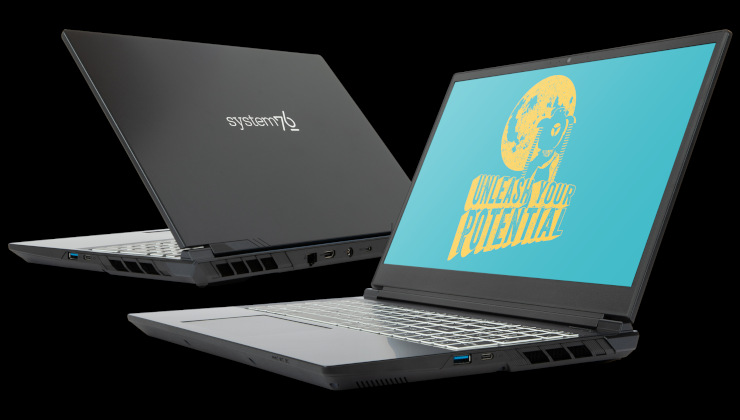
System76 Lemur Pro Linux laptop refresh brings Intel Panther Lake and two screen sizes: 14 or 16 inches - Liliputing

Liliputing System76 Lemur Pro Linux laptop refresh brings Intel Panther Lake and two screen sizes: 14 or 16 inches - Liliputing liliputing.com
preview

System76 Lemur Pro Linux laptop refresh brings Intel Panther Lake and two screen sizes: 14 or 16 inches

System76 Lemur Pro Linux laptop refresh brings Intel Panther Lake and two screen sizes: 14 or 16 inches

0

ARM computers

preview

what is the current state of GNU/Linux on ARM-based machines? I know a lot of distros offer an ARM build, but ARM fragmentation and software availability seem to still be a dealbreaker for personal use, so that might be the reason why I’ve only heard of ARM server focused devices

what is the current state of GNU/Linux on ARM-based machines? I know a lot of distros offer an ARM build, but ARM fragmentation and software availability seem to still be a dealbreaker for personal use, so that might be the reason why I’ve only heard of ARM server focused devices

0

TUXEDO Computers Unveils Intel-Powered InfinityBook Max 15 Gen10 Linux Laptop

9to5Linux TUXEDO Computers Unveils Intel-Powered InfinityBook Max 15 Gen10 Linux Laptop - 9to5Linux 9to5linux.com
preview

cross-posted from: suppo.fi/post/10265535

Linux hardware vendor TUXEDO Computers unveiled today the Intel variant of the InfinityBook Max 15 Linux-powered laptop, which was previously only available for purchase with an AMD processor.

The Intel-powered InfinityBook Max 15 features an Intel Core Ultra 7 255H processor with 16 cores and 16 threads, 24 MB cache, and up to 5.1 GHz clock speed, up to 128 GB DDR5 5600MHz Kingston RAM, and up to 8TB of NVMe PCIe 4.0 WD_Blue SSD storage.

The Linux laptop also includes mid-range graphics cards in the form of the NVIDIA GeForce RTX 5060 or NVIDIA GeForce RTX 5070 with 8 GB GDDR7 VRAM, which are connected to a gorgeous 15.3-inch WQXGA Omnia LED display featuring a productivity-friendly 16:10 aspect ratio, 500 nits brightness, and 300Hz refresh rate.

0

How Linux Saved My Hardware - 5 stories from recent years

preview

#1

my most recent example is a Macbook Air 13 that I chimera’d out of three different machines; awesome that 2012-2017 models have interchangeable parts. was lucky and one of the boards had 8 GB RAM, a rarity back then. alas, the only battery I got has barely 60% capacity and zillions of charge cycles and I ain’t too keen on spending money on a replacement.

ok, so shit autonomy, be happy you got a workstation for like $15 in total and run it thusly. except, this one shuts off even if there’s like 70% remaining and subsequently won’t power on without a charger - kinda big deal for a laptop. I imagine not all its cells are up to spec so when it reaches a threshold it cuts out. under macOS, the SMC lets it sip power and when you attach a charger it just wakes as you left it. linux ain’t that cool, when you connect power - all your unsaved work is gone.

what linux does have is intel-undervolt. just a smidge of -50mV was enough to remedy the issue. after a coupla days, moved it to -75mV, still perfectly stable; at -100mV it occasionally KPs.

so a thing that was unusable away from a charger is again a mobile device, netting me 4+ hours of light use and almost a week of standby!

#2

eons ago I had a Thinkpad W520; at least I think that was the model - a 15.6" with the chunky, 7-row keyboard sans numpad. lenovo stabbed me in the heart when they decided that all subsequent models must rock the annoying numeric pad, making you type off-center and… anyhoo, the one I got, had a partially damaged screen, about 100ish pixels wide and super irritating, flashing constantly. replacing it wasn’t in the budget and relying on an external monitor was a no-go…

hello xrander! that thing allowed you to cut off a part of the screen and that’s what I did - converted the 16:10 to something more like 4:3. not only that, a friend taped over the busted part with some carbon-like decal making it look super sick! I’m still trying to find a picture from way back when but no luck so far…

not only did I get a super usable machine, it was the coolest workstation by far - maxed out RAM, three SSD/HD in there… well, as cool as those things can be, anyways…

#3

a few years back, I got a 13" Yoga, forgot the model, for pocket change. dual-core i5 and soldered 8 GB RAM, gorgeous screen, awesome battery - but it constantly blue-screened. break out the mint USB with memtest, and yepp - errors. dogdamn, no way can I afford to fix this thing and if I try desoldering those things, Imma burn the house down. and break the thing even further…

enter GRUB and its BADRAM feature! you can exclude arbitrary region(s) of RAM and the OS that boots after it will be none the wiser - it just uses the rest. and verily, it worked without issues, used it for years and I believe it still works to this day with his current owner.

#4

got a kernel-panicking Macbook Pro 15 Mid2010 for next to nothing. those things died en masse, the issue was a capacitor that drove the Nvidia chip. any strain or excess power consumption and the thing gave out and the OS crashed. the fix was/is simple - disable the Nvidia chip via EFI variable and use just the Intel HD graphics. you lose display out but gain a cooler machine, longer battery life, and you get zero issues with linux.

having fixed it, I installed linux and wanted to upgrade the RAM to 8 GB. alas, no sticks I found would work in the thing. turns out, the fucker only takes 1066 MHz RAM. I totally lived with the conviction that if you stick faster RAM into slower hardware, it’ll run it slower, but apparently that ain’t so. so tried bartering with junkers, I’ll give you my 1333 RAM, you gimme yours - no takers. buying stuff for something that cost me less than $10 was out of the question…

turns out, you can use linux to reprogram the SPD data on the RAM module! you change its identifier to 1066 and the macbook recognized it as such. furthermore, you don’t need to patch both sticks, if one is 1066 it can run the other at 1066 as well - so you can run 'em slower! no idea if this is an apple thing or its widely present, but I got a functioning workstation for free! edit: here’s the link

#5

finally, the Dell Latitude 5285. that’s a 2-in-1 tablet with detachable keyboard that I got without the battery. it had okayish specs, the i5-7300u is nothing to get excited about but it had 16 GB LPDDR3 soldered on. the touch display is beyond gorgeous - 400-nit 1920x1280 IPS and the intel graphics shipped the full 4K @ 60 Hz to my monitor via DP-Alt. the only problem - the fucker won’t boost past 400 MHz without the battery! buying the thing is out of the question (y’all notice a pattern here, right?) so what are we to do…

thankfully, we got msr-tools. the thing can patch CPU’s registers and en/disable some things, and one of them is BD_PROCHOT. that signal makes the CPU throttle on account the heat, it’s also triggered if anything is amiss - touchpads disconnected, battery not present, etc. what’s needed is read out rdmsr 0x1fc if memory serves correctly, and then you add one bit to the read out state and write it back with wrmsr 0x1fc 0x1xxxxx et voila - speedsteps up to 2.7 GHz, a quick systemd script to make it permanent. it won’t turbo, to 3.3 GHz or sumsuch, but this was more than enough for everyday use.

thanks for reading! y’all got any stories how linux can save your ass without spending money? share it with the class!

0

I've figured out why Logitech G603 can't Right-click resize in Gnome

preview

Gnome tweaks and dconf say right-click resizing should work. It does, but only with the touchpad buttons. If I use my Logitech G603, it refuses to cooperate. Took a while to figure out why, so I’m sharing in case someone else is banging their head against the same brick wall.

Turns out, the Logitech G603’s right click triggers both BTN_RIGHT (273) and BTN_EXTRA (276) at the same time. A normal mouse would just use BTN_RIGHT, with BTN_EXTRA reserved for a separate physical button. Apparently, Gnome can’t handle this kind of messy double-input nonsense and blocks right-click resizing, which is mildly infuriating. I’ve tried this mouse with three different Linux computers, and the result is always the same. This is clearly caused by the mouse, not the system.

Side note: I absolutely love that sort of smooth resizing. If you haven’t used it yet, I highly recommend trying it out. I can’t believe how Windows users live without it. Imagine trying to aim for the 1 pixel wide edge of a window every time.

Anyway, if you’re running into the same issue, check what your mouse is actually sending when you right-click. Install libinput-tools and run:

sudo libinput debug-events

My output looks like this:

event7   POINTER_BUTTON               +1.688s	BTN_RIGHT (273) pressed, seat count: 1
event7   POINTER_BUTTON               +1.688s	BTN_EXTRA (276) pressed, seat count: 1
event7   POINTER_BUTTON               +1.935s	BTN_RIGHT (273) released, seat count: 0
event7   POINTER_BUTTON               +1.935s	BTN_EXTRA (276) released, seat count: 0

As you can see, a single right click produces four lines corresponding to pressing and releasing two buttons. If I can disable the BTN_EXTRA (276) input, I’ll stick with my Logitech. If not, I’ll probably switch to one of my backup mice.

I’m planning to test those later this week. Hopefully, they know how to behave. Next time I’m buying a (used) mouse, I’ll definitely test it this way before paying. I don’t want my hardware to require extra troubleshooting just to do basic things.

I’ll be looking into that tweaking side later as well, now that I know what to look for. If you have any tips, tricks, and sources to check, feel free to drop them in them here.

Update: G305 and Corsair Harpoon RGB Wireless Gaming Mouse don’t mess around with the clicks like that. Those have a completely normal right click. Only the Logitech G603 is doing something weird here.

0

This [1.8 kg] laptop [from Slimbook] has a 2.8K 120 Hz display, 99 Wh battery, and Linux or Windows options

Liliputing This 2.6 pound laptop has a 2.8K 120 Hz display, 99 Wh battery, and Linux or Windows options - Liliputing liliputing.com
preview

cross-posted from: piefed.social/…/this-1-8-kg-laptop-from-slimbook-…

This 2.6 pound laptop has a 2.8K 120 Hz display, 99 Wh battery, and Linux or Windows options

cross-posted from: piefed.social/…/this-1-8-kg-laptop-from-slimbook-…

This 2.6 pound laptop has a 2.8K 120 Hz display, 99 Wh battery, and Linux or Windows options

0

Schenker Element 16 is a "semi-modular" laptop with a repairable, customizable design - Liliputing

Liliputing Schenker Element 16 is a &quot;semi-modular&quot; laptop with a repairable, customizable design - Liliputing liliputing.com
preview

For context: Tuxedo uses Schenker laptops, so we can expect a linux laptop version of this when it releases.

For context: Tuxedo uses Schenker laptops, so we can expect a linux laptop version of this when it releases.

0

Standalone scanners with ethernet jack?

preview

Does this even exist? I have a brother mfc but trying to print anything at all will spitout a blank page and partway feed 2 more and call it a jam, exact same way every time and this also prevents scanning until it is cleared and the drum is jiggled before closing the front panel. I also have a standalone colour laser printer.

I’m not super excited about the idea of getting another mfc when I have a working printer so I’m looking for recommendations on standalone linux compatible scanners that have wired network capability, ideally with document feeder. So far I’ve looked at a few but I have low confidence on the linux functionality and network jack isn’t even mentioned in spec sheets where I can see it in the picture.

0

TUXEDO InfinityBook Max 16 Gen10 Linux Laptop Unveiled with New OLED Display

9to5Linux TUXEDO InfinityBook Max 16 Gen10 Linux Laptop Unveiled with New OLED Display - 9to5Linux 9to5linux.com
preview

cross-posted from: literature.cafe/post/27640124

Linux hardware vendor TUXEDO Computers unveiled today the 10th generation (Gen10) of their TUXEDO InfinityBook Max 16 Linux-powered laptop with newer NVIDIA GPUs, newer Intel CPU, and a new display.

The highlight of the TUXEDO InfinityBook Max 16 Gen10 laptop is the new OLED display, which takes image quality to the next level with brilliant, high-contrast color reproduction, 2560×1600 pixels resolution, 500 nits of brightness, 100% DCI-P3 color gamut, and up to 300Hz refresh rate for high FPS gaming.

0

ShaRPiKeebo pocket Linux computer will start shipping soon (3 years after crowdfunding) - Liliputing

Liliputing ShaRPiKeebo pocket Linux computer will start shipping soon (3 years after crowdfunding) - Liliputing liliputing.com
preview

ShaRPiKeebo pocket Linux computer will start shipping soon (3 years after crowdfunding)

ShaRPiKeebo pocket Linux computer will start shipping soon (3 years after crowdfunding)

0

Laptop recommendations w/ touchscreen stylus & good battery life?

preview

Hi, I’m looking for a good laptop to run linux that has a touchscreen with a stylus to take math notes(ik I should be using latex or typst but im too lazy) and good battery life, preferably one that folds into tablet mode to make taking notes easier.

I’m not planning on doing any gaming or video editing on it, just web/notes/programming and potentially a windows VM for software that doesn’t work on linux. I also want to try getting into some ricing :). I’ve been looking at the lenovo yoga 9i, it seems to be pretty good and I found some people that had good linux experiences with it. One thing that would be nice is an hdmi port which the yoga doesn’t have as my job involves a lot of AV stuff, but I can just get an adapter.

Any other suggestions? I can probably spend like 1000$ on it but obviously less is better, I’ll probably get it used/refurbished from ebay.

0

anyone using the P106 cards?

preview

so I got these things available locally for $10-20. them is headless GTX 1060 6 GB used during the mining craze, with no way to add on a display out. there’s a hack to use it with windows on Haswell and newer boards with iGPU.

there’s got to be some use for the things, video transcoding, LLM (can they be run in parallel?), or maybe (spitballing here) sunshine server?

anyone had experience with them?

0

[Guide] Optimizing Expanded Metal Mesh in FreeCAD

Eco-Libre Optimizing Expanded Metal Mesh in FreeCAD - eco-libre.org
preview

This article will show how to model sheets of Expanded Metal in FreeCAD, without slowing (or killing) FreeCAD.

Troubleshooting Large File Sizes in FreeCAD

Who is Eco-Libre?

Eco-Libre is a volunteer-run project that designs libre technology for sustainable communities.

Eco-Libre’s mission is to research, develop, document, teach, build, and distribute open-source technology that sustainably enfranchises communities’ human rights.

We aim to provide clear documentation to build low-cost machines, tools, and infrastructure for people all over the world who wish to live in sustainable communities with others.

Contribute to Eco-Libre

If you’d like to help Eco-Libre reach our mission to enfranchise sustainable communities’ human rights with libre tech, please contact us to get involved :)

Join Us
eco-libre.org/join

Cheers,
The Eco-Libre Team
www.eco-libre.org

0

Identifying root cause of FreeCAD file size bloat

Eco-Libre Troubleshooting Large FreeCAD File Sizes - eco-libre.org
preview

This article will show you how to find out exactly which layer is causing your FreeCAD file to balloon in size, by getting a granular list of all of the layers in your document tree, sorted by size.

Troubleshooting Large File Sizes in FreeCAD

Who is Eco-Libre?

Eco-Libre is a volunteer-run project that designs libre technology for sustainable communities.

Eco-Libre’s mission is to research, develop, document, teach, build, and distribute open-source technology that sustainably enfranchises communities’ human rights.

We aim to provide clear documentation to build low-cost machines, tools, and infrastructure for people all over the world who wish to live in sustainable communities with others.

Contribute to Eco-Libre

If you’d like to help Eco-Libre reach our mission to enfranchise sustainable communities’ human rights with libre tech, please contact us to get involved :)

Join Us
eco-libre.org/join

Cheers,
The Eco-Libre Team
www.eco-libre.org

0

What screws do I need for replacing all of T480s internally? M2x3 - m2x4?

preview

I recently purchased a T480s and after taking it apart to do a badly-needed clean, half the screws inside are missing, e.g. no screw for SSD, only 1 for the battery, various ones for the connections etc.

If I buy a specific set for the T480s, they’re like £35, so I’m thinking of buying a large generic set from ali - what sizes do I need though?

M2 x 3, M2 x 4? for both the normal and the ‘fat head’ shorter ones?

Are there any others?

Also, bonus question, the previous owner did something funky with the screen and the sides don’t seem to be pushed in equally all the way around - can I simply just apply force and push the screen into its housing so the sides align up equally, or do I need to actually take it apart?

0

Seeking suggestions to replace my C.H.I.P. Computer

preview

I was one of the lucky ones to receive their C.H.I.P. computer hardware back in the day:

en.wikipedia.org/wiki/CHIP_(computer)

It’s just another SBC ala the Pi world of machines, but it had a few features I really liked:

  • was physically small
  • was powered entirely by a USB port that worked off of my laptop
  • ran Debian/Armbian style Linux distros
  • had a fully functional USB OTG console (this is especially important)
  • had enough RAM for general hacking, but nothing hugely special

Too bad Next Thing Co got over ambitious and ran themselves out of business because their design was great, though it did run really hot at times.

So, I need a replacement. My major use case is while traveling. I like to do small SBC-based projects on the go. This means on trains and airplanes, coding and working with electronics/sensors. My new job starting in a month will have me commuting on a train for an hour twice per week, so I’d like to find a new board I can work with.

What boards can people suggest? I’ve done some searching and I have a few in mind, but I’d like to hear your ideas.

I do know about the RPi Zero 2 W, but I’ve never liked the RPi Zero boards and their form factor makes me sad for some reason. Mostly, they’re unweildy given the off balance design. What else is out there? What’s worked for you?

0

Laptop battery goes flat, when powered off, only on Debian

preview

Hi all,

I had this laptop (Lenovo Carbon X1 Gen 6), and when it had Debian, it would just go flat on sleep, and even when powered off. So strange. I checked all BIOS settings etc, but could never figure it out.

I moved it to Fedora, and it was perfect. Battery life was boosted like crazy, acted as it was meant to.

However, I have tomove away from Fedora, due to them dropping X11 (it’s an accessibility issue I’m facing with my tools) and I forgot about said issue with Debian.

Back on Debian now, woke up, powered on laptop, which was fully charged last night, and it’s flat again.

What is it, that Debian is doing differently, that is making it go flat, when powered off?

Please note, I am doing a proper shutdown. Not just closing lid, sleep, hybernate, etc.

Any advice greatly appreciated. Thanks so much!

UPDATE: I booted into a fedora live disk, and shutdown. This time the battery did not go flat at all when shutdown, indicating that it is absolutely debian related, not BIOS or anything else.

0

stacking macbooks - dead screen!1!!

preview

in today’s episode of “el stupido stupids around”, our hero wants to look up something on a MBP 15 2015 (retina). problem is, there’s already a 2010 (fatso) occupying space on the desk. is hero gonna move fatso aside to achieve said goal? 'course not, close fatso and place the retina on top. haha look at my lazy ass being expeditious!

power on the retina and… black screen. no idea what’s going on as there are no status lights - thanks apple… is the battery empty, dead, wtf, no way, how can this be? bring over Magsafe 2 charger, plug in, try now… same thing. what the fuck, it’s dead? maybe open it and disconnect the battery and try with magsafe only…

in a rare flash of mindfulness hero unstacks the laptops and… there we are, screen lights up, plymouth’s decrypt screen is visible and all is good!

what happened is macbooks detect the screen is closed by way of magnets. so, a reed relay closes, SMC says “ok we closed, turn off screen”. since there was another macbook beneath it, its magnet array got detected and retina’s screen was turned off.

0

Looking for a 2-in-1 with good linux compatibility to daily drive, should I avoid OLED displays?

preview

I’m looking for such a device:

  • 2-in-1 laptop, or at least a laptop with a touchscreen (optimally also with a stylus)
  • 14 or 15 inch screen
  • Good battery life (thus probably intel CPU/GPU) and lightweight
  • Optimally not a thinkpad because I don’t use the trackpoint and I prefer to tap the touchpad instead of clicking physical keys.

The candidates I’m currently interested in are lenovo yoga 7i 14/15 and asus zenbook 2-in-1s, but they all use OLED displays. For these devices is OLED a problem with linux? Mostly, does linux’s software-only dimming make battery life worse? And are there ways to avoid burn-in risks? (I’m using wayland compositor niri). I heard that yoga 7i has IPS versions but they are not available in my region, and I’d like to avoid international shipping. And for this reason I would prefer to stick to mainstream brands like lenovo, dell, and asus.

On this laptop I’ll mainly do note taking and coding with neovim (which is dark theme and shouldn’t have much problem), video playing, video editing, running small LLM and image generation models (better have good GPU multithread performance), and writing latex documents (which has light backgrounds and is my main concern with OLED). Would OLED on linux be a viable option for daily driving for my case?

If OLED is a true concern, are there relatively new LCD 2-in-1 models with good linux support and battery life?