
0

Discussion: How best to represent starship construction and supercharged slots

preview

The Orbital update has introduced the notion of starship construction. For those who haven’t explored this aspect of the game yet (or are still waiting for the Xbox update), the new space stations have a construction terminal where you can build a fighter, explorer, or hauler (no solars, exotics, shuttles, or interceptors at this time).

The way it works is, each ship is constructed from base components that you obtain by salvaging a starship, and a reactor core that you purchase from the starship tech merchant at the station (the class of the reactor core determines the class of the ship).

For a hauler you need: cockpit, wings, and engine. For a fighter, it’s: fuselage, thruster, and wings. For an explorer, you have hull, left wing and right wing. Note that each component can (and for wings, typically is) a set of multiple of components, which is how you get all the variations.

To obtain a component, you have to scrap a ship that has the configuration you want. The ship scapper has a new option to let you salvage one component. So if you want to make a ship, you have to scrap three ships total to get each component: cockpi+wing+engine for hauler, fuselage+wing+thruster for fighter, and left+right+hull for explorer.

Testing has shown that supercharged slot arrangement is procedural. The same components (including the reactor core, so S-class vs A-class etc. matters) at the same space station will result in the same SC slot configuration. Color is irrelevant.

So what does this mean for the Glyph Exchange?

It means we can publish glyphs to space stations that result in favorable SC slot arrangements for a given starship configuration. The question is, how best to do that?

Since the subject lines here are intended to serve as an index, I’d like to suggest using this form:

Fabricated Starship/Galaxy

Then we have to name the parts and provide a photo of the SC slot configuration that you get from that space station with that configuration.

As for part naming, though it’s tempting to use the game’s “language” for the parts, there are a lot of component names because they are describing combinations of parts rather than the parts themselves, and those names have a lot of potentially confusing redundancies. I think it’s better for us to stick with the standard part names we always use, as people are already familiar with those and it’s pretty easy to figure out which ships you need to scrap to get what you want.

The Orbital update has introduced the notion of starship construction. For those who haven’t explored this aspect of the game yet (or are still waiting for the Xbox update), the new space stations have a construction terminal where you can build a fighter, explorer, or hauler (no solars, exotics, shuttles, or interceptors at this time).

The way it works is, each ship is constructed from base components that you obtain by salvaging a starship, and a reactor core that you purchase from the starship tech merchant at the station (the class of the reactor core determines the class of the ship).

For a hauler you need: cockpit, wings, and engine. For a fighter, it’s: fuselage, thruster, and wings. For an explorer, you have hull, left wing and right wing. Note that each component can (and for wings, typically is) a set of multiple of components, which is how you get all the variations.

To obtain a component, you have to scrap a ship that has the configuration you want. The ship scapper has a new option to let you salvage one component. So if you want to make a ship, you have to scrap three ships total to get each component: cockpi+wing+engine for hauler, fuselage+wing+thruster for fighter, and left+right+hull for explorer.

Testing has shown that supercharged slot arrangement is procedural. The same components (including the reactor core, so S-class vs A-class etc. matters) at the same space station will result in the same SC slot configuration. Color is irrelevant.

So what does this mean for the Glyph Exchange?

It means we can publish glyphs to space stations that result in favorable SC slot arrangements for a given starship configuration. The question is, how best to do that?

Since the subject lines here are intended to serve as an index, I’d like to suggest using this form:

Fabricated Starship/Galaxy

Then we have to name the parts and provide a photo of the SC slot configuration that you get from that space station with that configuration.

As for part naming, though it’s tempting to use the game’s “language” for the parts, there are a lot of component names because they are describing combinations of parts rather than the parts themselves, and those names have a lot of potentially confusing redundancies. I think it’s better for us to stick with the standard part names we always use, as people are already familiar with those and it’s pretty easy to figure out which ships you need to scrap to get what you want.

0

The NMS Glyph Exchange resources post: everything you need to know to find the things you want

preview

Welcome to the No Man’s Sky Glyph Exchange

This community serves as a searchable index of “finds” in the No Man’s Sky universe. Players post their discoveries with the galaxy, system’s portal address, and planet name (where relevant) so that other players can locate them, too. All you need to visit another player’s discovery are:

  • Access to the galaxy where the discovery was found
  • Knowledge of the glyphs that are in the portal address
  • The location of a portal

How to locate a discovery

The process for locating a discovery depends on the type of discovery. The following is a hyperlink index of the various discovery guides.

NOTE: This is currently a work in progress. Links will be provided as guides are made available.

Additional resources for Travelers

The following are links to various resources that are useful to Travelers.

Naming Conventions

From the No Man’s Sky Wiki.

How you can help

Help is appreciated! The easiest way to help is to simply comment here with your suggestions. If you are feeling more intrepid, you can write a guide or resource post. We only ask that you don’t plagiarize another author’s work. Rewrite any pre-existing content in your own words.

Note: Several guides already exist on Reddit, but we want to function as an independent community and, more importantly, not take unfair advantage of others’ hard work. As such, direct links to guides on Reddit are discouraged.

Welcome to the No Man’s Sky Glyph Exchange

This community serves as a searchable index of “finds” in the No Man’s Sky universe. Players post their discoveries with the galaxy, system’s portal address, and planet name (where relevant) so that other players can locate them, too. All you need to visit another player’s discovery are:

  • Access to the galaxy where the discovery was found
  • Knowledge of the glyphs that are in the portal address
  • The location of a portal

How to locate a discovery

The process for locating a discovery depends on the type of discovery. The following is a hyperlink index of the various discovery guides.

NOTE: This is currently a work in progress. Links will be provided as guides are made available.

Additional resources for Travelers

The following are links to various resources that are useful to Travelers.

Naming Conventions

From the No Man’s Sky Wiki.

How you can help

Help is appreciated! The easiest way to help is to simply comment here with your suggestions. If you are feeling more intrepid, you can write a guide or resource post. We only ask that you don’t plagiarize another author’s work. Rewrite any pre-existing content in your own words.

Note: Several guides already exist on Reddit, but we want to function as an independent community and, more importantly, not take unfair advantage of others’ hard work. As such, direct links to guides on Reddit are discouraged.

0

Freighter/Eissentam: Grey and mint green Resurgent freighter. No bridge (spike), no keel. T3 Gek system.

preview

I have one like this but with an elevated bridge, and I think it actually looks better without the bridge. Might have to go back to get this one myself.

I have one like this but with an elevated bridge, and I think it actually looks better without the bridge. Might have to go back to get this one myself.

0

Multitool/Euclid: S-class red & blue Pistol Multitool at the Space Station.

preview

Glyphs:

It wasn’t very clear in the first picture but the fourth supercharged slot is at the advanced mining laser, so quite nice actually:

The same system has an awesome heavy Rasa.

Glyphs:

It wasn’t very clear in the first picture but the fourth supercharged slot is at the advanced mining laser, so quite nice actually:

The same system has an awesome heavy Rasa.

0

Starship/Euclid: Blue & silver Royal Exotic with side engines and clam tail. T3 Vy'keen system.

preview

So at first I thought maybe it was white and the lighting made it look blueish, but look at the gun. That’s actually white!

Supercharged slots:

So at first I thought maybe it was white and the lighting made it look blueish, but look at the gun. That’s actually white!

Supercharged slots:

0

Multitool/Euclid: Very nice red Radiant staff with red crystals. A-class. Secondary weapon! Check thread for steps.

preview

I left a comm station at the terminal:

Ok, so let me explain. Every synthesis terminal has one primary weapon and multiple secondary weapons. The secondary weapons depend on your position when you interact with the terminal.

The primary weapon at this terminal also looks very nice:

That’s the weapon you will always get at first at this terminal, but to get a secondary weapon you need to take these steps:

  1. Stand in the right spot (picture below)
  2. Put in all three parts (all Radiant) and assemble.
  3. Go back (right click).
  4. Assemble again.
  5. Go back and take out one of the three parts and put in your inventory. You will see the staff change color.
  6. Put the part back in and assemble.

Like I said, every terminal has multiple staffs, depending on your position (and yes, elevation also matters, but I never bother with that, too much effort :p). To get this specific red staff you need to be standing BEHIND the terminal. You will be seeing this:

And make sure you really back into the ‘wall’ behind you, because I noticed even a tiny step will mess it up and make the staff B-class.

I also upgraded it to S-class to see the Supercharged slots and those are very nice too!

I left a comm station at the terminal:

Ok, so let me explain. Every synthesis terminal has one primary weapon and multiple secondary weapons. The secondary weapons depend on your position when you interact with the terminal.

The primary weapon at this terminal also looks very nice:

That’s the weapon you will always get at first at this terminal, but to get a secondary weapon you need to take these steps:

  1. Stand in the right spot (picture below)
  2. Put in all three parts (all Radiant) and assemble.
  3. Go back (right click).
  4. Assemble again.
  5. Go back and take out one of the three parts and put in your inventory. You will see the staff change color.
  6. Put the part back in and assemble.

Like I said, every terminal has multiple staffs, depending on your position (and yes, elevation also matters, but I never bother with that, too much effort :p). To get this specific red staff you need to be standing BEHIND the terminal. You will be seeing this:

And make sure you really back into the ‘wall’ behind you, because I noticed even a tiny step will mess it up and make the staff B-class.

I also upgraded it to S-class to see the Supercharged slots and those are very nice too!

0

Multitool/Euclid: White & Yellow Atlantid MT, B-class.

preview

I left a comm station at the monument:

Supercharged slots at S-class:

Usually only see black&red and black&blue. The yellow orb thingy shines quite brightly too:

I left a comm station at the monument:

Supercharged slots at S-class:

Usually only see black&red and black&blue. The yellow orb thingy shines quite brightly too:

0

Starship/Euclid: Green Sentinel with open X-wings, Narrow head, Upsilon eyes and antennas.

preview

The one I found was a B-class, but obviously since every system only has 1 Sentinel ship (just like exotics) you don’t have to settle for B-class!
I upgraded this one to S to see the Supercharged slots:

In this system I also found an adorable green Vulture Rasa and an A-class Orange/Silver Royal MT!

The one I found was a B-class, but obviously since every system only has 1 Sentinel ship (just like exotics) you don’t have to settle for B-class!
I upgraded this one to S to see the Supercharged slots:

In this system I also found an adorable green Vulture Rasa and an A-class Orange/Silver Royal MT!

0

Multitool/Euclid: A-class Orange&Silver Royal Multitool

preview

Left a comms station at the Sentinel Pillar. :)

Supercharged slot locations when upgraded to S-class:

In the same system (T3 economy/Gek) I found a nice green/blue Vulture Rasa and a green X-wing Sentinel.

Left a comms station at the Sentinel Pillar. :)

Supercharged slot locations when upgraded to S-class:

In the same system (T3 economy/Gek) I found a nice green/blue Vulture Rasa and a green X-wing Sentinel.

0

Starship/Euclid: Green & blue Vulture Rasa with Serenity boosters, single thruster and dorsal fin. T3 Gek System

preview

Supercharged slot locations:

In the same system, I found an A-class Orange&Silver Royal Multitool and a very nice green X-wing Sentinel.

Supercharged slot locations:

In the same system, I found an A-class Orange&Silver Royal Multitool and a very nice green X-wing Sentinel.

0

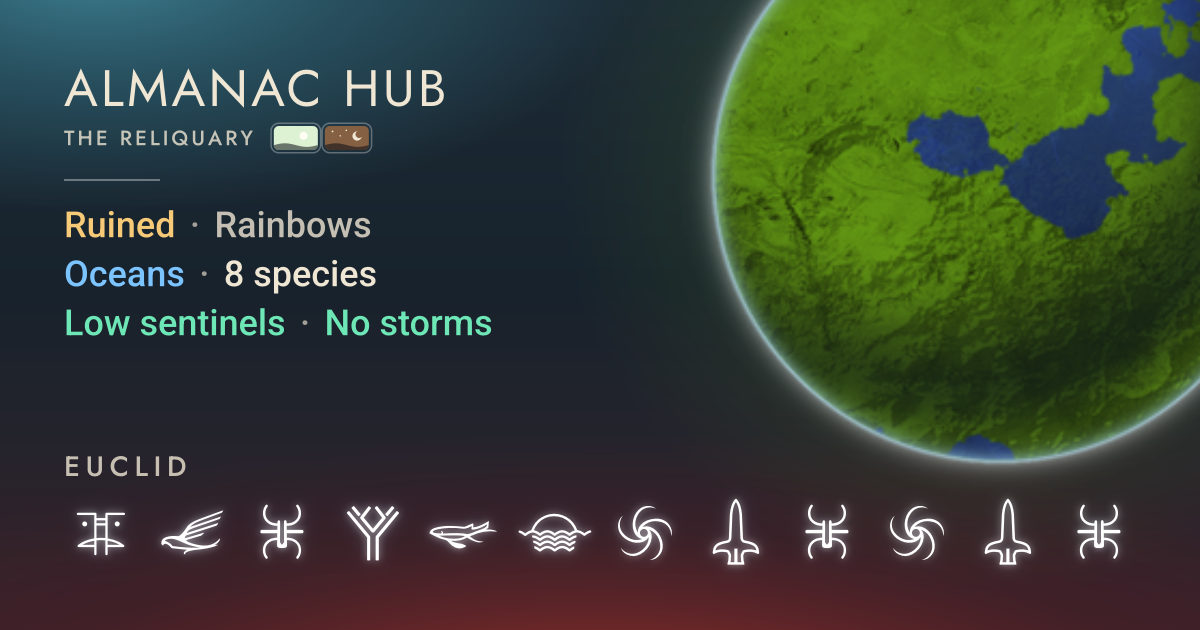
Almanac Hub, a tool to share planetary info

No Man’s Sky Almanac Almanac Hub · The Reliquary nmsalmanac.com
preview

I have not had a chance to use this yet as I am still working on the current expedition. But this looks like a great tool to share planetary info.

I have not had a chance to use this yet as I am still working on the current expedition. But this looks like a great tool to share planetary info.

0

Multitool/Euclid: S-class orange Radiant Staff with orange crystals. It's a SECONDARY weapon, please check thread for steps to follow.

preview

I left a comm station at the camp!

Ok, so for anyone who isn’t aware: All Synthesis Terminals have one primary weapon and multiple secondary weapons. Let me explain.

If you just walk up to the terminal and put in the 3 Radiant staff parts, you will find this staff:

This is the primary weapon. You will always get this first. But that’s not the one we want. To get a secondary staff, you have to take these steps:

  1. Put in the 3 parts and assemble.
  2. Go back (right-click).
  3. Assemble again.
  4. Go back one more time.
  5. Take out any one of the 3 parts and put it in your inventory. You will see the staff change colour!
  6. Put the part back in and assemble.

Now you have a secondary staff. BUT THAT IS NOT ALL.

Every terminal has multiple secondary weapons, depending on where YOU are when you interact with the terminal, e.g. standing in front of the terminal will give you a different secondary weapon than standing behind it (and different elevations will also yield different results!).

Now, to get this specific weapon, you need to stand on the right side of the Terminal, like so:

In first person, you will be looking at this:

If you interact with it from that spot, you will get the orange S-class weapon.

For example, if you stand on the left side of the terminal you’ll get another C-class in different colours. Well, I usually only check the front, back, left and right ones. But you can build up to stand higher, or down and check a bunch more. This time I was “lucky.” Sadly I really, really dislike orange, so it’s a scrapper for me. But hopefully someone will want this one and I didn’t end up wasting my time typing this. :D

In any case, enjoy!

I left a comm station at the camp!

Ok, so for anyone who isn’t aware: All Synthesis Terminals have one primary weapon and multiple secondary weapons. Let me explain.

If you just walk up to the terminal and put in the 3 Radiant staff parts, you will find this staff:

This is the primary weapon. You will always get this first. But that’s not the one we want. To get a secondary staff, you have to take these steps:

  1. Put in the 3 parts and assemble.
  2. Go back (right-click).
  3. Assemble again.
  4. Go back one more time.
  5. Take out any one of the 3 parts and put it in your inventory. You will see the staff change colour!
  6. Put the part back in and assemble.

Now you have a secondary staff. BUT THAT IS NOT ALL.

Every terminal has multiple secondary weapons, depending on where YOU are when you interact with the terminal, e.g. standing in front of the terminal will give you a different secondary weapon than standing behind it (and different elevations will also yield different results!).

Now, to get this specific weapon, you need to stand on the right side of the Terminal, like so:

In first person, you will be looking at this:

If you interact with it from that spot, you will get the orange S-class weapon.

For example, if you stand on the left side of the terminal you’ll get another C-class in different colours. Well, I usually only check the front, back, left and right ones. But you can build up to stand higher, or down and check a bunch more. This time I was “lucky.” Sadly I really, really dislike orange, so it’s a scrapper for me. But hopefully someone will want this one and I didn’t end up wasting my time typing this. :D

In any case, enjoy!

0

Multitool/Euclid: S-class Atlantid multitool, black and red, with 'antimatter' orb.

preview

I left a comm station at the Monolith.

These are the supercharged slot positions:

(Also look at that orb, it changes from black to bright white!)

I left a comm station at the Monolith.

These are the supercharged slot positions:

(Also look at that orb, it changes from black to bright white!)

0

Multitool/Euclid: S-class Atlantid multitool, black and blue, with cream-coloured orb.

preview

There is a comm station at the Monolith.

2 supercharged slots on the first row, the other 2 appear on the fourth row after adding slots:

There is a comm station at the Monolith.

2 supercharged slots on the first row, the other 2 appear on the fourth row after adding slots:

0

Euclid - Synthetic Creatures, 5.0m Walker

preview

Not as big as some of the others I’ve found, but I’m pretty sure these are the tallest Moving Castles/Towers I’ve seen in Euclid (Galaxy 00, the first galaxy).

If you can get to a Euclid portal, you have a couple of choices for walkers to help you explore.

Glyphs: 21FD-030C-790D

Not as big as some of the others I’ve found, but I’m pretty sure these are the tallest Moving Castles/Towers I’ve seen in Euclid (Galaxy 00, the first galaxy).

If you can get to a Euclid portal, you have a couple of choices for walkers to help you explore.

Glyphs: 21FD-030C-790D

0

Ehbogdenbu - Synthetic Creatures

preview

Doing the Galaxy tour, and got distracted (again) passing through #34 (hex 21) Ehbogdenbu. Saw a prime candidate for synthetic creatures and discovered the biggest walking tower I’ve encountered in the wild! 6.8m tall. It’s a bit out of the way I suppose, but they are a wonder to behold.

The planet has aggressive sentinels, so I built a base. It should simplify pacifying the local sentinels.

The darker walker isn’t native to the planet, that’s the mysterious pet I picked up somewhere, but it is pretty much the same height.

Hex address 107E-0700-7007.

Currently named “Bastion Walker 6.8” but open to suggestions.

Traveller for scale

Two walking towers

Doing the Galaxy tour, and got distracted (again) passing through #34 (hex 21) Ehbogdenbu. Saw a prime candidate for synthetic creatures and discovered the biggest walking tower I’ve encountered in the wild! 6.8m tall. It’s a bit out of the way I suppose, but they are a wonder to behold.

The planet has aggressive sentinels, so I built a base. It should simplify pacifying the local sentinels.

The darker walker isn’t native to the planet, that’s the mysterious pet I picked up somewhere, but it is pretty much the same height.

Hex address 107E-0700-7007.

Currently named “Bastion Walker 6.8” but open to suggestions.

Traveller for scale

Two walking towers

0

https://lemmy.ca/post/31721813

preview

If you’re on the Cursed Expedition, this crashed ship might be a nice upgrade from the C-class starter ship. It’s a crashed ship, so lots of repairs to get it into shape, but even partial cheap repairs early in the expedition gave it more cargo and better performance than the starter.

Found on the first rendezvous world, Ecorsfi in the Temarifi X system.

Coordinates: +39.79, -167.59 Planet Glyphs (for later retrieval): 5047.FCA7.8448

Glyphs 5047.FCA7.8448

Crashed, so a bit beat up

If you’re on the Cursed Expedition, this crashed ship might be a nice upgrade from the C-class starter ship. It’s a crashed ship, so lots of repairs to get it into shape, but even partial cheap repairs early in the expedition gave it more cargo and better performance than the starter.

Found on the first rendezvous world, Ecorsfi in the Temarifi X system.

Coordinates: +39.79, -167.59 Planet Glyphs (for later retrieval): 5047.FCA7.8448

Glyphs 5047.FCA7.8448

Crashed, so a bit beat up

0

Farm/Euclid: Stasis Device System

preview

I’ve converted a system in Euclid into a Stasis Device factory. I’ve built a base on every planet with a local Mineral, Gas, and Flora. Each base has Refiners and access to Storage.

Feel free to stop by if you’re low on Units.

Remember to turn off Multiplayer before emptying the Supply Depots.

| Base    | Mineral     | Gas        | Flora         |
------------------------------------------------------
| Alpha   | Paraffinium | Nitrogen   | Star Bulb     |
| Beta    | Dioxite     | Radon      | Frost Crystal | 
| Gamma   | Phosphorus  | Sulphurine | Solar Vine    |
| Delta   | Cobalt      | Oxygen     | Echinocactus  |
| Epsilon | Uranium     | Oxygen     | Gamma Weed    |
| Zeta    | Copper      | Oxygen     | Gutrot Flower | 

I’ve converted a system in Euclid into a Stasis Device factory. I’ve built a base on every planet with a local Mineral, Gas, and Flora. Each base has Refiners and access to Storage.

Feel free to stop by if you’re low on Units.

Remember to turn off Multiplayer before emptying the Supply Depots.

| Base    | Mineral     | Gas        | Flora         |
------------------------------------------------------
| Alpha   | Paraffinium | Nitrogen   | Star Bulb     |
| Beta    | Dioxite     | Radon      | Frost Crystal | 
| Gamma   | Phosphorus  | Sulphurine | Solar Vine    |
| Delta   | Cobalt      | Oxygen     | Echinocactus  |
| Epsilon | Uranium     | Oxygen     | Gamma Weed    |
| Zeta    | Copper      | Oxygen     | Gutrot Flower | 
0

Planet/Euclid: The Abyss—a gloomy, lush planet with chromatic fog in the Cemetery Drive system.

preview

No filters were used; I promise. The colors look “normal” when it’s (fire*) storming. Feel free to visit my base—a WIP—if you’re in the area!

*edit: I was wrong. They’re super-heated rainstorms

No filters were used; I promise. The colors look “normal” when it’s (fire*) storming. Feel free to visit my base—a WIP—if you’re in the area!

*edit: I was wrong. They’re super-heated rainstorms