showing posts tagged #opensource — clear

0

Tabrelay: let scripts and AI agents drive the Chrome you are already logged in to (MIT)

preview

I wrote Tabrelay, a small MIT-licensed tool that lets scripts and AI agents drive the Chrome you already use and are logged in to: github.com/aaronsuns/tabrelay

Why I made it: I didn’t want a second “automation browser” to log in to again (2FA, new-device checks, sites that treat it like a bot), and I didn’t want a debugging port on my everyday browser that every local program can talk to.

How it works: a Chrome extension plus one Python file (standard library only, no npm, no build step). The command sends jobs (open a page, run JavaScript, click, type, upload a file, screenshot) over 127.0.0.1 to the extension, which runs them with the Chrome DevTools Protocol. Jobs run in background windows so it doesn’t steal focus. The extension only touches sites on an allow-list that can only be edited on its own options page, and it only obeys jobs carrying a local token. It’s a CLI, not an MCP server, so any agent that can run a shell command can use it.

Honest limits: it’s a week old, Chrome/Chromium only, loaded as an unpacked extension (not on the Web Store), a page can tell a debugger is attached, and it has no auto-waiting locators like Playwright. For tests and servers, use Playwright or Puppeteer.

AI disclosure: most of the code, tests and docs were written with Claude Code. I designed it, steer it, review what goes in, and use it myself every day.

Guides and comparisons: tabrelay.zexa.se

I wrote Tabrelay, a small MIT-licensed tool that lets scripts and AI agents drive the Chrome you already use and are logged in to: github.com/aaronsuns/tabrelay

Why I made it: I didn’t want a second “automation browser” to log in to again (2FA, new-device checks, sites that treat it like a bot), and I didn’t want a debugging port on my everyday browser that every local program can talk to.

How it works: a Chrome extension plus one Python file (standard library only, no npm, no build step). The command sends jobs (open a page, run JavaScript, click, type, upload a file, screenshot) over 127.0.0.1 to the extension, which runs them with the Chrome DevTools Protocol. Jobs run in background windows so it doesn’t steal focus. The extension only touches sites on an allow-list that can only be edited on its own options page, and it only obeys jobs carrying a local token. It’s a CLI, not an MCP server, so any agent that can run a shell command can use it.

Honest limits: it’s a week old, Chrome/Chromium only, loaded as an unpacked extension (not on the Web Store), a page can tell a debugger is attached, and it has no auto-waiting locators like Playwright. For tests and servers, use Playwright or Puppeteer.

AI disclosure: most of the code, tests and docs were written with Claude Code. I designed it, steer it, review what goes in, and use it myself every day.

Guides and comparisons: tabrelay.zexa.se
0

Melarka: an AGPL music server for the family, with its own Android and iPhone apps (AI-assisted, disclosed)

GitHub GitHub - aaronsuns/melarka: Self-hosted music server for a family, with native iPhone and Android apps: songs from YouTube or your own files, synced lyrics, car autoplay, offline favorites github.com
preview

I built a music server for my family and put it under AGPL-3.0: Melarka. Go + SQLite in one Docker container, plus native Android (Kotlin) and iPhone apps, all in one public repo: github.com/aaronsuns/melarka

Why it might be of interest here:

  • Everything is in the repo: server, both apps, docs and the build scripts. You can run it, read it and fork it.
  • It reads your own music folders and never rewrites your files or tags. No account at a third party, no tracking; the only call home is an optional, opt-in install ping.
  • An account per family member (own favorites, playlists, personal radio), synced lyrics, an offline cache for walks, and the Android app starts playing when the phone connects to the car.
  • Honest limits: it has its own API, so it is not Subsonic-compatible, and the iPhone app is not in the App Store (Apple’s developer fee for something that earns nothing); you install it from a Mac with Xcode.

AI disclosure: most of the code, tests and docs were written with Claude Code. I designed it, steer it, review what goes in and use it every day on our phones. I know that is a sore point in open source; the repo says so up front, and I’d rather have the argument in the open than hide it.

Site with a one-minute tour: melarka.zexa.se

I built a music server for my family and put it under AGPL-3.0: Melarka. Go + SQLite in one Docker container, plus native Android (Kotlin) and iPhone apps, all in one public repo: github.com/aaronsuns/melarka

Why it might be of interest here:

  • Everything is in the repo: server, both apps, docs and the build scripts. You can run it, read it and fork it.
  • It reads your own music folders and never rewrites your files or tags. No account at a third party, no tracking; the only call home is an optional, opt-in install ping.
  • An account per family member (own favorites, playlists, personal radio), synced lyrics, an offline cache for walks, and the Android app starts playing when the phone connects to the car.
  • Honest limits: it has its own API, so it is not Subsonic-compatible, and the iPhone app is not in the App Store (Apple’s developer fee for something that earns nothing); you install it from a Mac with Xcode.

AI disclosure: most of the code, tests and docs were written with Claude Code. I designed it, steer it, review what goes in and use it every day on our phones. I know that is a sore point in open source; the repo says so up front, and I’d rather have the argument in the open than hide it.

Site with a one-minute tour: melarka.zexa.se

0

Redox OS Gets Golang Working, GIMP Ported & Simplified AI Policy

Redox OS Gets Golang Working, GIMP Ported & Simplified AI Policy www.phoronix.com
preview

The Rust-based Redox OS open-source operating system is now out with its October development summary that highlights recent software ports, progress on NUMA, and other enhancements made to this from-scratch platform.

Redox OS in October managed to get the Go programming language compiler working on the platform. Golang on Redox OS is working both for cross-compilation and self-hosted compilation. Golang is adapted to use Relibc.

Redox OS also managed to get the GIMP image editor working after months of work. Redox OS has also updated its Servo browser engine port against the newer Servo 0.7 code state.

Redox OS has also confirmed its initial NUMA support is working nicely, fixed RISC-V dynamic linking, and implemented initial rootless package installation in user equivalent paths.

Redox OS in October also simplified its AI policy down to:

"Redox OS does not accept contributions generated by LLMs (Large Language Models), sometimes also referred to as “AI”."

More details on these enhancements plus driver and kernel improvements and more via the Redox-OS.org blog.

The Rust-based Redox OS open-source operating system is now out with its October development summary that highlights recent software ports, progress on NUMA, and other enhancements made to this from-scratch platform.

Redox OS in October managed to get the Go programming language compiler working on the platform. Golang on Redox OS is working both for cross-compilation and self-hosted compilation. Golang is adapted to use Relibc.

Redox OS also managed to get the GIMP image editor working after months of work. Redox OS has also updated its Servo browser engine port against the newer Servo 0.7 code state.

Redox OS has also confirmed its initial NUMA support is working nicely, fixed RISC-V dynamic linking, and implemented initial rootless package installation in user equivalent paths.

Redox OS in October also simplified its AI policy down to:

"Redox OS does not accept contributions generated by LLMs (Large Language Models), sometimes also referred to as “AI”."

More details on these enhancements plus driver and kernel improvements and more via the Redox-OS.org blog.

0

Developer's $300 Embroidery Machine Required a Subscription, So She Built This Open Source Tool

It's FOSS Developer's $300 Embroidery Machine Required a Subscription, So She Built This Open Source Tool itsfoss.com
preview

A tinkerer, Kathy Korevec, has made ZigZag available under the Apache 2.0 license. She says that the entire app was built with AI, using ChatGPT, and her goal was to get software made to her specs, similar to the Adobe suite, but with MCP support built in.

That MCP support is a built-in server that lets AI agents draw and edit in the same window.

Her post about this on Hacker News has already managed to reach top 10 status (over a 48-hour period), and she has been answering questions there about how this was built and which machines it supports.

ZigZag: Why develop this?

This was built around a Brother Skitch PP1 embroidery machine that she says cost her around $300.

You see, the Skitch needs Brother’s Artspira app to operate. While the app is free and works with the machine, a paid plan called Artspira+ adds useful extras such as digitizing images into embroidery patterns and creating cross-stitch patterns.

Kathy says the free version is limited in colors and tools, and she believes some of the clip art is reserved for subscribers. She also guesses Brother sold the machine at a loss at first because of the subscription.

That last bit checks out, seeing what many hardware manufacturers are doing.

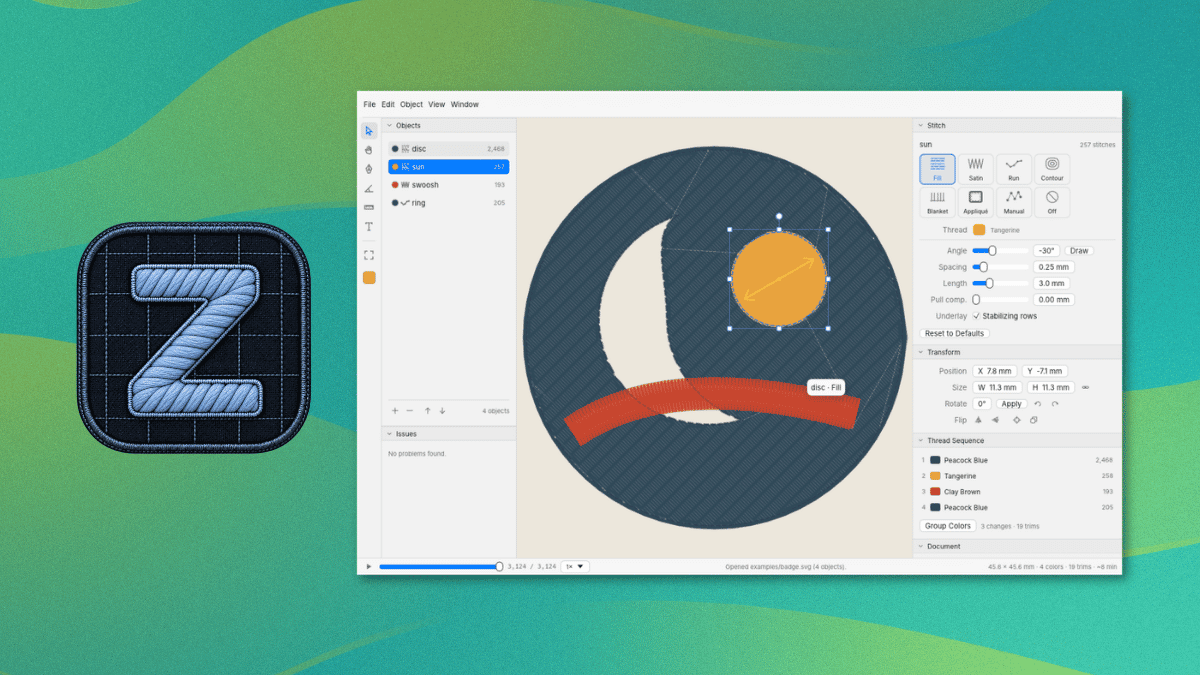
ZigZag imports SVG art and can trace PNG and JPEG images into shapes. It covers 11 stitch types, including fill, satin, and appliqué, with a preview of the stitches being shown in the editor.

As for the MCP server, it lets an AI agent inspect the open design, add and edit objects and text, trace images, preview the stitches, and export files. It can also control a Skitch device, and each action counts as one undo step.

This is not something new.

Open source embroidery tools existed before ZigZag. People have brought up projects like Ink/Stitch, an Inkscape extension, and Respira already lets people send designs to the Skitch without Artspira.

The project also credits Respira for the Bluetooth protocol and sewing flow. Kathy says she reverse-engineered the protocol herself and that her agent used Respira to verify it. Get sewing

Currently, ZigZag is available for Windows and macOS. You can grab the latest release from the project website or its GitHub releases page. ZigZag

The README covers installation, Bluetooth pairing, and the MCP server, and it advises against firmware updates on the Skitch. Linux users can follow its steps for building ZigZag from source with Rust.

The Brother Skitch PP1 is the only machine ZigZag sends designs to over Bluetooth, and Artspira needs to be closed first since the Skitch can only talk to one app at a time.

For other machines, ZigZag can export PES, DST, EXP, JEF, or VP3 files.

A tinkerer, Kathy Korevec, has made ZigZag available under the Apache 2.0 license. She says that the entire app was built with AI, using ChatGPT, and her goal was to get software made to her specs, similar to the Adobe suite, but with MCP support built in.

That MCP support is a built-in server that lets AI agents draw and edit in the same window.

Her post about this on Hacker News has already managed to reach top 10 status (over a 48-hour period), and she has been answering questions there about how this was built and which machines it supports.

ZigZag: Why develop this?

This was built around a Brother Skitch PP1 embroidery machine that she says cost her around $300.

You see, the Skitch needs Brother’s Artspira app to operate. While the app is free and works with the machine, a paid plan called Artspira+ adds useful extras such as digitizing images into embroidery patterns and creating cross-stitch patterns.

Kathy says the free version is limited in colors and tools, and she believes some of the clip art is reserved for subscribers. She also guesses Brother sold the machine at a loss at first because of the subscription.

That last bit checks out, seeing what many hardware manufacturers are doing.

ZigZag imports SVG art and can trace PNG and JPEG images into shapes. It covers 11 stitch types, including fill, satin, and appliqué, with a preview of the stitches being shown in the editor.

As for the MCP server, it lets an AI agent inspect the open design, add and edit objects and text, trace images, preview the stitches, and export files. It can also control a Skitch device, and each action counts as one undo step.

This is not something new.

Open source embroidery tools existed before ZigZag. People have brought up projects like Ink/Stitch, an Inkscape extension, and Respira already lets people send designs to the Skitch without Artspira.

The project also credits Respira for the Bluetooth protocol and sewing flow. Kathy says she reverse-engineered the protocol herself and that her agent used Respira to verify it. Get sewing

Currently, ZigZag is available for Windows and macOS. You can grab the latest release from the project website or its GitHub releases page. ZigZag

The README covers installation, Bluetooth pairing, and the MCP server, and it advises against firmware updates on the Skitch. Linux users can follow its steps for building ZigZag from source with Rust.

The Brother Skitch PP1 is the only machine ZigZag sends designs to over Bluetooth, and Artspira needs to be closed first since the Skitch can only talk to one app at a time.

For other machines, ZigZag can export PES, DST, EXP, JEF, or VP3 files.

0

Nextcloud Releases Free Desktop Office Suite Built on Euro-Office

Linuxiac Nextcloud Releases Free Desktop Office Suite Built on Euro-Office linuxiac.com
preview

Nextcloud has announced its new Office Desktop app, a free, open-source office suite powered by Euro-Office, for Linux, Windows, and macOS. The application allows users to create and edit documents locally, work offline, and collaborate with others through Nextcloud Hub.

The desktop application was announced in September as part of Nextcloud Hub 26 Summer. Now, ready-to-use builds are available for download, letting users install the office suite directly on their computers without a Nextcloud server for local document editing.

For those unfamiliar, Euro-Office is a European-led open-source project based on a fork of the ONLYOFFICE codebase, licensed under AGPLv3. It was established to improve development transparency, simplify external contributions, and provide an independently governed office solution.

According to its maintainers, the decision to fork ONLYOFFICE followed concerns about limited upstream collaboration, difficulties building the software from source, and proprietary components in parts of its ecosystem. The project is supported by several European technology companies and organizations, including Nextcloud, IONOS, OpenProject, Proton, and XWiki.

As for the new desktop application, it includes editors for text documents, spreadsheets, presentations, and PDFs. It supports Microsoft’s DOCX, XLSX, and PPTX formats alongside OpenDocument formats such as ODT, ODS, and ODP.

One of its selling points is offline operations. Users can open, edit, and save documents directly on their computers without an internet connection. When connected to a Nextcloud instance, the application provides access to cloud-stored files and enables real-time collaborative editing.

Moreover, users can connect multiple Nextcloud instances to the same application, allowing them to work with documents stored across different servers without switching between separate desktop clients.

The application also uses fonts installed locally on the operating system, including custom and corporate fonts. Other capabilities include digital document signatures, password protection, and restrictions on editing, commenting, and form filling.

Regarding platform availability, Linux users can download DEB packages for Debian and Ubuntu or RPM packages for Fedora and other RPM-based distributions. Windows builds are available for x64 and ARM64 systems, while macOS support currently targets Apple Silicon.

Nextcloud distributes signed builds intended for production use, while the Euro-Office project also provides unsigned community builds for testing and development. Both versions are built from the same source code, which is publicly available on GitHub.

The Nextcloud Office Desktop app is available now from the official announcement, which also includes installation details and instructions for connecting the application to Nextcloud Hub.

Nextcloud has announced its new Office Desktop app, a free, open-source office suite powered by Euro-Office, for Linux, Windows, and macOS. The application allows users to create and edit documents locally, work offline, and collaborate with others through Nextcloud Hub.

The desktop application was announced in September as part of Nextcloud Hub 26 Summer. Now, ready-to-use builds are available for download, letting users install the office suite directly on their computers without a Nextcloud server for local document editing.

For those unfamiliar, Euro-Office is a European-led open-source project based on a fork of the ONLYOFFICE codebase, licensed under AGPLv3. It was established to improve development transparency, simplify external contributions, and provide an independently governed office solution.

According to its maintainers, the decision to fork ONLYOFFICE followed concerns about limited upstream collaboration, difficulties building the software from source, and proprietary components in parts of its ecosystem. The project is supported by several European technology companies and organizations, including Nextcloud, IONOS, OpenProject, Proton, and XWiki.

As for the new desktop application, it includes editors for text documents, spreadsheets, presentations, and PDFs. It supports Microsoft’s DOCX, XLSX, and PPTX formats alongside OpenDocument formats such as ODT, ODS, and ODP.

One of its selling points is offline operations. Users can open, edit, and save documents directly on their computers without an internet connection. When connected to a Nextcloud instance, the application provides access to cloud-stored files and enables real-time collaborative editing.

Moreover, users can connect multiple Nextcloud instances to the same application, allowing them to work with documents stored across different servers without switching between separate desktop clients.

The application also uses fonts installed locally on the operating system, including custom and corporate fonts. Other capabilities include digital document signatures, password protection, and restrictions on editing, commenting, and form filling.

Regarding platform availability, Linux users can download DEB packages for Debian and Ubuntu or RPM packages for Fedora and other RPM-based distributions. Windows builds are available for x64 and ARM64 systems, while macOS support currently targets Apple Silicon.

Nextcloud distributes signed builds intended for production use, while the Euro-Office project also provides unsigned community builds for testing and development. Both versions are built from the same source code, which is publicly available on GitHub.

The Nextcloud Office Desktop app is available now from the official announcement, which also includes installation details and instructions for connecting the application to Nextcloud Hub.

0

WhatsApp Web audio/video calls in LibreWolf: mic cuts out, video also broken (fine in Brave)

preview

cross-posted from: lemmy.ml/post/55341521

Hi all,

WhatsApp Web calls are unreliable in LibreWolf on Debian 13. Both voice and video calls have problems:

  • The receiver sometimes hears nothing from me (mic works intermittently)
  • Video calls also fail or glitch
  • The same calls work fine in Brave on the same machine

Already tried:

  • RFP disabled, fingerprintingProtection enabled (no change when disabled)
  • media.peerconnection.enabled = true
  • Mic/camera permissions allowed for web.whatsapp.com

Has anyone gotten WhatsApp Web calls working reliably in LibreWolf, and what did you change?

cross-posted from: lemmy.ml/post/55341521

Hi all,

WhatsApp Web calls are unreliable in LibreWolf on Debian 13. Both voice and video calls have problems:

  • The receiver sometimes hears nothing from me (mic works intermittently)
  • Video calls also fail or glitch
  • The same calls work fine in Brave on the same machine

Already tried:

  • RFP disabled, fingerprintingProtection enabled (no change when disabled)
  • media.peerconnection.enabled = true
  • Mic/camera permissions allowed for web.whatsapp.com

Has anyone gotten WhatsApp Web calls working reliably in LibreWolf, and what did you change?

0

Licensing question - what is an open source license that guarantees forks of a decompiled clean room app cannot contain ads, telemetry, or freemium features?

preview

There is a health app that is very important to sufferers of a specific disease and it is freemium and I find this detestable. I am doing a clean room rewrite of it in its entirety and plan to release it on fdroid. Is there a license that prevents some ghoul from forking it to profit from people’s misfortunes? I am trying to avoid legal issues by being clean room but will try to keep my publishing of the app as anonymous as possible regardless. Thanks

There is a health app that is very important to sufferers of a specific disease and it is freemium and I find this detestable. I am doing a clean room rewrite of it in its entirety and plan to release it on fdroid. Is there a license that prevents some ghoul from forking it to profit from people’s misfortunes? I am trying to avoid legal issues by being clean room but will try to keep my publishing of the app as anonymous as possible regardless. Thanks

0

termchat.app 0.6.0 – an E2EE messenger for the terminal, desktop and Android (Rust, AGPL, self-hostable relay)

termchat.app termchat.app: encrypted messenger without a phone number, for terminal, desktop and Android termchat.app
preview

termchat.app is a private messenger for text and documents: a terminal app, a desktop app for macOS, Linux and Windows, and an Android app, on one engine.

  • Olm/Double Ratchet from vodozemac, no home-made crypto
  • no accounts, no phone numbers: a key pair and a nickname
  • the relay is one binary with SQLite; it stores public keys and a queue of padded ciphertext, nothing else. Run your own for your friends, optionally as an onion service
  • Tor built in, with bridges
  • reproducible builds, build attestations, AGPL-3.0

New in 0.6.0: the idle lock is a setting (1, 5, 15 or 30 minutes). The 0.5.x releases before it fixed findings of a source review and a relay bug that held back messages until the next reconnect.

Not independently audited yet, and the relay can see who talks to whom and when; the threat model spells out the rest.

Code: github.com/prophecy1345/termchat Threat model: github.com/prophecy1345/…/threat-model.md Self-hosting guide: github.com/prophecy1345/termchat/…/self-host.md

termchat.app is a private messenger for text and documents: a terminal app, a desktop app for macOS, Linux and Windows, and an Android app, on one engine.

  • Olm/Double Ratchet from vodozemac, no home-made crypto
  • no accounts, no phone numbers: a key pair and a nickname
  • the relay is one binary with SQLite; it stores public keys and a queue of padded ciphertext, nothing else. Run your own for your friends, optionally as an onion service
  • Tor built in, with bridges
  • reproducible builds, build attestations, AGPL-3.0

New in 0.6.0: the idle lock is a setting (1, 5, 15 or 30 minutes). The 0.5.x releases before it fixed findings of a source review and a relay bug that held back messages until the next reconnect.

Not independently audited yet, and the relay can see who talks to whom and when; the threat model spells out the rest.

Code: github.com/prophecy1345/termchat Threat model: github.com/prophecy1345/…/threat-model.md Self-hosting guide: github.com/prophecy1345/termchat/…/self-host.md

0

I had Libreoffice back then!!???

preview

So I was just looking at my artwork on my 13 year old family desktop and found out that Libreoffice was on the homescreen. I was SH9CKED to see that since me and my family probably didn’t even know a single bit of Libreoffice

So I was just looking at my artwork on my 13 year old family desktop and found out that Libreoffice was on the homescreen. I was SH9CKED to see that since me and my family probably didn’t even know a single bit of Libreoffice

0

Any good email providers?

preview

Requirements

  1. FOSS
  2. No, minimal, or human-checked AI code
  3. Free-to-use
  4. I’m asking for FOSS PROVIDERS, not proprietary providers with FOSS clients
  5. Not under authoritarian juristiction
  6. At least one independent security audit
  7. Lightweight
  8. Low on memory

Optional things:

  1. Self-hostable
  2. Environmental ideals
  3. Under European juristiction
  4. Not hosted on Github

Suggest MULTUPLE providers as I seek to decentralize the services I use ad much as possible

Requirements

  1. FOSS
  2. No, minimal, or human-checked AI code
  3. Free-to-use
  4. I’m asking for FOSS PROVIDERS, not proprietary providers with FOSS clients
  5. Not under authoritarian juristiction
  6. At least one independent security audit
  7. Lightweight
  8. Low on memory

Optional things:

  1. Self-hostable
  2. Environmental ideals
  3. Under European juristiction
  4. Not hosted on Github

Suggest MULTUPLE providers as I seek to decentralize the services I use ad much as possible

0

OctoLab: a free, open-source GitLab client for Android (gitlab.com and self-hosted)

preview

I’ve been building OctoLab, an unofficial GitLab client for Android. It works with gitlab.com and self-hosted GitLab (CE/EE), started as a GitLab-focused fork of OctoDroid, and is Apache 2.0 licensed.

What it does:

  • Issues and merge requests: browse, create, edit, comment, review diffs, subscribe/unsubscribe
  • To-dos | Participating: your to-dos plus new comments on issues and MRs you take part in, with notifications and counts per account
  • Your activity as a timeline, grouped by project
  • Projects: files, README, branches, tags, commits, releases, code search; images, videos and files open in the app
  • Bookmarks for projects, groups, issues, MRs, commits and snippets
  • Sign in with gitlab.com in your browser (OAuth), or with a token on any GitLab instance
  • Epics (Premium/Ultimate): a group’s epics with their child items, comments and reactions
  • Role-aware: shows what your GitLab role allows; what it doesn’t is hidden or explained
  • Multi-account (self-hosted and gitlab.com side by side), dark and light theme

No tracking, no analytics, no proprietary services.

F-Droid: f-droid.org/packages/com.secninjaz.octolab/

GitHub (releases, Obtainium): github.com/secninjaz/OctoLab

Feedback and bug reports welcome.

Edit: How it’s built: development happens on our own GitLab instance in small commits; each release is squash-merged into one commit on GitHub, so issue numbers in commit messages and changelogs refer to that internal tracker. Development is AI-assisted, as disclosed in the README; I review and test every change on my own devices before release, and the full changelog is in each GitHub release.

Development is AI-assisted (disclosed in the README); every change is reviewed and tested by a human.

I’ve been building OctoLab, an unofficial GitLab client for Android. It works with gitlab.com and self-hosted GitLab (CE/EE), started as a GitLab-focused fork of OctoDroid, and is Apache 2.0 licensed.

What it does:

  • Issues and merge requests: browse, create, edit, comment, review diffs, subscribe/unsubscribe
  • To-dos | Participating: your to-dos plus new comments on issues and MRs you take part in, with notifications and counts per account
  • Your activity as a timeline, grouped by project
  • Projects: files, README, branches, tags, commits, releases, code search; images, videos and files open in the app
  • Bookmarks for projects, groups, issues, MRs, commits and snippets
  • Sign in with gitlab.com in your browser (OAuth), or with a token on any GitLab instance
  • Epics (Premium/Ultimate): a group’s epics with their child items, comments and reactions
  • Role-aware: shows what your GitLab role allows; what it doesn’t is hidden or explained
  • Multi-account (self-hosted and gitlab.com side by side), dark and light theme

No tracking, no analytics, no proprietary services.

F-Droid: f-droid.org/packages/com.secninjaz.octolab/

GitHub (releases, Obtainium): github.com/secninjaz/OctoLab

Feedback and bug reports welcome.

Edit: How it’s built: development happens on our own GitLab instance in small commits; each release is squash-merged into one commit on GitHub, so issue numbers in commit messages and changelogs refer to that internal tracker. Development is AI-assisted, as disclosed in the README; I review and test every change on my own devices before release, and the full changelog is in each GitHub release.

Development is AI-assisted (disclosed in the README); every change is reviewed and tested by a human.

0

Language learning social platform

LangX LangX – Language Exchange App: Practice with Real People langx.io
preview

I just stumbled across LangX which has been amazing since I’ve been so dissatisfied with HelloTalk. I started using HelloTalk before I knew anything about user data privacy or open source software. Now that I’ve gained some technological insight, proprietary ad-driven software feels gross.

Anyhoo, LangX seems to have a generous free tier and their annual subscription is honestly not that expensive compared to other languages learning programs out there.

It is new enough that the user base is small, but it reminds me of Lemmy where the best thing people could offer it is participation. I’m usually a lurker, but I wanted to share because I enjoy learning Spanish, I enjoy open source software, and I want others to try it too!

  • p.s. I am not affiliated with LangX whatsoever and this genuinely what I wanted to write.

I just stumbled across LangX which has been amazing since I’ve been so dissatisfied with HelloTalk. I started using HelloTalk before I knew anything about user data privacy or open source software. Now that I’ve gained some technological insight, proprietary ad-driven software feels gross.

Anyhoo, LangX seems to have a generous free tier and their annual subscription is honestly not that expensive compared to other languages learning programs out there.

It is new enough that the user base is small, but it reminds me of Lemmy where the best thing people could offer it is participation. I’m usually a lurker, but I wanted to share because I enjoy learning Spanish, I enjoy open source software, and I want others to try it too!

  • p.s. I am not affiliated with LangX whatsoever and this genuinely what I wanted to write.
0

Sprout: Open Source motherboard that brings iPods back to life

preview

open-electronics.org/sprout-the-open-source-mothe…

Sprout is an open source replacement motherboard that brings third- and fourth-generation iPods and the iPod Mini back to life. It installs without soldering and reuses the original shell, monochrome display and click wheel. In place of the old electronics come Bluetooth, USB-C, a high-fidelity DAC and microSD storage. The project is by Certain Things and blends the tactile nostalgia of early-2000s Apple design with today’s connectivity: a dedicated music player that does one thing, but does it well.

Assembly doesn’t require a soldering bench. The board takes the place of the original logic board inside the same shell, so the display and click wheel stay the ones you already have in your hands.

www.crowdsupply.com/…/sprout-pi-mainboard

certainthings.studio/sprout/

open-electronics.org/sprout-the-open-source-mothe…

Sprout is an open source replacement motherboard that brings third- and fourth-generation iPods and the iPod Mini back to life. It installs without soldering and reuses the original shell, monochrome display and click wheel. In place of the old electronics come Bluetooth, USB-C, a high-fidelity DAC and microSD storage. The project is by Certain Things and blends the tactile nostalgia of early-2000s Apple design with today’s connectivity: a dedicated music player that does one thing, but does it well.

Assembly doesn’t require a soldering bench. The board takes the place of the original logic board inside the same shell, so the display and click wheel stay the ones you already have in your hands.

www.crowdsupply.com/…/sprout-pi-mainboard

certainthings.studio/sprout/

0

Critical Apache HTTP/2 Flaw Could Let Unauthenticated Attackers Execute Code Remotely

preview

A critical flaw in Apache HTTP Server’s HTTP/2 module, mod_http2, can let a remote attacker run code on the server. Tracked as CVE-2026-119618, it affects versions 2.4.55 through 2.4.70 and is fixed in version 2.4.71, released yesterday.

Only servers with HTTP/2 enabled are affected, according to Red Hat, which ships the server as part of Red Hat Enterprise Linux.

An attacker who can reach the server needs no authentication to exploit the flaw and could take full control of the server process, the Linux vendor says. It rates the flaw 9.8 out of 10 on the CVSS scale.

The vendor’s assessment, published yesterday, also says “public research has demonstrated a reliable exploit” against a server in its default configuration with mod_http2 enabled. It does not name or link that research. Security company Wiz said later that day that no exploit was available and that no exploitation in the wild had been reported.

HTTP/2 runs only where the Protocols directive turns it on, as the module documentation explains. The directive uses h2 for HTTP/2 over TLS and h2c for HTTP/2 over plain TCP. It can be set for the whole server or for a single virtual host, so admins should check the server-wide setting and every virtual host.

Standalone builds of the module, released on GitHub as mod_h2, are affected from version 2.0.8 through 2.0.42.

Admins who run the Apache HTTP Server project’s own releases should move to version 2.4.71, the fixed release named in its security advisory. That release also fixes a crash in mod_md, rated important, and a one-byte overwrite of stack memory in mod_vhost_alias, rated low.

The distributions in the table below ship their own builds of the server, with their own package version numbers. On Red Hat Enterprise Linux 9, for example, the fix ships as mod_http2-2.0.26-7.el9_9.1.

Red Hat shipped fixes for Red Hat Enterprise Linux 9 and 10 yesterday and rates the flaw Important on those releases rather than Critical. Their mod_http2 packages give each HTTP/2 stream its own memory allocator, which makes an attack much harder, according to the vendor’s severity assessment. Red Hat Enterprise Linux 8 and earlier do not contain the vulnerable code.

The Debian rows come from Debian’s security tracker, and the Amazon row from the Amazon Linux tracker. Ubuntu’s CVE tracker had no page for the flaw when The Hacker News checked it today.

The Apache HTTP Server advisory offers no workaround. In its vulnerability analysis, Wiz advises admins who cannot update yet to remove h2 and h2c from the Protocols directive, leaving Protocols http/1.1.

The standalone mod_h2 project has published no fixed release so far. Its release list on GitHub ends at 2.0.42, the last affected version, and its repository has been read-only since it was archived on June 9. The Protocols change above also applies to servers that use those builds.

The flaw was reported on October 26 by Anthropic’s OSS Scanner, a free scanning service for open-source projects that uses the company’s AI models. Anthony Weems and Simon Scannell of Google Cloud Vulnerability Research reported it last week.

An earlier HTTP/2 flaw, CVE-2026-23918, was fixed in version 2.4.67, released on May 4. Servers updated to that release, or to any later one up to 2.4.70, still run a version that the new flaw affects.

A critical flaw in Apache HTTP Server’s HTTP/2 module, mod_http2, can let a remote attacker run code on the server. Tracked as CVE-2026-119618, it affects versions 2.4.55 through 2.4.70 and is fixed in version 2.4.71, released yesterday.

Only servers with HTTP/2 enabled are affected, according to Red Hat, which ships the server as part of Red Hat Enterprise Linux.

An attacker who can reach the server needs no authentication to exploit the flaw and could take full control of the server process, the Linux vendor says. It rates the flaw 9.8 out of 10 on the CVSS scale.

The vendor’s assessment, published yesterday, also says “public research has demonstrated a reliable exploit” against a server in its default configuration with mod_http2 enabled. It does not name or link that research. Security company Wiz said later that day that no exploit was available and that no exploitation in the wild had been reported.

HTTP/2 runs only where the Protocols directive turns it on, as the module documentation explains. The directive uses h2 for HTTP/2 over TLS and h2c for HTTP/2 over plain TCP. It can be set for the whole server or for a single virtual host, so admins should check the server-wide setting and every virtual host.

Standalone builds of the module, released on GitHub as mod_h2, are affected from version 2.0.8 through 2.0.42.

Admins who run the Apache HTTP Server project’s own releases should move to version 2.4.71, the fixed release named in its security advisory. That release also fixes a crash in mod_md, rated important, and a one-byte overwrite of stack memory in mod_vhost_alias, rated low.

The distributions in the table below ship their own builds of the server, with their own package version numbers. On Red Hat Enterprise Linux 9, for example, the fix ships as mod_http2-2.0.26-7.el9_9.1.

Red Hat shipped fixes for Red Hat Enterprise Linux 9 and 10 yesterday and rates the flaw Important on those releases rather than Critical. Their mod_http2 packages give each HTTP/2 stream its own memory allocator, which makes an attack much harder, according to the vendor’s severity assessment. Red Hat Enterprise Linux 8 and earlier do not contain the vulnerable code.

The Debian rows come from Debian’s security tracker, and the Amazon row from the Amazon Linux tracker. Ubuntu’s CVE tracker had no page for the flaw when The Hacker News checked it today.

The Apache HTTP Server advisory offers no workaround. In its vulnerability analysis, Wiz advises admins who cannot update yet to remove h2 and h2c from the Protocols directive, leaving Protocols http/1.1.

The standalone mod_h2 project has published no fixed release so far. Its release list on GitHub ends at 2.0.42, the last affected version, and its repository has been read-only since it was archived on June 9. The Protocols change above also applies to servers that use those builds.

The flaw was reported on October 26 by Anthropic’s OSS Scanner, a free scanning service for open-source projects that uses the company’s AI models. Anthony Weems and Simon Scannell of Google Cloud Vulnerability Research reported it last week.

An earlier HTTP/2 flaw, CVE-2026-23918, was fixed in version 2.4.67, released on May 4. Servers updated to that release, or to any later one up to 2.4.70, still run a version that the new flaw affects.

0

Help me choose my daily browser (Android + Linux): hard privacy AND ethics constraints

preview

cross-posted from: lemmy.ml/post/55238685

no baked-in trackers/analytics, No VC backing, Big Tech parent, or crypto schemes. aggressive ad/tracker blocking, fingerprinting resistance, working YouTube ad blocking, extension support, smooth Android + Linux use.

What’s your daily driver under these constraints, and what tradeoff did you accept?

cross-posted from: lemmy.ml/post/55238685

no baked-in trackers/analytics, No VC backing, Big Tech parent, or crypto schemes. aggressive ad/tracker blocking, fingerprinting resistance, working YouTube ad blocking, extension support, smooth Android + Linux use.

What’s your daily driver under these constraints, and what tradeoff did you accept?