

0

Flare: Browse Mastodon, Bluesky, X, Misskey, Nostr, Pixiv, Fanbox and RSS all in one app. One timeline, all your accounts, cross-post everywhere.

GitHub GitHub - flaresocialapp/Flare: Browse Mastodon, Bluesky, X, Misskey, Nostr, Pixiv, Fanbox and RSS all in one app. One timeline, all your accounts, cross-post everywhere. github.com
preview

cross-posted from: feddit.online/…/flare-browse-mastodon-bluesky-x-m…

cross-posted from: feddit.online/…/flare-browse-mastodon-bluesky-x-m…

0

Codeberg.org not reachable

preview

As you probably noticed, our domain codeberg.org is entirely unreachable. It was registered with namesilo and entirely disappeared from our account. We’re waiting for their customer support to investigate the situation. No, we didn’t forget to renew. There are no suspicious logins in the login history. There is no entry about the situation in the account’s domain history. We’ll try setting up a workaround on our codeberg.eu domain ASAP.

Update: We have received the confirmation that our domain was suspended and our case got forwarded to the abuse team. We’re still waiting for a final decision.

We decided not to enable codeberg.eu as a quick workaround: There are several technical difficulties (e.g. multi-domain support, SEO, Two-Factor-Authentication). The benefit of a temporary workaround compared to the effort is quite low (updating all the Git remotes and other references). We hear you about domain resiliency and independence from a single point of failure. However, activating a second domain is a long-term project and nothing we can pull of within a few hours.

social.anoxinon.de/…/117636437840688845

As you probably noticed, our domain codeberg.org is entirely unreachable. It was registered with namesilo and entirely disappeared from our account. We’re waiting for their customer support to investigate the situation. No, we didn’t forget to renew. There are no suspicious logins in the login history. There is no entry about the situation in the account’s domain history. We’ll try setting up a workaround on our codeberg.eu domain ASAP.

Update: We have received the confirmation that our domain was suspended and our case got forwarded to the abuse team. We’re still waiting for a final decision.

We decided not to enable codeberg.eu as a quick workaround: There are several technical difficulties (e.g. multi-domain support, SEO, Two-Factor-Authentication). The benefit of a temporary workaround compared to the effort is quite low (updating all the Git remotes and other references). We hear you about domain resiliency and independence from a single point of failure. However, activating a second domain is a long-term project and nothing we can pull of within a few hours.

social.anoxinon.de/…/117636437840688845

0

"My Keynote at SeaGL and LLM-gen-AI-assisted Reverse Engineering" - Denver Gingerich, Software Freedom Conservancy

Software Freedom Conservancy My Keynote at SeaGL and LLM-gen-AI-assisted Reverse Engineering sfconservancy.org
preview

The article has many in text links, which I didn’t copy here. Here is an excerpt of the article:

Over the past few months, there have been an increasing number of reports of people successfully gaining access to their own devices that were designed to prevent them from installing their own updates and modifications. Nearly every one of these reports notes that an LLM-gen-AI was used. While there are obviously a huge number of issues with LLM-gen-AIs (as we note in our LLM-gen-AI recommendations), it is hard to ignore the benefits to people’s digital autonomy that reverse engineering like this brings.

As an example, one device that was previously difficult to install updates on was recently freed by OpenWrt (part of SFC). Specifically, the Zyxel XS1930 (a 10- or 12-port network switch, with dual-core 1.0 GHz MIPS CPU), which ships with a fully proprietary OS called ZyNOS, has been upgraded to OpenWrt using the ZyNOS web UI, which only recently became feasible, thanks to the efforts of developers using LLM-gen-AI. Previous efforts to install OpenWrt or other Linux-based systems on the XS1930 required hardware modifications, but now people can update to OpenWrt in a couple of minutes, ensuring they will be able to maintain the security of their device long after Zyxel stops supporting it, not to mention all the new (OpenWrt) features they can now enable if they so choose.

There are many other recent examples of such successful reverse engineering efforts. I covered several of these in the keynote at SeaGL a couple weeks ago (including a guitar amp, the Meta Quest bootloader, a variety of music gear, and the Nintendo Switch 2 - see Slide 16 of the slides for details). Since then

The article has many in text links, which I didn’t copy here. Here is an excerpt of the article:

Over the past few months, there have been an increasing number of reports of people successfully gaining access to their own devices that were designed to prevent them from installing their own updates and modifications. Nearly every one of these reports notes that an LLM-gen-AI was used. While there are obviously a huge number of issues with LLM-gen-AIs (as we note in our LLM-gen-AI recommendations), it is hard to ignore the benefits to people’s digital autonomy that reverse engineering like this brings.

As an example, one device that was previously difficult to install updates on was recently freed by OpenWrt (part of SFC). Specifically, the Zyxel XS1930 (a 10- or 12-port network switch, with dual-core 1.0 GHz MIPS CPU), which ships with a fully proprietary OS called ZyNOS, has been upgraded to OpenWrt using the ZyNOS web UI, which only recently became feasible, thanks to the efforts of developers using LLM-gen-AI. Previous efforts to install OpenWrt or other Linux-based systems on the XS1930 required hardware modifications, but now people can update to OpenWrt in a couple of minutes, ensuring they will be able to maintain the security of their device long after Zyxel stops supporting it, not to mention all the new (OpenWrt) features they can now enable if they so choose.

There are many other recent examples of such successful reverse engineering efforts. I covered several of these in the keynote at SeaGL a couple weeks ago (including a guitar amp, the Meta Quest bootloader, a variety of music gear, and the Nintendo Switch 2 - see Slide 16 of the slides for details). Since then

0

swe-mux, an open-source terminal multiplexer for coding agents with high optimization for mobile use

preview

swe-mux is an open-source (Apache-2.0) terminal multiplexer for coding agents, highly optimized for mobile use. I am the developer, and I built it because I usually have several Claude Code and Codex sessions going across different projects and found the phone side and the project notes lacking in the tools I had tried.

Claude Code, Codex, pi, oh-my-pi, opencode or any shell run in real terminals on your own machine, with the same keys in each of them and tmux, VS Code, Vim or Emacs keymaps for the workspace. The same workspace opens on a phone over your own Tailscale network as a web app, with per-project Markdown notes and voice commands for using it without looking at the screen.

There is no account and no telemetry. Windows has a desktop app; Linux and macOS run the daemon and use a browser. Install with uv tool install swe-mux.

I would appreciate any feedback, especially from anyone who tries it on their own setup.

Repo: github.com/jatoran/swe-mux

swe-mux is an open-source (Apache-2.0) terminal multiplexer for coding agents, highly optimized for mobile use. I am the developer, and I built it because I usually have several Claude Code and Codex sessions going across different projects and found the phone side and the project notes lacking in the tools I had tried.

Claude Code, Codex, pi, oh-my-pi, opencode or any shell run in real terminals on your own machine, with the same keys in each of them and tmux, VS Code, Vim or Emacs keymaps for the workspace. The same workspace opens on a phone over your own Tailscale network as a web app, with per-project Markdown notes and voice commands for using it without looking at the screen.

There is no account and no telemetry. Windows has a desktop app; Linux and macOS run the daemon and use a browser. Install with uv tool install swe-mux.

I would appreciate any feedback, especially from anyone who tries it on their own setup.

Repo: github.com/jatoran/swe-mux

0

FreeBSD Desktop Install Option Pushed Back To Next Year With FreeBSD 15.3

FreeBSD Desktop Install Option Pushed Back To Next Year With FreeBSD 15.3 www.phoronix.com
preview

FreeBSD 15.0 had been aiming for a nice (KDE-based) desktop install option in its installer that was then delayed to FreeBSD 15.1 and then pushed back to FreeBSD 15.2. FreeBSD 15.2 is due for release in December but there’s no last minute miracle and it looks like the desktop install option will now target FreeBSD 15.3 in mid-2027.

The FreeBSD laptop project today published their Q3’2026 status report on their development efforts to enhance FreeBSD on laptop hardware. When it comes to the installer work, the code is still under review after suffering a setback:

"The graphical-desktop installation work experienced a design setback but has now been reimplemented using a Ports-based approach and submitted for review. Assuming the review identifies no significant further changes, this item should be close to completion."

As a result, they are now targeting FreeBSD 15.3 for this nice desktop install option.

www.phoronix.net/image.php?id=2026&image=freebsd_…

As for other work accomplished this past quarter, for FreeBSD 16.0 in December 2027 they are aiming to have their modern standby support in order on AMD hardware. For FreeBSD 16.1 in mid-2028 they hope to have the S4/hibernate support addressed. Their WiFi driver enhancements remain ongoing and vary based on the WiFi chipset/driver, but more kernel work will land for FreeBSD 16.0. The developers also continue updating their kernel graphics driver code ported over from the Linux kernel, enhancing Bluetooth support, bettering webcam support, and other laptop improvements.

A lot to look forward to in late 2027 with FreeBSD 16.0 for improving modern laptop support. All the Q3 details can be found via this status update.

FreeBSD 15.0 had been aiming for a nice (KDE-based) desktop install option in its installer that was then delayed to FreeBSD 15.1 and then pushed back to FreeBSD 15.2. FreeBSD 15.2 is due for release in December but there’s no last minute miracle and it looks like the desktop install option will now target FreeBSD 15.3 in mid-2027.

The FreeBSD laptop project today published their Q3’2026 status report on their development efforts to enhance FreeBSD on laptop hardware. When it comes to the installer work, the code is still under review after suffering a setback:

"The graphical-desktop installation work experienced a design setback but has now been reimplemented using a Ports-based approach and submitted for review. Assuming the review identifies no significant further changes, this item should be close to completion."

As a result, they are now targeting FreeBSD 15.3 for this nice desktop install option.

www.phoronix.net/image.php?id=2026&image=freebsd_…

As for other work accomplished this past quarter, for FreeBSD 16.0 in December 2027 they are aiming to have their modern standby support in order on AMD hardware. For FreeBSD 16.1 in mid-2028 they hope to have the S4/hibernate support addressed. Their WiFi driver enhancements remain ongoing and vary based on the WiFi chipset/driver, but more kernel work will land for FreeBSD 16.0. The developers also continue updating their kernel graphics driver code ported over from the Linux kernel, enhancing Bluetooth support, bettering webcam support, and other laptop improvements.

A lot to look forward to in late 2027 with FreeBSD 16.0 for improving modern laptop support. All the Q3 details can be found via this status update.

0

Shotcut 26.11 Video Editor Released with New Audio Mixing Assistant

Linuxiac Shotcut 26.11 Video Editor Released with New Audio Mixing Assistant linuxiac.com
preview

Shotcut, an open-source video editor for Linux, Windows, and macOS, has released version 26.11, with the new Audio Mixing Assistant, accessible through Timeline > Edit. It analyzes audio tracks and recommends adjustments based on their roles, such as dialogue, background music, or ambient sound. Users can specify a target loudness level for the overall mix.

Based on the analysis, the assistant suggests suitable audio filters and gain adjustments. It can also generate keyframes for automatic audio ducking, lowering background music when dialogue is present. Users can review the recommendations before applying them, making it easier to achieve a balanced audio mix without manually configuring every filter.

Apart from audio editing, Shotcut 26.11 adds support for proxy file naming conventions used by Adobe Premiere Pro and DaVinci Resolve. The editor recognizes proxy files stored in Proxy or Proxies subfolders, including files with different extensions or an optional _Proxy suffix. This makes working with proxy media from other editing applications more convenient.

Timeline editing also receives several improvements. The release fixes slow clip dragging, inaccurate snapping to the playhead or markers at lower zoom levels, and problems copying multiple clips with dissolve transitions. It also resolves issues with resizing transitions and pasting filters onto tracks.

Performance improvements include reduced memory usage for audio transitions and faster dissolve video transitions when using 8-bit processing. Several audio-related regressions have been corrected, including scratchy playback, broken audio scrubbing in the Source player, and crashes or freezes caused by certain VST2 plugins.

The update addresses stability issues involving hardware decoding and preview scaling in GPU processing mode. Linux users benefit from a fix for crashes when opening file dialogs in AppImage and Snap packages on Ubuntu 26.04.1.

Shotcut’s GPS filters have gained support for reading plain-text files, including dashcam logs, and can automatically load matching companion GPS files. The GPS Graphic filter now avoids drawing overlapping lines, while the GPS Text filter supports decimal precision for date and time values.

Finally, smaller interface improvements include a search field in the Elements panel, a new camcorder recording animation, and settings to disable rounded timeline clips or synchronize timeline zoom with the keyframes view. The playhead has been made thinner.

For more information, see the changelog.

Shotcut, an open-source video editor for Linux, Windows, and macOS, has released version 26.11, with the new Audio Mixing Assistant, accessible through Timeline > Edit. It analyzes audio tracks and recommends adjustments based on their roles, such as dialogue, background music, or ambient sound. Users can specify a target loudness level for the overall mix.

Based on the analysis, the assistant suggests suitable audio filters and gain adjustments. It can also generate keyframes for automatic audio ducking, lowering background music when dialogue is present. Users can review the recommendations before applying them, making it easier to achieve a balanced audio mix without manually configuring every filter.

Apart from audio editing, Shotcut 26.11 adds support for proxy file naming conventions used by Adobe Premiere Pro and DaVinci Resolve. The editor recognizes proxy files stored in Proxy or Proxies subfolders, including files with different extensions or an optional _Proxy suffix. This makes working with proxy media from other editing applications more convenient.

Timeline editing also receives several improvements. The release fixes slow clip dragging, inaccurate snapping to the playhead or markers at lower zoom levels, and problems copying multiple clips with dissolve transitions. It also resolves issues with resizing transitions and pasting filters onto tracks.

Performance improvements include reduced memory usage for audio transitions and faster dissolve video transitions when using 8-bit processing. Several audio-related regressions have been corrected, including scratchy playback, broken audio scrubbing in the Source player, and crashes or freezes caused by certain VST2 plugins.

The update addresses stability issues involving hardware decoding and preview scaling in GPU processing mode. Linux users benefit from a fix for crashes when opening file dialogs in AppImage and Snap packages on Ubuntu 26.04.1.

Shotcut’s GPS filters have gained support for reading plain-text files, including dashcam logs, and can automatically load matching companion GPS files. The GPS Graphic filter now avoids drawing overlapping lines, while the GPS Text filter supports decimal precision for date and time values.

Finally, smaller interface improvements include a search field in the Elements panel, a new camcorder recording animation, and settings to disable rounded timeline clips or synchronize timeline zoom with the keyframes view. The playhead has been made thinner.

For more information, see the changelog.

0

Faceboost: an ad-free Facebook client for Android. Reel controls and auto-scroll, in-app Messages, share to Messenger, notifications, hide navigation bar, update checker. Material You / AMOLED themes.

GitHub GitHub - Ufoex/Faceboost: Faceboost: an ad-free Facebook client for Android (WebView). Reel controls and auto-scroll, in-app Messages, share to Messenger, notifications, hide navigation bar, update checker. Material You / AMOLED themes. github.com
preview

cross-posted from: feddit.online/…/faceboost-an-ad-free-facebook-cli…

cross-posted from: feddit.online/…/faceboost-an-ad-free-facebook-cli…

0

Redox OS Gets Golang Working, GIMP Ported & Simplified AI Policy

Redox OS Gets Golang Working, GIMP Ported & Simplified AI Policy www.phoronix.com
preview

The Rust-based Redox OS open-source operating system is now out with its October development summary that highlights recent software ports, progress on NUMA, and other enhancements made to this from-scratch platform.

Redox OS in October managed to get the Go programming language compiler working on the platform. Golang on Redox OS is working both for cross-compilation and self-hosted compilation. Golang is adapted to use Relibc.

Redox OS also managed to get the GIMP image editor working after months of work. Redox OS has also updated its Servo browser engine port against the newer Servo 0.7 code state.

Redox OS has also confirmed its initial NUMA support is working nicely, fixed RISC-V dynamic linking, and implemented initial rootless package installation in user equivalent paths.

Redox OS in October also simplified its AI policy down to:

"Redox OS does not accept contributions generated by LLMs (Large Language Models), sometimes also referred to as “AI”."

More details on these enhancements plus driver and kernel improvements and more via the Redox-OS.org blog.

The Rust-based Redox OS open-source operating system is now out with its October development summary that highlights recent software ports, progress on NUMA, and other enhancements made to this from-scratch platform.

Redox OS in October managed to get the Go programming language compiler working on the platform. Golang on Redox OS is working both for cross-compilation and self-hosted compilation. Golang is adapted to use Relibc.

Redox OS also managed to get the GIMP image editor working after months of work. Redox OS has also updated its Servo browser engine port against the newer Servo 0.7 code state.

Redox OS has also confirmed its initial NUMA support is working nicely, fixed RISC-V dynamic linking, and implemented initial rootless package installation in user equivalent paths.

Redox OS in October also simplified its AI policy down to:

"Redox OS does not accept contributions generated by LLMs (Large Language Models), sometimes also referred to as “AI”."

More details on these enhancements plus driver and kernel improvements and more via the Redox-OS.org blog.

0

Developer's $300 Embroidery Machine Required a Subscription, So She Built This Open Source Tool

It's FOSS Developer's $300 Embroidery Machine Required a Subscription, So She Built This Open Source Tool itsfoss.com
preview

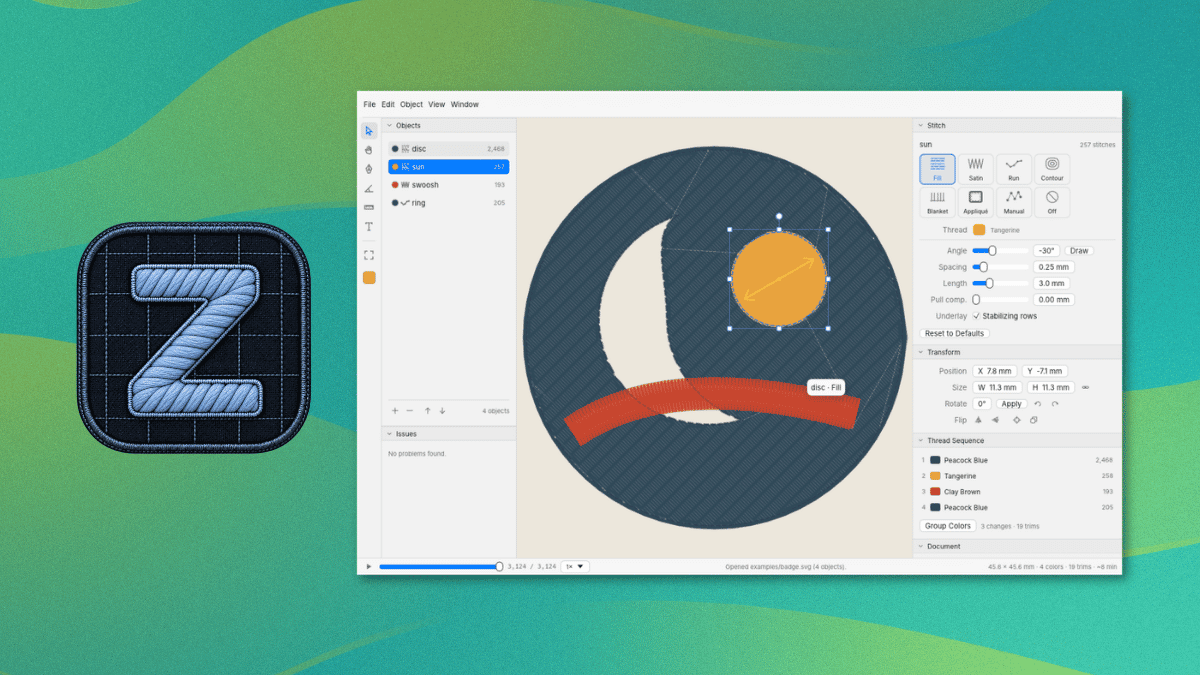
A tinkerer, Kathy Korevec, has made ZigZag available under the Apache 2.0 license. She says that the entire app was built with AI, using ChatGPT, and her goal was to get software made to her specs, similar to the Adobe suite, but with MCP support built in.

That MCP support is a built-in server that lets AI agents draw and edit in the same window.

Her post about this on Hacker News has already managed to reach top 10 status (over a 48-hour period), and she has been answering questions there about how this was built and which machines it supports.

ZigZag: Why develop this?

This was built around a Brother Skitch PP1 embroidery machine that she says cost her around $300.

You see, the Skitch needs Brother’s Artspira app to operate. While the app is free and works with the machine, a paid plan called Artspira+ adds useful extras such as digitizing images into embroidery patterns and creating cross-stitch patterns.

Kathy says the free version is limited in colors and tools, and she believes some of the clip art is reserved for subscribers. She also guesses Brother sold the machine at a loss at first because of the subscription.

That last bit checks out, seeing what many hardware manufacturers are doing.

ZigZag imports SVG art and can trace PNG and JPEG images into shapes. It covers 11 stitch types, including fill, satin, and appliqué, with a preview of the stitches being shown in the editor.

As for the MCP server, it lets an AI agent inspect the open design, add and edit objects and text, trace images, preview the stitches, and export files. It can also control a Skitch device, and each action counts as one undo step.

This is not something new.

Open source embroidery tools existed before ZigZag. People have brought up projects like Ink/Stitch, an Inkscape extension, and Respira already lets people send designs to the Skitch without Artspira.

The project also credits Respira for the Bluetooth protocol and sewing flow. Kathy says she reverse-engineered the protocol herself and that her agent used Respira to verify it. Get sewing

Currently, ZigZag is available for Windows and macOS. You can grab the latest release from the project website or its GitHub releases page. ZigZag

The README covers installation, Bluetooth pairing, and the MCP server, and it advises against firmware updates on the Skitch. Linux users can follow its steps for building ZigZag from source with Rust.

The Brother Skitch PP1 is the only machine ZigZag sends designs to over Bluetooth, and Artspira needs to be closed first since the Skitch can only talk to one app at a time.

For other machines, ZigZag can export PES, DST, EXP, JEF, or VP3 files.

A tinkerer, Kathy Korevec, has made ZigZag available under the Apache 2.0 license. She says that the entire app was built with AI, using ChatGPT, and her goal was to get software made to her specs, similar to the Adobe suite, but with MCP support built in.

That MCP support is a built-in server that lets AI agents draw and edit in the same window.

Her post about this on Hacker News has already managed to reach top 10 status (over a 48-hour period), and she has been answering questions there about how this was built and which machines it supports.

ZigZag: Why develop this?

This was built around a Brother Skitch PP1 embroidery machine that she says cost her around $300.

You see, the Skitch needs Brother’s Artspira app to operate. While the app is free and works with the machine, a paid plan called Artspira+ adds useful extras such as digitizing images into embroidery patterns and creating cross-stitch patterns.

Kathy says the free version is limited in colors and tools, and she believes some of the clip art is reserved for subscribers. She also guesses Brother sold the machine at a loss at first because of the subscription.

That last bit checks out, seeing what many hardware manufacturers are doing.

ZigZag imports SVG art and can trace PNG and JPEG images into shapes. It covers 11 stitch types, including fill, satin, and appliqué, with a preview of the stitches being shown in the editor.

As for the MCP server, it lets an AI agent inspect the open design, add and edit objects and text, trace images, preview the stitches, and export files. It can also control a Skitch device, and each action counts as one undo step.

This is not something new.

Open source embroidery tools existed before ZigZag. People have brought up projects like Ink/Stitch, an Inkscape extension, and Respira already lets people send designs to the Skitch without Artspira.

The project also credits Respira for the Bluetooth protocol and sewing flow. Kathy says she reverse-engineered the protocol herself and that her agent used Respira to verify it. Get sewing

Currently, ZigZag is available for Windows and macOS. You can grab the latest release from the project website or its GitHub releases page. ZigZag

The README covers installation, Bluetooth pairing, and the MCP server, and it advises against firmware updates on the Skitch. Linux users can follow its steps for building ZigZag from source with Rust.

The Brother Skitch PP1 is the only machine ZigZag sends designs to over Bluetooth, and Artspira needs to be closed first since the Skitch can only talk to one app at a time.

For other machines, ZigZag can export PES, DST, EXP, JEF, or VP3 files.

0

Nextcloud Releases Free Desktop Office Suite Built on Euro-Office

Linuxiac Nextcloud Releases Free Desktop Office Suite Built on Euro-Office linuxiac.com
preview

Nextcloud has announced its new Office Desktop app, a free, open-source office suite powered by Euro-Office, for Linux, Windows, and macOS. The application allows users to create and edit documents locally, work offline, and collaborate with others through Nextcloud Hub.

The desktop application was announced in September as part of Nextcloud Hub 26 Summer. Now, ready-to-use builds are available for download, letting users install the office suite directly on their computers without a Nextcloud server for local document editing.

For those unfamiliar, Euro-Office is a European-led open-source project based on a fork of the ONLYOFFICE codebase, licensed under AGPLv3. It was established to improve development transparency, simplify external contributions, and provide an independently governed office solution.

According to its maintainers, the decision to fork ONLYOFFICE followed concerns about limited upstream collaboration, difficulties building the software from source, and proprietary components in parts of its ecosystem. The project is supported by several European technology companies and organizations, including Nextcloud, IONOS, OpenProject, Proton, and XWiki.

As for the new desktop application, it includes editors for text documents, spreadsheets, presentations, and PDFs. It supports Microsoft’s DOCX, XLSX, and PPTX formats alongside OpenDocument formats such as ODT, ODS, and ODP.

One of its selling points is offline operations. Users can open, edit, and save documents directly on their computers without an internet connection. When connected to a Nextcloud instance, the application provides access to cloud-stored files and enables real-time collaborative editing.

Moreover, users can connect multiple Nextcloud instances to the same application, allowing them to work with documents stored across different servers without switching between separate desktop clients.

The application also uses fonts installed locally on the operating system, including custom and corporate fonts. Other capabilities include digital document signatures, password protection, and restrictions on editing, commenting, and form filling.

Regarding platform availability, Linux users can download DEB packages for Debian and Ubuntu or RPM packages for Fedora and other RPM-based distributions. Windows builds are available for x64 and ARM64 systems, while macOS support currently targets Apple Silicon.

Nextcloud distributes signed builds intended for production use, while the Euro-Office project also provides unsigned community builds for testing and development. Both versions are built from the same source code, which is publicly available on GitHub.

The Nextcloud Office Desktop app is available now from the official announcement, which also includes installation details and instructions for connecting the application to Nextcloud Hub.

Nextcloud has announced its new Office Desktop app, a free, open-source office suite powered by Euro-Office, for Linux, Windows, and macOS. The application allows users to create and edit documents locally, work offline, and collaborate with others through Nextcloud Hub.

The desktop application was announced in September as part of Nextcloud Hub 26 Summer. Now, ready-to-use builds are available for download, letting users install the office suite directly on their computers without a Nextcloud server for local document editing.

For those unfamiliar, Euro-Office is a European-led open-source project based on a fork of the ONLYOFFICE codebase, licensed under AGPLv3. It was established to improve development transparency, simplify external contributions, and provide an independently governed office solution.

According to its maintainers, the decision to fork ONLYOFFICE followed concerns about limited upstream collaboration, difficulties building the software from source, and proprietary components in parts of its ecosystem. The project is supported by several European technology companies and organizations, including Nextcloud, IONOS, OpenProject, Proton, and XWiki.

As for the new desktop application, it includes editors for text documents, spreadsheets, presentations, and PDFs. It supports Microsoft’s DOCX, XLSX, and PPTX formats alongside OpenDocument formats such as ODT, ODS, and ODP.

One of its selling points is offline operations. Users can open, edit, and save documents directly on their computers without an internet connection. When connected to a Nextcloud instance, the application provides access to cloud-stored files and enables real-time collaborative editing.

Moreover, users can connect multiple Nextcloud instances to the same application, allowing them to work with documents stored across different servers without switching between separate desktop clients.

The application also uses fonts installed locally on the operating system, including custom and corporate fonts. Other capabilities include digital document signatures, password protection, and restrictions on editing, commenting, and form filling.

Regarding platform availability, Linux users can download DEB packages for Debian and Ubuntu or RPM packages for Fedora and other RPM-based distributions. Windows builds are available for x64 and ARM64 systems, while macOS support currently targets Apple Silicon.

Nextcloud distributes signed builds intended for production use, while the Euro-Office project also provides unsigned community builds for testing and development. Both versions are built from the same source code, which is publicly available on GitHub.

The Nextcloud Office Desktop app is available now from the official announcement, which also includes installation details and instructions for connecting the application to Nextcloud Hub.

0

Flow: A modern, feature-rich YouTube and YouTube Music client with local recommendation for Android built with Jetpack Compose

GitHub GitHub - Flow-Tube/Flow: A modern, feature-rich YouTube and YouTube Music client with local recommendation for Android built with Jetpack Compose github.com
preview

cross-posted from: feddit.online/…/flow-a-modern-feature-rich-youtub…

cross-posted from: feddit.online/…/flow-a-modern-feature-rich-youtub…

0

Churn: A Unified Torrenting Stack

GitHub GitHub - Git-Monke/churn github.com
preview

Hi everyone!

I hate the process of having to do a search through a bunch of paid services to find what you want to watch, and then sometimes have it still be locked behind a paywall. I just want to watch my damn shows.

Because of this, I’ve had to set up a lot of torrent stacks in my life.

However, setting up Jellyfin + qbit + ensuring your VPN is on, finding torrent files on sites… the process is tiresome. It’s not terrible. It just feels like there should be one service that does it all by now.

So I made Churn. Churn has two parts: an installer and an interface. When you run the installer, it sets up a bunch of docker containers which provide a full media management and torrenting service across two stacks:

  1. The server. Contains Jellyfin for media, Sonarr and Radarr for searching, and a custom-built server which provides a clean interface to both watch your media and search for new media. From this interface you can request new downloads from:

  2. The torrenting stack. The installer sets up a gluetun namespace using your chosen VPN provider and credentials. It then sets up qbittorrent, Prowlarr and FlareSolverr locked behind the VPN. It configures Prowlarr for you with 8 indexers (PirateBay, LimeTorrents, 1337, YTS etc). Because Prowlarr is in the gluetun namespace it is able to search all of these sites for you securely and automatically. The stack, on startup, runs a bunch of VPN checks to ensure you’re safe (like testing the kill switch, ensuring non-VPN internet can’t be accessed from the containers even if VPN is broken etc). When you initiate installs or search for media from the frontend, the requests get sent to the torrenting stack which does the site-searching and downloading securely.

The installer automatically configures and wires these services together. In the end, it gives you a full media management + secure torrenting setup out of the box. Then it provides a single interface where you can browse your media, or search for new media, find good torrents at any quality, install it, and watch it.

I just threw this together for my own purposes, so I’m looking for some other people who may be interested in trying to give me some feedback! There’s tons of room for improvement.

Hi everyone!

I hate the process of having to do a search through a bunch of paid services to find what you want to watch, and then sometimes have it still be locked behind a paywall. I just want to watch my damn shows.

Because of this, I’ve had to set up a lot of torrent stacks in my life.

However, setting up Jellyfin + qbit + ensuring your VPN is on, finding torrent files on sites… the process is tiresome. It’s not terrible. It just feels like there should be one service that does it all by now.

So I made Churn. Churn has two parts: an installer and an interface. When you run the installer, it sets up a bunch of docker containers which provide a full media management and torrenting service across two stacks:

  1. The server. Contains Jellyfin for media, Sonarr and Radarr for searching, and a custom-built server which provides a clean interface to both watch your media and search for new media. From this interface you can request new downloads from:

  2. The torrenting stack. The installer sets up a gluetun namespace using your chosen VPN provider and credentials. It then sets up qbittorrent, Prowlarr and FlareSolverr locked behind the VPN. It configures Prowlarr for you with 8 indexers (PirateBay, LimeTorrents, 1337, YTS etc). Because Prowlarr is in the gluetun namespace it is able to search all of these sites for you securely and automatically. The stack, on startup, runs a bunch of VPN checks to ensure you’re safe (like testing the kill switch, ensuring non-VPN internet can’t be accessed from the containers even if VPN is broken etc). When you initiate installs or search for media from the frontend, the requests get sent to the torrenting stack which does the site-searching and downloading securely.

The installer automatically configures and wires these services together. In the end, it gives you a full media management + secure torrenting setup out of the box. Then it provides a single interface where you can browse your media, or search for new media, find good torrents at any quality, install it, and watch it.

I just threw this together for my own purposes, so I’m looking for some other people who may be interested in trying to give me some feedback! There’s tons of room for improvement.

0

OctoLab: a free, open-source GitLab client for Android (gitlab.com and self-hosted)

preview

I’ve been building OctoLab, an unofficial GitLab client for Android. It works with gitlab.com and self-hosted GitLab (CE/EE), started as a GitLab-focused fork of OctoDroid, and is Apache 2.0 licensed.

What it does:

  • Issues and merge requests: browse, create, edit, comment, review diffs, subscribe/unsubscribe
  • To-dos | Participating: your to-dos plus new comments on issues and MRs you take part in, with notifications and counts per account
  • Your activity as a timeline, grouped by project
  • Projects: files, README, branches, tags, commits, releases, code search; images, videos and files open in the app
  • Bookmarks for projects, groups, issues, MRs, commits and snippets
  • Sign in with gitlab.com in your browser (OAuth), or with a token on any GitLab instance
  • Epics (Premium/Ultimate): a group’s epics with their child items, comments and reactions
  • Role-aware: shows what your GitLab role allows; what it doesn’t is hidden or explained
  • Multi-account (self-hosted and gitlab.com side by side), dark and light theme

No tracking, no analytics, no proprietary services.

How it’s built: development happens on our own GitLab instance in small commits; each release is squash-merged into one commit on GitHub, so issue numbers in commit messages and changelogs refer to that internal tracker. Development is AI-assisted, as disclosed in the README; I review and test every change on my own devices before release, and the full changelog is in each GitHub release.

F-Droid: f-droid.org/packages/com.secninjaz.octolab/

GitHub (releases, Obtainium): github.com/secninjaz/OctoLab

Feedback and bug reports welcome.

I’ve been building OctoLab, an unofficial GitLab client for Android. It works with gitlab.com and self-hosted GitLab (CE/EE), started as a GitLab-focused fork of OctoDroid, and is Apache 2.0 licensed.

What it does:

  • Issues and merge requests: browse, create, edit, comment, review diffs, subscribe/unsubscribe
  • To-dos | Participating: your to-dos plus new comments on issues and MRs you take part in, with notifications and counts per account
  • Your activity as a timeline, grouped by project
  • Projects: files, README, branches, tags, commits, releases, code search; images, videos and files open in the app
  • Bookmarks for projects, groups, issues, MRs, commits and snippets
  • Sign in with gitlab.com in your browser (OAuth), or with a token on any GitLab instance
  • Epics (Premium/Ultimate): a group’s epics with their child items, comments and reactions
  • Role-aware: shows what your GitLab role allows; what it doesn’t is hidden or explained
  • Multi-account (self-hosted and gitlab.com side by side), dark and light theme

No tracking, no analytics, no proprietary services.

How it’s built: development happens on our own GitLab instance in small commits; each release is squash-merged into one commit on GitHub, so issue numbers in commit messages and changelogs refer to that internal tracker. Development is AI-assisted, as disclosed in the README; I review and test every change on my own devices before release, and the full changelog is in each GitHub release.

F-Droid: f-droid.org/packages/com.secninjaz.octolab/

GitHub (releases, Obtainium): github.com/secninjaz/OctoLab

Feedback and bug reports welcome.

0

Sprout: Open Source motherboard that brings iPods back to life

preview

open-electronics.org/sprout-the-open-source-mothe…

Sprout is an open source replacement motherboard that brings third- and fourth-generation iPods and the iPod Mini back to life. It installs without soldering and reuses the original shell, monochrome display and click wheel. In place of the old electronics come Bluetooth, USB-C, a high-fidelity DAC and microSD storage. The project is by Certain Things and blends the tactile nostalgia of early-2000s Apple design with today’s connectivity: a dedicated music player that does one thing, but does it well.

Assembly doesn’t require a soldering bench. The board takes the place of the original logic board inside the same shell, so the display and click wheel stay the ones you already have in your hands.

www.crowdsupply.com/…/sprout-pi-mainboard

certainthings.studio/sprout/

open-electronics.org/sprout-the-open-source-mothe…

Sprout is an open source replacement motherboard that brings third- and fourth-generation iPods and the iPod Mini back to life. It installs without soldering and reuses the original shell, monochrome display and click wheel. In place of the old electronics come Bluetooth, USB-C, a high-fidelity DAC and microSD storage. The project is by Certain Things and blends the tactile nostalgia of early-2000s Apple design with today’s connectivity: a dedicated music player that does one thing, but does it well.

Assembly doesn’t require a soldering bench. The board takes the place of the original logic board inside the same shell, so the display and click wheel stay the ones you already have in your hands.

www.crowdsupply.com/…/sprout-pi-mainboard

certainthings.studio/sprout/

0

Critical Apache HTTP/2 Flaw Could Let Unauthenticated Attackers Execute Code Remotely

preview

A critical flaw in Apache HTTP Server’s HTTP/2 module, mod_http2, can let a remote attacker run code on the server. Tracked as CVE-2026-119618, it affects versions 2.4.55 through 2.4.70 and is fixed in version 2.4.71, released yesterday.

Only servers with HTTP/2 enabled are affected, according to Red Hat, which ships the server as part of Red Hat Enterprise Linux.

An attacker who can reach the server needs no authentication to exploit the flaw and could take full control of the server process, the Linux vendor says. It rates the flaw 9.8 out of 10 on the CVSS scale.

The vendor’s assessment, published yesterday, also says “public research has demonstrated a reliable exploit” against a server in its default configuration with mod_http2 enabled. It does not name or link that research. Security company Wiz said later that day that no exploit was available and that no exploitation in the wild had been reported.

HTTP/2 runs only where the Protocols directive turns it on, as the module documentation explains. The directive uses h2 for HTTP/2 over TLS and h2c for HTTP/2 over plain TCP. It can be set for the whole server or for a single virtual host, so admins should check the server-wide setting and every virtual host.

Standalone builds of the module, released on GitHub as mod_h2, are affected from version 2.0.8 through 2.0.42.

Admins who run the Apache HTTP Server project’s own releases should move to version 2.4.71, the fixed release named in its security advisory. That release also fixes a crash in mod_md, rated important, and a one-byte overwrite of stack memory in mod_vhost_alias, rated low.

The distributions in the table below ship their own builds of the server, with their own package version numbers. On Red Hat Enterprise Linux 9, for example, the fix ships as mod_http2-2.0.26-7.el9_9.1.

Red Hat shipped fixes for Red Hat Enterprise Linux 9 and 10 yesterday and rates the flaw Important on those releases rather than Critical. Their mod_http2 packages give each HTTP/2 stream its own memory allocator, which makes an attack much harder, according to the vendor’s severity assessment. Red Hat Enterprise Linux 8 and earlier do not contain the vulnerable code.

The Debian rows come from Debian’s security tracker, and the Amazon row from the Amazon Linux tracker. Ubuntu’s CVE tracker had no page for the flaw when The Hacker News checked it today.

The Apache HTTP Server advisory offers no workaround. In its vulnerability analysis, Wiz advises admins who cannot update yet to remove h2 and h2c from the Protocols directive, leaving Protocols http/1.1.

The standalone mod_h2 project has published no fixed release so far. Its release list on GitHub ends at 2.0.42, the last affected version, and its repository has been read-only since it was archived on June 9. The Protocols change above also applies to servers that use those builds.

The flaw was reported on October 26 by Anthropic’s OSS Scanner, a free scanning service for open-source projects that uses the company’s AI models. Anthony Weems and Simon Scannell of Google Cloud Vulnerability Research reported it last week.

An earlier HTTP/2 flaw, CVE-2026-23918, was fixed in version 2.4.67, released on May 4. Servers updated to that release, or to any later one up to 2.4.70, still run a version that the new flaw affects.

A critical flaw in Apache HTTP Server’s HTTP/2 module, mod_http2, can let a remote attacker run code on the server. Tracked as CVE-2026-119618, it affects versions 2.4.55 through 2.4.70 and is fixed in version 2.4.71, released yesterday.

Only servers with HTTP/2 enabled are affected, according to Red Hat, which ships the server as part of Red Hat Enterprise Linux.

An attacker who can reach the server needs no authentication to exploit the flaw and could take full control of the server process, the Linux vendor says. It rates the flaw 9.8 out of 10 on the CVSS scale.

The vendor’s assessment, published yesterday, also says “public research has demonstrated a reliable exploit” against a server in its default configuration with mod_http2 enabled. It does not name or link that research. Security company Wiz said later that day that no exploit was available and that no exploitation in the wild had been reported.

HTTP/2 runs only where the Protocols directive turns it on, as the module documentation explains. The directive uses h2 for HTTP/2 over TLS and h2c for HTTP/2 over plain TCP. It can be set for the whole server or for a single virtual host, so admins should check the server-wide setting and every virtual host.

Standalone builds of the module, released on GitHub as mod_h2, are affected from version 2.0.8 through 2.0.42.

Admins who run the Apache HTTP Server project’s own releases should move to version 2.4.71, the fixed release named in its security advisory. That release also fixes a crash in mod_md, rated important, and a one-byte overwrite of stack memory in mod_vhost_alias, rated low.

The distributions in the table below ship their own builds of the server, with their own package version numbers. On Red Hat Enterprise Linux 9, for example, the fix ships as mod_http2-2.0.26-7.el9_9.1.

Red Hat shipped fixes for Red Hat Enterprise Linux 9 and 10 yesterday and rates the flaw Important on those releases rather than Critical. Their mod_http2 packages give each HTTP/2 stream its own memory allocator, which makes an attack much harder, according to the vendor’s severity assessment. Red Hat Enterprise Linux 8 and earlier do not contain the vulnerable code.

The Debian rows come from Debian’s security tracker, and the Amazon row from the Amazon Linux tracker. Ubuntu’s CVE tracker had no page for the flaw when The Hacker News checked it today.

The Apache HTTP Server advisory offers no workaround. In its vulnerability analysis, Wiz advises admins who cannot update yet to remove h2 and h2c from the Protocols directive, leaving Protocols http/1.1.

The standalone mod_h2 project has published no fixed release so far. Its release list on GitHub ends at 2.0.42, the last affected version, and its repository has been read-only since it was archived on June 9. The Protocols change above also applies to servers that use those builds.

The flaw was reported on October 26 by Anthropic’s OSS Scanner, a free scanning service for open-source projects that uses the company’s AI models. Anthony Weems and Simon Scannell of Google Cloud Vulnerability Research reported it last week.

An earlier HTTP/2 flaw, CVE-2026-23918, was fixed in version 2.4.67, released on May 4. Servers updated to that release, or to any later one up to 2.4.70, still run a version that the new flaw affects.

0

SmartTube LOCAL: piss off Youtube with a local account, subs and offline playback

GitHub GitHub - bsgcl/SmartTubeLocal: SmartTube with local profiles, no Google sign-in and offline playback from your local YouTube archive. github.com
preview

Hei

As you may have noticed, Youtube is kinda shitty in 2026. There are various solutions to that (pay, use one of a zillion apps, use invidious etc). All of those have their pros and cons…but for me, SmartTube was always the GOAT.

As the big-screen Youtube replacement, you can’t get much better.

Recently though, Google have been right pains in the ass here. For example, I am not able to view my own saved playlists without logging in…and to log in, I need to provide photoID. Haha, no.

So, I got a stick up my ass and decided to cook up a solution. One thing led to another and well…here we are.

Cool story bro. WTF is this?

The inventively named SmartTube LOCAL came about because Google got on my tits…and unlike a sane person, I decided to code around it. For 6 months. Because that seemed like a sane solution.

So, here’s SmartTube LOCAL, with the following cool feats.

  • Offline playback from your SMB share, via MeTube or yt-dlp. Finally, you can watch Youtube without needing JF or Plex.
  • AUTO / LOCAL ONLY modes. Mix YouTube with your archive, or tell Google to fuck off entirely.
  • OFFLINE PROFILES. Give everyone their own subscriptions, playlists and settings, without Google accounts. Keep the kids on approved local content while the adults get the whole shebang.
  • Parental controls. Restrict what the kids can watch without maintaining separate archives. No more brainrot.
  • Local search, recommendations and SponsorBlock, even offline.
  • Playlist and subscription imports from Google Takeout and NewPipe.

You’ll need an SMB share and the included Python catalogue publisher. A little elbow grease required for now. Sorry - I would have baked that in, but I have some old ass TVs in the extended fam I need to support and they might shit themselves polling 20,000 videos.

I just cleaned repo kruft and re-pushed 32.71 (pegged to 32.53 upstream).

https://github.com/bsgcl/SmartTubeLocal

It’s a personal project - which means I get to maintain it forever, yay. I’m just sharing this for fun because it tickles me some to think people are enjoying Youtube “wrong” (according to Big Evil).

PS: Clankers helped with the implementation and testing. Design and review was good old fashioned caffeine and swearing. The questionable life choices are my parents’ fault for raising me wrong / day drinking.

PPS: If you like it, star it, share it, I don’t fucking know. I’m not trying to win a prize pig. Honestly, I stuck it on GitHub so I wouldn’t have to punch a hole in my firewall. Plus this way, the app can auto-magically update on extended fam’s TVs without me having to schlep it all over town.

PPPS: If Google decides to enshittify SABR even further and breaks online playback, at least you’ll still be able to watch your ill-gotten downloads on the big screen. Then Google can fuck off twice.

Pretty pictures because reading it hard

Hei

As you may have noticed, Youtube is kinda shitty in 2026. There are various solutions to that (pay, use one of a zillion apps, use invidious etc). All of those have their pros and cons…but for me, SmartTube was always the GOAT.

As the big-screen Youtube replacement, you can’t get much better.

Recently though, Google have been right pains in the ass here. For example, I am not able to view my own saved playlists without logging in…and to log in, I need to provide photoID. Haha, no.

So, I got a stick up my ass and decided to cook up a solution. One thing led to another and well…here we are.

Cool story bro. WTF is this?

The inventively named SmartTube LOCAL came about because Google got on my tits…and unlike a sane person, I decided to code around it. For 6 months. Because that seemed like a sane solution.

So, here’s SmartTube LOCAL, with the following cool feats.

  • Offline playback from your SMB share, via MeTube or yt-dlp. Finally, you can watch Youtube without needing JF or Plex.
  • AUTO / LOCAL ONLY modes. Mix YouTube with your archive, or tell Google to fuck off entirely.
  • OFFLINE PROFILES. Give everyone their own subscriptions, playlists and settings, without Google accounts. Keep the kids on approved local content while the adults get the whole shebang.
  • Parental controls. Restrict what the kids can watch without maintaining separate archives. No more brainrot.
  • Local search, recommendations and SponsorBlock, even offline.
  • Playlist and subscription imports from Google Takeout and NewPipe.

You’ll need an SMB share and the included Python catalogue publisher. A little elbow grease required for now. Sorry - I would have baked that in, but I have some old ass TVs in the extended fam I need to support and they might shit themselves polling 20,000 videos.

I just cleaned repo kruft and re-pushed 32.71 (pegged to 32.53 upstream).

https://github.com/bsgcl/SmartTubeLocal

It’s a personal project - which means I get to maintain it forever, yay. I’m just sharing this for fun because it tickles me some to think people are enjoying Youtube “wrong” (according to Big Evil).

PS: Clankers helped with the implementation and testing. Design and review was good old fashioned caffeine and swearing. The questionable life choices are my parents’ fault for raising me wrong / day drinking.

PPS: If you like it, star it, share it, I don’t fucking know. I’m not trying to win a prize pig. Honestly, I stuck it on GitHub so I wouldn’t have to punch a hole in my firewall. Plus this way, the app can auto-magically update on extended fam’s TVs without me having to schlep it all over town.

PPPS: If Google decides to enshittify SABR even further and breaks online playback, at least you’ll still be able to watch your ill-gotten downloads on the big screen. Then Google can fuck off twice.

Pretty pictures because reading it hard

0

EU Sovereign Tech Fund pilot survey

Sovereign Tech Agency Which open source does Europe rely on? A survey for the EU Sovereign… www.sovereign.tech
preview

The German publicly funded Sovereign Tech Agency is setting up an EU-funded pilot for supporting FOSS. They’re currently doing a survey, asking for projects in need of support.

If someone knows of any underfunded FOSS projects, which is unfortunately very likely, this is a great chance of getting them some money. Germany’s funds have already contributed to many important projects, getting the whole EU to increase the available funds could be a huge win for FOSS.

The German publicly funded Sovereign Tech Agency is setting up an EU-funded pilot for supporting FOSS. They’re currently doing a survey, asking for projects in need of support.

If someone knows of any underfunded FOSS projects, which is unfortunately very likely, this is a great chance of getting them some money. Germany’s funds have already contributed to many important projects, getting the whole EU to increase the available funds could be a huge win for FOSS.

0

Mozilla Thunderbird 160 Email Client Released with Various Improvements

9to5Linux Mozilla Thunderbird 160 Email Client Released with Various Improvements - 9to5Linux 9to5linux.com
preview

Following the release of the Mozilla Firefox 160 web browser today, Mozilla also released the Mozilla Thunderbird 160 open-source email, chat, address book, news, and calendar client for all supported platforms.

Mozilla Thunderbird 160 adds support for the Ctrl+A keyboard shortcut for selecting all filters in the Message Filters dialog, improves OAuth sign-in windows to explain when blocked cookies may prevent sign-in, and updates Office 365 account setup to no longer automatically offer EWS configuration.

Thunderbird 160 fixes numerous bugs, starting with a crash that could occur when opening a window, a crash caused by message database updates, and a freeze of new mail notifications when processing some sender addresses.

IMAP retention settings no longer delete newer messages instead of older ones, folders no longer disappear after a restart on servers using compression, and namespace root folders are no longer missing or given incorrect permissions.

Undo is no longer disabled after deleting messages, dragging multiple selected folders now moves all of them, renaming or moving folders no longer removes them from saved searches, and Thunderbird now warns before repairing folders with offline message storage.

POP3 and news messages with LF line endings are no longer parsed incorrectly, Edit as New Message now works for some news messages, and empty message filter conditions no longer cause incorrect matches. The News Reader and Feed Reader also got various improvements.

On the interface side, Mozilla Thunderbird 160 improves the macOS Dock badge to no longer omit unread counts with multiple accounts, improves the Windows system tray icon to update when new mail arrives, brings back the option to create a mailing list, and updates toolbar defaults to no longer close the customization dialog.

Composing sees fixes too, with the spelling dictionary menu no longer empty in the Subject field, tabbing from the Subject field now moving focus to the message body instead of the header divider, and replies to saved messages no longer blocked despite a valid Reply-To address.

On top of all that, account setup got better as Exchange autodiscovery no longer fails when redirected to another email address, Graph account setup now works for tenants without a SharePoint license, and address book setup no longer returns to mail setup when no mail account exists.

Address books and CardDAV also see fixes, with filter conditions now matching messages that have missing addresses, website fields no longer prefixing non-HTTP links with HTTPS, and CardDAV contacts with multiline street addresses no longer appearing empty.

Also, CardDAV contacts are now saved in a format supported by more servers, and photos saved in vCard 3.0 contacts now appear correctly in other clients. Lastly, Delete Event is no longer enabled for read-only calendars in the Today Pane, and attendance options now appear for all recurring event series.

Furthermore, the task list no longer stops updating after toolbar customization, and CalDAV reminders can be dismissed and snoozed again. Some webcal calendar subscriptions are no longer incorrectly blocked, and invalid ICS calendar files are no longer overwritten when events are changed.

Check out the release notes for more details about the changes included in Mozilla Thunderbird 160, which is available for download right now from the official website as binaries for Linux, macOS, and Windows systems. Linux users can also install Thunderbird from their distro’s repositories or from Flathub.

Following the release of the Mozilla Firefox 160 web browser today, Mozilla also released the Mozilla Thunderbird 160 open-source email, chat, address book, news, and calendar client for all supported platforms.

Mozilla Thunderbird 160 adds support for the Ctrl+A keyboard shortcut for selecting all filters in the Message Filters dialog, improves OAuth sign-in windows to explain when blocked cookies may prevent sign-in, and updates Office 365 account setup to no longer automatically offer EWS configuration.

Thunderbird 160 fixes numerous bugs, starting with a crash that could occur when opening a window, a crash caused by message database updates, and a freeze of new mail notifications when processing some sender addresses.

IMAP retention settings no longer delete newer messages instead of older ones, folders no longer disappear after a restart on servers using compression, and namespace root folders are no longer missing or given incorrect permissions.

Undo is no longer disabled after deleting messages, dragging multiple selected folders now moves all of them, renaming or moving folders no longer removes them from saved searches, and Thunderbird now warns before repairing folders with offline message storage.

POP3 and news messages with LF line endings are no longer parsed incorrectly, Edit as New Message now works for some news messages, and empty message filter conditions no longer cause incorrect matches. The News Reader and Feed Reader also got various improvements.

On the interface side, Mozilla Thunderbird 160 improves the macOS Dock badge to no longer omit unread counts with multiple accounts, improves the Windows system tray icon to update when new mail arrives, brings back the option to create a mailing list, and updates toolbar defaults to no longer close the customization dialog.

Composing sees fixes too, with the spelling dictionary menu no longer empty in the Subject field, tabbing from the Subject field now moving focus to the message body instead of the header divider, and replies to saved messages no longer blocked despite a valid Reply-To address.

On top of all that, account setup got better as Exchange autodiscovery no longer fails when redirected to another email address, Graph account setup now works for tenants without a SharePoint license, and address book setup no longer returns to mail setup when no mail account exists.

Address books and CardDAV also see fixes, with filter conditions now matching messages that have missing addresses, website fields no longer prefixing non-HTTP links with HTTPS, and CardDAV contacts with multiline street addresses no longer appearing empty.

Also, CardDAV contacts are now saved in a format supported by more servers, and photos saved in vCard 3.0 contacts now appear correctly in other clients. Lastly, Delete Event is no longer enabled for read-only calendars in the Today Pane, and attendance options now appear for all recurring event series.

Furthermore, the task list no longer stops updating after toolbar customization, and CalDAV reminders can be dismissed and snoozed again. Some webcal calendar subscriptions are no longer incorrectly blocked, and invalid ICS calendar files are no longer overwritten when events are changed.

Check out the release notes for more details about the changes included in Mozilla Thunderbird 160, which is available for download right now from the official website as binaries for Linux, macOS, and Windows systems. Linux users can also install Thunderbird from their distro’s repositories or from Flathub.

0

FreeBSD Working To Establish An AI Policy After Polling Developers

FreeBSD Working To Establish An AI Policy After Polling Developers www.phoronix.com
preview

The FreeBSD Project published its Q3’2026 status report on Tuesday that outlines a number of development initiatives to ongoing work around an AI policy for this BSD operating system.

FreeBSD polled their developers on the usage of AI and LLMs as a hot topic for the quarter. An overwhelming 88% want the FreeBSD Project to adopt an AI policy. 35% of those polled want AI-assisted code to be disclosed while 22% felt it should be treated just like any other code contribution and only 16% want AI generated code to be rejected outright. 65% of the respondents were in favor of AI-generated documentation with human review.

FreeBSD has established an AI working group to work on drafting an AI policy. Final reports are expected in Q4.

FreeBSD developers have also had to spend a lot of time preparing for the EU’s Cyber Resilience Act (CRA) such as around Software Bill of Materials (SBOM) support.

FreeBSD has also seen work on a GUI for the Bhyve hypervisor written in Freepascal/Lazarus. This Bhyvemgr GUI is coming along well to help in managing of Bhyve VMs:

www.phoronix.net/image.php?id=2026&image=bhyvemgr…

Meanwhile on the web management/UI side, Sylve continues looking quite slick as a unified system management platform for FreeBSD from the web browser. Adding in the past quarter were new storage options, data center / cluster features, and more.

www.phoronix.net/image.php?id=2026&image=sylve_me…

FreeBSD also continues seeing work to enhance desktop installations of the operating system and more polishing of the desktop experience. Related have also been more suspend/resume and audio stack improvements.

Some other FreeBSD happenings include improving zoned storage support, debugging enhancements, a variety of scheduler improvements, and enhancing the bootloader.

More details on these FreeBSD improvements made during Q3 can be found via FreeBSD.org.

The FreeBSD Project published its Q3’2026 status report on Tuesday that outlines a number of development initiatives to ongoing work around an AI policy for this BSD operating system.

FreeBSD polled their developers on the usage of AI and LLMs as a hot topic for the quarter. An overwhelming 88% want the FreeBSD Project to adopt an AI policy. 35% of those polled want AI-assisted code to be disclosed while 22% felt it should be treated just like any other code contribution and only 16% want AI generated code to be rejected outright. 65% of the respondents were in favor of AI-generated documentation with human review.

FreeBSD has established an AI working group to work on drafting an AI policy. Final reports are expected in Q4.

FreeBSD developers have also had to spend a lot of time preparing for the EU’s Cyber Resilience Act (CRA) such as around Software Bill of Materials (SBOM) support.

FreeBSD has also seen work on a GUI for the Bhyve hypervisor written in Freepascal/Lazarus. This Bhyvemgr GUI is coming along well to help in managing of Bhyve VMs:

www.phoronix.net/image.php?id=2026&image=bhyvemgr…

Meanwhile on the web management/UI side, Sylve continues looking quite slick as a unified system management platform for FreeBSD from the web browser. Adding in the past quarter were new storage options, data center / cluster features, and more.

www.phoronix.net/image.php?id=2026&image=sylve_me…

FreeBSD also continues seeing work to enhance desktop installations of the operating system and more polishing of the desktop experience. Related have also been more suspend/resume and audio stack improvements.

Some other FreeBSD happenings include improving zoned storage support, debugging enhancements, a variety of scheduler improvements, and enhancing the bootloader.

More details on these FreeBSD improvements made during Q3 can be found via FreeBSD.org.

0

I Tried The Weird New Mini Window Feature in Firefox 160

It's FOSS I Tried The Weird New Mini Window Feature in Firefox 160 itsfoss.com
preview

Mozilla has been experimenting a lot with Firefox lately, and a good chunk of that effort has gone into AI. The sidebar can house a chatbot of your choice, and Smart Window has an assistant that lets you pick the AI model.

Luckily, they have stopped tunnel-visioning into AI, and the UX side of the browser has seen some big upgrades.

Containers keep work, shopping, and personal browsing separate; Split View shows two pages side by side in one window; and Vertical Tabs move your tab list into the sidebar.

I believe that these upgrades have made Firefox a much more compelling option when compared to other popular web browsers.

Of course they are not stopping there. Mini Window is the latest addition to that list, which builds on the work done in Picture-in-Picture, the floating video player.

This feature is still being developed. Don’t rely on it for any important browsing sessions. Firefox Mini Window

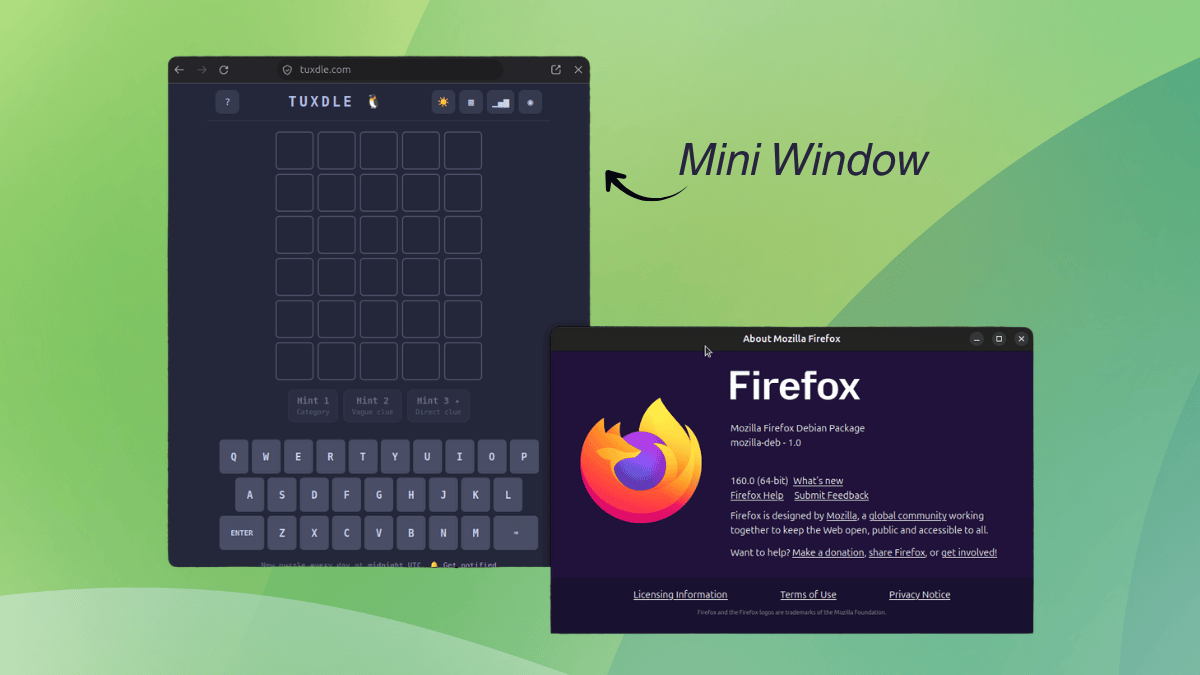
Using Mini Window on Linux with Firefox 160 feels like a beta from the start. It needs a regular browser window with a tab open to work because a standalone mini window is not possible yet.

It comes in two modes. Move full tab sends the whole page into a small window that floats above your other windows, and Move selection lets you draw a box around the part of a page you want and sends only that.

Either way, the moved tab is not available in the main window until you send it back.

A full tab mini window looks like a tiny browser window. The top bar has the page address along with reload, back, forward, send back, and close buttons. Pages adapt to the smaller size as well.

During testing, websites like ours, Wikipedia, and Associated Press were successfully switching to their compact layout.

A selection mini window is more compact and shows just the chosen area under the page address, with a reload button and the same close and send back buttons.

Both kinds can be dragged around and resized. Selection mini windows have some rough edges because they can appear too small and refuse to resize well.

They are still handy for research sessions where you need to check small bits of information without opening more tabs and cluttering the desktop.

Try it Out

Before you get started using Mini Window, you first have to ensure that you are on Firefox 160 or later. To do that, go into the hamburger menu and open “Help and Report.” Here, click on “About Firefox” and take note of the version shown in the dialog that opens up.

If you find that an older build of Firefox is installed, then get the latest release from the official website or the official FTP mirror.

Next, you just have to start a normal browsing session with multiple tabs and follow any one of these three approaches to get started:

Add the Mini Window icon to the toolbar.
Right-click a tab and go into "Move Tab."
Right-click the page content and choose Move Section to "Mini Window."

For the toolbar method, right-click the toolbar and open “Customize Toolbar.” Find the Mini Window icon in the list and drag it onto the toolbar, then hit “Done.” After that, the feature is just one click away on any page.

Mozilla has been experimenting a lot with Firefox lately, and a good chunk of that effort has gone into AI. The sidebar can house a chatbot of your choice, and Smart Window has an assistant that lets you pick the AI model.

Luckily, they have stopped tunnel-visioning into AI, and the UX side of the browser has seen some big upgrades.

Containers keep work, shopping, and personal browsing separate; Split View shows two pages side by side in one window; and Vertical Tabs move your tab list into the sidebar.

I believe that these upgrades have made Firefox a much more compelling option when compared to other popular web browsers.

Of course they are not stopping there. Mini Window is the latest addition to that list, which builds on the work done in Picture-in-Picture, the floating video player.

This feature is still being developed. Don’t rely on it for any important browsing sessions. Firefox Mini Window

Using Mini Window on Linux with Firefox 160 feels like a beta from the start. It needs a regular browser window with a tab open to work because a standalone mini window is not possible yet.

It comes in two modes. Move full tab sends the whole page into a small window that floats above your other windows, and Move selection lets you draw a box around the part of a page you want and sends only that.

Either way, the moved tab is not available in the main window until you send it back.

A full tab mini window looks like a tiny browser window. The top bar has the page address along with reload, back, forward, send back, and close buttons. Pages adapt to the smaller size as well.

During testing, websites like ours, Wikipedia, and Associated Press were successfully switching to their compact layout.

A selection mini window is more compact and shows just the chosen area under the page address, with a reload button and the same close and send back buttons.

Both kinds can be dragged around and resized. Selection mini windows have some rough edges because they can appear too small and refuse to resize well.

They are still handy for research sessions where you need to check small bits of information without opening more tabs and cluttering the desktop.

Try it Out

Before you get started using Mini Window, you first have to ensure that you are on Firefox 160 or later. To do that, go into the hamburger menu and open “Help and Report.” Here, click on “About Firefox” and take note of the version shown in the dialog that opens up.

If you find that an older build of Firefox is installed, then get the latest release from the official website or the official FTP mirror.

Next, you just have to start a normal browsing session with multiple tabs and follow any one of these three approaches to get started:

Add the Mini Window icon to the toolbar.
Right-click a tab and go into "Move Tab."
Right-click the page content and choose Move Section to "Mini Window."

For the toolbar method, right-click the toolbar and open “Customize Toolbar.” Find the Mini Window icon in the list and drag it onto the toolbar, then hit “Done.” After that, the feature is just one click away on any page.

0

Firefox 160 release brings new floating 'mini window' mode - OMG! Ubuntu

OMG! Ubuntu Firefox 160 release brings new floating 'mini window' mode - OMG! Ubuntu www.omgubuntu.co.uk
preview

Firefox 160 released today with some new features.

A new “Mini Window” option lets you move a tab or select a portion of a web page to an always-on-top window, so you can keep an eye on it while browsing. The feature is in beta and Mozilla invite feedback on it.

Mozilla say the feature is “useful when you’re multitasking and need to keep a few sources of information in view at once” – think Picture-in-Picture mode, but to see sections or entire web pages, basically.

Using it is easy. You can right click a tab, mouse into the Move Tab menu and choose Move to Mini Window to punt an entire page to a dedicated floating, resizable and compact window with address bar and navigation buttons that auto-hide.

Or customise the toolbar and add the Mini Window icon. Pressing this on a page gives you the choice of sharing the whole tab or just a portion.

You can also “PiP” part of a page using right-click > Move Section to Mini Window. This prompts you to draw out the section you want to pop out, and then do so.

Picture-in-Picture mode also gets a boost in this update. PiP windows now have a button to adjust playback speed, from 0.25x to 2.0x, depending on the source. The speed button only shows if the player window is large enough to have the button on show, though.

And if you regularly copy words to your clipboard with the intent to search, Firefox’s address bar context menu now reads “Paste and Search” for plain text, with “Paste and Go” reserved for URLs only.

Other changes in Firefox 160:

Drag history entries from the sidebar to the tab strip to open them

Saving pages as PDF makes MathLab content screen-reader friendly

Block websites from asking to handle mailto, etc links

Matroska (MKV) support (with FLAC, MP3 or PCM audio)

WebGL content on macOS now uses Metal graphics API

Smart Window’s Organise Tabs is now available in French

Real-time speech-to-text via SpeechRecognition Web Speech API

Fixes improves visual contrast between domain name and the rest of the address bar, resolve minor text selection and cursor placement quirks using touch-input and nixes some small freezes affecting sign-in on intranet sites with NTLM or Kerberos.

Plus, as ever, a fresh crop of security fixes.

Get Firefox 160

Firefox 160 is free, open-source software. You can download the new release from the Mozilla FTP server or wait for the links to the same builds to appear on the Firefox website from 10 November, 2026.

Existing user? You’ll be updated to the latest version when running the app on Windows, macOS and Linux (binary builds), or via the app store or package repository you originally installed it from.

On Ubuntu? You’ll get an automatic, background update from the Snap Store.

Firefox 160 released today with some new features.

A new “Mini Window” option lets you move a tab or select a portion of a web page to an always-on-top window, so you can keep an eye on it while browsing. The feature is in beta and Mozilla invite feedback on it.

Mozilla say the feature is “useful when you’re multitasking and need to keep a few sources of information in view at once” – think Picture-in-Picture mode, but to see sections or entire web pages, basically.

Using it is easy. You can right click a tab, mouse into the Move Tab menu and choose Move to Mini Window to punt an entire page to a dedicated floating, resizable and compact window with address bar and navigation buttons that auto-hide.

Or customise the toolbar and add the Mini Window icon. Pressing this on a page gives you the choice of sharing the whole tab or just a portion.

You can also “PiP” part of a page using right-click > Move Section to Mini Window. This prompts you to draw out the section you want to pop out, and then do so.

Picture-in-Picture mode also gets a boost in this update. PiP windows now have a button to adjust playback speed, from 0.25x to 2.0x, depending on the source. The speed button only shows if the player window is large enough to have the button on show, though.

And if you regularly copy words to your clipboard with the intent to search, Firefox’s address bar context menu now reads “Paste and Search” for plain text, with “Paste and Go” reserved for URLs only.

Other changes in Firefox 160:

Drag history entries from the sidebar to the tab strip to open them

Saving pages as PDF makes MathLab content screen-reader friendly

Block websites from asking to handle mailto, etc links

Matroska (MKV) support (with FLAC, MP3 or PCM audio)

WebGL content on macOS now uses Metal graphics API

Smart Window’s Organise Tabs is now available in French

Real-time speech-to-text via SpeechRecognition Web Speech API

Fixes improves visual contrast between domain name and the rest of the address bar, resolve minor text selection and cursor placement quirks using touch-input and nixes some small freezes affecting sign-in on intranet sites with NTLM or Kerberos.

Plus, as ever, a fresh crop of security fixes.

Get Firefox 160

Firefox 160 is free, open-source software. You can download the new release from the Mozilla FTP server or wait for the links to the same builds to appear on the Firefox website from 10 November, 2026.

Existing user? You’ll be updated to the latest version when running the app on Windows, macOS and Linux (binary builds), or via the app store or package repository you originally installed it from.

On Ubuntu? You’ll get an automatic, background update from the Snap Store.

0

The past, present and future of office suites - TDF Community Blog

TDF Community Blog The past, present and future of office suites - TDF Community Blog blog.documentfoundation.org
preview

Summary

The office suite market is large, profitable and growing, and this attracts new entrants: low-cost clones, open-core products and, more recently, suites built largely with artificial intelligence. Most of them compete on price and on native support for OOXML, a format whose evolution remains in practice under Microsoft’s control.

When features can be reproduced cheaply, what distinguishes a suite is who governs the document format and the software, and therefore who controls the content. This is the question of digital sovereignty, and its outcome will depend partly on political decisions, and partly on software features.

The 1980s and 1990s

The office suite sector emerged in the 1980s and developed in the 1990s, when Microsoft Office established itself as the leading product, with a market share of over 90% according to Microsoft unofficial statements at their events.

Some may remember the main competitors: Lotus SmartSuite, WordPerfect Office and StarOffice, the ancestor of OpenOffice and LibreOffice. Fewer will recall Anywhere Office, Ability Office, Pro PC Suite 2001 and ThinkFree Office. Ability Office still exists, and ThinkFree Office is now called Hancom Office.

By the end of the century Microsoft Office dominated the sector, while all other products had a barely noticeable market share or had disappeared altogether.

The sector has always been lucrative: the products meet a universal need, while development and sales costs are low relative to volumes, so margins are potentially extremely high. For this reason all the major software vendors tried to enter the market, and the first clones emerged, competing solely on price.

Market presence, however, was just one of the factors contributing to success. Other factors were bundling with the Windows operating system, lock-in through document formats and pricing.

The two decades between 2000 and 2020

Sun Microsystems, which had acquired StarOffice, released its source code in 2000, and OpenOffice.org 1.0 followed in 2002: the first FOSS suite to reach a mass audience. Version 1.0 offered only a glimpse of the suite’s potential, and version 1.1 was usable but still limited. Only version 2.0, released in 2005, made OpenOffice a genuine competitor to the market leader.

For several years the rivalry between the proprietary suite and the FOSS suite played out on two fronts: large migration projects and document formats.

At the time, migrations seemed to signal an irreversible trend, but this proved an illusion. Microsoft deployed all its commercial muscles and started to talk to politicians. Since 2012, the company has been one of the biggest spenders on lobbying in Brussels (based on data from Corporate Europe Observatory and Lobby Facts).

The battle over file formats was most prominent between 2006, when ODF was standardised by ISO/IEC, and 2008, when the proprietary OOXML format was standardised through a process we have already described in a previous blog post and will not revisit here.

In 2010, following Oracle’s acquisition of Sun, the community created The Document Foundation and LibreOffice. In 2011, Oracle was effectively forced to donate the OpenOffice.org source code to the Apache Software Foundation in order to honour a contract – due to expire in 2014 – that IBM had signed with Sun Microsystems, and which allowed it to use the OpenOffice.org source code whilst disregarding the open-source licence.

The format battle then faded into the background, as IBM decided to abandon the ODF advocacy project at OASIS to use the money to fund the development of Apache OpenOffice and fight the growth of LibreOffice. It resurfaced in 2024 with the concept of digital sovereignty and the announcement of several large scale migrations to open source software, such as the German province of Schleswig-Holstein and the Austrian Army.

Between 2010 and 2020 the sector also evolved with the arrival of cloud-based suites, which started a new battle for market share between Microsoft and Google. Given the sector’s renewed growth, a new generation of clones emerged: programs that are almost always limited in functionality, copy the market leader and compete on licence cost.

Some of these clones, in order to disguise their commercial operation, release a basic version under an open-source licence, often modified so as to prevent forking. Such a licence no longer meets the Open Source Definition, and the product is in practice freeware, while the full-featured version is sold separately (the “open core” model).

Naturally, these programs support the OOXML format natively, because they aim at a low-cost replacement, not at migration, that is, a paradigm shift that would give users full control over the software and its content.

By digital sovereignty we mean the ability of a user or institution to control its documents and software: to open documents with any implementation, to fork the code, and to choose where data is hosted and who operates the service.

OOXML is formally an ISO standard, but its reference implementation remain with Microsoft. As long as this is the case, Microsoft retains control over the content: the user saves money, but sacrifices digital sovereignty.

The current situation

The reason for the renewed interest in the office suite market lies in the size of the market itself, which is worth tens of billions of dollars and therefore whets the appetite of software companies. Even a 1% market share is worth a very significant sum, sufficient to justify the investment.

As a reference point, we use public data from the “Office Productivity Software Market Report 2026” by Business Research Company, a US-based market analysis firm. The office productivity software market reached $50.73 billion in 2025 and is expected to grow to $81.83 billion by 2030, at a CAGR (compound annual growth rate) of 10.1%.

We add some figures relating to Microsoft and Google.

Microsoft 365 Commercial generated $102 billion in fiscal year 2026, an increase of 16%. Paid licences for Microsoft 365 Copilot exceeded 30 million by the end of June 2026, which on analyst estimates is about 6 to 7% of the paid commercial user base.

Google Workspace is estimated to have over 3 billion users and over 11 million paying customers. The user figure includes free Gmail accounts, so it is not comparable to Microsoft’s paid subscriptions. Technographic data from 6sense, another US-based market research firm, attributes 50.34% of the office productivity category to Google Workspace and 45.46% to Microsoft 365 (figures are based on corporate domains). Measured in corporate licences and revenue, Microsoft is clearly in the lead.

According to 6sense, 64% of organisations use both suites. This figure is only indicative, but it points to an increasingly widespread overlap between office suites, which is not limited to Microsoft 365 and Google Workspace. For LibreOffice, based on hands-on experience with large organizations, we estimate that 50% of users also use another office suite, depending on their needs.

We are therefore talking about a market of enormous economic value, and these figures refer almost exclusively to licences, not to the ecosystem. If we include value added consultancy services, which are a necessary component of every implementation in public bodies and companies, the total is likely to be significantly higher.

Analysts do not provide precise data on this, so we rely on a rough estimate based on experience: value-added services are worth about 25% of the value of licences. On the analysts’ forecast, the 2030 market would then be worth about $102 billion ($81.83 billion plus 25%). One percentage point of market share is therefore worth $1 billion a year to a commercial vendor.

This figure does not accrue to free software, but it explains the incentive for new entrants. It also explains the emergence of a new type of office suite: so-called “clones” developed largely with artificial intelligence. At present we remain extremely cautious about the use of artificial intelligence in software development, but we recognise that views differ, and we are monitoring the evolution of these applications closely.

The strategic consequence does not depend on that debate: if the cost of reproducing a feature set collapses, features stop being the main barrier to entry. What remains is the governance of the format and of the code, the strength of the community, and the long-term maintenance of the software.

A glimpse into the future of office suites

Over the last twenty years we have read contradictory forecasts: the total disappearance of the sector, or only of the desktop suite, and the opposite, a strong growth driven by announcements of new operating systems, software paradigms or hardware platforms.

One thing is certain: the office suite market has gone through periods of slight contraction, probably normal fluctuations, but overall it has grown, and in our opinion it will continue growing for the foreseeable future.

Today, the installed base consists of around 2 billion desktop and laptop computers, based on active devices reported by manufacturers, plus devices that nobody counts because they are second- or third-hand, found mainly in poorer countries that are overlooked by technology usage statistics.

The integration of AI assistants into the suites adds a further dimension. With more than 30 million paid Copilot seats, Microsoft has shown that there is a market for it.

Overall, this is an extremely interesting potential market, where there is room for all types of office suites, desktop and cloud-based, and for all development strategies. On the other hand, success is not just related to number of users as there are market dynamics which depend on political decisions that go beyond the value of the software itself.

However, the location where documents are processed – whether locally or in a provider’s cloud – and the ability of artificial intelligence tools to read and write in open formats remain issues linked to the question of sovereignty. We have already expressed our views on these matters in several blog posts: nothing should interfere with the user’s right to decide on their own content.

LibreOffice will continue to be a key player. Downloads and donations grew substantially in 2026 (as of 31 October, downloads +26% and donations +44 in term of numbers), which reflects a steady improvement in the quality of the software and in the reputation of the project.

The practical conclusion is that LibreOffice and ODF compete on a different axis from the clones: not feature parity at a lower price, but open governance of the format and of the code.

Summary

The office suite market is large, profitable and growing, and this attracts new entrants: low-cost clones, open-core products and, more recently, suites built largely with artificial intelligence. Most of them compete on price and on native support for OOXML, a format whose evolution remains in practice under Microsoft’s control.

When features can be reproduced cheaply, what distinguishes a suite is who governs the document format and the software, and therefore who controls the content. This is the question of digital sovereignty, and its outcome will depend partly on political decisions, and partly on software features.

The 1980s and 1990s

The office suite sector emerged in the 1980s and developed in the 1990s, when Microsoft Office established itself as the leading product, with a market share of over 90% according to Microsoft unofficial statements at their events.

Some may remember the main competitors: Lotus SmartSuite, WordPerfect Office and StarOffice, the ancestor of OpenOffice and LibreOffice. Fewer will recall Anywhere Office, Ability Office, Pro PC Suite 2001 and ThinkFree Office. Ability Office still exists, and ThinkFree Office is now called Hancom Office.

By the end of the century Microsoft Office dominated the sector, while all other products had a barely noticeable market share or had disappeared altogether.

The sector has always been lucrative: the products meet a universal need, while development and sales costs are low relative to volumes, so margins are potentially extremely high. For this reason all the major software vendors tried to enter the market, and the first clones emerged, competing solely on price.

Market presence, however, was just one of the factors contributing to success. Other factors were bundling with the Windows operating system, lock-in through document formats and pricing.

The two decades between 2000 and 2020

Sun Microsystems, which had acquired StarOffice, released its source code in 2000, and OpenOffice.org 1.0 followed in 2002: the first FOSS suite to reach a mass audience. Version 1.0 offered only a glimpse of the suite’s potential, and version 1.1 was usable but still limited. Only version 2.0, released in 2005, made OpenOffice a genuine competitor to the market leader.

For several years the rivalry between the proprietary suite and the FOSS suite played out on two fronts: large migration projects and document formats.

At the time, migrations seemed to signal an irreversible trend, but this proved an illusion. Microsoft deployed all its commercial muscles and started to talk to politicians. Since 2012, the company has been one of the biggest spenders on lobbying in Brussels (based on data from Corporate Europe Observatory and Lobby Facts).

The battle over file formats was most prominent between 2006, when ODF was standardised by ISO/IEC, and 2008, when the proprietary OOXML format was standardised through a process we have already described in a previous blog post and will not revisit here.

In 2010, following Oracle’s acquisition of Sun, the community created The Document Foundation and LibreOffice. In 2011, Oracle was effectively forced to donate the OpenOffice.org source code to the Apache Software Foundation in order to honour a contract – due to expire in 2014 – that IBM had signed with Sun Microsystems, and which allowed it to use the OpenOffice.org source code whilst disregarding the open-source licence.

The format battle then faded into the background, as IBM decided to abandon the ODF advocacy project at OASIS to use the money to fund the development of Apache OpenOffice and fight the growth of LibreOffice. It resurfaced in 2024 with the concept of digital sovereignty and the announcement of several large scale migrations to open source software, such as the German province of Schleswig-Holstein and the Austrian Army.

Between 2010 and 2020 the sector also evolved with the arrival of cloud-based suites, which started a new battle for market share between Microsoft and Google. Given the sector’s renewed growth, a new generation of clones emerged: programs that are almost always limited in functionality, copy the market leader and compete on licence cost.

Some of these clones, in order to disguise their commercial operation, release a basic version under an open-source licence, often modified so as to prevent forking. Such a licence no longer meets the Open Source Definition, and the product is in practice freeware, while the full-featured version is sold separately (the “open core” model).

Naturally, these programs support the OOXML format natively, because they aim at a low-cost replacement, not at migration, that is, a paradigm shift that would give users full control over the software and its content.

By digital sovereignty we mean the ability of a user or institution to control its documents and software: to open documents with any implementation, to fork the code, and to choose where data is hosted and who operates the service.

OOXML is formally an ISO standard, but its reference implementation remain with Microsoft. As long as this is the case, Microsoft retains control over the content: the user saves money, but sacrifices digital sovereignty.

The current situation

The reason for the renewed interest in the office suite market lies in the size of the market itself, which is worth tens of billions of dollars and therefore whets the appetite of software companies. Even a 1% market share is worth a very significant sum, sufficient to justify the investment.

As a reference point, we use public data from the “Office Productivity Software Market Report 2026” by Business Research Company, a US-based market analysis firm. The office productivity software market reached $50.73 billion in 2025 and is expected to grow to $81.83 billion by 2030, at a CAGR (compound annual growth rate) of 10.1%.

We add some figures relating to Microsoft and Google.

Microsoft 365 Commercial generated $102 billion in fiscal year 2026, an increase of 16%. Paid licences for Microsoft 365 Copilot exceeded 30 million by the end of June 2026, which on analyst estimates is about 6 to 7% of the paid commercial user base.

Google Workspace is estimated to have over 3 billion users and over 11 million paying customers. The user figure includes free Gmail accounts, so it is not comparable to Microsoft’s paid subscriptions. Technographic data from 6sense, another US-based market research firm, attributes 50.34% of the office productivity category to Google Workspace and 45.46% to Microsoft 365 (figures are based on corporate domains). Measured in corporate licences and revenue, Microsoft is clearly in the lead.

According to 6sense, 64% of organisations use both suites. This figure is only indicative, but it points to an increasingly widespread overlap between office suites, which is not limited to Microsoft 365 and Google Workspace. For LibreOffice, based on hands-on experience with large organizations, we estimate that 50% of users also use another office suite, depending on their needs.

We are therefore talking about a market of enormous economic value, and these figures refer almost exclusively to licences, not to the ecosystem. If we include value added consultancy services, which are a necessary component of every implementation in public bodies and companies, the total is likely to be significantly higher.

Analysts do not provide precise data on this, so we rely on a rough estimate based on experience: value-added services are worth about 25% of the value of licences. On the analysts’ forecast, the 2030 market would then be worth about $102 billion ($81.83 billion plus 25%). One percentage point of market share is therefore worth $1 billion a year to a commercial vendor.

This figure does not accrue to free software, but it explains the incentive for new entrants. It also explains the emergence of a new type of office suite: so-called “clones” developed largely with artificial intelligence. At present we remain extremely cautious about the use of artificial intelligence in software development, but we recognise that views differ, and we are monitoring the evolution of these applications closely.

The strategic consequence does not depend on that debate: if the cost of reproducing a feature set collapses, features stop being the main barrier to entry. What remains is the governance of the format and of the code, the strength of the community, and the long-term maintenance of the software.

A glimpse into the future of office suites

Over the last twenty years we have read contradictory forecasts: the total disappearance of the sector, or only of the desktop suite, and the opposite, a strong growth driven by announcements of new operating systems, software paradigms or hardware platforms.

One thing is certain: the office suite market has gone through periods of slight contraction, probably normal fluctuations, but overall it has grown, and in our opinion it will continue growing for the foreseeable future.

Today, the installed base consists of around 2 billion desktop and laptop computers, based on active devices reported by manufacturers, plus devices that nobody counts because they are second- or third-hand, found mainly in poorer countries that are overlooked by technology usage statistics.

The integration of AI assistants into the suites adds a further dimension. With more than 30 million paid Copilot seats, Microsoft has shown that there is a market for it.

Overall, this is an extremely interesting potential market, where there is room for all types of office suites, desktop and cloud-based, and for all development strategies. On the other hand, success is not just related to number of users as there are market dynamics which depend on political decisions that go beyond the value of the software itself.

However, the location where documents are processed – whether locally or in a provider’s cloud – and the ability of artificial intelligence tools to read and write in open formats remain issues linked to the question of sovereignty. We have already expressed our views on these matters in several blog posts: nothing should interfere with the user’s right to decide on their own content.

LibreOffice will continue to be a key player. Downloads and donations grew substantially in 2026 (as of 31 October, downloads +26% and donations +44 in term of numbers), which reflects a steady improvement in the quality of the software and in the reputation of the project.

The practical conclusion is that LibreOffice and ODF compete on a different axis from the clones: not feature parity at a lower price, but open governance of the format and of the code.

0

ScreenGuard: Digital Wellbeing for Linux — Screen Time Tracking, Daily App Limits & Focus Mode

GitHub GitHub - adityakrishnan005-a11y/ScreenGuard: Digital Wellbeing for Linux — Screen Time Tracking, Daily App Limits & Focus Mode (GNOME Wayland & X11) github.com
preview

ScreenGuard is an open-source, privacy-first desktop application built in Flutter for Linux. It brings active Android-style Digital Wellbeing, Daily App Limit Lockouts, and Focus Mode Pomodoro Session Blocking directly to the Linux desktop.

i am currently searching for volunteering contributors to help me expand support to othe Desktop environments

check README: github.com/adityakrishnan005-a11y/ScreenGuard

Check wiki: github.com/adityakrishnan005-a11y/…/wiki

Peek into new -UI undergoing testing and developmentSuggest any changes - v1.2.0-beta.1 if you want to test the newest UI try out v1.2.0-beta.1 here: github.com/…/v1.2.0-beta.1

ScreenGuard is an open-source, privacy-first desktop application built in Flutter for Linux. It brings active Android-style Digital Wellbeing, Daily App Limit Lockouts, and Focus Mode Pomodoro Session Blocking directly to the Linux desktop.

i am currently searching for volunteering contributors to help me expand support to othe Desktop environments

check README: github.com/adityakrishnan005-a11y/ScreenGuard

Check wiki: github.com/adityakrishnan005-a11y/…/wiki

Peek into new -UI undergoing testing and developmentSuggest any changes - v1.2.0-beta.1 if you want to test the newest UI try out v1.2.0-beta.1 here: github.com/…/v1.2.0-beta.1

0

Grafana 13.3 Observability Platform Adds Shared Variables, UI Refresh

Linuxiac Grafana 13.3 Observability Platform Adds Shared Variables, UI Refresh linuxiac.com
preview

Grafana Labs has released Grafana 13.3, the latest update to its open-source observability and data visualization platform.

One of the most useful additions is cross-dashboard variables, which allow administrators to define a variable once and reuse it across multiple dashboards instead of keeping separate copies. They can be configured globally, making them available to every dashboard in an organization or restricted to dashboards within a specific folder.

The feature is currently in public preview across all Grafana editions. Self-hosted installations can enable it using the grafana.dashboardGlobalVariables feature toggle.

Grafana 13.3 also introduces the first phase of the platform’s largest visual refresh since Grafana 7. The updated interface includes redesigned dark and light themes, revised typography, softer borders, rounded corners, and new buttons, menus, and input controls.

Another addition is Notebooks, a new way to document and share investigations. Users can combine dashboard panels, queries from Explore, Grafana Assistant findings, and observations in a single editable document.

This makes it possible to preserve steps taken during troubleshooting, prepare incident reviews, and share findings with colleagues without relying on separate screenshots or documents. Notebooks can be saved, searched, edited, shared, and exported.

Grafana Assistant also gains dashboard planning capabilities. Instead of immediately generating a dashboard from a text prompt, the Assistant is able to first propose its structure, including panels, visualization types, variables, and layout. Users can review a read-only preview, request changes, and approve the final dashboard before it is created.

Additionally, the ability to undo changes made by Grafana Assistant is now generally available. A single undo action can revert modifications to multiple panels made during the same Assistant request.

On the visualization side, panel thresholds now support dashboard variables, allowing threshold values to be adjusted without manually editing individual panels. The Sort by transformation supports multiple sorting fields, while panel descriptions can be displayed as subtitles directly beneath panel titles.

Cross-filtering support has also been extended to Histogram, State timeline, and Status History visualizations. Meanwhile, panel-specific time settings and comparisons are now generally available, letting users compare different periods or override a panel’s time range without entering dashboard edit mode.

The Text visualization also receives a public preview update that allows query data to populate tables, cards, lists, and status summaries rather than limiting users to static content.

For alerting, Grafana 13.3 launches a public preview option to import existing Prometheus or Mimir Alertmanager configurations into Grafana Alerting. This includes notification routing and related settings, lessening the need to recreate them manually when migrating alert rules.

Finally, Grafana Cloud and Enterprise users gain generally available custom headers and footers for PDF reports, while administrators should review a role-management behavior change that allows authorized role managers to revoke permissions they do not personally hold.

For more information, see the release announcement and the Grafana 13.3 documentation.

Grafana Labs has released Grafana 13.3, the latest update to its open-source observability and data visualization platform.

One of the most useful additions is cross-dashboard variables, which allow administrators to define a variable once and reuse it across multiple dashboards instead of keeping separate copies. They can be configured globally, making them available to every dashboard in an organization or restricted to dashboards within a specific folder.

The feature is currently in public preview across all Grafana editions. Self-hosted installations can enable it using the grafana.dashboardGlobalVariables feature toggle.

Grafana 13.3 also introduces the first phase of the platform’s largest visual refresh since Grafana 7. The updated interface includes redesigned dark and light themes, revised typography, softer borders, rounded corners, and new buttons, menus, and input controls.

Another addition is Notebooks, a new way to document and share investigations. Users can combine dashboard panels, queries from Explore, Grafana Assistant findings, and observations in a single editable document.

This makes it possible to preserve steps taken during troubleshooting, prepare incident reviews, and share findings with colleagues without relying on separate screenshots or documents. Notebooks can be saved, searched, edited, shared, and exported.

Grafana Assistant also gains dashboard planning capabilities. Instead of immediately generating a dashboard from a text prompt, the Assistant is able to first propose its structure, including panels, visualization types, variables, and layout. Users can review a read-only preview, request changes, and approve the final dashboard before it is created.

Additionally, the ability to undo changes made by Grafana Assistant is now generally available. A single undo action can revert modifications to multiple panels made during the same Assistant request.

On the visualization side, panel thresholds now support dashboard variables, allowing threshold values to be adjusted without manually editing individual panels. The Sort by transformation supports multiple sorting fields, while panel descriptions can be displayed as subtitles directly beneath panel titles.

Cross-filtering support has also been extended to Histogram, State timeline, and Status History visualizations. Meanwhile, panel-specific time settings and comparisons are now generally available, letting users compare different periods or override a panel’s time range without entering dashboard edit mode.

The Text visualization also receives a public preview update that allows query data to populate tables, cards, lists, and status summaries rather than limiting users to static content.

For alerting, Grafana 13.3 launches a public preview option to import existing Prometheus or Mimir Alertmanager configurations into Grafana Alerting. This includes notification routing and related settings, lessening the need to recreate them manually when migrating alert rules.

Finally, Grafana Cloud and Enterprise users gain generally available custom headers and footers for PDF reports, while administrators should review a role-management behavior change that allows authorized role managers to revoke permissions they do not personally hold.

For more information, see the release announcement and the Grafana 13.3 documentation.

0

OccupySaaS — They laid us off. We're rebuilding their SaaS.

OccupySaaS — They laid us off. We're rebuilding their SaaS. occupysaas.com
preview

OccupySaaS is protest movement written in code.

Story is simple. Many engineers got laid off in tech. But the SaaS platforms they built keep growing and keep charging per seat. So the same industry rent our own work back to us. This project is answer to that. Laid off engineers use AI and public documentation to rebuild those platforms as free open source drop-in replacements. One seat at a time.

Method is clean room. Public docs only, open standards, public SDK behaviour. No leaked code, no decompile, no confidential info from former employer. AI help with build, humans write spec and review every change. Compatible is proven by running vendors own public SDKs against the server. If your existing code dont work unchanged, it is not done.

Two early releases: ZeroAuthy ( Auth0 compatible identity server) and SalesCompel( Salesforce compatible CRM)

They are early, not production ready yet. But the goal is the point.

OccupySaaS is protest movement written in code.

Story is simple. Many engineers got laid off in tech. But the SaaS platforms they built keep growing and keep charging per seat. So the same industry rent our own work back to us. This project is answer to that. Laid off engineers use AI and public documentation to rebuild those platforms as free open source drop-in replacements. One seat at a time.

Method is clean room. Public docs only, open standards, public SDK behaviour. No leaked code, no decompile, no confidential info from former employer. AI help with build, humans write spec and review every change. Compatible is proven by running vendors own public SDKs against the server. If your existing code dont work unchanged, it is not done.

Two early releases: ZeroAuthy ( Auth0 compatible identity server) and SalesCompel( Salesforce compatible CRM)

They are early, not production ready yet. But the goal is the point.

0

StreetComplete on iOS

preview

Finally StreetComplete has been approved on the App Store and everyone has now the possibility to download it: apps.apple.com/app/id6808344816

F-Droid download link: f-droid.org/…/de.westnordost.streetcomplete/

PlayStore download link: play.google.com/store/apps/details?id=de.westnord…

I highly suggest you this app in order to contribute to OpenStreetMap without background or any technical knowledge. Just open the app and answer to simple questions:

  • Does this crossing have an island?
  • Is this place still there?
  • What can be left here for recycling? Furthermore by completing more and more quests the app will reward you with links to (FOSS) maps for different purposes: wheelmap, indoor, graphhopper, touchmapper.

I truly believe that this is the solution and way to get as many contributors as possible to improve the map, and make us less dependent on BigTech.

In case you want to see the site, here it is: streetcomplete.app

Finally StreetComplete has been approved on the App Store and everyone has now the possibility to download it: apps.apple.com/app/id6808344816

F-Droid download link: f-droid.org/…/de.westnordost.streetcomplete/

PlayStore download link: play.google.com/store/apps/details?id=de.westnord…

I highly suggest you this app in order to contribute to OpenStreetMap without background or any technical knowledge. Just open the app and answer to simple questions:

  • Does this crossing have an island?
  • Is this place still there?
  • What can be left here for recycling? Furthermore by completing more and more quests the app will reward you with links to (FOSS) maps for different purposes: wheelmap, indoor, graphhopper, touchmapper.

I truly believe that this is the solution and way to get as many contributors as possible to improve the map, and make us less dependent on BigTech.

In case you want to see the site, here it is: streetcomplete.app

0

Schools in Six German States Can Now Opt For Nextcloud

It's FOSS Schools in Six German States Can Now Opt For Nextcloud itsfoss.com
preview

govdigital eG has awarded IONOS a four-year framework contract under KoDaS, the abbreviation for a collaboration and file storage system. The service delivered under it is built on Nextcloud and sold as Nextcloud Workspace.

It is meant for schools and school authorities in the German states of Berlin, Hamburg, Bremen, North Rhine-Westphalia, Rhineland-Palatinate, and Hesse. Other German states can join later, and schools are not mandated to implement it.

How the deal works

IONOS is the main contractor. It is tasked with delivering and operating the service, running the cloud infrastructure located in German data centers, and building it all on Nextcloud’s open source software.

The tender notice for KoDaS sets a maximum value of 67.5 million euros and a maximum term of 48 months from the award. Nextcloud’s announcement names the six states and their schools as the main parties who can order, leaving room for other states to be added later.

The announcement does not say what the contract will actually be worth. 📝

The notice calls for procuring software available under an OSI-approved open source license, citing digital sovereignty, lasting availability, and the ability to switch providers.

Among its asks for bidders are ISO 27001 certification, at least 10 million euros in turnover, liability insurance of at least 5 million euros, and a reference project with at least 10,000 active users and fully separated tenants.

For the features, the notice calls for central file hosting and sharing, a browser-based office suite for working on documents together, calendar and contact management, and an integrated email client.

Pricing depends on how many people actively use the service, and it is split into five tiers that start at the up to 50,000 users mark, ending above 500,000. No school authority has to commit to a set volume up front, so each can begin with its current users and grow from there.

Nextcloud’s main argument is that public institutions should have alternatives to proprietary platforms so they keep control of their data. The company also believes students who start out using open source tools are less likely to reach for big-vendor products afterward.

We have seen this already

Other German institutions are also reworking their software. Last year, we heard that almost 80% of Schleswig-Holstein’s state government workplaces had switched away from Microsoft.

Mecklenburg-Vorpommern is replacing SharePoint with a self-hosted Nextcloud that around 5,000 employees use today, and the state plans to bring that to 50,000 across the public sector.

Then there’s the federal Deutschland-Stack, published by the Federal Ministry for Digital Transformation and Government Modernization, which covers all levels of public administration and permits use of only ODF and PDF/UA for documents.

I anticipate more such moves across Europe as governments realize that keeping sensitive data with providers that fall under foreign law can expose it to access they have no say over, irrespective of where the servers are located.

The ongoing US midterms could also shift the conversation depending on who comes out ahead.

govdigital eG has awarded IONOS a four-year framework contract under KoDaS, the abbreviation for a collaboration and file storage system. The service delivered under it is built on Nextcloud and sold as Nextcloud Workspace.

It is meant for schools and school authorities in the German states of Berlin, Hamburg, Bremen, North Rhine-Westphalia, Rhineland-Palatinate, and Hesse. Other German states can join later, and schools are not mandated to implement it.

How the deal works

IONOS is the main contractor. It is tasked with delivering and operating the service, running the cloud infrastructure located in German data centers, and building it all on Nextcloud’s open source software.

The tender notice for KoDaS sets a maximum value of 67.5 million euros and a maximum term of 48 months from the award. Nextcloud’s announcement names the six states and their schools as the main parties who can order, leaving room for other states to be added later.

The announcement does not say what the contract will actually be worth. 📝

The notice calls for procuring software available under an OSI-approved open source license, citing digital sovereignty, lasting availability, and the ability to switch providers.

Among its asks for bidders are ISO 27001 certification, at least 10 million euros in turnover, liability insurance of at least 5 million euros, and a reference project with at least 10,000 active users and fully separated tenants.

For the features, the notice calls for central file hosting and sharing, a browser-based office suite for working on documents together, calendar and contact management, and an integrated email client.

Pricing depends on how many people actively use the service, and it is split into five tiers that start at the up to 50,000 users mark, ending above 500,000. No school authority has to commit to a set volume up front, so each can begin with its current users and grow from there.

Nextcloud’s main argument is that public institutions should have alternatives to proprietary platforms so they keep control of their data. The company also believes students who start out using open source tools are less likely to reach for big-vendor products afterward.

We have seen this already

Other German institutions are also reworking their software. Last year, we heard that almost 80% of Schleswig-Holstein’s state government workplaces had switched away from Microsoft.

Mecklenburg-Vorpommern is replacing SharePoint with a self-hosted Nextcloud that around 5,000 employees use today, and the state plans to bring that to 50,000 across the public sector.

Then there’s the federal Deutschland-Stack, published by the Federal Ministry for Digital Transformation and Government Modernization, which covers all levels of public administration and permits use of only ODF and PDF/UA for documents.

I anticipate more such moves across Europe as governments realize that keeping sensitive data with providers that fall under foreign law can expose it to access they have no say over, irrespective of where the servers are located.

The ongoing US midterms could also shift the conversation depending on who comes out ahead.