0
0

Epic Developer Community Forums
5.8.4 Hotfix Released
forums.unrealengine.com


Not on this instance? Enter your own instance's domain to go straight to following c/unreal_engine@programming.dev there.


Any good tools out there that make it easy to Playtest with people? Would like to have screen, player on camera, and mic recorded while they play test ideally.
Any good tools out there that make it easy to Playtest with people? Would like to have screen, player on camera, and mic recorded while they play test ideally.


March 20, 9:30AM PDT
March 20, 9:30AM PDT


Hey folks!
I seem to have hit a problem in Unreal and Perforce that I want to better understand.
After a milestone, I wanted to reorganize our Content folder to keep things tidy and easy to navigate. Everyone else on my team was taking a break from doing anything in the project for a day, so I took it upon myself to do this.
Here was my process:
The result was that everything was nice and clean on my machine. However, when a coworker pulled the change, it seemed some things didn’t move, or were left behind, or were having compile errors on their end. Very different than what I had locally!
I don’t know if this is an issue with Perforce or if this is Unreal being very rigid/fussy about assets being moved! I’m kinda new to Unreal, so want to better understand what happened here.
Did I do anything improper in my process?

We’re doing a Spooktober N64 graphics jam starting next week. There are no prizes orher than bragging rights, but we have fun with it anyway.
We’re doing a Spooktober N64 graphics jam starting next week. There are no prizes orher than bragging rights, but we have fun with it anyway.


Any mind-blowing advices, like “I wish I knew that before!”? Thanks!
Any mind-blowing advices, like “I wish I knew that before!”? Thanks!
Title says it all. Currently no README as I can call functionally done but still WIP from the point of usability as I am trying to get the points editable via mouse clicks besides the details panel. Description and screenshot with the demo level added!
Any feedback/suggestion/tips are welcome!
Title says it all. Currently no README as I can call functionally done but still WIP from the point of usability as I am trying to get the points editable via mouse clicks besides the details panel. Description and screenshot with the demo level added!
Any feedback/suggestion/tips are welcome!
I have a few C++ templates which I use to bootstrap my UE projects and I was fairly annoyed with renaming all references manually. I hope this small CLI app will streamline your workflow too!
I have a few C++ templates which I use to bootstrap my UE projects and I was fairly annoyed with renaming all references manually. I hope this small CLI app will streamline your workflow too!
SIGGRAPH 2023 is coming up! Register for the event and join us for sessions that explore how tools like Unreal Engine, Quixel Megascans, and Twinmotion are changing the game for film, TV, and animation.
SIGGRAPH 2023 is coming up! Register for the event and join us for sessions that explore how tools like Unreal Engine, Quixel Megascans, and Twinmotion are changing the game for film, TV, and animation.
Newcore Games explains how it brought together the fast-paced combos of a fighting game, the vast interconnected world of a Metroidvania, and a unique mystical and cybernetic aesthetic to create The Devil Within: Satgat.
Newcore Games explains how it brought together the fast-paced combos of a fighting game, the vast interconnected world of a Metroidvania, and a unique mystical and cybernetic aesthetic to create The Devil Within: Satgat.
How an small indie team crafted the otherworldly vision for its first game.
How an small indie team crafted the otherworldly vision for its first game.

This is one of the most useful videos I’ve seen for starting to get into the guts of how unreal works.
This is one of the most useful videos I’ve seen for starting to get into the guts of how unreal works.
Hi, I would like to share my first work that I had submitted to unreal marketplace, this is a prop pack for Brazilian street food style, you can check more details and screenshots on my ArtStation page here: www.artstation.com/artwork/39bQKY
I’m currently working on vol 2 of my commercial props, and these will be part of another large city kit, soon as I can share more!
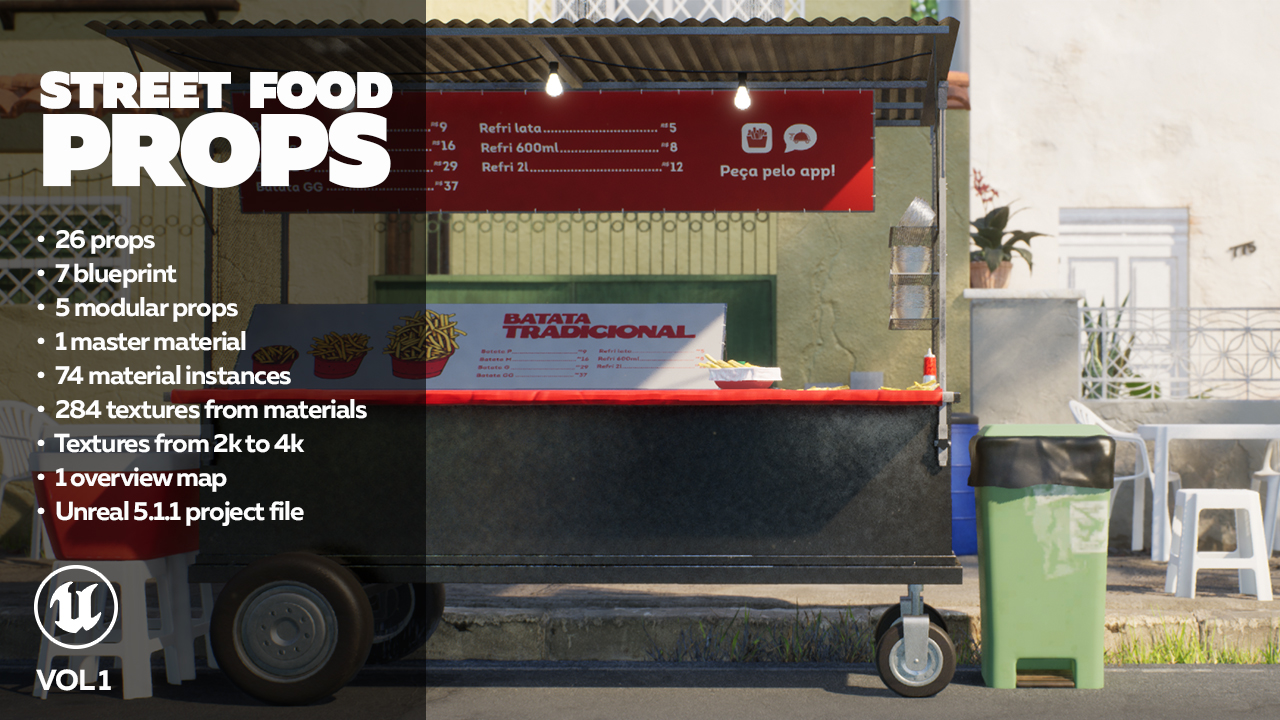
Hi, I would like to share my first work that I had submitted to unreal marketplace, this is a prop pack for Brazilian street food style, you can check more details and screenshots on my ArtStation page here: www.artstation.com/artwork/39bQKY
I’m currently working on vol 2 of my commercial props, and these will be part of another large city kit, soon as I can share more!