showing posts tagged #xiaomi — clear

0

Budget phones democratize access but extract your data as payment

preview

Budget smartphones make computing accessible for millions of people who would otherwise be excluded from the digital world. This access comes hidden in the fine print. Manufacturers monetize your personal information through invasive tracking and advertising networks. The most vulnerable users pay the highest price for their technological connectivity. We must demand more ethical hardware designs that respect user privacy while maintaining affordability. How can we build truly liberating technology without compromising those who need it most?
#tech #privacy #digitalrights #anticonsumerism #datamining

Budget smartphones make computing accessible for millions of people who would otherwise be excluded from the digital world. This access comes hidden in the fine print. Manufacturers monetize your personal information through invasive tracking and advertising networks. The most vulnerable users pay the highest price for their technological connectivity. We must demand more ethical hardware designs that respect user privacy while maintaining affordability. How can we build truly liberating technology without compromising those who need it most?
#tech #privacy #digitalrights #anticonsumerism #datamining

0

HyperOS 3 for Mi Bands release dates

Xiaomi for All HyperOS 3.0 Coming to Xiaomi Mi Bands in December! - Xiaomi for All xiaomiforall.com
preview

The changes sound nice:

  • Pure HyperOS Interface: Say goodbye to MIUI-inspired dials and hello to a unified design that mirrors Xiaomi’s mobile experience.
  • Ultra-Smooth 60 FPS Animations: It’ll feel like you’re wearing a Mi Band 10!
  • Enhanced Always-on Display: Expect more personalization options and reduced battery consumption.
  • Over 100 Exclusive New Watch Faces: Freshen up your style with a wide selection.
  • Brutal Battery Optimization: Get up to 2-3 extra days of battery life with intensive use.
  • Redesigned Gestures and Controls: Swiping is now more intuitive than ever.
  • Native Emoji Support in Notifications: Finally! No more question mark boxes.
  • Improved Sports Tracking: Updated AI algorithms for more accurate data.

Now if only Xiaomi had a proper website with changelog, release dates and information which firmware is the latest for which device 🙄

The changes sound nice:

  • Pure HyperOS Interface: Say goodbye to MIUI-inspired dials and hello to a unified design that mirrors Xiaomi’s mobile experience.
  • Ultra-Smooth 60 FPS Animations: It’ll feel like you’re wearing a Mi Band 10!
  • Enhanced Always-on Display: Expect more personalization options and reduced battery consumption.
  • Over 100 Exclusive New Watch Faces: Freshen up your style with a wide selection.
  • Brutal Battery Optimization: Get up to 2-3 extra days of battery life with intensive use.
  • Redesigned Gestures and Controls: Swiping is now more intuitive than ever.
  • Native Emoji Support in Notifications: Finally! No more question mark boxes.
  • Improved Sports Tracking: Updated AI algorithms for more accurate data.

Now if only Xiaomi had a proper website with changelog, release dates and information which firmware is the latest for which device 🙄

0

Xiaomi Redmi A27Q 2026: New USB-C monitor with 120 Hz and 90-watt charging power

Notebookcheck Xiaomi Redmi A27Q 2026: New USB-C monitor with 120 Hz and 90-watt charging power www.notebookcheck.net
preview

Xiaomi has a new monitor on offer, the Redmi A27Q 2026, which now available as a new variant with a USB-C port, allowing you to use a laptop with just a single cable connection. The monitor supports 90 watts of power output.

Xiaomi has a new monitor on offer, the Redmi A27Q 2026, which now available as a new variant with a USB-C port, allowing you to use a laptop with just a single cable connection. The monitor supports 90 watts of power output.

0

Where can I download official ROMs for Redmi phones?

preview

I’m trying to flash to bricked Redmi A3, and I cannot find official downloads for the ROMs.

The best I could find are shady unofficial websites.

I’m trying to flash to bricked Redmi A3, and I cannot find official downloads for the ROMs.

The best I could find are shady unofficial websites.

0

Xiaomi’s XRING 01 Does Not Mean It Will Immediately Cut Off Sourcing From Qualcomm & MediaTek, As An Estimate Reveals That 40 Percent Of The Company’s Smartphones Use ‘Off The Shelf’ Parts

Wccftech Xiaomi’s XRING 01 Does Not Mean It Will Immediately Cut Off Sourcing From Qualcomm & MediaTek, As An Estimate Reveals That 40 Percent Of The Company’s Smartphones Use ‘Off The Shelf’ Parts wccftech.com
preview

cross-posted from: lemmy.world/post/30203698

cross-posted from: lemmy.world/post/30203698

0

Xiaomi says it is cooperating with a Chinese police probe into a fatal crash by a car using its autonomous features; its stock is down 10%+ over the past week.

The Straits Times Xiaomi EV car with driver assistance crashes in China, 3 reported dead www.straitstimes.com
preview

cross-posted from: programming.dev/post/27908301

cross-posted from: programming.dev/post/27908301

0

AX3000 Adding to the Mi Home App

preview

Hi All,

I am new to the community and needed some guidance. For the longest of time I had the AX3000 added to my Mi Home app with region stating Germany. However, I wanted to change this to South Africa (where I am based). I since did this but now I am unable to add the mesh system back onto the app. I even changed it back to Germany but still no luck. It keeps stating that I need to be part of the same network, which I am.

App Version : V10.0.203-build10.0.203.1180 Iphone version : 14 Pro Max Iphone software ver : 18.1.1

Any help would be greatly appreciated? Thx

Hi All,

I am new to the community and needed some guidance. For the longest of time I had the AX3000 added to my Mi Home app with region stating Germany. However, I wanted to change this to South Africa (where I am based). I since did this but now I am unable to add the mesh system back onto the app. I even changed it back to Germany but still no luck. It keeps stating that I need to be part of the same network, which I am.

App Version : V10.0.203-build10.0.203.1180 Iphone version : 14 Pro Max Iphone software ver : 18.1.1

Any help would be greatly appreciated? Thx

0

Got Google Fi partially working on HyperOS

preview

I have Chinese edition Mix Fold 4 with HyperOS.

I have been able to activate my Google Fi sim (unlimited) in my S24 Ultra and then transferring it to my Mix Fold 4. Which gave me texting, calling and LTE data without downloading Google Fi app.

I have enabled VoNR and VoLTE, which seem to work. I have managed to enable “Calls over WLAN” without Google Fi app and using dial codes to enable. But it does not work.

When I make a call, it keeps saying “connect to WLAN” even though I’m already connected to WLAN. I tried enabling “Mobile Radio Power” in network, but no luck either.

Mix Fold 4 info:

  • bootloader is not unlocked.
  • OS version: 1.0.11.0UNVCNXM
  • has original build.prop

Was wondering if anyone been able to enable WIFI calling or texting without Google Fi app on HyperOS?

I found this, but don’t know if it’s still relevant today. https://xdaforums.com/t/activate-project-fi-account-from-an-unsupported-device-successfully-accomplished.3784430/ Looks like you try to trick Google Fi into thinking your device is supported by updating the Build.prop file with “supported device” information.

Was thinking about using either of these to edit build.prop file in HyperOS. APP: “Root Browser” or Systemless

Any words of advice? Thanks

I have Chinese edition Mix Fold 4 with HyperOS.

I have been able to activate my Google Fi sim (unlimited) in my S24 Ultra and then transferring it to my Mix Fold 4. Which gave me texting, calling and LTE data without downloading Google Fi app.

I have enabled VoNR and VoLTE, which seem to work. I have managed to enable “Calls over WLAN” without Google Fi app and using dial codes to enable. But it does not work.

When I make a call, it keeps saying “connect to WLAN” even though I’m already connected to WLAN. I tried enabling “Mobile Radio Power” in network, but no luck either.

Mix Fold 4 info:

  • bootloader is not unlocked.
  • OS version: 1.0.11.0UNVCNXM
  • has original build.prop

Was wondering if anyone been able to enable WIFI calling or texting without Google Fi app on HyperOS?

I found this, but don’t know if it’s still relevant today. https://xdaforums.com/t/activate-project-fi-account-from-an-unsupported-device-successfully-accomplished.3784430/ Looks like you try to trick Google Fi into thinking your device is supported by updating the Build.prop file with “supported device” information.

Was thinking about using either of these to edit build.prop file in HyperOS. APP: “Root Browser” or Systemless

Any words of advice? Thanks

0

How to dump RAW Data from Android to PC?

preview

I’m looking for a way to dump raw data from an entire phone or at least the sda block to a PC, using a method other than adb pull.

When I run adb pull /dev/block/sda sdaDump.img, it creates a dump file. To find what I need, I have to search through this raw data using a Hex Editor. If the dump comes from a fully functioning phone, I can usually find what I’m looking for because all the data is still intact.

However, I accidentally wiped the metadata partition on my phone, so the decryption keys/files are gone. Now, because of that, some folders appear empty when checked with TWRP’s File Manager, even though the actual files are still there.

If I create a dump now, the raw data in the file won’t be the same as when the metadata was present, and those folders weren’t showing as empty.

Running adb pull /dev/block/sda sdaDump.img now results in a dump where the Hex Editor shows zeroes (no data) where these files should be.

Is there any alternative method to create a raw data dump of the sda block or entire phone storage, that will capture that data as it is (not empty folders, but the data in them), even if it’s encrypted?

I don’t want to create the raw data dump onto the phone storage and then transfer it to a PC, but something that works like adb pull, in the sense that it pulls the data from the phone directly onto a PC.

Thanks a lot in advance to everyone!

I’m looking for a way to dump raw data from an entire phone or at least the sda block to a PC, using a method other than adb pull.

When I run adb pull /dev/block/sda sdaDump.img, it creates a dump file. To find what I need, I have to search through this raw data using a Hex Editor. If the dump comes from a fully functioning phone, I can usually find what I’m looking for because all the data is still intact.

However, I accidentally wiped the metadata partition on my phone, so the decryption keys/files are gone. Now, because of that, some folders appear empty when checked with TWRP’s File Manager, even though the actual files are still there.

If I create a dump now, the raw data in the file won’t be the same as when the metadata was present, and those folders weren’t showing as empty.

Running adb pull /dev/block/sda sdaDump.img now results in a dump where the Hex Editor shows zeroes (no data) where these files should be.

Is there any alternative method to create a raw data dump of the sda block or entire phone storage, that will capture that data as it is (not empty folders, but the data in them), even if it’s encrypted?

I don’t want to create the raw data dump onto the phone storage and then transfer it to a PC, but something that works like adb pull, in the sense that it pulls the data from the phone directly onto a PC.

Thanks a lot in advance to everyone!

0

Poco X6 Pro: how to set different ringtones for the sim1 and sim2?

preview

I want to set different ringtones for personal number and the one I use for work, but I can’t figure out how to do it. any tips?

I want to set different ringtones for personal number and the one I use for work, but I can’t figure out how to do it. any tips?

0

Finally resolved: Recovering data after wiping metadata is actually possible, but I need you help with some info

preview

I need to ask a small favor from the good people of Lemdro.id Community.

In short, I accidentally wiped the metadata partition on my Poco F3 and now I can’t boot into the OS and access my data. I have a lot of pictures, videos and other stuff that I would hate to lose, because of a mistake. But all that is still on the phone, I just can’t boot the phone to access it.

Thankfully, there is a way to fix this by creating a full backup of the phone with adb, then using a HEX Editor to manually look through that gigantic file and try to find the files that were in that metadata partition.

A huge thanks to bluet33th, a user from XDA Forums, without whom I would be helpless and couldn’t do any of this. It might be a bit complicated and manual process, but it is possible. He explained everything in great detail here, so check it out, especially if you are facing the same problem, this will help you tremendously: xdaforums.com/…/how-to-recover-data-if-metadata-p…

In order to find these files and put them back where they belong, I need your help, because I have to know their names, exact sizes and at least part of their content, so that I can search for it. Because I’m searching for a specific text in a text file that is 128 GB in size.

I have already tried this on another Xiaomi phone, to make sure this procedure works on Xiaomi phones and it does, but that phone had HyperOS with Android 14 and since every phone and android version is probably different, in order to be sure, I need this information specifically for Poco F3 with Android 13.

It doesn’t take long, but if you don’t have the time to look inside your metadata partition and tell me which files are inside of that partition and their sizes in bytes, you can just make a backup of the metadata partition and sent it to me, and I’ll do the rest of the work.

Here are the steps on how to create a backup:

  1. Turn on your phone and boot into TWRP, then connect your phone to a PC, type cmd inside Windows search and run cmd, then position cmd into your platform-tools folder (if you flashed your ROM, you should already have the necessary drivers installed for the next steps to work). For example, if your platform-tools folder on Windows is inside C:\platform-tools, all you need to type into cmd is: cd C:\platform-tools

You can also just go inside your platform-tools folder and type cmd in the address bar and the cmd will start already positioned inside that folder.

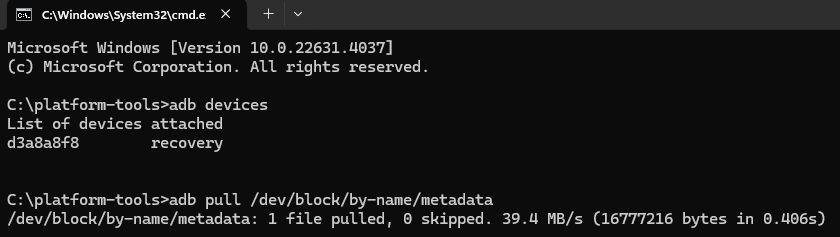
  1. Then type adb devices and you should see your device, if you do, that means that all the drivers are successfully installed and your phone is detected.

  2. Type adb pull /dev/block/by-name/metadata

  3. After that, you should see a file named metadata inside C:\platform-tools. That is the file that I’m looking for and as you can see, it takes just a few minutes to get it.

You can skip the next steps (5 and 6), but I’ll explain them, just in case someone wants to extract these files for themselves, so that you have them in case something like this happens to you. Of course, you can also proceed to extract the files and tell me their names and sizes.

Here is what you need to do:

  1. Extract the content of the metadata file, you can use a software like 7-Zip. Go inside that extracted folder, then into vold > metadata_encryption > key

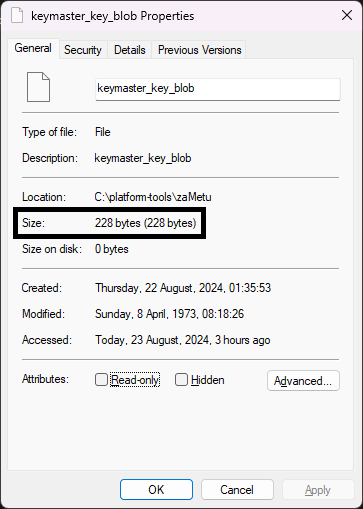
  2. Inside of that key folder, you should see a few files. These are the important files and save them somewhere safe in case you ever need them. Since I don’t have them anymore, in order to recreate them, I need to know their exact names and sizes in bytes. You can check the size of every individual file by right clicking on the file and choosing Properties. Then look under Size, not Size on disk, and in parenthesis, you should see the size in bytes.

Please, if you could check the size of every file and write down which file has what size. I would really appreciate it.

I’m specifically looking for someone who has a Poco F3 with Android 13 and MIUI, because I’m not sure if HyperOS changed something, so maybe the number of files or their size is different. But feel free to post the information even if you have HyperOS, but please mention that, so that I am aware of it.

Thanks a lot for your help, it really means a great deal.

I need to ask a small favor from the good people of Lemdro.id Community.

In short, I accidentally wiped the metadata partition on my Poco F3 and now I can’t boot into the OS and access my data. I have a lot of pictures, videos and other stuff that I would hate to lose, because of a mistake. But all that is still on the phone, I just can’t boot the phone to access it.

Thankfully, there is a way to fix this by creating a full backup of the phone with adb, then using a HEX Editor to manually look through that gigantic file and try to find the files that were in that metadata partition.

A huge thanks to bluet33th, a user from XDA Forums, without whom I would be helpless and couldn’t do any of this. It might be a bit complicated and manual process, but it is possible. He explained everything in great detail here, so check it out, especially if you are facing the same problem, this will help you tremendously: xdaforums.com/…/how-to-recover-data-if-metadata-p…

In order to find these files and put them back where they belong, I need your help, because I have to know their names, exact sizes and at least part of their content, so that I can search for it. Because I’m searching for a specific text in a text file that is 128 GB in size.

I have already tried this on another Xiaomi phone, to make sure this procedure works on Xiaomi phones and it does, but that phone had HyperOS with Android 14 and since every phone and android version is probably different, in order to be sure, I need this information specifically for Poco F3 with Android 13.

It doesn’t take long, but if you don’t have the time to look inside your metadata partition and tell me which files are inside of that partition and their sizes in bytes, you can just make a backup of the metadata partition and sent it to me, and I’ll do the rest of the work.

Here are the steps on how to create a backup:

  1. Turn on your phone and boot into TWRP, then connect your phone to a PC, type cmd inside Windows search and run cmd, then position cmd into your platform-tools folder (if you flashed your ROM, you should already have the necessary drivers installed for the next steps to work). For example, if your platform-tools folder on Windows is inside C:\platform-tools, all you need to type into cmd is: cd C:\platform-tools

You can also just go inside your platform-tools folder and type cmd in the address bar and the cmd will start already positioned inside that folder.

  1. Then type adb devices and you should see your device, if you do, that means that all the drivers are successfully installed and your phone is detected.

  2. Type adb pull /dev/block/by-name/metadata

  3. After that, you should see a file named metadata inside C:\platform-tools. That is the file that I’m looking for and as you can see, it takes just a few minutes to get it.

You can skip the next steps (5 and 6), but I’ll explain them, just in case someone wants to extract these files for themselves, so that you have them in case something like this happens to you. Of course, you can also proceed to extract the files and tell me their names and sizes.

Here is what you need to do:

  1. Extract the content of the metadata file, you can use a software like 7-Zip. Go inside that extracted folder, then into vold > metadata_encryption > key

  2. Inside of that key folder, you should see a few files. These are the important files and save them somewhere safe in case you ever need them. Since I don’t have them anymore, in order to recreate them, I need to know their exact names and sizes in bytes. You can check the size of every individual file by right clicking on the file and choosing Properties. Then look under Size, not Size on disk, and in parenthesis, you should see the size in bytes.

Please, if you could check the size of every file and write down which file has what size. I would really appreciate it.

I’m specifically looking for someone who has a Poco F3 with Android 13 and MIUI, because I’m not sure if HyperOS changed something, so maybe the number of files or their size is different. But feel free to post the information even if you have HyperOS, but please mention that, so that I am aware of it.

Thanks a lot for your help, it really means a great deal.

0

Is Xiaomi abandoning Second Space feature?

preview

Second space feature is uniqoe to Xiaomi and truly makes you feel like you have two completely separate phones in one device. This Xiaomi implementation of Android multiple accounts feature is by far the most elegant and user-friendly.

The second space feature is the only reason I continue to buy Xiaomi phones. Otherwise nothing really differentiates Xiaomi significantly from competitors.

I am discovering more and more bugs and missing features in recent versions of second space. Examples:

Cannot adust display size (stuck at Small and can’t change it). I am vision impaired so this is important to me.

Missing ability to set power saving options for apps installed in second space.

Missing ability to adjust notifications sound volume in second space.

Buggy handling of notification sounds when switching between spaces.

All this is causing me to wonder whether Xiaomi has ababdoned this feature and is no longer maintaining or updating it?

Would appreciate hearing from other second space users about this.

Second space feature is uniqoe to Xiaomi and truly makes you feel like you have two completely separate phones in one device. This Xiaomi implementation of Android multiple accounts feature is by far the most elegant and user-friendly.

The second space feature is the only reason I continue to buy Xiaomi phones. Otherwise nothing really differentiates Xiaomi significantly from competitors.

I am discovering more and more bugs and missing features in recent versions of second space. Examples:

Cannot adust display size (stuck at Small and can’t change it). I am vision impaired so this is important to me.

Missing ability to set power saving options for apps installed in second space.

Missing ability to adjust notifications sound volume in second space.

Buggy handling of notification sounds when switching between spaces.

All this is causing me to wonder whether Xiaomi has ababdoned this feature and is no longer maintaining or updating it?

Would appreciate hearing from other second space users about this.

0

Does the Xiaomi 14 have something similar to Samsungs "Adapt Sound" feature?

preview

“Adapt Sound” basically does a hearing test and then automatically equalizes your headphones or speakers accordingly. I have a hearing impairment and need this feature.

“Adapt Sound” basically does a hearing test and then automatically equalizes your headphones or speakers accordingly. I have a hearing impairment and need this feature.

0

Xiaomi 14 related questions

preview

Hi everyone, I’m planning to buy Xiaomi 14. I have read reviews but I wish to know the user reviews about it, especially about the display, heating, “lens fog” issue, etc. Thanks for the replies.

Hi everyone, I’m planning to buy Xiaomi 14. I have read reviews but I wish to know the user reviews about it, especially about the display, heating, “lens fog” issue, etc. Thanks for the replies.