#moddedminecraft

posts tagged #moddedminecraft

0

[Solved] Builder Block with rendering

preview

Hi, I remember playing with a mod which featured a transparent block with a white border and multiple options on all sides (+, -, and such). I played it with FTB sky odyssey, but I added it. you had to power the block with redstone and if I’m not mistaken, the mod icon was just the block. it would make an outline of the shape it would build, just like “Build Guide”. you could feed it with items by right clicking the block. I’ve already searched both Modrinth and curseforge (which I likley downloaded it from). I’d appreciate it, if someone found it (or if someone knows a mod for modern mc that does something similar)

Edit: Just noticed the block in the new goose video. It’s “openblocks”

Hi, I remember playing with a mod which featured a transparent block with a white border and multiple options on all sides (+, -, and such). I played it with FTB sky odyssey, but I added it. you had to power the block with redstone and if I’m not mistaken, the mod icon was just the block. it would make an outline of the shape it would build, just like “Build Guide”. you could feed it with items by right clicking the block. I’ve already searched both Modrinth and curseforge (which I likley downloaded it from). I’d appreciate it, if someone found it (or if someone knows a mod for modern mc that does something similar)

Edit: Just noticed the block in the new goose video. It’s “openblocks”

0

I'm looking for testers

preview

Hey guys, we’re trying to build the next-gen gaming server host, where people would pay by-the-hour, instead of monthly, to save on costs.

We’re in public beta, and we’d happily host your Factorio games, if you’d like to play with your friends, family and team, in exchange for feedback on reliability and service as a whole.

The website is warp.cool

My Discord @adamwarp

Just let me know if you’re interested, and I’ll assign you your credits.

Your feedback would be invaluable to us!

(Factorio players welcome as well)

Hey guys, we’re trying to build the next-gen gaming server host, where people would pay by-the-hour, instead of monthly, to save on costs.

We’re in public beta, and we’d happily host your Factorio games, if you’d like to play with your friends, family and team, in exchange for feedback on reliability and service as a whole.

The website is warp.cool

My Discord @adamwarp

Just let me know if you’re interested, and I’ll assign you your credits.

Your feedback would be invaluable to us!

(Factorio players welcome as well)

0

How to find technical modpack to play?

preview

I want to get back to modded Minecraft, but I am lost on where to begin. Would love tips on how to find a fitting modpack!

I would love something like GregTech for multiblock stuffs and complexity, or Immersive Engineering for the interactivity and multiblocks.

I considered GregTech New Horizons, but it looks too difficult at a glance, especially with the infernal mobs. I want a casual play through with some complexity added in. Would be great if you could recommend a modpack, or give tips on choosing the right modpack!

I want to get back to modded Minecraft, but I am lost on where to begin. Would love tips on how to find a fitting modpack!

I would love something like GregTech for multiblock stuffs and complexity, or Immersive Engineering for the interactivity and multiblocks.

I considered GregTech New Horizons, but it looks too difficult at a glance, especially with the infernal mobs. I want a casual play through with some complexity added in. Would be great if you could recommend a modpack, or give tips on choosing the right modpack!

0

[FOUND] Which mod adds this Spice of Life/Farmer's Delight compatibility to Cooking for Blockheads?

A screenshot of the cooking for blockhead's cooking table, with the options 'Sort by Eaten' and the text 'Moved to Cooking Pot' highlighted
preview

I saw this in OceanBlock 2, I was looking for something to make Farmer’s Delight’s cooking pot work with Cooking for Blockheads in a different pack

Edit: I looked through the Cooking for Blockhead’s changelogs and it’s actually supported by default now!

I saw this in OceanBlock 2, I was looking for something to make Farmer’s Delight’s cooking pot work with Cooking for Blockheads in a different pack

Edit: I looked through the Cooking for Blockhead’s changelogs and it’s actually supported by default now!

0

AMI Mod

Modrinth Automated Materials Index (AMI) - Minecraft Mod modrinth.com
preview

Today i found this mod called AMI, It looks like a nice recipe viewer and a bit different from EMI and JEI and very useful for big modpacks, I haven’t tried it out but it’s new and i think it’s worth trying out.

AMI is an index and search mod for NeoForge 1.21.1 and Forge 1.20.1 designed for large Minecraft modpacks. It builds a client-side searchable index of items, entities, biomes, structures, and recipe data, with recommended integration for JEI and EMI for the recipe viewer support.

  • Material Grouping: Groups related block variants such as stairs, slabs, walls, and other material families to make > large item lists easier to browse.
  • Structured Query Search: Supports text search plus filters for tags, mods, categories, properties, and numeric metadata such as >energy:50000, >damage:15, or >dps:8.
  • Item Metadata Indexing: Detects useful item facts such as durability, tool stats, armor stats, food values, storage capacity, energy capacity, and fluid capacity where available.
  • Entity Indexing: Adds searchable entity entries with category, health, attack damage, spawn egg support, and >metadata hints such as mountable or tamable where detectable.
  • Biome and Structure Search: Includes indexed biome and structure entries alongside item and entity results.
  • Recipe Viewer Integration: Works standalone or alongside JEI/EMI, including lookup history, favorites, cheat-mode actions, and recipe transfer from AMI panels.
  • Built for Large Modpacks: Handles packs with 50K+ items, with added compatibility for some popular mods like Cobblemon, Create, Tinkers/SilentGear, and more

Today i found this mod called AMI, It looks like a nice recipe viewer and a bit different from EMI and JEI and very useful for big modpacks, I haven’t tried it out but it’s new and i think it’s worth trying out.

AMI is an index and search mod for NeoForge 1.21.1 and Forge 1.20.1 designed for large Minecraft modpacks. It builds a client-side searchable index of items, entities, biomes, structures, and recipe data, with recommended integration for JEI and EMI for the recipe viewer support.

  • Material Grouping: Groups related block variants such as stairs, slabs, walls, and other material families to make > large item lists easier to browse.
  • Structured Query Search: Supports text search plus filters for tags, mods, categories, properties, and numeric metadata such as >energy:50000, >damage:15, or >dps:8.
  • Item Metadata Indexing: Detects useful item facts such as durability, tool stats, armor stats, food values, storage capacity, energy capacity, and fluid capacity where available.
  • Entity Indexing: Adds searchable entity entries with category, health, attack damage, spawn egg support, and >metadata hints such as mountable or tamable where detectable.
  • Biome and Structure Search: Includes indexed biome and structure entries alongside item and entity results.
  • Recipe Viewer Integration: Works standalone or alongside JEI/EMI, including lookup history, favorites, cheat-mode actions, and recipe transfer from AMI panels.
  • Built for Large Modpacks: Handles packs with 50K+ items, with added compatibility for some popular mods like Cobblemon, Create, Tinkers/SilentGear, and more
0

Create Aeronautics has finally released

play · youtube.com
YouTube Create Aeronautics Mod Release Trailer www.youtube.com
preview

From their discord server:

Hey @everyone <@Progress Ping>!

The wait is over!

This has been an incredible journey! We never would have imagined Aeronautics growing from a small project in Create dev-chat to what it is today. We want to thank our community for the years of support, we are all excited to see what you create!

Watch the Trailer: www.youtube.com/watch?v=SO8tpWfZjGk

Download the mod:

Please bear with us as we work out initial issues and bugs. Further patches and updates are to come!

From their discord server:

Hey @everyone <@Progress Ping>!

The wait is over!

This has been an incredible journey! We never would have imagined Aeronautics growing from a small project in Create dev-chat to what it is today. We want to thank our community for the years of support, we are all excited to see what you create!

Watch the Trailer: www.youtube.com/watch?v=SO8tpWfZjGk

Download the mod:

Please bear with us as we work out initial issues and bugs. Further patches and updates are to come!

0

Cobblemon Stats

preview

So, I’ve found a couple things to “raise IV stat by 1”, and I can view said stats, but I can’t find any explanation either in game or on the cobblemon site explaining what IVs (or EVs, for that matter) actually are or how they work. Googling just led me to the cobblemon page about “Hyper Training” where it says you can raise the stats, but that’s not exactly helpful without information on how the system works. Is there anywhere I can find this out (preferably by reading)?

So, I’ve found a couple things to “raise IV stat by 1”, and I can view said stats, but I can’t find any explanation either in game or on the cobblemon site explaining what IVs (or EVs, for that matter) actually are or how they work. Googling just led me to the cobblemon page about “Hyper Training” where it says you can raise the stats, but that’s not exactly helpful without information on how the system works. Is there anywhere I can find this out (preferably by reading)?

0

[Recommendations] Can you suggest a pack that has Create + Farmer's Delight for a server? Ideally for Minecraft 1.20.x or higher

preview

I’m wanting to run a little server for some friends, and one has went “Farmer’s Delight is essential!” and another with “Create is essential!”, but otherwise we’re flexible on what’s included.

I tend to like questpacks, but honestly that’s a nice-to-have

I’m wanting to run a little server for some friends, and one has went “Farmer’s Delight is essential!” and another with “Create is essential!”, but otherwise we’re flexible on what’s included.

I tend to like questpacks, but honestly that’s a nice-to-have

0

Automating the Powah Energizing Orb with the Create Packaging System

preview

I’m currently playing through Stoneblock 4, and as I hadn’t used the Post-Production yet, I decided to try to use Create in place of AE2 for storage/autocrafting. This presents some obstacles, of course. An obvious one is the Energizing Orb from Powah.

It did end up being fairly simple, but since the solution wasn’t immediately obvious I googled to see if anybody had already done this. I quickly found this video with a promising title. Watching revealed a couple obvious reasons that setup wouldn’t work for me (or likely most) though.

  • It only makes energized steel, requiring a new orb (difficult to make early in sb4) and custom setup PER RECIPE
  • It relies on timing (no thanks)

So I had a stab at it myself. The intake frogport (Energizer) is sitting on an inventory access port (no packager) just to extend that bit of the vault. That vault needs to receive packages, not items.

Then, attach a re-packager to that intake vault, place a lever on the back (or top) of the re-packager, and activate the lever so that the re-packager is always powered. Below the re-packager, place a SMART chute. It needs to be lockable, which a regular chute is not.

Place a chute (can be regular or smart) two blocks below and one block in front of the smart chute. Place the orb on top of the bottom chute. Attach a packager to the side of the orb beneath the top (smart) chute. So far, the entire recipe will be inserted into the orb simultaneously. Now to keep anything else from going in while something is in process. Attach a threshold switch to the top of the orb, and rotate it so that one of the 2 output sides is facing the smart chute (the other will be facing away from it).

Now set the threshold switch to output a signal if there’s ANYTHING in the orb (minimum item count 1)

Now just get your rods set up and powered per usual, and set any gauges to send the ingredients to whatever you named your input frogport.

I’m currently playing through Stoneblock 4, and as I hadn’t used the Post-Production yet, I decided to try to use Create in place of AE2 for storage/autocrafting. This presents some obstacles, of course. An obvious one is the Energizing Orb from Powah.

It did end up being fairly simple, but since the solution wasn’t immediately obvious I googled to see if anybody had already done this. I quickly found this video with a promising title. Watching revealed a couple obvious reasons that setup wouldn’t work for me (or likely most) though.

  • It only makes energized steel, requiring a new orb (difficult to make early in sb4) and custom setup PER RECIPE
  • It relies on timing (no thanks)

So I had a stab at it myself. The intake frogport (Energizer) is sitting on an inventory access port (no packager) just to extend that bit of the vault. That vault needs to receive packages, not items.

Then, attach a re-packager to that intake vault, place a lever on the back (or top) of the re-packager, and activate the lever so that the re-packager is always powered. Below the re-packager, place a SMART chute. It needs to be lockable, which a regular chute is not.

Place a chute (can be regular or smart) two blocks below and one block in front of the smart chute. Place the orb on top of the bottom chute. Attach a packager to the side of the orb beneath the top (smart) chute. So far, the entire recipe will be inserted into the orb simultaneously. Now to keep anything else from going in while something is in process. Attach a threshold switch to the top of the orb, and rotate it so that one of the 2 output sides is facing the smart chute (the other will be facing away from it).

Now set the threshold switch to output a signal if there’s ANYTHING in the orb (minimum item count 1)

Now just get your rods set up and powered per usual, and set any gauges to send the ingredients to whatever you named your input frogport.

0

A&S made having a community of your mod annoying

preview

Action and Stuff (called also AnS), is a marketplace addon that became popular soon as you know, they even got inspiration from a lot of Java mods, as results it got annoying having a community of a mod that give inspiration to AnS or a mod that has some similiar features, even if said mod came before AnS! I swear…just look at Hold My Items youtube comments! Luckly people are doing it less, but still… Action and Stuff was great because it made famous some concept but now it’s annoyong doing something with similiar concept because their fans will just attack you

Action and Stuff (called also AnS), is a marketplace addon that became popular soon as you know, they even got inspiration from a lot of Java mods, as results it got annoying having a community of a mod that give inspiration to AnS or a mod that has some similiar features, even if said mod came before AnS! I swear…just look at Hold My Items youtube comments! Luckly people are doing it less, but still… Action and Stuff was great because it made famous some concept but now it’s annoyong doing something with similiar concept because their fans will just attack you

0

Minecraft Java modding is about to get a lot easier and more interesting

GamingOnLinux Minecraft Java modding is about to get a lot easier and more interesting www.gamingonlinux.com
preview

Mojang announced a big change is coming to Minecraft: Java Edition, one that could make it a whole lot easier to make mods and perhaps make them more exciting.

While Minecraft has a long history of modding and there’s some truly massive mods out there, the game has been using obfuscation to make it more difficult to pick it apart. Something that is quite normal in the software industry as one tool in the box to protect games. But, that’s now going to change as they’re completely removing the obfuscation!

Mojang announced a big change is coming to Minecraft: Java Edition, one that could make it a whole lot easier to make mods and perhaps make them more exciting.

While Minecraft has a long history of modding and there’s some truly massive mods out there, the game has been using obfuscation to make it more difficult to pick it apart. Something that is quite normal in the software industry as one tool in the box to protect games. But, that’s now going to change as they’re completely removing the obfuscation!

0

Journeymap Waystone Beacon Pickup

preview

Ahoy!

So I’m usin the Big Chad Guy (w/cobblesmon) mod pack, and a part of that is the journeymap Waystones. When we had it runnin off local we were able to break an pickup the naturally generated Waystone beacons(like in villages or in certain towers) an place them down somewhere else, but recently I moved everything to a server I setup and now I can’t seem to break an replace natural ones. Any suggestions on where to find the settings for that or is this a limitation cause I’m using the server pack now?

Ahoy!

So I’m usin the Big Chad Guy (w/cobblesmon) mod pack, and a part of that is the journeymap Waystones. When we had it runnin off local we were able to break an pickup the naturally generated Waystone beacons(like in villages or in certain towers) an place them down somewhere else, but recently I moved everything to a server I setup and now I can’t seem to break an replace natural ones. Any suggestions on where to find the settings for that or is this a limitation cause I’m using the server pack now?

0

I lost all my items because I was dumb enough to try sleeping in the overworld [Compression]

preview

The screenshot has a weird aspect ratio because I was playing splitscreen and forgot to resize the window before taking it

The last backup is from an hour ago, fml

The screenshot has a weird aspect ratio because I was playing splitscreen and forgot to resize the window before taking it

The last backup is from an hour ago, fml

0

FTB Evolution with no FE generation

preview

The combination of Ars Énergistique and Applied Flux should make it possible to power everything with source either directly or through conversion (whether or not it’s practical remains to be seen). I’m currently on a version from before create was updated and won’t be updating the pack unless Ars Creo is compatible as well.

The combination of Ars Énergistique and Applied Flux should make it possible to power everything with source either directly or through conversion (whether or not it’s practical remains to be seen). I’m currently on a version from before create was updated and won’t be updating the pack unless Ars Creo is compatible as well.

0

Running Minecraft on the Steam Deck using GDLauncher Carbon

preview

cross-posted from: lemmy.world/post/28078581

My kids and I have been using GDLauncher on the Steam Deck for a few years now to run Minecraft modpacks, to the point that they don’t use the Deck for much else! I’ve tried a couple of other modpack managers, but GDLauncher is the one we keep coming back to - the UI design feels much more comfortable on the Deck’s interface, and it’s easy enough to use that I keep finding new modpacks my six year old just installed!

A few years ago GDLauncher jumped to a new version, GDLauncher Carbon. This no longer worked on the Deck out of the box, so we carried on with the older version for a while. The allure of newer Minecraft versions was finally strong enough for me to puzzle out how to get GDLauncher Carbon running, with just a little trial and error! The crucial steps I found here; here’s the step-by-step process I used to get it running, with just the directions at the end:

First, download the GDLauncher Carbon installer for Linux. This should get you an .AppImage file (GDLauncher__2.0.24__linux__x64.AppImage at the time of this writing). I went ahead and made it executable as well, though I’m not clear if this is necessary or not.

A .AppImage file is essentially a self-contained Linux executable that can be run from any location without any external dependencies. The problem is, Steam doesn’t seem to run these well - attempting to add this to the Steam launcher right now will result in Steam attempting to launch it, and nothing happening other than Steam reporting it’s running (and having a lot of trouble closing it).

Fortunately, we’re not the only ones who want to run an .AppImage on Steam! TheAssassin has created an AppImageLauncher program that can seamlessly handle .AppImage files for a variety of application managers, including Steam. The latest stable version is here.

To install it, first open the File Properties, go to the Permissions tab, and make sure “Is executable” is checked. Move it to your Home directory, open Konsole (or your preferred Terminal app) and cd to your home dir, and type: ./appimagelauncher-lite-2.2.0-travis995-0f91801-x86_64.AppImage install (Don’t type that whole thing out! Copy and paste, or type “./ap” and press Tab to get the whole filename, and add the " install" argument to the end.)

This should spit out a few lines describing the installation process, and you should get a new “Applications” directory in your Home dir. Move your GDLauncher .AppImage into Applications, and double-click on it. Take a few moments to go ahead and do your initial GDLauncher Carbon setup, link it to your account, and pull in your existing Minecraft worlds if you like. Mostly, it seems like we need to run it once natively so it registers with appImageLauncher properly.

Now we’re ready to add it to Steam! Launch Steam from the desktop (don’t go back to Gaming Mode yet!), and click on Add a Game in the very bottom left corner. Select “Add a Non-Steam game…” from the popup. Click the “Browse…” button on the “Add Non-Steam Game” window, navigate to “/Home/Applications/”, and select your GDLauncher .AppImage. You’ll know it registered correctly if it reads “GDLauncher (2.0.24.794)” (or whatever) rather than “GDLauncher__2.0.24__linux__x64.AppImage” in Steam - in the latter case, remove the game from Steam, and try launching it from the Application dir again (double-click it from the file browser). Then try readding to Steam once it has run successfully.

At this point, you should be set! I like to verify it runs from Desktop Steam before switching the Deck back to Gaming mode - should just take a few seconds to launch and shut down! All that’s left to do now is bring in your preferred control scheme!

Just the steps:

  1. Download GDLauncher and appImageLauncher
  2. Move both files to the Home dir
  3. Set the Executable permission on appImageLauncher (and possibly GDLauncher) - open the file properties, go to the Permissions tab, and check “Is executable"
  4. Open Konsole and navigate to the Home dir (should start there), and run the command: ./appimagelauncher-lite-2.2.0-travis995-0f91801-x86_64.AppImage install (copy and paste, or use tab completion and add " install”!)
  5. Move GDLauncher into the new Home/Applications dir
  6. Run GDLauncher (double-click it in Dolphin). Go ahead and link your account, import existing modpacks, etc.
  7. Open Steam in Desktop Mode and Add a Non-Steam Game, and Browse to Home/Applications/GDLauncher file
  8. Should show in Steam as “GDLauncher (2.0.currentversion)”; if not, remove it from Steam and go back to step 6. Otherwise, verify it launches from Steam, and you should be good to run it Gaming mode!
  9. Now that it runs in Gaming Mode, set up your controls so you can actually play!

cross-posted from: lemmy.world/post/28078581

My kids and I have been using GDLauncher on the Steam Deck for a few years now to run Minecraft modpacks, to the point that they don’t use the Deck for much else! I’ve tried a couple of other modpack managers, but GDLauncher is the one we keep coming back to - the UI design feels much more comfortable on the Deck’s interface, and it’s easy enough to use that I keep finding new modpacks my six year old just installed!

A few years ago GDLauncher jumped to a new version, GDLauncher Carbon. This no longer worked on the Deck out of the box, so we carried on with the older version for a while. The allure of newer Minecraft versions was finally strong enough for me to puzzle out how to get GDLauncher Carbon running, with just a little trial and error! The crucial steps I found here; here’s the step-by-step process I used to get it running, with just the directions at the end:

First, download the GDLauncher Carbon installer for Linux. This should get you an .AppImage file (GDLauncher__2.0.24__linux__x64.AppImage at the time of this writing). I went ahead and made it executable as well, though I’m not clear if this is necessary or not.

A .AppImage file is essentially a self-contained Linux executable that can be run from any location without any external dependencies. The problem is, Steam doesn’t seem to run these well - attempting to add this to the Steam launcher right now will result in Steam attempting to launch it, and nothing happening other than Steam reporting it’s running (and having a lot of trouble closing it).

Fortunately, we’re not the only ones who want to run an .AppImage on Steam! TheAssassin has created an AppImageLauncher program that can seamlessly handle .AppImage files for a variety of application managers, including Steam. The latest stable version is here.

To install it, first open the File Properties, go to the Permissions tab, and make sure “Is executable” is checked. Move it to your Home directory, open Konsole (or your preferred Terminal app) and cd to your home dir, and type: ./appimagelauncher-lite-2.2.0-travis995-0f91801-x86_64.AppImage install (Don’t type that whole thing out! Copy and paste, or type “./ap” and press Tab to get the whole filename, and add the " install" argument to the end.)

This should spit out a few lines describing the installation process, and you should get a new “Applications” directory in your Home dir. Move your GDLauncher .AppImage into Applications, and double-click on it. Take a few moments to go ahead and do your initial GDLauncher Carbon setup, link it to your account, and pull in your existing Minecraft worlds if you like. Mostly, it seems like we need to run it once natively so it registers with appImageLauncher properly.

Now we’re ready to add it to Steam! Launch Steam from the desktop (don’t go back to Gaming Mode yet!), and click on Add a Game in the very bottom left corner. Select “Add a Non-Steam game…” from the popup. Click the “Browse…” button on the “Add Non-Steam Game” window, navigate to “/Home/Applications/”, and select your GDLauncher .AppImage. You’ll know it registered correctly if it reads “GDLauncher (2.0.24.794)” (or whatever) rather than “GDLauncher__2.0.24__linux__x64.AppImage” in Steam - in the latter case, remove the game from Steam, and try launching it from the Application dir again (double-click it from the file browser). Then try readding to Steam once it has run successfully.

At this point, you should be set! I like to verify it runs from Desktop Steam before switching the Deck back to Gaming mode - should just take a few seconds to launch and shut down! All that’s left to do now is bring in your preferred control scheme!

Just the steps:

  1. Download GDLauncher and appImageLauncher
  2. Move both files to the Home dir
  3. Set the Executable permission on appImageLauncher (and possibly GDLauncher) - open the file properties, go to the Permissions tab, and check “Is executable"
  4. Open Konsole and navigate to the Home dir (should start there), and run the command: ./appimagelauncher-lite-2.2.0-travis995-0f91801-x86_64.AppImage install (copy and paste, or use tab completion and add " install”!)
  5. Move GDLauncher into the new Home/Applications dir
  6. Run GDLauncher (double-click it in Dolphin). Go ahead and link your account, import existing modpacks, etc.
  7. Open Steam in Desktop Mode and Add a Non-Steam Game, and Browse to Home/Applications/GDLauncher file
  8. Should show in Steam as “GDLauncher (2.0.currentversion)”; if not, remove it from Steam and go back to step 6. Otherwise, verify it launches from Steam, and you should be good to run it Gaming mode!
  9. Now that it runs in Gaming Mode, set up your controls so you can actually play!
0

What modern packs are similar to FTB Inf Evolved 1.7.10?

preview

FTB Inf Evolved 1.7.10 is my favourite pack and I dont really want to go back and play it for the millionth time. So Instead im looking for a similar experience but with some mod updates.

FTB Inf Evolved 1.7.10 is my favourite pack and I dont really want to go back and play it for the millionth time. So Instead im looking for a similar experience but with some mod updates.

0

Found a VR Modpack that includes Create 6.0+

preview

Sharing this because I tried making my own and kept having issues, so I found one that actually worked out of the gate (that had Create 6.0+) and wanted to share. Playing this in VR is fascinating, the water wheels are HUGE for example.

The name is Simple Vivecraft - Create Edition

Note: Not my modpack

Sharing this because I tried making my own and kept having issues, so I found one that actually worked out of the gate (that had Create 6.0+) and wanted to share. Playing this in VR is fascinating, the water wheels are HUGE for example.

The name is Simple Vivecraft - Create Edition

Note: Not my modpack

0

What servers do you play on?

preview

I wanted to play some modded MC again, but not alone. If you guys could recommend me a server I could join, I would be extraordinary grateful. Best would be 1.12.2 or lower… but I’ll take my chances anywhere.

I wanted to play some modded MC again, but not alone. If you guys could recommend me a server I could join, I would be extraordinary grateful. Best would be 1.12.2 or lower… but I’ll take my chances anywhere.

0

GTNH 10th year anniversary and 2.7 update

play · youtube.com
YouTube THE BIGGEST MODPACK UPDATE IN MINECRAFT HISTORY | GTNH 2.7 youtu.be
preview

Can’t believe that GTNH is 10 years old! It has certainly came a long way from its humble beginnings! The 2.7 update is also one of the largest NH updates, adding many new machines (including more steam machines for earlygame QOL), new and rebalanced processing lines, new endgame content, new mechanics, new custom mods (including Sodium backport to 1.7.10 with shader support) and technical stuff, and much, much more! More details can be found in an update video by Aditya.

Can’t believe that GTNH is 10 years old! It has certainly came a long way from its humble beginnings! The 2.7 update is also one of the largest NH updates, adding many new machines (including more steam machines for earlygame QOL), new and rebalanced processing lines, new endgame content, new mechanics, new custom mods (including Sodium backport to 1.7.10 with shader support) and technical stuff, and much, much more! More details can be found in an update video by Aditya.

0

I made a mod about giving your items a soul - Awakened Items

Modrinth Awakened Items - Minecraft Mod modrinth.com
preview

I’ve always liked the fantasy concept of talking swords and similar things and in the last modpack I played I kinda wished for a way to make any piece of equipment better. Some weapons for example are really cool looking and have interesting mechanics but their base stats just can’t compare to weapons from other mods. That’s where I got the idea for this.

Available on Modrinth for NeoForge 1.21.1-1.21.3

I’ve always liked the fantasy concept of talking swords and similar things and in the last modpack I played I kinda wished for a way to make any piece of equipment better. Some weapons for example are really cool looking and have interesting mechanics but their base stats just can’t compare to weapons from other mods. That’s where I got the idea for this.

Available on Modrinth for NeoForge 1.21.1-1.21.3

0

They changed the veins didn't they

preview

Playing Monifactory (Gregtech Modern for 1.20.1) and I couldn’t help but notice how much bigger the veins are here. They are now so much thicker and the “in-between” ores now display a vertical pattern. In 1.12.2 CEu I remember the veins are usually only like 7 blocks thick (or I am having memory issues). I wonder if this is modpack settings or this is default GTM settings.

Playing Monifactory (Gregtech Modern for 1.20.1) and I couldn’t help but notice how much bigger the veins are here. They are now so much thicker and the “in-between” ores now display a vertical pattern. In 1.12.2 CEu I remember the veins are usually only like 7 blocks thick (or I am having memory issues). I wonder if this is modpack settings or this is default GTM settings.

0

Whats the best Modern Day Performance mod for an older Laptop?

preview

I Repaired my first ever Laptop with which I used to play 1.7.10 on back in the day. While that version still runs at a buttery smooth 60 fps, trying the newest version barely manages 15 fps, if even that.

Since the days of Optifine, I’ve heard that there has been a bit of a Performance mod war going on, but since im out of the loop, I’ve wanted to ask whats the best performance mod for the job?

I Repaired my first ever Laptop with which I used to play 1.7.10 on back in the day. While that version still runs at a buttery smooth 60 fps, trying the newest version barely manages 15 fps, if even that.

Since the days of Optifine, I’ve heard that there has been a bit of a Performance mod war going on, but since im out of the loop, I’ve wanted to ask whats the best performance mod for the job?

0

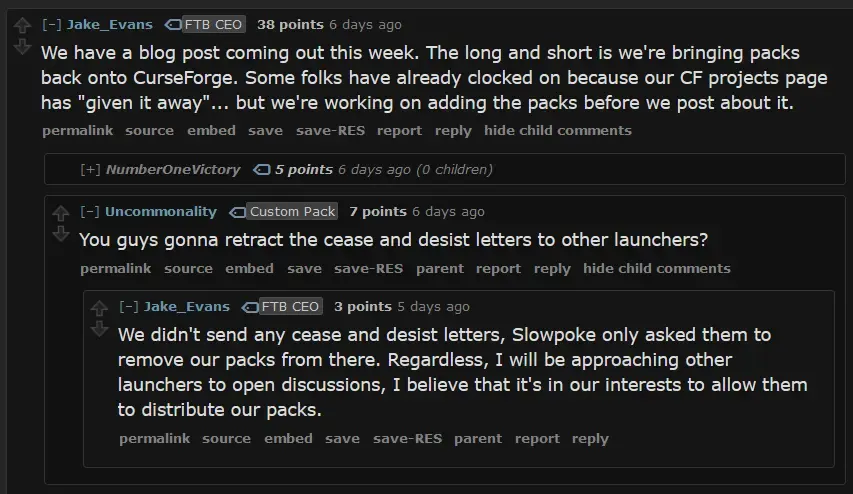
FTB is re-allowing downloads from Curseforge, following them getting a new CEO

Feeding The Beast: What&#x27;s New and What to Look Forward To | Feed The Beast Feeding The Beast: What&#x27;s New and What to Look Forward To | Feed The Beast feed-the-beast.com
preview

He also said this on the other website, but we’ll see if he actually follows through with third party launchers:

opinion

I don’t forgive them for locking their modpacks behind overwolf bloatware for 4 years, but I am glad that they are reopening them at least though it feels like it’ll be a matter of time before the enshittification starts again, they are a corporation after all it kinda feels like what is going on with TF2 right now with the bots being gone but wondering how long it will last

He also said this on the other website, but we’ll see if he actually follows through with third party launchers:

opinion

I don’t forgive them for locking their modpacks behind overwolf bloatware for 4 years, but I am glad that they are reopening them at least though it feels like it’ll be a matter of time before the enshittification starts again, they are a corporation after all it kinda feels like what is going on with TF2 right now with the bots being gone but wondering how long it will last

0

Is it possible to have a long-term/"forever" modded minecraft world?

preview

I’m always fascinated with the idea of a forever world, but I got always bored out with the vanilla options. Since my friend introcued me to Create, I have instantly became obsessed with a forever modded minecraft world.

If it’s sorta possible, what type of mods should I avoid to include in a forever Create and Ad Astra modpack, aside from possibly inactive mods? Is Biomes O Plenty a no-go as an example since it’s a world gen mod?

EDIT: By long-term I mean playing a world through release updates.

I’m always fascinated with the idea of a forever world, but I got always bored out with the vanilla options. Since my friend introcued me to Create, I have instantly became obsessed with a forever modded minecraft world.

If it’s sorta possible, what type of mods should I avoid to include in a forever Create and Ad Astra modpack, aside from possibly inactive mods? Is Biomes O Plenty a no-go as an example since it’s a world gen mod?

EDIT: By long-term I mean playing a world through release updates.

0

Who thought this was a good idea? [Stacia 2: Expert]

expert pack, my ass
preview

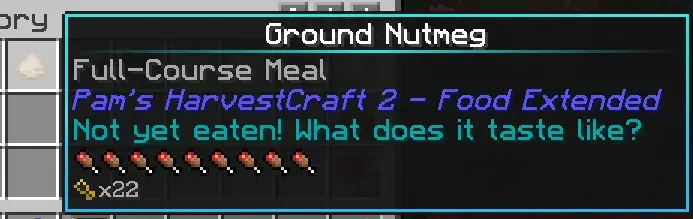
this took me a total of 30 seconds to find the ingredients to make (nutmeg from a tree, 3 andesite, and a stick)

5/7 of the recipes using ground nutmeg give less saturation AND less hunger shanks also

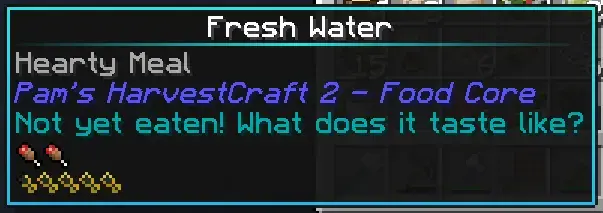
this one is just funny

this took me a total of 30 seconds to find the ingredients to make (nutmeg from a tree, 3 andesite, and a stick)

5/7 of the recipes using ground nutmeg give less saturation AND less hunger shanks also

this one is just funny

0

Impact of Pipez on server performance

preview

The server I play on doesn’t have much logistics options (apart from intergrated dynamics and refined storage), so many people are relying on massive setups with Pipez. I’ve heard many people complain about the bad performance of Pipez, but I was unable to verify. Does anyone encounter TPS issues when using Pipez?

The server I play on doesn’t have much logistics options (apart from intergrated dynamics and refined storage), so many people are relying on massive setups with Pipez. I’ve heard many people complain about the bad performance of Pipez, but I was unable to verify. Does anyone encounter TPS issues when using Pipez?

0

Looking for a resource pack or fabric mod: Bringing back C418 music in newer versions/making it more frequent without removing the new soundtrack

preview

cross-posted from: lemmy.dbzer0.com/post/23993923

Post title says it all.

I already looked on Modrinth and other platforms, but was unable to find what I was looking for. They all seem to remove/disable the new soundtrack, but I’d prefer to have a different approach of just “balancing” the old soundtrack back into the mix by making the C418 tracks more frequent.

Ideally, it would also retain the weighted functionality that adjust the music to the situation/biome you are in.
Another bonus point would be incorporating the tracks of the C418 MC albums which were not included even in the old soundtrack

cross-posted from: lemmy.dbzer0.com/post/23993923

Post title says it all.

I already looked on Modrinth and other platforms, but was unable to find what I was looking for. They all seem to remove/disable the new soundtrack, but I’d prefer to have a different approach of just “balancing” the old soundtrack back into the mix by making the C418 tracks more frequent.

Ideally, it would also retain the weighted functionality that adjust the music to the situation/biome you are in.
Another bonus point would be incorporating the tracks of the C418 MC albums which were not included even in the old soundtrack

0

1.7.10 is 10 years old!

preview

I can’t believe 1710 is already 10 years old. I can’t believe 2014 is 10 years ago. I can’t believe I’ve been playing Minecraft for 10 years now (I joined around the 1.7.X era). I can’t believe I entered primary school 10 years ago.

I can’t believe 1710 is already 10 years old. I can’t believe 2014 is 10 years ago. I can’t believe I’ve been playing Minecraft for 10 years now (I joined around the 1.7.X era). I can’t believe I entered primary school 10 years ago.

0

finally AE2 system (Nomifactory ceu)

preview

finaly set up an ae2 sytem in nomifactory ceu. you can create it in early in game but 4k cells and me drive are gated behind mv tech. ae2 system has 10 4k cells and types of 3 of them full currently this hopefully make it easier to move to void world.

finaly set up an ae2 sytem in nomifactory ceu. you can create it in early in game but 4k cells and me drive are gated behind mv tech. ae2 system has 10 4k cells and types of 3 of them full currently this hopefully make it easier to move to void world.

0

Abandoned bases...

preview

… or not, it’s really hard to tell on servers that sees relativelly little action.

(the base in the image above is confirmed to be abandoned, it used to be a farm that supplies vegetables)

… or not, it’s really hard to tell on servers that sees relativelly little action.

(the base in the image above is confirmed to be abandoned, it used to be a farm that supplies vegetables)

0

Catching runaway locomotive(s)

preview

Some locos “escaped” (it was still powered on) from a station because the driver (totally not me) got ran over. I managed to find two of the same locos (not sure where the second came from) several km away from the station , and I managed to return them without incident (trust me totally nothing went wrong)

everything normal…

(don’t mind me just some uninsulated IC2 wires)

aaaand the trains ran away again (managed to break the track at the next station, which coincidentally was the station where I’m supposed to return these rainbow locos)

Finally, after an hour of “very smooth progress”, I finally accomplished the task of moving 2 locomotives from one place to another! With~~(out)~~ incident, of course

Some locos “escaped” (it was still powered on) from a station because the driver (totally not me) got ran over. I managed to find two of the same locos (not sure where the second came from) several km away from the station , and I managed to return them without incident (trust me totally nothing went wrong)

everything normal…

(don’t mind me just some uninsulated IC2 wires)

aaaand the trains ran away again (managed to break the track at the next station, which coincidentally was the station where I’m supposed to return these rainbow locos)

Finally, after an hour of “very smooth progress”, I finally accomplished the task of moving 2 locomotives from one place to another! With~~(out)~~ incident, of course

0

My problems with Skyfactory 4

preview

I guess this is kind of asking for direction, but also just airing out my grievances.

I have tried multiple times to play skyfactory 4 and have stopped every time. I just started a new skyfactory 3 and am starting to realize why I don’t like skyfactory 4. 4 feels very linear to me. Everything is centered on bonsai trees. Maybe later with huge mega farms mystical agriculture could take over but it’s way too far away and I lose interest far before then. 3 keeps helping you move forward because there are so many things to try even in early game that makes you want to push into new mods.

The second reason I stopped might just be preference, but i feel like 3 is easier to scale making the grind feel shorter. Things like extreme reactors and tinkers construct can start small and then grow with you as your production increases. I also do like that there are some mods that help a ton (some would say broken) that help move things if you know about them e.g. cloches in immersive engineering. I just feel like 4 has been optimized to draw out the grind in one mod at a time.

4 seems great and I want to love it, but I just run out of steam too early. The last time I even let myself move through some grind by using creative to fill in things once I had made a couple of something.

I am open to suggestions and people telling me I am wrong. I would just like to know how everyone addresses my issues.

Thank you all in advance!

I guess this is kind of asking for direction, but also just airing out my grievances.

I have tried multiple times to play skyfactory 4 and have stopped every time. I just started a new skyfactory 3 and am starting to realize why I don’t like skyfactory 4. 4 feels very linear to me. Everything is centered on bonsai trees. Maybe later with huge mega farms mystical agriculture could take over but it’s way too far away and I lose interest far before then. 3 keeps helping you move forward because there are so many things to try even in early game that makes you want to push into new mods.

The second reason I stopped might just be preference, but i feel like 3 is easier to scale making the grind feel shorter. Things like extreme reactors and tinkers construct can start small and then grow with you as your production increases. I also do like that there are some mods that help a ton (some would say broken) that help move things if you know about them e.g. cloches in immersive engineering. I just feel like 4 has been optimized to draw out the grind in one mod at a time.

4 seems great and I want to love it, but I just run out of steam too early. The last time I even let myself move through some grind by using creative to fill in things once I had made a couple of something.

I am open to suggestions and people telling me I am wrong. I would just like to know how everyone addresses my issues.

Thank you all in advance!

0

Is there anyway i can transfer a world save from fabric to forge?

preview

Both saves are on mc 1.20.1 and not all the mods line up but im happy to manually fix the things that are broken. And lose things from mods not in my new modpack.

Currently it complains about corrupted save file.

Since a majority of what i actually want to transfer is located within a small area i have considered making a schematic and using world edit to drop it in woukd this work?

I assume most if not all items will be lost in this proccess but im not sure if perhaps i could export/transfer things via ME?

Any help would greatly be appreciated

EDIT: I did it all i had to do was create a new world in the new mc instance then manually copy over world and player files and it just worked.

Both saves are on mc 1.20.1 and not all the mods line up but im happy to manually fix the things that are broken. And lose things from mods not in my new modpack.

Currently it complains about corrupted save file.

Since a majority of what i actually want to transfer is located within a small area i have considered making a schematic and using world edit to drop it in woukd this work?

I assume most if not all items will be lost in this proccess but im not sure if perhaps i could export/transfer things via ME?

Any help would greatly be appreciated

EDIT: I did it all i had to do was create a new world in the new mc instance then manually copy over world and player files and it just worked.

0

Am I going insane? Wasn't Create originally a Fabric mod?

preview

I recently had this conversation on Discord (I am the jerma guy):

I looked on the official Create mod’s Curseforge page, and the earliest version is for Forge, with the first Fabric version being dated 3 years later.

I wanted to send my earliest minecraft saves (with the mod) here, but I can’t find them anywhere, I suspect they’ve been lost to time.

I am genuinely confused, this is not a joke.

I recently had this conversation on Discord (I am the jerma guy):

I looked on the official Create mod’s Curseforge page, and the earliest version is for Forge, with the first Fabric version being dated 3 years later.

I wanted to send my earliest minecraft saves (with the mod) here, but I can’t find them anywhere, I suspect they’ve been lost to time.

I am genuinely confused, this is not a joke.