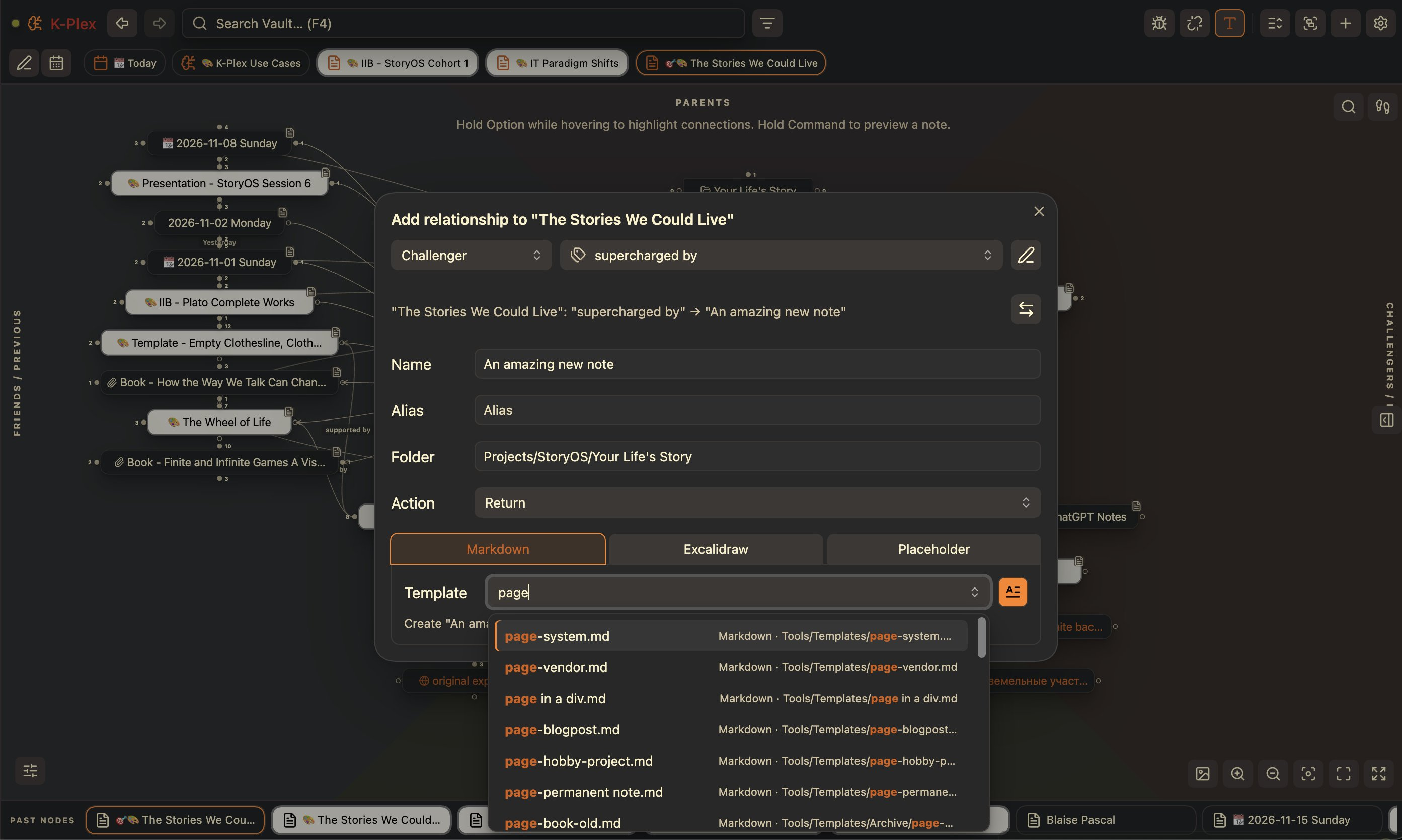
Create notes with Markdown & Excalidraw templates, build relationships faster, customize node styles, and enjoy a smoother experience on desktop and mobile.
Create notes with Markdown & Excalidraw templates, build relationships faster, customize node styles, and enjoy a smoother experience on desktop and mobile.
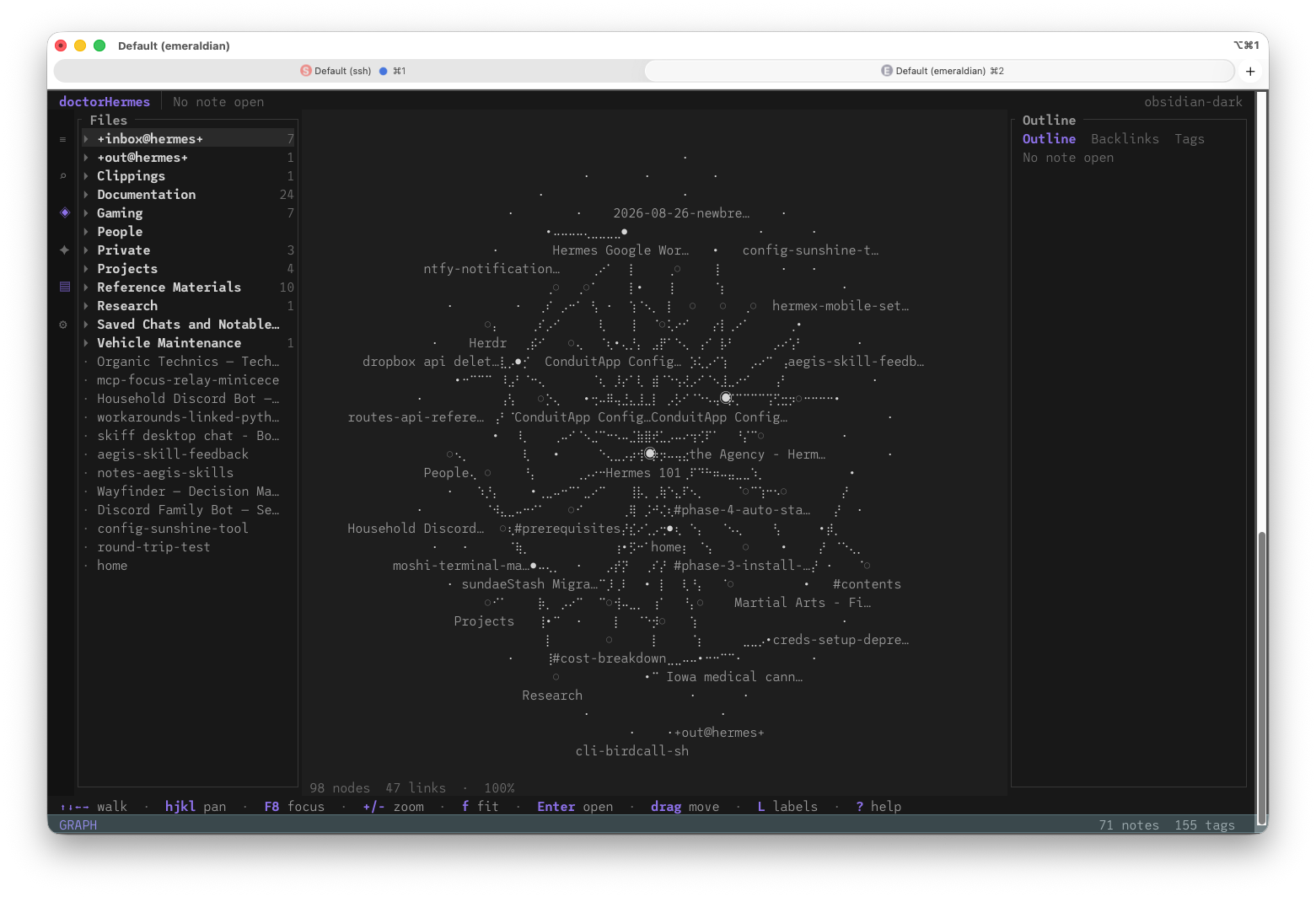
emeraldian is an @obsidianmd for terminals and I ran it for the first time and it loaded my vault used by my Hermes environment and offered to show me an ascii graph.
emeraldian is an @obsidianmd for terminals and I ran it for the first time and it loaded my vault used by my Hermes environment and offered to show me an ascii graph.
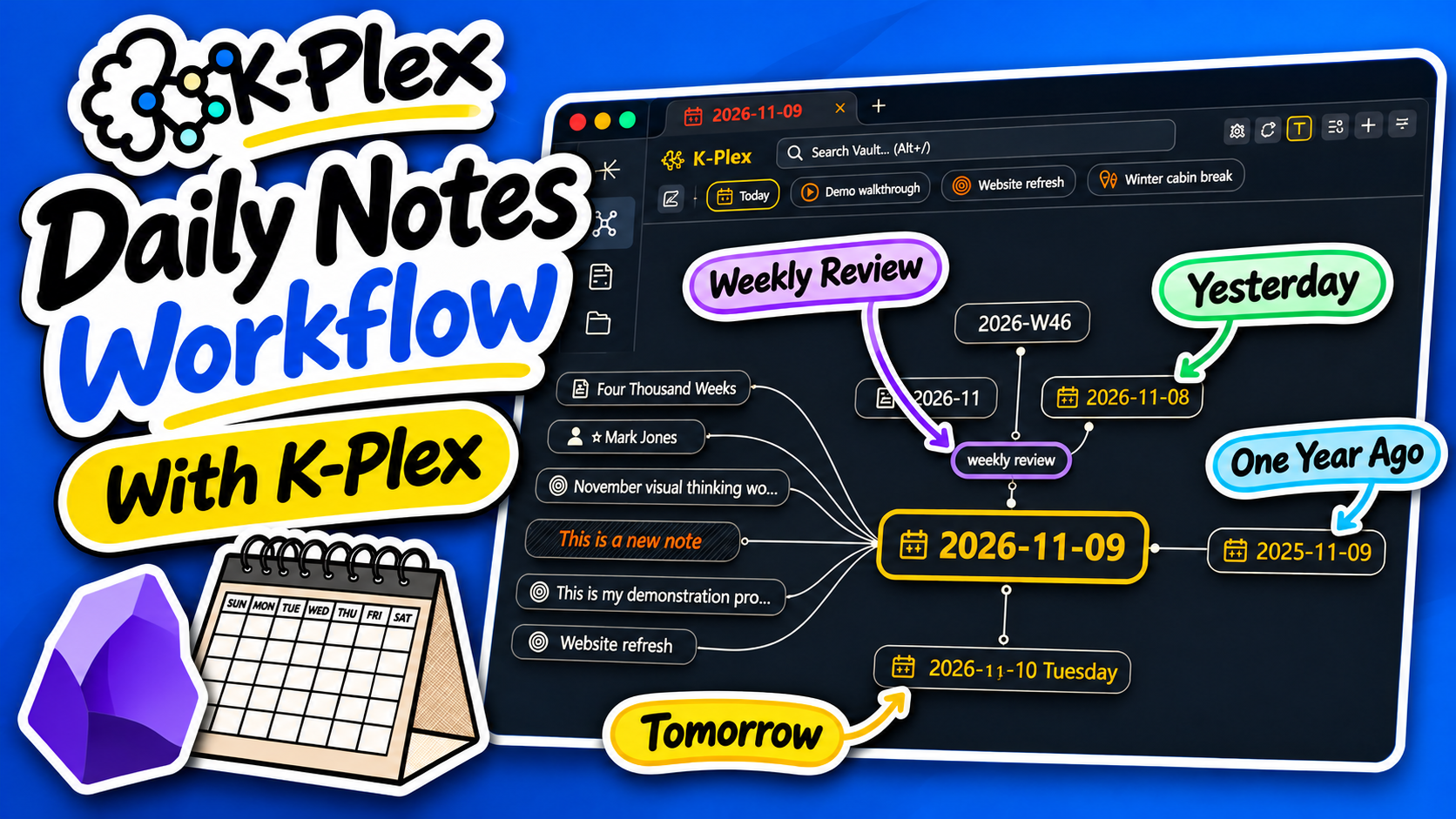
Just released K-Plex 0.3.1 for @obsidianmd
- mindmap-, facets-, compas-views
- drag & drop support
- Obsidian theme support
- better indexing
- breadcrumbs
+ more, more, more
Just released K-Plex 0.3.1 for @obsidianmd
- mindmap-, facets-, compas-views
- drag & drop support
- Obsidian theme support
- better indexing
- breadcrumbs
+ more, more, more
You’ve probably run into some Obsidian evangelist espousing some convoluted system of organizing all their notes, and building some knowledge base.[…] This isn’t that article.
You’ve probably run into some Obsidian evangelist espousing some convoluted system of organizing all their notes, and building some knowledge base.[…] This isn’t that article.
I’m sure that many who use obsidian already knew of this plugin. But if you just need a quick and free way to sync your notes between devices this plugin is quite handy.
⚠️ This is a community plugin - Not been maintained for 2 years ⚠️
Sync notes between local and cloud with smart conflict: S3, Dropbox, webdav, OneDrive, Google Drive, Box, pCloud, Yandex Disk, Koofr, Azure Blob Storage.
Basically the only thing you have to do (after installing obsidian) is to create a New Vault with the same name (exp. “FkyGoogle123”) in all your devices.
Then go in the vault setting
Community plugins> and search “Remotely Save”
Once installed click “option” and select “chose a remote service”. After that, authenticate with the Auth of your service and it’s done.
A new Sync option will now appear in the vault setting menu on the left. Click it to sync your file.
I’m sure that many who use obsidian already knew of this plugin. But if you just need a quick and free way to sync your notes between devices this plugin is quite handy.
⚠️ This is a community plugin - Not been maintained for 2 years ⚠️
Sync notes between local and cloud with smart conflict: S3, Dropbox, webdav, OneDrive, Google Drive, Box, pCloud, Yandex Disk, Koofr, Azure Blob Storage.
Basically the only thing you have to do (after installing obsidian) is to create a New Vault with the same name (exp. “FkyGoogle123”) in all your devices.
Then go in the vault setting
Community plugins> and search “Remotely Save”
Once installed click “option” and select “chose a remote service”. After that, authenticate with the Auth of your service and it’s done.
A new Sync option will now appear in the vault setting menu on the left. Click it to sync your file.
A big update with a smoother freedraw experience (🙏Excalidraw), improved Markdown embeds, Comic Book Callout Editor, MindMap Builder improvements, and more.
A big update with a smoother freedraw experience (🙏Excalidraw), improved Markdown embeds, Comic Book Callout Editor, MindMap Builder improvements, and more.
I’m currently building a small website as my online portfolio and blog, with some fun stuff like making it explorable as a side-scroller “game” (I gaven’t enabled that functionality yet), and as part of documenting the process, I’m trying to write short blog posts that cover some of the tools and decisions I’m making along the way.
This post is about how I decided to write the site’s content using Markdown in order to write using Obsidian, and how I then turn that Markdown code into clean, modern HTML “on the fly”.
Please note that the site itself is still very much a work in progress.
I’m currently building a small website as my online portfolio and blog, with some fun stuff like making it explorable as a side-scroller “game” (I gaven’t enabled that functionality yet), and as part of documenting the process, I’m trying to write short blog posts that cover some of the tools and decisions I’m making along the way.
This post is about how I decided to write the site’s content using Markdown in order to write using Obsidian, and how I then turn that Markdown code into clean, modern HTML “on the fly”.
Please note that the site itself is still very much a work in progress.
Interesting tool based on blocks to tag any document for photos you own. With app to allow access from any device. Blocks contains tags and links between them to organize all like a heap.
I haven’t installed the self-hosted version yet to see how it can interact with an existing Obsidian vault. Next step.
Site: heaper.de
Interesting tool based on blocks to tag any document for photos you own. With app to allow access from any device. Blocks contains tags and links between them to organize all like a heap.
I haven’t installed the self-hosted version yet to see how it can interact with an existing Obsidian vault. Next step.
Site: heaper.de
TODOseq (“to-do-seek”) is a lightweight, keyword-based task tracker that uses an Org Mode / Logseq style of task capture. obsidian.md/plugins?id=todoseq
This update adds a couple of user requested features and some quality of life improvements:
The new keyword sort option organizes the task list by the state keywords which prioritizes active tasks first, then inactive, custom, waiting, and then completed. This provides a more rigid and predictable sort than the dynamic urgency sort added in 0.9.0.
A new search by page properties option enables a powerful way to filter tasks across your vault based on the tags and properties of the page the task is defined on, and the new History list in the search options provides quick access to you last 10 search queries.
The embedded task lists get some visual updates, with a new collapse option to expand and collapse the list, and a wrap-content option to control whether to wrap or truncate task details.
Finally some cleanup to editor views better aligns the visuals to the Live Preview, Reader and Source View modes.
TODOseq (“to-do-seek”) is a lightweight, keyword-based task tracker that uses an Org Mode / Logseq style of task capture. obsidian.md/plugins?id=todoseq
This update adds a couple of user requested features and some quality of life improvements:
The new keyword sort option organizes the task list by the state keywords which prioritizes active tasks first, then inactive, custom, waiting, and then completed. This provides a more rigid and predictable sort than the dynamic urgency sort added in 0.9.0.
A new search by page properties option enables a powerful way to filter tasks across your vault based on the tags and properties of the page the task is defined on, and the new History list in the search options provides quick access to you last 10 search queries.
The embedded task lists get some visual updates, with a new collapse option to expand and collapse the list, and a wrap-content option to control whether to wrap or truncate task details.
Finally some cleanup to editor views better aligns the visuals to the Live Preview, Reader and Source View modes.
I’ve been brainstorming a weird west series; Judas Jones. The pitch is “Michael Moorcock’s Gunsmoke.”
Using @obsidianmd allows me to organize my ideas and fiddle with technology, my two favorite things. Like using a canvas to create this relationship chart.
I’m not sure if it’s going to be a comic or a series of short stories.
I’ve two published novels and the ESPionage RPG coming out this year. I’d like to add a comic to the portfolio. #WritingCommunity
I’ve been brainstorming a weird west series; Judas Jones. The pitch is “Michael Moorcock’s Gunsmoke.”
Using @obsidianmd allows me to organize my ideas and fiddle with technology, my two favorite things. Like using a canvas to create this relationship chart.
I’m not sure if it’s going to be a comic or a series of short stories.
I’ve two published novels and the ESPionage RPG coming out this year. I’d like to add a comic to the portfolio. #WritingCommunity
Anyone keep diaries in Obsidian? How do you format the filenames/directories and the notes themselves? My current formatting for the filenames is “/Daily Notes/DD-MMMM-YYYY”. Don’t have many plugins right now, but I’m open to suggestions. It’s kind of frustrating that the notes in the diary are not ordered in a good way, but what can you do, it’s not too much of an issue. I also tag all my notes. If anyone has any experiences with journaling in Obsidian then let me know what you’ve learned in that process.
A list of useful plugins would be much appreciated!
Anyone keep diaries in Obsidian? How do you format the filenames/directories and the notes themselves? My current formatting for the filenames is “/Daily Notes/DD-MMMM-YYYY”. Don’t have many plugins right now, but I’m open to suggestions. It’s kind of frustrating that the notes in the diary are not ordered in a good way, but what can you do, it’s not too much of an issue. I also tag all my notes. If anyone has any experiences with journaling in Obsidian then let me know what you’ve learned in that process.
A list of useful plugins would be much appreciated!
I am trying to put together a D&D character sheet in obsidian using the dataview plugin. It is going well but I have run into the fact some stats which I want to display (e.g. AC) are a function of Ability Modifiers (e.g. Con of +3) which themselves are a function of the character’s Ability Scores (e.g. Con of 16).
As far as I can see, dataview lets you define variables (properties) in the front matter of a page and then reference them on different pages, but I cant seem to find a way to define one of these variable as a function of other variables.
I have tried this kind of thing with no success:
---
con: 16
conmod: floor((number(this.con) - 10)/2)
ac: 10 + this.conmod
---
`=ac`
This video was super helpful but only got me so far… Any advice? Maybe this is just a limitation of dataview.
I am trying to put together a D&D character sheet in obsidian using the dataview plugin. It is going well but I have run into the fact some stats which I want to display (e.g. AC) are a function of Ability Modifiers (e.g. Con of +3) which themselves are a function of the character’s Ability Scores (e.g. Con of 16).
As far as I can see, dataview lets you define variables (properties) in the front matter of a page and then reference them on different pages, but I cant seem to find a way to define one of these variable as a function of other variables.
I have tried this kind of thing with no success:
---
con: 16
conmod: floor((number(this.con) - 10)/2)
ac: 10 + this.conmod
---
`=ac`
This video was super helpful but only got me so far… Any advice? Maybe this is just a limitation of dataview.
I understand that technically any widget that can manipulate .md files works and I have found some that do exactly that.
My problem is that as I use the official Obsidian Sync, I can’t find my vault folder on Android and thus those tools don’t work.
Does anyone know of a widget tool that works with Sync or how to point an existing tool to the Sync folder?
I understand that technically any widget that can manipulate .md files works and I have found some that do exactly that.
My problem is that as I use the official Obsidian Sync, I can’t find my vault folder on Android and thus those tools don’t work.
Does anyone know of a widget tool that works with Sync or how to point an existing tool to the Sync folder?
I want to sync my Obsidian files between Windows and Android. Between using Syncthing and Obsidian Remotely Save plugin, which would be an better option for me if I only care about sync performance, security, regex support and battery usage?
Syncthing seems to be a better option, though I’m not sure whether it supports encryption when transmitting data and regex. but it requires constant running in the background so I would say it consumes more battery power than remotely save
Remotely Save plugin is a bit buggy in my opinion (experienced a few file lost and incorrect sync when creating new files) but it supports encryption in transmitting data and regex.
thanks a lot in advance
Syncthing vs Obsidian Remotely Save
I want to sync my Obsidian files between Windows and Android. Between using Syncthing and Obsidian Remotely Save plugin, which would be an better option for me if I only care about sync performance, security, regex support and battery usage?
Syncthing seems to be a better option, though I’m not sure whether it supports encryption when transmitting data and regex. but it requires constant running in the background so I would say it consumes more battery power than remotely save
Remotely Save plugin is a bit buggy in my opinion (experienced a few file lost and incorrect sync when creating new files) but it supports encryption in transmitting data and regex.
Hello, I’m looking for CSS code that can invert only bright images in Obsidian. Could you provide me with a script or guidance on how to achieve this? I’m not familiar with CSS, but I’d appreciate any help or clarification on the process
Thanks in advance
CSS for Inverting Only Bright Images in Obsidian
Hello, I’m looking for CSS code that can invert only bright images in Obsidian. Could you provide me with a script or guidance on how to achieve this? I’m not familiar with CSS, but I’d appreciate any help or clarification on the process
Is there a feature similar to Tab Stash or OneTab in browsers that works in Obsidian?
So I can click a button and stash all my currently opened tabs into a side bar
If not then this would be a great feature to implement
Is there a feature similar to Tab Stash or OneTab in browsers that works in Obsidian?
So I can click a button and stash all my currently opened tabs into a side bar
If not then this would be a great feature to implement
I know this would be a massive amount of work and probably not very practical — just a something I think I would enjoy doing.
I guess the question now is how to scrap data from those lotr website and put in our vault so that we could have a solid start organizing those info and stories with Obsidian plugins.
Anyone thought about creating an ultimate Lord of the Rings Obsidian vault?
I know this would be a massive amount of work and probably not very practical — just a something I think I would enjoy doing.
I guess the question now is how to scrap data from those lotr website and put in our vault so that we could have a solid start organizing those info and stories with Obsidian plugins.
Many users use Reddit possibly because they are unaware that a more structured and supported platform exists.
I suggest that the subreddit moderators consider adding an AutoModerator reply to new posts that informs users about the official forum and support channels. This would help:
Direct users to the best place to get accurate and high-quality answers (often directly from the Obsidian team or experienced community members).
Reduce repetitive questions and misinformation on Reddit.
Encourage the use of better-moderated and privacy-conscious platforms.
An example of an auto-reply:
Notice: Obsidian has an Official Forum and Support Channels
Hi there! 👋 It looks like you’re posting about Obsidian here on Reddit.
Please note that while this subreddit remains active, we strongly encourage you to use our official forum or one of our community-run chat platforms, which you can find listed on our Community page.
Many users use Reddit possibly because they are unaware that a more structured and supported platform exists.
I suggest that the subreddit moderators consider adding an AutoModerator reply to new posts that informs users about the official forum and support channels. This would help:
Direct users to the best place to get accurate and high-quality answers (often directly from the Obsidian team or experienced community members).
Reduce repetitive questions and misinformation on Reddit.
Encourage the use of better-moderated and privacy-conscious platforms.
An example of an auto-reply:
Notice: Obsidian has an Official Forum and Support Channels
Hi there! 👋 It looks like you’re posting about Obsidian here on Reddit.
Please note that while this subreddit remains active, we strongly encourage you to use our official forum or one of our community-run chat platforms, which you can find listed on our Community page.
I’m working on customizing horizontal rules lines using CSS snippets. So far, I’ve followed guides like: forum.obsidian.md/t/…/63700
However, instead of using emoji or data URIs, I want to use an SVG file stored locally in my vault (e.g., vault/.my-snippets/mysvg.svg) and reference it in the CSS.
Is it possible to
Place a local SVG file in the center of a horizontal rule in Obsidian,
Style the line (e.g. color, gradient)
A million thanks
I’m working on customizing horizontal rules lines using CSS snippets. So far, I’ve followed guides like: forum.obsidian.md/t/…/63700
However, instead of using emoji or data URIs, I want to use an SVG file stored locally in my vault (e.g., vault/.my-snippets/mysvg.svg) and reference it in the CSS.
Is it possible to
Place a local SVG file in the center of a horizontal rule in Obsidian,
Found this. I have very light DataView use, but figure if I ever want to go deeper I might swap it out with this because DataView is new to me, while SQL is something I already know.
Found this. I have very light DataView use, but figure if I ever want to go deeper I might swap it out with this because DataView is new to me, while SQL is something I already know.
After weeks of incremental improvements, CloudSync has evolved into a robust and reliable sync solution for Obsidian vaults that writes directly to Azure, AWS and GCP cloud storage. The plugin is now thoroughly documented, tested with various static code analysis tools and in use by several Obsidian users.
While CloudSync is now stable for daily use, I am always looking to improve. If you enjoy finding edge cases, hidden bugs, and helping make software better, I’d love your feedback! Plugin will be submitted to Obsidian marketplace after the last push to bash bugs out from CloudSync.
Edit: Thank you all for the amazing feedback and support so far!
After weeks of incremental improvements, CloudSync has evolved into a robust and reliable sync solution for Obsidian vaults that writes directly to Azure, AWS and GCP cloud storage. The plugin is now thoroughly documented, tested with various static code analysis tools and in use by several Obsidian users.
While CloudSync is now stable for daily use, I am always looking to improve. If you enjoy finding edge cases, hidden bugs, and helping make software better, I’d love your feedback! Plugin will be submitted to Obsidian marketplace after the last push to bash bugs out from CloudSync.