
0
Slate Magazine
20 Years of 30 Rock
slate.com
preview
Twenty years? I want to go on a skiing trip with Mitch!
Twenty years? I want to go on a skiing trip with Mitch!
@wjrii@lemmy.world


RIP Spike.

RIP Spike.

cross-posted from: lemmy.world/post/54269690
Stacy Keach, one of America’s finest stage actors who became best known for playing scruffy private eye Mike Hammer on TV and whose career was nearly derailed after he was imprisoned in 1984 for trying to smuggle cocaine into Britain, has died aged 85.
cross-posted from: lemmy.world/post/54269690
Stacy Keach, one of America’s finest stage actors who became best known for playing scruffy private eye Mike Hammer on TV and whose career was nearly derailed after he was imprisoned in 1984 for trying to smuggle cocaine into Britain, has died aged 85.

en.wikipedia.org/wiki/This_Side_of_Paradise
This is what happens when an English major at a football school doesn’t take any classes studying stuff newer than 1800.
en.wikipedia.org/wiki/This_Side_of_Paradise
This is what happens when an English major at a football school doesn’t take any classes studying stuff newer than 1800.

The show was great at packing multiple angles into a couple of lines. Any other examples?
The show was great at packing multiple angles into a couple of lines. Any other examples?

Still time to vote, Americans!
Still time to vote, Americans!

cross-posted from: sh.itjust.works/post/69359689
cross-posted from: sh.itjust.works/post/69359689

Arctic Interloper?
Actor, comma, inexperienced category?
Afterhours Inamorato?
Attractively insignificant?
Arctic Interloper?
Actor, comma, inexperienced category?
Afterhours Inamorato?
Attractively insignificant?


cross-posted from: lemmy.world/post/53750994
cross-posted from: lemmy.world/post/53750994

It was hard to find much Star Trek because Liz is not a “nerdery slut.” She likes Star Wars.
Jack didn’t seem to care much for either, though.
It was hard to find much Star Trek because Liz is not a “nerdery slut.” She likes Star Wars.
Jack didn’t seem to care much for either, though.


A horn- or bell-shaped device that plays it would also be acceptable.
A horn- or bell-shaped device that plays it would also be acceptable.

Or at a hotel on the Isle of Wight, apparently.
Or at a hotel on the Isle of Wight, apparently.

cross-posted from: lemmy.world/post/53549763
cross-posted from: lemmy.world/post/53549763

Twenty years? I want to go on a skiing trip with Mitch!
Twenty years? I want to go on a skiing trip with Mitch!

Can Tracy convince black americans to vote Republican?
Can Tracy convince black americans to vote Republican?

Do you think I’ll ever be able to get another one?
Do you think I’ll ever be able to get another one?

The golden goose is not dead or even on life support quite yet, but it got some troubling news at the last vet visit…
The golden goose is not dead or even on life support quite yet, but it got some troubling news at the last vet visit…
I suppose I might someday spackle the toggle bolt holes from the old fluorescent fixture, but jeez this blade bulb is plenty of light.
I suppose I might someday spackle the toggle bolt holes from the old fluorescent fixture, but jeez this blade bulb is plenty of light.

cross-posted from: lemmy.world/post/51637498
Okay, so by “controller” I just mean a specialized mechanical keyboard. Endless Sky is a spiritual successor to the Escape Velocity games.
- Gateron Black for most of the keyboard switches
- Also got momentary toggle switches and a light duty aluminum push button, because Millennium Falcon and Top Gun.
- “DSA” and “F10” profile keycaps
- laser cut (painted Masonite) and 3D printed (PLA)enclosure
- Layout built around the in-cockpit control mapping
- Hand-wired (aka “Dead Bug”) keyboard matrix
- QMK/VIAL programmable firmware on my last Promicro with a Micro-USB cable.
- Dymo-style embossing tape labels!!!
cross-posted from: lemmy.world/post/51637498
Okay, so by “controller” I just mean a specialized mechanical keyboard. Endless Sky is a spiritual successor to the Escape Velocity games.
- Gateron Black for most of the keyboard switches
- Also got momentary toggle switches and a light duty aluminum push button, because Millennium Falcon and Top Gun.
- “DSA” and “F10” profile keycaps
- laser cut (painted Masonite) and 3D printed (PLA)enclosure
- Layout built around the in-cockpit control mapping
- Hand-wired (aka “Dead Bug”) keyboard matrix
- QMK/VIAL programmable firmware on my last Promicro with a Micro-USB cable.
- Dymo-style embossing tape labels!!!
A: He waits until Liam Neeson is exhausted from carrying the whole movie.
Thank you! Thank you! I’ll be here all week!
A: He waits until Liam Neeson is exhausted from carrying the whole movie.
Thank you! Thank you! I’ll be here all week!

More here. Bonus points to the first person to spot the keycaps I had to switch after taking the pic.
More here. Bonus points to the first person to spot the keycaps I had to switch after taking the pic.

Corsair recently shut down Drop, their Keyboard/Audio/EDC brand that used to be Massdrop. In the fire sale, you could get a solid aluminum TKL (the “CTRL”) case for ten bucks. I have done quite a few handwired keyboards in the past few years, usually custom layouts (or else why bother?), but this seemed like an interesting challenge. The integrated switchplate was not milled to very tight tolerances, so I had to find the manufacturing files for an open source aftermarket PCB and turn one of them into a DXF file for my laser, so I could use it as a dummy PCB to hold the switches still. I also had to 3D print a spacer to go between the case’s two halves, because the spacer/LED diffuser that originally went with that board was a separate part and I didn’t realize I’d need one until the site was shut down. I used an open source tool to generate a build of the open source “ZMK” firmware, and after some tedious troubleshooting and some structural hot-glue, everything works and from the outside it looks pretty normal. Caps are MOA profile from Amazon resale, and switches are generic reds (light linear), lubed and spring swapped so they’re heavy linears.
Corsair recently shut down Drop, their Keyboard/Audio/EDC brand that used to be Massdrop. In the fire sale, you could get a solid aluminum TKL (the “CTRL”) case for ten bucks. I have done quite a few handwired keyboards in the past few years, usually custom layouts (or else why bother?), but this seemed like an interesting challenge. The integrated switchplate was not milled to very tight tolerances, so I had to find the manufacturing files for an open source aftermarket PCB and turn one of them into a DXF file for my laser, so I could use it as a dummy PCB to hold the switches still. I also had to 3D print a spacer to go between the case’s two halves, because the spacer/LED diffuser that originally went with that board was a separate part and I didn’t realize I’d need one until the site was shut down. I used an open source tool to generate a build of the open source “ZMK” firmware, and after some tedious troubleshooting and some structural hot-glue, everything works and from the outside it looks pretty normal. Caps are MOA profile from Amazon resale, and switches are generic reds (light linear), lubed and spring swapped so they’re heavy linears.

DIY 3D printed case for the Yushakobo Primer61 PCB I got in Japan over the holidays. I didn’t buy one of their BLE Pro Micro boards, but had a Nice!Nano clone, so I learned just enough ZMK to port it over and use it wirelessly. More HERE. Not my cleanest print, but I’m happy, and pretty stoked I didn’t set it on fire trying to use an unsupported MCU with a wireless firmware.
DIY 3D printed case for the Yushakobo Primer61 PCB I got in Japan over the holidays. I didn’t buy one of their BLE Pro Micro boards, but had a Nice!Nano clone, so I learned just enough ZMK to port it over and use it wirelessly. More HERE. Not my cleanest print, but I’m happy, and pretty stoked I didn’t set it on fire trying to use an unsupported MCU with a wireless firmware.
I’ve printed up 7 of these, plus I have a lid and one less-satisfying prototype from my diode laser. They fit in the footprint of a sheet of US Letter paper, hold a little over a TKL’s worth of keycaps, and use about 1/6 of a 1kg roll of filament, so maybe USD $3 per try with the cheap PLA I always buy.
I’ve printed up 7 of these, plus I have a lid and one less-satisfying prototype from my diode laser. They fit in the footprint of a sheet of US Letter paper, hold a little over a TKL’s worth of keycaps, and use about 1/6 of a 1kg roll of filament, so maybe USD $3 per try with the cheap PLA I always buy.

Fun to see/hear something from before the hobby blew up, but after Model M’s were “retro.”
Fun to see/hear something from before the hobby blew up, but after Model M’s were “retro.”

I had spare PCBs left over from an earlier project. I got the Signature Plastics DSS Honeywell keycaps on sale from a vendor who was closing down. I made the plate design using online tools, then cut it and the bottom plate on my home laser. I designed the 3D-printed case to look like the original terminal keyboards that inspired the keycaps. I used black switches because a heavy linear feels right for something like this. Firmware is QMK/VIAL. More info here. There’s much that could be better, but I’m pleased with how it came out.
I had spare PCBs left over from an earlier project. I got the Signature Plastics DSS Honeywell keycaps on sale from a vendor who was closing down. I made the plate design using online tools, then cut it and the bottom plate on my home laser. I designed the 3D-printed case to look like the original terminal keyboards that inspired the keycaps. I used black switches because a heavy linear feels right for something like this. Firmware is QMK/VIAL. More info here. There’s much that could be better, but I’m pleased with how it came out.
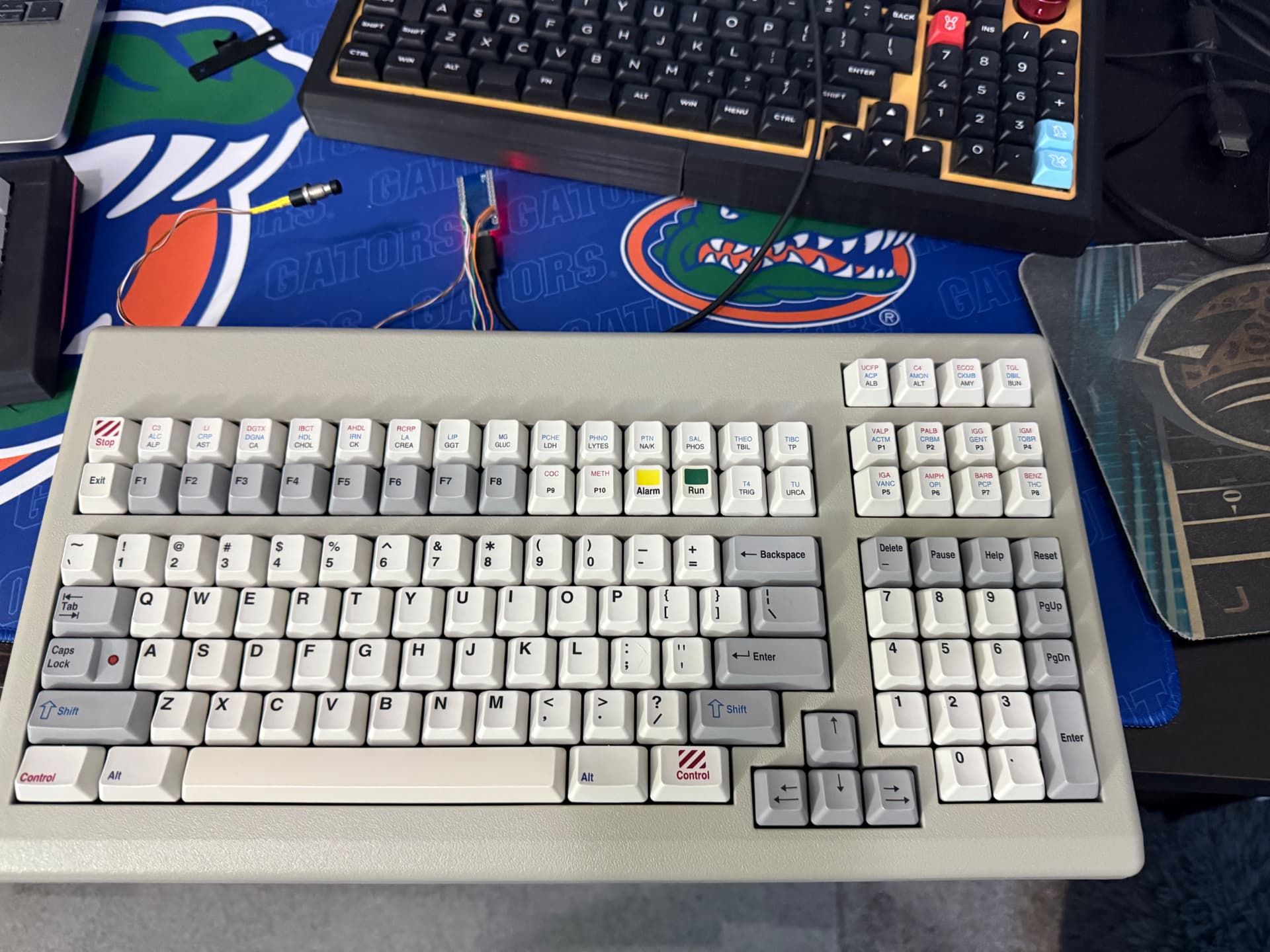
Keyboard from 2010 built by TG3 for a Siemens chemistry analyzer. I cleaned it up, added some weight to the bottom, and converted to USB. Cherry MX Black and PBT Dye-subbed DCS caps. Take a peek at what should be F9 and F10 (and are after conversion), as well as some of the keys above the numpad, which, tangentially, now has 5 keys that do absolutely nothing related to what’s written on them.
Keyboard from 2010 built by TG3 for a Siemens chemistry analyzer. I cleaned it up, added some weight to the bottom, and converted to USB. Cherry MX Black and PBT Dye-subbed DCS caps. Take a peek at what should be F9 and F10 (and are after conversion), as well as some of the keys above the numpad, which, tangentially, now has 5 keys that do absolutely nothing related to what’s written on them.
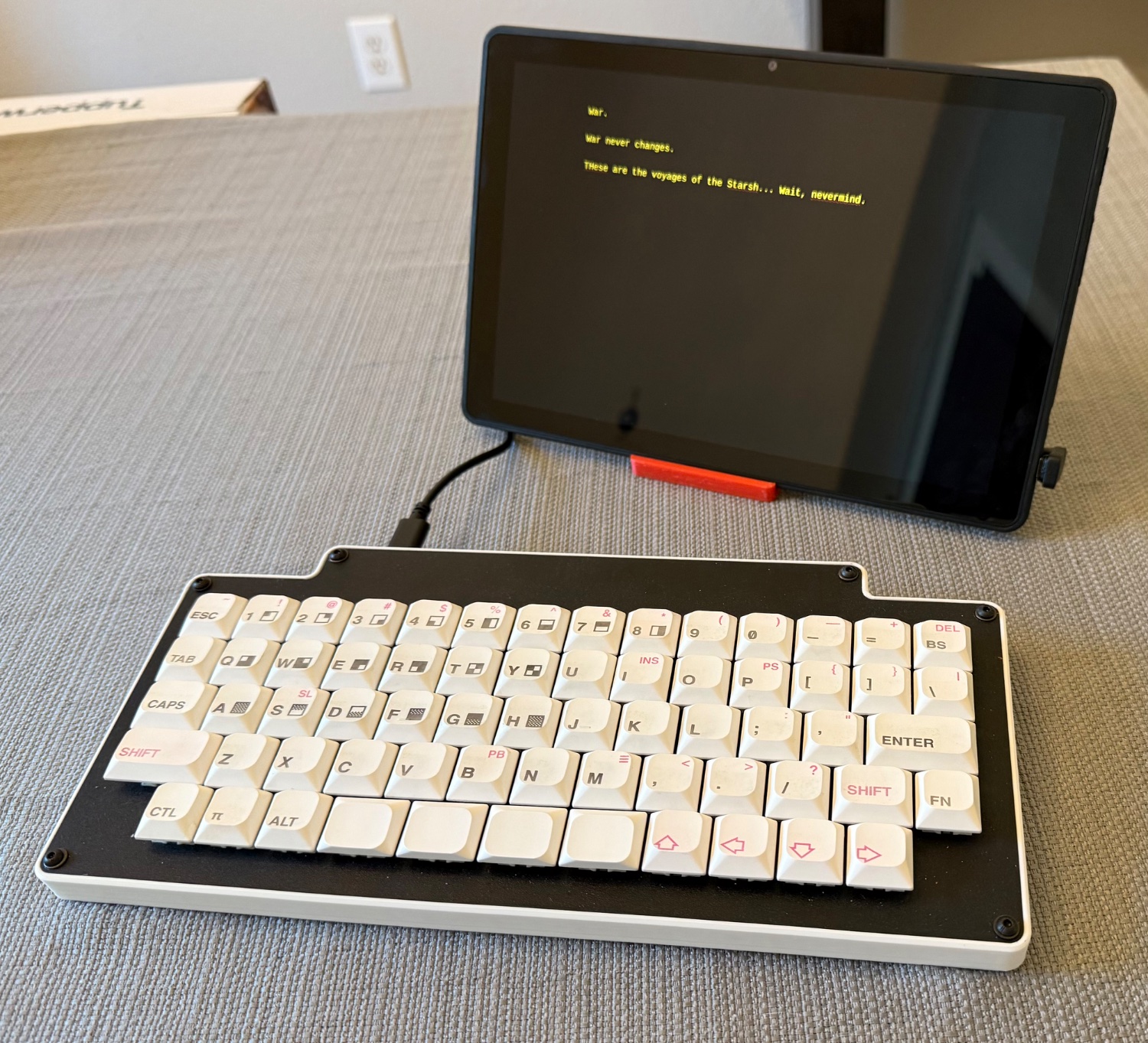
Keyboard is one I first made a year or so ago, but recently upgraded a little. DIY with laser-cut Masonite plate, 3D printed sides, Outemu “mid height” Black switches, and JWA PBT low-profile keycaps with DIY legends. KMK firmware on an RP2040 dev board.
cross-posted from: lemmy.world/post/35772689
Putting the cart before the horse a bit here, as I haven’t been writing much lately, but I got this education market ARM Chrome tablet pretty cheap and followed some instructions to get it fully converted to Linux. ChromeOS is gone. It’s running Debian Trixie via the “velvetOS” project. I could’ve just used the Linux container in chrome OS, but everything has such high guardrails that even the most minor of customizations got very frustrating. Anyway, I specifically picked the 10E because it was known to at least mostly support Linux.
Some limitations, as the camera doesn’t work, I don’t think the external speakers work (could be specific to this particular boot image), and on full boot I have to manually rotate the screen to make sure the touchscreen coordinates stay aligned with the display. Otherwise it works surprisingly well.
Firefox is probably too slow on this old MT8183 with 4 GB of RAM, but it is much faster on the EMMC install compared to the USB, and it was not torture to go online and grab a couple of files directly. The word processor is Focuswriter with their green theme tweaked to amber and it runs perfectly. Suspend/resume is working well enough with auto-login that I can just leave Focuswriter up. Battery life is an open question, but before I wiped it, Chrome OS reported it had 96% battery health 🤷. With a mobile-grade SoC, and with Bluetooth and Wi-Fi turned off, I’m optimistic it won’t be too bad.
I also fixed up one of my DIY mechanical keyboards, and I think it’s a pretty nice little writing setup. Right now, I just have Wi-Fi turned off, but I could theoretically strip out the drivers altogether, or (if I remember correctly), even take the Wi-Fi module out of this one. I opened it briefly to short out the hardware write protection on the firmware, but forgot to look for the Wi-Fi card. As an aside, this was by far the easiest I could imagine a tablet being to service — zero glue connecting screen to case.
Keyboard is one I first made a year or so ago, but recently upgraded a little. DIY with laser-cut Masonite plate, 3D printed sides, Outemu “mid height” Black switches, and JWA PBT low-profile keycaps with DIY legends. KMK firmware on an RP2040 dev board.
cross-posted from: lemmy.world/post/35772689
Putting the cart before the horse a bit here, as I haven’t been writing much lately, but I got this education market ARM Chrome tablet pretty cheap and followed some instructions to get it fully converted to Linux. ChromeOS is gone. It’s running Debian Trixie via the “velvetOS” project. I could’ve just used the Linux container in chrome OS, but everything has such high guardrails that even the most minor of customizations got very frustrating. Anyway, I specifically picked the 10E because it was known to at least mostly support Linux.
Some limitations, as the camera doesn’t work, I don’t think the external speakers work (could be specific to this particular boot image), and on full boot I have to manually rotate the screen to make sure the touchscreen coordinates stay aligned with the display. Otherwise it works surprisingly well.
Firefox is probably too slow on this old MT8183 with 4 GB of RAM, but it is much faster on the EMMC install compared to the USB, and it was not torture to go online and grab a couple of files directly. The word processor is Focuswriter with their green theme tweaked to amber and it runs perfectly. Suspend/resume is working well enough with auto-login that I can just leave Focuswriter up. Battery life is an open question, but before I wiped it, Chrome OS reported it had 96% battery health 🤷. With a mobile-grade SoC, and with Bluetooth and Wi-Fi turned off, I’m optimistic it won’t be too bad.
I also fixed up one of my DIY mechanical keyboards, and I think it’s a pretty nice little writing setup. Right now, I just have Wi-Fi turned off, but I could theoretically strip out the drivers altogether, or (if I remember correctly), even take the Wi-Fi module out of this one. I opened it briefly to short out the hardware write protection on the firmware, but forgot to look for the Wi-Fi card. As an aside, this was by far the easiest I could imagine a tablet being to service — zero glue connecting screen to case.