0

Looking for Moderators

preview

Hi, all.

We’ve grown considerably since rebuilding the sub (see lemmy.ml/post/2262830). Active monthly users 150 -> 380. 3.5k -> 5.42k subs. It seems to be growing organically now, and the higher we go, the more people will stumble across it. There is always a need to get away from Google, and hopefully our community can help people with this.

If you’d like to join us to help moderate so we have folk in place as we need them, that would be awesome.

If you are interested. Please send a message about why you think you’d be good for the role, and also an example post/comment in this community previously.

Thanks,

CrypticCoffee

Hi, all.

We’ve grown considerably since rebuilding the sub (see lemmy.ml/post/2262830). Active monthly users 150 -> 380. 3.5k -> 5.42k subs. It seems to be growing organically now, and the higher we go, the more people will stumble across it. There is always a need to get away from Google, and hopefully our community can help people with this.

If you’d like to join us to help moderate so we have folk in place as we need them, that would be awesome.

If you are interested. Please send a message about why you think you’d be good for the role, and also an example post/comment in this community previously.

Thanks,

CrypticCoffee

0

Software Recommendations

preview

Here I will pin a list of recommendations for software. Getting started can be daunting, and it’d be great to pull that information together here for newcomers so they can take practical steps to degoogle their lives.

Disclaimer: These are recommendations by regulars here and on privacy forums. Use at own risk. We cannot due diligence on these, so if people do have issue with items in the list, please create a post and raise your concerns.

Recommendations

Browser -

  • Firefox (Strongly recommend in light of WEI and Google’s plan that could potentially restrict access to websites)
  • Librewolf
  • Brave (Not recommended, due to Google’s WEI changes. Using chromium is a bad idea. I left this in case you really must)

Search

  • Duck Duck Go
  • Brave

Email

  • Proton mail
  • Tutanota

Cloud storage

  • Proton mail

Productivity Suite (Alternative to google docs)

  • Libre office (Maybe not cloud based)
  • Only office (for MS doc compatibility)

Degoogled Android phones

Phone OS - lemm.ee/post/663113

  • GrapheneOS

  • LineageOS (wihh or without MicroG)

  • /e/OS

Android app store -

  • F-droid

Messaging

  • Signal

  • Element (Matrix)

Maps - lemmy.ml/post/2211048

  • Organic Maps

  • OsmAnd+

SMS - lemmy.ml/post/2256135

Organisation

Task lists - lemmy.ml/post/2249613

Calendar - lemm.ee/post/704703

Discussion

These items are ones either recommended multiple times or seem to have some form of consensus on them being good and privacy focussed. I will link discussion topics so people can see the logic and reasoning behind recommendation. If you are not happy with anything here, please discuss here: lemmy.ml/post/2262409

If you would like another item in this, please create a post discussion and we can pull it in and link to it.

Here I will pin a list of recommendations for software. Getting started can be daunting, and it’d be great to pull that information together here for newcomers so they can take practical steps to degoogle their lives.

Disclaimer: These are recommendations by regulars here and on privacy forums. Use at own risk. We cannot due diligence on these, so if people do have issue with items in the list, please create a post and raise your concerns.

Recommendations

Browser -

  • Firefox (Strongly recommend in light of WEI and Google’s plan that could potentially restrict access to websites)
  • Librewolf
  • Brave (Not recommended, due to Google’s WEI changes. Using chromium is a bad idea. I left this in case you really must)

Search

  • Duck Duck Go
  • Brave

Email

  • Proton mail
  • Tutanota

Cloud storage

  • Proton mail

Productivity Suite (Alternative to google docs)

  • Libre office (Maybe not cloud based)
  • Only office (for MS doc compatibility)

Degoogled Android phones

Phone OS - lemm.ee/post/663113

  • GrapheneOS

  • LineageOS (wihh or without MicroG)

  • /e/OS

Android app store -

  • F-droid

Messaging

  • Signal

  • Element (Matrix)

Maps - lemmy.ml/post/2211048

  • Organic Maps

  • OsmAnd+

SMS - lemmy.ml/post/2256135

Organisation

Task lists - lemmy.ml/post/2249613

Calendar - lemm.ee/post/704703

Discussion

These items are ones either recommended multiple times or seem to have some form of consensus on them being good and privacy focussed. I will link discussion topics so people can see the logic and reasoning behind recommendation. If you are not happy with anything here, please discuss here: lemmy.ml/post/2262409

If you would like another item in this, please create a post discussion and we can pull it in and link to it.

0

Ok it's in french, but have you seen the number of mail altetnatives?

Le Demailnagement Le déMAILnagement - bye bye gmail et ses amis demailnagement.net
preview

“Vous aussi vous pensez qu’utiliser Gmail (ou ses amis géants du web) ce n’est plus possible ? Vous savez déjà que ces fournisseurs de mails sont des ogres qui dévorent vos données, votre confidentialité et qui polluent allégrement ! Mais bon, comment sortir de ces fournisseurs ? Où aller ? Comment faire transiter vos mails ?”

“Vous aussi vous pensez qu’utiliser Gmail (ou ses amis géants du web) ce n’est plus possible ? Vous savez déjà que ces fournisseurs de mails sont des ogres qui dévorent vos données, votre confidentialité et qui polluent allégrement ! Mais bon, comment sortir de ces fournisseurs ? Où aller ? Comment faire transiter vos mails ?”

0

Linux phones are becoming just SLIGHTLY MORE of a reality😂

OMG! Ubuntu Purism announces second-gen Librem 5 Linux phone - OMG! Ubuntu www.omgubuntu.co.uk
preview

cross-posted from: lemmy.ml/post/55349361

Librem 5 second-gen $1599 RISC-V Linux phone - OMG! Ubuntu

Purism is crowdfunding a new version of its Librem 5 Linux smartphone, this one powered by RISC-V rather than Arm.

Librem 5 v2 will use an octa-core SpacemiT K1 RISC-V SoC, replacing the quad-core ARM64 NXP CPU This platform shift will provide much better performance and longer battery life than the existing Librem 5 – and not run as hot in use.

Memory is increased to 8 GB RAM, up from 3 GB in the first-generation handset, and storage leaps to 128 GB from 32 GB.

SD card reading speeds are boosted, and on-board hardware encoding means the Librem 5 v2 can take 13 megapixel photos with and shoot high-definition video for the first time.

The rest of the phone is familiar to the first. The same case design, 5.7-inch (720×1440) display, removable 4,500mAh battery, audio jack and physical kit switches. This is intentional as it will make repairs and upgrades between generations easier.

Wireless connectivity also stays modular, though the v2 handset will ship with an improved 4G modem. A 5G module is planned.

Librem 5 v2 will run PureOS, Purism’s Debian-based operating system using Phosh as its UI.

Librem 5 v2 costs from $1599

“RISC-V is the future, and Librem 5 v2 is the perfect product to bring it to a mainstream audience”, Jonathon Hall, CTO at Purism, says of the launch.

“Freeing us from the control of Big Tech starts with the foundation, and RISC-V’s foundation frees us from the oligarchy. The Librem 5 v2 puts you in control of your data, combining that with the ease of use we expect in the modern era”.

Given that general feedback to the first-gen Librem 5 – beset by delays, price rises and patchy build quality – was mixed best. But, to it credit, Purism is still out there making, selling and supporting the phones (and their other devices and services).

Transitioning to RISC-V for the follow-up won’t be trivial, mind. Graphics acceleration, new drivers and power management (which on a phone is rather critical) will be big undertakings.

And more work is needed to make the day-to-day software stack editable, like browser performance (sluggish on the newest and fastest RISC-V chips) and providing an Arm64 app compatibility layer to run software not made for RISC-V. Available to back until February 2027

If you’ve got at least $1599 burning a hole in your pocket and you don’t need anything to show for it before 2028, you can go pledge to the campaign. It runs until February 2027, so don’t feel pressured to decide just yet.

cross-posted from: lemmy.ml/post/55349361

Librem 5 second-gen $1599 RISC-V Linux phone - OMG! Ubuntu

Purism is crowdfunding a new version of its Librem 5 Linux smartphone, this one powered by RISC-V rather than Arm.

Librem 5 v2 will use an octa-core SpacemiT K1 RISC-V SoC, replacing the quad-core ARM64 NXP CPU This platform shift will provide much better performance and longer battery life than the existing Librem 5 – and not run as hot in use.

Memory is increased to 8 GB RAM, up from 3 GB in the first-generation handset, and storage leaps to 128 GB from 32 GB.

SD card reading speeds are boosted, and on-board hardware encoding means the Librem 5 v2 can take 13 megapixel photos with and shoot high-definition video for the first time.

The rest of the phone is familiar to the first. The same case design, 5.7-inch (720×1440) display, removable 4,500mAh battery, audio jack and physical kit switches. This is intentional as it will make repairs and upgrades between generations easier.

Wireless connectivity also stays modular, though the v2 handset will ship with an improved 4G modem. A 5G module is planned.

Librem 5 v2 will run PureOS, Purism’s Debian-based operating system using Phosh as its UI.

Librem 5 v2 costs from $1599

“RISC-V is the future, and Librem 5 v2 is the perfect product to bring it to a mainstream audience”, Jonathon Hall, CTO at Purism, says of the launch.

“Freeing us from the control of Big Tech starts with the foundation, and RISC-V’s foundation frees us from the oligarchy. The Librem 5 v2 puts you in control of your data, combining that with the ease of use we expect in the modern era”.

Given that general feedback to the first-gen Librem 5 – beset by delays, price rises and patchy build quality – was mixed best. But, to it credit, Purism is still out there making, selling and supporting the phones (and their other devices and services).

Transitioning to RISC-V for the follow-up won’t be trivial, mind. Graphics acceleration, new drivers and power management (which on a phone is rather critical) will be big undertakings.

And more work is needed to make the day-to-day software stack editable, like browser performance (sluggish on the newest and fastest RISC-V chips) and providing an Arm64 app compatibility layer to run software not made for RISC-V. Available to back until February 2027

If you’ve got at least $1599 burning a hole in your pocket and you don’t need anything to show for it before 2028, you can go pledge to the campaign. It runs until February 2027, so don’t feel pressured to decide just yet.

0

Linux on mobile is becoming more of a reality!

KDE e.V. Call for proposals - Software Engineer ev.kde.org
preview

cross-posted from: lemmy.world/post/54392985

KDE is hiring a developer with a focus for Plasma Mobile!

I figure this could also be a place for discussing what are some things you’d like to see in Plasma Mobile? Frankly, hoping to organize ideas to formulate possible work items or goals to suggest to KDE.

cross-posted from: lemmy.world/post/54392985

KDE is hiring a developer with a focus for Plasma Mobile!

I figure this could also be a place for discussing what are some things you’d like to see in Plasma Mobile? Frankly, hoping to organize ideas to formulate possible work items or goals to suggest to KDE.

0

Any good email providers?

preview

cross-posted from: reddthat.com/post/76545241

Requirements

  1. FOSS
  2. No, minimal, or human-checked AI code
  3. Free-to-use
  4. I’m asking for FOSS PROVIDERS, not proprietary providers with FOSS clients
  5. Not under authoritarian juristiction
  6. At least one independent security audit
  7. Lightweight
  8. Low on memory

Optional things:

  1. Self-hostable
  2. Environmental ideals
  3. Under European juristiction
  4. Not hosted on Github

Suggest MULTUPLE providers as I seek to decentralize the services I use ad much as possible

cross-posted from: reddthat.com/post/76545241

Requirements

  1. FOSS
  2. No, minimal, or human-checked AI code
  3. Free-to-use
  4. I’m asking for FOSS PROVIDERS, not proprietary providers with FOSS clients
  5. Not under authoritarian juristiction
  6. At least one independent security audit
  7. Lightweight
  8. Low on memory

Optional things:

  1. Self-hostable
  2. Environmental ideals
  3. Under European juristiction
  4. Not hosted on Github

Suggest MULTUPLE providers as I seek to decentralize the services I use ad much as possible

0

Degoogle setup part 3

preview

Previous part: vger.to/lemmy.world/post/54095201

(Changelog at the bottom)

Universal prefernces:

  1. Lightweight
  2. FOSS
  3. Resource-effeciency
  4. No or human-checked vibecoding

Nice-to-have but non-garenteed features:

  1. Eco-friendly (by using the money for environmental purposes DIRECTLY)
  2. Decentralized
  3. Complete independence from original service. Use frontend or client if possible
  4. Self-hostable
  5. Offline-capable
  6. Not hosted on Github (eww Microslop product)
  7. Hardware sustainability

Avoiding alternative software developers (or companies/cooperations):

  • Proton
  • Mullvad
  • Tuta
  • Mozzila
  • Signal
  • FUTO

De-Boogle

Boogle Search:

  1. SearxNG
  2. Marginalia
  3. YaCy

Boogle Chrome:

  1. FREE Browser (Obscure)
  2. Librewolf
  3. Tor Browser

Boogle Mail:

  • Service provider - Custom domain, Thundermail
  • Client:
  1. FairEmail
  2. TutaNota
  3. Thunderbird

Boogle Maps:

  • Modified PWA - Gmaps WV
  • Map data - OpenStreetMaps
  • Public transportation data - Transitious
  • Navigation client - CoMaps

Boogle Gemini:

  1. Duck.ai
  2. Ollama

Boogle Play:

  • Repo:
  1. F-Droid
  2. IzzyOnDroid
  3. Obtainium
  • Client - Aurora Store
  • Client for repos:
  1. Droid-ify
  2. ObtainX

YouTube:

  • Platform:
  1. PeerTube
  2. Odysee
  • Frontend - Invidious
  • Frontend instance:
  1. materialio.us
  2. ytchocolatemoo.com
  3. Self-hosted
  • Client:
  1. FreeTube
  2. PlasmaTube

Boogle messages:

  1. Fossify Messager
  2. NovaDial

Boogle My Files:

  1. Fossify File Manager

VirusTotal

  1. Veto
  2. Hypatia

Android - GrapeheneOS

Android Auto - Phone stand for car

De-Microslop

Windows:

  1. CachyOS
  2. Linux Mint

Office (or “Microslop Copilot 365”):

  1. MA Office
  2. LibreOffice
  3. OnlyOffice

De-Meta

Facebook and instagram:

  • Platform - Mastodon
  • Client for platform - Smither

WhatsApp - SimpleX Chat

De-ByteDance:

TikTok - Loops

CapCut:

  1. LibreCuts
  2. Kdenlive
  3. Shotcut

Hypic (photo editor):

  1. Pocket Paint
  2. Pinta
  3. Inkscape
  4. GIMP

Gaming

  • Minecraft:
  1. Luanti + Mineclonia
  2. Cubys
  • Universe Sandbox - Cosmogon

  • Space Engine - Celestia

  • Territorial.io - OpenFront

  • Tetris - Block Drop

  • Wordle - Code Word

  • Friday Night Funkin - Etterna

  • Geoguessr - GeoGuessLite

General internet:

Domain name system:

  1. Adguard DNS
  2. NextDNS
  3. Quad9

Network tunnels:

  1. Manual Wireguard VPN tunnel
  2. Manual OpenVPN tunnel
  3. Tor Network

Proxy:

  1. HTTPS Proxy
  2. SOCKS5 Proxy
  3. Orbot

(not really related for De-googling or opensource but mpreso for de-bloating) File types and codecs (wheneber possible):

.png/.JPEG:

  1. .webp
  2. jxl

.exc:

  1. .ods

.mp4:

  1. .webm
  2. .VP9

.mp3:

  1. .OPUS
  2. .m4a

Other:

Reddit:

  • Platform - Lemmy
  • Platform instance - reddthat.com
  • Platform client - Voyager
  • Frontend - Redlib
  • Frontend instance:
  1. saferreddit.com
  2. self-hosted

SearxNG search rssult sources:

  1. DuckDuckGo
  2. Brave
  3. Qwant
  4. StartPage
  5. Ecosia
  6. Mojeek
  7. GOOD

Github:

  • Repo:
  1. Gitlab
  2. Codeberg
  • Frontend - Gothub (no chosen instance yet)
  • Client - Octolab (Gitlab-only)

New additions:

  1. Privacy Flip
  2. Shizuku
  3. Canta
  4. EnforceDoze
  5. SaverTuner
  6. Wine
  7. Virtual Box
  8. Librefind
  9. sustysubs.net
  10. Yagni Launcher
  11. LTE Cleaner
  12. SquirrelDisk

Main sources of help:

  1. YouTube videos and comments
  2. Lemmy comments and posts
  3. Reddit comments and posts
  4. sustysubs.net
  5. Librefind
  6. Possibly PeerTube in the future

Useless reccomendations for me:

  • Termux

On the sidelines of comsideration:

  • WizeStream (NewPipe fork)
  • Flow (YouTube client)
  • Skylib (Bluesky frontend, unlikely to actaully use)
  • YT-dlp

Could use reccomendations for:

  • Linux file manager
  • Linux non-cloud-based photo gallery
  • Linux malware scanner
  • Long-term Linux distro if I find my beginner-friendly distros a bit pale in the future

Remaining questions:

  • If you tested or use QubesOS, how’s the experience?
  • Do you use a non-Linux-based FOSS operating system (like ReactOS)? If so, how’s the experience?
  • If you used SailfishOS, PostMarketOS (or NuraOS) alongside GrapheneOS in your lufe, how’s the experience?
  • Any alternatives I missed?
  • Any other software categories I missed?
  • Any other new additions that I missed?

Changelog (NOT TOO IMPORTANT):

(Somewhat) Important changes

  • Added “No or human-checked vibecoding” to Universal preferences
  • Added “Not hosted on Github” and “Hardware sustainability” to "Nice-to-have but non garanteed features"
  • Added note to “Eco-friendly” (Nice-to-have but non-garanteed featueres)
  • Added “Signal” to "Avoiding alternative software developers"
  • Replaced “Posteo” with “TutaNota” in Email clients
  • Added “Public transportation data” with “Transitious” as the service
  • Added “Odysee” as a new altermative platform to YouTube
  • Replaced “Nobara” with “Linux Mint” as an alternative to Windows
  • Added “Shotcut” as an alternative to CapCut
  • Replaced “Galaxy Engine” with “Cosmogon” as an alternative to Universe Sandbox
  • Added “Geoguessr” with “GeoguessLite” as the alternative
  • Added “reddthat.com” as Lemmy instance
  • Added “Voyager” as Lemmy client
  • Added “SearxNG search results sources” with DuckDuckGo, Brave, Startpage, Qwant, Ecosia, Mojeek and GOOD
  • Added “Octolab” as Gitlab client
  • Added “Squirreldisk” as a new addition
  • Added “Main sources of help” with YouTube, Lemmy, Reddit, sustysubs.net, Librefind, and PeerTube
  • Added “YT-dlp” on the sidelines of consideration
  • Added “Linux malware scanner” to "Could use reccomendations for
  • Asked about the SailfishOS and PostmarketOS (or NuraOS) experience

Changes you might notbcare about:

  • Added changelog
  • Added link to the previous part
  • Added thumnail
  • Updated format

Previous part: vger.to/lemmy.world/post/54095201

(Changelog at the bottom)

Universal prefernces:

  1. Lightweight
  2. FOSS
  3. Resource-effeciency
  4. No or human-checked vibecoding

Nice-to-have but non-garenteed features:

  1. Eco-friendly (by using the money for environmental purposes DIRECTLY)
  2. Decentralized
  3. Complete independence from original service. Use frontend or client if possible
  4. Self-hostable
  5. Offline-capable
  6. Not hosted on Github (eww Microslop product)
  7. Hardware sustainability

Avoiding alternative software developers (or companies/cooperations):

  • Proton
  • Mullvad
  • Tuta
  • Mozzila
  • Signal
  • FUTO

De-Boogle

Boogle Search:

  1. SearxNG
  2. Marginalia
  3. YaCy

Boogle Chrome:

  1. FREE Browser (Obscure)
  2. Librewolf
  3. Tor Browser

Boogle Mail:

  • Service provider - Custom domain, Thundermail
  • Client:
  1. FairEmail
  2. TutaNota
  3. Thunderbird

Boogle Maps:

  • Modified PWA - Gmaps WV
  • Map data - OpenStreetMaps
  • Public transportation data - Transitious
  • Navigation client - CoMaps

Boogle Gemini:

  1. Duck.ai
  2. Ollama

Boogle Play:

  • Repo:
  1. F-Droid
  2. IzzyOnDroid
  3. Obtainium
  • Client - Aurora Store
  • Client for repos:
  1. Droid-ify
  2. ObtainX

YouTube:

  • Platform:
  1. PeerTube
  2. Odysee
  • Frontend - Invidious
  • Frontend instance:
  1. materialio.us
  2. ytchocolatemoo.com
  3. Self-hosted
  • Client:
  1. FreeTube
  2. PlasmaTube

Boogle messages:

  1. Fossify Messager
  2. NovaDial

Boogle My Files:

  1. Fossify File Manager

VirusTotal

  1. Veto
  2. Hypatia

Android - GrapeheneOS

Android Auto - Phone stand for car

De-Microslop

Windows:

  1. CachyOS
  2. Linux Mint

Office (or “Microslop Copilot 365”):

  1. MA Office
  2. LibreOffice
  3. OnlyOffice

De-Meta

Facebook and instagram:

  • Platform - Mastodon
  • Client for platform - Smither

WhatsApp - SimpleX Chat

De-ByteDance:

TikTok - Loops

CapCut:

  1. LibreCuts
  2. Kdenlive
  3. Shotcut

Hypic (photo editor):

  1. Pocket Paint
  2. Pinta
  3. Inkscape
  4. GIMP

Gaming

  • Minecraft:
  1. Luanti + Mineclonia
  2. Cubys
  • Universe Sandbox - Cosmogon

  • Space Engine - Celestia

  • Territorial.io - OpenFront

  • Tetris - Block Drop

  • Wordle - Code Word

  • Friday Night Funkin - Etterna

  • Geoguessr - GeoGuessLite

General internet:

Domain name system:

  1. Adguard DNS
  2. NextDNS
  3. Quad9

Network tunnels:

  1. Manual Wireguard VPN tunnel
  2. Manual OpenVPN tunnel
  3. Tor Network

Proxy:

  1. HTTPS Proxy
  2. SOCKS5 Proxy
  3. Orbot

(not really related for De-googling or opensource but mpreso for de-bloating) File types and codecs (wheneber possible):

.png/.JPEG:

  1. .webp
  2. jxl

.exc:

  1. .ods

.mp4:

  1. .webm
  2. .VP9

.mp3:

  1. .OPUS
  2. .m4a

Other:

Reddit:

  • Platform - Lemmy
  • Platform instance - reddthat.com
  • Platform client - Voyager
  • Frontend - Redlib
  • Frontend instance:
  1. saferreddit.com
  2. self-hosted

SearxNG search rssult sources:

  1. DuckDuckGo
  2. Brave
  3. Qwant
  4. StartPage
  5. Ecosia
  6. Mojeek
  7. GOOD

Github:

  • Repo:
  1. Gitlab
  2. Codeberg
  • Frontend - Gothub (no chosen instance yet)
  • Client - Octolab (Gitlab-only)

New additions:

  1. Privacy Flip
  2. Shizuku
  3. Canta
  4. EnforceDoze
  5. SaverTuner
  6. Wine
  7. Virtual Box
  8. Librefind
  9. sustysubs.net
  10. Yagni Launcher
  11. LTE Cleaner
  12. SquirrelDisk

Main sources of help:

  1. YouTube videos and comments
  2. Lemmy comments and posts
  3. Reddit comments and posts
  4. sustysubs.net
  5. Librefind
  6. Possibly PeerTube in the future

Useless reccomendations for me:

  • Termux

On the sidelines of comsideration:

  • WizeStream (NewPipe fork)
  • Flow (YouTube client)
  • Skylib (Bluesky frontend, unlikely to actaully use)
  • YT-dlp

Could use reccomendations for:

  • Linux file manager
  • Linux non-cloud-based photo gallery
  • Linux malware scanner
  • Long-term Linux distro if I find my beginner-friendly distros a bit pale in the future

Remaining questions:

  • If you tested or use QubesOS, how’s the experience?
  • Do you use a non-Linux-based FOSS operating system (like ReactOS)? If so, how’s the experience?
  • If you used SailfishOS, PostMarketOS (or NuraOS) alongside GrapheneOS in your lufe, how’s the experience?
  • Any alternatives I missed?
  • Any other software categories I missed?
  • Any other new additions that I missed?

Changelog (NOT TOO IMPORTANT):

(Somewhat) Important changes

  • Added “No or human-checked vibecoding” to Universal preferences
  • Added “Not hosted on Github” and “Hardware sustainability” to "Nice-to-have but non garanteed features"
  • Added note to “Eco-friendly” (Nice-to-have but non-garanteed featueres)
  • Added “Signal” to "Avoiding alternative software developers"
  • Replaced “Posteo” with “TutaNota” in Email clients
  • Added “Public transportation data” with “Transitious” as the service
  • Added “Odysee” as a new altermative platform to YouTube
  • Replaced “Nobara” with “Linux Mint” as an alternative to Windows
  • Added “Shotcut” as an alternative to CapCut
  • Replaced “Galaxy Engine” with “Cosmogon” as an alternative to Universe Sandbox
  • Added “Geoguessr” with “GeoguessLite” as the alternative
  • Added “reddthat.com” as Lemmy instance
  • Added “Voyager” as Lemmy client
  • Added “SearxNG search results sources” with DuckDuckGo, Brave, Startpage, Qwant, Ecosia, Mojeek and GOOD
  • Added “Octolab” as Gitlab client
  • Added “Squirreldisk” as a new addition
  • Added “Main sources of help” with YouTube, Lemmy, Reddit, sustysubs.net, Librefind, and PeerTube
  • Added “YT-dlp” on the sidelines of consideration
  • Added “Linux malware scanner” to "Could use reccomendations for
  • Asked about the SailfishOS and PostmarketOS (or NuraOS) experience

Changes you might notbcare about:

  • Added changelog
  • Added link to the previous part
  • Added thumnail
  • Updated format
0

Depending on who I am, is the Proton drama REALLY that bad?

preview

DISCLAIMER!!!

I have NOT done any proer research in all of this. Every bit of info provided in this post is only what I stumbled across, so I am open to be corrected. Otherwise, take all of the info in this post with a grain of salt

This post is NOT written by AI

Usually I don’t wanna talk about things like this, only to my personal connections, however this will affect my journey to Degoogling. I am, by no means, a new Degoogler, however I am new or completely unfamiliar to many aspects of it (like self-hosting). The community on Reddit has gone through a civil war on whether Proton has or has not been too evil as of lately

What happened?

(Not so) Recently, Proton’s CEO has been using more and more AI code. From what I heard of, they aren’t using humans to check the vibecoding. Also, I’ve heard that as times Proton has been exposed for not actaully providing the respect for privacy they claim to have

Why it matters

One aspect for Degoogling is trust. If there’s an open-source app out there that suddenly adds telemetry even tho they claim to be provate, that breaks trust. The Proton community has not been to fond with AI slop, and the (not so) recent actions of Proton didn’t help. This means Proton isn’t tooooo trust-worthy in my opinion

"oH, bUt It’S jUsT rEdDiT bEiNg ReDdIt"

I know, but this is wayyyy more serious than the other types of drama. And besides, Twitter (X) had it wayyy worse from what I’ve heard of. I, myself, am not a fan of AI slop either, and I would at least check if the vibecoding is checked by actaul humans

Ok, but why?

Some people say it’s not that bad, others say it is. I am open to any final corrections. If I am misunderstanding something or just blatantly wrong, tell me in the comments

DISCLAIMER!!!

I have NOT done any proer research in all of this. Every bit of info provided in this post is only what I stumbled across, so I am open to be corrected. Otherwise, take all of the info in this post with a grain of salt

This post is NOT written by AI

Usually I don’t wanna talk about things like this, only to my personal connections, however this will affect my journey to Degoogling. I am, by no means, a new Degoogler, however I am new or completely unfamiliar to many aspects of it (like self-hosting). The community on Reddit has gone through a civil war on whether Proton has or has not been too evil as of lately

What happened?

(Not so) Recently, Proton’s CEO has been using more and more AI code. From what I heard of, they aren’t using humans to check the vibecoding. Also, I’ve heard that as times Proton has been exposed for not actaully providing the respect for privacy they claim to have

Why it matters

One aspect for Degoogling is trust. If there’s an open-source app out there that suddenly adds telemetry even tho they claim to be provate, that breaks trust. The Proton community has not been to fond with AI slop, and the (not so) recent actions of Proton didn’t help. This means Proton isn’t tooooo trust-worthy in my opinion

"oH, bUt It’S jUsT rEdDiT bEiNg ReDdIt"

I know, but this is wayyyy more serious than the other types of drama. And besides, Twitter (X) had it wayyy worse from what I’ve heard of. I, myself, am not a fan of AI slop either, and I would at least check if the vibecoding is checked by actaul humans

Ok, but why?

Some people say it’s not that bad, others say it is. I am open to any final corrections. If I am misunderstanding something or just blatantly wrong, tell me in the comments

0

DuckDuckGo vs Brave Search: which one is better for privacy, independence, and result quality?

preview

cross-posted from: lemmy.ml/post/55060932

Hi everyone,

I’m choosing a default search engine and I’m torn between DuckDuckGo and Brave Search. What matters most to me:

Privacy: what’s actually logged, and can the claims be trusted? Independence from Big Tech: DDG partly relies on Bing, while Brave has its own index. Result quality: relevance for daily, technical and niche queries. Trust: track record, controversies, business model.

Which one do you use daily, and why? Have you noticed a real quality difference? Thanks!

cross-posted from: lemmy.ml/post/55060932

Hi everyone,

I’m choosing a default search engine and I’m torn between DuckDuckGo and Brave Search. What matters most to me:

Privacy: what’s actually logged, and can the claims be trusted? Independence from Big Tech: DDG partly relies on Bing, while Brave has its own index. Result quality: relevance for daily, technical and niche queries. Trust: track record, controversies, business model.

Which one do you use daily, and why? Have you noticed a real quality difference? Thanks!

0

Should I delete my old Google account?

preview

Hi everyone, I have an old Google account that I don’t use anymore, and I’m thinking about deleting it. But I’m worried I may have used that email address for government services or other important accounts in the past, and I don’t want to overlook something that could cause problems later.

What should I check before deleting it? Do you have similar experience?

Hi everyone, I have an old Google account that I don’t use anymore, and I’m thinking about deleting it. But I’m worried I may have used that email address for government services or other important accounts in the past, and I don’t want to overlook something that could cause problems later.

What should I check before deleting it? Do you have similar experience?

0

De-google setup part 2

preview

Universal prefernces:

  1. Lightweight
  2. FOSS
  3. Resource-effeciency
  4. Offline-capable

Nice-to-have but non-garenteed features:

  1. Eco-friendly
  2. Decentralized
  3. Complete independence from original service. Use frontend if possible

Avoiding alternative software developers (or companies/cooperations), only use their products as a last resort:

  • Proton
  • Mullvad
  • Tuta
  • Mozzila
  • FUTO

De-Boogle

Boogle Search:

  1. SearxNG
  2. Marginalia
  3. YaCy

Boogle Chrome:

  1. FREE Browser
  2. Librewolf
  3. Tor Browser

Boogle Mail:

  • Service provider - mailbox.org with a custom domain
  • Client:
  1. FairEmail
  2. Posteo
  3. Thunderbird

Boogle Maps:

  • Modified PWA - Gmaps WV
  • Map data - OpenStreetMaps
  • Client - CoMaps

Boogle Gemini:

  1. Duck.ai
  2. Ollama

Boogle Play:

  • Repo:
  1. F-Droid
  2. IzzyOnDroid
  3. Obtainium
  • Client - Aurora Store
  • Client for repos:
  1. Droid-ify
  2. ObtainX

YouTube:

  • Platform - PeerTube
  • Frontend - Invidious
  • Frontend instance - materialio.us, ytchocolatemoo.com, Self-hosted
  • Client:
  1. FreeTube
  2. PlasmaTube

Boogle messages:

  1. Fossify Messager
  2. NovaDial

Boogle My Files:

  1. Fossify File Manager

VirusTotal

  1. Veto
  2. Hypatia

Android - GrapeheneOS

Android Auto - Phone stand for car

De-Microslop

Windows:

  1. CachyOS
  2. Nobara

Office (or “Microslop Copilot 365”):

  1. MA Office
  2. LibreOffice
  3. OnlyOffice

De-Meta

Facebook and instagram:

  • Platform - Mastodon
  • Client for platform - Smither

WhatsApp - SimpleX Chat

De-ByteDance:

TikTok - Loops

CapCut:

  1. LibreCuts
  2. Kdenlive

Hypic (photo editor):

  1. Pocket Paint
  2. Pinta
  3. Inkscape
  4. GIMP

Gaming

  • Minecraft:
  1. Luanti
  2. Cubys
  • Universe Sandbox - Galaxy Engine

  • Space Engine - Celestia

  • Territorial.io - OpenFront

  • Tetris - Block Drop

  • Wordle - Code Word

  • Friday Night Funkin - Etterna

General internet:

Domain name system:

  1. Adguard DNS
  2. NextDNS
  3. Quad9

Virtual private network:

  1. Manual Wireguard VPN tunnel
  2. Manual OpenVPN tunnel
  3. Tor Network

Proxy:

  1. HTTPS Proxy
  2. SOCKS5 Proxy
  3. Tor Proxy

(not really related for De-googling or opensource but mpreso for de-bloating) File types and codecs (wheneber possible):

.png/.JPEG:

  1. .webp
  2. jxl

.exc:

  1. .ods

.mp4:

  1. .webm
  2. .VP9

.mp3:

  1. .OPUS
  2. .m4a

Other:

Reddit:

  • Platform - Lemmy
  • Frontend - Redlib
  • Frontend instance - saferreddit.com, self-hosted

Github:

  • Repo - Gitlab, Codeberg
  • Frontend - Gothub (no chosen instance yet)

New additions:

  1. Privacy Flip
  2. Shizuku
  3. Canta
  4. EnforceDoze
  5. SaverTuner
  6. Wine
  7. Virtual Box
  8. Librefind
  9. sustysubs.net
  10. Yagni Launcher
  11. LTE Cleaner

Useless reccomendations for me:

  • Termux

On the sidelijes of comsideration:

  • WizeStream (NewPipe fork)
  • Flow (YouTube client)
  • Skylib (Bluesky client, unlikely to actaully use)

Could use reccomendations for:

  • Linux file manager
  • Linux non-cloud-based photo gallery
  • Long-term Linux distro if I find my beginner-friendly distros a bit pale in the future

Remaining questions:

  • If you tested or use QubesOS, how’s the experience?
  • Do you use a non-Linux-based FOSS operating system (like ReactOS)? If so, how’s the experience?
  • Any alternatives I missed?
  • Any other software categories I missed?
  • Any other new additions that I missed?

Correct any misunderstandings if you can

Universal prefernces:

  1. Lightweight
  2. FOSS
  3. Resource-effeciency
  4. Offline-capable

Nice-to-have but non-garenteed features:

  1. Eco-friendly
  2. Decentralized
  3. Complete independence from original service. Use frontend if possible

Avoiding alternative software developers (or companies/cooperations), only use their products as a last resort:

  • Proton
  • Mullvad
  • Tuta
  • Mozzila
  • FUTO

De-Boogle

Boogle Search:

  1. SearxNG
  2. Marginalia
  3. YaCy

Boogle Chrome:

  1. FREE Browser
  2. Librewolf
  3. Tor Browser

Boogle Mail:

  • Service provider - mailbox.org with a custom domain
  • Client:
  1. FairEmail
  2. Posteo
  3. Thunderbird

Boogle Maps:

  • Modified PWA - Gmaps WV
  • Map data - OpenStreetMaps
  • Client - CoMaps

Boogle Gemini:

  1. Duck.ai
  2. Ollama

Boogle Play:

  • Repo:
  1. F-Droid
  2. IzzyOnDroid
  3. Obtainium
  • Client - Aurora Store
  • Client for repos:
  1. Droid-ify
  2. ObtainX

YouTube:

  • Platform - PeerTube
  • Frontend - Invidious
  • Frontend instance - materialio.us, ytchocolatemoo.com, Self-hosted
  • Client:
  1. FreeTube
  2. PlasmaTube

Boogle messages:

  1. Fossify Messager
  2. NovaDial

Boogle My Files:

  1. Fossify File Manager

VirusTotal

  1. Veto
  2. Hypatia

Android - GrapeheneOS

Android Auto - Phone stand for car

De-Microslop

Windows:

  1. CachyOS
  2. Nobara

Office (or “Microslop Copilot 365”):

  1. MA Office
  2. LibreOffice
  3. OnlyOffice

De-Meta

Facebook and instagram:

  • Platform - Mastodon
  • Client for platform - Smither

WhatsApp - SimpleX Chat

De-ByteDance:

TikTok - Loops

CapCut:

  1. LibreCuts
  2. Kdenlive

Hypic (photo editor):

  1. Pocket Paint
  2. Pinta
  3. Inkscape
  4. GIMP

Gaming

  • Minecraft:
  1. Luanti
  2. Cubys
  • Universe Sandbox - Galaxy Engine

  • Space Engine - Celestia

  • Territorial.io - OpenFront

  • Tetris - Block Drop

  • Wordle - Code Word

  • Friday Night Funkin - Etterna

General internet:

Domain name system:

  1. Adguard DNS
  2. NextDNS
  3. Quad9

Virtual private network:

  1. Manual Wireguard VPN tunnel
  2. Manual OpenVPN tunnel
  3. Tor Network

Proxy:

  1. HTTPS Proxy
  2. SOCKS5 Proxy
  3. Tor Proxy

(not really related for De-googling or opensource but mpreso for de-bloating) File types and codecs (wheneber possible):

.png/.JPEG:

  1. .webp
  2. jxl

.exc:

  1. .ods

.mp4:

  1. .webm
  2. .VP9

.mp3:

  1. .OPUS
  2. .m4a

Other:

Reddit:

  • Platform - Lemmy
  • Frontend - Redlib
  • Frontend instance - saferreddit.com, self-hosted

Github:

  • Repo - Gitlab, Codeberg
  • Frontend - Gothub (no chosen instance yet)

New additions:

  1. Privacy Flip
  2. Shizuku
  3. Canta
  4. EnforceDoze
  5. SaverTuner
  6. Wine
  7. Virtual Box
  8. Librefind
  9. sustysubs.net
  10. Yagni Launcher
  11. LTE Cleaner

Useless reccomendations for me:

  • Termux

On the sidelijes of comsideration:

  • WizeStream (NewPipe fork)
  • Flow (YouTube client)
  • Skylib (Bluesky client, unlikely to actaully use)

Could use reccomendations for:

  • Linux file manager
  • Linux non-cloud-based photo gallery
  • Long-term Linux distro if I find my beginner-friendly distros a bit pale in the future

Remaining questions:

  • If you tested or use QubesOS, how’s the experience?
  • Do you use a non-Linux-based FOSS operating system (like ReactOS)? If so, how’s the experience?
  • Any alternatives I missed?
  • Any other software categories I missed?
  • Any other new additions that I missed?

Correct any misunderstandings if you can

0

Motorola Signiture 27 rolls out as a flagship phone but with a very high price

Motorola Signature 27 Launches November 26 at $1,599 With GrapheneOS Support Promised digitalescapetools.com
preview

The Motorola Signoture phone has finally released… And it’s utterly expensive with a price pf $1600. Jeez. Only the rich can get privacy, I guess. Might as well buy the outdated Pixel 10

The Motorola Signoture phone has finally released… And it’s utterly expensive with a price pf $1600. Jeez. Only the rich can get privacy, I guess. Might as well buy the outdated Pixel 10

0

Just Curious: How small are the chances of next year's Fairphone supporting GrapheneOS?

preview

WARNING:

I have NOT done any research in any of the info provided ij this post, only info that I just so happened to sumble upon, so please take this post with a grain of salt

What happened?

With the Motorola Signiture 27, GrapheneOS finally broke free from being Pixel-exclusive. However, a good question meeds to be asked for me: How slim are the chances that next year’s Fairphone could support GrapheneOS?

Why I even considered it as a possibility

I’ve seen some people saying Fairphone will support GrapheneOS, but there’s lots of evidence against it, saying that the bare minimum requirements

Why I think it’s unlikely:

Fairphone has historically lacked in terms of specs. While I don’t have a shoot out of the camera or ANY specs like most people (my bare minimum res quality is 240p lol), as long as the technology used for the hardware stays modern, however I heard GrapheneOS had specific requirements in order to gain support for a device model. Idk what those are other than a relockable bootloader. While this year’s hardware improvements have been much bettet than the past, I don’t think it will be enough even if 5he pace is kept or even improved next year

Comment down what you found or correct what I’ve missed or done wrong in the comments

WARNING:

I have NOT done any research in any of the info provided ij this post, only info that I just so happened to sumble upon, so please take this post with a grain of salt

What happened?

With the Motorola Signiture 27, GrapheneOS finally broke free from being Pixel-exclusive. However, a good question meeds to be asked for me: How slim are the chances that next year’s Fairphone could support GrapheneOS?

Why I even considered it as a possibility

I’ve seen some people saying Fairphone will support GrapheneOS, but there’s lots of evidence against it, saying that the bare minimum requirements

Why I think it’s unlikely:

Fairphone has historically lacked in terms of specs. While I don’t have a shoot out of the camera or ANY specs like most people (my bare minimum res quality is 240p lol), as long as the technology used for the hardware stays modern, however I heard GrapheneOS had specific requirements in order to gain support for a device model. Idk what those are other than a relockable bootloader. While this year’s hardware improvements have been much bettet than the past, I don’t think it will be enough even if 5he pace is kept or even improved next year

Comment down what you found or correct what I’ve missed or done wrong in the comments

0

Android TV alternative OS for Mi TV Stick?

preview

Hi everyone! I want to degoogle my TV box (Mi TV Stick, running Android TV 9), so I’m looking for an alternative OS.

Is there any custom ROM or alternative OS I can flash on it? If not, what’s the best way to get as close as possible to a degoogled TV experience (debloating with ADB, alternative launchers, open source apps, etc.)?

I’d also appreciate any hardware recommendations if a different device is a better starting point for this.

Thanks in advance!

Hi everyone! I want to degoogle my TV box (Mi TV Stick, running Android TV 9), so I’m looking for an alternative OS.

Is there any custom ROM or alternative OS I can flash on it? If not, what’s the best way to get as close as possible to a degoogled TV experience (debloating with ADB, alternative launchers, open source apps, etc.)?

I’d also appreciate any hardware recommendations if a different device is a better starting point for this.

Thanks in advance!

0

AARE (open source android auto client)

GitHub GitHub - prototux/AARE: An open-source reimplementation of the phone side of Android Auto github.com
preview

Pretty cool project I stumbled across, was a bit of a pain to get to work with head unit. The GitHub tells you how to extract keys but when I tried to import I got errors. Had to run “openssl pkc12 -export -out carservice.pfx -inkey carservice_key.pem -in carservice_cert.pem” and set a password to use

Pretty cool project I stumbled across, was a bit of a pain to get to work with head unit. The GitHub tells you how to extract keys but when I tried to import I got errors. Had to run “openssl pkc12 -export -out carservice.pfx -inkey carservice_key.pem -in carservice_cert.pem” and set a password to use

0

Inventory app

preview

Hi everyone! I’m looking for a simple FOSS Android app to manage a small market stall’s inventory and sales. I don’t need barcode scanning, but I’d like to enter each product’s name, quantity, and price.

Most importantly, when I sell something, I want to record how many units were sold so the stock goes down, and have the app keep a sales history and show how much money I’ve taken in. For example, if I sell 3 items at 5 each, I’d like to see the remaining stock and the 15 in sales.

I tried Personal Stuff from F-Droid and liked that it shows prices, but I couldn’t find a way to record sales and have them deducted from stock. Is there a setting or workflow I’m missing, or can you recommend an app that handles this?

Hi everyone! I’m looking for a simple FOSS Android app to manage a small market stall’s inventory and sales. I don’t need barcode scanning, but I’d like to enter each product’s name, quantity, and price.

Most importantly, when I sell something, I want to record how many units were sold so the stock goes down, and have the app keep a sales history and show how much money I’ve taken in. For example, if I sell 3 items at 5 each, I’d like to see the remaining stock and the 15 in sales.

I tried Personal Stuff from F-Droid and liked that it shows prices, but I couldn’t find a way to record sales and have them deducted from stock. Is there a setting or workflow I’m missing, or can you recommend an app that handles this?

0

Morphe: patching apps to reduce ads and clone apps?

preview

I recently came across Morphe, which seems to let users patch some apps to reduce ads and create separate app clones. Has anyone tried it? What are the benefits and security trade-offs? Which official sources do you recommend for learning about it?

I recently came across Morphe, which seems to let users patch some apps to reduce ads and create separate app clones. Has anyone tried it? What are the benefits and security trade-offs? Which official sources do you recommend for learning about it?

0

I'm looking for a solution for mail, aliases, vault, drive and VPN

preview

Hello,

I took the degoogle boat in 2024 when I saw shit like gulf of murika.

So far I have no regrets, and if I have to do it again, I’ll do it again.

My actual setup : Phone : Pixel with GrapheneOS.

Mail : Proton Drive : Proton VPN : Proton Password Vault : Proton

Calendars/Contacts : radicale (selfhosted) Photo : Immich (selfhosted) Home : Home Assistant (selfhosted)

Notes : Standard notes YouTube : Newpipe/Grayjay/SmartTube Maps : CoMaps Authenticator : Aegis Wallet : Catima & (Mybank app)


Now with the last declarations from CEO of Proton, I’m seriously thinking to change some of my setup.

Did someone have recommandations for mail provider, with a private domain name? I want to be more resilient in case my mail provider turn on the dark side.

Actually I’m thinking about mailo services. 1,5€/months for 20Go with drive. If someone have some experience with them and coule advise me.

Also I need a solution for my aliases. I was thinking of Addy.io or duck.

VPN, I need a solution for Android with split tunneling, and also for linux. Maybe Amnezia, but there website don’t inspire me confidence.

And also I need a new password vault, easy to sync between my devices. Lots of articles talk about BitWarden and VaultWarden, but from US, and I don’t wan’t to feed the beast even if it’s a geniune editor focused on privacy.

Hello,

I took the degoogle boat in 2024 when I saw shit like gulf of murika.

So far I have no regrets, and if I have to do it again, I’ll do it again.

My actual setup : Phone : Pixel with GrapheneOS.

Mail : Proton Drive : Proton VPN : Proton Password Vault : Proton

Calendars/Contacts : radicale (selfhosted) Photo : Immich (selfhosted) Home : Home Assistant (selfhosted)

Notes : Standard notes YouTube : Newpipe/Grayjay/SmartTube Maps : CoMaps Authenticator : Aegis Wallet : Catima & (Mybank app)


Now with the last declarations from CEO of Proton, I’m seriously thinking to change some of my setup.

Did someone have recommandations for mail provider, with a private domain name? I want to be more resilient in case my mail provider turn on the dark side.

Actually I’m thinking about mailo services. 1,5€/months for 20Go with drive. If someone have some experience with them and coule advise me.

Also I need a solution for my aliases. I was thinking of Addy.io or duck.

VPN, I need a solution for Android with split tunneling, and also for linux. Maybe Amnezia, but there website don’t inspire me confidence.

And also I need a new password vault, easy to sync between my devices. Lots of articles talk about BitWarden and VaultWarden, but from US, and I don’t wan’t to feed the beast even if it’s a geniune editor focused on privacy.

0

Cautionary tale and advice if you use smaller email providers

preview

TD;DR : Make sure to back up important mails on a local folder so they don’t get deleted in case of hardware failure on the server side. This is good advice in general, but especially if you use a smaller mail provider.

Email is a thing that’s seemingly very easy to degoogle, as there are many providers, but when you look into it it’s not that easy to get something significantly better than google.

It’s a service that involves storing your data on a server, which isn’t free for the provider so it usually abides the “if it’s free, you’re the product” rule of thumb.

Most free providers are from companies just as bad as google, that probably sell your data as well.

Those that seem better on privacy like proton or tutanota paywall some important features such as using a third party client (like Thunderbird).

Self-hosting may not be possible for you even if you have a home server depending on your ISP.

There are some better options if you’re willing to pay, but of course, paying for a service you used to get for free may not seem very desirable if you’re not currently in the best financial situation.

In all this, what seemed like the best option to me was disroot: A free email service provided by a netherlands-based non-profit organization, funded by donations and offering to pay for extra space of needed. The free storage space is smaller, but I can just watch out to delete the useless mails so it can fit: with a few smart filters you can already place mails that are only temporarily useful in a separate box with an auto-deletion policy, and there aren’t that many mails you do need to keep.

Now, disroot has had a critical server failure a few days ago, and it hasn’t been fixed yet. Thankfully, they were quick to set up a temporary storage solution so that mails that arrived after the failure are still delivered, but it’s impossible now to send mails from their servers or to access older mails.

The later part if what caughy me off-guard. I use thunderbird and K-9 mail, which synchronize mails locally, and mails from servers where my account no longer exist are still here… But in this case, the clients did synchronize with the servers, and the mails weren’t there anymore, so it deleted them locally too.

My salvation was this old thinkpad I sometimes used and had by chance booted just a few days prior and turned off. It has a physical switch that disables wifi (something that had so far mostly caused me trouble when I spent hours trying to troubleshoot my config, even tho only issue was that I had accidentally pushed a switch I’d forgotten about). By pushing the switch before booting it, my mails weren’t synchronised and I got to copy them to a local folder. Yippee!

I don’t know yet when Disroot will have solved this problem, or whether old mails on their server are recoverable or corrupted. My mails are saved either way now, but if I didn’t have that thinkpad, or if I had turned it on before noticing the problem, there’d be a real risk of permanently losing all my mails.

I do intend on still using Disroot if they manage to get it running like before, I think their service is good, and I can accept this risk, I will just need to watch out not to put all my eggs in the same basket agakn, and make of habit of copying all important mails to a local folder, and also re-take the habit of backing up all my files on an external hard disk (something I’ve neglected to do of late).

I do not blame Disroot at all, I understand that sometimes stuff happens even if you did everything right, and that they’re doing their best to fix it, despite one of them also going through a personal tragedy at the same time. Failures like this can also happen with GAFAM services, but they have more redundancy and more employees so it generally get fixed faster. With a small non-profit, you have to be more patient. As a great spider man once said, with great power comes great responsibilty; so it’s understandable that taking power back over our data also means taking back responsibility over it, and learning more about how email clients store mails is an important part of it. Your email server failing can be an acceptable risk if you’re well prepared for it.

TD;DR : Make sure to back up important mails on a local folder so they don’t get deleted in case of hardware failure on the server side. This is good advice in general, but especially if you use a smaller mail provider.

Email is a thing that’s seemingly very easy to degoogle, as there are many providers, but when you look into it it’s not that easy to get something significantly better than google.

It’s a service that involves storing your data on a server, which isn’t free for the provider so it usually abides the “if it’s free, you’re the product” rule of thumb.

Most free providers are from companies just as bad as google, that probably sell your data as well.

Those that seem better on privacy like proton or tutanota paywall some important features such as using a third party client (like Thunderbird).

Self-hosting may not be possible for you even if you have a home server depending on your ISP.

There are some better options if you’re willing to pay, but of course, paying for a service you used to get for free may not seem very desirable if you’re not currently in the best financial situation.

In all this, what seemed like the best option to me was disroot: A free email service provided by a netherlands-based non-profit organization, funded by donations and offering to pay for extra space of needed. The free storage space is smaller, but I can just watch out to delete the useless mails so it can fit: with a few smart filters you can already place mails that are only temporarily useful in a separate box with an auto-deletion policy, and there aren’t that many mails you do need to keep.

Now, disroot has had a critical server failure a few days ago, and it hasn’t been fixed yet. Thankfully, they were quick to set up a temporary storage solution so that mails that arrived after the failure are still delivered, but it’s impossible now to send mails from their servers or to access older mails.

The later part if what caughy me off-guard. I use thunderbird and K-9 mail, which synchronize mails locally, and mails from servers where my account no longer exist are still here… But in this case, the clients did synchronize with the servers, and the mails weren’t there anymore, so it deleted them locally too.

My salvation was this old thinkpad I sometimes used and had by chance booted just a few days prior and turned off. It has a physical switch that disables wifi (something that had so far mostly caused me trouble when I spent hours trying to troubleshoot my config, even tho only issue was that I had accidentally pushed a switch I’d forgotten about). By pushing the switch before booting it, my mails weren’t synchronised and I got to copy them to a local folder. Yippee!

I don’t know yet when Disroot will have solved this problem, or whether old mails on their server are recoverable or corrupted. My mails are saved either way now, but if I didn’t have that thinkpad, or if I had turned it on before noticing the problem, there’d be a real risk of permanently losing all my mails.

I do intend on still using Disroot if they manage to get it running like before, I think their service is good, and I can accept this risk, I will just need to watch out not to put all my eggs in the same basket agakn, and make of habit of copying all important mails to a local folder, and also re-take the habit of backing up all my files on an external hard disk (something I’ve neglected to do of late).

I do not blame Disroot at all, I understand that sometimes stuff happens even if you did everything right, and that they’re doing their best to fix it, despite one of them also going through a personal tragedy at the same time. Failures like this can also happen with GAFAM services, but they have more redundancy and more employees so it generally get fixed faster. With a small non-profit, you have to be more patient. As a great spider man once said, with great power comes great responsibilty; so it’s understandable that taking power back over our data also means taking back responsibility over it, and learning more about how email clients store mails is an important part of it. Your email server failing can be an acceptable risk if you’re well prepared for it.

0

Google bussness hours and reviews are finally getting SOME sort of competition

preview

Why people don’t wanna switch from Gmaps (maybe at best a client app):

  • Gmaps has a monopoly on the navigation industry because of one thing: Bussness hours and reviews. It has been that way for years, and the only real alternative for this is Vela Maps, which is vibe-coded (or AI-made), until now

Competition arrives

  • A new project, called “Mangrove Reviews”, has been quietly growing on the scenes and has been doing revoews for the FOSS industry, giving Google Maps SOME sort of competition, even if it’s not to the level of straight rivalry
  • This service, tho, isn’t enough to turn the tides. However, navigation services like MapComplete and CoMaps have been slowly working with them to finally bring convenience for navigation for the more newer or unfamiliar de-googlers

Is this real competition yet?

  • We can’t know for sure. As stated in the latest CoMaps article (as of Oct 30th 2026), this is very niche. Competition for certain monoloplies have varying levels of success. Godot has succeeded on rivaling other game engines like Unreal or Unity, while attempts at YouTube altermatives like PeerTube only moderately succeeded. Mangrove Reviews, as far as I can tell, seems to be a very new project, so we can’t know for sure. We just gptta hope they succeed

Links and sources:

Info source:

CoMaps download:

MapComplete:

Mangrove:

Why people don’t wanna switch from Gmaps (maybe at best a client app):

  • Gmaps has a monopoly on the navigation industry because of one thing: Bussness hours and reviews. It has been that way for years, and the only real alternative for this is Vela Maps, which is vibe-coded (or AI-made), until now

Competition arrives

  • A new project, called “Mangrove Reviews”, has been quietly growing on the scenes and has been doing revoews for the FOSS industry, giving Google Maps SOME sort of competition, even if it’s not to the level of straight rivalry
  • This service, tho, isn’t enough to turn the tides. However, navigation services like MapComplete and CoMaps have been slowly working with them to finally bring convenience for navigation for the more newer or unfamiliar de-googlers

Is this real competition yet?

  • We can’t know for sure. As stated in the latest CoMaps article (as of Oct 30th 2026), this is very niche. Competition for certain monoloplies have varying levels of success. Godot has succeeded on rivaling other game engines like Unreal or Unity, while attempts at YouTube altermatives like PeerTube only moderately succeeded. Mangrove Reviews, as far as I can tell, seems to be a very new project, so we can’t know for sure. We just gptta hope they succeed

Links and sources:

Info source:

CoMaps download:

MapComplete:

Mangrove:

0

Chromium Browser for PC/Android

preview

Sorry, not with the Linux movement yet due to being poor and can’t afford a hard drive at the moment 😞

Anyway.

Recently ran into a thing with Waterfox where I needed it to load & refresh pages in a time-sensitive application for an event I was participating in, but Waterfox was just struggling. Ended up missing slots for said event, and I’m really annoyed.

I really don’t want to use Brave, but it’s the only browser not in beta that is considered “Private” (would love to go back to Cromite if it wasn’t MIA).

Any suggestions?

Sorry, not with the Linux movement yet due to being poor and can’t afford a hard drive at the moment 😞

Anyway.

Recently ran into a thing with Waterfox where I needed it to load & refresh pages in a time-sensitive application for an event I was participating in, but Waterfox was just struggling. Ended up missing slots for said event, and I’m really annoyed.

I really don’t want to use Brave, but it’s the only browser not in beta that is considered “Private” (would love to go back to Cromite if it wasn’t MIA).

Any suggestions?

0

Do you use your custom domain email address for all your accounts?

preview

For those of you who use an email address with a custom domain name, like first@firstlast.com, do you use that email address for every online account you create? It seems weird to me to do that if the email address is also my professional address and the domain is used for my professional/portfolio website, but maybe I’m overthinking it.

For those of you who use an email address with a custom domain name, like first@firstlast.com, do you use that email address for every online account you create? It seems weird to me to do that if the email address is also my professional address and the domain is used for my professional/portfolio website, but maybe I’m overthinking it.

0

House chores/tasks management app suggestions

preview

I’ve searching a lot and I don’t know why but there doesn’t seem to be any chores app. No generic tasks App seems to have the ability to assign it to people or cycle chores.

I found one called Donetick but it is so bad that nothing works when self hosting it and it’s asking for a subscription to be able to send notifications?? From my own server to my own app?

I’m at my wit’s end because this seems like such a small addition to any of the hundred tasks apps out there but somehow it doesn’t seem to exist

I’ve searching a lot and I don’t know why but there doesn’t seem to be any chores app. No generic tasks App seems to have the ability to assign it to people or cycle chores.

I found one called Donetick but it is so bad that nothing works when self hosting it and it’s asking for a subscription to be able to send notifications?? From my own server to my own app?

I’m at my wit’s end because this seems like such a small addition to any of the hundred tasks apps out there but somehow it doesn’t seem to exist

0

The Decentralized Social Stack

Smart Deal Zone The Decentralized Social Stack - Smart Deal Zone smartdealzone.com
preview

The Problem with Centralized Social Media

For two decades, social media has been dominated by a small handful of corporations. Facebook, Twitter, Reddit, Discord, and their peers built walled gardens that captured billions of users and then monetized them through surveillance advertising, algorithmic manipulation, and data extraction. These platforms don’t just host conversations — they shape them. They decide what you see, what reaches an audience, and who gets silenced.

The consequences are now well understood. Centralized platforms are vulnerable to a single point of failure: one CEO’s whim, one policy change, one acquisition, and the rules of engagement for millions of people change overnight. When Elon Musk bought Twitter, he didn’t just change the logo — he altered the fundamental dynamics of a global communication network. When Reddit changed its API pricing, third-party apps died overnight. This is not a bug of centralized systems; it is their defining feature.

The decentralized social stack offers an alternative. It is not a single platform or a single company. It is a set of open protocols and software that allow anyone to run a server, connect with others, and participate in a global conversation without asking permission from a central authority. No CEO can change the rules for everyone. No algorithm decides what you see. No corporation owns your data.

–feel free to share this article with your normie friends, perhaps they can benefit from this

The Problem with Centralized Social Media

For two decades, social media has been dominated by a small handful of corporations. Facebook, Twitter, Reddit, Discord, and their peers built walled gardens that captured billions of users and then monetized them through surveillance advertising, algorithmic manipulation, and data extraction. These platforms don’t just host conversations — they shape them. They decide what you see, what reaches an audience, and who gets silenced.

The consequences are now well understood. Centralized platforms are vulnerable to a single point of failure: one CEO’s whim, one policy change, one acquisition, and the rules of engagement for millions of people change overnight. When Elon Musk bought Twitter, he didn’t just change the logo — he altered the fundamental dynamics of a global communication network. When Reddit changed its API pricing, third-party apps died overnight. This is not a bug of centralized systems; it is their defining feature.

The decentralized social stack offers an alternative. It is not a single platform or a single company. It is a set of open protocols and software that allow anyone to run a server, connect with others, and participate in a global conversation without asking permission from a central authority. No CEO can change the rules for everyone. No algorithm decides what you see. No corporation owns your data.

–feel free to share this article with your normie friends, perhaps they can benefit from this

0

A face selfie request is the last straw

preview

I have a long list I made a while ago of things I need to do to divorce myself from Google. It’s super daunting and I’ve been procrastinating. Last night Google requested a video of my face when logging in. It didn’t require it but it’s only a matter of time before that or something else awful gets added as a condition of using their service. I’m now ready to start my email transition elsewhere. It’s probably one of the bigger steps so it may give me momentum to do the other steps also.

I have seen a million guides and gmail replacement options, but I’m curious what the latest opinions on email services are. I currently lean toward proton and I’m willing to pay, but again, there are so many options and pro/cons to different companies and services it is overwhelming. Any info I can get will be helpful in choosing an email service. Thanks everyone.

Update: I’ve taken the very first step and started forwarding my Gmail to a proton email account. One thing I just thought of is that my android phone currently uses contacts synced from my Google account automatically. Does anyone know a way to replicate that with proton?

I have a long list I made a while ago of things I need to do to divorce myself from Google. It’s super daunting and I’ve been procrastinating. Last night Google requested a video of my face when logging in. It didn’t require it but it’s only a matter of time before that or something else awful gets added as a condition of using their service. I’m now ready to start my email transition elsewhere. It’s probably one of the bigger steps so it may give me momentum to do the other steps also.

I have seen a million guides and gmail replacement options, but I’m curious what the latest opinions on email services are. I currently lean toward proton and I’m willing to pay, but again, there are so many options and pro/cons to different companies and services it is overwhelming. Any info I can get will be helpful in choosing an email service. Thanks everyone.

Update: I’ve taken the very first step and started forwarding my Gmail to a proton email account. One thing I just thought of is that my android phone currently uses contacts synced from my Google account automatically. Does anyone know a way to replicate that with proton?

0

You Can Reserve This De-Googled Phone for $30

It's FOSS You Can Reserve This De-Googled Phone for $30 itsfoss.com
preview

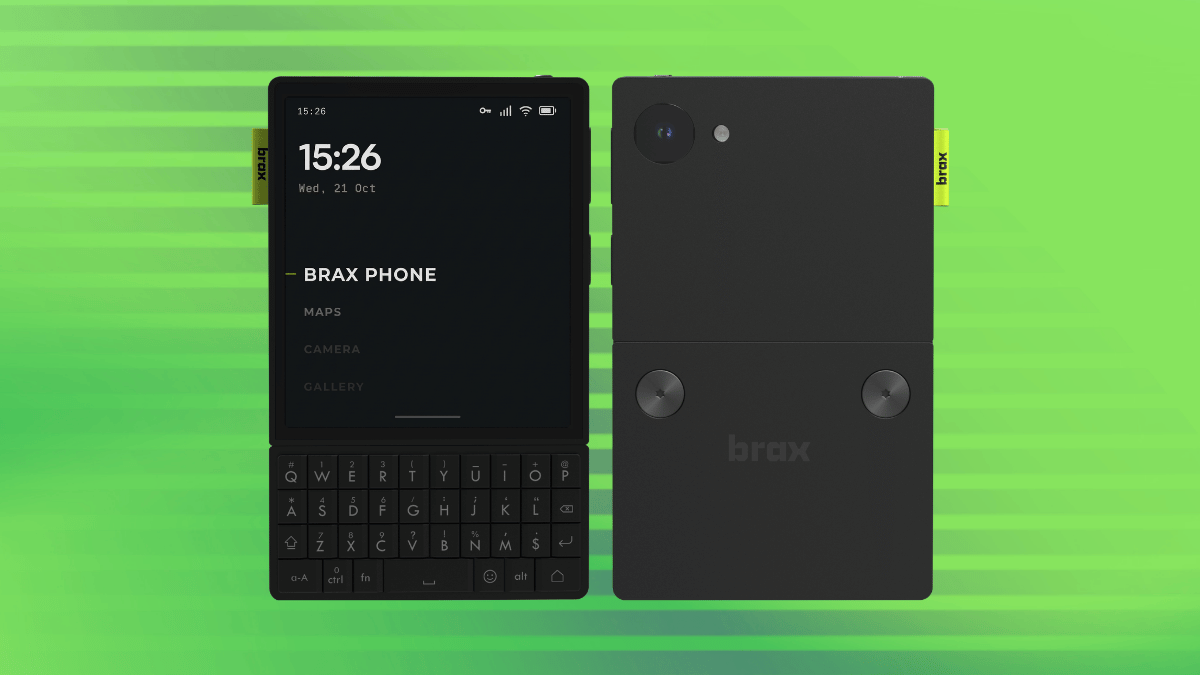
Brax Technologies, the company behind the BraX3 smartphone and the open_slate tablet, opened pre-orders for the Wink last week with plans to ship it in two batches next year.

Rob Braxman, a co-founder of the company and known on the web as The Internet Privacy Guy, had presented the Wink at a roadmap event last month.

The Wink runs BraxOS, an Android-based operating system that does not include Google services, and the device comes with a physical switch located on top that can be configured to shut off the camera, microphones, location, sensors, or mobile network.

During setup, you can pick between Omni, a full Android experience, and Zero, a stripped-down mode limited to encrypted messaging, calls, messages, and optional navigation.

BraxOS does not support Google account sign-ins or Google Play Services, but Brax says most Android apps still run without issues. The exceptions are apps that check for Google’s integrity services before starting, which includes a few banking apps.

The Wink can also wipe itself on triggers you set in advance, namely every restart, a long stretch powered off state, repeated failed unlock attempts, and a duress password.

Brax promises updates until 2032 and says anyone can build BraxOS from source, with files available in its BraX3 repositories.

Key specifications

Coming back to the hardware that powers all that, we have:

SoC: MediaTek MT8875 with an octa-core CPU (4x Arm C1-Pro and 4x Arm C1-Nano cores, 4 nm) and an Arm Mali-G625 MC2 GPU.
RAM & Storage: 8 GB, alongside 128 GB of built-in storage.
Display: 4-inch OLED touchscreen
Camera: 50 MP rear camera, sensor not disclosed.
Keyboard: Physical QWERTY keys that are touch-sensitive and support swipe scrolling.
Networking: Global LTE and 5G bands, plus physical SIM and eSIM support.
Connectivity: Wi-Fi 6E and Bluetooth 5.4.
Ports: USB-C 3.2 Gen 1, a 3.5 mm headphone jack, and a microSD slot for cards up to 1 TB.

Getting the device

Pre-orders come in two batches, each capped at the number of units being built:

Batch 1 is for buyers who pay in full at $449, a price Brax guarantees, and those units go out first in July 2027.
Batch 2 starts with a $30 deposit toward a $550 total. The remaining $520 would be charged around July 2027, with these units shipping in September 2027.

The deposit amount is refundable until the balance is paid, and orders can be changed or cancelled while they are still reservations. Shipping dates can also change, and reservation holders will be emailed about any change before the remaining amount is due.

Each unit is set to ship with the keyboard, a USB-C cable, and a translucent case.

If such phones interest you, you can also explore the MAKERphone 2.0.

Brax Technologies, the company behind the BraX3 smartphone and the open_slate tablet, opened pre-orders for the Wink last week with plans to ship it in two batches next year.

Rob Braxman, a co-founder of the company and known on the web as The Internet Privacy Guy, had presented the Wink at a roadmap event last month.

The Wink runs BraxOS, an Android-based operating system that does not include Google services, and the device comes with a physical switch located on top that can be configured to shut off the camera, microphones, location, sensors, or mobile network.

During setup, you can pick between Omni, a full Android experience, and Zero, a stripped-down mode limited to encrypted messaging, calls, messages, and optional navigation.

BraxOS does not support Google account sign-ins or Google Play Services, but Brax says most Android apps still run without issues. The exceptions are apps that check for Google’s integrity services before starting, which includes a few banking apps.

The Wink can also wipe itself on triggers you set in advance, namely every restart, a long stretch powered off state, repeated failed unlock attempts, and a duress password.

Brax promises updates until 2032 and says anyone can build BraxOS from source, with files available in its BraX3 repositories.

Key specifications

Coming back to the hardware that powers all that, we have:

SoC: MediaTek MT8875 with an octa-core CPU (4x Arm C1-Pro and 4x Arm C1-Nano cores, 4 nm) and an Arm Mali-G625 MC2 GPU.
RAM & Storage: 8 GB, alongside 128 GB of built-in storage.
Display: 4-inch OLED touchscreen
Camera: 50 MP rear camera, sensor not disclosed.
Keyboard: Physical QWERTY keys that are touch-sensitive and support swipe scrolling.
Networking: Global LTE and 5G bands, plus physical SIM and eSIM support.
Connectivity: Wi-Fi 6E and Bluetooth 5.4.
Ports: USB-C 3.2 Gen 1, a 3.5 mm headphone jack, and a microSD slot for cards up to 1 TB.

Getting the device

Pre-orders come in two batches, each capped at the number of units being built:

Batch 1 is for buyers who pay in full at $449, a price Brax guarantees, and those units go out first in July 2027.
Batch 2 starts with a $30 deposit toward a $550 total. The remaining $520 would be charged around July 2027, with these units shipping in September 2027.

The deposit amount is refundable until the balance is paid, and orders can be changed or cancelled while they are still reservations. Shipping dates can also change, and reservation holders will be emailed about any change before the remaining amount is due.

Each unit is set to ship with the keyboard, a USB-C cable, and a translucent case.

If such phones interest you, you can also explore the MAKERphone 2.0.

0

Google is testing the hiding of YouTube's dislike button entirely from all forms of videos

Google is testing the hiding of YouTube's dislike button entirely from all forms of videos
preview

Crossposted from https://thebrainbin.org/m/enshittification@lemmy.world/t/1996619

Crossposted from https://piefed.world/c/tech/p/1480679/google-is-testing-the-hiding-of-youtube-s-dislike-button-entirely-from-all-forms-of-vide

Source: User reports, reported on by couple of news outlets:

Crossposted from https://thebrainbin.org/m/enshittification@lemmy.world/t/1996619

Crossposted from https://piefed.world/c/tech/p/1480679/google-is-testing-the-hiding-of-youtube-s-dislike-button-entirely-from-all-forms-of-vide

Source: User reports, reported on by couple of news outlets:

0

How's going (1 month degoogled)

preview

Very very well, actually. Much easier than I thought. I got my hands on a phone that was suitable for LineageOS, installed it (smooth experience - so nice to be able to install your own OS, gives you the sensation to really own the phone, and not the other way around) and only installed degoogled apps. On the personal space there is no Google Play Services nor MicroG. Only apps that if I lose my phone and someone access it it wouldn’t be a problem. On the private space, the apps that have sensitive data or need Google Play Services (MicroG, actually)

So far, I hadn’t much problems. There is only one banking app that did not work (so I changed bank :D). There is an alternative for nearly anything you want. The one and only app that I miss is Maps, I’m using CoMaps, and although the navigation works fine and i like the feeling of it, it doesn’t have traffic info (which makes me lose so much time), takes you to a random number of the street you searched and you can’t find most stores and places only by the name. Anyway, I’m adapting, searching for the places somewhere else, leaving with spare time and trying to have a healthier life in which I’m not in a hurry.

My setup:

  • Tuta Mail
  • Proton Drive
  • Signal
  • Aurora Store
  • F-Droid (included Izzy on Droid repo)
  • FUTO Keyboard
  • Vivaldi Browser
  • CoMaps
  • Kagi Search
  • NewPipe (youtube)
  • Tidal
  • LibreOffice
  • Summit (for Lemmy)

Hope it helps those who are considering taking the leap. Once you do it, it’s hard to imagine going back and being monitored 24/7 by the big tech companies

Very very well, actually. Much easier than I thought. I got my hands on a phone that was suitable for LineageOS, installed it (smooth experience - so nice to be able to install your own OS, gives you the sensation to really own the phone, and not the other way around) and only installed degoogled apps. On the personal space there is no Google Play Services nor MicroG. Only apps that if I lose my phone and someone access it it wouldn’t be a problem. On the private space, the apps that have sensitive data or need Google Play Services (MicroG, actually)

So far, I hadn’t much problems. There is only one banking app that did not work (so I changed bank :D). There is an alternative for nearly anything you want. The one and only app that I miss is Maps, I’m using CoMaps, and although the navigation works fine and i like the feeling of it, it doesn’t have traffic info (which makes me lose so much time), takes you to a random number of the street you searched and you can’t find most stores and places only by the name. Anyway, I’m adapting, searching for the places somewhere else, leaving with spare time and trying to have a healthier life in which I’m not in a hurry.

My setup:

  • Tuta Mail
  • Proton Drive
  • Signal
  • Aurora Store
  • F-Droid (included Izzy on Droid repo)
  • FUTO Keyboard
  • Vivaldi Browser
  • CoMaps
  • Kagi Search
  • NewPipe (youtube)
  • Tidal
  • LibreOffice
  • Summit (for Lemmy)

Hope it helps those who are considering taking the leap. Once you do it, it’s hard to imagine going back and being monitored 24/7 by the big tech companies

0

Here Is the Google I Have Left (not mobile-friendly)

preview

I’m quite a few years into this de-Googling thing. It’s also pretty much an extension of the de-Microsofting I started when I first tried Linux around 2005 or so. I was one of the original users of whatever Google Workspace was called back when they were still offering it free to Organizations and Families who wanted to use their own domain name with their Gmail accounts. I started de-googling in earnest around the time they first tried to take away this free-forever perk. Lately, I’ve been working hard to get ready for the era of identity verification and the pending Android lockdown. I consider large companies and surveillance-advertisers as my primary adversaries.

I’m down to my last few google dependencies and I’d appreciate your help in trying to overcome them as that lockdown date gets closer and the whole ecosystem will be thrown into chaos. I’d like to have essential services self-hosted and backups of essential APKs and such prior to that date. There are a few items not on this list that are occasional installs (and immediate uninstalls). These are usually hardware companion apps for stuff like my little wireless hotspot.

I wasn’t sure if it was safe to publicly post a spreadsheet from my machine, so please see the image for the bad stuff I have left (the red rows), mildly questionable stuff (yellow), and the good stuff I have installed (green), it’s not necessarily Google itself, but the red and sometimes yellow stuff chains me back to the Play ecosystem. I genericized any financial or health apps, except UHC because it’s super common and fuck them, I want to call out how shitty their app is and point out that their approach to attestation and verifying device integrity must be out of desperation because they themselves have no integrity.

Feel free to call anything out by name in the left column if you:

A. Have a better alternative that maintains good functionality.

B. Commiserate with my plight replacing a particular piece of software.

C. Think that I’ve mis-catagorized something as an undesirable when it’s actually good, or vice versa.

D. Anything else.

I would love to hear from you all.

I’m quite a few years into this de-Googling thing. It’s also pretty much an extension of the de-Microsofting I started when I first tried Linux around 2005 or so. I was one of the original users of whatever Google Workspace was called back when they were still offering it free to Organizations and Families who wanted to use their own domain name with their Gmail accounts. I started de-googling in earnest around the time they first tried to take away this free-forever perk. Lately, I’ve been working hard to get ready for the era of identity verification and the pending Android lockdown. I consider large companies and surveillance-advertisers as my primary adversaries.

I’m down to my last few google dependencies and I’d appreciate your help in trying to overcome them as that lockdown date gets closer and the whole ecosystem will be thrown into chaos. I’d like to have essential services self-hosted and backups of essential APKs and such prior to that date. There are a few items not on this list that are occasional installs (and immediate uninstalls). These are usually hardware companion apps for stuff like my little wireless hotspot.

I wasn’t sure if it was safe to publicly post a spreadsheet from my machine, so please see the image for the bad stuff I have left (the red rows), mildly questionable stuff (yellow), and the good stuff I have installed (green), it’s not necessarily Google itself, but the red and sometimes yellow stuff chains me back to the Play ecosystem. I genericized any financial or health apps, except UHC because it’s super common and fuck them, I want to call out how shitty their app is and point out that their approach to attestation and verifying device integrity must be out of desperation because they themselves have no integrity.

Feel free to call anything out by name in the left column if you:

A. Have a better alternative that maintains good functionality.

B. Commiserate with my plight replacing a particular piece of software.

C. Think that I’ve mis-catagorized something as an undesirable when it’s actually good, or vice versa.

D. Anything else.

I would love to hear from you all.

0

Push Notifications Without Play Services

preview

Hello from my new GrapheneOS phone! I’m working on getting things set up and have come to the notification issue. I’ve heard this brought up tangentially but haven’t put enough together to be actionable, and my initial searches mostly turn up info for app developers rather than end users.

Is there a way to get reliable and timely push notifications without Google Play Services? What does that look like?

For my threat model I’m not really concerned with people gaining physical access to my phone, it’s more the surveillance capitalism I’ve got a problem with. So I’d like to be able to keep showing notification contents to myself without showing them to Google.

I haven’t picked a cell provider yet, and I’m in the US, in case that affects my options. Wanted to make sure the new setup was viable before cutting the cord on the old one.

From what I understand, this is a per-app situation, so here are my important sources:

  • Email: currently use the Proton app. I’m open to switching to a separate client, but the feature to mark read directly from the notification has been a game changer for my notification fatigue, especially with the decryption lag and getting two copies of things as I switch everything off my gmail. I do still want the notification for a lot of things (e.g. credit card payment is due) but I get what I need out of the subject and have no further value to actually opening the whole thing.
  • Calendar: also Proton, also open to other clients. Reliability here is important for obvious reasons.
  • Messaging: I live where service is bad, so I rely on internet messaging to communicate with family. This can get time sensitive sometimes. I’ll have to talk everyone into a new app since we’re currently on Facebook Messenger (🤢) so I’m not married to a specific app yet. It needs to be able to talk to both Android and iOS. From what I’ve heard, it sounds like Molly is the go-to? That talks to regular Signal, correct?
  • Emergency/weather alerts: this is push notifications, right? Currently I’m using Breezy Weather from F-Droid because I like the widget but I’m also not dead set on this one (or can have two apps if necessary).
  • Microsoft Authenticator: this is for work. I might just leave it on my old phone though, I expect it will be an ordeal.
  • Smart home degoogling is Coming Soon™, if there’s anything I need to keep in mind there. Can home assistant consolidate everything or does it work through vendor apps? (Schlage deadbolts, ecobee thermostat, WiZ lightbulbs, Kasa switches if it matters.)
  • I’m guessing call, SMS, and MMS are a dedicated channel with the cell service and are not push notifications, but please correct me if I’m wrong.
  • It seems like scheduled notifications e.g. alarms and timers are also not push notifications. I tried a test timer and it worked.

Any guidance from my fellow degooglers would be much appreciated. Thanks!

UPDATE 1: Thanks for all the info everyone! I’ve had work and junk to do the last few days but I’m slowly trying these out.

  • Molly is super easy, WebSocket works right out of the box. And I managed to get my family and a couple friends on board without too much fuss.
  • Surprised to hear Proton is so Google dependent, that request to support unified push has people complaining that it hasn’t been done for 3 years. You Have Mail seems to do what I hoped for, but if the polling becomes too battery hungry, good news! I’ve been using aliases for everything so switching my backend should be pretty easy.
  • Calendar works for ones I add on the phone itself, but if I add one elsewhere (on the computer while I’m talking on the phone for example), I have to be sure to open the calendar at least once before it happens or it won’t register. But apparently that’s also how it works when you do have play services running, and I didn’t notice, so it should be fine.

Hello from my new GrapheneOS phone! I’m working on getting things set up and have come to the notification issue. I’ve heard this brought up tangentially but haven’t put enough together to be actionable, and my initial searches mostly turn up info for app developers rather than end users.

Is there a way to get reliable and timely push notifications without Google Play Services? What does that look like?

For my threat model I’m not really concerned with people gaining physical access to my phone, it’s more the surveillance capitalism I’ve got a problem with. So I’d like to be able to keep showing notification contents to myself without showing them to Google.

I haven’t picked a cell provider yet, and I’m in the US, in case that affects my options. Wanted to make sure the new setup was viable before cutting the cord on the old one.

From what I understand, this is a per-app situation, so here are my important sources:

  • Email: currently use the Proton app. I’m open to switching to a separate client, but the feature to mark read directly from the notification has been a game changer for my notification fatigue, especially with the decryption lag and getting two copies of things as I switch everything off my gmail. I do still want the notification for a lot of things (e.g. credit card payment is due) but I get what I need out of the subject and have no further value to actually opening the whole thing.
  • Calendar: also Proton, also open to other clients. Reliability here is important for obvious reasons.
  • Messaging: I live where service is bad, so I rely on internet messaging to communicate with family. This can get time sensitive sometimes. I’ll have to talk everyone into a new app since we’re currently on Facebook Messenger (🤢) so I’m not married to a specific app yet. It needs to be able to talk to both Android and iOS. From what I’ve heard, it sounds like Molly is the go-to? That talks to regular Signal, correct?
  • Emergency/weather alerts: this is push notifications, right? Currently I’m using Breezy Weather from F-Droid because I like the widget but I’m also not dead set on this one (or can have two apps if necessary).
  • Microsoft Authenticator: this is for work. I might just leave it on my old phone though, I expect it will be an ordeal.
  • Smart home degoogling is Coming Soon™, if there’s anything I need to keep in mind there. Can home assistant consolidate everything or does it work through vendor apps? (Schlage deadbolts, ecobee thermostat, WiZ lightbulbs, Kasa switches if it matters.)
  • I’m guessing call, SMS, and MMS are a dedicated channel with the cell service and are not push notifications, but please correct me if I’m wrong.
  • It seems like scheduled notifications e.g. alarms and timers are also not push notifications. I tried a test timer and it worked.

Any guidance from my fellow degooglers would be much appreciated. Thanks!

UPDATE 1: Thanks for all the info everyone! I’ve had work and junk to do the last few days but I’m slowly trying these out.

  • Molly is super easy, WebSocket works right out of the box. And I managed to get my family and a couple friends on board without too much fuss.
  • Surprised to hear Proton is so Google dependent, that request to support unified push has people complaining that it hasn’t been done for 3 years. You Have Mail seems to do what I hoped for, but if the polling becomes too battery hungry, good news! I’ve been using aliases for everything so switching my backend should be pretty easy.
  • Calendar works for ones I add on the phone itself, but if I add one elsewhere (on the computer while I’m talking on the phone for example), I have to be sure to open the calendar at least once before it happens or it won’t register. But apparently that’s also how it works when you do have play services running, and I didn’t notice, so it should be fine.
0

Degoogle setup

preview

IMPORTANT CONTEXT:

This is just my PLANNED setup, so not everything will be garenteed to be my final setup

The reason why I use multiple services for each use case:

  1. I’m taking decentralization to the local level, which means NO connection between smartphone, Laptop, PC and TV
  2. Fallbacks if the service or app doesn’t work

Google Search

  1. Mojeek
  2. Margnialia (self-hostable)
  3. YaCy (self-hostable)
  • Fallbacks:
  1. DuckDuckGo
  2. Qwant
  3. Ecosia

Google Chrome

  1. FREE Browser
  2. LibreWolf
  3. Tor Browser

Google Mail

  1. FairEmail
  2. TutaNota
  3. Proton

Google Maps

  1. CoMaps
  • Fallbacks:
  1. Gmaps WV

YouTube

  1. Peertube (Platform) (Self-hostable)
  2. Invidious (Frontend) (Self-hostable)
  3. FreeTube (Client) (Self-hostable)
  4. PlasmaTube (Client)
  5. Flow (Client)

Android

  1. GrapheneOS

Google Workspace

  1. MA Office
  2. LibreOffice
  3. OnlyOffice

Google Keep

  1. Notally
  2. Loqsec
  3. Notesook

Gboard

  1. Iris Keyboard
  2. Xime IME (for Chinese input)

Google Translate

  1. Offline Translator
  2. LibreTranslate
  3. Lingva Translate

Google My Files

  1. Fossify File Manager (Idk any Linux file managers)

Google Photos

  1. Prism Gallery (Idk any Linux gallery apps)

Google Play

  1. F-Droid (Platform)
  2. Flathub (Platform)
  3. Appteka (Platform)
  4. Aurora Store (Client)
  5. Droid-ify (Client)
  6. ObtainX (Client)

Google Earth

  1. GeoLibre
  2. Marble

Google Messages

  1. Fossify Messages (SMS)
  2. SimpleX (Platform) (Idk any Linux SMS apps)

Android System Webview

  1. Vanadium

Bilibili

  1. Bilimiao

Video editor

  1. LibreCuts
  2. Kdenlive
  3. Cutwire Drift

Photo editor

  1. PocketvPaint
  2. GIMP
  3. Pinta

Reddit (also also kinda Twitter too)

  1. Lemmy (Platform)
  2. Voyager (Client)
  3. Redlib (Frontend)

Windows

  1. CachyOS with Shelly
  2. Nobara

VPN

  1. Windscribe VPN
  2. Proton VPN
  3. Tor VPN

DNS

  1. Adguard DNS
  2. Quad9 DNS
  3. NextDNS

Minecraft

  1. Luanti (game)
  2. Prism (launcher)

Wordle

  1. Code Word

Convenience tools

  1. LibreFind
  2. sustysubs.net
  3. DNS toggle
  4. Privacy Flip
  5. SponsorBlock
  6. DeArrow
  7. ReturnYouTubeDislike

IMPORTANT CONTEXT:

This is just my PLANNED setup, so not everything will be garenteed to be my final setup

The reason why I use multiple services for each use case:

  1. I’m taking decentralization to the local level, which means NO connection between smartphone, Laptop, PC and TV
  2. Fallbacks if the service or app doesn’t work

Google Search

  1. Mojeek
  2. Margnialia (self-hostable)
  3. YaCy (self-hostable)
  • Fallbacks:
  1. DuckDuckGo
  2. Qwant
  3. Ecosia

Google Chrome

  1. FREE Browser
  2. LibreWolf
  3. Tor Browser

Google Mail

  1. FairEmail
  2. TutaNota
  3. Proton

Google Maps

  1. CoMaps
  • Fallbacks:
  1. Gmaps WV

YouTube

  1. Peertube (Platform) (Self-hostable)
  2. Invidious (Frontend) (Self-hostable)
  3. FreeTube (Client) (Self-hostable)
  4. PlasmaTube (Client)
  5. Flow (Client)

Android

  1. GrapheneOS

Google Workspace

  1. MA Office
  2. LibreOffice
  3. OnlyOffice

Google Keep

  1. Notally
  2. Loqsec
  3. Notesook

Gboard

  1. Iris Keyboard
  2. Xime IME (for Chinese input)

Google Translate

  1. Offline Translator
  2. LibreTranslate
  3. Lingva Translate

Google My Files

  1. Fossify File Manager (Idk any Linux file managers)

Google Photos

  1. Prism Gallery (Idk any Linux gallery apps)

Google Play

  1. F-Droid (Platform)
  2. Flathub (Platform)
  3. Appteka (Platform)
  4. Aurora Store (Client)
  5. Droid-ify (Client)
  6. ObtainX (Client)

Google Earth

  1. GeoLibre
  2. Marble

Google Messages

  1. Fossify Messages (SMS)
  2. SimpleX (Platform) (Idk any Linux SMS apps)

Android System Webview

  1. Vanadium

Bilibili

  1. Bilimiao

Video editor

  1. LibreCuts
  2. Kdenlive
  3. Cutwire Drift

Photo editor

  1. PocketvPaint
  2. GIMP
  3. Pinta

Reddit (also also kinda Twitter too)

  1. Lemmy (Platform)
  2. Voyager (Client)
  3. Redlib (Frontend)

Windows

  1. CachyOS with Shelly
  2. Nobara

VPN

  1. Windscribe VPN
  2. Proton VPN
  3. Tor VPN

DNS

  1. Adguard DNS
  2. Quad9 DNS
  3. NextDNS

Minecraft

  1. Luanti (game)
  2. Prism (launcher)

Wordle

  1. Code Word

Convenience tools

  1. LibreFind
  2. sustysubs.net
  3. DNS toggle
  4. Privacy Flip
  5. SponsorBlock
  6. DeArrow
  7. ReturnYouTubeDislike
0

Do politics really matter?

preview

Mullvad donated some money to a Neo-N@zi party. To me, umless if they keep doing this, it doesn’t feel too important, as long as they keep their products up and going. What does it mean to you? Your opinion could change my mind

Mullvad donated some money to a Neo-N@zi party. To me, umless if they keep doing this, it doesn’t feel too important, as long as they keep their products up and going. What does it mean to you? Your opinion could change my mind

0

Underrated projects that help for De-googling

preview

Tools that probably no one had heard of but are extremely helpful for Degoogling:

Sustysubs.net - A list of alternative services

  • A very useful tool that you can find privacy-friendly altermatives to proprietary services. You can suggest a service via Codeberg and/or Email

Link:

Wizestream - A better NewPipe

  • A NewPipe fork that intergrates Material Design 3 into the UI and includes things like ReturnYouTubeDislike, SponsorBlock, Dearrow, Learning tools, Invidious, subcription syncronization,

Repository:

IzzyOnDroid:

LibreCuts - The only FOSS Android video editor for the professionals

  • A video editor for Android that supports overlays and keyframes, which in my opinion, is the minimum requirment for a video editor to be “professional”

Repository:

F-Droid:

LibreFind - Community-driven app for finding alternative apps for Android

  • LibreFind is probably the most well-known project listed here, but basically, you submit a FOSS alternative to a proprietary app, then wait for it to be approved. It also lists how many of your local apps are FOSS or not

Repository:

F-Droid:

IzzyOnDroid:

(TURNS OUT IT IS NOT OPEN-SOURCE MY BAD) Pur.ili - Kagi if it was free

  • Pur.ili is a private search engine that does not have big tech spy on you by secret. Unlike most “privacy friendly” search engines, like DuckDuckGo or Brave Search, this one has a completely independent index, meaning no contracts to big tech to let them spy on you by secret. The difference between this and Kagi? It doesn’t require a paid subscription, so you can use it for free

Link:

Search query:

Tools that probably no one had heard of but are extremely helpful for Degoogling:

Sustysubs.net - A list of alternative services

  • A very useful tool that you can find privacy-friendly altermatives to proprietary services. You can suggest a service via Codeberg and/or Email

Link:

Wizestream - A better NewPipe

  • A NewPipe fork that intergrates Material Design 3 into the UI and includes things like ReturnYouTubeDislike, SponsorBlock, Dearrow, Learning tools, Invidious, subcription syncronization,

Repository:

IzzyOnDroid:

LibreCuts - The only FOSS Android video editor for the professionals

  • A video editor for Android that supports overlays and keyframes, which in my opinion, is the minimum requirment for a video editor to be “professional”

Repository:

F-Droid:

LibreFind - Community-driven app for finding alternative apps for Android

  • LibreFind is probably the most well-known project listed here, but basically, you submit a FOSS alternative to a proprietary app, then wait for it to be approved. It also lists how many of your local apps are FOSS or not

Repository:

F-Droid:

IzzyOnDroid:

(TURNS OUT IT IS NOT OPEN-SOURCE MY BAD) Pur.ili - Kagi if it was free

  • Pur.ili is a private search engine that does not have big tech spy on you by secret. Unlike most “privacy friendly” search engines, like DuckDuckGo or Brave Search, this one has a completely independent index, meaning no contracts to big tech to let them spy on you by secret. The difference between this and Kagi? It doesn’t require a paid subscription, so you can use it for free

Link:

Search query:

0

Per-app mobile data usage and blocking, with no INTERNET permission and no Play Services dependency

preview

Disclosure first, I wrote this, and I’ll keep it short since the rule here is justified or not at all.

It measures per-app mobile data for your billing cycle rather than the calendar month, splits foreground from background, and blocks apps per network so something can be dead on mobile and fine on Wi-Fi.

Why it’s relevant here rather than just another utility. It has no INTERNET permission in the manifest, so it cannot phone home at all, and it has no Play Services dependency. The only library it pulls is androidx.core-ktx and there is no com/google/android/play anywhere in the release dex. It reads NetworkStatsManager and uses VpnService in package-list mode with no packet forwarding, both plain AOSP, so nothing about it needs Google on the device.

The one part that sounds wrong for this community is the protected-apps list, so I’ll explain it rather than let someone find it. There’s a fixed list of push carriers the app refuses to block, because blocking the thing that carries push silences every notification on the phone and people do that to themselves without realising. It includes Play Services, but also Samsung, Xiaomi, Huawei, Honor, OPPO, vivo and Meizu push, since those matter more in the markets this is aimed at. Matching is by package name and anything not installed is skipped, so on a degoogled phone with no Play Services there is simply nothing there to protect and you lose nothing. The Play Store itself is deliberately not protected, you can block it, which on my test phone was the single biggest consumer at 444 MB a cycle of background auto-updates.

The honest gap: right now it’s only distributed through Play. The F-Droid request is open at fdroid/rfp#4520 and has been waiting since 8 October, which from what I can see is normal queue time rather than anything wrong. Until then it builds from a clean clone if you’d rather do that.

GPL-3.0, free, no ads, no purchases, no accounts, no analytics. Android 7 and up.

github.com/…/data-saver-usage-blocker

Disclosure first, I wrote this, and I’ll keep it short since the rule here is justified or not at all.

It measures per-app mobile data for your billing cycle rather than the calendar month, splits foreground from background, and blocks apps per network so something can be dead on mobile and fine on Wi-Fi.

Why it’s relevant here rather than just another utility. It has no INTERNET permission in the manifest, so it cannot phone home at all, and it has no Play Services dependency. The only library it pulls is androidx.core-ktx and there is no com/google/android/play anywhere in the release dex. It reads NetworkStatsManager and uses VpnService in package-list mode with no packet forwarding, both plain AOSP, so nothing about it needs Google on the device.

The one part that sounds wrong for this community is the protected-apps list, so I’ll explain it rather than let someone find it. There’s a fixed list of push carriers the app refuses to block, because blocking the thing that carries push silences every notification on the phone and people do that to themselves without realising. It includes Play Services, but also Samsung, Xiaomi, Huawei, Honor, OPPO, vivo and Meizu push, since those matter more in the markets this is aimed at. Matching is by package name and anything not installed is skipped, so on a degoogled phone with no Play Services there is simply nothing there to protect and you lose nothing. The Play Store itself is deliberately not protected, you can block it, which on my test phone was the single biggest consumer at 444 MB a cycle of background auto-updates.

The honest gap: right now it’s only distributed through Play. The F-Droid request is open at fdroid/rfp#4520 and has been waiting since 8 October, which from what I can see is normal queue time rather than anything wrong. Until then it builds from a clean clone if you’d rather do that.

GPL-3.0, free, no ads, no purchases, no accounts, no analytics. Android 7 and up.

github.com/…/data-saver-usage-blocker

0

Some time ago I have learnt that Google maps isolate functionalities from non-logged users

preview

Some time ago I have experienced how Google maps isolate their functionalities from non-logged users. They limit reviews, photos browsing. I use Firefox.

I know it could be old news, but I noticed it just now when they propagated “update” to other places.

Some time ago I have experienced how Google maps isolate their functionalities from non-logged users. They limit reviews, photos browsing. I use Firefox.

I know it could be old news, but I noticed it just now when they propagated “update” to other places.

0

Alternative to Google Calendar & Tasks & more: a self-hosted central hub for life-management.

GitHub GitHub - ontoplano/ontoplano: One life, one app. github.com
preview

Demo:

  • demo.ontoplano.com

Some of the many things it offers:

  • Calendar: your week with time blocks, repeating or one-off. You can skip or move a single occurrence and save week templates. External calendars show next to it, and there’s an ICS feed out.
  • Board / Todos: today as a kanban board, plus undated todos with tags, filters, attributes and links. Putting a todo on a day schedules it.
  • Weekly review: clear out stale todos and write a note on the week.
  • Notebooks: notes per subject in folders, a diary, ideas, people (birthdays, relationships, every mention of them). Those work as scopes, they can hold everything mentioned here: goals, workouts, inventory, tasks, etc.
  • Goals: numeric targets and progress logs. You can link tasks to a goal, so finishing them moves it.
  • Health: habit tracking with a heatmap, and workouts that log reps, kg and km per exercise. You can put those on a date too, log how much weight you lifted, the distance you ran, etc.
  • Inventory / Shopping: things you own with quantities and restocking. Recipes use inventory items as ingredients, and what’s missing goes to the shopping list, which you can open offline in the market to see what is missing.
  • Finance: ledgers, statement import, auto-sorting rules, bills. Also integrates with inventory prices.
  • Media: a gallery and audio recordings. You can put those on notes and tasks, or standalone.
  • Reminders: on blocks and todos. You get notifications on the mobile app or PC.

Everything works in the computer and in the phone.

There is also a quick add (+) wheel menu for adding any important thing with one finger movement. Everything can have tags, many things can have attributes (key value pairs) that can be used with integrations: it comes with a REST API and a MCP server; you can use any AI to talk to it through scoped tokens that allow you to protect your privacy by only giving it access to one particular project (Notebook) and its goals, tasks, notes, inventory items etc. Of course, you could also use a local AI or no AI at all.

It’s keyboard-driven (vim-style keys) too, and you can run it in the phone both in sync with the official / you self-hosted instance, or fully isolated (never sees the internet).

Screenshots

@ PC

@ Mobile

Demo:

  • demo.ontoplano.com

Some of the many things it offers:

  • Calendar: your week with time blocks, repeating or one-off. You can skip or move a single occurrence and save week templates. External calendars show next to it, and there’s an ICS feed out.
  • Board / Todos: today as a kanban board, plus undated todos with tags, filters, attributes and links. Putting a todo on a day schedules it.
  • Weekly review: clear out stale todos and write a note on the week.
  • Notebooks: notes per subject in folders, a diary, ideas, people (birthdays, relationships, every mention of them). Those work as scopes, they can hold everything mentioned here: goals, workouts, inventory, tasks, etc.
  • Goals: numeric targets and progress logs. You can link tasks to a goal, so finishing them moves it.
  • Health: habit tracking with a heatmap, and workouts that log reps, kg and km per exercise. You can put those on a date too, log how much weight you lifted, the distance you ran, etc.
  • Inventory / Shopping: things you own with quantities and restocking. Recipes use inventory items as ingredients, and what’s missing goes to the shopping list, which you can open offline in the market to see what is missing.
  • Finance: ledgers, statement import, auto-sorting rules, bills. Also integrates with inventory prices.
  • Media: a gallery and audio recordings. You can put those on notes and tasks, or standalone.
  • Reminders: on blocks and todos. You get notifications on the mobile app or PC.

Everything works in the computer and in the phone.

There is also a quick add (+) wheel menu for adding any important thing with one finger movement. Everything can have tags, many things can have attributes (key value pairs) that can be used with integrations: it comes with a REST API and a MCP server; you can use any AI to talk to it through scoped tokens that allow you to protect your privacy by only giving it access to one particular project (Notebook) and its goals, tasks, notes, inventory items etc. Of course, you could also use a local AI or no AI at all.

It’s keyboard-driven (vim-style keys) too, and you can run it in the phone both in sync with the official / you self-hosted instance, or fully isolated (never sees the internet).

Screenshots

@ PC

@ Mobile

0

Unable unlock Bootloader on Redmi note 7 pro

preview

Hi guys, I’m actually facing a little trouble around here, im trying unlock the bootloader of my redmi note 7 pro. But the latest xiaomi unlock tool doesn’t recognize it, is there something to do with port. Im using windows for this, the laptop detects the mobile but the xiaomi application won’t. Any suggestion or have anyone faced similar issue with any other xiaomi device.

Hi guys, I’m actually facing a little trouble around here, im trying unlock the bootloader of my redmi note 7 pro. But the latest xiaomi unlock tool doesn’t recognize it, is there something to do with port. Im using windows for this, the laptop detects the mobile but the xiaomi application won’t. Any suggestion or have anyone faced similar issue with any other xiaomi device.

0

LineageOS vs /e/OS?

preview

I am wondering what is better for both privacy AND security, I already installed Lineage but I’m fine with switching to /e/OS.
I’ve heard Lineage isn’t good for security, but I know very little about /e/OS.
The phone is a moto g power 2021 so it doesn’t support GrapheneOS.

I am wondering what is better for both privacy AND security, I already installed Lineage but I’m fine with switching to /e/OS.
I’ve heard Lineage isn’t good for security, but I know very little about /e/OS.
The phone is a moto g power 2021 so it doesn’t support GrapheneOS.

0

What's a cheap phone that isint trash or unsupported, but can run a custom os with ease?

preview

Ive wanted to try custom phone os’s but im not sure where to start, my phones are not supported from the few ive gathered over time also most of them are “trash” as some may say. So im wondering what phone to get and where from, also what mobile os do your prefer over other ones?

does this vary on multiple factors?

Ive wanted to try custom phone os’s but im not sure where to start, my phones are not supported from the few ive gathered over time also most of them are “trash” as some may say. So im wondering what phone to get and where from, also what mobile os do your prefer over other ones?

does this vary on multiple factors?

0

(maybe off-topic?) is there any way to get extensions and themes on a PUBLIC degoog instance?

preview

I really like degoog and I recently found out that you can install extensions and themes, but I can’t seem to install them (both from the official extensions and community extensions). I’m using a public instance 'cause I’m too lazy to self-host

any ideas? thank david

I really like degoog and I recently found out that you can install extensions and themes, but I can’t seem to install them (both from the official extensions and community extensions). I’m using a public instance 'cause I’m too lazy to self-host

any ideas? thank david

0

syncspirit v0.4.7 release

GitHub Release v0.4.7 · basiliscos/syncspirit github.com
preview

cross-posted from: lemmy.ml/post/53284374

I’m glad to announce v0.4.7 release!

Syncspirit is continuous peer-to-peer realtime syncrhonization tool. It implements BEP protocol and provides seamless interoperability with existing syncthing nodes and clients.

raw.githubusercontent.com/…/fltk-overview.gif

You can download ready-to-use binaries for Linux x86_64 (AppImage), Windows 32 bit (WindowsXP is supported), Windows 64 bit and Mac OS X (Apple silicon).

Notable changes (since previous v0.4.5 announce):

  • [core, fltk] allow to use file patterns (PCRE-syntax) accept or ignore local files into cluster
  • [core] add start offline option
  • [fltk, win32, os x] add system tray icon
  • [fltk] use menu instead of toolbar
  • [core] introduce services layer (allow stop/start/restart of networking)
  • [core] dns resolver actor: randomly choose ip address of resolver server
  • [core, fix] more reliably connect to relays.syncthing.net
  • [core, win32, bugfix] use utf8 for displaying error messages
  • [core, win32, bugfix] allow to use long file paths (260+ symbols)

Syncspirt source code uses GPLv3 license.

Any feedback is welcome!

WBR, basiliscos.

cross-posted from: lemmy.ml/post/53284374

I’m glad to announce v0.4.7 release!

Syncspirit is continuous peer-to-peer realtime syncrhonization tool. It implements BEP protocol and provides seamless interoperability with existing syncthing nodes and clients.

raw.githubusercontent.com/…/fltk-overview.gif

You can download ready-to-use binaries for Linux x86_64 (AppImage), Windows 32 bit (WindowsXP is supported), Windows 64 bit and Mac OS X (Apple silicon).

Notable changes (since previous v0.4.5 announce):

  • [core, fltk] allow to use file patterns (PCRE-syntax) accept or ignore local files into cluster
  • [core] add start offline option
  • [fltk, win32, os x] add system tray icon
  • [fltk] use menu instead of toolbar
  • [core] introduce services layer (allow stop/start/restart of networking)
  • [core] dns resolver actor: randomly choose ip address of resolver server
  • [core, fix] more reliably connect to relays.syncthing.net
  • [core, win32, bugfix] use utf8 for displaying error messages
  • [core, win32, bugfix] allow to use long file paths (260+ symbols)

Syncspirt source code uses GPLv3 license.

Any feedback is welcome!

WBR, basiliscos.

0

De-Amazon: Turn an old Amazon Echo Dot (2nd gen) into a local voice assistant for Home Assistant.

GitHub GitHub - wilbowes/EchoMuse: A local voice assistant for Home Assistant on old Amazon Echoes, with no Amazon software left on them: our own Linux userspace (emOS), our own audio pipeline, and a wake word that runs on the Echo, so nothing is sent until you say it. github.com