0

preview
I’ve looked but I have not found a way to log into and browse my YouTube account on Jellyfin.
I’ve looked but I have not found a way to log into and browse my YouTube account on Jellyfin.
Not on this instance? Enter your own instance's domain to go straight to following c/jellyfin@lemmy.world there.

Fathom is a free, open-source (AGPL) Jellyfin client for Linux, Windows and Android, with YouTube, Seerr requests and internet radio built in.
Thanks to feedback here, 0.13.1 adds an Interface Size setting on Linux and Windows (75% to 200%). On Linux it also sizes up on its own on a dense 4K screen when the desktop’s scaling is left at 100%.
Also new:
Release and downloads: github.com/Fathom-Media/fathom/…/v0.13.1 Docs: fathom-media.github.io/fathom/
Per Rule 7 / [AIP] disclosure requirements AI was used during development as a coding assistant. Level per category:
I’ve looked but I have not found a way to log into and browse my YouTube account on Jellyfin.
I’ve looked but I have not found a way to log into and browse my YouTube account on Jellyfin.
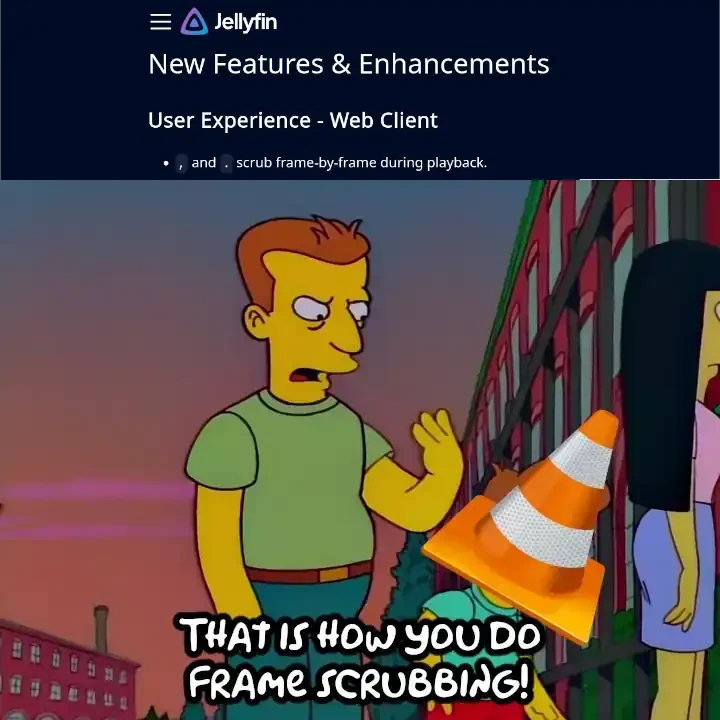
jellyfin.org/posts/jellyfin-release-12.0/
Jellyfin 12.0
New Features & Enhancements
User Experience - Web Client
,and.scrub frame-by-frame during playback.
That is exactly how MPV does it. But from what I remember, VLC devs claim it’s impossible, so VLC only allows you to scrub forward frame-by-frame (using the e key), not backward. You can skip backwards in three-second increments or whatever, just not frame-by-frame. It’s the main thing that keeps me using MPV as my default video player, because I frequently skip around videos trying to get a screenshot of the perfect frame to use to make a meme or something. Being able to scrub frame-by-frame in both directions is a big deal.
Frame scrubbing is certainly a relatively computationally taxing task. Oftentimes, while I am skipping around a video frame-by-frame with MPV, my computer’s fans ramp up a bunch. It may be extra effort, but it is certainly possible; the VLC devs simply do not want to rewrite what needs to be rewritten to make that happen.
There is apparently a VLC plugin that adds this feature, but the UX seems to be rather clunky compared to the simple keystrokes involved in the Jellyfin/MPV way.

From my comment here: quokk.au/comment/5917329
Hopefully jokes/memes are welcome in this community. I did not see any rule against it.
jellyfin.org/posts/jellyfin-release-12.0/
Jellyfin 12.0
New Features & Enhancements
User Experience - Web Client
,and.scrub frame-by-frame during playback.
That is exactly how MPV does it. But from what I remember, VLC devs claim it’s impossible, so VLC only allows you to scrub forward frame-by-frame (using the e key), not backward. You can skip backwards in three-second increments or whatever, just not frame-by-frame. It’s the main thing that keeps me using MPV as my default video player, because I frequently skip around videos trying to get a screenshot of the perfect frame to use to make a meme or something. Being able to scrub frame-by-frame in both directions is a big deal.
Frame scrubbing is certainly a relatively computationally taxing task. Oftentimes, while I am skipping around a video frame-by-frame with MPV, my computer’s fans ramp up a bunch. It may be extra effort, but it is certainly possible; the VLC devs simply do not want to rewrite what needs to be rewritten to make that happen.
There is apparently a VLC plugin that adds this feature, but the UX seems to be rather clunky compared to the simple keystrokes involved in the Jellyfin/MPV way.
From my comment here: quokk.au/comment/5917329
Hopefully jokes/memes are welcome in this community. I did not see any rule against it.
Just a simple program I wrote to turn user favorites into server-wide recommendations, you might also find it fun. Screenshots in the repo.
For me the ‘favorite’ functionality is pretty useless, I wanted something to let other users on my server know ‘this is pretty good, you should watch it’. I also wanted it to work on TV clients too, so it just ‘hijacks’ the Collections functionality to show each user’s favorites (if they have any) as a collection.
I could have probably written this as a plugin instead, rather than a standalone container, but I have no interest in learning C#.
Hand-written with <3
I use Intro Skipper to automatically skip the intros/recaps in TV shows. But I have found that the automatic intro detection is not great and often misidentifies the media segments a bit. Because of that, for some TV shows, I have put a lot of time/effort into manually setting the media segments for each episode using the Segment Editor in the Jellyfin web UI.
But recently, for whatever reason, I seem to have lost that media segment data. Now, when I watch any of those episodes that I had definitely meticulously manually set the media segments on, it just has the original automatically-generated bad segments again instead.
I definitely have backups of this server. Can I just restore a certain folder from a backup in order to restore my media segments? Searching around the filesystem, I just cannot find where media segment data is stored. Furthermore, I am concerned that the filenames and everything may no longer match. As far as I understand, shows/episodes/etc. in the Jellyfin filesystem are actually assigned a random n-character unique identifier, and I worry that identifier for each item may not be exactly the same as it was in my backups for whatever reason.
The Jellyfin documentation is pretty clear on how to handle a single file that is actually multiple episodes combined in one. You basically just use a hyphen to specify the range of episodes in that file.
Example: See S01E01-E02 here
Shows
├── Series Name A (2010)
│   ├── Season 00
│   │   ├── Some Special.mkv
│   │   ├── Series Name A S00E01.mkv
│   │   └── Series Name A S00E02.mkv
│   ├── Season 01
│   │   ├── Series Name A S01E01-E02.mkv
│   │   ├── Series Name A S01E03.mkv
│   │   └── Series Name A S01E04.mkv
│   └── Season 02
│       ├── Series Name A S02E01.mkv
│       ├── Series Name A S02E02.mkv
│       ├── Series Name A S02E03 Part 1.mkv
│       └── Series Name A S02E03 Part 2.mkv
└── Series Name B (2018)
    ├── Season 01
    |   ├── Series Name B S01E01.mkv
    |   └── Series Name B S01E02.mkv
    └── Season 02
        ├── Series Name B S02E01-E02.mkv
        └── Series Name B S02E03.mkv
jellyfin.org/docs/general/server/media/shows/
For whatever reason, a couple of the files I have for season 3 of the Whitest Kids U’ Know are combined out of order compared to the order on TMDB/TVDB. Episodes seven and nine are both in the same file, and episodes eight and ten are both in the same file. Most of the files for this season are episodes that are combined in the “correct” order, but just these two files are mixed up.
thetvdb.com/series/the-whitest-kids-u-know/…/3
My files:
"Whitest Kids U' Know S03E01-E02.mp4"
"Whitest Kids U' Know S03E03-E04.mp4"
"Whitest Kids U' Know S03E05-E06.mp4"
"Whitest Kids U' Know S03E07+E09.mp4"
"Whitest Kids U' Know S03E08+E10.mp4"
"Whitest Kids U' Know S03E11-E12.mp4"
"Whitest Kids U' Know S03E13-E14.mp4"
"Whitest Kids U' Know S03E15-E16.mp4"
"Whitest Kids U' Know S03E17-E18.mp4"
"Whitest Kids U' Know S03E19-E20.mp4"
I have tried using a + in the file name (as seen above), but that does not work; Jellyfin just treats the file as only the episode number before the + (i.e. S03E07+E09.mp4 just shows up as S03E07 in Jellyfin). An & also does not work; the episode does not show up in Jellyfin at all. Is there actually a correct way to handle this situation with Jellyfin?
Note that this is an anthology sketch comedy show, so episode order truly does not matter. I just want the episode descriptions in Jellyfin to actually describe the right episodes.
//Edit: it’s back, reason (expired DNS entries) in the comments.
<disclaimer> I chose this community to post in since it seems the most likely userbase to know and use MakeMKV.</disclaimer>
MakeMKV has stopped working for me (temp licence ran out), and when I tried to renew it, I noticed that the entire website seems to be down. Does anybody know anything about the project? Is this just temporary server issues or a permanent shutdown? And, seeing that such a vital piece of software can just go away at any moment, do you know any viable alternatives for ripping your legally owned DVDs? Of course, handbrake does exist, but it can’t seem to properly sync up subtitles with the audio.
Hello,
I just found this nice little mini desktop PC that I could put next to my TV in the living room or hide somewhere in my apartment. I was wondering if this would be enough for a Jellyfin server. I’d probably attach an external HDD to it to store all the movies and tv series.
It’s main use would most probably be only for personal use. I don’t really intend to share it with anybody. I’ll connect to it via my NVidia Shield box with the Jellyfin app.
I’ll also use it to download torrents directly.
What do you guys think?

Time to upgrade I guess. :D
Time to upgrade I guess. :D
Hey guys, this is a small experience report of me getting into Jellyfin. This community seems a bit dead, so let’s get into discussion. I am sure you have a lot to say about your Jellyfin projects.
I played with the thought of setting up Jellyfin for a longer time, because we got so mad of streaming enshittification. This googling “who streams xxx” just to see nobody does, another new streaming service I never heard about or I can rent it for 3,99 from fucking Jeff Bezos. I am not a person who watches a lot of movies or shows (not really a binge watcher), so Netflix is not really worth it for me. But from time to time I get the urge to watch Harry Potter or some other shit but then I can’t, because fuck you.
So I played with the thought of trying out Jellyfin, because I don’t want the hassle of handling DVDs and also I sometimes watch on devices like a phone or a tablet. It seemed super complicated with all this encoding transcoding stuff and also felt like a huge investment, as I didn’t have an old notebook here that I could use.
I decided to try it out on an old Raspberry Pi 3B+ I had lying around - I knew it was to weak to act as a Jellyfin server, but anyway. It worked like a charm, so I decided to get something more powerful. This was a very difficult research for me and I am still not sure if I went the right path. I know a little about gaming PCs, but I knew I needed something that does not use a lot of energy. On the web it seems that there is not really one single right way to host jellyfin? Everyone used something different… I stumbled across the “Dell Optiplex” series many people use and started looking out for then on eBay, learning about Intel processor generations and stuff like that (the Jellyfin docs recommend 11th or 12th gen, whatever that means).
I ended up with a Dell Optiplex 3070 Micro with an Intel i5-2,20 GHz, a 256GB NVMe, 16GB RAM and Windows 11 Pro. I bought it for about 120€, maybe that was a little too much but I didn’t care as I wanted that thing better sooner than later. After it arrived I crossed myself and immediately installed Debian to get rid of the plague. I set up Jellyfin with apt, docker is cool and stuff but I like it more the traditional way.
I didn’t have another internal HDD lying around, also there is not much space in this micro PC (btw it seems 2,5" != 2,5", they have different heights!), but I had an external 8TB HDD with external power supply. I know an internal HDD is probably more stable but well. So I mounted that one and modified fstab, a file I got to know recently on my Desktop PC after I formatted and partioned my dual boot Windows drive to ext4.
I decided going against docker and installing Jellyfin on bare metal, because I am a but old school and I like tweaking around with software. Revenge will come as soon as the system fails!
Whatever, I had some real problems with the permission settings. There were a lot of things I never came across before, e.g. groups. With a bit if google-fu I could finally solve these issues, but it took me some hours. After forgetting my credentials a couple if time I finally pushed a movie on the HDD, accessed Jellyfin via the browser and oh boy how fucking great is Jellyfin? I love it! It just looks so clean and polished! A real masterpiece for an open source software.
In the next step I bought a blu ray reader, which was not really easy because the guys in the makemkv forums are real nerds. As I am not interested in 4k (yet) I realized I won’t run into too much trouble. So I went with a Verbatim 43888, an external disc reader. It was a real struggle to set it up on Linux Mint at first. First, MakeMKV did not work, Open Disc was grayed out. After a lot of research I identified two independent problems/solutions:
As a bonus struggle - the physical eject button does not work, I have to run eject /dev/sr0/ from Terminal.
After solving this problems, my Blu-Ray ripping started. I read a bit into all the formats and ended up ripping the mkv with MakeMKV and after encoding the files with a handbrake Matroschka setting. It all works fine.
So here I am know streaming to my mobile and my TV. For the TV I first tried another RPI3+ with Kodi installed, but honestly, it was an underwhelming experience. So I just bought a longer HDMI cable and now stream from my desktop PC to my TV, which is alright. Now my girlfriend also wants to stream when she is not home, so I set up tailscale. A wonderful easy piece of software!
So lastly, I bought all seasons of Gilmore Girls for 10€ and ripped them for my of. A downside, they are all in 4:3. It seems Netflix has a special production version which they can stream widescreen, but it isn’t published. Whatever, you know what my gf said? “Oh great, then I can cancel Netflix now?” I love that about her. She is not into tech, but she is so enthusiastic about the things I do. Also, she is really pissed from enshittification as well, but could never defend by herself.
I could go on for another half an hour, but I guess it is alright for now! Let’s start discussing! How was your experience getting into Jellyfin? Do you know the struggles? Ant questions or advices?
With VLC I can control the volume with the scroll wheel and go to 200%. Thing is, we’re watching on the couch, not near the PC. With Jellyfin I’m constantly fiddling with the KB or hunting with the mouse to raise and lower volume. Any way to both bind the scroll wheel to volume and push it past 100%?
With VLC I can control the volume with the scroll wheel and go to 200%. Thing is, we’re watching on the couch, not near the PC. With Jellyfin I’m constantly fiddling with the KB or hunting with the mouse to raise and lower volume. Any way to both bind the scroll wheel to volume and push it past 100%?
We are pleased to announce that Jellyfin for iOS 1.7.0 has been submitted to the App Store! 🚀
⏬️ Featuring download support!
- Direct downloads for all media types
- Files app integration
- Share downloads to other apps
- Transcoded downloads now in alpha
Read the blog post to learn more about the changes in this release.
jellyfin.org/posts/ios-v1.7.0
TL;DR: Does the Arc A310 have any important advantage over recent Intel low-power CPUs with integrated graphics (e.g. N100/N150/N350/N355) specifically for use with Jellyfin, in terms of the number of streams it can transcode simultaneously or something like that?
Even if they do differ, is it something I would notice in a household context (e.g. with probably never more than 4 users at a time), or would the discrete GPU just be overkill?
___ My Jellyfin is currently running in a VM on a Proxmox server with a Ryzen 5 3600 CPU and Vega 56 discrete GPU that draws a lot of power unnecessarily and apparently isn’t recommended for Jellyfin transcoding due to lack of encoder quality. I’m thinking about either replacing the GPU with an Arc A310 for ~$100 or replacing the whole CPU/mobo/GPU with some kind of low-power Intel ITX board (the kind designed for routers or NASs, with a soldered-on N100 or similar) for ~$200. I’m leaning towards the latter because it would use less power, be simpler to set up (since, as I understand it, integrated GPU functions are always available instead of needing to be passed through and dedicated to a single VM/container) more versatile in the future (e.g. as a NAS or router), and be a whole additional system, freeing up the AMD hardware for some other use. But is the N100 option just strictly equal or better for Jellyfin, or is there some other performance trade-off? (BTW, I know the Arc uses Intel Quick Sync Video version 9 while the N100 uses version 8, with the difference between them being that the newer version supports 8K 10-bit AV1 hardware encoding. I’m not going to be encoding 8K any time in the foreseeable future, so I don’t care about that.)
OC by @MNByChoice@midwest.social
Hoping this helps someone in the future… (Likely myself when I forget all of this and reinstall.)
Setup: “OS install” of Jellyfin on Debian with package 10.10.7+deb11. Videos hosted on a FreeBSD and mounted with NFSv3.
When scanning libraries to find new videos, either the scan pauses midway through indefinitely, or completes quickly. CPUs are idle, several Jellyfin processes in state “D”. No information logged in Jellyfin logs. One error in dmesg note about nfs lock files (one every few hours).
Can partly diagnose with these commands from …freebsd.org/…/freebsd-v14-1-release-p3-nfsv3-no-… and user “tanis”:
touch /data/test/myfile
# obtain nfs lock from FreeBSD client
lockf /data/test/myfile true && echo ok || echo nok
# obtain nfs lock from Linux client
flock /data/test/myfile true && echo ok || echo nokIf the flock hangs, then the fix is to disable NFS locking. Add “nolock” to the NFS mount options.
After remounting and starting the scan, the Jellyfin processes should produce a lot of CPU load and network traffic.
Discussion: Why did the scan work completely for one and only one folder? I suspect ffprobe was not invoked for the successful run, but my other folders have home movies and are not easily detected.
It’s a very early stage product but defintely keep an eye on this one.
AudioMuse-AI is a Dockerized environment that brings smart playlist generation to Jellyfin using deep audio analysis via Essentia with TensorFlow.
It’s a very early stage product but defintely keep an eye on this one.
AudioMuse-AI is a Dockerized environment that brings smart playlist generation to Jellyfin using deep audio analysis via Essentia with TensorFlow.
We are pleased to announce the first release candidate preview release of Jellyfin 10.11.0!
This is a preview release, intended for those interested in testing 10.11.0 before it’s final public release. We welcome testers to help find as many bugs as we can before the final release.
As always, please ensure you stop your Jellyfin server and take a full backup before upgrading!
WIP release notes: notes.jellyfin.org/v10.11.0_features
This is the first release that uses the new EF Core database mapper. If you’d like to help test this release, please remember to remove all plugins to make debugging logs as easy as possible.
One important call out that I’d like to make about this release is the new “Use Fallback Font Across App” setting.
Enabling this setting will cause the client to attempt to download and use the server’s configured and enabled fallback font in all text elements in the Roku app.
Why is this worth a call out?
Well, if you have a CJK font set as your fallback font, this means it’ll use it to display artist names, song titles, movie descriptions, etc. that have CJK characters! Where you previously saw boxes, you will now see the correct characters.
Release Notes: github.com/jellyfin/jellyfin-roku/…/3.0.4
🌷Spring Cleaning release🌹
🎉 New Features
- Add unplayed episode count and refresh number in real time
- Add folder support to music video library
🐛 Bug Fixes
- Fix clicking skip outro can result in video stuck in buffering state
- Fix voice search in visual and music libraries
- Fix search in collections library
- Fix NFO not updating when media finishes playing
- Improve default audio track selection in video player
- Fix quickplay from causing video player error on list of episodes in TV season
Release Notes: github.com/jellyfin/jellyfin-roku/…/3.0.2
The Xbox app for Jellyfin now has a new maintainer and its first release in 5 years.
The Xbox app for Jellyfin now has a new maintainer and its first release in 5 years.
Important Notes
Configurations behind a reverse proxy that did not explicitly configure trusted proxies will not work after this release. This was never a supported configuration, so please ensure you correct your configuration before upgrading. See the updated docs here for more information.
Security
- Fix validation of API parameters to FFmpeg [GHSA-2c3c-r7gp-q32m], by @Shadowghost
- Fix trusting forward headers if none are configured [GHSA-qcmf-gmhm-rfv9], by @JPVenson
Note: GHSAs will be published seven (7) days after this release.
General Changes
- Fix regression where “Search for missing metadata” not handling cast having multiple roles [PR #13720], by @Lampan-git
- Clone fallback audio tags instead of use ATL.Track.set [PR #13694], by @gnattu
- Backport 10.11 API enum changes [PR #13835], by @nielsvanvelzen
- Support more rating formats [PR #13639], by @IDisposable
- Fix stackoverflow in MediaSourceCount [PR #12907], by @JPVenson
- Upgrade LrcParser to 2025.228.1 [PR #13659], by @congerh
- Include Role and SortOrder in MergePeople to fix “Search for missing metadata” [PR #13618], by @Lampan-git
- Delete children from cache on parent delete [PR #13601], by @Bond-009
- Fix overwrite of PremierDate with a year-only value [PR #13598], by @IDisposable
- Wait for ffmpeg to exit on Windows before we try deleting the concat file [PR #13593], by @Bond-009
- Fix 4K filtering when grouping movies into collections [PR #13594], by @theguymadmax
- Remove empty ParentIndexNumber workaround [PR #13611], by @Shadowghost
- Update dependency z440.atl.core to 6.20.0 [PR #13845], by @Shadowghost
General Changes
Announcement Blog Post: jellyfin.org/posts/roku-300
Release Notes: github.com/jellyfin/jellyfin-roku/…/3.0.0
Announcement Blog Post: jellyfin.org/posts/roku-300
Release Notes: github.com/jellyfin/jellyfin-roku/…/3.0.0
On iOS, why can the Jellyfin app play Opus music fine, but Finamp cannot without forcing transcoding to AAC in Finamp settings?
I recently lossy-encoded my FLAC music library to Opus format and created a new library for it on my Jellyfin server. I started trying to use the Jellyfin iOS app to play music from the library, which works fine with one caveat: if the phone screen locks, the next track in the queue will not play. This seems to be related to a limitation in a library used for the Jellyfin iOS app (expo).
The only workaround I am aware of to continue playing music from a Jellyfin server on iOS after the screen locks is to use the Finamp app instead, which is a purpose-built music player app for Jellyfin servers. But it will not play Opus tracks on iOS, apparently because iOS doesn’t natively support Opus except when it’s in a CAF container, which is non-standard and exceedingly rare. I have to set Finamp to transcode all music to AAC in order to play the tracks.
Why can the Jellyfin app play Opus tracks on iOS without issue, but Finamp can’t?
Hi. I recently upgraded my TrueNAS from Core to Scale and had to re-install Jellyfin. Everything (almost) is working fine except my GoogleTV (or whatever it’s called) doesn’t seem to find it. It doesn’t show up in the “browser” bit on the right so I can’t select it, and I can’t type in an IP because I don’t have a keyboard. Any idea on how I can fix this?
The server is clearly on the right network as I can cast from my phone.
From the blog: This minor release brings several bugfixes to improve your Jellyfin experience.
From the blog: This minor release brings several bugfixes to improve your Jellyfin experience.
cross-posted from: programming.dev/post/21702345
Random question a friend asked, I want to know what the community thinks of this!
cross-posted from: programming.dev/post/21702345
Random question a friend asked, I want to know what the community thinks of this!
From the blog:
This major release brings several new features, improvements, and bugfixes to improve your Jellyfin experience. With our faster release cadence between 10.9.0 and 10.10.0, this release should be far less daunting, so please read on for a quick peek at what’s new and some important-to-know breaking changes!
You may upgrade your Jellyfin instances at any time now. For those who were running Unstable builds for testing, we thank you immensely, and you may now switch back to the Stable repository and forcibly reinstall/repull the latest version. As always, ensure you back up your Jellyfin data and configuration directories before upgrading. With a major release, it’s possible you will hit a bug and want to revert, and to do so, you will need to restore from a backup.
Happy watching!
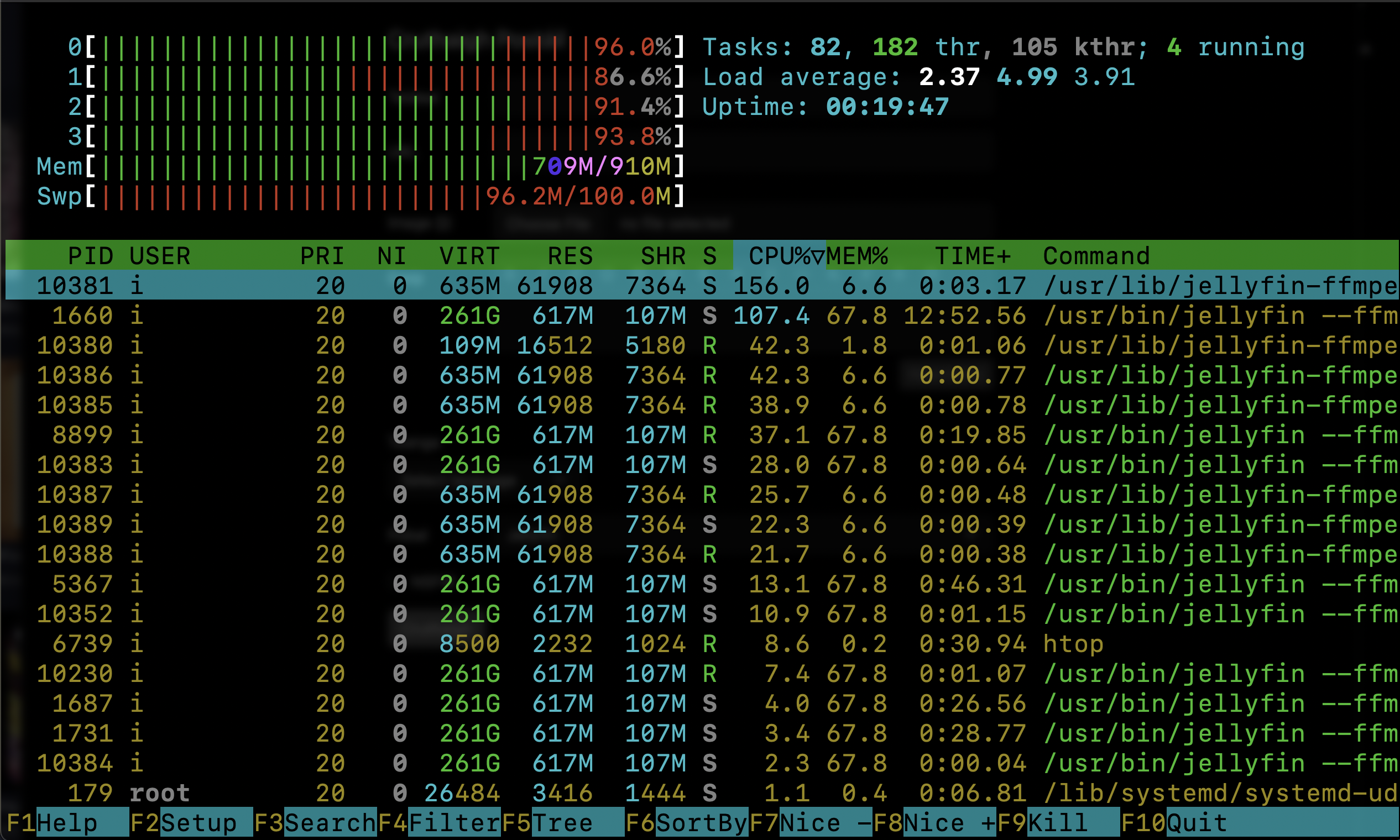
I started the scan for my movie collection (roughly 140 movies) on my Raspberry Pi 3B. It has become unresponsive and I can’t ssh in now. It seems to be due to all the ffmpeg instances. I have two questions:
Should I wait for an hour or should I just reboot the server? Also, is there a way to disable the setting for chapter images from the web UI? I can’t find it in the setting.
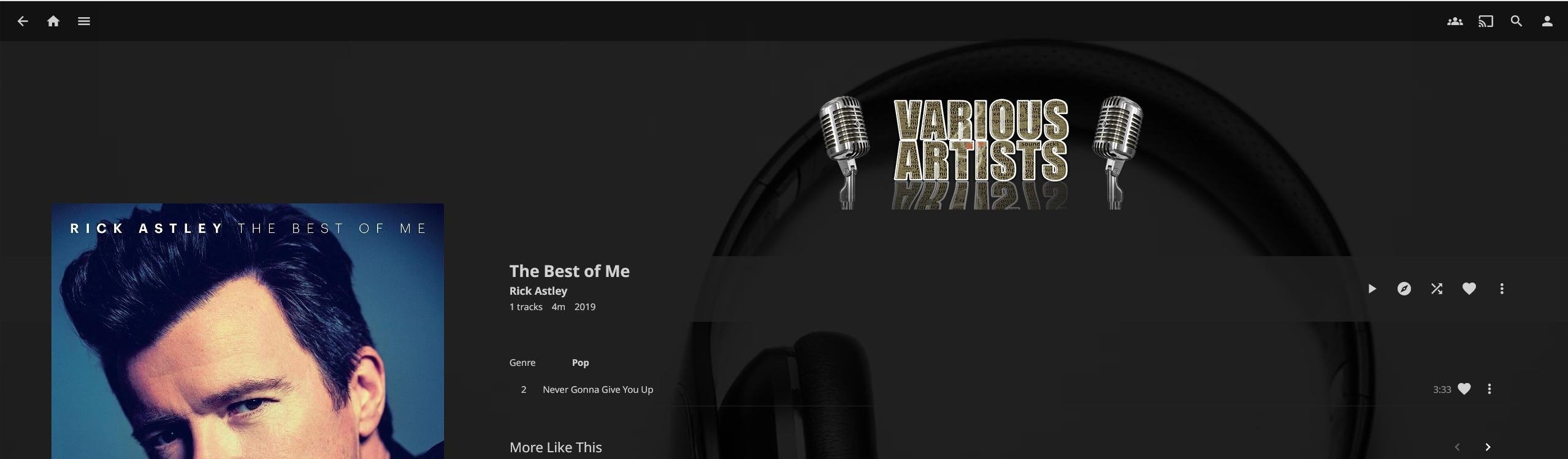
I have no idea how that happened or when it happened. Now every single album in my music collection has this background image of a random headphone and this “Various Artists” microphone picture on top.
How do I get rid of this?
I have no idea how that happened or when it happened. Now every single album in my music collection has this background image of a random headphone and this “Various Artists” microphone picture on top.
How do I get rid of this?
I have some stuff where my language is not the default audio track. I can’t figure out how to tell it to change the track when using the jellyfin app on roku. Am I missing something?
I have some stuff where my language is not the default audio track. I can’t figure out how to tell it to change the track when using the jellyfin app on roku. Am I missing something?

cross-posted from: lemmy.world/post/3440449
Nice set of images for your libraries. Two different sets of gradients. Not mine, random find.
cross-posted from: lemmy.world/post/3440449
Nice set of images for your libraries. Two different sets of gradients. Not mine, random find.
cross-posted from: lemmy.world/post/1622687
I’m starting to get more and more HDR content, and I’m noticing an issue with my Jellyfin server. In nearly all cases, it’s required to transcode and tone map the HDR content. All of it is in 4k.
My little Quadro P400 just can’t keep up. Encoder and decoder usage hovers around 15-17%, but the GPU core usage is pinned at 100% the entire time, and my framerate doesn’t exceed 19fps, which makes the video skip so badly it’s unwatchable.
What’s a reasonable upgrade? I’m thinking about the P4000, but that might be excessive. Also, it needs to fit in a low-profile slot.