preview
Edit to add - Here is my system specs.
Operating System: Debian GNU/Linux 13
KDE Plasma Version: 6.3.6
KDE Frameworks Version: 6.13.0
Qt Version: 6.8.2
Kernel Version: 6.12.107+deb13-amd64 (64-bit)
Graphics Platform: Wayland
Processors: 16 × Intel® Core™ i9-9900KF CPU @ 3.60GHz
Memory: 64 GiB of RAM (62.7 GiB usable)
Graphics Processor: NVIDIA GeForce RTX 4070 SUPER/PCIe/SSE2
Manufacturer: Gigabyte Technology Co., Ltd.
Product Name: Z390 AORUS MASTER
preview
“Choice 5: Responsible Use of Generative AI” won. Compare the proposals page.
For fuck’s sake, Debian.
“Choice 5: Responsible Use of Generative AI” won. Compare the proposals page.
For fuck’s sake, Debian.
preview
Somehow, this msn.com article is the most comprehensive on the subject that I’ve seen so far, and it also talks about how a couple of other big open source projects handle this issue. Voting on the issue concludes on August 28th 23:59 UTC, BTW.
Somehow, this msn.com article is the most comprehensive on the subject that I’ve seen so far, and it also talks about how a couple of other big open source projects handle this issue. Voting on the issue concludes on August 28th 23:59 UTC, BTW.
preview
When looking at backports.debian.org, yt-dlp shows an upload of 2026.07.04-1~bpo13+1 (backports.debian.org/uploads/trixie-backports/)
Checking packages.debian.org, it shows the source package as the same 2026.07.04, but the packaged version as 2026.03.17 (packages.debian.org/trixie-backports/yt-dlp)
Does anyone know why the upload and source versions wouldn’t match the packaged version?
preview
I am on a dual boot Debian 12 / Win11 and I get a firmware upgrade in debian with this text:
_Some of the platform secrets may be invalidated when updating this firmware. Please ensure you have the volume recovery key before continuing.
This updates the list of forbidden signatures (the “dbx”) to the latest release from Microsoft.
Some insecure bootloaders were added, due to security vulnerabilities that allowed an attacker to bypass UEFI Secure Boot. The additional entries were from:
• Baramanudi Management Suite
• EAZ EasyFix
• Finland Matriculation Examination Board
• NTC IT ROSA Linux
• PC-Doctor
• Spyrus WTGCreator
• WhiteCanyon blancco
• Some ancient shim releases for OpenSUSE, Oracle and Red Hat_
My questions are:
- Does dual boot have extra riscs?
- The volume recovery key: is that the luks encryption key?
- Any tips how to get it?
Any help much appreciated.
preview
Post title stolen from c/hackernews@lemmy.bestiver.se, not crossposted because I don’t care about comments on ycombinator and Lemmy users generally don’t interact with bot posts.
Very curious how this is going to turn out. We’re going to see LLM-contributions in Debian one way or another for sure (even the Linux kernel allows AI-assisted coding and tons of other upstream projects are using Claude etc.), but that doesn’t mean that Debian shouldn’t take a stance.
preview
@debian@lemmy.ml @debian@framapiaf.org @debian@lemmy.world @debian@mastodon.cloud @debian @debian@kbin.social @debian@zotadel.net @debian@lemmy.zip @debianFR
Greetings to the entire debian community on Indian independence day and remembering and reminding that freedom is not free.
It is due to sacrifice and love of many that we enjoy freedom, and that we need to preserve it against vested interest.
preview
We’ve removed systemd from our system. Or so we thought.
libsystemd0 is still installed, though.
Turns out apt depends on it?? coreutils depends on it??? None of those should have anything to do with systemd???
So what’s up with that? Is there a way to actually remove libsystemd0 without breaking everything in half?
This bug report seems to indicate that libelogind0 at least used to Provides: libsystemd0, but it doesn’t seem to anymore on our systems.
– Ylfingr
preview
I was wondering since I moved from Linux Mint to Debian, everyone said it’s more for advanced users, it’s barebones, it needs lots of adjusting…etc.
But I’m the contrary, my codecs where there and worked. It was more stable and intuitive. I only had to plugin my store to the flat hub. Nothing much I did of tinkering than I did in Mint.
preview
I’m sorry if this has been asked before, I searched using different terms but couldn’t find a similar question. I’m a noob. When using apt install sometimes it recommends a bunch of other packages. I read that GUI tools generally install them. I don’t use GUI, I use the terminal. I know of the –no-install-recommends flag, but I am wondering whether and when to use it. Should I just let it do the default thing?
For example, this is the list of packages when I try to install Calibre:
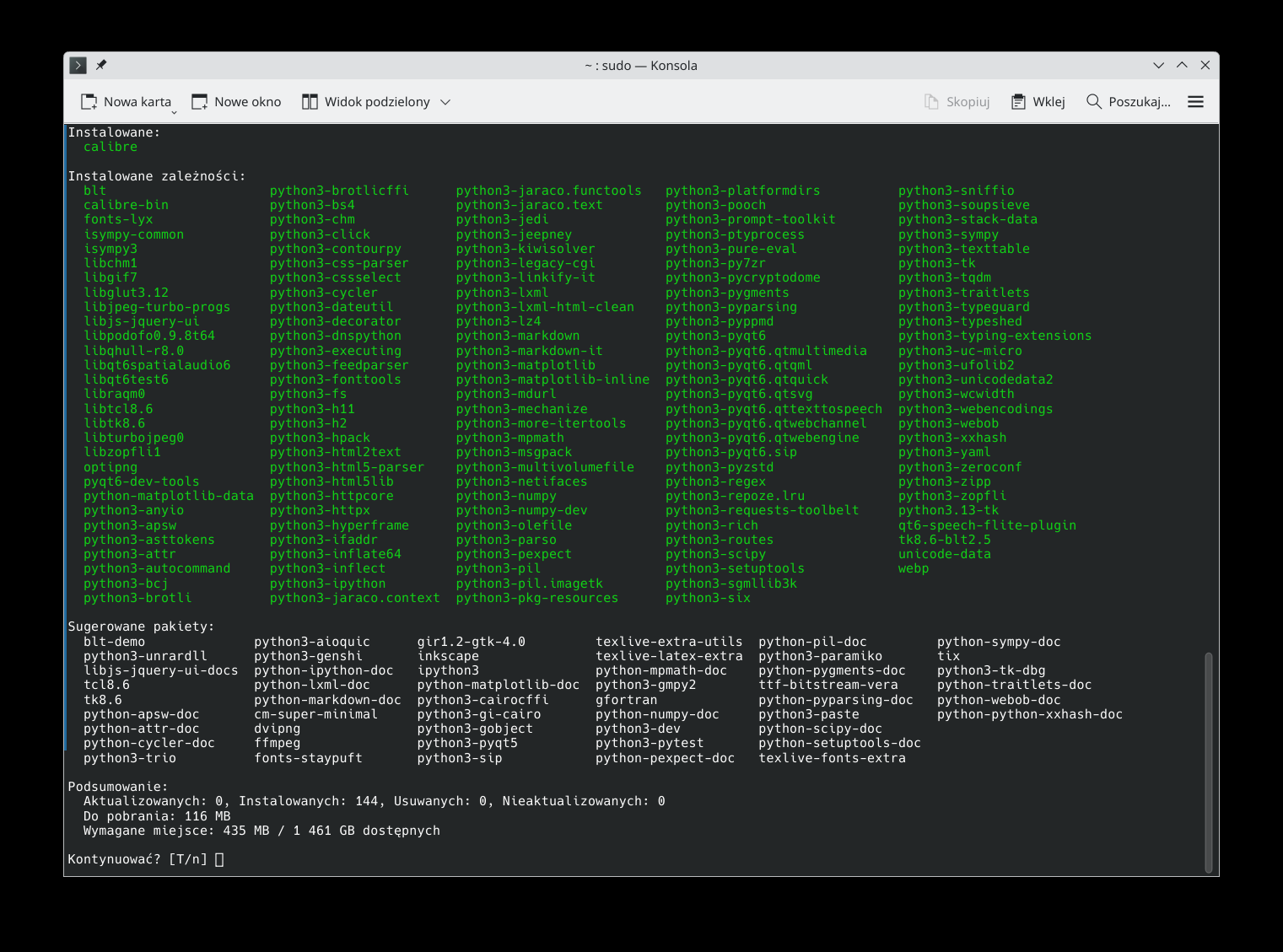
Some of them seem useful based on names, but for example blt-demo?
I’m sorry if this has been asked before, I searched using different terms but couldn’t find a similar question. I’m a noob. When using apt install sometimes it recommends a bunch of other packages. I read that GUI tools generally install them. I don’t use GUI, I use the terminal. I know of the –no-install-recommends flag, but I am wondering whether and when to use it. Should I just let it do the default thing?
For example, this is the list of packages when I try to install Calibre:
Some of them seem useful based on names, but for example blt-demo?
preview
:picklerick: Debian ist die Abkürzung für:
Der Name des Betriebssystems leitet sich von den Vornamen des Debian-Gründers Ian Murdock und seiner damaligen Freundin und späteren Ehefrau Debra Lynn ab.
:cannabis: Wenige Monate nach der Gründung, im Mai 1994, entschied Ian Murdock den Namen des Projekts von Debian Linux in Debian GNU/Linux zu ändern. Damit folgte er der Auffassung der Free Software Foundation, dass Linux eine Variante des GNU-Systems sei.
https://de.wikipedia.org/wiki/Debian
@debian@lemmy.ml @debian@lemmy.world