

0
0xMillyByte
Executive Function as Code: using (Doom) Emacs to script my brain
milly.kittycloud.eu
posts tagged #emacs
My next novel, a science fiction story set 500 years in the future, features a sentient artificial being—imagine a HAL 9000 with a functioning moral compass, or Skynet without the genocidal nihilism.
Users interact with this sentient AI being in a variety of ways: non-tech users interact via voice commands and touch, but more tech-savvy users interact through a Brain-computer Interface (BCI) that enables tactile and vision control. A smaller portion of users still use keyboards, but they are viewed in the same way our current age views typewriters: a quaint artifact of a bygone era.
My next novel, a science fiction story set 500 years in the future, features a sentient artificial being—imagine a HAL 9000 with a functioning moral compass, or Skynet without the genocidal nihilism.
Users interact with this sentient AI being in a variety of ways: non-tech users interact via voice commands and touch, but more tech-savvy users interact through a Brain-computer Interface (BCI) that enables tactile and vision control. A smaller portion of users still use keyboards, but they are viewed in the same way our current age views typewriters: a quaint artifact of a bygone era.

The idea for this post started today when I saw in #emacs-til on libera.chat:
- [2026-01-17 22:30:19] <quelt> TIL emacs is just not for old boomers lol
- [2026-01-17 22:31:53] <bremner> also for younger boomers
- [2026-01-17 22:33:10] <quelt> haha that’s me!
- [2026-01-17 22:33:17] <quelt> lil baby baby boomer
- [2026-01-17 23:25:18] <hodapp> the Youth of Today love Emacs
- [2026-01-17 23:25:29] <hodapp> I asked one of them back in… uh…
- [2026-01-17 23:25:31] <hodapp> 1991?
So I did a websearch for the youngest emacs user, and, the websearch results couldn’t help but all be about how old emacs users are.
So I ask Lemmy…
Who is the youngest emacs user?
[And no, before anyone thinks otherwise, that image is not real. I just put that together for whimsical illustration, from an image search or 3, with a relevant comment, an image from an article about a 2 year old who self-taught the alphabet, and an image of an emacs welcome screen pasted together with the help of the GIMP.]
Who is the youngest emacs user?
Anyone younger than 40? In 20s? Teens?? Younger??!
The idea for this post started today when I saw in #emacs-til on libera.chat:
- [2026-01-17 22:30:19] <quelt> TIL emacs is just not for old boomers lol
- [2026-01-17 22:31:53] <bremner> also for younger boomers
- [2026-01-17 22:33:10] <quelt> haha that’s me!
- [2026-01-17 22:33:17] <quelt> lil baby baby boomer
- [2026-01-17 23:25:18] <hodapp> the Youth of Today love Emacs
- [2026-01-17 23:25:29] <hodapp> I asked one of them back in… uh…
- [2026-01-17 23:25:31] <hodapp> 1991?
So I did a websearch for the youngest emacs user, and, the websearch results couldn’t help but all be about how old emacs users are.
So I ask Lemmy…
Who is the youngest emacs user?
[And no, before anyone thinks otherwise, that image is not real. I just put that together for whimsical illustration, from an image search or 3, with a relevant comment, an image from an article about a 2 year old who self-taught the alphabet, and an image of an emacs welcome screen pasted together with the help of the GIMP.]
Who is the youngest emacs user?
Anyone younger than 40? In 20s? Teens?? Younger??!

I’ve been reading through their docs[0] and FAQs[1] but cannot for the life of me understand how they can use SPC as a chord prefix, and also just type normal sentences on a keyboard.
I don’t want to try it, but I do want to know.
0: www.spacemacs.org/doc/QUICK_START.html
1: www.spacemacs.org/doc/FAQ.html#how-do-i
I’ve been reading through their docs[0] and FAQs[1] but cannot for the life of me understand how they can use SPC as a chord prefix, and also just type normal sentences on a keyboard.
I don’t want to try it, but I do want to know.
0: www.spacemacs.org/doc/QUICK_START.html
1: www.spacemacs.org/doc/FAQ.html#how-do-i

No explanation given. Just a whimsical little image for our beloved emacs, I made a while ago, in response to something, I forget what. Is just fun.
OC by @Digit@lemmy.wtf
No explanation given. Just a whimsical little image for our beloved emacs, I made a while ago, in response to something, I forget what. Is just fun.
OC by @Digit@lemmy.wtf

No explanation given. Just a whimsical little image for our beloved emacs, I made a while ago, in response to something, I forget what. Is just fun.
No explanation given. Just a whimsical little image for our beloved emacs, I made a while ago, in response to something, I forget what. Is just fun.
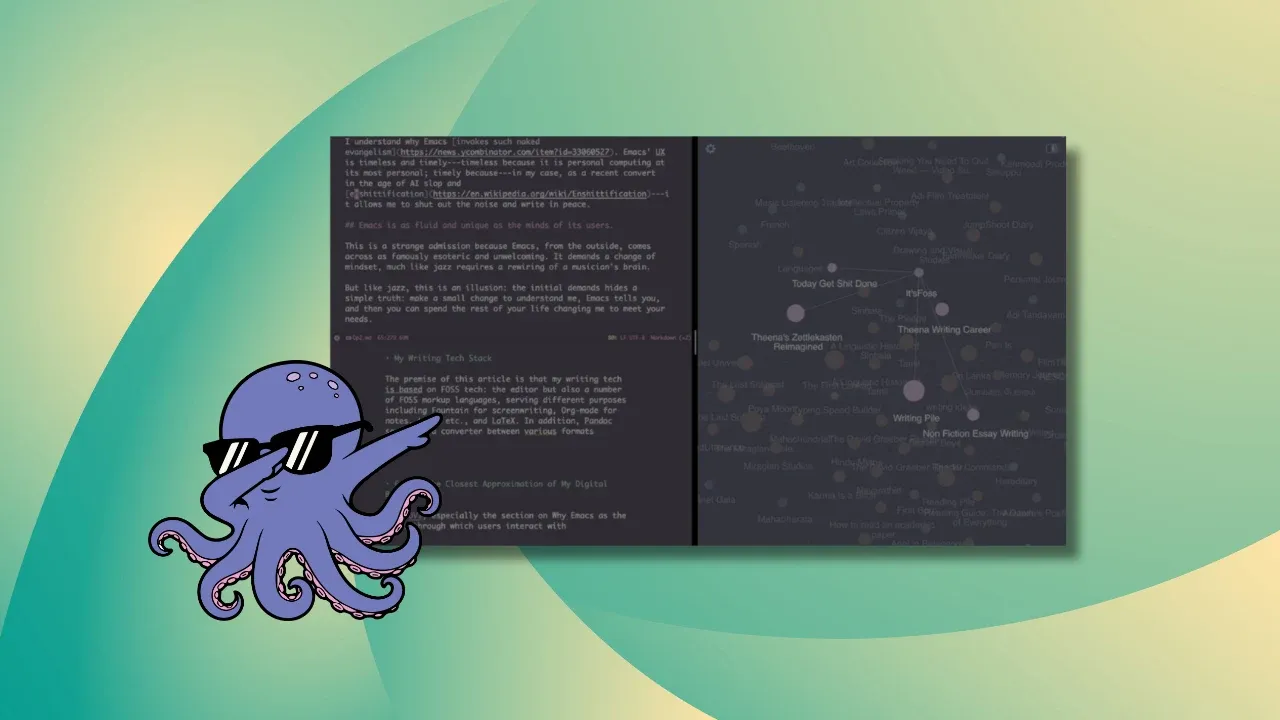
If you write for a living, for studies, or even as a hobby, you should consider Emacs. It could be just what you need in an environment of enshittifying word processors and AI garbage.
If you write for a living, for studies, or even as a hobby, you should consider Emacs. It could be just what you need in an environment of enshittifying word processors and AI garbage.
One are ELPA tarballs…
…and the other 'elps 'er tar balls!
(Nailed it. Flawless setup!)
One are ELPA tarballs…
…and the other 'elps 'er tar balls!
(Nailed it. Flawless setup!)

Emacs Reader, talk, code, emacsconf page This talk described a fast new document reader that leverages dynamic modules. This made it work faster than docview or pdftools.
LLM & Emacs talk, talk, emacsconf page This talk explores what is “editing” and how different classes of emacs LLM tools goes with, or against editing. A quick tour of many tools + an easy going philosophical discussion.
Emacs Reader, talk, code, emacsconf page This talk described a fast new document reader that leverages dynamic modules. This made it work faster than docview or pdftools.
LLM & Emacs talk, talk, emacsconf page This talk explores what is “editing” and how different classes of emacs LLM tools goes with, or against editing. A quick tour of many tools + an easy going philosophical discussion.
If you write for a living, for studies, or even as a hobby, you should consider Emacs. It could be just what you need in an environment of enshittifying word processors and AI garbage.
If you write for a living, for studies, or even as a hobby, you should consider Emacs. It could be just what you need in an environment of enshittifying word processors and AI garbage.
cross-posted from: hexbear.net/post/6891969
If you write for a living, for studies, or even as a hobby, you should consider Emacs. It could be just what you need in an environment of enshittifying word processors and AI garbage.
cross-posted from: hexbear.net/post/6891969
If you write for a living, for studies, or even as a hobby, you should consider Emacs. It could be just what you need in an environment of enshittifying word processors and AI garbage.

A minimal, declarative setup for productive Rust hacking on Emacs + Guix
I noticed there was a blatant lack of resources and documentation on this particular setup. So I rolled up my sleeves and wrote this article, which hopefully you find useful.
jointhefreeworld.org/blog/articles/…/index.html
See image here of my Emacs with rust-analyzer and clippy working: ibb.co/whxq8dX1
A minimal, declarative setup for productive Rust hacking on Emacs + Guix
I noticed there was a blatant lack of resources and documentation on this particular setup. So I rolled up my sleeves and wrote this article, which hopefully you find useful.
jointhefreeworld.org/blog/articles/…/index.html
See image here of my Emacs with rust-analyzer and clippy working: ibb.co/whxq8dX1
als kruisbericht geplaatst vanaf: lemmy.ml/post/38966704
A minimal, declarative setup for productive Rust hacking on Emacs + Guix
I noticed there was a blatant lack of resources and documentation on this particular setup. So I rolled up my sleeves and wrote this article, which hopefully you find useful.
jointhefreeworld.org/blog/articles/…/index.html
See image here of my Emacs with rust-analyzer and clippy working: ibb.co/whxq8dX1
als kruisbericht geplaatst vanaf: lemmy.ml/post/38966704
A minimal, declarative setup for productive Rust hacking on Emacs + Guix
I noticed there was a blatant lack of resources and documentation on this particular setup. So I rolled up my sleeves and wrote this article, which hopefully you find useful.
jointhefreeworld.org/blog/articles/…/index.html
See image here of my Emacs with rust-analyzer and clippy working: ibb.co/whxq8dX1

I think one of my package is interacting wrongly with TRAMP and it is too often freezing. It is difficult to debug as it freezes totally and quite annoying as I cannot interrupt with C-g. Are there options to run tramp in a way it does not collapse the whole emacs? I could then try to guess which package interact with it by deactivating/activating them…
It seems to work properly if I open emacs with emacs -Q
I think one of my package is interacting wrongly with TRAMP and it is too often freezing. It is difficult to debug as it freezes totally and quite annoying as I cannot interrupt with C-g. Are there options to run tramp in a way it does not collapse the whole emacs? I could then try to guess which package interact with it by deactivating/activating them…
It seems to work properly if I open emacs with emacs -Q
Hello, guys!
I’m in process of moving my notes from Joplin, which is also a great tool, to Emacs 30.1. I use denote for managing notes.
I found a strange behavior when using org-publish: almost every note I created and exported using org-publish can’t be read by webserver. It happens when file name consists cyrillic letters. I’ve tried nginx, apache, python http.server, web-static-server. When I run a server and try to open html file in latin - it’s OK, but when there some cyrillic letters in file name - web serser tells me it can’t find file with this name like “%u…”. However when I open html files locally with Firefox everything works just fine.
So after a couple of days of reasearch I found that one reason for such behavior could be the wrong file name encoding. As far as I’m not an expert may be somebody can explain how to make emacs convert with org-publish notes in encoding that is readable for any web server?
My emacs config consists:
org-publish-project-alist '(
                            (
                             "notes"
                             :base-directory "~/org/denotes/"
                             :recursive nil
                             :publishing-directory "~/public_notes"
                             :section-numbers nil
                             :with-toc nil
                             :with-author nil
                             :with-creator nil
                             :with-date nil
                             :html-preamble "<nav><a href='index.html'>Notes</a></nav>"
                             :html-postamble nil
                             :auto-sitemap t
                             :sitemap-filename "index.org"
                             :sitemap-title "Notes"
                             :sitemap-sort-files anti-chronologically
                             )
Host is Debian 13. UTF-8 is the only encoding enabled in locales. Servers I’ve tried so far also run on Debian 13 with UTF-8.
Hello, guys!
I’m in process of moving my notes from Joplin, which is also a great tool, to Emacs 30.1. I use denote for managing notes.
I found a strange behavior when using org-publish: almost every note I created and exported using org-publish can’t be read by webserver. It happens when file name consists cyrillic letters. I’ve tried nginx, apache, python http.server, web-static-server. When I run a server and try to open html file in latin - it’s OK, but when there some cyrillic letters in file name - web serser tells me it can’t find file with this name like “%u…”. However when I open html files locally with Firefox everything works just fine.
So after a couple of days of reasearch I found that one reason for such behavior could be the wrong file name encoding. As far as I’m not an expert may be somebody can explain how to make emacs convert with org-publish notes in encoding that is readable for any web server?
My emacs config consists:
org-publish-project-alist '(
                            (
                             "notes"
                             :base-directory "~/org/denotes/"
                             :recursive nil
                             :publishing-directory "~/public_notes"
                             :section-numbers nil
                             :with-toc nil
                             :with-author nil
                             :with-creator nil
                             :with-date nil
                             :html-preamble "<nav><a href='index.html'>Notes</a></nav>"
                             :html-postamble nil
                             :auto-sitemap t
                             :sitemap-filename "index.org"
                             :sitemap-title "Notes"
                             :sitemap-sort-files anti-chronologically
                             )
Host is Debian 13. UTF-8 is the only encoding enabled in locales. Servers I’ve tried so far also run on Debian 13 with UTF-8.
Hello all,
I recently started working out again, and started thinking can I track my workouts using emacs org mode.
What I basically envision is tracking what exercises I did in a given day, repetitions and weights. Any suggestions? Thanks in advance!
Hello all,
I recently started working out again, and started thinking can I track my workouts using emacs org mode.
What I basically envision is tracking what exercises I did in a given day, repetitions and weights. Any suggestions? Thanks in advance!
Hello! I’m happy to announce the release of Disproject version 2.2.0. This update comes with various improvements, including:
The full change notes for this release can be found here.
Other links:
Disproject is a GNU Emacs package that implements Transient menus for managing and interacting with project files. It aims to provide a featureful, yet extensible interface from which users can intuitively dispatch commands on projects.
Some of its notable features include:
- a main menu with access to many of the built-in project library’s commands and other project-aware commands;
- auto-detection of current project as the default project to act on from the menu;
- options for switching to other projects from the menu in order to execute commands elsewhere;
- a menu for finding common “special” project files, like the dir-locals file;
- a menu for custom project-local suffix commands;
- and display-buffer override options, to control where commands should display buffers to.
This package was inspired by the
project-switch-projectcommand, from the built-in project library. Users may also draw similarities to the Projectile library’sprojectile-commander.
Hello! I’m happy to announce the release of Disproject version 2.2.0. This update comes with various improvements, including:
The full change notes for this release can be found here.
Other links:
Disproject is a GNU Emacs package that implements Transient menus for managing and interacting with project files. It aims to provide a featureful, yet extensible interface from which users can intuitively dispatch commands on projects.
Some of its notable features include:
- a main menu with access to many of the built-in project library’s commands and other project-aware commands;
- auto-detection of current project as the default project to act on from the menu;
- options for switching to other projects from the menu in order to execute commands elsewhere;
- a menu for finding common “special” project files, like the dir-locals file;
- a menu for custom project-local suffix commands;
- and display-buffer override options, to control where commands should display buffers to.
This package was inspired by the
project-switch-projectcommand, from the built-in project library. Users may also draw similarities to the Projectile library’sprojectile-commander.
Lately I’ve been experimenting with my emacs setup, which has led to a lot of extra ELPA (gnu and nongnu) requests. Unfortunately, ELPA is very slow nowadays, which makes experimenting inconvenient. Also, I don’t want to contribute to the already high load on the official GNU servers.
Are there any “official” mirrors for ELPA? How can I activate them? If not, how can I activate and validate non official mirrors?
Lately I’ve been experimenting with my emacs setup, which has led to a lot of extra ELPA (gnu and nongnu) requests. Unfortunately, ELPA is very slow nowadays, which makes experimenting inconvenient. Also, I don’t want to contribute to the already high load on the official GNU servers.
Are there any “official” mirrors for ELPA? How can I activate them? If not, how can I activate and validate non official mirrors?
Dear emacs and org-mode comrades.
Given:
How can I count with pure elisp (assuming some table formula but I’m open to other ways) the sum of individual tag appearances of each tag group, for each question?
Example:
| tag  | Q1 | Q2 |
|------+----+----|
| tagA |  9 |    |
| tagB |  4 |  2 |
| tagC |  1 |  4 |
| tagD |    |  5 |
| tagE |    |  6 |
|------+----+----|
| GT1  | 10 |  9 |
| GT2  |  4 |  9 |
| GT3  |  5 | 11 |
Thanks a lot for your time and attention… :)
Dear emacs and org-mode comrades.
Given:
How can I count with pure elisp (assuming some table formula but I’m open to other ways) the sum of individual tag appearances of each tag group, for each question?
Example:
| tag  | Q1 | Q2 |
|------+----+----|
| tagA |  9 |    |
| tagB |  4 |  2 |
| tagC |  1 |  4 |
| tagD |    |  5 |
| tagE |    |  6 |
|------+----+----|
| GT1  | 10 |  9 |
| GT2  |  4 |  9 |
| GT3  |  5 | 11 |
Thanks a lot for your time and attention… :)
I “live in Emacs”, like most of us (atleast at work). It has been getting slower release on release, async support doesn’t seem to have been picked up by most packages and native-comp has made it more brittle.
Over this time, we moved from running the OS on hardware to running in VMs, so fractional slowdown was expected. But what I have is a few X slower Emacs. I had never seen Emacs take a minute to indent a few thousand lines, for example. Maybe some modes have slower code.
I “live in Emacs”, like most of us (atleast at work). It has been getting slower release on release, async support doesn’t seem to have been picked up by most packages and native-comp has made it more brittle.
Over this time, we moved from running the OS on hardware to running in VMs, so fractional slowdown was expected. But what I have is a few X slower Emacs. I had never seen Emacs take a minute to indent a few thousand lines, for example. Maybe some modes have slower code.
Edit 6/21/2026 I am still regularly using this setup even after several times of dropping it for awhile which is not something I generally do when something feels fiddly. It works great for using org mode on the go!
I didn’t know how to title this one, and it is such an esoteric thing but this set of tools I think actually makes a really compelling mobile text editing/task tracking solution allowing full use of org mode in emacs with file syncing capability naturally and easily accessible through termux’s straightforward ability to add the filepath of a syncthing folder share to the termux app and thus for emacs/spacemacs and org mode.
Cursed? I mean yeah… but also consider that you can still mainly use something like orgro or orgzly revived to access your org files and use this crazed method as a backup for edge cases where you are stuck on mobile!
This use of termux gets all the great touchscreen controls for terminal interaction (like swipe to scroll, pinch to “zoom”/change text size, esc ctrl keyboard arrows etc…) AND dodges one of the biggest issues with the way sandboxing is implemented in Android by naturally connecting both your file sharing/syncing app and your text editing/task tracking app in a way that is simple and resilient to the nonsense of Android.

…but the big elephant in the room is that emacs and spacemacs are keyboard driven right… so… how could this not be a nightmare on a smartphone???
That is where 8vim comes in! It is a really fluid and natural touchscreen keyboard that allows precise input of the core keyboard letters in a very easy but precise fashion. Somewhat unexpectedly the modal editing and space leader key command system that Spacemacs is centered around works perfectly with a touchscreen keyboard like 8vim.
f-droid.org/packages/inc.flide.vi8
lmd-jazzededtech.gitlab.io/…/inc.flide.vi8/
8vim works this way, there are four lines that intersect a circle. Starting with your finger in the circle you can input a letter by drawing a line out of the circle and then passing through one of the four lines in a loop around the circle, the letter inputted is determined by how many additional lines (if any) you pass through before returning to inside the circle. In the following example to make an “r” is just the same as to make a “c” but in reverse.

Above is an example of inputting a “c”, if you wanted to keep typing “cat” as opposed to "c " instead of lifting your finger after finishing the “c” keep drawing an “a” and then “t” in one continuous motion as below image illustrates.

Other essential Spacemacs keys are accessible in one tap from the main 8vim letter input screen

8vims style of input is decidedly strange at first glance, but once you understand the basic way you input letters, consider a couple of basic spacemacs evil commands like “file save” “quit”, “org-insert-heading”, “org-narrow-to-subtree” and “widen” or any number of routine operations and most of them map out quite naturally to 8vim. Far more than you might expect given neither tool was designed for the other.

spacemacs running in termux

editing spacemacs dotfile “spc f e d”

editing and viewing an org mode file

browsing spacemacs documentation, full terminal height can be given to termux/emacs without sacrificing a big uncramped keyboard

The square shape of 8vim naturally works well in termux in landscape orientation too.
Pinch to zoom in an org mode file works great in termux, a natural view for indepth editing can be quickly transformed into an extremely clear color coded pocket-note style task list to glance at while working.


 This is in conjunction with the spacemacs ranger layer and is opened with…
spc a t r r
…another surprisingly natural and easy to remember input sequence with the 8vim touchscreen keyboard.
Of course, if I am going to type a lot I use a bluetooth keyboard and transition to typing with a hardware keyboard, but for simple todo list and task tracking type uses of org mode (what I almost exclusively use it for) 8vim works great.
The reason I suggest Syncthing is that both Syncthing and Termux can so easily access the same folder locations on Android that it makes file syncing a breeze compared to how much of a silo’d corporate “somebody else’s computer” headache it is for other solutions that work for Android or iOS for that matter.
f-droid.org/…/com.github.catfriend1.syncthingandr…
Edit I realize I didn’t explicitly explain but you can install git with termux in two seconds…
pkg install git
…and then just install spacemacs with git like normal.
git clone github.com/syl20bnr/spacemacs ~/.emacs.d
Edit 2 Note pandoc can be installed with termux so emacs and spacemacs integration also works right out of the box with pandoc which is kind of mindblowing even though I guess it is obvious given both emacs and pandoc can be installed with termux. If you aren’t aware, pandoc integration with emacs lets you export an org mode document to pretty much any format you want… webpage html… word document… slideshow… what would you like? It is a VERY powerful way to take org notes and turn them into things other people can interact with and view in a variety of contexts.
www.spacemacs.org/layers/+tools/…/README.html

Pandoc running in emacs in termux with the spacemacs pandoc layer
*Cross-post from !spacemacs@lemmy.ml
Edit 6/21/2026 I am still regularly using this setup even after several times of dropping it for awhile which is not something I generally do when something feels fiddly. It works great for using org mode on the go!
I didn’t know how to title this one, and it is such an esoteric thing but this set of tools I think actually makes a really compelling mobile text editing/task tracking solution allowing full use of org mode in emacs with file syncing capability naturally and easily accessible through termux’s straightforward ability to add the filepath of a syncthing folder share to the termux app and thus for emacs/spacemacs and org mode.
Cursed? I mean yeah… but also consider that you can still mainly use something like orgro or orgzly revived to access your org files and use this crazed method as a backup for edge cases where you are stuck on mobile!
This use of termux gets all the great touchscreen controls for terminal interaction (like swipe to scroll, pinch to “zoom”/change text size, esc ctrl keyboard arrows etc…) AND dodges one of the biggest issues with the way sandboxing is implemented in Android by naturally connecting both your file sharing/syncing app and your text editing/task tracking app in a way that is simple and resilient to the nonsense of Android.
…but the big elephant in the room is that emacs and spacemacs are keyboard driven right… so… how could this not be a nightmare on a smartphone???
That is where 8vim comes in! It is a really fluid and natural touchscreen keyboard that allows precise input of the core keyboard letters in a very easy but precise fashion. Somewhat unexpectedly the modal editing and space leader key command system that Spacemacs is centered around works perfectly with a touchscreen keyboard like 8vim.
f-droid.org/packages/inc.flide.vi8
lmd-jazzededtech.gitlab.io/…/inc.flide.vi8/
8vim works this way, there are four lines that intersect a circle. Starting with your finger in the circle you can input a letter by drawing a line out of the circle and then passing through one of the four lines in a loop around the circle, the letter inputted is determined by how many additional lines (if any) you pass through before returning to inside the circle. In the following example to make an “r” is just the same as to make a “c” but in reverse.
Above is an example of inputting a “c”, if you wanted to keep typing “cat” as opposed to "c " instead of lifting your finger after finishing the “c” keep drawing an “a” and then “t” in one continuous motion as below image illustrates.
Other essential Spacemacs keys are accessible in one tap from the main 8vim letter input screen
8vims style of input is decidedly strange at first glance, but once you understand the basic way you input letters, consider a couple of basic spacemacs evil commands like “file save” “quit”, “org-insert-heading”, “org-narrow-to-subtree” and “widen” or any number of routine operations and most of them map out quite naturally to 8vim. Far more than you might expect given neither tool was designed for the other.
spacemacs running in termux
editing spacemacs dotfile “spc f e d”
editing and viewing an org mode file
browsing spacemacs documentation, full terminal height can be given to termux/emacs without sacrificing a big uncramped keyboard
The square shape of 8vim naturally works well in termux in landscape orientation too.
Pinch to zoom in an org mode file works great in termux, a natural view for indepth editing can be quickly transformed into an extremely clear color coded pocket-note style task list to glance at while working.
This is in conjunction with the spacemacs ranger layer and is opened with…
spc a t r r
…another surprisingly natural and easy to remember input sequence with the 8vim touchscreen keyboard.
Of course, if I am going to type a lot I use a bluetooth keyboard and transition to typing with a hardware keyboard, but for simple todo list and task tracking type uses of org mode (what I almost exclusively use it for) 8vim works great.
The reason I suggest Syncthing is that both Syncthing and Termux can so easily access the same folder locations on Android that it makes file syncing a breeze compared to how much of a silo’d corporate “somebody else’s computer” headache it is for other solutions that work for Android or iOS for that matter.
f-droid.org/…/com.github.catfriend1.syncthingandr…
Edit I realize I didn’t explicitly explain but you can install git with termux in two seconds…
pkg install git
…and then just install spacemacs with git like normal.
git clone github.com/syl20bnr/spacemacs ~/.emacs.d
Edit 2 Note pandoc can be installed with termux so emacs and spacemacs integration also works right out of the box with pandoc which is kind of mindblowing even though I guess it is obvious given both emacs and pandoc can be installed with termux. If you aren’t aware, pandoc integration with emacs lets you export an org mode document to pretty much any format you want… webpage html… word document… slideshow… what would you like? It is a VERY powerful way to take org notes and turn them into things other people can interact with and view in a variety of contexts.
www.spacemacs.org/layers/+tools/…/README.html
Pandoc running in emacs in termux with the spacemacs pandoc layer
*Cross-post from !spacemacs@lemmy.ml
In SLIME/Sly when compiling a file with ‘slime-compile-and-load-file’ (C-c C-k) I can navigate between notes with M-n and M-p. Is there also something like that for compiling #asdf systems or do I have to compile files manually?
In SLIME/Sly when compiling a file with ‘slime-compile-and-load-file’ (C-c C-k) I can navigate between notes with M-n and M-p. Is there also something like that for compiling #asdf systems or do I have to compile files manually?
Recently found about tramp-mode.
I’m trying to use it as primary way to work.
My previous workflow was: VNC to VM, open emacs for editing and shell-pop for issuing run commands etc.
My shell-pop config is:
'(shell-pop-full-span t) '(shell-pop-shell-type '(“eshell” “*eshell*” (lambda nil (eshell shell-pop-term-shell)))) '(shell-pop-universal-key “C-t”) '(shell-pop-window-position “bottom”) '(shell-pop-window-size 30)
With tramp-mode I would like to follow similar approach.
I can get shell-pop to come up with ctrl-t and it opens current working directory.
However .cshrc related to VM is not loaded and I don’t have access to correct VM shell commands / tools.
is there way to source RC file (from VM) before invoking eshell?
Recently found about tramp-mode.
I’m trying to use it as primary way to work.
My previous workflow was: VNC to VM, open emacs for editing and shell-pop for issuing run commands etc.
My shell-pop config is:
'(shell-pop-full-span t) '(shell-pop-shell-type '(“eshell” “*eshell*” (lambda nil (eshell shell-pop-term-shell)))) '(shell-pop-universal-key “C-t”) '(shell-pop-window-position “bottom”) '(shell-pop-window-size 30)
With tramp-mode I would like to follow similar approach.
I can get shell-pop to come up with ctrl-t and it opens current working directory.
However .cshrc related to VM is not loaded and I don’t have access to correct VM shell commands / tools.
is there way to source RC file (from VM) before invoking eshell?

I’m trying to learn Emacs again. This time it’s going better! I’m starting to learn the nitty gritty details about Org mode. This video is great!
Previously, my only experience with Org mode was watching my coworker do cool magic stuff with it.
Also this video on TODO: www.youtube.com/watch?v=L0EJeN1fCYw
I’m trying to learn Emacs again. This time it’s going better! I’m starting to learn the nitty gritty details about Org mode. This video is great!
Previously, my only experience with Org mode was watching my coworker do cool magic stuff with it.
Also this video on TODO: www.youtube.com/watch?v=L0EJeN1fCYw

I’ve always been curious about Emacs, but haven’t been able to learn it.
This playlist looks promising, but ufff each video is like 1 hour and most of the video is just random chatting because it’s a live stream…
Does anyone know any better video series? Something structured and to the point?
I’ve always been curious about Emacs, but haven’t been able to learn it.
This playlist looks promising, but ufff each video is like 1 hour and most of the video is just random chatting because it’s a live stream…
Does anyone know any better video series? Something structured and to the point?
I explain what I dislike about which-key and what I think people should use instead.
I explain what I dislike about which-key and what I think people should use instead.
When I first joined Lemmy and created this instance, there was no emacs community with consistent activity. I created the community mostly to see if I could help in the efforts during the Reddit migration and because it’s one of the subreddits that I was still visiting regularly.
I was also interested in having some communities where I could have full control to run some experiments: most notably the ability to have all submissions and contents mirrored from Reddit via alien.top.
These experiments and the effort to keep it fresh with content did make this most active emacs community (even without the mirroring bots) but to be honest today it feels out of place. Two years later, the landscape of instances are more of less consolidated and I’m no longer interested in running a community that does not belong to a topic-specific instance.
I strongly believe that there should be a cleaner separation between instances for groups and instances for people, and it would be kind of hypocritical to keep nurturing this community here when there is an instance focused on programming and software tools.
So, effective today, I am removing this community from fediverser.network as the recommended alternative and I’m going to list !emacs@programming.dev as the best place for emacs content. I don’t know if there is a standard procedure established for these types, so I’m going to keep the community open for the next 90 days and keep this post pinned until then. On June 1st, I will close down this community altogether.
When I first joined Lemmy and created this instance, there was no emacs community with consistent activity. I created the community mostly to see if I could help in the efforts during the Reddit migration and because it’s one of the subreddits that I was still visiting regularly.
I was also interested in having some communities where I could have full control to run some experiments: most notably the ability to have all submissions and contents mirrored from Reddit via alien.top.
These experiments and the effort to keep it fresh with content did make this most active emacs community (even without the mirroring bots) but to be honest today it feels out of place. Two years later, the landscape of instances are more of less consolidated and I’m no longer interested in running a community that does not belong to a topic-specific instance.
I strongly believe that there should be a cleaner separation between instances for groups and instances for people, and it would be kind of hypocritical to keep nurturing this community here when there is an instance focused on programming and software tools.
So, effective today, I am removing this community from fediverser.network as the recommended alternative and I’m going to list !emacs@programming.dev as the best place for emacs content. I don’t know if there is a standard procedure established for these types, so I’m going to keep the community open for the next 90 days and keep this post pinned until then. On June 1st, I will close down this community altogether.