0

preview
cross-posted from: lemmy.world/post/54803730
Or has it reached end of life?
cross-posted from: lemmy.world/post/54803730
Or has it reached end of life?
posts tagged #macos
cross-posted from: lemmy.world/post/54803730
Or has it reached end of life?
cross-posted from: lemmy.world/post/54803730
Or has it reached end of life?

I perceived macOS 27 as a “maintenance” update that would fix the issues of Tahoe, but I am disappointed to still see glitches like this one…
I perceived macOS 27 as a “maintenance” update that would fix the issues of Tahoe, but I am disappointed to still see glitches like this one…
I’ve got these two settings set to “off” but the OS checks for new updates and constantly bugs me with a pop up asking if I want to update the OS now or later. It just wont fucking stop. I gave in and updated to whatever the hell the newest version is today, but I want to ensure that it doesn’t start bothering me again in a few weeks. Are there any more settings I need to look into?

I’ve got these two settings set to “off” but the OS checks for new updates and constantly bugs me with a pop up asking if I want to update the OS now or later. It just wont fucking stop. I gave in and updated to whatever the hell the newest version is today, but I want to ensure that it doesn’t start bothering me again in a few weeks. Are there any more settings I need to look into?
Crossposted from lemmy.wtf/post/50042393
Crossposted from lemmy.wtf/post/50042393

This is a sensitivity of mine that many might not relate to, but the extra visual noise in toolbar buttons (bottom) versus Sequoia (top) will actually make it very difficult for me to focus on the content of my work.
WilliApple posted a way to disable liquid glass completely on Tahoe in his quick video here. This isn’t just the slider or reduced transparency, but fully disables it by running the commands here: pastebin.com/raw/Cb7X37G6
But as you can see in the video and the comments, there are side effects that might be a step too far for most.
Does anyone know if this works differently on 27? I really would need to get rid of the bubbles/circles around all the toolbar icons on Finder, and preferably the rest of the system.
Upgrading to 27 would mean getting two more years out of my M1 which is on Sequoia currently. I can’t believe bubble wrap in the toolbars is what’s going to take me out.
Edit: I’ve come across a potentially better command that targets a specific application, in this example, Finder:
defaults write com.apple.finder com.apple.SwiftUI.DisableSolarium -bool YES
killall finder
I don’t recommend anyone run these commands for me specifically since we don’t know the outcome. But if you already have and can confirm that this works for macOS 27 it would be a massive help.
I upgraded right away yesterday. The window borders are now correct. There is hope.
In general the system seems snappy and stable, so I don’t have anything bad to say.
I also like the slider to set the amount of transparency
I upgraded right away yesterday. The window borders are now correct. There is hope.
In general the system seems snappy and stable, so I don’t have anything bad to say.
I also like the slider to set the amount of transparency
Sequoia is running well for me and while 27 looks good in some ways, at some stage I expect diminishing returns such as slowness.
Sequoia is running well for me and while 27 looks good in some ways, at some stage I expect diminishing returns such as slowness.

There is a lot to cover, but the title sums it up. I stopped keeping my photos in the cloud because of money and privacy reasons, but at the same time I couldn’t find a nice software that wasn’t a web app or an Electron web app that would run on iPhones and iPads, and would let me browse the library without headaches.
So I built Raza Photos. Completely written in modern Swift 6, requiring the latest Apple frameworks, needing at least macOS and iOS 26 (sorry), with no Internet connectivity, no telemetry, no phoning home, no ads, no subscriptions, no accounts.
You import the photo folders you want the Mac app. It safely indexes the metadata, leaves the photos exactly where they are, and uses Bonjour to advertise itself on your local network. You can start or stop the server if you want to use the app by yourself or publish the library to the whole family. When you open Raza Photos on any iPhone, iPad, or Mac in the house, it instantly discovers the server. If you have multiple Macs hosting libraries, it finds them all and shows a complete library, with deduplicated filters.
You can browse, filter by date, location, people, albums and events, and you can even edit metadata from iOS while on the couch. The changes can go back to the original files as XMP/EXIF, without touching the image pixels. You can add countries and cities to photos that have GPS data and you can browse them all on a map. Face detection is done locally on the device.
The app is free for now, but it will be a one time purchase of around 20 USD. In the future I plan to add photo transfer from iOS to the Mac server, so you can backup your photos or migrate them away from iCloud. I also plan more photo management features like date taken conflict resolution and better face detection. And I also plan to extract a Swift headless server for Linux which you could put on a NAS, but I am a just solo dev, so bug fixes and features will come at a slower pace. I also plan a video app and a music app with the same features.
It seems like Firefox crashes all the time on macOS. When you exist (⌘+Q) it says it crashed and wants to send a report back to Mozilla. I just realised I’ve been doing that for the 3 years I’ve been a Mac user, and Mozilla still can’t be arsed to fix the problem. I’m beginning to think their code is not well ported to ARM64 and they don’t care enough to fix it.
So now I’m wondering if one of the Firefox clones, which would be built from source, might be better ported to macOS.
Yes, I could use Safari, and I don’t hate it, but I’ve been using Firefox since it was called Firebird, so like 20-25 years? Safari is completely different. My biggest gripe is that it doesn’t support free ad blockers, but I did pay for Wipr2 so that should alleviate the issue. There are ad blocking options on Safari, but I don’t think they’re quite as good as uBlock Origin on Firefox.
Hey, folks,
My laptop broke the other day, and I need a replacement asap. But here’s the rub: I despise windows. I’ve been a full time fedora user on my main device for a decade now, and I run Ubuntu on my desktop that I rarely touch because it’s ooooold. I am not a techy person. At all. I’m an idiot, actually. I use Linux because it’s cheaper, it keeps my aging hardware alive longer, and because politically I align pretty well with the idea of FOSS. And because I absolutely hate windows. I don’t even like KDE, because it reminds me of windows. Cinnamon? Too much like windows! Lol. I love my workflow in gnome, I love that it’s shiny and pretty and looks nice. And for the most part, I’m a browser based user. I rarely have cause to do much outside of the browser, except for sail the seas for some audiobooks. Even my papers for school are written in Google docs.
But also, on my desktop or a secondary device, I don’t mind having to fiddle with things and get them working, I enjoy it. It makes me feel like I have actual tech skills when I absolutely do not. But on the device I use for school I just want something that works and I never have to think about. I feel like a traitor to the cause even considering it, but I think I want to get a used m1 air. I’ve never used a Mac before, though. I used an iPhone once, for about 10-15 minutes, and I hated it. But, like, of course I did. It was completely different, and incapable of doing the thing I wanted it to do.
How painful is the Linux to Mac transition? If I’m using an android phone, an Ubuntu desktop, and a MacBook, how awful is everything going to be to switch between devices? Am I going to regret this purchase, or, worse yet, become an apple fan boy and abandon my glorious FOSS devices forever?
Please assist
cross-posted from: lemmy.ml/post/46206569
Looking to purchase an old cheap macbook air 2018 just as a spare laptop but i understand it has T2 chip which may not go well. Just wondering if anyone here has already tried Linux in this macs and is it in a usable state?
cross-posted from: lemmy.ml/post/46206569
Looking to purchase an old cheap macbook air 2018 just as a spare laptop but i understand it has T2 chip which may not go well. Just wondering if anyone here has already tried Linux in this macs and is it in a usable state?

How to set up a new Mac mini with Tahoe 26.1 for the best possible privacy.
What settings should I turn off, what do you recommend for the vest privacy on a mac M4 ?
How to set up a new Mac mini with Tahoe 26.1 for the best possible privacy.
What settings should I turn off, what do you recommend for the vest privacy on a mac M4 ?
cross-posted from: lemmy.ml/post/42330116
in this inaugural post to !linux_on_mac@lemmy.ml we’ll disable discrete graphics on a Macbook Pro and make the thing run exclusively off the Intel graphics.
reasons aplenty; 2010/11 models have their share of failed GPUs. those can be disabled with this trick and you get a fully functional machine that would otherwise necessitate a costly repair or it’d be thrown out, due to its age.
GPU and/or GMUX failures continued on post-2012 retina models; folks used those anemically cooled laptops for gaming, with predictable consequences.
finally, if you want to switch to linux, the discrete graphics complicates your life significantly.
this method works on all the models listed in the subject; if you know it works on other ones, please let me know and I’ll add it.
the only downside, you’ll lose video out as it’s connected to discrete graphics.
so, boot off a macOS installer or your existing macOS partition, open the terminal and go:
nvram GfxMode=4(prepend withsudoif it’s from an interactive shell)(todo: how to add the EFI variable from linux)
and reboot. that’s it, your discrete graphics is gone. it’s not present in lspci output, system report, etc. not only that, it’s no longer drawing power netting you a cooler system and longer battery life.
there were earlier versions of this with some GRUB shenanigans followed by some kext/systemd magic, but thanks to the awesome folks at macrumors that’s no longer needed.
I’m running macOS 18 and since I depend on dark mode, macOS 26 seems like a step backwards for my eye sensitivity.
So I’d like to stay on 18 for as long as it receives security updates and consider upgrade options some time later. Do the ISOs tend to remain available? Because my understanding is that when it comes to iOS, if you miss the last chance to upgrade, you’re stuck with whatever you have.

Hi - I’m just a little frustrated with the amount of bugs in macOS 26 and I hope 26.1 will fix some of these. This is my list so far:
Hi - I’m just a little frustrated with the amount of bugs in macOS 26 and I hope 26.1 will fix some of these. This is my list so far:
I discovered it by accident today, but it’s been there for a year already. The context, as usual, depends on where you last clicked/tabbed/etc. the focus to.
Relatedly, to keep track of hotkeys I used to use Cheatsheet and later KeyCue, but now there’s an open source alternative, KeyClu. There’s also Karabiner Elements for keyboard customization.

Not long ago I made a post asking about using Homebrew and Applite (a GUI “App Store” for Homebrew Casks) with some questions about the potential for new users getting a better “App Store.” Fortunately, after some testing, I can confirm that this might be a viable solution for most people!
I just migrated nearly my entire setup from apps installed online on respective websites over to Homebrew, and I’m glad I did. Things are working well, and I was even able to update my Application Sheet to have a column for Homebrew casks to quickly reproduce Brewfiles for future setups. Now, I’m looking into some “Quick Setup Brewfiles” for my tech support clients! For instance, a “Xdobe Setup Pack” might consist of GIMP, Darktable, Inkscape, a link to Photopea, and DaVinci Resolve. I also have my Google Sheet linked of my app recommendations, and am glad to explain any to anyone here! docs.google.com/spreadsheets/d/…/edit?usp=drivesd…
As for the actual setup process, my goal was to remove as many elements of the CLI and any other potentially “technical” things that could be off-putting to non-techs. The process as of now is as follows. Please recommend any additional improvements as they come to mind!
P.S. Yes, my apps have a tagging system. This is also for tech support and organization. I’d highly recommend this anyone who frequently helps others’ setups or modifies your own!
TL;DR: Hey guys, question here for everyone familiar with Homebrew on macOS, particularly through GUI apps such as Applite. I had a bunch of problems when installing apps through Applite in a macOS VM, and was wondering is this was likely more of a fault of the VM, Applite, or a legitimate Homebrew issue. I made a checklist of all the apps I wanted to install and/or test out, along with their successes and failures. docs.google.com/spreadsheets/d/…/edit?usp=drivesd…
Long explanation: See, I’m a tech – both in the sense that I’m a power user who can familiarize myself with just about everything, and that I do tech support and break down a lot of things for other people. As a result of this, once I first used Linux a few years ago and started learning about package managers for other systems, Homebrew caught my eye. I saw people recommending it left and right, and as soon as I got comfortable with my Mac and found my application suite, I knew I was going to test it.
…thing is, a majority of applications that I tested on through a virtual machine failed in one way or another. Almost to none of them seemed to allow in-app updates or work with apps like Latest (which use Sparkle for update detection). Some part of this could be due to the virtual machine nature of this test (I created a macOS Sequoia VM ON macOS Sequoia using UTM and Apple Virtualization), and some part of it could be Applite specifically (though I set the app up to use my Homebrew directory set up via the actual Homebrew website, not using “Applite’s custom directory”), but either way, a lot of programs just flat-out didn’t work. Any thoughts as to why this could be?
Also, before you say “just use the CLI,” there’s a reason I used Applite, and it’s the same reason I mentioned tech support: Most people still do not feel comfortable using a command line interface. Convenient as it may be for fellow “power users” with brewfiles and the instantaneous setups, most users still default to their app stores. Helped FIVE people with their Macs on installing different browsers, and they ALL went to “why isn’t it in the App Store?” If Applite or another free program works for this, that could solve the “missing App Store” problem for average users. With it being Homebrew-powered too, that could even open up the door to help people become more technologically savvy. Question is though, was I just doing something wrong, or is Applite not a viable solution for homebrew installations? I’m going to test things out one more time in another VM today, and if I still run into the same issues, I’ll post a follow-up comment. Thank you all for your help!

Unfortunately, my old Reddit account was recently suspended without notice (though I believe it to be because of “spam” from reminding people who comment about missing Launchpad that they can submit feedback requests), but this has not halted my progress with developing this app. Instead, here I am now on Lemmy!
Hey everyone, I’m proud to announce the first beta release for LaunchBack, my FOSS Launchpad remake built entirely independently of Spotlight and Launchpad/Apps dependencies!
Why LaunchBack? See, while other solutions for accessing apps exist on macOS, there have always been three fundamentals of Launchpad that make it so beloved: A fullscreen app grid with search, application reordering, and folder support for organization. With Launchpad’s removal in macOS 26 Tahoe, plenty of alternatives or solutions have arisen with some of these, but as a new developer learning more about computer science, I figured this would make for a great starting project to learn Swift, hoping to eventually capture (and surpass) the functionality of Apple’s original Launchpad application. Furthermore, projects like OpenShell from ClassicShell on Windows inspired me to make the app fully free and open-source, which I was successfully able to achieve. Previously with release 1.0, I was able to achieve the first of these fundamentals, and now with Beta 1.1.0, I proudly present a solution for the second fundamental, as well as another LaunchBack exclusive: Application Reordering & Custom App Directories!
So then, without further ado… here’s LaunchBack 1.1.0! Watch the GitHub page to follow along and be notified for new updates such as folder support, Sparkle updates, Homebrew installation, and more! github.com/trey-a-12/LaunchBack/releases/…/Beta

I get this prompt sometimes when I connect my phone to my computer. It doesn’t tell me what items it’s referring to, but I know I don’t want anything on my computer that isn’t there already. But it looks like if I don’t go ahead with it, the mystery items will be removed from my phone.
Anybody know what the thinking is behind this? Maybe it’s just a sync setting I’ve set myself, but it reads like some kind of crazy ransom note :)
I chose ‘Don’t Transfer’ in the end. I have no idea what the consequences are. I don’t notice any differences on my phone.
MusicBee on Windows has a plugin that achieves this. On macOS I can only find one (Album Flow), and it works only with my Apple Music library.
I’m looking for something that works independently, with a directory of music I point it to. Does anything like this exist today?
I’ve done quite a bit of searching, I hope I’m missing something obvious because it’s an extremely intuitive and accessible way to browse and listen to music. Thanks!
I have a Corsair K95 mechanical gaming keyboard with full led backlighting. When I switched from Windows to Mac it kept the last program I had and everything was illuminated static red. In the last couple weeks however it changed to Roy G Biv and does a spiral pattern.
I installed Corsair’s iCue app to try and change back to the red, or anything else static. The problem is the keyboard never shows up in the iCue app for me to modify it. If I unplug the keyboard my profile within the app cannot be edited. So it is detecting there is a Corsair product.
Does anyone have any experience with this? Is there an alternative app that works with Corsair? I do not need any fancy programs, I just want to stop the spinning lights.
I never knew this was an option. I was viewing a video from Finder in QuickLook. While jumping back and forth between apps, I accidentally hit Cmd-L in Finder when I intended to be in Safari (to copy a URL). The video rotated left. Cmd-R, predictably at this point, rotated back to the right. I assume images would work as well, but the video hasn’t finished playing so I haven’t confirmed.
I’ve been a Mac power user for decades and this was a satisfying discovery.
Let me explain.
Coming from windows, if i have my monitor split into halfs with firefox, for example, youtube on the left and lemmy on the right, and I am typing on lemmy, I just click on the youtube video on the left once to stop/start it.
On macos in same scenario, the youtube window is “inactive” and then i have to click it once for the window to be the active one, and again to stop the video. It feels like my mac is not responsive because I expect the first click to stop the video. It’s been weeks using a mac and I still can’t get used to this for some reason.
I know this is nitpicking but is this normal macos behaviour or can this be changed?
I’ve got a couple of files (empty directories) in the Trash I can’t delete. I own them, the mode is 777 and whether I use Empty Trash or use rm from the command line (with sudo or running as root) I get “Permission denied”. I tried booting into recovery mode and setting csrutil to disabled but that did nothing. Any ideas? It’s not the end of the world but every time I empty the trash I have to deal with the dialog box about not being able to delete them.
I’ve got a couple of files (empty directories) in the Trash I can’t delete. I own them, the mode is 777 and whether I use Empty Trash or use rm from the command line (with sudo or running as root) I get “Permission denied”. I tried booting into recovery mode and setting csrutil to disabled but that did nothing. Any ideas? It’s not the end of the world but every time I empty the trash I have to deal with the dialog box about not being able to delete them.
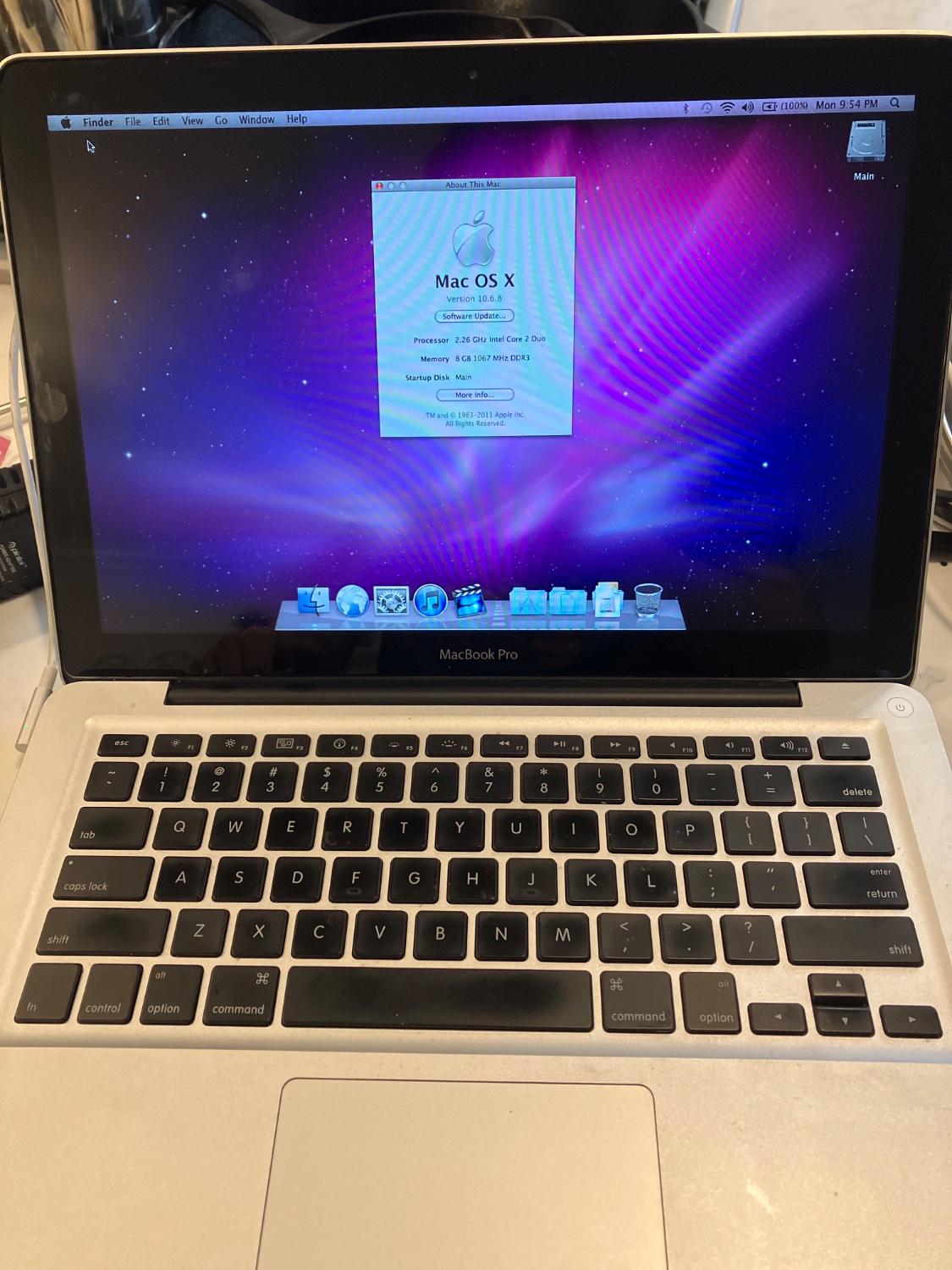
I have used Macs since the PPC days. I own at least a dozen and have owned dozens over the years. For work I always use the latest and biggest MBP. I have gotten more and more annoyed with MacOS changes over the years. Some of it is just my general annoyance with recent technology trends, and some of it is just design choices that don’t tickle my fancy.
On a whim, I bought a 2009 13” MBP. I used to own one of these back then. Since it can’t run anything modern, and my goal was to recapture some of what once was, I installed Snow Leopard. I always thought back to Snow Leopard as peak OS X. I didn’t know how much of that was just rose tinted glasses and nostalgia. So after popping in an SSD and maxing it out at a whole 8GB of RAM, I started using it. I’m in the process of trying to give up streaming services, so I have been using it to rip DVDs for my plex library. I found old versions of everything. Most of which I still had on my fileserver. Handbrake, various emulators, iMovie 6, iTunes 9, etc. Modern web browsing is a non starter with Safari from back then, but I found interweb and it works fine for the occasional thing I use it for. I mostly just grab what I need from my server.
The keyboard is significantly better than my M4 MBP and it has been delightful not dealing with the absurdly large trackpads Apple uses today. The biggest benefit is Apple not being so intrusive back then. The OS is much more utilitarian. It has everything I need and what I don’t is out of the way. The extra thickness is completely worth it to actually have all the ports and the disc drive. Swapping the drive and memory took less than 5 minutes. Still plenty sleek.
I wanted to test my feeling that Mac has gotten worse over the years and it definitely has. Practicality forces me to use modern computers, but I intend to keep daily driving this old gal for as long as I can. First time I have enjoyed working on a computer in years. That’s saying something since writing code and working on a computer is literally my job.
Hey, I will move soon to macOS as my main os. I am currently using Linux as my main os and from what I know, macOS is similar to Linux. I also wanted to ask some questions beforehand: There are few cli package managers for macOS but which one is the best? Will it be hard for me to use macOS if I am using currently Linux? Which keys on mac keyboard work same as keys on windows keyboard?
Hey, I will move soon to macOS as my main os. I am currently using Linux as my main os and from what I know, macOS is similar to Linux. I also wanted to ask some questions beforehand: There are few cli package managers for macOS but which one is the best? Will it be hard for me to use macOS if I am using currently Linux? Which keys on mac keyboard work same as keys on windows keyboard?
found a thing that said you could use Gnome Files on Mac using MacPorts. I don’t know what MacPorts is but I was able to find some instructions on how to use it with Gnome Files, but it’s a bit involved and I don’t want to screw up my Mac (not as easy to recover a mac installation as a Linux in my inexperience). Anyone actually done this? Can’t find any info about it on Youtube. Would like to see how it actually functions.
found a thing that said you could use Gnome Files on Mac using MacPorts. I don’t know what MacPorts is but I was able to find some instructions on how to use it with Gnome Files, but it’s a bit involved and I don’t want to screw up my Mac (not as easy to recover a mac installation as a Linux in my inexperience). Anyone actually done this? Can’t find any info about it on Youtube. Would like to see how it actually functions.
I’m fed up with MacOS
I’m fed up with MacOS

I find the colours really distracting. I’ve tried using those Greasemonky / user scripts but I suspect Safari doesn’t permit them to address the favicons, because they don’t work.
I also would like the extension icons to be monochrome. Anybody knowledgeable enough to say whether there’s an API that allows this kind of thing?

It’s easy to lose Applications in the Applications folder and the Groups view isn’t always consistent or helpful. It’s also limited to one group, which isn’t that helpful if you want to search for one app for several possible purposes.
Tagging is a solution, but if you apply to Applications, directly, you have to give permissions each time, which gets annoying. Worse still, any update will wipe the tag.
But if you apply tags to Aliases for each application, you side-step these problems and can use multiple groupings. I think that the alias will still works when applications are updated, unless they change name.
So far, this is working as intended. I’ve not yet updated any application 🤞
I ran through a bunch of obvious app categories and have been tagging as and when I can be bothered. It’s not seemed too arduous.

The mic icon pops up on my top bar from time to time. I have checked over any over and in settings all currently opened pages, and all other pages are set to deny use of mic. The only way I have found to get rid of it is to close Safari and reopen it after a few minutes. Is there any way to get more info about what is causing it beyond the “safari” in the screenshot?
The mic icon pops up on my top bar from time to time. I have checked over any over and in settings all currently opened pages, and all other pages are set to deny use of mic. The only way I have found to get rid of it is to close Safari and reopen it after a few minutes. Is there any way to get more info about what is causing it beyond the “safari” in the screenshot?
Hello everyone!
So I have just bought myself (of course at the expense of one of my kidneys) a MacBook Pro M4. So far well it’s an absolute great machine. It is the first time for me to ever use a Mac and I’m really enjoying it.
I’m curious if any of you have some recommendations for some Youtube channels that specifically focus on MacOS content?
I’m busy right now playing around with homebrew and discovering some linux commands and I’m amazed to find that my favorite apps can run on this machine. Just overall really excited.
Thanks in advance everyone :)
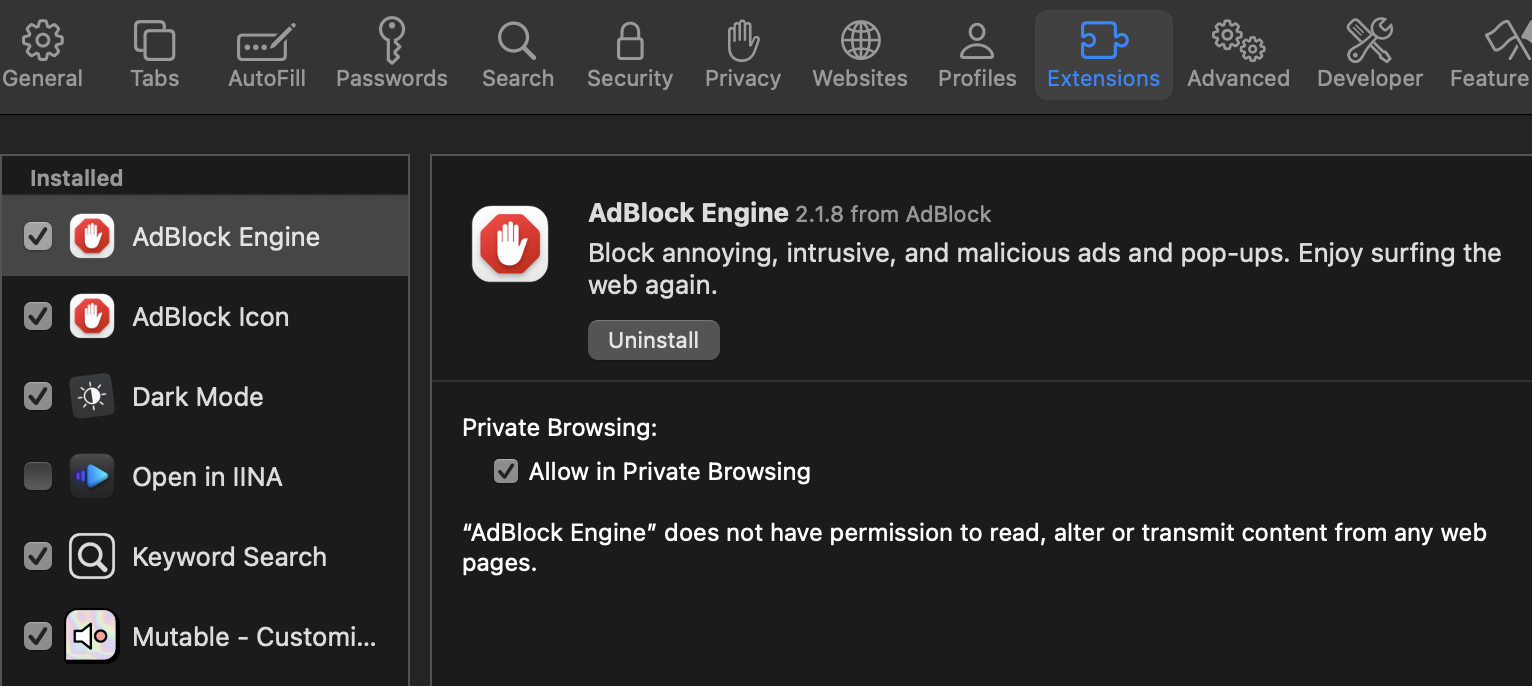
I’ve checked the boxes for the extension. On the browser toolbar I’ve chosen “Allow for all websites”. I’ve also restarted the browser. It still doesn’t work and just gives that message about permissions (pictured).
I’ve checked the boxes for the extension. On the browser toolbar I’ve chosen “Allow for all websites”. I’ve also restarted the browser. It still doesn’t work and just gives that message about permissions (pictured).
There hasn’t been a new release in a few years so I don’t know if it’s supported anymore, but it’s working well for me.
Edit: In case you don’t already know, there is an excellent collection of Winamp skins here which the app supports: skins.webamp.org
There hasn’t been a new release in a few years so I don’t know if it’s supported anymore, but it’s working well for me.
Edit: In case you don’t already know, there is an excellent collection of Winamp skins here which the app supports: skins.webamp.org
My 2013 trashcan recently had its SSD filled up to the max (likely from BOINC data.) So far diskutil cannot initialize or clone the drive. It gives error 69620. There’s certain data from the home folder I’d like to recover if I can.
Does anyone have any suggestions on how I can pull this data to another drive?
Currently I have an NVMe drive installing macOS to it, which should do much better with space (1tb to replace the stock 256gb) but I’m not sure if there’s a way to mount the full drive after installing the NVMe+adapter into the Mac. Any suggestions would be greatly appreciated.
I have a Macbook Pro connected to an external display. I prefer to have my dock on the larger external display, but when I boot up (or when my Mac wakes from sleep) the dock is on the Macbook display. I have tried in vain to find a way to keep it on the external display, or at least more easily move it there, other than the standard “move the mouse pointer to the bottom of the screen twice” method. Can this be accomplished with Shortcuts or an Automator action?
I have a Macbook Pro connected to an external display. I prefer to have my dock on the larger external display, but when I boot up (or when my Mac wakes from sleep) the dock is on the Macbook display. I have tried in vain to find a way to keep it on the external display, or at least more easily move it there, other than the standard “move the mouse pointer to the bottom of the screen twice” method. Can this be accomplished with Shortcuts or an Automator action?

I’m not sure what I did to summon this little window, or how do get rid of it. Can anyone enlighten me? Thanks.
I’m not sure what I did to summon this little window, or how do get rid of it. Can anyone enlighten me? Thanks.