I received a SimpleX link to a chat, and when I click on it, i can see their welcome message template
“Thank you for contacting o0o0o0o0. We will respond as soon as possible. Please clearly describe your request here so that we can assist you promptly”
Beneath that it says “connecting…”
And in the text entry field it says “can’t send messages”
If I click in the text entry field I receive a pop up saying
“You can’t send messages!” with “ok” to close it.
I have gone to settings and selected restart. I have tried on two different devices, VPN on and off.
I have left it “connecting…” for over an hour (no change).
I have gone to their chat profile and says network status is connected and that “You are connected to the server used to receive messages from this connection”
I don’t know what else to check, hoping somebody here will be able to help.
I received a SimpleX link to a chat, and when I click on it, i can see their welcome message template
“Thank you for contacting o0o0o0o0. We will respond as soon as possible. Please clearly describe your request here so that we can assist you promptly”
Beneath that it says “connecting…”
And in the text entry field it says “can’t send messages”
If I click in the text entry field I receive a pop up saying
“You can’t send messages!” with “ok” to close it.
I have gone to settings and selected restart. I have tried on two different devices, VPN on and off.
I have left it “connecting…” for over an hour (no change).
I have gone to their chat profile and says network status is connected and that “You are connected to the server used to receive messages from this connection”
I don’t know what else to check, hoping somebody here will be able to help.
I’m trying to figure out how I add groups, specifically groups i have on my mobile app to my terminal.
simple x help suggested I add a directory bot but It is still not clear how i can connect to an existing group in the CLI,
i’d expect /groups list should return some kind of list but that option doesn’t exist.
Any tips appreciated!
EDIT:
Well, looks like I figured it out.
I need to find the URL from the group in the website, then paste that after /connect <URL>
This worked for a few but anything that required a captcha just didn’t work, so not sure if there is a way around that.
I’m trying to figure out how I add groups, specifically groups i have on my mobile app to my terminal.
simple x help suggested I add a directory bot but It is still not clear how i can connect to an existing group in the CLI,
i’d expect /groups list should return some kind of list but that option doesn’t exist.
Any tips appreciated!
EDIT:
Well, looks like I figured it out.
I need to find the URL from the group in the website, then paste that after /connect <URL>
This worked for a few but anything that required a captcha just didn’t work, so not sure if there is a way around that.
I love everything about simplex. I want it to be the messenger for me. But the friction from mobile app to desktop is too much. My lifestyle and work mode have me on both laptop and desktop often. I prefer typing on desktop with the real keyboard.
Am I alone in thinking the friction is too much?
I love everything about simplex. I want it to be the messenger for me. But the friction from mobile app to desktop is too much. My lifestyle and work mode have me on both laptop and desktop often. I prefer typing on desktop with the real keyboard.
i’ve been using the ios app and often do not get any notification for an incoming message. seems i often dont get anything until i open the app again. is this a known issue?
i’ve been using the ios app and often do not get any notification for an incoming message. seems i often dont get anything until i open the app again. is this a known issue?
I wanted to post this as a conversation then convert into an issues on github but it seem the github conversation of this project are closed… (we can’t create new one) Do you know why ?
I’ve installed simpleX onfez android phones. it work smoothly.
but for one of those phone (Android 14) the messages are only received and send when I restart the apps then no more.
in Your settings\settings\Network & servers\network connection
The WiFi dot is red !
Any ideas ?
Thanks.
Hi,
SimpleX github conversations closed ??
I wanted to post this as a conversation then convert into an issues on github but it seem the github conversation of this project are closed… (we can’t create new one) Do you know why ?
I’ve installed simpleX onfez android phones. it work smoothly.
but for one of those phone (Android 14) the messages are only received and send when I restart the apps then no more.
in Your settings\settings\Network & servers\network connection
Unfortunately simplex uses way too much battery on my unisoc tablet. It is also still quite high on an older qualcomm phone. Is there room for improvement with updates or is this the limitation of lower end hardware?
Unfortunately simplex uses way too much battery on my unisoc tablet. It is also still quite high on an older qualcomm phone. Is there room for improvement with updates or is this the limitation of lower end hardware?
Hi all! I’m working on my cyber security bachelor’s thesis and am reaching out to gather insights from users who use decentralized messaging applications.
I would be incredibly thankful if you could find the 2 to 4 minutes to fill out the form. Your experience in the matter is incredibly valuable.
Your responses are confidential and will be used solely for supporting my thesis. No personally identifiable information is collected.
Thanks!
Hi all! I’m working on my cyber security bachelor’s thesis and am reaching out to gather insights from users who use decentralized messaging applications.
I would be incredibly thankful if you could find the 2 to 4 minutes to fill out the form. Your experience in the matter is incredibly valuable.
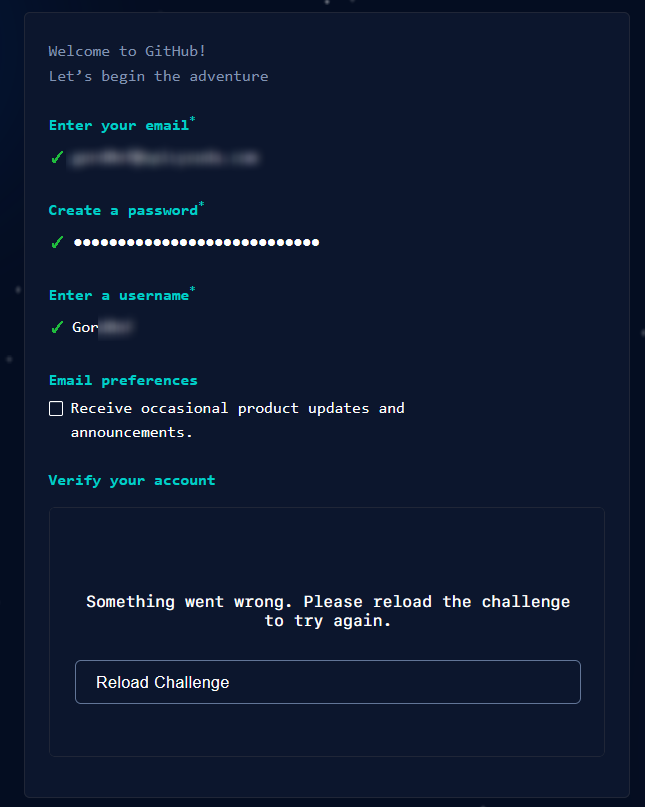
I had myself a question for the maintainers. I was planning to use the discussions and to do so, create an account :'( But it seem that Microsoft really doesn’t like Tor:
Cheers.
To the developer working on SimpleX,
Why are you still using Microsoft Github ? (and by extend Reddit ! )
I had myself a question for the maintainers. I was planning to use the discussions and to do so, create an account :'( But it seem that Microsoft really doesn’t like Tor:
Does anyone know why every release is not available through F-Droid? For example F-Droid has version 5.5.2 and the latest stable is 5.5.5. In the buildlog it looks like F-Droid gets the soirce code for every release. It assume it is not successfully compiled in order for it to never end up being released.
Does anyone know why every release is not available through F-Droid? For example F-Droid has version 5.5.2 and the latest stable is 5.5.5. In the buildlog it looks like F-Droid gets the soirce code for every release. It assume it is not successfully compiled in order for it to never end up being released.
As far as I understand it, the relay servers only hold the messages until they are delivered, but what happens if they can never get delivered? Does the server just endlessly accumulate these messages in limbo, and never purge them, or are they on a timer? Even if they are on a timer, if a group chat with one abandoned user has a large enough volume of messages, they could theoretically overwhelm the server’s storage.
Update
I have received an official response on this from the SimpleX Chat team:
the servers hold the messages for 21 days if they are not received
As far as I understand it, the relay servers only hold the messages until they are delivered, but what happens if they can never get delivered? Does the server just endlessly accumulate these messages in limbo, and never purge them, or are they on a timer? Even if they are on a timer, if a group chat with one abandoned user has a large enough volume of messages, they could theoretically overwhelm the server’s storage.
Update
I have received an official response on this from the SimpleX Chat team:
the servers hold the messages for 21 days if they are not received
The app is available in all channels via the links on the website or via [GitHub release] – the main F-Droid repo is coming soon.
If you use Android, make sure to use the build 134 - the previous one had a database performance issue causing very slow message delivery.
Join our event on 7/27 at 17:00 UTC (6pm UK, 10am PT):
demo of the new desktop app 🚀
platform evolution:
what’s coming for groups and communities.
why we don’t plan read receipts for now.
demo how to host a server with dual public+tor address in Ubuntu VM, so that users who prefer to connect to onion addresses can communicate with you via your self-hosted server even if you don’t use Tor - it’s much simpler than you think.
Mark your calendar, the link to connect is coming soon, it won’t require any registration.
The app is available in all channels via the links on the website or via [GitHub release] – the main F-Droid repo is coming soon.
If you use Android, make sure to use the build 134 - the previous one had a database performance issue causing very slow message delivery.
Join our event on 7/27 at 17:00 UTC (6pm UK, 10am PT):
demo of the new desktop app 🚀
platform evolution:
what’s coming for groups and communities.
why we don’t plan read receipts for now.
demo how to host a server with dual public+tor address in Ubuntu VM, so that users who prefer to connect to onion addresses can communicate with you via your self-hosted server even if you don’t use Tor - it’s much simpler than you think.
Mark your calendar, the link to connect is coming soon, it won’t require any registration.
Full release and the release announcement are coming on Saturday July 22nd.
We will host an online event on July 27 at 17:00 UTC (6pm UK, 10am PT) to talk about:
what’s new in v5.2, why we won’t have read receipts and what is coming soon
how we will solve the problems of groups and communities that are emerging on SimpleX platform
we will demo how to host a server with dual address (both clearnet and onion) in linux VM, so that users who prefer to only connect to onion addresses can communicate with you via your self-hosted server even if you don’t use Tor - it’s much simpler than you think.
we will answer all your questions too.
Online platform to connect to TBC, we’ll make sure that it doesn’t require any registration.
You will be able to ask any questions in SimpleX group, you can already join it now via this link #SimpleX-Event-2023-07-27
Full release and the release announcement are coming on Saturday July 22nd.
We will host an online event on July 27 at 17:00 UTC (6pm UK, 10am PT) to talk about:
what’s new in v5.2, why we won’t have read receipts and what is coming soon
how we will solve the problems of groups and communities that are emerging on SimpleX platform
we will demo how to host a server with dual address (both clearnet and onion) in linux VM, so that users who prefer to only connect to onion addresses can communicate with you via your self-hosted server even if you don’t use Tor - it’s much simpler than you think.
we will answer all your questions too.
Online platform to connect to TBC, we’ll make sure that it doesn’t require any registration.
You will be able to ask any questions in SimpleX group, you can already join it now via this link #SimpleX-Event-2023-07-27
lint
agent api to reconnect all servers (#792)
add crypto error to RSYNC event (#794)
agent: catch IO errors correctly in MonadError (#795)
test with catchError/tryError
fix allFinally
db error busy treatments (#796)
increase TCP timeout for clients (#797)
server: disable transport timeout (#793)
resubscribe in batches in Client.Agent (#798)
5.2.1 (ntf 1.5.1, xftp 1.0.1) (#799)
Latest version of SMP server is 5.2.1
lint
agent api to reconnect all servers (#792)
add crypto error to RSYNC event (#794)
agent: catch IO errors correctly in MonadError (#795)
test with catchError/tryError
fix allFinally
db error busy treatments (#796)
increase TCP timeout for clients (#797)
server: disable transport timeout (#793)
resubscribe in batches in Client.Agent (#798)
5.2.1 (ntf 1.5.1, xftp 1.0.1) (#799)
This relay will be migrated to the datacenter in the UK to reduce the latency for most users. The migration itself takes less than 30 minutes, the DNS changes propagate in 1-3 hours (based on tests we ran). The relay will remain available on the same hostnames but with a different IP address.
The migration will start from 4pm UTC.
If you use Tor, it will be available as soon migration is complete, within 30 minutes - we did such migrations before without announcing them.
If you use public Internet to connect SimpleX relays, it will become available as soon as DNS updates.
If you have some important contacts where you use smp10 relay to receive messages you can switch them in advance (it won’t be possible to switch during migration).
This relay will be migrated to the datacenter in the UK to reduce the latency for most users. The migration itself takes less than 30 minutes, the DNS changes propagate in 1-3 hours (based on tests we ran). The relay will remain available on the same hostnames but with a different IP address.
The migration will start from 4pm UTC.
If you use Tor, it will be available as soon migration is complete, within 30 minutes - we did such migrations before without announcing them.
If you use public Internet to connect SimpleX relays, it will become available as soon as DNS updates.
If you have some important contacts where you use smp10 relay to receive messages you can switch them in advance (it won’t be possible to switch during migration).
5.1.3
fix connection switch status db encoding (#781)
ntf server: better batching and logging (#780)
5.1.2 (was pre-release)
agent: ack message in case of decryption error (#759)
Docker entrypoint fixes (#753)
add more message delivery tests (#763)
install.sh: fixes (#765)
install: some more fixes (#770)
install: simplify systemd service and add new helper stopscript (#771)
run a single batch test to avoid hanging on server disconnect (#773)
connection switch - track status, stop switch command (#764)
rename “stop switch” -> “abort switch”, add canAbortSwitch to rcv queue info (#775)
return updated ConnectionStats from switchConnectionAsync (#777)
batch subscriptions for ntf server (#778)
5.1.2, ntf server 1.4.1
5.1.3
fix connection switch status db encoding (#781)
ntf server: better batching and logging (#780)
5.1.2 (was pre-release)
agent: ack message in case of decryption error (#759)
Docker entrypoint fixes (#753)
add more message delivery tests (#763)
install.sh: fixes (#765)
install: some more fixes (#770)
install: simplify systemd service and add new helper stopscript (#771)
run a single batch test to avoid hanging on server disconnect (#773)
connection switch - track status, stop switch command (#764)
rename “stop switch” -> “abort switch”, add canAbortSwitch to rcv queue info (#775)
return updated ConnectionStats from switchConnectionAsync (#777)
batch subscriptions for ntf server (#778)
5.1.2, ntf server 1.4.1
New preset SMP servers - add them in server settings (they will become default if you’ve never saved server changes, that includes server test results though).
Many small fixes.
New in v5.1.3:
Fixed video calls on iOS!
Much faster group deletion.
New preset SMP servers - add them in server settings (they will become default if you’ve never saved server changes, that includes server test results though).