0

Seven things a website can read even when your proxy shows the right IP

preview

Everybody runs the IP check, sees the exit address and calls it done. Fair enough, but a site can ask a lot more than that, and these are the ones that bite:

IPv6. Your device has a public v6 address, your proxy only carries v4, and some traffic just walks around it. Turn IPv6 off in the browser profile or on the adapter.

DNS. Resolver in your own country while the exit is in another one? That’s a leak. On SOCKS5, use socks5h:// so names resolve at the proxy.

WebRTC can hand out another public address. Via, Forwarded and X-Forwarded-For can carry your real IP. And your browser clock saying one time zone while the IP says another is a flag all by itself.

Also, easy to forget: a system proxy only covers apps that bother to read it, and an extension only covers its own browser.

We put all seven checks on one page. Your browser asks a few public services the questions directly and we store nothing: proxymint.com/tools/proxy-check/

Disclosure: it’s our tool, we run a proxy service.

Everybody runs the IP check, sees the exit address and calls it done. Fair enough, but a site can ask a lot more than that, and these are the ones that bite:

IPv6. Your device has a public v6 address, your proxy only carries v4, and some traffic just walks around it. Turn IPv6 off in the browser profile or on the adapter.

DNS. Resolver in your own country while the exit is in another one? That’s a leak. On SOCKS5, use socks5h:// so names resolve at the proxy.

WebRTC can hand out another public address. Via, Forwarded and X-Forwarded-For can carry your real IP. And your browser clock saying one time zone while the IP says another is a flag all by itself.

Also, easy to forget: a system proxy only covers apps that bother to read it, and an extension only covers its own browser.

We put all seven checks on one page. Your browser asks a few public services the questions directly and we store nothing: proxymint.com/tools/proxy-check/

Disclosure: it’s our tool, we run a proxy service.

0

requests, httpx and curl give the same proxy stall three different names

preview

If a scraper starts throwing ReadTimeout and the first instinct is to double every timeout, read the message again. It can point at the wrong place.

We made each phase of a proxied HTTPS request stall on purpose in a local lab (curl 8.5.0, requests 2.34.2, httpx 0.28.1). For a proxy that accepts the connection and never answers CONNECT, curl said “Proxy CONNECT aborted due to timeout”. requests raised ReadTimeout with the target’s hostname in it, though the target was never contacted. httpx said ReadTimeout too, but only after its read timer, so 8 seconds instead of 5.

The tell in requests: if the number in “(read timeout=N)” equals your connect value, the stall was in the tunnel or TLS, not on the site.

Two more from the same run. An unreachable proxy raises ProxyError, which isn’t a subclass of requests.exceptions.Timeout, so code that only catches Timeout lets it crash the worker. And with no timeout set at all, curl and requests both sat there for 134 seconds, which is the Linux kernel’s SYN retries and not the client.

curl -w with time_connect, http_connect, time_appconnect and time_starttransfer splits the four phases, and honestly that’s the first thing I’d run.

Full table: proxymint.com/proxy-timeout/

Disclosure: our blog, we run a proxy service.

If a scraper starts throwing ReadTimeout and the first instinct is to double every timeout, read the message again. It can point at the wrong place.

We made each phase of a proxied HTTPS request stall on purpose in a local lab (curl 8.5.0, requests 2.34.2, httpx 0.28.1). For a proxy that accepts the connection and never answers CONNECT, curl said “Proxy CONNECT aborted due to timeout”. requests raised ReadTimeout with the target’s hostname in it, though the target was never contacted. httpx said ReadTimeout too, but only after its read timer, so 8 seconds instead of 5.

The tell in requests: if the number in “(read timeout=N)” equals your connect value, the stall was in the tunnel or TLS, not on the site.

Two more from the same run. An unreachable proxy raises ProxyError, which isn’t a subclass of requests.exceptions.Timeout, so code that only catches Timeout lets it crash the worker. And with no timeout set at all, curl and requests both sat there for 134 seconds, which is the Linux kernel’s SYN retries and not the client.

curl -w with time_connect, http_connect, time_appconnect and time_starttransfer splits the four phases, and honestly that’s the first thing I’d run.

Full table: proxymint.com/proxy-timeout/

Disclosure: our blog, we run a proxy service.

0

Worth checking: your Cloudflare AI-training block may also cover mixed-purpose crawlers like Googlebot

preview

If you ticked a “block AI training” option on Cloudflare at some point, this is worth five minutes. Cloudflare’s docs (updated Nov 2) say training actions also apply to mixed-purpose crawlers used for both search and training. Their July blog post names Googlebot, Applebot and BingBot as examples.

There were reports in August of Googlebot getting 403s on sitemaps. Nobody has confirmed the cause as far as I can find, so don’t panic over it. It could be another setting entirely, Bot Fight Mode came up in the same thread.

Still, checking is cheap. Look at crawl stats in Search Console for a jump in 403s since mid-September, then read which Cloudflare setting is on. I’d rather spend five minutes on that than learn about it from a traffic graph.

Has anyone here actually seen this on their own site?

If you ticked a “block AI training” option on Cloudflare at some point, this is worth five minutes. Cloudflare’s docs (updated Nov 2) say training actions also apply to mixed-purpose crawlers used for both search and training. Their July blog post names Googlebot, Applebot and BingBot as examples.

There were reports in August of Googlebot getting 403s on sitemaps. Nobody has confirmed the cause as far as I can find, so don’t panic over it. It could be another setting entirely, Bot Fight Mode came up in the same thread.

Still, checking is cheap. Look at crawl stats in Search Console for a jump in 403s since mid-September, then read which Cloudflare setting is on. I’d rather spend five minutes on that than learn about it from a traffic graph.

Has anyone here actually seen this on their own site?

0

Python keeps the proxy status that Chrome throws away, so don't retry every ProxyError

preview

Got ERR_TUNNEL_CONNECTION_FAILED in Chrome and no idea why? Try the same proxy from Python, because it’ll tell you what the browser won’t. Chromium drops every CONNECT reply except 200 and 407, so you can’t tell a policy block from a dead exit in there.

Python leaves the status in the exception text. You’ll see OSError: Tunnel connection failed: 502 Bad Gateway from http.client, and requests wraps that in a ProxyError with the same words inside.

I’d read that string before retrying anything, since a blanket except ProxyError plus a retry loop just burns time on errors that can’t heal. A 403 is usually policy, sometimes just a port they don’t allow. 407 means check your login. If you get 405 or 501 you aren’t talking to a forward proxy at all. Only 502, 503 and 504 are worth backing off on, those happened behind the proxy.

Disclosure: we run a proxy service, none of this depends on whose.

Got ERR_TUNNEL_CONNECTION_FAILED in Chrome and no idea why? Try the same proxy from Python, because it’ll tell you what the browser won’t. Chromium drops every CONNECT reply except 200 and 407, so you can’t tell a policy block from a dead exit in there.

Python leaves the status in the exception text. You’ll see OSError: Tunnel connection failed: 502 Bad Gateway from http.client, and requests wraps that in a ProxyError with the same words inside.

I’d read that string before retrying anything, since a blanket except ProxyError plus a retry loop just burns time on errors that can’t heal. A 403 is usually policy, sometimes just a port they don’t allow. 407 means check your login. If you get 405 or 501 you aren’t talking to a forward proxy at all. Only 502, 503 and 504 are worth backing off on, those happened behind the proxy.

Disclosure: we run a proxy service, none of this depends on whose.

0

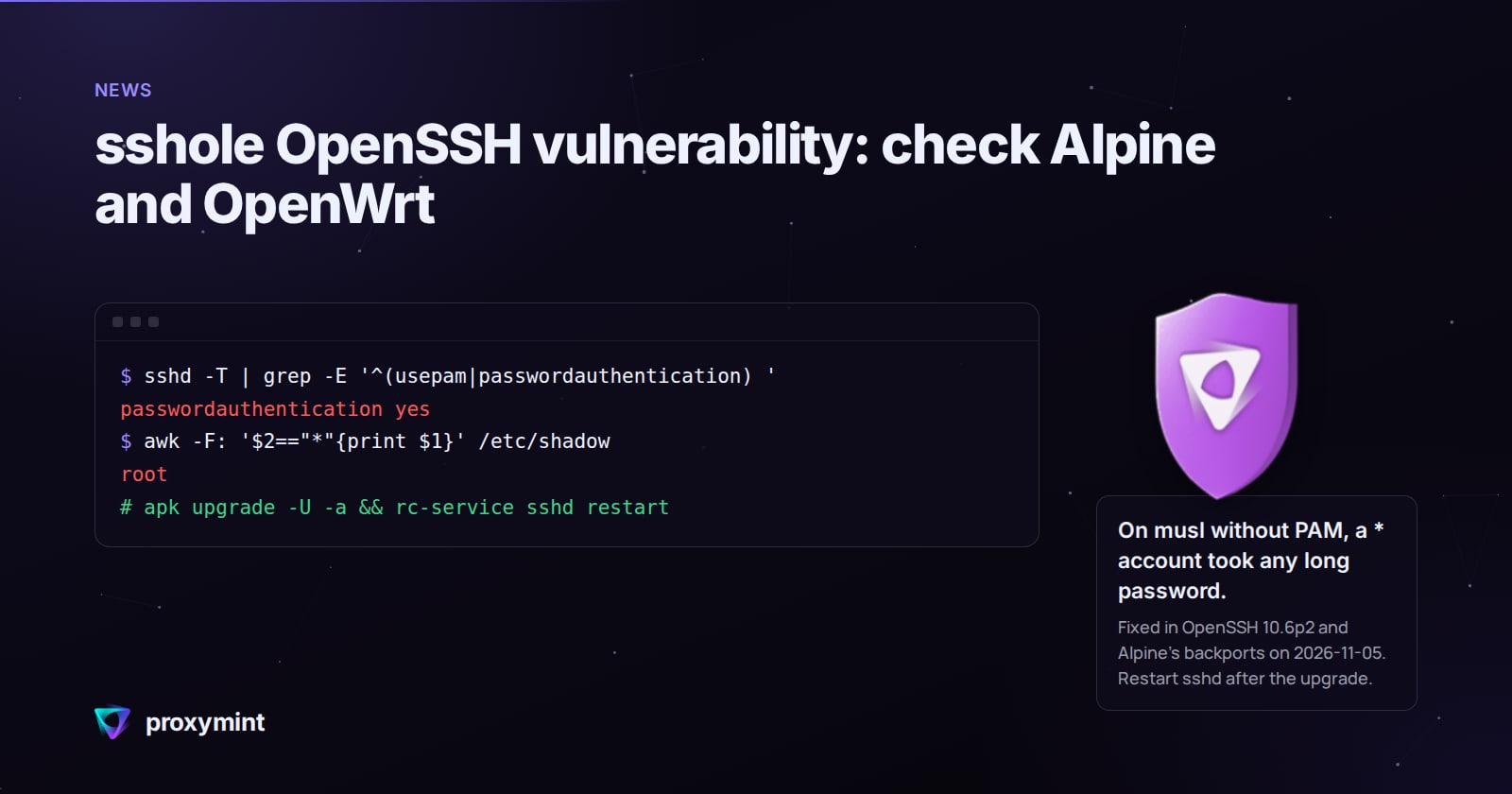
sshole: OpenSSH on musl without PAM lets * accounts in with any 256+ byte password (fixed 5 Nov)

proxymint sshole OpenSSH vulnerability: check Alpine and OpenWrt proxymint.com
preview

From the Alpine advisory and the researcher’s notes: musl’s crypt() gives back * when a password is over 256 bytes, and sshd then compares it with an account whose stored field is also *. Key-only users have that field, and so does the alpine user on tiny-cloud images. Fix is OpenSSH 10.6p2 or Alpine’s backport (on 3.24 that’s 10.3_p1-r2), plus an sshd restart. PasswordAuthentication no also closes it. Package table and check commands are in the link. Disclosure: it’s our blog, we run a proxy service.

From the Alpine advisory and the researcher’s notes: musl’s crypt() gives back * when a password is over 256 bytes, and sshd then compares it with an account whose stored field is also *. Key-only users have that field, and so does the alpine user on tiny-cloud images. Fix is OpenSSH 10.6p2 or Alpine’s backport (on 3.24 that’s 10.3_p1-r2), plus an sshd restart. PasswordAuthentication no also closes it. Package table and check commands are in the link. Disclosure: it’s our blog, we run a proxy service.

0

Stop asking whether a proxy provider logs. Ask which fields, why, and for how long

preview

“No logs” on a proxy or VPN page tells you very little, and a couple of old court cases show why. In 2011 a UK web proxy and VPN service handed over a user’s records under a court order. In 2017 a US cyberstalking complaint relied on records from a VPN whose privacy policy said it kept no logs.

A service that bills per GB and handles abuse reports has to keep something, so I’d stop asking whether a provider logs. Ask which fields, for what purpose, how long, and who can demand them. A policy that names its fields is worth more than a bold claim on the landing page.

The other half is what they can see at all. Over a CONNECT tunnel with certificate checks on, a proxy sees your IP, the hostname, timing and volume. Paths, headers, passwords and page content stay inside TLS. Turn off certificate verification and that stops being true, which is why I’d never leave verify=False in a script.

Disclosure: we run a proxy service, so we keep some of those records too.

“No logs” on a proxy or VPN page tells you very little, and a couple of old court cases show why. In 2011 a UK web proxy and VPN service handed over a user’s records under a court order. In 2017 a US cyberstalking complaint relied on records from a VPN whose privacy policy said it kept no logs.

A service that bills per GB and handles abuse reports has to keep something, so I’d stop asking whether a provider logs. Ask which fields, for what purpose, how long, and who can demand them. A policy that names its fields is worth more than a bold claim on the landing page.

The other half is what they can see at all. Over a CONNECT tunnel with certificate checks on, a proxy sees your IP, the hostname, timing and volume. Paths, headers, passwords and page content stay inside TLS. Turn off certificate verification and that stops being true, which is why I’d never leave verify=False in a script.

Disclosure: we run a proxy service, so we keep some of those records too.

0

Testing a Shopify store from another country: shipping rates ignore the IP, and the redirect only fires once

preview

Easy one to miss if you’re checking a Shopify store for other markets: a VPN or proxy won’t show you different shipping rates. Shopify ties rates to the shipping zone of the checkout address, so a local IP changes nothing there. A test checkout with a local address does.

Prices, currency, catalog and translations you can check for free in the admin: Markets, click the market, then More actions > View online store. Products > View as shows the market’s currency and which products aren’t published for it.

What the preview can’t show is the IP-driven stuff: the automatic redirect, geo app popups, the cookie banner, apps that block VPNs. For that you need a connection in the country and a clean browser profile, and you have to load the root domain, because Shopify only redirects on the first page a visitor opens. Land on /de/ directly and you skip the very redirect you wanted to test.

The cookie banner is the sneaky one. With automated privacy settings on, Shopify sets it up for UK and EEA visitors when you have active markets there, so from a US desk you just never see it.

How are you handling multi-market QA for stores like this, manual passes or something scripted?

Easy one to miss if you’re checking a Shopify store for other markets: a VPN or proxy won’t show you different shipping rates. Shopify ties rates to the shipping zone of the checkout address, so a local IP changes nothing there. A test checkout with a local address does.

Prices, currency, catalog and translations you can check for free in the admin: Markets, click the market, then More actions > View online store. Products > View as shows the market’s currency and which products aren’t published for it.

What the preview can’t show is the IP-driven stuff: the automatic redirect, geo app popups, the cookie banner, apps that block VPNs. For that you need a connection in the country and a clean browser profile, and you have to load the root domain, because Shopify only redirects on the first page a visitor opens. Land on /de/ directly and you skip the very redirect you wanted to test.

The cookie banner is the sneaky one. With automated privacy settings on, Shopify sets it up for UK and EEA visitors when you have active markets there, so from a US desk you just never see it.

How are you handling multi-market QA for stores like this, manual passes or something scripted?

0

Google's Custom Search JSON API shuts down on Jan 1, 2027 (and a free alternative for your own rankings)

preview

If you’ve got anything running on Google’s Custom Search JSON API, it’s on a clock. Google closed it to new customers and their overview page says it’s gone on January 1, 2027.

Easy to miss in the docs: one call returns 10 results and a query tops out at 100. So pulling the top 100 for a single keyword is 10 billable calls.

For checking your own site’s rankings there’s an easier path anyway. The Search Console API hands you query, page, country and device rows, up to 25,000 per request, and it’s all within Google’s rules.

Anyone already moved off Custom Search? What did you switch to?

If you’ve got anything running on Google’s Custom Search JSON API, it’s on a clock. Google closed it to new customers and their overview page says it’s gone on January 1, 2027.

Easy to miss in the docs: one call returns 10 results and a query tops out at 100. So pulling the top 100 for a single keyword is 10 billable calls.

For checking your own site’s rankings there’s an easier path anyway. The Search Console API hands you query, page, country and device rows, up to 25,000 per request, and it’s all within Google’s rules.

Anyone already moved off Custom Search? What did you switch to?