
0

Skepticism grows within GOP over tech failures: ‘Americans aren’t stupid’

preview

Republican lawmakers and other prominent conservatives have grown skeptical over a wave of recent technology outages and failures in recent days, as some Americans stockpile canned foods and bottled water amid several high-profile outages.

“Americans aren’t stupid. We want and deserve to know what’s really going on,” Tricia McLaughlin, former deputy assistant secretary for the Department of Homeland Security, wrote Tuesday on the social platform X.

The latest outages to hit businesses occurred Tuesday, with Apple, Gmail and Marriott each affected, NBC 4 Washington and its affiliates reported. Sources told CNN that the National Security Agency’s (NSA) internal communications network was also down but said nothing indicated it was caused by a cyberattack.

Officials have pointed to problems with technology likely causing issues up until Tuesday, but it has opened a wave of criticism after so many outages within a short timeframe.

Republican lawmakers and other prominent conservatives have grown skeptical over a wave of recent technology outages and failures in recent days, as some Americans stockpile canned foods and bottled water amid several high-profile outages.

“Americans aren’t stupid. We want and deserve to know what’s really going on,” Tricia McLaughlin, former deputy assistant secretary for the Department of Homeland Security, wrote Tuesday on the social platform X.

The latest outages to hit businesses occurred Tuesday, with Apple, Gmail and Marriott each affected, NBC 4 Washington and its affiliates reported. Sources told CNN that the National Security Agency’s (NSA) internal communications network was also down but said nothing indicated it was caused by a cyberattack.

Officials have pointed to problems with technology likely causing issues up until Tuesday, but it has opened a wave of criticism after so many outages within a short timeframe.

129

DroidDeck Is Bringing the Real Steam Experience to Android, One Impossible Problem at a Time

The Bryant Review DroidDeck Is Bringing the Real Steam Experience to Android, One Impossible Problem at a Time gardinerbryant.com
preview

For anyone unfamiliar with it, DroidDeck is a relatively new, open-source Android application that lets you run Valve’s actual Steam client, along with PC games from your Steam library, on supported Android phones and handhelds. Rather than just launching individual Windows games through something like Winlator, it brings much of the familiar Steam Deck experience to Android, including Steam’s interface, Proton compatibility, controller integration and more. It does all this without needing to root your device or replace Android with another operating system. It’s still experimental, but the progress has been pretty amazing so far.

So I’ve been chatting with the people behind DroidDeck over the last couple of weeks, and I’ve finally put together what turned into a pretty lengthy feature about the project, its history, and the people making it happen.

I interviewed The412Banner, Max, xXJSONDeruloXx, Kimchi and Astro Sky, digging into everything from their earliest experiences with gaming and development to how their separate experiments with Linux, Gamescope and Steam eventually came together. What started as a way of getting the actual Steam client running on Android has grown into something way more ambitious, and I really wanted to tell the story of how that happened rather than just write another overview of what the software can do.

We also got into the technical challenges, the ridiculous pace of development (it updated and changed a few times while I was writing this!), their approach to AI-assisted coding and automated testing, the importance of open source, and where they hope to take DroidDeck in the future. There are some personal stories in there too, particularly about the early breakthroughs and the excitement of finally seeing things work. It’s a long read, admittedly, but I wanted to give everyone involved the space to tell their side of the story. I’m really grateful to all five for taking the time to answer my many, many questions, and I hope you enjoy getting to know a little more about the people behind a project that’s quickly become one of the more interesting developments in Android handheld gaming!

And just to be transparent, since I know it’s a subject people have strong feelings about, DroidDeck does make use of AI-assisted development.

We discuss that openly in the article, including how the developers use AI tools, automated testing and code reviews as part of their workflow.

For anyone unfamiliar with it, DroidDeck is a relatively new, open-source Android application that lets you run Valve’s actual Steam client, along with PC games from your Steam library, on supported Android phones and handhelds. Rather than just launching individual Windows games through something like Winlator, it brings much of the familiar Steam Deck experience to Android, including Steam’s interface, Proton compatibility, controller integration and more. It does all this without needing to root your device or replace Android with another operating system. It’s still experimental, but the progress has been pretty amazing so far.

So I’ve been chatting with the people behind DroidDeck over the last couple of weeks, and I’ve finally put together what turned into a pretty lengthy feature about the project, its history, and the people making it happen.

I interviewed The412Banner, Max, xXJSONDeruloXx, Kimchi and Astro Sky, digging into everything from their earliest experiences with gaming and development to how their separate experiments with Linux, Gamescope and Steam eventually came together. What started as a way of getting the actual Steam client running on Android has grown into something way more ambitious, and I really wanted to tell the story of how that happened rather than just write another overview of what the software can do.

We also got into the technical challenges, the ridiculous pace of development (it updated and changed a few times while I was writing this!), their approach to AI-assisted coding and automated testing, the importance of open source, and where they hope to take DroidDeck in the future. There are some personal stories in there too, particularly about the early breakthroughs and the excitement of finally seeing things work. It’s a long read, admittedly, but I wanted to give everyone involved the space to tell their side of the story. I’m really grateful to all five for taking the time to answer my many, many questions, and I hope you enjoy getting to know a little more about the people behind a project that’s quickly become one of the more interesting developments in Android handheld gaming!

And just to be transparent, since I know it’s a subject people have strong feelings about, DroidDeck does make use of AI-assisted development.

We discuss that openly in the article, including how the developers use AI tools, automated testing and code reviews as part of their workflow.

82

AI and social media bans won't make California kids safer online. It may even be harmful

CalMatters Opinion | AI and social media bans won't make California kids safer online. It may even be harmful calmatters.org
preview

For more than two decades, my research group has been studying and supporting young people with disabilities, as they create and use digital technologies.

In one study of Autcraft, a Minecraft server built for autistic kids, a 13-year-old boy described a rich social life there that included friends he trusted, builds he led, other kids he comforted when they were struggling.

And yet, when describing this rich social life, he asked, “Will I always be not social?”

This quote has stayed with me. This sweet, social child was measuring his life against a definition of “social” that was not built for him. And the way his parents, schoolteachers and other well-meaning adults were using that definition made him feel terrible about his own experiences and the things that made him happy.

…

We should hold platforms accountable for what they design and encourage them to make better experiences for everyone, rather than banning some people while creating a surveillance infrastructure that risks harming us all.

California has a real choice this year: pass bans that push youth further from spaces they feel safe or start setting standards for platforms so those spaces actually are safe. The 13-year-old who wondered if he’d always be “not social” was asking us to see his social life, not to take it away.

For more than two decades, my research group has been studying and supporting young people with disabilities, as they create and use digital technologies.

In one study of Autcraft, a Minecraft server built for autistic kids, a 13-year-old boy described a rich social life there that included friends he trusted, builds he led, other kids he comforted when they were struggling.

And yet, when describing this rich social life, he asked, “Will I always be not social?”

This quote has stayed with me. This sweet, social child was measuring his life against a definition of “social” that was not built for him. And the way his parents, schoolteachers and other well-meaning adults were using that definition made him feel terrible about his own experiences and the things that made him happy.

…

We should hold platforms accountable for what they design and encourage them to make better experiences for everyone, rather than banning some people while creating a surveillance infrastructure that risks harming us all.

California has a real choice this year: pass bans that push youth further from spaces they feel safe or start setting standards for platforms so those spaces actually are safe. The 13-year-old who wondered if he’d always be “not social” was asking us to see his social life, not to take it away.

0

TIL about Wilhelm Carl Werner Otto Fritz Franz „Willy“ Wien

preview

en.wikipedia.org/wiki/Wilhelm_Wien

dude was a physicist and found out some formula to describe black body radiation at high frequencies. i just found the name funny.

en.wikipedia.org/wiki/Wilhelm_Wien

dude was a physicist and found out some formula to describe black body radiation at high frequencies. i just found the name funny.

0

Popular Atlanta music school to claim, remake eastside church

Urbanize Atlanta Popular Atlanta music school to claim, remake eastside church atlanta.urbanize.city
preview

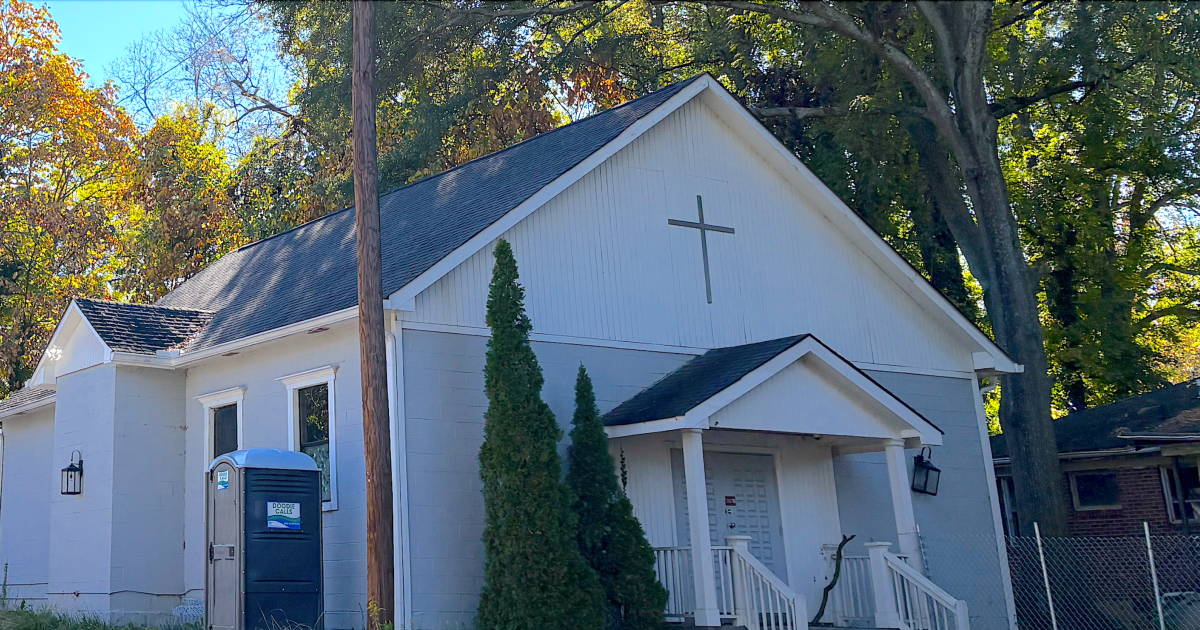
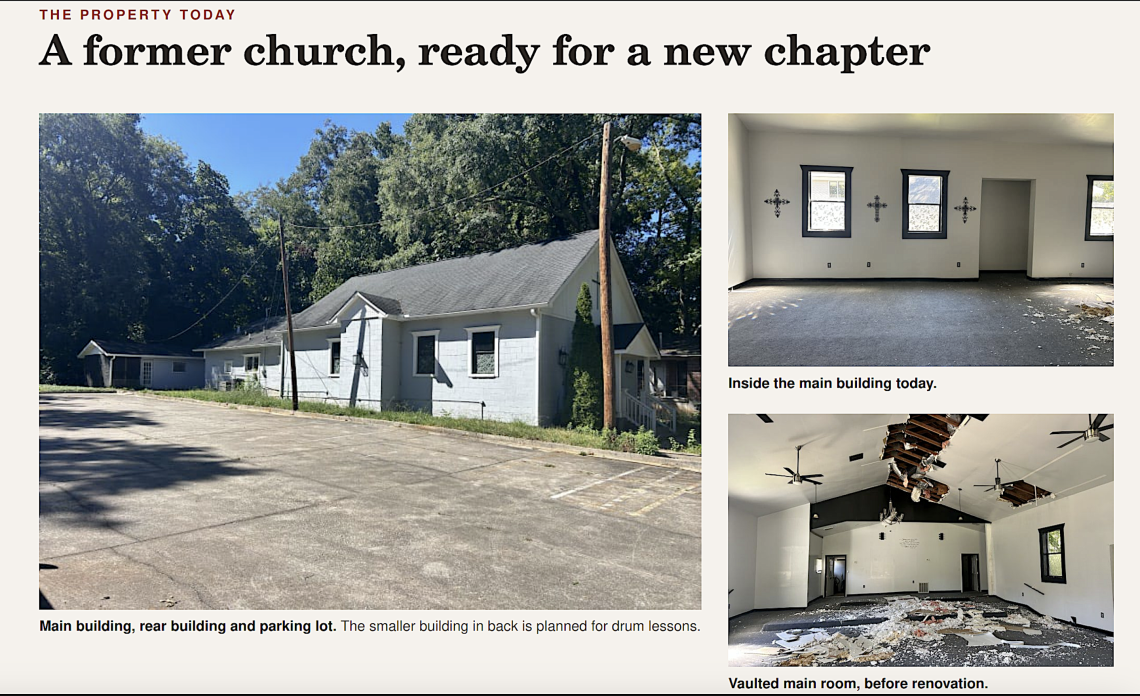
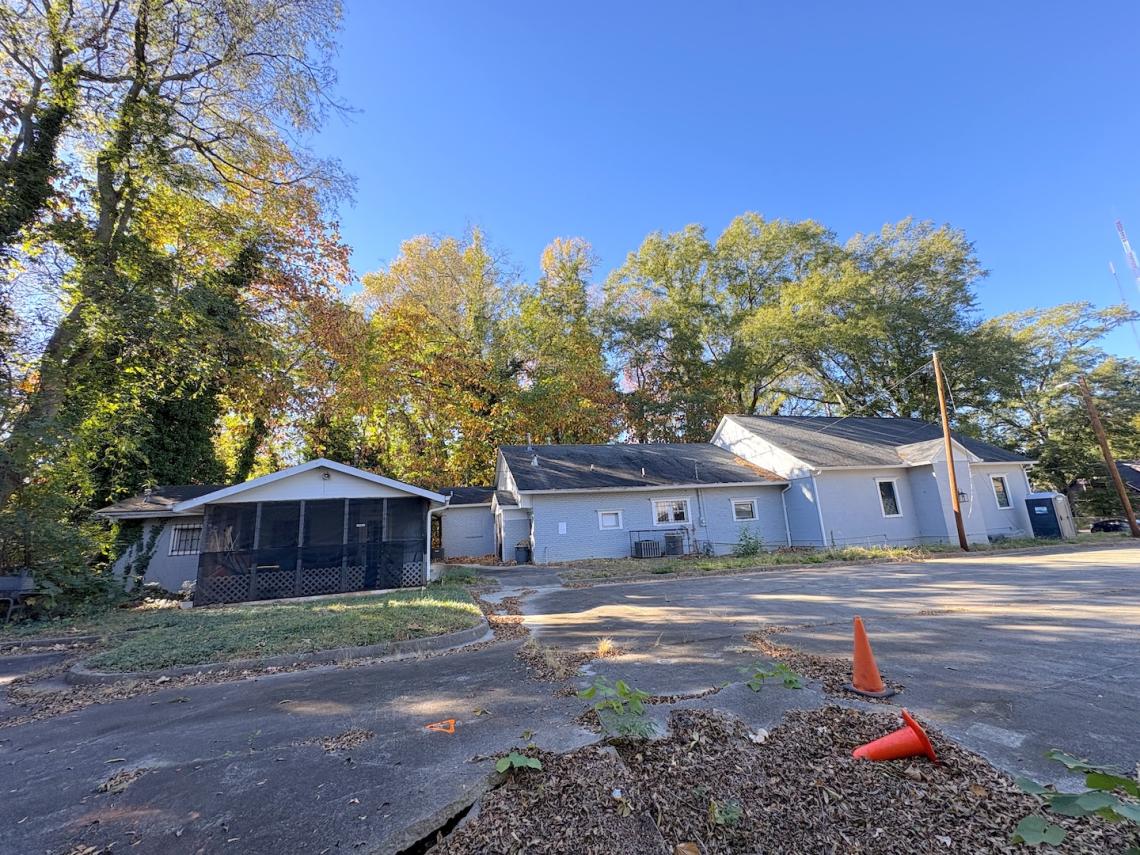
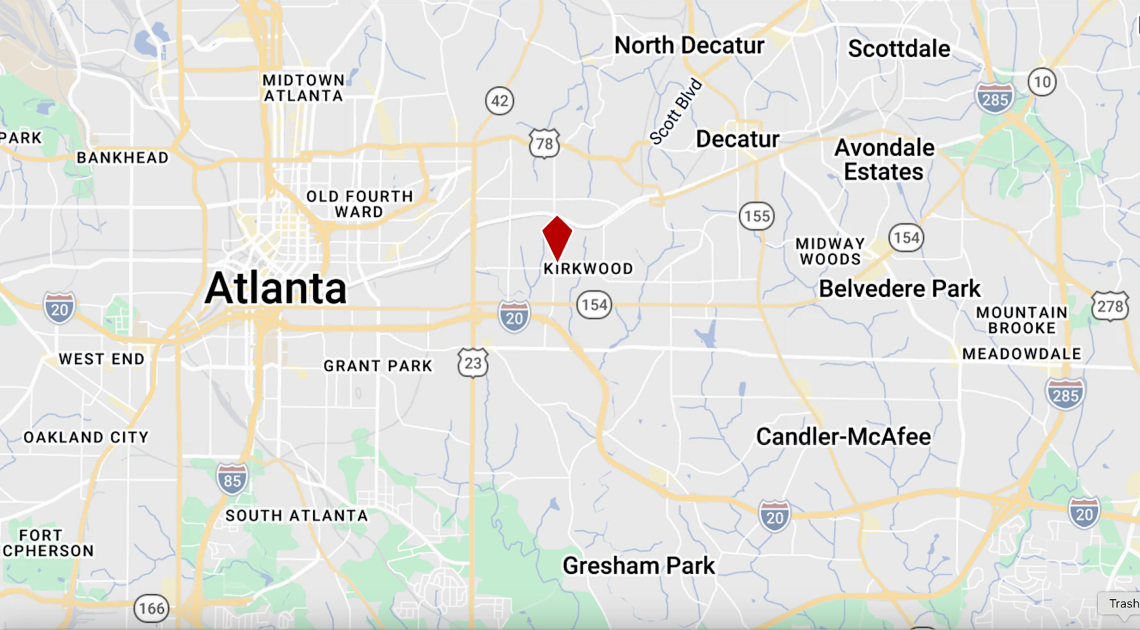
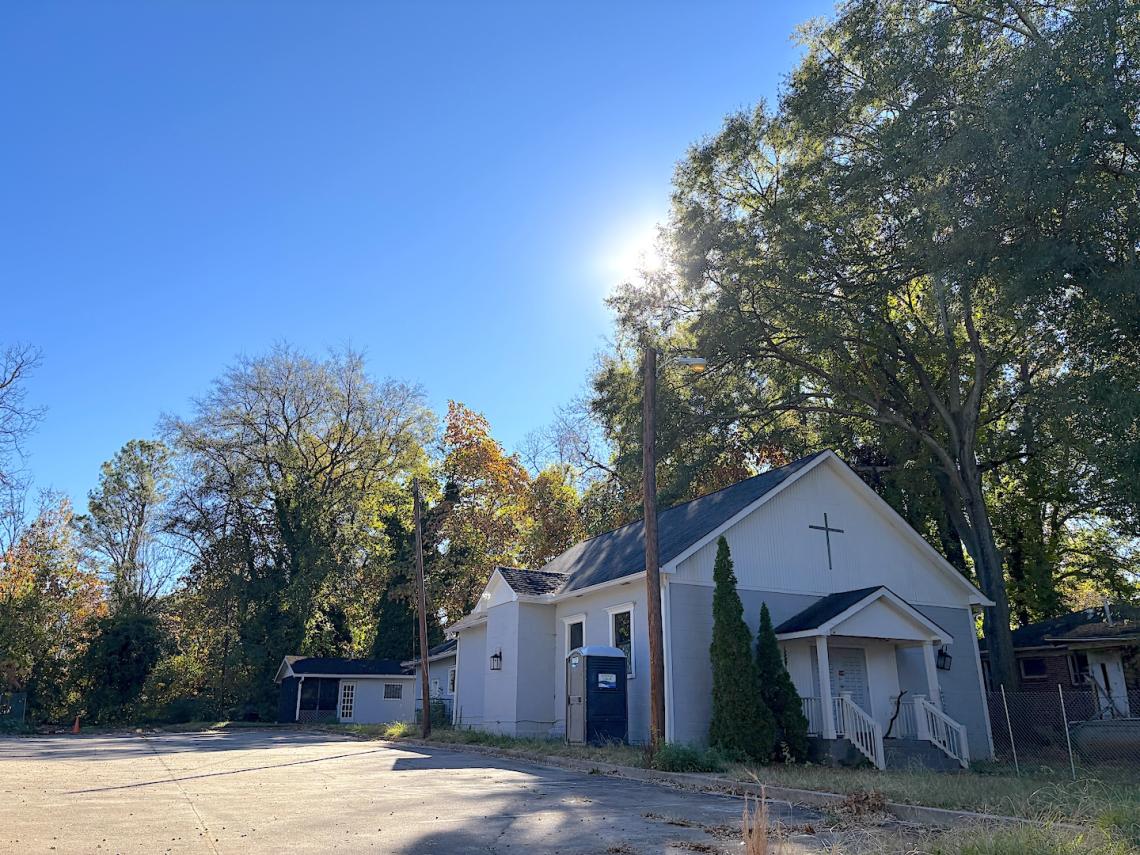
Popular Atlanta music school to claim, remake eastside church Josh GreenTue, 11/17/2026 - 17:41An eastside church property that’s been vacant for years is set to transform into a learning space for Atlanta’s budding musicians. Guitar Shed, a growing music school that operates where Kirkwood meets Edgewood along the Trolley Line Trail, has closed on the purchase of a former church at 1689 Hosea L. Williams Drive SE for its new and larger digs. Founded 11 years ago in a single room, Guitar Shed offers lessons for kids and adults on guitar, piano, voice, drums, violin, and other instruments. The music school currently operates about two blocks west of the former church on Hosea L. Williams Drive, having claimed space once occupied by Spotted Trotter and other businesses. altThe main building’s Hosea Williams Drive frontage in Kirkwood today. Courtesy of Guitar ShedaltCourtesy of Guitar ShedClosed four years ago, the church complex was formerly home to St. Mark Church’s Simply Blessed Workhouse of Faith. Parker Smith, Guitar Shed’s owner and founder, said the business has had its eye on the church property for about seven years, went under contract in 2025, and closed on the property last week. Guitar Shed’s current lease at the Kirkwood Park commercial node ends in July, and plans call for moving the entire operation to the church property as a permanent home. “It’s less than a quarter mile from where we are now, so we get to stay in the neighborhood that’s supported us from the beginning,” Smith wrote via email. “There’s also a good amount of parking and a separate building in the back that’s perfect for drum lessons. The buildings have good bones, and we’re excited to have mostly everything under one roof.”Smith said the former church buildings offer a combined 4,200 square feet of conditioned space (including an airy main sanctuary), or roughly 1,000 more square feet than the business has now. Plans call for turning the former parsonage behind the church into two drum rooms (one of them doubling as a small performance space). Guitar Shed is working with Kirkwood-based Stryant Construction to add a reception and waiting area, restrooms, staff break room, parking lot upgrades, and an accessible entrance ramp to the main building, where the bulk of lessons will take place. altCondition of an outbuilding and parking lot beside the former Kirkwood church today. Courtesy of Guitar ShedSmith said Guitar Shed has a building permit in hand and is prepping to start work soon. Renovations are scheduled to take about five months, and plans call for moving the business down the street next summer. Smith declined to disclose the purchase price. According to LoopNet, the church building dates to 1973.  Find more images and context in the gallery above. altThe former church property’s 1689 Hosea L. Williams Drive SE location, just west of downtown Kirkwood. Google Maps**…**Follow us on social media:Twitter / Facebook/and now: Instagram  • Kirkwood news, discussion (Urbanize Atlanta)Tags1689 Hosea L. Williams Drive SEGuitar ShedKirkwood NewsKirkwood DevelopmentKirkwood ConstructionStryant ConstructionFormerly St. Mark Church’s Simply Blessed Workhouse of FaithSt. Mark ChurchAtlanta ChurchesChurch RedevelopmentAtlanta Church PropertyImagesaltThe former church property’s 1689 Hosea L. Williams Drive SE location, just west of downtown Kirkwood. Google MapsaltThe main building’s Hosea Williams Drive frontage in Kirkwood today. Courtesy of Guitar ShedaltCourtesy of Guitar ShedaltCondition of an outbuilding and parking lot beside the former Kirkwood church today. Courtesy of Guitar ShedaltCourtesy of Guitar ShedSubtitleKirkwood’s Guitar Shed moves forward with latest intown church redevelopmentNeighborhoodKirkwoodBackground ImageImageAn image of a light blue and white church building under blue skies near many trees in fall in Atlanta with a parking lot beside it and interiors in need of repair. Before/After ImagesSponsored PostOff
#Atlanta #UrbanizeAtlanta #theATLBot

Popular Atlanta music school to claim, remake eastside church Josh GreenTue, 11/17/2026 - 17:41An eastside church property that’s been vacant for years is set to transform into a learning space for Atlanta’s budding musicians. Guitar Shed, a growing music school that operates where Kirkwood meets Edgewood along the Trolley Line Trail, has closed on the purchase of a former church at 1689 Hosea L. Williams Drive SE for its new and larger digs. Founded 11 years ago in a single room, Guitar Shed offers lessons for kids and adults on guitar, piano, voice, drums, violin, and other instruments. The music school currently operates about two blocks west of the former church on Hosea L. Williams Drive, having claimed space once occupied by Spotted Trotter and other businesses. altThe main building’s Hosea Williams Drive frontage in Kirkwood today. Courtesy of Guitar ShedaltCourtesy of Guitar ShedClosed four years ago, the church complex was formerly home to St. Mark Church’s Simply Blessed Workhouse of Faith. Parker Smith, Guitar Shed’s owner and founder, said the business has had its eye on the church property for about seven years, went under contract in 2025, and closed on the property last week. Guitar Shed’s current lease at the Kirkwood Park commercial node ends in July, and plans call for moving the entire operation to the church property as a permanent home. “It’s less than a quarter mile from where we are now, so we get to stay in the neighborhood that’s supported us from the beginning,” Smith wrote via email. “There’s also a good amount of parking and a separate building in the back that’s perfect for drum lessons. The buildings have good bones, and we’re excited to have mostly everything under one roof.”Smith said the former church buildings offer a combined 4,200 square feet of conditioned space (including an airy main sanctuary), or roughly 1,000 more square feet than the business has now. Plans call for turning the former parsonage behind the church into two drum rooms (one of them doubling as a small performance space). Guitar Shed is working with Kirkwood-based Stryant Construction to add a reception and waiting area, restrooms, staff break room, parking lot upgrades, and an accessible entrance ramp to the main building, where the bulk of lessons will take place. altCondition of an outbuilding and parking lot beside the former Kirkwood church today. Courtesy of Guitar ShedSmith said Guitar Shed has a building permit in hand and is prepping to start work soon. Renovations are scheduled to take about five months, and plans call for moving the business down the street next summer. Smith declined to disclose the purchase price. According to LoopNet, the church building dates to 1973.  Find more images and context in the gallery above. altThe former church property’s 1689 Hosea L. Williams Drive SE location, just west of downtown Kirkwood. Google Maps**…**Follow us on social media:Twitter / Facebook/and now: Instagram  • Kirkwood news, discussion (Urbanize Atlanta)Tags1689 Hosea L. Williams Drive SEGuitar ShedKirkwood NewsKirkwood DevelopmentKirkwood ConstructionStryant ConstructionFormerly St. Mark Church’s Simply Blessed Workhouse of FaithSt. Mark ChurchAtlanta ChurchesChurch RedevelopmentAtlanta Church PropertyImagesaltThe former church property’s 1689 Hosea L. Williams Drive SE location, just west of downtown Kirkwood. Google MapsaltThe main building’s Hosea Williams Drive frontage in Kirkwood today. Courtesy of Guitar ShedaltCourtesy of Guitar ShedaltCondition of an outbuilding and parking lot beside the former Kirkwood church today. Courtesy of Guitar ShedaltCourtesy of Guitar ShedSubtitleKirkwood’s Guitar Shed moves forward with latest intown church redevelopmentNeighborhoodKirkwoodBackground ImageImageAn image of a light blue and white church building under blue skies near many trees in fall in Atlanta with a parking lot beside it and interiors in need of repair. Before/After ImagesSponsored PostOff

#Atlanta #UrbanizeAtlanta #theATLBot

175

Movie Scene Map: 1826 games with 690 locations for those games

preview

Hello everyone,

I am Mr. Flightmussy and the creator of the website Movie Scene Map. It is mainly a movie site, but there are also many locations where video games are set.

Maybe I added them since I really liked gaming when I was younger and that I am nostalgic. On the map, there are currently 1826 games with 690 locations.

I am partly posting here because I want everyone to check the website and partly because I want feedback so that I can improve Movie Scene Map.

I am especially struggling with finding posters for video games, because this counts as a commercial project although it does not have any revenue yet.

It will take several months before I earn any money, where I could finally afford better equipment and proper licenses. Meanwhile, I want to make Movie Scene Map better in every single way I personally can.

Every single comment will be considered to make Movie Scene Map better. Basically, I let the community decide the direction of the project while I sit in the basement and do the development.

I understand that this might be a promotion post, so please delete this if you want to.

Best regards, Mr. Flightmussy

Hello everyone,

I am Mr. Flightmussy and the creator of the website Movie Scene Map. It is mainly a movie site, but there are also many locations where video games are set.

Maybe I added them since I really liked gaming when I was younger and that I am nostalgic. On the map, there are currently 1826 games with 690 locations.

I am partly posting here because I want everyone to check the website and partly because I want feedback so that I can improve Movie Scene Map.

I am especially struggling with finding posters for video games, because this counts as a commercial project although it does not have any revenue yet.

It will take several months before I earn any money, where I could finally afford better equipment and proper licenses. Meanwhile, I want to make Movie Scene Map better in every single way I personally can.

Every single comment will be considered to make Movie Scene Map better. Basically, I let the community decide the direction of the project while I sit in the basement and do the development.

I understand that this might be a promotion post, so please delete this if you want to.

Best regards, Mr. Flightmussy

0

Without paying, is there a way to filter out spam calls. I have the spam filter on but the robo dialers still go through. I am tired of it. Any recommendations via apps?

preview

It’s like 5-8 times per day. Ridiculous.

It’s like 5-8 times per day. Ridiculous.

1

GE-Proton11-9 Released

GitHub Release GE-Proton11-9 Released · GloriousEggroll/proton-ge-custom github.com
preview

Patch notes in spoiler

spoiler

# Hotfix release: # GE-Proton11-9 ## Video Playback - Added a fix for Crimson Desert getting stuck after selecting Play or starting a new game due to looping menu-video playback. Affects both Wine-Wayland and XWayland. ## Rendering and HDR - Added automatic HDR detection for DX11/DXVK and DX12/VKD3D-Proton with Wine-Wayland or Gamescope. - PROTON_ENABLE_HDR=1 and PROTON_USE_HDR=1 are no longer required. HDR must still be enabled in the desktop or Gamescope. - Corrected a Wine-Wayland detection regression that incorrectly reported HDR displays as SDR, affecting Dragon’s Dogma 2 and other games on compositors without optional Windows-specific color- management extensions. - Preserved SDR fallback when HDR is unavailable or disabled. - Retained legacy HDR overrides. Use DXVK_NO_HDR=1 to disable HDR reporting. - Updated the README with automatic HDR setup instructions. # Pre-hotfix changelog: # GE-Proton11-8 Changes since GE-Proton11-7. ## Component Updates - Updated Wine bleeding-edge, DXVK, VKD3D-Proton, VKD3D, D7VK, DXVK-NVAPI, DXVK-IGDext, FEX, lsteamclient, wineopenxr and protonfixes. - Rebased the downstream patch stack and removed patches superseded upstream. ## Controllers - Added automatic PlayStation-to-XInput fallback when Steam Input is disabled, including appropriate controller identity and button origins for supported games. Native controller handling and real Steam Input take priority. - Removed most (now obsolete) game-specific Sony fallback overrides; improved compatibility with Grandia I/ II, Lunar, Sky, God of War Ragnarok and Horizon Zero Dawn. - Fixed Diablo IV’s startup DualSense detection and added DualSense Edge compatibility. - Fixed Castlevania Anniversary Collection controller replacement and late connection. - Improved DS4 speaker audio, Sony controller hotplugging, Death Stranding speaker switching and Monster Hunter Wilds haptics. Addressed audio initialization races and expensive controller polling. - Added Switch Pro/compatible controller XInput support and corrected Dynasty Warriors 8 DualSense mappings. ## Steam Overlay - Fixed Guide-button overlay not closing under Wine-Wayland, including Labwc and Warframe. - Improved overlay cursor ownership and visibility; fixed a Wine-Wayland clipboard-related World of Warcraft crash. ## Wayland and Windowing - Fixed fullscreen Alt+Tab restoration in Guild Wars Reforged - Fixed startup/minimize recovery for Deadlock on Niri. Added cross-driver suppression of the transient minimized-window white rectangle. (#781, [#762] (github.com/GloriousEggroll/…/762)) - Improved Battle.net tray-menu rendering, positioning, keyboard focus, cursor handling and tray recovery. - Fixed Warframe’s missing launcher settings dialog and disappearing cursor. - Fixed Touhou 11’s unwanted fixed-window resizing - Fixed Zenless Zone Zero launcher window being mistaken for a tray menu. - Improved GNOME direct-scanout compatibility, Vulkan surface opacity metadata and cursor confinement updates. - Preserved Assassin’s Creed DX10 fullscreen mode across Alt+Tab. ## Video Playback - Improved VRChat YouTube, HTTP MP4, HLS, MPEG-TS and RTSP playback, including URL compatibility, playlists, seeking, pause/resume, audio synchronization and periodic streaming stalls. - Enabled AV1 decoding through dav1d. - Fixed Resident Evil 4 video corruption and improved intro playback performance - Fixed WUCHANG skill-preview videos. ([#775](github.com/GloriousEggroll/proton-ge-custom/ issues/775), #787) - Added playback fixes for Borderlands 3, Saku Saku, Fairy Fencer F Advent Dark Force, SHUFFLE! Essence+, Hatsumira, Colin McRae Rally 3 and One Piece: Pirate Warriors 4. - Fixed interrupted music in T4C Neerya and an audio-sample memory leak affecting Apple Jack. - Fixed Way of the Samurai 4 movie-skipping crashes. - Improved King of Fighters XIII and Taito Type X2 movie compatibility, added DirectDraw video-overlay emulation, and fixed a seeking deadlock affecting SNK Heroines. ## Rendering and HDR - Added reported-working StarCraft II GPU-hang workaround. ([#790](github.com GloriousEggroll/proton-ge-custom/issues/790)) - Fixed Meridian: New World’s dark lighting and scrolling flicker through Wine-Mono/FNA stencil-state fixes. - Fixed Le Mans Ultimate initialization and HUD/text rendering through Direct2D improvements. (#777) - Enabled Warframe’s DX11 HDR detection and added SDR fallback when HDR is requested but unavailable on the output. ## Protonfixes - Project Torque: corrected .NET dependencies and disabled Xalia to prevent startup problems. - The Witcher 3: hid Wine exports to restore graphics features disabled by the game’s Wine detection. - Added or updated fixes for A Way Out, Way of the Samurai 4, Ceville, Kanvas Launcher and the original Call of Duty’s non-Steam release. - Updated the UMU database and fixed the unzip dependency URL. ## Other Changes - Added opt-in Bluetooth LE support for applications such as Zwift and Rouvy using PROTON_ENABLE_WINEBTH=1. - Fixed unsafe timing-source selection, process-exit hangs, Richard Burns Rally’s exit crash, and serial-port probing that disrupted Sinden lightguns. - Added SHA-256 certificate-property support for MTA and corrected incomplete TLS-record handling. - Restored ARM64 DXVK-NVAPI builds, enabled FEX disk caching by default, and updated upstream game/launcher compatibility fixes. - Expanded controller documentation and replaced obsolete RDNA3-specific FSR4 guidance with PROTON_FSR4_UPGRADE.

Patch notes in spoiler

spoiler

# Hotfix release: # GE-Proton11-9 ## Video Playback - Added a fix for Crimson Desert getting stuck after selecting Play or starting a new game due to looping menu-video playback. Affects both Wine-Wayland and XWayland. ## Rendering and HDR - Added automatic HDR detection for DX11/DXVK and DX12/VKD3D-Proton with Wine-Wayland or Gamescope. - PROTON_ENABLE_HDR=1 and PROTON_USE_HDR=1 are no longer required. HDR must still be enabled in the desktop or Gamescope. - Corrected a Wine-Wayland detection regression that incorrectly reported HDR displays as SDR, affecting Dragon’s Dogma 2 and other games on compositors without optional Windows-specific color- management extensions. - Preserved SDR fallback when HDR is unavailable or disabled. - Retained legacy HDR overrides. Use DXVK_NO_HDR=1 to disable HDR reporting. - Updated the README with automatic HDR setup instructions. # Pre-hotfix changelog: # GE-Proton11-8 Changes since GE-Proton11-7. ## Component Updates - Updated Wine bleeding-edge, DXVK, VKD3D-Proton, VKD3D, D7VK, DXVK-NVAPI, DXVK-IGDext, FEX, lsteamclient, wineopenxr and protonfixes. - Rebased the downstream patch stack and removed patches superseded upstream. ## Controllers - Added automatic PlayStation-to-XInput fallback when Steam Input is disabled, including appropriate controller identity and button origins for supported games. Native controller handling and real Steam Input take priority. - Removed most (now obsolete) game-specific Sony fallback overrides; improved compatibility with Grandia I/ II, Lunar, Sky, God of War Ragnarok and Horizon Zero Dawn. - Fixed Diablo IV’s startup DualSense detection and added DualSense Edge compatibility. - Fixed Castlevania Anniversary Collection controller replacement and late connection. - Improved DS4 speaker audio, Sony controller hotplugging, Death Stranding speaker switching and Monster Hunter Wilds haptics. Addressed audio initialization races and expensive controller polling. - Added Switch Pro/compatible controller XInput support and corrected Dynasty Warriors 8 DualSense mappings. ## Steam Overlay - Fixed Guide-button overlay not closing under Wine-Wayland, including Labwc and Warframe. - Improved overlay cursor ownership and visibility; fixed a Wine-Wayland clipboard-related World of Warcraft crash. ## Wayland and Windowing - Fixed fullscreen Alt+Tab restoration in Guild Wars Reforged - Fixed startup/minimize recovery for Deadlock on Niri. Added cross-driver suppression of the transient minimized-window white rectangle. (#781, [#762] (github.com/GloriousEggroll/…/762)) - Improved Battle.net tray-menu rendering, positioning, keyboard focus, cursor handling and tray recovery. - Fixed Warframe’s missing launcher settings dialog and disappearing cursor. - Fixed Touhou 11’s unwanted fixed-window resizing - Fixed Zenless Zone Zero launcher window being mistaken for a tray menu. - Improved GNOME direct-scanout compatibility, Vulkan surface opacity metadata and cursor confinement updates. - Preserved Assassin’s Creed DX10 fullscreen mode across Alt+Tab. ## Video Playback - Improved VRChat YouTube, HTTP MP4, HLS, MPEG-TS and RTSP playback, including URL compatibility, playlists, seeking, pause/resume, audio synchronization and periodic streaming stalls. - Enabled AV1 decoding through dav1d. - Fixed Resident Evil 4 video corruption and improved intro playback performance - Fixed WUCHANG skill-preview videos. ([#775](github.com/GloriousEggroll/proton-ge-custom/ issues/775), #787) - Added playback fixes for Borderlands 3, Saku Saku, Fairy Fencer F Advent Dark Force, SHUFFLE! Essence+, Hatsumira, Colin McRae Rally 3 and One Piece: Pirate Warriors 4. - Fixed interrupted music in T4C Neerya and an audio-sample memory leak affecting Apple Jack. - Fixed Way of the Samurai 4 movie-skipping crashes. - Improved King of Fighters XIII and Taito Type X2 movie compatibility, added DirectDraw video-overlay emulation, and fixed a seeking deadlock affecting SNK Heroines. ## Rendering and HDR - Added reported-working StarCraft II GPU-hang workaround. ([#790](github.com GloriousEggroll/proton-ge-custom/issues/790)) - Fixed Meridian: New World’s dark lighting and scrolling flicker through Wine-Mono/FNA stencil-state fixes. - Fixed Le Mans Ultimate initialization and HUD/text rendering through Direct2D improvements. (#777) - Enabled Warframe’s DX11 HDR detection and added SDR fallback when HDR is requested but unavailable on the output. ## Protonfixes - Project Torque: corrected .NET dependencies and disabled Xalia to prevent startup problems. - The Witcher 3: hid Wine exports to restore graphics features disabled by the game’s Wine detection. - Added or updated fixes for A Way Out, Way of the Samurai 4, Ceville, Kanvas Launcher and the original Call of Duty’s non-Steam release. - Updated the UMU database and fixed the unzip dependency URL. ## Other Changes - Added opt-in Bluetooth LE support for applications such as Zwift and Rouvy using PROTON_ENABLE_WINEBTH=1. - Fixed unsafe timing-source selection, process-exit hangs, Richard Burns Rally’s exit crash, and serial-port probing that disrupted Sinden lightguns. - Added SHA-256 certificate-property support for MTA and corrected incomplete TLS-record handling. - Restored ARM64 DXVK-NVAPI builds, enabled FEX disk caching by default, and updated upstream game/launcher compatibility fixes. - Expanded controller documentation and replaced obsolete RDNA3-specific FSR4 guidance with PROTON_FSR4_UPGRADE.

1

GitHub - Furglitch/modorganizer2-linux-installer: An easy-to-use Mod Organizer 2 installer for Linux

GitHub GitHub - Furglitch/modorganizer2-linux-installer: An easy-to-use Mod Organizer 2 installer for Linux github.com
preview

MO2-LINT finally allowed me to natively integrate my Skyrim to Ubuntu. Before, I had to create a non-Steam shortcut to my MO2 with a crucial limitation of jury-rigging “Download via Manager” installs from Nexus. Now, as far as I’m concerned, the overall experience is now as seamless as in Windows.

Background: My MO2 profile was originally from Windows that I last touched in 2020. Ported it to Linux in late 2025 and played it for a few months, then tried getting back into Skyrim in Oct 2026.

MO2-LINT finally allowed me to natively integrate my Skyrim to Ubuntu. Before, I had to create a non-Steam shortcut to my MO2 with a crucial limitation of jury-rigging “Download via Manager” installs from Nexus. Now, as far as I’m concerned, the overall experience is now as seamless as in Windows.

Background: My MO2 profile was originally from Windows that I last touched in 2020. Ported it to Linux in late 2025 and played it for a few months, then tried getting back into Skyrim in Oct 2026.

3

Nexus Mods with Amethyst-Mod-Manager (first steps starting guide)

preview

So I’m new to modding PC games. I wanted to recommend a way using a mod manager called Amethyst-Mod-Manager, which installs and manages game mods from Nexus Mods. It has native support for almost 100 games listed at github.com/ChrisDKN/Amethyst-Mod-Manager/wiki#sup… . But one can add manually more games to the list, but I didn’t test that out. Just tried out modding Stardew Valley for the first time, and plan on trying Cyberpunk 2077 too.

My little documentary of the steps and what is needed:

  1. Download and install the application. Choose from github.com/ChrisDKN/Amethyst-Mod-Manager#install options, I chose the AppImage for testing. If it doesn’t have self updating, I might go for Flatpak later.
  2. To download and manage mods from the app, you need an account on Nexus Mods. There is a free tier (which I use) with limitations such as download speed, but it does not cost any money. A new account can be created at: users.nexusmods.com/register For me it took a few minutes before the verification email landed, so have this in mind.
  3. If not already connected, in the Amythyst App go to Settings > Connections and click “Login via SSO”. You should be connected to Nexus Mods now and can start adding mods.
  4. Add a game to the list. But first you need to download the game, in order it to be detected. I play on Steam and downloaded Stardew Valley in Steam (because its small, and I wanted to test it quickly). Then come back to the Amythist App and add the game, it should automatically find the location and configure it.
  5. Then I clicked the “Wizard” button on the app and installed “Install SMAPI”.
  6. On the main page of the App, click “Nexus” button, and choose “Open Nexus Mods”. This will open a new tab in the App, listing all mods for the game. Choose what you want to install, in my case I chose “SMAPI” again, the “Content Patcher” and “CJB Cheats Menu”. Click the “Install” button for the mod.
  7. This should open the page in your external web browser (in my case Firefox) and ask you to open the link. Click it and select “Slow download” (if you are on free tier) and the download process should start. It will install the mod for you.

It’s exciting to finally be able to mod PC games as well. And I hope this helps you figure this out, if you are new to this too. Especially so on Linux, where modding was always a bit problematic before. But this makes it so much easier for me to finally try it out. Have a nice day.

So I’m new to modding PC games. I wanted to recommend a way using a mod manager called Amethyst-Mod-Manager, which installs and manages game mods from Nexus Mods. It has native support for almost 100 games listed at github.com/ChrisDKN/Amethyst-Mod-Manager/wiki#sup… . But one can add manually more games to the list, but I didn’t test that out. Just tried out modding Stardew Valley for the first time, and plan on trying Cyberpunk 2077 too.

My little documentary of the steps and what is needed:

  1. Download and install the application. Choose from github.com/ChrisDKN/Amethyst-Mod-Manager#install options, I chose the AppImage for testing. If it doesn’t have self updating, I might go for Flatpak later.
  2. To download and manage mods from the app, you need an account on Nexus Mods. There is a free tier (which I use) with limitations such as download speed, but it does not cost any money. A new account can be created at: users.nexusmods.com/register For me it took a few minutes before the verification email landed, so have this in mind.
  3. If not already connected, in the Amythyst App go to Settings > Connections and click “Login via SSO”. You should be connected to Nexus Mods now and can start adding mods.
  4. Add a game to the list. But first you need to download the game, in order it to be detected. I play on Steam and downloaded Stardew Valley in Steam (because its small, and I wanted to test it quickly). Then come back to the Amythist App and add the game, it should automatically find the location and configure it.
  5. Then I clicked the “Wizard” button on the app and installed “Install SMAPI”.
  6. On the main page of the App, click “Nexus” button, and choose “Open Nexus Mods”. This will open a new tab in the App, listing all mods for the game. Choose what you want to install, in my case I chose “SMAPI” again, the “Content Patcher” and “CJB Cheats Menu”. Click the “Install” button for the mod.
  7. This should open the page in your external web browser (in my case Firefox) and ask you to open the link. Click it and select “Slow download” (if you are on free tier) and the download process should start. It will install the mod for you.

It’s exciting to finally be able to mod PC games as well. And I hope this helps you figure this out, if you are new to this too. Especially so on Linux, where modding was always a bit problematic before. But this makes it so much easier for me to finally try it out. Have a nice day.

1

Bazzite (AMD BC-250) color change on mouse input

preview

Hey everyone!

I’ve tried digging on the web, GitHub and last resort asking the stupid robots (Claude) and I can’t figure this one out.

When I’m booted into Bazzite Gamescope (bazzite-deck) if I use my Steam Controller, the color looks fine, as soon as I use the trackpad or my mouse, I’ll see a reddish tint to the colors. It’s like it gets warmer and then when I switch back to controller it’s normal again. Doesn’t happen in Desktop mode.

I noticed initially when I first built my BC-250, internet suggested turning off HDR because I’m using a passive DisplayPort to HDMI adapter. This seemed to work and I hadn’t noticed it since. Then I booted up and ran updates the other day and noticed it’s back. Really frustrating if I want to play a RTS with my Steam Controller, color changes every time I use the mouse.

I found some stale issues on GitHub and they all suggest turning on Use Native Color Temperature, but this doesn’t make a difference for me.

Curious if anyone else has experienced similar issues?

  • BC-250
  • LG CX
  • JSAUX DP to HDMI Adapter
  • Steam Controller (2026)
  • Logitech Mouse
  • Bazzite (version 44, stable, bazzite-deck)

Let me know if I can share any additional information

Hey everyone!

I’ve tried digging on the web, GitHub and last resort asking the stupid robots (Claude) and I can’t figure this one out.

When I’m booted into Bazzite Gamescope (bazzite-deck) if I use my Steam Controller, the color looks fine, as soon as I use the trackpad or my mouse, I’ll see a reddish tint to the colors. It’s like it gets warmer and then when I switch back to controller it’s normal again. Doesn’t happen in Desktop mode.

I noticed initially when I first built my BC-250, internet suggested turning off HDR because I’m using a passive DisplayPort to HDMI adapter. This seemed to work and I hadn’t noticed it since. Then I booted up and ran updates the other day and noticed it’s back. Really frustrating if I want to play a RTS with my Steam Controller, color changes every time I use the mouse.

I found some stale issues on GitHub and they all suggest turning on Use Native Color Temperature, but this doesn’t make a difference for me.

Curious if anyone else has experienced similar issues?

  • BC-250
  • LG CX
  • JSAUX DP to HDMI Adapter
  • Steam Controller (2026)
  • Logitech Mouse
  • Bazzite (version 44, stable, bazzite-deck)

Let me know if I can share any additional information

7

GE-Proton11-12 Released

GitHub Release GE-Proton11-12 Released · GloriousEggroll/proton-ge-custom github.com
preview

Patch notes in spoiler

spoiler

Changes since GE-Proton11-11. Component Updates - Wine: Valve bleeding-edge 2026-10-31, plus newer bleeding-edge commits: - XInput now rescans controllers only when a device could have changed. This replaces the Far Cry 4 and Witcher 3 rescan hacks. - The thread pool worker timeout is now 60 seconds. - Voice Capture DSP (mfwmaaec) supports audio capture. - HID input reports are cut to their declared length. - The Radeon Software version is now set in the registry. - nvapi is disabled for every game when the NVIDIA driver isn’t loaded. - Xalia was updated to 0.5.0.1. - wineopenxr was updated to OpenXR 1.1.65, adds initial support for D3D-consumed swapchains and fixes extension string lengths. - lsteamclient: better path resolution for ISteamApps::GetFileDetails(), and matchmaking request handles are now validated. - DXVK: v3.1.1-174: - Command submission throttling and memory eviction rework. - Present timing fixes, including an NVIDIA fence workaround. - D3D9 YUV conversion fix and D3D11 ForcedSampleCount fix. - D7VK: large DirectDraw/D3D7 and older rework: - Viewport, material and texture objects are shared between interface versions. - Gamma, display mode and present handling fixes. - New legacy aspect-ratio and overlay options. - VKD3D-Proton: v3.1: - Arc Raiders wave32 workaround. - UE4 ray tracing glitch fix on AMD. - Memory allocation fallback across memory types. - Fence event and present timing fixes. - VKD3D: shader compiler updates (HLSL namespaces, .mips[][], d3dbc parsing). - DXVK-NVAPI: v0.9.3. Available video memory now matches nvidia-smi. - FEX: FEX-2610-116. Adds AVX-NE-CONVERT and x87 FIP, plus decoder fixes. - DXVK, D7VK and VKD3D-Proton built from a GE-patched tree now carry -GE-Proton(dirty) in their version string. This lets upstream developers see in bug reports that the build is modified. Controllers - Final Fantasy VII Rebirth, Horizon Forbidden West and Horizon Zero Dawn Remastered: Duariggers now work together over USB. These games now default toPROTON_SONY_WINDOWS_DEVICE_NAMES=1 (#860). - Armored Core VI: controllers now work through the Steam Input fallback with Steam Inpute received no input. - The automatic Sony Steam Input fallback is kept when Steam Input is disabled for one game but enabled globally for PlayStation controllers. - Added PROTON_STEAM_INPUT_XBOX_PROMPTS. It reports the Steam Deck and Steam Controllermes show controller prompts instead of keyboard prompts. Enabled by default for RuneFactory 5 (#841). - Where Winds Meet now defaults to PROTON_SONY_AUTO_XINPUT=0, which fixes the DualSenseeplugged (#829). - The Forest: fixed a crash when joining a dedicated server from the in-game browser. Steam Overlay - Wine-Wayland on niri and other Smithay compositors: fixed the overlay cursor drifting or staying in place, and the overlay responding late to input (#904, thanks @yahya637). - Fixed the overlay cursor freezing in pointer-locked games on compositors that skip wl_ **Wayland and Windowing** - Hyprland: fixed fullscreen games dropping to a tiled or maximized window. Examples are UT2004 rendering into a tile-sized viewport and UT4 losing fullscreen at the menu. This was a regression since GE-Proton11-7 ([#871](https://github.com/GloriousEggroll/proton-ge-custom/issues/871)). - Fixed IME input (Fcitx5) freezing games with PROTON_ENABLE_WAYLAND=1([#798](https://oton-ge-custom/issues/798)). - Fixed a Wine-Wayland deadlock during present and focus changes, and a hang on exit, in Galaxy Idle Clicker ([#908](https://github.com/GloriousEggroll/proton-ge-custom/issues/908)). - GNOME: fixed tray icons of Wine-Wayland applications not appearing. This was a regression in GE-Proton11-11 ([#872](https://github.com/GloriousEggroll/proton-ge-custom/issues/872)). - Wine-Wayland: animated game cursors now animate ([#919](https://github.com/GloriousEggr19)). - RuneScape (Vulkan beta): fixed the game window never appearing on Wine-Wayland with NVIDIA and antialiasing enabled ([#837](https://github.com/GloriousEggroll/proton-ge-custom/issues/837)). - Cinnamon: windows keep their title bars and borders again. GE-Proton now treats Muffin ke Valve’s Proton does([#767](https://github.com/GloriousEggroll/proton-ge-custom/issues/767)). - X11: games no longer hang waiting for a pointer grab on focus changes ([#920](https://github.com/GloriousEggroll/proton-ge-custom/pull/920), thanks @Syrupdesu). - Layered overlay windows such as Desktop Mate ([#897](https://github.com/GloriousEggroll/proton-ge-custom/pull/897), thanks @Mihnea8848): - Fast readback is now kept for windows larger than the screen. - New opt-inWINE_LAYERED_OVERLAY_DIRECT=1presents directly, which avoids duplicated - Fixed DXVK and VKD3D-Proton device creation failing on Wayland when an OpenXR runtime iyZ ([#852](https://github.com/GloriousEggroll/proton-ge-custom/issues/852)). **Video Playback** - MSFS 2024: 4K intro videos no longer play in slow motion. The faster GPU conversion path is enabled again ([#389](https://github.com/GloriousEggroll/proton-ge-custom/issues/389)). - Warrior Cats: Clans of the Forest: intro videos with AAC audio no longer stop playback https://github.com/GloriousEggroll/proton-ge-custom/issues/882)). - VRChat TopazPlayer: RTSP streams are now reported as live, so AVPro Video no longer reloads them as stalled. Patch by @l12436 ([#896](https://github.com/GloriousEggroll/proton-ge-custom/issues/896)). - The Godfather: FMVs no longer flicker or flash at the edges ([#909](https://github.com/GloriousEggroll/proton-ge-custom/pull/909), thanks @AITUS95). - Arcade and Konami movie fixes, thanks @aderumier ([#880](https://github.com/GloriousEgg0), [#884](https://github.com/GloriousEggroll/proton-ge-custom/pull/884),[#894](https://github.com/GloriousEggroll/proton-ge-custom/pull/894), [#895](https://github.com/GloriousEggroll/proton-ge-custom/pull/895), [#905](https://github.com/GloriousEggroll/proton-ge-custom/pull/905), [#915](https://github.com/GloriousEggroll/proton-ge-custom/pull/915), [#918](https://gith-ge-custom/pull/918)): - Silent Hill: The Arcade: movies no longer stay black. - Cooper’s 9: MP42 movies play. - Yu-Gi-Oh! 5D’s Duel Terminal 6: mode previews no longer turn grey. - Wangan Midnight Maximum Tune 5: WMV movies play. - Need for Speed Underground (Global VR): no longer crashes at the first movie frame. - Madden NFL Football Season 2 (Global VR): no longer crashes at the end of attract mov - PGA TOUR Golf Championship Edition III: gray blocks after fades are gone. - khdays-port: the game now gets past the first cutscene. Fixes a work queue shutdown deacom/GloriousEggroll/proton-ge-custom/issues/899)). **Rendering and HDR** - RuneScape: colors no longer look washed out. Swapchains now report the same first surfahttps://github.com/GloriousEggroll/proton-ge-custom/issues/837)). - KDE Plasma 6.8: MangoHud and the Steam overlay no longer look oversaturated in HDR10 games on Wine-Wayland.WINE_WAYLAND_HDR_PASSTHROUGH=1restores the previous behavior ([#898](https://github.com/GloriousEggroll/proton-ge-custom/issues/898), [#916](https://github.com/GloriousEggroll/proton-ge-custom/issues/916)). - HDR detection on KDE no longer uses KWin’s private protocol and now uses the same stands ([#838](https://github.com/GloriousEggroll/proton-ge-custom/issues/838)). - AddedPROTON_FORCE_HDR=1. It reports HDR when KDE’s SDR brightness is set to the monitor’s peak, and on compositors that switch to HDR only for fullscreen HDR clients, such as Hyprland’s cm_auto_hdr. - Star Citizen: DLSS works on NVIDIA again without disabling bottom-up allocation. GE-Proton now keeps free the address range the NVIDIA driver reserves for DLSS. - Titanfall 2 and the EA app on Wine-Wayland with NVIDIA: fixed the EA app crashing at stVIDIA driver bug when Vulkan instances are destroyed([#881](https://github.com/GloriousEggroll/proton-ge-custom/issues/881)). - Arc Raiders: fixed an NVIDIA crash when the window is unfocused while a level loads ([#891](https://github.com/GloriousEggroll/proton-ge-custom/issues/891)). - StarCraft II: the GPU hang workaround now applies only to Navi 10 (RX 5000) GPUs. Otherreaming ([#845](https://github.com/GloriousEggroll/proton-ge-custom/issues/845)). - Warhammer 40,000: Darktide: on AMD-only systems the game now uses its native AGS library without amdxc64, restoring the FSR 4 option on RDNA3. This is skipped when PROTON_FSR4_UPGRADEis set oramdxc64 is overridden ([#869](https://github.com/GloriousEggroll/proton-ge-custom/issues/869)). **Protonfixes** - AddedPROTON_STREAMLINE_UPGRADE. It downloads a current NVIDIA Streamline so the DLSSrks in games that ship an old one([#875](https://github.com/GloriousEggroll/proton-ge-custom/issues/875)). - Upscalers: - User-defined DLLs can now be passed. - PROTON_FSR4_UPGRADEandPROTON_MLFG_UPGRADEare now passed through. - The FFX4 version is controlled through the FSR4 version when OptiScaler is used. - Setup is skipped when the fix’s conditions aren’t met. - The Witcher 3: the Wine version is hidden for the other store versions too ([#879](httpl/proton-ge-custom/issues/879)). - Kingdoms of Amalur: Re-Reckoning: installsd3dcompiler_43andd3dcompiler_47([umu-database#159](https://github.com/Open-Wine-Components/umu-database/issues/159)). - Star Citizen: - The libcuda workaround was replaced by the DLSS address-range fix above. -PROTON_DLL_COPYis applied early for the .NET install. - Added a fix for Ultima Online (ClassicUO Launcher). - Removed the Gray Zone Warfare EAC hash fix. - Updated the umu database. - The protonfixes debug output now shows the Proton build and the prefix version. **Other Changes** - Helldivers 2: - Fixed a memory leak of about 34 GiB of address space and 360 MiB of RAM per hour ([#917](https://github.com/GloriousEggroll/proton-ge-custom/pull/917), thanks @jegglest). - Fixed threads and file descriptors piling up during a session ([#921](https://github.com/GloriousEggroll/proton-ge-custom/pull/921), thanks @jegglest). - Both leaks come from killed threads not being cleaned up. - Fixed unbounded heap growth. In EVE Online with 5 clients, memory growth went from 292 ttps://github.com/GloriousEggroll/proton-ge-custom/pull/907), thanks @greg2010). - Space Marine 2: fixed crashes after long play sessions. This is Proton-JE’sRtlWaitOnA - ntsync: a mutex whose owner dies is now abandoned even after its handles were closed, aer block forever. - Persona 5 Royal: fixed crashes with Reloaded-II mods (#873). - The Last of Us Part II: daily-run leaderboards work again (#463). - NCSOFT PURPLE launcher (#870): - Runs in WoW64 mode. - No longer stays closed after restarting itself for an update, which fixes cmd /C choice /T timeouts. - EA app: fixed installs failing with INST-14-1603. New prefixes include the Wine Mono support package again (#857, #881). - Prefixes moved from Valve’s Proton to GE-Proton no longer fail .NET 4.0 and 4.8 installs. Leftover read-only links to the other install are replaced. - Prefix upgrades: - Prefix upgrade and downgrade logic runs again (#900). - The prefix version now follows Valve’s (11.0-100). The log shows the GE build name. - 32-bit OpenXR applications are now supported (#906). - Liarsoft games (codeX RScript): reduced audio crackling. The high-quality resampler is buffers (#521). - Fixed WoW64 processes crashing on exit with the Wayland driver. - The compatibility report template now asks for Wine-Wayland and launcher details, and spresets for common problem areas. - Release workflow: an already uploaded release build is never replaced.

Patch notes in spoiler

spoiler

Changes since GE-Proton11-11. Component Updates - Wine: Valve bleeding-edge 2026-10-31, plus newer bleeding-edge commits: - XInput now rescans controllers only when a device could have changed. This replaces the Far Cry 4 and Witcher 3 rescan hacks. - The thread pool worker timeout is now 60 seconds. - Voice Capture DSP (mfwmaaec) supports audio capture. - HID input reports are cut to their declared length. - The Radeon Software version is now set in the registry. - nvapi is disabled for every game when the NVIDIA driver isn’t loaded. - Xalia was updated to 0.5.0.1. - wineopenxr was updated to OpenXR 1.1.65, adds initial support for D3D-consumed swapchains and fixes extension string lengths. - lsteamclient: better path resolution for ISteamApps::GetFileDetails(), and matchmaking request handles are now validated. - DXVK: v3.1.1-174: - Command submission throttling and memory eviction rework. - Present timing fixes, including an NVIDIA fence workaround. - D3D9 YUV conversion fix and D3D11 ForcedSampleCount fix. - D7VK: large DirectDraw/D3D7 and older rework: - Viewport, material and texture objects are shared between interface versions. - Gamma, display mode and present handling fixes. - New legacy aspect-ratio and overlay options. - VKD3D-Proton: v3.1: - Arc Raiders wave32 workaround. - UE4 ray tracing glitch fix on AMD. - Memory allocation fallback across memory types. - Fence event and present timing fixes. - VKD3D: shader compiler updates (HLSL namespaces, .mips[][], d3dbc parsing). - DXVK-NVAPI: v0.9.3. Available video memory now matches nvidia-smi. - FEX: FEX-2610-116. Adds AVX-NE-CONVERT and x87 FIP, plus decoder fixes. - DXVK, D7VK and VKD3D-Proton built from a GE-patched tree now carry -GE-Proton(dirty) in their version string. This lets upstream developers see in bug reports that the build is modified. Controllers - Final Fantasy VII Rebirth, Horizon Forbidden West and Horizon Zero Dawn Remastered: Duariggers now work together over USB. These games now default toPROTON_SONY_WINDOWS_DEVICE_NAMES=1 (#860). - Armored Core VI: controllers now work through the Steam Input fallback with Steam Inpute received no input. - The automatic Sony Steam Input fallback is kept when Steam Input is disabled for one game but enabled globally for PlayStation controllers. - Added PROTON_STEAM_INPUT_XBOX_PROMPTS. It reports the Steam Deck and Steam Controllermes show controller prompts instead of keyboard prompts. Enabled by default for RuneFactory 5 (#841). - Where Winds Meet now defaults to PROTON_SONY_AUTO_XINPUT=0, which fixes the DualSenseeplugged (#829). - The Forest: fixed a crash when joining a dedicated server from the in-game browser. Steam Overlay - Wine-Wayland on niri and other Smithay compositors: fixed the overlay cursor drifting or staying in place, and the overlay responding late to input (#904, thanks @yahya637). - Fixed the overlay cursor freezing in pointer-locked games on compositors that skip wl_ **Wayland and Windowing** - Hyprland: fixed fullscreen games dropping to a tiled or maximized window. Examples are UT2004 rendering into a tile-sized viewport and UT4 losing fullscreen at the menu. This was a regression since GE-Proton11-7 ([#871](https://github.com/GloriousEggroll/proton-ge-custom/issues/871)). - Fixed IME input (Fcitx5) freezing games with PROTON_ENABLE_WAYLAND=1([#798](https://oton-ge-custom/issues/798)). - Fixed a Wine-Wayland deadlock during present and focus changes, and a hang on exit, in Galaxy Idle Clicker ([#908](https://github.com/GloriousEggroll/proton-ge-custom/issues/908)). - GNOME: fixed tray icons of Wine-Wayland applications not appearing. This was a regression in GE-Proton11-11 ([#872](https://github.com/GloriousEggroll/proton-ge-custom/issues/872)). - Wine-Wayland: animated game cursors now animate ([#919](https://github.com/GloriousEggr19)). - RuneScape (Vulkan beta): fixed the game window never appearing on Wine-Wayland with NVIDIA and antialiasing enabled ([#837](https://github.com/GloriousEggroll/proton-ge-custom/issues/837)). - Cinnamon: windows keep their title bars and borders again. GE-Proton now treats Muffin ke Valve’s Proton does([#767](https://github.com/GloriousEggroll/proton-ge-custom/issues/767)). - X11: games no longer hang waiting for a pointer grab on focus changes ([#920](https://github.com/GloriousEggroll/proton-ge-custom/pull/920), thanks @Syrupdesu). - Layered overlay windows such as Desktop Mate ([#897](https://github.com/GloriousEggroll/proton-ge-custom/pull/897), thanks @Mihnea8848): - Fast readback is now kept for windows larger than the screen. - New opt-inWINE_LAYERED_OVERLAY_DIRECT=1presents directly, which avoids duplicated - Fixed DXVK and VKD3D-Proton device creation failing on Wayland when an OpenXR runtime iyZ ([#852](https://github.com/GloriousEggroll/proton-ge-custom/issues/852)). **Video Playback** - MSFS 2024: 4K intro videos no longer play in slow motion. The faster GPU conversion path is enabled again ([#389](https://github.com/GloriousEggroll/proton-ge-custom/issues/389)). - Warrior Cats: Clans of the Forest: intro videos with AAC audio no longer stop playback https://github.com/GloriousEggroll/proton-ge-custom/issues/882)). - VRChat TopazPlayer: RTSP streams are now reported as live, so AVPro Video no longer reloads them as stalled. Patch by @l12436 ([#896](https://github.com/GloriousEggroll/proton-ge-custom/issues/896)). - The Godfather: FMVs no longer flicker or flash at the edges ([#909](https://github.com/GloriousEggroll/proton-ge-custom/pull/909), thanks @AITUS95). - Arcade and Konami movie fixes, thanks @aderumier ([#880](https://github.com/GloriousEgg0), [#884](https://github.com/GloriousEggroll/proton-ge-custom/pull/884),[#894](https://github.com/GloriousEggroll/proton-ge-custom/pull/894), [#895](https://github.com/GloriousEggroll/proton-ge-custom/pull/895), [#905](https://github.com/GloriousEggroll/proton-ge-custom/pull/905), [#915](https://github.com/GloriousEggroll/proton-ge-custom/pull/915), [#918](https://gith-ge-custom/pull/918)): - Silent Hill: The Arcade: movies no longer stay black. - Cooper’s 9: MP42 movies play. - Yu-Gi-Oh! 5D’s Duel Terminal 6: mode previews no longer turn grey. - Wangan Midnight Maximum Tune 5: WMV movies play. - Need for Speed Underground (Global VR): no longer crashes at the first movie frame. - Madden NFL Football Season 2 (Global VR): no longer crashes at the end of attract mov - PGA TOUR Golf Championship Edition III: gray blocks after fades are gone. - khdays-port: the game now gets past the first cutscene. Fixes a work queue shutdown deacom/GloriousEggroll/proton-ge-custom/issues/899)). **Rendering and HDR** - RuneScape: colors no longer look washed out. Swapchains now report the same first surfahttps://github.com/GloriousEggroll/proton-ge-custom/issues/837)). - KDE Plasma 6.8: MangoHud and the Steam overlay no longer look oversaturated in HDR10 games on Wine-Wayland.WINE_WAYLAND_HDR_PASSTHROUGH=1restores the previous behavior ([#898](https://github.com/GloriousEggroll/proton-ge-custom/issues/898), [#916](https://github.com/GloriousEggroll/proton-ge-custom/issues/916)). - HDR detection on KDE no longer uses KWin’s private protocol and now uses the same stands ([#838](https://github.com/GloriousEggroll/proton-ge-custom/issues/838)). - AddedPROTON_FORCE_HDR=1. It reports HDR when KDE’s SDR brightness is set to the monitor’s peak, and on compositors that switch to HDR only for fullscreen HDR clients, such as Hyprland’s cm_auto_hdr. - Star Citizen: DLSS works on NVIDIA again without disabling bottom-up allocation. GE-Proton now keeps free the address range the NVIDIA driver reserves for DLSS. - Titanfall 2 and the EA app on Wine-Wayland with NVIDIA: fixed the EA app crashing at stVIDIA driver bug when Vulkan instances are destroyed([#881](https://github.com/GloriousEggroll/proton-ge-custom/issues/881)). - Arc Raiders: fixed an NVIDIA crash when the window is unfocused while a level loads ([#891](https://github.com/GloriousEggroll/proton-ge-custom/issues/891)). - StarCraft II: the GPU hang workaround now applies only to Navi 10 (RX 5000) GPUs. Otherreaming ([#845](https://github.com/GloriousEggroll/proton-ge-custom/issues/845)). - Warhammer 40,000: Darktide: on AMD-only systems the game now uses its native AGS library without amdxc64, restoring the FSR 4 option on RDNA3. This is skipped when PROTON_FSR4_UPGRADEis set oramdxc64 is overridden ([#869](https://github.com/GloriousEggroll/proton-ge-custom/issues/869)). **Protonfixes** - AddedPROTON_STREAMLINE_UPGRADE. It downloads a current NVIDIA Streamline so the DLSSrks in games that ship an old one([#875](https://github.com/GloriousEggroll/proton-ge-custom/issues/875)). - Upscalers: - User-defined DLLs can now be passed. - PROTON_FSR4_UPGRADEandPROTON_MLFG_UPGRADEare now passed through. - The FFX4 version is controlled through the FSR4 version when OptiScaler is used. - Setup is skipped when the fix’s conditions aren’t met. - The Witcher 3: the Wine version is hidden for the other store versions too ([#879](httpl/proton-ge-custom/issues/879)). - Kingdoms of Amalur: Re-Reckoning: installsd3dcompiler_43andd3dcompiler_47([umu-database#159](https://github.com/Open-Wine-Components/umu-database/issues/159)). - Star Citizen: - The libcuda workaround was replaced by the DLSS address-range fix above. -PROTON_DLL_COPYis applied early for the .NET install. - Added a fix for Ultima Online (ClassicUO Launcher). - Removed the Gray Zone Warfare EAC hash fix. - Updated the umu database. - The protonfixes debug output now shows the Proton build and the prefix version. **Other Changes** - Helldivers 2: - Fixed a memory leak of about 34 GiB of address space and 360 MiB of RAM per hour ([#917](https://github.com/GloriousEggroll/proton-ge-custom/pull/917), thanks @jegglest). - Fixed threads and file descriptors piling up during a session ([#921](https://github.com/GloriousEggroll/proton-ge-custom/pull/921), thanks @jegglest). - Both leaks come from killed threads not being cleaned up. - Fixed unbounded heap growth. In EVE Online with 5 clients, memory growth went from 292 ttps://github.com/GloriousEggroll/proton-ge-custom/pull/907), thanks @greg2010). - Space Marine 2: fixed crashes after long play sessions. This is Proton-JE’sRtlWaitOnA - ntsync: a mutex whose owner dies is now abandoned even after its handles were closed, aer block forever. - Persona 5 Royal: fixed crashes with Reloaded-II mods (#873). - The Last of Us Part II: daily-run leaderboards work again (#463). - NCSOFT PURPLE launcher (#870): - Runs in WoW64 mode. - No longer stays closed after restarting itself for an update, which fixes cmd /C choice /T timeouts. - EA app: fixed installs failing with INST-14-1603. New prefixes include the Wine Mono support package again (#857, #881). - Prefixes moved from Valve’s Proton to GE-Proton no longer fail .NET 4.0 and 4.8 installs. Leftover read-only links to the other install are replaced. - Prefix upgrades: - Prefix upgrade and downgrade logic runs again (#900). - The prefix version now follows Valve’s (11.0-100). The log shows the GE build name. - 32-bit OpenXR applications are now supported (#906). - Liarsoft games (codeX RScript): reduced audio crackling. The high-quality resampler is buffers (#521). - Fixed WoW64 processes crashing on exit with the Wayland driver. - The compatibility report template now asks for Wine-Wayland and launcher details, and spresets for common problem areas. - Release workflow: an already uploaded release build is never replaced.

38

Making a paid game using Super Tux assets. Opinions?

preview

I am building a game using the Super Tux assets. It is NOT an asset flip, game has a totally different main concept, new mechanics, 4 new boss fights, built with a different engine.

When I first started building the game, it was supposed to be a FOSS game. But after spending a ton of sleepless nights working on it, I would like to get compensated.

Donations will probably not cut it, judging by what most FOSS games go through. I’m a huge fan of FOSS, so it does feel wrong releasing a commercial games where 80% of the assets are from volunteer work.

On the other hand, the license approves of this. If they have an issue with it, they would have chosen another license, correct?

What do you think?

I am building a game using the Super Tux assets. It is NOT an asset flip, game has a totally different main concept, new mechanics, 4 new boss fights, built with a different engine.

When I first started building the game, it was supposed to be a FOSS game. But after spending a ton of sleepless nights working on it, I would like to get compensated.

Donations will probably not cut it, judging by what most FOSS games go through. I’m a huge fan of FOSS, so it does feel wrong releasing a commercial games where 80% of the assets are from volunteer work.

On the other hand, the license approves of this. If they have an issue with it, they would have chosen another license, correct?

What do you think?

96

Meta Employees 'Interacted' With Pirated Copies of Adult Films, Filing Shows

preview

cross-posted from: https://piefed.world/c/tech/p/1514853/meta-employees-interacted-with-pirated-copies-of-adult-films-filing-shows

cross-posted from: https://piefed.world/c/tech/p/1514853/meta-employees-interacted-with-pirated-copies-of-adult-films-filing-shows

35

MTG Arena has been having problems with the hands lately.

preview

I don't know if anyone plays MTG Arena, but for several days I've been playing and I only get lands, or only white lands, or only red lands, and I think this happens the other way around because the opponents resign on the first turn. #MTG #MTGArena

I don't know if anyone plays MTG Arena, but for several days I've been playing and I only get lands, or only white lands, or only red lands, and I think this happens the other way around because the opponents resign on the first turn. #MTG #MTGArena

0

[Bug? Feature request?] Image too tall

preview

There’s an image I’d like to cross-post but it won’t even display in this instance as I’m getting an error message that reads:

code:	"validate-height"
msg:	"Too tall"

Trying to upload the image gives a similar error message pop-up at the bottom of the screen.

Is there an easy fix for this? Or was the height limit set to avoid certain spam?

There’s an image I’d like to cross-post but it won’t even display in this instance as I’m getting an error message that reads:

code:	"validate-height"
msg:	"Too tall"

Trying to upload the image gives a similar error message pop-up at the bottom of the screen.

Is there an easy fix for this? Or was the height limit set to avoid certain spam?

42

It's that time again. Only true millennium students can get this one.

preview

Joke explanation:

spoiler

Aru from the game blue archive is the leader of a group called “Problem solver 68”. She is pointing to the wallpaper of KDE version 6.8.

Joke explanation:

spoiler

Aru from the game blue archive is the leader of a group called “Problem solver 68”. She is pointing to the wallpaper of KDE version 6.8.

1

My GameDev Template

My Godot Template jeferson.me
preview

Not sure if this is fully part of this community. But maybe could be a good read for the folks here since this is focused in the GameDev in he Unix systems.

This is how I organize my Godot Template for development. And a fair bunch of code. All code is AGPL so if you use this code, your codebase is also AGPL.

If this is too far from the community, I can delete this post, sorry for streching the community definition.

All feedback is welcomed.

Not sure if this is fully part of this community. But maybe could be a good read for the folks here since this is focused in the GameDev in he Unix systems.

This is how I organize my Godot Template for development. And a fair bunch of code. All code is AGPL so if you use this code, your codebase is also AGPL.

If this is too far from the community, I can delete this post, sorry for streching the community definition.

All feedback is welcomed.

0

House Democrats prepare to elect leaders for the new Congress as party pushes for change

WABE House Democrats prepare to elect leaders for the new Congress www.wabe.org
preview

From WABE Politics News:

House Democrats are preparing to elect their leadership slate for the new Congress. The private voting Wednesday will test Democratic Leader Hakeem Jeffries.

#Atlanta #WABE #AtlantaPolitics #AtlantaNews #theATLBot

From WABE Politics News:

House Democrats are preparing to elect their leadership slate for the new Congress. The private voting Wednesday will test Democratic Leader Hakeem Jeffries.

#Atlanta #WABE #AtlantaPolitics #AtlantaNews #theATLBot