0

Desktop icon behavior survey results | AksDev

Desktop icon behavior survey results | AksDev akselmo.dev
preview

Thank you all for filling the survey I mentioned in my other post here. We got 1518 full responses total, which is a lot!

Without further ado, here’s the data in charts.

  • What is your desktop icon usage like?
  • Average desktop icon amount
  • Automatic or manual sorting?
  • Icons on side of monitor when screen changes

    Here’s the real juicy parts: How do we want icons to behave when something happens?

Thank you all for filling the survey I mentioned in my other post here. We got 1518 full responses total, which is a lot!

Without further ado, here’s the data in charts.

  • What is your desktop icon usage like?
  • Average desktop icon amount
  • Automatic or manual sorting?
  • Icons on side of monitor when screen changes

    Here’s the real juicy parts: How do we want icons to behave when something happens?

0

The Fall of the House of Usher by Edgar Allan Poe and What Moves the Dead by T. Kingfisher

play · play.libsyn.com
The Devil's Library: Episode 19 - The Fall of the House of Usher by Edgar Allan Poe and What Moves the Dead by T. Kingfisher thedevilslibrary.libsyn.com
preview

In this episode we talk about our experiences of reading Poe’s classic short story The Fall of the House of Usher and its modern day reimagining, What Moves the Dead by T. Kingfisher.

Manageable as an episode because Poe’s story is very short and Kingfisher’s is a short-ish novella and very interesting (maybe only to us!) to compare the changes in storytelling styles wit a 180+ year gap.

Episode is here or wherever you get your podcasts from (but not Spotify). As usual, no ads, no sponsors, no genAI or any other bullshit.

In this episode we talk about our experiences of reading Poe’s classic short story The Fall of the House of Usher and its modern day reimagining, What Moves the Dead by T. Kingfisher.

Manageable as an episode because Poe’s story is very short and Kingfisher’s is a short-ish novella and very interesting (maybe only to us!) to compare the changes in storytelling styles wit a 180+ year gap.

Episode is here or wherever you get your podcasts from (but not Spotify). As usual, no ads, no sponsors, no genAI or any other bullshit.

0

Librem 5 second-gen $1599 RISC-V Linux phone - OMG! Ubuntu

OMG! Ubuntu Purism announces second-gen Librem 5 Linux phone - OMG! Ubuntu www.omgubuntu.co.uk
preview

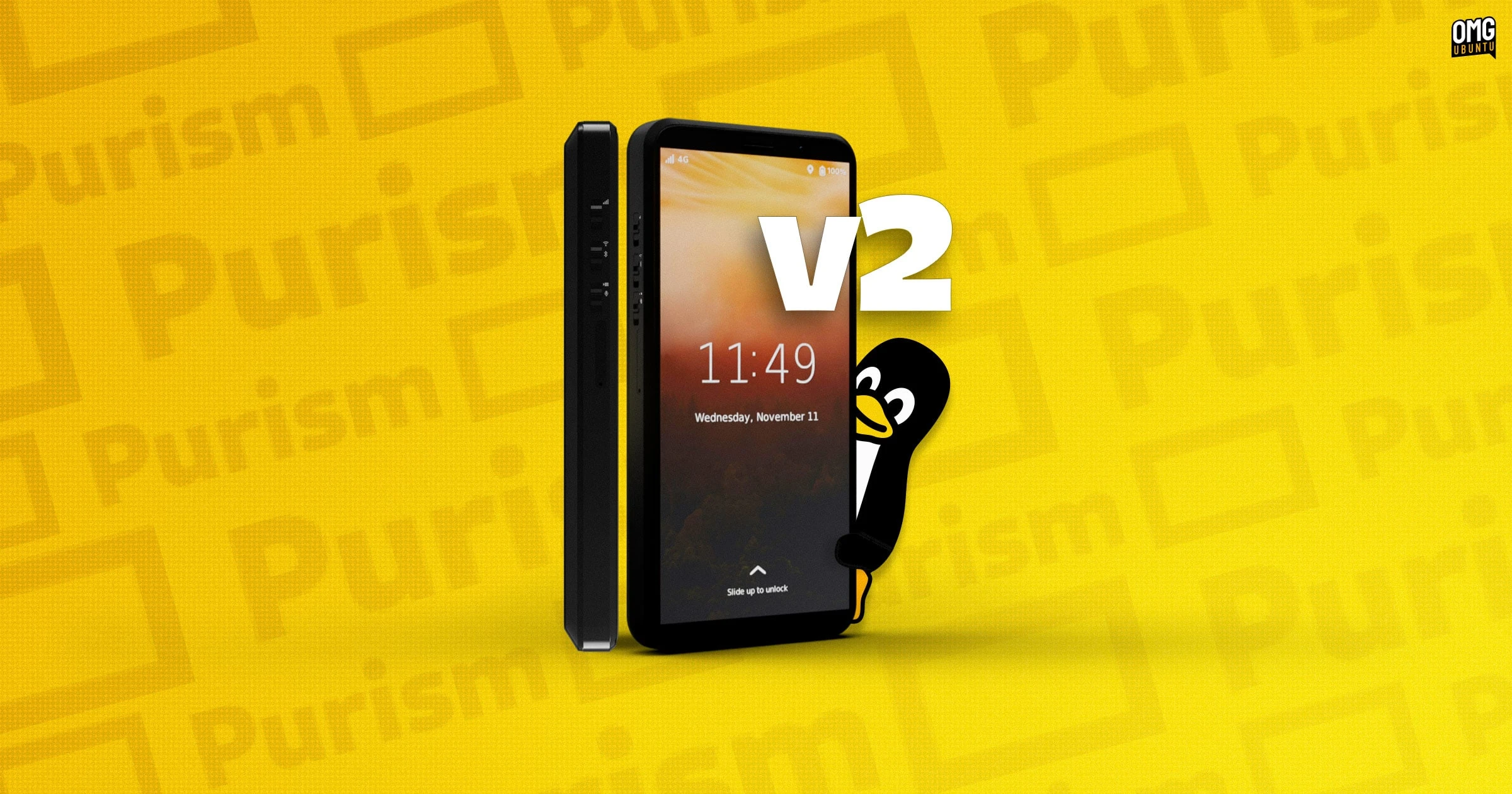
Purism is crowdfunding a new version of its Librem 5 Linux smartphone, this one powered by RISC-V rather than Arm.

Librem 5 v2 will use an octa-core SpacemiT K1 RISC-V SoC, replacing the quad-core ARM64 NXP CPU This platform shift will provide much better performance and longer battery life than the existing Librem 5 – and not run as hot in use.

Memory is increased to 8 GB RAM, up from 3 GB in the first-generation handset, and storage leaps to 128 GB from 32 GB.

SD card reading speeds are boosted, and on-board hardware encoding means the Librem 5 v2 can take 13 megapixel photos with and shoot high-definition video for the first time.

The rest of the phone is familiar to the first. The same case design, 5.7-inch (720×1440) display, removable 4,500mAh battery, audio jack and physical kit switches. This is intentional as it will make repairs and upgrades between generations easier.

Wireless connectivity also stays modular, though the v2 handset will ship with an improved 4G modem. A 5G module is planned.

Librem 5 v2 will run PureOS, Purism’s Debian-based operating system using Phosh as its UI.

Librem 5 v2 costs from $1599

“RISC-V is the future, and Librem 5 v2 is the perfect product to bring it to a mainstream audience”, Jonathon Hall, CTO at Purism, says of the launch.

“Freeing us from the control of Big Tech starts with the foundation, and RISC-V’s foundation frees us from the oligarchy. The Librem 5 v2 puts you in control of your data, combining that with the ease of use we expect in the modern era”.

Given that general feedback to the first-gen Librem 5 – beset by delays, price rises and patchy build quality – was mixed best. But, to it credit, Purism is still out there making, selling and supporting the phones (and their other devices and services).

Transitioning to RISC-V for the follow-up won’t be trivial, mind. Graphics acceleration, new drivers and power management (which on a phone is rather critical) will be big undertakings.

And more work is needed to make the day-to-day software stack editable, like browser performance (sluggish on the newest and fastest RISC-V chips) and providing an Arm64 app compatibility layer to run software not made for RISC-V. Available to back until February 2027

If you’ve got at least $1599 burning a hole in your pocket and you don’t need anything to show for it before 2028, you can go pledge to the campaign. It runs until February 2027, so don’t feel pressured to decide just yet.

Purism is crowdfunding a new version of its Librem 5 Linux smartphone, this one powered by RISC-V rather than Arm.

Librem 5 v2 will use an octa-core SpacemiT K1 RISC-V SoC, replacing the quad-core ARM64 NXP CPU This platform shift will provide much better performance and longer battery life than the existing Librem 5 – and not run as hot in use.

Memory is increased to 8 GB RAM, up from 3 GB in the first-generation handset, and storage leaps to 128 GB from 32 GB.

SD card reading speeds are boosted, and on-board hardware encoding means the Librem 5 v2 can take 13 megapixel photos with and shoot high-definition video for the first time.

The rest of the phone is familiar to the first. The same case design, 5.7-inch (720×1440) display, removable 4,500mAh battery, audio jack and physical kit switches. This is intentional as it will make repairs and upgrades between generations easier.

Wireless connectivity also stays modular, though the v2 handset will ship with an improved 4G modem. A 5G module is planned.

Librem 5 v2 will run PureOS, Purism’s Debian-based operating system using Phosh as its UI.

Librem 5 v2 costs from $1599

“RISC-V is the future, and Librem 5 v2 is the perfect product to bring it to a mainstream audience”, Jonathon Hall, CTO at Purism, says of the launch.

“Freeing us from the control of Big Tech starts with the foundation, and RISC-V’s foundation frees us from the oligarchy. The Librem 5 v2 puts you in control of your data, combining that with the ease of use we expect in the modern era”.

Given that general feedback to the first-gen Librem 5 – beset by delays, price rises and patchy build quality – was mixed best. But, to it credit, Purism is still out there making, selling and supporting the phones (and their other devices and services).

Transitioning to RISC-V for the follow-up won’t be trivial, mind. Graphics acceleration, new drivers and power management (which on a phone is rather critical) will be big undertakings.

And more work is needed to make the day-to-day software stack editable, like browser performance (sluggish on the newest and fastest RISC-V chips) and providing an Arm64 app compatibility layer to run software not made for RISC-V. Available to back until February 2027

If you’ve got at least $1599 burning a hole in your pocket and you don’t need anything to show for it before 2028, you can go pledge to the campaign. It runs until February 2027, so don’t feel pressured to decide just yet.

0

22 novembre, roma, libreria fahrenheit: “visto da qui / hybris” – mostra per msf, medici senza frontiere

preview

22 novembre, roma, libreria fahrenheit: “visto da qui / hybris” – mostra per msf, medici senza frontiere

cartoline d’artista, per il lavoro di MSF in Palestina, Cisgiordania e Libano @ Libreria Fahrenheit 431, Roma, Piazza Campo de’ Fiori. domenica 22 novembre, dalle 17 alle 22.

http://slowforward.net/2026/11/15/22-nov-fahrenheit-msf/

@radiopopolare
@radiocittaperta
@radiondadurto
@radiocittaperta
@ondarossa
@roma
@Roma@diggita.com
@roma@citiverse.it
@mostreoggi
#mostre
#roma
#MSF #Palestina #Gaza #Libano #Cisgiordania #MediciSenzaFrontiere

22 novembre, roma, libreria fahrenheit: “visto da qui / hybris” – mostra per msf, medici senza frontiere

cartoline d’artista, per il lavoro di MSF in Palestina, Cisgiordania e Libano @ Libreria Fahrenheit 431, Roma, Piazza Campo de’ Fiori. domenica 22 novembre, dalle 17 alle 22.

http://slowforward.net/2026/11/15/22-nov-fahrenheit-msf/

@radiopopolare
@radiocittaperta
@radiondadurto
@radiocittaperta
@ondarossa
@roma
@Roma@diggita.com
@roma@citiverse.it
@mostreoggi
#mostre
#roma
#MSF #Palestina #Gaza #Libano #Cisgiordania #MediciSenzaFrontiere

0

Librem 5 second-gen $1599 RISC-V Linux phone - OMG! Ubuntu

OMG! Ubuntu Purism announces second-gen Librem 5 Linux phone - OMG! Ubuntu www.omgubuntu.co.uk
preview

Purism is crowdfunding a new version of its Librem 5 Linux smartphone, this one powered by RISC-V rather than Arm.

Librem 5 v2 will use an octa-core SpacemiT K1 RISC-V SoC, replacing the quad-core ARM64 NXP CPU This platform shift will provide much better performance and longer battery life than the existing Librem 5 – and not run as hot in use.

Memory is increased to 8 GB RAM, up from 3 GB in the first-generation handset, and storage leaps to 128 GB from 32 GB.

SD card reading speeds are boosted, and on-board hardware encoding means the Librem 5 v2 can take 13 megapixel photos with and shoot high-definition video for the first time.

The rest of the phone is familiar to the first. The same case design, 5.7-inch (720×1440) display, removable 4,500mAh battery, audio jack and physical kit switches. This is intentional as it will make repairs and upgrades between generations easier.

Wireless connectivity also stays modular, though the v2 handset will ship with an improved 4G modem. A 5G module is planned.

Librem 5 v2 will run PureOS, Purism’s Debian-based operating system using Phosh as its UI.

Librem 5 v2 costs from $1599

“RISC-V is the future, and Librem 5 v2 is the perfect product to bring it to a mainstream audience”, Jonathon Hall, CTO at Purism, says of the launch.

“Freeing us from the control of Big Tech starts with the foundation, and RISC-V’s foundation frees us from the oligarchy. The Librem 5 v2 puts you in control of your data, combining that with the ease of use we expect in the modern era”.

Given that general feedback to the first-gen Librem 5 – beset by delays, price rises and patchy build quality – was mixed best. But, to it credit, Purism is still out there making, selling and supporting the phones (and their other devices and services).

Transitioning to RISC-V for the follow-up won’t be trivial, mind. Graphics acceleration, new drivers and power management (which on a phone is rather critical) will be big undertakings.

And more work is needed to make the day-to-day software stack editable, like browser performance (sluggish on the newest and fastest RISC-V chips) and providing an Arm64 app compatibility layer to run software not made for RISC-V. Available to back until February 2027

If you’ve got at least $1599 burning a hole in your pocket and you don’t need anything to show for it before 2028, you can go pledge to the campaign. It runs until February 2027, so don’t feel pressured to decide just yet.

Purism is crowdfunding a new version of its Librem 5 Linux smartphone, this one powered by RISC-V rather than Arm.

Librem 5 v2 will use an octa-core SpacemiT K1 RISC-V SoC, replacing the quad-core ARM64 NXP CPU This platform shift will provide much better performance and longer battery life than the existing Librem 5 – and not run as hot in use.

Memory is increased to 8 GB RAM, up from 3 GB in the first-generation handset, and storage leaps to 128 GB from 32 GB.

SD card reading speeds are boosted, and on-board hardware encoding means the Librem 5 v2 can take 13 megapixel photos with and shoot high-definition video for the first time.

The rest of the phone is familiar to the first. The same case design, 5.7-inch (720×1440) display, removable 4,500mAh battery, audio jack and physical kit switches. This is intentional as it will make repairs and upgrades between generations easier.

Wireless connectivity also stays modular, though the v2 handset will ship with an improved 4G modem. A 5G module is planned.

Librem 5 v2 will run PureOS, Purism’s Debian-based operating system using Phosh as its UI.

Librem 5 v2 costs from $1599

“RISC-V is the future, and Librem 5 v2 is the perfect product to bring it to a mainstream audience”, Jonathon Hall, CTO at Purism, says of the launch.

“Freeing us from the control of Big Tech starts with the foundation, and RISC-V’s foundation frees us from the oligarchy. The Librem 5 v2 puts you in control of your data, combining that with the ease of use we expect in the modern era”.

Given that general feedback to the first-gen Librem 5 – beset by delays, price rises and patchy build quality – was mixed best. But, to it credit, Purism is still out there making, selling and supporting the phones (and their other devices and services).

Transitioning to RISC-V for the follow-up won’t be trivial, mind. Graphics acceleration, new drivers and power management (which on a phone is rather critical) will be big undertakings.

And more work is needed to make the day-to-day software stack editable, like browser performance (sluggish on the newest and fastest RISC-V chips) and providing an Arm64 app compatibility layer to run software not made for RISC-V. Available to back until February 2027

If you’ve got at least $1599 burning a hole in your pocket and you don’t need anything to show for it before 2028, you can go pledge to the campaign. It runs until February 2027, so don’t feel pressured to decide just yet.

0

Developer's $300 Embroidery Machine Required a Subscription, So She Built This Open Source Tool

It's FOSS Developer's $300 Embroidery Machine Required a Subscription, So She Built This Open Source Tool itsfoss.com
preview

A tinkerer, Kathy Korevec, has made ZigZag available under the Apache 2.0 license. She says that the entire app was built with AI, using ChatGPT, and her goal was to get software made to her specs, similar to the Adobe suite, but with MCP support built in.

That MCP support is a built-in server that lets AI agents draw and edit in the same window.

Her post about this on Hacker News has already managed to reach top 10 status (over a 48-hour period), and she has been answering questions there about how this was built and which machines it supports.

ZigZag: Why develop this?

This was built around a Brother Skitch PP1 embroidery machine that she says cost her around $300.

You see, the Skitch needs Brother’s Artspira app to operate. While the app is free and works with the machine, a paid plan called Artspira+ adds useful extras such as digitizing images into embroidery patterns and creating cross-stitch patterns.

Kathy says the free version is limited in colors and tools, and she believes some of the clip art is reserved for subscribers. She also guesses Brother sold the machine at a loss at first because of the subscription.

That last bit checks out, seeing what many hardware manufacturers are doing.

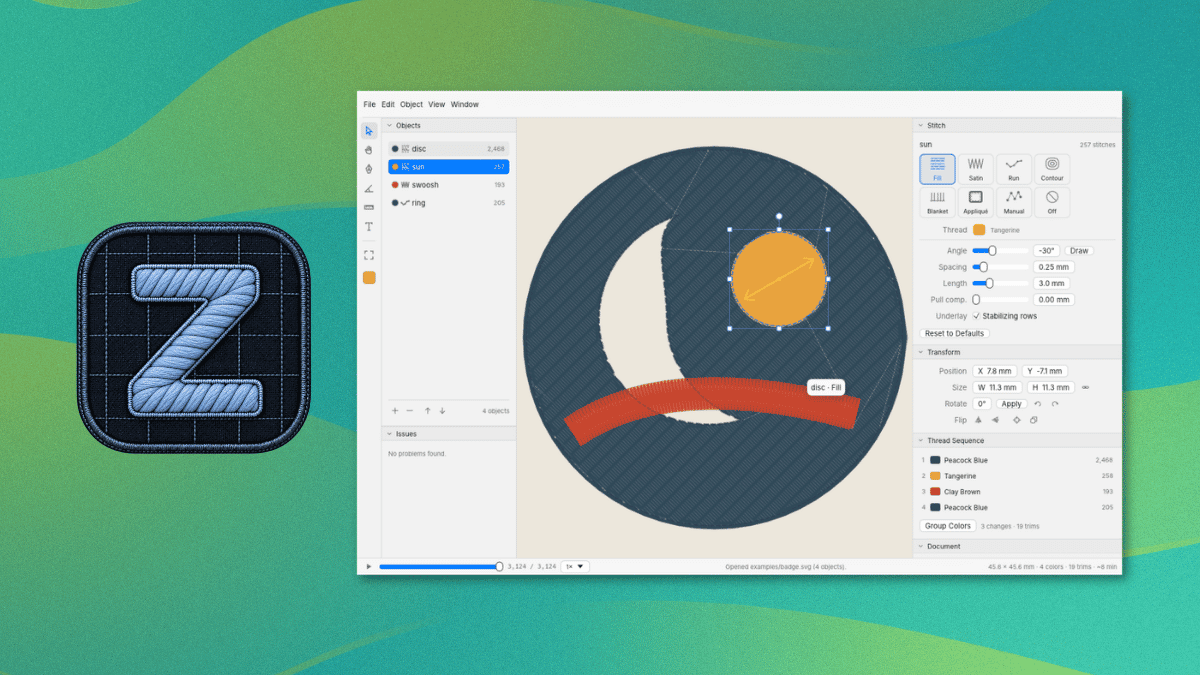
ZigZag imports SVG art and can trace PNG and JPEG images into shapes. It covers 11 stitch types, including fill, satin, and appliqué, with a preview of the stitches being shown in the editor.

As for the MCP server, it lets an AI agent inspect the open design, add and edit objects and text, trace images, preview the stitches, and export files. It can also control a Skitch device, and each action counts as one undo step.

This is not something new.

Open source embroidery tools existed before ZigZag. People have brought up projects like Ink/Stitch, an Inkscape extension, and Respira already lets people send designs to the Skitch without Artspira.

The project also credits Respira for the Bluetooth protocol and sewing flow. Kathy says she reverse-engineered the protocol herself and that her agent used Respira to verify it. Get sewing

Currently, ZigZag is available for Windows and macOS. You can grab the latest release from the project website or its GitHub releases page. ZigZag

The README covers installation, Bluetooth pairing, and the MCP server, and it advises against firmware updates on the Skitch. Linux users can follow its steps for building ZigZag from source with Rust.

The Brother Skitch PP1 is the only machine ZigZag sends designs to over Bluetooth, and Artspira needs to be closed first since the Skitch can only talk to one app at a time.

For other machines, ZigZag can export PES, DST, EXP, JEF, or VP3 files.

A tinkerer, Kathy Korevec, has made ZigZag available under the Apache 2.0 license. She says that the entire app was built with AI, using ChatGPT, and her goal was to get software made to her specs, similar to the Adobe suite, but with MCP support built in.

That MCP support is a built-in server that lets AI agents draw and edit in the same window.

Her post about this on Hacker News has already managed to reach top 10 status (over a 48-hour period), and she has been answering questions there about how this was built and which machines it supports.

ZigZag: Why develop this?

This was built around a Brother Skitch PP1 embroidery machine that she says cost her around $300.

You see, the Skitch needs Brother’s Artspira app to operate. While the app is free and works with the machine, a paid plan called Artspira+ adds useful extras such as digitizing images into embroidery patterns and creating cross-stitch patterns.

Kathy says the free version is limited in colors and tools, and she believes some of the clip art is reserved for subscribers. She also guesses Brother sold the machine at a loss at first because of the subscription.

That last bit checks out, seeing what many hardware manufacturers are doing.

ZigZag imports SVG art and can trace PNG and JPEG images into shapes. It covers 11 stitch types, including fill, satin, and appliqué, with a preview of the stitches being shown in the editor.

As for the MCP server, it lets an AI agent inspect the open design, add and edit objects and text, trace images, preview the stitches, and export files. It can also control a Skitch device, and each action counts as one undo step.

This is not something new.

Open source embroidery tools existed before ZigZag. People have brought up projects like Ink/Stitch, an Inkscape extension, and Respira already lets people send designs to the Skitch without Artspira.

The project also credits Respira for the Bluetooth protocol and sewing flow. Kathy says she reverse-engineered the protocol herself and that her agent used Respira to verify it. Get sewing

Currently, ZigZag is available for Windows and macOS. You can grab the latest release from the project website or its GitHub releases page. ZigZag

The README covers installation, Bluetooth pairing, and the MCP server, and it advises against firmware updates on the Skitch. Linux users can follow its steps for building ZigZag from source with Rust.

The Brother Skitch PP1 is the only machine ZigZag sends designs to over Bluetooth, and Artspira needs to be closed first since the Skitch can only talk to one app at a time.

For other machines, ZigZag can export PES, DST, EXP, JEF, or VP3 files.

0

KDE Plasma 6.9 Will Launch XWayland Only When Needed

Linuxiac KDE Plasma 6.9 Will Launch XWayland Only When Needed linuxiac.com
preview

KDE developers are preparing an important change for the upcoming Plasma 6.9 desktop environment, scheduled for release in late February. According to the latest update, XWayland, the compatibility layer that allows X11 applications to run in Wayland sessions, will now start only when needed instead of running continuously in the background.

Until now, Plasma kept XWayland active even when no X11 applications ran. The change means that Plasma’s Wayland session will no longer need to keep XWayland running simply to support applications that users may never launch.

Apart from this improvement, Plasma 6.9 is receiving a redesigned Task Switching page in System Settings. The page was ported to QML, with a refreshed interface that also includes configuration options for the Overview effect.

The Date & Time settings page is also undergoing a similar transition. Its new QML-based interface consolidates controls into a single page, making it quicker to change the system’s time zone.

KDE is also refining desktop customization. The wallpaper configuration page will have more room for browsing images after the desktop layout selector moved to a separate page. Moreover, desktop icons and the Folder View widget will gain additional size options, filling a noticeable gap between the two largest existing sizes.

Regarding performance improvements, Spectacle, KDE’s screenshot utility, will launch faster thanks to optimizations and parallelization. The Add Widgets sidebar has also been optimized to open substantially faster, with smoother animations.

On top of that, the Task Manager will handle window previews more efficiently by avoiding unnecessary thumbnail regeneration when the pointer leaves and returns to a preview, thus eliminating a minor flickering issue. Additionally, when a grouped application requests attention, opening its group popup will now identify the specific window responsible.

On the network management side, users will be able to forget saved connections directly from the Networks widget without opening System Settings. The network share configuration wizard will also automatically recognize more information from pasted URLs, including the protocol and whether encryption is required.

For system monitoring, Plasma 6.9 adds a sensor showing the number of physical CPU cores, available in both the System Monitor application and its widgets.

Other desktop refinements include named presets for the Wobbly Windows effect, fade animations for Spectacle’s screen capture overlay, and more convenient duration editing in the Timer widget. The Keyboard settings page will make it clearer when the system-wide keyboard layout is used rather than a custom configuration.

Finally, if the login via Plasma Login Manager fails, it will provide a basic terminal fallback instead of leaving users with a black screen, allowing them to access the system for troubleshooting.

For more information about the upcoming changes, see KDE’s “This Week in Plasma” blog post.

KDE developers are preparing an important change for the upcoming Plasma 6.9 desktop environment, scheduled for release in late February. According to the latest update, XWayland, the compatibility layer that allows X11 applications to run in Wayland sessions, will now start only when needed instead of running continuously in the background.

Until now, Plasma kept XWayland active even when no X11 applications ran. The change means that Plasma’s Wayland session will no longer need to keep XWayland running simply to support applications that users may never launch.

Apart from this improvement, Plasma 6.9 is receiving a redesigned Task Switching page in System Settings. The page was ported to QML, with a refreshed interface that also includes configuration options for the Overview effect.

The Date & Time settings page is also undergoing a similar transition. Its new QML-based interface consolidates controls into a single page, making it quicker to change the system’s time zone.

KDE is also refining desktop customization. The wallpaper configuration page will have more room for browsing images after the desktop layout selector moved to a separate page. Moreover, desktop icons and the Folder View widget will gain additional size options, filling a noticeable gap between the two largest existing sizes.

Regarding performance improvements, Spectacle, KDE’s screenshot utility, will launch faster thanks to optimizations and parallelization. The Add Widgets sidebar has also been optimized to open substantially faster, with smoother animations.

On top of that, the Task Manager will handle window previews more efficiently by avoiding unnecessary thumbnail regeneration when the pointer leaves and returns to a preview, thus eliminating a minor flickering issue. Additionally, when a grouped application requests attention, opening its group popup will now identify the specific window responsible.

On the network management side, users will be able to forget saved connections directly from the Networks widget without opening System Settings. The network share configuration wizard will also automatically recognize more information from pasted URLs, including the protocol and whether encryption is required.

For system monitoring, Plasma 6.9 adds a sensor showing the number of physical CPU cores, available in both the System Monitor application and its widgets.

Other desktop refinements include named presets for the Wobbly Windows effect, fade animations for Spectacle’s screen capture overlay, and more convenient duration editing in the Timer widget. The Keyboard settings page will make it clearer when the system-wide keyboard layout is used rather than a custom configuration.

Finally, if the login via Plasma Login Manager fails, it will provide a basic terminal fallback instead of leaving users with a black screen, allowing them to access the system for troubleshooting.

For more information about the upcoming changes, see KDE’s “This Week in Plasma” blog post.

0

Nextcloud Releases Free Desktop Office Suite Built on Euro-Office

Linuxiac Nextcloud Releases Free Desktop Office Suite Built on Euro-Office linuxiac.com
preview

Nextcloud has announced its new Office Desktop app, a free, open-source office suite powered by Euro-Office, for Linux, Windows, and macOS. The application allows users to create and edit documents locally, work offline, and collaborate with others through Nextcloud Hub.

The desktop application was announced in September as part of Nextcloud Hub 26 Summer. Now, ready-to-use builds are available for download, letting users install the office suite directly on their computers without a Nextcloud server for local document editing.

For those unfamiliar, Euro-Office is a European-led open-source project based on a fork of the ONLYOFFICE codebase, licensed under AGPLv3. It was established to improve development transparency, simplify external contributions, and provide an independently governed office solution.

According to its maintainers, the decision to fork ONLYOFFICE followed concerns about limited upstream collaboration, difficulties building the software from source, and proprietary components in parts of its ecosystem. The project is supported by several European technology companies and organizations, including Nextcloud, IONOS, OpenProject, Proton, and XWiki.

As for the new desktop application, it includes editors for text documents, spreadsheets, presentations, and PDFs. It supports Microsoft’s DOCX, XLSX, and PPTX formats alongside OpenDocument formats such as ODT, ODS, and ODP.

One of its selling points is offline operations. Users can open, edit, and save documents directly on their computers without an internet connection. When connected to a Nextcloud instance, the application provides access to cloud-stored files and enables real-time collaborative editing.

Moreover, users can connect multiple Nextcloud instances to the same application, allowing them to work with documents stored across different servers without switching between separate desktop clients.

The application also uses fonts installed locally on the operating system, including custom and corporate fonts. Other capabilities include digital document signatures, password protection, and restrictions on editing, commenting, and form filling.

Regarding platform availability, Linux users can download DEB packages for Debian and Ubuntu or RPM packages for Fedora and other RPM-based distributions. Windows builds are available for x64 and ARM64 systems, while macOS support currently targets Apple Silicon.

Nextcloud distributes signed builds intended for production use, while the Euro-Office project also provides unsigned community builds for testing and development. Both versions are built from the same source code, which is publicly available on GitHub.

The Nextcloud Office Desktop app is available now from the official announcement, which also includes installation details and instructions for connecting the application to Nextcloud Hub.

Nextcloud has announced its new Office Desktop app, a free, open-source office suite powered by Euro-Office, for Linux, Windows, and macOS. The application allows users to create and edit documents locally, work offline, and collaborate with others through Nextcloud Hub.

The desktop application was announced in September as part of Nextcloud Hub 26 Summer. Now, ready-to-use builds are available for download, letting users install the office suite directly on their computers without a Nextcloud server for local document editing.

For those unfamiliar, Euro-Office is a European-led open-source project based on a fork of the ONLYOFFICE codebase, licensed under AGPLv3. It was established to improve development transparency, simplify external contributions, and provide an independently governed office solution.

According to its maintainers, the decision to fork ONLYOFFICE followed concerns about limited upstream collaboration, difficulties building the software from source, and proprietary components in parts of its ecosystem. The project is supported by several European technology companies and organizations, including Nextcloud, IONOS, OpenProject, Proton, and XWiki.

As for the new desktop application, it includes editors for text documents, spreadsheets, presentations, and PDFs. It supports Microsoft’s DOCX, XLSX, and PPTX formats alongside OpenDocument formats such as ODT, ODS, and ODP.

One of its selling points is offline operations. Users can open, edit, and save documents directly on their computers without an internet connection. When connected to a Nextcloud instance, the application provides access to cloud-stored files and enables real-time collaborative editing.

Moreover, users can connect multiple Nextcloud instances to the same application, allowing them to work with documents stored across different servers without switching between separate desktop clients.

The application also uses fonts installed locally on the operating system, including custom and corporate fonts. Other capabilities include digital document signatures, password protection, and restrictions on editing, commenting, and form filling.

Regarding platform availability, Linux users can download DEB packages for Debian and Ubuntu or RPM packages for Fedora and other RPM-based distributions. Windows builds are available for x64 and ARM64 systems, while macOS support currently targets Apple Silicon.

Nextcloud distributes signed builds intended for production use, while the Euro-Office project also provides unsigned community builds for testing and development. Both versions are built from the same source code, which is publicly available on GitHub.

The Nextcloud Office Desktop app is available now from the official announcement, which also includes installation details and instructions for connecting the application to Nextcloud Hub.

60

For people using OpnSense who want some automatic snapshots.

preview

So here is the deal. OpnSense is based on FreeBSD (as the users know but others may not understand) and utilizes ZFS Snapshots which are an amazing way to go back to a previous state when something breaks after an update. However for some reason the cron section has been changed so you can not add any random cron job and can only select from predefined options. This means we have to work from the CLI to add jobs, but even worse after an update the cron jobs are removed… which becomes self defeating.

I think I have a decent solution that will work to not only persist the backup script that will automatically create and remove snapshots but also recreate the cron jobs automatically. Ideally there would be some sort of addon where we could adjust things but this is the best I can do for now and want to share with everyone.

Here is the script, place it at: /usr/local/etc/rc.syshook.d/start/99-snapshot-addon.sh and preform a chmod +x so that it is executable. Then reboot and the script to create the snapshot automatically and the cron job should be created. Since this runs on boot it will do this check after every update that requires a reboot or reboot in general and if the script and cron jobs are removed due to an update it will recreate them.

#!/bin/sh

CAT_PATH="/usr/local/opnsense/scripts/auto_be_retention.sh"

# Ensure target directory exists
mkdir -p /usr/local/opnsense/scripts

# 1. Write/Update the auto_be_retention.sh script
cat << 'EOF' > "$CAT_PATH"
#!/bin/sh

WEEKLY_RETENTION=6
MONTHLY_RETENTION=4

TYPE=$1

if [ "$TYPE" != "weekly" ] && [ "$TYPE" != "monthly" ]; then
    echo "Usage: $0 [weekly|monthly]"
    exit 1
fi

DATE_TAG=$(date +%Y%m%d_%H%M%S)
BE_NAME="auto_${TYPE}_${DATE_TAG}"

/sbin/bectl create "${BE_NAME}"

if [ "$TYPE" = "weekly" ]; then
    KEEP=$WEEKLY_RETENTION
else
    KEEP=$MONTHLY_RETENTION
fi

/sbin/bectl list -H | awk '{print $1}' | grep "^auto_${TYPE}_" | sort | \
awk -v keep="$KEEP" '
    { lines[NR] = $1 }
    END {
        to_delete = NR - keep
        for (i = 1; i <= to_delete; i++) {
            print lines[i]
        }
    }
' | while read -r OLD_BE; do
    if [ -n "$OLD_BE" ]; then
        /sbin/bectl destroy -F -o "$OLD_BE"
    fi
done
EOF

chmod +x "$CAT_PATH"

# 2. Inject cron tasks into /etc/crontab if missing
CRON_FILE="/etc/crontab"

if ! grep -q "auto_be_retention.sh weekly" "$CRON_FILE"; then
    echo "0 3 * * 0 root /usr/local/opnsense/scripts/auto_be_retention.sh weekly" >> "$CRON_FILE"
fi

if ! grep -q "auto_be_retention.sh monthly" "$CRON_FILE"; then
    echo "30 3 1 * * root /usr/local/opnsense/scripts/auto_be_retention.sh monthly" >> "$CRON_FILE"
fi

# 3. Reload cron daemon
service cron restart

This will check for and if missing create a script at /usr/local/opnsense/scripts/auto_be_retention.sh and it will check for and if missing create two cron jobs.

The script located at /usr/local/opnsense/scripts/auto_be_retention.sh will create a snapshot with a timestamp named similar to: auto_monthly_20261001_033000

It will also look the count of previous snapshots (6 for weekly and 4 for monthly which can be adjusted if you choose) and delete the oldest one. Weekly snapshots will happen every Sunday at 3:00 AM and monthly snapshots will happen on the 1st of the month at 3:30 AM.


Why do we need this?

We don’t “need” this but the advantage is that if you can have automatic updates (which are an option that is available in the cron section) it’s probably better to have a snapshot that can easily be rolled back to in the case of something acting up automatically created as well. The other option is try and undo the issue or take a config backup and reinstall then use that to get everything up and running again.

Rolling back a snapshot takes a few minutes and gets everything back up and running until a solution for the issue/s are available.

I ran the script and I am not seeing anything in the Settings > cron section!!

You won’t… that is part of the deal with how OpnSense has decided to handle things. You will need to look in: /etc/crontab This is because of how OpnSense is using menu drive cron selections, since the selections are not available it seems to not want to create or show them.

I have done some testing and removed the files and jobs and also had them recreated. At the next update we will see if everything sticks around or if it is removed.

Please remember that the script above is given without warranty or guarantee, use it at your own risk. I am not responsible if this script causes things not limited to but including data loss, testicular/breast shrinkage/growth, rude children, nagging wives/girlfriends/husbands/partners, alien visitation, global warming, or thermonuclear war. ID10T errors are also your own responsibility… you should not be running things you find on the internet without understanding how they work.

So here is the deal. OpnSense is based on FreeBSD (as the users know but others may not understand) and utilizes ZFS Snapshots which are an amazing way to go back to a previous state when something breaks after an update. However for some reason the cron section has been changed so you can not add any random cron job and can only select from predefined options. This means we have to work from the CLI to add jobs, but even worse after an update the cron jobs are removed… which becomes self defeating.

I think I have a decent solution that will work to not only persist the backup script that will automatically create and remove snapshots but also recreate the cron jobs automatically. Ideally there would be some sort of addon where we could adjust things but this is the best I can do for now and want to share with everyone.

Here is the script, place it at: /usr/local/etc/rc.syshook.d/start/99-snapshot-addon.sh and preform a chmod +x so that it is executable. Then reboot and the script to create the snapshot automatically and the cron job should be created. Since this runs on boot it will do this check after every update that requires a reboot or reboot in general and if the script and cron jobs are removed due to an update it will recreate them.

#!/bin/sh

CAT_PATH="/usr/local/opnsense/scripts/auto_be_retention.sh"

# Ensure target directory exists
mkdir -p /usr/local/opnsense/scripts

# 1. Write/Update the auto_be_retention.sh script
cat << 'EOF' > "$CAT_PATH"
#!/bin/sh

WEEKLY_RETENTION=6
MONTHLY_RETENTION=4

TYPE=$1

if [ "$TYPE" != "weekly" ] && [ "$TYPE" != "monthly" ]; then
    echo "Usage: $0 [weekly|monthly]"
    exit 1
fi

DATE_TAG=$(date +%Y%m%d_%H%M%S)
BE_NAME="auto_${TYPE}_${DATE_TAG}"

/sbin/bectl create "${BE_NAME}"

if [ "$TYPE" = "weekly" ]; then
    KEEP=$WEEKLY_RETENTION
else
    KEEP=$MONTHLY_RETENTION
fi

/sbin/bectl list -H | awk '{print $1}' | grep "^auto_${TYPE}_" | sort | \
awk -v keep="$KEEP" '
    { lines[NR] = $1 }
    END {
        to_delete = NR - keep
        for (i = 1; i <= to_delete; i++) {
            print lines[i]
        }
    }
' | while read -r OLD_BE; do
    if [ -n "$OLD_BE" ]; then
        /sbin/bectl destroy -F -o "$OLD_BE"
    fi
done
EOF

chmod +x "$CAT_PATH"

# 2. Inject cron tasks into /etc/crontab if missing
CRON_FILE="/etc/crontab"

if ! grep -q "auto_be_retention.sh weekly" "$CRON_FILE"; then
    echo "0 3 * * 0 root /usr/local/opnsense/scripts/auto_be_retention.sh weekly" >> "$CRON_FILE"
fi

if ! grep -q "auto_be_retention.sh monthly" "$CRON_FILE"; then
    echo "30 3 1 * * root /usr/local/opnsense/scripts/auto_be_retention.sh monthly" >> "$CRON_FILE"
fi

# 3. Reload cron daemon
service cron restart

This will check for and if missing create a script at /usr/local/opnsense/scripts/auto_be_retention.sh and it will check for and if missing create two cron jobs.

The script located at /usr/local/opnsense/scripts/auto_be_retention.sh will create a snapshot with a timestamp named similar to: auto_monthly_20261001_033000

It will also look the count of previous snapshots (6 for weekly and 4 for monthly which can be adjusted if you choose) and delete the oldest one. Weekly snapshots will happen every Sunday at 3:00 AM and monthly snapshots will happen on the 1st of the month at 3:30 AM.


Why do we need this?

We don’t “need” this but the advantage is that if you can have automatic updates (which are an option that is available in the cron section) it’s probably better to have a snapshot that can easily be rolled back to in the case of something acting up automatically created as well. The other option is try and undo the issue or take a config backup and reinstall then use that to get everything up and running again.

Rolling back a snapshot takes a few minutes and gets everything back up and running until a solution for the issue/s are available.

I ran the script and I am not seeing anything in the Settings > cron section!!

You won’t… that is part of the deal with how OpnSense has decided to handle things. You will need to look in: /etc/crontab This is because of how OpnSense is using menu drive cron selections, since the selections are not available it seems to not want to create or show them.

I have done some testing and removed the files and jobs and also had them recreated. At the next update we will see if everything sticks around or if it is removed.

Please remember that the script above is given without warranty or guarantee, use it at your own risk. I am not responsible if this script causes things not limited to but including data loss, testicular/breast shrinkage/growth, rude children, nagging wives/girlfriends/husbands/partners, alien visitation, global warming, or thermonuclear war. ID10T errors are also your own responsibility… you should not be running things you find on the internet without understanding how they work.

22

[AIP] Portabase (v1.34) now supports file and directory backups

GitHub GitHub - Portabase/portabase: Portabase - Database backup &amp; restore tool for PostgreSQL, MySQL, MsSQL, MariaDB, Firebird SQL, SQLite, MongoDB, Redis, Files and Docker Volume github.com
preview

Hi everyone,

It’s been a while since I last posted here! I’m happy to announce that we’ve released Portabase 1.34!

Repository: github.com/Portabase/portabase (on the road to 2k stars)

For those unfamiliar with Portabase, it’s an open-source, self-hostable backup and restore platform designed for data retention, disaster recovery, and homogeneous migrations.

Until now, Portabase supported 10 data sources (including PostgreSQL, MySQL, MariaDB, MongoDB and Docker volumes).

With v1.34, we’re introducing our 11th data source: files and directories!

There are 3 ways to back up your files:

  • Archive (logical backup): creates a full .tar.gz of the selected directory.
  • Snapshot (incremental): uses Restic under the hood to provide incremental backups with deduplication, reducing storage usage.
  • Sync: synchronize files and directories to a destination. This is a direct copy, not a restorable backup.

What’s new in 1.34?

  • Support for file and directory backup/restore (obviously)
  • UX improvements and UI fixes
  • Multiple security fixes, thanks to users who reported vulnerabilities
  • DACPAC support for Microsoft SQL Server (in addition to BACPAC, and native BACKUP DATABASE support is also on the way)
  • Helm chart improvements

Important: If you’re upgrading and want to use the new file and directory backup features, make sure to update your agents as well.

As always, if you encounter a bug, please open an issue on GitHub. And if you like the project, consider giving us a star! It means a lot to us and helps the project gain visibility.

Thanks to everyone using, testing, contributing to, and supporting Portabase!

Hi everyone,

It’s been a while since I last posted here! I’m happy to announce that we’ve released Portabase 1.34!

Repository: github.com/Portabase/portabase (on the road to 2k stars)

For those unfamiliar with Portabase, it’s an open-source, self-hostable backup and restore platform designed for data retention, disaster recovery, and homogeneous migrations.

Until now, Portabase supported 10 data sources (including PostgreSQL, MySQL, MariaDB, MongoDB and Docker volumes).

With v1.34, we’re introducing our 11th data source: files and directories!

There are 3 ways to back up your files:

  • Archive (logical backup): creates a full .tar.gz of the selected directory.
  • Snapshot (incremental): uses Restic under the hood to provide incremental backups with deduplication, reducing storage usage.
  • Sync: synchronize files and directories to a destination. This is a direct copy, not a restorable backup.

What’s new in 1.34?

  • Support for file and directory backup/restore (obviously)
  • UX improvements and UI fixes
  • Multiple security fixes, thanks to users who reported vulnerabilities
  • DACPAC support for Microsoft SQL Server (in addition to BACPAC, and native BACKUP DATABASE support is also on the way)
  • Helm chart improvements

Important: If you’re upgrading and want to use the new file and directory backup features, make sure to update your agents as well.

As always, if you encounter a bug, please open an issue on GitHub. And if you like the project, consider giving us a star! It means a lot to us and helps the project gain visibility.

Thanks to everyone using, testing, contributing to, and supporting Portabase!

36

[AIP] - Tempus v4.31.0 android subsonic client release

preview

Tempus is an open-source and lightweight music client for Subsonic, designed and built natively for Android.

AI Disclosure:

  • Implementation - Assisted (many contributions use ai)
  • Testing - Assisted
  • Review - Assisted

This app works with any service that implements the Subsonic API, including:

https://github.com/eddyizm/tempus/releases/tag/v4.31.0

My last release post was for v4.20.0 so I’ve included what’s changed across recent stable releases up to v4.31.0.

What’s Changed

Highlighting major features added over recent releases:

  • feat: UPnP and DLNA streaming & control — Play directly to UPnP/DLNA renderers on your network, control remote player volume from your phone, and cast seamlessly.
  • feat: Parametric Equalizer & AutoEq Support — Import AutoEq profiles for custom headphone/audio profiles, plus improved equalizer stability.
  • feat: Continue Listening & Queue Management — Resume playback where you left off with a dedicated home section, modern player queue sheets with summary and quick actions, and fast playlist queueing.
  • feat: Custom HTTP Headers — Support custom HTTP headers per server configuration.
  • feat: Downloads & Syncing — Added fast scrolling to download views and automatic playlist download synchronization with the server.

And a ton of bug fixes, performance improvements, and updated translations across many languages -> Full Changelog: github.com/eddyizm/tempus/…/v4.20.0...v4.31.0

📝 Note: Looking for Google Play Testers!

Tempus is currently being prepared for Google Play and is in the review process. If you are interested in testing early Google Play builds and helping out with feedback, please let me know—testers are greatly appreciated!

Release Notes app-tempus* <- The GitHub release with all the Android Auto, Chromecast, and media features. app-degoogled* <- The IzzyOnDroid release built without any Google dependencies.

As usual, any dev contributions appreciated as I am not actually a java/mobile dev, so my progress is significantly slower than those who do this on the daily.

Big thanks to all the folks who have been contributing.

Tempus is an open-source and lightweight music client for Subsonic, designed and built natively for Android.

AI Disclosure:

  • Implementation - Assisted (many contributions use ai)
  • Testing - Assisted
  • Review - Assisted

This app works with any service that implements the Subsonic API, including:

https://github.com/eddyizm/tempus/releases/tag/v4.31.0

My last release post was for v4.20.0 so I’ve included what’s changed across recent stable releases up to v4.31.0.

What’s Changed

Highlighting major features added over recent releases:

  • feat: UPnP and DLNA streaming & control — Play directly to UPnP/DLNA renderers on your network, control remote player volume from your phone, and cast seamlessly.
  • feat: Parametric Equalizer & AutoEq Support — Import AutoEq profiles for custom headphone/audio profiles, plus improved equalizer stability.
  • feat: Continue Listening & Queue Management — Resume playback where you left off with a dedicated home section, modern player queue sheets with summary and quick actions, and fast playlist queueing.
  • feat: Custom HTTP Headers — Support custom HTTP headers per server configuration.
  • feat: Downloads & Syncing — Added fast scrolling to download views and automatic playlist download synchronization with the server.

And a ton of bug fixes, performance improvements, and updated translations across many languages -> Full Changelog: github.com/eddyizm/tempus/…/v4.20.0...v4.31.0

📝 Note: Looking for Google Play Testers!

Tempus is currently being prepared for Google Play and is in the review process. If you are interested in testing early Google Play builds and helping out with feedback, please let me know—testers are greatly appreciated!

Release Notes app-tempus* <- The GitHub release with all the Android Auto, Chromecast, and media features. app-degoogled* <- The IzzyOnDroid release built without any Google dependencies.

As usual, any dev contributions appreciated as I am not actually a java/mobile dev, so my progress is significantly slower than those who do this on the daily.

Big thanks to all the folks who have been contributing.

0

Neanche commento

Open Insulti omofobi ai bambini e sputi dagli spalti, la follia dei genitori al torneo nel Bergamasco: sospesa la partita www.open.online
preview

Neanche commento

“Insulti omofobi ai bambini e sputi dagli spalti, la follia dei genitori al torneo nel Bergamasco: sospesa la partita”

https://www.open.online/2026/11/14/bergamo-insulti-genitori-partita-calcio-bambini/

@attualita

Neanche commento

“Insulti omofobi ai bambini e sputi dagli spalti, la follia dei genitori al torneo nel Bergamasco: sospesa la partita”

https://www.open.online/2026/11/14/bergamo-insulti-genitori-partita-calcio-bambini/

@attualita

0

Librem 5 second-gen $1599 RISC-V Linux phone - OMG! Ubuntu

OMG! Ubuntu Purism announces second-gen Librem 5 Linux phone - OMG! Ubuntu www.omgubuntu.co.uk
preview

Purism is crowdfunding a new version of its Librem 5 Linux smartphone, this one powered by RISC-V rather than Arm.

Librem 5 v2 will use an octa-core SpacemiT K1 RISC-V SoC, replacing the quad-core ARM64 NXP CPU This platform shift will provide much better performance and longer battery life than the existing Librem 5 – and not run as hot in use.

Memory is increased to 8 GB RAM, up from 3 GB in the first-generation handset, and storage leaps to 128 GB from 32 GB.

SD card reading speeds are boosted, and on-board hardware encoding means the Librem 5 v2 can take 13 megapixel photos with and shoot high-definition video for the first time.

The rest of the phone is familiar to the first. The same case design, 5.7-inch (720×1440) display, removable 4,500mAh battery, audio jack and physical kit switches. This is intentional as it will make repairs and upgrades between generations easier.

Wireless connectivity also stays modular, though the v2 handset will ship with an improved 4G modem. A 5G module is planned.

Librem 5 v2 will run PureOS, Purism’s Debian-based operating system using Phosh as its UI.

Librem 5 v2 costs from $1599

“RISC-V is the future, and Librem 5 v2 is the perfect product to bring it to a mainstream audience”, Jonathon Hall, CTO at Purism, says of the launch.

“Freeing us from the control of Big Tech starts with the foundation, and RISC-V’s foundation frees us from the oligarchy. The Librem 5 v2 puts you in control of your data, combining that with the ease of use we expect in the modern era”.

Given that general feedback to the first-gen Librem 5 – beset by delays, price rises and patchy build quality – was mixed best. But, to it credit, Purism is still out there making, selling and supporting the phones (and their other devices and services).

Transitioning to RISC-V for the follow-up won’t be trivial, mind. Graphics acceleration, new drivers and power management (which on a phone is rather critical) will be big undertakings.

And more work is needed to make the day-to-day software stack editable, like browser performance (sluggish on the newest and fastest RISC-V chips) and providing an Arm64 app compatibility layer to run software not made for RISC-V. Available to back until February 2027

If you’ve got at least $1599 burning a hole in your pocket and you don’t need anything to show for it before 2028, you can go pledge to the campaign. It runs until February 2027, so don’t feel pressured to decide just yet.

Purism is crowdfunding a new version of its Librem 5 Linux smartphone, this one powered by RISC-V rather than Arm.

Librem 5 v2 will use an octa-core SpacemiT K1 RISC-V SoC, replacing the quad-core ARM64 NXP CPU This platform shift will provide much better performance and longer battery life than the existing Librem 5 – and not run as hot in use.

Memory is increased to 8 GB RAM, up from 3 GB in the first-generation handset, and storage leaps to 128 GB from 32 GB.

SD card reading speeds are boosted, and on-board hardware encoding means the Librem 5 v2 can take 13 megapixel photos with and shoot high-definition video for the first time.

The rest of the phone is familiar to the first. The same case design, 5.7-inch (720×1440) display, removable 4,500mAh battery, audio jack and physical kit switches. This is intentional as it will make repairs and upgrades between generations easier.

Wireless connectivity also stays modular, though the v2 handset will ship with an improved 4G modem. A 5G module is planned.

Librem 5 v2 will run PureOS, Purism’s Debian-based operating system using Phosh as its UI.

Librem 5 v2 costs from $1599

“RISC-V is the future, and Librem 5 v2 is the perfect product to bring it to a mainstream audience”, Jonathon Hall, CTO at Purism, says of the launch.

“Freeing us from the control of Big Tech starts with the foundation, and RISC-V’s foundation frees us from the oligarchy. The Librem 5 v2 puts you in control of your data, combining that with the ease of use we expect in the modern era”.

Given that general feedback to the first-gen Librem 5 – beset by delays, price rises and patchy build quality – was mixed best. But, to it credit, Purism is still out there making, selling and supporting the phones (and their other devices and services).

Transitioning to RISC-V for the follow-up won’t be trivial, mind. Graphics acceleration, new drivers and power management (which on a phone is rather critical) will be big undertakings.

And more work is needed to make the day-to-day software stack editable, like browser performance (sluggish on the newest and fastest RISC-V chips) and providing an Arm64 app compatibility layer to run software not made for RISC-V. Available to back until February 2027

If you’ve got at least $1599 burning a hole in your pocket and you don’t need anything to show for it before 2028, you can go pledge to the campaign. It runs until February 2027, so don’t feel pressured to decide just yet.

0

Sea of Fallen Titans

An armored figure cloaked in black stands on a rocky ledge while facing an immense cavernous landscape filled with colossal stone heads and towering statues. Thousands of pale sculpted faces densely crowd the valley floor below, creating a vast sea of human-like forms that stretches into the distance between the cliffs. Directly ahead, a gigantic fallen stone head rests partially submerged among the countless faces, while several monumental statues rise from the depths beyond, their weathered features tilted downward. Steep cliff walls frame the composition, disappearing upward into mist and shadow. Above the statues, a deep red-orange glow illuminates clouds and haze, contrasting sharply with the cool blue-gray lighting that bathes the stone figures and the valley below.
preview

(dkpc69) (2026)

Image description: An armored figure cloaked in black stands on a rocky ledge while facing an immense cavernous landscape filled with colossal stone heads and towering statues. Thousands of pale sculpted faces densely crowd the valley floor below, creating a vast sea of human-like forms that stretches into the distance between the cliffs. Directly ahead, a gigantic fallen stone head rests partially submerged among the countless faces, while several monumental statues rise from the depths beyond, their weathered features tilted downward. Steep cliff walls frame the composition, disappearing upward into mist and shadow. Above the statues, a deep red-orange glow illuminates clouds and haze, contrasting sharply with the cool blue-gray lighting that bathes the stone figures and the valley below.

Full Generation Parameters:

dcd@rkf@ntsy. A solitary black-armoured warrior stands on a cliff overlooking an endless valley filled with thousands of colossal stone statues of forgotten gods. Several statues have fallen, their enormous heads scattered across the landscape. Rear wide shot, desaturated blue-grey atmosphere and dark copper skies. Steps: 8, CFG scale: 1, Sampler: er_sde, Seed: 8720866562100124, engine: ComfyUI, Model: Krea2\krea2_turbo_fp8_scaled

(dkpc69) (2026)

Image description: An armored figure cloaked in black stands on a rocky ledge while facing an immense cavernous landscape filled with colossal stone heads and towering statues. Thousands of pale sculpted faces densely crowd the valley floor below, creating a vast sea of human-like forms that stretches into the distance between the cliffs. Directly ahead, a gigantic fallen stone head rests partially submerged among the countless faces, while several monumental statues rise from the depths beyond, their weathered features tilted downward. Steep cliff walls frame the composition, disappearing upward into mist and shadow. Above the statues, a deep red-orange glow illuminates clouds and haze, contrasting sharply with the cool blue-gray lighting that bathes the stone figures and the valley below.

Full Generation Parameters:

dcd@rkf@ntsy. A solitary black-armoured warrior stands on a cliff overlooking an endless valley filled with thousands of colossal stone statues of forgotten gods. Several statues have fallen, their enormous heads scattered across the landscape. Rear wide shot, desaturated blue-grey atmosphere and dark copper skies. Steps: 8, CFG scale: 1, Sampler: er_sde, Seed: 8720866562100124, engine: ComfyUI, Model: Krea2\krea2_turbo_fp8_scaled

0

Liane Mistlud - Atelier Firis

A young woman standing outdoors while resting her left gloved hand behind her head and smiling toward the viewer. She has long dark-blue hair extending past her waist, red eyes, and star-shaped dangle earrings. Her attire consists of a silver metal chest cuirass worn over a dark striped top, a light-blue scarf wrapped around her neck with a long trailing end, a green plaid-patterned tunic top with a green-and-white checkered hem, a gray pleated skirt, brown arm sleeves with beige gloves, and beige thigh-high boots with gold decorations. A quiver filled with orange-fletched arrows is slung across her back over her right shoulder. The background displays a green field landscape beneath a clear blue sky filled with white clouds.
preview

(Elesico) (2026)

Image description: A young woman standing outdoors while resting her left gloved hand behind her head and smiling toward the viewer. She has long dark-blue hair extending past her waist, red eyes, and star-shaped dangle earrings. Her attire consists of a silver metal chest cuirass worn over a dark striped top, a light-blue scarf wrapped around her neck with a long trailing end, a green plaid-patterned tunic top with a green-and-white checkered hem, a gray pleated skirt, brown arm sleeves with beige gloves, and beige thigh-high boots with gold decorations. A quiver filled with orange-fletched arrows is slung across her back over her right shoulder. The background displays a green field landscape beneath a clear blue sky filled with white clouds.

Full Generation Parameters:

blue sky, outdoors, 1girl, solo, atliane, very long hair, blue hair, red eyes, earrings, atlidef, aqua scarf, gradient scarf, jewelry, sleeveless shirt, black shirt, grey muneate, armor, pinstripe shirt, green dress, square print, tile print, checkered dress, grey skirt, pleated skirt, high-low skirt, two-tone skirt, two-sided fabric, detached sleeves, gloves, detached sleeves, bandaged arm, black sleeves, black garter straps, brown thighhighs, black thighhighs, looking at viewer, blush, smile, open mouth, quiver, standing, arm at side, hand on own face, quiver, masterpiece, best quality, <lora:_liane_mistlud_atelier-elesico-anima:1> Negative prompt: low quality,worst quality,normal quality,text,signature,jpeg artifacts,bad anatomy,copyright name,watermark,artist name,signature, Steps: 24, CFG scale: 4, Sampler: Euler a, Seed: 1892220511, RNG: CPU, Model: waiNovaAnimaWAIAnima_animaV10, Shift: 3, width: 832, height: 1216, Version: neo-2.30, Module 1: Qwen2D_VAE, Module 2: qwen_3_06b_base, Model hash: 6d9321bf6c, Hires Shift: 3, Hires steps: 8, Hires upscale: 1.5, Schedule type: Beta, Hires Module 1: Use same choices, Hires upscaler: 2x-AnimeSharpV4_RCAN, Hires CFG Scale: 4, Beta schedule beta: 0.6, Denoising strength: 0.4, Beta schedule alpha: 0.6

(Elesico) (2026)

Image description: A young woman standing outdoors while resting her left gloved hand behind her head and smiling toward the viewer. She has long dark-blue hair extending past her waist, red eyes, and star-shaped dangle earrings. Her attire consists of a silver metal chest cuirass worn over a dark striped top, a light-blue scarf wrapped around her neck with a long trailing end, a green plaid-patterned tunic top with a green-and-white checkered hem, a gray pleated skirt, brown arm sleeves with beige gloves, and beige thigh-high boots with gold decorations. A quiver filled with orange-fletched arrows is slung across her back over her right shoulder. The background displays a green field landscape beneath a clear blue sky filled with white clouds.

Full Generation Parameters:

blue sky, outdoors, 1girl, solo, atliane, very long hair, blue hair, red eyes, earrings, atlidef, aqua scarf, gradient scarf, jewelry, sleeveless shirt, black shirt, grey muneate, armor, pinstripe shirt, green dress, square print, tile print, checkered dress, grey skirt, pleated skirt, high-low skirt, two-tone skirt, two-sided fabric, detached sleeves, gloves, detached sleeves, bandaged arm, black sleeves, black garter straps, brown thighhighs, black thighhighs, looking at viewer, blush, smile, open mouth, quiver, standing, arm at side, hand on own face, quiver, masterpiece, best quality, <lora:_liane_mistlud_atelier-elesico-anima:1> Negative prompt: low quality,worst quality,normal quality,text,signature,jpeg artifacts,bad anatomy,copyright name,watermark,artist name,signature, Steps: 24, CFG scale: 4, Sampler: Euler a, Seed: 1892220511, RNG: CPU, Model: waiNovaAnimaWAIAnima_animaV10, Shift: 3, width: 832, height: 1216, Version: neo-2.30, Module 1: Qwen2D_VAE, Module 2: qwen_3_06b_base, Model hash: 6d9321bf6c, Hires Shift: 3, Hires steps: 8, Hires upscale: 1.5, Schedule type: Beta, Hires Module 1: Use same choices, Hires upscaler: 2x-AnimeSharpV4_RCAN, Hires CFG Scale: 4, Beta schedule beta: 0.6, Denoising strength: 0.4, Beta schedule alpha: 0.6

0

Cold Brew

Cold Brew
preview

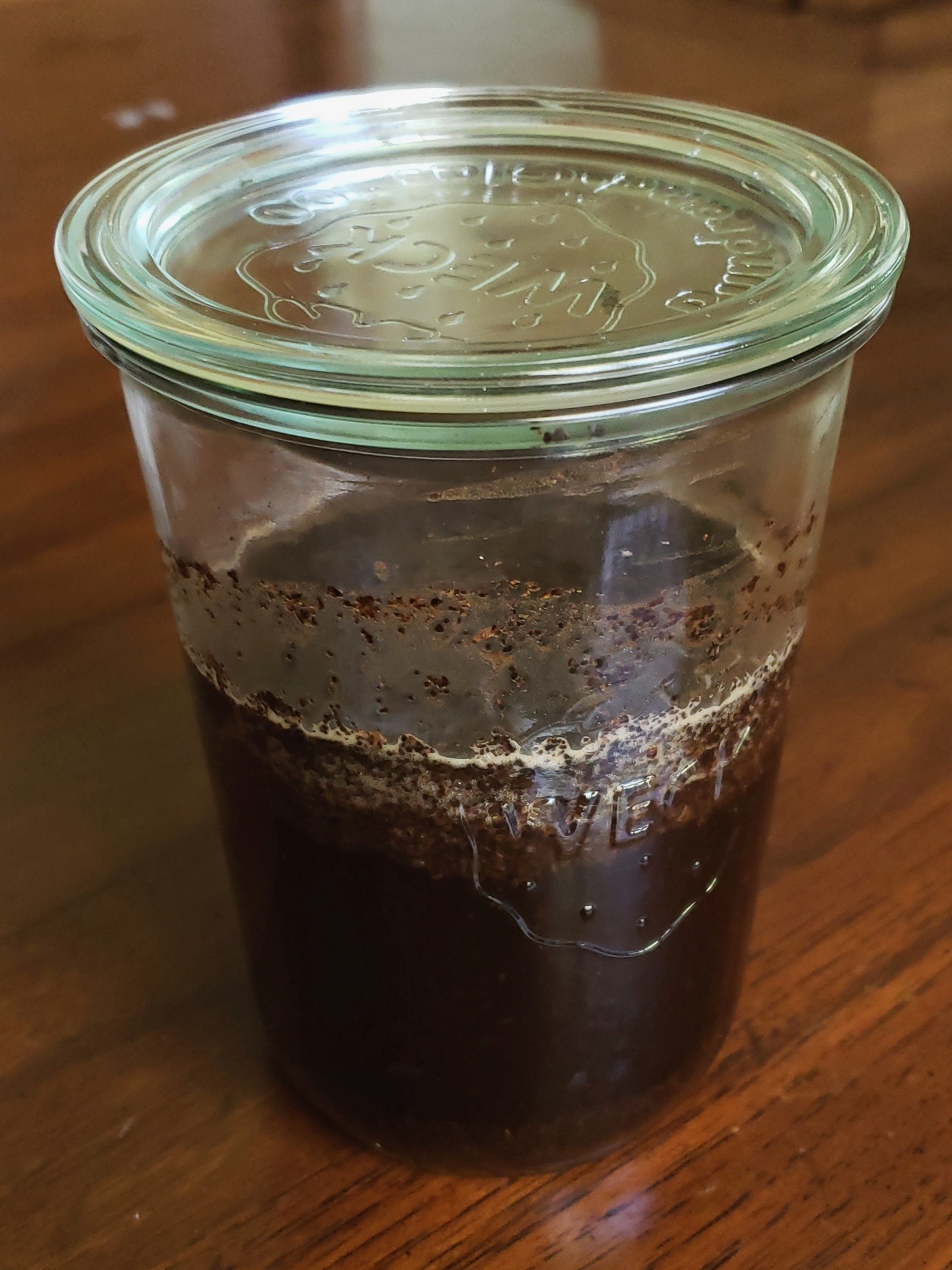
Trying some cold brew with regular store brand coffee.

This is two cups of water with half a cup of whole beans. I used 42 clicks on my manual burr grinder. The grinds are fairly couse. More fine than I would have thought but I am just testing things.

I will taste this at twelve hours then eighteen hours to see how it comes out.

Trying some cold brew with regular store brand coffee.

This is two cups of water with half a cup of whole beans. I used 42 clicks on my manual burr grinder. The grinds are fairly couse. More fine than I would have thought but I am just testing things.

I will taste this at twelve hours then eighteen hours to see how it comes out.

0

FleshPick Review: It Sounds Human Because It Technically Is

FleshPick Review: It Sounds Human Because It Technically Is disreport.com
preview

Three posts in a day is bordering spam so I’ll stop here. But this one wrapped up sooner than expected and I’m not good at “scheduling” releases.

…can you tell we do a lot of drugs? I’m beginning to think this is obvious.

Three posts in a day is bordering spam so I’ll stop here. But this one wrapped up sooner than expected and I’m not good at “scheduling” releases.

…can you tell we do a lot of drugs? I’m beginning to think this is obvious.

0

Seasonal art at home

preview

Started making seasonal posters for the family to hang in the hallway. The original idea was to make four total, but this autumn has inspired two. Just took down the Halloween poster and swapped in this newly completed Great Pumpkin poster. Combination of brush and pen, as well as watercolor pencils.

Started making seasonal posters for the family to hang in the hallway. The original idea was to make four total, but this autumn has inspired two. Just took down the Halloween poster and swapped in this newly completed Great Pumpkin poster. Combination of brush and pen, as well as watercolor pencils.

0

Developer's $300 Embroidery Machine Required a Subscription, So She Built This Open Source Tool

It&#x27;s FOSS Developer&#x27;s $300 Embroidery Machine Required a Subscription, So She Built This Open Source Tool itsfoss.com
preview

A tinkerer, Kathy Korevec, has made ZigZag available under the Apache 2.0 license. She says that the entire app was built with AI, using ChatGPT, and her goal was to get software made to her specs, similar to the Adobe suite, but with MCP support built in.

That MCP support is a built-in server that lets AI agents draw and edit in the same window.

Her post about this on Hacker News has already managed to reach top 10 status (over a 48-hour period), and she has been answering questions there about how this was built and which machines it supports.

ZigZag: Why develop this?

This was built around a Brother Skitch PP1 embroidery machine that she says cost her around $300.

You see, the Skitch needs Brother’s Artspira app to operate. While the app is free and works with the machine, a paid plan called Artspira+ adds useful extras such as digitizing images into embroidery patterns and creating cross-stitch patterns.

Kathy says the free version is limited in colors and tools, and she believes some of the clip art is reserved for subscribers. She also guesses Brother sold the machine at a loss at first because of the subscription.

That last bit checks out, seeing what many hardware manufacturers are doing.

ZigZag imports SVG art and can trace PNG and JPEG images into shapes. It covers 11 stitch types, including fill, satin, and appliqué, with a preview of the stitches being shown in the editor.

As for the MCP server, it lets an AI agent inspect the open design, add and edit objects and text, trace images, preview the stitches, and export files. It can also control a Skitch device, and each action counts as one undo step.

This is not something new.

Open source embroidery tools existed before ZigZag. People have brought up projects like Ink/Stitch, an Inkscape extension, and Respira already lets people send designs to the Skitch without Artspira.

The project also credits Respira for the Bluetooth protocol and sewing flow. Kathy says she reverse-engineered the protocol herself and that her agent used Respira to verify it. Get sewing

Currently, ZigZag is available for Windows and macOS. You can grab the latest release from the project website or its GitHub releases page. ZigZag

The README covers installation, Bluetooth pairing, and the MCP server, and it advises against firmware updates on the Skitch. Linux users can follow its steps for building ZigZag from source with Rust.

The Brother Skitch PP1 is the only machine ZigZag sends designs to over Bluetooth, and Artspira needs to be closed first since the Skitch can only talk to one app at a time.

For other machines, ZigZag can export PES, DST, EXP, JEF, or VP3 files.
A tinkerer, Kathy Korevec, has made ZigZag available under the Apache 2.0 license. She says that the entire app was built with AI, using ChatGPT, and her goal was to get software made to her specs, similar to the Adobe suite, but with MCP support built in.

That MCP support is a built-in server that lets AI agents draw and edit in the same window.

Her post about this on Hacker News has already managed to reach top 10 status (over a 48-hour period), and she has been answering questions there about how this was built and which machines it supports.

ZigZag: Why develop this?

This was built around a Brother Skitch PP1 embroidery machine that she says cost her around $300.

You see, the Skitch needs Brother’s Artspira app to operate. While the app is free and works with the machine, a paid plan called Artspira+ adds useful extras such as digitizing images into embroidery patterns and creating cross-stitch patterns.

Kathy says the free version is limited in colors and tools, and she believes some of the clip art is reserved for subscribers. She also guesses Brother sold the machine at a loss at first because of the subscription.

That last bit checks out, seeing what many hardware manufacturers are doing.

ZigZag imports SVG art and can trace PNG and JPEG images into shapes. It covers 11 stitch types, including fill, satin, and appliqué, with a preview of the stitches being shown in the editor.

As for the MCP server, it lets an AI agent inspect the open design, add and edit objects and text, trace images, preview the stitches, and export files. It can also control a Skitch device, and each action counts as one undo step.

This is not something new.

Open source embroidery tools existed before ZigZag. People have brought up projects like Ink/Stitch, an Inkscape extension, and Respira already lets people send designs to the Skitch without Artspira.

The project also credits Respira for the Bluetooth protocol and sewing flow. Kathy says she reverse-engineered the protocol herself and that her agent used Respira to verify it. Get sewing

Currently, ZigZag is available for Windows and macOS. You can grab the latest release from the project website or its GitHub releases page. ZigZag

The README covers installation, Bluetooth pairing, and the MCP server, and it advises against firmware updates on the Skitch. Linux users can follow its steps for building ZigZag from source with Rust.

The Brother Skitch PP1 is the only machine ZigZag sends designs to over Bluetooth, and Artspira needs to be closed first since the Skitch can only talk to one app at a time.

For other machines, ZigZag can export PES, DST, EXP, JEF, or VP3 files.

0

The United Kingdom launched its new Titania military satellite as part of a £3 billion investment to strengthen its presence in space

Zona Militar The United Kingdom launched its new Titania military satellite as part of a £3 billion investment to strengthen its presence in space www.zona-militar.com
preview

cross-posted from: lemmy.ca/post/73894608

One of the main capabilities planned for Titania involves free-space optical communications (FSOC). This technology uses beams of light to transmit information between satellites and ground stations. Its main advantage is its high data-transfer capacity, which is particularly useful for distributing large volumes of military information. The original project called for establishing communications with the Puck optical ground station, developed by Dstl.

cross-posted from: lemmy.ca/post/73894608

One of the main capabilities planned for Titania involves free-space optical communications (FSOC). This technology uses beams of light to transmit information between satellites and ground stations. Its main advantage is its high data-transfer capacity, which is particularly useful for distributing large volumes of military information. The original project called for establishing communications with the Puck optical ground station, developed by Dstl.

0

Chronicles: Medieval developer declared bankruptcy on the day it announced it was in trouble, but development will continue after a $5 million reprieve from Coffee Stain

PC Gamer Chronicles: Medieval developer declared bankruptcy on the day it announced it was in trouble, but development will continue after a $5 million reprieve from Coffee Stain www.pcgamer.com
preview

A new studio overseen by “key members” of the Chronicles team will finish the historical strategy.

A new studio overseen by “key members” of the Chronicles team will finish the historical strategy.

0

littleFedi è un singolo file binario ma anche un intero server del fediverso: un piccolo server ActivityPub scritto in Go.

preview

littleFedi è un singolo file binario ma anche un intero server del fediverso: un piccolo server ActivityPub scritto in Go.

#littleFedi viene distribuito come un singolo eseguibile statico con un’interfaccia web renderizzata lato server, un’API client compatibile con Mastodon, una coda di federazione persistente, strumenti di moderazione e supporto opzionale per PostgreSQL e S3. Non è necessario installare alcun runtime né configurare alcun servizio.

Qui puoi trovare il link al repo di #littleFedi grazie al lavoro di @stefano e della sua community

littlefedi.org/index.html

@fediverso

#Fediverso
RE: mastodon.bsd.cafe/users/stefan…

littleFedi è un singolo file binario ma anche un intero server del fediverso: un piccolo server ActivityPub scritto in Go.

#littleFedi viene distribuito come un singolo eseguibile statico con un’interfaccia web renderizzata lato server, un’API client compatibile con Mastodon, una coda di federazione persistente, strumenti di moderazione e supporto opzionale per PostgreSQL e S3. Non è necessario installare alcun runtime né configurare alcun servizio.

Qui puoi trovare il link al repo di #littleFedi grazie al lavoro di @stefano e della sua community

littlefedi.org/index.html

@fediverso

#Fediverso
RE: mastodon.bsd.cafe/users/stefan…

0

Are you seeing subscript and superscript in comment text?

preview

[Solved? Oh, I see, it only applies to words and is cancelled by spaces, unlike Bold and Italics which applies to entire phrases and encompasses words. ^This^ ^is^ ^supercript.^

^This should be superscript.^

This should be normal script.

~This should be subscript.~

I just made a comment somewhere and it did not format correctly on the post’s page, just came out as plain text with the tildes and carets.

On 2.47.2 on Samsung Tab with stock android.

Edit: Yup. I’m seeing the formatting marks but they’re not being interpreted.

^test^

[Solved? Oh, I see, it only applies to words and is cancelled by spaces, unlike Bold and Italics which applies to entire phrases and encompasses words. ^This^ ^is^ ^supercript.^

^This should be superscript.^

This should be normal script.

~This should be subscript.~

I just made a comment somewhere and it did not format correctly on the post’s page, just came out as plain text with the tildes and carets.

On 2.47.2 on Samsung Tab with stock android.

Edit: Yup. I’m seeing the formatting marks but they’re not being interpreted.
^test^