#askandroid

posts tagged #askandroid

0

does bankID and other banking apps work on the chinese version of the xiaomi 17 pro/18 pro series?

preview

in sweden bankID and other banking apps are you know pretty important, and ive looked online and i cant really get a concrete answer if they work or not. One article said that bankID thought the phone was screen recording, when it was most likely the back display

SO should i get the chinese version and save some money, or should i just wait for the global version of the 18 pro?

in sweden bankID and other banking apps are you know pretty important, and ive looked online and i cant really get a concrete answer if they work or not. One article said that bankID thought the phone was screen recording, when it was most likely the back display

SO should i get the chinese version and save some money, or should i just wait for the global version of the 18 pro?

0

Good music players for e-ink displays?

preview

EDIT: The Boox Palma includes an e-ink mp3 player. FLAC not listed.

I am likely going to buy a Boox Palma 3 once it comes out and I’d like to use its SD expansion slot for offline audio (audiobooks, podcasts, and music). Can anyone recommend an mp3/flac player for monochrome e-ink displays?

EDIT: The Boox Palma includes an e-ink mp3 player. FLAC not listed.

I am likely going to buy a Boox Palma 3 once it comes out and I’d like to use its SD expansion slot for offline audio (audiobooks, podcasts, and music). Can anyone recommend an mp3/flac player for monochrome e-ink displays?

0

Good source to download Samsung device ROMs??

preview

Hi there,

I’m looking for good, relatively secure sources to download Samsung device ROMs. I’m about to try LineageOS on a few devices, but I’d like to have a backup in case things go bad and I need to revert to the stock Samsung ROM.

I have a Samsung Tab A7 Lite and a Samsung S20 5G. I found ROMs on some shady websites and I don’t trust them one bit. Would anyone have an alternative source?

Hi there,

I’m looking for good, relatively secure sources to download Samsung device ROMs. I’m about to try LineageOS on a few devices, but I’d like to have a backup in case things go bad and I need to revert to the stock Samsung ROM.

I have a Samsung Tab A7 Lite and a Samsung S20 5G. I found ROMs on some shady websites and I don’t trust them one bit. Would anyone have an alternative source?

0

Removed Android Developer Verifier

preview

I started the so-called advanced workflow to enable the installation of apps from unverified developers on my tablet, and because I didn’t want to wait the 24h post-restart period to truly enable it, figured I could try bypassing the process by uninstalling the verifier’s package (com.google.android.verifier). I didn’t expect anything, but as it turns out, it really got uninstalled and my tablet’s original apk isn’t anywhere to be found. Now, I’m wondering if this is going to prevent me from installing unverified apps when the time comes, or if there’ll be nothing to verify with on the first place, and if the verification process just won’t be there. Truth be told, I don’t believe bypassing Google’s hurdles is that easy, so I’ll admit the whole thing is leaving me a bit confused. Anyone more knowledgeable than me know anything about this?

I started the so-called advanced workflow to enable the installation of apps from unverified developers on my tablet, and because I didn’t want to wait the 24h post-restart period to truly enable it, figured I could try bypassing the process by uninstalling the verifier’s package (com.google.android.verifier). I didn’t expect anything, but as it turns out, it really got uninstalled and my tablet’s original apk isn’t anywhere to be found. Now, I’m wondering if this is going to prevent me from installing unverified apps when the time comes, or if there’ll be nothing to verify with on the first place, and if the verification process just won’t be there. Truth be told, I don’t believe bypassing Google’s hurdles is that easy, so I’ll admit the whole thing is leaving me a bit confused. Anyone more knowledgeable than me know anything about this?

0

FOSS and/or ADB screen dimmer below 0%?

preview

cross-posted from: lemmy.world/post/52505583

Hi all,

There are a number of apps on the Android App Store that enable you to lower the minimum backlight brightness (or claim to), but I’m looking for de-Googled FOSS options.

Any suggestions? Thanks

cross-posted from: lemmy.world/post/52505583

Hi all,

There are a number of apps on the Android App Store that enable you to lower the minimum backlight brightness (or claim to), but I’m looking for de-Googled FOSS options.

Any suggestions? Thanks

0

nothing phone 1 struggles to play older videos from my s21

preview

so i switched from i s21 to a nothing phone 1 with lineageOS, and when i try to play a video before like the beginning of 2026 it either doesn’t play (was like that on the default gallery app and fossify gallery) or it plays but its extremely stuttering. I’m not sure if it’s 'cause my nothing phone can’t like handle the videos from my s21, but when i watch videos from a couple of months ago its fine?!?!?!?!?? help

so i switched from i s21 to a nothing phone 1 with lineageOS, and when i try to play a video before like the beginning of 2026 it either doesn’t play (was like that on the default gallery app and fossify gallery) or it plays but its extremely stuttering. I’m not sure if it’s 'cause my nothing phone can’t like handle the videos from my s21, but when i watch videos from a couple of months ago its fine?!?!?!?!?? help

0

Looking for an Android phone similar in size to the HTC First, but able to run a more privacy-focused ROM

preview

I’m looking for an Android phone that is similar in size to the HTC First (4.3"), but is able to run a more privacy-focused ROM, such as GrapheneOS, Calyx, /e/, etc.

Or, maybe, for a way to run such a ROM on the HTC First, which I currently own.

Any help is greatly appreciated!

I’m looking for an Android phone that is similar in size to the HTC First (4.3"), but is able to run a more privacy-focused ROM, such as GrapheneOS, Calyx, /e/, etc.

Or, maybe, for a way to run such a ROM on the HTC First, which I currently own.

Any help is greatly appreciated!

0

Looking for a recipe manager.

preview

Hi there, I was looking for a FOSS app to manage my recipes, I previously used kitshn for tandoor which was amazing, however the app needs a server and internet connectivity, I’m looking for one that has the following features:

  • Import recipes from the web
  • Manage grocery lists
  • Timers
  • Checklists for which ingredients you have put in
  • Offline functionality

Hi there, I was looking for a FOSS app to manage my recipes, I previously used kitshn for tandoor which was amazing, however the app needs a server and internet connectivity, I’m looking for one that has the following features:

  • Import recipes from the web
  • Manage grocery lists
  • Timers
  • Checklists for which ingredients you have put in
  • Offline functionality
0

Duration of declined calls in call history

preview

I made 2 successive calls within 2 minutes to the same number, neither of which was answered. On my end the phone rang for the same approximate duration until the calls went to voice mail. Yet when I checked the duration of the calls (Motorola Edge Plus 5g UW 2022) the first call registered 8 seconds while the second only registered 2 seconds. Does that mean that the second call was declined? edit: I forgot to mention that I hang up as soon as the call goes to voicemail. Thank you in advance

I made 2 successive calls within 2 minutes to the same number, neither of which was answered. On my end the phone rang for the same approximate duration until the calls went to voice mail. Yet when I checked the duration of the calls (Motorola Edge Plus 5g UW 2022) the first call registered 8 seconds while the second only registered 2 seconds. Does that mean that the second call was declined? edit: I forgot to mention that I hang up as soon as the call goes to voicemail. Thank you in advance

0

Is there a way to automatically set an alarm a specified amount of time before the first calendar event in the morning?

preview

I use the Calendula app, which has the option to send a reminder before an event, but not an alarm per se. I sync Android’s calendar to my Radicale server with davx⁵ if that matters. I have a Huawei P30 pro.

I use the Calendula app, which has the option to send a reminder before an event, but not an alarm per se. I sync Android’s calendar to my Radicale server with davx⁵ if that matters. I have a Huawei P30 pro.

0

Anybody with experience with LineageOS on something like a Chromecast?

preview

Currently I have a HTPC hooked up to my TV in my living room and with a k830 (best wireless keyboard until presumably the framework one?! ) its okeyish to control, very manual, but it works. The ability to boot up steam big picture or opening blu-rays makes up for that.

However I recently found out that there are some Lineage OS builds for Chromecasts . I used to have an Apple TV and did enjoy the ease of use and am now wondering what the experience is like with a more or less degoogled Chromecast. What are your Android TV setups like? I guess the biggest question I have is if would be able to cast content like videos from my phone (also Lineage OS) so the Chromecast fetches the content itself rather than casting the phone screen, as that would probably come with a big downgrade in quality.

Currently I have a HTPC hooked up to my TV in my living room and with a k830 (best wireless keyboard until presumably the framework one?! ) its okeyish to control, very manual, but it works. The ability to boot up steam big picture or opening blu-rays makes up for that.

However I recently found out that there are some Lineage OS builds for Chromecasts . I used to have an Apple TV and did enjoy the ease of use and am now wondering what the experience is like with a more or less degoogled Chromecast. What are your Android TV setups like? I guess the biggest question I have is if would be able to cast content like videos from my phone (also Lineage OS) so the Chromecast fetches the content itself rather than casting the phone screen, as that would probably come with a big downgrade in quality.

0

Phone brand that lets you fully unlock bootloader

preview

Hi,

Which decent phone that will last me for some time and wont break easily is the best to buy that lets you fully unlock the bootloader so I can flash custom ROM on it and root it if I wanted to by for example using Magisk by flashing patched boot.img and (optionally if specific model allows) installing custom recovery?

I have a Samsung that I could unlock bootloader on, however Samsung decided to block the option to unlock OEM starting in One UI 8.0 on all regions, and I was unlucky enough to update my phone (because I didnt know) so I cant root/flash custom ROM on it.

My guess would be some Google Pixel model,? but which one should I buy that has support for most ROMs and TWRP?

Google is also soon introducing mandatory ID verification for developers that want to publish their apps on Play Store on all Andro id verified devices, whch is another reason I want a phone that I can flash custom ROM on and root.

Also where should I buy new phone from? I think I should avoid buying from carrier and instead buying it online or from local electronics store?

Hi,

Which decent phone that will last me for some time and wont break easily is the best to buy that lets you fully unlock the bootloader so I can flash custom ROM on it and root it if I wanted to by for example using Magisk by flashing patched boot.img and (optionally if specific model allows) installing custom recovery?

I have a Samsung that I could unlock bootloader on, however Samsung decided to block the option to unlock OEM starting in One UI 8.0 on all regions, and I was unlucky enough to update my phone (because I didnt know) so I cant root/flash custom ROM on it.

My guess would be some Google Pixel model,? but which one should I buy that has support for most ROMs and TWRP?

Google is also soon introducing mandatory ID verification for developers that want to publish their apps on Play Store on all Andro id verified devices, whch is another reason I want a phone that I can flash custom ROM on and root.

Also where should I buy new phone from? I think I should avoid buying from carrier and instead buying it online or from local electronics store?

0

Is there a Configurable Assistant for Android?

preview

I have a Pixel 3A with LineageOS.

You can squeeze the Pixel 3 to activate a shortcut which google called Active Edge. Lineage provides an reverse engineered implementation of that where you can set the action to one of the one shown in the image. I would like to set it to open a specific app (FossWallet) however that is not an option.

But as I do not have any Assistant App yet, I have some hopes now that there is some kind of app that acts as an “Assistant” which you can configure to your liking. eg. launching an App or some Automation. Does anybody know of an app like that? Preferable available on Fdroid.

I have a Pixel 3A with LineageOS.

You can squeeze the Pixel 3 to activate a shortcut which google called Active Edge. Lineage provides an reverse engineered implementation of that where you can set the action to one of the one shown in the image. I would like to set it to open a specific app (FossWallet) however that is not an option.

But as I do not have any Assistant App yet, I have some hopes now that there is some kind of app that acts as an “Assistant” which you can configure to your liking. eg. launching an App or some Automation. Does anybody know of an app like that? Preferable available on Fdroid.

0

Can I use two password managers at the same time?

preview

I use a password manager personally, but my work uses a different application. Both common names in this space.

Android lets me set one password filler, but I don’t see how to go about having two active, if that’s even possible.

Ideally, I’d like to keep the application/web credentials for work in the work password manager, and everything else in my personal one, and get recommendations/autofill from only the one with a matching app ID or URL saved.

Any tips?

I have both installed, but opening the work password manager every time I need it is annoying.

I use a password manager personally, but my work uses a different application. Both common names in this space.

Android lets me set one password filler, but I don’t see how to go about having two active, if that’s even possible.

Ideally, I’d like to keep the application/web credentials for work in the work password manager, and everything else in my personal one, and get recommendations/autofill from only the one with a matching app ID or URL saved.

Any tips?

I have both installed, but opening the work password manager every time I need it is annoying.

0

Is there a way to fix volume controls for EarPods on Android?

preview

Hello all,

I have a Pixel 3a with Lineage OS.
I also have wired EarPods from Apple (3.5mm jack not the USB-C one) however it seems like the volume controls on there do not work (only play/pause). This is apparently nothing new as Apple and Google implemented inline controls differently.

I saw a couple of apps on fdroid improving AirPod support however I was not able to find the same for wired EarPods.
f-droid.org/packages/com.dosse.airpods/
play.google.com/store/apps/details?id=me.kavishde…
f-droid.org/packages/eu.darken.capod/

Does anybody know if there is a way to fix EarPods on Android?

Hello all,

I have a Pixel 3a with Lineage OS.
I also have wired EarPods from Apple (3.5mm jack not the USB-C one) however it seems like the volume controls on there do not work (only play/pause). This is apparently nothing new as Apple and Google implemented inline controls differently.

I saw a couple of apps on fdroid improving AirPod support however I was not able to find the same for wired EarPods.
f-droid.org/packages/com.dosse.airpods/
play.google.com/store/apps/details?id=me.kavishde…
f-droid.org/packages/eu.darken.capod/

Does anybody know if there is a way to fix EarPods on Android?

0

How to increase the storage space in my device ?🤔🤔

preview

I understand it’s a very stupid question, but l really need to master the skill of cleaning of my device very frequently, as this is the only one l have to do all of my work. Here’s the current available space :
lzwW3SoczT4cUi4.jpg

I understand it’s a very stupid question, but l really need to master the skill of cleaning of my device very frequently, as this is the only one l have to do all of my work. Here’s the current available space :
lzwW3SoczT4cUi4.jpg

0

Does Aurora Store automatically install Google Services/microG?

preview

cross-posted from: piefed.social/…/does-aurora-store-automatically-i…

Hello all,
just got my Android Phone with LineageOS installed. (Pixel 3a (LineageOS 22))

Have a question now regarding Apps needing Google Services. When Installing LineageOS i have opted out of installing any Google Apps, at least I really do think so.

However, I just installed Aurora Store to install a banking app I need. I did not do anything else and only installed Aurora Store and the Banking App without microG or other replacement. It says under compatibility that it would work with limited features if Google Play Services are not installed so I thought I give it a try and see how far I get.

Surprisingly far as it turns out. Everything works except for notifications, but that was to be expected. But now I notice two updates in the Aurora Store:

  • Android System Intelligence
  • Private Compute Services
    Am I correct to assume that these are integral to the AOSP/LineageOS? or does Aurora Store install Google Services when missing? I kinda expected that those components would be updated through the normal LineageOS update flow and not through Aurora Store.

Hope somebody can clear those questions up.

PS: Android is so incredibly delightful btw. happy to have switched back.

cross-posted from: piefed.social/…/does-aurora-store-automatically-i…

Hello all,
just got my Android Phone with LineageOS installed. (Pixel 3a (LineageOS 22))

Have a question now regarding Apps needing Google Services. When Installing LineageOS i have opted out of installing any Google Apps, at least I really do think so.

However, I just installed Aurora Store to install a banking app I need. I did not do anything else and only installed Aurora Store and the Banking App without microG or other replacement. It says under compatibility that it would work with limited features if Google Play Services are not installed so I thought I give it a try and see how far I get.

Surprisingly far as it turns out. Everything works except for notifications, but that was to be expected. But now I notice two updates in the Aurora Store:

  • Android System Intelligence
  • Private Compute Services
    Am I correct to assume that these are integral to the AOSP/LineageOS? or does Aurora Store install Google Services when missing? I kinda expected that those components would be updated through the normal LineageOS update flow and not through Aurora Store.

Hope somebody can clear those questions up.

PS: Android is so incredibly delightful btw. happy to have switched back.

0

What is this and how do I get rid of it?

preview

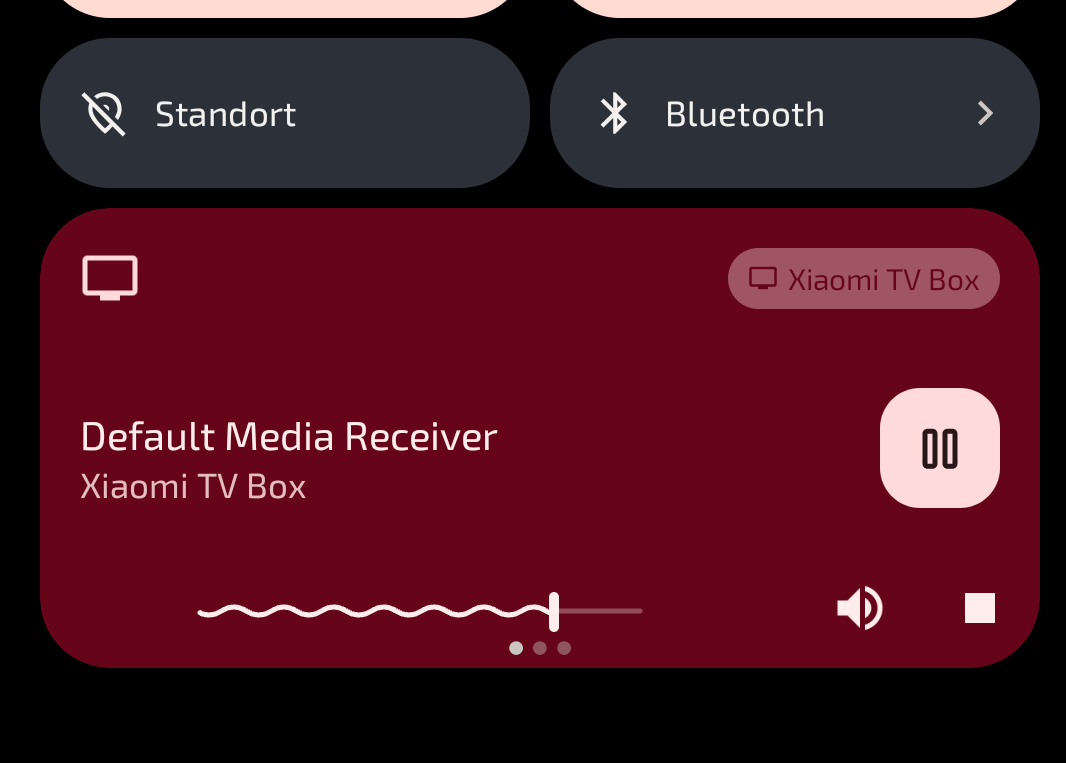
When I’m logged into my home wifi there’s frequently a media player window showing me being connected/playing media from a xiaomi tv box (possibly a roommate’s) that to my memory I never connected to. What is it doing there? Did the tv box possibly get hacked and is doing uncool stuff now? How do I disconnect from it/block it? I can’t really find anything useful in the settings.

When I’m logged into my home wifi there’s frequently a media player window showing me being connected/playing media from a xiaomi tv box (possibly a roommate’s) that to my memory I never connected to. What is it doing there? Did the tv box possibly get hacked and is doing uncool stuff now? How do I disconnect from it/block it? I can’t really find anything useful in the settings.

0

iPhone guy wondering how you guys manage your gallery!

preview

Bit of back story, I started with Android (2010-2014) but have used iPhone since. I have an Android phone (Galaxy S10) I use for some things. My wife is an Android user since 2010 but is not very technical.

Right to my question: how do you manage your images/gallery on Android? I know that the Android OS defaults to sorting by folder. I used to use QuickPic; my current gallery of choice is Google Gallery, for its simplicity (and being free). So you have your camera pics, your saved images, images from various apps tend to be in folders for those apps.

Is that organisation good enough for you? Or do you do more?

Jumping over to the Apple side, every image, saved or taken with the camera, goes into the “Camera Roll” gallery. It’s all one monolithic thing. You can create albums within it, but unless you did that from the start, it’s a monolithic task. Fortunately I found an app that makes it easy. It shows me an image, I tap the album I want to put it in. After a few hours, I had it sorted. Now I have a wallpaper album, an album of pictures of my wife, an album for holidays, an album for friends, one for cars, one for food… and so on. Every week or so I go back to this app to get the unsorted ones.

Yesterday I was looking at my wife’s phone, and something bothered me. It occurred to me that, she’s had this phone for 3 years and has never changed the lock screen. She said she tried to do it once and couldn’t figure it out, so she left it alone. (It’s a Galaxy S22, if you’re curious.) I had a minute, so I dived in. Found it pretty quick. Asked her what she wanted. She said there was a wallpaper from this anime I sent her once… This is when I found an issue with Android’s image organisation. It was hard to navigate and completely unsorted. (Likely, partially user error, which is why I’m asking here!) I solved the problem by going to my iPhone, going into my wallpaper album, finding the wallpaper in question, sending it over to her, and then picking it as the most recent image. I got the clock set up with her favourite colour, and now she’s super happy with her lock screen. It’s no longer “just there,” now it reflects its owner better. Win/win. (Of course, if you looked at my S10, you’d never know it was managed by an “Apple guy.” Nova Prime, everything customised to specification… honestly still an awesome phone, and does a few things better than my five-years-newer 16 Pro Max.)

So, TL;DR: are you happy with the folder-based (source-based) gallery system in Android? If so, how do you make it work for you? How can a user with something like 2500 saved images best make it work for them?

Bit of back story, I started with Android (2010-2014) but have used iPhone since. I have an Android phone (Galaxy S10) I use for some things. My wife is an Android user since 2010 but is not very technical.

Right to my question: how do you manage your images/gallery on Android? I know that the Android OS defaults to sorting by folder. I used to use QuickPic; my current gallery of choice is Google Gallery, for its simplicity (and being free). So you have your camera pics, your saved images, images from various apps tend to be in folders for those apps.

Is that organisation good enough for you? Or do you do more?

Jumping over to the Apple side, every image, saved or taken with the camera, goes into the “Camera Roll” gallery. It’s all one monolithic thing. You can create albums within it, but unless you did that from the start, it’s a monolithic task. Fortunately I found an app that makes it easy. It shows me an image, I tap the album I want to put it in. After a few hours, I had it sorted. Now I have a wallpaper album, an album of pictures of my wife, an album for holidays, an album for friends, one for cars, one for food… and so on. Every week or so I go back to this app to get the unsorted ones.

Yesterday I was looking at my wife’s phone, and something bothered me. It occurred to me that, she’s had this phone for 3 years and has never changed the lock screen. She said she tried to do it once and couldn’t figure it out, so she left it alone. (It’s a Galaxy S22, if you’re curious.) I had a minute, so I dived in. Found it pretty quick. Asked her what she wanted. She said there was a wallpaper from this anime I sent her once… This is when I found an issue with Android’s image organisation. It was hard to navigate and completely unsorted. (Likely, partially user error, which is why I’m asking here!) I solved the problem by going to my iPhone, going into my wallpaper album, finding the wallpaper in question, sending it over to her, and then picking it as the most recent image. I got the clock set up with her favourite colour, and now she’s super happy with her lock screen. It’s no longer “just there,” now it reflects its owner better. Win/win. (Of course, if you looked at my S10, you’d never know it was managed by an “Apple guy.” Nova Prime, everything customised to specification… honestly still an awesome phone, and does a few things better than my five-years-newer 16 Pro Max.)

So, TL;DR: are you happy with the folder-based (source-based) gallery system in Android? If so, how do you make it work for you? How can a user with something like 2500 saved images best make it work for them?

0

Phone loses signal with Android Auto

preview

When I’m using Android Auto, my phone will intermittently lose cell signal. It doesn’t happen all the time. Sometimes I’ll go weeks or months without it happening, then other times it will happen several times in a single trip.

There have been a couple times when the phone seemed to be acting up before it completely lost the signal. The only way to recover is to restart the phone.

It has never happened when not using Android Auto.

It happens in my current car, a 2022 Honda Ridgeline with wired android auto support. I recently bought a wireless adapter for the car, and it happens with that as well. It also happens when my phone is plugged into our 2020 Honda Civic.

It happened with my previous phones when I was using Android Auto in my 2011 Honda Ridgeline which only had an aftermarket Bluetooth adapter.

Current phone is a Samsung Galaxy S10. Previous phone was an LG Nexus 5x.

It seems that the only common issue is Android Auto.

Has anyone else experienced this?

When I’m using Android Auto, my phone will intermittently lose cell signal. It doesn’t happen all the time. Sometimes I’ll go weeks or months without it happening, then other times it will happen several times in a single trip.

There have been a couple times when the phone seemed to be acting up before it completely lost the signal. The only way to recover is to restart the phone.

It has never happened when not using Android Auto.

It happens in my current car, a 2022 Honda Ridgeline with wired android auto support. I recently bought a wireless adapter for the car, and it happens with that as well. It also happens when my phone is plugged into our 2020 Honda Civic.

It happened with my previous phones when I was using Android Auto in my 2011 Honda Ridgeline which only had an aftermarket Bluetooth adapter.

Current phone is a Samsung Galaxy S10. Previous phone was an LG Nexus 5x.

It seems that the only common issue is Android Auto.

Has anyone else experienced this?

0

How do i stop the android system from using all my free space?

preview

Hours ago i freed up ~600 mb of space.

It is now gone and i have downloaded less than 10mb of items.

Android ate all the remaining space and now will not stop nagging me to delete my files.

Android should delete whatever it decided to do that ate up 500+mb.

It happens all the goddamn time.

I feel violated by the operating system.

Hours ago i freed up ~600 mb of space.

It is now gone and i have downloaded less than 10mb of items.

Android ate all the remaining space and now will not stop nagging me to delete my files.

Android should delete whatever it decided to do that ate up 500+mb.

It happens all the goddamn time.

I feel violated by the operating system.

0

Latest tablet with AOSP?

preview

I’m looking for recommendations for a new-ish tablet that can do light gaming and video streaming, that can run on custom ROMs like Lineageos or equivalent Google-free Android.

I’m looking for recommendations for a new-ish tablet that can do light gaming and video streaming, that can run on custom ROMs like Lineageos or equivalent Google-free Android.

0

Web Extension To Download Images; Firefox/Ironfox

preview

Hello,

Are there any recommendations for web extensions to download images from pages you’re visiting?

I don’t normally use an extension; instead filtering through by using the Dev Tools, but these aren’t available on mobile iirc?

Thank you for your time and I really appreciate any suggestions or direction you may be able to provide!

Have a great New Year!

Hello,

Are there any recommendations for web extensions to download images from pages you’re visiting?

I don’t normally use an extension; instead filtering through by using the Dev Tools, but these aren’t available on mobile iirc?

Thank you for your time and I really appreciate any suggestions or direction you may be able to provide!

Have a great New Year!

0

I have to confirm every installion on F-Droid

preview

What can I do? It’s really annoying if you have a lot of apps and you have to confirm every installation manually… I’m using the newest LineageOS

What can I do? It’s really annoying if you have a lot of apps and you have to confirm every installation manually… I’m using the newest LineageOS

0

Does Shuzku / wireless debugging demand a trusted wifi device?

preview

Hey.

I need a wireless connection to use it, right?

And I can’t use a selfhosted hotspot, right? It must be a second device, like an external hotspot or a modem.

And I authorize that device to adb level, right?

So if my modem is untrustworthy, it could install malware on my phone?

Thank you for clarification.

Hey.

I need a wireless connection to use it, right?

And I can’t use a selfhosted hotspot, right? It must be a second device, like an external hotspot or a modem.

And I authorize that device to adb level, right?

So if my modem is untrustworthy, it could install malware on my phone?

Thank you for clarification.

0

Any good FLOSS day planner ?

preview

Hello,

I’ve been looking for a while for a free day planner. While there are a lot of proprietary ones, there seem to be no good free option apart from traditional calendar apps.

I’m looking for something like Structured, and I find it difficulted to believe that there are millions of users of proprietary day planners and still seem to be no good alternative. Unfortunately I am no developer.

Do you know or use any good free day planner app ?

Hello,

I’ve been looking for a while for a free day planner. While there are a lot of proprietary ones, there seem to be no good free option apart from traditional calendar apps.

I’m looking for something like Structured, and I find it difficulted to believe that there are millions of users of proprietary day planners and still seem to be no good alternative. Unfortunately I am no developer.

Do you know or use any good free day planner app ?

0

Best FOSS NFC app?

preview

I’ve seen NFC Taginfo used a lot, but it appears to be proprietary. MIFARE Classic Tool is FOSS, but it’s for more specific hardware than TagInfo.

Anyone have any suggestions?

I’ve seen NFC Taginfo used a lot, but it appears to be proprietary. MIFARE Classic Tool is FOSS, but it’s for more specific hardware than TagInfo.

Anyone have any suggestions?

0

Which Android tablet would you recommend?

preview

I need an android tablet, the budget is around 270€. It doesn’t need to be really powerful, just something my family could use to play online chess, watch videos etc.

Reparability would also be nice, in the style of fairphone, though I can do without it. It would also be nice if the tablet had an unlockable bootloader and open source ROMs available for it.

I need an android tablet, the budget is around 270€. It doesn’t need to be really powerful, just something my family could use to play online chess, watch videos etc.

Reparability would also be nice, in the style of fairphone, though I can do without it. It would also be nice if the tablet had an unlockable bootloader and open source ROMs available for it.

0

Set desktop mode screen resolution

preview

Hello,

As graphene dropped the QBR update this week, I gave the new desktop mode a try. However, I couldn’t find an option to set the screen resolution. Everything looks really “pixelated” and text is hard to read.

Does anyone know how to set the external screen resolution to 3440*1440p?

(Pixel 8a, Graphene OS)

Hello,

As graphene dropped the QBR update this week, I gave the new desktop mode a try. However, I couldn’t find an option to set the screen resolution. Everything looks really “pixelated” and text is hard to read.

Does anyone know how to set the external screen resolution to 3440*1440p?

(Pixel 8a, Graphene OS)

0

Can I turn it off?

preview

Hi, phone is galaxy s22. Can I turn this off in status bar? I don’t want to remove music player widget thingy from notifications. Thanks a bunch

Hi, phone is galaxy s22. Can I turn this off in status bar? I don’t want to remove music player widget thingy from notifications. Thanks a bunch

0

To what extent dœs mass-overwriting files with random data wear out NAND storage ?

preview

Need to overwrite lots data (talkin ≳100 GB) using some thing like Extirpater in hopes it all can’t be recovered . Hoping some one here will have knowledge whether this’s safe for me to do as it’s not really explained tꝏ well in provided link !

EDIT : Asked this in a discord the answer I got was that any phone NAND should take a few times it’s full capacity in read write just fine as long’s you’re not doing it tꝏ often , so guess that means I’m in the clear ?

Need to overwrite lots data (talkin ≳100 GB) using some thing like Extirpater in hopes it all can’t be recovered . Hoping some one here will have knowledge whether this’s safe for me to do as it’s not really explained tꝏ well in provided link !

EDIT : Asked this in a discord the answer I got was that any phone NAND should take a few times it’s full capacity in read write just fine as long’s you’re not doing it tꝏ often , so guess that means I’m in the clear ?

0

Best Android TV box in 2025?

preview

I’ve got an old nVidia Shield (2017) that doesn’t handle 4K AV1. Unfortunately, it looks like AV1 is missing from the latest models, too.

Anyone have a good ad-free’ish suggestion?

I’ve got an old nVidia Shield (2017) that doesn’t handle 4K AV1. Unfortunately, it looks like AV1 is missing from the latest models, too.

Anyone have a good ad-free’ish suggestion?

0

Bluetooth turns itself on every day after Android 16 update

preview

After my phone updated to Android 16 last week, I’ve noticed that bluetooth gets re-enabled every day, even though I manually turn it off. I never use anything with bluetooth, so I figure I should just leave it off. I disable it in the top pull-down settings menu. But, every morning, it is turned back on again. I’m about 99.9% sure that I’m not turning it on in my sleep.

Any ideas as to why this could be happening?

Phone: Pixel 6a
Android version: 16

After my phone updated to Android 16 last week, I’ve noticed that bluetooth gets re-enabled every day, even though I manually turn it off. I never use anything with bluetooth, so I figure I should just leave it off. I disable it in the top pull-down settings menu. But, every morning, it is turned back on again. I’m about 99.9% sure that I’m not turning it on in my sleep.

Any ideas as to why this could be happening?

Phone: Pixel 6a
Android version: 16

0

AI based SMS blocker app

preview

I get a ton of spam messages. I want to archive or delete those messages based on what I flag as spam. A basic Bayesian spam filter would be good too.

I could not find anything in fdroid.

SpamBlocker can filter sms but needs manual hand crafted rules.

One app for notification which does this is FilterBox. I want one for SMS.

I get a ton of spam messages. I want to archive or delete those messages based on what I flag as spam. A basic Bayesian spam filter would be good too.

I could not find anything in fdroid.

SpamBlocker can filter sms but needs manual hand crafted rules.

One app for notification which does this is FilterBox. I want one for SMS.

0

Is it possible to move the three buttons at the bottom to the side?

preview

I’m talking about the back, home and app switcher buttons. I’ve just bought a Google Pixel Pro 9 but something that’s really bugging me is that I can barely reach the back button, I keep accidentally pressing the home button. When I hold my phone in my right hand, my thumb only covers half way across and half way up.

Is there a way to either change the order the buttons are in, or move them all to the side? For some reason I never had this problem on my One Plus 6T even though it’s got a slightly larger display.

I’m talking about the back, home and app switcher buttons. I’ve just bought a Google Pixel Pro 9 but something that’s really bugging me is that I can barely reach the back button, I keep accidentally pressing the home button. When I hold my phone in my right hand, my thumb only covers half way across and half way up.

Is there a way to either change the order the buttons are in, or move them all to the side? For some reason I never had this problem on my One Plus 6T even though it’s got a slightly larger display.

0

anybody else noticing some pages hang loading for ages in Firefox mobile?

preview

cross-posted from: lemmy.sdf.org/post/41691086

anybody else noticing some pages hang loading for ages on mobile?

Using Fennec F-Droid, some pages the progress bar hits 25% and then hangs for an amount of time between a couple minutes to forever. Usually the same page will always hang around the same time, but trying hours or days later it might work. Sometimes the page loads after a couple minutes, but if it doesn’t, I can come back hours later and the progress bar is still at 25% for that tab. Killing the app doesn’t seem to make a difference. I do use Ublock origin and one other extension to redirect reddit links to old.reddit.com. Haven’t started disabling extensions yet, I wanted to see if anyone else is experiencing this on Android.

cross-posted from: lemmy.sdf.org/post/41691086

anybody else noticing some pages hang loading for ages on mobile?

Using Fennec F-Droid, some pages the progress bar hits 25% and then hangs for an amount of time between a couple minutes to forever. Usually the same page will always hang around the same time, but trying hours or days later it might work. Sometimes the page loads after a couple minutes, but if it doesn’t, I can come back hours later and the progress bar is still at 25% for that tab. Killing the app doesn’t seem to make a difference. I do use Ublock origin and one other extension to redirect reddit links to old.reddit.com. Haven’t started disabling extensions yet, I wanted to see if anyone else is experiencing this on Android.

0

I'm new to Lawnchair and I want to like it. Maybe I'm not seeing the right options.

preview

I’m not new to Android, but new to Lawnchair and was able to download and install Lawnchair 15 Beta 1 Google Play release.

So far, I really like it. Folders in the app drawer was great, though it requires a bit more work. I know it’s a beta so I’m keeping my expectations in check.

I’m moving over from Smart Launcher, which I moved to from Nova Launcher. There are two main features that I don’t know I’m just not seeing or if they don’t exist:

  • Access to Hidden Apps: I like to hide my NSFW apps for obvious reasons. It seems like the way to access hidden apps is to go to Settings, App Drawer, and then selectively unhide the app you want to use and then hide it again when you are done. Is that correct? This seems very round-about. Smart Launcher’s hidden drawer feature is really useful and would like to see something similar in Lawnchair
  • Gestures for home screen icons: I like to keep my home screen as minimalistic as possible. I use “swipe up” and “double-tap” gestures on icons on the home screen to toggle alternate apps. For example, I double-tap “Phone” to get to “Contacts”, double-tap “Messages” to open “Google Voice”. I don’t see this feature at all for Lawnchair. Am I missing an option or does Lawnchair not have this feature.

Thanks!

I’m not new to Android, but new to Lawnchair and was able to download and install Lawnchair 15 Beta 1 Google Play release.

So far, I really like it. Folders in the app drawer was great, though it requires a bit more work. I know it’s a beta so I’m keeping my expectations in check.

I’m moving over from Smart Launcher, which I moved to from Nova Launcher. There are two main features that I don’t know I’m just not seeing or if they don’t exist:

  • Access to Hidden Apps: I like to hide my NSFW apps for obvious reasons. It seems like the way to access hidden apps is to go to Settings, App Drawer, and then selectively unhide the app you want to use and then hide it again when you are done. Is that correct? This seems very round-about. Smart Launcher’s hidden drawer feature is really useful and would like to see something similar in Lawnchair
  • Gestures for home screen icons: I like to keep my home screen as minimalistic as possible. I use “swipe up” and “double-tap” gestures on icons on the home screen to toggle alternate apps. For example, I double-tap “Phone” to get to “Contacts”, double-tap “Messages” to open “Google Voice”. I don’t see this feature at all for Lawnchair. Am I missing an option or does Lawnchair not have this feature.

Thanks!

0

What does "grammatical gender" mean here?

preview

Ok, I was looking at developer options and found this “grammatical gender” mean in terms of android device? Like, I tried selecting it and doesn’t seem to do anything…

Device is Galaxy A71 with lineage os 22.2, also my Galaxy A55 with stock oneUI 7 has it. (Both android 15) like what does it do? Just curious…

Ok, I was looking at developer options and found this “grammatical gender” mean in terms of android device? Like, I tried selecting it and doesn’t seem to do anything…

Device is Galaxy A71 with lineage os 22.2, also my Galaxy A55 with stock oneUI 7 has it. (Both android 15) like what does it do? Just curious…