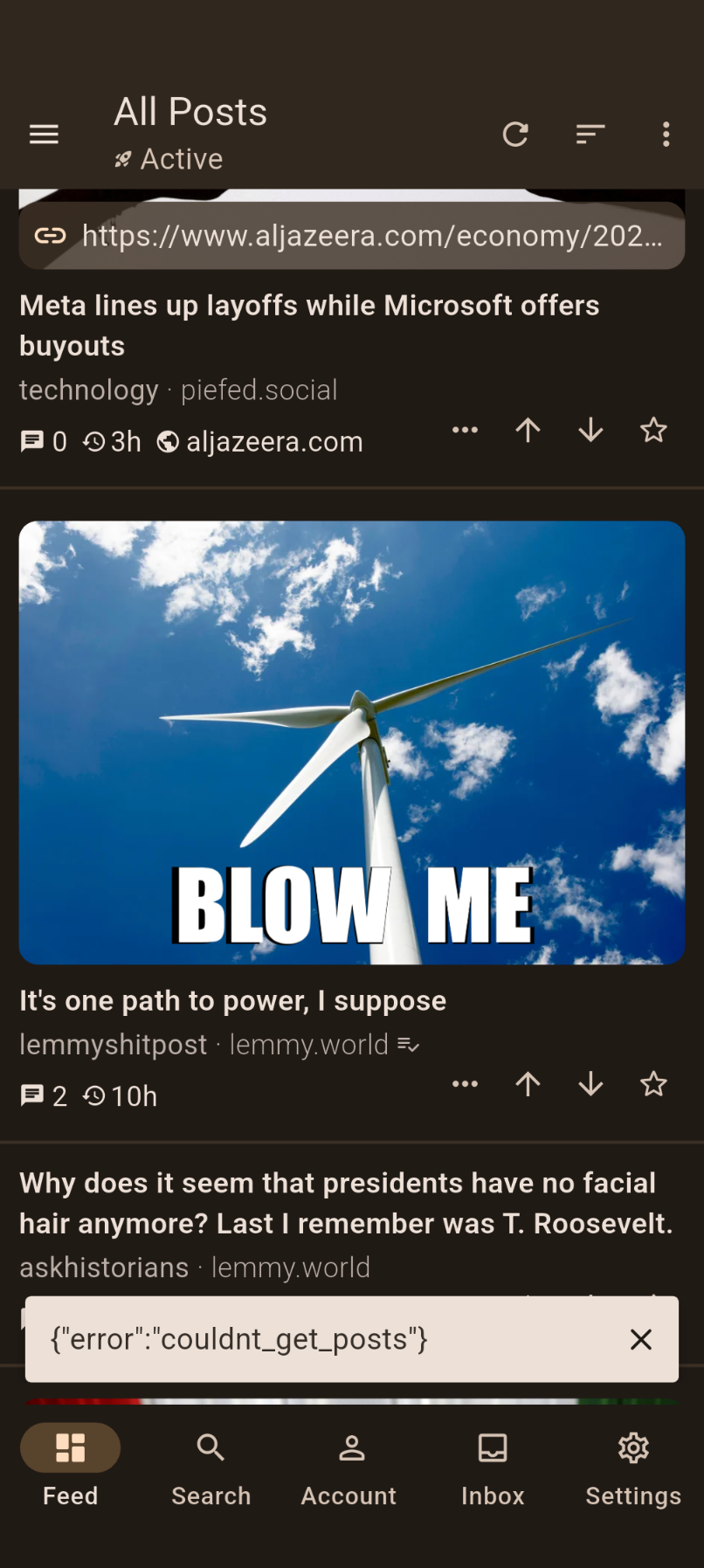
I’m using the app with extra large font because of vision issues but that makes posts hard to navigate because long titles push everything down. The line height is fine with the base font size but I don’t think it works for larger fonts.
I’m using the app with extra large font because of vision issues but that makes posts hard to navigate because long titles push everything down. The line height is fine with the base font size but I don’t think it works for larger fonts.
Recently I started being unable to access slrpnk.net via Thunder. I thought maybe the servers were just down, as I can still access lemmy.world through Thunder. Today I decided to check slrpnk.net in my browser just to check and it works fine (I’m positing this from it now), but I still can not access it through Thunder.
Does anyone else have this issue?
Recently I started being unable to access slrpnk.net via Thunder. I thought maybe the servers were just down, as I can still access lemmy.world through Thunder. Today I decided to check slrpnk.net in my browser just to check and it works fine (I’m positing this from it now), but I still can not access it through Thunder.
Pretty much any interaction with the comment box creates highlights between two words. No matter how you tap, it’s nearly impossible to just have one single cursor. Sometimes it’ll shrink to a single space, but that’s about it, and it’s been like this quite a while.
Typing this post, I’m able to just tap and move the cursor, but if this were a comment, it would create a highlight between where it is, and where I tapped next, every time.
I have been using Thunder as my main Fediverse app for years, across several Lemmy/PieFed accounts. I have been using it with Quokk.au (a PieFed instance) for months without major issue. But for the past few days, I have not been able to log into my Quokk.au account. I can log into any of my other accounts, but when I tap my Quokk.au account, nothing happens. It just does not load.
I recently registered for an account on Anarchist Nexus, which is a PieFed instance. I can log into that account in Thunder, so I do not think it is just a PieFed issue.
I did notice that as of a couple months or so ago, Quokk.au is now actually running a PieFed fork called PyLova. Might that be part of the issue? Just from the README, it does not sound like it should be drastically different enough from mainline PieFed that compatibility with third-party apps breaks.
Another thing to note is that other third-party apps (like Voyager and Blorp) still work fine with Quokk.au. I am posting this from Voyager, which I have switched to in the mean time. And yes, the regular quokk.au does work in a web browser.
Is anyone else experiencing a similar issue? I am not sure what is to blame here and how I should go about rectifying the problem. Can I view error logs is anything for Thunder so I can see what it is trying to do and what responses it receives when I attempt to log in?
Update: Turns out this is caused by viewing a large image and then zooming in. At a certain zoom level the app goes into fullscreen, hiding the navigation buttons and top bar. It then never exits this mode until you quit the app.
v0.9.0-3
Pixel 7 Pro
Android 16
[I edited my screenshot to add the border and the word “SCREENSHOT” because the full size preview was making it very confusing to view the post in the app. 😅]
Context: When one shares a post, there is now an option for sharing it as seen here on the app (Advanced options), and I think it is great. One can even pick what details go into this image, for example, to show or not to show the community name. But the image itself is always white and…
Suggestion/Petition: I’d love if the sharing background followed your app theme (or maybe had a couple of options to choose from).
Personal reasons: My friends and I rarely use white/light themes, so sharing a white summary from Lemmy posts is not ideal. Also, it makes the content look like a meme, and I don’t want someone accidentally ignoring an interesting post because of the white borders.
Thank you for reading.
Really, really small detail.
Context: When one shares a post, there is now an option for sharing it as seen here on the app (Advanced options), and I think it is great. One can even pick what details go into this image, for example, to show or not to show the community name. But the image itself is always white and…
Suggestion/Petition: I’d love if the sharing background followed your app theme (or maybe had a couple of options to choose from).
Personal reasons: My friends and I rarely use white/light themes, so sharing a white summary from Lemmy posts is not ideal. Also, it makes the content look like a meme, and I don’t want someone accidentally ignoring an interesting post because of the white borders.
Great app, but is there any way to limit the number of notifications that pop up at the bottom of the feed? I’m also not sure why they’re not formatted properly.
Great app, but is there any way to limit the number of notifications that pop up at the bottom of the feed? I’m also not sure why they’re not formatted properly.
The draggable cursor has been getting stuck on the span mode, and refuses to go back to the single cursor no matter where you tap. Sometimes the end even gets stuck at the end of the whole comment text, and can’t be moved to span a single character, unless it’s the last one. Sometimes it works fine, but usually not. It does usually seem to go back to normal if you cancel, and re-edit.
The draggable cursor has been getting stuck on the span mode, and refuses to go back to the single cursor no matter where you tap. Sometimes the end even gets stuck at the end of the whole comment text, and can’t be moved to span a single character, unless it’s the last one. Sometimes it works fine, but usually not. It does usually seem to go back to normal if you cancel, and re-edit.
I see an option to back up accounts database, and I see an option to back up settings.
Does Thunder apply distinct settings for each account? If so, do I have to switch to each account and back up those settings I order to restore functionality for each?
Moving to a new phone.
I see an option to back up accounts database, and I see an option to back up settings.
Does Thunder apply distinct settings for each account? If so, do I have to switch to each account and back up those settings I order to restore functionality for each?
Update: It’s caused by the “Show Text Post Indicator” setting being on in Compact mode.
Version v0.9.0-1
I forgot I installed Thunder via Obtanium, so I get very quick updates. I guess I shouldn’t be surprised no one else has seen it. It also turns out it’s caused by a non-default setting.
Is this happening to anyone else? It started after an update.
As Wikipedia starts removing archive.today as a source for its business practices, I see that when I go into alternate sources on a post, I have that as an option. I can’t see where to change the options to remove it, but I’m not sure I want it there.
Can this be changed or is there a plan to remove?
As Wikipedia starts removing archive.today as a source for its business practices, I see that when I go into alternate sources on a post, I have that as an option. I can’t see where to change the options to remove it, but I’m not sure I want it there.
It’s annoying to have to scroll back up to view the clock l, change music or skip ads in pod carts so I’d like to be able to see and interact with the top notification bar all the time
It’s annoying to have to scroll back up to view the clock l, change music or skip ads in pod carts so I’d like to be able to see and interact with the top notification bar all the time
Edit: RESOLVED - Guess I’m just blind and missed “Show post/comment scores” in settings.
v0.8.6 on android
Ordinarily, the vote count would be displayed in the area that I have highlighted, but when I opened the app this morning, it just was missing. I went into my settings and attempted to alter what was displayed that way, but I could not get the vote count to appear. Is anyone else experiencing this issue?
today I wanted to block an instance. Usually when you start typing a drop down would come up under the field where you enter the instance name. This does not happen. Also if I type the complete name in the field and press OK nothing happens and I can only cancel.
Is this a known behavior or did I turn on some option that prevents blocking?
Hello everybody,
today I wanted to block an instance. Usually when you start typing a drop down would come up under the field where you enter the instance name. This does not happen. Also if I type the complete name in the field and press OK nothing happens and I can only cancel.
Is this a known behavior or did I turn on some option that prevents blocking?
After the latest update, clicking any item in the inbox or comment in my profile brings up a blank screen for me.
Also, in posting this - it is apparently impossible to post a comment reply to my own post? I get an edit button instead of a reply button. Which definitely doesn’t make sense, lots of people reply to their own posts to add comments for context and such.
After reaching the end of my feed, it reloads the feed and concatenates it to the end once. Easiest to notice on small instances or with a short “top” sorting.
Scroll to the end and wait a while, or scroll up a few pixels and back again to reproduce.
After reaching the end of my feed, it reloads the feed and concatenates it to the end once. Easiest to notice on small instances or with a short “top” sorting.
Scroll to the end and wait a while, or scroll up a few pixels and back again to reproduce.
I’ve been away from thunder for a few months (some bug or other that was affecting me badly at the time), and it’s cool to see how much the app has progressed since.
I’ve been away from thunder for a few months (some bug or other that was affecting me badly at the time), and it’s cool to see how much the app has progressed since.
Sinse updating to 8.2 links opened in the in app browser no longer open in reader mode, when clicking on the menu there isn’t any option to enable reader mode. In system settings the option to use reader mode by default isn’t visible. When searching for it in the settings it shows it as a result, however the opened page does not contain the option. Anything I’m missing or is this a bug?
Sinse updating to 8.2 links opened in the in app browser no longer open in reader mode, when clicking on the menu there isn’t any option to enable reader mode. In system settings the option to use reader mode by default isn’t visible. When searching for it in the settings it shows it as a result, however the opened page does not contain the option. Anything I’m missing or is this a bug?
Hey everyone! This is just a small update that resolves some issues with Thunder v0.8.1 and Lemmy v0.19.14. As always, if you encounter any issues or have feedback, please share them with the Thunder community or on GitHub.
If you’re enjoying Thunder and would like to show some support, star this project on GitHub! This helps gain visibility for the project and allows more contributors to help with the continued development of Thunder. If you’d like to show some appreciation, here is a post with details on how to donate to the active contributors of Thunder.
Updated translations from Weblate by hjiangsu in #1982
Hey everyone! This is just a small update that resolves some issues with Thunder v0.8.1 and Lemmy v0.19.14. As always, if you encounter any issues or have feedback, please share them with the Thunder community or on GitHub.
If you’re enjoying Thunder and would like to show some support, star this project on GitHub! This helps gain visibility for the project and allows more contributors to help with the continued development of Thunder. If you’d like to show some appreciation, here is a post with details on how to donate to the active contributors of Thunder.
I’m getting green lines to the right and bottom of a lot of images. They also show up when saving the image, not just in the app.
They don’t show up when browsing on a web browser or when testing other Lemmy apps.
UPDATE: turns out it’s likely an android-wide issue with AVIF format images. It’s not exclusive to just Thunder. It’s also only a visual glitch, and if you upload the image elsewhere there is no green line.
After scrolling a couple pages (endless scrolling is on) I start seeing “Instance of ‘LemmyApiException’”. Once it starts, the tiniest amount of scrolling—even upwards—causes the error. I can make a bunch of rapid, itty bitty scrolls, and each one will hide and reshow the error.
What is Thunder doing with the API on every single scroll? Even up? Makes no sense.
I don’t have “mark read on scroll” enabled, or anything odd. I haven’t changed any settings in weeks, and this started happening just a few days ago. It might only be happening on my home instance. I could test with an alt.
Update: I can’t reproduce this using a lemmy.world account
Version v0.8.1. Android 16. Pixel 7 Pro.
After scrolling a couple pages (endless scrolling is on) I start seeing “Instance of ‘LemmyApiException’”. Once it starts, the tiniest amount of scrolling—even upwards—causes the error. I can make a bunch of rapid, itty bitty scrolls, and each one will hide and reshow the error.
What is Thunder doing with the API on every single scroll? Even up? Makes no sense.
I don’t have “mark read on scroll” enabled, or anything odd. I haven’t changed any settings in weeks, and this started happening just a few days ago. It might only be happening on my home instance. I could test with an alt.
Update: I can’t reproduce this using a lemmy.world account
Since the update, hitting the tick to mark messages as read in the inbox seems to misbehave. It’s like it’s marking the wrong messages. If I go in a different order, it works, but tapping the comment directs to the wrong posts, assuming of those that were in their slot before marking them off.
Does that make sense? It doesn’t make sense. This might need to be a screen recording thing lol…
Hey everyone, Thunder v0.8.0 is now available! This release introduces initial PieFed support and includes significant under-the-hood improvements to enable compatibility with PieFed, along with the usual performance enhancements and bug fixes. As always, if you encounter any issues or have feedback, please share them with the Thunder community or on GitHub.
If you’re enjoying Thunder and would like to show some support, star this project on GitHub! This helps gain visibility for the project and allows more contributors to help with the continued development of Thunder. If you’d like to show some appreciation, here is a post with details on how to donate to the active contributors of Thunder.
Note: Android APKs will now be distributed by ABI to reduce download size. Make sure to download the version that matches your device.
Here are the changes between versions v0.7.3 and v0.8.0. For improved readability, internal issues introduced and fixed in nightly versions will be largely omitted.
Additions
Added initial support for PieFed by hjiangsu in #1912 and #1952
Added ability to search for users/communities/posts/comments via their URL by hjiangsu in #1941
Added ability to set transparent colour for feed dividers by hjiangsu in #1959
Added ability to toggle alt text and fullscreen mode in image viewer by hjiangsu in #1965
Improved general markdown logic and rendering by hjiangsu in #1928
Improved bottom sheet logic for posts/comments by hjiangsu in #1923
Improved profile switching logic by hjiangsu in #1952
Improved markdown image support and handling by hjiangsu in #1947
Fixes
Fixed comment metadata disappearing for comments with no children by micahmo in #1895
Fixed unified push notification logic by hjiangsu in #1918
Fixed mark reply/mention as read by hjiangsu in #1925
Fixed drawer profile picture not displaying properly by hjiangsu in #1930
Fixed user chip not highlighting OP by hjiangsu in #1936
Fixed user labels not appearing in some cases by hjiangsu in #1937
Fixed certain markdown elements not adjusting to system theme changes by hjiangsu in #1938
Fixed image height not matching aspect ratio in some cases by hjiangsu in #1947
Fixed “Explore Instance” not working for anonymous profiles by hjiangsu in #1947
Fixed grey screen on feed page for instances containing a single tagline by hjiangsu in #1947
Fixed issue where performing comment actions would cause the post page to scroll by hjiangsu in #1949
Fixed non-functional web build by hjiangsu in #1958
Fixed post page end card not appearing in some cases by hjiangsu in #1960
Fixed crash when displaying a large amount of GIFs by hjiangsu in #1962
Fixed sharing on iOS devices running iOS 26 by hjiangsu in #1964
Misc
Updated translations from Weblate by hjiangsu in #1917, #1961
Updated list of active Lemmy instances by github-actions in #1864
Upgraded package dependencies by hjiangsu in #1887
Reorganized repository directory structure by hjiangsu in #1924
Migrated Lemmy API to internal implementation by hjiangsu in #1935
Refactored and improved post and comment widgets by hjiangsu in #1944 and #1945
Refactored database implementation and logic by hjiangsu in #1931
Upgraded Thunder to Flutter 3.35 by hjiangsu in #1946
Updated Android workflow to generate per ABI APKs by hjiangsu in #1956
Removed experimental APNs logic by hjiangsu in #1957
Removed URL metadata for image posts within post cards by hjiangsu in #1933
Disabled Android’s auto backup/restore on install by hjiangsu in #1932
Hey everyone, Thunder v0.8.0 is now available! This release introduces initial PieFed support and includes significant under-the-hood improvements to enable compatibility with PieFed, along with the usual performance enhancements and bug fixes. As always, if you encounter any issues or have feedback, please share them with the Thunder community or on GitHub.
If you’re enjoying Thunder and would like to show some support, star this project on GitHub! This helps gain visibility for the project and allows more contributors to help with the continued development of Thunder. If you’d like to show some appreciation, here is a post with details on how to donate to the active contributors of Thunder.
Note: Android APKs will now be distributed by ABI to reduce download size. Make sure to download the version that matches your device.
Here are the changes between versions v0.7.3 and v0.8.0. For improved readability, internal issues introduced and fixed in nightly versions will be largely omitted.
Additions
Added initial support for PieFed by hjiangsu in #1912 and #1952
Added ability to search for users/communities/posts/comments via their URL by hjiangsu in #1941
Added ability to set transparent colour for feed dividers by hjiangsu in #1959
Added ability to toggle alt text and fullscreen mode in image viewer by hjiangsu in #1965
If not, can you please add a setting to disable it? It’s just not for me. At best it’s a distraction while I wait for the image to load. At worst, it blocks part of the image.
If not, can you please add a setting to disable it? It’s just not for me. At best it’s a distraction while I wait for the image to load. At worst, it blocks part of the image.
Hey, after trying every lemmy android app I could find, I like thunder the most other than Sync. But there are three main things that stop me from fully switching from Sync.
Option to hide bottom navigation bar on scroll, same as we already can with the top one.
Option to change the three dots on every post to a share button, hold for options or have both. I only ever vote, share (to save to read later) or check comments. That one extra step to save to my read later app gets weirdly annoying very quickly.
Compact card mode, looks the same as cards but have the smaller thumbnails to the side like compact does (which side as an option, right would be my choice).
Sorry if anything is badly explained, got no sleep last night so my brain is running on fumes, just ask if needed and I’ll try to explain better.
I’ve had three comments in my inbox for about a week and every day I try to mark them as read, but it doesn’t work. They disappear from the list at first, but then when I refresh they’re still there. I get the error in the picture which says, LemmyApiException: couldnt_find_comment_reply
I just went to the website and logged into my instance, and I had no problem marking the comments read from there. They disappeared from my Thunder inbox, too, after a refresh.
I saved one of the comments for debugging purposes, in case there’s something we can look at.
Hey everyone! I just wanted to share a quick update on Thunder’s development for those who might not be following our progress on Matrix or GitHub.
The next nightly build of Thunder should be out soon (give or take about a week, depending on when I wrap up internal testing) and will include initial support for PieFed. This has been quite a large undertaking and has resulted in a ton of under-the-hood changes to Thunder’s internal logic. Because of that, the upcoming nightly build will be highly experimental and may introduce more bugs than usual.
If you’re currently running the nightly builds (including TestFlight), I highly recommend backing up your Thunder settings and local database just in case something unexpected happens.
While the upcoming nightly will support PieFed, general availability won’t be coming for some time. This is to give us plenty of time to fix any remaining issues, improve PieFed support, and make sure Thunder is stable before releasing the next update (v0.8.0).
Here’s a quick overview of what will be supported for PieFed in the upcoming nightly:
Browsing feeds (all, local, subscribed), posts, and comments
Logging into existing PieFed accounts
Interacting with posts, comments, and users (vote, save, block, etc.), including some moderator actions
Searching for content (posts and comments)
Basic notification support (replies and mentions)
And here’s what won’t be supported just yet (requires some additional work):
Finally, if you have any questions about Thunder at all, feel free to leave a comment and I’ll do my best to answer them.
Hey everyone! I just wanted to share a quick update on Thunder’s development for those who might not be following our progress on Matrix or GitHub.
The next nightly build of Thunder should be out soon (give or take about a week, depending on when I wrap up internal testing) and will include initial support for PieFed. This has been quite a large undertaking and has resulted in a ton of under-the-hood changes to Thunder’s internal logic. Because of that, the upcoming nightly build will be highly experimental and may introduce more bugs than usual.
If you’re currently running the nightly builds (including TestFlight), I highly recommend backing up your Thunder settings and local database just in case something unexpected happens.
While the upcoming nightly will support PieFed, general availability won’t be coming for some time. This is to give us plenty of time to fix any remaining issues, improve PieFed support, and make sure Thunder is stable before releasing the next update (v0.8.0).
Here’s a quick overview of what will be supported for PieFed in the upcoming nightly:
Browsing feeds (all, local, subscribed), posts, and comments
Logging into existing PieFed accounts
Interacting with posts, comments, and users (vote, save, block, etc.), including some moderator actions
Searching for content (posts and comments)
Basic notification support (replies and mentions)
And here’s what won’t be supported just yet (requires some additional work):
When an attached image is loaded, then if the loading fails the app should check if it’s using proxying (domain belongs to posters’/forums’ instance or user’s instance & contains redirect format URL pointing to another domain) and give you a button to press to retry, which would suggest bypassing the proxy and requesting the original image directly
Motivation: I keep seeing broken image embeds and can’t be bothered to view source and try the redirect section in my browser after rewriting it to a proper link for every failed image load
Let the app do that for me
When an attached image is loaded, then if the loading fails the app should check if it’s using proxying (domain belongs to posters’/forums’ instance or user’s instance & contains redirect format URL pointing to another domain) and give you a button to press to retry, which would suggest bypassing the proxy and requesting the original image directly
Motivation: I keep seeing broken image embeds and can’t be bothered to view source and try the redirect section in my browser after rewriting it to a proper link for every failed image load
Is there a way to have clickable action buttons in compact mode. I know you can long press the post and you get the action buttons but that has the vote actions all the way on the left which is hard to press with your thumb.
The way some other app does it is that it gives a button that expands a bar under to access the action buttons.
I’m new to the app but noticed in 0.6.1 that despite changing my language to en_GB as soon as I leave settings and go back in, it reverts back to the US English setting. I went to your site and saw the link for translations and noted that the English (United Kingdom) had 0 translations. I signed up for an account and completed the language translation to 100% and so waited for a new release. Now that 0.7.1 is out the same issue occurs. Has the transition not been imported or am I hitting a bug?
Thanks for the great app!
I’m new to the app but noticed in 0.6.1 that despite changing my language to en_GB as soon as I leave settings and go back in, it reverts back to the US English setting. I went to your site and saw the link for translations and noted that the English (United Kingdom) had 0 translations. I signed up for an account and completed the language translation to 100% and so waited for a new release. Now that 0.7.1 is out the same issue occurs. Has the transition not been imported or am I hitting a bug?
Hey everyone, Thunder v0.7.1 is finally here! This release primarily focuses on improving Thunder’s core architecture in preparation for upcoming API changes. As a result, there aren’t too many new features this time around. The work is still ongoing and will take a bit more time to complete, but doing so will lay the foundation for Thunder to more easily support future API versions and platforms.
As always, if you experience any issues or have suggestions or feedback, feel free to share them with the Thunder community or on GitHub.
For those using Google Play or the App Store, it may take a couple of days to receive the update as it’s being rolled out.
If you’re enjoying Thunder and would like to show some support, star this project on GitHub! This helps gain visibility for the project and allows more contributors to help with the continued development of Thunder. If you’d like to show some appreciation, here is a post with details on how to donate to the active contributors of Thunder.
Here are the changes between versions v0.6.1 and v0.7.1. For improved readability, internal issues introduced and fixed in nightly versions will be largely omitted.
Additions
Added ability to search for top-level settings by micahmo in #1668
Added semantic labels to all overflow/popup buttons by micahmo in #1705
Added semantic label to community search subscription button by micahmo in #1790
Added ability to mark private messages as read by hjiangsu in #1762
Added ability to toggle community icons in compact mode by hjiangsu in #1746
Added prompt to add original post body when cross-posting links and images by hjiangsu in #1759
Added action chips to user and community headers by hjiangsu in #1851
Added loading indicator on startup under slow network connections by micahmo in #1795
Added additional support contact in About page by hjiangsu in #1866
Changes
Enabled the experimental post page to be the default by hjiangsu in #1713
Enabled full-height images in default configuration by hjiangsu in #1756
Enabled ability for last tapped post to preserve it’s state by micahmo in #1520
Improved markdown link behaviour by micahmo in #1700
Improved UX for toggling pure black theme by hjiangsu in #1690
Improved visibility of comment navigator in dark mode by micahmo in #1691
Improved message clarity of “Mark all as read” action by micahmo in #1766
Improved reply preview actions touch area by hjiangsu in #1815
Improved notification user handling by micahmo in #1865
Improved handling of tall images in feed/post by hjiangsu in #1709
Improved comment depth indicators by hjiangsu in #1788
Improved post loading under slow network connections by micahmo in #1796
Improved image handling for instances with image proxy enabled by hjiangsu in #1807
Improved error handling when navigating to a post of a blocked community by hjiangsu in #1808
Improved initial feed loading API calls by hjiangsu in #1852
Display full username in private messages by micahmo in #1823
Display user avatars only when they have an associated image by hjiangsu in #1806
Featured posts are compacted when using card mode by hjiangsu in #1757
Moved author and community metadata to the top of post page by hjiangsu in #1844
Improved community icon setting terminology by hjiangsu in #1747
Removed scrape missing previews option by hjiangsu in #1721
Fixes
Fixed profile modal staying open after logging into new account by micahmo in #1701
Fixed profile modal not closing after switching accounts by micahmo in #1706
Fixed issue navigating to post after creation by micahmo in #1797
Fixed post body not updating after performing an edit by micahmo in #1789
Fixed instance display in post by micahmo in #1799
Fixed comment sort setting label not matching selected comment sort option by micahmo in #1771
Fixed issue where blocked user comments are attached to wrong comment tree by hjiangsu in #1835
Fixed color of block icon on “Block User” button by micahmo in #1693
Fixed color of block community button by micahmo in #1834
Fixed size of vote buttons on the post page by micahmo in #1792
Fixed link images not respecting edge-to-edge option by hjiangsu in #1708
Fixed Bluesky image URL parsing by hjiangsu in #1801
Fixed issue with block quotes not being applied in some cases by micahmo in #1727
Fixed taglines not showing on anonymous accounts by hjiangsu in #1817
Fixed advanced share sheet overflow by micahmo in #1794
Fixed visual glitch when navigating to posts via link by micahmo in #1760
Fixed visual glitch on post page app bar by micahmo in #1783
Fixed search keyboard popping up when using back navigation by hjiangsu in #1738
Fixed video player back button on landscape mode not being displayed by hjiangsu in #1749
Fixed notification page overlapping with bottom navigation bar by micahmo in #1761
Fixed positioning of the pull-to-refresh indicator by micahmo in #1861
Fixed full date setting not accounting for user timezone by hjiangsu in #1758
Fixed FAB settings page navigation by micahmo in #1811
Fixed issue where empty inbox message is shown prematurely by micahmo in #1791
Fixed issue with the feed FAB appearing on the account page by micahmo in #1793
Refactored community-related widgets and logic by hjiangsu in #1750, #1702, #1773
Refactored core logic to use internal models (account, post, feed type) by hjiangsu in #1814, #1838, #1839, #1853, #1836
Refactored user preferences and modlog logic by hjiangsu in #1842, #1831
Refactored navigation and linking (sharing intent, deep link, feed page app bar) by hjiangsu in #1832, #1829, #1863
Refactored instance-related components (list entry, info response) by hjiangsu in #1821
Updated translations from Weblate by hjiangsu in #1781
Updated instances by github-actions in #1688, #1782
Upgraded Thunder to Flutter 3.32.0 and updated gradle/NDK versions by hjiangsu in #1850, #1859
Hey everyone, Thunder v0.7.1 is finally here! This release primarily focuses on improving Thunder’s core architecture in preparation for upcoming API changes. As a result, there aren’t too many new features this time around. The work is still ongoing and will take a bit more time to complete, but doing so will lay the foundation for Thunder to more easily support future API versions and platforms.
As always, if you experience any issues or have suggestions or feedback, feel free to share them with the Thunder community or on GitHub.
For those using Google Play or the App Store, it may take a couple of days to receive the update as it’s being rolled out.
If you’re enjoying Thunder and would like to show some support, star this project on GitHub! This helps gain visibility for the project and allows more contributors to help with the continued development of Thunder. If you’d like to show some appreciation, here is a post with details on how to donate to the active contributors of Thunder.
Here are the changes between versions v0.6.1 and v0.7.1. For improved readability, internal issues introduced and fixed in nightly versions will be largely omitted.
Additions
Added ability to search for top-level settings by micahmo in #1668
Added semantic labels to all overflow/popup buttons by micahmo in #1705
Added semantic label to community search subscription button by micahmo in #1790
Added ability to mark private messages as read by hjiangsu in #1762
Added ability to toggle community icons in compact mode by hjiangsu in #1746
Added prompt to add original post body when cross-posting links and images by hjiangsu in #1759
Added action chips to user and community headers by hjiangsu in #1851
Added loading indicator on startup under slow network connections by micahmo in #1795
Added additional support contact in About page by hjiangsu in #1866
Changes
Enabled the experimental post page to be the default by hjiangsu in #1713
Enabled full-height images in default configuration by hjiangsu in #1756
Enabled ability for last tapped post to preserve it’s state by micahmo in #1520
Improved markdown link behaviour by micahmo in #1700
Improved UX for toggling pure black theme by hjiangsu in #1690
Improved visibility of comment navigator in dark mode by micahmo in #1691
Improved message clarity of “Mark all as read” action by micahmo in #1766
Improved reply preview actions touch area by hjiangsu in #1815
Improved notification user handling by micahmo in #1865
Improved handling of tall images in feed/post by hjiangsu in #1709
Improved comment depth indicators by hjiangsu in #1788
Improved post loading under slow network connections by micahmo in #1796
Improved image handling for instances with image proxy enabled by hjiangsu in #1807
Improved error handling when navigating to a post of a blocked community by hjiangsu in #1808
Improved initial feed loading API calls by hjiangsu in #1852
Display full username in private messages by micahmo in #1823
Display user avatars only when they have an associated image by hjiangsu in #1806
Featured posts are compacted when using card mode by hjiangsu in #1757
Moved author and community metadata to the top of post page by hjiangsu in #1844
Improved community icon setting terminology by hjiangsu in #1747
Removed scrape missing previews option by hjiangsu in #1721
Fixes
Fixed profile modal staying open after logging into new account by micahmo in #1701
Fixed profile modal not closing after switching accounts by micahmo in #1706
Fixed issue navigating to post after creation by micahmo in #1797
Fixed post body not updating after performing an edit by micahmo in #1789
Fixed instance display in post by micahmo in #1799
Fixed comment sort setting label not matching selected comment sort option by micahmo in #1771
Fixed issue where blocked user comments are attached to wrong comment tree by hjiangsu in #1835
Fixed color of block icon on “Block User” button by micahmo in #1693
Fixed color of block community button by micahmo in #1834
Fixed size of vote buttons on the post page by micahmo in #1792
Fixed link images not respecting edge-to-edge option by hjiangsu in #1708
Fixed Bluesky image URL parsing by hjiangsu in #1801
Fixed issue with block quotes not being applied in some cases by micahmo in #1727
Fixed taglines not showing on anonymous accounts by hjiangsu in #1817
Fixed advanced share sheet overflow by micahmo in #1794
Fixed visual glitch when navigating to posts via link by micahmo in #1760
Fixed visual glitch on post page app bar by micahmo in #1783
Fixed search keyboard popping up when using back navigation by hjiangsu in #1738
Fixed video player back button on landscape mode not being displayed by hjiangsu in #1749
Fixed notification page overlapping with bottom navigation bar by micahmo in #1761
Fixed positioning of the pull-to-refresh indicator by micahmo in #1861
Fixed full date setting not accounting for user timezone by hjiangsu in #1758
Fixed FAB settings page navigation by micahmo in #1811
Fixed issue where empty inbox message is shown prematurely by micahmo in #1791
Fixed issue with the feed FAB appearing on the account page by micahmo in #1793
When using the Gboard keyboard in thunder, every time I go back to the main page the Gboard keyboard pops back up. Has anyone figured out how to use Gboard without this happening?
Note 20 ultra android 13. one ui 5.1
When using the Gboard keyboard in thunder, every time I go back to the main page the Gboard keyboard pops back up. Has anyone figured out how to use Gboard without this happening?