0

Can I update now?

preview
System Specifications

Operating System: CachyOS Linux KDE Plasma Version: 6.8.0 KDE Frameworks Version: 6.31.0 Qt Version: 6.12.0 Kernel Version: 7.2.11-1-cachyos (64-bit) Graphics Platform: Wayland Processors: 12 × 12th Gen Intel® Core™ i5-12450H Memory: 8 GiB of RAM (7.5 GiB usable) Graphics Processor 1: Intel® Graphics Graphics Processor 2: NVIDIA GeForce RTX 3050 Laptop GPU

Several days ago, I tried to update my CachyOS system. And seen the below warning from Pacman itself

Update notice: Kernel 7.3.0-2 has issues with amdgpu particularly causing black screen on AMD dGPUs

At first, I was like gonna do the update, because I don’t have an AMD CPU/GPU. Then I went to check on the internet and found lots of issues with both Kernel 7.3 and KDE Plasma 6.8.1. Even affecting NVIDIA GPU.

Some of the examples

Linux 7.3 - GPU idle increased from 10 W to 60. Anyone else? Partial upgrade for ca-certificates-mozilla Plasma 6.8.1 update: fullscreen games choppy (fine in windowed), desktop animations laggy - fixed by downgrading to 6.8.0 Choppy frame pacing in CS2 and Deadlock (300–500 FPS) after 2026-10-22 update (linux 7.3.0, linux-firmware-amdgpu 20261019, Plasma 6.8.1) – RX 6600 XT, Wayland – fixed by snapshot rollback Steam games broken after updating from kernel 7.2.11-1 -> 7.3.0-2 (not fixed by 7.3.0-3) linux-cachyos 7.3.0-4: amdgpu “Fence fallback timer expired” causes game crashes (RX 6600 XT) (Monster Hunter Wilds) Cachyos kernel upgrade to 7.3.0 - fails on AMD After latest update to cachyos-rate-mirrors the speeds are horible GPU and CPU Fans Running at Double Speed under 7.3.1 Cachy kernel version 7.3.1 breaks the dual display (DisplayLink device) (KDE Plasma) (Kwin) Cannot login after the latest update from kernel 7.2.10-1 -> 7.3.0-2 (presented with a frozen screen) Nvidia-open 615.78.08: dGPU runtime D3 “Not supported” on linux-cachyos 7.3.0-4, works on LTS 6.18.55-2 Steam games broken after updating from kernel 7.2.11-1 -> 7.3.0-2 (not fixed by 7.3.0-3) Is there a reason that the BORE kernel is stale (7.2.10 vs. 7.3.0)? After Recent Update, Shut Down Takes Over 1 Minute - User Manager Issue? Behringer UMC404HD - fail with Kernel 7.3.0 LACT power cap write fails with “Operation not supported (os error 95)” on 7.3.0-3-cachyos Plasma 6.8.1: immediate screen tearing / flickering shadows / black areas on GTX 1650 Ti (HP Pavilion Gaming 15-dk1xxx) - 6.8.0 is fine Updating to 7.3.0-3-cachyos causes UMC204HD Audio Interface to be unusable Issue with AdaptiveSync kernel 7.3+ Keyboard Backlight Not Working With 7.3 Kernel Kernal 7.3.0-3 - AMD / NVIDEA Should i stay at linux-cachyos 7.2.11-1? After update audio is is wery crapy and not loud Audio echo in FAudio/Proton games on launch — regression starting linux-cachyos 7.3 Severe display artifacts and flickering on NVIDIA HDMI output after today’s first upgrade (2026/10/22) Update causing KDE Plasma crash or blackscreen at boot After KDE 6.8 update, Desktop Animations lag and Games run on 48fps 7.3.0-2 on RX 9070 XT: no black screen, but a DCN401 MCM LUT warning on HDR enable (Plasma 6.8.0) After update lost fps

Not every link I shared is completely relevant to me, but the amount of issues on Kernel 7.3 and KDE Plasma 6.8.1. Even affecting NVIDIA GPU made me hesitant.

Because of this hesitation, I also didn’t update Firefox CA-Certificates security update.

Should I update now?
System Specifications

Operating System: CachyOS Linux KDE Plasma Version: 6.8.0 KDE Frameworks Version: 6.31.0 Qt Version: 6.12.0 Kernel Version: 7.2.11-1-cachyos (64-bit) Graphics Platform: Wayland Processors: 12 × 12th Gen Intel® Core™ i5-12450H Memory: 8 GiB of RAM (7.5 GiB usable) Graphics Processor 1: Intel® Graphics Graphics Processor 2: NVIDIA GeForce RTX 3050 Laptop GPU

Several days ago, I tried to update my CachyOS system. And seen the below warning from Pacman itself

Update notice: Kernel 7.3.0-2 has issues with amdgpu particularly causing black screen on AMD dGPUs

At first, I was like gonna do the update, because I don’t have an AMD CPU/GPU. Then I went to check on the internet and found lots of issues with both Kernel 7.3 and KDE Plasma 6.8.1. Even affecting NVIDIA GPU.

Some of the examples

Linux 7.3 - GPU idle increased from 10 W to 60. Anyone else? Partial upgrade for ca-certificates-mozilla Plasma 6.8.1 update: fullscreen games choppy (fine in windowed), desktop animations laggy - fixed by downgrading to 6.8.0 Choppy frame pacing in CS2 and Deadlock (300–500 FPS) after 2026-10-22 update (linux 7.3.0, linux-firmware-amdgpu 20261019, Plasma 6.8.1) – RX 6600 XT, Wayland – fixed by snapshot rollback Steam games broken after updating from kernel 7.2.11-1 -> 7.3.0-2 (not fixed by 7.3.0-3) linux-cachyos 7.3.0-4: amdgpu “Fence fallback timer expired” causes game crashes (RX 6600 XT) (Monster Hunter Wilds) Cachyos kernel upgrade to 7.3.0 - fails on AMD After latest update to cachyos-rate-mirrors the speeds are horible GPU and CPU Fans Running at Double Speed under 7.3.1 Cachy kernel version 7.3.1 breaks the dual display (DisplayLink device) (KDE Plasma) (Kwin) Cannot login after the latest update from kernel 7.2.10-1 -> 7.3.0-2 (presented with a frozen screen) Nvidia-open 615.78.08: dGPU runtime D3 “Not supported” on linux-cachyos 7.3.0-4, works on LTS 6.18.55-2 Steam games broken after updating from kernel 7.2.11-1 -> 7.3.0-2 (not fixed by 7.3.0-3) Is there a reason that the BORE kernel is stale (7.2.10 vs. 7.3.0)? After Recent Update, Shut Down Takes Over 1 Minute - User Manager Issue? Behringer UMC404HD - fail with Kernel 7.3.0 LACT power cap write fails with “Operation not supported (os error 95)” on 7.3.0-3-cachyos Plasma 6.8.1: immediate screen tearing / flickering shadows / black areas on GTX 1650 Ti (HP Pavilion Gaming 15-dk1xxx) - 6.8.0 is fine Updating to 7.3.0-3-cachyos causes UMC204HD Audio Interface to be unusable Issue with AdaptiveSync kernel 7.3+ Keyboard Backlight Not Working With 7.3 Kernel Kernal 7.3.0-3 - AMD / NVIDEA Should i stay at linux-cachyos 7.2.11-1? After update audio is is wery crapy and not loud Audio echo in FAudio/Proton games on launch — regression starting linux-cachyos 7.3 Severe display artifacts and flickering on NVIDIA HDMI output after today’s first upgrade (2026/10/22) Update causing KDE Plasma crash or blackscreen at boot After KDE 6.8 update, Desktop Animations lag and Games run on 48fps 7.3.0-2 on RX 9070 XT: no black screen, but a DCN401 MCM LUT warning on HDR enable (Plasma 6.8.0) After update lost fps

Not every link I shared is completely relevant to me, but the amount of issues on Kernel 7.3 and KDE Plasma 6.8.1. Even affecting NVIDIA GPU made me hesitant.

Because of this hesitation, I also didn’t update Firefox CA-Certificates security update.

Should I update now?

0

Can I update now?

preview
System Specifications

Operating System: CachyOS Linux KDE Plasma Version: 6.8.0 KDE Frameworks Version: 6.31.0 Qt Version: 6.12.0 Kernel Version: 7.2.11-1-cachyos (64-bit) Graphics Platform: Wayland Processors: 12 × 12th Gen Intel® Core™ i5-12450H Memory: 8 GiB of RAM (7.5 GiB usable) Graphics Processor 1: Intel® Graphics Graphics Processor 2: NVIDIA GeForce RTX 3050 Laptop GPU

Several days ago, I tried to update my CachyOS system. And seen the below warning from Pacman itself

Update notice: Kernel 7.3.0-2 has issues with amdgpu particularly causing black screen on AMD dGPUs

At first, I was like gonna do the update, because I don’t have an AMD CPU/GPU. Then I went to check on the internet and found lots of issues with both Kernel 7.3 and KDE Plasma 6.8.1. Even affecting NVIDIA GPU.

Some of the examples

Linux 7.3 - GPU idle increased from 10 W to 60. Anyone else? Partial upgrade for ca-certificates-mozilla Plasma 6.8.1 update: fullscreen games choppy (fine in windowed), desktop animations laggy - fixed by downgrading to 6.8.0 Choppy frame pacing in CS2 and Deadlock (300–500 FPS) after 2026-10-22 update (linux 7.3.0, linux-firmware-amdgpu 20261019, Plasma 6.8.1) – RX 6600 XT, Wayland – fixed by snapshot rollback Steam games broken after updating from kernel 7.2.11-1 -> 7.3.0-2 (not fixed by 7.3.0-3) linux-cachyos 7.3.0-4: amdgpu “Fence fallback timer expired” causes game crashes (RX 6600 XT) (Monster Hunter Wilds) Cachyos kernel upgrade to 7.3.0 - fails on AMD After latest update to cachyos-rate-mirrors the speeds are horible GPU and CPU Fans Running at Double Speed under 7.3.1 Cachy kernel version 7.3.1 breaks the dual display (DisplayLink device) (KDE Plasma) (Kwin) Cannot login after the latest update from kernel 7.2.10-1 -> 7.3.0-2 (presented with a frozen screen) Nvidia-open 615.78.08: dGPU runtime D3 “Not supported” on linux-cachyos 7.3.0-4, works on LTS 6.18.55-2 Steam games broken after updating from kernel 7.2.11-1 -> 7.3.0-2 (not fixed by 7.3.0-3) Is there a reason that the BORE kernel is stale (7.2.10 vs. 7.3.0)? After Recent Update, Shut Down Takes Over 1 Minute - User Manager Issue? Behringer UMC404HD - fail with Kernel 7.3.0 LACT power cap write fails with “Operation not supported (os error 95)” on 7.3.0-3-cachyos Plasma 6.8.1: immediate screen tearing / flickering shadows / black areas on GTX 1650 Ti (HP Pavilion Gaming 15-dk1xxx) - 6.8.0 is fine Updating to 7.3.0-3-cachyos causes UMC204HD Audio Interface to be unusable Issue with AdaptiveSync kernel 7.3+ Keyboard Backlight Not Working With 7.3 Kernel Kernal 7.3.0-3 - AMD / NVIDEA Should i stay at linux-cachyos 7.2.11-1? After update audio is is wery crapy and not loud Audio echo in FAudio/Proton games on launch — regression starting linux-cachyos 7.3 Severe display artifacts and flickering on NVIDIA HDMI output after today’s first upgrade (2026/10/22) Update causing KDE Plasma crash or blackscreen at boot After KDE 6.8 update, Desktop Animations lag and Games run on 48fps 7.3.0-2 on RX 9070 XT: no black screen, but a DCN401 MCM LUT warning on HDR enable (Plasma 6.8.0) After update lost fps

Not every link I shared is completely relevant to me, but the amount of issues on Kernel 7.3 and KDE Plasma 6.8.1. Even affecting NVIDIA GPU made me hesitant.

Because of this hesitation, I also didn’t update Firefox CA-Certificates security update.

Should I update now?
System Specifications

Operating System: CachyOS Linux KDE Plasma Version: 6.8.0 KDE Frameworks Version: 6.31.0 Qt Version: 6.12.0 Kernel Version: 7.2.11-1-cachyos (64-bit) Graphics Platform: Wayland Processors: 12 × 12th Gen Intel® Core™ i5-12450H Memory: 8 GiB of RAM (7.5 GiB usable) Graphics Processor 1: Intel® Graphics Graphics Processor 2: NVIDIA GeForce RTX 3050 Laptop GPU

Several days ago, I tried to update my CachyOS system. And seen the below warning from Pacman itself

Update notice: Kernel 7.3.0-2 has issues with amdgpu particularly causing black screen on AMD dGPUs

At first, I was like gonna do the update, because I don’t have an AMD CPU/GPU. Then I went to check on the internet and found lots of issues with both Kernel 7.3 and KDE Plasma 6.8.1. Even affecting NVIDIA GPU.

Some of the examples

Linux 7.3 - GPU idle increased from 10 W to 60. Anyone else? Partial upgrade for ca-certificates-mozilla Plasma 6.8.1 update: fullscreen games choppy (fine in windowed), desktop animations laggy - fixed by downgrading to 6.8.0 Choppy frame pacing in CS2 and Deadlock (300–500 FPS) after 2026-10-22 update (linux 7.3.0, linux-firmware-amdgpu 20261019, Plasma 6.8.1) – RX 6600 XT, Wayland – fixed by snapshot rollback Steam games broken after updating from kernel 7.2.11-1 -> 7.3.0-2 (not fixed by 7.3.0-3) linux-cachyos 7.3.0-4: amdgpu “Fence fallback timer expired” causes game crashes (RX 6600 XT) (Monster Hunter Wilds) Cachyos kernel upgrade to 7.3.0 - fails on AMD After latest update to cachyos-rate-mirrors the speeds are horible GPU and CPU Fans Running at Double Speed under 7.3.1 Cachy kernel version 7.3.1 breaks the dual display (DisplayLink device) (KDE Plasma) (Kwin) Cannot login after the latest update from kernel 7.2.10-1 -> 7.3.0-2 (presented with a frozen screen) Nvidia-open 615.78.08: dGPU runtime D3 “Not supported” on linux-cachyos 7.3.0-4, works on LTS 6.18.55-2 Steam games broken after updating from kernel 7.2.11-1 -> 7.3.0-2 (not fixed by 7.3.0-3) Is there a reason that the BORE kernel is stale (7.2.10 vs. 7.3.0)? After Recent Update, Shut Down Takes Over 1 Minute - User Manager Issue? Behringer UMC404HD - fail with Kernel 7.3.0 LACT power cap write fails with “Operation not supported (os error 95)” on 7.3.0-3-cachyos Plasma 6.8.1: immediate screen tearing / flickering shadows / black areas on GTX 1650 Ti (HP Pavilion Gaming 15-dk1xxx) - 6.8.0 is fine Updating to 7.3.0-3-cachyos causes UMC204HD Audio Interface to be unusable Issue with AdaptiveSync kernel 7.3+ Keyboard Backlight Not Working With 7.3 Kernel Kernal 7.3.0-3 - AMD / NVIDEA Should i stay at linux-cachyos 7.2.11-1? After update audio is is wery crapy and not loud Audio echo in FAudio/Proton games on launch — regression starting linux-cachyos 7.3 Severe display artifacts and flickering on NVIDIA HDMI output after today’s first upgrade (2026/10/22) Update causing KDE Plasma crash or blackscreen at boot After KDE 6.8 update, Desktop Animations lag and Games run on 48fps 7.3.0-2 on RX 9070 XT: no black screen, but a DCN401 MCM LUT warning on HDR enable (Plasma 6.8.0) After update lost fps

Not every link I shared is completely relevant to me, but the amount of issues on Kernel 7.3 and KDE Plasma 6.8.1. Even affecting NVIDIA GPU made me hesitant.

Because of this hesitation, I also didn’t update Firefox CA-Certificates security update.

Should I update now?
0

What Kernel are you guys using?

preview

What Kernel are you guys using?

I have seen some people claiming that custom kernels like zen cachyos offer better battery life and performance.

Is it true ?

What Kernel are you guys using?

I have seen some people claiming that custom kernels like zen cachyos offer better battery life and performance.

Is it true ?

0

Can't boot into snapshots via rEFInd

preview

What I want:

To boot into a BTRFS snapshots from rEFind boot manager.


Additional Info:

  1. So, apparently, to restore the BTRFS snapshot of a root subvolume, I shouldn’t do it with the root partition being actively used.
  1. So, I need to boot into the desired snapshot from the boot manager itself.
  1. GRUB has grub-btrfs, which lets you boot into snapshot from OS selection screen itself.
  1. rEFInd has refind-btrfs, which should do the same as grub-btrfs. But it didn’t in my case. I am not seeing any way to boot into a snapshot from rEFInd.
  1. I use BTRFS Assistant with snapper to manage snapshots.
  1. I am not seeing any way to restore the snapshot from live environment too.
  1. I am using CachyOS (Arch) with Plasma DE.
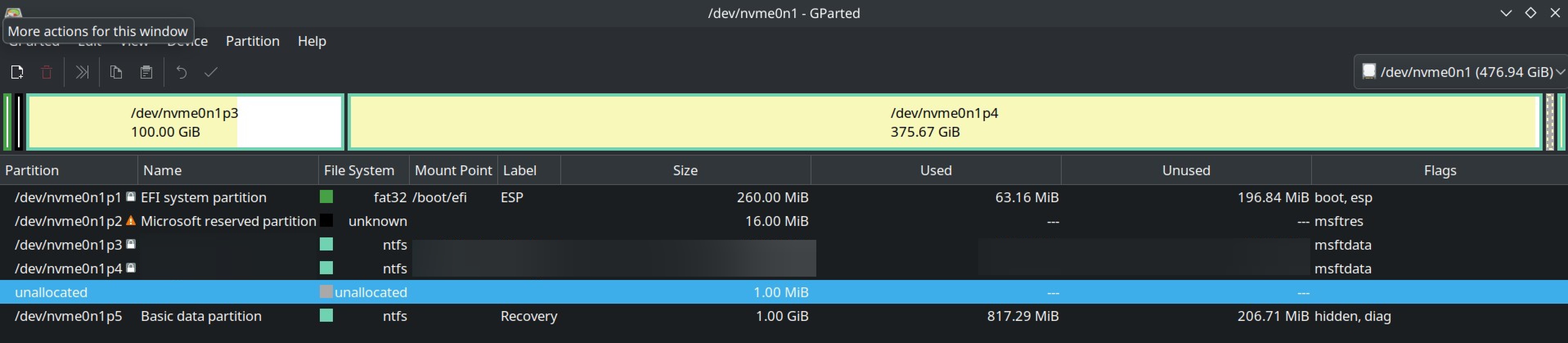
  1. I suspect the reason is my unusual /efi /boot partition layout. (attached below)
  1. I did my partition this way because, my initial EFI partition had less storage (as seen on image), so , I created another boot partition and mounted my pre-existing EFI partition to /boot/efi. I did this by referring a Youtube video (I know, I should’ve known better)
  1. I also encrypted my BTRFS / partition
  1. If you need any other info, please ask.

What I want:

To boot into a BTRFS snapshots from rEFind boot manager.


Additional Info:

  1. So, apparently, to restore the BTRFS snapshot of a root subvolume, I shouldn’t do it with the root partition being actively used.
  1. So, I need to boot into the desired snapshot from the boot manager itself.
  1. GRUB has grub-btrfs, which lets you boot into snapshot from OS selection screen itself.
  1. rEFInd has refind-btrfs, which should do the same as grub-btrfs. But it didn’t in my case. I am not seeing any way to boot into a snapshot from rEFInd.
  1. I use BTRFS Assistant with snapper to manage snapshots.
  1. I am not seeing any way to restore the snapshot from live environment too.
  1. I am using CachyOS (Arch) with Plasma DE.
  1. I suspect the reason is my unusual /efi /boot partition layout. (attached below)
  1. I did my partition this way because, my initial EFI partition had less storage (as seen on image), so , I created another boot partition and mounted my pre-existing EFI partition to /boot/efi. I did this by referring a Youtube video (I know, I should’ve known better)
  1. I also encrypted my BTRFS / partition
  1. If you need any other info, please ask.

0

How to restore root subvolume BTRFS snapshot?

preview

I’m using CachyOS (Arch) with BTRFS. And tried to restore snap of root subvolume and it didn’t work ( see previous post ).

If I remember correctly, i successfully restored root subvolume before. Take it with a grain of salt.

Some people on my previos posts said that I shouldn’t have tried restore root subvol while system is actively running through the subvol.

Now my question is,

How to restore a snap of root subvolume ?

Edit: I know how to restore a snapshot. Just need help with root subvol snapshot.

I use BTRFS Assistant with snapper. And rEFInd doens’t have boot to snapshot option. (I installed and it didn’t work )

I’m using CachyOS (Arch) with BTRFS. And tried to restore snap of root subvolume and it didn’t work ( see previous post ).

If I remember correctly, i successfully restored root subvolume before. Take it with a grain of salt.

Some people on my previos posts said that I shouldn’t have tried restore root subvol while system is actively running through the subvol.

Now my question is,

How to restore a snap of root subvolume ?

Edit: I know how to restore a snapshot. Just need help with root subvol snapshot.

I use BTRFS Assistant with snapper. And rEFInd doens’t have boot to snapshot option. (I installed and it didn’t work )

0

I guess I borked my System

preview

Context: I updated my CachyOS (Arch) BTRFS system. Some new things caused few problems especially brave browser(missing tabs), some icons missing.

So I wanted to go back to previous snapshot.

What I did: I first restored my home subvol which I saved before update. I worked.

Then I tried to restored my root partition. This is where I got the problem.

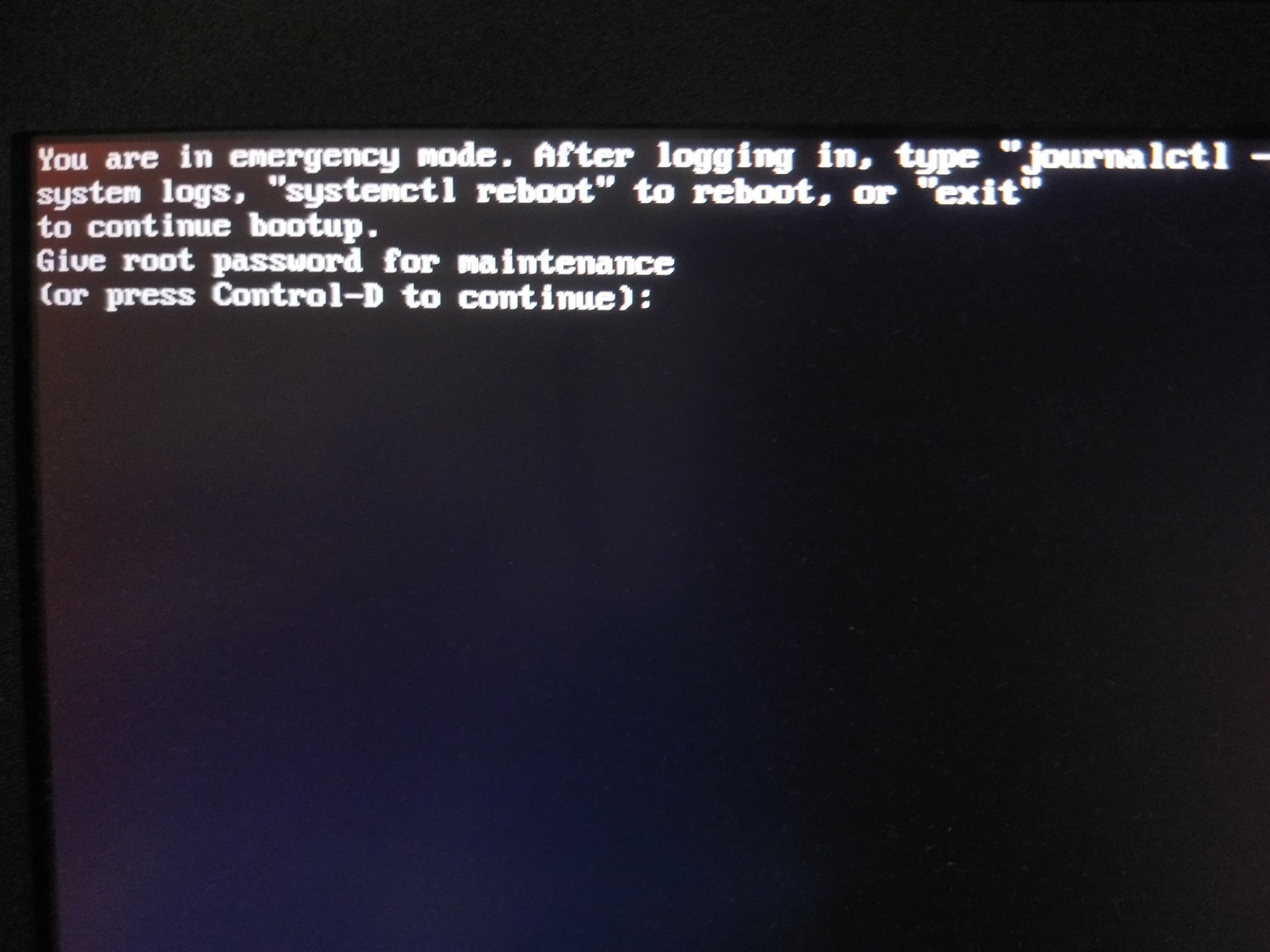
I got this error.

1001090084

I would really appreciate URGENT help

If you need any more details I can provide.

EDIT

  1. I used BTRFS Assistant to restore the root partition. And I did it while the OS is running.

( I previously did that and got no issues )

  1. I pressed crtl+d and got 👇🏽

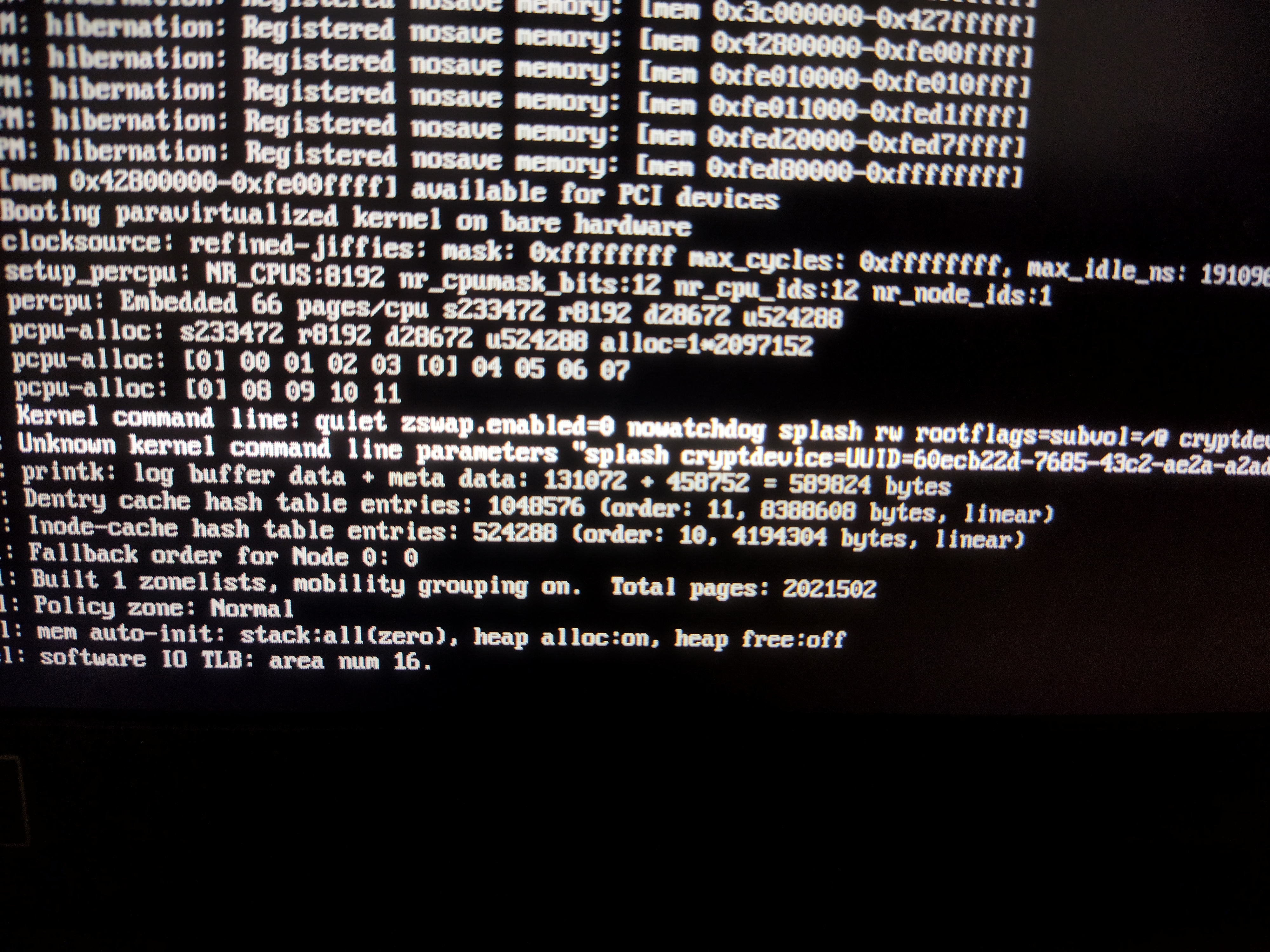
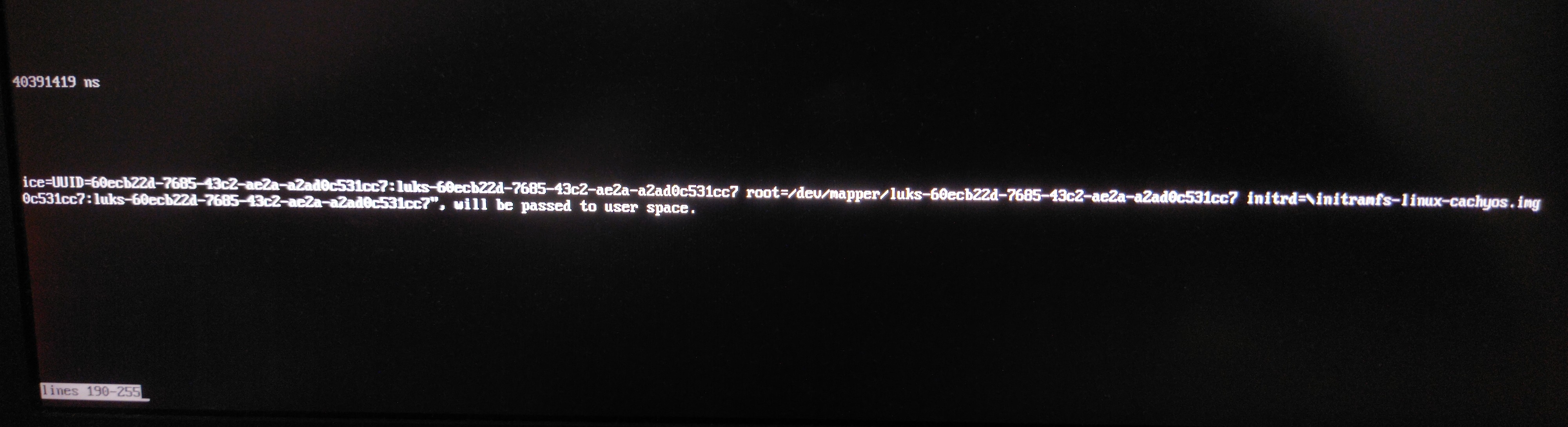
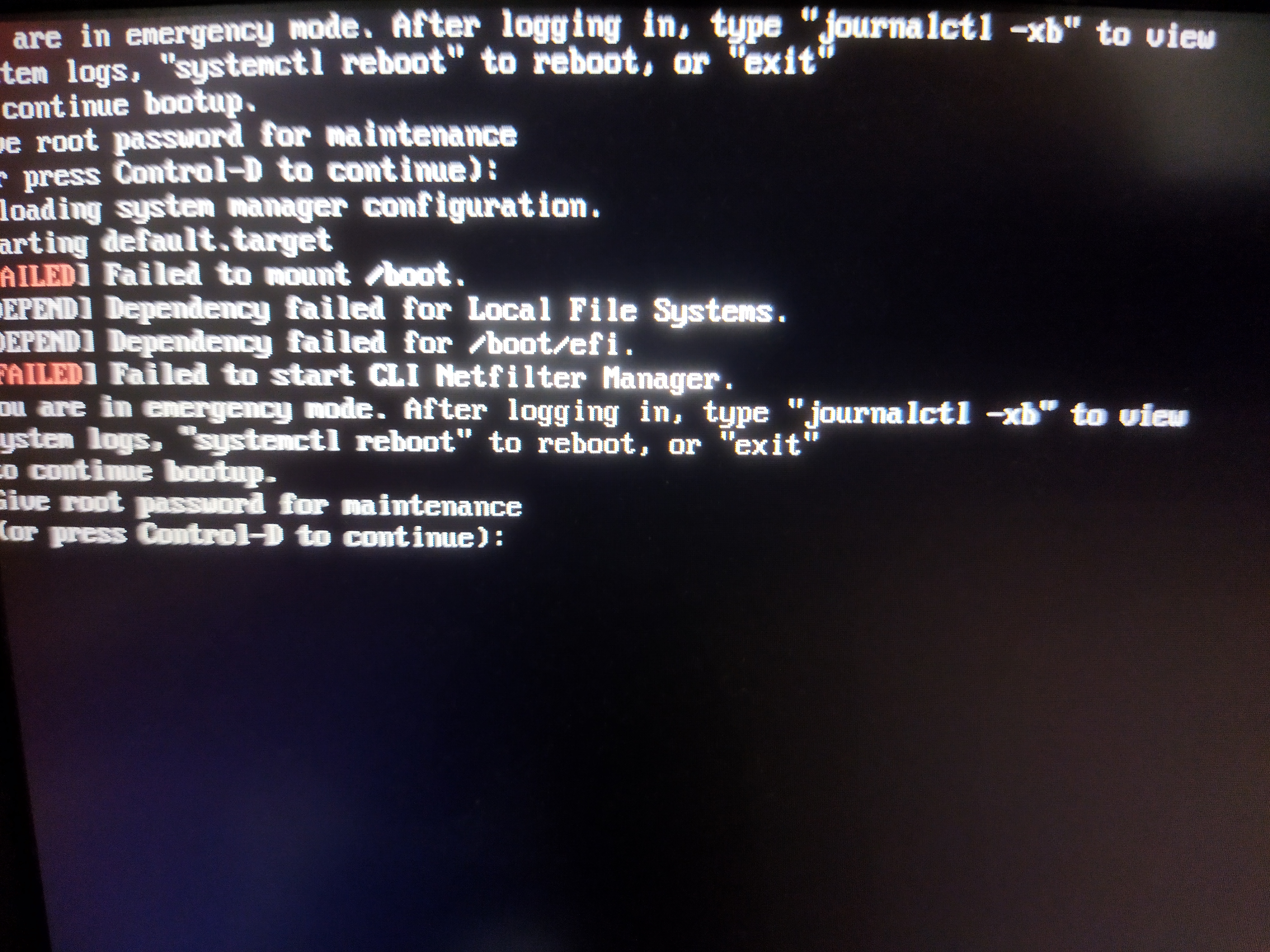
  1. I typed my password and went into maintenance. Typed journalctl -xb and got 2667 lines 😵‍💫. While scrolling mindlessly, this looked like something 👇🏽

👉🏽

👉🏽

  1. This is my refind_linux.conf 👇🏽
"Boot with standard options"    "quiet zswap.enabled=0 nowatchdog splash rw rootflags=subvol=/@ cryptdevice=UUID=60ecb22d-7685-43c2-ae2a-a2ad0c531cc7:luks-60ecb22d-7685-43c2-ae2a-a2ad0c531cc7 root=/dev/mapper/luks-60ecb22d-7685-43c2-ae2a-a2ad0c531cc7"

"Boot to single-user mode"    "quiet zswap.enabled=0 nowatchdog splash rw rootflags=subvol=/@ cryptdevice=UUID=60ecb22d-7685-43c2-ae2a-a2ad0c531cc7:luks-60ecb22d-7685-43c2-ae2a-a2ad0c531cc7 root=/dev/mapper/luks-60ecb22d-7685-43c2-ae2a-a2ad0c531cc7" single

"Boot with minimal options"   "ro root=/dev/mapper/luks-60ecb22d-7685-43c2-ae2a-a2ad0c531cc7"


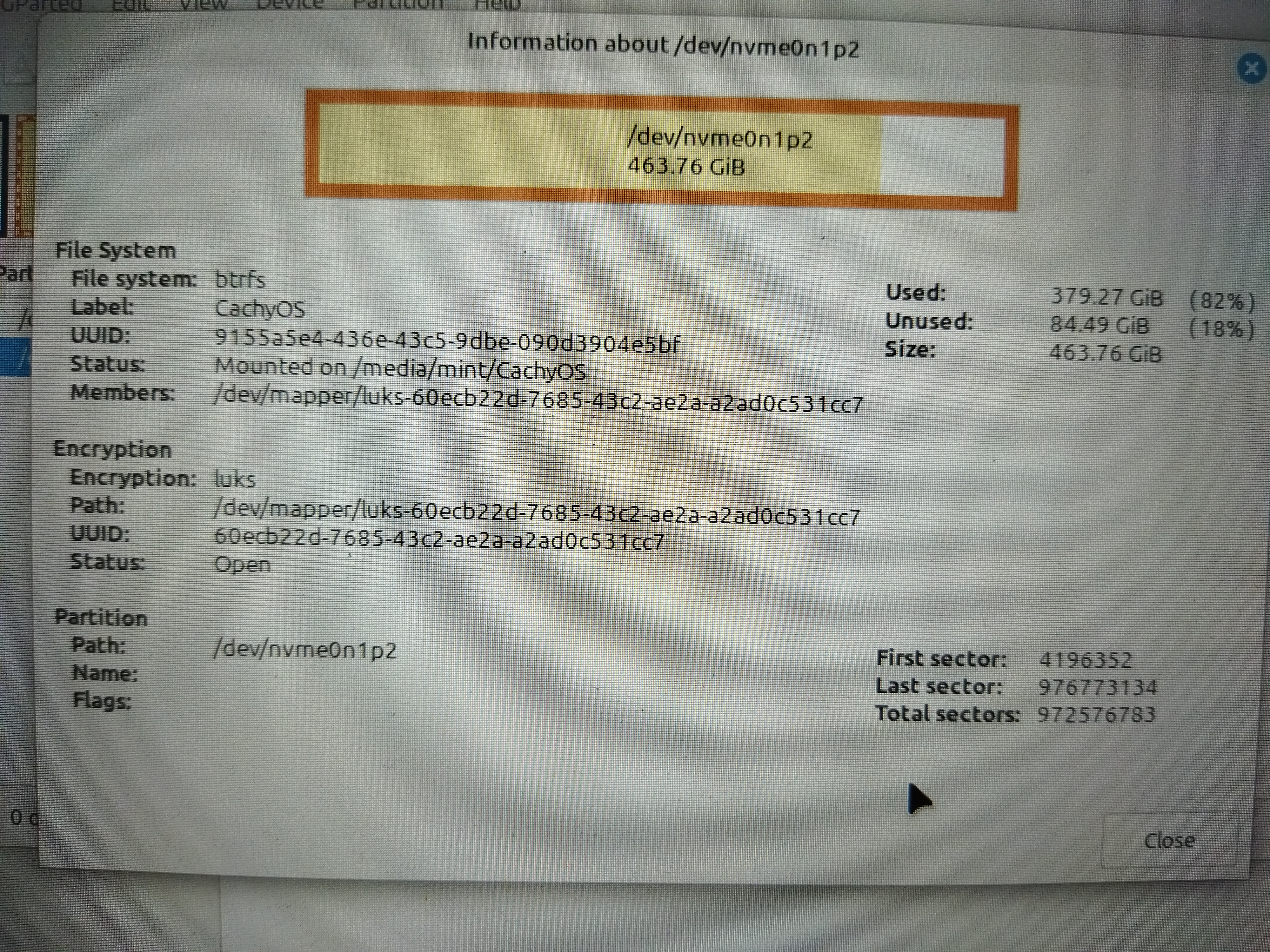
  1. This my OS partition 👇🏽

  1. This is my subvol layout 👇🏽 (CachyOS default)

Context: I updated my CachyOS (Arch) BTRFS system. Some new things caused few problems especially brave browser(missing tabs), some icons missing.

So I wanted to go back to previous snapshot.

What I did: I first restored my home subvol which I saved before update. I worked.

Then I tried to restored my root partition. This is where I got the problem.

I got this error.

1001090084

I would really appreciate URGENT help

If you need any more details I can provide.

EDIT

  1. I used BTRFS Assistant to restore the root partition. And I did it while the OS is running.

( I previously did that and got no issues )

  1. I pressed crtl+d and got 👇🏽

  1. I typed my password and went into maintenance. Typed journalctl -xb and got 2667 lines 😵‍💫. While scrolling mindlessly, this looked like something 👇🏽

👉🏽

👉🏽

  1. This is my refind_linux.conf 👇🏽
"Boot with standard options"    "quiet zswap.enabled=0 nowatchdog splash rw rootflags=subvol=/@ cryptdevice=UUID=60ecb22d-7685-43c2-ae2a-a2ad0c531cc7:luks-60ecb22d-7685-43c2-ae2a-a2ad0c531cc7 root=/dev/mapper/luks-60ecb22d-7685-43c2-ae2a-a2ad0c531cc7"

"Boot to single-user mode"    "quiet zswap.enabled=0 nowatchdog splash rw rootflags=subvol=/@ cryptdevice=UUID=60ecb22d-7685-43c2-ae2a-a2ad0c531cc7:luks-60ecb22d-7685-43c2-ae2a-a2ad0c531cc7 root=/dev/mapper/luks-60ecb22d-7685-43c2-ae2a-a2ad0c531cc7" single

"Boot with minimal options"   "ro root=/dev/mapper/luks-60ecb22d-7685-43c2-ae2a-a2ad0c531cc7"


  1. This my OS partition 👇🏽

  1. This is my subvol layout 👇🏽 (CachyOS default)

0

Mangohud not showing GPU stats after update

preview

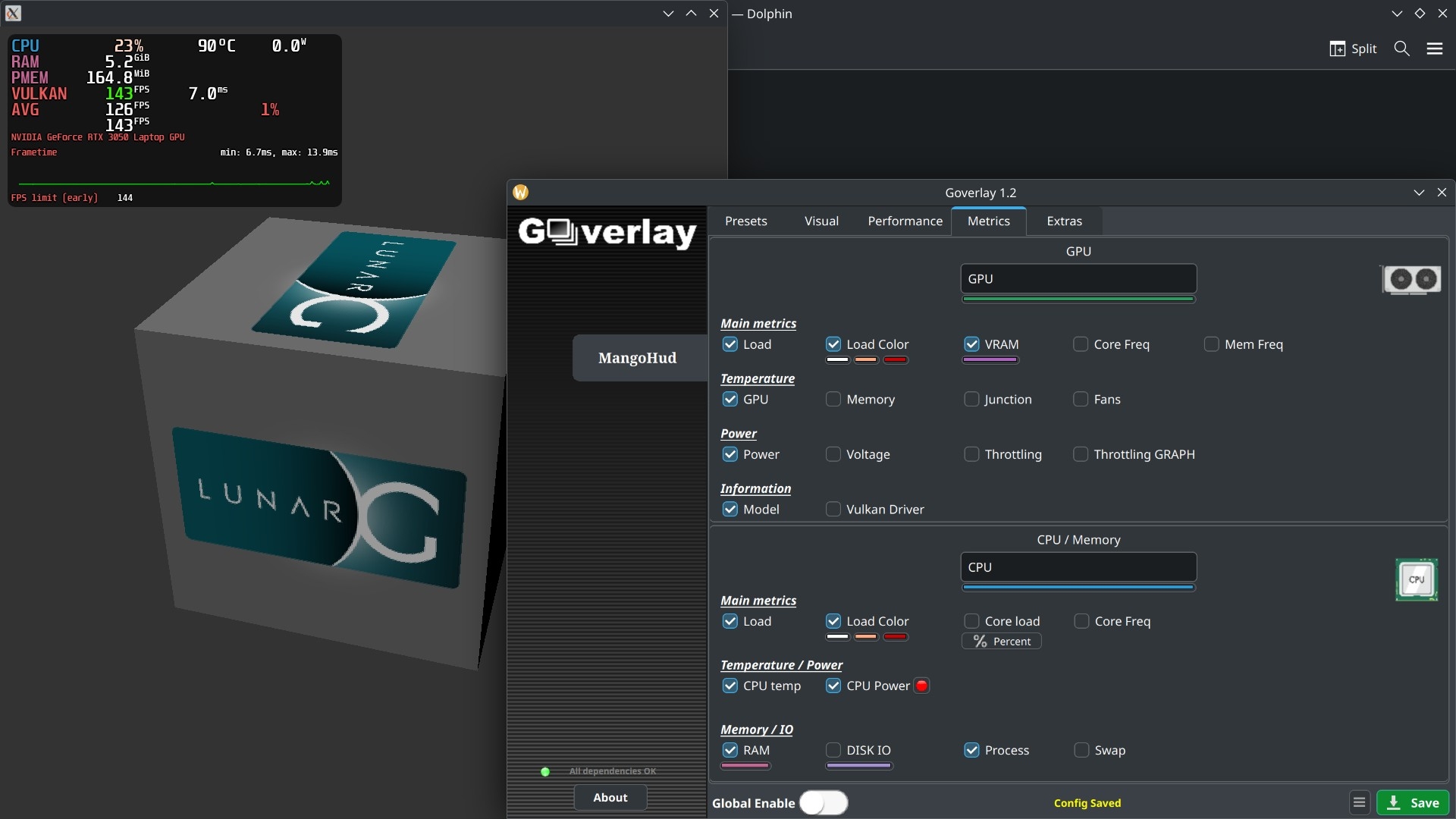
I updated arch. After the update mangohud is not showing any GPU stats except GPU model.

I was working perfectly fine before.

Config 👇🏽

################### File Generated by Goverlay ###################
legacy_layout=false


background_alpha=0.6
round_corners=10
background_alpha=0.6
background_color=000000

font_size=24
text_color=FFFFFF
position=top-left
toggle_hud=Shift_R+F12
no_display
pci_dev=0:0000:00
table_columns=4
gpu_text=GPU
gpu_stats
gpu_load_change
gpu_load_value=50,90
gpu_load_color=FFFFFF,FFAA7F,CC0000
gpu_temp
gpu_power
gpu_color=2E9762
cpu_text=CPU
cpu_stats

cpu_load_change
cpu_load_value=50,90
cpu_load_color=FFFFFF,FFAA7F,CC0000
cpu_temp
cpu_power
cpu_color=2E97CB
vram
vram_color=AD64C1
ram
ram_color=C26693
procmem
fps
fps_metrics=avg,0.01
gpu_name
frame_timing
frametime_color=00FF00
fps_limit_method=early
toggle_fps_limit=Shift_L+F1
show_fps_limit

fps_limit=144,90,60,45,30
fps_color_change
fps_color=B22222,FDFD09,39F900
fps_value=30,60
#offset=0


output_folder=/home/user
log_duration=30
autostart_log=0
log_interval=100
toggle_logging=Shift_L+F2


I updated arch. After the update mangohud is not showing any GPU stats except GPU model.

I was working perfectly fine before.

Config 👇🏽

################### File Generated by Goverlay ###################
legacy_layout=false


background_alpha=0.6
round_corners=10
background_alpha=0.6
background_color=000000

font_size=24
text_color=FFFFFF
position=top-left
toggle_hud=Shift_R+F12
no_display
pci_dev=0:0000:00
table_columns=4
gpu_text=GPU
gpu_stats
gpu_load_change
gpu_load_value=50,90
gpu_load_color=FFFFFF,FFAA7F,CC0000
gpu_temp
gpu_power
gpu_color=2E9762
cpu_text=CPU
cpu_stats

cpu_load_change
cpu_load_value=50,90
cpu_load_color=FFFFFF,FFAA7F,CC0000
cpu_temp
cpu_power
cpu_color=2E97CB
vram
vram_color=AD64C1
ram
ram_color=C26693
procmem
fps
fps_metrics=avg,0.01
gpu_name
frame_timing
frametime_color=00FF00
fps_limit_method=early
toggle_fps_limit=Shift_L+F1
show_fps_limit

fps_limit=144,90,60,45,30
fps_color_change
fps_color=B22222,FDFD09,39F900
fps_value=30,60
#offset=0


output_folder=/home/user
log_duration=30
autostart_log=0
log_interval=100
toggle_logging=Shift_L+F2


0

What to do if packages are in Conflict ?

preview

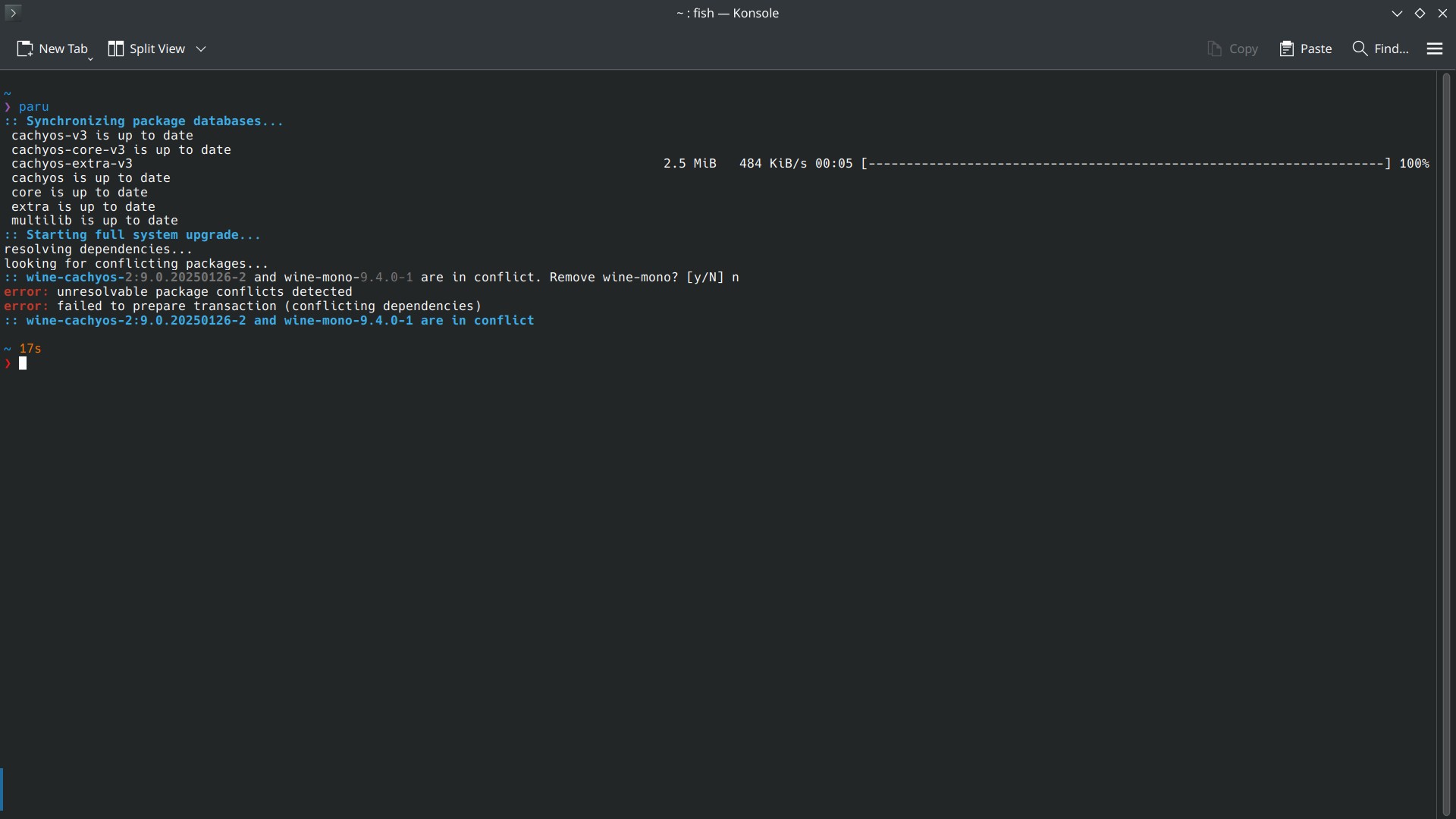
I am using CachyOS (Arch btw) and when I tried to update using paru, it says some packages are in conflict, and asking to remove those. What should I do ?

I didn’t find the best help from searching by myself ?

❯ paru
:: Synchronizing package databases...
 cachyos-v3 is up to date
 cachyos-core-v3 is up to date
 cachyos-extra-v3                                                                      2.5 MiB   484 KiB/s 00:05 [--------------------------------------------------------------------] 100%
 cachyos is up to date
 core is up to date
 extra is up to date
 multilib is up to date
:: Starting full system upgrade...
resolving dependencies...
looking for conflicting packages...
:: wine-cachyos-2:9.0.20250126-2 and wine-mono-9.4.0-1 are in conflict. Remove wine-mono? [y/N] n
error: unresolvable package conflicts detected
error: failed to prepare transaction (conflicting dependencies)
:: wine-cachyos-2:9.0.20250126-2 and wine-mono-9.4.0-1 are in conflict

~ 17s

I am using CachyOS (Arch btw) and when I tried to update using paru, it says some packages are in conflict, and asking to remove those. What should I do ?

I didn’t find the best help from searching by myself ?

❯ paru
:: Synchronizing package databases...
 cachyos-v3 is up to date
 cachyos-core-v3 is up to date
 cachyos-extra-v3                                                                      2.5 MiB   484 KiB/s 00:05 [--------------------------------------------------------------------] 100%
 cachyos is up to date
 core is up to date
 extra is up to date
 multilib is up to date
:: Starting full system upgrade...
resolving dependencies...
looking for conflicting packages...
:: wine-cachyos-2:9.0.20250126-2 and wine-mono-9.4.0-1 are in conflict. Remove wine-mono? [y/N] n
error: unresolvable package conflicts detected
error: failed to prepare transaction (conflicting dependencies)
:: wine-cachyos-2:9.0.20250126-2 and wine-mono-9.4.0-1 are in conflict

~ 17s

0

EXE icons out of nowhere

preview

I haven’t updated my Arch (Plasma) for some time.

When I updated it yesterday, suddenly all the exe icons started to show up ( I’m dualbooting with Win ), which is not the case before.

As far I looked up, I can’t find anything on internet.

I don’t know if it’s whether WINE or Dolphin or some other package.

So, what’s changed ?

I haven’t updated my Arch (Plasma) for some time.

When I updated it yesterday, suddenly all the exe icons started to show up ( I’m dualbooting with Win ), which is not the case before.

As far I looked up, I can’t find anything on internet.

I don’t know if it’s whether WINE or Dolphin or some other package.

So, what’s changed ?

0

[SOLVED] Unable to hide 'tools' in rEFInd

preview

I want to hide the about tag in rEFInd. So, I did according to the info in config and website, which is to add a showtools line with no options.

And, nothing happens. I still see About, Shutdown, Reboot, Firmware tools in the rEFInd screen

# Default is shell,memtest,gdisk,apple_recovery,windows_recovery,mok_tool,about,hidden_tags,shutdown,reboot,firmware,fwupdate
# To completely disable scanning for all tools, provide a showtools line
# with no options.
#
#showtools shell, bootorder, gdisk, memtest, mok_tool, apple_recovery, windows_recovery, about, hidden_tags, reboot, exit, firmware, fwupdate
showtools

Eventhough the previous showtools line is a just a comment, I removed it too. And still nothing happens.

Does anybody have any idea?

I only want Shutdown, Reboot.


SOLVED

It seems like a rEFInd problem in latest version.

https://lemmy.frozeninferno.xyz/comment/16257252

Looks like I have to edit and rebuild it myself. Unfortunately, I’m not really that familiar with building packages myself.

Guess, I have to wait it out.

I want to hide the about tag in rEFInd. So, I did according to the info in config and website, which is to add a showtools line with no options.

And, nothing happens. I still see About, Shutdown, Reboot, Firmware tools in the rEFInd screen

# Default is shell,memtest,gdisk,apple_recovery,windows_recovery,mok_tool,about,hidden_tags,shutdown,reboot,firmware,fwupdate
# To completely disable scanning for all tools, provide a showtools line
# with no options.
#
#showtools shell, bootorder, gdisk, memtest, mok_tool, apple_recovery, windows_recovery, about, hidden_tags, reboot, exit, firmware, fwupdate
showtools

Eventhough the previous showtools line is a just a comment, I removed it too. And still nothing happens.

Does anybody have any idea?

I only want Shutdown, Reboot.


SOLVED

It seems like a rEFInd problem in latest version.

https://lemmy.frozeninferno.xyz/comment/16257252

Looks like I have to edit and rebuild it myself. Unfortunately, I’m not really that familiar with building packages myself.

Guess, I have to wait it out.

0

Why I shouldn't use Discover on Arch (Plasma) ?

preview

I installed CachyOS with Plasma DE and found it has no discover in it. When I searched on their sub lots of people say that one shouldn’t use Discover with any Arch distro as it will break the system. Can anybody clarify why?

Also if I am not supposed to use Discover, can anybody suggest an actual GUI application store? Unlike Octopi (which I consider just as a TUI with check boxes and columns)

Edit: I only use Discover for find and install new apps.

For updating, I just use paru.

I installed CachyOS with Plasma DE and found it has no discover in it. When I searched on their sub lots of people say that one shouldn’t use Discover with any Arch distro as it will break the system. Can anybody clarify why?

Also if I am not supposed to use Discover, can anybody suggest an actual GUI application store? Unlike Octopi (which I consider just as a TUI with check boxes and columns)

Edit: I only use Discover for find and install new apps.

For updating, I just use paru.