0

Can I update now?

preview
System Specifications

Operating System: CachyOS Linux KDE Plasma Version: 6.8.0 KDE Frameworks Version: 6.31.0 Qt Version: 6.12.0 Kernel Version: 7.2.11-1-cachyos (64-bit) Graphics Platform: Wayland Processors: 12 × 12th Gen Intel® Core™ i5-12450H Memory: 8 GiB of RAM (7.5 GiB usable) Graphics Processor 1: Intel® Graphics Graphics Processor 2: NVIDIA GeForce RTX 3050 Laptop GPU

Several days ago, I tried to update my CachyOS system. And seen the below warning from Pacman itself

Update notice: Kernel 7.3.0-2 has issues with amdgpu particularly causing black screen on AMD dGPUs

At first, I was like gonna do the update, because I don’t have an AMD CPU/GPU. Then I went to check on the internet and found lots of issues with both Kernel 7.3 and KDE Plasma 6.8.1. Even affecting NVIDIA GPU.

Some of the examples

Linux 7.3 - GPU idle increased from 10 W to 60. Anyone else? Partial upgrade for ca-certificates-mozilla Plasma 6.8.1 update: fullscreen games choppy (fine in windowed), desktop animations laggy - fixed by downgrading to 6.8.0 Choppy frame pacing in CS2 and Deadlock (300–500 FPS) after 2026-10-22 update (linux 7.3.0, linux-firmware-amdgpu 20261019, Plasma 6.8.1) – RX 6600 XT, Wayland – fixed by snapshot rollback Steam games broken after updating from kernel 7.2.11-1 -> 7.3.0-2 (not fixed by 7.3.0-3) linux-cachyos 7.3.0-4: amdgpu “Fence fallback timer expired” causes game crashes (RX 6600 XT) (Monster Hunter Wilds) Cachyos kernel upgrade to 7.3.0 - fails on AMD After latest update to cachyos-rate-mirrors the speeds are horible GPU and CPU Fans Running at Double Speed under 7.3.1 Cachy kernel version 7.3.1 breaks the dual display (DisplayLink device) (KDE Plasma) (Kwin) Cannot login after the latest update from kernel 7.2.10-1 -> 7.3.0-2 (presented with a frozen screen) Nvidia-open 615.78.08: dGPU runtime D3 “Not supported” on linux-cachyos 7.3.0-4, works on LTS 6.18.55-2 Steam games broken after updating from kernel 7.2.11-1 -> 7.3.0-2 (not fixed by 7.3.0-3) Is there a reason that the BORE kernel is stale (7.2.10 vs. 7.3.0)? After Recent Update, Shut Down Takes Over 1 Minute - User Manager Issue? Behringer UMC404HD - fail with Kernel 7.3.0 LACT power cap write fails with “Operation not supported (os error 95)” on 7.3.0-3-cachyos Plasma 6.8.1: immediate screen tearing / flickering shadows / black areas on GTX 1650 Ti (HP Pavilion Gaming 15-dk1xxx) - 6.8.0 is fine Updating to 7.3.0-3-cachyos causes UMC204HD Audio Interface to be unusable Issue with AdaptiveSync kernel 7.3+ Keyboard Backlight Not Working With 7.3 Kernel Kernal 7.3.0-3 - AMD / NVIDEA Should i stay at linux-cachyos 7.2.11-1? After update audio is is wery crapy and not loud Audio echo in FAudio/Proton games on launch — regression starting linux-cachyos 7.3 Severe display artifacts and flickering on NVIDIA HDMI output after today’s first upgrade (2026/10/22) Update causing KDE Plasma crash or blackscreen at boot After KDE 6.8 update, Desktop Animations lag and Games run on 48fps 7.3.0-2 on RX 9070 XT: no black screen, but a DCN401 MCM LUT warning on HDR enable (Plasma 6.8.0) After update lost fps

Not every link I shared is completely relevant to me, but the amount of issues on Kernel 7.3 and KDE Plasma 6.8.1. Even affecting NVIDIA GPU made me hesitant.

Because of this hesitation, I also didn’t update Firefox CA-Certificates security update.

Should I update now?

System Specifications

Operating System: CachyOS Linux KDE Plasma Version: 6.8.0 KDE Frameworks Version: 6.31.0 Qt Version: 6.12.0 Kernel Version: 7.2.11-1-cachyos (64-bit) Graphics Platform: Wayland Processors: 12 × 12th Gen Intel® Core™ i5-12450H Memory: 8 GiB of RAM (7.5 GiB usable) Graphics Processor 1: Intel® Graphics Graphics Processor 2: NVIDIA GeForce RTX 3050 Laptop GPU

Several days ago, I tried to update my CachyOS system. And seen the below warning from Pacman itself

Update notice: Kernel 7.3.0-2 has issues with amdgpu particularly causing black screen on AMD dGPUs

At first, I was like gonna do the update, because I don’t have an AMD CPU/GPU. Then I went to check on the internet and found lots of issues with both Kernel 7.3 and KDE Plasma 6.8.1. Even affecting NVIDIA GPU.

Some of the examples

Linux 7.3 - GPU idle increased from 10 W to 60. Anyone else? Partial upgrade for ca-certificates-mozilla Plasma 6.8.1 update: fullscreen games choppy (fine in windowed), desktop animations laggy - fixed by downgrading to 6.8.0 Choppy frame pacing in CS2 and Deadlock (300–500 FPS) after 2026-10-22 update (linux 7.3.0, linux-firmware-amdgpu 20261019, Plasma 6.8.1) – RX 6600 XT, Wayland – fixed by snapshot rollback Steam games broken after updating from kernel 7.2.11-1 -> 7.3.0-2 (not fixed by 7.3.0-3) linux-cachyos 7.3.0-4: amdgpu “Fence fallback timer expired” causes game crashes (RX 6600 XT) (Monster Hunter Wilds) Cachyos kernel upgrade to 7.3.0 - fails on AMD After latest update to cachyos-rate-mirrors the speeds are horible GPU and CPU Fans Running at Double Speed under 7.3.1 Cachy kernel version 7.3.1 breaks the dual display (DisplayLink device) (KDE Plasma) (Kwin) Cannot login after the latest update from kernel 7.2.10-1 -> 7.3.0-2 (presented with a frozen screen) Nvidia-open 615.78.08: dGPU runtime D3 “Not supported” on linux-cachyos 7.3.0-4, works on LTS 6.18.55-2 Steam games broken after updating from kernel 7.2.11-1 -> 7.3.0-2 (not fixed by 7.3.0-3) Is there a reason that the BORE kernel is stale (7.2.10 vs. 7.3.0)? After Recent Update, Shut Down Takes Over 1 Minute - User Manager Issue? Behringer UMC404HD - fail with Kernel 7.3.0 LACT power cap write fails with “Operation not supported (os error 95)” on 7.3.0-3-cachyos Plasma 6.8.1: immediate screen tearing / flickering shadows / black areas on GTX 1650 Ti (HP Pavilion Gaming 15-dk1xxx) - 6.8.0 is fine Updating to 7.3.0-3-cachyos causes UMC204HD Audio Interface to be unusable Issue with AdaptiveSync kernel 7.3+ Keyboard Backlight Not Working With 7.3 Kernel Kernal 7.3.0-3 - AMD / NVIDEA Should i stay at linux-cachyos 7.2.11-1? After update audio is is wery crapy and not loud Audio echo in FAudio/Proton games on launch — regression starting linux-cachyos 7.3 Severe display artifacts and flickering on NVIDIA HDMI output after today’s first upgrade (2026/10/22) Update causing KDE Plasma crash or blackscreen at boot After KDE 6.8 update, Desktop Animations lag and Games run on 48fps 7.3.0-2 on RX 9070 XT: no black screen, but a DCN401 MCM LUT warning on HDR enable (Plasma 6.8.0) After update lost fps

Not every link I shared is completely relevant to me, but the amount of issues on Kernel 7.3 and KDE Plasma 6.8.1. Even affecting NVIDIA GPU made me hesitant.

Because of this hesitation, I also didn’t update Firefox CA-Certificates security update.

Should I update now?

0

Issue with display to television

preview

About a year ago, I bought an Intel NUC mini pc for my wife with the intention that she could take it with her to work and we could play simple games passively, with ideas that it could be used for a media station or gaming station in the future.

It shipped with windows. Given our technological environment, I also saw this as an opportunity to dive into Linux. I installed Mint first and messed around for awhile before I had performance issues when plugged into a larger tv. It seemed to have zero issue plugged into a normal computer monitor. I ended up building my wife a different computer with spare parts from friends and stuff I had lying around, so the mini PC became just mine to mess with.

I ultimately landed on CachyOS as it seemed to be the smoothest when I’d use the machine to game. The only problem is that I’d like to use this in my living room on the TV, and it just displays a black screen there. My monitors however work fine.

When I turn it on the TV, it displays the Intel NUC screen and shows Limine, but when I select linux-cachyos, it displays black. If I then plug it into a monitor at this point, the display shows normal, so I know it is pushing the display, but the image is not showing on the TV.

I’m definitely looking for a resolution, but also just curious why it would be different for a television vs a monitor at the hardware level. I’ve tried three different televisions and used two different monitors. I only have this issue on the TVs.

I am aware I’m not explaining this problem as concisely as I’d like. If you have any questions about what I’m trying to fix here, I’d love to clarify.

About a year ago, I bought an Intel NUC mini pc for my wife with the intention that she could take it with her to work and we could play simple games passively, with ideas that it could be used for a media station or gaming station in the future.

It shipped with windows. Given our technological environment, I also saw this as an opportunity to dive into Linux. I installed Mint first and messed around for awhile before I had performance issues when plugged into a larger tv. It seemed to have zero issue plugged into a normal computer monitor. I ended up building my wife a different computer with spare parts from friends and stuff I had lying around, so the mini PC became just mine to mess with.

I ultimately landed on CachyOS as it seemed to be the smoothest when I’d use the machine to game. The only problem is that I’d like to use this in my living room on the TV, and it just displays a black screen there. My monitors however work fine.

When I turn it on the TV, it displays the Intel NUC screen and shows Limine, but when I select linux-cachyos, it displays black. If I then plug it into a monitor at this point, the display shows normal, so I know it is pushing the display, but the image is not showing on the TV.

I’m definitely looking for a resolution, but also just curious why it would be different for a television vs a monitor at the hardware level. I’ve tried three different televisions and used two different monitors. I only have this issue on the TVs.

I am aware I’m not explaining this problem as concisely as I’d like. If you have any questions about what I’m trying to fix here, I’d love to clarify.

0

Learning to set up a server help

preview

I’m looking to start my own server, and was going to dive into YouTube tutorials. Do you have any recommendations to offer?

Service wise, I wanted to start with a pi hole, and maybe a music server or something to store pictures from my phone. Maybe host my own ss14 server too!

Hardware wise, i was going to start with a raspberry pi (of some sort?)

Any tips, references, or suggestions are greatly appreciated ❤️

I’m looking to start my own server, and was going to dive into YouTube tutorials. Do you have any recommendations to offer?

Service wise, I wanted to start with a pi hole, and maybe a music server or something to store pictures from my phone. Maybe host my own ss14 server too!

Hardware wise, i was going to start with a raspberry pi (of some sort?)

Any tips, references, or suggestions are greatly appreciated ❤️

0

Questions about NVIDIA GPUs and HDR from a pre-Linuxer

preview

As I understand things, or least how I’ve understood them over the last year or so, NVIDIA GPUs are comparatively less-supported on Linux than AMD ones. Is this still the case, and if so, is there hope for near-future improvements in this department? Has NVIDIA made any moves that indicates they’re gonna try to make things better in terms of drivers? And out of curiosity, what is it that AMD has done that NVIDIA hasn’t? Is it really just down to the drivers?

On a similar topic, how is HDR support on Linux? I’ve read that Wayland has support for this (I sound like I know what Wayland is, but I really don’t) but that streaming services and DRM-protected content won’t work with HDR. I personally don’t care about the streaming side of it, I’m more concerned about gaming and watching local video files or 4K Blu-ray discs (I use a tool to strip out the DRM from such discs on-the-fly, so no worries there).

So, in sum (and to make it easier to reply!):

  1. Is NVIDIA still lagging behind AMD in terms of GPU support on Linux?
  2. Why is (or was) AMD better-supported?
  3. How is the current HDR implementation? Particularly as it relates to gaming and watching videos/discs locally.

Thank you kindly!

As I understand things, or least how I’ve understood them over the last year or so, NVIDIA GPUs are comparatively less-supported on Linux than AMD ones. Is this still the case, and if so, is there hope for near-future improvements in this department? Has NVIDIA made any moves that indicates they’re gonna try to make things better in terms of drivers? And out of curiosity, what is it that AMD has done that NVIDIA hasn’t? Is it really just down to the drivers?

On a similar topic, how is HDR support on Linux? I’ve read that Wayland has support for this (I sound like I know what Wayland is, but I really don’t) but that streaming services and DRM-protected content won’t work with HDR. I personally don’t care about the streaming side of it, I’m more concerned about gaming and watching local video files or 4K Blu-ray discs (I use a tool to strip out the DRM from such discs on-the-fly, so no worries there).

So, in sum (and to make it easier to reply!):

  1. Is NVIDIA still lagging behind AMD in terms of GPU support on Linux?
  2. Why is (or was) AMD better-supported?
  3. How is the current HDR implementation? Particularly as it relates to gaming and watching videos/discs locally.

Thank you kindly!

0

Can you suggest some good tutorial for vs code ?

preview

Looking up the search bar gives too many choices, considering the fact that I am a complete beginner. I need to narrow down on what I am using vs code for. I shall be working with git. So the tutorial ought to start right from beginners and flow towards using git.

@bleeptrack@vis.social

Looking up the search bar gives too many choices, considering the fact that I am a complete beginner. I need to narrow down on what I am using vs code for. I shall be working with git. So the tutorial ought to start right from beginners and flow towards using git.

@bleeptrack@vis.social

0

Does QEMU help me create a virtual Linux system in my Windows 10 machine ?

preview

I wish to switch over to Linux, but the only machine l have at my disposal is my brother’s windows 10 laptop. Does QEMU help me create a virtual Linux system on this machine ?

I wish to switch over to Linux, but the only machine l have at my disposal is my brother’s windows 10 laptop. Does QEMU help me create a virtual Linux system on this machine ?

0

Bazzites Adguard DNS setup

preview

I run a pihole and use ublock origin in my browser so this normally doesn’t come up. But I’ll be traveling for about a week and would like to use Adguard (which I pay for) on my bazzite system. I tried following the instructions on adguard’s website but when I run the command in terminal I get a message saying the bash command is not found. I assume this is because generally bazzite doesn’t run bash commands.

I’d like a detailed explanation of how to get this running if anyone has it, or a guide I can follow.

Thank you in advance.

I run a pihole and use ublock origin in my browser so this normally doesn’t come up. But I’ll be traveling for about a week and would like to use Adguard (which I pay for) on my bazzite system. I tried following the instructions on adguard’s website but when I run the command in terminal I get a message saying the bash command is not found. I assume this is because generally bazzite doesn’t run bash commands.

I’d like a detailed explanation of how to get this running if anyone has it, or a guide I can follow.

Thank you in advance.

0

@lemmy.world @programming.dev @casualconversation can someone please suggest me a way out ??

preview

@linux4noobs@lemmy.world @linux4noobs@programming.dev @casualconversation can someone please suggest me a way out ??

Basically, l’m installing virtual box on a windows 10 laptop. Here, l’m going to try out MX Linux fluxbox and tinker with linux in a sandboxed environment, so that my experiments don’t harm the main system.

In the screenshot, you can see where l got stuck. In the storage part, it says that the controller ide optical drive is empty. The controller sata MX fluxbox.vdi is inaccessible.

@linux4noobs@lemmy.world @linux4noobs@programming.dev @casualconversation can someone please suggest me a way out ??

Basically, l’m installing virtual box on a windows 10 laptop. Here, l’m going to try out MX Linux fluxbox and tinker with linux in a sandboxed environment, so that my experiments don’t harm the main system.

In the screenshot, you can see where l got stuck. In the storage part, it says that the controller ide optical drive is empty. The controller sata MX fluxbox.vdi is inaccessible.

0

Lock up problem

preview

Hi guys, been having a problem for a week now in fedora 43.

After half an hour of light use, my kde keyboard starts crashing at regular intervals, the taskbar is unresponsive, and the shutdown greeter will crash if i try to restart or shut down. I have to power cycle the system to turn it off, not the best.

Looking for anyone also experiencing the problem has not yielded any hits, so I’m posting here 😅

Thus far i have tried: -Restarting -Disabling Firefox video decoding (closest fix i could find in searches) -Rolling back to my previous Friday backups

The issue persists 😓

I don’t know enough about Linux to troubleshoot the problem effectively 😅

Hi guys, been having a problem for a week now in fedora 43.

After half an hour of light use, my kde keyboard starts crashing at regular intervals, the taskbar is unresponsive, and the shutdown greeter will crash if i try to restart or shut down. I have to power cycle the system to turn it off, not the best.

Looking for anyone also experiencing the problem has not yielded any hits, so I’m posting here 😅

Thus far i have tried: -Restarting -Disabling Firefox video decoding (closest fix i could find in searches) -Rolling back to my previous Friday backups

The issue persists 😓

I don’t know enough about Linux to troubleshoot the problem effectively 😅

0

KDE Touchscree/Tablet Enhancements

preview

Greetings Lemmings,

I am not sure when touchscreen/tablet mode stuff was enhanced with KDE, I am guessing somewhere between 6.4.x and 6.6.x but I am quite pleased with this.

I couldn’t find a good touchscreen compatible keyboard for the random times I used my Lenovo Yoga in touch mode, but somewhere along the way KDE was updated with some enhancements to touch mode.

I didn’t know it until today that screen rotation was not an issue for my tablet mode either. I discovered it completely by accident.

Prior to this I had written a script I mapped to a hotkey to rotate the screen before switching to tablet mode.

This was such a wonderful surprise, so for anyone else looking to use KDE with their touch compatible devices I highly suggest trying it again.

Greetings Lemmings,

I am not sure when touchscreen/tablet mode stuff was enhanced with KDE, I am guessing somewhere between 6.4.x and 6.6.x but I am quite pleased with this.

I couldn’t find a good touchscreen compatible keyboard for the random times I used my Lenovo Yoga in touch mode, but somewhere along the way KDE was updated with some enhancements to touch mode.

I didn’t know it until today that screen rotation was not an issue for my tablet mode either. I discovered it completely by accident.

Prior to this I had written a script I mapped to a hotkey to rotate the screen before switching to tablet mode.

This was such a wonderful surprise, so for anyone else looking to use KDE with their touch compatible devices I highly suggest trying it again.

0

Bazzite but mutable?

preview

The number of issues I’ve been having with Bazzite, due to its immutability and my lack of experience, has finally reached the point that I’m no longer willing to deal with.

But I like basically everything about Bazzite, aside from its immutability, and I’d like to preserve as much of it as possible. In particular, I like KDE/Plasma (right?) way more than I liked Cinnamon on Mint, and the whole reason I gave Bazzite a try over Mint was that it supposedly was better for NVidia gaming. Which has absolutely been true, all the minor performance issues I was having on Mint vanished under Bazzite.

So, thoughts and recommendations? Thanks in advance.


Since I’m sure some nerds like me will want to know WHAT issues I’ve been having, the most significant ones would be…

  • I’ve hit a dead-end with trying to setup multiple audio sinks, so I can do what’s been standard behavior in Windows for decades and use both my speakers and headset separately, at the same time, per-application. There’s basically only ONE source of info on how to do this, and it’s written for mutable distros, as it apparently involves doing some firmware config mods or something.

  • I’ve had quite a lot of issues with getting JetBrains Rider and the .NET SDK to work properly with each other, ranging from the inability to get .NET 10 installed, since Rider’s flatpak only includes up to .NET 8, and there IS no flatpak for the .NET SDK itself, to getting .NET CLI tools to run properly from Rider, due to the sandboxing.

  • I was looking to install GameMaker to continue a little side project I started on Mint, and it’s not available on flatpak, nor can I find any wisdom on how I might work around that fact.

The number of issues I’ve been having with Bazzite, due to its immutability and my lack of experience, has finally reached the point that I’m no longer willing to deal with.

But I like basically everything about Bazzite, aside from its immutability, and I’d like to preserve as much of it as possible. In particular, I like KDE/Plasma (right?) way more than I liked Cinnamon on Mint, and the whole reason I gave Bazzite a try over Mint was that it supposedly was better for NVidia gaming. Which has absolutely been true, all the minor performance issues I was having on Mint vanished under Bazzite.

So, thoughts and recommendations? Thanks in advance.


Since I’m sure some nerds like me will want to know WHAT issues I’ve been having, the most significant ones would be…

  • I’ve hit a dead-end with trying to setup multiple audio sinks, so I can do what’s been standard behavior in Windows for decades and use both my speakers and headset separately, at the same time, per-application. There’s basically only ONE source of info on how to do this, and it’s written for mutable distros, as it apparently involves doing some firmware config mods or something.

  • I’ve had quite a lot of issues with getting JetBrains Rider and the .NET SDK to work properly with each other, ranging from the inability to get .NET 10 installed, since Rider’s flatpak only includes up to .NET 8, and there IS no flatpak for the .NET SDK itself, to getting .NET CLI tools to run properly from Rider, due to the sandboxing.

  • I was looking to install GameMaker to continue a little side project I started on Mint, and it’s not available on flatpak, nor can I find any wisdom on how I might work around that fact.

0

I'm fine with using traditional package managers, is there any benefit to using Flatpak?

preview

I went to install some software today (Gradia) which is only available via Flathub apparently, the install size is larger than my distro which feels like a bit much for a screenshot tool. What’s the deal with the massive size of Flatpaks and is it really worth all the extra space? 4GB per application?

I went to install some software today (Gradia) which is only available via Flathub apparently, the install size is larger than my distro which feels like a bit much for a screenshot tool. What’s the deal with the massive size of Flatpaks and is it really worth all the extra space? 4GB per application?

0

Audio Codecs for Firefox in Bazzite/Fedora

preview

I have been able to see online that the problem I am having is a known one where the Firefox flatpak needs version 23.06 ffmpeg-full as a dependency.

I cannot for the life of me figure out how to get this working and as a result Firefox audio stutters significantly on every website no matter what settings I change or what extensions I turn on and off.

I at first assumed this was a problem with my extensions and went through a pretty hefty troubleshooting session that got me pretty much nowhere.

I have attempted to install the proper codecs via the terminal and the system says those codecs are already installed.

I’m at a loss here. If anyone knows an answer or at least an avenue to help me get this solved, I’m all ears.

Device: ROG Ally X OS: Bazzite/Fedora updated fully to the most recent update released.

I have been able to see online that the problem I am having is a known one where the Firefox flatpak needs version 23.06 ffmpeg-full as a dependency.

I cannot for the life of me figure out how to get this working and as a result Firefox audio stutters significantly on every website no matter what settings I change or what extensions I turn on and off.

I at first assumed this was a problem with my extensions and went through a pretty hefty troubleshooting session that got me pretty much nowhere.

I have attempted to install the proper codecs via the terminal and the system says those codecs are already installed.

I’m at a loss here. If anyone knows an answer or at least an avenue to help me get this solved, I’m all ears.

Device: ROG Ally X OS: Bazzite/Fedora updated fully to the most recent update released.

0

Mint-Arch migration led to unmountable drive

preview

Just installed CachyOS and the drive I used alongside system drive for media\archive storage can’t get mounted anymore. It’s internal HDD and uses NTFS, I created it on Windows 10 years ago and used all this time from under Mint (no dualboot, only Mint). I did a regular reboot before OS switch and didn’t even mount it this time.

While trying to access said drive, dolphin prints that:

An error occurred while accessing ‘drive’, the system responded: The requested operation has failed: Error mounting /dev/sda1 at /run/media/user/drive: wrong fs type, bad option, bad superblock on /dev/sda1, missing codepage or helper program, or other error

Where can I start my fixing journey? Where I can look for precise reason it fails?

All components are 5-10 years old if it matters. The other HDD that I formatted under Mint works just fine. It’s probably a CachyOS vs NTFS problem.

[new]

I succeed at force-mounting it via ntfs 3g, but it seems it really was a problem with a bad block or something originating from windows. Checks were passed with 0 errors, so I assume it’s a little funni M$ gave me with a divorce letter.

Instead of finding a way to force-mount it every time, I tried checking it via WinPE, and it helped remove the cause of errors.

I’m yet to understand what is really behind that, filesystem differences and how OSs work with them, so if you have good articles, please share these.

Just installed CachyOS and the drive I used alongside system drive for media\archive storage can’t get mounted anymore. It’s internal HDD and uses NTFS, I created it on Windows 10 years ago and used all this time from under Mint (no dualboot, only Mint). I did a regular reboot before OS switch and didn’t even mount it this time.

While trying to access said drive, dolphin prints that:

An error occurred while accessing ‘drive’, the system responded: The requested operation has failed: Error mounting /dev/sda1 at /run/media/user/drive: wrong fs type, bad option, bad superblock on /dev/sda1, missing codepage or helper program, or other error

Where can I start my fixing journey? Where I can look for precise reason it fails?

All components are 5-10 years old if it matters. The other HDD that I formatted under Mint works just fine. It’s probably a CachyOS vs NTFS problem.

[new]

I succeed at force-mounting it via ntfs 3g, but it seems it really was a problem with a bad block or something originating from windows. Checks were passed with 0 errors, so I assume it’s a little funni M$ gave me with a divorce letter.

Instead of finding a way to force-mount it every time, I tried checking it via WinPE, and it helped remove the cause of errors.

I’m yet to understand what is really behind that, filesystem differences and how OSs work with them, so if you have good articles, please share these.

0

[Linux Mint] - How good are preinstalled softwares?

preview

Hello.

I just switch to Linux mint from Windows. And I found that there is some software that are preinstalled that does the same that what I would have installed myself.

For example, I use qbittorent and there is something called “Transmission” that does torrenting.
I use VLC for video playing and there is something called “Celluloid”.

Are the software preinstalled on Mint generally good at what they are doing and beginner friendly? Should I check for Linux version of the software I use on Windows or rather experiment with what is here?

Thank you for your help.

Hello.

I just switch to Linux mint from Windows. And I found that there is some software that are preinstalled that does the same that what I would have installed myself.

For example, I use qbittorent and there is something called “Transmission” that does torrenting.
I use VLC for video playing and there is something called “Celluloid”.

Are the software preinstalled on Mint generally good at what they are doing and beginner friendly? Should I check for Linux version of the software I use on Windows or rather experiment with what is here?

Thank you for your help.

0

Question about AMD GPU drivers on Fedora 42

preview

I am having a problem with my Linux desktop and hoping this community can help. The hardware is only about a year old: CPU: AMD Ryzen 7 7800X3D, GPU: AMD Radeon RX 7900XTX. I am running KDE Plasma 6.4.4 on Wayland. My distro is Feodra 42, and I keep up with regular updates. Kernel version is 6.15.9.

Lately, I have been getting a flicker of horizontal white stripes occasionally coming across my monitors. It does not seem to matter what the program on the screen is. They’re not making it impossible to use the computer, but it is very distracting when it happens. I am also worried that it may be the hardware failing, but I am hoping it’s just a driver issue.

Is this a known issue with AMD drivers? Part of my concern is that last year I installed amdgpu and rcom from the AMDGPU and ROCm repos to play with AI models locally. Now I am wondering if that is messing with my video drivers. How can I tell which ones are being used? If I want to go back to the stock drivers, do I just uninstall the amdgpu package with dnf?

I am having a problem with my Linux desktop and hoping this community can help. The hardware is only about a year old: CPU: AMD Ryzen 7 7800X3D, GPU: AMD Radeon RX 7900XTX. I am running KDE Plasma 6.4.4 on Wayland. My distro is Feodra 42, and I keep up with regular updates. Kernel version is 6.15.9.

Lately, I have been getting a flicker of horizontal white stripes occasionally coming across my monitors. It does not seem to matter what the program on the screen is. They’re not making it impossible to use the computer, but it is very distracting when it happens. I am also worried that it may be the hardware failing, but I am hoping it’s just a driver issue.

Is this a known issue with AMD drivers? Part of my concern is that last year I installed amdgpu and rcom from the AMDGPU and ROCm repos to play with AI models locally. Now I am wondering if that is messing with my video drivers. How can I tell which ones are being used? If I want to go back to the stock drivers, do I just uninstall the amdgpu package with dnf?

0

[Nobara] Kde Plasma doesn't start from login manager

preview

Hi, i’ve searched high and low for a solution to this issue and can’t pin it down.

PC boots normal, i land in SDDM, i put in my passwort. screen goes black for a few seconds, and then i’m back at the login manager again. if i switch to the shell, i can login without issue and using startplasma-wayland, i get my desktop and everything is fine including video and gaming, so it’s probably not nvidia-driver related.

i can’t really find any issues in the logfiles, so it’s probably a configuration issue. i already did a distro-sync and the system is updated fully.

has anyone a tip for me?

<systeminfo>

Operating System: Nobara Linux 42 KDE Plasma Version: 6.4.2 KDE Frameworks Version: 6.15.0 Qt Version: 6.9.1 Kernel Version: 6.15.7-200.nobara.fc42.x86_64 (64-bit) Graphics Platform: Wayland Processors: 12 × AMD Ryzen 5 2600X Six-Core Processor Memory: 34 GB of RAM (33,6 GB usable) Graphics Processor: NVIDIA GeForce RTX 3070 Ti

<window manager info>

Version ======= KWin version: 6.4.2 Qt Version: 6.9.1 Qt compile version: 6.9.1 XCB compile version: 1.17.0 Operation Mode: Wayland Build Options ============= KWIN_BUILD_DECORATIONS: yes KWIN_BUILD_TABBOX: yes KWIN_BUILD_ACTIVITIES: yes HAVE_X11_XCB: yes X11 === Vendor: The X.Org Foundation Vendor Release: 12401008 Protocol Version/Revision: 11/0 SHAPE: yes; Version: 0x11 RANDR: yes; Version: 0x14 Composite: yes; Version: 0x4 RENDER: yes; Version: 0xb XFIXES: yes; Version: 0x50 SYNC: yes; Version: 0x31 RES: yes; Version: 0x12 Output backend ============== Name: DRM Atomic Mode Setting on GPU 0: true Compositing =========== Compositing is active Compositing Type: OpenGL OpenGL vendor string: NVIDIA Corporation OpenGL renderer string: NVIDIA GeForce RTX 3070 Ti/PCIe/SSE2 OpenGL version string: 3.1.0 NVIDIA 570.169 OpenGL platform interface: EGL OpenGL shading language version string: 1.40 NVIDIA via Cg compiler Driver: NVIDIA Driver version: 570.169 GPU class: Unknown OpenGL version: 3.1 GLSL version: 1.40 X server version: 1.24.1 Linux kernel version: 6.15.7 Direct rendering: Requires strict binding: no Virtual Machine: no OpenGL 2 Shaders are used

Hi, i’ve searched high and low for a solution to this issue and can’t pin it down.

PC boots normal, i land in SDDM, i put in my passwort. screen goes black for a few seconds, and then i’m back at the login manager again. if i switch to the shell, i can login without issue and using startplasma-wayland, i get my desktop and everything is fine including video and gaming, so it’s probably not nvidia-driver related.

i can’t really find any issues in the logfiles, so it’s probably a configuration issue. i already did a distro-sync and the system is updated fully.

has anyone a tip for me?

<systeminfo>

Operating System: Nobara Linux 42 KDE Plasma Version: 6.4.2 KDE Frameworks Version: 6.15.0 Qt Version: 6.9.1 Kernel Version: 6.15.7-200.nobara.fc42.x86_64 (64-bit) Graphics Platform: Wayland Processors: 12 × AMD Ryzen 5 2600X Six-Core Processor Memory: 34 GB of RAM (33,6 GB usable) Graphics Processor: NVIDIA GeForce RTX 3070 Ti

<window manager info>

Version ======= KWin version: 6.4.2 Qt Version: 6.9.1 Qt compile version: 6.9.1 XCB compile version: 1.17.0 Operation Mode: Wayland Build Options ============= KWIN_BUILD_DECORATIONS: yes KWIN_BUILD_TABBOX: yes KWIN_BUILD_ACTIVITIES: yes HAVE_X11_XCB: yes X11 === Vendor: The X.Org Foundation Vendor Release: 12401008 Protocol Version/Revision: 11/0 SHAPE: yes; Version: 0x11 RANDR: yes; Version: 0x14 Composite: yes; Version: 0x4 RENDER: yes; Version: 0xb XFIXES: yes; Version: 0x50 SYNC: yes; Version: 0x31 RES: yes; Version: 0x12 Output backend ============== Name: DRM Atomic Mode Setting on GPU 0: true Compositing =========== Compositing is active Compositing Type: OpenGL OpenGL vendor string: NVIDIA Corporation OpenGL renderer string: NVIDIA GeForce RTX 3070 Ti/PCIe/SSE2 OpenGL version string: 3.1.0 NVIDIA 570.169 OpenGL platform interface: EGL OpenGL shading language version string: 1.40 NVIDIA via Cg compiler Driver: NVIDIA Driver version: 570.169 GPU class: Unknown OpenGL version: 3.1 GLSL version: 1.40 X server version: 1.24.1 Linux kernel version: 6.15.7 Direct rendering: Requires strict binding: no Virtual Machine: no OpenGL 2 Shaders are used

0

In KDE on Wayland, I'm having issues running multiple refresh rates

preview

I have a 144Hz ultrawide monitor, and recently I bought another little monitor for music/Discord. However, even though I’m running it on Wayland, If I try to change the framerate of the big monitor in KDE settings, it spits out an error (something about the framerate not being compatible with the driver - unfortunately I can’t check it anymore) and doesn’t change it. This is on Arch running the latest plasma-meta, and an AMD GPU.

I’ve tried looking for a solution to this problem, but practically all of them just say “use Wayland”, which I already am. I found a Debian Bookworm USB I had lying around and thought I’d see if the issue persisted. It turns out that it doesn’t - It works perfectly.

Does anybody have any ideas as to why this doesn’t work on a newer version of Plasma?

I’m not necessarily against switching to Debian to get this working, it’s just that Arch is what I’m used to.

I have a 144Hz ultrawide monitor, and recently I bought another little monitor for music/Discord. However, even though I’m running it on Wayland, If I try to change the framerate of the big monitor in KDE settings, it spits out an error (something about the framerate not being compatible with the driver - unfortunately I can’t check it anymore) and doesn’t change it. This is on Arch running the latest plasma-meta, and an AMD GPU.

I’ve tried looking for a solution to this problem, but practically all of them just say “use Wayland”, which I already am. I found a Debian Bookworm USB I had lying around and thought I’d see if the issue persisted. It turns out that it doesn’t - It works perfectly.

Does anybody have any ideas as to why this doesn’t work on a newer version of Plasma?

I’m not necessarily against switching to Debian to get this working, it’s just that Arch is what I’m used to.

0

VLC and Elisa (music player) skip while playing MP3s

preview

Howdy,

I have been experiencing annoying brief skips, like on a bumped CD player, with my media players. Replaying the same song or same part of the song does not have the skips, so I don’t think it’s the files’ fault.

Had the same problem in Elisa and VLC. I don’t watch much local video, but streaming audio and video doesn’t have this problem for me.

Watching the system monitor I see I have 10 Gb of free memory and only 5-10% CPU utilization.

System is Debian 12 with KDE and Xwindows. (Wayland doesn’t like my Nvidia 1070)

Any suggestion for how to troubleshoot would be appreciated. I tried downloading more memory but that didn’t help!

Howdy,

I have been experiencing annoying brief skips, like on a bumped CD player, with my media players. Replaying the same song or same part of the song does not have the skips, so I don’t think it’s the files’ fault.

Had the same problem in Elisa and VLC. I don’t watch much local video, but streaming audio and video doesn’t have this problem for me.

Watching the system monitor I see I have 10 Gb of free memory and only 5-10% CPU utilization.

System is Debian 12 with KDE and Xwindows. (Wayland doesn’t like my Nvidia 1070)

Any suggestion for how to troubleshoot would be appreciated. I tried downloading more memory but that didn’t help!

0

Looking for VoIP/SIP client

preview

Hi all! On Win10 I used PhonerLite to connect to fritzbox SIP services. I’m looking for a sip/softphone client that lets me at minimum make and receive calls. I did some research and found the following packages in the arch repo/aur:

  • linphone-desktop - marked as outdated(?), appimage version has bug reports and needs tinkering
  • viber - doesn’t mention SIP?
  • jitsi - last package update 5 years ago?
  • zoiper-bin - proprietary and not transparent on difference between free/pro
  • twinkle-git - git repo down

None of them seem to be a good choice. Has anyone other recommendations but to try and run PhonerLite in wine?

Edit: Formatting

Edit2: I went with zoiper-bin in the end, and it works for calling. On every startup it has an ad for the pro version though. For anyone else who needs to open up the ports to receive calls, these are the ones you need for it to work with a fritzbox:

  • 5060-5061 udp
  • 30000-65535 udp and tcp

Hi all! On Win10 I used PhonerLite to connect to fritzbox SIP services. I’m looking for a sip/softphone client that lets me at minimum make and receive calls. I did some research and found the following packages in the arch repo/aur:

  • linphone-desktop - marked as outdated(?), appimage version has bug reports and needs tinkering
  • viber - doesn’t mention SIP?
  • jitsi - last package update 5 years ago?
  • zoiper-bin - proprietary and not transparent on difference between free/pro
  • twinkle-git - git repo down

None of them seem to be a good choice. Has anyone other recommendations but to try and run PhonerLite in wine?

Edit: Formatting

Edit2: I went with zoiper-bin in the end, and it works for calling. On every startup it has an ad for the pro version though. For anyone else who needs to open up the ports to receive calls, these are the ones you need for it to work with a fritzbox:

  • 5060-5061 udp
  • 30000-65535 udp and tcp
0

What Kernel are you guys using?

preview

What Kernel are you guys using?

I have seen some people claiming that custom kernels like zen cachyos offer better battery life and performance.

Is it true ?

What Kernel are you guys using?

I have seen some people claiming that custom kernels like zen cachyos offer better battery life and performance.

Is it true ?

0

Question About Virtual Machine under Linux for work

preview

Hi,

I’m considering transitioning completely to Linux for my main workstation. However, due to the nature of my work I rely extensively on a few Autodesk products (namely AutoCAD, Revit) as well as Ms OneDrive to coordinate with clients. I did some research and these applications are not available natively and can’t run through Wine. So I was thinking setting up a virtual machine with a windows image in order to run these two programs. They don’t need extensive GPU. I was wondering if there are any obstacles / issues I should be aware if I chose to go this route? Thanks!

Hi,

I’m considering transitioning completely to Linux for my main workstation. However, due to the nature of my work I rely extensively on a few Autodesk products (namely AutoCAD, Revit) as well as Ms OneDrive to coordinate with clients. I did some research and these applications are not available natively and can’t run through Wine. So I was thinking setting up a virtual machine with a windows image in order to run these two programs. They don’t need extensive GPU. I was wondering if there are any obstacles / issues I should be aware if I chose to go this route? Thanks!

0

Disk writes cause other applications to hang

preview

I’ve set up an old laptop with Linux mint some months ago, and while the laptop’s speed is fine when there are no disk write, even a very small write can cause other applications to hang until it is done, and i can also tell because i have an IO led so whenever it is on i know that i can’t really interact with stuff whenever it’s on.

SMART status doesn’t seem to report anything, (tested some weeks ago, but issue was always present), but i’m willing to test again and show screenshots.

I’ll show some maybe relevant information, note that my Linux fs is mounted on sda7.

some forums online suggested looking at /etc/fstab:

`/etc/fstab`

# <file system> <mount point> <type> <options> <dump> <pass> # / was on /dev/sda7 during installation UUID=fad802b2-f40c-4a8d-93de-128447fc6cd1 / ext4 errors=remount-ro 0 1 # /boot/efi was on /dev/sda2 during installation UUID=9A65-70AD /boot/efi vfat umask=0077 0 1 # swap was on /dev/sda6 during installation UUID=401c4f54-6932-4987-a9e2-9855a88ce52f none swap sw 0 0

the following is an output of sudo hdparm -i /dev/sda7:

`sudo hdparm -i /dev/sda7`

/dev/sda7: Model=WDC WD5000LPCX-60VHAT0, FwRev=01.01A01, SerialNo=WD-WX41AA7PDTLZ Config={ HardSect NotMFM HdSw>15uSec SpinMotCtl Fixed DTR>5Mbs FmtGapReq } RawCHS=16383/16/63, TrkSize=0, SectSize=0, ECCbytes=0 BuffType=unknown, BuffSize=16384kB, MaxMultSect=16, MultSect=off (maybe): CurCHS=16383/16/63, CurSects=16514064, LBA=yes, LBAsects=976773168 IORDY=on/off, tPIO={min:120,w/IORDY:120}, tDMA={min:120,rec:120} PIO modes: pio0 pio3 pio4 DMA modes: mdma0 mdma1 mdma2 UDMA modes: udma0 udma1 udma2 udma3 udma4 udma5 *udma6 AdvancedPM=yes: unknown setting WriteCache=enabled Drive conforms to: unknown: ATA/ATAPI-1,2,3,4,5,6,7 * signifies the current active mode

here is my system information:

system info

System: Kernel: 6.8.0-57-generic arch: x86_64 bits: 64 compiler: gcc v: 13.3.0 clocksource: tsc Desktop: Cinnamon v: 6.4.8 tk: GTK v: 3.24.41 wm: Muffin v: 6.4.1 vt: 7 dm: LightDM v: 1.30.0 Distro: Linux Mint 22.1 Xia base: Ubuntu 24.04 noble Machine: Type: Laptop System: Dell product: Latitude E5450 v: N/A serial: <superuser required> Chassis: type: 9 serial: <superuser required> Mobo: Dell model: N/A serial: <superuser required> part-nu: 062B uuid: <superuser required> UEFI: Dell v: A13 date: 05/17/2016 Battery: ID-1: BAT0 charge: 27.0 Wh (100.0%) condition: 27.0/51.7 Wh (52.2%) volts: 8.6 min: 7.6 model: Samsung SDI DELL 7FR5JD9 type: Li-poly serial: <filter> status: full CPU: Info: dual core model: Intel Core i5-5300U bits: 64 type: MT MCP smt: enabled arch: Broadwell rev: 4 cache: L1: 128 KiB L2: 512 KiB L3: 3 MiB Speed (MHz): avg: 2694 min/max: 500/2900 cores: 1: 2694 2: 2694 3: 2694 4: 2694 bogomips: 18357 Flags: avx avx2 ht lm nx pae sse sse2 sse3 sse4_1 sse4_2 ssse3 vmx Graphics: Device-1: Intel HD Graphics 5500 vendor: Dell driver: i915 v: kernel arch: Gen-8 ports: active: eDP-1 empty: DP-1,HDMI-A-1,HDMI-A-2 bus-ID: 00:02.0 chip-ID: 8086:1616 class-ID: 0300 Device-2: Sunplus Innovation Integrated_Webcam_HD driver: uvcvideo type: USB rev: 2.0 speed: 480 Mb/s lanes: 1 bus-ID: 1-1.6:4 chip-ID: 1bcf:2b8d class-ID: 0e02 Display: x11 server: X.Org v: 21.1.11 with: Xwayland v: 23.2.6 driver: X: loaded: modesetting unloaded: fbdev,vesa dri: iris gpu: i915 display-ID: :0 screens: 1 Screen-1: 0 s-res: 1366x768 s-dpi: 96 s-size: 361x203mm (14.21x7.99") s-diag: 414mm (16.31") Monitor-1: eDP-1 model: ChiMei InnoLux 0x1490 res: 1366x768 hz: 60 dpi: 112 size: 309x173mm (12.17x6.81") diag: 354mm (13.9") modes: 1366x768 API: EGL v: 1.5 hw: drv: intel iris platforms: device: 0 drv: iris device: 1 drv: swrast gbm: drv: iris surfaceless: drv: iris x11: drv: iris inactive: wayland API: OpenGL v: 4.6 compat-v: 4.5 vendor: intel mesa v: 24.2.8-1ubuntu1~24.04.1 glx-v: 1.4 direct-render: yes renderer: Mesa Intel HD Graphics 5500 (BDW GT2) device-ID: 8086:1616 Audio: Device-1: Intel Broadwell-U Audio vendor: Dell driver: snd_hda_intel v: kernel bus-ID: 00:03.0 chip-ID: 8086:160c class-ID: 0403 Device-2: Intel Wildcat Point-LP High Definition Audio vendor: Dell driver: snd_hda_intel v: kernel bus-ID: 00:1b.0 chip-ID: 8086:9ca0 class-ID: 0403 API: ALSA v: k6.8.0-57-generic status: kernel-api Server-1: PipeWire v: 1.0.5 status: active with: 1: pipewire-pulse status: active 2: wireplumber status: active 3: pipewire-alsa type: plugin Network: Device-1: Intel Ethernet I218-LM vendor: Dell driver: e1000e v: kernel port: f080 bus-ID: 00:19.0 chip-ID: 8086:15a2 class-ID: 0200 IF: eno1 state: down mac: <filter> Device-2: Intel Wireless 7265 driver: iwlwifi v: kernel pcie: speed: 2.5 GT/s lanes: 1 bus-ID: 02:00.0 chip-ID: 8086:095a class-ID: 0280 IF: wlp2s0 state: up mac: <filter> Bluetooth: Device-1: Intel Bluetooth wireless interface driver: btusb v: 0.8 type: USB rev: 2.0 speed: 12 Mb/s lanes: 1 bus-ID: 1-1.3:3 chip-ID: 8087:0a2a class-ID: e001 Report: hciconfig ID: hci0 rfk-id: 43 state: down bt-service: enabled,running rfk-block: hardware: no software: yes address: <filter> Drives: Local Storage: total: 465.76 GiB used: 81.99 GiB (17.6%) ID-1: /dev/sda vendor: Western Digital model: WD5000LPCX-60VHAT0 size: 465.76 GiB speed: 6.0 Gb/s tech: HDD rpm: 5400 serial: <filter> fw-rev: 1A01 scheme: GPT Partition: ID-1: / size: 230.08 GiB used: 81.31 GiB (35.3%) fs: ext4 dev: /dev/sda7 ID-2: /boot/efi size: 96 MiB used: 31.6 MiB (32.9%) fs: vfat dev: /dev/sda2 Swap: ID-1: swap-1 type: partition size: 9.31 GiB used: 657.6 MiB (6.9%) priority: -2 dev: /dev/sda6 USB: Hub-1: 1-0:1 info: full speed or root hub ports: 2 rev: 2.0 speed: 480 Mb/s lanes: 1 chip-ID: 1d6b:0002 class-ID: 0900 Hub-2: 1-1:2 info: Intel Integrated Hub ports: 8 rev: 2.0 speed: 480 Mb/s lanes: 1 chip-ID: 8087:8001 class-ID: 0900 Device-1: 1-1.3:3 info: Intel Bluetooth wireless interface type: bluetooth driver: btusb interfaces: 2 rev: 2.0 speed: 12 Mb/s lanes: 1 power: 100mA chip-ID: 8087:0a2a class-ID: e001 Device-2: 1-1.6:4 info: Sunplus Innovation Integrated_Webcam_HD type: video driver: uvcvideo interfaces: 2 rev: 2.0 speed: 480 Mb/s lanes: 1 power: 500mA chip-ID: 1bcf:2b8d class-ID: 0e02 Hub-3: 2-0:1 info: hi-speed hub with single TT ports: 11 rev: 2.0 speed: 480 Mb/s lanes: 1 chip-ID: 1d6b:0002 class-ID: 0900 Device-1: 2-2:2 info: MOSART Semi. 2.4G Wireless Mouse type: mouse driver: hid-generic,usbhid interfaces: 1 rev: 1.1 speed: 12 Mb/s lanes: 1 power: 100mA chip-ID: 3938:1031 class-ID: 0301 Hub-4: 3-0:1 info: super-speed hub ports: 4 rev: 3.0 speed: 5 Gb/s lanes: 1 chip-ID: 1d6b:0003 class-ID: 0900 Sensors: System Temperatures: cpu: 50.0 C mobo: 39.0 C sodimm: SODIMM C Fan Speeds (rpm): cpu: 0 Repos: Packages: 2350 pm: dpkg pkgs: 2341 pm: flatpak pkgs: 9 No active apt repos in: /etc/apt/sources.list Active apt repos in: /etc/apt/sources.list.d/google-chrome.list 1: deb [arch=amd64] https: //dl.google.com/linux/chrome/deb/ stable main Active apt repos in: /etc/apt/sources.list.d/official-package-repositories.list 1: deb http: //packages.linuxmint.com xia main upstream import backport 2: deb http: //archive.ubuntu.com/ubuntu noble main restricted universe multiverse 3: deb http: //archive.ubuntu.com/ubuntu noble-updates main restricted universe multiverse 4: deb http: //archive.ubuntu.com/ubuntu noble-backports main restricted universe multiverse 5: deb http: //security.ubuntu.com/ubuntu/ noble-security main restricted universe multiverse No active apt repos in: /etc/apt/sources.list.d/select-editor.list Active apt repos in: /etc/apt/sources.list.d/vscode.list 1: deb [arch=amd64,arm64,armhf] https: //packages.microsoft.com/repos/code stable main Info: Memory: total: 8 GiB available: 7.63 GiB used: 2.8 GiB (36.7%) Processes: 248 Power: uptime: 16d 21h 10m states: freeze,mem,disk suspend: deep wakeups: 40 hibernate: platform Init: systemd v: 255 target: graphical (5) default: graphical Compilers: clang: 18.1.3 gcc: 13.3.0 Client: Cinnamon v: 6.4.8 inxi: 3.3.34

If there is anything else that is relevant, I’d like to know, and thanks for any help.

I’ve set up an old laptop with Linux mint some months ago, and while the laptop’s speed is fine when there are no disk write, even a very small write can cause other applications to hang until it is done, and i can also tell because i have an IO led so whenever it is on i know that i can’t really interact with stuff whenever it’s on.

SMART status doesn’t seem to report anything, (tested some weeks ago, but issue was always present), but i’m willing to test again and show screenshots.

I’ll show some maybe relevant information, note that my Linux fs is mounted on sda7.

some forums online suggested looking at /etc/fstab:

`/etc/fstab`

# <file system> <mount point> <type> <options> <dump> <pass> # / was on /dev/sda7 during installation UUID=fad802b2-f40c-4a8d-93de-128447fc6cd1 / ext4 errors=remount-ro 0 1 # /boot/efi was on /dev/sda2 during installation UUID=9A65-70AD /boot/efi vfat umask=0077 0 1 # swap was on /dev/sda6 during installation UUID=401c4f54-6932-4987-a9e2-9855a88ce52f none swap sw 0 0

the following is an output of sudo hdparm -i /dev/sda7:

`sudo hdparm -i /dev/sda7`

/dev/sda7: Model=WDC WD5000LPCX-60VHAT0, FwRev=01.01A01, SerialNo=WD-WX41AA7PDTLZ Config={ HardSect NotMFM HdSw>15uSec SpinMotCtl Fixed DTR>5Mbs FmtGapReq } RawCHS=16383/16/63, TrkSize=0, SectSize=0, ECCbytes=0 BuffType=unknown, BuffSize=16384kB, MaxMultSect=16, MultSect=off (maybe): CurCHS=16383/16/63, CurSects=16514064, LBA=yes, LBAsects=976773168 IORDY=on/off, tPIO={min:120,w/IORDY:120}, tDMA={min:120,rec:120} PIO modes: pio0 pio3 pio4 DMA modes: mdma0 mdma1 mdma2 UDMA modes: udma0 udma1 udma2 udma3 udma4 udma5 *udma6 AdvancedPM=yes: unknown setting WriteCache=enabled Drive conforms to: unknown: ATA/ATAPI-1,2,3,4,5,6,7 * signifies the current active mode

here is my system information:

system info

System: Kernel: 6.8.0-57-generic arch: x86_64 bits: 64 compiler: gcc v: 13.3.0 clocksource: tsc Desktop: Cinnamon v: 6.4.8 tk: GTK v: 3.24.41 wm: Muffin v: 6.4.1 vt: 7 dm: LightDM v: 1.30.0 Distro: Linux Mint 22.1 Xia base: Ubuntu 24.04 noble Machine: Type: Laptop System: Dell product: Latitude E5450 v: N/A serial: <superuser required> Chassis: type: 9 serial: <superuser required> Mobo: Dell model: N/A serial: <superuser required> part-nu: 062B uuid: <superuser required> UEFI: Dell v: A13 date: 05/17/2016 Battery: ID-1: BAT0 charge: 27.0 Wh (100.0%) condition: 27.0/51.7 Wh (52.2%) volts: 8.6 min: 7.6 model: Samsung SDI DELL 7FR5JD9 type: Li-poly serial: <filter> status: full CPU: Info: dual core model: Intel Core i5-5300U bits: 64 type: MT MCP smt: enabled arch: Broadwell rev: 4 cache: L1: 128 KiB L2: 512 KiB L3: 3 MiB Speed (MHz): avg: 2694 min/max: 500/2900 cores: 1: 2694 2: 2694 3: 2694 4: 2694 bogomips: 18357 Flags: avx avx2 ht lm nx pae sse sse2 sse3 sse4_1 sse4_2 ssse3 vmx Graphics: Device-1: Intel HD Graphics 5500 vendor: Dell driver: i915 v: kernel arch: Gen-8 ports: active: eDP-1 empty: DP-1,HDMI-A-1,HDMI-A-2 bus-ID: 00:02.0 chip-ID: 8086:1616 class-ID: 0300 Device-2: Sunplus Innovation Integrated_Webcam_HD driver: uvcvideo type: USB rev: 2.0 speed: 480 Mb/s lanes: 1 bus-ID: 1-1.6:4 chip-ID: 1bcf:2b8d class-ID: 0e02 Display: x11 server: X.Org v: 21.1.11 with: Xwayland v: 23.2.6 driver: X: loaded: modesetting unloaded: fbdev,vesa dri: iris gpu: i915 display-ID: :0 screens: 1 Screen-1: 0 s-res: 1366x768 s-dpi: 96 s-size: 361x203mm (14.21x7.99") s-diag: 414mm (16.31") Monitor-1: eDP-1 model: ChiMei InnoLux 0x1490 res: 1366x768 hz: 60 dpi: 112 size: 309x173mm (12.17x6.81") diag: 354mm (13.9") modes: 1366x768 API: EGL v: 1.5 hw: drv: intel iris platforms: device: 0 drv: iris device: 1 drv: swrast gbm: drv: iris surfaceless: drv: iris x11: drv: iris inactive: wayland API: OpenGL v: 4.6 compat-v: 4.5 vendor: intel mesa v: 24.2.8-1ubuntu1~24.04.1 glx-v: 1.4 direct-render: yes renderer: Mesa Intel HD Graphics 5500 (BDW GT2) device-ID: 8086:1616 Audio: Device-1: Intel Broadwell-U Audio vendor: Dell driver: snd_hda_intel v: kernel bus-ID: 00:03.0 chip-ID: 8086:160c class-ID: 0403 Device-2: Intel Wildcat Point-LP High Definition Audio vendor: Dell driver: snd_hda_intel v: kernel bus-ID: 00:1b.0 chip-ID: 8086:9ca0 class-ID: 0403 API: ALSA v: k6.8.0-57-generic status: kernel-api Server-1: PipeWire v: 1.0.5 status: active with: 1: pipewire-pulse status: active 2: wireplumber status: active 3: pipewire-alsa type: plugin Network: Device-1: Intel Ethernet I218-LM vendor: Dell driver: e1000e v: kernel port: f080 bus-ID: 00:19.0 chip-ID: 8086:15a2 class-ID: 0200 IF: eno1 state: down mac: <filter> Device-2: Intel Wireless 7265 driver: iwlwifi v: kernel pcie: speed: 2.5 GT/s lanes: 1 bus-ID: 02:00.0 chip-ID: 8086:095a class-ID: 0280 IF: wlp2s0 state: up mac: <filter> Bluetooth: Device-1: Intel Bluetooth wireless interface driver: btusb v: 0.8 type: USB rev: 2.0 speed: 12 Mb/s lanes: 1 bus-ID: 1-1.3:3 chip-ID: 8087:0a2a class-ID: e001 Report: hciconfig ID: hci0 rfk-id: 43 state: down bt-service: enabled,running rfk-block: hardware: no software: yes address: <filter> Drives: Local Storage: total: 465.76 GiB used: 81.99 GiB (17.6%) ID-1: /dev/sda vendor: Western Digital model: WD5000LPCX-60VHAT0 size: 465.76 GiB speed: 6.0 Gb/s tech: HDD rpm: 5400 serial: <filter> fw-rev: 1A01 scheme: GPT Partition: ID-1: / size: 230.08 GiB used: 81.31 GiB (35.3%) fs: ext4 dev: /dev/sda7 ID-2: /boot/efi size: 96 MiB used: 31.6 MiB (32.9%) fs: vfat dev: /dev/sda2 Swap: ID-1: swap-1 type: partition size: 9.31 GiB used: 657.6 MiB (6.9%) priority: -2 dev: /dev/sda6 USB: Hub-1: 1-0:1 info: full speed or root hub ports: 2 rev: 2.0 speed: 480 Mb/s lanes: 1 chip-ID: 1d6b:0002 class-ID: 0900 Hub-2: 1-1:2 info: Intel Integrated Hub ports: 8 rev: 2.0 speed: 480 Mb/s lanes: 1 chip-ID: 8087:8001 class-ID: 0900 Device-1: 1-1.3:3 info: Intel Bluetooth wireless interface type: bluetooth driver: btusb interfaces: 2 rev: 2.0 speed: 12 Mb/s lanes: 1 power: 100mA chip-ID: 8087:0a2a class-ID: e001 Device-2: 1-1.6:4 info: Sunplus Innovation Integrated_Webcam_HD type: video driver: uvcvideo interfaces: 2 rev: 2.0 speed: 480 Mb/s lanes: 1 power: 500mA chip-ID: 1bcf:2b8d class-ID: 0e02 Hub-3: 2-0:1 info: hi-speed hub with single TT ports: 11 rev: 2.0 speed: 480 Mb/s lanes: 1 chip-ID: 1d6b:0002 class-ID: 0900 Device-1: 2-2:2 info: MOSART Semi. 2.4G Wireless Mouse type: mouse driver: hid-generic,usbhid interfaces: 1 rev: 1.1 speed: 12 Mb/s lanes: 1 power: 100mA chip-ID: 3938:1031 class-ID: 0301 Hub-4: 3-0:1 info: super-speed hub ports: 4 rev: 3.0 speed: 5 Gb/s lanes: 1 chip-ID: 1d6b:0003 class-ID: 0900 Sensors: System Temperatures: cpu: 50.0 C mobo: 39.0 C sodimm: SODIMM C Fan Speeds (rpm): cpu: 0 Repos: Packages: 2350 pm: dpkg pkgs: 2341 pm: flatpak pkgs: 9 No active apt repos in: /etc/apt/sources.list Active apt repos in: /etc/apt/sources.list.d/google-chrome.list 1: deb [arch=amd64] https: //dl.google.com/linux/chrome/deb/ stable main Active apt repos in: /etc/apt/sources.list.d/official-package-repositories.list 1: deb http: //packages.linuxmint.com xia main upstream import backport 2: deb http: //archive.ubuntu.com/ubuntu noble main restricted universe multiverse 3: deb http: //archive.ubuntu.com/ubuntu noble-updates main restricted universe multiverse 4: deb http: //archive.ubuntu.com/ubuntu noble-backports main restricted universe multiverse 5: deb http: //security.ubuntu.com/ubuntu/ noble-security main restricted universe multiverse No active apt repos in: /etc/apt/sources.list.d/select-editor.list Active apt repos in: /etc/apt/sources.list.d/vscode.list 1: deb [arch=amd64,arm64,armhf] https: //packages.microsoft.com/repos/code stable main Info: Memory: total: 8 GiB available: 7.63 GiB used: 2.8 GiB (36.7%) Processes: 248 Power: uptime: 16d 21h 10m states: freeze,mem,disk suspend: deep wakeups: 40 hibernate: platform Init: systemd v: 255 target: graphical (5) default: graphical Compilers: clang: 18.1.3 gcc: 13.3.0 Client: Cinnamon v: 6.4.8 inxi: 3.3.34

If there is anything else that is relevant, I’d like to know, and thanks for any help.

0

Q: how to set a file's mtime to match its own ctime/btime?

preview

I’ve tried various versions of these:

FILENAME has spaces

touch -d "$(stat 'FILENAME' | grep -oP 'Birth:\s+\K\d{4}\-\d{2}\-\d{2}' | sed 's/^/"/;s/$/"/')" $(echo 'FILENAME' | sed 's/^/"/;s/$/"/')

FILENAME has no spaces

touch -d "$(stat 'FILENAME' | grep -oP 'Birth:\s+\K\d{4}\-\d{2}\-\d{2} \d{2}:\d{2}' | sed 's/\-//g;s/://g;s/ //')" "FILENAME"

the former returns error about wrong time format.

the latter ended up setting the mtime date to May 10 2446 (at least the millennium is right…) i can’t even figure out how the numbers would rearrange/misread to get that from desired Jan 6 2025. So i assume it was read as some kind of offset from 1970 but I don’t know enough to use that info to my advantage.

when i echo the commands, the formatting and syntax seems to match examples in the web. so I’m lost.

and I can’t seem to find specific docs about touch vis-à-vis what time format is accepted and details of syntax.

btw I’m ND, and can’t mentally process manpages docs, at least not dynamically enough to use the info in original or niche situations without also having stackoverflow or other q&a pages with directly relevant examples. ND/OCD is also why i need to sort files by mtime specifically. “just sort it by ctime” is not an option.

anyone who replies, thank you very much.

I’ve tried various versions of these:

FILENAME has spaces

touch -d "$(stat 'FILENAME' | grep -oP 'Birth:\s+\K\d{4}\-\d{2}\-\d{2}' | sed 's/^/"/;s/$/"/')" $(echo 'FILENAME' | sed 's/^/"/;s/$/"/')

FILENAME has no spaces

touch -d "$(stat 'FILENAME' | grep -oP 'Birth:\s+\K\d{4}\-\d{2}\-\d{2} \d{2}:\d{2}' | sed 's/\-//g;s/://g;s/ //')" "FILENAME"

the former returns error about wrong time format.

the latter ended up setting the mtime date to May 10 2446 (at least the millennium is right…) i can’t even figure out how the numbers would rearrange/misread to get that from desired Jan 6 2025. So i assume it was read as some kind of offset from 1970 but I don’t know enough to use that info to my advantage.

when i echo the commands, the formatting and syntax seems to match examples in the web. so I’m lost.

and I can’t seem to find specific docs about touch vis-à-vis what time format is accepted and details of syntax.

btw I’m ND, and can’t mentally process manpages docs, at least not dynamically enough to use the info in original or niche situations without also having stackoverflow or other q&a pages with directly relevant examples. ND/OCD is also why i need to sort files by mtime specifically. “just sort it by ctime” is not an option.

anyone who replies, thank you very much.

0

Can't boot into snapshots via rEFInd

preview

What I want:

To boot into a BTRFS snapshots from rEFind boot manager.


Additional Info:

  1. So, apparently, to restore the BTRFS snapshot of a root subvolume, I shouldn’t do it with the root partition being actively used.
  1. So, I need to boot into the desired snapshot from the boot manager itself.
  1. GRUB has grub-btrfs, which lets you boot into snapshot from OS selection screen itself.
  1. rEFInd has refind-btrfs, which should do the same as grub-btrfs. But it didn’t in my case. I am not seeing any way to boot into a snapshot from rEFInd.
  1. I use BTRFS Assistant with snapper to manage snapshots.
  1. I am not seeing any way to restore the snapshot from live environment too.
  1. I am using CachyOS (Arch) with Plasma DE.
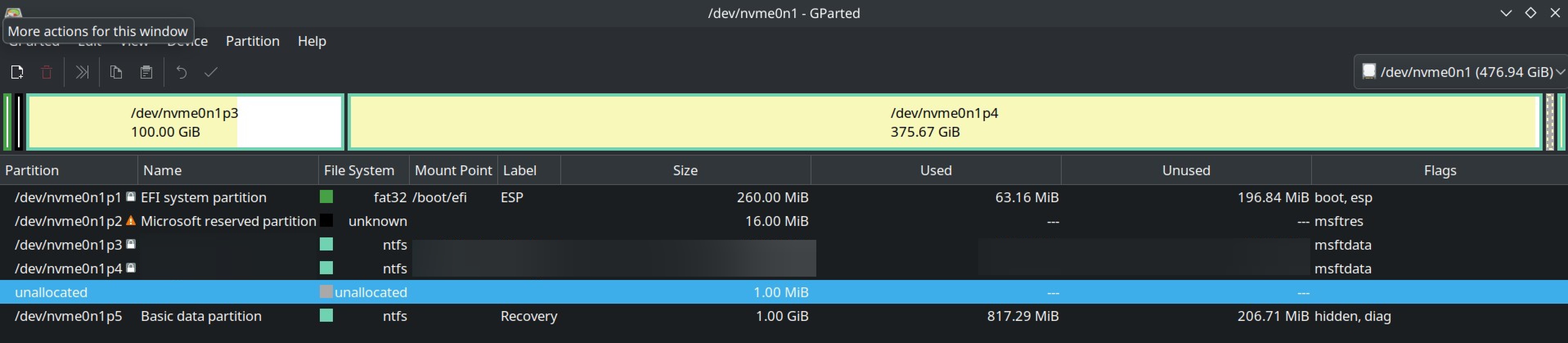
  1. I suspect the reason is my unusual /efi /boot partition layout. (attached below)
  1. I did my partition this way because, my initial EFI partition had less storage (as seen on image), so , I created another boot partition and mounted my pre-existing EFI partition to /boot/efi. I did this by referring a Youtube video (I know, I should’ve known better)
  1. I also encrypted my BTRFS / partition
  1. If you need any other info, please ask.

What I want:

To boot into a BTRFS snapshots from rEFind boot manager.


Additional Info:

  1. So, apparently, to restore the BTRFS snapshot of a root subvolume, I shouldn’t do it with the root partition being actively used.
  1. So, I need to boot into the desired snapshot from the boot manager itself.
  1. GRUB has grub-btrfs, which lets you boot into snapshot from OS selection screen itself.
  1. rEFInd has refind-btrfs, which should do the same as grub-btrfs. But it didn’t in my case. I am not seeing any way to boot into a snapshot from rEFInd.
  1. I use BTRFS Assistant with snapper to manage snapshots.
  1. I am not seeing any way to restore the snapshot from live environment too.
  1. I am using CachyOS (Arch) with Plasma DE.
  1. I suspect the reason is my unusual /efi /boot partition layout. (attached below)
  1. I did my partition this way because, my initial EFI partition had less storage (as seen on image), so , I created another boot partition and mounted my pre-existing EFI partition to /boot/efi. I did this by referring a Youtube video (I know, I should’ve known better)
  1. I also encrypted my BTRFS / partition
  1. If you need any other info, please ask.

0

What do I do with my existing NTFS drives?

preview

I am about to try switching to Linux, and will start with a dual boot so I can still use Windows if necessary. I’m planning to buy a new M2 SSD for Linux.

But, I currently have 4 hard drives which are all formatted as NTFS for Windows. What considerations do I need to make regarding these existing drives, or for moving files between systems?

For instance, I assume Windows simply won’t be able to see any of the files on my Linux drive. What about the other way around? Are there any downsides to accessing my files on NTFS drives through Linux? Am I able to move files around between my drives?

Do I need to convert any of my NTFS drives to a different format? (Or is that even possible without wiping the data?)

I am about to try switching to Linux, and will start with a dual boot so I can still use Windows if necessary. I’m planning to buy a new M2 SSD for Linux.

But, I currently have 4 hard drives which are all formatted as NTFS for Windows. What considerations do I need to make regarding these existing drives, or for moving files between systems?

For instance, I assume Windows simply won’t be able to see any of the files on my Linux drive. What about the other way around? Are there any downsides to accessing my files on NTFS drives through Linux? Am I able to move files around between my drives?

Do I need to convert any of my NTFS drives to a different format? (Or is that even possible without wiping the data?)

0

How to restore root subvolume BTRFS snapshot?

preview

I’m using CachyOS (Arch) with BTRFS. And tried to restore snap of root subvolume and it didn’t work ( see previous post ).

If I remember correctly, i successfully restored root subvolume before. Take it with a grain of salt.

Some people on my previos posts said that I shouldn’t have tried restore root subvol while system is actively running through the subvol.

Now my question is,

How to restore a snap of root subvolume ?

Edit: I know how to restore a snapshot. Just need help with root subvol snapshot.

I use BTRFS Assistant with snapper. And rEFInd doens’t have boot to snapshot option. (I installed and it didn’t work )

I’m using CachyOS (Arch) with BTRFS. And tried to restore snap of root subvolume and it didn’t work ( see previous post ).

If I remember correctly, i successfully restored root subvolume before. Take it with a grain of salt.

Some people on my previos posts said that I shouldn’t have tried restore root subvol while system is actively running through the subvol.

Now my question is,

How to restore a snap of root subvolume ?

Edit: I know how to restore a snapshot. Just need help with root subvol snapshot.

I use BTRFS Assistant with snapper. And rEFInd doens’t have boot to snapshot option. (I installed and it didn’t work )

0

what's the best way to get started with a desktop (laptop) linux?

preview

caveat; i’ve used linux in the best from debian to fedora to ubuntu to redhat on servers but this is the first time i want to actually switch to using it on my laptop because win11 is increasingly bad but also because i love it.

i’m just lost as to where to start. i’m currently looking at laptopwithlinux.com, system76.com, and thinkbooks. a lot of them come with specific distros, though i’m much more partial to debian than ubuntu. is it generally able to switch between a different one without too much hassle?

i also have an hp envy; browser.geekbench.com/v5/cpu/compare/5818425?base… is it wise to get rid of windows and just install linux on it?

i know some hardware but i’m not an EXPERT (with drivers and such)

any thoughts? hopefully this is an alright community for this question; it was the closest community when searching that i could find that seemed like it fit.

caveat; i’ve used linux in the best from debian to fedora to ubuntu to redhat on servers but this is the first time i want to actually switch to using it on my laptop because win11 is increasingly bad but also because i love it.

i’m just lost as to where to start. i’m currently looking at laptopwithlinux.com, system76.com, and thinkbooks. a lot of them come with specific distros, though i’m much more partial to debian than ubuntu. is it generally able to switch between a different one without too much hassle?

i also have an hp envy; browser.geekbench.com/v5/cpu/compare/5818425?base… is it wise to get rid of windows and just install linux on it?

i know some hardware but i’m not an EXPERT (with drivers and such)

any thoughts? hopefully this is an alright community for this question; it was the closest community when searching that i could find that seemed like it fit.

0

I guess I borked my System

preview

Context: I updated my CachyOS (Arch) BTRFS system. Some new things caused few problems especially brave browser(missing tabs), some icons missing.

So I wanted to go back to previous snapshot.

What I did: I first restored my home subvol which I saved before update. I worked.

Then I tried to restored my root partition. This is where I got the problem.

I got this error.

1001090084

I would really appreciate URGENT help

If you need any more details I can provide.

EDIT

  1. I used BTRFS Assistant to restore the root partition. And I did it while the OS is running.

( I previously did that and got no issues )

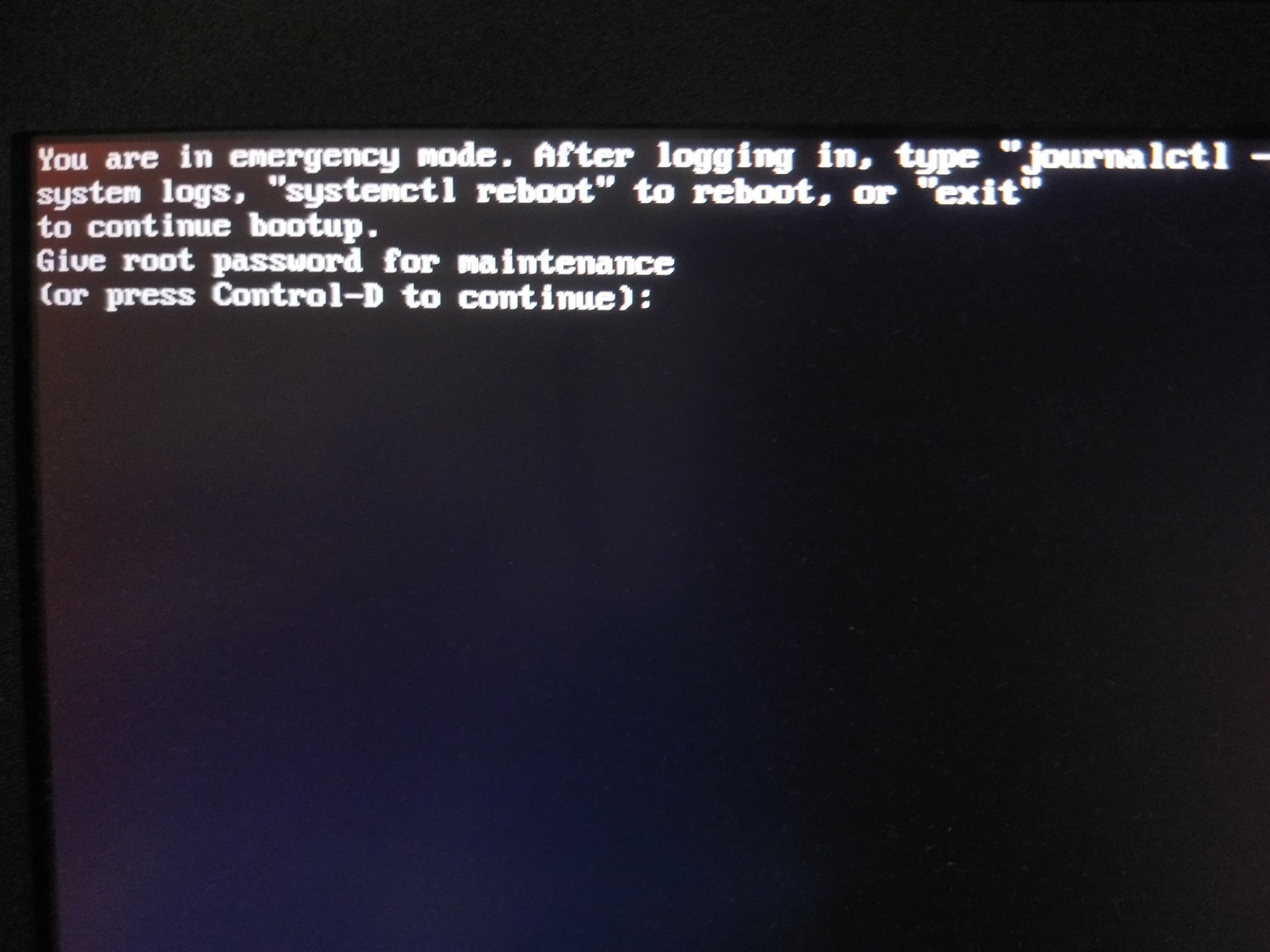
  1. I pressed crtl+d and got 👇🏽

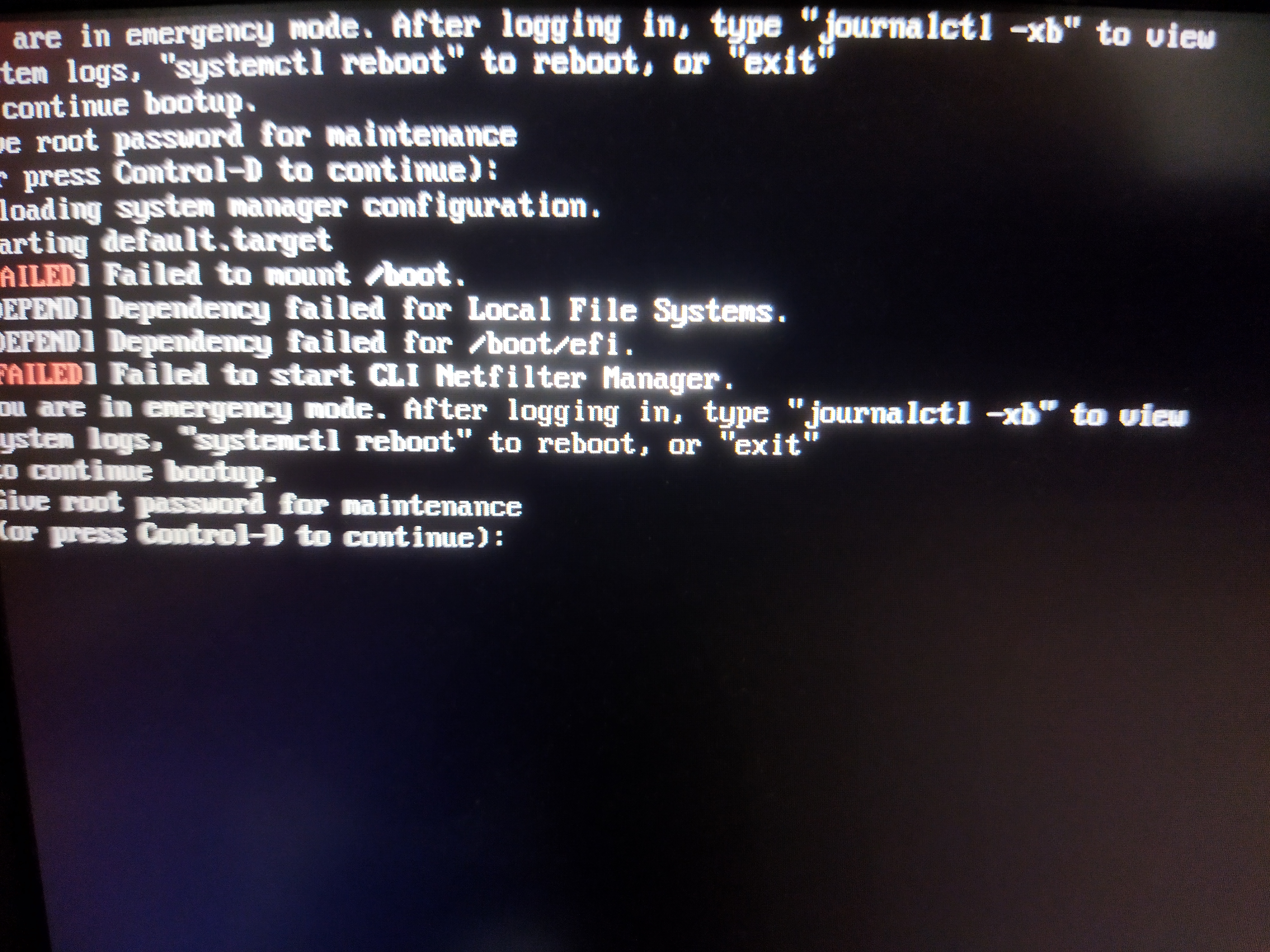
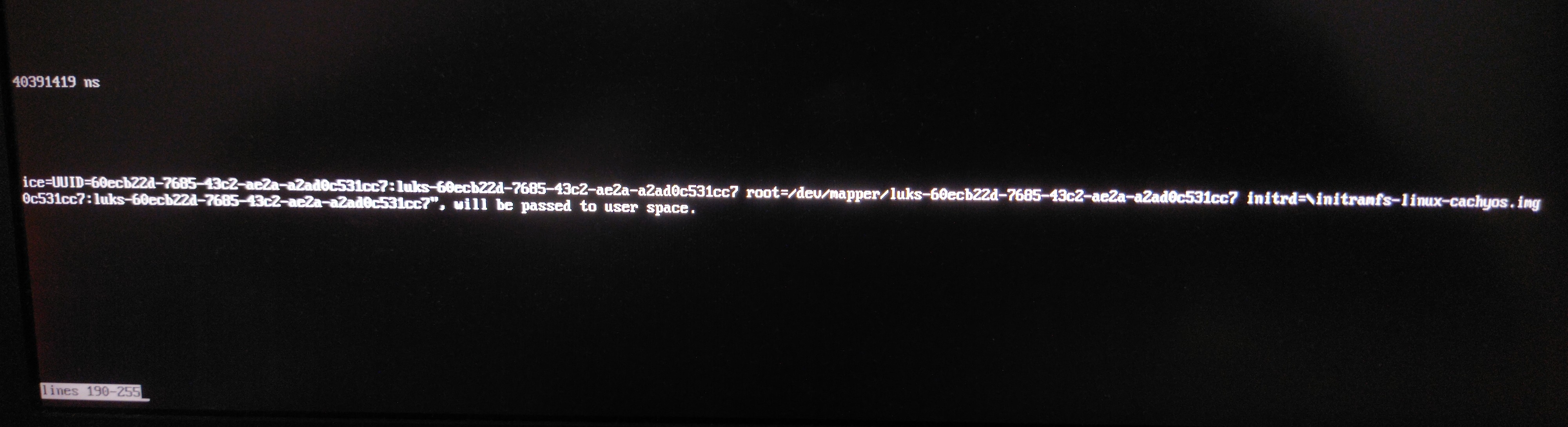
  1. I typed my password and went into maintenance. Typed journalctl -xb and got 2667 lines 😵‍💫. While scrolling mindlessly, this looked like something 👇🏽

👉🏽

👉🏽

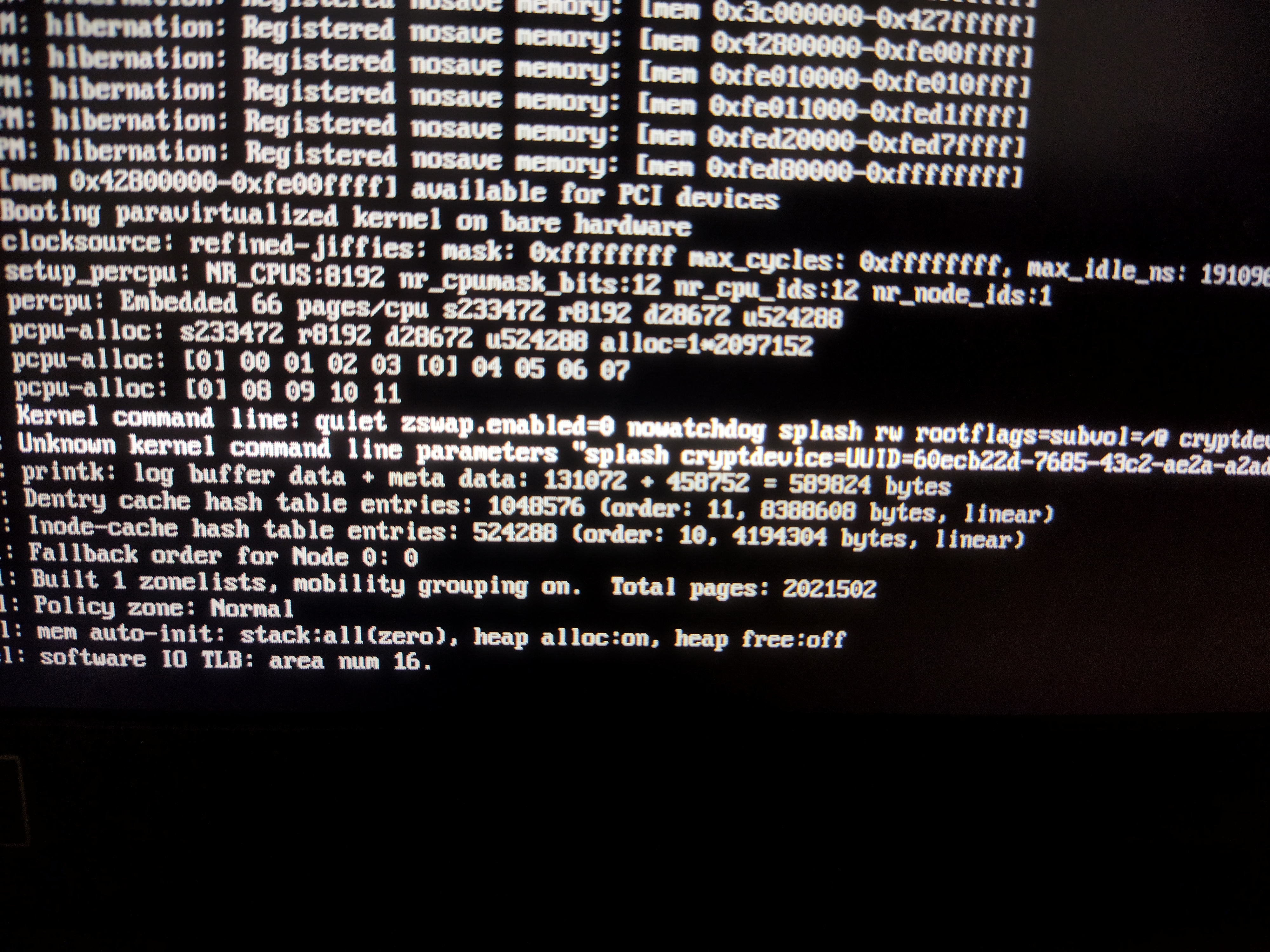
  1. This is my refind_linux.conf 👇🏽
"Boot with standard options"    "quiet zswap.enabled=0 nowatchdog splash rw rootflags=subvol=/@ cryptdevice=UUID=60ecb22d-7685-43c2-ae2a-a2ad0c531cc7:luks-60ecb22d-7685-43c2-ae2a-a2ad0c531cc7 root=/dev/mapper/luks-60ecb22d-7685-43c2-ae2a-a2ad0c531cc7"

"Boot to single-user mode"    "quiet zswap.enabled=0 nowatchdog splash rw rootflags=subvol=/@ cryptdevice=UUID=60ecb22d-7685-43c2-ae2a-a2ad0c531cc7:luks-60ecb22d-7685-43c2-ae2a-a2ad0c531cc7 root=/dev/mapper/luks-60ecb22d-7685-43c2-ae2a-a2ad0c531cc7" single

"Boot with minimal options"   "ro root=/dev/mapper/luks-60ecb22d-7685-43c2-ae2a-a2ad0c531cc7"


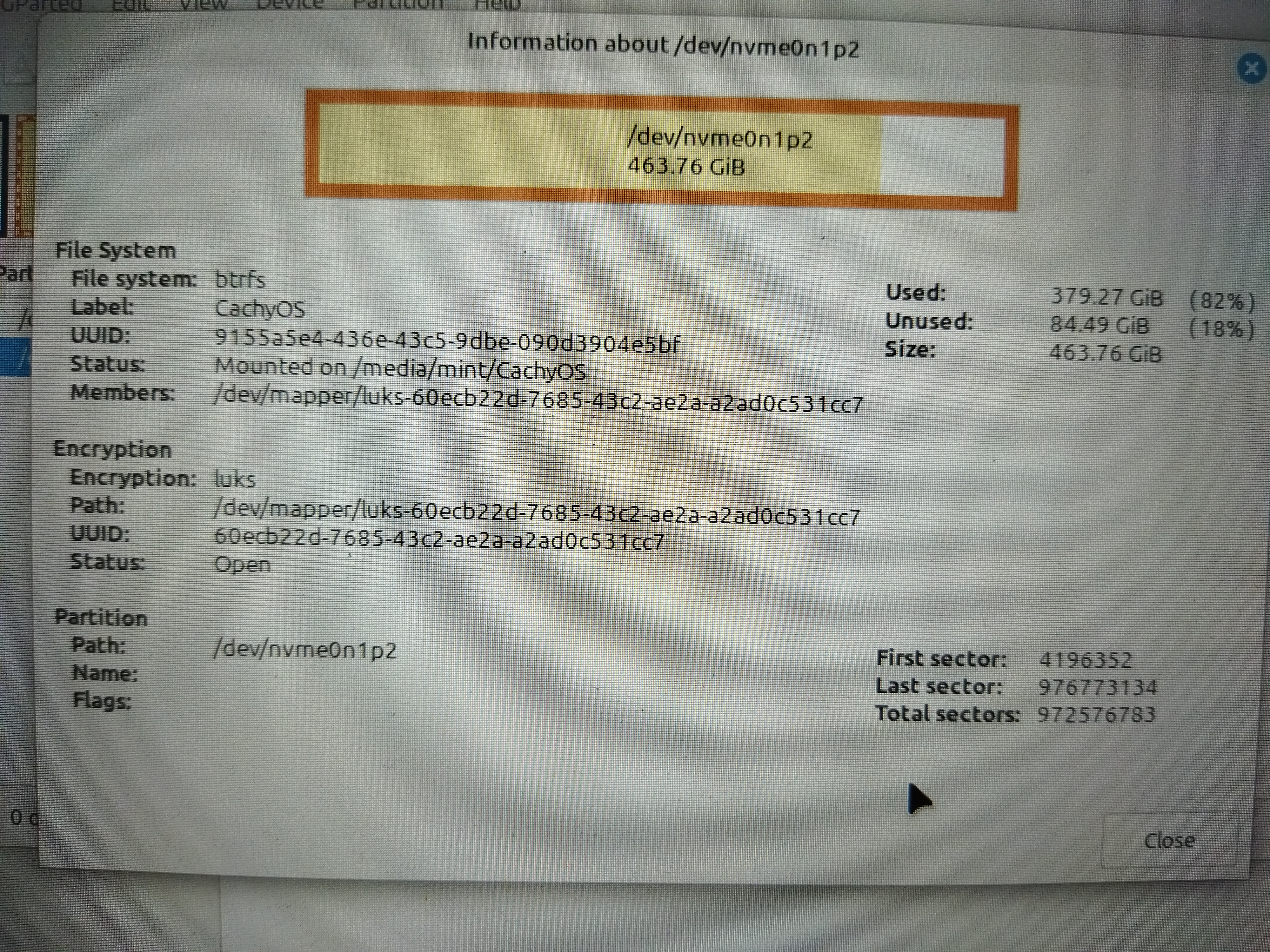
  1. This my OS partition 👇🏽

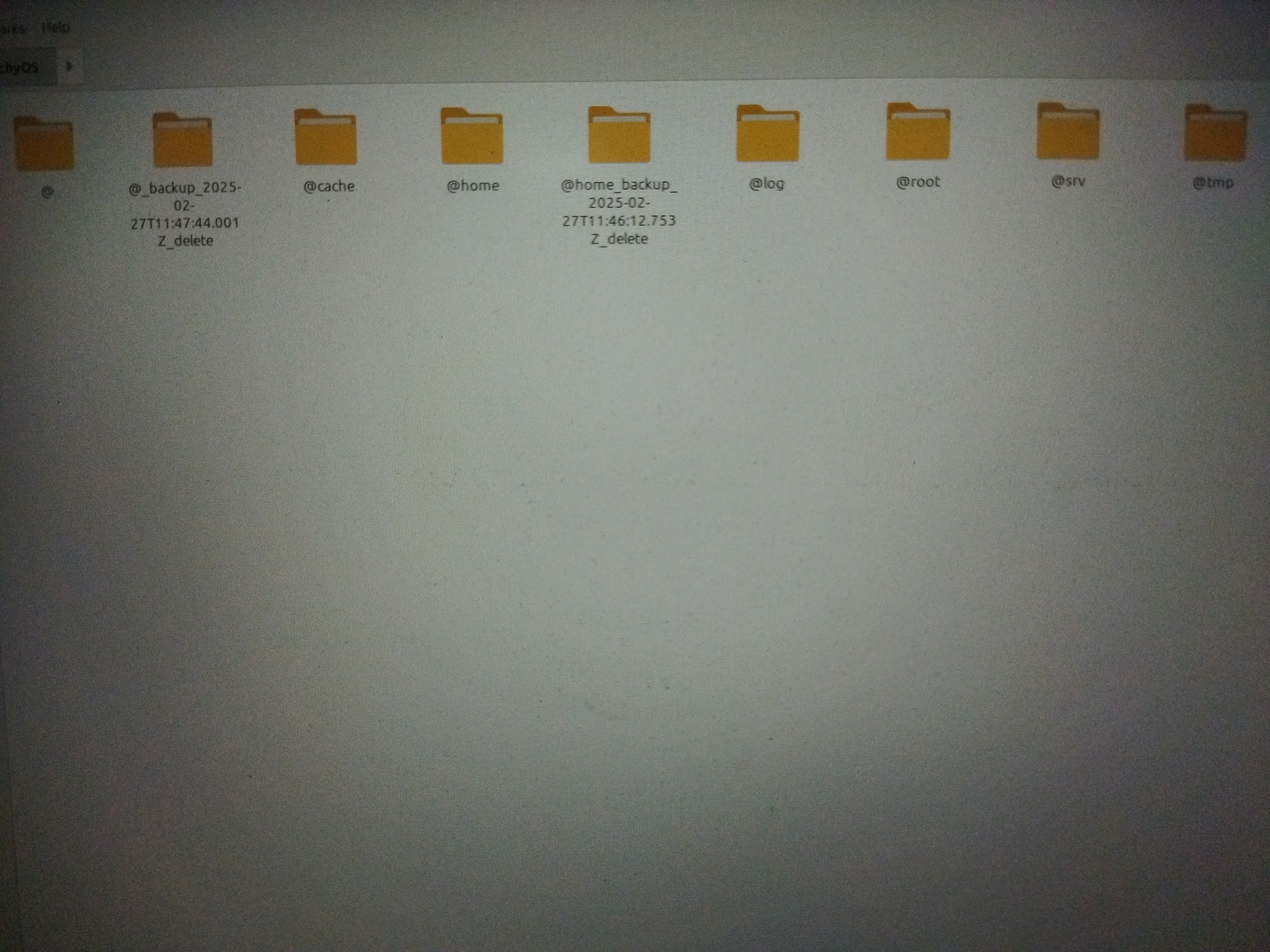
  1. This is my subvol layout 👇🏽 (CachyOS default)

Context: I updated my CachyOS (Arch) BTRFS system. Some new things caused few problems especially brave browser(missing tabs), some icons missing.

So I wanted to go back to previous snapshot.

What I did: I first restored my home subvol which I saved before update. I worked.

Then I tried to restored my root partition. This is where I got the problem.

I got this error.

1001090084

I would really appreciate URGENT help

If you need any more details I can provide.

EDIT

  1. I used BTRFS Assistant to restore the root partition. And I did it while the OS is running.

( I previously did that and got no issues )

  1. I pressed crtl+d and got 👇🏽

  1. I typed my password and went into maintenance. Typed journalctl -xb and got 2667 lines 😵‍💫. While scrolling mindlessly, this looked like something 👇🏽

👉🏽

👉🏽

  1. This is my refind_linux.conf 👇🏽
"Boot with standard options"    "quiet zswap.enabled=0 nowatchdog splash rw rootflags=subvol=/@ cryptdevice=UUID=60ecb22d-7685-43c2-ae2a-a2ad0c531cc7:luks-60ecb22d-7685-43c2-ae2a-a2ad0c531cc7 root=/dev/mapper/luks-60ecb22d-7685-43c2-ae2a-a2ad0c531cc7"

"Boot to single-user mode"    "quiet zswap.enabled=0 nowatchdog splash rw rootflags=subvol=/@ cryptdevice=UUID=60ecb22d-7685-43c2-ae2a-a2ad0c531cc7:luks-60ecb22d-7685-43c2-ae2a-a2ad0c531cc7 root=/dev/mapper/luks-60ecb22d-7685-43c2-ae2a-a2ad0c531cc7" single

"Boot with minimal options"   "ro root=/dev/mapper/luks-60ecb22d-7685-43c2-ae2a-a2ad0c531cc7"


  1. This my OS partition 👇🏽

  1. This is my subvol layout 👇🏽 (CachyOS default)

0

Mangohud not showing GPU stats after update

preview

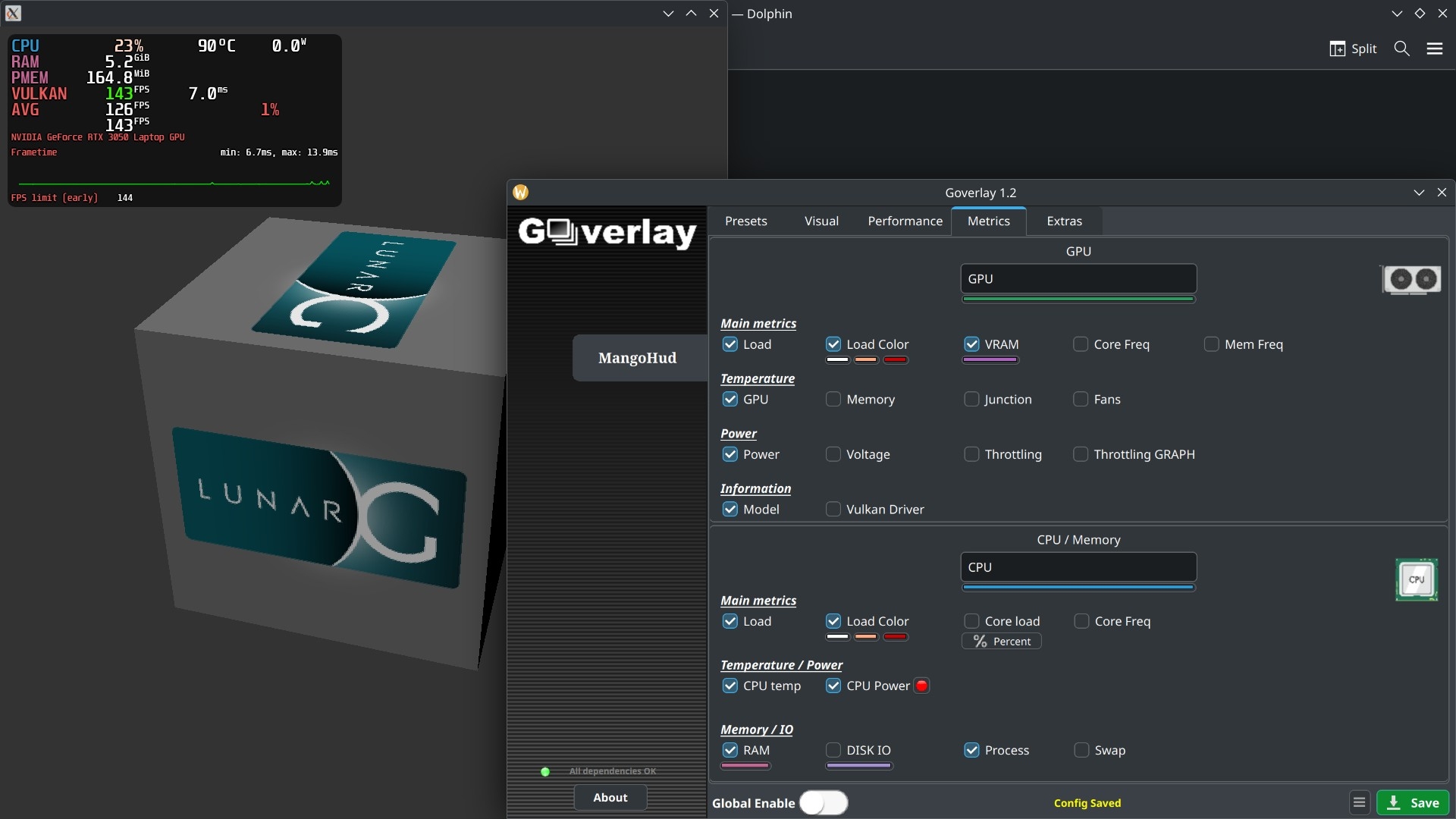
I updated arch. After the update mangohud is not showing any GPU stats except GPU model.

I was working perfectly fine before.

Config 👇🏽

################### File Generated by Goverlay ###################
legacy_layout=false


background_alpha=0.6
round_corners=10
background_alpha=0.6
background_color=000000

font_size=24
text_color=FFFFFF
position=top-left
toggle_hud=Shift_R+F12
no_display
pci_dev=0:0000:00
table_columns=4
gpu_text=GPU
gpu_stats
gpu_load_change
gpu_load_value=50,90
gpu_load_color=FFFFFF,FFAA7F,CC0000
gpu_temp
gpu_power
gpu_color=2E9762
cpu_text=CPU
cpu_stats

cpu_load_change
cpu_load_value=50,90
cpu_load_color=FFFFFF,FFAA7F,CC0000
cpu_temp
cpu_power
cpu_color=2E97CB
vram
vram_color=AD64C1
ram
ram_color=C26693
procmem
fps
fps_metrics=avg,0.01
gpu_name
frame_timing
frametime_color=00FF00
fps_limit_method=early
toggle_fps_limit=Shift_L+F1
show_fps_limit

fps_limit=144,90,60,45,30
fps_color_change
fps_color=B22222,FDFD09,39F900
fps_value=30,60
#offset=0


output_folder=/home/user
log_duration=30
autostart_log=0
log_interval=100
toggle_logging=Shift_L+F2


I updated arch. After the update mangohud is not showing any GPU stats except GPU model.

I was working perfectly fine before.

Config 👇🏽

################### File Generated by Goverlay ###################
legacy_layout=false


background_alpha=0.6
round_corners=10
background_alpha=0.6
background_color=000000

font_size=24
text_color=FFFFFF
position=top-left
toggle_hud=Shift_R+F12
no_display
pci_dev=0:0000:00
table_columns=4
gpu_text=GPU
gpu_stats
gpu_load_change
gpu_load_value=50,90
gpu_load_color=FFFFFF,FFAA7F,CC0000
gpu_temp
gpu_power
gpu_color=2E9762
cpu_text=CPU
cpu_stats

cpu_load_change
cpu_load_value=50,90
cpu_load_color=FFFFFF,FFAA7F,CC0000
cpu_temp
cpu_power
cpu_color=2E97CB
vram
vram_color=AD64C1
ram
ram_color=C26693
procmem
fps
fps_metrics=avg,0.01
gpu_name
frame_timing
frametime_color=00FF00
fps_limit_method=early
toggle_fps_limit=Shift_L+F1
show_fps_limit

fps_limit=144,90,60,45,30
fps_color_change
fps_color=B22222,FDFD09,39F900
fps_value=30,60
#offset=0


output_folder=/home/user
log_duration=30
autostart_log=0
log_interval=100
toggle_logging=Shift_L+F2


0

What to do if packages are in Conflict ?

preview

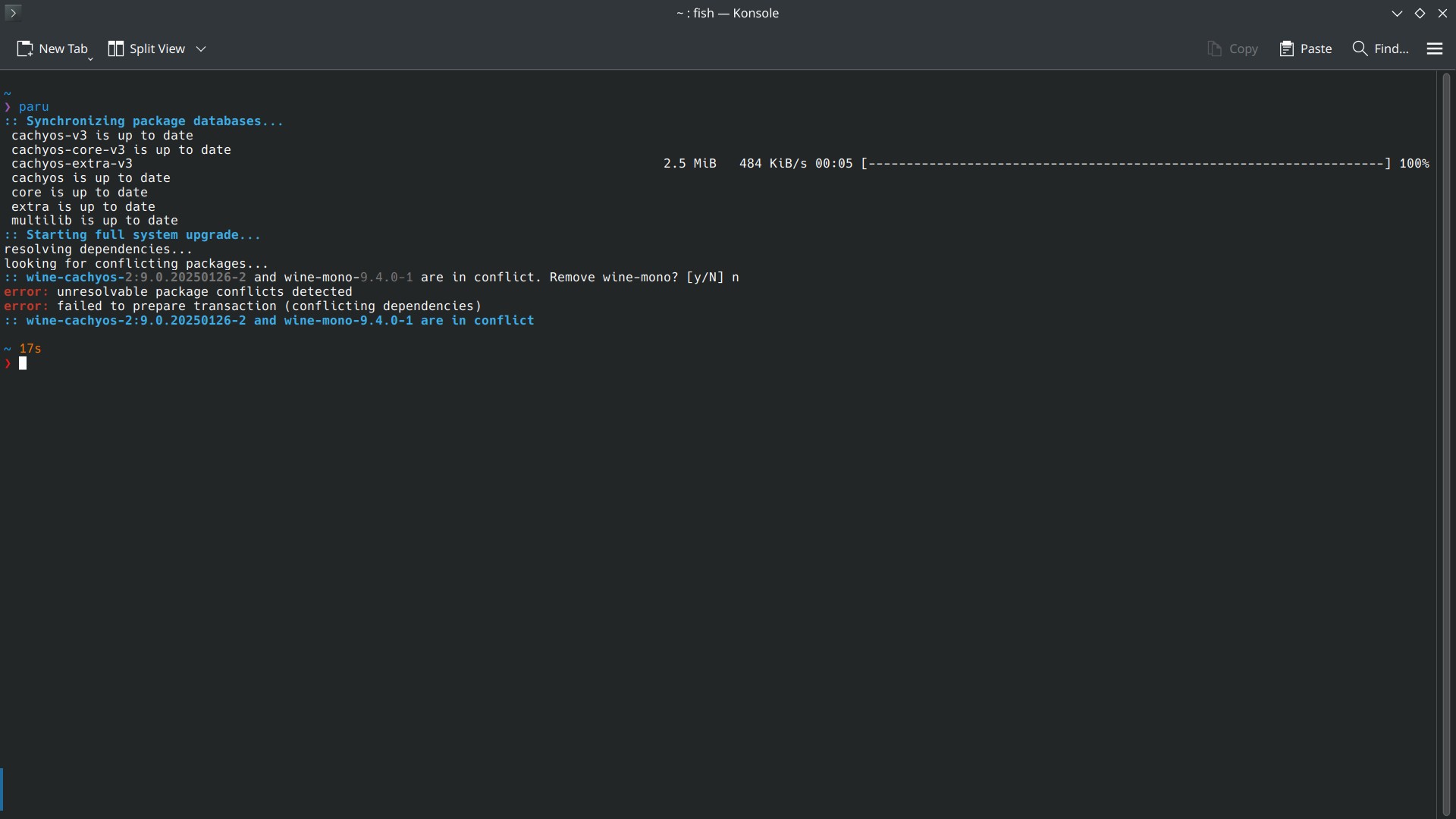
I am using CachyOS (Arch btw) and when I tried to update using paru, it says some packages are in conflict, and asking to remove those. What should I do ?

I didn’t find the best help from searching by myself ?

❯ paru
:: Synchronizing package databases...
 cachyos-v3 is up to date
 cachyos-core-v3 is up to date
 cachyos-extra-v3                                                                      2.5 MiB   484 KiB/s 00:05 [--------------------------------------------------------------------] 100%
 cachyos is up to date
 core is up to date
 extra is up to date
 multilib is up to date
:: Starting full system upgrade...
resolving dependencies...
looking for conflicting packages...
:: wine-cachyos-2:9.0.20250126-2 and wine-mono-9.4.0-1 are in conflict. Remove wine-mono? [y/N] n
error: unresolvable package conflicts detected
error: failed to prepare transaction (conflicting dependencies)
:: wine-cachyos-2:9.0.20250126-2 and wine-mono-9.4.0-1 are in conflict

~ 17s

I am using CachyOS (Arch btw) and when I tried to update using paru, it says some packages are in conflict, and asking to remove those. What should I do ?

I didn’t find the best help from searching by myself ?

❯ paru
:: Synchronizing package databases...
 cachyos-v3 is up to date
 cachyos-core-v3 is up to date
 cachyos-extra-v3                                                                      2.5 MiB   484 KiB/s 00:05 [--------------------------------------------------------------------] 100%
 cachyos is up to date
 core is up to date
 extra is up to date
 multilib is up to date
:: Starting full system upgrade...
resolving dependencies...
looking for conflicting packages...
:: wine-cachyos-2:9.0.20250126-2 and wine-mono-9.4.0-1 are in conflict. Remove wine-mono? [y/N] n
error: unresolvable package conflicts detected
error: failed to prepare transaction (conflicting dependencies)
:: wine-cachyos-2:9.0.20250126-2 and wine-mono-9.4.0-1 are in conflict

~ 17s

0

A few questions (Desktop Environments; Hard Drives; Package Managers)

preview

Thank you for your time!

  1. Are desktop environments changeable once the OS is installed? Can I switch between Cinnamon and KDE Plasma, for example? Or should I decide on one before I settle for a distro?
  2. Coming from Windows, I’m used to my hard drives just being “there”, no matter what program I’m using. I need to explicitly set permission levels in order to restrict access, but by default I can access anything anytime. The last time I tried Linux, I couldn’t get the program I was using to “see” my hard drives in order to open a file, despite the drives being accessible in the OS file manager. How does this stuff differ between Windows and Linux? What basics should I know about hard drives, e.g. what the hell is “mounting”?
  3. What are the crucial differences between the different package managers (e.g. Flathub, Snap, etc.) and why should I choose one over another? And like with the desktop environment question, can I switch app stores at will, or do I need to commit to one before I begin? I’ve read a lot of very angry and passionate comments in passing related to the various package managers, but none of it was accessible/comprehensible to a n00b like me.
  4. Can you recommend a resource - be it a CoolGuide image, video series, a PDF, a website, whatever - that will explain in simple terms the Linux way of doing Windows stuff? (Like with my hard drives question, for example.) “If on Windows you do X, on Linux you’ll have to do Y” kinda thing, but for everything, no matter how basic.

Thanks for reading 👍

Thank you for your time!

  1. Are desktop environments changeable once the OS is installed? Can I switch between Cinnamon and KDE Plasma, for example? Or should I decide on one before I settle for a distro?
  2. Coming from Windows, I’m used to my hard drives just being “there”, no matter what program I’m using. I need to explicitly set permission levels in order to restrict access, but by default I can access anything anytime. The last time I tried Linux, I couldn’t get the program I was using to “see” my hard drives in order to open a file, despite the drives being accessible in the OS file manager. How does this stuff differ between Windows and Linux? What basics should I know about hard drives, e.g. what the hell is “mounting”?
  3. What are the crucial differences between the different package managers (e.g. Flathub, Snap, etc.) and why should I choose one over another? And like with the desktop environment question, can I switch app stores at will, or do I need to commit to one before I begin? I’ve read a lot of very angry and passionate comments in passing related to the various package managers, but none of it was accessible/comprehensible to a n00b like me.
  4. Can you recommend a resource - be it a CoolGuide image, video series, a PDF, a website, whatever - that will explain in simple terms the Linux way of doing Windows stuff? (Like with my hard drives question, for example.) “If on Windows you do X, on Linux you’ll have to do Y” kinda thing, but for everything, no matter how basic.

Thanks for reading 👍

0

Brave crashes followed by a /usr/bin/brave-browser: line 39: 16656 Trace/breakpoint trap "$HERE/brave" "$@" error..

preview

Title. This error/crash happens with certain web pages only whilst everything else works as intended. Any ideas of what is going on? Running on sway, on a Orange pi 5 max with 16 GiB of ram. Dietpi. Thanks in advance. And yes, Firefox runs just fine without any crashes whatsoever.

Title. This error/crash happens with certain web pages only whilst everything else works as intended. Any ideas of what is going on? Running on sway, on a Orange pi 5 max with 16 GiB of ram. Dietpi. Thanks in advance. And yes, Firefox runs just fine without any crashes whatsoever.

0

Read Only File System

preview

Will my OS break if I make it the system Read Only? I am installing a raspberry pi 4 (Raspberry Pi OS (64-bit)) in my car and read on Lemmy that if I make the system files Read Only my system won’t get corrupt when power is abruptly turned off. I will leave the ‘home’ directory read-write. I realize I will have to remove the drive and run updates regularly.

Will my OS break if I make it the system Read Only? I am installing a raspberry pi 4 (Raspberry Pi OS (64-bit)) in my car and read on Lemmy that if I make the system files Read Only my system won’t get corrupt when power is abruptly turned off. I will leave the ‘home’ directory read-write. I realize I will have to remove the drive and run updates regularly.

0

EXE icons out of nowhere

preview

I haven’t updated my Arch (Plasma) for some time.

When I updated it yesterday, suddenly all the exe icons started to show up ( I’m dualbooting with Win ), which is not the case before.

As far I looked up, I can’t find anything on internet.

I don’t know if it’s whether WINE or Dolphin or some other package.

So, what’s changed ?

I haven’t updated my Arch (Plasma) for some time.

When I updated it yesterday, suddenly all the exe icons started to show up ( I’m dualbooting with Win ), which is not the case before.

As far I looked up, I can’t find anything on internet.

I don’t know if it’s whether WINE or Dolphin or some other package.

So, what’s changed ?

0

[SOLVED] Unable to hide 'tools' in rEFInd

preview

I want to hide the about tag in rEFInd. So, I did according to the info in config and website, which is to add a showtools line with no options.

And, nothing happens. I still see About, Shutdown, Reboot, Firmware tools in the rEFInd screen

# Default is shell,memtest,gdisk,apple_recovery,windows_recovery,mok_tool,about,hidden_tags,shutdown,reboot,firmware,fwupdate
# To completely disable scanning for all tools, provide a showtools line
# with no options.
#
#showtools shell, bootorder, gdisk, memtest, mok_tool, apple_recovery, windows_recovery, about, hidden_tags, reboot, exit, firmware, fwupdate
showtools

Eventhough the previous showtools line is a just a comment, I removed it too. And still nothing happens.

Does anybody have any idea?

I only want Shutdown, Reboot.


SOLVED

It seems like a rEFInd problem in latest version.

https://lemmy.frozeninferno.xyz/comment/16257252

Looks like I have to edit and rebuild it myself. Unfortunately, I’m not really that familiar with building packages myself.

Guess, I have to wait it out.

I want to hide the about tag in rEFInd. So, I did according to the info in config and website, which is to add a showtools line with no options.

And, nothing happens. I still see About, Shutdown, Reboot, Firmware tools in the rEFInd screen

# Default is shell,memtest,gdisk,apple_recovery,windows_recovery,mok_tool,about,hidden_tags,shutdown,reboot,firmware,fwupdate
# To completely disable scanning for all tools, provide a showtools line
# with no options.
#
#showtools shell, bootorder, gdisk, memtest, mok_tool, apple_recovery, windows_recovery, about, hidden_tags, reboot, exit, firmware, fwupdate
showtools

Eventhough the previous showtools line is a just a comment, I removed it too. And still nothing happens.

Does anybody have any idea?

I only want Shutdown, Reboot.


SOLVED

It seems like a rEFInd problem in latest version.

https://lemmy.frozeninferno.xyz/comment/16257252

Looks like I have to edit and rebuild it myself. Unfortunately, I’m not really that familiar with building packages myself.

Guess, I have to wait it out.

0

Why I shouldn't use Discover on Arch (Plasma) ?

preview

I installed CachyOS with Plasma DE and found it has no discover in it. When I searched on their sub lots of people say that one shouldn’t use Discover with any Arch distro as it will break the system. Can anybody clarify why?

Also if I am not supposed to use Discover, can anybody suggest an actual GUI application store? Unlike Octopi (which I consider just as a TUI with check boxes and columns)

Edit: I only use Discover for find and install new apps.

For updating, I just use paru.

I installed CachyOS with Plasma DE and found it has no discover in it. When I searched on their sub lots of people say that one shouldn’t use Discover with any Arch distro as it will break the system. Can anybody clarify why?

Also if I am not supposed to use Discover, can anybody suggest an actual GUI application store? Unlike Octopi (which I consider just as a TUI with check boxes and columns)

Edit: I only use Discover for find and install new apps.

For updating, I just use paru.

0

Create File in rpm-ostree Read Only

preview

I’m trying to get a Garmin Ant+ USB dongle working within Fedora Kinoite to work with Golden Cheetah and my cycle trainer.

The Golden Cheetah wiki only has instructions for getting this to work within Ubuntu which I got working on Mint previously. I’m trying to convert over to Kinoite and this is critical.

The wiki says to create a new udev rule. Following the instructions it says to place it in /etc/udev/rules.d which also exists in Kinoite, the problem being it’s a read only folder and sudo still doesn’t allow me to place a file. How do I override the atomic structure to create a file there? I believe it requires using the rpm-ostree command but I’m unfamiliar.

I’m trying to get a Garmin Ant+ USB dongle working within Fedora Kinoite to work with Golden Cheetah and my cycle trainer.

The Golden Cheetah wiki only has instructions for getting this to work within Ubuntu which I got working on Mint previously. I’m trying to convert over to Kinoite and this is critical.

The wiki says to create a new udev rule. Following the instructions it says to place it in /etc/udev/rules.d which also exists in Kinoite, the problem being it’s a read only folder and sudo still doesn’t allow me to place a file. How do I override the atomic structure to create a file there? I believe it requires using the rpm-ostree command but I’m unfamiliar.

0

Is it possible to use windows to run an already existing locally installed linux within a VM/WSL?

preview

I’ve got an image noise reduction app that I simply can’t get working under linux, and that I can’t find an equivalent tool for under linux.

I’ve tried VMs and wine and none of them work. My web searches haven’t encountered anyone that can make it work either.

So, I’m at the point where I may need to boot in to windows to do my noise reduction. However, I would really love to be able to access my existing linux install via a VM or the like when I do so, so that I can access my daily driver software (which is all linux) whilst I’m in windows.

Is such a thing possible?

I’ve got an image noise reduction app that I simply can’t get working under linux, and that I can’t find an equivalent tool for under linux.

I’ve tried VMs and wine and none of them work. My web searches haven’t encountered anyone that can make it work either.

So, I’m at the point where I may need to boot in to windows to do my noise reduction. However, I would really love to be able to access my existing linux install via a VM or the like when I do so, so that I can access my daily driver software (which is all linux) whilst I’m in windows.

Is such a thing possible?

0

Not seeing new Linux kernels (Fedora) in systemd-boot

preview

cross-posted from: feddit.nl/post/24216224

Problem: new kernels not showing up in boot menu

I can install new kernels, and I see them in /boot/efi/{PARITION_UUID}, but they don’t show up in the systemd-boot menu.

Data

Normally, Fedora shows the 3 latest kernels (plus a recovery kernel) in the boot menu. I only see up to 6.11.6 in the systemd-boot menu. On the /boot partition, I see much newer kernel versions (both labeled fc40 and fc41)

➜  ~ sudo ls /boot/efi/808f2c9ae4464f1ab2f0a7d367da1b30 -l
total 20
drwx------. 2 root root 4096 Jul  4 19:25 0-rescue
drwx------. 2 root root 4096 Nov  8 12:42 6.11.6-200.fc40.x86_64
drwx------. 2 root root 4096 Nov 18 17:57 6.11.7-200.fc40.x86_64
drwx------. 2 root root 4096 Nov 12 16:47 6.11.7-300.fc41.x86_64
drwx------. 2 root root 4096 Nov 20 10:10 6.11.8-300.fc41.x86_64
➜  ~ sudo ls /boot/efi/808f2c9ae4464f1ab2f0a7d367da1b30/6.11.8-300.fc41.x86_64 -l 
total 72484
-rwx------. 1 root root 57917440 Nov 20 10:10 initrd
-rwx------. 1 root root 16304488 Nov 20 10:10 linux

Systemd-boot

I started with other distros on this disk before I settled on Fedora. Since I was happy with systemd-boot and its automatic discovery of boot entries, I chose to use systemd-boot when I installed Fedora. I know that Grub is the default bootloader and manager for Fedora, but I have systemd-boot. It’s an option in the installer.

Major OS upgrades and rolling back the rollback

Last weekend I upgraded from Fedora 40 KDE Spin to Fedora 41. On the next Monday morning, screensharing in Edge Browser had stopped working, so I rolled back to a Fedora 40 snapshot with BTRFS Assistant. This turned out to be an issue in the latest Edge version, not in the underlying OS, so I rolled back the rollback and went to the Monday evening snapshot, then upgraded my packages.

Ever since, I’m not seeing new Kernels in the systemd-boot menu. Any idea how I can fix this, short of a fresh install of Fedora 41 KDE?

cross-posted from: feddit.nl/post/24216224

Problem: new kernels not showing up in boot menu

I can install new kernels, and I see them in /boot/efi/{PARITION_UUID}, but they don’t show up in the systemd-boot menu.

Data

Normally, Fedora shows the 3 latest kernels (plus a recovery kernel) in the boot menu. I only see up to 6.11.6 in the systemd-boot menu. On the /boot partition, I see much newer kernel versions (both labeled fc40 and fc41)

➜  ~ sudo ls /boot/efi/808f2c9ae4464f1ab2f0a7d367da1b30 -l
total 20
drwx------. 2 root root 4096 Jul  4 19:25 0-rescue
drwx------. 2 root root 4096 Nov  8 12:42 6.11.6-200.fc40.x86_64
drwx------. 2 root root 4096 Nov 18 17:57 6.11.7-200.fc40.x86_64
drwx------. 2 root root 4096 Nov 12 16:47 6.11.7-300.fc41.x86_64
drwx------. 2 root root 4096 Nov 20 10:10 6.11.8-300.fc41.x86_64
➜  ~ sudo ls /boot/efi/808f2c9ae4464f1ab2f0a7d367da1b30/6.11.8-300.fc41.x86_64 -l 
total 72484
-rwx------. 1 root root 57917440 Nov 20 10:10 initrd
-rwx------. 1 root root 16304488 Nov 20 10:10 linux

Systemd-boot

I started with other distros on this disk before I settled on Fedora. Since I was happy with systemd-boot and its automatic discovery of boot entries, I chose to use systemd-boot when I installed Fedora. I know that Grub is the default bootloader and manager for Fedora, but I have systemd-boot. It’s an option in the installer.

Major OS upgrades and rolling back the rollback

Last weekend I upgraded from Fedora 40 KDE Spin to Fedora 41. On the next Monday morning, screensharing in Edge Browser had stopped working, so I rolled back to a Fedora 40 snapshot with BTRFS Assistant. This turned out to be an issue in the latest Edge version, not in the underlying OS, so I rolled back the rollback and went to the Monday evening snapshot, then upgraded my packages.

Ever since, I’m not seeing new Kernels in the systemd-boot menu. Any idea how I can fix this, short of a fresh install of Fedora 41 KDE?

0

Creating zram, and then making it a ramdisk for .cache, /tmp, etc -- does it do any difference?

preview

Title.

Worst case scenario I’ve figured out a formidable way to make the “ultimate” ~/Downloads directory, heh.

Thanks in advance.

Title.

Worst case scenario I’ve figured out a formidable way to make the “ultimate” ~/Downloads directory, heh.

Thanks in advance.