0

am I the only one who thinks of codeberg and similar platforms like a file exchanger or a cloud storage? - Lemmy.World
lemmy.world
posts tagged #linux4noobs
My purely debian-family Linux Chromebook has been acting weird lately. I suspect that maybe when I replaced the internal battery a while ago, some of the connections inside might not have been put back properly because it was very difficult to reassemble. I was very careful but totally possible I made an error because I’m not too experienced with that. All the little ribbons and clips were so fiddly.
Is there a way to monitor for loose connections from the terminal? Some kind of log entries that would be clues? I just am looking for the basic info here, don’t feel anything is too obvious!
Problems I’m having are like pauses of unresponsiveness, and a lot of confusion about the power (battery vs ac, full vs empty, plugged vs unplugged). Bluetooth has become less reliable also. Generalized poltergeist type behavior.
Edit: I have confirmed a hardware problem. Pressing the keyboard and the bottom plate together around the power-in helps. So something is loose in there.
My purely debian-family Linux Chromebook has been acting weird lately. I suspect that maybe when I replaced the internal battery a while ago, some of the connections inside might not have been put back properly because it was very difficult to reassemble. I was very careful but totally possible I made an error because I’m not too experienced with that. All the little ribbons and clips were so fiddly.
Is there a way to monitor for loose connections from the terminal? Some kind of log entries that would be clues? I just am looking for the basic info here, don’t feel anything is too obvious!
Problems I’m having are like pauses of unresponsiveness, and a lot of confusion about the power (battery vs ac, full vs empty, plugged vs unplugged). Bluetooth has become less reliable also. Generalized poltergeist type behavior.
Edit: I have confirmed a hardware problem. Pressing the keyboard and the bottom plate together around the power-in helps. So something is loose in there.
Operating System: CachyOS Linux KDE Plasma Version: 6.8.0 KDE Frameworks Version: 6.31.0 Qt Version: 6.12.0 Kernel Version: 7.2.11-1-cachyos (64-bit) Graphics Platform: Wayland Processors: 12 × 12th Gen Intel® Core™ i5-12450H Memory: 8 GiB of RAM (7.5 GiB usable) Graphics Processor 1: Intel® Graphics Graphics Processor 2: NVIDIA GeForce RTX 3050 Laptop GPU
Several days ago, I tried to update my CachyOS system. And seen the below warning from Pacman itself
Update notice: Kernel 7.3.0-2 has issues with amdgpu particularly causing black screen on AMD dGPUs
At first, I was like gonna do the update, because I don’t have an AMD CPU/GPU. Then I went to check on the internet and found lots of issues with both Kernel 7.3 and KDE Plasma 6.8.1. Even affecting NVIDIA GPU.
Linux 7.3 - GPU idle increased from 10 W to 60. Anyone else? Partial upgrade for ca-certificates-mozilla Plasma 6.8.1 update: fullscreen games choppy (fine in windowed), desktop animations laggy - fixed by downgrading to 6.8.0 Choppy frame pacing in CS2 and Deadlock (300–500 FPS) after 2026-10-22 update (linux 7.3.0, linux-firmware-amdgpu 20261019, Plasma 6.8.1) – RX 6600 XT, Wayland – fixed by snapshot rollback Steam games broken after updating from kernel 7.2.11-1 -> 7.3.0-2 (not fixed by 7.3.0-3) linux-cachyos 7.3.0-4: amdgpu “Fence fallback timer expired” causes game crashes (RX 6600 XT) (Monster Hunter Wilds) Cachyos kernel upgrade to 7.3.0 - fails on AMD After latest update to cachyos-rate-mirrors the speeds are horible GPU and CPU Fans Running at Double Speed under 7.3.1 Cachy kernel version 7.3.1 breaks the dual display (DisplayLink device) (KDE Plasma) (Kwin) Cannot login after the latest update from kernel 7.2.10-1 -> 7.3.0-2 (presented with a frozen screen) Nvidia-open 615.78.08: dGPU runtime D3 “Not supported” on linux-cachyos 7.3.0-4, works on LTS 6.18.55-2 Steam games broken after updating from kernel 7.2.11-1 -> 7.3.0-2 (not fixed by 7.3.0-3) Is there a reason that the BORE kernel is stale (7.2.10 vs. 7.3.0)? After Recent Update, Shut Down Takes Over 1 Minute - User Manager Issue? Behringer UMC404HD - fail with Kernel 7.3.0 LACT power cap write fails with “Operation not supported (os error 95)” on 7.3.0-3-cachyos Plasma 6.8.1: immediate screen tearing / flickering shadows / black areas on GTX 1650 Ti (HP Pavilion Gaming 15-dk1xxx) - 6.8.0 is fine Updating to 7.3.0-3-cachyos causes UMC204HD Audio Interface to be unusable Issue with AdaptiveSync kernel 7.3+ Keyboard Backlight Not Working With 7.3 Kernel Kernal 7.3.0-3 - AMD / NVIDEA Should i stay at linux-cachyos 7.2.11-1? After update audio is is wery crapy and not loud Audio echo in FAudio/Proton games on launch — regression starting linux-cachyos 7.3 Severe display artifacts and flickering on NVIDIA HDMI output after today’s first upgrade (2026/10/22) Update causing KDE Plasma crash or blackscreen at boot After KDE 6.8 update, Desktop Animations lag and Games run on 48fps 7.3.0-2 on RX 9070 XT: no black screen, but a DCN401 MCM LUT warning on HDR enable (Plasma 6.8.0) After update lost fps
Not every link I shared is completely relevant to me, but the amount of issues on Kernel 7.3 and KDE Plasma 6.8.1. Even affecting NVIDIA GPU made me hesitant.
Because of this hesitation, I also didn’t update Firefox CA-Certificates security update.
Should I update now?
Operating System: CachyOS Linux KDE Plasma Version: 6.8.0 KDE Frameworks Version: 6.31.0 Qt Version: 6.12.0 Kernel Version: 7.2.11-1-cachyos (64-bit) Graphics Platform: Wayland Processors: 12 × 12th Gen Intel® Core™ i5-12450H Memory: 8 GiB of RAM (7.5 GiB usable) Graphics Processor 1: Intel® Graphics Graphics Processor 2: NVIDIA GeForce RTX 3050 Laptop GPU
Several days ago, I tried to update my CachyOS system. And seen the below warning from Pacman itself
Update notice: Kernel 7.3.0-2 has issues with amdgpu particularly causing black screen on AMD dGPUs
At first, I was like gonna do the update, because I don’t have an AMD CPU/GPU. Then I went to check on the internet and found lots of issues with both Kernel 7.3 and KDE Plasma 6.8.1. Even affecting NVIDIA GPU.
Linux 7.3 - GPU idle increased from 10 W to 60. Anyone else? Partial upgrade for ca-certificates-mozilla Plasma 6.8.1 update: fullscreen games choppy (fine in windowed), desktop animations laggy - fixed by downgrading to 6.8.0 Choppy frame pacing in CS2 and Deadlock (300–500 FPS) after 2026-10-22 update (linux 7.3.0, linux-firmware-amdgpu 20261019, Plasma 6.8.1) – RX 6600 XT, Wayland – fixed by snapshot rollback Steam games broken after updating from kernel 7.2.11-1 -> 7.3.0-2 (not fixed by 7.3.0-3) linux-cachyos 7.3.0-4: amdgpu “Fence fallback timer expired” causes game crashes (RX 6600 XT) (Monster Hunter Wilds) Cachyos kernel upgrade to 7.3.0 - fails on AMD After latest update to cachyos-rate-mirrors the speeds are horible GPU and CPU Fans Running at Double Speed under 7.3.1 Cachy kernel version 7.3.1 breaks the dual display (DisplayLink device) (KDE Plasma) (Kwin) Cannot login after the latest update from kernel 7.2.10-1 -> 7.3.0-2 (presented with a frozen screen) Nvidia-open 615.78.08: dGPU runtime D3 “Not supported” on linux-cachyos 7.3.0-4, works on LTS 6.18.55-2 Steam games broken after updating from kernel 7.2.11-1 -> 7.3.0-2 (not fixed by 7.3.0-3) Is there a reason that the BORE kernel is stale (7.2.10 vs. 7.3.0)? After Recent Update, Shut Down Takes Over 1 Minute - User Manager Issue? Behringer UMC404HD - fail with Kernel 7.3.0 LACT power cap write fails with “Operation not supported (os error 95)” on 7.3.0-3-cachyos Plasma 6.8.1: immediate screen tearing / flickering shadows / black areas on GTX 1650 Ti (HP Pavilion Gaming 15-dk1xxx) - 6.8.0 is fine Updating to 7.3.0-3-cachyos causes UMC204HD Audio Interface to be unusable Issue with AdaptiveSync kernel 7.3+ Keyboard Backlight Not Working With 7.3 Kernel Kernal 7.3.0-3 - AMD / NVIDEA Should i stay at linux-cachyos 7.2.11-1? After update audio is is wery crapy and not loud Audio echo in FAudio/Proton games on launch — regression starting linux-cachyos 7.3 Severe display artifacts and flickering on NVIDIA HDMI output after today’s first upgrade (2026/10/22) Update causing KDE Plasma crash or blackscreen at boot After KDE 6.8 update, Desktop Animations lag and Games run on 48fps 7.3.0-2 on RX 9070 XT: no black screen, but a DCN401 MCM LUT warning on HDR enable (Plasma 6.8.0) After update lost fps
Not every link I shared is completely relevant to me, but the amount of issues on Kernel 7.3 and KDE Plasma 6.8.1. Even affecting NVIDIA GPU made me hesitant.
Because of this hesitation, I also didn’t update Firefox CA-Certificates security update.
Should I update now?
Not a total linux noob, plenty of experience using them for servers @ work. Less experience with using them with GUIs and for other computing use.
I’ve got an intel nuc i3 that I use as a media pc. It doesn’t do (or need to do) more than allow me to browse files and play videos (mkv, mp4, just the usual fare). I don’t really need or want something like Kodi. I just have the stuff I want to play on my NAS and smb or nfs mount to get at it. Specs aren’t great, but it doesn’t need to run 4k, so it’s been fine. Perhaps I use clementine once in a blue moon to play a few mp3s when hosting a party or dinner. (And I toy around with the IR reader of the nuc so I can make my own media buttons on a programmable remote, but that’s not super important.)
That’s pretty much it.
Currently I run Ubuntu on it, but it takes so long to boot. What are your distro recommendations? Not afraid to tinker, I doubt I’ll ever become an Archlinux user.
Not a total linux noob, plenty of experience using them for servers @ work. Less experience with using them with GUIs and for other computing use.
I’ve got an intel nuc i3 that I use as a media pc. It doesn’t do (or need to do) more than allow me to browse files and play videos (mkv, mp4, just the usual fare). I don’t really need or want something like Kodi. I just have the stuff I want to play on my NAS and smb or nfs mount to get at it. Specs aren’t great, but it doesn’t need to run 4k, so it’s been fine. Perhaps I use clementine once in a blue moon to play a few mp3s when hosting a party or dinner. (And I toy around with the IR reader of the nuc so I can make my own media buttons on a programmable remote, but that’s not super important.)
That’s pretty much it.
Currently I run Ubuntu on it, but it takes so long to boot. What are your distro recommendations? Not afraid to tinker, I doubt I’ll ever become an Archlinux user.
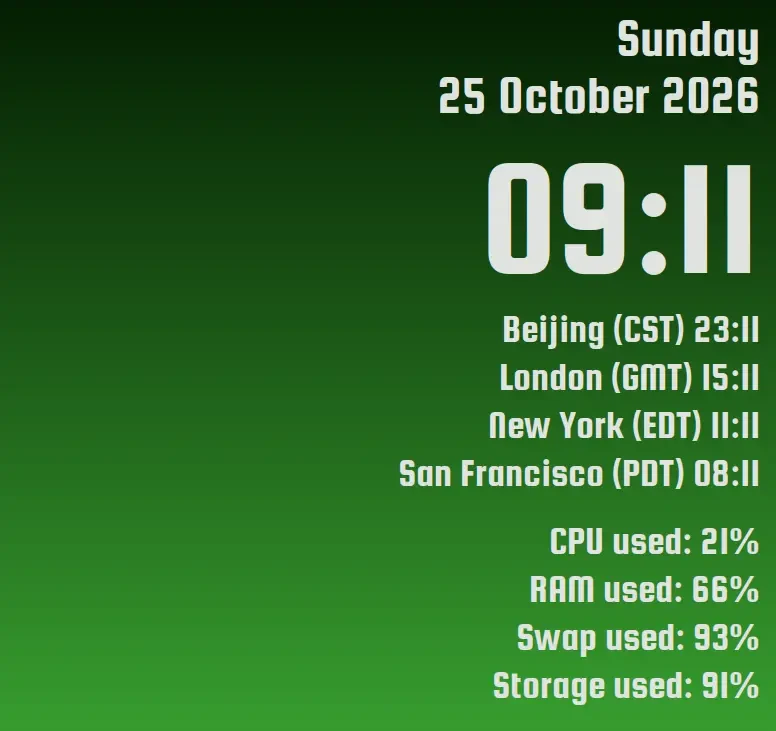
Because of communicating with people elsewhere, remote work & watch parties, I have my Conky show the time in a few key time zones. And they automatically update when those time zones that have a DST change (mine doesn’t). So far, so good.
But I’d like a little more warning about start / end of DST. Like maybe:
I know I could (and will) set up warnings in my personal calendar, but ideally I’d also like Conky to show me somehow. Maybe change text colour? An asterisk or other symbol? Something else?
Is that possible?
Also, it’s been so long since I set it up, I’ve forgotten what little Conky skills I ever had, so please be patient with me 😁
Here’s my config:
conky.config = { --============================================================================== – – – – – – – – – --============================================================================== – Size and Position settings – alignment = ‘top_right’, gap_x = 20, gap_y = 0, maximum_width = 1280, minimum_height = 300, minimum_width = 680, – Text settings – use_xft = true, override_utf8_locale = true, font = ‘Roboto:light:size=9’, – Color Settings – default_color = ‘white’, default_outline_color = ‘white’, default_shade_color = ‘white’, color1 = ‘#404040’, color2 = ‘#e1e3e1’, – Window Settings – background = false, border_width = 1, draw_borders = false, draw_graph_borders = false, draw_outline = false, draw_shades = false, own_window = true, – own_window_colour = ‘#FFFFFF’, own_window_class = ‘Conky’, own_window_argb_visual = true, own_window_type = ‘Conky’, own_window_transparent = true, own_window_hints = ‘undecorated,below,sticky,skip_taskbar,skip_pager’, stippled_borders = 0, – — Graphics settings — # draw_shades = false, draw_outline = false, draw_borders = false, draw_graph_borders = false, default_outline_color = black, – Others – cpu_avg_samples = 2, net_avg_samples = 2, double_buffer = true, out_to_console = false, out_to_stderr = false, extra_newline = false, update_interval = 1, uppercase = false, use_spacer = ‘none’, show_graph_scale = false, show_graph_range = false } conky.text = [[ ${alignr}${voffset 10}${color2}${font Squada One:size=40}${time %A} ${alignr}${voffset 0}${color2}${font Squada One:size=40}${time %e %B %Y} ${alignr}${voffset 5}${color2}${font Squada One:size=125}${time %H:%M}${font} ${alignr}${voffset 30}${color2}${font Squada One:size=30}${color2}Beijing (${tztime Asia/Shanghai %Z) %H:%M} ${alignr}${voffset 5}${color2}${font Squada One:size=30}${color2}London (${tztime Europe/London %Z) %H:%M} ${alignr}${voffset 5}${color2}${font Squada One:size=30}${color2}New York (${tztime America/New_York %Z) %H:%M} ${alignr}${voffset 5}${color2}${font Squada One:size=30}${color2}San Francisco (${tztime America/Vancouver %Z) %H:%M} ${alignr}${voffset 25}${color2}${font Squada One:size=30}CPU used: ${cpu cpu0}% ${alignr}${voffset 5}${color2}${font Squada One:size=30}RAM used: ${memperc}% ${alignr}${voffset 5}${color2}${font Squada One:size=30}Swap used: ${swapperc}% ${alignr}${voffset 5}${color2}${font Squada One:size=30}Storage used: ${fs_used_perc /}% ]]
Because of communicating with people elsewhere, remote work & watch parties, I have my Conky show the time in a few key time zones. And they automatically update when those time zones that have a DST change (mine doesn’t). So far, so good.
But I’d like a little more warning about start / end of DST. Like maybe:
I know I could (and will) set up warnings in my personal calendar, but ideally I’d also like Conky to show me somehow. Maybe change text colour? An asterisk or other symbol? Something else?
Is that possible?
Also, it’s been so long since I set it up, I’ve forgotten what little Conky skills I ever had, so please be patient with me 😁
Here’s my config:
conky.config = { --============================================================================== – – – – – – – – – --============================================================================== – Size and Position settings – alignment = ‘top_right’, gap_x = 20, gap_y = 0, maximum_width = 1280, minimum_height = 300, minimum_width = 680, – Text settings – use_xft = true, override_utf8_locale = true, font = ‘Roboto:light:size=9’, – Color Settings – default_color = ‘white’, default_outline_color = ‘white’, default_shade_color = ‘white’, color1 = ‘#404040’, color2 = ‘#e1e3e1’, – Window Settings – background = false, border_width = 1, draw_borders = false, draw_graph_borders = false, draw_outline = false, draw_shades = false, own_window = true, – own_window_colour = ‘#FFFFFF’, own_window_class = ‘Conky’, own_window_argb_visual = true, own_window_type = ‘Conky’, own_window_transparent = true, own_window_hints = ‘undecorated,below,sticky,skip_taskbar,skip_pager’, stippled_borders = 0, – — Graphics settings — # draw_shades = false, draw_outline = false, draw_borders = false, draw_graph_borders = false, default_outline_color = black, – Others – cpu_avg_samples = 2, net_avg_samples = 2, double_buffer = true, out_to_console = false, out_to_stderr = false, extra_newline = false, update_interval = 1, uppercase = false, use_spacer = ‘none’, show_graph_scale = false, show_graph_range = false } conky.text = [[ ${alignr}${voffset 10}${color2}${font Squada One:size=40}${time %A} ${alignr}${voffset 0}${color2}${font Squada One:size=40}${time %e %B %Y} ${alignr}${voffset 5}${color2}${font Squada One:size=125}${time %H:%M}${font} ${alignr}${voffset 30}${color2}${font Squada One:size=30}${color2}Beijing (${tztime Asia/Shanghai %Z) %H:%M} ${alignr}${voffset 5}${color2}${font Squada One:size=30}${color2}London (${tztime Europe/London %Z) %H:%M} ${alignr}${voffset 5}${color2}${font Squada One:size=30}${color2}New York (${tztime America/New_York %Z) %H:%M} ${alignr}${voffset 5}${color2}${font Squada One:size=30}${color2}San Francisco (${tztime America/Vancouver %Z) %H:%M} ${alignr}${voffset 25}${color2}${font Squada One:size=30}CPU used: ${cpu cpu0}% ${alignr}${voffset 5}${color2}${font Squada One:size=30}RAM used: ${memperc}% ${alignr}${voffset 5}${color2}${font Squada One:size=30}Swap used: ${swapperc}% ${alignr}${voffset 5}${color2}${font Squada One:size=30}Storage used: ${fs_used_perc /}% ]]
I’ve been working with a live distro recently and now im in love with the idea of the read-only base system. Knowing there is always the option of going back to a clean slate.
I want to avoid immutable distros since they are too locked down for my taste, but they showed me that running all apps through flatpak/appimage/distrobox is a workable option.
Setting up sandboxing so that everything is contained in a /home partiton shouldn’t be too difficult. Then i could just roll back to a clean btrfs snapshot before every update to keep my system close to a fresh install. I dont plan to update that often, maybe every 2-3 months.
Is there an noticeable performance impact if im running, let’s say, an arch distrobox container on an arch system? Any other sandboxing tools should i look into?
I’ve been working with a live distro recently and now im in love with the idea of the read-only base system. Knowing there is always the option of going back to a clean slate.
I want to avoid immutable distros since they are too locked down for my taste, but they showed me that running all apps through flatpak/appimage/distrobox is a workable option.
Setting up sandboxing so that everything is contained in a /home partiton shouldn’t be too difficult. Then i could just roll back to a clean btrfs snapshot before every update to keep my system close to a fresh install. I dont plan to update that often, maybe every 2-3 months.
Is there an noticeable performance impact if im running, let’s say, an arch distrobox container on an arch system? Any other sandboxing tools should i look into?
HP Pavilion dv6500 Notebook PC
Intel Core 2 Duo T5250 @ 1.5GHz
2GB RAM
Hitachi 500GB HDD
Windows Vista
What distro would you recommend?
Can this be done with a USB or will a DVD be necessary?
I want to save it from ewaste because it has a ridiculous number of ports on the sides.
HP Pavilion dv6500 Notebook PC
Intel Core 2 Duo T5250 @ 1.5GHz
2GB RAM
Hitachi 500GB HDD
Windows Vista
What distro would you recommend?
Can this be done with a USB or will a DVD be necessary?
I want to save it from ewaste because it has a ridiculous number of ports on the sides.
Debian 13.
I have an FSTAB config that auto mounts a second drive , NTFS fstype that used to be on windows (same laptop)
UUID=666 /media/userName/Data auto defaults,nofail,x-systemd.automount 0 2
Because the /media/userName/Data path was made in a way that didn’t transfer ownership to my user, and because I am clueless about user/group management on linux, Virtual machine manager and jenkins and all the other program based users that don’t really get a “real” user I can manage on cockpit or similar (AFAIK) can’t use that disk for writing information to and etc.
I already tried to change owner to a shared group in a shitty way that locked me out of that very important drive. Also, it doesn’t seem to work anyway, and just fucking sets it back to root or ignores it when I try to do it.
What’s the simplest change I can make to the fstab entry or ownership to make use of that drive for jenkins pipelines , steam games and most importantly, Virtual Machine Manager guest machines?
This shit scares me, and I have very little time, so I will get back to you guys in due time, and appreciate your assistance.
Debian 13.
I have an FSTAB config that auto mounts a second drive , NTFS fstype that used to be on windows (same laptop)
UUID=666 /media/userName/Data auto defaults,nofail,x-systemd.automount 0 2
Because the /media/userName/Data path was made in a way that didn’t transfer ownership to my user, and because I am clueless about user/group management on linux, Virtual machine manager and jenkins and all the other program based users that don’t really get a “real” user I can manage on cockpit or similar (AFAIK) can’t use that disk for writing information to and etc.
I already tried to change owner to a shared group in a shitty way that locked me out of that very important drive. Also, it doesn’t seem to work anyway, and just fucking sets it back to root or ignores it when I try to do it.
What’s the simplest change I can make to the fstab entry or ownership to make use of that drive for jenkins pipelines , steam games and most importantly, Virtual Machine Manager guest machines?
This shit scares me, and I have very little time, so I will get back to you guys in due time, and appreciate your assistance.
Important: This is an X11 application and, as such, will not function correctly when Wayland is in use instead of Xorg.
Python script in AUTOKEY program
import concurrent.futures
import subprocess
import os


# Change the current working directory
os.chdir('/home/user/Documents/VideoDownloader') #change to your working directory not where autokey stores scripts (/home/user/.config/autokey/data/Start_Up_Scripts/
with concurrent.futures.ProcessPoolExecutor() as executor:
    proc1 = executor.submit(subprocess.run, ['./downloader.sh'])
    proc2 = executor.submit(subprocess.run, ['./onlinedownloader.sh'])

proc1.result()
proc2.result()
Example of a bash script in ( /home/user/Documents/VideoDownloader ) or where ever.
1. downloader.sh
------------------------------------------------------------
#!/bin/bash

./Open.Video.Downloader_3.2.0_amd64.AppImage # You can start up appimages

------------------------------------------------------------


2. onlinedownloader.sh
------------------------------------------------------------

#!/bin/bash

librewolf https://4get.ca/   # Open Webpages

------------------------------------------------------------
Then with the push of a button using a cheap chinese macros tied to a key combo and blam. Magic.
Important: This is an X11 application and, as such, will not function correctly when Wayland is in use instead of Xorg.
Python script in AUTOKEY program
import concurrent.futures
import subprocess
import os


# Change the current working directory
os.chdir('/home/user/Documents/VideoDownloader') #change to your working directory not where autokey stores scripts (/home/user/.config/autokey/data/Start_Up_Scripts/
with concurrent.futures.ProcessPoolExecutor() as executor:
    proc1 = executor.submit(subprocess.run, ['./downloader.sh'])
    proc2 = executor.submit(subprocess.run, ['./onlinedownloader.sh'])

proc1.result()
proc2.result()
Example of a bash script in ( /home/user/Documents/VideoDownloader ) or where ever.
1. downloader.sh
------------------------------------------------------------
#!/bin/bash

./Open.Video.Downloader_3.2.0_amd64.AppImage # You can start up appimages

------------------------------------------------------------


2. onlinedownloader.sh
------------------------------------------------------------

#!/bin/bash

librewolf https://4get.ca/   # Open Webpages

------------------------------------------------------------
Then with the push of a button using a cheap chinese macros tied to a key combo and blam. Magic.
Running Nixos with Gnome, and I have Piper with libratbag for my Logitech many button mouse.
I’d like to toggle a pair of keyboard keys up and down together via a mouse button. Hit the mouse button: both keyboard keys are pressed and stay pressed. Hit it again: both keyboard keys come unpressed.
Piper doesn’t seen to support it, and I was looking at the Gnome accessibility settings without success.
Happy for suggestions!
Running Nixos with Gnome, and I have Piper with libratbag for my Logitech many button mouse.
I’d like to toggle a pair of keyboard keys up and down together via a mouse button. Hit the mouse button: both keyboard keys are pressed and stay pressed. Hit it again: both keyboard keys come unpressed.
Piper doesn’t seen to support it, and I was looking at the Gnome accessibility settings without success.
Happy for suggestions!
Is there a way to permanently hide certain bluetooth devices showing up on scan, like when using blueman-manager? I want to hide them from the list, forever.
It is densely-populated around here and the list of found devices is long. I want to just remove the clutter of my neighbors weird appliances and devices. I am always nervous that I will accidentally connect to someone else’s device.
Is there a way to permanently hide certain bluetooth devices showing up on scan, like when using blueman-manager? I want to hide them from the list, forever.
It is densely-populated around here and the list of found devices is long. I want to just remove the clutter of my neighbors weird appliances and devices. I am always nervous that I will accidentally connect to someone else’s device.
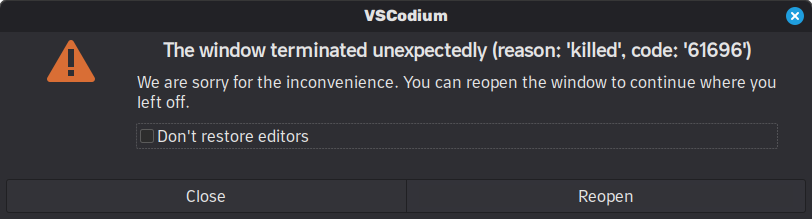
VS code or in this case VS Codium crashes suddenly when I open a large project or repo.
Turns out, earlyOOM was killing it, since I didnt have swap, so memory was the only factor needed to trigger “out of memory”.
Solution:
Enable swap, this guide could be of help.
If it continues to happen, you need to reduce the aggressiveness of earlyOOM or exclude the problematic app.
VS code or in this case VS Codium crashes suddenly when I open a large project or repo.
Turns out, earlyOOM was killing it, since I didnt have swap, so memory was the only factor needed to trigger “out of memory”.
Solution:
Enable swap, this guide could be of help.
If it continues to happen, you need to reduce the aggressiveness of earlyOOM or exclude the problematic app.

Hey. Starting relatively recently, when I wake from sleep, some windows (mostly the file explorer Gnome Files) are blurry as in the screenshot. Moving the window or passing the cursor over the blurry area often helps, but sometimes I need to close the window and re-open it.
Here are the sections of my various .nix files that look relevant. I’m worried I have a bad video card!
    nvidia.modesetting.enable = true;
    nvidia.powerManagement.enable = false;
    nvidia.open = false;
    nvidia.nvidiaSettings = true;
Below is what looks like the relevant part of my restore from suspend from dmesg. Let me know if I can provide anything else helpful!
[21230.467601] nouveau 0000:01:00.0: gr: TRAP ch 11 [01ff748000 gst-plugin-scan[21807]]
[21230.467613] nouveau 0000:01:00.0: gr: GPC0/PROP trap: 00000020 [RT_HEIGHT_OVERRUN] x = 0, y = 8, format = 37, storage type = 0
[21230.467622] nouveau 0000:01:00.0: gr: GPC1/PROP trap: 00000020 [RT_HEIGHT_OVERRUN] x = 8, y = 8, format = 37, storage type = 0
[21230.467629] nouveau 0000:01:00.0: gr: GPC2/PROP trap: 00000020 [RT_HEIGHT_OVERRUN] x = 16, y = 8, format = 37, storage type = 0
[21230.486521] nouveau 0000:01:00.0: gr: TRAP ch 11 [01ff748000 gst-plugin-scan[21807]]
[21230.486536] nouveau 0000:01:00.0: gr: GPC0/PROP trap: 00000020 [RT_HEIGHT_OVERRUN] x = 0, y = 8, format = 37, storage type = 0
[21230.486548] nouveau 0000:01:00.0: gr: GPC1/PROP trap: 00000020 [RT_HEIGHT_OVERRUN] x = 8, y = 8, format = 37, storage type = 0
[21230.486556] nouveau 0000:01:00.0: gr: GPC2/PROP trap: 00000020 [RT_HEIGHT_OVERRUN] x = 16, y = 8, format = 37, storage type = 0
[21230.505718] nouveau 0000:01:00.0: gr: TRAP ch 11 [01ff748000 gst-plugin-scan[21807]]
[21230.505730] nouveau 0000:01:00.0: gr: GPC0/PROP trap: 00000020 [RT_HEIGHT_OVERRUN] x = 0, y = 8, format = 37, storage type = 0
[21230.505742] nouveau 0000:01:00.0: gr: GPC1/PROP trap: 00000020 [RT_HEIGHT_OVERRUN] x = 8, y = 8, format = 37, storage type = 0
[21230.505752] nouveau 0000:01:00.0: gr: GPC2/PROP trap: 00000020 [RT_HEIGHT_OVERRUN] x = 16, y = 8, format = 37, storage type = 0
[21234.024015] logitech-djreceiver 0003:046D:C537.0003: Unexpected input report number 128
[21234.029073] nouveau 0000:01:00.0: gr: TRAP ch 12 [01ff709000 .kgx-wrapped[21863]]
[21234.029088] nouveau 0000:01:00.0: gr: GPC1/TPC2/MP trap: global 00000000 [] warp 3d0016 []
[21234.036492] nouveau 0000:01:00.0: gr: TRAP ch 12 [01ff709000 .kgx-wrapped[21863]]
[21234.036506] nouveau 0000:01:00.0: gr: GPC2/TPC3/MP trap: global 00000000 [] warp 3e0016 []
[21234.104020] logitech-djreceiver 0003:046D:C537.0003: Unexpected input report number 128
[21237.439351] nouveau 0000:01:00.0: gr: TRAP ch 12 [01ff709000 .kgx-wrapped[21863]]
[21237.439364] nouveau 0000:01:00.0: gr: GPC2/TPC1/MP trap: global 00000000 [] warp 3c0016 []
[21243.107011] nouveau 0000:01:00.0: gr: DATA_ERROR 00000004 [INVALID_VALUE] ch 2 [01ffb9c000 vivaldi-bin[2820]] subc 0 class c197 mthd 0804 data 343ef401
[21243.107029] nouveau 0000:01:00.0: gr: DATA_ERROR 00000004 [INVALID_VALUE] ch 2 [01ffb9c000 vivaldi-bin[2820]] subc 0 class c197 mthd 0804 data 343ef001
[21243.121826] pcieport 0000:00:1c.7: AER: Correctable error message received from 0000:05:00.0
[21243.121838] rtl8821ae 0000:05:00.0: PCIe Bus Error: severity=Correctable, type=Physical Layer, (Receiver ID)
[21243.121840] rtl8821ae 0000:05:00.0:   device [10ec:8812] error status/mask=00000001/00006000
[21243.121842] rtl8821ae 0000:05:00.0:    [ 0] RxErr                  (First)
Hey. Starting relatively recently, when I wake from sleep, some windows (mostly the file explorer Gnome Files) are blurry as in the screenshot. Moving the window or passing the cursor over the blurry area often helps, but sometimes I need to close the window and re-open it.
Here are the sections of my various .nix files that look relevant. I’m worried I have a bad video card!
    nvidia.modesetting.enable = true;
    nvidia.powerManagement.enable = false;
    nvidia.open = false;
    nvidia.nvidiaSettings = true;
Below is what looks like the relevant part of my restore from suspend from dmesg. Let me know if I can provide anything else helpful!
[21230.467601] nouveau 0000:01:00.0: gr: TRAP ch 11 [01ff748000 gst-plugin-scan[21807]]
[21230.467613] nouveau 0000:01:00.0: gr: GPC0/PROP trap: 00000020 [RT_HEIGHT_OVERRUN] x = 0, y = 8, format = 37, storage type = 0
[21230.467622] nouveau 0000:01:00.0: gr: GPC1/PROP trap: 00000020 [RT_HEIGHT_OVERRUN] x = 8, y = 8, format = 37, storage type = 0
[21230.467629] nouveau 0000:01:00.0: gr: GPC2/PROP trap: 00000020 [RT_HEIGHT_OVERRUN] x = 16, y = 8, format = 37, storage type = 0
[21230.486521] nouveau 0000:01:00.0: gr: TRAP ch 11 [01ff748000 gst-plugin-scan[21807]]
[21230.486536] nouveau 0000:01:00.0: gr: GPC0/PROP trap: 00000020 [RT_HEIGHT_OVERRUN] x = 0, y = 8, format = 37, storage type = 0
[21230.486548] nouveau 0000:01:00.0: gr: GPC1/PROP trap: 00000020 [RT_HEIGHT_OVERRUN] x = 8, y = 8, format = 37, storage type = 0
[21230.486556] nouveau 0000:01:00.0: gr: GPC2/PROP trap: 00000020 [RT_HEIGHT_OVERRUN] x = 16, y = 8, format = 37, storage type = 0
[21230.505718] nouveau 0000:01:00.0: gr: TRAP ch 11 [01ff748000 gst-plugin-scan[21807]]
[21230.505730] nouveau 0000:01:00.0: gr: GPC0/PROP trap: 00000020 [RT_HEIGHT_OVERRUN] x = 0, y = 8, format = 37, storage type = 0
[21230.505742] nouveau 0000:01:00.0: gr: GPC1/PROP trap: 00000020 [RT_HEIGHT_OVERRUN] x = 8, y = 8, format = 37, storage type = 0
[21230.505752] nouveau 0000:01:00.0: gr: GPC2/PROP trap: 00000020 [RT_HEIGHT_OVERRUN] x = 16, y = 8, format = 37, storage type = 0
[21234.024015] logitech-djreceiver 0003:046D:C537.0003: Unexpected input report number 128
[21234.029073] nouveau 0000:01:00.0: gr: TRAP ch 12 [01ff709000 .kgx-wrapped[21863]]
[21234.029088] nouveau 0000:01:00.0: gr: GPC1/TPC2/MP trap: global 00000000 [] warp 3d0016 []
[21234.036492] nouveau 0000:01:00.0: gr: TRAP ch 12 [01ff709000 .kgx-wrapped[21863]]
[21234.036506] nouveau 0000:01:00.0: gr: GPC2/TPC3/MP trap: global 00000000 [] warp 3e0016 []
[21234.104020] logitech-djreceiver 0003:046D:C537.0003: Unexpected input report number 128
[21237.439351] nouveau 0000:01:00.0: gr: TRAP ch 12 [01ff709000 .kgx-wrapped[21863]]
[21237.439364] nouveau 0000:01:00.0: gr: GPC2/TPC1/MP trap: global 00000000 [] warp 3c0016 []
[21243.107011] nouveau 0000:01:00.0: gr: DATA_ERROR 00000004 [INVALID_VALUE] ch 2 [01ffb9c000 vivaldi-bin[2820]] subc 0 class c197 mthd 0804 data 343ef401
[21243.107029] nouveau 0000:01:00.0: gr: DATA_ERROR 00000004 [INVALID_VALUE] ch 2 [01ffb9c000 vivaldi-bin[2820]] subc 0 class c197 mthd 0804 data 343ef001
[21243.121826] pcieport 0000:00:1c.7: AER: Correctable error message received from 0000:05:00.0
[21243.121838] rtl8821ae 0000:05:00.0: PCIe Bus Error: severity=Correctable, type=Physical Layer, (Receiver ID)
[21243.121840] rtl8821ae 0000:05:00.0:   device [10ec:8812] error status/mask=00000001/00006000
[21243.121842] rtl8821ae 0000:05:00.0:    [ 0] RxErr                  (First)
I am using Bitwarden on my smartphone. I want to use it on CachyOS.
Bitwarden Officially supports Flatpak, Snap, Appimage, .deb, .rpm.
I don’t like Flatpak because for every single update, I also have to update Gnome Locale x2, KDE Locale x2 (at least 2 GBs)
Appimage is fine but I have to manually update.
Then, I looked on CachyOS Repo. There is a Bitwarden. Probably built over Arch Extra repos ?
Usually, I just install from CachyOS repo. But, Since I am downloading Bitwarden ( password manager ), I am bit skeptical. Whether this is recommended?
Can anybody help me?
I am using Bitwarden on my smartphone. I want to use it on CachyOS.
Bitwarden Officially supports Flatpak, Snap, Appimage, .deb, .rpm.
I don’t like Flatpak because for every single update, I also have to update Gnome Locale x2, KDE Locale x2 (at least 2 GBs)
Appimage is fine but I have to manually update.
Then, I looked on CachyOS Repo. There is a Bitwarden. Probably built over Arch Extra repos ?
Usually, I just install from CachyOS repo. But, Since I am downloading Bitwarden ( password manager ), I am bit skeptical. Whether this is recommended?
Can anybody help me?
I was updating my CachyOS system. Copied the AUR diff and (still learning linux, so…) asked Claude if it can find anything malicious with the context of Arch AUR malware attack.
Package in question is librtmp0
Claude said librtmp0’s Maintainer changed from “Maxime Gauduin” → “Damglador”. And that I should watch out. It also said that something is fishy about version bump.
with the context of recent arch aur malware incident, check if the following are malicious. Aur (4) Old Version New Version Make Only aur/lib32-gstreamer 1.28.4-1 1.28.5-1 No aur/lib32-gst-plugins-base-libs 1.28.4-1 1.28.5-1 No aur/lib32-libpng12 1.2.59-3 1.2.59-4 No aur/librtmp0 2.4-7 2.6-1 No :: Proceed to review? [Y/n]: :: Downloading PKGBUILDs… (1/1) lib32-gstreamer-1.28.5-1 (lib32-gstreamer lib [-------------------------------------------------------------------------------------------------------------------------------------------------------------------------------------] Paging with less. Press ‘q’ to quit or ‘h’ for help. :: lib32-gstreamer: PKGBUILD | 4 +±- 1 file changed, 2 insertions(+), 2 deletions(-) diff --git a/PKGBUILD b/PKGBUILD index 5d61e88…72db7e0 100644 — a/PKGBUILD +++ b/PKGBUILD @@ -9,7 +9,7 @@ pkgname=( lib32-gst-plugins-base lib32-gst-plugins-good ) -pkgver=1.28.4 +pkgver=1.28.5 pkgrel=1 pkgdesc=“Multimedia graph framework (32-bit)” url=“https://gstreamer.freedesktop.org/” @@ -81,7 +81,7 @@ source=( “git+https://gitlab.freedesktop.org/gstreamer/gstreamer.git?signed#tag=%24pkgver” 0001-HACK-meson-Disable-broken-tests.patch ) -b2sums=(‘3a8a3d89bfc9be8b2b1cbd24b6e7e1dbea25c4619045dd97df4631b94ad5d59d9ac54ffc54eccdec10b0195aee87e0dadd8f560e5cdc499dee99b033d141f7e9’ +b2sums=(‘af4c921e40f58cd61d62dfc1420dfd4d9c0b678f8c17f9504b5f3b6fdbdbd81139a9e5c4397453795ab9fd57f6212f3eee672fc27ad37a4c2f241560dec5c1cd’ ‘f6c0042f2d171d93f3aadc5fed50fa4a83a901371ce914cb44d614ac0510e0c5c2e10334a9011acad80f86ab08d7a953cce8d331660bca49bbfcaabbce9bee6b’) validpgpkeys=( D637032E45B8C6585B9456565D2EEE6F6F349D7C # Tim Müller :: librtmp0: PKGBUILD | 7 +++±-- 1 file changed, 4 insertions(+), 3 deletions(-) diff --git a/PKGBUILD b/PKGBUILD index bd5f514…1016d72 100644 — a/PKGBUILD +++ b/PKGBUILD @@ -1,4 +1,5 @@ -# Maintainer: Maxime Gauduin +# Maintainer: Damglador +# Contributor: Maxime Gauduin # Contributor: Bartłomiej Piotrowski # Contributor: xduugu # Contributor: Elis Hughes @@ -6,8 +7,8 @@ # Contributor: Arthur Skowronek pkgname=librtmp0 -pkgver=2.4 -pkgrel=7 +pkgver=2.6 +pkgrel=1 pkgdesc=‘Toolkit for RTMP streams’ arch=(‘x86_64’) url=‘https://rtmpdump.mplayerhq.hu/’ :: lib32-libpng12: LICENSE: Copyright Arch Linux Contributors Permission to use, copy, modify, and/or distribute this software for any purpose with or without fee is hereby granted. THE SOFTWARE IS PROVIDED “AS IS” AND THE AUTHOR DISCLAIMS ALL WARRANTIES WITH REGARD TO THIS SOFTWARE INCLUDING ALL IMPLIED WARRANTIES OF MERCHANTABILITY AND FITNESS. IN NO EVENT SHALL THE AUTHOR BE LIABLE FOR ANY SPECIAL, DIRECT, INDIRECT, OR CONSEQUENTIAL DAMAGES OR ANY DAMAGES WHATSOEVER RESULTING FROM LOSS OF USE, DATA OR PROFITS, WHETHER IN AN ACTION OF CONTRACT, NEGLIGENCE OR OTHER TORTIOUS ACTION, ARISING OUT OF OR IN CONNECTION WITH THE USE OR PERFORMANCE OF THIS SOFTWARE. PKGBUILD: # Maintainer: Maxime Gauduin # Contributor: Arthur Zamarin # Contributor: trya # Contributor: Jan de Groot # Contributor: dorphell # Contributor: Travis Willard # Contributor: Douglas Soares de Andrade pkgname=lib32-libpng12 pkgver=1.2.59 pkgrel=4 pkgdesc=‘A collection of routines used to create PNG format graphics files’ arch=(‘x86_64’) url=‘http://www.libpng.org/pub/png/libpng.html’ license=(‘custom’) depends=(‘lib32-glibc’ ‘lib32-zlib’ ‘lib32-gcc-libs’) makedepends=(‘gcc-multilib’) source=(“https://sourceforge.net/projects/libpng/files/libpng-$%7Bpkgver%7D.tar.xz”{,.asc} “https://sourceforge.net/projects/libpng-apng/files/libpng12/$%7Bpkgver%7D/libpng-$%7Bpkgver%7D-apng.patch.gz”) validpgpkeys=(‘8048643BA2C840F4F92A195FF54984BFA16C640F’) # Glenn Randers-Pehrson sha256sums=(‘b4635f15b8adccc8ad0934eea485ef59cc4cae24d0f0300a9a941e51974ffcc7’ ‘SKIP’ ‘281fd5f0165762967a18302dca217de3212be4a3437f95805be44f1ac9db1a5d’) prepare() { cd libpng-${pkgver} patch -Np1 -i …/libpng-${pkgver}-apng.patch libtoolize --force --copy aclocal autoconf automake --add-missing } build() { cd libpng-${pkgver} export CC=‘gcc -m32’ export PKG_CONFIG_PATH=‘/usr/lib32/pkgconfig’ ./configure \ --prefix=‘/usr’ \ --libdir=‘/usr/lib32’ make } package() { cd libpng-${pkgver} make DESTDIR=“${pkgdir}” install rm -rf “${pkgdir}”/usr/{bin,include,lib32/{libpng.{a,so},pkgconfig},share} install -Dm 644 LICENSE -t “${pkgdir}”/usr/share/licenses/lib32-libpng12/ } # vim: ts=2 sw=2 et: REUSE.toml: version = 1 [[annotations]] path = [ “PKGBUILD”, “README.md”, “keys/**”, “.SRCINFO”, “.nvchecker.toml”, “*.install”, “*.sysusers”, “*.tmpfiles”, “*.logrotate”, “*.pam”, “*.service”, “*.socket”, “*.timer”, “*.desktop”, “*.hook”, ] SPDX-FileCopyrightText = “Arch Linux contributors” SPDX-License-Identifier = “0BSD” (END)
## Assessment of These AUR Packages
Based on the recent “Atomic Arch” malware campaign from June 2026, I can provide you with an analysis:
| Package | Status | Risk Level | Notes |
|---------|--------|-----------|-------|
| lib32-gstreamer | Safe | Low | Simple version bump (1.28.4 → 1.28.5), b2sum hash updated cleanly. No new dependencies. |
| lib32-gst-plugins-base-libs | Safe | Low | Version bump only, same pattern as gstreamer. |
| lib32-libpng12 | Safe | Low | Minor pkgrel bump (3 → 4). Full PKGBUILD shown—no malicious npm packages or suspicious install hooks. |
| librtmp0 | ⚠️ Requires Review | Medium | Maintainer changed from “Maxime Gauduin” → “Damglador”. This is exactly the attack pattern used in Atomic Arch (package adoption by new maintainers). Full PKGBUILD content not shown in your diff. |
—
## Key Findings
### The “Atomic Arch” Campaign Context
The June 2026 incident targeted orphaned AUR packages through maintainer takeovers. <citation src=“2,4,5”>Attackers adopted abandoned packages and injected malicious npm dependencies (atomic-lockfile, js-digest, lockfile-js) that steal credentials, SSH keys, GitHub tokens, and developer environment secrets.</citation> <citation src=“4,5”>Over 1,500 packages were ultimately compromised across multiple waves.</citation>
### What to Look For
The malware signatures included:
- New npm dependencies added to depends() or install hooks (e.g., npm install atomic-lockfile)
- Preinstall hooks like “preinstall”: “./lib/install-deps.mjs” in npm packages
- Maintainer changes on previously stable packages (potential adoption by attackers)
### Your Packages
Safe packages: The three gstreamer and libpng packages show only version bumps and hash updates—no new dependencies, no npm installs, no suspicious hooks. These are routine upstream updates.
Flagged package: librtmp0 shows a maintainer change, which aligns with the Atomic Arch attack vector. However, the diff you provided doesn’t show the complete PKGBUILD or new dependencies. You need to verify:
1. Whether the version bump to 2.6 and the maintainer change are legitimate
2. Whether any new depends() or install hooks were added (not visible in your diff)
3. Check the full PKGBUILD for npm install commands or suspicious scripts
—
## Recommendation
Proceed cautiously. Install the first three packages if your normal update cycle includes them. For librtmp0, run a full PKGBUILD review before proceeding—look at the complete file for any added dependencies or install hooks. Cross-reference with the AUR malware check tools to confirm whether librtmp0 appears on any known-compromised lists.
So, I am seeking your help. Should I proceed with the update?
I was updating my CachyOS system. Copied the AUR diff and (still learning linux, so…) asked Claude if it can find anything malicious with the context of Arch AUR malware attack.
Package in question is librtmp0
Claude said librtmp0’s Maintainer changed from “Maxime Gauduin” → “Damglador”. And that I should watch out. It also said that something is fishy about version bump.
with the context of recent arch aur malware incident, check if the following are malicious. Aur (4) Old Version New Version Make Only aur/lib32-gstreamer 1.28.4-1 1.28.5-1 No aur/lib32-gst-plugins-base-libs 1.28.4-1 1.28.5-1 No aur/lib32-libpng12 1.2.59-3 1.2.59-4 No aur/librtmp0 2.4-7 2.6-1 No :: Proceed to review? [Y/n]: :: Downloading PKGBUILDs… (1/1) lib32-gstreamer-1.28.5-1 (lib32-gstreamer lib [-------------------------------------------------------------------------------------------------------------------------------------------------------------------------------------] Paging with less. Press ‘q’ to quit or ‘h’ for help. :: lib32-gstreamer: PKGBUILD | 4 +±- 1 file changed, 2 insertions(+), 2 deletions(-) diff --git a/PKGBUILD b/PKGBUILD index 5d61e88…72db7e0 100644 — a/PKGBUILD +++ b/PKGBUILD @@ -9,7 +9,7 @@ pkgname=( lib32-gst-plugins-base lib32-gst-plugins-good ) -pkgver=1.28.4 +pkgver=1.28.5 pkgrel=1 pkgdesc=“Multimedia graph framework (32-bit)” url=“https://gstreamer.freedesktop.org/” @@ -81,7 +81,7 @@ source=( “git+https://gitlab.freedesktop.org/gstreamer/gstreamer.git?signed#tag=%24pkgver” 0001-HACK-meson-Disable-broken-tests.patch ) -b2sums=(‘3a8a3d89bfc9be8b2b1cbd24b6e7e1dbea25c4619045dd97df4631b94ad5d59d9ac54ffc54eccdec10b0195aee87e0dadd8f560e5cdc499dee99b033d141f7e9’ +b2sums=(‘af4c921e40f58cd61d62dfc1420dfd4d9c0b678f8c17f9504b5f3b6fdbdbd81139a9e5c4397453795ab9fd57f6212f3eee672fc27ad37a4c2f241560dec5c1cd’ ‘f6c0042f2d171d93f3aadc5fed50fa4a83a901371ce914cb44d614ac0510e0c5c2e10334a9011acad80f86ab08d7a953cce8d331660bca49bbfcaabbce9bee6b’) validpgpkeys=( D637032E45B8C6585B9456565D2EEE6F6F349D7C # Tim Müller :: librtmp0: PKGBUILD | 7 +++±-- 1 file changed, 4 insertions(+), 3 deletions(-) diff --git a/PKGBUILD b/PKGBUILD index bd5f514…1016d72 100644 — a/PKGBUILD +++ b/PKGBUILD @@ -1,4 +1,5 @@ -# Maintainer: Maxime Gauduin +# Maintainer: Damglador +# Contributor: Maxime Gauduin # Contributor: Bartłomiej Piotrowski # Contributor: xduugu # Contributor: Elis Hughes @@ -6,8 +7,8 @@ # Contributor: Arthur Skowronek pkgname=librtmp0 -pkgver=2.4 -pkgrel=7 +pkgver=2.6 +pkgrel=1 pkgdesc=‘Toolkit for RTMP streams’ arch=(‘x86_64’) url=‘https://rtmpdump.mplayerhq.hu/’ :: lib32-libpng12: LICENSE: Copyright Arch Linux Contributors Permission to use, copy, modify, and/or distribute this software for any purpose with or without fee is hereby granted. THE SOFTWARE IS PROVIDED “AS IS” AND THE AUTHOR DISCLAIMS ALL WARRANTIES WITH REGARD TO THIS SOFTWARE INCLUDING ALL IMPLIED WARRANTIES OF MERCHANTABILITY AND FITNESS. IN NO EVENT SHALL THE AUTHOR BE LIABLE FOR ANY SPECIAL, DIRECT, INDIRECT, OR CONSEQUENTIAL DAMAGES OR ANY DAMAGES WHATSOEVER RESULTING FROM LOSS OF USE, DATA OR PROFITS, WHETHER IN AN ACTION OF CONTRACT, NEGLIGENCE OR OTHER TORTIOUS ACTION, ARISING OUT OF OR IN CONNECTION WITH THE USE OR PERFORMANCE OF THIS SOFTWARE. PKGBUILD: # Maintainer: Maxime Gauduin # Contributor: Arthur Zamarin # Contributor: trya # Contributor: Jan de Groot # Contributor: dorphell # Contributor: Travis Willard # Contributor: Douglas Soares de Andrade pkgname=lib32-libpng12 pkgver=1.2.59 pkgrel=4 pkgdesc=‘A collection of routines used to create PNG format graphics files’ arch=(‘x86_64’) url=‘http://www.libpng.org/pub/png/libpng.html’ license=(‘custom’) depends=(‘lib32-glibc’ ‘lib32-zlib’ ‘lib32-gcc-libs’) makedepends=(‘gcc-multilib’) source=(“https://sourceforge.net/projects/libpng/files/libpng-$%7Bpkgver%7D.tar.xz”{,.asc} “https://sourceforge.net/projects/libpng-apng/files/libpng12/$%7Bpkgver%7D/libpng-$%7Bpkgver%7D-apng.patch.gz”) validpgpkeys=(‘8048643BA2C840F4F92A195FF54984BFA16C640F’) # Glenn Randers-Pehrson sha256sums=(‘b4635f15b8adccc8ad0934eea485ef59cc4cae24d0f0300a9a941e51974ffcc7’ ‘SKIP’ ‘281fd5f0165762967a18302dca217de3212be4a3437f95805be44f1ac9db1a5d’) prepare() { cd libpng-${pkgver} patch -Np1 -i …/libpng-${pkgver}-apng.patch libtoolize --force --copy aclocal autoconf automake --add-missing } build() { cd libpng-${pkgver} export CC=‘gcc -m32’ export PKG_CONFIG_PATH=‘/usr/lib32/pkgconfig’ ./configure \ --prefix=‘/usr’ \ --libdir=‘/usr/lib32’ make } package() { cd libpng-${pkgver} make DESTDIR=“${pkgdir}” install rm -rf “${pkgdir}”/usr/{bin,include,lib32/{libpng.{a,so},pkgconfig},share} install -Dm 644 LICENSE -t “${pkgdir}”/usr/share/licenses/lib32-libpng12/ } # vim: ts=2 sw=2 et: REUSE.toml: version = 1 [[annotations]] path = [ “PKGBUILD”, “README.md”, “keys/**”, “.SRCINFO”, “.nvchecker.toml”, “*.install”, “*.sysusers”, “*.tmpfiles”, “*.logrotate”, “*.pam”, “*.service”, “*.socket”, “*.timer”, “*.desktop”, “*.hook”, ] SPDX-FileCopyrightText = “Arch Linux contributors” SPDX-License-Identifier = “0BSD” (END)
## Assessment of These AUR Packages
Based on the recent “Atomic Arch” malware campaign from June 2026, I can provide you with an analysis:
| Package | Status | Risk Level | Notes |
|---------|--------|-----------|-------|
| lib32-gstreamer | Safe | Low | Simple version bump (1.28.4 → 1.28.5), b2sum hash updated cleanly. No new dependencies. |
| lib32-gst-plugins-base-libs | Safe | Low | Version bump only, same pattern as gstreamer. |
| lib32-libpng12 | Safe | Low | Minor pkgrel bump (3 → 4). Full PKGBUILD shown—no malicious npm packages or suspicious install hooks. |
| librtmp0 | ⚠️ Requires Review | Medium | Maintainer changed from “Maxime Gauduin” → “Damglador”. This is exactly the attack pattern used in Atomic Arch (package adoption by new maintainers). Full PKGBUILD content not shown in your diff. |
—
## Key Findings
### The “Atomic Arch” Campaign Context
The June 2026 incident targeted orphaned AUR packages through maintainer takeovers. <citation src=“2,4,5”>Attackers adopted abandoned packages and injected malicious npm dependencies (atomic-lockfile, js-digest, lockfile-js) that steal credentials, SSH keys, GitHub tokens, and developer environment secrets.</citation> <citation src=“4,5”>Over 1,500 packages were ultimately compromised across multiple waves.</citation>
### What to Look For
The malware signatures included:
- New npm dependencies added to depends() or install hooks (e.g., npm install atomic-lockfile)
- Preinstall hooks like “preinstall”: “./lib/install-deps.mjs” in npm packages
- Maintainer changes on previously stable packages (potential adoption by attackers)
### Your Packages
Safe packages: The three gstreamer and libpng packages show only version bumps and hash updates—no new dependencies, no npm installs, no suspicious hooks. These are routine upstream updates.
Flagged package: librtmp0 shows a maintainer change, which aligns with the Atomic Arch attack vector. However, the diff you provided doesn’t show the complete PKGBUILD or new dependencies. You need to verify:
1. Whether the version bump to 2.6 and the maintainer change are legitimate
2. Whether any new depends() or install hooks were added (not visible in your diff)
3. Check the full PKGBUILD for npm install commands or suspicious scripts
—
## Recommendation
Proceed cautiously. Install the first three packages if your normal update cycle includes them. For librtmp0, run a full PKGBUILD review before proceeding—look at the complete file for any added dependencies or install hooks. Cross-reference with the AUR malware check tools to confirm whether librtmp0 appears on any known-compromised lists.
So, I am seeking your help. Should I proceed with the update?
I installed some updates and after a restart the network manager thing in the taskbar said NetworkManager wasnt running so i tried to run it in terminal and it said i didnt have permission so i ran it with sudo and it worked. How do I get it to automatically start?
(I also posted this here: piefed.social/…/networkmanager-on-kubuntu-doesn-t…)
UPDATE:
fixed with sudo apt install --reinstall network-manager
I installed some updates and after a restart the network manager thing in the taskbar said NetworkManager wasnt running so i tried to run it in terminal and it said i didnt have permission so i ran it with sudo and it worked. How do I get it to automatically start?
(I also posted this here: piefed.social/…/networkmanager-on-kubuntu-doesn-t…)
UPDATE:
fixed with sudo apt install --reinstall network-manager

I do not wish for it to be magnified. I hit some combination of super, alt, Ctrl, shift, maybe z? I have checked like twenty Linux keyboard shortcut websites and checked my actual keyboard shortcuts on my computer to no avail.
CachyOS 7.1.3-2
I do not wish for it to be magnified. I hit some combination of super, alt, Ctrl, shift, maybe z? I have checked like twenty Linux keyboard shortcut websites and checked my actual keyboard shortcuts on my computer to no avail.
CachyOS 7.1.3-2
Any linux wizards know why when my sound sources go to background and CPU is under heavy load the audio crackles?
apps tested: minecraft, vlc(flatpak), spotify(flatpak), other fltapaks
crackles on both bluetooth and minijack headphones,
disabling microphone, easyeffects, gpu screen recorder ( gsr-default_output) didn’t help
I use blender to put the load on CPU but it also happens when compiling or gaming
I have increased stuff in cat /etc/pipewire/pipewire.conf
[…]
## Properties for the DSP configuration.
    default.clock.rate          = 192000
    #default.clock.allowed-rates = [ 48000 ]
    default.clock.quantum       = 1024
    default.clock.min-quantum   = 32
    default.clock.max-quantum   = 4096
[…]
pw-top -b
S   ID  QUANT   RATE    WAIT    BUSY   W/Q   B/Q  ERR FORMAT           NAME
S   29      0      0    ---     ---   ---   ---     0                  Dummy-Driver
S   30      0      0    ---     ---   ---   ---     0                  Freewheel-Driver
S   45      0      0    ---     ---   ---   ---     0                  Midi-Bridge
S   48      0      0    ---     ---   ---   ---     0                  bluez_midi.server
R   52   2048 192000  10,6ms  69,7us  0,99  0,01  453    S32LE 2 48000 alsa_output.pci-0000_06_00.6.analog-stereo
R  213    900  48000 229,0us  69,1us  0,02  0,01    0    F32LE 2 48000  + Firefox
R  219      0      0  13,0us  41,1us  0,00  0,00    0    F32P 2 192000  + easyeffects_sink
R  217      0      0    +++   17,0us  +++   0,00  428                   + ee_soe_output_level
R  174      0      0   9,3ms  34,3us  0,88  0,00  5416                   + ee_soe_spectrum
R  206    512  48000 300,5us  54,3us  0,03  0,01    0    F32LE 2 48000  + java
R  186    900  48000 359,5us  56,2us  0,03  0,01    0    F32LE 2 48000  + Firefox
R  242    900  48000 417,2us  52,4us  0,04  0,00    0    F32LE 2 48000  + Firefox
R  129    960  48000 152,1us  74,5us  0,01  0,01    0    S16LE 2 48000  + gsr-default_output
R  116   1920  48000 472,4us  62,5us  0,04  0,01    0    F32LE 2 48000  + VLC media player (LibVLC 3.0.23)
I   53   4096 192000   8,9us   3,3us  0,00  0,00  109   S32LE 2 192000 alsa_input.pci-0000_06_00.6.analog-stereo
S   68      0      0    ---     ---   ---   ---     0                  v4l2_input.pci-0000_06_00.3-usb-0_3_1.0
I  191      0      0   0,0us   0,0us  ???   ???     0    F32LE 2 48000 Firefox
I  216      0      0   0,0us   0,0us  ???   ???     0    F32LE 2 48000 Firefox
I  220      0      0   0,0us   0,0us  ???   ???     0    F32LE 2 48000 Firefox
S  244      0      0    ---     ---   ---   ---     0                  Blender
I  205      0      0   0,0us   0,0us  ???   ???     0    F32LE 2 44100 spotify
R  249   2048 192000  10,7ms  35,5us  1,00  0,00  1339    S16LE 1 48000 alsa_input.usb-145f_Trust_GXT_242_Microphone-00.mono-fallback
R  120      0      0  12,2us  13,5us  0,00  0,00    7    F32P 2 192000  + easyeffects_source
R  145      0      0   6,2us   8,2us  0,00  0,00   90                   + ee_sie_output_level
R  230      0      0   5,7us   7,6us  0,00  0,00  118                   + ee_sie_spectrum
R  144    960  48000  18,9us  49,7us  0,00  0,00    0    S16LE 2 48000  + gsr-default_input
R  257      0      0 122,2us    +++   0,01  +++   1101                   + ee_sie_rnnoise
R  106      0      0  44,8us 139,8us  0,00  0,01  236                   + ee_sie_stereo_tools
R   84      0      0    ---    8,6us  ---   0,00  235                   + ee_sie_crossfeed
R  158      0      0   5,3us   7,8us  0,00  0,00   30                   + ee_sie_reverb
R  171      0      0   5,2us   8,9us  0,00  0,00    4                   + ee_sie_equalizer
S  172      0      0    ---     ---   ---   ---     0                  plasmashell
S  119      0      0    ---     ---   ---   ---     0                  plasmashell
S  233      0      0    ---     ---   ---   ---     0                  ee_test_signals
S  193      0      0    ---     ---   ---   ---     0                  plasmashell
I  175      0      0   0,0us   0,0us  ???   ???     0    F32LE 2 48000 plasmashell
I know to little to dig into the scheduler stuff. systemctl status rtkit-daemon prints about pipewire sucess at priority 20.
I am on KDE/linux (bazzite based on fedora atomic44)
--------------
OS: Bazzite x86_64
Host: 82JU (Legion 5 15ACH6H)
Kernel: Linux 7.1.3-ogc3.4.fc44.x86_64
Uptime: 4 hours, 46 mins
Packages: 2 (appimage), 4 (brew), 1 (brew-cask), 173 (flatpak), 3014 (rpm)
Shell: bash 5.3.9
Display (BOE08E8): 1920x1080 in 16", 120 Hz [Built-in]
DE: KDE Plasma 6.7.2
WM: KWin (Wayland)
WM Theme: leaf-dark-color
Theme: Fusion (LeafDark) [Qt], Vapor [GTK2/3]
Icons: breeze-dark [Qt], breeze-dark [GTK3/4]
Font: Noto Sans (10pt) [Qt], Noto Sans (10pt) [GTK3/4]
Cursor: Teto (30px)
Terminal: konsole 26.4.3
CPU: AMD Ryzen 5 5600H (12) @ 4.28 GHz
GPU 1: NVIDIA GeForce RTX 3060 Mobile / Max-Q [Discrete]
GPU 2: AMD Radeon Vega Series / Radeon Vega Mobile Series [Integrated]
Memory: 12.05 GiB / 13.49 GiB (89%)
Swap: 16.62 GiB / 35.59 GiB (47%)
Disk (/): 49.00 MiB / 49.00 MiB (100%) - overlay [Read-only]
Disk (/etc): 845.89 GiB / 929.93 GiB (91%) - btrfs
Local IP (tun0): 10.96.0.42/16
Battery (L20M4PC0): 100% [AC Connected]
Locale: pl_PL.UTF-8
Any linux wizards know why when my sound sources go to background and CPU is under heavy load the audio crackles?
apps tested: minecraft, vlc(flatpak), spotify(flatpak), other fltapaks
crackles on both bluetooth and minijack headphones,
disabling microphone, easyeffects, gpu screen recorder ( gsr-default_output) didn’t help
I use blender to put the load on CPU but it also happens when compiling or gaming
I have increased stuff in cat /etc/pipewire/pipewire.conf
[…]
## Properties for the DSP configuration.
    default.clock.rate          = 192000
    #default.clock.allowed-rates = [ 48000 ]
    default.clock.quantum       = 1024
    default.clock.min-quantum   = 32
    default.clock.max-quantum   = 4096
[…]
pw-top -b
S   ID  QUANT   RATE    WAIT    BUSY   W/Q   B/Q  ERR FORMAT           NAME
S   29      0      0    ---     ---   ---   ---     0                  Dummy-Driver
S   30      0      0    ---     ---   ---   ---     0                  Freewheel-Driver
S   45      0      0    ---     ---   ---   ---     0                  Midi-Bridge
S   48      0      0    ---     ---   ---   ---     0                  bluez_midi.server
R   52   2048 192000  10,6ms  69,7us  0,99  0,01  453    S32LE 2 48000 alsa_output.pci-0000_06_00.6.analog-stereo
R  213    900  48000 229,0us  69,1us  0,02  0,01    0    F32LE 2 48000  + Firefox
R  219      0      0  13,0us  41,1us  0,00  0,00    0    F32P 2 192000  + easyeffects_sink
R  217      0      0    +++   17,0us  +++   0,00  428                   + ee_soe_output_level
R  174      0      0   9,3ms  34,3us  0,88  0,00  5416                   + ee_soe_spectrum
R  206    512  48000 300,5us  54,3us  0,03  0,01    0    F32LE 2 48000  + java
R  186    900  48000 359,5us  56,2us  0,03  0,01    0    F32LE 2 48000  + Firefox
R  242    900  48000 417,2us  52,4us  0,04  0,00    0    F32LE 2 48000  + Firefox
R  129    960  48000 152,1us  74,5us  0,01  0,01    0    S16LE 2 48000  + gsr-default_output
R  116   1920  48000 472,4us  62,5us  0,04  0,01    0    F32LE 2 48000  + VLC media player (LibVLC 3.0.23)
I   53   4096 192000   8,9us   3,3us  0,00  0,00  109   S32LE 2 192000 alsa_input.pci-0000_06_00.6.analog-stereo
S   68      0      0    ---     ---   ---   ---     0                  v4l2_input.pci-0000_06_00.3-usb-0_3_1.0
I  191      0      0   0,0us   0,0us  ???   ???     0    F32LE 2 48000 Firefox
I  216      0      0   0,0us   0,0us  ???   ???     0    F32LE 2 48000 Firefox
I  220      0      0   0,0us   0,0us  ???   ???     0    F32LE 2 48000 Firefox
S  244      0      0    ---     ---   ---   ---     0                  Blender
I  205      0      0   0,0us   0,0us  ???   ???     0    F32LE 2 44100 spotify
R  249   2048 192000  10,7ms  35,5us  1,00  0,00  1339    S16LE 1 48000 alsa_input.usb-145f_Trust_GXT_242_Microphone-00.mono-fallback
R  120      0      0  12,2us  13,5us  0,00  0,00    7    F32P 2 192000  + easyeffects_source
R  145      0      0   6,2us   8,2us  0,00  0,00   90                   + ee_sie_output_level
R  230      0      0   5,7us   7,6us  0,00  0,00  118                   + ee_sie_spectrum
R  144    960  48000  18,9us  49,7us  0,00  0,00    0    S16LE 2 48000  + gsr-default_input
R  257      0      0 122,2us    +++   0,01  +++   1101                   + ee_sie_rnnoise
R  106      0      0  44,8us 139,8us  0,00  0,01  236                   + ee_sie_stereo_tools
R   84      0      0    ---    8,6us  ---   0,00  235                   + ee_sie_crossfeed
R  158      0      0   5,3us   7,8us  0,00  0,00   30                   + ee_sie_reverb
R  171      0      0   5,2us   8,9us  0,00  0,00    4                   + ee_sie_equalizer
S  172      0      0    ---     ---   ---   ---     0                  plasmashell
S  119      0      0    ---     ---   ---   ---     0                  plasmashell
S  233      0      0    ---     ---   ---   ---     0                  ee_test_signals
S  193      0      0    ---     ---   ---   ---     0                  plasmashell
I  175      0      0   0,0us   0,0us  ???   ???     0    F32LE 2 48000 plasmashell
I know to little to dig into the scheduler stuff. systemctl status rtkit-daemon prints about pipewire sucess at priority 20.
I am on KDE/linux (bazzite based on fedora atomic44)
--------------
OS: Bazzite x86_64
Host: 82JU (Legion 5 15ACH6H)
Kernel: Linux 7.1.3-ogc3.4.fc44.x86_64
Uptime: 4 hours, 46 mins
Packages: 2 (appimage), 4 (brew), 1 (brew-cask), 173 (flatpak), 3014 (rpm)
Shell: bash 5.3.9
Display (BOE08E8): 1920x1080 in 16", 120 Hz [Built-in]
DE: KDE Plasma 6.7.2
WM: KWin (Wayland)
WM Theme: leaf-dark-color
Theme: Fusion (LeafDark) [Qt], Vapor [GTK2/3]
Icons: breeze-dark [Qt], breeze-dark [GTK3/4]
Font: Noto Sans (10pt) [Qt], Noto Sans (10pt) [GTK3/4]
Cursor: Teto (30px)
Terminal: konsole 26.4.3
CPU: AMD Ryzen 5 5600H (12) @ 4.28 GHz
GPU 1: NVIDIA GeForce RTX 3060 Mobile / Max-Q [Discrete]
GPU 2: AMD Radeon Vega Series / Radeon Vega Mobile Series [Integrated]
Memory: 12.05 GiB / 13.49 GiB (89%)
Swap: 16.62 GiB / 35.59 GiB (47%)
Disk (/): 49.00 MiB / 49.00 MiB (100%) - overlay [Read-only]
Disk (/etc): 845.89 GiB / 929.93 GiB (91%) - btrfs
Local IP (tun0): 10.96.0.42/16
Battery (L20M4PC0): 100% [AC Connected]
Locale: pl_PL.UTF-8
theres no “disable during full screen” option in Night Light itself, brightness and gamma applet was a nice workaround for a while but stopped working last week, it increases gamma levels to 100% but doesn’t disable the night light anymore; the gnome extension caffeine sounded perfect but after installing I cant open settings/config/manual, there’s just a tray icon that doesn’t seem to do anything.
any ideas?
theres no “disable during full screen” option in Night Light itself, brightness and gamma applet was a nice workaround for a while but stopped working last week, it increases gamma levels to 100% but doesn’t disable the night light anymore; the gnome extension caffeine sounded perfect but after installing I cant open settings/config/manual, there’s just a tray icon that doesn’t seem to do anything.
any ideas?
So at the moment I know that an official unixporn server on discord does exist, but first I don’t wanna use discord and second, they want me to verify myself via phone number before I’ll be able to chat, and that’s like a bit of BS. So what I’m actually looking for instead is preferably an xmpp room or an IRC chat Thanks to all of you in advance
So at the moment I know that an official unixporn server on discord does exist, but first I don’t wanna use discord and second, they want me to verify myself via phone number before I’ll be able to chat, and that’s like a bit of BS. So what I’m actually looking for instead is preferably an xmpp room or an IRC chat Thanks to all of you in advance


I’m intent on getting rid of Ubuntu since their embrace of AI, and would prefer to avoid any other distro based on Ubuntu, since that’s just kicking the can down the road.
But a thorough search of the web for various versions of “Linux with no AI” only returns results that recommend AI infused distros and articles touting how great AI will be for Linux, or how to fix Linux using AI. 🤮
Can anyone recommend a distro that has proudly announced their refusal to ever consider adding #AIslop to their distro?
I’m intent on getting rid of Ubuntu since their embrace of AI, and would prefer to avoid any other distro based on Ubuntu, since that’s just kicking the can down the road.
But a thorough search of the web for various versions of “Linux with no AI” only returns results that recommend AI infused distros and articles touting how great AI will be for Linux, or how to fix Linux using AI. 🤮
Can anyone recommend a distro that has proudly announced their refusal to ever consider adding #AIslop to their distro?


Hi,
I bought a Lenovo M910q (i5-6500T, 16Gib RAM, Intel Mesa graphics) to play with Proxmox, but I’m dying on the first level!
After installing Proxmox from Ventoy using either the default settings or the ones from someone’s guide , I get kernel panics on the first boot. As a test, I’ve just installed Debian on it from Ventoy with the default settings, and it seems to work fine.
I ran the Processor, Memory, and SSD checks from the Intel BIOS without any flags.
Any guesses what I’ve done wrong here?
Hi,
I bought a Lenovo M910q (i5-6500T, 16Gib RAM, Intel Mesa graphics) to play with Proxmox, but I’m dying on the first level!
After installing Proxmox from Ventoy using either the default settings or the ones from someone’s guide , I get kernel panics on the first boot. As a test, I’ve just installed Debian on it from Ventoy with the default settings, and it seems to work fine.
I ran the Processor, Memory, and SSD checks from the Intel BIOS without any flags.
Any guesses what I’ve done wrong here?
Linux Mint Cinnamon 22.1// Logitech G433 with on-wire microphone
Yesterday my headset-mic just felt like not picking up sound properly anymore. I do not recall doing anything that could cause this, like updates etc. I can scream directly into my micorphone and nothing. Yet, when I tap on it it suddenly records sound perfectly?
I tried
wpctl get-volume 50 Volume: 10.00 wpctl set-volume 50 100 wpctl set-volume 50 10000 I am at my wits end here. Do you have any ideas how to solve this?
Linux Mint Cinnamon 22.1// Logitech G433 with on-wire microphone
Yesterday my headset-mic just felt like not picking up sound properly anymore. I do not recall doing anything that could cause this, like updates etc. I can scream directly into my micorphone and nothing. Yet, when I tap on it it suddenly records sound perfectly?
I tried
wpctl get-volume 50 Volume: 10.00 wpctl set-volume 50 100 wpctl set-volume 50 10000 I am at my wits end here. Do you have any ideas how to solve this?
I have bind mounts configured in my /etc/fstab. The source (i.e. where the files physically exist) is on a removable USB drive.
Right now it works but I have to mount/unmount everything individually when I plug/unplug the drive. I would like to be able to have the bind mounts follow the state of of the USB drive automatically.
Is there a way?
Edit here is relevant section of fstab:
/dev/mapper/external-crypt	/mount/external		auto	nosuid,nodev,nofail,x-systemd.device-timeout=5	0 0
/mount/external/realfolder	/home/user/folder	none	bind,nofail	0 0
So when I run sudo mount “/mount/external” I want sudo mount /home/user/folder to be implied; likewise for umount.
I have bind mounts configured in my /etc/fstab. The source (i.e. where the files physically exist) is on a removable USB drive.
Right now it works but I have to mount/unmount everything individually when I plug/unplug the drive. I would like to be able to have the bind mounts follow the state of of the USB drive automatically.
Is there a way?
Edit here is relevant section of fstab:
/dev/mapper/external-crypt	/mount/external		auto	nosuid,nodev,nofail,x-systemd.device-timeout=5	0 0
/mount/external/realfolder	/home/user/folder	none	bind,nofail	0 0
So when I run sudo mount “/mount/external” I want sudo mount /home/user/folder to be implied; likewise for umount.
I’ve spent hours on MX fluxbox, but wasn’t able to make the brightness and the time adjustments permanent.
I boot it from my live USB stick by the way.
I’ve spent hours on MX fluxbox, but wasn’t able to make the brightness and the time adjustments permanent.
I boot it from my live USB stick by the way.

What do you think of this framing of linux distributions? Accurate? Horrible?
cross-posted from: mander.xyz/post/53932495
What do you think of this framing of linux distributions? Accurate? Horrible?
cross-posted from: mander.xyz/post/53932495
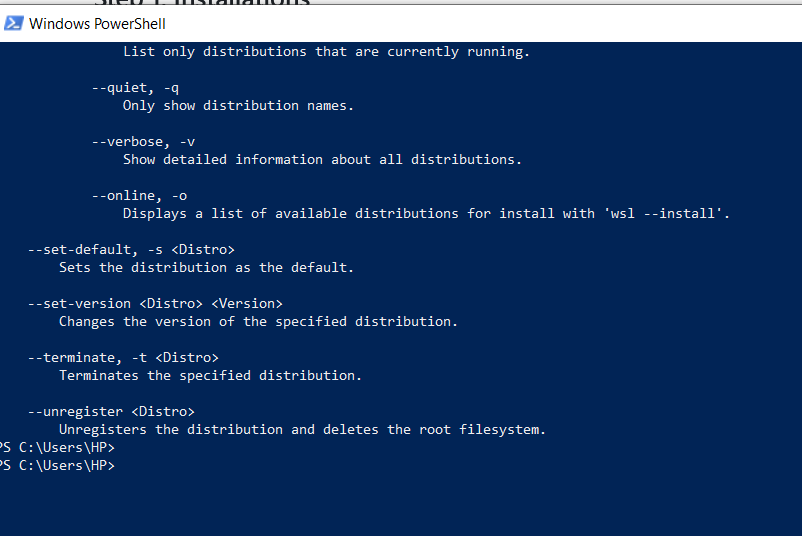
I simply opened the power shell on my windows computer and gave the command wsl --install.
I simply opened the power shell on my windows computer and gave the command wsl --install.
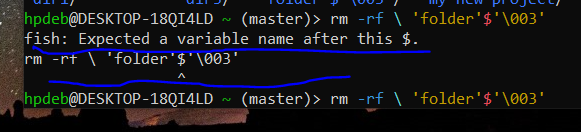

When l typed in a command for kolourpaint, this came up.
When l typed in a command for kolourpaint, this came up.
I’m totally new on GitHub, and don’t know how to make good use of it. How do l make use of this link docs.github.com/en/…/testing-your-ssh-connection?… ??
My purpose is to try out my SSH key.
I’m totally new on GitHub, and don’t know how to make good use of it. How do l make use of this link docs.github.com/en/…/testing-your-ssh-connection?… ??
My purpose is to try out my SSH key.

I am working on windows 10 currently. I was wondering if MX Linux could be installed directly from online. Thanks for taking the time to reply.
I am working on windows 10 currently. I was wondering if MX Linux could be installed directly from online. Thanks for taking the time to reply.
Perhaps I missed the setting, but I want blank username/password fields instead of selecting from available users if that makes any sense. On KDE Plasma if that matters.
Thank you!
Perhaps I missed the setting, but I want blank username/password fields instead of selecting from available users if that makes any sense. On KDE Plasma if that matters.
Thank you!
Hi, y’all. Running Linux Mint and I have the puzzle presented above.
From what I gather, I’m using rename (1p) which makes mention of Perl and in the man page it says it will also run as file-rename. I’m not sure if this is the right rename utility for the common argument
s/old_pattern/new_pattern/
but any time I try to run anything (including -n), I just get an angle bracket > and have to ctrl-c out.
I’d also need some details on how the wildcards work, which seems to be lacking in the documentation.
Edit: Instructions unclear. I have a bunch of episodes that are very wordy. I’m moving them onto DVD and truncated on my player the directory will look like:
Star Trek The Next Gene…
Star Trek The Next Gene…
Star Trek The Next Gene…
Star Trek The Next Gene…
Star Trek The Next Gene…
so I want to take (sample episode)
Star Trek The Next Generation Season 1 Episode 1 - Encounter at Far Point
and
Replace 'Star Trek The Next Generation Season ’ with ‘S0’
Replace 'Episode ’ with ‘E0’ or ‘E’ depending on digits
Keep episode title as is.
So it looks like
S01E01 - Encounter at Farpoint.mkv
Hi, y’all. Running Linux Mint and I have the puzzle presented above.
From what I gather, I’m using rename (1p) which makes mention of Perl and in the man page it says it will also run as file-rename. I’m not sure if this is the right rename utility for the common argument
s/old_pattern/new_pattern/
but any time I try to run anything (including -n), I just get an angle bracket > and have to ctrl-c out.
I’d also need some details on how the wildcards work, which seems to be lacking in the documentation.
Edit: Instructions unclear. I have a bunch of episodes that are very wordy. I’m moving them onto DVD and truncated on my player the directory will look like:
Star Trek The Next Gene…
Star Trek The Next Gene…
Star Trek The Next Gene…
Star Trek The Next Gene…
Star Trek The Next Gene…
so I want to take (sample episode)
Star Trek The Next Generation Season 1 Episode 1 - Encounter at Far Point
and
Replace 'Star Trek The Next Generation Season ’ with ‘S0’
Replace 'Episode ’ with ‘E0’ or ‘E’ depending on digits
Keep episode title as is.
So it looks like
S01E01 - Encounter at Farpoint.mkv

Imagine a young explorer who’s just heard that word, “git”. But it actually means an entire world. How is this young explorer supposed to dive into this mysterious world with just a machine in hand ?
He’s got vs code though !! And he’s also got fish and zsh on WSL !
Imagine a young explorer who’s just heard that word, “git”. But it actually means an entire world. How is this young explorer supposed to dive into this mysterious world with just a machine in hand ?
He’s got vs code though !! And he’s also got fish and zsh on WSL !

I wish to work on Linux, but the only machine l have at my disposal is my brother’s windows laptop when it’s free. Can I create a virtual Linux system using QEMU ?
I wish to work on Linux, but the only machine l have at my disposal is my brother’s windows laptop when it’s free. Can I create a virtual Linux system using QEMU ?
I’ve installed Kubuntu (26.04 LTS) on a laptop with a touchscreen. When logging in, there is a button for the virtual keyboard in the lock screen, but it does nothing, nor does tapping on the password field. Once I’ve logged in, it works fine (including on the lock screen), but once I’ve logged out it breaks again. I also tried the Silent theme, which has a different on-screen keyboard, but that also didn’t work (it shows up, but the keys do nothing). How do I fix this?
I’ve installed Kubuntu (26.04 LTS) on a laptop with a touchscreen. When logging in, there is a button for the virtual keyboard in the lock screen, but it does nothing, nor does tapping on the password field. Once I’ve logged in, it works fine (including on the lock screen), but once I’ve logged out it breaks again. I also tried the Silent theme, which has a different on-screen keyboard, but that also didn’t work (it shows up, but the keys do nothing). How do I fix this?
I installed Ubuntu 24.04 LTS about a year ago. Now that 26.04 is out, I was planning to upgrade, but instead I think I’m going to wipe and re-install from scratch. Does anyone have any tips or tweaks they recommend for new installs? Things like, do or don’t encrypt the drive during the install process, make an administrator account separate from your regular user account? I already plan to install the Flatpak repo and the Gnome Software Center.
Thanks!
I installed Ubuntu 24.04 LTS about a year ago. Now that 26.04 is out, I was planning to upgrade, but instead I think I’m going to wipe and re-install from scratch. Does anyone have any tips or tweaks they recommend for new installs? Things like, do or don’t encrypt the drive during the install process, make an administrator account separate from your regular user account? I already plan to install the Flatpak repo and the Gnome Software Center.
Thanks!
For some reason, most of Kubuntu’s default themes disappeared on me. Is there any way to redownload them?
For some reason, most of Kubuntu’s default themes disappeared on me. Is there any way to redownload them?
I’ve started a Fediverse watch party (#ReMonsterdon on Mastodon) & want to store & organize info about it (films shown; films scheduled to be shown; candidates for showing; dates; relevant links like streams, trailers, Wikipedia; images like film posters etc).
At the moment, I’m using a combination of stuff on my computer, i.e. a folder with text & image files, and a collection on NeoDB, a Fediverse media catalogue.
But I’d like a more all-in-one & organized/organizable file (easy to search, sort etc). A lot of people use a spreadsheet for that kind of thing. But I was under the impression that that’s what databases are for.
I don’t know much about either. I use spreadsheets very little and databases not at all (except NeoDB, I suppose).
Is there a simple, local, FLOSS, GUI database, suitable for beginners, that I could use for this?
(I had a look at my installation of LibreOffice, but for some reason the options for creating a Base file are greyed out or missing).
(I am not yet ready to try self-hosting. So something that is local, preferably in a system package, .deb or .AppImage. My OS: Linux Mint 22.2 Xfce.)
Thanks in advance
I’ve started a Fediverse watch party (#ReMonsterdon on Mastodon) & want to store & organize info about it (films shown; films scheduled to be shown; candidates for showing; dates; relevant links like streams, trailers, Wikipedia; images like film posters etc).
At the moment, I’m using a combination of stuff on my computer, i.e. a folder with text & image files, and a collection on NeoDB, a Fediverse media catalogue.
But I’d like a more all-in-one & organized/organizable file (easy to search, sort etc). A lot of people use a spreadsheet for that kind of thing. But I was under the impression that that’s what databases are for.
I don’t know much about either. I use spreadsheets very little and databases not at all (except NeoDB, I suppose).
Is there a simple, local, FLOSS, GUI database, suitable for beginners, that I could use for this?
(I had a look at my installation of LibreOffice, but for some reason the options for creating a Base file are greyed out or missing).
(I am not yet ready to try self-hosting. So something that is local, preferably in a system package, .deb or .AppImage. My OS: Linux Mint 22.2 Xfce.)
Thanks in advance
I’m just curious here. I use MySql Workbench on Windows and Linux. I am not storing the password in Workbench. On Windows, I click the database I want, enter the password and go about my business. On Linux (Mint), I enter my password…and then it prompts me for my password randomly from there on out. I might use it for fifteen minutes without a prompt. Then, I might get prompted for a password four times in a row. It does this if I start Workbench up as a user or as root.
Anything obvious I could do to make the Linux version mirror the Windows version a little better in this regards?
Also, just as an observation, the Linux version of Workbench is definitely inferior to the Windows version. There are all kinds of quirky things going on in the Linux version.
Thanks,
I’m just curious here. I use MySql Workbench on Windows and Linux. I am not storing the password in Workbench. On Windows, I click the database I want, enter the password and go about my business. On Linux (Mint), I enter my password…and then it prompts me for my password randomly from there on out. I might use it for fifteen minutes without a prompt. Then, I might get prompted for a password four times in a row. It does this if I start Workbench up as a user or as root.
Anything obvious I could do to make the Linux version mirror the Windows version a little better in this regards?
Also, just as an observation, the Linux version of Workbench is definitely inferior to the Windows version. There are all kinds of quirky things going on in the Linux version.
Thanks,
I’m on a desktop PC that’s in my home office. I have personal documents and clients’ intellectual property on it (source code, databases, documents, etc.). Hence, I like to use full disk encryption on all disks. Nobody else uses this PC besides me and it’s safe at home. The only threat vector is if somebody gained access to my room and stole the computer. It’s very remote, but still technically possible (if you think I’m exaggerating, I’d like to learn your opinion). Maaaaybe if I was sending the nvme for RMA, that’s also a threat, but I have never had an SSD break on me. Never. I know it’s anecdotal and sometimes they break, but I had multiple and I think it’s such a small chance…
LUKS is a bit of a pain with having to type the passphrase on each boot. So I had it on auto-unlock via TPM, which works great when it works, but a) is also a pain when it breaks (usually due to system upgrade that changes something and I forgot to re-enroll the keys or re-generate the PCRs), b) according to Arch wiki it’s unsafe, if anybody has physical access to my PC – so essentially the only threat vector I was trying to protect myself against is not protected against.
But I was thinking – I am OK with typing one password on boot. I just don’t want to type two different passwords one after the other. What if I set autologin in my Desktop Environment (GNOME or KDE), but left LUKS locked down with a passphrase? Wouldn’t that be safe? It’s a single user system, nobody will use it. If it gets stolen, it’s been shutdown and then they can’t gain access because of LUKS.
Am I thinking correctly?
I’m on a desktop PC that’s in my home office. I have personal documents and clients’ intellectual property on it (source code, databases, documents, etc.). Hence, I like to use full disk encryption on all disks. Nobody else uses this PC besides me and it’s safe at home. The only threat vector is if somebody gained access to my room and stole the computer. It’s very remote, but still technically possible (if you think I’m exaggerating, I’d like to learn your opinion). Maaaaybe if I was sending the nvme for RMA, that’s also a threat, but I have never had an SSD break on me. Never. I know it’s anecdotal and sometimes they break, but I had multiple and I think it’s such a small chance…
LUKS is a bit of a pain with having to type the passphrase on each boot. So I had it on auto-unlock via TPM, which works great when it works, but a) is also a pain when it breaks (usually due to system upgrade that changes something and I forgot to re-enroll the keys or re-generate the PCRs), b) according to Arch wiki it’s unsafe, if anybody has physical access to my PC – so essentially the only threat vector I was trying to protect myself against is not protected against.
But I was thinking – I am OK with typing one password on boot. I just don’t want to type two different passwords one after the other. What if I set autologin in my Desktop Environment (GNOME or KDE), but left LUKS locked down with a passphrase? Wouldn’t that be safe? It’s a single user system, nobody will use it. If it gets stolen, it’s been shutdown and then they can’t gain access because of LUKS.
Am I thinking correctly?
I’m several months into my Linux journey and this is one thing that is driving me absolutely crazy because it legit just works on Windows and OS X.
I hit the start button
I type “note”
I hit enter.
If I give it a full second between steps 2 and 3, Notesnook opens as intended.
But if I hit enter at a normal speed, a game (Necesse) launches.
This is presumably because it’s executing the command before the search finishes.
Can I change this behavior? I use AutoCAD for a living so typing a command and hitting enter really fast is a habit I won’t be able to break.
I’m several months into my Linux journey and this is one thing that is driving me absolutely crazy because it legit just works on Windows and OS X.
I hit the start button
I type “note”
I hit enter.
If I give it a full second between steps 2 and 3, Notesnook opens as intended.
But if I hit enter at a normal speed, a game (Necesse) launches.
This is presumably because it’s executing the command before the search finishes.
Can I change this behavior? I use AutoCAD for a living so typing a command and hitting enter really fast is a habit I won’t be able to break.
Here’s my situation. I have an Asus router that allows me to connect an external drive to it and then it can function as a UPnP media server. Back when I was on Windows It worked perfectly. It always sat in the sidebar of the file explorer and I could just drag and drop files to and from it, download stuff directly onto it or play movies just by double clicking them
I moved to a Fedora-based distro (Nobara) a few months ago and have been unable to access the server the same way. I know it works, because if I open VLC I can access it under “Universal Plug’n’Play” and see my movies, but for the life of me I can’t get it to show up in Dolphin or any other file explorer I’ve tried. I’ve resorted to turning on FTP on the router and mounting the drive with rclone, which somewhat works for my use case, but it’s slow and occasionally just refuses to connect because sessions don’t seem to get closed properly and I get a “Too many connections” error.
My google-fu appears to have failed me, because I have genuinely found nothing, besides just using Kodi or VLC. I also found a few threats from like a decade ago complaining about the UPnP support on KDE, but I would have expected things to have improved since then. Is what I’m trying to achieve here just not possible?
Here’s my situation. I have an Asus router that allows me to connect an external drive to it and then it can function as a UPnP media server. Back when I was on Windows It worked perfectly. It always sat in the sidebar of the file explorer and I could just drag and drop files to and from it, download stuff directly onto it or play movies just by double clicking them
I moved to a Fedora-based distro (Nobara) a few months ago and have been unable to access the server the same way. I know it works, because if I open VLC I can access it under “Universal Plug’n’Play” and see my movies, but for the life of me I can’t get it to show up in Dolphin or any other file explorer I’ve tried. I’ve resorted to turning on FTP on the router and mounting the drive with rclone, which somewhat works for my use case, but it’s slow and occasionally just refuses to connect because sessions don’t seem to get closed properly and I get a “Too many connections” error.
My google-fu appears to have failed me, because I have genuinely found nothing, besides just using Kodi or VLC. I also found a few threats from like a decade ago complaining about the UPnP support on KDE, but I would have expected things to have improved since then. Is what I’m trying to achieve here just not possible?
@linux4noobs@programming.dev @linux4noobs@lemmy.world l wish to try out on Linux for the first time. I wish to try out with MX Linux. There are two versions available for the latest update. One is sysvinit and the other is systemd.
What are the pros and cons of the two ?
I wish to understand it well before downloading either.
@linux4noobs@programming.dev @linux4noobs@lemmy.world l wish to try out on Linux for the first time. I wish to try out with MX Linux. There are two versions available for the latest update. One is sysvinit and the other is systemd.
What are the pros and cons of the two ?
I wish to understand it well before downloading either.
So I run Linux for a bit now but I am still not fully confident with downloading “random” Appimages or .tar archives (I don’t even know how to run/compile the archives but that is another problem lol) from Github or something.
I try to verify the hashes or GPG signatures for all the programs but not every developer provides a latest.yml.
I revently noticed sometimes Github shows a sha256 sum next to the files in the release tab but not in every repo and is this just a second layer or is this a substitution for the latest.yml?
Is there something I am missing or should I not worry too much when using Appimages or Flatpaks because they are sandboxed anyways?
So I run Linux for a bit now but I am still not fully confident with downloading “random” Appimages or .tar archives (I don’t even know how to run/compile the archives but that is another problem lol) from Github or something.
I try to verify the hashes or GPG signatures for all the programs but not every developer provides a latest.yml.
I revently noticed sometimes Github shows a sha256 sum next to the files in the release tab but not in every repo and is this just a second layer or is this a substitution for the latest.yml?
Is there something I am missing or should I not worry too much when using Appimages or Flatpaks because they are sandboxed anyways?
This community has been locked and we would like to redirect you to a similar, more active community at !linux4noobs@programming.dev
Would you like to reopen this community and moderate it? Contact Sopuli’s admins and we can talk!
Tämä yhteisö on lukittu ja haluaisimme ohjata sinut samankaltaiseen, aktiivisempaan yhteisöön !linux4noobs@programming.dev
Haluaisitko avata tämän yhteisön ja ottaa sen hoidettavaksesi? Ota yhteyttä Sopulin ylläpitäjiin niin jutellaan!
This community has been locked and we would like to redirect you to a similar, more active community at !linux4noobs@programming.dev
Would you like to reopen this community and moderate it? Contact Sopuli’s admins and we can talk!
Tämä yhteisö on lukittu ja haluaisimme ohjata sinut samankaltaiseen, aktiivisempaan yhteisöön !linux4noobs@programming.dev
Haluaisitko avata tämän yhteisön ja ottaa sen hoidettavaksesi? Ota yhteyttä Sopulin ylläpitäjiin niin jutellaan!