
0

Custom ROMs on Honor devices

preview

I wish to flash my Honor 9X with GSI LineageOS. Aside from its tricky bootloader unlocking, I have never ever seen any evidence of using custom ROMs on Honor devices. Are there any such examples in practice?

I wish to flash my Honor 9X with GSI LineageOS. Aside from its tricky bootloader unlocking, I have never ever seen any evidence of using custom ROMs on Honor devices. Are there any such examples in practice?

0

Has a thick case ever made your phone's camera worse in low light?

preview

I’ve noticed some bulky cases trap a bit of heat around the bump, and night shots look noisier until I take the case off. Curious whether that’s been a real issue for you, or if I’m blaming the case for a software update.

#Android

I’ve noticed some bulky cases trap a bit of heat around the bump, and night shots look noisier until I take the case off. Curious whether that’s been a real issue for you, or if I’m blaming the case for a software update.

#Android

0

Has a thick case ever made your phone's camera worse in low light?

preview

I’ve noticed some bulky cases trap a bit of heat around the bump, and night shots look noisier until I take the case off. Curious whether that’s been a real issue for you, or if I’m blaming the case for a software update.

#Android

I’ve noticed some bulky cases trap a bit of heat around the bump, and night shots look noisier until I take the case off. Curious whether that’s been a real issue for you, or if I’m blaming the case for a software update.

#Android

0

Has a thick case ever made your phone's camera worse in low light?

preview

I’ve noticed some bulky cases trap a bit of heat around the bump, and night shots look noisier until I take the case off. Curious whether that’s been a real issue for you, or if I’m blaming the case for a software update.

#Android

I’ve noticed some bulky cases trap a bit of heat around the bump, and night shots look noisier until I take the case off. Curious whether that’s been a real issue for you, or if I’m blaming the case for a software update.

#Android

0

Rank your top 5 favorite photo filters apps for Android

preview

I’m curious to see the rankings of your favorite filter apps. Here is what my ranking looks like:

  1. FilterMe Photo Editor
  2. VSCO
  3. Lightroom
  4. Snapseed
  5. Picsart

I’m curious to see the rankings of your favorite filter apps. Here is what my ranking looks like:

  1. FilterMe Photo Editor
  2. VSCO
  3. Lightroom
  4. Snapseed
  5. Picsart
0

"Allow window-level blurs" in Moto G55 Android 16 is not there

preview

I have two Moto Android 16 phones, the Edge 50 Neo, and the Moto G55. In the Edge 50 Neo, Allow window-level blurs is included in Developer Options. This gives me a nice blurred background in my pattern screen log in. But this option is not listed in the Developer Options of the Moto G55. So Im stuck with an ugly solid white background on my pattern screen login.

NB Neither phone has the Accessibility > Color & motion >“Reduce blur effects” listed either.

Is this option available anywhere else in the G55 settings or Developer Options?

Any help or suggestions gratefully received.

G55


Edge 50 Neo

I have two Moto Android 16 phones, the Edge 50 Neo, and the Moto G55. In the Edge 50 Neo, Allow window-level blurs is included in Developer Options. This gives me a nice blurred background in my pattern screen log in. But this option is not listed in the Developer Options of the Moto G55. So Im stuck with an ugly solid white background on my pattern screen login.

NB Neither phone has the Accessibility > Color & motion >“Reduce blur effects” listed either.

Is this option available anywhere else in the G55 settings or Developer Options?

Any help or suggestions gratefully received.

G55


Edge 50 Neo

0

Users who switched to GOS, is it worth it?

preview

cross-posted from: lemmy.ml/post/55281333

How’s it so far? Based on your experience, do you feel it gave you more benefits than a regular Pixel can give?

For someone who’s only using apps from Fdroid and not signing in to Playstore, do you think it’s worth the change?

P.S. I found GOS community in Lemmy but they seem to have disabled posting.

cross-posted from: lemmy.ml/post/55281333

How’s it so far? Based on your experience, do you feel it gave you more benefits than a regular Pixel can give?

For someone who’s only using apps from Fdroid and not signing in to Playstore, do you think it’s worth the change?

P.S. I found GOS community in Lemmy but they seem to have disabled posting.

0

New Anddroid todo.txt App

GitHub GitHub - fleapower/vodotxt: Android todo.txt app with robust recurring tasks and Google Drive sync. github.com
preview

I’m working on releasing a new todo.txt app on Google Play, but I need some testers to help with the closed testing process. You can see the project at github.com/fleapower/vodotxt. If you are interested, please email me at vodotxt at gmail. Thanks!

I’m working on releasing a new todo.txt app on Google Play, but I need some testers to help with the closed testing process. You can see the project at github.com/fleapower/vodotxt. If you are interested, please email me at vodotxt at gmail. Thanks!

0

Looking at new phones and feeling overwhelmed

preview

The USB port on my S20 fe 5g has died and I’m starting my search for a replacement phone. I’m at a bit of a loss I dont really keep up with whats come out, and just want a solid phone that will last a good long while. I’d like to stay around the same size or smaller than my current phone, I don’t play intensive games so I don’t need a top end processor. But I would like a nice camera, I travel and take lots of pictures. Macro shots of mushrooms, wide angle and telephoto shots of landscapes, regular shots of my dog. I’d like a physical sim slot and a microsd slot is nice but not a deal breaker. The Nothing 3 is seemingly checking all my boxes but would like to hear some suggestions or feedback from someone who has one or another phone that might be better for me.

The USB port on my S20 fe 5g has died and I’m starting my search for a replacement phone. I’m at a bit of a loss I dont really keep up with whats come out, and just want a solid phone that will last a good long while. I’d like to stay around the same size or smaller than my current phone, I don’t play intensive games so I don’t need a top end processor. But I would like a nice camera, I travel and take lots of pictures. Macro shots of mushrooms, wide angle and telephoto shots of landscapes, regular shots of my dog. I’d like a physical sim slot and a microsd slot is nice but not a deal breaker. The Nothing 3 is seemingly checking all my boxes but would like to hear some suggestions or feedback from someone who has one or another phone that might be better for me.

0

calendar app with accordion?

preview

Does anyone remember the Palm Pre? It had a calendar app and if you had a large block of time without an event, it would collapse like an accordion the time so that you could see more of your day without scrolling. Are there any Android calendar apps that do that?

Does anyone remember the Palm Pre? It had a calendar app and if you had a large block of time without an event, it would collapse like an accordion the time so that you could see more of your day without scrolling. Are there any Android calendar apps that do that?

0

Xperia Owners...why?

preview

Why did your choose the Sony Xperia over something like a OnePlus 15 or (insert top tier phone this year)? I’ve always been curious as almost every owner I’ve heard from absolutely loves their phones?
Id be particularly interested in those who couldn’t put didn’t go through their carrier. I have a OnePlus 13 and I swear I’ll be using it for another 3 years. But I’d like to consider an Xperia for my next phone.

Why did your choose the Sony Xperia over something like a OnePlus 15 or (insert top tier phone this year)? I’ve always been curious as almost every owner I’ve heard from absolutely loves their phones?
Id be particularly interested in those who couldn’t put didn’t go through their carrier. I have a OnePlus 13 and I swear I’ll be using it for another 3 years. But I’d like to consider an Xperia for my next phone.

0

If you're on a Pixel 9 or 10, is the Pixel 11 worth it to you?

preview

Been comparing the Pixel 9/10/11 and the gap is smaller than the marketing makes it sound, so curious what others think.

The way I read it: same 6.3in body all three years. The 9 actually has the biggest main sensor but no zoom lens. The 10 added a 5x zoom and the magnetic Qi2 charging but shrank the main camera. The 11 keeps the zoom, brings a bigger main sensor back, and bumps wireless to 25W. None of the base three get a vapor chamber, so they all throttle in long games.

My take: on a 10 I wouldn’t bother; on a 9 the zoom + magnets + faster wireless are the things you’d feel daily.

For the Pixel 9 and 10 owners here — has the camera or charging actually pushed anyone to upgrade, or is it a “wait for the 12” year?

Been comparing the Pixel 9/10/11 and the gap is smaller than the marketing makes it sound, so curious what others think.

The way I read it: same 6.3in body all three years. The 9 actually has the biggest main sensor but no zoom lens. The 10 added a 5x zoom and the magnetic Qi2 charging but shrank the main camera. The 11 keeps the zoom, brings a bigger main sensor back, and bumps wireless to 25W. None of the base three get a vapor chamber, so they all throttle in long games.

My take: on a 10 I wouldn’t bother; on a 9 the zoom + magnets + faster wireless are the things you’d feel daily.

For the Pixel 9 and 10 owners here — has the camera or charging actually pushed anyone to upgrade, or is it a “wait for the 12” year?

0

SMS of Death: A single malformed WAP Push SMS crashes com.android.phone on Android, dropping active calls (including emergency calls), with zero interaction from the victim.

SMS of Death SMS of Death smsofdeath.com
preview

cross-posted from: piefed.world/…/sms-of-death-a-single-malformed-wa…

cross-posted from: piefed.world/…/sms-of-death-a-single-malformed-wa…

Hacker News.

cross-posted from: piefed.world/…/sms-of-death-a-single-malformed-wa…

cross-posted from: piefed.world/…/sms-of-death-a-single-malformed-wa…

Hacker News.

0

Setting up an Android phone with FOSS applications.

preview

My intention is to buy the cheapest smartphone I can reasonably get as I need to use a phone for professional reasons; the company uses Whatsapp and other applications I do not want to have occupying space in a smartphone I use for my personal life.

I’ve been loading my phones with FOSS applications from F-Droid for years now but I am aware the loop is tightening and continuing to do so is becoming more and more difficult.

Ideally, I would like to keep this phone as much as possible exempt from connecting with Google. This means I don’t intend to load an account on the phone and instead load F-Droid and Aurora to get the software I want to use.

My intention is to buy the cheapest smartphone I can reasonably get as I need to use a phone for professional reasons; the company uses Whatsapp and other applications I do not want to have occupying space in a smartphone I use for my personal life.

I’ve been loading my phones with FOSS applications from F-Droid for years now but I am aware the loop is tightening and continuing to do so is becoming more and more difficult.

Ideally, I would like to keep this phone as much as possible exempt from connecting with Google. This means I don’t intend to load an account on the phone and instead load F-Droid and Aurora to get the software I want to use.

0

Is there any voice recording app with software noise cancellation?

preview

Most recording apps I stumbled upon (fossify, rec studio lite) only let you choose your OEM’s implementation as mic source, which isn’t guaranteed or reliable

Most recording apps I stumbled upon (fossify, rec studio lite) only let you choose your OEM’s implementation as mic source, which isn’t guaranteed or reliable

0

Is there such a thing as on-device voicemail?

preview

I don’t understand why voicemail really needs ti be a separate service involving forwarding and such. Couldn’t there be an app that picks up an unanswered call after a timer, plays a greeting, and records the reply? Couldn’t that all be on the device?

Or is there some technical limitation that I just don’t understand? I haven’t found any such app, and all voicemail apps seem to be services that forward calls remotely.

I don’t understand why voicemail really needs ti be a separate service involving forwarding and such. Couldn’t there be an app that picks up an unanswered call after a timer, plays a greeting, and records the reply? Couldn’t that all be on the device?

Or is there some technical limitation that I just don’t understand? I haven’t found any such app, and all voicemail apps seem to be services that forward calls remotely.

0

Is there a way to manage the type of network access per app, for Pixel on GrapheneOS?

preview

I use Pixel on GOS but i welcome any other apps that can help achieve this.

Background: I have a smart home system that i can use my phone to lock/unlock doors, turning lights on/off…etc. This app can be accessed via house wifi and 5G.

Problem: sometimes theres a lag when the phone switches from 5G to wifi, or vice versa. This would mean that the commands are “stopped” until we have stable signals. Eg. pressing open door would not open, i have to press open door again.

I would like to setup so that this smart home app is always on 5G. The rest of the apps can run 5G or wifi…

I remember on old Galaxy phones, you can do that. But is there an app?

I use Pixel on GOS but i welcome any other apps that can help achieve this.

Background: I have a smart home system that i can use my phone to lock/unlock doors, turning lights on/off…etc. This app can be accessed via house wifi and 5G.

Problem: sometimes theres a lag when the phone switches from 5G to wifi, or vice versa. This would mean that the commands are “stopped” until we have stable signals. Eg. pressing open door would not open, i have to press open door again.

I would like to setup so that this smart home app is always on 5G. The rest of the apps can run 5G or wifi…

I remember on old Galaxy phones, you can do that. But is there an app?

0

Fossify Documents v1.1.0

preview

Reposting from reddit, the app is a recent addition to the Fossify roster and already a quite good PDF/document viewer.

Fossify Documents has been updated to v1.1.0. This update comes with the following new features:

  • Select and copy text from PDFs
  • Search within PDF, DOCX, and HTML files
  • Dark PDF pages
  • Option for horizontal PDF scrolling
  • PDF table-of-contents navigation
  • An option to hide floating page numbers

It also fixes files opened from other apps missing from Recents and problems editing externally opened CSV files.

If you don’t see the latest version on F-Droid, please use the IzzyOnDroid repo or the GitHub releases.

Reposting from reddit, the app is a recent addition to the Fossify roster and already a quite good PDF/document viewer.

Fossify Documents has been updated to v1.1.0. This update comes with the following new features:

  • Select and copy text from PDFs
  • Search within PDF, DOCX, and HTML files
  • Dark PDF pages
  • Option for horizontal PDF scrolling
  • PDF table-of-contents navigation
  • An option to hide floating page numbers

It also fixes files opened from other apps missing from Recents and problems editing externally opened CSV files.

If you don’t see the latest version on F-Droid, please use the IzzyOnDroid repo or the GitHub releases.

0

Games you played this summer

preview

Hi!

I wanted to make a post to ask for recommandations of small and relaxing android games for my wife and I, but I figured this could be broader so : What Android games have you played recently? And what’s your opinion on them?

I’ll start

  • Meowdoku : really fun a long while, though the fake leaderboards are annoying (has ads between levels)
  • Tile Clear : relaxing and has a few interesting mechanics (has ads between levels)
  • POINPY : awesome game from devolver digital, the art style is very nice and the mechanics are challenging while not being too frustrating. It feels like a better take on the old doodle jump formula. (no ads!!)

Hi!

I wanted to make a post to ask for recommandations of small and relaxing android games for my wife and I, but I figured this could be broader so : What Android games have you played recently? And what’s your opinion on them?

I’ll start

  • Meowdoku : really fun a long while, though the fake leaderboards are annoying (has ads between levels)
  • Tile Clear : relaxing and has a few interesting mechanics (has ads between levels)
  • POINPY : awesome game from devolver digital, the art style is very nice and the mechanics are challenging while not being too frustrating. It feels like a better take on the old doodle jump formula. (no ads!!)
0

Bitdefender finds preinstalled Android malware you can’t uninstall, seen in 150 countries

Security Affairs Bitdefender finds preinstalled Android malware you can't uninstall, seen in 150 countries securityaffairs.com
preview

cross-posted from: infosec.pub/post/53450841

Bitdefender finds Midnight Mimosa, preinstalled Android malware on cheap MediaTek phones that fakes ad clicks, drops apps and builds a proxy botnet. Bitdefender researchers discovered a campaign called Midnight Mimosa involving preinstalled Android malware on low-cost phones from different brands that use MediaTek platforms. The malware is built into the device firmware and may be […]

cross-posted from: infosec.pub/post/53450841

Bitdefender finds Midnight Mimosa, preinstalled Android malware on cheap MediaTek phones that fakes ad clicks, drops apps and builds a proxy botnet. Bitdefender researchers discovered a campaign called Midnight Mimosa involving preinstalled Android malware on low-cost phones from different brands that use MediaTek platforms. The malware is built into the device firmware and may be […]

0

For those who have used and know about Droid Deck, Game Native and Winlator

preview

Do you think Droid Deck is comparable in its current status to Game Native and Winlator? And if not, do you know if at some point Droid Deck could achieve better performance than Game Native and Winlator? Or, it will be always only on par with them? I don’t know that much about the FEX translation layer, Proton in ARM and the difference between these 3.

Do you think Droid Deck is comparable in its current status to Game Native and Winlator? And if not, do you know if at some point Droid Deck could achieve better performance than Game Native and Winlator? Or, it will be always only on par with them? I don’t know that much about the FEX translation layer, Proton in ARM and the difference between these 3.

0

Is it safe to remove Google services from a phone and install microG instead?

preview

AFAIK, I can purge Googleware from my phone with Shizuku and replace it with microG, but I’m afraid it is unsafe

AFAIK, I can purge Googleware from my phone with Shizuku and replace it with microG, but I’m afraid it is unsafe

0

anyone knows well about VoLTE/IMS in android?

preview

hello. my daily driver phone is a 2013 LG G2. it’s my favorite device and i intend to use it as long as i can.

unfortunately, 3G services are ending soon in my region. this device is 4G/LTE capable and even supports VoLTE on the stock firmware, however with a (AOSP-based) custom rom, VoLTE is non functional. data network and sms works with 4G, but calls switch to 3G.

to keep it functional as a phone, right now my only choice is to install the stock rom. unfortunately the stock rom is terrible compared to lineageos. latest stock rom is at 5.0.1 lollipop and is poorly optimized, has ram leakage issue that needs reboot every few days or so. i’ll have to install 4.4.2 kitkat to use it well, and that means saying goodbye to all modern apps…

recently i’ve seen some people make VoLTE work by reverse engineering the IMS(?). such as LG V30, LG V50, LG V60, Samsung Galaxy S9/S20/S23.

while these are all newer than my device, at least there’s an example unlike just a few years ago. since my device is older than when AOSP started officially having VoLTE support i suppose my device’s implementation would significantly differ, though i hope it’s similar to those newer LG devices.

thus i’m looking into developing IMS for my device’s lineageos, any pointers are appreciated. thanks.

hello. my daily driver phone is a 2013 LG G2. it’s my favorite device and i intend to use it as long as i can.

unfortunately, 3G services are ending soon in my region. this device is 4G/LTE capable and even supports VoLTE on the stock firmware, however with a (AOSP-based) custom rom, VoLTE is non functional. data network and sms works with 4G, but calls switch to 3G.

to keep it functional as a phone, right now my only choice is to install the stock rom. unfortunately the stock rom is terrible compared to lineageos. latest stock rom is at 5.0.1 lollipop and is poorly optimized, has ram leakage issue that needs reboot every few days or so. i’ll have to install 4.4.2 kitkat to use it well, and that means saying goodbye to all modern apps…

recently i’ve seen some people make VoLTE work by reverse engineering the IMS(?). such as LG V30, LG V50, LG V60, Samsung Galaxy S9/S20/S23.

while these are all newer than my device, at least there’s an example unlike just a few years ago. since my device is older than when AOSP started officially having VoLTE support i suppose my device’s implementation would significantly differ, though i hope it’s similar to those newer LG devices.

thus i’m looking into developing IMS for my device’s lineageos, any pointers are appreciated. thanks.

0

WhatsApp local backup without Google account

preview

Yes, 90% of my contacts use Whatsapp. I am therefore trying to remove my main Google account from my GrapheneOS daily profile. I also plan to move over to Proton too, so there is no need for Google Drive.

To clarify, I’m fine keeping sandboxed Google Play with a dummy Google account for downloads/updates. I just don’t want my main Google credentials signed into Android at the system/profile level.

WhatsApp backup is one of the last blockers. On a new phone, restoring a large Google backup can take ages, and in my experience WhatsApp wouldn’t become properly usable until a significant part of the restore had completed. During that time I couldn’t reliably receive WhatsApp calls/messages, which makes migration pretty painful. If your internet drops during that time? Start over !

Has anyone successfully relied on WhatsApp’s local backup instead? Can I periodically copy it to Proton Drive/Linux and later restore it onto a fresh Android/GrapheneOS install if needed?

Especially interested in anyone who has actually tested a full restore from a manually preserved local backup.

Yes, 90% of my contacts use Whatsapp. I am therefore trying to remove my main Google account from my GrapheneOS daily profile. I also plan to move over to Proton too, so there is no need for Google Drive.

To clarify, I’m fine keeping sandboxed Google Play with a dummy Google account for downloads/updates. I just don’t want my main Google credentials signed into Android at the system/profile level.

WhatsApp backup is one of the last blockers. On a new phone, restoring a large Google backup can take ages, and in my experience WhatsApp wouldn’t become properly usable until a significant part of the restore had completed. During that time I couldn’t reliably receive WhatsApp calls/messages, which makes migration pretty painful. If your internet drops during that time? Start over !

Has anyone successfully relied on WhatsApp’s local backup instead? Can I periodically copy it to Proton Drive/Linux and later restore it onto a fresh Android/GrapheneOS install if needed?

Especially interested in anyone who has actually tested a full restore from a manually preserved local backup.

0

Fairphone 6 e/ OS keeps crashing with lists and menus.

preview

As an example you can see that when I try to change from List in Feedflow the app just crashes. Same thing happens when I try to “enter” the URL line in Waterfox and there’s already a website in there. Has anyone had similar issues and knows how to resolve them?

As an example you can see that when I try to change from List in Feedflow the app just crashes. Same thing happens when I try to “enter” the URL line in Waterfox and there’s already a website in there. Has anyone had similar issues and knows how to resolve them?

0

OnePlus 13 WiFi problems

preview

I’m using two SSIDs at home for my network: one for 5GHz and one fore 2.4GHz. Both networks share the same IP range with the same connection settings: gateway and my own PiHole as DNS server.

This sunday, out of the blue, being connected to the 5GHz network I noticed I couldn’t connect to anything on the internet. I disabled/enabled the wifi, nothing changes. I restarted the phone, nothing changed. I checked all my devices at home (personal laptop, work laptop, Android TV device - nVidia Shield) and they all work on the 5GHz network.

Then, I connected to the 2.4GHz and it works without any issue at all.

I then wanted to see if my phone could resolve DNS. I have termux installed and running a nslookup command I could see it uses Google’s 8.8.8.8 DNS server, which my DHCP is not sending. This is frustrating to say at least. Anyway, it’s the same DNS server when connected to 5GHz or 2.4GHz, but for 5 it doesn’t even reach the server for some reason.

I also set the phone to “forget” the wifi network and then reconnected, with no luck.

Also, it’s very frustrating that Google hides network settings. I can’t see the DNS servers configured for my connection anywhere. I had to install an application to be able to see them.

Any idea how to get over this?

I’m using two SSIDs at home for my network: one for 5GHz and one fore 2.4GHz. Both networks share the same IP range with the same connection settings: gateway and my own PiHole as DNS server.

This sunday, out of the blue, being connected to the 5GHz network I noticed I couldn’t connect to anything on the internet. I disabled/enabled the wifi, nothing changes. I restarted the phone, nothing changed. I checked all my devices at home (personal laptop, work laptop, Android TV device - nVidia Shield) and they all work on the 5GHz network.

Then, I connected to the 2.4GHz and it works without any issue at all.

I then wanted to see if my phone could resolve DNS. I have termux installed and running a nslookup command I could see it uses Google’s 8.8.8.8 DNS server, which my DHCP is not sending. This is frustrating to say at least. Anyway, it’s the same DNS server when connected to 5GHz or 2.4GHz, but for 5 it doesn’t even reach the server for some reason.

I also set the phone to “forget” the wifi network and then reconnected, with no luck.

Also, it’s very frustrating that Google hides network settings. I can’t see the DNS servers configured for my connection anywhere. I had to install an application to be able to see them.

Any idea how to get over this?

0

Does the Xperia 10 VIII support LineageOS?

preview

The Xperia 10 VIII (the 8th gen) is nearly identical to the 10 VII (the 7th gen), the same chip, same resolution display (albeit brighter apparently), the same cameras, dimensions, battery, everything. Does that mean the build for LineageOS for the 10 VII can also be used for the 10 VIII? The older 10 VII isn’t sold where I live, only the 10 VIII is, and I’d really like to use a device with a headphone jack + clean software!

If LineageOS does not support the 10 VIII right now, I’ll probably still get it as Sony’s stock OS is usually pretty clean compared to other OEMs (particularly compared to the Vivo device I have right now!), and LineageOS support could arrive later (it’s only been a month since it released!). I also love the new lilac colourway for the 10 VIII :D

The Xperia 10 VIII (the 8th gen) is nearly identical to the 10 VII (the 7th gen), the same chip, same resolution display (albeit brighter apparently), the same cameras, dimensions, battery, everything. Does that mean the build for LineageOS for the 10 VII can also be used for the 10 VIII? The older 10 VII isn’t sold where I live, only the 10 VIII is, and I’d really like to use a device with a headphone jack + clean software!

If LineageOS does not support the 10 VIII right now, I’ll probably still get it as Sony’s stock OS is usually pretty clean compared to other OEMs (particularly compared to the Vivo device I have right now!), and LineageOS support could arrive later (it’s only been a month since it released!). I also love the new lilac colourway for the 10 VIII :D

0

How do you sync/download all emails from Gmail using Thunderbird for Android?

preview

My goal is to have a working offline copy of my email database on my phone, in case of no internet.

I know we can just go to Fetch Mail settings, choose:

  • All mails for the Mailbox size

  • Sync period to All time

But it is not as simple as that. For my case, I have around 200k emails. Using the above settings, Thunderbird would not even start to sync. The progress bar showed for like 5 seconds then hang. I made sure to check Cache / Storage size of Thunderbird after like 30 mins to see if it grows… nothing happens.

Anyone managed to do this successfully?

Note: I also tried Fairmail and got even WORSE results than Thunderbird. Nothing against Fairmail, I love how advanced the settings are. But it just would not work reliably if you have a lot of emails. For comparison, I tried to fetch like 10k emails on both Fairmail and Thunderbird. After both finjshed downloading:

  • Thunderbird: i can go Airplane mode, pick any emails and ALL contents are shown instantly. e.g. texts, attachments

  • Fairmail: Airplane mode on, pick any emails and some emails are shown correctly, some are missing body texts and some just hang.

My goal is to have a working offline copy of my email database on my phone, in case of no internet.

I know we can just go to Fetch Mail settings, choose:

  • All mails for the Mailbox size

  • Sync period to All time

But it is not as simple as that. For my case, I have around 200k emails. Using the above settings, Thunderbird would not even start to sync. The progress bar showed for like 5 seconds then hang. I made sure to check Cache / Storage size of Thunderbird after like 30 mins to see if it grows… nothing happens.

Anyone managed to do this successfully?

Note: I also tried Fairmail and got even WORSE results than Thunderbird. Nothing against Fairmail, I love how advanced the settings are. But it just would not work reliably if you have a lot of emails. For comparison, I tried to fetch like 10k emails on both Fairmail and Thunderbird. After both finjshed downloading:

  • Thunderbird: i can go Airplane mode, pick any emails and ALL contents are shown instantly. e.g. texts, attachments

  • Fairmail: Airplane mode on, pick any emails and some emails are shown correctly, some are missing body texts and some just hang.

0

Weird bootloop after flashing magisk

preview

Today I installed Lineage OS on my phone. Afterwards, I decided to use root with magisk.

Due to my ignorance, I flashed patched recovery into the boot partition, which resulted in a bootloop. I realized my mistake, proceeded with installing Lineage again, and then flashed patched boot image to the corresponding partition. After that, I got a bootloop again, but it can be overriden by holding Volume up + Power while booting.

All the changes I make in the phone (e.g. installed apps, settings) persist.

Probably, my ROM is goofed, but it is still able to boot from recovery.

I think I should reflash everything from scratch, but I’m not sure about the order. Should I reinstall Lineage first and then reflash the boot image?

UPD: This did NOT work.

SOLVED: I flashed a non-patched boot.img provided by Lineage, now the bootloop is solved. The actual problem was that I have patched boot.img NOT right on the target device. Flashing non-patched image provided by Lineage fixed the bootloop.

Today I installed Lineage OS on my phone. Afterwards, I decided to use root with magisk.

Due to my ignorance, I flashed patched recovery into the boot partition, which resulted in a bootloop. I realized my mistake, proceeded with installing Lineage again, and then flashed patched boot image to the corresponding partition. After that, I got a bootloop again, but it can be overriden by holding Volume up + Power while booting.

All the changes I make in the phone (e.g. installed apps, settings) persist.

Probably, my ROM is goofed, but it is still able to boot from recovery.

I think I should reflash everything from scratch, but I’m not sure about the order. Should I reinstall Lineage first and then reflash the boot image?

UPD: This did NOT work.

SOLVED: I flashed a non-patched boot.img provided by Lineage, now the bootloop is solved. The actual problem was that I have patched boot.img NOT right on the target device. Flashing non-patched image provided by Lineage fixed the bootloop.

0

Google ML Kit's barcode scanner adds the INTERNET permission and sends diagnostics, even in apps with no network code

preview

While checking one of my own apps with Exodus Privacy, I noticed it had the INTERNET permission even though the code never touches the network. The culprit turned out to be Google ML Kit’s barcode scanning library, which a very popular Flutter QR scanner uses under the hood. It adds INTERNET and ACCESS_NETWORK_STATE through a Google transport library, and sends diagnostic data to Google when the scanner is opened (device model, app version, an install-scoped ID, latencies, error codes). Google documents this, but you’d never guess it from an app that just reads a QR code.

A few things I took away from it:

  • A “0 trackers” result on Exodus doesn’t mean “no network”. Check the permission list too.
  • If an app that should be offline asks for INTERNET, a QR/barcode feature is worth suspecting.
  • For developers: ZXing-based scanners decode entirely on-device and don’t pull any of this in. You can confirm with the merged manifest or the manifest-merger report in your build folder.

Has anyone else run into libraries quietly adding network access like this? Curious which others are common offenders.

While checking one of my own apps with Exodus Privacy, I noticed it had the INTERNET permission even though the code never touches the network. The culprit turned out to be Google ML Kit’s barcode scanning library, which a very popular Flutter QR scanner uses under the hood. It adds INTERNET and ACCESS_NETWORK_STATE through a Google transport library, and sends diagnostic data to Google when the scanner is opened (device model, app version, an install-scoped ID, latencies, error codes). Google documents this, but you’d never guess it from an app that just reads a QR code.

A few things I took away from it:

  • A “0 trackers” result on Exodus doesn’t mean “no network”. Check the permission list too.
  • If an app that should be offline asks for INTERNET, a QR/barcode feature is worth suspecting.
  • For developers: ZXing-based scanners decode entirely on-device and don’t pull any of this in. You can confirm with the merged manifest or the manifest-merger report in your build folder.

Has anyone else run into libraries quietly adding network access like this? Curious which others are common offenders.

0

Incident Detection - Activity monitoring app

Incident Detection - Apps on Google Play play.google.com
preview

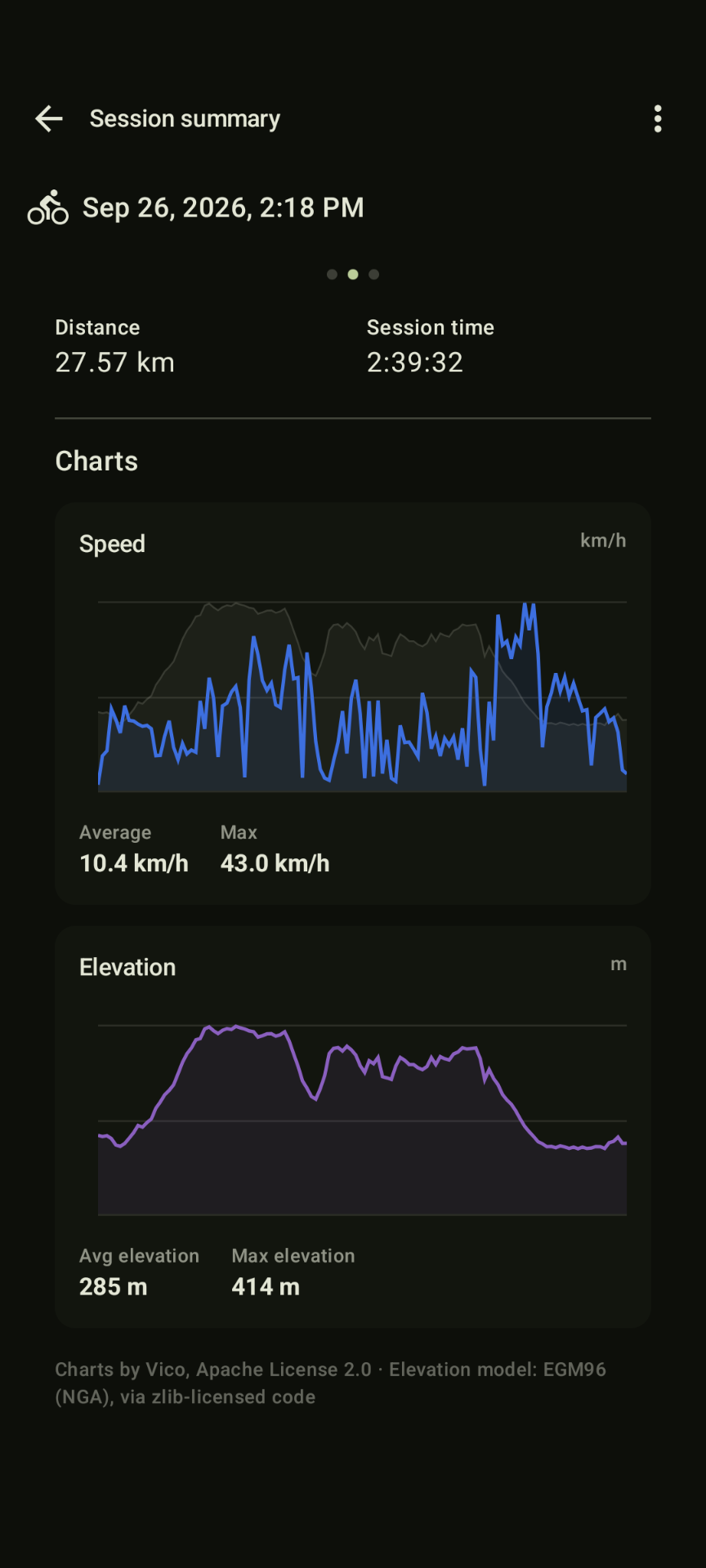
I was looking for an app to detect crashes for mountain biking and discovered this app. It seems to be a pretty new app by a solo developer but it’s feature packed. I just tried it for a bike ride and besides the main feature - crash detection - it’s great for tracking activities It’s showing a graph for speed and elevation, you can export your track as GPX and a lot more. I feel like this app needs more exposure, unfortunately it’s not open source, but it’s still great. I’m not affiliated with the app or it’s developers in any way, I’m just passionate for biking and technology.

I was looking for an app to detect crashes for mountain biking and discovered this app. It seems to be a pretty new app by a solo developer but it’s feature packed. I just tried it for a bike ride and besides the main feature - crash detection - it’s great for tracking activities It’s showing a graph for speed and elevation, you can export your track as GPX and a lot more. I feel like this app needs more exposure, unfortunately it’s not open source, but it’s still great. I’m not affiliated with the app or it’s developers in any way, I’m just passionate for biking and technology.

0

How do I perform a full backup of my device before flashing a new OS?

preview

I’m about to switch my outdated Samsung tablet and smartphones to LineageOS. But I want to make a backup of my device, including the OS and everything, in case something goes wrong and I need to flash the original OS back into the device.

How do I proceed? I think I need to do a Nandroid backup or something? Is that correct?

I’m about to switch my outdated Samsung tablet and smartphones to LineageOS. But I want to make a backup of my device, including the OS and everything, in case something goes wrong and I need to flash the original OS back into the device.

How do I proceed? I think I need to do a Nandroid backup or something? Is that correct?

0

What are Shizuku use cases?

preview

I’ve never used Shizuku but I’m curious about what it can actually do. What are some practical or interesting use cases?

As a side question: I’m running CalyxOS and would like to export my browser history (probably as a SQLite database), the relevant files seem to be protected or inaccessible. Could Shizuku help me access or export them?

I’ve never used Shizuku but I’m curious about what it can actually do. What are some practical or interesting use cases?

As a side question: I’m running CalyxOS and would like to export my browser history (probably as a SQLite database), the relevant files seem to be protected or inaccessible. Could Shizuku help me access or export them?

0

I hate the advanced flow for enabling 'apps from unverified developers'

preview

It is implemented in a plainly malicious manner.

Once you find the option buried in developer settings, get past the 2 scare screens and enter your pin it tells you that you need to reboot and wait 24 hours. The two options it gives you are: “Reboot Later” and “Cancel”. Not only is the requirement to reboot arbitrary, not presenting an option to do so immediately makes it seem like they hope you will forget to reboot later and the flow will deactivate.

If you reboot the 24 hour period starts, but there’s no notification when it ends. You are only able to enable the setting for the next 34 hours. NOWHERE before this is any time limitation mentioned, and if you forget about it and come back to it it will not mention why you need to wait another 24 hours.

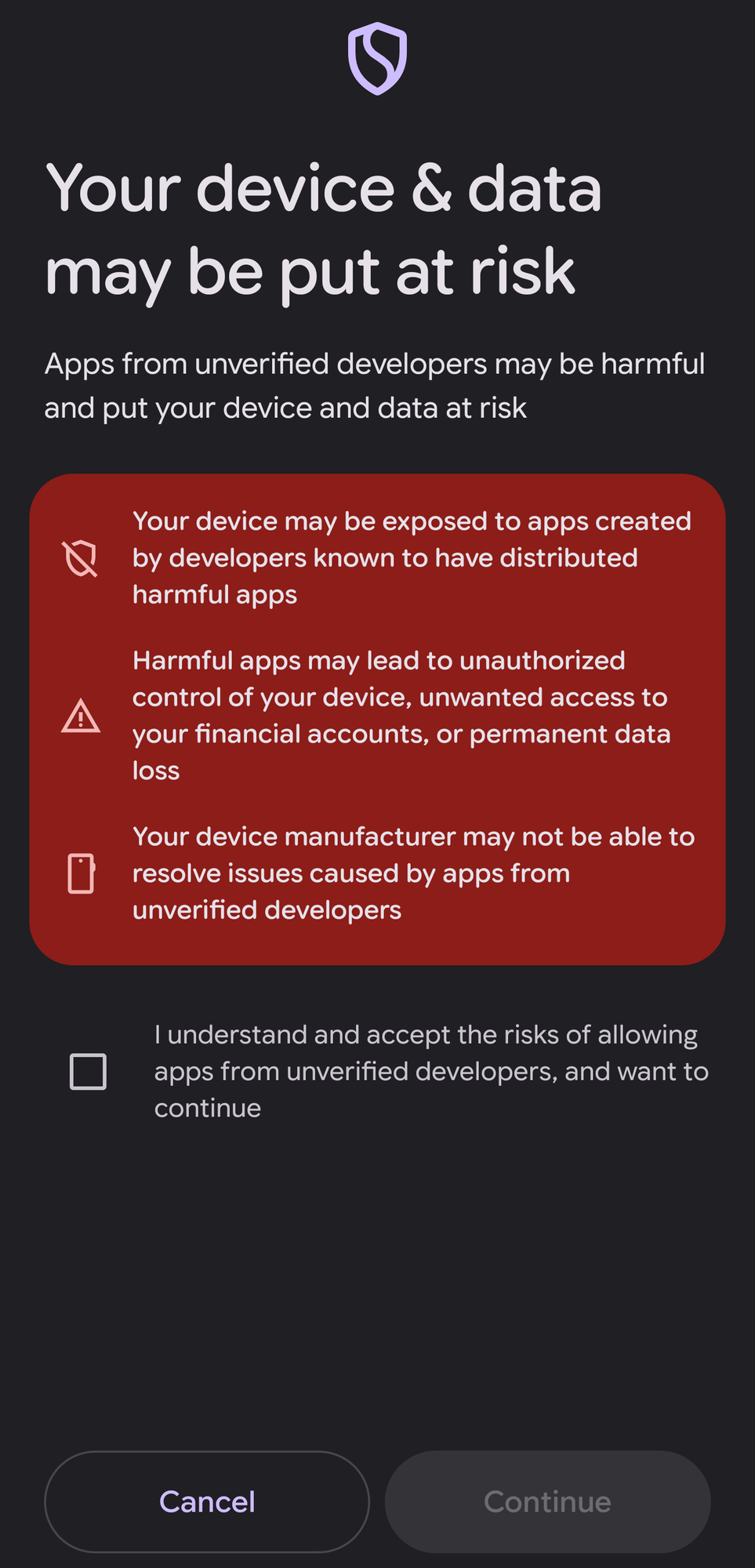
If you remember in the time window it presents you with the most egregious scare screen yet: altr

Your device may be exposed to apps created by developers known to have distributed harmful apps

I find this personally insulting. It’s just plainly defamtory to every unregistered developer. If a supermarket put up an ad that says “If you buy from independent shops you might be exposed to shops known to have sold rotten produce” that would be illegal right?

After that it makes you choose between 7 days and permanent. If you accidentally turn it off you have 10 minutes to re enable before you need to reboot and wait again.

It is implemented in a plainly malicious manner.

Once you find the option buried in developer settings, get past the 2 scare screens and enter your pin it tells you that you need to reboot and wait 24 hours. The two options it gives you are: “Reboot Later” and “Cancel”. Not only is the requirement to reboot arbitrary, not presenting an option to do so immediately makes it seem like they hope you will forget to reboot later and the flow will deactivate.

If you reboot the 24 hour period starts, but there’s no notification when it ends. You are only able to enable the setting for the next 34 hours. NOWHERE before this is any time limitation mentioned, and if you forget about it and come back to it it will not mention why you need to wait another 24 hours.

If you remember in the time window it presents you with the most egregious scare screen yet: altr

Your device may be exposed to apps created by developers known to have distributed harmful apps

I find this personally insulting. It’s just plainly defamtory to every unregistered developer. If a supermarket put up an ad that says “If you buy from independent shops you might be exposed to shops known to have sold rotten produce” that would be illegal right?

After that it makes you choose between 7 days and permanent. If you accidentally turn it off you have 10 minutes to re enable before you need to reboot and wait again.

0

Google Family Calendar + Multiple google accounts on phone = 4x events

preview

I just set up the family calendar feature, but since I have my kids’ google accounts on my phone, I see multiple copies of each event in my calendar! Is there a workaround? Any way to sync an account but NOT the calendar?

I just set up the family calendar feature, but since I have my kids’ google accounts on my phone, I see multiple copies of each event in my calendar! Is there a workaround? Any way to sync an account but NOT the calendar?

0

Android 16: How to stop audio ducking without disabling notifications?

preview

When of my biggest pet peeves is not that notification sounds play while listening to music, but that they briefly power its volume. Its like dancing in a club and you get a notification about your uber eats and so the dj tells everyone to quiet down for a bit so that you look at the message.

I am pretty high while writing this, so, just to be safe, here are similar issues: …stackexchange.com/…/disable-or-change-audio-duck… which was deemed answered by android.stackexchange.com/questions/199918/stop

-notifications-from-briefly-lowering-media-volume.

When of my biggest pet peeves is not that notification sounds play while listening to music, but that they briefly power its volume. Its like dancing in a club and you get a notification about your uber eats and so the dj tells everyone to quiet down for a bit so that you look at the message.

I am pretty high while writing this, so, just to be safe, here are similar issues: …stackexchange.com/…/disable-or-change-audio-duck… which was deemed answered by android.stackexchange.com/questions/199918/stop

-notifications-from-briefly-lowering-media-volume.

0

Degoogled Android and bank apps in the EU?

preview

I’m currently running Lineage with GApps, but I’d like to degoogle before the whole developer verification thing goes into effect in 2027. As always, bank apps present a problem.

My current bank’s application refuses to run without Google Play Services and I was thinking of simply switching to a bank that does. Question is, are there even any left? I can’t say I’m looking forward to calling each bank in my country and asking them stupid questions, so I’m just wondering if anyone has done the hard work already. I know from others that ING blocks degoogled devices, so that one is out of the question from the start.

EDIT: I’m interested in particular in Polish banks (particularily ones that support BLIK transactions), but asked the question in the context of the EU so that maybe others could benefit from this post as well.

I’m currently running Lineage with GApps, but I’d like to degoogle before the whole developer verification thing goes into effect in 2027. As always, bank apps present a problem.

My current bank’s application refuses to run without Google Play Services and I was thinking of simply switching to a bank that does. Question is, are there even any left? I can’t say I’m looking forward to calling each bank in my country and asking them stupid questions, so I’m just wondering if anyone has done the hard work already. I know from others that ING blocks degoogled devices, so that one is out of the question from the start.

EDIT: I’m interested in particular in Polish banks (particularily ones that support BLIK transactions), but asked the question in the context of the EU so that maybe others could benefit from this post as well.

0

Google Pixel phones pwned in zero-click attacks

theregister Google Pixel phones pwned in zero-click attacks www.theregister.com
preview

Interestingly this seems to be an attack against the modem. I had thought modems were well separated from the rest of the phone by now.

Interestingly this seems to be an attack against the modem. I had thought modems were well separated from the rest of the phone by now.

0

Trying to recover encrypted timeline data

preview

I’m trying to recover many years of Google Maps Timeline history and have gotten far enough into the problem that I’m hoping someone familiar with Android Keystore, Google Play Services/Folsom security domains, or Maps Timeline’s encrypted-backup implementation might recognize what is happening.

The short version is:

Google confirms that encrypted Timeline backups for my account still exist on its servers, but every device I try says “Your encrypted data isn’t unlocked yet.” On the S23 that was probably involved in the Timeline migration, an Android bugreport shows Google Play Services actually attempting key recovery and failing with:

LocationHistory: [BackupRunner] Failed to get encryption key for backup

LocationHistory: bmas: 38502: Domain is not retrievable

The recovery flow also invokes:

com.google.android.gms.auth.folsom.StartKeyRetrieval

and references:

on_device_location_history

How I think I got here

I have used Google Maps Timeline/Location History for many years.

For most of that time my primary Google account on Android devices was one account, while the account I actually used inside Google Maps for Timeline was a different secondary Google account. That worked normally for years.

My main phone during the transition from Google’s old server-based Timeline system to the newer device-local/encrypted-backup system was a Samsung Galaxy S23 Ultra, SM-S918U1.

At some point I had to repair/reflash the S23 firmware. I believe I used firmware that was compatible with the hardware but may not initially have been the exact correct region/CSC variant. The phone continued working afterward.

I cannot prove that this caused the Timeline problem. It is simply the most suspicious event in the history because Android Keystore/device trust material may have changed during that process.

Later I noticed that older Timeline history was gone from the normal Maps UI.

What Google Takeout shows

I requested a Google Takeout specifically for Timeline.

The plaintext Timeline export only contains relatively recent device-local history.

However, Takeout also produced an Encrypted Backups file that explicitly states that I have encrypted Timeline backups stored on Google servers.

So as far as I can determine:

Old Timeline data

    ↓

encrypted backup still exists at Google

    ↓

decryption/recovery state is unavailable

    ↓

Maps cannot restore it

Importantly, the Takeout file is not the encrypted backup itself. It just confirms that encrypted backups exist.

What Maps does

On the S23, my new Galaxy Fold, and several old Android devices, Maps shows:

Your encrypted data isn’t unlocked yet

If I tap the Timeline cloud/backup icon:

A spinner appears.

It waits for a while.

The spinner disappears.

No backup list appears.

I never receive a PIN/password/key-recovery prompt.

I never get a usable “Fix now” flow.

I have tested:

Galaxy S23 Ultra

Galaxy Z Fold8 Ultra

Galaxy Note8

Galaxy Tab A

The older devices were preserved and had not necessarily been wiped, but signing the Timeline Google account into them does not change the behavior.

This suggests that simply having an old device is not enough. The specific device-side recovery/security-domain state apparently matters.

What I found on the S23

I kept the S23 intact after moving to the Fold and captured an Android bugreport while reproducing the Timeline failure.

The critical log entries are:

LocationHistory: [BackupRunner] Failed to get encryption key for backup

LocationHistory: bmas: 38502: Domain is not retrievable

The bugreport also shows the Google Play Services key-recovery path actually launching:

com.google.android.gms.auth.folsom.StartKeyRetrieval

The recovery request is associated with the correct Google account and:

on_device_location_history

There are also Google Play Services/Keystore references such as:

com.google.android.gms.auth.folsom

com.google.android.gms.backup/folsom

security_domain_member_key

security_domain_member_key_encrypted_locally

and activity involving operations with names along the lines of:

ListSecurityDomainMembersOperation

GetKeyMaterialOperation

MarkLocalKeysAsStaleOperation

INVALIDATE_LOCAL_KEYS

I am not interpreting those names as proof that Google deleted the keys. They are simply what appears in the recovery sequence.

Current S23 state

The phone currently reports:

Model: SM-S918U1

Android: 16

Bootloader: locked

Verified Boot: green

Warranty bit: 0

Security patch: 2026-08-05

Sales code: XAA

So there is no obvious current unlocked-bootloader/failed-Verified-Boot situation.

The Keystore is also clearly functioning in general. Google Play Services can create/use hardware-backed operations. The unresolved question is whether the specific historical Timeline/security-domain key material is gone, stale, inaccessible, or simply failing to be retrieved from Google’s recovery infrastructure.

Things I have deliberately NOT done

I have not:

deleted the encrypted Timeline backups

selected Google’s “delete encrypted data and start over” option

factory-reset the S23 during this investigation

cleared Google Play Services storage

cleared Maps storage

unlocked the bootloader

removed the affected Google account

reflashed the phone again

I want to preserve every remaining recovery possibility.

Things I’ve already tried

Tested the original/current S23

Tested a new Fold

Tested old Note8 and Tab A devices

Verified the correct Google account is being used

Verified normal Google authentication works

Confirmed the encrypted backups exist via Takeout

Captured ADB/logcat/Android bugreport during failure

Submitted the exact error through Google Maps feedback

Posted to the official Google Maps support community

The normal Google support documentation basically says to recover encrypted Timeline data using the original device, or delete the encrypted backup and start over if recovery is impossible.

The problem is that I still have the likely original device, and its recovery process is actively running but failing internally.

What I’m trying to figure out

Does anyone recognize:

38502: Domain is not retrievable

from Google Play Services, Folsom, security-domain recovery, Android backup encryption, or Maps Timeline?

In particular, I’m trying to determine whether this means:

The historical device-bound encryption key was permanently lost during the earlier firmware event.

The local Google security-domain membership/key wrapping state is damaged but potentially repairable.

Google still has enough recovery metadata server-side, but the security domain is in a broken/stale state.

This is a Google Play Services/Maps bug rather than true key loss.

There is some supported or unsupported way to re-enroll the device into the existing security domain without deleting the encrypted backups.

I am comfortable with ADB, Android debugging, Linux, Docker, firmware tooling, and doing forensic-style diagnostics on the S23 now that it is no longer my daily phone.

I am not looking to bypass someone else’s encryption or account security. These are my own Google account, phone, and Timeline backups. I’m mainly trying to avoid destroying the one server-side copy that apparently still exists.

If anyone has dealt with Google Play Services auth.folsom, Android security domains, or Timeline’s newer end-to-end encrypted backup implementation, I would especially appreciate pointers about what 38502 / Domain is not retrievable actually signifies and what additional state I should preserve before experimenting further.

I’m trying to recover many years of Google Maps Timeline history and have gotten far enough into the problem that I’m hoping someone familiar with Android Keystore, Google Play Services/Folsom security domains, or Maps Timeline’s encrypted-backup implementation might recognize what is happening.

The short version is:

Google confirms that encrypted Timeline backups for my account still exist on its servers, but every device I try says “Your encrypted data isn’t unlocked yet.” On the S23 that was probably involved in the Timeline migration, an Android bugreport shows Google Play Services actually attempting key recovery and failing with:

LocationHistory: [BackupRunner] Failed to get encryption key for backup

LocationHistory: bmas: 38502: Domain is not retrievable

The recovery flow also invokes:

com.google.android.gms.auth.folsom.StartKeyRetrieval

and references:

on_device_location_history

How I think I got here

I have used Google Maps Timeline/Location History for many years.

For most of that time my primary Google account on Android devices was one account, while the account I actually used inside Google Maps for Timeline was a different secondary Google account. That worked normally for years.

My main phone during the transition from Google’s old server-based Timeline system to the newer device-local/encrypted-backup system was a Samsung Galaxy S23 Ultra, SM-S918U1.

At some point I had to repair/reflash the S23 firmware. I believe I used firmware that was compatible with the hardware but may not initially have been the exact correct region/CSC variant. The phone continued working afterward.

I cannot prove that this caused the Timeline problem. It is simply the most suspicious event in the history because Android Keystore/device trust material may have changed during that process.

Later I noticed that older Timeline history was gone from the normal Maps UI.

What Google Takeout shows

I requested a Google Takeout specifically for Timeline.

The plaintext Timeline export only contains relatively recent device-local history.

However, Takeout also produced an Encrypted Backups file that explicitly states that I have encrypted Timeline backups stored on Google servers.

So as far as I can determine:

Old Timeline data

    ↓

encrypted backup still exists at Google

    ↓

decryption/recovery state is unavailable

    ↓

Maps cannot restore it

Importantly, the Takeout file is not the encrypted backup itself. It just confirms that encrypted backups exist.

What Maps does

On the S23, my new Galaxy Fold, and several old Android devices, Maps shows:

Your encrypted data isn’t unlocked yet

If I tap the Timeline cloud/backup icon:

A spinner appears.

It waits for a while.

The spinner disappears.

No backup list appears.

I never receive a PIN/password/key-recovery prompt.

I never get a usable “Fix now” flow.

I have tested:

Galaxy S23 Ultra

Galaxy Z Fold8 Ultra

Galaxy Note8

Galaxy Tab A

The older devices were preserved and had not necessarily been wiped, but signing the Timeline Google account into them does not change the behavior.

This suggests that simply having an old device is not enough. The specific device-side recovery/security-domain state apparently matters.

What I found on the S23

I kept the S23 intact after moving to the Fold and captured an Android bugreport while reproducing the Timeline failure.

The critical log entries are:

LocationHistory: [BackupRunner] Failed to get encryption key for backup

LocationHistory: bmas: 38502: Domain is not retrievable

The bugreport also shows the Google Play Services key-recovery path actually launching:

com.google.android.gms.auth.folsom.StartKeyRetrieval

The recovery request is associated with the correct Google account and:

on_device_location_history

There are also Google Play Services/Keystore references such as:

com.google.android.gms.auth.folsom

com.google.android.gms.backup/folsom

security_domain_member_key

security_domain_member_key_encrypted_locally

and activity involving operations with names along the lines of:

ListSecurityDomainMembersOperation

GetKeyMaterialOperation

MarkLocalKeysAsStaleOperation

INVALIDATE_LOCAL_KEYS

I am not interpreting those names as proof that Google deleted the keys. They are simply what appears in the recovery sequence.

Current S23 state

The phone currently reports:

Model: SM-S918U1

Android: 16

Bootloader: locked

Verified Boot: green

Warranty bit: 0

Security patch: 2026-08-05

Sales code: XAA

So there is no obvious current unlocked-bootloader/failed-Verified-Boot situation.

The Keystore is also clearly functioning in general. Google Play Services can create/use hardware-backed operations. The unresolved question is whether the specific historical Timeline/security-domain key material is gone, stale, inaccessible, or simply failing to be retrieved from Google’s recovery infrastructure.

Things I have deliberately NOT done

I have not:

deleted the encrypted Timeline backups

selected Google’s “delete encrypted data and start over” option

factory-reset the S23 during this investigation

cleared Google Play Services storage

cleared Maps storage

unlocked the bootloader

removed the affected Google account

reflashed the phone again

I want to preserve every remaining recovery possibility.

Things I’ve already tried

Tested the original/current S23

Tested a new Fold

Tested old Note8 and Tab A devices

Verified the correct Google account is being used

Verified normal Google authentication works

Confirmed the encrypted backups exist via Takeout

Captured ADB/logcat/Android bugreport during failure

Submitted the exact error through Google Maps feedback

Posted to the official Google Maps support community

The normal Google support documentation basically says to recover encrypted Timeline data using the original device, or delete the encrypted backup and start over if recovery is impossible.

The problem is that I still have the likely original device, and its recovery process is actively running but failing internally.

What I’m trying to figure out

Does anyone recognize:

38502: Domain is not retrievable

from Google Play Services, Folsom, security-domain recovery, Android backup encryption, or Maps Timeline?

In particular, I’m trying to determine whether this means:

The historical device-bound encryption key was permanently lost during the earlier firmware event.

The local Google security-domain membership/key wrapping state is damaged but potentially repairable.

Google still has enough recovery metadata server-side, but the security domain is in a broken/stale state.

This is a Google Play Services/Maps bug rather than true key loss.

There is some supported or unsupported way to re-enroll the device into the existing security domain without deleting the encrypted backups.

I am comfortable with ADB, Android debugging, Linux, Docker, firmware tooling, and doing forensic-style diagnostics on the S23 now that it is no longer my daily phone.

I am not looking to bypass someone else’s encryption or account security. These are my own Google account, phone, and Timeline backups. I’m mainly trying to avoid destroying the one server-side copy that apparently still exists.

If anyone has dealt with Google Play Services auth.folsom, Android security domains, or Timeline’s newer end-to-end encrypted backup implementation, I would especially appreciate pointers about what 38502 / Domain is not retrievable actually signifies and what additional state I should preserve before experimenting further.