
0

OpenWrt for the FritzBox-7390 (AI coded)

GitHub GitHub - sj14/fritzbox-7390-openwrt: 🛜 OpenWrt for the FRITZ!Box 7390 github.com
preview

It’s an old box but still doing its job very well. I do only use it as an access point, so no DSL or telephony driver support.

It’s an old box but still doing its job very well. I do only use it as an access point, so no DSL or telephony driver support.

0

Bored at work, LED shenanigans. Can you figure out what each one is for?

play · i.imgur.com
Imgur imgur.com i.imgur.com
preview

Spoiler tag your answers in case others want to guess.

Long story short, I’ve been teaching myself a little bit of coding, trying to script kiddie patch openWRT’s frankly ludicrous DFS handling. I did succeed there! At least enough for my needs.

But then I was bored at work, and I have an AP that I added to extend the Wi-Fi to the back corner of the shop (cinder block walls). So I decided to tinker with it.

Pointless, but fun! And educational!

Edit: AP is an EX6120 from Netgear. Basically e waste, especially it’s stock firmware that requires an external account to configure 😵‍💫 I saved it from the trash. Plenty good enough for its purpose.

Spoiler tag your answers in case others want to guess.

Long story short, I’ve been teaching myself a little bit of coding, trying to script kiddie patch openWRT’s frankly ludicrous DFS handling. I did succeed there! At least enough for my needs.

But then I was bored at work, and I have an AP that I added to extend the Wi-Fi to the back corner of the shop (cinder block walls). So I decided to tinker with it.

Pointless, but fun! And educational!

Edit: AP is an EX6120 from Netgear. Basically e waste, especially it’s stock firmware that requires an external account to configure 😵‍💫 I saved it from the trash. Plenty good enough for its purpose.

0

#OpenWrt: Updates schließen teils kritische Sicherheitslücken | Security https://www.heise.de/news/OpenWrt-Updates-schliessen-teils-kritische-Sicherheitsluecken-11381496.html #Patchday #XSS

preview

#OpenWrt: Updates schließen teils kritische Sicherheitslücken | Security https://www.heise.de/news/OpenWrt-Updates-schliessen-teils-kritische-Sicherheitsluecken-11381496.html #Patchday #XSS #CrossSiteScripting #Linux :tux: #OpenSource #openSSL #odhcpd #dnsmasq @openwrt

#OpenWrt: Updates schließen teils kritische Sicherheitslücken | Security https://www.heise.de/news/OpenWrt-Updates-schliessen-teils-kritische-Sicherheitsluecken-11381496.html #Patchday #XSS #CrossSiteScripting #Linux :tux: #OpenSource #openSSL #odhcpd #dnsmasq @openwrt

0

libretube (youtube viewer) not working only on openwrtt

preview

libretube is not working only when im on my openwrt router. if i turn off wifi it works, and if i connect directly to my isp’s router, it works. it works from my wifi at work…

what possible settings could be blocking this? i turned off tailscale on the router… thats really the only thing i can think of…

libretube is not working only when im on my openwrt router. if i turn off wifi it works, and if i connect directly to my isp’s router, it works. it works from my wifi at work…

what possible settings could be blocking this? i turned off tailscale on the router… thats really the only thing i can think of…

0

The #DHCP server, running on the #OpenWRT router, assigned an internal IP to a client. However this IP was already used by a central NAS device. This situation is called an IP address conflict.

preview

The #DHCP server, running on the #OpenWRT router, assigned an internal IP to a client. However this IP was already used by a central NAS device. This situation is called an IP address conflict.

In our latest #tutorial we show where to find the current DHCP leases, how to create a static and remove an existing lease on @openwrt .

https://www.geekersdigest.com/how-to-manually-remove-a-dhcp-lease-on-openwrt-router/

The #DHCP server, running on the #OpenWRT router, assigned an internal IP to a client. However this IP was already used by a central NAS device. This situation is called an IP address conflict.

In our latest #tutorial we show where to find the current DHCP leases, how to create a static and remove an existing lease on @openwrt .

https://www.geekersdigest.com/how-to-manually-remove-a-dhcp-lease-on-openwrt-router/

0

That sweet satisfaction of something actually working

OpenWrt Forum Wireguard and PBR - No rules being added to routing table forum.openwrt.org
preview

- Big shout out to egc on the #openwrt forum - forum.openwrt.org/u/egc/summar… - Who helped me sort out some wireguard routing issues that have been bugging me for ages!

Yesterday I sat down and spun up a test harness of openwrt to try to figure out how to get policy based routing working with wireguard and after a day bashing my head against a brick wall egc provided the clarrification, knowledge and experience I needed to sort this out.

Here’s the chat - forum.openwrt.org/t/wireguard-… - yeah I didn’t get it at first but feels so good to finally work this out.

- Big shout out to egc on the #openwrt forum - forum.openwrt.org/u/egc/summar… - Who helped me sort out some wireguard routing issues that have been bugging me for ages!

Yesterday I sat down and spun up a test harness of openwrt to try to figure out how to get policy based routing working with wireguard and after a day bashing my head against a brick wall egc provided the clarrification, knowledge and experience I needed to sort this out.

Here’s the chat - forum.openwrt.org/t/wireguard-… - yeah I didn’t get it at first but feels so good to finally work this out.

0

Router firmware is the most underrated form of tech liberation most people ignore

preview

Most people never think about what runs on their router, treating it like an appliance that just works. OpenWrt shows your network hardware can be something entirely different from the ISP surveillance node they shipped you. Running open firmware on a router puts you in control of your local network in a way proprietary OS updates on phones or laptops never will. That autonomy matters because the router sits at the choke point of your entire digital life. If we actually cared about privacy we’d be having very different conversations about the firmware running on billions of devices. When did you last think about what your router actually runs? #privacy #FOSS #techliberation #router #opennet

Most people never think about what runs on their router, treating it like an appliance that just works. OpenWrt shows your network hardware can be something entirely different from the ISP surveillance node they shipped you. Running open firmware on a router puts you in control of your local network in a way proprietary OS updates on phones or laptops never will. That autonomy matters because the router sits at the choke point of your entire digital life. If we actually cared about privacy we’d be having very different conversations about the firmware running on billions of devices. When did you last think about what your router actually runs? #privacy #FOSS #techliberation #router #opennet

0

Your router watches you. Commodity hardware decides what you're allowed to run on it.

preview

Routers are the most overlooked surveillance device in most homes. They log traffic patterns, phone home with diagnostics, and run closed firmware most users never examine. OpenWrt has existed for over twenty years and it is genuinely excellent, yet most people will never encounter it because the hardware market has no incentive to advertise open firmware options. This is not a knowledge problem. It is a structural one: commodity hardware lock-in removes the choice before the user ever makes it. Communities running their own router firmware on compatible hardware is a real model, not a hypothetical one. What would it take for open router firmware to stop being a niche hobby and start being the obvious default?

Routers are the most overlooked surveillance device in most homes. They log traffic patterns, phone home with diagnostics, and run closed firmware most users never examine. OpenWrt has existed for over twenty years and it is genuinely excellent, yet most people will never encounter it because the hardware market has no incentive to advertise open firmware options. This is not a knowledge problem. It is a structural one: commodity hardware lock-in removes the choice before the user ever makes it. Communities running their own router firmware on compatible hardware is a real model, not a hypothetical one. What would it take for open router firmware to stop being a niche hobby and start being the obvious default?

0

Unifi devices aren't all that

preview

I’ve had two UAP AC AP Lite access points for 8 years now. After fooling with WiFi for so long before, Unifi was just a “set and forget” kind of solution.

Two days ago, the repo signature for the Debian unifi network controller became a pain point for apt, or apt started not being OK with it, or whatever.

Since I was on the fence about putting openwrt on these for a while, I took it as a sign and finally did it.

No more roaming problems, strong signal, responsive performance, wtf??.. I’m not buying any more ubiquiti overpriced garbage. If it won’t run an open platform like openwrt, it’s not going into my infra.

That is all.

I’ve had two UAP AC AP Lite access points for 8 years now. After fooling with WiFi for so long before, Unifi was just a “set and forget” kind of solution.

Two days ago, the repo signature for the Debian unifi network controller became a pain point for apt, or apt started not being OK with it, or whatever.

Since I was on the fence about putting openwrt on these for a while, I took it as a sign and finally did it.

No more roaming problems, strong signal, responsive performance, wtf??.. I’m not buying any more ubiquiti overpriced garbage. If it won’t run an open platform like openwrt, it’s not going into my infra.

That is all.

0

How to create a separate "Direct Internet" SSID alongside my AmneziaWG VPN setup?

preview

Hello, everyone, recently I set up AmneziaWG on my router(Cudy WR3000 running openwrt) using this shell script. It works great, but currently it routes all traffic from my LAN through the VPN interface(awg1). But I want to somehow to achieve a split setup. I want first Wi-Fi, that routes everything AmneziaVPN and a second, that doesn’t. But I want to use my computer without VPN too, through cable. My question is: how can I do it? I would appreciate a step-by-step hint or a link to a guide. Thanks!

Hello, everyone, recently I set up AmneziaWG on my router(Cudy WR3000 running openwrt) using this shell script. It works great, but currently it routes all traffic from my LAN through the VPN interface(awg1). But I want to somehow to achieve a split setup. I want first Wi-Fi, that routes everything AmneziaVPN and a second, that doesn’t. But I want to use my computer without VPN too, through cable. My question is: how can I do it? I would appreciate a step-by-step hint or a link to a guide. Thanks!

0

root '/' no longer redirecting to /cgi-bin/luci/

preview

So I was messing around a bit with nginx on my openwrt one router, nothing that should’ve affected uHTTPd but now I don’t get redirected to the LuCI web interface from 192.168.1.1/

I’ve stopped and disabled nginx, checked the configs and I can’t find anything out of the ordinary, maybe I’m blind.

cat /etc/config/uhttpd:

config uhttpd 'main'
	list listen_http '0.0.0.0:80'
	list listen_http '[::]:80'
	list listen_https '0.0.0.0:443'
	list listen_https '[::]:443'
	option redirect_https '0'
	option home '/www'
	option rfc1918_filter '1'
	option max_requests '3'
	option max_connections '100'
	option cert '/etc/uhttpd.crt'
	option key '/etc/uhttpd.key'
	option cgi_prefix '/cgi-bin'
	list lua_prefix '/cgi-bin/luci=/usr/lib/lua/luci/sgi/uhttpd.lua'
	option script_timeout '60'
	option network_timeout '30'
	option http_keepalive '20'
	option tcp_keepalive '1'
	option ubus_prefix '/ubus'

config cert 'defaults'
	option days '397'
	option key_type 'ec'
	option bits '2048'
	option ec_curve 'P-256'
	option country 'ZZ'
	option state 'Somewhere'
	option location 'Unknown'
	option commonname 'OpenWrt'

Should I look anywhere else? I can live with this but I would really like to know the reason for the change.

Maybe it’s worth mentioning that I ran chmod -R 777 /www and maybe that’s the cause? I reverted it to 755 but no change. I don’t see how that would affect it either way though.

So I was messing around a bit with nginx on my openwrt one router, nothing that should’ve affected uHTTPd but now I don’t get redirected to the LuCI web interface from 192.168.1.1/

I’ve stopped and disabled nginx, checked the configs and I can’t find anything out of the ordinary, maybe I’m blind.

cat /etc/config/uhttpd:

config uhttpd 'main'
	list listen_http '0.0.0.0:80'
	list listen_http '[::]:80'
	list listen_https '0.0.0.0:443'
	list listen_https '[::]:443'
	option redirect_https '0'
	option home '/www'
	option rfc1918_filter '1'
	option max_requests '3'
	option max_connections '100'
	option cert '/etc/uhttpd.crt'
	option key '/etc/uhttpd.key'
	option cgi_prefix '/cgi-bin'
	list lua_prefix '/cgi-bin/luci=/usr/lib/lua/luci/sgi/uhttpd.lua'
	option script_timeout '60'
	option network_timeout '30'
	option http_keepalive '20'
	option tcp_keepalive '1'
	option ubus_prefix '/ubus'

config cert 'defaults'
	option days '397'
	option key_type 'ec'
	option bits '2048'
	option ec_curve 'P-256'
	option country 'ZZ'
	option state 'Somewhere'
	option location 'Unknown'
	option commonname 'OpenWrt'

Should I look anywhere else? I can live with this but I would really like to know the reason for the change.

Maybe it’s worth mentioning that I ran chmod -R 777 /www and maybe that’s the cause? I reverted it to 755 but no change. I don’t see how that would affect it either way though.

0

Anybody else having issues on v25.12.0-rc2?

preview

I’m on a Raspberry Pi 4B. After updating to the latest firmware v25.12.0-rc2 I can’t connect to the router/Pi. The WiFi on the Pi is disabled. I only connect through Ethernet.

Since I can’t connect to it, neither with ssh or through the webui, it feels like I’m going to have to do clean install with the previous firmware until this pre-release is fixed.

I’m on a Raspberry Pi 4B. After updating to the latest firmware v25.12.0-rc2 I can’t connect to the router/Pi. The WiFi on the Pi is disabled. I only connect through Ethernet.

Since I can’t connect to it, neither with ssh or through the webui, it feels like I’m going to have to do clean install with the previous firmware until this pre-release is fixed.

0

D7800 + new partition layout + sysupgrade?

preview

Hi all, I have a Netgear D7800 that I have run openwrt on for a long time. Does anyone else have one (or similar) and how do I get sysupgrades working? They error out when I upload a sysupgrade image, with an error about unsupported partition layout.

But as far as I can tell, I have a v2.0 layout, as I flashed a factory openwrt image manually. Is sysupgrade just not supported at all anymore (and if so, why do the images still exist?), or do I need to do something to reenable it?

Hi all, I have a Netgear D7800 that I have run openwrt on for a long time. Does anyone else have one (or similar) and how do I get sysupgrades working? They error out when I upload a sysupgrade image, with an error about unsupported partition layout.

But as far as I can tell, I have a v2.0 layout, as I flashed a factory openwrt image manually. Is sysupgrade just not supported at all anymore (and if so, why do the images still exist?), or do I need to do something to reenable it?

0

N00B Question - R9000 not suported but on git?

preview

I haven’t used open wrt before and need to buy a comparable router. I’m also not sure if I might swap to ddWRT (and I’m not really sure what the difference is)

The Netgear R9000 is supported by ddWRT but not on the official list of openWRT routers. However, there is an active git for the firmware and the git seems to be a mirror of the official openWRT

So does this mean that openWRT is available, but in dev for the R9000? And that I could use it but might have issues?

The reason I chose the R9000 this is that I was looking at the R500 and can get that pretty cheap and works on both openWRT and ddWRT. But I found a R9000 for the same price as the R500 and the R9000 has double the ram and flash.

I haven’t used open wrt before and need to buy a comparable router. I’m also not sure if I might swap to ddWRT (and I’m not really sure what the difference is)

The Netgear R9000 is supported by ddWRT but not on the official list of openWRT routers. However, there is an active git for the firmware and the git seems to be a mirror of the official openWRT

So does this mean that openWRT is available, but in dev for the R9000? And that I could use it but might have issues?

The reason I chose the R9000 this is that I was looking at the R500 and can get that pretty cheap and works on both openWRT and ddWRT. But I found a R9000 for the same price as the R500 and the R9000 has double the ram and flash.

0

I'm not a bumper sticker person. I bought Linux stickers for my laptop, decided it was too much like a bumper sticker, didn't use them. But my routers? Somehow feels appropriate 😁

preview

Pictured is my most recent victim, some free e-waste from work. It is now a mesh extension for my garage.

My main router is an old Google WiFi:

I’ll upgrade eventually, but I’m not being restricted in any way at the moment so I’ll save the money 🤷‍♂️

Pictured is my most recent victim, some free e-waste from work. It is now a mesh extension for my garage.

My main router is an old Google WiFi:

I’ll upgrade eventually, but I’m not being restricted in any way at the moment so I’ll save the money 🤷‍♂️

0

Router as tiny server?

preview

Go with me here. Routers are routers, and servers are servers. Some people mix and match things, but generally, ideally, this is how it goes. And I agree.

But the router I just set up, the Google WiFi, has 4gb storage, 512mb of ram, a quad core CPU at 800mhz, is easy to flash, and only costs $10-15 on eBay all day long.

If you used it as only a little computer, no routing… Then…

If I wanted to say… Set up a tailscale node at my family’s house. Why spend $45-80, or even $130(!) on a raspberry pi with an Ethernet port, when the Google WiFi works just as well if not better for that job?

Maybe a tiny matrix server? Tiny web hosting?

Or, for a less ideal solution, but still reasonable. What if I wanted to set up a remote backup node for my main server? If my needs were small enough, the Google WiFi would be much more economical, although you’d need to add a USB hub to break out the USB ports. And there would be limitations obviously.

Or getting really crazy, you could potentially squeeze one or two bigger services onto a router, just to see if it’s possible… Minecraft server?

My question is. What is the best device for this? The Google WiFi is dirt cheap at $10-15, I’m about to pull the trigger on a second one just to play with. But I wanted to see if you guys had any other suggestions?

I tried searching the toh for similar devices, but even restricting it down every way I can think of, I’ve still got over a hundred devices to look at.

Basically, I think older router hardware is an overlooked, cheaper alternative, to raspberry pis, for some scenarios.

Go with me here. Routers are routers, and servers are servers. Some people mix and match things, but generally, ideally, this is how it goes. And I agree.

But the router I just set up, the Google WiFi, has 4gb storage, 512mb of ram, a quad core CPU at 800mhz, is easy to flash, and only costs $10-15 on eBay all day long.

If you used it as only a little computer, no routing… Then…

If I wanted to say… Set up a tailscale node at my family’s house. Why spend $45-80, or even $130(!) on a raspberry pi with an Ethernet port, when the Google WiFi works just as well if not better for that job?

Maybe a tiny matrix server? Tiny web hosting?

Or, for a less ideal solution, but still reasonable. What if I wanted to set up a remote backup node for my main server? If my needs were small enough, the Google WiFi would be much more economical, although you’d need to add a USB hub to break out the USB ports. And there would be limitations obviously.

Or getting really crazy, you could potentially squeeze one or two bigger services onto a router, just to see if it’s possible… Minecraft server?

My question is. What is the best device for this? The Google WiFi is dirt cheap at $10-15, I’m about to pull the trigger on a second one just to play with. But I wanted to see if you guys had any other suggestions?

I tried searching the toh for similar devices, but even restricting it down every way I can think of, I’ve still got over a hundred devices to look at.

Basically, I think older router hardware is an overlooked, cheaper alternative, to raspberry pis, for some scenarios.

0

I read that not all routers support VLANs, but I can't tell if mine does or not. I'm extremely new to VLANs and openwrt in general. Can someone give me a touch of guidance?

preview

I’m old school, the last router firmware I touched was ddwrt on a 54g. These days it seems openwrt is the way to go.

I’ve got an old Google WiFi that I just flashed over. I have a small managed switch in the mail. I want to play with VLANs. With only one lan port I’ll need to do trunking.

I’ve watched the videos, read some docs, I’m still trying to wrap my head around it.

Right now I’m stuck on the idea that my router model might not even support it? I can’t find where I read that, but now I’m all turned around.

I’ll play with it when the switch arrives, surely I’ll figure it out eventually. but in the meantime, does anyone know if the Google WiFi router supports VLANs when flashed? Or is that a problem I made up?

Thanks!

Edit: update, VLANs up and running! Still need to tweak the isolation, but this is very cool tech.

I’m old school, the last router firmware I touched was ddwrt on a 54g. These days it seems openwrt is the way to go.

I’ve got an old Google WiFi that I just flashed over. I have a small managed switch in the mail. I want to play with VLANs. With only one lan port I’ll need to do trunking.

I’ve watched the videos, read some docs, I’m still trying to wrap my head around it.

Right now I’m stuck on the idea that my router model might not even support it? I can’t find where I read that, but now I’m all turned around.

I’ll play with it when the switch arrives, surely I’ll figure it out eventually. but in the meantime, does anyone know if the Google WiFi router supports VLANs when flashed? Or is that a problem I made up?

Thanks!

Edit: update, VLANs up and running! Still need to tweak the isolation, but this is very cool tech.

0

Protecting OpenWrt using CrowdSec (via Syslog)

preview

Here’s how to set up CrowdSec to protect your OpenWrt router.

Running the Security Engine in Docker (server), forwarding logs via Syslog, and using the lightweight firewall bouncer on the router.

Result: community-powered IPS on tiny hardware 🚀

Here’s how to set up CrowdSec to protect your OpenWrt router.

Running the Security Engine in Docker (server), forwarding logs via Syslog, and using the lightweight firewall bouncer on the router.

Result: community-powered IPS on tiny hardware 🚀

0

¿Alguien usa Openwrt con Orange o Jazztel España? - Anyone use Openwrt with Orange or Jazztel Spain?

preview

- I am looking for anyone who is using OpenWrt with Orange or Jazztel Spain who might be able to help me figure out why after changing my router I can’t get an Ipv6 allocated to my connection. #openwrt #Jazztel #orange #ipv6 #spain - I’d really appreciate any boosts to followers in spain who might be able to help - Its driving me nuts!

Estoy buscando por alguien que usa Openwrt con Jaztell o Orange España que peude ayudarme porque despues del le cambio el router no le puede obtiner un numero IPv6. Estoy loco porque no pude entiender por que no se funciona. Me gustaria mucho si puede me recomiendes alguien con que hablar y hacer boosts para compatir con otra gente de españa.

- I am looking for anyone who is using OpenWrt with Orange or Jazztel Spain who might be able to help me figure out why after changing my router I can’t get an Ipv6 allocated to my connection. #openwrt #Jazztel #orange #ipv6 #spain - I’d really appreciate any boosts to followers in spain who might be able to help - Its driving me nuts!

Estoy buscando por alguien que usa Openwrt con Jaztell o Orange España que peude ayudarme porque despues del le cambio el router no le puede obtiner un numero IPv6. Estoy loco porque no pude entiender por que no se funciona. Me gustaria mucho si puede me recomiendes alguien con que hablar y hacer boosts para compatir con otra gente de españa.

0

Looking for advice: Different WANs for different VLANs

preview

Hi all. Thanks for checking in. I’ve been looking at Routing Rules and Routes to try and solve a couple of problems but I keep screwing up and taking down my whole network (and I’ve never been more grateful for serial ports).

What I’m trying to do is use different WAN connections for different VLANs/subnets. To begin with, I would like to route my general-purpose subnet (VLAN104) WAN traffic over a Proton Wireguard VPN while leaving all my other subnets using my standard ISP connection. Afterwards, I’d like to additionally route a subnet I use to give my neighbour Internet access (VLAN102) over a different Proton Wireguard VPN. Annoyingly, both the Wireguard VPN connections use the same private IP addresses though I suspect that won’t actually matter that much in practise.

I starting to suspect I’m barking up the wrong tree trying to use Routing Rules but I’d appreciate any advice.

Hi all. Thanks for checking in. I’ve been looking at Routing Rules and Routes to try and solve a couple of problems but I keep screwing up and taking down my whole network (and I’ve never been more grateful for serial ports).

What I’m trying to do is use different WAN connections for different VLANs/subnets. To begin with, I would like to route my general-purpose subnet (VLAN104) WAN traffic over a Proton Wireguard VPN while leaving all my other subnets using my standard ISP connection. Afterwards, I’d like to additionally route a subnet I use to give my neighbour Internet access (VLAN102) over a different Proton Wireguard VPN. Annoyingly, both the Wireguard VPN connections use the same private IP addresses though I suspect that won’t actually matter that much in practise.

I starting to suspect I’m barking up the wrong tree trying to use Routing Rules but I’d appreciate any advice.

0

Somewhere along the line I lost my Jazztel Ipv6 Connectivity

preview

- I think it was when I replaced my router with a new #BananapiR3 but my #openwrt v24 router has lost its #ipv6 connectivity from #Jazztel #fibre and I can’t figure out why. - I have vague memories of something blocking it in the past (or did it just work when I connected it - I can’t remember) but its annoying me now I have #hetzner #ddns running.

- I think it was when I replaced my router with a new #BananapiR3 but my #openwrt v24 router has lost its #ipv6 connectivity from #Jazztel #fibre and I can’t figure out why. - I have vague memories of something blocking it in the past (or did it just work when I connected it - I can’t remember) but its annoying me now I have #hetzner #ddns running.

0

Best Router device for openwrt 2025

preview

Best Router device for openwrt 2025

I am completely new to OpenWRT/Pi-hole and need a recommendation for a device that could run OpenWRT/Pi-hole on it to replace my current router. I’m not even sure if I used the correct wording in this sentence, lol.

I have checked:

I need recommendations for devices to get some hands-on experience. And please explain the advantages of the devices you recommend a bit. There are indeed a lot of options listed on the internet, but not enough reasons are provided.

  • I need Pi-hole because I want local DNS, but I guess OpenWRT could do the job as well.
  • My current router does not support changing the DNS server.
  • I need a simple substitute.
  • I need good performance because it might need to connect to about 15 devices (though I have no idea what good performance means in terms of a router).
  • So I guess a device with at least 256MB of RAM is needed.
  • No limitation on price as long as it is not excessively expensive.
  • Users should consider multi-core, ARM-based (or x86_64/AMD64) devices for mid-range and higher applications. (From https://openwrt.org/toh/recommended/_routers)

Thanks for your help in advance!

Best Router device for openwrt 2025

I am completely new to OpenWRT/Pi-hole and need a recommendation for a device that could run OpenWRT/Pi-hole on it to replace my current router. I’m not even sure if I used the correct wording in this sentence, lol.

I have checked:

I need recommendations for devices to get some hands-on experience. And please explain the advantages of the devices you recommend a bit. There are indeed a lot of options listed on the internet, but not enough reasons are provided.

  • I need Pi-hole because I want local DNS, but I guess OpenWRT could do the job as well.
  • My current router does not support changing the DNS server.
  • I need a simple substitute.
  • I need good performance because it might need to connect to about 15 devices (though I have no idea what good performance means in terms of a router).
  • So I guess a device with at least 256MB of RAM is needed.
  • No limitation on price as long as it is not excessively expensive.
  • Users should consider multi-core, ARM-based (or x86_64/AMD64) devices for mid-range and higher applications. (From https://openwrt.org/toh/recommended/_routers)

Thanks for your help in advance!

0

Integrating Forum.openwrt.org with activityPub

preview

- I really appreciate the OpenWrt forum but also like using an ActivityPub based account to browse posts on topics I am interested in.

I understand that forum OpenWrt uses Discourse which has some capabilities to integrate with activityPub services and have suggested in the forum that they are used but there doesn’t seem to be much enthusiasm to do so.

Im probably not good at promoting the benefits or addressing points of concern.

What are people’s thoughts?

- I really appreciate the OpenWrt forum but also like using an ActivityPub based account to browse posts on topics I am interested in.

I understand that forum OpenWrt uses Discourse which has some capabilities to integrate with activityPub services and have suggested in the forum that they are used but there doesn’t seem to be much enthusiasm to do so.

Im probably not good at promoting the benefits or addressing points of concern.

What are people’s thoughts?

0

Multiple aerials on Wifi6 Router

preview

Im considering purchasing a Banana Pi OpenWRT router.

My previous devices have all had internal aerials but this device has four connectors.

Knowing almost nothing about Wifi 6 and aerials How feasible is it to run extensions from one or more of those aerials out the wall of our house and use a larger uni or directional aerial to extend coverage in a particular direction from a high point or should you always have the same short aerials that come with the router?

Im considering purchasing a Banana Pi OpenWRT router.

My previous devices have all had internal aerials but this device has four connectors.

Knowing almost nothing about Wifi 6 and aerials How feasible is it to run extensions from one or more of those aerials out the wall of our house and use a larger uni or directional aerial to extend coverage in a particular direction from a high point or should you always have the same short aerials that come with the router?

0

Connection drops every half hour with error (Reason: 252=<unknown>)

preview

Hello! I have a repeater setup that has been doing this for a long time, across different builds. I’m pretty confused as to why. is this due to a DHCP drop, or a radio problem? the system log doesn’t give me much info besides just saying “link has connectivity loss” before dropping. if anyone might know what’s going on, I’ll post my system logs and any other info needed, as requested.

Thanks!

Hello! I have a repeater setup that has been doing this for a long time, across different builds. I’m pretty confused as to why. is this due to a DHCP drop, or a radio problem? the system log doesn’t give me much info besides just saying “link has connectivity loss” before dropping. if anyone might know what’s going on, I’ll post my system logs and any other info needed, as requested.

Thanks!

0

AP/router hardware recommendations for RV

preview

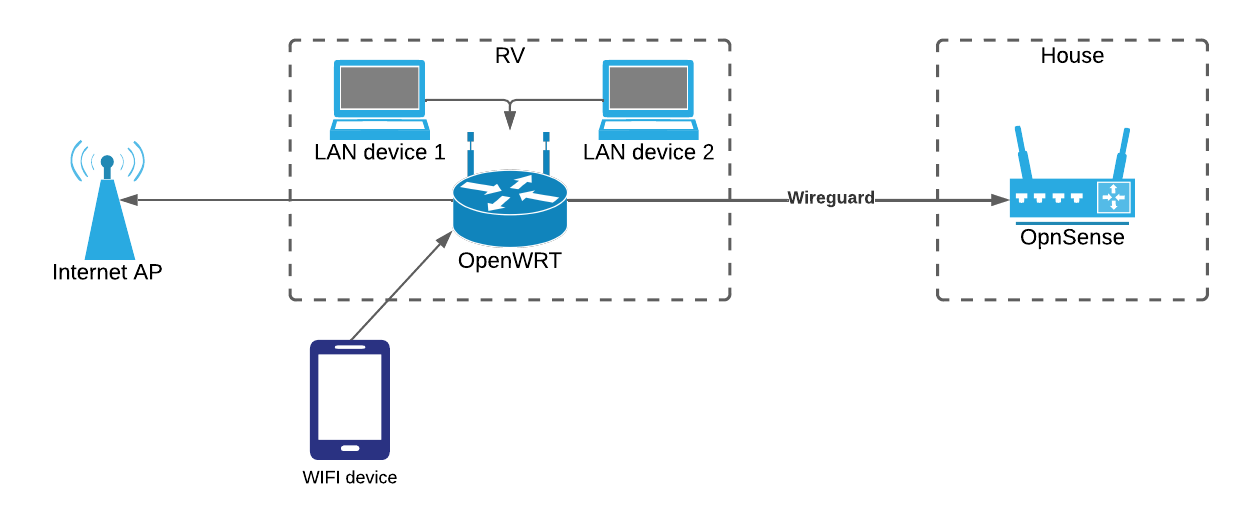
Asking for a friend - Because I have similar ideas - AP/router hardware recommendations for RV

I’m looking for hardware recommendations for the depicted setup, with an AP/router running OpenWRT in an RV. Requirements:

  • Compact footprint: Very small equipment cabinet in RV.
  • Stable (unattended connectivity with light traffic for months).
  • Dual radios to support simultaneous WIFI uplink to Internet gw, as well as acting as a WIFI AP to clients.
  • 802.11ac or better WIFI speeds.
  • 1 Gbps or better Ethernet ports (at least two).
  • Light traffic over Wireguard link to home base (telemetry).
  • Low power usage preferred, 5V or 12V power supply preferred (available without shore power).

Any ideas? Thanks!

My thought was to also add a Starlink Connection using ethernet adapter for when no wifi or Mobile signal is a available and montior the bus with HomeAssistant for security and power management.

Asking for a friend - Because I have similar ideas - AP/router hardware recommendations for RV

I’m looking for hardware recommendations for the depicted setup, with an AP/router running OpenWRT in an RV. Requirements:

  • Compact footprint: Very small equipment cabinet in RV.
  • Stable (unattended connectivity with light traffic for months).
  • Dual radios to support simultaneous WIFI uplink to Internet gw, as well as acting as a WIFI AP to clients.
  • 802.11ac or better WIFI speeds.
  • 1 Gbps or better Ethernet ports (at least two).
  • Light traffic over Wireguard link to home base (telemetry).
  • Low power usage preferred, 5V or 12V power supply preferred (available without shore power).

Any ideas? Thanks!

My thought was to also add a Starlink Connection using ethernet adapter for when no wifi or Mobile signal is a available and montior the bus with HomeAssistant for security and power management.

0

I require assistance with fixing OKOD on a Linksys E8450

preview

Unfortunately, a Linksys E8450 of mine has succumbed to the OKOD (OpenWRT Kiss of Death) (in case you are unfamiliar). From what I understand, it should be recoverable from it’s current effectively bricked state. I’ve tried going through the process, but I haven’t had too much luck, and I’m somewhat stuck at the moment, so I would appreciate some guidance. There’s two potential objectives that I am hoping to acheive: the first, and primary, objective is to simply recover the router from its currently bricked state so that it can be used like normal, and secondly, if possible, recover the data, and configuration that was on it.

I have tried following this guide, but I’m not sure what I am supposed to do at the end. I completed the last step, but the router still isn’t able to boot on its own. If I run boot from the U-Boot console, it appears to be able to boot into the OpenWRT CLI, but if I then reboot from that CLI, it shows the following error:

F0: 102B 0000
F6: 0000 0000
V0: 0000 0000 [0001]
00: 0000 0000
BP: 0400 0041 [0000]
G0: 1190 0000
T0: 0000 02D7 [000F]
Jump to BL

NOTICE:  BL2: v2.9(release):OpenWrt v2023-07-24-00ac6db3-2 (mt7622-snand-1ddr)
NOTICE:  BL2: Built : 21:45:35, Oct  9 2023
NOTICE:  CPU: MT7622
NOTICE:  WDT: [40000000] Software reset (reboot)
NOTICE:  SPI-NAND: FM35Q1GA (128MB)
ERROR:   BL2: Failed to load image id 3 (-2)

That same error is what shows when I watch the serial output of the router while it boots from the power switch.

Unfortunately, a Linksys E8450 of mine has succumbed to the OKOD (OpenWRT Kiss of Death) (in case you are unfamiliar). From what I understand, it should be recoverable from it’s current effectively bricked state. I’ve tried going through the process, but I haven’t had too much luck, and I’m somewhat stuck at the moment, so I would appreciate some guidance. There’s two potential objectives that I am hoping to acheive: the first, and primary, objective is to simply recover the router from its currently bricked state so that it can be used like normal, and secondly, if possible, recover the data, and configuration that was on it.

I have tried following this guide, but I’m not sure what I am supposed to do at the end. I completed the last step, but the router still isn’t able to boot on its own. If I run boot from the U-Boot console, it appears to be able to boot into the OpenWRT CLI, but if I then reboot from that CLI, it shows the following error:

F0: 102B 0000
F6: 0000 0000
V0: 0000 0000 [0001]
00: 0000 0000
BP: 0400 0041 [0000]
G0: 1190 0000
T0: 0000 02D7 [000F]
Jump to BL

NOTICE:  BL2: v2.9(release):OpenWrt v2023-07-24-00ac6db3-2 (mt7622-snand-1ddr)
NOTICE:  BL2: Built : 21:45:35, Oct  9 2023
NOTICE:  CPU: MT7622
NOTICE:  WDT: [40000000] Software reset (reboot)
NOTICE:  SPI-NAND: FM35Q1GA (128MB)
ERROR:   BL2: Failed to load image id 3 (-2)

That same error is what shows when I watch the serial output of the router while it boots from the power switch.

0

My Linksys E8450 has been kissed by Death, so I am looking for recommendations for an alternative router, should I be unsuccessful in its recovery.

preview

My Linksys E8450 has succumbed to the OKOD (OpenWRT Kiss of Death). In case you are unaware, the OKOD essentially is the E8450 spontaneously dying. loss of power, or a reboot can lead to it completely dying — the lights don’t come on, and it is essentially bricked. Afaik, it is currently unknown exactly what causes it.

Anyways, it may be possible to recover, and I am currently working on that, but should I not be able to recover it, I will need to purchase a new router. To that end, I am looking for recommendations for a new router that is equal to, or better than the Linksys E8450 (it must be well supported by OpenWRT).

I may just buy another E8450, but I am curious if there is a better alternative.

My Linksys E8450 has succumbed to the OKOD (OpenWRT Kiss of Death). In case you are unaware, the OKOD essentially is the E8450 spontaneously dying. loss of power, or a reboot can lead to it completely dying — the lights don’t come on, and it is essentially bricked. Afaik, it is currently unknown exactly what causes it.

Anyways, it may be possible to recover, and I am currently working on that, but should I not be able to recover it, I will need to purchase a new router. To that end, I am looking for recommendations for a new router that is equal to, or better than the Linksys E8450 (it must be well supported by OpenWRT).

I may just buy another E8450, but I am curious if there is a better alternative.

0

TP Link EAP225 - Flashing firmware

preview

In the instructions it starts “The Outdoor, Wall, EAP225 v3, and later models can be installed via the web interface after disabling FW.” - Can I check what FW refers to? I dont want to muck this up.

In the instructions it starts “The Outdoor, Wall, EAP225 v3, and later models can be installed via the web interface after disabling FW.” - Can I check what FW refers to? I dont want to muck this up.

0

MAC randomisation help

preview

Hi!

Can anyone please help me to make my MAC be randomly generated after each reboot?

I need some kind of script or instructions. Thanks you!

Found this one:

#!/bin/sh

INSTALL_PATH="/etc/init.d/randomize_mac"

echo "Creating MAC randomizer script..."
cat << 'EOF' > $INSTALL_PATH
#!/bin/sh /etc/rc.common

START=99

start() {
    generate_random_mac() {
        echo $(printf '%02x' $((RANDOM%256)))":"$(printf '%02x' $((RANDOM%256)))":"$(printf '%02x' $((RANDOM%256)))":"$(printf '%02x' $((RANDOM%256)))":"$(printf '%02x' $((RANDOM%256)))":"$(printf '%02x' $((RANDOM%256)))
    }

    change_mac() {
        local iface=$1
        local new_mac=$(generate_random_mac)
        ip link set dev $iface down
        ip link set dev $iface address $new_mac
        ip link set dev $iface up
    }

    for iface in $(ip link show | grep -E '^[0-9]+:' | cut -d ':' -f 2 | cut -d ' ' -f 2); do
        if [ "$iface" != "lo" ]; then
            change_mac $iface
        fi
    done
}
EOF

echo "Making MAC randomizer script executable..."
chmod +x $INSTALL_PATH
echo "Success!"

echo "Enabling MAC randomizer script to run at boot time..."
/etc/init.d/randomize_mac enable
echo "Success!"

echo "Deleting installation script..."
rm -- "$0"

Here is example of output of this command:

echo $(printf '%02x' $((RANDOM%256)))":"$(printf '%02x' $((RANDOM%256)))":"$(printf '%02x' $((RANDOM%256)))":"$(printf '%02x' $((RANDOM%256)))":"$(printf '%02x' $((RANDOM%256)))":"$(printf '%02x' $((RANDOM%256)))

Output:

a7:03:f2:fa:45:5d

Hi!

Can anyone please help me to make my MAC be randomly generated after each reboot?

I need some kind of script or instructions. Thanks you!

Found this one:

#!/bin/sh

INSTALL_PATH="/etc/init.d/randomize_mac"

echo "Creating MAC randomizer script..."
cat << 'EOF' > $INSTALL_PATH
#!/bin/sh /etc/rc.common

START=99

start() {
    generate_random_mac() {
        echo $(printf '%02x' $((RANDOM%256)))":"$(printf '%02x' $((RANDOM%256)))":"$(printf '%02x' $((RANDOM%256)))":"$(printf '%02x' $((RANDOM%256)))":"$(printf '%02x' $((RANDOM%256)))":"$(printf '%02x' $((RANDOM%256)))
    }

    change_mac() {
        local iface=$1
        local new_mac=$(generate_random_mac)
        ip link set dev $iface down
        ip link set dev $iface address $new_mac
        ip link set dev $iface up
    }

    for iface in $(ip link show | grep -E '^[0-9]+:' | cut -d ':' -f 2 | cut -d ' ' -f 2); do
        if [ "$iface" != "lo" ]; then
            change_mac $iface
        fi
    done
}
EOF

echo "Making MAC randomizer script executable..."
chmod +x $INSTALL_PATH
echo "Success!"

echo "Enabling MAC randomizer script to run at boot time..."
/etc/init.d/randomize_mac enable
echo "Success!"

echo "Deleting installation script..."
rm -- "$0"

Here is example of output of this command:

echo $(printf '%02x' $((RANDOM%256)))":"$(printf '%02x' $((RANDOM%256)))":"$(printf '%02x' $((RANDOM%256)))":"$(printf '%02x' $((RANDOM%256)))":"$(printf '%02x' $((RANDOM%256)))":"$(printf '%02x' $((RANDOM%256)))

Output:

a7:03:f2:fa:45:5d

0

How to make my router admin panel be accessible only by HTTPS without errors?

preview

I need to make my router Admin panel be accessible not by HTTPS and block HTTP.

I am using Mudi v2

Chat gpt prompted to generate custom CA:


#!/bin/sh
openssl genrsa -out ca.key 4096
openssl req -new -x509 -days 36500 -key ca.key -out ca.crt -subj "/C=XX/ST=XX/L=XX/O=Example/OU=CA/CN=ca.example.lan"
openssl genrsa -out router.lan.key 4096
openssl req -new -key router.lan.key -out router.lan.csr -subj "/C=XX/ST=XX/L=XX/O=Example/OU=Devices/CN=router.lan"
openssl x509 -req -days 36500 -in router.lan.csr -CA ca.crt -CAkey ca.key -CAcreateserial -out router.lan.crt
echo "CA and signed router.lan certificate generated in current directory"

It will generate certificates and key. What to do next?

I need to make my router Admin panel be accessible not by HTTPS and block HTTP.

I am using Mudi v2

Chat gpt prompted to generate custom CA:


#!/bin/sh
openssl genrsa -out ca.key 4096
openssl req -new -x509 -days 36500 -key ca.key -out ca.crt -subj "/C=XX/ST=XX/L=XX/O=Example/OU=CA/CN=ca.example.lan"
openssl genrsa -out router.lan.key 4096
openssl req -new -key router.lan.key -out router.lan.csr -subj "/C=XX/ST=XX/L=XX/O=Example/OU=Devices/CN=router.lan"
openssl x509 -req -days 36500 -in router.lan.csr -CA ca.crt -CAkey ca.key -CAcreateserial -out router.lan.crt
echo "CA and signed router.lan certificate generated in current directory"

It will generate certificates and key. What to do next?

0

Considering TP-Link EAP225 Outdoor

preview

I’m looking at buying a couple of EAP 225s to provide outdoor coverage for two houuses about 15 meters apart - But I haven’t been able to confirm how much memory or The CPU it uses to determine if it would meet my needs. I’m looking to run a few Wireguard connections to route traffic through some other gateways as well as proving WAN access for approx five people. Would want to provide captive portals for visitors and some age related content filtering of Internet access for selected devices.

I’m looking at buying a couple of EAP 225s to provide outdoor coverage for two houuses about 15 meters apart - But I haven’t been able to confirm how much memory or The CPU it uses to determine if it would meet my needs. I’m looking to run a few Wireguard connections to route traffic through some other gateways as well as proving WAN access for approx five people. Would want to provide captive portals for visitors and some age related content filtering of Internet access for selected devices.

0

Openwrt on Proxmox. Questions I have

preview

I’m new to Proxmox and have had Openwrt on an AP router for a while, but still am not all that good at it.

I followed a YouTube video yesterday to set up Openwrt as a Proxmox device. The idea being that I can patch all my containers through it and have a single IP address and many ports associated with it on my home lan.

But I’m also trying to get Mullvad VPN installed on it. When I’ve followed the instructions to install Mullvad I can no longer ping the outside world. If there’s any pointers to getting that going I’d be grateful. I followed the instructions on their website.

Questions: if I get Mullvad working is there a way for me to route some containers through that and others through my own IP, or do I need 2 openwrt containers to get this? I noticed that during the setup I removed the WAN from the LAN and just left Mullvad as an exit route, so I assume I would need a second LAN with the WAN for me to be able to route via it. If that is the case, can I route some through one LAN and some through a second?

I’m new to Proxmox and have had Openwrt on an AP router for a while, but still am not all that good at it.

I followed a YouTube video yesterday to set up Openwrt as a Proxmox device. The idea being that I can patch all my containers through it and have a single IP address and many ports associated with it on my home lan.

But I’m also trying to get Mullvad VPN installed on it. When I’ve followed the instructions to install Mullvad I can no longer ping the outside world. If there’s any pointers to getting that going I’d be grateful. I followed the instructions on their website.

Questions: if I get Mullvad working is there a way for me to route some containers through that and others through my own IP, or do I need 2 openwrt containers to get this? I noticed that during the setup I removed the WAN from the LAN and just left Mullvad as an exit route, so I assume I would need a second LAN with the WAN for me to be able to route via it. If that is the case, can I route some through one LAN and some through a second?

0

Could someone explain these OpenWRT LuCI firewall settings to me? I am having trouble interpereting what they are saying exactly.

preview

cross-posted to: sh.itjust.works/post/14114583


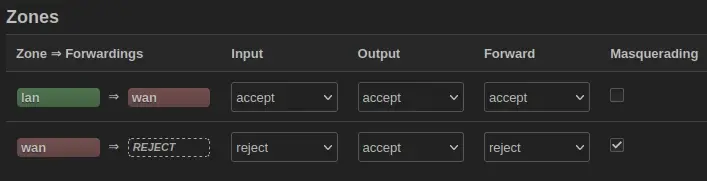
If the rule is about forwarding traffic from the lan interface to the wan interface, then why is there also a forward rule? How would inputs, and outputs make any sense if the rule is talking about forwarding? What does it mean for wan to forward to REJECT? I interperet that as saying that wan doesn’t go anywhere, but that wouldn’t make sense given that the router can send, and receive over the internet.

For example I would interperet the first rule as follows:

  • lan => wan: the conditions for which connections from the lan interface are forwarded to to the wan interface.
  • Input: accept: the lan interface accepts all connections originating from the network (I wouldn’t understand the point of setting this to be reject).
  • Output: accept: all connections exiting the wan interface are accepted (again, I’m not sure what the point of this would be).
  • Forward: accept: forwarding of packets from lan to wan is allowed.
  • Masquerade: I honestly don’t know what the effect of enabling this would be. What would it mean to masquerade the lan interface?

I tried finding documentation, and I did come across this, and this, but, from what I could understand, they didn’t really answer any of my questions.

cross-posted to: sh.itjust.works/post/14114583


If the rule is about forwarding traffic from the lan interface to the wan interface, then why is there also a forward rule? How would inputs, and outputs make any sense if the rule is talking about forwarding? What does it mean for wan to forward to REJECT? I interperet that as saying that wan doesn’t go anywhere, but that wouldn’t make sense given that the router can send, and receive over the internet.

For example I would interperet the first rule as follows:

  • lan => wan: the conditions for which connections from the lan interface are forwarded to to the wan interface.
  • Input: accept: the lan interface accepts all connections originating from the network (I wouldn’t understand the point of setting this to be reject).
  • Output: accept: all connections exiting the wan interface are accepted (again, I’m not sure what the point of this would be).
  • Forward: accept: forwarding of packets from lan to wan is allowed.
  • Masquerade: I honestly don’t know what the effect of enabling this would be. What would it mean to masquerade the lan interface?

I tried finding documentation, and I did come across this, and this, but, from what I could understand, they didn’t really answer any of my questions.