
Hutao (by Rable)

preview
Artist: Rable | pixiv | twitter | deviantart | danbooru
Full quality: .jpg 2 MB (1781 × 2344)
Artist: Rable | pixiv | twitter | deviantart | danbooru
Full quality: .jpg 2 MB (1781 × 2344)


Minister says Arctic Barents Sea key to sustaining production
Norway aims to maintain current output at least until 2035
Rejects idea of Norway power as ‘green battery’ for Europe
Equinor CEO: can export oil, LNG anywhere in the world

cross-posted from: lemmy.world/post/51125980

A map of where anime and manga are set rather than filmed, because nothing is filmed in a drawn show. 568 titles, 589 real places, 39 countries.
It has Washinomiya Shrine for Lucky Star and Hida-Furukawa Station for Your Name. It has nothing at all for Attack on Titan or One Piece, Slam Dunk is only Hiroshima, and about half the map is still just a city rather than the actual spot. (Working on it)
I have not gotten to the rest yet. If you know an exact spot, tell me and I might be able add it.
Free, no ads, no signup. Data is CC0.

“Fast Pair” equals fast insecurity
Audio headsets that connect to computers wirelessly via Bluetooth demonstrate how quickly this loss of control turns into a security problem. Millions of Bluetooth-capable products utilize Google’s “Fast Pair” service, which is nonfree software that promises to make pairing of wearable devices easier. It uses Bluetooth Low Energy and Android’s location services to detect nearby Bluetooth devices automatically and prompts you to pair. Security researchers discovered this feature was really a bug, as it introduced a serious weakness across a wide range of devices. More…


was using tails at a cafe that blocks all videos (for some reason) i used a bridge (the easy default one) went to invidious but no videos worked because of the network. everything else on the site worked. does it know the contents of the page despite tor? (im not using a work or school given device i am using framework)
(i also have an unsafe home network and have to use a google wireless access point. also have someone who has a virus. (we dont share the same device just same network) i cant remove it because i get scolded for messing with her stuff and spying on her (??? yes the virus is spyware the irony lol)) (everything i do has to be on device because my family doesn’t want me messing with the wifi)
(also any qubes specific advice would help since i wont be using tails as my daily driver anymore since i learned its not for that. also not a fan of the gimmicks but thats just me.)
thanks for reading any commcnt helps more people see this )

Alt text. Bluesky post and reply
EmilyZhou@reversibledestiny.bsky.socialtoday in maria hernandez park i watched a baby squirrel fall dead from a tree and the two lesbians sitting next to me used it as an opportunity to introduce themselves to each other
one of them to the other: “the gay community has had a hard week. dolly parton, tim curry, that squirrel…”


Remember the original Quest headset that Meta (then Oculus) trumpeted back in 2019? Meta seems to hope you don’t, since the company officially stopped supporting the wireless VR headset in 2023 to focus on the more popular Quests 2 and 3. However, tinkerers haven’t abandoned the hardware and recently released a new root-access exploit and bootloader that gives “developers and enthusiasts full control over Quest 1 hardware.”
The QuestStack project integrates previously known vulnerabilities in the Quest’s Android fastboot process into a privilege escalation chain that leads easily to full root access on the device. The bootloading process is now streamlined enough that it can be completed without any downloads through a web interface after connecting the headset to a PC.
With this exploit, the original Quest hardware can now be officially divorced from any reliance on Meta’s servers or services to be useful. That means enterprising Quest owners should be able to sideload apps without needing to register for a Meta Developer account and activating Developer Mode through Meta’s mobile app. It also means users should be able to go through the initial setup and login steps for a fresh Quest headset even if and when Meta decides to shut down the servers that currently support this process.



Aug 26 (Reuters) - Tim Curry, the baritone-voiced British actor who pranced to movie fame as a singing, lingerie-clad “sweet transvestite” in the 1975 cult classic “The Rocky Horror Picture Show,” has died at the age of 80, Variety and other outlets reported.
A cause of death was not immediately given, but Curry had been in ill health for some time.
Curry appeared in numerous movies, often as a hammy villain, was nominated three times for a Tony Award for Broadway roles, and performed voice work in many animated films and TV shows.
But his best-known role was Dr. Frank N. Furter, which came in his debut film, the outrageous, crowd-pleasing horror-comedy-musical “The Rocky Horror Picture Show,” co-starring Susan Sarandon and Barry Bostwick.





In the book “The Rulers: Corporate Power in the Age of AI and the Cloud,” writer Cecilia Rikap examines how India, Brazil and China are taking on Big Tech companies.
Edit: forgot to mention that I’m based in Europe, which might be relevant for which devices are easily available.
Hi, I am a newbie looking for a new router, one where I can block ads and tracking (with AdGuard, PiHole or something similar), I can choose my own DNS, and hopefully tinker more once I learn more about routers and networks. I have a home server currently running only locally and would like to access it from outside my home, but I’m afraid of letting the door open to bots, hackers, etc.
I am currently using the router provided by my ISP, which has poor customization options and is also failing a lot lately (it loses internet connection at least once a week and needs restarting).
I have searched a bit around and I think something where I can install OpenWRT or other open source firmware would be good. On the OpenWRT forum I have seen recommended the GL·INet Flint 2 GL-MT6000 openwrt.org/toh/gl.inet/gl-mt6000. I also looked a bit more on GL·INet’s website and saw the GL·INet 3e (GL-BE6500) which has WiFi 7, and wondered if that could be a good upgrade, but seems it doesn’t support (yet) installing official OpenWRT.
As for me and my use case: I am comfortable with the Linux command line, my personal computer runs Linux and I have a home server running OpenMediaVault with a couple of services on Docker (Jellyfin, Navidrome, Radicale, Trilium, Calibre-Web, Wanderer), but I barely know anything about routers and networks. The router will serve to connect that server via Ethernet and use several devices (laptops, desktop PC, phones, tablets, AndroidTV…) via WiFi.
I wonder what the thoughts of people who know about routers and networks are.
In addition to the physical router recommendation, I have 2 more questions:
from what I have read in other threads I believe I might need to keep my ISP’s router, or get another device to use as a modem before the router (I don’t know how to do that). Is that correct or can I just replace my ISP’s router with a router running OpenWRT (or similar) and be set?
does anyone have any good resources to learn more about networks, modems, routers, etc.? for a newbie who is comfortable with the Linux command line but otherwise knows nothing about the topic.
cross-posted from: lemmy.world/post/51140134
My take from this Cybernews article about an Android toolkit to trick KYC verification significantly differs from theirs!
Them: “…the existence of such tools puts users and organizations at imminent risk.” “Not a tool for the masses”
Me: “Where can I find this amazing Privacy tool?” “A tool the masses everywhere need access to ASAP”
cross-posted from: lemmy.world/post/51140134
My take from this Cybernews article about an Android toolkit to trick KYC verification significantly differs from theirs!
Them: “…the existence of such tools puts users and organizations at imminent risk.” “Not a tool for the masses”
Me: “Where can I find this amazing Privacy tool?” “A tool the masses everywhere need access to ASAP”
Mozilla recently announced a partnership with the AI company Exa. They say:
Firefox is investing in partnerships with companies like Exa.ai to bring deep expertise in specific areas while sharing our commitment to user choice, privacy, and transparency.
They continue:
We’re picking partners for the same reason each time: people who think AI in a browser should work for you, not the other way around.
This is a little ironic when Exa’s CEO describes it differently:
We’re organizing the world’s knowledge, but this time for AI
…But I digress. Mozilla promises three things above.
I’ll be looking into privacy exclusively (and leave the fact Exa is an undisclosed member of the Andreesen Horowitz portfolio for another day).
Exa’s privacy policy is short and troubling. It starts with an entitled attitude towards private data that might be available online:
Although publicly available data is not considered “personal information” under certain data privacy laws, we have nevertheless described how we collect, use and disclose such information…
This is an appeal to technical legality: common sense would dictate that a publicly leaked database of social security numbers would be personal information, but apparently the possibility that it’s not explicitly enumerated under some (unnamed) privacy laws irks the AI company.
Not a great start, but maybe things get better…
When you use or access the Services, we collect certain categories of information about you from different sources. In addition to the specific uses discussed below, we may use this information to provide and improve the Services and to maintain our business relationship… and protecting our rights and the rights of our employees, users or other individuals.
What other individuals need this company’a protection? How will information be used to “improve” their product? These questions are unanswered. But we do get told a bit more about sources:
We and third parties also automatically collect certain information about your interactions with the Services, including through cookies, pixels or other tracking technologies. This information is collected and used to better understand user interactions with the Services, run analytics, monitor and improve performance, measure engagement and to tailor and enhance user experience. Such information includes:
Device information, such as device type, operating system, unique device identifier, and internet protocol (IP) address.
Location information, such as approximate location based on IP address.
Other information regarding your interaction with the Services, such as browser type, log data, date and time stamps, clickstream data (e.g., page requests, page views, how much time is spent on a page, content viewed or interacted with, text entered, etc.), interactions with marketing emails
That’s a ton of data!
Exa describes how they refuse to honor requests not to track you.
Your browser settings may allow you to transmit a “Do Not Track” signal when you visit various websites. Like many websites, our website is not designed to respond to “Do Not Track” signals received from browsers.
Exa admits they knowingly collect personal data by default, and it’s unclear how or if Firefox Smart Window uses can steer clear of the privacy problems.
On default plans, we use anonymized data…
[You can] opt out of Exa’s collection of brokered personal information, opt out of its database, or out of its certain sale of data customers…
Opt out of certain, but not all, sales.
Exa has a second privacy page that describes its compliance with requests to delete private data or opt out of selling it. It received 50 total requests to delete or opt out of selling private data, and “complied”, which can include incomplete compliance for some reason, with only 5 of them. That’s a 10% compliance rate.
I just found out about another skeleton in Exa’s closet: the stalkerish People Search that scraped and started publicizing work information. From a LinkedIn post:
I can pull entire staff lists for companies. I can [get] an individual’s work history. I can pull lists of people with a particular job title in a geographical area. I can also combine all this with richer company information and web search data…
Exa are very brave as I can’t imagine LinkedIn likes it very much.
On privacy alone: no.
Mozilla promises a commitment to user privacy, and promises to only work with companies that share that commitment. Exa demonstrates hostility towards user privacy.
Maybe the New, AI-First Mozilla has abandoned this charter, but their website still says:
Individuals’ security and privacy on the internet are fundamental and must not be treated as optional.
Additional link from another source

Re:Zero kara Hajimeru Isekai Seikatsu 4th Season, episode 14

Re:ZERO รีเซทชีวิต ฝ่าวิกฤตต่างโลก ซีซั่น 4, Re:ZERO – Жизнь с нуля в альтернативном мире 4
- Info - AniList - Info - Kitsu - Info - MyAnimeList - Info - Official Site (Japanese) - Social - Facebook (English) - Social - Instagram (English) - Social - TikTok - Social - TikTok (Japanese) - Social - Twitter (English) - Social - Twitter (French) - Social - Twitter (Japanese) - Streaming - Bilibili TV - Streaming - Crunchyroll - Streaming - YouTube - Streaming - iQ
Reminder: Please do not discuss plot points not yet seen or skipped in the show. Failing to follow the rules may result in a ban.
All discussions
| Episode | Link | Episode | Link |
|---|---|---|---|
| 1 | Link | 14 | Link |
| 2 | Link | 15 | Link |
| 3 | Link | 16 | Link |
| 4 | Link | 17 | Link |
| 5 | Link | 18 | Link |
| 6 | Link | ||
| 7 | Link | ||
| 8 | Link | ||
| 9 | Link | ||
| 10 | Link | ||
| 11 | Link | ||
| 12 | Link | ||
| 13 | Link |
This post was created by a bot. Message the mod team for feedback and comments. The original source code can be found on GitHub.

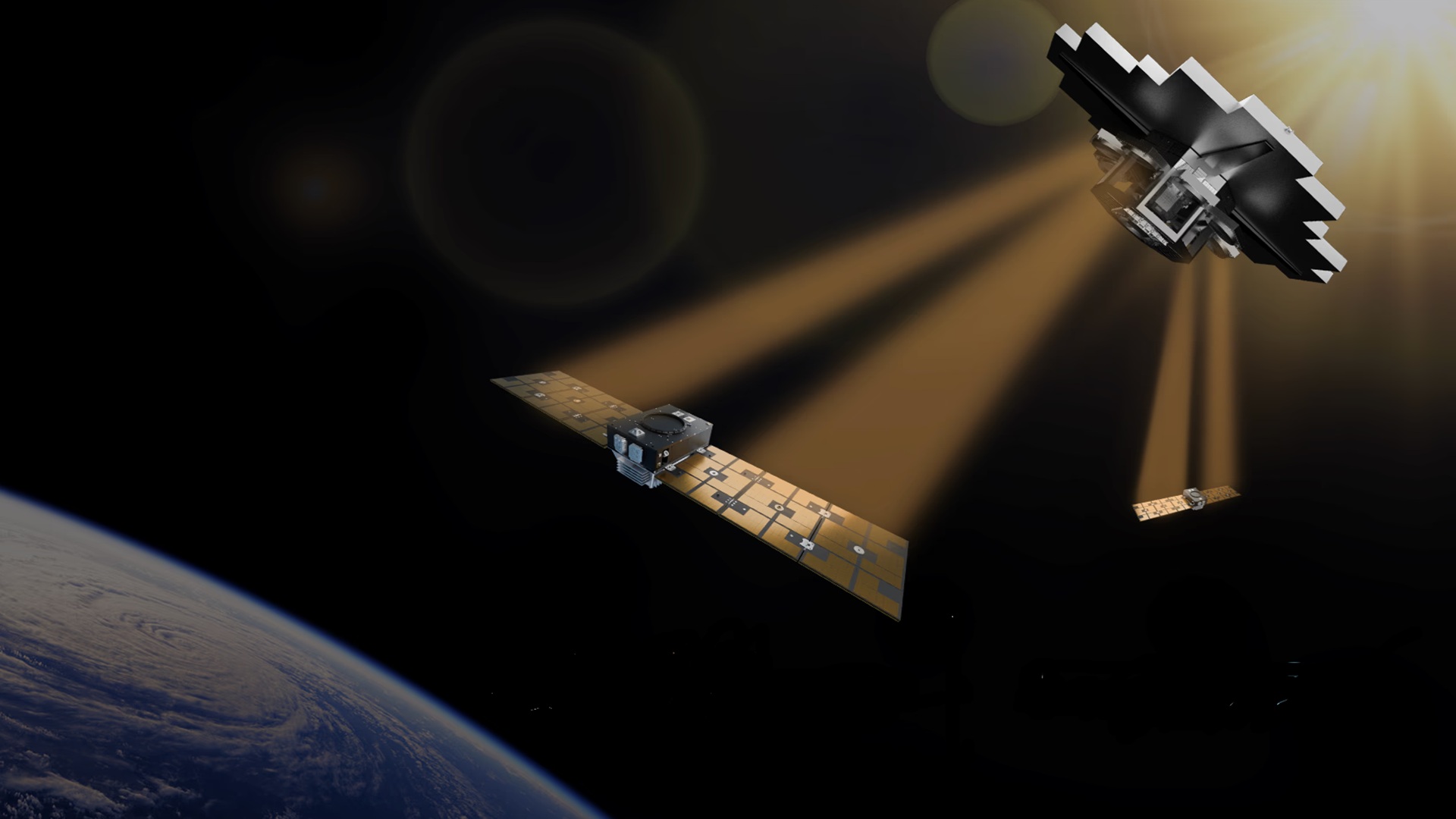
…Under a power purchase agreement, Aethero will draw electricity on demand from Star Catcher’s planned orbital energy grid. The arrangement is designed to let spacecraft access additional power when computing loads rise, without having to carry enough onboard generation and storage to cover those peaks…
…The company says it can harvest solar energy and beam concentrated power directly onto existing satellite solar panels, allowing spacecraft to generate up to 10 times more power on demand without installing specialized receivers…
…The company is preparing for its first in-space power-beaming demonstration later this year, with another mission already in development…





Some of you may know by now that ani.social has its own official Matrix server. But not everyone who visits this community may have realized this, since the announcement about its launch was posted only in !meta, and the server itself was initially operating only as an experiment.
However, months are passing by, and it doesn’t look like the Matrix server is going away, so I wanted to invite members of this community to join us there. So far, the server is not very populated, but we do have a handful of regulars. There are rooms for anime, manga, novels, and there’s one for everything and anything too. This isn’t an attempt to lure you away from this forum, but simply an addition to enhance the experience for those who, apart from discussing posts here, also enjoy a real-time chat from time to time. Come and say hi!
You can join by using this link #space:ani.social or by entering #space:ani.social into your Matrix client.
Here’s a link to the official announcement (it includes information about registration on ani.social, but you can join using your existing Matrix account):
ani.social/post/28183037
Side note: If you decide to join, it’s a good idea to use spoilers when discussing anime/manga. However, not all Matrix clients can send or even display spoilers (most notably Element X – it can’t even obscure spoiler messages, so you’re risking getting spoiled; Element Web/Desktop is fine). That’s why I’d recommend using a client that supports spoilers. Personally, I can recommend Cinny, Commet Chat, Gomuks for desktop, and FluffyChat for mobile/desktop. SchildiChat Next is also decent on Android, but it only displays spoilers, can’t send them (there’s a workaround but it’s inconvenient). Obviously, you can use any other client if you want. The almost full list can be found here matrix.org/ecosystem/clients/
For those who don’t know what Matrix is – it’s basically a Discord for nerds and also kind of an IRC spiritual successor. It’s unpolished – you can realize that from reading the note – but still can be quite fun!
You can read more about it here: matrix.org
Follow the white rabbit, Neo!
@edit:
If you like the Cinny client, you can now use the version hosted in the ani.social domain:
chat.ani.social


Hey everyone!
A lot has happened since the v5.0 announcement. Step by step, Reitti grows into something richer: it now understands journeys with multiple transportation modes, tells you how much of your world you have actually explored, geotags the photos your camera didn´t, and reads the FIT recordings from your sports watch. Yesterday’s v5.3.0 brought all of these threads together, and I want to take a moment to share this progress with the community.
For anyone new here: Reitti (Finnish for “route”) is a self-hosted, privacy-first alternative to Google Timeline. It turns raw GPS points from your devices into visits, trips and a timeline of your life, stored exclusively on your own infrastructure.
Here are the features I’m most excited about:
Real journeys are rarely single-mode: you walk to the car, drive, then walk again. Reitti now understands this and models it as one trip with multiple transport segments instead of mislabeling everything as “Driving”.

Hexagons are bestagons.
The “fog of war” for your life: Reitti now calculates how much of your cities, regions, and countries you have actually explored, down to the percentage. With the historical sliders you can watch your map fill in year by year.
Heads up: this optional feature requires SPATIAL_COVERAGE=true, roughly 10 GB of
additional disk space and some initial indexing time. Everything about setup and configuration is covered in the Spatial Coverage documentation.

This one is for everyone running Immich next to Reitti: connect the two services once, and Reitti can locate photos that have no GPS data, then write the coordinates permanently back into your Immich library.
How it works: Reitti takes a photo’s capture timestamp, matches it against your recorded location history, and shows you the suggested position. Happy with what you see? One button press writes it into the photo’s metadata in Immich. Nothing happens without your confirmation.
This solves a real problem: most dedicated cameras, whether DSLR, mirrorless or action cam, simply have no GPS receiver. Until now, those photos sat forever on Immich’s “no location” pile or needed tedious manual tagging. With Reitti, the tracker you already carry does the job your camera never could. And since everything happens between your own two self-hosted services, not a single byte leaves your infrastructure.
Reitti now natively imports .fit files, the standard format for cycling computers and sports watches from Garmin, Wahoo & co. No more converting your rides and runs to GPX first: drop them in and they show up in your timeline like any other recording.
#reitti on libera.chatI’m always curious how you all use Reitti, so feel free to share your setup and stories in the comments. ❤️
Per this community’s rules for project promotion posts, here is exactly how AI was used in building Reitti:
Everything else, including architecture, system design, testing, review and deployment, I do by hand.
— Daniel
Download the best classic and new games on Windows, Mac & Linux. A vast selection of titles, DRM-free, with free goodies and 30-day money-back guarantee.