0

0

NPR
World's fastest ocean liner is sunk to break another record: largest artificial reef
www.npr.org
0

GitHub
GitHub - fleapower/vodotxt: Android todo.txt app with robust recurring tasks and Google Drive sync.
github.com
preview
I’m working on releasing a new todo.txt app on Google Play, but I need some testers to help with the closed testing process. You can see the project at github.com/fleapower/vodotxt. If you are interested, please email me at vodotxt at gmail. Thanks!
I’m working on releasing a new todo.txt app on Google Play, but I need some testers to help with the closed testing process. You can see the project at github.com/fleapower/vodotxt. If you are interested, please email me at vodotxt at gmail. Thanks!
0


0

preview
title, basically. i know i am in growing zone 6, but i am curious if that will change soon and how that will be handled by experts.
title, basically. i know i am in growing zone 6, but i am curious if that will change soon and how that will be handled by experts.
0


preview
Mehr Infos zum Heft: www.kultboy.com/magazin/3001/
Mehr Infos zum Heft: www.kultboy.com/magazin/3001/
0

preview
[NS2] Homebrew collection -and more- for the Switch 2
Another list that may be useful. =)
[NS2] Homebrew collection -and more- for the Switch 2
Another list that may be useful. =)
0

NPR
Crews search for survivors after deadly Brooklyn building collapse
www.npr.org
0


YouTube
Wir sind Helden - Von Hier An Blind (Official Video)
m.youtube.com
preview
Mit einem herzlichen Glückwunsch zum Geburtstag an Judith Holofernes. Der Zeichentrick-Stil in diesem Video erinnert an Tim & Struppi.
Mit einem herzlichen Glückwunsch zum Geburtstag an Judith Holofernes. Der Zeichentrick-Stil in diesem Video erinnert an Tim & Struppi.
0


Middle East Eye
Israeli soldier accused of smearing faeces on Palestinian detainee’s face
www.middleeasteye.net
preview
An Israeli soldier has been accused of abusing a Palestinian detainee at a military outpost in the occupied West Bank, including beating him, urinating on him and smearing faeces on his face.
According to Israel’s Channel 12 News, the abuse took place last month at the Jalameh military outpost, after Israeli soldiers arrested abducted a Plestinian man at a nearby crossing.
Investigators suspect the soldier beat the Palestinian and extinguished a cigarette on his body, leaving him injured.
The alleged abuse did not end there. According to the investigation, the soldier urinated on the detainee before smearing his own faeces on the man’s face and urging him to eat it.
0

YouTube
Harakiri For The Sky - Keep Me Longing (Official Music Video)
www.youtube.com
0


YouTube
Very Important People Season 4 Teaser
www.youtube.com
0


Save 15% on Warp to Sector One on Steam
store.steampowered.com
0


preview
🚗 Roma, domenica ecologica il 15 novembre
Domenica 15 novembre stop alle auto nella ZTL Fascia Verde di Roma, dalle 7:30 alle 12:30 e dalle 16:30 alle 20:30. Sono previste deroghe per benzina Euro 6, veicoli ibridi ed elettrici e mezzi alimentati esclusivamente a GPL o metano.
https://www.odisseaquotidiana.com/2026/11/domenica-ecologica-roma-15-novembre.html
0


0


It's FOSS
Agent Name Service is Now Part of The Linux Foundation
itsfoss.com
preview
Agent Name Service (ANS) now has a home at the Linux Foundation. The launch happened at KubeCon North America in Salt Lake City, and you might remember that the foundation first announced its plans for the project way back in June.
GoDaddy, Cloudflare, Salesforce, and DigiCert are among the organizations now involved with ANS, bringing the total number up to eleven.
One of the early deployments of ANS has been in AGNTCY, another project under the foundation, where its directory of AI agents can now check an agent’s ANS identity.
Announcing the move, Jim Zemlin, CEO of the Linux Foundation, had this to share:
Autonomous AI agents are transacting and operating across global systems, but they can't succeed without verifiable identity.

Under the neutral governance of the Linux Foundation, ANS provides a common foundation for trust that the entire industry can adopt, implement and improve together.
An explainer
Platforms identify AI agents in their own ways, and a service that receives a request from one has no standardized way to confirm who the agent represents.
ANS tackles this by linking each agent to a domain name its operator owns, the same way a website is tied to its domain. Each version of an agent gets its own name, such as ans://v1.4.2.travel.example.com.
To register an agent, the operator first has to prove it controls that domain. Certificates are then issued for the agent, and every registration goes into a public log that anyone can read.
ANS also publishes details about each agent in DNS, the internet’s address book, and other systems can then look them up with tools they already use.
The main DNS records use a format from a separate project called DNS-AID. ANS adds one record of its own that points to the agent’s entry in the public log.
When an agent sends a request, the receiving system can check that its registration exists, that it has not been revoked, and that the agent really holds the key tied to it.
ANS only covers who the agent is. Deciding what it can do is left to the receiving system, and platforms have to add the check themselves.
The setup behind ANS
A technical steering committee now oversees the project. It starts with five seats, held by three people from GoDaddy, Ken Huang of DistributedApps.ai, and Michael Kantor of Hashgraph Online (HOL).
That lineup is only a starting point. The first election has to be held within 12 months, and after it, the charter prevents any one company from holding half or more of the seats (to ensure vendor neutrality, I assume).
The charter also mentions that meetings are meant to be open to the public and that discussions and decisions should be visible to everyone.
As for all the code in the project, the Go, Rust, and Java libraries currently use the MIT license, but new code contributed from now on has to use the Apache 2.0 license.
Some lore info
ANS began in 2025 as a draft sent to the IETF, the internet standards body, and a follow-up came in October. Drafts like these have no formal standing at the IETF and are not endorsed by it.
At present, the Linux Foundation calls the specification formalized. The reference code and a local demo are on the project’s GitHub page, and the specifications are on ansinfo.ai.
0
0


Executive Digest
LG enfrenta ação judicial em Portugal por alegada “espionagem doméstica” através de televisões
executivedigest.sapo.pt
preview
Article being fully in text and not having paywall (at least on my side?), it can be easily translated by plugins or in-built browser tools though.
Also, news is two weeks old already, but since from what I’ve read and heard, Portugal can be quite slow for bureaucratic matters, I would expect the news to be relatively fresh still, and any updates to take a while to come.
Still, hopefully the outcomes are positive. =)
0


YouTube
Suzy Eddie Izzard- Death Star Canteen
www.youtube.com
0


Al Jazeera
Breaking News, World News and Video from Al Jazeera
www.aljazeera.com
0


YouTube
Autumn Lies Buried - Prison Song
youtu.be
preview
My neck! It hurts now
My neck! It hurts now
0

preview
A critical flaw in Apache HTTP Server’s HTTP/2 module, mod_http2, can let a remote attacker run code on the server. Tracked as CVE-2026-119618, it affects versions 2.4.55 through 2.4.70 and is fixed in version 2.4.71, released yesterday.
Only servers with HTTP/2 enabled are affected, according to Red Hat, which ships the server as part of Red Hat Enterprise Linux.
An attacker who can reach the server needs no authentication to exploit the flaw and could take full control of the server process, the Linux vendor says. It rates the flaw 9.8 out of 10 on the CVSS scale.
The vendor’s assessment, published yesterday, also says “public research has demonstrated a reliable exploit” against a server in its default configuration with mod_http2 enabled. It does not name or link that research. Security company Wiz said later that day that no exploit was available and that no exploitation in the wild had been reported.
HTTP/2 runs only where the Protocols directive turns it on, as the module documentation explains. The directive uses h2 for HTTP/2 over TLS and h2c for HTTP/2 over plain TCP. It can be set for the whole server or for a single virtual host, so admins should check the server-wide setting and every virtual host.
Standalone builds of the module, released on GitHub as mod_h2, are affected from version 2.0.8 through 2.0.42.
Admins who run the Apache HTTP Server project’s own releases should move to version 2.4.71, the fixed release named in its security advisory. That release also fixes a crash in mod_md, rated important, and a one-byte overwrite of stack memory in mod_vhost_alias, rated low.
The distributions in the table below ship their own builds of the server, with their own package version numbers. On Red Hat Enterprise Linux 9, for example, the fix ships as mod_http2-2.0.26-7.el9_9.1.
Red Hat shipped fixes for Red Hat Enterprise Linux 9 and 10 yesterday and rates the flaw Important on those releases rather than Critical. Their mod_http2 packages give each HTTP/2 stream its own memory allocator, which makes an attack much harder, according to the vendor’s severity assessment. Red Hat Enterprise Linux 8 and earlier do not contain the vulnerable code.
The Debian rows come from Debian’s security tracker, and the Amazon row from the Amazon Linux tracker. Ubuntu’s CVE tracker had no page for the flaw when The Hacker News checked it today.
The Apache HTTP Server advisory offers no workaround. In its vulnerability analysis, Wiz advises admins who cannot update yet to remove h2 and h2c from the Protocols directive, leaving Protocols http/1.1.
The standalone mod_h2 project has published no fixed release so far. Its release list on GitHub ends at 2.0.42, the last affected version, and its repository has been read-only since it was archived on June 9. The Protocols change above also applies to servers that use those builds.
The flaw was reported on October 26 by Anthropic’s OSS Scanner, a free scanning service for open-source projects that uses the company’s AI models. Anthony Weems and Simon Scannell of Google Cloud Vulnerability Research reported it last week.
An earlier HTTP/2 flaw, CVE-2026-23918, was fixed in version 2.4.67, released on May 4. Servers updated to that release, or to any later one up to 2.4.70, still run a version that the new flaw affects.
0

0

0

preview
I can have a script trigger a notification to other people by typing in a Facebook Messenger group chat, but my phone won’t receive a push notification since I’ve already “read” the message when the script sends it.
Any ideas for tools which can trigger a push notification from a bash script?
FOSS solutions are of course preferred, but not critical :)
0

Ars Technica
Google pushes privacy angle as Gemini-powered smartglasses debut starting at $395
arstechnica.com
preview
Smartglasses have always faced an uphill road to acceptance. Not only is propping a computer up on your nose an uncomfortable proposition, but the privacy aspect has been vexing people since the Google Glass days. Now, Google is ready to take another swing at “intelligent eyewear” for the Gemini era after previewing its plans a couple of times. The first glasses are up for preorder today from Gentle Monster and Warby Parker, but they’re no impulse buy.
These devices are a collaboration between Google, Samsung, and the aforementioned eyewear designers. Gentle Monster and Warby Parker have each designed a few different frames, with options for transparent and tinted lenses. Samsung is providing the computing hardware that fits inside them, and Google has the software covered.
Warby Parker has designed three frames for Google eyewear, called Alden, Reid, and Wren (see above). They are available with both standard optical and sun lenses in Pine, Saddle, and Jet Black colors at $395 and higher. Warby Parker is only selling devices in the US. Gentle Monster has gone a bit further with six styles, but Google hasn’t told us any names for those yet. They come in dark red, pink, gray, and yellow colors and are available with clear, tinted, blue, or brown lenses. The Gentle Monster styles start a little higher at $449, and they will be available in the US and South Korea.
Google says the frames all weigh about 41 grams, which is not terrible but is definitely near the top for glasses generally. They will, naturally, weigh much more when you account for lenses. That will also determine the final pricing. So far, we only have the starting prices for these devices, including non-prescription lenses.
The setup here is similar to the Ray-Ban Meta glasses we’ve seen for a few years. There are no screens in the lenses, but you can interact with the AI system via voice or by activating the integrated camera. The experience should be similar to using Gemini Live on your phone, but it will be a lot easier to fire up the AI. You can say “Hey Gemini” or tap a touch-sensitive area of the frame to start interacting with the robot.
Since this is the same chatbot that operates across the Google ecosystem, it has access to your data and preferences. You can ask questions and get personalized answers, have Google Maps guide you by voice, or just talk with the AI to kill time. The glasses use custom open-ear speakers to limit distractions for those around you. Google notes the directional microphones should not pick up speech from other people, either.
Adding the camera feed is where things get interesting. When the AI can see what you see, it has the potential to do more work on your behalf. Google suggests asking Gemini for recommendations when looking at a bookshelf or glancing at an event poster to have the AI add it to your calendar. The glasses will also support Gemini Guided Vision, which provides conversational audio descriptions for people who are visually impaired.
The utility of these devices hinges on Gemini. I would be remiss not to point out that Gemini, like all AI systems, is not infallible. In fact, it can be frustratingly fallible at times. The chatbot still regularly screws up simple things like adding calendar appointments or identifying objects in an image in my testing, and when you don’t have a screen to verify the AI’s output, it may be harder to trust it. These devices will really only make sense if you can rely on Gemini to do things right, and that’s still not a guarantee. Google’s privacy promises
All the Gemini-powered glasses from Gentle Monster and Warby Parker feature a 12 MP wide-angle camera capable of shooting photos and video. Google says it has implemented a number of features and limitations to ensure people don’t do creepy things with its intelligent eyewear, and that it doesn’t do creepy things to you—Google claims its approach respects privacy on “both sides of the lens.”
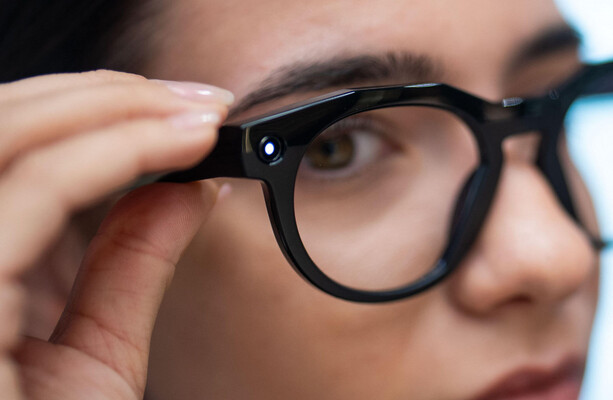
For starters, there’s a recording light that is on whenever the camera is active. Like the Meta glasses, Google’s eyewear will detect if the light has been covered up or modified in any way that would prevent it from illuminating. In that event, the glasses will refuse to activate the camera. All Google-powered glasses will have a physical off switch, too.
The terms of use for Gemini eyewear also require users to agree not to record people without consent or in sensitive areas. If Google finds out someone has broken those rules, it may remotely disable the glasses. Google is going a bit further in restricting video functionality than Meta, too. Google says it will not allow any apps in the Play Store to live stream video to social media from the glasses (not even YouTube live is supported). The content you record is saved to your gallery, and you can upload that wherever you want, but going live is apparently not on the agenda. Real-time facial recognition is also off the table, according to Google. The glasses also automatically redact faces before sending video to Google for processing.
On the user privacy side, Google says it will not save any images or videos captured by the glasses in your Gemini history. Additionally, none of that data will be used for training AI models or targeting ads. Your voice interactions with Gemini via the glasses are, as with all other Gemini endpoints, not guaranteed the same level of protection. You can delete your chats from the Gemini history, though.
Data on the glasses is encrypted, and it remains that way during transit to the cloud. However, it’s not encrypted on Google’s servers. The company does note that it’s working to bring Private AI Compute to glasses, which will isolate data during processing so not even Google can access it.
Anyone looking to get Gemini on their face and test Google’s privacy promise can preorder the glasses from the Gentle Monster and Warby Parker websites. Devices should ship and appear on store shelves on December 10. Importantly, support for these devices is a bit narrow at launch. They will work with all iPhones from the 13 Pro onward. On the Android side, you’ll need a Pixel 7 or newer or a Samsung Galaxy S or Z series device running One UI 9 or later. If you’ve got a cheaper Samsung Galaxy or a device from another OEM, you’re out of luck at the moment.
0
0

0


Ocarina - Wikipedia
en.wikipedia.org
0

TheJournal.ie
Do you think 'smart glasses' that can record people should be banned?
www.thejournal.ie
preview
Ireland’s Oireachtas AI Committee has called for smart glasses that can record people to be regulated over privacy concerns. The bigger question: should they be banned outright?
Ireland’s Oireachtas AI Committee has called for smart glasses that can record people to be regulated over privacy concerns. The bigger question: should they be banned outright?
0


preview
Watch the episode live on Twitch and YouTube at 7pm PST. Restreams on Twitch and youTube the next day at 9am PST
Runtime Break start 4h 23m 2h 31m
Episode 43: The Water’s Edge
On our last episode of Critical Role Campaign 4, the Seekers had ventured forward into Timmony after a successful rescue mission in Hawthorn’s Glade and delivering those refugee fair folk to the Tintazi Wood.
After audience with King Augustus Valian in the rainy little hamlet of Sloak, our Seekers were given clandestine aid in their mission to rescue the lost daughters of one Ulbid Morn, both a kindness and an act of magnanimous heroism to help an ally (but also potentially an interference with the grand and malevolent schemes of House Tachonis).
As ever, you flit like gnats around the edge of the vast and terrible plans of the House of Death, specifically their scheme to call the white banners (wherever that may be in the Fora Crucialma, the Hall of Mercy beyond the Sea of Lachris). You have heard bits and pieces of this vast plan of theirs. Schema and schematics of ships with massive machinery within the middle of them. The Sea Door referenced in a letter written by your sisters that was discovered within the haunted halls of Tannesar. The statuesque victims of the basilisks that the Soldiers originally found in the dungeons of Castle Delawney (all of which a cross-continental international plan that the aim of which can only be gleaned from a tiny cryptic sentence in that one letter [pointing to Occtis] of attacking the Path itself, the means of reincarnation and perhaps total domination over the underworld).
Well, the stakes seem very high and very worthy. So this is why those of you (who maybe are not sentimental towards the plight of a little old gnome) have stuck around to see this absolutely ill-advised endeavor through.
In our last episode, making their way the ferry town of Bradanfall, our friends were set up with an introduction to the shire-reeve (Alden Gwinnel) where you got basically deputized with repairing the ferry raft, not often used as the Gainesly Bridge has now been shut. You got swiftly to work installing not only a false compartment (there is a trap door in the base of the raft going down into the interior of the vessel that four medium-sized creatures can hide in) right? A very well done piece of craftsmanship on your part to get that situated. You also have carved depressions on the underside of the raft (so those that are perhaps either holding onto the cable you attached down there as well) can actually remain breathing for quite some time. It’s not that the air won’t get pretty deoxygenated pretty quickly, but you certainly won’t immediately start drowning. You can be there for a while. You set all of that up and got the raft together while Thimble, the Black Rabbits, and Sir Groveland (of the Hounds of the King) made their way on the Miller’s Road back to Caller’s Perch (where you saw the hectic, panicked, impromptu cliffside village of halted caravans) and made your way to spy to discover if the girls were truly there. You did discover that they were but were also in turn discovered by Primus Tachonis (who had cast See Invisibility and then True Sight on his son Ethrand) a harrowing encounter that ended up with him flying after you across a vast ravine and having cast a Horrid Wilting spell on you that would have plunged you immediately into unconsciousness and pretty subsequently death after taking falling damage.
You made your way to the Black Rabbits (not before Sir Groveland valiantly surged forward, launching himself at Primus Tachonis, and his last word that you heard him say was “Run.”)
Returning here, Dame Morgaine basically explained you guys have another day (because even though it will take a while for the caravans and carriages to unravel, the Tachonis’ steeds need no rest, and so they will travel 24 hours a day on the highways of Timmony to arrive at their destination). So you and Morgaine have just gone back to Arderin (the capital of Vallow, one of the provinces of Timmony that’s the first big city to the south that the Tachonis are traveling through) and you and Morgaine, the last thing you saw was their carriages all laid low with cargo. All three cargo carriages. And, in fact, I didn’t necessarily specify three in the last one because the caravan is not necessarily as you remember it, but we’ll have to get into that on tonight’s episode of Critical Role.
Map of Dol-Makjar
0

preview
Il mare delle donne che pescano controcorrente
@giornalismo
articolo21.org/2026/11/il-mare…
Dieci storie raccolte da Angela Gennaro in Tunisia raccontano il lavoro femminile nella pesca mediterranea. Il cortometraggio, prodotto con WWF Mediterranean e presentato al MedFilm Festival di Roma, intreccia emancipazione, giustizia
0

It's FOSS
Agent Name Service is Now Part of The Linux Foundation
itsfoss.com
preview
Agent Name Service (ANS) now has a home at the Linux Foundation. The launch happened at KubeCon North America in Salt Lake City, and you might remember that the foundation first announced its plans for the project way back in June.
GoDaddy, Cloudflare, Salesforce, and DigiCert are among the organizations now involved with ANS, bringing the total number up to eleven.
One of the early deployments of ANS has been in AGNTCY, another project under the foundation, where its directory of AI agents can now check an agent’s ANS identity.
Announcing the move, Jim Zemlin, CEO of the Linux Foundation, had this to share:
Autonomous AI agents are transacting and operating across global systems, but they can't succeed without verifiable identity.

Under the neutral governance of the Linux Foundation, ANS provides a common foundation for trust that the entire industry can adopt, implement and improve together.
An explainer
Platforms identify AI agents in their own ways, and a service that receives a request from one has no standardized way to confirm who the agent represents.
ANS tackles this by linking each agent to a domain name its operator owns, the same way a website is tied to its domain. Each version of an agent gets its own name, such as ans://v1.4.2.travel.example.com.
To register an agent, the operator first has to prove it controls that domain. Certificates are then issued for the agent, and every registration goes into a public log that anyone can read.
ANS also publishes details about each agent in DNS, the internet’s address book, and other systems can then look them up with tools they already use.
The main DNS records use a format from a separate project called DNS-AID. ANS adds one record of its own that points to the agent’s entry in the public log.
When an agent sends a request, the receiving system can check that its registration exists, that it has not been revoked, and that the agent really holds the key tied to it.
ANS only covers who the agent is. Deciding what it can do is left to the receiving system, and platforms have to add the check themselves.
The setup behind ANS
A technical steering committee now oversees the project. It starts with five seats, held by three people from GoDaddy, Ken Huang of DistributedApps.ai, and Michael Kantor of Hashgraph Online (HOL).
That lineup is only a starting point. The first election has to be held within 12 months, and after it, the charter prevents any one company from holding half or more of the seats (to ensure vendor neutrality, I assume).
The charter also mentions that meetings are meant to be open to the public and that discussions and decisions should be visible to everyone.
As for all the code in the project, the Go, Rust, and Java libraries currently use the MIT license, but new code contributed from now on has to use the Apache 2.0 license.
Some lore info
ANS began in 2025 as a draft sent to the IETF, the internet standards body, and a follow-up came in October. Drafts like these have no formal standing at the IETF and are not endorsed by it.
At present, the Linux Foundation calls the specification formalized. The reference code and a local demo are on the project’s GitHub page, and the specifications are on ansinfo.ai.
Agent Name Service (ANS) now has a home at the Linux Foundation. The launch happened at KubeCon North America in Salt Lake City, and you might remember that the foundation first announced its plans for the project way back in June.
GoDaddy, Cloudflare, Salesforce, and DigiCert are among the organizations now involved with ANS, bringing the total number up to eleven.
One of the early deployments of ANS has been in AGNTCY, another project under the foundation, where its directory of AI agents can now check an agent’s ANS identity.
Announcing the move, Jim Zemlin, CEO of the Linux Foundation, had this to share:
Autonomous AI agents are transacting and operating across global systems, but they can't succeed without verifiable identity.

Under the neutral governance of the Linux Foundation, ANS provides a common foundation for trust that the entire industry can adopt, implement and improve together.
An explainer
Platforms identify AI agents in their own ways, and a service that receives a request from one has no standardized way to confirm who the agent represents.
ANS tackles this by linking each agent to a domain name its operator owns, the same way a website is tied to its domain. Each version of an agent gets its own name, such as ans://v1.4.2.travel.example.com.
To register an agent, the operator first has to prove it controls that domain. Certificates are then issued for the agent, and every registration goes into a public log that anyone can read.
ANS also publishes details about each agent in DNS, the internet’s address book, and other systems can then look them up with tools they already use.
The main DNS records use a format from a separate project called DNS-AID. ANS adds one record of its own that points to the agent’s entry in the public log.
When an agent sends a request, the receiving system can check that its registration exists, that it has not been revoked, and that the agent really holds the key tied to it.
ANS only covers who the agent is. Deciding what it can do is left to the receiving system, and platforms have to add the check themselves.
The setup behind ANS
A technical steering committee now oversees the project. It starts with five seats, held by three people from GoDaddy, Ken Huang of DistributedApps.ai, and Michael Kantor of Hashgraph Online (HOL).
That lineup is only a starting point. The first election has to be held within 12 months, and after it, the charter prevents any one company from holding half or more of the seats (to ensure vendor neutrality, I assume).
The charter also mentions that meetings are meant to be open to the public and that discussions and decisions should be visible to everyone.
As for all the code in the project, the Go, Rust, and Java libraries currently use the MIT license, but new code contributed from now on has to use the Apache 2.0 license.
Some lore info
ANS began in 2025 as a draft sent to the IETF, the internet standards body, and a follow-up came in October. Drafts like these have no formal standing at the IETF and are not endorsed by it.
At present, the Linux Foundation calls the specification formalized. The reference code and a local demo are on the project’s GitHub page, and the specifications are on ansinfo.ai.
0

preview
cross-posted from: https://lemmy.blahaj.zone/post/50421411
This is a post about using epilators to remove unwanted body hair. I wanted to make this, since I literally just did it, and also my friend Teagan (@IntroSkeptic@lemmy.blahaj.zone) just ordered hers, so I thought I’d make a small guide on how to do it.
Please note that this is just my experience with epilators and your mileage may vary.
With that said…Epilating is by far the best hair removal method I’ve found. It has its upsides and downsides, but the result is always worth it, in my opinion.
The pros of epilating are: * It rips out the hair shaft completely, including the roots. This means that: * The result is smoother than just shaving, the hair shaft is just gone and also: * The result lasts for longer, because the entire shaft has to grow back * It’s relatively easy to do, once you have an epilator and get the hang of it * You can do it at home! * As the result lasts for longer, you don’t have to do it as often as you would have to shave * At least in my experience, especially combined with HRT, epilated hair grows back thinner, lighter and slower * I don’t get almost any ingrown hairs when epilating, but I don’t get those even when shaving tbh
HOWEVER! With that said, there are some pretty nasty downsides to epilating as well: * There’s no sugarcoating it: epilating fucking HURTS * You need an epilator, which can be pricey * You don’t have to do it as often, but it can take a while to do * You might need help reaching some hard-to-reach spots (like your butt) * Skin irritation, red dots, bleeding and skin damage (more on that later) * It is possible to injure yourself, but it shouldn’t happen when being careful * Risk of infection, but that’s why we have aftercare!
So, with those out of the way, how do you start epilating yourself?
Well, first of course, you need an epilator! I use a Philips 8000 series. It’s around 80$ IIRC and it’s amazing. I’ve had and used it for years now and it still works super well! My bf even dropped it from our apartment on the fourth floor (because of course he did 🤦♀️) and it still works exactly the same. Great machine ❤️
Once you have your epilator, you’re gonna want to choose a spot to epilate. I epilate my boobs, belly, what little chest hair I have, all of my pubic hair, my butt and my lower back. Oh and also my armpits.
I shave my arms and legs with a Venus razor and my face with a razor too, ofc. I find this combination to work really well, as although epilating arms and legs works well, it takes a reeeeeally long time. This combo works for me, but you should experiment! Your body isn’t my body and YMMV.So, before epilating anything, you’re gonna want to shorten the hair a bit. Long hair gets tangled and that fucking HURTS. It also damages your skin quite a bit, so you want to avoid that as much as possible.
I recommend trimming hair to about 5mm in length, so that it doesn’t get tangled, but it still gets caught by the epilator. If it’s too short, you’re probably gonna struggle to get it all, which again, damages your skin and hurts. So keep the length in mind!You’re also wanna get something for the pain. Trust me, don’t rawdog it!
In my experience, regular painkillers don’t work well for this. This pain is the acute, sharp and intense type, which is like the opposite of what painkillers treat. I personally use kratom (sue me) and it works really, really well for this. Tbh I haven’t been able to find a better alternative yet, but maybe you’ll find something that works for you that’s less…habit-forming :PThere’s one extremely important thing you have to do before actually epilating tho! Tie your hair up.
Getting it caught in an epilator is NOT fun. It hasn’t happened to me yet, but I’ve read people’s experiences and apparently it’s hell. Just tie it up to avoid this problem.After that, take a hot shower. As hot as you can handle, so that your pores open up. This will help with the pain a bit, as there won’t be as much resistance. Plus, it’s just relaxing!
Okay, so for the actual epilating part: turn on the machine and (I recommend) set it to the lowest setting first. All tutorials say to gently glide the thing over your skin, but in my experience, you can put a little bit of pressure on it. Still, be gentle and be careful!
I go back and forth, applying slight pressure when I need it. Since body hair (or at least my body hair) doesn’t all grow in one direction, I usually try all the different directions. The key part is, you want to go against the direction the hair is growing in. That means, going from the tip towards the root basically. That helps tear it out as easily as possible.
What helps a lot is pulling the skin taut, stretching it out. That way, the hairs aren’t that close to each other and they also “let go” more easily. Idk, it just works.It’s quite possible that you won’t get all the hair in one go. That’s completely fine! When the majority is gone, I usually switch my epilator to the faster speed and go over the area again. If you’re still unable to get all of the hair, don’t force it! Don’t push too hard. Just grab the leftover hair with a pair of tweezers, it’s fine!
If you’re epilating pubic hair, be extremely careful! You will bleed and that’s okay. Pubic hair is just sensitive like that. No matter what tho, always try to hold the skin taut. With thinner skin like that, the epilator sometime catches on a piece of it and slides to other places…and that really hurts, damages your skin and it’s just overall unpleasant. It’s hard to describe and it will probably happen to you a couple of times, but you’ll get the hang of it eventually. Just be careful with areas with thinner and more sensitive skin.
Try to hold everything in one place. I imagine that being post-OP would make this much easier as there aren’t any loose parts, but it is what it is. Try to hold everything in one place, prevent the epilator from catching and sliding away and just…be careful please!When you’re done epilating, then comes aftercare, which is equally as important as the epilating part. I recommend showering the area with cold water, to calm down the irritation and to wash away any loose hair (and blood, sometimes :P). After showering, use some after shave! DON’T use the one that’s literally just alcohol tho! That is…unpleasant, to say the least. In my experience, “men’s” after shave is almost exclusively this alcohol type. I use an after shave “balm”, which looks like a sort of white cream. It contains no alcohol, doesn’t smell awful, doesn’t burn nearly as much, rubs really well and it works! If you can find that, I recommend it.
Regarding skin irritation and bleeding…it will happen, especially the first couple of times. However, once you learn how to epilate even better and you get more and more careful, you’ll learn to avoid it. Sometimes I get these red bumps after epilating, but those usually disappear after a day or two, leaving only smooth skin behind. Bleeding is almost guaranteed with pubic hair, but it’s really not a huge problem. Just be sure to follow aftercare practices and you’ll be just fine.
My epilated parts usually last two weeks plus before I have to do it again. Hair doesn’t start appearing until like five days plus. It really is so much better than shaving.
And, that’s about it…don’t know if this will help anyone, but that’s what epilating has been for me so far.
Is it worth it? For me, absolutely yes.
Is it scary? Yeah…
Does it hurt? Fuck yes.
Do I recommend it? Absolutely.If this helps even just one person, I’ll be happy. If not, oh well.
Feel free to ask any questions in the comments.And Teag? This is for you, girlie. I hope all goes well on your hair removal journey 🩷
0


preview
No King Bitey this time but I finally got a good Shipwreck run.
No King Bitey this time but I finally got a good Shipwreck run.
0
Al Jazeera
Breaking News, World News and Video from Al Jazeera
www.aljazeera.com
0


0

preview
A critical flaw in Apache HTTP Server’s HTTP/2 module, mod_http2, can let a remote attacker run code on the server. Tracked as CVE-2026-119618, it affects versions 2.4.55 through 2.4.70 and is fixed in version 2.4.71, released yesterday.
Only servers with HTTP/2 enabled are affected, according to Red Hat, which ships the server as part of Red Hat Enterprise Linux.
An attacker who can reach the server needs no authentication to exploit the flaw and could take full control of the server process, the Linux vendor says. It rates the flaw 9.8 out of 10 on the CVSS scale.
The vendor’s assessment, published yesterday, also says “public research has demonstrated a reliable exploit” against a server in its default configuration with mod_http2 enabled. It does not name or link that research. Security company Wiz said later that day that no exploit was available and that no exploitation in the wild had been reported.
HTTP/2 runs only where the Protocols directive turns it on, as the module documentation explains. The directive uses h2 for HTTP/2 over TLS and h2c for HTTP/2 over plain TCP. It can be set for the whole server or for a single virtual host, so admins should check the server-wide setting and every virtual host.
Standalone builds of the module, released on GitHub as mod_h2, are affected from version 2.0.8 through 2.0.42.
Admins who run the Apache HTTP Server project’s own releases should move to version 2.4.71, the fixed release named in its security advisory. That release also fixes a crash in mod_md, rated important, and a one-byte overwrite of stack memory in mod_vhost_alias, rated low.
The distributions in the table below ship their own builds of the server, with their own package version numbers. On Red Hat Enterprise Linux 9, for example, the fix ships as mod_http2-2.0.26-7.el9_9.1.
Red Hat shipped fixes for Red Hat Enterprise Linux 9 and 10 yesterday and rates the flaw Important on those releases rather than Critical. Their mod_http2 packages give each HTTP/2 stream its own memory allocator, which makes an attack much harder, according to the vendor’s severity assessment. Red Hat Enterprise Linux 8 and earlier do not contain the vulnerable code.
The Debian rows come from Debian’s security tracker, and the Amazon row from the Amazon Linux tracker. Ubuntu’s CVE tracker had no page for the flaw when The Hacker News checked it today.
The Apache HTTP Server advisory offers no workaround. In its vulnerability analysis, Wiz advises admins who cannot update yet to remove h2 and h2c from the Protocols directive, leaving Protocols http/1.1.
The standalone mod_h2 project has published no fixed release so far. Its release list on GitHub ends at 2.0.42, the last affected version, and its repository has been read-only since it was archived on June 9. The Protocols change above also applies to servers that use those builds.
The flaw was reported on October 26 by Anthropic’s OSS Scanner, a free scanning service for open-source projects that uses the company’s AI models. Anthony Weems and Simon Scannell of Google Cloud Vulnerability Research reported it last week.
An earlier HTTP/2 flaw, CVE-2026-23918, was fixed in version 2.4.67, released on May 4. Servers updated to that release, or to any later one up to 2.4.70, still run a version that the new flaw affects.
0
Ars Technica
Google pushes privacy angle as Gemini-powered smartglasses debut starting at $395
arstechnica.com
preview
Smartglasses have always faced an uphill road to acceptance. Not only is propping a computer up on your nose an uncomfortable proposition, but the privacy aspect has been vexing people since the Google Glass days. Now, Google is ready to take another swing at “intelligent eyewear” for the Gemini era after previewing its plans a couple of times. The first glasses are up for preorder today from Gentle Monster and Warby Parker, but they’re no impulse buy.
These devices are a collaboration between Google, Samsung, and the aforementioned eyewear designers. Gentle Monster and Warby Parker have each designed a few different frames, with options for transparent and tinted lenses. Samsung is providing the computing hardware that fits inside them, and Google has the software covered.
Warby Parker has designed three frames for Google eyewear, called Alden, Reid, and Wren (see above). They are available with both standard optical and sun lenses in Pine, Saddle, and Jet Black colors at $395 and higher. Warby Parker is only selling devices in the US. Gentle Monster has gone a bit further with six styles, but Google hasn’t told us any names for those yet. They come in dark red, pink, gray, and yellow colors and are available with clear, tinted, blue, or brown lenses. The Gentle Monster styles start a little higher at $449, and they will be available in the US and South Korea.
Google says the frames all weigh about 41 grams, which is not terrible but is definitely near the top for glasses generally. They will, naturally, weigh much more when you account for lenses. That will also determine the final pricing. So far, we only have the starting prices for these devices, including non-prescription lenses.
The setup here is similar to the Ray-Ban Meta glasses we’ve seen for a few years. There are no screens in the lenses, but you can interact with the AI system via voice or by activating the integrated camera. The experience should be similar to using Gemini Live on your phone, but it will be a lot easier to fire up the AI. You can say “Hey Gemini” or tap a touch-sensitive area of the frame to start interacting with the robot.
Since this is the same chatbot that operates across the Google ecosystem, it has access to your data and preferences. You can ask questions and get personalized answers, have Google Maps guide you by voice, or just talk with the AI to kill time. The glasses use custom open-ear speakers to limit distractions for those around you. Google notes the directional microphones should not pick up speech from other people, either.
Adding the camera feed is where things get interesting. When the AI can see what you see, it has the potential to do more work on your behalf. Google suggests asking Gemini for recommendations when looking at a bookshelf or glancing at an event poster to have the AI add it to your calendar. The glasses will also support Gemini Guided Vision, which provides conversational audio descriptions for people who are visually impaired.
The utility of these devices hinges on Gemini. I would be remiss not to point out that Gemini, like all AI systems, is not infallible. In fact, it can be frustratingly fallible at times. The chatbot still regularly screws up simple things like adding calendar appointments or identifying objects in an image in my testing, and when you don’t have a screen to verify the AI’s output, it may be harder to trust it. These devices will really only make sense if you can rely on Gemini to do things right, and that’s still not a guarantee. Google’s privacy promises
All the Gemini-powered glasses from Gentle Monster and Warby Parker feature a 12 MP wide-angle camera capable of shooting photos and video. Google says it has implemented a number of features and limitations to ensure people don’t do creepy things with its intelligent eyewear, and that it doesn’t do creepy things to you—Google claims its approach respects privacy on “both sides of the lens.”
For starters, there’s a recording light that is on whenever the camera is active. Like the Meta glasses, Google’s eyewear will detect if the light has been covered up or modified in any way that would prevent it from illuminating. In that event, the glasses will refuse to activate the camera. All Google-powered glasses will have a physical off switch, too.
The terms of use for Gemini eyewear also require users to agree not to record people without consent or in sensitive areas. If Google finds out someone has broken those rules, it may remotely disable the glasses. Google is going a bit further in restricting video functionality than Meta, too. Google says it will not allow any apps in the Play Store to live stream video to social media from the glasses (not even YouTube live is supported). The content you record is saved to your gallery, and you can upload that wherever you want, but going live is apparently not on the agenda. Real-time facial recognition is also off the table, according to Google. The glasses also automatically redact faces before sending video to Google for processing.
On the user privacy side, Google says it will not save any images or videos captured by the glasses in your Gemini history. Additionally, none of that data will be used for training AI models or targeting ads. Your voice interactions with Gemini via the glasses are, as with all other Gemini endpoints, not guaranteed the same level of protection. You can delete your chats from the Gemini history, though.
Data on the glasses is encrypted, and it remains that way during transit to the cloud. However, it’s not encrypted on Google’s servers. The company does note that it’s working to bring Private AI Compute to glasses, which will isolate data during processing so not even Google can access it.
Anyone looking to get Gemini on their face and test Google’s privacy promise can preorder the glasses from the Gentle Monster and Warby Parker websites. Devices should ship and appear on store shelves on December 10. Importantly, support for these devices is a bit narrow at launch. They will work with all iPhones from the 13 Pro onward. On the Android side, you’ll need a Pixel 7 or newer or a Samsung Galaxy S or Z series device running One UI 9 or later. If you’ve got a cheaper Samsung Galaxy or a device from another OEM, you’re out of luck at the moment.
Smartglasses have always faced an uphill road to acceptance. Not only is propping a computer up on your nose an uncomfortable proposition, but the privacy aspect has been vexing people since the Google Glass days. Now, Google is ready to take another swing at “intelligent eyewear” for the Gemini era after previewing its plans a couple of times. The first glasses are up for preorder today from Gentle Monster and Warby Parker, but they’re no impulse buy.
These devices are a collaboration between Google, Samsung, and the aforementioned eyewear designers. Gentle Monster and Warby Parker have each designed a few different frames, with options for transparent and tinted lenses. Samsung is providing the computing hardware that fits inside them, and Google has the software covered.
Warby Parker has designed three frames for Google eyewear, called Alden, Reid, and Wren (see above). They are available with both standard optical and sun lenses in Pine, Saddle, and Jet Black colors at $395 and higher. Warby Parker is only selling devices in the US. Gentle Monster has gone a bit further with six styles, but Google hasn’t told us any names for those yet. They come in dark red, pink, gray, and yellow colors and are available with clear, tinted, blue, or brown lenses. The Gentle Monster styles start a little higher at $449, and they will be available in the US and South Korea.
Google says the frames all weigh about 41 grams, which is not terrible but is definitely near the top for glasses generally. They will, naturally, weigh much more when you account for lenses. That will also determine the final pricing. So far, we only have the starting prices for these devices, including non-prescription lenses.
The setup here is similar to the Ray-Ban Meta glasses we’ve seen for a few years. There are no screens in the lenses, but you can interact with the AI system via voice or by activating the integrated camera. The experience should be similar to using Gemini Live on your phone, but it will be a lot easier to fire up the AI. You can say “Hey Gemini” or tap a touch-sensitive area of the frame to start interacting with the robot.
Since this is the same chatbot that operates across the Google ecosystem, it has access to your data and preferences. You can ask questions and get personalized answers, have Google Maps guide you by voice, or just talk with the AI to kill time. The glasses use custom open-ear speakers to limit distractions for those around you. Google notes the directional microphones should not pick up speech from other people, either.
Adding the camera feed is where things get interesting. When the AI can see what you see, it has the potential to do more work on your behalf. Google suggests asking Gemini for recommendations when looking at a bookshelf or glancing at an event poster to have the AI add it to your calendar. The glasses will also support Gemini Guided Vision, which provides conversational audio descriptions for people who are visually impaired.
The utility of these devices hinges on Gemini. I would be remiss not to point out that Gemini, like all AI systems, is not infallible. In fact, it can be frustratingly fallible at times. The chatbot still regularly screws up simple things like adding calendar appointments or identifying objects in an image in my testing, and when you don’t have a screen to verify the AI’s output, it may be harder to trust it. These devices will really only make sense if you can rely on Gemini to do things right, and that’s still not a guarantee. Google’s privacy promises
All the Gemini-powered glasses from Gentle Monster and Warby Parker feature a 12 MP wide-angle camera capable of shooting photos and video. Google says it has implemented a number of features and limitations to ensure people don’t do creepy things with its intelligent eyewear, and that it doesn’t do creepy things to you—Google claims its approach respects privacy on “both sides of the lens.”
For starters, there’s a recording light that is on whenever the camera is active. Like the Meta glasses, Google’s eyewear will detect if the light has been covered up or modified in any way that would prevent it from illuminating. In that event, the glasses will refuse to activate the camera. All Google-powered glasses will have a physical off switch, too.
The terms of use for Gemini eyewear also require users to agree not to record people without consent or in sensitive areas. If Google finds out someone has broken those rules, it may remotely disable the glasses. Google is going a bit further in restricting video functionality than Meta, too. Google says it will not allow any apps in the Play Store to live stream video to social media from the glasses (not even YouTube live is supported). The content you record is saved to your gallery, and you can upload that wherever you want, but going live is apparently not on the agenda. Real-time facial recognition is also off the table, according to Google. The glasses also automatically redact faces before sending video to Google for processing.
On the user privacy side, Google says it will not save any images or videos captured by the glasses in your Gemini history. Additionally, none of that data will be used for training AI models or targeting ads. Your voice interactions with Gemini via the glasses are, as with all other Gemini endpoints, not guaranteed the same level of protection. You can delete your chats from the Gemini history, though.
Data on the glasses is encrypted, and it remains that way during transit to the cloud. However, it’s not encrypted on Google’s servers. The company does note that it’s working to bring Private AI Compute to glasses, which will isolate data during processing so not even Google can access it.
Anyone looking to get Gemini on their face and test Google’s privacy promise can preorder the glasses from the Gentle Monster and Warby Parker websites. Devices should ship and appear on store shelves on December 10. Importantly, support for these devices is a bit narrow at launch. They will work with all iPhones from the 13 Pro onward. On the Android side, you’ll need a Pixel 7 or newer or a Samsung Galaxy S or Z series device running One UI 9 or later. If you’ve got a cheaper Samsung Galaxy or a device from another OEM, you’re out of luck at the moment.
0
preview
cross-posted from: lemmy.ml/post/55238685
no baked-in trackers/analytics, No VC backing, Big Tech parent, or crypto schemes. aggressive ad/tracker blocking, fingerprinting resistance, working YouTube ad blocking, extension support, smooth Android + Linux use.
What’s your daily driver under these constraints, and what tradeoff did you accept?
0


preview
cross-posted from: lemmy.world/post/54315842
Underpass Orthenseweg
's-Hertogenbosch, NL9 May 2025
Cosina CSM, Kodak Gold 200
cross-posted from: lemmy.world/post/54315842
Underpass Orthenseweg
's-Hertogenbosch, NL9 May 2025
Cosina CSM, Kodak Gold 200
0
preview
Hi, I’m getting really into wildlife photography (primarily birds/waterfowl) but I have just been using my mobile phone camera (Google Pixel 8 Pro) and would really like to upgrade to an actual camera.
Problem is, I have never owned a camera (and haven’t even borrowed one in over 10 years) so don’t know where to start with researching and purchasing the right equipment.
I was hoping someone here could give some recommendations (or pointers on where to go to find) info on cameras, lenses, and anything else I may need.
I could do with a smaller form factor, probably mirrorless, and a good zoom. I would prefer it not to be particularly heavy as I am disabled and may struggle to carry a heavier camera around.
My budget is probably around £1000 but I could go slightly higher if necessary.
Thanks
0


0


preview
I think it’s just a crow, but it was standing with just one leg which is why it caught my attention
pic of the squawking

I think it’s just a crow, but it was standing with just one leg which is why it caught my attention
pic of the squawking
0

OMG! Ubuntu
Firefox's free built-in VPN removes its data limit (until next year) - OMG! Ubuntu
www.omgubuntu.co.uk
preview
From 10 November, you can enable the free VPN in Firefox and browse as much as you like, for as long as you like, without needing to worry about reaching the fixed monthly limit.
‘Whether you’re heading home to see family this winter or taking a well-earned break before the year wraps up, we want you to browse with a little more peace of mind’, Mozilla’s LLM-aided blog screed insincerely enthuses.
Mozilla ran a similar promotion in June (when it also temporarily bumped the number of server locations to proxy browsing traffic through to a generous 28). On 1 February 2027, Firefox VPN snaps back to a 50GB monthly data limit.
Making use of the free VPN does require that you sign in with a Mozilla account (that only costs the price of an email address). Per-site exceptions can be set, so that visiting certain websites won’t use a VPN. It also works in private mode.
But Firefox VPN is not a regular VPN. It only masks your activity inside of the browser. To obscure connections from other apps, desktop services, and so on you need a proper VPN – Mozilla happens to sell one, Mozilla VPN.
Unlimited data means you can flip the VPN on for one of the available locations and not worry too much about what you get up to on data-heavy sites like YouTube – set and forget, ahoy (well, until you’re bored of search results in German).
0

0

preview

0


Variety
David Walliams Adaptation ‘Fing!’ Pulled by Doha Film Festival Following Sexual Harassment Allegations
variety.com
0

preview
Two days ago I launched an onion-only Monero download shop and wrote up how it works. A quick, honest update, mostly about what broke.
Sales
One order since launch, not paid (yet: there’s no expiry, so a payment still counts whenever it arrives). The only paid order so far is my own test from before launch. So: zero sales. Nothing surprising for a two-day-old onion shop, but I said I’d report honestly.
What broke, and what fixed it
The shop runs in light mode: three view-only wallets, each talking to a different remote onion node, and a payment only counts when 2 of 3 agree. In the launch post I said the wallets’ missed polls were Tor latency, not a bad node.
That was half right. A commenter here suggested giving each wallet its own Tor circuit and a longer RPC timeout. I gave each wallet its own SocksPort and raised the timeout from 15 s to 60 s. Over the next ~34 hours:
- failed payment checks (fewer than 2 of 3 wallets answering): 0.41/h → 0.12/h
- wallet timeouts overall: 9.5/h → 4.8/h
But one wallet barely improved, and that one was the node: it had stopped answering entirely and dropped off monero.fail. After switching that wallet to another onion node (and ~10 minutes of it catching up), all three have answered every check since.
Lessons if you run something similar
- One Tor circuit for several wallets makes them fail together. Give each its own SocksPort.
- 15 s is too short for wallet RPC over Tor; 60 s works.
- Check your nodes against monero.fail now and then. A node that vanishes from the list is a red flag.
- After switching a wallet’s node, expect it to time out for a few minutes while it catches up. That’s normal.
- This is exactly why 2-of-3 exists: one dead node cost nothing but log noise.
Unchanged
The shop still sells the guide plus full source and setup script for 0.052 XMR, and the per-wallet SOCKS ports are already in the guide’s setup script. No accounts, no email, no JavaScript.
Shop: 2puqu7h2c6nr447zun3t6kdanhaq2xaq5xybnge7ivx4nrfid… (Tor Browser)
Questions about light mode are welcome here, whether or not you buy anything.
0