0

Agent Name Service is Now Part of The Linux Foundation

It's FOSS Agent Name Service is Now Part of The Linux Foundation itsfoss.com
preview

Agent Name Service (ANS) now has a home at the Linux Foundation. The launch happened at KubeCon North America in Salt Lake City, and you might remember that the foundation first announced its plans for the project way back in June.

GoDaddy, Cloudflare, Salesforce, and DigiCert are among the organizations now involved with ANS, bringing the total number up to eleven.

One of the early deployments of ANS has been in AGNTCY, another project under the foundation, where its directory of AI agents can now check an agent’s ANS identity.

Announcing the move, Jim Zemlin, CEO of the Linux Foundation, had this to share:

Autonomous AI agents are transacting and operating across global systems, but they can't succeed without verifiable identity.

Under the neutral governance of the Linux Foundation, ANS provides a common foundation for trust that the entire industry can adopt, implement and improve together.

An explainer

Platforms identify AI agents in their own ways, and a service that receives a request from one has no standardized way to confirm who the agent represents.

ANS tackles this by linking each agent to a domain name its operator owns, the same way a website is tied to its domain. Each version of an agent gets its own name, such as ans://v1.4.2.travel.example.com.

To register an agent, the operator first has to prove it controls that domain. Certificates are then issued for the agent, and every registration goes into a public log that anyone can read.

ANS also publishes details about each agent in DNS, the internet’s address book, and other systems can then look them up with tools they already use.

The main DNS records use a format from a separate project called DNS-AID. ANS adds one record of its own that points to the agent’s entry in the public log.

When an agent sends a request, the receiving system can check that its registration exists, that it has not been revoked, and that the agent really holds the key tied to it.

ANS only covers who the agent is. Deciding what it can do is left to the receiving system, and platforms have to add the check themselves.

The setup behind ANS

A technical steering committee now oversees the project. It starts with five seats, held by three people from GoDaddy, Ken Huang of DistributedApps.ai, and Michael Kantor of Hashgraph Online (HOL).

That lineup is only a starting point. The first election has to be held within 12 months, and after it, the charter prevents any one company from holding half or more of the seats (to ensure vendor neutrality, I assume).

The charter also mentions that meetings are meant to be open to the public and that discussions and decisions should be visible to everyone.

As for all the code in the project, the Go, Rust, and Java libraries currently use the MIT license, but new code contributed from now on has to use the Apache 2.0 license.

Some lore info

ANS began in 2025 as a draft sent to the IETF, the internet standards body, and a follow-up came in October. Drafts like these have no formal standing at the IETF and are not endorsed by it.

At present, the Linux Foundation calls the specification formalized. The reference code and a local demo are on the project’s GitHub page, and the specifications are on ansinfo.ai.

Agent Name Service (ANS) now has a home at the Linux Foundation. The launch happened at KubeCon North America in Salt Lake City, and you might remember that the foundation first announced its plans for the project way back in June.

GoDaddy, Cloudflare, Salesforce, and DigiCert are among the organizations now involved with ANS, bringing the total number up to eleven.

One of the early deployments of ANS has been in AGNTCY, another project under the foundation, where its directory of AI agents can now check an agent’s ANS identity.

Announcing the move, Jim Zemlin, CEO of the Linux Foundation, had this to share:

Autonomous AI agents are transacting and operating across global systems, but they can't succeed without verifiable identity.

Under the neutral governance of the Linux Foundation, ANS provides a common foundation for trust that the entire industry can adopt, implement and improve together.

An explainer

Platforms identify AI agents in their own ways, and a service that receives a request from one has no standardized way to confirm who the agent represents.

ANS tackles this by linking each agent to a domain name its operator owns, the same way a website is tied to its domain. Each version of an agent gets its own name, such as ans://v1.4.2.travel.example.com.

To register an agent, the operator first has to prove it controls that domain. Certificates are then issued for the agent, and every registration goes into a public log that anyone can read.

ANS also publishes details about each agent in DNS, the internet’s address book, and other systems can then look them up with tools they already use.

The main DNS records use a format from a separate project called DNS-AID. ANS adds one record of its own that points to the agent’s entry in the public log.

When an agent sends a request, the receiving system can check that its registration exists, that it has not been revoked, and that the agent really holds the key tied to it.

ANS only covers who the agent is. Deciding what it can do is left to the receiving system, and platforms have to add the check themselves.

The setup behind ANS

A technical steering committee now oversees the project. It starts with five seats, held by three people from GoDaddy, Ken Huang of DistributedApps.ai, and Michael Kantor of Hashgraph Online (HOL).

That lineup is only a starting point. The first election has to be held within 12 months, and after it, the charter prevents any one company from holding half or more of the seats (to ensure vendor neutrality, I assume).

The charter also mentions that meetings are meant to be open to the public and that discussions and decisions should be visible to everyone.

As for all the code in the project, the Go, Rust, and Java libraries currently use the MIT license, but new code contributed from now on has to use the Apache 2.0 license.

Some lore info

ANS began in 2025 as a draft sent to the IETF, the internet standards body, and a follow-up came in October. Drafts like these have no formal standing at the IETF and are not endorsed by it.

At present, the Linux Foundation calls the specification formalized. The reference code and a local demo are on the project’s GitHub page, and the specifications are on ansinfo.ai.

0

Miisha's small guide on epilating

preview

cross-posted from: https://lemmy.blahaj.zone/post/50421411

This is a post about using epilators to remove unwanted body hair. I wanted to make this, since I literally just did it, and also my friend Teagan (@IntroSkeptic@lemmy.blahaj.zone) just ordered hers, so I thought I’d make a small guide on how to do it.

Please note that this is just my experience with epilators and your mileage may vary.
With that said…

Epilating is by far the best hair removal method I’ve found. It has its upsides and downsides, but the result is always worth it, in my opinion.

The pros of epilating are: * It rips out the hair shaft completely, including the roots. This means that: * The result is smoother than just shaving, the hair shaft is just gone and also: * The result lasts for longer, because the entire shaft has to grow back * It’s relatively easy to do, once you have an epilator and get the hang of it * You can do it at home! * As the result lasts for longer, you don’t have to do it as often as you would have to shave * At least in my experience, especially combined with HRT, epilated hair grows back thinner, lighter and slower * I don’t get almost any ingrown hairs when epilating, but I don’t get those even when shaving tbh

HOWEVER! With that said, there are some pretty nasty downsides to epilating as well: * There’s no sugarcoating it: epilating fucking HURTS * You need an epilator, which can be pricey * You don’t have to do it as often, but it can take a while to do * You might need help reaching some hard-to-reach spots (like your butt) * Skin irritation, red dots, bleeding and skin damage (more on that later) * It is possible to injure yourself, but it shouldn’t happen when being careful * Risk of infection, but that’s why we have aftercare!

So, with those out of the way, how do you start epilating yourself?

Well, first of course, you need an epilator! I use a Philips 8000 series. It’s around 80$ IIRC and it’s amazing. I’ve had and used it for years now and it still works super well! My bf even dropped it from our apartment on the fourth floor (because of course he did 🤦‍♀️) and it still works exactly the same. Great machine ❤️

Once you have your epilator, you’re gonna want to choose a spot to epilate. I epilate my boobs, belly, what little chest hair I have, all of my pubic hair, my butt and my lower back. Oh and also my armpits.
I shave my arms and legs with a Venus razor and my face with a razor too, ofc. I find this combination to work really well, as although epilating arms and legs works well, it takes a reeeeeally long time. This combo works for me, but you should experiment! Your body isn’t my body and YMMV.

So, before epilating anything, you’re gonna want to shorten the hair a bit. Long hair gets tangled and that fucking HURTS. It also damages your skin quite a bit, so you want to avoid that as much as possible.
I recommend trimming hair to about 5mm in length, so that it doesn’t get tangled, but it still gets caught by the epilator. If it’s too short, you’re probably gonna struggle to get it all, which again, damages your skin and hurts. So keep the length in mind!

You’re also wanna get something for the pain. Trust me, don’t rawdog it!
In my experience, regular painkillers don’t work well for this. This pain is the acute, sharp and intense type, which is like the opposite of what painkillers treat. I personally use kratom (sue me) and it works really, really well for this. Tbh I haven’t been able to find a better alternative yet, but maybe you’ll find something that works for you that’s less…habit-forming :P

There’s one extremely important thing you have to do before actually epilating tho! Tie your hair up.
Getting it caught in an epilator is NOT fun. It hasn’t happened to me yet, but I’ve read people’s experiences and apparently it’s hell. Just tie it up to avoid this problem.

After that, take a hot shower. As hot as you can handle, so that your pores open up. This will help with the pain a bit, as there won’t be as much resistance. Plus, it’s just relaxing!

Okay, so for the actual epilating part: turn on the machine and (I recommend) set it to the lowest setting first. All tutorials say to gently glide the thing over your skin, but in my experience, you can put a little bit of pressure on it. Still, be gentle and be careful!
I go back and forth, applying slight pressure when I need it. Since body hair (or at least my body hair) doesn’t all grow in one direction, I usually try all the different directions. The key part is, you want to go against the direction the hair is growing in. That means, going from the tip towards the root basically. That helps tear it out as easily as possible.
What helps a lot is pulling the skin taut, stretching it out. That way, the hairs aren’t that close to each other and they also “let go” more easily. Idk, it just works.

It’s quite possible that you won’t get all the hair in one go. That’s completely fine! When the majority is gone, I usually switch my epilator to the faster speed and go over the area again. If you’re still unable to get all of the hair, don’t force it! Don’t push too hard. Just grab the leftover hair with a pair of tweezers, it’s fine!

If you’re epilating pubic hair, be extremely careful! You will bleed and that’s okay. Pubic hair is just sensitive like that. No matter what tho, always try to hold the skin taut. With thinner skin like that, the epilator sometime catches on a piece of it and slides to other places…and that really hurts, damages your skin and it’s just overall unpleasant. It’s hard to describe and it will probably happen to you a couple of times, but you’ll get the hang of it eventually. Just be careful with areas with thinner and more sensitive skin.
Try to hold everything in one place. I imagine that being post-OP would make this much easier as there aren’t any loose parts, but it is what it is. Try to hold everything in one place, prevent the epilator from catching and sliding away and just…be careful please!

When you’re done epilating, then comes aftercare, which is equally as important as the epilating part. I recommend showering the area with cold water, to calm down the irritation and to wash away any loose hair (and blood, sometimes :P). After showering, use some after shave! DON’T use the one that’s literally just alcohol tho! That is…unpleasant, to say the least. In my experience, “men’s” after shave is almost exclusively this alcohol type. I use an after shave “balm”, which looks like a sort of white cream. It contains no alcohol, doesn’t smell awful, doesn’t burn nearly as much, rubs really well and it works! If you can find that, I recommend it.

Regarding skin irritation and bleeding…it will happen, especially the first couple of times. However, once you learn how to epilate even better and you get more and more careful, you’ll learn to avoid it. Sometimes I get these red bumps after epilating, but those usually disappear after a day or two, leaving only smooth skin behind. Bleeding is almost guaranteed with pubic hair, but it’s really not a huge problem. Just be sure to follow aftercare practices and you’ll be just fine.

My epilated parts usually last two weeks plus before I have to do it again. Hair doesn’t start appearing until like five days plus. It really is so much better than shaving.

And, that’s about it…don’t know if this will help anyone, but that’s what epilating has been for me so far.
Is it worth it? For me, absolutely yes.
Is it scary? Yeah…
Does it hurt? Fuck yes.
Do I recommend it? Absolutely.

If this helps even just one person, I’ll be happy. If not, oh well.
Feel free to ask any questions in the comments.

And Teag? This is for you, girlie. I hope all goes well on your hair removal journey 🩷

cross-posted from: https://lemmy.blahaj.zone/post/50421411

This is a post about using epilators to remove unwanted body hair. I wanted to make this, since I literally just did it, and also my friend Teagan (@IntroSkeptic@lemmy.blahaj.zone) just ordered hers, so I thought I’d make a small guide on how to do it.

Please note that this is just my experience with epilators and your mileage may vary.
With that said…

Epilating is by far the best hair removal method I’ve found. It has its upsides and downsides, but the result is always worth it, in my opinion.

The pros of epilating are: * It rips out the hair shaft completely, including the roots. This means that: * The result is smoother than just shaving, the hair shaft is just gone and also: * The result lasts for longer, because the entire shaft has to grow back * It’s relatively easy to do, once you have an epilator and get the hang of it * You can do it at home! * As the result lasts for longer, you don’t have to do it as often as you would have to shave * At least in my experience, especially combined with HRT, epilated hair grows back thinner, lighter and slower * I don’t get almost any ingrown hairs when epilating, but I don’t get those even when shaving tbh

HOWEVER! With that said, there are some pretty nasty downsides to epilating as well: * There’s no sugarcoating it: epilating fucking HURTS * You need an epilator, which can be pricey * You don’t have to do it as often, but it can take a while to do * You might need help reaching some hard-to-reach spots (like your butt) * Skin irritation, red dots, bleeding and skin damage (more on that later) * It is possible to injure yourself, but it shouldn’t happen when being careful * Risk of infection, but that’s why we have aftercare!

So, with those out of the way, how do you start epilating yourself?

Well, first of course, you need an epilator! I use a Philips 8000 series. It’s around 80$ IIRC and it’s amazing. I’ve had and used it for years now and it still works super well! My bf even dropped it from our apartment on the fourth floor (because of course he did 🤦‍♀️) and it still works exactly the same. Great machine ❤️

Once you have your epilator, you’re gonna want to choose a spot to epilate. I epilate my boobs, belly, what little chest hair I have, all of my pubic hair, my butt and my lower back. Oh and also my armpits.
I shave my arms and legs with a Venus razor and my face with a razor too, ofc. I find this combination to work really well, as although epilating arms and legs works well, it takes a reeeeeally long time. This combo works for me, but you should experiment! Your body isn’t my body and YMMV.

So, before epilating anything, you’re gonna want to shorten the hair a bit. Long hair gets tangled and that fucking HURTS. It also damages your skin quite a bit, so you want to avoid that as much as possible.
I recommend trimming hair to about 5mm in length, so that it doesn’t get tangled, but it still gets caught by the epilator. If it’s too short, you’re probably gonna struggle to get it all, which again, damages your skin and hurts. So keep the length in mind!

You’re also wanna get something for the pain. Trust me, don’t rawdog it!
In my experience, regular painkillers don’t work well for this. This pain is the acute, sharp and intense type, which is like the opposite of what painkillers treat. I personally use kratom (sue me) and it works really, really well for this. Tbh I haven’t been able to find a better alternative yet, but maybe you’ll find something that works for you that’s less…habit-forming :P

There’s one extremely important thing you have to do before actually epilating tho! Tie your hair up.
Getting it caught in an epilator is NOT fun. It hasn’t happened to me yet, but I’ve read people’s experiences and apparently it’s hell. Just tie it up to avoid this problem.

After that, take a hot shower. As hot as you can handle, so that your pores open up. This will help with the pain a bit, as there won’t be as much resistance. Plus, it’s just relaxing!

Okay, so for the actual epilating part: turn on the machine and (I recommend) set it to the lowest setting first. All tutorials say to gently glide the thing over your skin, but in my experience, you can put a little bit of pressure on it. Still, be gentle and be careful!
I go back and forth, applying slight pressure when I need it. Since body hair (or at least my body hair) doesn’t all grow in one direction, I usually try all the different directions. The key part is, you want to go against the direction the hair is growing in. That means, going from the tip towards the root basically. That helps tear it out as easily as possible.
What helps a lot is pulling the skin taut, stretching it out. That way, the hairs aren’t that close to each other and they also “let go” more easily. Idk, it just works.

It’s quite possible that you won’t get all the hair in one go. That’s completely fine! When the majority is gone, I usually switch my epilator to the faster speed and go over the area again. If you’re still unable to get all of the hair, don’t force it! Don’t push too hard. Just grab the leftover hair with a pair of tweezers, it’s fine!

If you’re epilating pubic hair, be extremely careful! You will bleed and that’s okay. Pubic hair is just sensitive like that. No matter what tho, always try to hold the skin taut. With thinner skin like that, the epilator sometime catches on a piece of it and slides to other places…and that really hurts, damages your skin and it’s just overall unpleasant. It’s hard to describe and it will probably happen to you a couple of times, but you’ll get the hang of it eventually. Just be careful with areas with thinner and more sensitive skin.
Try to hold everything in one place. I imagine that being post-OP would make this much easier as there aren’t any loose parts, but it is what it is. Try to hold everything in one place, prevent the epilator from catching and sliding away and just…be careful please!

When you’re done epilating, then comes aftercare, which is equally as important as the epilating part. I recommend showering the area with cold water, to calm down the irritation and to wash away any loose hair (and blood, sometimes :P). After showering, use some after shave! DON’T use the one that’s literally just alcohol tho! That is…unpleasant, to say the least. In my experience, “men’s” after shave is almost exclusively this alcohol type. I use an after shave “balm”, which looks like a sort of white cream. It contains no alcohol, doesn’t smell awful, doesn’t burn nearly as much, rubs really well and it works! If you can find that, I recommend it.

Regarding skin irritation and bleeding…it will happen, especially the first couple of times. However, once you learn how to epilate even better and you get more and more careful, you’ll learn to avoid it. Sometimes I get these red bumps after epilating, but those usually disappear after a day or two, leaving only smooth skin behind. Bleeding is almost guaranteed with pubic hair, but it’s really not a huge problem. Just be sure to follow aftercare practices and you’ll be just fine.

My epilated parts usually last two weeks plus before I have to do it again. Hair doesn’t start appearing until like five days plus. It really is so much better than shaving.

And, that’s about it…don’t know if this will help anyone, but that’s what epilating has been for me so far.
Is it worth it? For me, absolutely yes.
Is it scary? Yeah…
Does it hurt? Fuck yes.
Do I recommend it? Absolutely.

If this helps even just one person, I’ll be happy. If not, oh well.
Feel free to ask any questions in the comments.

And Teag? This is for you, girlie. I hope all goes well on your hair removal journey 🩷

0

Critical Apache HTTP/2 Flaw Could Let Unauthenticated Attackers Execute Code Remotely

preview

A critical flaw in Apache HTTP Server’s HTTP/2 module, mod_http2, can let a remote attacker run code on the server. Tracked as CVE-2026-119618, it affects versions 2.4.55 through 2.4.70 and is fixed in version 2.4.71, released yesterday.

Only servers with HTTP/2 enabled are affected, according to Red Hat, which ships the server as part of Red Hat Enterprise Linux.

An attacker who can reach the server needs no authentication to exploit the flaw and could take full control of the server process, the Linux vendor says. It rates the flaw 9.8 out of 10 on the CVSS scale.

The vendor’s assessment, published yesterday, also says “public research has demonstrated a reliable exploit” against a server in its default configuration with mod_http2 enabled. It does not name or link that research. Security company Wiz said later that day that no exploit was available and that no exploitation in the wild had been reported.

HTTP/2 runs only where the Protocols directive turns it on, as the module documentation explains. The directive uses h2 for HTTP/2 over TLS and h2c for HTTP/2 over plain TCP. It can be set for the whole server or for a single virtual host, so admins should check the server-wide setting and every virtual host.

Standalone builds of the module, released on GitHub as mod_h2, are affected from version 2.0.8 through 2.0.42.

Admins who run the Apache HTTP Server project’s own releases should move to version 2.4.71, the fixed release named in its security advisory. That release also fixes a crash in mod_md, rated important, and a one-byte overwrite of stack memory in mod_vhost_alias, rated low.

The distributions in the table below ship their own builds of the server, with their own package version numbers. On Red Hat Enterprise Linux 9, for example, the fix ships as mod_http2-2.0.26-7.el9_9.1.

Red Hat shipped fixes for Red Hat Enterprise Linux 9 and 10 yesterday and rates the flaw Important on those releases rather than Critical. Their mod_http2 packages give each HTTP/2 stream its own memory allocator, which makes an attack much harder, according to the vendor’s severity assessment. Red Hat Enterprise Linux 8 and earlier do not contain the vulnerable code.

The Debian rows come from Debian’s security tracker, and the Amazon row from the Amazon Linux tracker. Ubuntu’s CVE tracker had no page for the flaw when The Hacker News checked it today.

The Apache HTTP Server advisory offers no workaround. In its vulnerability analysis, Wiz advises admins who cannot update yet to remove h2 and h2c from the Protocols directive, leaving Protocols http/1.1.

The standalone mod_h2 project has published no fixed release so far. Its release list on GitHub ends at 2.0.42, the last affected version, and its repository has been read-only since it was archived on June 9. The Protocols change above also applies to servers that use those builds.

The flaw was reported on October 26 by Anthropic’s OSS Scanner, a free scanning service for open-source projects that uses the company’s AI models. Anthony Weems and Simon Scannell of Google Cloud Vulnerability Research reported it last week.

An earlier HTTP/2 flaw, CVE-2026-23918, was fixed in version 2.4.67, released on May 4. Servers updated to that release, or to any later one up to 2.4.70, still run a version that the new flaw affects.

A critical flaw in Apache HTTP Server’s HTTP/2 module, mod_http2, can let a remote attacker run code on the server. Tracked as CVE-2026-119618, it affects versions 2.4.55 through 2.4.70 and is fixed in version 2.4.71, released yesterday.

Only servers with HTTP/2 enabled are affected, according to Red Hat, which ships the server as part of Red Hat Enterprise Linux.

An attacker who can reach the server needs no authentication to exploit the flaw and could take full control of the server process, the Linux vendor says. It rates the flaw 9.8 out of 10 on the CVSS scale.

The vendor’s assessment, published yesterday, also says “public research has demonstrated a reliable exploit” against a server in its default configuration with mod_http2 enabled. It does not name or link that research. Security company Wiz said later that day that no exploit was available and that no exploitation in the wild had been reported.

HTTP/2 runs only where the Protocols directive turns it on, as the module documentation explains. The directive uses h2 for HTTP/2 over TLS and h2c for HTTP/2 over plain TCP. It can be set for the whole server or for a single virtual host, so admins should check the server-wide setting and every virtual host.

Standalone builds of the module, released on GitHub as mod_h2, are affected from version 2.0.8 through 2.0.42.

Admins who run the Apache HTTP Server project’s own releases should move to version 2.4.71, the fixed release named in its security advisory. That release also fixes a crash in mod_md, rated important, and a one-byte overwrite of stack memory in mod_vhost_alias, rated low.

The distributions in the table below ship their own builds of the server, with their own package version numbers. On Red Hat Enterprise Linux 9, for example, the fix ships as mod_http2-2.0.26-7.el9_9.1.

Red Hat shipped fixes for Red Hat Enterprise Linux 9 and 10 yesterday and rates the flaw Important on those releases rather than Critical. Their mod_http2 packages give each HTTP/2 stream its own memory allocator, which makes an attack much harder, according to the vendor’s severity assessment. Red Hat Enterprise Linux 8 and earlier do not contain the vulnerable code.

The Debian rows come from Debian’s security tracker, and the Amazon row from the Amazon Linux tracker. Ubuntu’s CVE tracker had no page for the flaw when The Hacker News checked it today.

The Apache HTTP Server advisory offers no workaround. In its vulnerability analysis, Wiz advises admins who cannot update yet to remove h2 and h2c from the Protocols directive, leaving Protocols http/1.1.

The standalone mod_h2 project has published no fixed release so far. Its release list on GitHub ends at 2.0.42, the last affected version, and its repository has been read-only since it was archived on June 9. The Protocols change above also applies to servers that use those builds.

The flaw was reported on October 26 by Anthropic’s OSS Scanner, a free scanning service for open-source projects that uses the company’s AI models. Anthony Weems and Simon Scannell of Google Cloud Vulnerability Research reported it last week.

An earlier HTTP/2 flaw, CVE-2026-23918, was fixed in version 2.4.67, released on May 4. Servers updated to that release, or to any later one up to 2.4.70, still run a version that the new flaw affects.

0

Google pushes privacy angle as Gemini-powered smartglasses debut starting at $395

Ars Technica Google pushes privacy angle as Gemini-powered smartglasses debut starting at $395 arstechnica.com
preview

Smartglasses have always faced an uphill road to acceptance. Not only is propping a computer up on your nose an uncomfortable proposition, but the privacy aspect has been vexing people since the Google Glass days. Now, Google is ready to take another swing at “intelligent eyewear” for the Gemini era after previewing its plans a couple of times. The first glasses are up for preorder today from Gentle Monster and Warby Parker, but they’re no impulse buy.

These devices are a collaboration between Google, Samsung, and the aforementioned eyewear designers. Gentle Monster and Warby Parker have each designed a few different frames, with options for transparent and tinted lenses. Samsung is providing the computing hardware that fits inside them, and Google has the software covered.

Warby Parker has designed three frames for Google eyewear, called Alden, Reid, and Wren (see above). They are available with both standard optical and sun lenses in Pine, Saddle, and Jet Black colors at $395 and higher. Warby Parker is only selling devices in the US. Gentle Monster has gone a bit further with six styles, but Google hasn’t told us any names for those yet. They come in dark red, pink, gray, and yellow colors and are available with clear, tinted, blue, or brown lenses. The Gentle Monster styles start a little higher at $449, and they will be available in the US and South Korea.

Google says the frames all weigh about 41 grams, which is not terrible but is definitely near the top for glasses generally. They will, naturally, weigh much more when you account for lenses. That will also determine the final pricing. So far, we only have the starting prices for these devices, including non-prescription lenses.

The setup here is similar to the Ray-Ban Meta glasses we’ve seen for a few years. There are no screens in the lenses, but you can interact with the AI system via voice or by activating the integrated camera. The experience should be similar to using Gemini Live on your phone, but it will be a lot easier to fire up the AI. You can say “Hey Gemini” or tap a touch-sensitive area of the frame to start interacting with the robot.

Since this is the same chatbot that operates across the Google ecosystem, it has access to your data and preferences. You can ask questions and get personalized answers, have Google Maps guide you by voice, or just talk with the AI to kill time. The glasses use custom open-ear speakers to limit distractions for those around you. Google notes the directional microphones should not pick up speech from other people, either.

Adding the camera feed is where things get interesting. When the AI can see what you see, it has the potential to do more work on your behalf. Google suggests asking Gemini for recommendations when looking at a bookshelf or glancing at an event poster to have the AI add it to your calendar. The glasses will also support Gemini Guided Vision, which provides conversational audio descriptions for people who are visually impaired.

The utility of these devices hinges on Gemini. I would be remiss not to point out that Gemini, like all AI systems, is not infallible. In fact, it can be frustratingly fallible at times. The chatbot still regularly screws up simple things like adding calendar appointments or identifying objects in an image in my testing, and when you don’t have a screen to verify the AI’s output, it may be harder to trust it. These devices will really only make sense if you can rely on Gemini to do things right, and that’s still not a guarantee. Google’s privacy promises

All the Gemini-powered glasses from Gentle Monster and Warby Parker feature a 12 MP wide-angle camera capable of shooting photos and video. Google says it has implemented a number of features and limitations to ensure people don’t do creepy things with its intelligent eyewear, and that it doesn’t do creepy things to you—Google claims its approach respects privacy on “both sides of the lens.”

For starters, there’s a recording light that is on whenever the camera is active. Like the Meta glasses, Google’s eyewear will detect if the light has been covered up or modified in any way that would prevent it from illuminating. In that event, the glasses will refuse to activate the camera. All Google-powered glasses will have a physical off switch, too.

The terms of use for Gemini eyewear also require users to agree not to record people without consent or in sensitive areas. If Google finds out someone has broken those rules, it may remotely disable the glasses. Google is going a bit further in restricting video functionality than Meta, too. Google says it will not allow any apps in the Play Store to live stream video to social media from the glasses (not even YouTube live is supported). The content you record is saved to your gallery, and you can upload that wherever you want, but going live is apparently not on the agenda. Real-time facial recognition is also off the table, according to Google. The glasses also automatically redact faces before sending video to Google for processing.

On the user privacy side, Google says it will not save any images or videos captured by the glasses in your Gemini history. Additionally, none of that data will be used for training AI models or targeting ads. Your voice interactions with Gemini via the glasses are, as with all other Gemini endpoints, not guaranteed the same level of protection. You can delete your chats from the Gemini history, though.

Data on the glasses is encrypted, and it remains that way during transit to the cloud. However, it’s not encrypted on Google’s servers. The company does note that it’s working to bring Private AI Compute to glasses, which will isolate data during processing so not even Google can access it.

Anyone looking to get Gemini on their face and test Google’s privacy promise can preorder the glasses from the Gentle Monster and Warby Parker websites. Devices should ship and appear on store shelves on December 10. Importantly, support for these devices is a bit narrow at launch. They will work with all iPhones from the 13 Pro onward. On the Android side, you’ll need a Pixel 7 or newer or a Samsung Galaxy S or Z series device running One UI 9 or later. If you’ve got a cheaper Samsung Galaxy or a device from another OEM, you’re out of luck at the moment.

Smartglasses have always faced an uphill road to acceptance. Not only is propping a computer up on your nose an uncomfortable proposition, but the privacy aspect has been vexing people since the Google Glass days. Now, Google is ready to take another swing at “intelligent eyewear” for the Gemini era after previewing its plans a couple of times. The first glasses are up for preorder today from Gentle Monster and Warby Parker, but they’re no impulse buy.

These devices are a collaboration between Google, Samsung, and the aforementioned eyewear designers. Gentle Monster and Warby Parker have each designed a few different frames, with options for transparent and tinted lenses. Samsung is providing the computing hardware that fits inside them, and Google has the software covered.

Warby Parker has designed three frames for Google eyewear, called Alden, Reid, and Wren (see above). They are available with both standard optical and sun lenses in Pine, Saddle, and Jet Black colors at $395 and higher. Warby Parker is only selling devices in the US. Gentle Monster has gone a bit further with six styles, but Google hasn’t told us any names for those yet. They come in dark red, pink, gray, and yellow colors and are available with clear, tinted, blue, or brown lenses. The Gentle Monster styles start a little higher at $449, and they will be available in the US and South Korea.

Google says the frames all weigh about 41 grams, which is not terrible but is definitely near the top for glasses generally. They will, naturally, weigh much more when you account for lenses. That will also determine the final pricing. So far, we only have the starting prices for these devices, including non-prescription lenses.

The setup here is similar to the Ray-Ban Meta glasses we’ve seen for a few years. There are no screens in the lenses, but you can interact with the AI system via voice or by activating the integrated camera. The experience should be similar to using Gemini Live on your phone, but it will be a lot easier to fire up the AI. You can say “Hey Gemini” or tap a touch-sensitive area of the frame to start interacting with the robot.

Since this is the same chatbot that operates across the Google ecosystem, it has access to your data and preferences. You can ask questions and get personalized answers, have Google Maps guide you by voice, or just talk with the AI to kill time. The glasses use custom open-ear speakers to limit distractions for those around you. Google notes the directional microphones should not pick up speech from other people, either.

Adding the camera feed is where things get interesting. When the AI can see what you see, it has the potential to do more work on your behalf. Google suggests asking Gemini for recommendations when looking at a bookshelf or glancing at an event poster to have the AI add it to your calendar. The glasses will also support Gemini Guided Vision, which provides conversational audio descriptions for people who are visually impaired.

The utility of these devices hinges on Gemini. I would be remiss not to point out that Gemini, like all AI systems, is not infallible. In fact, it can be frustratingly fallible at times. The chatbot still regularly screws up simple things like adding calendar appointments or identifying objects in an image in my testing, and when you don’t have a screen to verify the AI’s output, it may be harder to trust it. These devices will really only make sense if you can rely on Gemini to do things right, and that’s still not a guarantee. Google’s privacy promises

All the Gemini-powered glasses from Gentle Monster and Warby Parker feature a 12 MP wide-angle camera capable of shooting photos and video. Google says it has implemented a number of features and limitations to ensure people don’t do creepy things with its intelligent eyewear, and that it doesn’t do creepy things to you—Google claims its approach respects privacy on “both sides of the lens.”

For starters, there’s a recording light that is on whenever the camera is active. Like the Meta glasses, Google’s eyewear will detect if the light has been covered up or modified in any way that would prevent it from illuminating. In that event, the glasses will refuse to activate the camera. All Google-powered glasses will have a physical off switch, too.

The terms of use for Gemini eyewear also require users to agree not to record people without consent or in sensitive areas. If Google finds out someone has broken those rules, it may remotely disable the glasses. Google is going a bit further in restricting video functionality than Meta, too. Google says it will not allow any apps in the Play Store to live stream video to social media from the glasses (not even YouTube live is supported). The content you record is saved to your gallery, and you can upload that wherever you want, but going live is apparently not on the agenda. Real-time facial recognition is also off the table, according to Google. The glasses also automatically redact faces before sending video to Google for processing.

On the user privacy side, Google says it will not save any images or videos captured by the glasses in your Gemini history. Additionally, none of that data will be used for training AI models or targeting ads. Your voice interactions with Gemini via the glasses are, as with all other Gemini endpoints, not guaranteed the same level of protection. You can delete your chats from the Gemini history, though.

Data on the glasses is encrypted, and it remains that way during transit to the cloud. However, it’s not encrypted on Google’s servers. The company does note that it’s working to bring Private AI Compute to glasses, which will isolate data during processing so not even Google can access it.

Anyone looking to get Gemini on their face and test Google’s privacy promise can preorder the glasses from the Gentle Monster and Warby Parker websites. Devices should ship and appear on store shelves on December 10. Importantly, support for these devices is a bit narrow at launch. They will work with all iPhones from the 13 Pro onward. On the Android side, you’ll need a Pixel 7 or newer or a Samsung Galaxy S or Z series device running One UI 9 or later. If you’ve got a cheaper Samsung Galaxy or a device from another OEM, you’re out of luck at the moment.

0

Help me choose my daily browser (Android + Linux): hard privacy AND ethics constraints

preview

cross-posted from: lemmy.ml/post/55238685

no baked-in trackers/analytics, No VC backing, Big Tech parent, or crypto schemes. aggressive ad/tracker blocking, fingerprinting resistance, working YouTube ad blocking, extension support, smooth Android + Linux use.

What’s your daily driver under these constraints, and what tradeoff did you accept?

cross-posted from: lemmy.ml/post/55238685

no baked-in trackers/analytics, No VC backing, Big Tech parent, or crypto schemes. aggressive ad/tracker blocking, fingerprinting resistance, working YouTube ad blocking, extension support, smooth Android + Linux use.

What’s your daily driver under these constraints, and what tradeoff did you accept?

0

Entry-level camera for wildlife photography?

preview

Hi, I’m getting really into wildlife photography (primarily birds/waterfowl) but I have just been using my mobile phone camera (Google Pixel 8 Pro) and would really like to upgrade to an actual camera.

Problem is, I have never owned a camera (and haven’t even borrowed one in over 10 years) so don’t know where to start with researching and purchasing the right equipment.

I was hoping someone here could give some recommendations (or pointers on where to go to find) info on cameras, lenses, and anything else I may need.

I could do with a smaller form factor, probably mirrorless, and a good zoom. I would prefer it not to be particularly heavy as I am disabled and may struggle to carry a heavier camera around.

My budget is probably around £1000 but I could go slightly higher if necessary.

Thanks

Hi, I’m getting really into wildlife photography (primarily birds/waterfowl) but I have just been using my mobile phone camera (Google Pixel 8 Pro) and would really like to upgrade to an actual camera.

Problem is, I have never owned a camera (and haven’t even borrowed one in over 10 years) so don’t know where to start with researching and purchasing the right equipment.

I was hoping someone here could give some recommendations (or pointers on where to go to find) info on cameras, lenses, and anything else I may need.

I could do with a smaller form factor, probably mirrorless, and a good zoom. I would prefer it not to be particularly heavy as I am disabled and may struggle to carry a heavier camera around.

My budget is probably around £1000 but I could go slightly higher if necessary.

Thanks

0

Firefox's free built-in VPN removes its data limit (until next year) - OMG! Ubuntu

OMG! Ubuntu Firefox's free built-in VPN removes its data limit (until next year) - OMG! Ubuntu www.omgubuntu.co.uk
preview

From 10 November, you can enable the free VPN in Firefox and browse as much as you like, for as long as you like, without needing to worry about reaching the fixed monthly limit.

‘Whether you’re heading home to see family this winter or taking a well-earned break before the year wraps up, we want you to browse with a little more peace of mind’, Mozilla’s LLM-aided blog screed insincerely enthuses.

Mozilla ran a similar promotion in June (when it also temporarily bumped the number of server locations to proxy browsing traffic through to a generous 28). On 1 February 2027, Firefox VPN snaps back to a 50GB monthly data limit.

Making use of the free VPN does require that you sign in with a Mozilla account (that only costs the price of an email address). Per-site exceptions can be set, so that visiting certain websites won’t use a VPN. It also works in private mode.

But Firefox VPN is not a regular VPN. It only masks your activity inside of the browser. To obscure connections from other apps, desktop services, and so on you need a proper VPN – Mozilla happens to sell one, Mozilla VPN.

Unlimited data means you can flip the VPN on for one of the available locations and not worry too much about what you get up to on data-heavy sites like YouTube – set and forget, ahoy (well, until you’re bored of search results in German).

From 10 November, you can enable the free VPN in Firefox and browse as much as you like, for as long as you like, without needing to worry about reaching the fixed monthly limit.

‘Whether you’re heading home to see family this winter or taking a well-earned break before the year wraps up, we want you to browse with a little more peace of mind’, Mozilla’s LLM-aided blog screed insincerely enthuses.

Mozilla ran a similar promotion in June (when it also temporarily bumped the number of server locations to proxy browsing traffic through to a generous 28). On 1 February 2027, Firefox VPN snaps back to a 50GB monthly data limit.

Making use of the free VPN does require that you sign in with a Mozilla account (that only costs the price of an email address). Per-site exceptions can be set, so that visiting certain websites won’t use a VPN. It also works in private mode.

But Firefox VPN is not a regular VPN. It only masks your activity inside of the browser. To obscure connections from other apps, desktop services, and so on you need a proper VPN – Mozilla happens to sell one, Mozilla VPN.

Unlimited data means you can flip the VPN on for one of the available locations and not worry too much about what you get up to on data-heavy sites like YouTube – set and forget, ahoy (well, until you’re bored of search results in German).

0

Starter Shop, two days in: no sales yet, one dead node, and a Tor fix that worked

preview

Two days ago I launched an onion-only Monero download shop and wrote up how it works. A quick, honest update, mostly about what broke.

Sales

One order since launch, not paid (yet: there’s no expiry, so a payment still counts whenever it arrives). The only paid order so far is my own test from before launch. So: zero sales. Nothing surprising for a two-day-old onion shop, but I said I’d report honestly.

What broke, and what fixed it

The shop runs in light mode: three view-only wallets, each talking to a different remote onion node, and a payment only counts when 2 of 3 agree. In the launch post I said the wallets’ missed polls were Tor latency, not a bad node.

That was half right. A commenter here suggested giving each wallet its own Tor circuit and a longer RPC timeout. I gave each wallet its own SocksPort and raised the timeout from 15 s to 60 s. Over the next ~34 hours:

  • failed payment checks (fewer than 2 of 3 wallets answering): 0.41/h → 0.12/h
  • wallet timeouts overall: 9.5/h → 4.8/h

But one wallet barely improved, and that one was the node: it had stopped answering entirely and dropped off monero.fail. After switching that wallet to another onion node (and ~10 minutes of it catching up), all three have answered every check since.

Lessons if you run something similar

  • One Tor circuit for several wallets makes them fail together. Give each its own SocksPort.
  • 15 s is too short for wallet RPC over Tor; 60 s works.
  • Check your nodes against monero.fail now and then. A node that vanishes from the list is a red flag.
  • After switching a wallet’s node, expect it to time out for a few minutes while it catches up. That’s normal.
  • This is exactly why 2-of-3 exists: one dead node cost nothing but log noise.

Unchanged

The shop still sells the guide plus full source and setup script for 0.052 XMR, and the per-wallet SOCKS ports are already in the guide’s setup script. No accounts, no email, no JavaScript.

Shop: 2puqu7h2c6nr447zun3t6kdanhaq2xaq5xybnge7ivx4nrfid… (Tor Browser)

Questions about light mode are welcome here, whether or not you buy anything.

Two days ago I launched an onion-only Monero download shop and wrote up how it works. A quick, honest update, mostly about what broke.

Sales

One order since launch, not paid (yet: there’s no expiry, so a payment still counts whenever it arrives). The only paid order so far is my own test from before launch. So: zero sales. Nothing surprising for a two-day-old onion shop, but I said I’d report honestly.

What broke, and what fixed it

The shop runs in light mode: three view-only wallets, each talking to a different remote onion node, and a payment only counts when 2 of 3 agree. In the launch post I said the wallets’ missed polls were Tor latency, not a bad node.

That was half right. A commenter here suggested giving each wallet its own Tor circuit and a longer RPC timeout. I gave each wallet its own SocksPort and raised the timeout from 15 s to 60 s. Over the next ~34 hours:

  • failed payment checks (fewer than 2 of 3 wallets answering): 0.41/h → 0.12/h
  • wallet timeouts overall: 9.5/h → 4.8/h

But one wallet barely improved, and that one was the node: it had stopped answering entirely and dropped off monero.fail. After switching that wallet to another onion node (and ~10 minutes of it catching up), all three have answered every check since.

Lessons if you run something similar

  • One Tor circuit for several wallets makes them fail together. Give each its own SocksPort.
  • 15 s is too short for wallet RPC over Tor; 60 s works.
  • Check your nodes against monero.fail now and then. A node that vanishes from the list is a red flag.
  • After switching a wallet’s node, expect it to time out for a few minutes while it catches up. That’s normal.
  • This is exactly why 2-of-3 exists: one dead node cost nothing but log noise.

Unchanged

The shop still sells the guide plus full source and setup script for 0.052 XMR, and the per-wallet SOCKS ports are already in the guide’s setup script. No accounts, no email, no JavaScript.

Shop: 2puqu7h2c6nr447zun3t6kdanhaq2xaq5xybnge7ivx4nrfid… (Tor Browser)

Questions about light mode are welcome here, whether or not you buy anything.

0

Meta: 5 MB Bilder auf jeder Community-Seite

preview

Hallo liebe Moderatoren,

es fiel mir auf, dass mein Browser für jede Besprechung im !deutschland@feddit.org 5 Megabyte Daten herunterladen muss, um zwei kleine 300px Bilder oben rechts anzuzeigen. Könntet ihr es bitte optimieren?

Hallo liebe Moderatoren,

es fiel mir auf, dass mein Browser für jede Besprechung im !deutschland@feddit.org 5 Megabyte Daten herunterladen muss, um zwei kleine 300px Bilder oben rechts anzuzeigen. Könntet ihr es bitte optimieren?

0

Don't be fooled by Horses of Hoofprint Bay's hand-drawn art, this stable management game has all the drama of a Jilly Cooper novel

Rock Paper Shotgun Don't be fooled by Horses of Hoofprint Bay's hand-drawn art, this stable management game has all the drama of a Jilly Cooper novel www.rockpapershotgun.com
preview

Stable management game Horses of Hoofprint Pay may not have much story but you can fill it with your own drama.

Stable management game Horses of Hoofprint Pay may not have much story but you can fill it with your own drama.

0

Tehran will strike US bases in Europe if used to attack Iran, security chief says

France 24 Tehran will strike US bases in Europe if used to attack Iran, security chief says www.france24.com
preview

Iranian security chief Mohsen Rezaei said Wednesday that Tehran would attack US bases located in Europe if they were used to carry out bombing raids against the Islamic republic. The heavy defeat of US President Donald Trump’s Republican Party in the midterm elections earlier this month seems to have pushed Washington to pull back its threats to carry out fresh strikes against Iran.

Iranian security chief Mohsen Rezaei has threatened to strike US bases beyond the Middle East, including in Europe, if they are used for attacks against the Islamic republic.

“If American aircraft take off from an American military base, even one located in a European country or some other distant region, to bomb Iran, we will strike those bases as well,” Rezaei told Lebanon-based Al Mayadeen TV in an interview broadcast on Wednesday.

Iranian security chief Mohsen Rezaei said Wednesday that Tehran would attack US bases located in Europe if they were used to carry out bombing raids against the Islamic republic. The heavy defeat of US President Donald Trump’s Republican Party in the midterm elections earlier this month seems to have pushed Washington to pull back its threats to carry out fresh strikes against Iran.

Iranian security chief Mohsen Rezaei has threatened to strike US bases beyond the Middle East, including in Europe, if they are used for attacks against the Islamic republic.

“If American aircraft take off from an American military base, even one located in a European country or some other distant region, to bomb Iran, we will strike those bases as well,” Rezaei told Lebanon-based Al Mayadeen TV in an interview broadcast on Wednesday.

0

Pro-Palestine philanthropist faces US extradition hearing in Spain

Al Jazeera Pro-Palestine philanthropist faces US extradition hearing in Spain www.aljazeera.com
preview

Madrid, Spain – The wife of a pro-Palestine philanthropist who faces extradition to the United States has urged the Spanish prime minister to grant asylum, to save him from being sent to his own country.

“I am pleading with [Spanish Prime Minister Pedro] Sanchez to use his powers to ensure Fergie’s political asylum claim is expedited for urgent consideration by the panel of ministers. This is within his gift. If he chooses not to act, he risks enabling [US President Donald] Trump to establish a precedent in Spain and across Europe which criminalises solidarity with the Palestinian people,” Stella Schnabel told Al Jazeera.

Madrid, Spain – The wife of a pro-Palestine philanthropist who faces extradition to the United States has urged the Spanish prime minister to grant asylum, to save him from being sent to his own country.

“I am pleading with [Spanish Prime Minister Pedro] Sanchez to use his powers to ensure Fergie’s political asylum claim is expedited for urgent consideration by the panel of ministers. This is within his gift. If he chooses not to act, he risks enabling [US President Donald] Trump to establish a precedent in Spain and across Europe which criminalises solidarity with the Palestinian people,” Stella Schnabel told Al Jazeera.

0

Il giovedì del libro!

preview

Il giovedì del libro!
@libri@feddit.it @libri @cultura #UnoLibri
.
Un #SuggerimentoDiLettura, questa settimana, particolarmente adatto ai bambini: UN GIORNO DA KOALA di Rachel Bright, illustrato da Jim Field.
Al piccolo koala Cesare piace stare sul suo albero, tanto che non scende mai a giocare con i suoi amici. Eppure, se solo si lasciasse andare, scoprirebbe che il vasto mondo non è solo rumoroso, confusionario o pericoloso…
Un albo illustrato sull’importanza delle nuove esperienze.

Il giovedì del libro!
@libri@feddit.it @libri @cultura #UnoLibri
.
Un #SuggerimentoDiLettura, questa settimana, particolarmente adatto ai bambini: UN GIORNO DA KOALA di Rachel Bright, illustrato da Jim Field.
Al piccolo koala Cesare piace stare sul suo albero, tanto che non scende mai a giocare con i suoi amici. Eppure, se solo si lasciasse andare, scoprirebbe che il vasto mondo non è solo rumoroso, confusionario o pericoloso…
Un albo illustrato sull’importanza delle nuove esperienze.

0

Dutch foreign minister declines to deny talks are under way on curbing ICC powers

Middle East Eye Dutch foreign minister declines to deny talks are under way on curbing ICC powers www.middleeasteye.net
preview

Dutch Foreign Minister Tom Berendsen has declined to rule out the suggestion that discussions are taking place over sweeping restrictions on the International Criminal Court (ICC), following a report that the Netherlands is negotiating with Washington over changes that could severely undermine the court’s powers.

Questioned in parliament on Wednesday, Berendsen said diplomatic discussions were taking place but he would not specify whether proposals to shield national leaders and restrict the court’s jurisdiction were under consideration.

The exchange followed a report by Dutch rights organisation The Rights Forum, citing anonymous diplomatic sources in New York, that the Netherlands was negotiating restrictions in response to US sanctions.

Hanneke van der Werf MP, from the Democrats 66 party, asked whether discussions included immunity for heads of state and government, excluding nationals of countries outside the court’s founding treaty from its jurisdiction, and weakening its ability to intervene when national authorities fail to prosecute.

Dutch Foreign Minister Tom Berendsen has declined to rule out the suggestion that discussions are taking place over sweeping restrictions on the International Criminal Court (ICC), following a report that the Netherlands is negotiating with Washington over changes that could severely undermine the court’s powers.

Questioned in parliament on Wednesday, Berendsen said diplomatic discussions were taking place but he would not specify whether proposals to shield national leaders and restrict the court’s jurisdiction were under consideration.

The exchange followed a report by Dutch rights organisation The Rights Forum, citing anonymous diplomatic sources in New York, that the Netherlands was negotiating restrictions in response to US sanctions.

Hanneke van der Werf MP, from the Democrats 66 party, asked whether discussions included immunity for heads of state and government, excluding nationals of countries outside the court’s founding treaty from its jurisdiction, and weakening its ability to intervene when national authorities fail to prosecute.

24

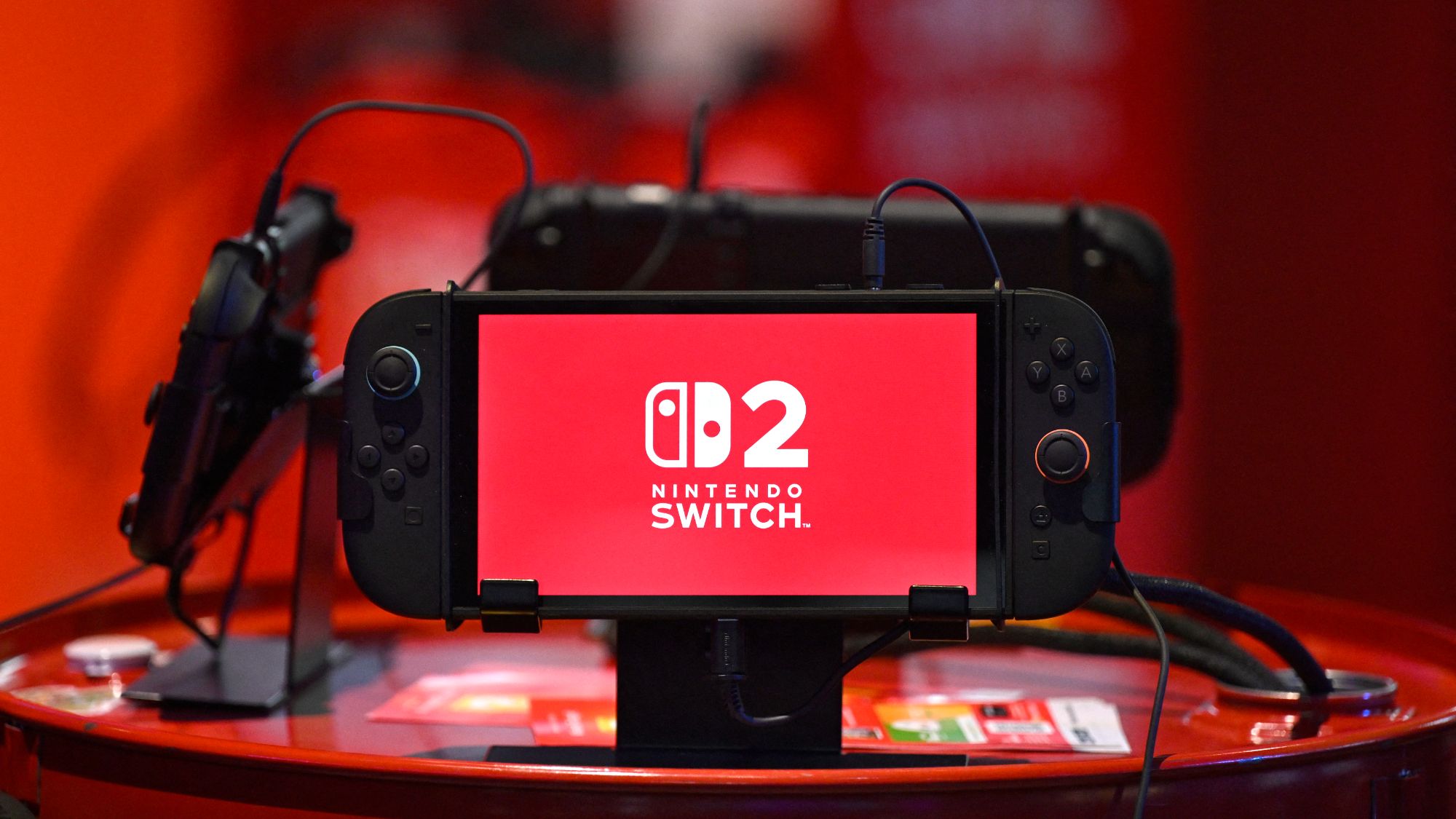
Nintendo unleashes DMCA takedown wave against open-source Switch modchip firmware, 144 tools disabled — Picofly, SX Core, and HWFLY among casualties following criminal trial victory

Tom's Hardware Nintendo unleashes DMCA takedown wave against open-source Switch modchip firmware, 144 tools disabled — Picofly, SX Core, and HWFLY among casualties following criminal trial victory www.tomshardware.com
0

Libreboot 26.11 Released with Full UEFI Support, Drops GRUB Payload

Linuxiac Libreboot 26.11 Released with Full UEFI Support, Drops GRUB Payload linuxiac.com
preview

Libreboot, the free and open-source boot firmware project that replaces proprietary BIOS and UEFI firmware on supported hardware, has released version 26.11, transitioning to full UEFI support through the MrChromebox EDK2 payload, which also makes it compatible with Microsoft Windows.

With this release, nearly all supported boards now ship exclusively with EDK2 firmware. The project removed GRUB as a coreboot payload, along with the previously included MemTest86plus and CSMWrap payloads, simplifying firmware configuration and reducing maintenance.

However, this change comes with an important warning for existing users. Systems configured to boot in legacy BIOS mode must be migrated to UEFI, including setting up a proper EFI System Partition, before installing the new firmware. Otherwise, existing operating system installations may no longer boot.

Legacy booting is still possible, but users must add the required components themselves when compiling Libreboot. The build system now supports inserting GRUB EFI, MemTest86plus, and ReBIOS through its efi/ directory.

On the hardware side, Libreboot 26.11 enables TPM 2.0 by default on several systems, including the ThinkPad X270, X280, T480, T480s, and T580, along with the Supermicro X11SSH-F and Topton X2E N150. TPM support was previously disabled due to problems with SeaBIOS, which no longer occur with EDK2.

Dell Latitude laptops also receive fixes for fan control, battery status reporting, and lid-switch handling during suspend. These improvements use an updated ACPI implementation replacing older SMM-based patches. Furthermore, SD card reader functionality has been restored on the ThinkPad W541 and Dell Latitude E7240 through an EDK2 patch.

For Chromebook users, the release restores configurations matching upstream MrChromebox after changes in Libreboot 26.10 caused boot failures on some systems. The Dell OptiPlex 780 also switches to EDK2, while the OptiPlex 5050 SFF gains SATA hotplug support and a fix for PCIe error reporting related to certain wireless cards.

A security-related EDK2 fix addresses an ICMP packet bounds-checking vulnerability in its PXE implementation. According to the developers, Libreboot was not affected because its configurations use iPXE instead, but the patch has been incorporated into the distributed source code.

Finally, the release simplifies several aspects of Libreboot’s build system, including firmware payload configuration, source handling, and ROM naming. Custom firmware images now use clearer BIOS and UEFI prefixes. Improvements to the lbmk build utility make it easier to insert additional EFI payloads and work with older firmware images.

For more information, see the release announcement.

Libreboot, the free and open-source boot firmware project that replaces proprietary BIOS and UEFI firmware on supported hardware, has released version 26.11, transitioning to full UEFI support through the MrChromebox EDK2 payload, which also makes it compatible with Microsoft Windows.

With this release, nearly all supported boards now ship exclusively with EDK2 firmware. The project removed GRUB as a coreboot payload, along with the previously included MemTest86plus and CSMWrap payloads, simplifying firmware configuration and reducing maintenance.

However, this change comes with an important warning for existing users. Systems configured to boot in legacy BIOS mode must be migrated to UEFI, including setting up a proper EFI System Partition, before installing the new firmware. Otherwise, existing operating system installations may no longer boot.

Legacy booting is still possible, but users must add the required components themselves when compiling Libreboot. The build system now supports inserting GRUB EFI, MemTest86plus, and ReBIOS through its efi/ directory.

On the hardware side, Libreboot 26.11 enables TPM 2.0 by default on several systems, including the ThinkPad X270, X280, T480, T480s, and T580, along with the Supermicro X11SSH-F and Topton X2E N150. TPM support was previously disabled due to problems with SeaBIOS, which no longer occur with EDK2.

Dell Latitude laptops also receive fixes for fan control, battery status reporting, and lid-switch handling during suspend. These improvements use an updated ACPI implementation replacing older SMM-based patches. Furthermore, SD card reader functionality has been restored on the ThinkPad W541 and Dell Latitude E7240 through an EDK2 patch.

For Chromebook users, the release restores configurations matching upstream MrChromebox after changes in Libreboot 26.10 caused boot failures on some systems. The Dell OptiPlex 780 also switches to EDK2, while the OptiPlex 5050 SFF gains SATA hotplug support and a fix for PCIe error reporting related to certain wireless cards.

A security-related EDK2 fix addresses an ICMP packet bounds-checking vulnerability in its PXE implementation. According to the developers, Libreboot was not affected because its configurations use iPXE instead, but the patch has been incorporated into the distributed source code.

Finally, the release simplifies several aspects of Libreboot’s build system, including firmware payload configuration, source handling, and ROM naming. Custom firmware images now use clearer BIOS and UEFI prefixes. Improvements to the lbmk build utility make it easier to insert additional EFI payloads and work with older firmware images.

For more information, see the release announcement.

0

Announcing Rust 1.100.0 | Rust Blog

Announcing Rust 1.100.0 | Rust Blog blog.rust-lang.org
preview

What’s in 1.100.0 stable

  • Never type
  • Allocator API
  • DropGuard API
  • Conjuring zero-sized types
  • Reporting unused dependencies in Cargo
  • Reducing Cargo cache collisions
  • Cargo min-publish-age
  • Stabilized APIs

What’s in 1.100.0 stable

  • Never type
  • Allocator API
  • DropGuard API
  • Conjuring zero-sized types
  • Reporting unused dependencies in Cargo
  • Reducing Cargo cache collisions
  • Cargo min-publish-age
  • Stabilized APIs
0

Miisha's small guide on epilating

preview

This is a post about using epilators to remove unwanted body hair. I wanted to make this, since I literally just did it, and also my friend Teagan (@IntroSkeptic@lemmy.blahaj.zone) just ordered hers, so I thought I’d make a small guide on how to do it.

Please note that this is just my experience with epilators and your mileage may vary.
With that said…

Epilating is by far the best hair removal method I’ve found. It has its upsides and downsides, but the result is always worth it, in my opinion.

The pros of epilating are:

  • It rips out the hair shaft completely, including the roots. This means that:
    • The result is smoother than just shaving, the hair shaft is just gone and also:
    • The result lasts for longer, because the entire shaft has to grow back
  • It’s relatively easy to do, once you have an epilator and get the hang of it
  • You can do it at home!
  • As the result lasts for longer, you don’t have to do it as often as you would have to shave
  • At least in my experience, especially combined with HRT, epilated hair grows back thinner, lighter and slower
  • I don’t get almost any ingrown hairs when epilating, but I don’t get those even when shaving tbh

HOWEVER! With that said, there are some pretty nasty downsides to epilating as well:

  • There’s no sugarcoating it: epilating fucking HURTS
  • You need an epilator, which can be pricey
  • You don’t have to do it as often, but it can take a while to do
  • You might need help reaching some hard-to-reach spots (like your butt)
  • Skin irritation, red dots, bleeding and skin damage (more on that later)
  • It is possible to injure yourself, but it shouldn’t happen when being careful
  • Risk of infection, but that’s why we have aftercare!

So, with those out of the way, how do you start epilating yourself?

Well, first of course, you need an epilator! I use a Philips 8000 series. It’s around 80$ IIRC and it’s amazing. I’ve had and used it for years now and it still works super well! My bf even dropped it from our apartment on the fourth floor (because of course he did 🤦‍♀️) and it still works exactly the same. Great machine ❤️

Once you have your epilator, you’re gonna want to choose a spot to epilate. I epilate my boobs, belly, what little chest hair I have, all of my pubic hair, my butt and my lower back. Oh and also my armpits.
I shave my arms and legs with a Venus razor and my face with a razor too, ofc. I find this combination to work really well, as although epilating arms and legs works well, it takes a reeeeeally long time. This combo works for me, but you should experiment! Your body isn’t my body and YMMV.

So, before epilating anything, you’re gonna want to shorten the hair a bit. Long hair gets tangled and that fucking HURTS. It also damages your skin quite a bit, so you want to avoid that as much as possible.
I recommend trimming hair to about 5mm in length, so that it doesn’t get tangled, but it still gets caught by the epilator. If it’s too short, you’re probably gonna struggle to get it all, which again, damages your skin and hurts. So keep the length in mind!

You’re also wanna get something for the pain. Trust me, don’t rawdog it!
In my experience, regular painkillers don’t work well for this. This pain is the acute, sharp and intense type, which is like the opposite of what painkillers treat. I personally use kratom (sue me) and it works really, really well for this. Tbh I haven’t been able to find a better alternative yet, but maybe you’ll find something that works for you that’s less…habit-forming :P

There’s one extremely important thing you have to do before actually epilating tho! Tie your hair up.
Getting it caught in an epilator is NOT fun. It hasn’t happened to me yet, but I’ve read people’s experiences and apparently it’s hell. Just tie it up to avoid this problem.

After that, take a hot shower. As hot as you can handle, so that your pores open up. This will help with the pain a bit, as there won’t be as much resistance. Plus, it’s just relaxing!

Okay, so for the actual epilating part: turn on the machine and (I recommend) set it to the lowest setting first. All tutorials say to gently glide the thing over your skin, but in my experience, you can put a little bit of pressure on it. Still, be gentle and be careful!
I go back and forth, applying slight pressure when I need it. Since body hair (or at least my body hair) doesn’t all grow in one direction, I usually try all the different directions. The key part is, you want to go against the direction the hair is growing in. That means, going from the tip towards the root basically. That helps tear it out as easily as possible.
What helps a lot is pulling the skin taut, stretching it out. That way, the hairs aren’t that close to each other and they also “let go” more easily. Idk, it just works.

It’s quite possible that you won’t get all the hair in one go. That’s completely fine! When the majority is gone, I usually switch my epilator to the faster speed and go over the area again. If you’re still unable to get all of the hair, don’t force it! Don’t push too hard. Just grab the leftover hair with a pair of tweezers, it’s fine!

If you’re epilating pubic hair, be extremely careful! You will bleed and that’s okay. Pubic hair is just sensitive like that. No matter what tho, always try to hold the skin taut. With thinner skin like that, the epilator sometime catches on a piece of it and slides to other places…and that really hurts, damages your skin and it’s just overall unpleasant. It’s hard to describe and it will probably happen to you a couple of times, but you’ll get the hang of it eventually. Just be careful with areas with thinner and more sensitive skin.
Try to hold everything in one place. I imagine that being post-OP would make this much easier as there aren’t any loose parts, but it is what it is. Try to hold everything in one place, prevent the epilator from catching and sliding away and just…be careful please!

When you’re done epilating, then comes aftercare, which is equally as important as the epilating part. I recommend showering the area with cold water, to calm down the irritation and to wash away any loose hair (and blood, sometimes :P). After showering, use some after shave! DON’T use the one that’s literally just alcohol tho! That is…unpleasant, to say the least. In my experience, “men’s” after shave is almost exclusively this alcohol type. I use an after shave “balm”, which looks like a sort of white cream. It contains no alcohol, doesn’t smell awful, doesn’t burn nearly as much, rubs really well and it works! If you can find that, I recommend it.

Regarding skin irritation and bleeding…it will happen, especially the first couple of times. However, once you learn how to epilate even better and you get more and more careful, you’ll learn to avoid it. Sometimes I get these red bumps after epilating, but those usually disappear after a day or two, leaving only smooth skin behind. Bleeding is almost guaranteed with pubic hair, but it’s really not a huge problem. Just be sure to follow aftercare practices and you’ll be just fine.

My epilated parts usually last two weeks plus before I have to do it again. Hair doesn’t start appearing until like five days plus. It really is so much better than shaving.

And, that’s about it…don’t know if this will help anyone, but that’s what epilating has been for me so far.
Is it worth it? For me, absolutely yes.
Is it scary? Yeah…
Does it hurt? Fuck yes.
Do I recommend it? Absolutely.

If this helps even just one person, I’ll be happy. If not, oh well.
Feel free to ask any questions in the comments.

And Teag? This is for you, girlie. I hope all goes well on your hair removal journey 🩷

Edit: Regarding facial hair, which I completely forgot to mention: yes, epilating would theoretically give a much better result than just shaving, but I personally don’t do it. At least for me, the pain is actually worse than epilating my pubic hair, which is…weird. You can try it either way, it’s just really painful for me, so I neither recommend it nor do I do it myself.

This is a post about using epilators to remove unwanted body hair. I wanted to make this, since I literally just did it, and also my friend Teagan (@IntroSkeptic@lemmy.blahaj.zone) just ordered hers, so I thought I’d make a small guide on how to do it.

Please note that this is just my experience with epilators and your mileage may vary.
With that said…

Epilating is by far the best hair removal method I’ve found. It has its upsides and downsides, but the result is always worth it, in my opinion.

The pros of epilating are:

  • It rips out the hair shaft completely, including the roots. This means that:
    • The result is smoother than just shaving, the hair shaft is just gone and also:
    • The result lasts for longer, because the entire shaft has to grow back
  • It’s relatively easy to do, once you have an epilator and get the hang of it
  • You can do it at home!
  • As the result lasts for longer, you don’t have to do it as often as you would have to shave
  • At least in my experience, especially combined with HRT, epilated hair grows back thinner, lighter and slower
  • I don’t get almost any ingrown hairs when epilating, but I don’t get those even when shaving tbh

HOWEVER! With that said, there are some pretty nasty downsides to epilating as well:

  • There’s no sugarcoating it: epilating fucking HURTS
  • You need an epilator, which can be pricey
  • You don’t have to do it as often, but it can take a while to do
  • You might need help reaching some hard-to-reach spots (like your butt)
  • Skin irritation, red dots, bleeding and skin damage (more on that later)
  • It is possible to injure yourself, but it shouldn’t happen when being careful
  • Risk of infection, but that’s why we have aftercare!

So, with those out of the way, how do you start epilating yourself?

Well, first of course, you need an epilator! I use a Philips 8000 series. It’s around 80$ IIRC and it’s amazing. I’ve had and used it for years now and it still works super well! My bf even dropped it from our apartment on the fourth floor (because of course he did 🤦‍♀️) and it still works exactly the same. Great machine ❤️

Once you have your epilator, you’re gonna want to choose a spot to epilate. I epilate my boobs, belly, what little chest hair I have, all of my pubic hair, my butt and my lower back. Oh and also my armpits.
I shave my arms and legs with a Venus razor and my face with a razor too, ofc. I find this combination to work really well, as although epilating arms and legs works well, it takes a reeeeeally long time. This combo works for me, but you should experiment! Your body isn’t my body and YMMV.

So, before epilating anything, you’re gonna want to shorten the hair a bit. Long hair gets tangled and that fucking HURTS. It also damages your skin quite a bit, so you want to avoid that as much as possible.
I recommend trimming hair to about 5mm in length, so that it doesn’t get tangled, but it still gets caught by the epilator. If it’s too short, you’re probably gonna struggle to get it all, which again, damages your skin and hurts. So keep the length in mind!

You’re also wanna get something for the pain. Trust me, don’t rawdog it!
In my experience, regular painkillers don’t work well for this. This pain is the acute, sharp and intense type, which is like the opposite of what painkillers treat. I personally use kratom (sue me) and it works really, really well for this. Tbh I haven’t been able to find a better alternative yet, but maybe you’ll find something that works for you that’s less…habit-forming :P

There’s one extremely important thing you have to do before actually epilating tho! Tie your hair up.
Getting it caught in an epilator is NOT fun. It hasn’t happened to me yet, but I’ve read people’s experiences and apparently it’s hell. Just tie it up to avoid this problem.

After that, take a hot shower. As hot as you can handle, so that your pores open up. This will help with the pain a bit, as there won’t be as much resistance. Plus, it’s just relaxing!

Okay, so for the actual epilating part: turn on the machine and (I recommend) set it to the lowest setting first. All tutorials say to gently glide the thing over your skin, but in my experience, you can put a little bit of pressure on it. Still, be gentle and be careful!
I go back and forth, applying slight pressure when I need it. Since body hair (or at least my body hair) doesn’t all grow in one direction, I usually try all the different directions. The key part is, you want to go against the direction the hair is growing in. That means, going from the tip towards the root basically. That helps tear it out as easily as possible.
What helps a lot is pulling the skin taut, stretching it out. That way, the hairs aren’t that close to each other and they also “let go” more easily. Idk, it just works.

It’s quite possible that you won’t get all the hair in one go. That’s completely fine! When the majority is gone, I usually switch my epilator to the faster speed and go over the area again. If you’re still unable to get all of the hair, don’t force it! Don’t push too hard. Just grab the leftover hair with a pair of tweezers, it’s fine!

If you’re epilating pubic hair, be extremely careful! You will bleed and that’s okay. Pubic hair is just sensitive like that. No matter what tho, always try to hold the skin taut. With thinner skin like that, the epilator sometime catches on a piece of it and slides to other places…and that really hurts, damages your skin and it’s just overall unpleasant. It’s hard to describe and it will probably happen to you a couple of times, but you’ll get the hang of it eventually. Just be careful with areas with thinner and more sensitive skin.
Try to hold everything in one place. I imagine that being post-OP would make this much easier as there aren’t any loose parts, but it is what it is. Try to hold everything in one place, prevent the epilator from catching and sliding away and just…be careful please!

When you’re done epilating, then comes aftercare, which is equally as important as the epilating part. I recommend showering the area with cold water, to calm down the irritation and to wash away any loose hair (and blood, sometimes :P). After showering, use some after shave! DON’T use the one that’s literally just alcohol tho! That is…unpleasant, to say the least. In my experience, “men’s” after shave is almost exclusively this alcohol type. I use an after shave “balm”, which looks like a sort of white cream. It contains no alcohol, doesn’t smell awful, doesn’t burn nearly as much, rubs really well and it works! If you can find that, I recommend it.

Regarding skin irritation and bleeding…it will happen, especially the first couple of times. However, once you learn how to epilate even better and you get more and more careful, you’ll learn to avoid it. Sometimes I get these red bumps after epilating, but those usually disappear after a day or two, leaving only smooth skin behind. Bleeding is almost guaranteed with pubic hair, but it’s really not a huge problem. Just be sure to follow aftercare practices and you’ll be just fine.

My epilated parts usually last two weeks plus before I have to do it again. Hair doesn’t start appearing until like five days plus. It really is so much better than shaving.

And, that’s about it…don’t know if this will help anyone, but that’s what epilating has been for me so far.
Is it worth it? For me, absolutely yes.
Is it scary? Yeah…
Does it hurt? Fuck yes.
Do I recommend it? Absolutely.

If this helps even just one person, I’ll be happy. If not, oh well.
Feel free to ask any questions in the comments.

And Teag? This is for you, girlie. I hope all goes well on your hair removal journey 🩷

Edit: Regarding facial hair, which I completely forgot to mention: yes, epilating would theoretically give a much better result than just shaving, but I personally don’t do it. At least for me, the pain is actually worse than epilating my pubic hair, which is…weird. You can try it either way, it’s just really painful for me, so I neither recommend it nor do I do it myself.

0

SmartTube LOCAL: piss off Youtube with a local account, subs and offline playback

GitHub GitHub - bsgcl/SmartTubeLocal: SmartTube with local profiles, no Google sign-in and offline playback from your local YouTube archive. github.com
preview

Hei

As you may have noticed, Youtube is kinda shitty in 2026. There are various solutions to that (pay, use one of a zillion apps, use invidious etc). All of those have their pros and cons…but for me, SmartTube was always the GOAT.

As the big-screen Youtube replacement, you can’t get much better.

Recently though, Google have been right pains in the ass here. For example, I am not able to view my own saved playlists without logging in…and to log in, I need to provide photoID. Haha, no.

So, I got a stick up my ass and decided to cook up a solution. One thing led to another and well…here we are.

Cool story bro. WTF is this?

The inventively named SmartTube LOCAL came about because Google got on my tits…and unlike a sane person, I decided to code around it. For 6 months. Because that seemed like a sane solution.

So, here’s SmartTube LOCAL, with the following cool feats.

  • Offline playback from your SMB share, via MeTube or yt-dlp. Finally, you can watch Youtube without needing JF or Plex.
  • AUTO / LOCAL ONLY modes. Mix YouTube with your archive, or tell Google to fuck off entirely.
  • OFFLINE PROFILES. Give everyone their own subscriptions, playlists and settings, without Google accounts. Keep the kids on approved local content while the adults get the whole shebang.
  • Parental controls. Restrict what the kids can watch without maintaining separate archives. No more brainrot.
  • Local search, recommendations and SponsorBlock, even offline.
  • Playlist and subscription imports from Google Takeout and NewPipe.

You’ll need an SMB share and the included Python catalogue publisher. A little elbow grease required for now. Sorry - I would have baked that in, but I have some old ass TVs in the extended fam I need to support and they might shit themselves polling 20,000 videos.

I just cleaned repo kruft and re-pushed 32.71 (pegged to 32.53 upstream).

https://github.com/bsgcl/SmartTubeLocal

It’s a personal project - which means I get to maintain it forever, yay. I’m just sharing this for fun because it tickles me some to think people are enjoying Youtube “wrong” (according to Big Evil).

PS: Clankers helped with the implementation and testing. Design and review was good old fashioned caffeine and swearing. The questionable life choices are my parents’ fault for raising me wrong / day drinking.

PPS: If you like it, star it, share it, I don’t fucking know. I’m not trying to win a prize pig. Honestly, I stuck it on GitHub so I wouldn’t have to punch a hole in my firewall. Plus this way, the app can auto-magically update on extended fam’s TVs without me having to schlep it all over town.

PPPS: If Google decides to enshittify SABR even further and breaks online playback, at least you’ll still be able to watch your ill-gotten downloads on the big screen. Then Google can fuck off twice.

Pretty pictures because reading it hard

Hei

As you may have noticed, Youtube is kinda shitty in 2026. There are various solutions to that (pay, use one of a zillion apps, use invidious etc). All of those have their pros and cons…but for me, SmartTube was always the GOAT.

As the big-screen Youtube replacement, you can’t get much better.

Recently though, Google have been right pains in the ass here. For example, I am not able to view my own saved playlists without logging in…and to log in, I need to provide photoID. Haha, no.

So, I got a stick up my ass and decided to cook up a solution. One thing led to another and well…here we are.

Cool story bro. WTF is this?

The inventively named SmartTube LOCAL came about because Google got on my tits…and unlike a sane person, I decided to code around it. For 6 months. Because that seemed like a sane solution.

So, here’s SmartTube LOCAL, with the following cool feats.

  • Offline playback from your SMB share, via MeTube or yt-dlp. Finally, you can watch Youtube without needing JF or Plex.
  • AUTO / LOCAL ONLY modes. Mix YouTube with your archive, or tell Google to fuck off entirely.
  • OFFLINE PROFILES. Give everyone their own subscriptions, playlists and settings, without Google accounts. Keep the kids on approved local content while the adults get the whole shebang.
  • Parental controls. Restrict what the kids can watch without maintaining separate archives. No more brainrot.
  • Local search, recommendations and SponsorBlock, even offline.
  • Playlist and subscription imports from Google Takeout and NewPipe.

You’ll need an SMB share and the included Python catalogue publisher. A little elbow grease required for now. Sorry - I would have baked that in, but I have some old ass TVs in the extended fam I need to support and they might shit themselves polling 20,000 videos.

I just cleaned repo kruft and re-pushed 32.71 (pegged to 32.53 upstream).

https://github.com/bsgcl/SmartTubeLocal

It’s a personal project - which means I get to maintain it forever, yay. I’m just sharing this for fun because it tickles me some to think people are enjoying Youtube “wrong” (according to Big Evil).

PS: Clankers helped with the implementation and testing. Design and review was good old fashioned caffeine and swearing. The questionable life choices are my parents’ fault for raising me wrong / day drinking.

PPS: If you like it, star it, share it, I don’t fucking know. I’m not trying to win a prize pig. Honestly, I stuck it on GitHub so I wouldn’t have to punch a hole in my firewall. Plus this way, the app can auto-magically update on extended fam’s TVs without me having to schlep it all over town.

PPPS: If Google decides to enshittify SABR even further and breaks online playback, at least you’ll still be able to watch your ill-gotten downloads on the big screen. Then Google can fuck off twice.

Pretty pictures because reading it hard

0

Leaked screenshot shows Graphite reading your Signal, WhatsApp, and Telegram - directly from your phone

preview

found this on some telegram channel:

In February 2026, an employee of Paragon Solutions published a photograph on her LinkedIn profile depicting the operation of the Graphite spyware. The post has currently been deleted.

Reut Yamen holds the position of Chief Legal Counsel and Director of Compliance at the Israeli company Paragon Solutions, which specializes in cyber-surveillance technologies. The company was founded in 2019 by a group of former employees of Israeli intelligence services — among them Ehud Schneorson, former commander of Unit 8200 (Israel’s equivalent of the U.S. National Security Agency), as well as former Israeli Prime Minister Ehud Barak.

The post was first noticed by technology researcher Yurre van Bergen, who tracks the use and proliferation of spyware worldwide.

The image apparently shows a demonstration interface of the Graphite system. An operator can view messages intercepted from a surveillance target in various services, including WhatsApp, Telegram, Signal, Line, and TikTok.

According to the results of a large-scale investigation conducted by The Citizen Lab in 2025, in 2024 in Italy, dozens of journalists and private individuals were attacked via the WhatsApp messenger using Graphite. A “zero-click” exploit (one that does not require user interaction) was used for this purpose.

Paragon Solutions has (or previously had) contracts with U.S. government agencies, in particular the Drug Enforcement Administration (DEA) and Immigration and Customs Enforcement (ICE).

found this on some telegram channel:

In February 2026, an employee of Paragon Solutions published a photograph on her LinkedIn profile depicting the operation of the Graphite spyware. The post has currently been deleted.

Reut Yamen holds the position of Chief Legal Counsel and Director of Compliance at the Israeli company Paragon Solutions, which specializes in cyber-surveillance technologies. The company was founded in 2019 by a group of former employees of Israeli intelligence services — among them Ehud Schneorson, former commander of Unit 8200 (Israel’s equivalent of the U.S. National Security Agency), as well as former Israeli Prime Minister Ehud Barak.

The post was first noticed by technology researcher Yurre van Bergen, who tracks the use and proliferation of spyware worldwide.

The image apparently shows a demonstration interface of the Graphite system. An operator can view messages intercepted from a surveillance target in various services, including WhatsApp, Telegram, Signal, Line, and TikTok.

According to the results of a large-scale investigation conducted by The Citizen Lab in 2025, in 2024 in Italy, dozens of journalists and private individuals were attacked via the WhatsApp messenger using Graphite. A “zero-click” exploit (one that does not require user interaction) was used for this purpose.

Paragon Solutions has (or previously had) contracts with U.S. government agencies, in particular the Drug Enforcement Administration (DEA) and Immigration and Customs Enforcement (ICE).

0

Libreboot 26.11 Released with Full UEFI Support, Drops GRUB Payload

Linuxiac Libreboot 26.11 Released with Full UEFI Support, Drops GRUB Payload linuxiac.com
preview

Libreboot, the free and open-source boot firmware project that replaces proprietary BIOS and UEFI firmware on supported hardware, has released version 26.11, transitioning to full UEFI support through the MrChromebox EDK2 payload, which also makes it compatible with Microsoft Windows.

With this release, nearly all supported boards now ship exclusively with EDK2 firmware. The project removed GRUB as a coreboot payload, along with the previously included MemTest86plus and CSMWrap payloads, simplifying firmware configuration and reducing maintenance.

However, this change comes with an important warning for existing users. Systems configured to boot in legacy BIOS mode must be migrated to UEFI, including setting up a proper EFI System Partition, before installing the new firmware. Otherwise, existing operating system installations may no longer boot.

Legacy booting is still possible, but users must add the required components themselves when compiling Libreboot. The build system now supports inserting GRUB EFI, MemTest86plus, and ReBIOS through its efi/ directory.

On the hardware side, Libreboot 26.11 enables TPM 2.0 by default on several systems, including the ThinkPad X270, X280, T480, T480s, and T580, along with the Supermicro X11SSH-F and Topton X2E N150. TPM support was previously disabled due to problems with SeaBIOS, which no longer occur with EDK2.

Dell Latitude laptops also receive fixes for fan control, battery status reporting, and lid-switch handling during suspend. These improvements use an updated ACPI implementation replacing older SMM-based patches. Furthermore, SD card reader functionality has been restored on the ThinkPad W541 and Dell Latitude E7240 through an EDK2 patch.

For Chromebook users, the release restores configurations matching upstream MrChromebox after changes in Libreboot 26.10 caused boot failures on some systems. The Dell OptiPlex 780 also switches to EDK2, while the OptiPlex 5050 SFF gains SATA hotplug support and a fix for PCIe error reporting related to certain wireless cards.

A security-related EDK2 fix addresses an ICMP packet bounds-checking vulnerability in its PXE implementation. According to the developers, Libreboot was not affected because its configurations use iPXE instead, but the patch has been incorporated into the distributed source code.

Finally, the release simplifies several aspects of Libreboot’s build system, including firmware payload configuration, source handling, and ROM naming. Custom firmware images now use clearer BIOS and UEFI prefixes. Improvements to the lbmk build utility make it easier to insert additional EFI payloads and work with older firmware images.

For more information, see the release announcement.

Libreboot, the free and open-source boot firmware project that replaces proprietary BIOS and UEFI firmware on supported hardware, has released version 26.11, transitioning to full UEFI support through the MrChromebox EDK2 payload, which also makes it compatible with Microsoft Windows.

With this release, nearly all supported boards now ship exclusively with EDK2 firmware. The project removed GRUB as a coreboot payload, along with the previously included MemTest86plus and CSMWrap payloads, simplifying firmware configuration and reducing maintenance.

However, this change comes with an important warning for existing users. Systems configured to boot in legacy BIOS mode must be migrated to UEFI, including setting up a proper EFI System Partition, before installing the new firmware. Otherwise, existing operating system installations may no longer boot.

Legacy booting is still possible, but users must add the required components themselves when compiling Libreboot. The build system now supports inserting GRUB EFI, MemTest86plus, and ReBIOS through its efi/ directory.

On the hardware side, Libreboot 26.11 enables TPM 2.0 by default on several systems, including the ThinkPad X270, X280, T480, T480s, and T580, along with the Supermicro X11SSH-F and Topton X2E N150. TPM support was previously disabled due to problems with SeaBIOS, which no longer occur with EDK2.

Dell Latitude laptops also receive fixes for fan control, battery status reporting, and lid-switch handling during suspend. These improvements use an updated ACPI implementation replacing older SMM-based patches. Furthermore, SD card reader functionality has been restored on the ThinkPad W541 and Dell Latitude E7240 through an EDK2 patch.

For Chromebook users, the release restores configurations matching upstream MrChromebox after changes in Libreboot 26.10 caused boot failures on some systems. The Dell OptiPlex 780 also switches to EDK2, while the OptiPlex 5050 SFF gains SATA hotplug support and a fix for PCIe error reporting related to certain wireless cards.

A security-related EDK2 fix addresses an ICMP packet bounds-checking vulnerability in its PXE implementation. According to the developers, Libreboot was not affected because its configurations use iPXE instead, but the patch has been incorporated into the distributed source code.

Finally, the release simplifies several aspects of Libreboot’s build system, including firmware payload configuration, source handling, and ROM naming. Custom firmware images now use clearer BIOS and UEFI prefixes. Improvements to the lbmk build utility make it easier to insert additional EFI payloads and work with older firmware images.

For more information, see the release announcement.

0

Help me choose my daily browser (Android + Linux): hard privacy AND ethics constraints

preview

cross-posted from: lemmy.ml/post/55238685

no baked-in trackers/analytics, No VC backing, Big Tech parent, or crypto schemes. aggressive ad/tracker blocking, fingerprinting resistance, working YouTube ad blocking, extension support, smooth Android + Linux use.

What’s your daily driver under these constraints, and what tradeoff did you accept?

cross-posted from: lemmy.ml/post/55238685

no baked-in trackers/analytics, No VC backing, Big Tech parent, or crypto schemes. aggressive ad/tracker blocking, fingerprinting resistance, working YouTube ad blocking, extension support, smooth Android + Linux use.

What’s your daily driver under these constraints, and what tradeoff did you accept?

0

Help me choose my daily browser (Android + Linux): hard privacy AND ethics constraints

preview

no baked-in trackers/analytics, No VC backing, Big Tech parent, or crypto schemes. aggressive ad/tracker blocking, fingerprinting resistance, working YouTube ad blocking, extension support, smooth Android + Linux use.

What’s your daily driver under these constraints, and what tradeoff did you accept?

no baked-in trackers/analytics, No VC backing, Big Tech parent, or crypto schemes. aggressive ad/tracker blocking, fingerprinting resistance, working YouTube ad blocking, extension support, smooth Android + Linux use.

What’s your daily driver under these constraints, and what tradeoff did you accept?

0

Dutch foreign minister declines to deny talks are under way on curbing ICC powers

Middle East Eye Dutch foreign minister declines to deny talks are under way on curbing ICC powers www.middleeasteye.net
preview

Dutch Foreign Minister Tom Berendsen has declined to rule out the suggestion that discussions are taking place over sweeping restrictions on the International Criminal Court (ICC), following a report that the Netherlands is negotiating with Washington over changes that could severely undermine the court’s powers.

Questioned in parliament on Wednesday, Berendsen said diplomatic discussions were taking place but he would not specify whether proposals to shield national leaders and restrict the court’s jurisdiction were under consideration.

The exchange followed a report by Dutch rights organisation The Rights Forum, citing anonymous diplomatic sources in New York, that the Netherlands was negotiating restrictions in response to US sanctions.

Hanneke van der Werf MP, from the Democrats 66 party, asked whether discussions included immunity for heads of state and government, excluding nationals of countries outside the court’s founding treaty from its jurisdiction, and weakening its ability to intervene when national authorities fail to prosecute.

Dutch Foreign Minister Tom Berendsen has declined to rule out the suggestion that discussions are taking place over sweeping restrictions on the International Criminal Court (ICC), following a report that the Netherlands is negotiating with Washington over changes that could severely undermine the court’s powers.

Questioned in parliament on Wednesday, Berendsen said diplomatic discussions were taking place but he would not specify whether proposals to shield national leaders and restrict the court’s jurisdiction were under consideration.

The exchange followed a report by Dutch rights organisation The Rights Forum, citing anonymous diplomatic sources in New York, that the Netherlands was negotiating restrictions in response to US sanctions.

Hanneke van der Werf MP, from the Democrats 66 party, asked whether discussions included immunity for heads of state and government, excluding nationals of countries outside the court’s founding treaty from its jurisdiction, and weakening its ability to intervene when national authorities fail to prosecute.

0

Introducing home keys in Google Wallet for compatible smart locks in the Google Home app

Locks and Alarms Introducing home keys in Google Wallet for compatible smart locks in the Google Home app support.google.com
preview

Introducing home keys in Google Wallet for compatible smart locks in the Google Home app

Introducing home keys in Google Wallet for compatible smart locks in the Google Home app

0

Tutorial for Verus, a language and checker for statically verifying correctness of Rust code sections

preview

Here the verus github page with some code samples in color:

github.com/verus-lang/verus

Here the verus github page with some code samples in color:

github.com/verus-lang/verus

0

Tutorial for Verus, a language and checker for statically verifying correctness of Rust code sections

preview

Here the verus github page with some code samples in color:

github.com/verus-lang/verus

Here the verus github page with some code samples in color:

github.com/verus-lang/verus

0

Looking for feedback on my WIP squadron wiki - Omni Academy

preview

I’ve spent the last few months working on a wiki for teaching new players in my squadron. There’s still a lot to cover, but the general idea behind my squadron is that every time I wanted to learn something new in Elite, I had to go to a new source for that information. 85% of the time that information is buried in a forum or halfway into a 30-minute YouTube video.

I kept having to look up the same information over and over again, but would have to find where the source was every time. So instead I condensed it into the basics of what it takes to get a new player off the ground landing pad. That way they can stick mostly to my site and not have to bare with the search engine gods to find what they’re looking for when people aren’t around to answer questions.

I’m not going tor the “best” way of doing things here. Just the easiest for new players. I don’t believe in min-maxing especially when teaching new players. They can learn their own ways to optimize if they want, but almost every tutorial out there is trying to show you how to do things in one exact way and don’t always explain how they got there.

I’m curious what others think and if the direction I’m headed in is something others would enjoy. And feel free to use this as a resource if you find it helpful even if you’re not interested in joining. I’m trying to add a new article at least a couple times a month. These take a ton of effort so if there’s something I could be doing better, I’m curious what I should consider before continuing.

Also if anyone would be interested, I’d be open to considering new members. Just reach out to me privately and we can discuss if it would be a good fit.

also also...

I can’t believe I even have to mention this, but no, nothing in this stack is AI. I wrote every sentence and did the formatting one line at a time in Markdown.

I’ve spent the last few months working on a wiki for teaching new players in my squadron. There’s still a lot to cover, but the general idea behind my squadron is that every time I wanted to learn something new in Elite, I had to go to a new source for that information. 85% of the time that information is buried in a forum or halfway into a 30-minute YouTube video.

I kept having to look up the same information over and over again, but would have to find where the source was every time. So instead I condensed it into the basics of what it takes to get a new player off the ground landing pad. That way they can stick mostly to my site and not have to bare with the search engine gods to find what they’re looking for when people aren’t around to answer questions.

I’m not going tor the “best” way of doing things here. Just the easiest for new players. I don’t believe in min-maxing especially when teaching new players. They can learn their own ways to optimize if they want, but almost every tutorial out there is trying to show you how to do things in one exact way and don’t always explain how they got there.

I’m curious what others think and if the direction I’m headed in is something others would enjoy. And feel free to use this as a resource if you find it helpful even if you’re not interested in joining. I’m trying to add a new article at least a couple times a month. These take a ton of effort so if there’s something I could be doing better, I’m curious what I should consider before continuing.

Also if anyone would be interested, I’d be open to considering new members. Just reach out to me privately and we can discuss if it would be a good fit.

also also...

I can’t believe I even have to mention this, but no, nothing in this stack is AI. I wrote every sentence and did the formatting one line at a time in Markdown.

0

Drei Figuren (1922) by Arthur Segal

preview

Arthur Segal was a Romanian artist and author. Segal was born to Jewish parents in Iaşi, Romania, and studied at the Berlin Academy from 1892. He studied with Schmid-Reutte [de] and Hölzel in Munich in 1896, and later studied in Paris and Italy in the early 1900s. After studying in Paris and Italy, he eventually moved to Berlin in 1904 where he exhibited his work with Die Brucke and Der Blaue Reiter, two leading German expression groups. In 1910 he co-founded the Neue Sezession, a group of artists whose work was rejected by the Berliner Sezession.

https://en.wikipedia.org/wiki/Arthur_Segal_(painter)

More Arthur: https://artvee.com/artist/arthur-segal/

Arthur Segal was a Romanian artist and author. Segal was born to Jewish parents in Iaşi, Romania, and studied at the Berlin Academy from 1892. He studied with Schmid-Reutte [de] and Hölzel in Munich in 1896, and later studied in Paris and Italy in the early 1900s. After studying in Paris and Italy, he eventually moved to Berlin in 1904 where he exhibited his work with Die Brucke and Der Blaue Reiter, two leading German expression groups. In 1910 he co-founded the Neue Sezession, a group of artists whose work was rejected by the Berliner Sezession.

https://en.wikipedia.org/wiki/Arthur_Segal_(painter)

More Arthur: https://artvee.com/artist/arthur-segal/