55
160
preview
LMAO, so true! Happens every time I’m in a car 😂
Kinda affirming tho, ngl ❤️
LMAO, so true! Happens every time I’m in a car 😂
Kinda affirming tho, ngl ❤️

LMAO, so true! Happens every time I’m in a car 😂
Kinda affirming tho, ngl ❤️
LMAO, so true! Happens every time I’m in a car 😂
Kinda affirming tho, ngl ❤️


THIS RIGHT HERE!
If I show you a pic on my phone and you start swiping like a dummy, don’t complain about seeing my ass pics, boob pics and pics (and videos :3) of me getting bent over by my bf! You did this to yourself, you have no right to complain 😭
We actually just talked about this with my female cousin today, lol. We both agreed that this is a heinous thing to do. We had an amazing yapping session, I think we both really needed that. She’s great, I love her ❤️
THIS RIGHT HERE!
If I show you a pic on my phone and you start swiping like a dummy, don’t complain about seeing my ass pics, boob pics and pics (and videos :3) of me getting bent over by my bf! You did this to yourself, you have no right to complain 😭
We actually just talked about this with my female cousin today, lol. We both agreed that this is a heinous thing to do. We had an amazing yapping session, I think we both really needed that. She’s great, I love her ❤️


UK under-16 social media ban may expand to 150 platforms, including YouTube Kids, Lego Play and Spotify. See who it hits and when it starts.
UK under-16 social media ban may expand to 150 platforms, including YouTube Kids, Lego Play and Spotify. See who it hits and when it starts.




For those who haven’t heard: Namesilo took down codeberg.
For those who haven’t heard: Namesilo took down codeberg.


Hello there, my dearest people of Selfhosted!
I’m Evgenii, the developer and maintainer of Dawarich, a free, open-source, self-hostable alternative to Google Timeline, and I brought you a fresh portion of updates we made in October 2026.
AI Disclosure (as per lemmy.world/post/49320548):
Implementation - Generated
Testing - Assisted
Design - Assisted
As always, our links:
Github: https://github.com/Freika/dawarich
Website: https://dawarich.app/
iOS app: https://apps.apple.com/us/app/dawarich/id6739544999
Android app: https://play.google.com/store/apps/details?id=app.dawarich.Dawarich
So, what we brought to Dawarich in October? First of all, A TON of bugfixes. I released fixes for and closed roughly ~150 bug reports, plus the stuff I discovered myself. For months, number of open issues on GitHub was somewhere between 100 and 150, and I was struggling to keep up with the new reports. But in October I was finally able to build a proper system around this and now reproducing, finding the root and fixing a bug is a lot faster process. As of today, we have ~40 open issues on Github, most of which are either feature requests (I usually convert them to Discussions on Github, under “Ideas” section) or bug reports related to our mobile apps. I hope to reduce this number further before the year ends. For the mobile apps development pace is naturally a bit slower, due to how releasing process works in AppStore and Google Play, but we’re addressing issues reported for them as well.

Now, historically, due to tech stack of my choice, Dawarich consisted of 4 docker containers: the app itself, sidekiq for background jobs, redis for cache and sidekiq jobs queue, and postgresql for the database. I know it bothered some of our users, so I found the way to reduce number of docker containers to 3 by putting Sidekiq into the app container. It was introduced in 1.17.0 and works well, here’s your updating guide: dawarich.app/docs/self-hosting/updating/#one-cont…
Also, in the same release, thanks to one container less and some other optimizations, idling memory consumption went down, from ~480mb to ~230mb. Feels good, innit? And since we’re here talking performance, Trips pages are now a LOT faster, same as Points index page. Data imports and reverse geocoding speed were also improved, with more speed ups are being in progress right now.
First, there were Areas, that you could draw on the map and detect visits within, then I added Places, that were created either from detected visits or manually by user. It was kinda inconvenient to have both, so I finally found the time to convert Areas to Places, add a radius to Places so the would act as Areas, and introduced geofencing as a cherry in top. Phew! So now you can create a place, set a radius to detect visits (upto 50km) and configure webhooks on enter-leave events. Enter the designated area -> Enter event triggered -> configured webhook is sent to your HomeAssistant, NodeRed, N8n, or whatever other service you prefer to use. Add some imagination and maybe you could configure push notifications. Complete freedom, yay!

As much as I would love people to create videos about Dawarich (which they do, and they’re awesome!), it’s obvious nobody wants to doxx themselves by exposing their home location on a video. So a while ago I introduced Privacy zones for tags, and now updated them to work across all the maps in Dawarich, be it the Map page, Trips, Posters, Replays, publicly shared pages, you name it. Basically it works like this:
What’s important, the place tagged with a privacy zone’d tag is not in the middle of the radius, so it won’t be possible to establish exact location by simply putting a finger in the center of hidden radius. Here’s a short demo of how the feature works: youtu.be/CIl09RAVSBI
Some other notable changes:
Lots of other, smaller, things were introduced and/or changes, so as always, I’d recommend to keep your eyes on changelogs and create backups before updating :)
We worked on them, too :) As always, some work was done to improve battery consumption and performance, on Android specifically, we added Photos and Hexagons layers to the map, some fixes for widgets, and a supporter badge in the web for those who purchased Self-Hoster Pro plan in the mobile app. Because every way of supporting matters and we would love to give back to the community.

Almost forgot: Dawarich is now available on your Apple Watch and WearOS :) Some screenshots below:

We’ve sent first batch of stickers to our users from Germany, and I expect to send ~50 more envelopes to the rest of the world next week. If you’d like to receive some, leave your address in this form: tally.so/r/1A1DBg
Turns out, manually signing all the envelopes and postcards (I’m adding one to each envelope until they last) is a time-consuming job and a lot less fun than tapping buttons on a keyboard, but I managed to do it with the help of my lovely wife :D Gotta figure something out to simplify the process though, especially if there will be more people requesting stickers :)
Small reminder, the idea behind stickers is that you stick them in the place of your travels and (optionally) send me a picture of the place with the sticker with coordinates, so later I could put them together to a map, marking travelings of our users :)

In Dawarich, we have transportation mode detection for tracks. Based on speed, acceleration and some other parameters, an estimation is being done on backend, whether part of a track walked by foot, cycled, driven or flown. It’s pretty unreliable in its current form, so I have this idea, where you, the community, can help. I drafted a tool, where you can load your GPX files and mark track segments up, by providing information on what transportation mode the segment belongs to.

It all works in your browser and no coordinates nor timestamps being sent anywhere. When you finish, you can click “Review & Send” and only then features of the marked up track segments will be uploaded. You’ll be able to see what exactly is being sent before it’s sent to make sure no private data leaves your device.
Later on, when there is enough data for each transportation mode, I’ll try to compose a tool that will accept a gpx track and return most probable transportation mode for it. If all goes well and the tool works as intended, I will open source it under permissive license. It will also be distributed as part of Dawarich, which will benefit from more reliable transportation mode detection. Once it’s reliable enough, this opens some new possibilities for features long asked by the community.
Here’s the link, if you want to help: transportation-modes.dawarich.app
Thanks!
It’s fascinating, that after two years of Dawarich being in development I still have TONS of ideas, both for the web app and the mobile app. Kinda envy myself a bit, haha. Lots of stuff to port from our web to mobile, new features, improvements.
Thank you all for that. There would be no Dawarich without you, people using it, loving it and sharing it with your friends.
As always, more awesome stuff to come, see you in the next one!
P.S.
Links to save you a scroll:
Support development: GitHub Sponsors / Patreon
Hello there, my dearest people of Selfhosted!
I’m Evgenii, the developer and maintainer of Dawarich, a free, open-source, self-hostable alternative to Google Timeline, and I brought you a fresh portion of updates we made in October 2026.
AI Disclosure (as per lemmy.world/post/49320548):
Implementation - Generated
Testing - Assisted
Design - Assisted
As always, our links:
Github: https://github.com/Freika/dawarich
Website: https://dawarich.app/
iOS app: https://apps.apple.com/us/app/dawarich/id6739544999
Android app: https://play.google.com/store/apps/details?id=app.dawarich.Dawarich
So, what we brought to Dawarich in October? First of all, A TON of bugfixes. I released fixes for and closed roughly ~150 bug reports, plus the stuff I discovered myself. For months, number of open issues on GitHub was somewhere between 100 and 150, and I was struggling to keep up with the new reports. But in October I was finally able to build a proper system around this and now reproducing, finding the root and fixing a bug is a lot faster process. As of today, we have ~40 open issues on Github, most of which are either feature requests (I usually convert them to Discussions on Github, under “Ideas” section) or bug reports related to our mobile apps. I hope to reduce this number further before the year ends. For the mobile apps development pace is naturally a bit slower, due to how releasing process works in AppStore and Google Play, but we’re addressing issues reported for them as well.
Now, historically, due to tech stack of my choice, Dawarich consisted of 4 docker containers: the app itself, sidekiq for background jobs, redis for cache and sidekiq jobs queue, and postgresql for the database. I know it bothered some of our users, so I found the way to reduce number of docker containers to 3 by putting Sidekiq into the app container. It was introduced in 1.17.0 and works well, here’s your updating guide: dawarich.app/docs/self-hosting/updating/#one-cont…
Also, in the same release, thanks to one container less and some other optimizations, idling memory consumption went down, from ~480mb to ~230mb. Feels good, innit? And since we’re here talking performance, Trips pages are now a LOT faster, same as Points index page. Data imports and reverse geocoding speed were also improved, with more speed ups are being in progress right now.
First, there were Areas, that you could draw on the map and detect visits within, then I added Places, that were created either from detected visits or manually by user. It was kinda inconvenient to have both, so I finally found the time to convert Areas to Places, add a radius to Places so the would act as Areas, and introduced geofencing as a cherry in top. Phew! So now you can create a place, set a radius to detect visits (upto 50km) and configure webhooks on enter-leave events. Enter the designated area -> Enter event triggered -> configured webhook is sent to your HomeAssistant, NodeRed, N8n, or whatever other service you prefer to use. Add some imagination and maybe you could configure push notifications. Complete freedom, yay!
As much as I would love people to create videos about Dawarich (which they do, and they’re awesome!), it’s obvious nobody wants to doxx themselves by exposing their home location on a video. So a while ago I introduced Privacy zones for tags, and now updated them to work across all the maps in Dawarich, be it the Map page, Trips, Posters, Replays, publicly shared pages, you name it. Basically it works like this:
What’s important, the place tagged with a privacy zone’d tag is not in the middle of the radius, so it won’t be possible to establish exact location by simply putting a finger in the center of hidden radius. Here’s a short demo of how the feature works: youtu.be/CIl09RAVSBI
Some other notable changes:
Lots of other, smaller, things were introduced and/or changes, so as always, I’d recommend to keep your eyes on changelogs and create backups before updating :)
We worked on them, too :) As always, some work was done to improve battery consumption and performance, on Android specifically, we added Photos and Hexagons layers to the map, some fixes for widgets, and a supporter badge in the web for those who purchased Self-Hoster Pro plan in the mobile app. Because every way of supporting matters and we would love to give back to the community.
Almost forgot: Dawarich is now available on your Apple Watch and WearOS :) Some screenshots below:
We’ve sent first batch of stickers to our users from Germany, and I expect to send ~50 more envelopes to the rest of the world next week. If you’d like to receive some, leave your address in this form: tally.so/r/1A1DBg
Turns out, manually signing all the envelopes and postcards (I’m adding one to each envelope until they last) is a time-consuming job and a lot less fun than tapping buttons on a keyboard, but I managed to do it with the help of my lovely wife :D Gotta figure something out to simplify the process though, especially if there will be more people requesting stickers :)
Small reminder, the idea behind stickers is that you stick them in the place of your travels and (optionally) send me a picture of the place with the sticker with coordinates, so later I could put them together to a map, marking travelings of our users :)
In Dawarich, we have transportation mode detection for tracks. Based on speed, acceleration and some other parameters, an estimation is being done on backend, whether part of a track walked by foot, cycled, driven or flown. It’s pretty unreliable in its current form, so I have this idea, where you, the community, can help. I drafted a tool, where you can load your GPX files and mark track segments up, by providing information on what transportation mode the segment belongs to.
It all works in your browser and no coordinates nor timestamps being sent anywhere. When you finish, you can click “Review & Send” and only then features of the marked up track segments will be uploaded. You’ll be able to see what exactly is being sent before it’s sent to make sure no private data leaves your device.
Later on, when there is enough data for each transportation mode, I’ll try to compose a tool that will accept a gpx track and return most probable transportation mode for it. If all goes well and the tool works as intended, I will open source it under permissive license. It will also be distributed as part of Dawarich, which will benefit from more reliable transportation mode detection. Once it’s reliable enough, this opens some new possibilities for features long asked by the community.
Here’s the link, if you want to help: transportation-modes.dawarich.app
Thanks!
It’s fascinating, that after two years of Dawarich being in development I still have TONS of ideas, both for the web app and the mobile app. Kinda envy myself a bit, haha. Lots of stuff to port from our web to mobile, new features, improvements.
Thank you all for that. There would be no Dawarich without you, people using it, loving it and sharing it with your friends.
As always, more awesome stuff to come, see you in the next one!
P.S.
Links to save you a scroll:
Support development: GitHub Sponsors / Patreon


One of the fun things about Changeling: the Dreaming is that there’s no “morality system” to mechanically disencentivize the “good guys” from doing horrifyingly evil things. Vampire: the Masquerade has their Humanity track keeping players from diving into being the monsters they are, Demon: the Fallen has Torment keeping the Fallen from getting too evil, Werewolf: the Apocalypse has the players collecting Renown in order to advance, Wraith: the Oblivion has Pathos and Angst marking the battle with the shadow-self. Mage: the Ascension doesn’t exactly have a morality tracker, but if you go around casting fireball willy-nilly you’re gonna end up in Reality Jail with all the Paradox backlash, and doing so would also keep you from Ascension. And even in D&D and Pathfinder you can trust that the Chaotic Good wizard will not turn the local village into an XP farm, or that the Lawful Evil artificer will not go back on his word.
With Changelings, nothing but the natural consequences of their actions is keeping a Sidhe from gaining their Glamour by permanently ripping the creative spark out of that one really annoying child down the street, or a Redcap responding to someone making fun of them by eating the offending party on the spot.
One of the fun things about Changeling: the Dreaming is that there’s no “morality system” to mechanically disencentivize the “good guys” from doing horrifyingly evil things. Vampire: the Masquerade has their Humanity track keeping players from diving into being the monsters they are, Demon: the Fallen has Torment keeping the Fallen from getting too evil, Werewolf: the Apocalypse has the players collecting Renown in order to advance, Wraith: the Oblivion has Pathos and Angst marking the battle with the shadow-self. Mage: the Ascension doesn’t exactly have a morality tracker, but if you go around casting fireball willy-nilly you’re gonna end up in Reality Jail with all the Paradox backlash, and doing so would also keep you from Ascension. And even in D&D and Pathfinder you can trust that the Chaotic Good wizard will not turn the local village into an XP farm, or that the Lawful Evil artificer will not go back on his word.
With Changelings, nothing but the natural consequences of their actions is keeping a Sidhe from gaining their Glamour by permanently ripping the creative spark out of that one really annoying child down the street, or a Redcap responding to someone making fun of them by eating the offending party on the spot.

Omg, my bf can come too?? How nice of you :3
Wait, does that maybe…imply having fun with two men at once, later? 👀️
Fucking would :3
Omg, my bf can come too?? How nice of you :3
Wait, does that maybe…imply having fun with two men at once, later? 👀️
Fucking would :3


sorry if this is the wrong place to post this.
Recently i switched to steam os on my pc, installed battle net and everything went smoothly. I played in beta and i dont have issue but when i play on live my ping would shoot to 1000 to 4000. and it only smooth on the first 10 minutes or so. I dont know what else i should do so any help is appreciated.
things i tried
restarting.
Im using starlink so i tried to relocate the dish.
turning off firewall in my asus modem
turning off firewall in my pc
turning on and off qos
turning on and off ipv6
changing poton
I tried several ping checker and in my browser everything seem normal
sorry if this is the wrong place to post this.
Recently i switched to steam os on my pc, installed battle net and everything went smoothly. I played in beta and i dont have issue but when i play on live my ping would shoot to 1000 to 4000. and it only smooth on the first 10 minutes or so. I dont know what else i should do so any help is appreciated.
things i tried
restarting.
Im using starlink so i tried to relocate the dish.
turning off firewall in my asus modem
turning off firewall in my pc
turning on and off qos
turning on and off ipv6
changing poton
I tried several ping checker and in my browser everything seem normal


It happened. No matter how long ago, a person’s life was ruined. That person was seriously hurt, probably even physically, but definitely mentally…and those scars fucking stay. So, it shouldn’t matter how long ago it happened…just that it did happen.
It happened. No matter how long ago, a person’s life was ruined. That person was seriously hurt, probably even physically, but definitely mentally…and those scars fucking stay. So, it shouldn’t matter how long ago it happened…just that it did happen.


I was a bit sad getting my steam controller, and it not even working outside steam on linux (before kernel 7.3 apparently).
So I decided to spend the night (vibe) coding a solution that integrates better into a linux desktop based on wayland (many supported, not gnome sorry…).
Essentially provides what steam input provides while steam is started, but compared to steam it actually works well under wayland (e.g. pointer / mouse input in desktop mode working).
I was a bit sad getting my steam controller, and it not even working outside steam on linux (before kernel 7.3 apparently).
So I decided to spend the night (vibe) coding a solution that integrates better into a linux desktop based on wayland (many supported, not gnome sorry…).
Essentially provides what steam input provides while steam is started, but compared to steam it actually works well under wayland (e.g. pointer / mouse input in desktop mode working).


cross-posted from: lemmy.world/post/54245199
Meta always up to no good, even in quality!
cross-posted from: lemmy.world/post/54245199
Meta always up to no good, even in quality!



New version of Will Be Done is released! Will Be Done is an offline-first, self-hosted task manager with a visual weekly timeline.
The main idea is simple: collect tasks, put them on a week timeline. I find that the week timeline helps me stay more organised and fits naturally into my workflow. It works offline-first with server sync, so tasks are stored locally in the browser/desktop app (like Linear), and it also gives an instant UI.
What changed since my last post (v0.10.0):
Links:
Demo: demo.will-be-done.app
GitHub: github.com/will-be-done/will-be-done
Download desktop app: github.com/will-be-done/will-be-done/releases
More info: will-be-done.app
Self-host with Docker:
docker run -d \
  -p 3000:3000 \
  -v will_be_done_storage:/var/lib/will-be-done \
  --restart unless-stopped \
  ghcr.io/will-be-done/will-be-done:latest
Then open localhost:3000.
Would love to hear feedback!
AI disclosure
New version of Will Be Done is released! Will Be Done is an offline-first, self-hosted task manager with a visual weekly timeline.
The main idea is simple: collect tasks, put them on a week timeline. I find that the week timeline helps me stay more organised and fits naturally into my workflow. It works offline-first with server sync, so tasks are stored locally in the browser/desktop app (like Linear), and it also gives an instant UI.
What changed since my last post (v0.10.0):
Links:
Demo: demo.will-be-done.app
GitHub: github.com/will-be-done/will-be-done
Download desktop app: github.com/will-be-done/will-be-done/releases
More info: will-be-done.app
Self-host with Docker:
docker run -d \
  -p 3000:3000 \
  -v will_be_done_storage:/var/lib/will-be-done \
  --restart unless-stopped \
  ghcr.io/will-be-done/will-be-done:latest
Then open localhost:3000.
Would love to hear feedback!
AI disclosure
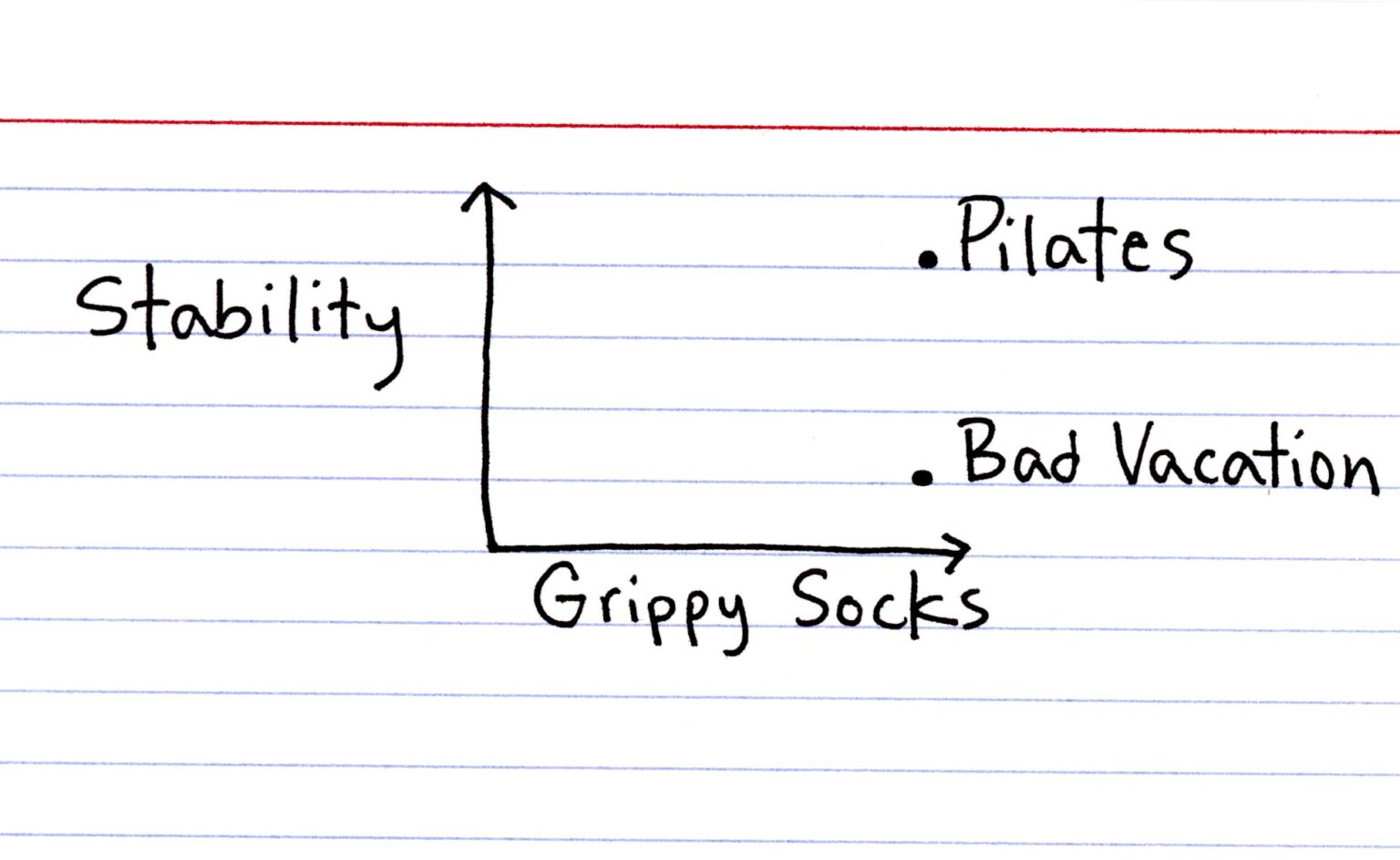
Source: thisisindexed.com/…/girls-in-expensive-rooms/
Transcript: An index card with a graph drawn on it. X axis labeled “Grippy Socks”, Y axis labeled “Stability”. A point with high stability and high grippy socks is labeled “Pilates”, while a point with low stability and high grippy socks is labeled “Bad Vacation”.
Source: thisisindexed.com/…/girls-in-expensive-rooms/
Transcript: An index card with a graph drawn on it. X axis labeled “Grippy Socks”, Y axis labeled “Stability”. A point with high stability and high grippy socks is labeled “Pilates”, while a point with low stability and high grippy socks is labeled “Bad Vacation”.

Wow, this is…just wow. This hit me way harder than I expected. Cause I see myself in this. I ask for reassurance constantly from literally everyone, and you know…this is just me 🩵
sigh
Wow, this is…just wow. This hit me way harder than I expected. Cause I see myself in this. I ask for reassurance constantly from literally everyone, and you know…this is just me 🩵
sigh


So happy for them <3

So happy for them <3


Omg, goals! Welp, now I wanna get married 😭️
Living the rest of my life with the man I love, growing old together…what more could I possibly wish for? 🩷️
Omg, goals! Welp, now I wanna get married 😭️
Living the rest of my life with the man I love, growing old together…what more could I possibly wish for? 🩷️

cross-posted from: lemmy.today/post/63107763
I’m looking for something like Snikket or Prosody, but kids-oriented. I DON’T want my <10 daughter using Meta Messenger Kids! I’ll tell my friends to setup for their kids, too. I’d have no access to anything, so it’s secure (mom and dad not snooping per se), but the downside is minimal parental controls. Though, no one to really add either.
I’ll host or pay for it, IDC. It doesn’t seem like there is much out there either.
JusTalk seemed nice when I found out but apparently China owned and so no more secure. I/we need better options!
cross-posted from: lemmy.today/post/63107763
I’m looking for something like Snikket or Prosody, but kids-oriented. I DON’T want my <10 daughter using Meta Messenger Kids! I’ll tell my friends to setup for their kids, too. I’d have no access to anything, so it’s secure (mom and dad not snooping per se), but the downside is minimal parental controls. Though, no one to really add either.
I’ll host or pay for it, IDC. It doesn’t seem like there is much out there either.
JusTalk seemed nice when I found out but apparently China owned and so no more secure. I/we need better options!

The New York Times has revealed that he was also having an affair with Nvidia executive and vice president of healthcare Kimberly Powell. They were previously caught on camera getting intimate, and he paid hush money.
For a publicly traded company, sleeping with a subordinate is far more serious than sleeping with a spy.
Posted on Normals.me · View the original post
The New York Times has revealed that he was also having an affair with Nvidia executive and vice president of healthcare Kimberly Powell. They were previously caught on camera getting intimate, and he paid hush money.
For a publicly traded company, sleeping with a subordinate is far more serious than sleeping with a spy.
Posted on Normals.me · View the original post
Can someone recommend an ebook with some fun shaders? I’m still learning the concepts. Maybe Gaussian blur or grayscale filters. Not interested in 3D yet.
Can someone recommend an ebook with some fun shaders? I’m still learning the concepts. Maybe Gaussian blur or grayscale filters. Not interested in 3D yet.

Oh dad…silly, silly dad 😂
As long as he’s supportive, that is precious and wholesome af! 💜
Oh dad…silly, silly dad 😂
As long as he’s supportive, that is precious and wholesome af! 💜


Wait…do people not do this? I was doing this already 😭️
Even with my pair, which is really small, I still do this. Cause it feels nice and yeah, it is good for stress! I recommend trying it! ❤️
Wait…do people not do this? I was doing this already 😭️
Even with my pair, which is really small, I still do this. Cause it feels nice and yeah, it is good for stress! I recommend trying it! ❤️


How can people be against capital punishment and then be pro torture? Either you are pro human rights or you’re not …
How can people be against capital punishment and then be pro torture? Either you are pro human rights or you’re not …




cross-posted from: sh.itjust.works/post/70064411
funny number, please laugh
cross-posted from: sh.itjust.works/post/70064411
funny number, please laugh