#linux

posts tagged #linux

0

aerynOS Improves Moss Package Manager in Latest Unstable Stream Update

Linuxiac aerynOS Improves Moss Package Manager in Latest Unstable Stream Update linuxiac.com
preview

The aerynOS team has published its latest unstable stream update, introducing Linux kernel 7.2.15, which marks the final release in the 7.2 series. The team is preparing to move to version 7.3, expected to arrive in the volatile repository soon.

The update also includes Linux LTS 6.18.62, along with newer versions of several system components, including systemd 261.5, LLVM 23.1.5, and glibc 2.44 development snapshots.

On the package management side, Moss now displays help when users enter the older moss install and moss remove commands or their aliases. Boulder and Ent have also been updated to use a new versioning format for packages built from Git commits.

Desktop updates include KDE Gear 26.08.3, Hyprland 0.57.1, Dux suite 2.1 (formerly Dank Material Shell), Waybar 0.16, and Mir 2.31, accompanied by a rebuild of Miracle WM.

KWin receives a fix for crashes involving DisplayLink docking stations when running fullscreen applications. Additional upstream NVIDIA fixes address graphical glitches, flickering, and buffer allocation problems.

COSMIC Player receives missing GStreamer dependencies, restoring audio and video playback. Meanwhile, both Ghostty and Kitty have fixes for Bash shell startup integration.

Other notable package updates include GStreamer 1.28.9, Poppler 26.11, Zed 1.27, Signal Desktop 8.34, and PowerStation 0.9. The Poppler update includes printing fixes, while additional character maps required by Ghostscript have been added.

Moreover, Rsync now includes daemon service units and the rrsync restricted helper. Zulip Desktop also gets a fix for flashing when using dark mode, along with a new application theme selector.

Finally, several new packages have been added to the repositories, including the terminal-based bandwidth monitor bandwhich, the disk usage utility duf, Gitea’s official command-line client, GNU Stow, and openfortivpn.

KDE’s KeepSecret password manager and the JetBrains Mono typeface are also newly available.

For more information, see the announcement.

The aerynOS team has published its latest unstable stream update, introducing Linux kernel 7.2.15, which marks the final release in the 7.2 series. The team is preparing to move to version 7.3, expected to arrive in the volatile repository soon.

The update also includes Linux LTS 6.18.62, along with newer versions of several system components, including systemd 261.5, LLVM 23.1.5, and glibc 2.44 development snapshots.

On the package management side, Moss now displays help when users enter the older moss install and moss remove commands or their aliases. Boulder and Ent have also been updated to use a new versioning format for packages built from Git commits.

Desktop updates include KDE Gear 26.08.3, Hyprland 0.57.1, Dux suite 2.1 (formerly Dank Material Shell), Waybar 0.16, and Mir 2.31, accompanied by a rebuild of Miracle WM.

KWin receives a fix for crashes involving DisplayLink docking stations when running fullscreen applications. Additional upstream NVIDIA fixes address graphical glitches, flickering, and buffer allocation problems.

COSMIC Player receives missing GStreamer dependencies, restoring audio and video playback. Meanwhile, both Ghostty and Kitty have fixes for Bash shell startup integration.

Other notable package updates include GStreamer 1.28.9, Poppler 26.11, Zed 1.27, Signal Desktop 8.34, and PowerStation 0.9. The Poppler update includes printing fixes, while additional character maps required by Ghostscript have been added.

Moreover, Rsync now includes daemon service units and the rrsync restricted helper. Zulip Desktop also gets a fix for flashing when using dark mode, along with a new application theme selector.

Finally, several new packages have been added to the repositories, including the terminal-based bandwidth monitor bandwhich, the disk usage utility duf, Gitea’s official command-line client, GNU Stow, and openfortivpn.

KDE’s KeepSecret password manager and the JetBrains Mono typeface are also newly available.

For more information, see the announcement.
0

OverTheWire Bandit Tips & Tricks

preview

I’ve been doing the OverTheWire Bandit over the past couple of days and have become stuck on the earlier levels. I deem this very embarrassing as this is supposed to be an “easy” and “recommended for beginners” type of puzzle that requires hands on understanding of the Linux terminal. But I have been using Linux for 9 months now, I wouldn’t do the most complicated things (other than break my whole os) only the things required to make my overall user experience somewhat enjoyable. Now this makes me very sad to come to the conclusions that I may be below the average Linux beginner which I didn’t know was possible according to my knowledge. I am only asking of tips and tricks to these puzzles and maybe to positive reinforcement to make feel better about myself. Now I will not tolerate spoilers as in the official rules of OverTheWire clearly states, and I hope you will follow this rule for the better sake of my learning and understanding of the Linux terminal ( and for the sake of the game itself)

I’ve been doing the OverTheWire Bandit over the past couple of days and have become stuck on the earlier levels. I deem this very embarrassing as this is supposed to be an “easy” and “recommended for beginners” type of puzzle that requires hands on understanding of the Linux terminal. But I have been using Linux for 9 months now, I wouldn’t do the most complicated things (other than break my whole os) only the things required to make my overall user experience somewhat enjoyable. Now this makes me very sad to come to the conclusions that I may be below the average Linux beginner which I didn’t know was possible according to my knowledge. I am only asking of tips and tricks to these puzzles and maybe to positive reinforcement to make feel better about myself. Now I will not tolerate spoilers as in the official rules of OverTheWire clearly states, and I hope you will follow this rule for the better sake of my learning and understanding of the Linux terminal ( and for the sake of the game itself)

0

What is your reaction to the flood of CVEs?

preview

The number of reported security vulnerabilities has gone up drastically. And so has the frequency, number, and volume of security patches. Which also makes the gap between fully supported distributions and ones with only partial security support larger. (Not every distribution provides full security upddates for the full announced life time of a release.)

How are you folks reacting to this?

The number of reported security vulnerabilities has gone up drastically. And so has the frequency, number, and volume of security patches. Which also makes the gap between fully supported distributions and ones with only partial security support larger. (Not every distribution provides full security upddates for the full announced life time of a release.)

How are you folks reacting to this?

0

It’s that time of year, time to blow up the home server!

preview

me and fedora have been boxing for a while now and I’m thinking I want to try something else after I finish designing my next home server case for it.

I’m considering NASty github.com/nasty-project/nasty as it’s doing pretty much everything out of box I want to do with this next one already, and even though it’s young, it’s build on nixOS, which I consider mature at this point.

But I have no experience with nixOS. It sounds like it’s a less obnoxious form of fedora coreOS. Any opinions?

me and fedora have been boxing for a while now and I’m thinking I want to try something else after I finish designing my next home server case for it.

I’m considering NASty github.com/nasty-project/nasty as it’s doing pretty much everything out of box I want to do with this next one already, and even though it’s young, it’s build on nixOS, which I consider mature at this point.

But I have no experience with nixOS. It sounds like it’s a less obnoxious form of fedora coreOS. Any opinions?

0

What Thinkpad Model

preview

Currently running mint on a 15+ year old HP laptop but I want to update to a ‘modern’ second hand Thinkpad. The second hand market is just full of different model numbers and I’m not sure how to filter to what I’m after.

I get most tech basics (ram, ssh) but I’m not sure what all the models numbers, generations or processors mean.

Looking for something with a memory card spot, HDMI output and ideally touchscreen.

I don’t use it for gaming but have an ultra wide screen high res monitor (possibly 2k cant quite remember) that I’d like to take advantage of.

Larger SSD and 16gb ram wouldn’t hurt too but I assume I can upgrade them.

I don’t need the Yoga tablet style folding.

Currently running mint on a 15+ year old HP laptop but I want to update to a ‘modern’ second hand Thinkpad. The second hand market is just full of different model numbers and I’m not sure how to filter to what I’m after.

I get most tech basics (ram, ssh) but I’m not sure what all the models numbers, generations or processors mean.

Looking for something with a memory card spot, HDMI output and ideally touchscreen.

I don’t use it for gaming but have an ultra wide screen high res monitor (possibly 2k cant quite remember) that I’d like to take advantage of.

Larger SSD and 16gb ram wouldn’t hurt too but I assume I can upgrade them.

I don’t need the Yoga tablet style folding.

0

Ran into my first problem within Fedora KDE Plasma...

preview

Since switching to fedora, I have been testing out its features and i just now ran into my first problem; Since my laptop doesn’t have a SD card reader, I have to use an external SD card reader when i want to access my microSD cards. I recently tried to put in my Acer 2-in-1 SD Card reader and my system did not pick up that i inserted the card reader. I’m not sure on what I am supposed to do about that, so if anyone can give me any advice I’ll appreciate it.

Update: So I decided to put in a different brand of SD card into the card reader (to test if the card could be an problem) and Dolphin immediately read and put it in the removable device section. The sd card that is having issues was a Sandisk card. Verbatim was mounted easily, so something is going on with my Standisk card.

Since switching to fedora, I have been testing out its features and i just now ran into my first problem; Since my laptop doesn’t have a SD card reader, I have to use an external SD card reader when i want to access my microSD cards. I recently tried to put in my Acer 2-in-1 SD Card reader and my system did not pick up that i inserted the card reader. I’m not sure on what I am supposed to do about that, so if anyone can give me any advice I’ll appreciate it.

Update: So I decided to put in a different brand of SD card into the card reader (to test if the card could be an problem) and Dolphin immediately read and put it in the removable device section. The sd card that is having issues was a Sandisk card. Verbatim was mounted easily, so something is going on with my Standisk card.

0

TUXEDO OS Enters Final Beta Testing Ahead of Debian-Based Release

Linuxiac TUXEDO OS Enters Final Beta Testing Ahead of Debian-Based Release linuxiac.com
preview

TUXEDO Computers has just announced that its upcoming Debian-based TUXEDO OS has entered the final stage of its open beta. That brings the Linux distro right up to the point of being fully transitioned away from Ubuntu.

The new edition, known as TUXEDO OS “Continuous Debian,” replaces the distribution’s traditional Ubuntu foundation with Debian Testing. The change denotes a significant shift for TUXEDO OS, which is developed by German Linux hardware manufacturer TUXEDO Computers.

Open beta testing started in August, and since then the dev team has issued five beta ISOs. The company has reported a large number of bug reports as a result of the testing, as well as a lot of positive feedback from users who have been running the new system without any issues.

As for the software, the current beta runs KDE Plasma 6.7.4 on Wayland, alongside KDE Frameworks 6.30, Qt 6.11.2, and Linux kernel 7.2. Unlike Debian itself, which periodically promotes its Testing branch to Stable, TUXEDO OS will remain permanently based on Debian Testing.

TUXEDO Computers will also continue maintaining its own package repositories and providing updates for key components, including the kernel, graphics drivers, and KDE Plasma.

Throughout November, the development team is concentrating on handling outstanding bug reports and handling remaining issues before the first stable release. Users participating in the testing program are encouraged to report not previously identified bugs or unanticipated behavior as soon as possible.

However, bug fixing is not the only thing left to do. TUXEDO Computers also needs to establish and validate a suite of structured, automated QA test procedures. Those tests have to be run before they can actually set a release date.

As for when the stable Debian-based TUXEDO OS will be arriving, the developers have not given us a date at this point. They do, however, expect to be able to release it fairly soon once the final testing and QA are complete.

For additional information, see the announcement.

Those interested in testing the upcoming Debian-based TUXEDO OS before its stable release can download the latest beta ISO images from the preview download directory.

TUXEDO Computers has just announced that its upcoming Debian-based TUXEDO OS has entered the final stage of its open beta. That brings the Linux distro right up to the point of being fully transitioned away from Ubuntu.

The new edition, known as TUXEDO OS “Continuous Debian,” replaces the distribution’s traditional Ubuntu foundation with Debian Testing. The change denotes a significant shift for TUXEDO OS, which is developed by German Linux hardware manufacturer TUXEDO Computers.

Open beta testing started in August, and since then the dev team has issued five beta ISOs. The company has reported a large number of bug reports as a result of the testing, as well as a lot of positive feedback from users who have been running the new system without any issues.

As for the software, the current beta runs KDE Plasma 6.7.4 on Wayland, alongside KDE Frameworks 6.30, Qt 6.11.2, and Linux kernel 7.2. Unlike Debian itself, which periodically promotes its Testing branch to Stable, TUXEDO OS will remain permanently based on Debian Testing.

TUXEDO Computers will also continue maintaining its own package repositories and providing updates for key components, including the kernel, graphics drivers, and KDE Plasma.

Throughout November, the development team is concentrating on handling outstanding bug reports and handling remaining issues before the first stable release. Users participating in the testing program are encouraged to report not previously identified bugs or unanticipated behavior as soon as possible.

However, bug fixing is not the only thing left to do. TUXEDO Computers also needs to establish and validate a suite of structured, automated QA test procedures. Those tests have to be run before they can actually set a release date.

As for when the stable Debian-based TUXEDO OS will be arriving, the developers have not given us a date at this point. They do, however, expect to be able to release it fairly soon once the final testing and QA are complete.

For additional information, see the announcement.
Those interested in testing the upcoming Debian-based TUXEDO OS before its stable release can download the latest beta ISO images from the preview download directory.

0

sshole: OpenSSH on musl without PAM lets * accounts in with any 256+ byte password (fixed 5 Nov)

proxymint sshole OpenSSH vulnerability: check Alpine and OpenWrt proxymint.com
preview

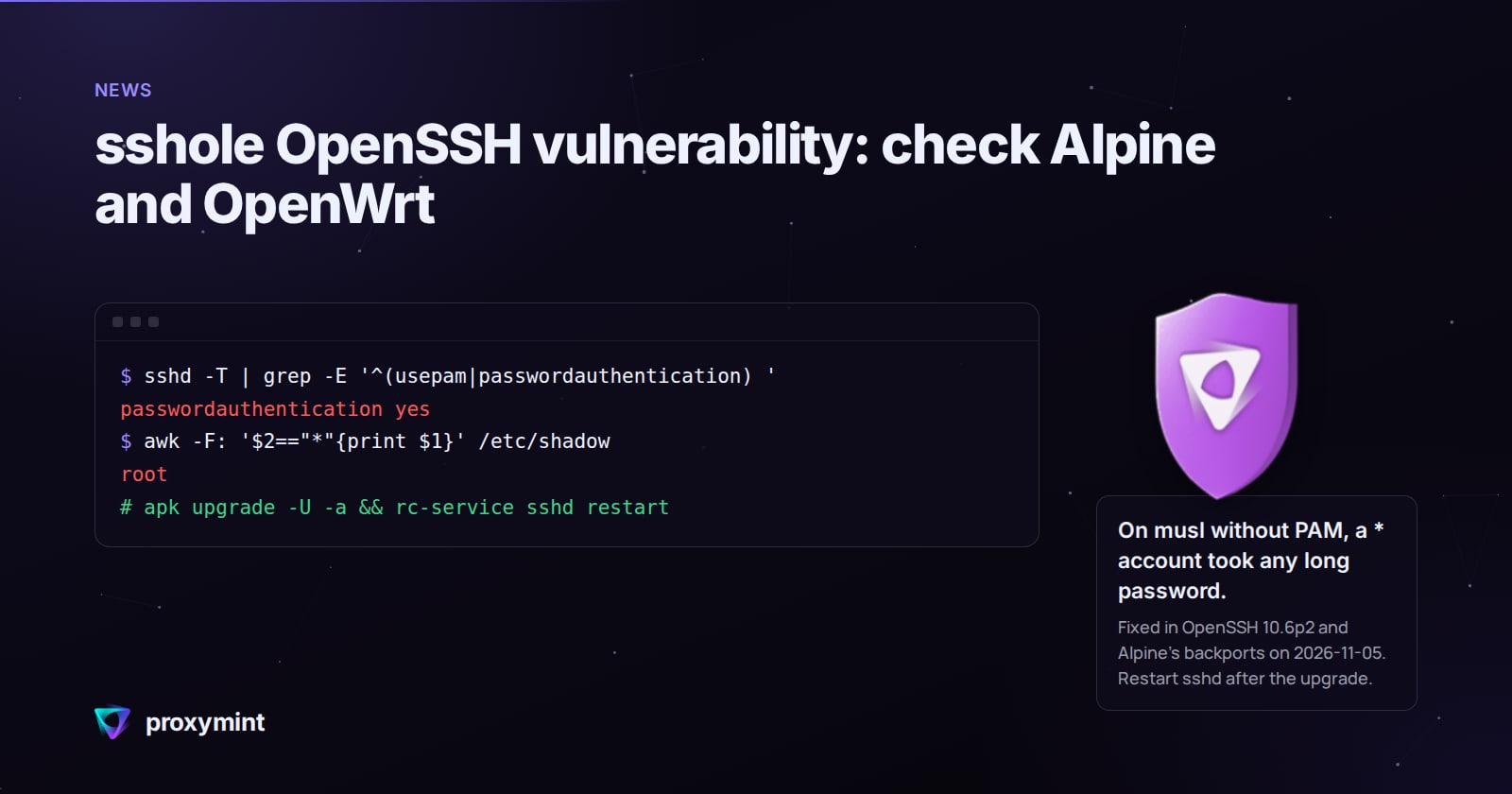
From the Alpine advisory and the researcher’s notes: musl’s crypt() gives back * when a password is over 256 bytes, and sshd then compares it with an account whose stored field is also *. Key-only users have that field, and so does the alpine user on tiny-cloud images. Fix is OpenSSH 10.6p2 or Alpine’s backport (on 3.24 that’s 10.3_p1-r2), plus an sshd restart. PasswordAuthentication no also closes it. Package table and check commands are in the link. Disclosure: it’s our blog, we run a proxy service.

From the Alpine advisory and the researcher’s notes: musl’s crypt() gives back * when a password is over 256 bytes, and sshd then compares it with an account whose stored field is also *. Key-only users have that field, and so does the alpine user on tiny-cloud images. Fix is OpenSSH 10.6p2 or Alpine’s backport (on 3.24 that’s 10.3_p1-r2), plus an sshd restart. PasswordAuthentication no also closes it. Package table and check commands are in the link. Disclosure: it’s our blog, we run a proxy service.

0

Unredacted hardened Kernel

Unredacted linux-hardened-unredacted: a hardened kernel for Debian unredacted.org
preview

Hardened debian kernel built on top of graphene os patches by the redacted non profit . Details for apt repo are here.

git.unredacted.org/…/linux-hardened-unredacted

Figured Id share for those interested. Text below copied from git readme.

What this kernel changes

On top of upstream Linux, this build applies the anthraxx/linux-hardened patch set under a kernel .config composed from anthraxx’s own Arch packaging config.x86_64 (pinned by sha256 + signed-commit-verified in configs/upstream-seed.toml) layered with our project overlay (configs/intent.common.config plus the x86-only configs/intent.x86_64.config; per-symbol rationale in configs/POLICY.md). Each build re-fetches the pinned seed, verifies its signature, merges our intent, runs olddefconfig, and aborts unless every intent line lands — so new hardening features anthraxx adopts flow through automatically, while regressions on the symbols we explicitly pin fail fast at configure time. Full design in docs/operators/config-architecture.md. The hardening falls into four buckets: memory-safety (heap and stack zero-init, stack-erase-on-return, hardened usercopy, FORTIFY_SOURCE, slab freelist hardening and canaries, KASLR, KFENCE); integrity (W^X for kernel and module text, forced module-signature verification, integrity-mode lockdown under Secure Boot); attack-surface reduction (/dev/mem, /proc/kcore, kexec, and several legacy syscalls removed); and restrictive sysctl defaults (unprivileged user namespaces off; perf, BPF, and ptrace restricted to root).

That hardening comes with friction worth knowing before you install:

  • Out-of-tree modules (NVIDIA, ZFS, VirtualBox) must be rebuilt against our headers and signed. DKMS is designed to do this with a machine-local MOK key you enroll once at reboot (not yet validated against a published release — see docs/users/dkms.md).
  • Rootless containers (Docker, Podman), the Chromium sandbox, Snap, and Flatpak depend on unprivileged user namespaces, which are off by default. Re-enable them via the opt-in in docs/users/incompatibilities.md.
  • kexec/kdump, hibernation, and /dev/mem-based tools do not work.
  • Every module must be signed. An unsigned out-of-tree module will not load (MODULE_SIG_FORCE).

Per-symptom workarounds are in docs/users/incompatibilities.md. Keep your distro’s stock kernel installed as a recovery fallback; both coexist and GRUB lists both.

Hardened debian kernel built on top of graphene os patches by the redacted non profit . Details for apt repo are here.

git.unredacted.org/…/linux-hardened-unredacted

Figured Id share for those interested. Text below copied from git readme.

What this kernel changes

On top of upstream Linux, this build applies the anthraxx/linux-hardened patch set under a kernel .config composed from anthraxx’s own Arch packaging config.x86_64 (pinned by sha256 + signed-commit-verified in configs/upstream-seed.toml) layered with our project overlay (configs/intent.common.config plus the x86-only configs/intent.x86_64.config; per-symbol rationale in configs/POLICY.md). Each build re-fetches the pinned seed, verifies its signature, merges our intent, runs olddefconfig, and aborts unless every intent line lands — so new hardening features anthraxx adopts flow through automatically, while regressions on the symbols we explicitly pin fail fast at configure time. Full design in docs/operators/config-architecture.md. The hardening falls into four buckets: memory-safety (heap and stack zero-init, stack-erase-on-return, hardened usercopy, FORTIFY_SOURCE, slab freelist hardening and canaries, KASLR, KFENCE); integrity (W^X for kernel and module text, forced module-signature verification, integrity-mode lockdown under Secure Boot); attack-surface reduction (/dev/mem, /proc/kcore, kexec, and several legacy syscalls removed); and restrictive sysctl defaults (unprivileged user namespaces off; perf, BPF, and ptrace restricted to root).

That hardening comes with friction worth knowing before you install:

  • Out-of-tree modules (NVIDIA, ZFS, VirtualBox) must be rebuilt against our headers and signed. DKMS is designed to do this with a machine-local MOK key you enroll once at reboot (not yet validated against a published release — see docs/users/dkms.md).
  • Rootless containers (Docker, Podman), the Chromium sandbox, Snap, and Flatpak depend on unprivileged user namespaces, which are off by default. Re-enable them via the opt-in in docs/users/incompatibilities.md.
  • kexec/kdump, hibernation, and /dev/mem-based tools do not work.
  • Every module must be signed. An unsigned out-of-tree module will not load (MODULE_SIG_FORCE).

Per-symptom workarounds are in docs/users/incompatibilities.md. Keep your distro’s stock kernel installed as a recovery fallback; both coexist and GRUB lists both.

0

[Tom's Hardware] Combined flaws let anyone into Alpine Linux and other distros by typing anything over 256 characters as a password — emergency fixes for OpenSSH and musl-libc issued for millions of systems, patch immediately

Yahoo Tech Combined flaws let anyone into Alpine Linux and other distros by typing anything over 256 characters as a password — emergency fixes for OpenSSH and musl-libc issued for millions of systems, patch immediately tech.yahoo.com
0

Looking for Volunteer Moderators for !linux!

preview

Hello !linux community!

The current moderation team for !linux has been inactive for a while, so the admin team has stepped in temporarily to help keep the queue clear and find new volunteer moderators from the community.

Interested in Moderating !linux?

If you enjoy this community and would like to help keep it welcoming, spam-free, and well-maintained:

  • Reply in the comments below or send a Direct Message to @ieh.
  • Let us know if you have any prior moderation experience (not required!) and what you’d like to see for the community.

(Note: If any of the previous moderators return in the future, they are always welcome to reach out to the admin team as well!)

Requirements and notes:

  • Reports do not get sent for moderators without a lemmy.world account, so if you have an account on a different instance, you’d need to create one here and check it daily for reports (takes a few seconds at most)
  • Most communities get reports infrequently, often once per week or less. Although sometimes more. Checking daily is important
  • Moderate fairly according to the community rules. Everyone has to make subjective calls, but try to be objective
  • Enforce the Lemmy.World ToS

If you have any questions, would like to volunteer, please reply below!

Hello !linux community!

The current moderation team for !linux has been inactive for a while, so the admin team has stepped in temporarily to help keep the queue clear and find new volunteer moderators from the community.

Interested in Moderating !linux?

If you enjoy this community and would like to help keep it welcoming, spam-free, and well-maintained:

  • Reply in the comments below or send a Direct Message to @ieh.
  • Let us know if you have any prior moderation experience (not required!) and what you’d like to see for the community.

(Note: If any of the previous moderators return in the future, they are always welcome to reach out to the admin team as well!)

Requirements and notes:

  • Reports do not get sent for moderators without a lemmy.world account, so if you have an account on a different instance, you’d need to create one here and check it daily for reports (takes a few seconds at most)
  • Most communities get reports infrequently, often once per week or less. Although sometimes more. Checking daily is important
  • Moderate fairly according to the community rules. Everyone has to make subjective calls, but try to be objective
  • Enforce the Lemmy.World ToS

If you have any questions, would like to volunteer, please reply below!

0

How do i make a flatpak for a cosmic applet?

preview

I created an applet for cosmic. Now I can’t figure out how to make a flatpak for it to add to cosmic applet repo. I don’t have previous experience making flatpaks.

Is it the same as creating normal flatpaks? What is cargo_sources.json I see in the cosmic applets repo? Is there a just command (or something similar) to create the corfig files automatically?

I created an applet for cosmic. Now I can’t figure out how to make a flatpak for it to add to cosmic applet repo. I don’t have previous experience making flatpaks.

Is it the same as creating normal flatpaks? What is cargo_sources.json I see in the cosmic applets repo? Is there a just command (or something similar) to create the corfig files automatically?

0

Good research topics about linux?

preview

finding something to do a deep dive.

here’s what I know:

  • C language
  • How syscall works in linux
  • basic networking concepts (not too advanced stuff like network namespaces etc)
  • virtualization ( know basic concepts of docker etc, want to make a docker like thing using just ns command )
  • Bash scripting
  • basics of devices in Linux

it’s all pretty basic every linux user might know already. what are the areas I should give a deep dive in. what other exciting things are there in linux?

I am also open to reading some research papers since those are interesting too.

a good paper I found: arxiv.org/abs/2607.24888

finding something to do a deep dive.

here’s what I know:

  • C language
  • How syscall works in linux
  • basic networking concepts (not too advanced stuff like network namespaces etc)
  • virtualization ( know basic concepts of docker etc, want to make a docker like thing using just ns command )
  • Bash scripting
  • basics of devices in Linux

it’s all pretty basic every linux user might know already. what are the areas I should give a deep dive in. what other exciting things are there in linux?

I am also open to reading some research papers since those are interesting too.

a good paper I found: arxiv.org/abs/2607.24888

0

On mint for a while now, people usually call mint a newbie distro, any reason to "upgrade" to a different distro?

preview

Hi, how’s it going? I’ve been daily driving mint with i3 for a while now, (takes like 500mb idle ram) but I always hear mint being called a newbie distro, I know arch is harder to set up and more customizable for example, but overall im wondering, in which cases one would go from mint to another distro? what can make other distros “better” than mint? i’ll end up using a window manager (i3 or if thats not availible some other lightweight one) so differences in desktop environments i dont really care that much about

Hi, how’s it going? I’ve been daily driving mint with i3 for a while now, (takes like 500mb idle ram) but I always hear mint being called a newbie distro, I know arch is harder to set up and more customizable for example, but overall im wondering, in which cases one would go from mint to another distro? what can make other distros “better” than mint? i’ll end up using a window manager (i3 or if thats not availible some other lightweight one) so differences in desktop environments i dont really care that much about

0

What's the actual usecase of := in parameter replacement?

preview

cross-posted from: lemmy.zip/post/74048002

I’ve seen : “${DB_HOST:=localhost}” because it assigns the variable if not set (: $… is just to run assignments standalone).

But that has the same effect like DB_HOST="${DB_HOST:-localhost} (use the string if not set).

While something like echo “${DB_HOST:=localhost}” smells from a mile, because it has output with side-effects.

cross-posted from: lemmy.zip/post/74048002

I’ve seen : “${DB_HOST:=localhost}” because it assigns the variable if not set (: $… is just to run assignments standalone).

But that has the same effect like DB_HOST="${DB_HOST:-localhost} (use the string if not set).

While something like echo “${DB_HOST:=localhost}” smells from a mile, because it has output with side-effects.

0

Some Fallout New Vegas Plymouth Themes I Made

Codeberg.org FNVThemes codeberg.org
preview

cross-posted from: programming.dev/post/58576910

I have been working on theming my setup and made some fun little plymouth themes (just static not animated idk how to do all that and didn’t feel like figuring it out), and figured I would share them. They’re based on different things from fallout and are made using stuff I found online. The art itself is not mine I just put them together into plymouth themes.

I’d always wanted some New Vegas splash screens but couldn’t find any premade. Hope some people who are New Vegas fans like me enjoy them! I might do some more for other factions eventually, but am currently preoccupied with other things. Here’s an example of one:

cross-posted from: programming.dev/post/58576910

I have been working on theming my setup and made some fun little plymouth themes (just static not animated idk how to do all that and didn’t feel like figuring it out), and figured I would share them. They’re based on different things from fallout and are made using stuff I found online. The art itself is not mine I just put them together into plymouth themes.

I’d always wanted some New Vegas splash screens but couldn’t find any premade. Hope some people who are New Vegas fans like me enjoy them! I might do some more for other factions eventually, but am currently preoccupied with other things. Here’s an example of one:

0

This Week in Plasma: Fixing All the Bugs, PiP, and Performance

KDE Blogs This Week in Plasma: Fixing All the Bugs, PiP, and Performance blogs.kde.org
preview

Welcome to a new issue of This Week in Plasma. And it’s going to be a big one, folks! This week, a familiar pattern played out: people upgraded to Plasma 6.8 and found all the bugs that nobody reported during the beta period, and the Plasma team worked incredibly hard to fix them! You’ll see the result below: tons of bug fixes.

Paywall?

Welcome to a new issue of This Week in Plasma. And it’s going to be a big one, folks! This week, a familiar pattern played out: people upgraded to Plasma 6.8 and found all the bugs that nobody reported during the beta period, and the Plasma team worked incredibly hard to fix them! You’ll see the result below: tons of bug fixes.

Paywall?

0

I tried to set up a UPS. I failed, so I made a thing

preview

Hey everyone,

I recently bought a brand new UPS for my local Linux desktop setup, and what should have been a straightforward afternoon project turned into an absolute nightmare of text files and terminal debugging. I decided to use Network UPS Tools (NUT), but as a desktop user with a single, locally connected USB unit, the onboarding friction was incredibly frustrating:

  • Just trying to figure out which packages to install (nut, nut-client, usbhid-ups, upsd) felt fragmented.
  • The official documentation is dense and heavily geared toward massive, multi-node enterprise network topographies rather than a single local workstation.
  • I kept running into silent connection failures, driver mismatch errors, and permission blocks under /etc/nut/ that took hours to track down because there wasn’t an easy way to diagnose what was actually failing.

Once I finally got the daemons running, I ran into my next disappointment: the lack of good, modern desktop GUI tools. The official legacy Python/GTK apps look like they were built in the 90s, and the modern web-based alternatives (like PeaNUT or Nutify) are strictly read-only monitoring dashboards. They expect you to do all the heavy configuration lifting in the CLI before you ever launch them. I originally sat down and started writing a tool just to solve my own frustration, but after getting it working, I realized it could be genuinely useful for a lot of people in the same boat.

I call it Voltwise (tentative name). It’s a native cross-platform desktop application built using .NET and Avalonia UI. Unlike read-only dashboards, it features a complete setup and diagnostic wizard designed specifically for single, locally connected UPS hardware. It acts as an automated guide through the exact pipeline I struggled with: it auto-discovers USB hardware IDs, maps drivers, handles configuration formatting, audits folder permissions, and validates live communication state rules. It handles on-demand system elevation securely and natively using pkexec (PolKit), meaning the app runs safely in user space and only requests root authentication when actively writing files to /etc/nut/.

Here is how it currently looks (I’m still actively refining and adding features))

The setup and diagnostic wizard:

The live monitoring screen (Completely customizable):

Events:

UPS Device settings:

Raw configuration file editing:

Here is the catch, and why I’m posting here before releasing it:

I am a solo dev, and a very large portion of this application was developed with heavy generative AI assistance to handle cross-platform boilerplate, XAML layout structures, and environmental path mapping. I manually architected the security boundaries, audited every line of code, and verified all the hardware loops against my physical desktop, but the AI footprint is undeniably there.

Given the current anti-AI climate, I’m feeling a bit hesitant. I’m strongly considering releasing the project under the MIT License so the homelab and Linux desktop community can freely use, fork, or dissect it. However, I’m trying to gauge if it is actually worth the hassle of dealing with the inevitable internet backlash from people who will instantly write it off as “AI slop” without looking at the functionality or utility.


  • Would a streamlined, local-only native desktop NUT setup wizard like this be helpful to you?
  • Is an MIT release the right path forward here?
  • Should I bother putting this on GitHub, or is the AI-assisted development stigma going to completely bury a functional utility?

Appreciate any honest thoughts or feedback!

Hey everyone,

I recently bought a brand new UPS for my local Linux desktop setup, and what should have been a straightforward afternoon project turned into an absolute nightmare of text files and terminal debugging. I decided to use Network UPS Tools (NUT), but as a desktop user with a single, locally connected USB unit, the onboarding friction was incredibly frustrating:

  • Just trying to figure out which packages to install (nut, nut-client, usbhid-ups, upsd) felt fragmented.
  • The official documentation is dense and heavily geared toward massive, multi-node enterprise network topographies rather than a single local workstation.
  • I kept running into silent connection failures, driver mismatch errors, and permission blocks under /etc/nut/ that took hours to track down because there wasn’t an easy way to diagnose what was actually failing.

Once I finally got the daemons running, I ran into my next disappointment: the lack of good, modern desktop GUI tools. The official legacy Python/GTK apps look like they were built in the 90s, and the modern web-based alternatives (like PeaNUT or Nutify) are strictly read-only monitoring dashboards. They expect you to do all the heavy configuration lifting in the CLI before you ever launch them. I originally sat down and started writing a tool just to solve my own frustration, but after getting it working, I realized it could be genuinely useful for a lot of people in the same boat.

I call it Voltwise (tentative name). It’s a native cross-platform desktop application built using .NET and Avalonia UI. Unlike read-only dashboards, it features a complete setup and diagnostic wizard designed specifically for single, locally connected UPS hardware. It acts as an automated guide through the exact pipeline I struggled with: it auto-discovers USB hardware IDs, maps drivers, handles configuration formatting, audits folder permissions, and validates live communication state rules. It handles on-demand system elevation securely and natively using pkexec (PolKit), meaning the app runs safely in user space and only requests root authentication when actively writing files to /etc/nut/.

Here is how it currently looks (I’m still actively refining and adding features))

The setup and diagnostic wizard:

The live monitoring screen (Completely customizable):

Events:

UPS Device settings:

Raw configuration file editing:

Here is the catch, and why I’m posting here before releasing it:

I am a solo dev, and a very large portion of this application was developed with heavy generative AI assistance to handle cross-platform boilerplate, XAML layout structures, and environmental path mapping. I manually architected the security boundaries, audited every line of code, and verified all the hardware loops against my physical desktop, but the AI footprint is undeniably there.

Given the current anti-AI climate, I’m feeling a bit hesitant. I’m strongly considering releasing the project under the MIT License so the homelab and Linux desktop community can freely use, fork, or dissect it. However, I’m trying to gauge if it is actually worth the hassle of dealing with the inevitable internet backlash from people who will instantly write it off as “AI slop” without looking at the functionality or utility.

  • Would a streamlined, local-only native desktop NUT setup wizard like this be helpful to you?
  • Is an MIT release the right path forward here?
  • Should I bother putting this on GitHub, or is the AI-assisted development stigma going to completely bury a functional utility?

Appreciate any honest thoughts or feedback!

0

Problems with Qualcomm Atheros AR8151

preview

Hello everyone. I’m getting a hard time with Qualcomm Atheros AR8151 onboard LAN with Debian. It usually drops to 100Mb/s and freezes the network altogether

Settings for enp1s0: Supported ports: [ TP ] Supported link modes: 10baseT/Half 10baseT/Full 100baseT/Half 100baseT/Full 1000baseT/Full Supported pause frame use: No Supports auto-negotiation: Yes Supported FEC modes: Not reported Advertised link modes: Not reported Advertised pause frame use: No Advertised auto-negotiation: Yes Advertised FEC modes: Not reported Speed: 100Mb/s Duplex: Full Auto-negotiation: on Port: Twisted Pair PHYAD: 0 Transceiver: internal MDI-X: Unknown Supports Wake-on: pg Wake-on: d Current message level: 0x0000003f (63) drv probe link timer ifdown ifup Link detected: yes [ 3.004591] atl1c 0000:01:00.0 enp1s0: renamed from eth0 [ 37.754972] atl1c 0000:01:00.0: atl1c: enp1s0 NIC Link is Up<100 Mbps Full Duplex> [ 45.071291] atl1c 0000:01:00.0: atl1c: enp1s0 NIC Link is Up<100 Mbps Full Duplex> [ 45.799689] atl1c 0000:01:00.0: atl1c: enp1s0 NIC Link is Up<100 Mbps Full Duplex> any tips of what can be done around here? I’m using kernel 6.12.111+deb13-amd64

Hello everyone. I’m getting a hard time with Qualcomm Atheros AR8151 onboard LAN with Debian. It usually drops to 100Mb/s and freezes the network altogether

Settings for enp1s0: Supported ports: [ TP ] Supported link modes: 10baseT/Half 10baseT/Full 100baseT/Half 100baseT/Full 1000baseT/Full Supported pause frame use: No Supports auto-negotiation: Yes Supported FEC modes: Not reported Advertised link modes: Not reported Advertised pause frame use: No Advertised auto-negotiation: Yes Advertised FEC modes: Not reported Speed: 100Mb/s Duplex: Full Auto-negotiation: on Port: Twisted Pair PHYAD: 0 Transceiver: internal MDI-X: Unknown Supports Wake-on: pg Wake-on: d Current message level: 0x0000003f (63) drv probe link timer ifdown ifup Link detected: yes [ 3.004591] atl1c 0000:01:00.0 enp1s0: renamed from eth0 [ 37.754972] atl1c 0000:01:00.0: atl1c: enp1s0 NIC Link is Up<100 Mbps Full Duplex> [ 45.071291] atl1c 0000:01:00.0: atl1c: enp1s0 NIC Link is Up<100 Mbps Full Duplex> [ 45.799689] atl1c 0000:01:00.0: atl1c: enp1s0 NIC Link is Up<100 Mbps Full Duplex> any tips of what can be done around here? I’m using kernel 6.12.111+deb13-amd64

0

Wizualizacja "Atlas osób współtworzących" projekty z rodziny Gnome

Fireflies — Contributor Atlas contributor-atlas-4dab97.pages.gitlab.gnome.org
preview

cross-postowane z: szmer.info/post/16685582

Spektakularna wizualizacja społeczności budującej Gnome i powiązane projekty. Mam ogromną satysfakcję z bycia 2-3 miniaturowymi punkcikami widocznymi tym kosmosie.

cross-postowane z: szmer.info/post/16685582

Spektakularna wizualizacja społeczności budującej Gnome i powiązane projekty. Mam ogromną satysfakcję z bycia 2-3 miniaturowymi punkcikami widocznymi tym kosmosie.

0

No, the kernel has not gone "Full AI Slop Code"

preview

There appears to be a few bad actors in the Lemmy community spreading ragebait for personal gain

In fact, the same mechanisms added at the beginning to catch bad human written code are the exact same that catch bad AI code

  1. No, the Linux kernel won’t use AI to auto approve code for inclusion. And no plans to do so
  2. The Kernel actually has a huge number of maintainers. As part of the process, all patches are reviewed by a human who provide feedback as part of the process, and patches get bounced back and forth multiple time.
  3. Patches don’t just magically go straight to master. The maintainers generally have their own branches where it goes to, then it goes to staging trees like Linux-Next. It goes through many eyes, and many tests by the end. The idea that AI code is overrunning the kernel is rediculous
  4. Maintainers also check that the code meets coding guidelines and is written properly, and solves the problem they are trying to solve. Yes, they also ensure the code isn’t slop
  5. LLM’s though might be used to identify obvious problems (bugs / coding guideline issues) with the code. These don’t generate “slop” just find issues
  6. The only thing that matters is the human who submitted the code, as they should be checking the code submitted anyway (including LLM generated code).

Writing bad code isn’t something new, and isn’t unique to LLM’s. Coders (and it seems some “journalists”) have been writing slop since computers were invented.

The process hasn’t gotten less stringent (probably even MORE stringent as there is an additional set of robotic eyes that can also check), and the same mechanisms that were put in place to catch badly written code 10 years ago, are still there now

There appears to be a few bad actors in the Lemmy community spreading ragebait for personal gain

In fact, the same mechanisms added at the beginning to catch bad human written code are the exact same that catch bad AI code

  1. No, the Linux kernel won’t use AI to auto approve code for inclusion. And no plans to do so
  2. The Kernel actually has a huge number of maintainers. As part of the process, all patches are reviewed by a human who provide feedback as part of the process, and patches get bounced back and forth multiple time.
  3. Patches don’t just magically go straight to master. The maintainers generally have their own branches where it goes to, then it goes to staging trees like Linux-Next. It goes through many eyes, and many tests by the end. The idea that AI code is overrunning the kernel is rediculous
  4. Maintainers also check that the code meets coding guidelines and is written properly, and solves the problem they are trying to solve. Yes, they also ensure the code isn’t slop
  5. LLM’s though might be used to identify obvious problems (bugs / coding guideline issues) with the code. These don’t generate “slop” just find issues
  6. The only thing that matters is the human who submitted the code, as they should be checking the code submitted anyway (including LLM generated code).

Writing bad code isn’t something new, and isn’t unique to LLM’s. Coders (and it seems some “journalists”) have been writing slop since computers were invented.

The process hasn’t gotten less stringent (probably even MORE stringent as there is an additional set of robotic eyes that can also check), and the same mechanisms that were put in place to catch badly written code 10 years ago, are still there now

0

handwritten to text

preview

Hi. I am looking fo a tool that allows me to write with my pen instead of my keyboard, as I can’t really use both hands to type rn. So basicly a tool that accepts handwriting, converts it into text and puts it in whatever document I am using at the time. I am not sure what to search for/ how these tools are called. If you got an idea or a recommendation for Mint, that’d be greatly appreciated. Thx :)

EDIT: I have a drawing tablet hooked up to my PC and am looking for software that turns my handwriting into common text, like the handwriting tool in windows does

Hi. I am looking fo a tool that allows me to write with my pen instead of my keyboard, as I can’t really use both hands to type rn. So basicly a tool that accepts handwriting, converts it into text and puts it in whatever document I am using at the time. I am not sure what to search for/ how these tools are called. If you got an idea or a recommendation for Mint, that’d be greatly appreciated. Thx :)

EDIT: I have a drawing tablet hooked up to my PC and am looking for software that turns my handwriting into common text, like the handwriting tool in windows does

0

Kernel Summit: "The time has come to make it harder for new people to contribute code to the kernel." -- Linus Torvalds reacting to AI assisted code contribution flood

preview

“Torvalds said that the time has come to make it harder for new people to contribute code to the kernel. People like Kroah-Hartman have spent years trying to teach people how to contribute; it is time to stop doing that, he said.”

lwn.net/Articles/1099594/

It is difficult to summarize exactly how Linus got to this point. Most of the discussion at this years Summit appears to have been related to AI assisted code and how the maintainers are dealing with the increase in code submissions to LKML. Many of the maintainers expressed varying levels of frustration with AI assisted drive-by code submissions. Linus’ train of thought is that they make it intentionally more difficult for humans to contribute. A later suggestion of his was to create an AGENTS. md that makes generating kernel code expensive in compute and token time.

“Torvalds said that the time has come to make it harder for new people to contribute code to the kernel. People like Kroah-Hartman have spent years trying to teach people how to contribute; it is time to stop doing that, he said.”

lwn.net/Articles/1099594/

It is difficult to summarize exactly how Linus got to this point. Most of the discussion at this years Summit appears to have been related to AI assisted code and how the maintainers are dealing with the increase in code submissions to LKML. Many of the maintainers expressed varying levels of frustration with AI assisted drive-by code submissions. Linus’ train of thought is that they make it intentionally more difficult for humans to contribute. A later suggestion of his was to create an AGENTS. md that makes generating kernel code expensive in compute and token time.

227

These are the kind of reactions I get when I recommend Anubis to deal with bots at work, what alternatives are there?

preview

At work I was asked by a different team how we can deal with bots, because someone in my team remembered that I knew how to do it.

I reluctantly suggested Anubis because I got shit for it last time, This is the URL https://anubis.techaro.lol

This is the 2nd and last time I will ever recommend Anubis anywhere at work to deal with bots because of how unprofessional, un-serious and weird others perceive it.

image
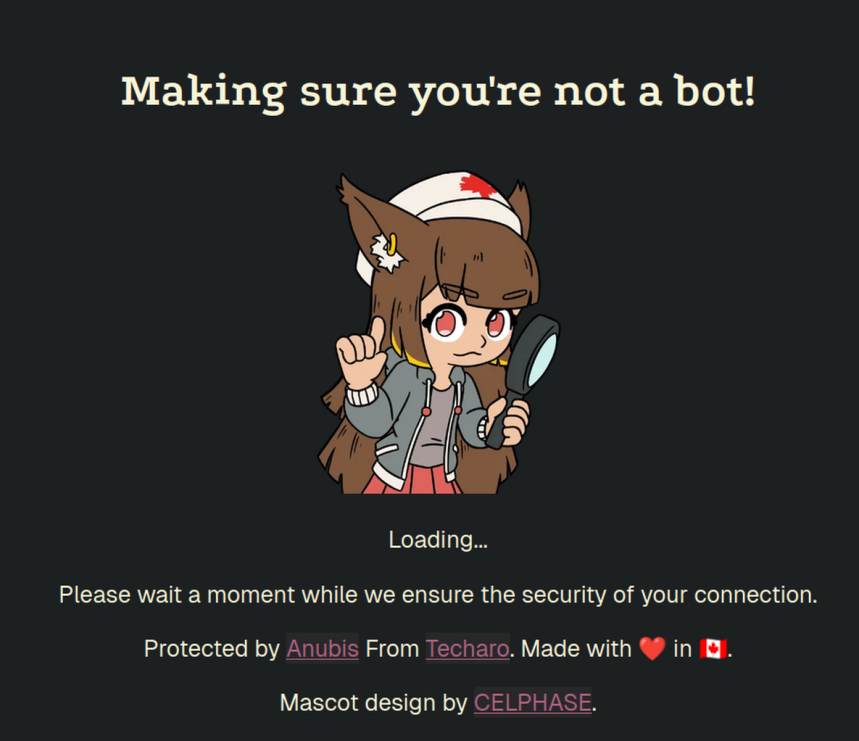
The mascot being a ~10 year old “cutsie” anime cat girl is weird in a work setting.
I will never put myself in a situation again where I have to explain that it’s not weird to anyone again, same for that URL.

What is a professional looking open-source alternative to Anubis?

Edit: No I can’t just send my colleges here https://anubis.techaro.lol/docs/admin/botstopper The issue is they find the Mascot and domain weird, they will still run into both.

My Goal: Recommend a Open-Source bot protection tool

The Issue: When I send my coworkers to https://anubis.techaro.lol/docs/admin/botstopper they find the mascot and URL weird.

Result: They don’t see Anubis as a serious tool and turn away from it

What is a professional looking open-source alternative to Anubis?

At work I was asked by a different team how we can deal with bots, because someone in my team remembered that I knew how to do it.

I reluctantly suggested Anubis because I got shit for it last time, This is the URL https://anubis.techaro.lol

This is the 2nd and last time I will ever recommend Anubis anywhere at work to deal with bots because of how unprofessional, un-serious and weird others perceive it.

image
The mascot being a ~10 year old “cutsie” anime cat girl is weird in a work setting.
I will never put myself in a situation again where I have to explain that it’s not weird to anyone again, same for that URL.

What is a professional looking open-source alternative to Anubis?

Edit: No I can’t just send my colleges here https://anubis.techaro.lol/docs/admin/botstopper The issue is they find the Mascot and domain weird, they will still run into both.

My Goal: Recommend a Open-Source bot protection tool

The Issue: When I send my coworkers to https://anubis.techaro.lol/docs/admin/botstopper they find the mascot and URL weird.

Result: They don’t see Anubis as a serious tool and turn away from it

What is a professional looking open-source alternative to Anubis?

0

The Torvalds vs Tanenbaum Debate | Comuniq

The Torvalds vs Tanenbaum Debate | Comuniq comuniq.xyz
preview

Linux won the world. Did Tanenbaum still win the argument? 30 years of containers, VMs and sandboxes are walls around a kernel with none inside. Team Torvalds or Team Tanenbaum?

Linux won the world. Did Tanenbaum still win the argument? 30 years of containers, VMs and sandboxes are walls around a kernel with none inside. Team Torvalds or Team Tanenbaum?

0

CEC over HDMI control?

preview

So I’ve got a living room computer running Cachy OS/Plasma Bigscreen that has replaced my Xbox. (I’m calling it the Xbox None)

It’s an old Dell Optiplex I picked up for cheap - runs indie titles pretty well and I can stream from my main PC.

Anyway, that’s not why I’m posting…

I can’t seem to find a way to get it to turn the TV on and off when it goes to sleep and wake up. Can anyone help?

Edit: thanks for the answers! I don’t want to buy an adapter so I guess I’ll live with having to use the remote. 🤷‍♂️ I am going to see if the TV settings can help me out though.

So I’ve got a living room computer running Cachy OS/Plasma Bigscreen that has replaced my Xbox. (I’m calling it the Xbox None)

It’s an old Dell Optiplex I picked up for cheap - runs indie titles pretty well and I can stream from my main PC.

Anyway, that’s not why I’m posting…

I can’t seem to find a way to get it to turn the TV on and off when it goes to sleep and wake up. Can anyone help?

Edit: thanks for the answers! I don’t want to buy an adapter so I guess I’ll live with having to use the remote. 🤷‍♂️ I am going to see if the TV settings can help me out though.

0

Linux Networking Diverts 50+ Fixes To Next Kernel, Still Bombarded With AI Fueled Churn

Linux Networking Diverts 50+ Fixes To Next Kernel, Still Bombarded With AI Fueled Churn www.phoronix.com
preview

Linux Networking Diverts 50+ Fixes To Next Kernel, Still Bombarded With AI Fueled Churn

Linux Networking Diverts 50+ Fixes To Next Kernel, Still Bombarded With AI Fueled Churn

0

RISC-V gets its first official Ubuntu desktop images in Ubuntu 26.10

RISC-V gets its first official Ubuntu desktop images in Ubuntu 26.10 linuxnation.social
preview

Ubuntu 26.10 brings official desktop images for RISC-V hardware, with experimental Xubuntu Minimal images for testing in virtual machines.

Ubuntu 26.10 brings official desktop images for RISC-V hardware, with experimental Xubuntu Minimal images for testing in virtual machines.

0

Euro Office has actual releases on their DesktopEditors github

GitHub Releases · Euro-Office/DesktopEditors github.com
preview

The DesktopEditors github repo appears to have actual releases now, with multiple download options for various Linux distros, plus Windows and MacOS. While some refinement may still be needed, this represents a usable release without requiring manual building.

The DesktopEditors github repo appears to have actual releases now, with multiple download options for various Linux distros, plus Windows and MacOS. While some refinement may still be needed, this represents a usable release without requiring manual building.