0

[Concluded] OOP wants recommendations for "terrible" places to take their racist great-aunt to in Houston, TX + UPDATE [Reddit]

preview

Original Reddit Post: Here

I am NOT the OOP

Update Post made by: Redditor u/red_earaches

Original post by: Redditor u/billionsandbillionsa in r/Houston

Trigger Warnings

potential discrimination, religious hypocrisy, MAGA


Recommendations for a Bad Time

May 22, 2026

I have my grandmother’s baby sister visiting next week. She’s in her 60s, but in very good shape and active. I kind of low-key hate her. She’s always making comments about my weight and why I’m not married and a list of other negative things. I want to take her out to places where she’ll be the most uncomfortable and potentially won’t be visiting Houston for a long time. She’s voted a certain way and her husband wears a red hat.

She’s very uncomfortable around minority groups. Where can I take her to make her visit miserable???

OOP clarifies in comments: I don’t ever contact her on my own but she is family and my mom and her are very close. She’s not a terrible person I just don’t prefer to be in her company. She’s just is very critical of younger people and always tries to give unsolicited advice and backhanded compliments.


Relevant Comments

Commenters give a wide variety of places to take this great-aunt to, including:

speaksoftly: Breakfast Klub. You’ll be in line for an hour, surrounded by black people enjoying themselves. (Breakfast Klub is known for its brunch soul food.)

cgreentx: Meow Wolf. Make sure you’re having an absolute blast and baffle them. They will be utterly confused and hate. (Meow Wolf is a radio station-theme immersive art experience that is known to be overstimulating.)

VanityJanitor: First, take her to the Houston farmers market. It’s a huge outdoor market with a bunch of spices, and it’s hella Mexican. Then stop at Gomez western wear so you can get her a true Texas outfit (also hella Mexican) before going jewelry shopping on Hillcroft Ave (Indian af).

And of course, stop at the Hong Kong food market before heading home. The penetrating fish smell and beautiful Asian culture is sure to put the nail in her maga coffin.

sashikku: Take her to Numbers (known for its alternative music venue and dance bar). Diverse environment, nowhere to sit, people dressed in anything from drag to BDSM gear.

Then take her to Boheme (known for its brunch drag shows).

Then take her to Menil Park (known for outside park and artwork). Also diverse crowd and it’s in the gayborhood.

ZaxZone: You can go visit the Donnellan Family Crypt under the Franklin Street Bridge. (It’s a 19-century creepy crypt.)

ThisIsNotACryForHelp:* Aga’s! The waitstaff are almost all immigrants, and if you go on Memorial Day, it will be so busy that you’ll have to wait outside with all of the other customers (who are typically mostly brown people) in the Houston humidity.

As a bonus, the food is top notch. But since she’s of the right-leaning persuasion, she probably won’t allow herself to enjoy such “exotic” foods as tikka masala or chicken makhani.

**SoSleepySue:**I’ll introduce her to my stepdad who doesn’t like the parking spot I picked, the grocery cart I picked, the way I drive, the way I shop, or the way I clean out his downspouts.


UPDATE

2 Weeks Later

I’m so grateful for everyone who contributed to the post. I never expected it to blow up so quickly.

For those who are wondering about my situation I do live with my parents, so my great-aunt visiting wasn’t something that I wanted but my mom and her are very close and I can’t control who visits my parents. I did spend a majority of the time in my room when she was there. But we did end up doing some family activities together.

I did get a lot of request to take my family to a drag show which I thought would be a hilarious suggestion, but my parents are very hardcore Christian and they would never go for such a thing. So I did suggest it very enthusiastically but was shut down immediately by them. At first they knew I was joking but I kept trying to push it and they said that “that’s the kind of event the devil lives at”.

I mentioned to my great aunt that according to the Bible, we’re all the bride of Christ so technically her husband Phil ( who’s ironically her 2nd husband) should identify as the bride of Christ. Which it wouldn’t and shouldn’t be considered sinful for men to express themselves as feminine since we are all the “bride of Christ”. This pissed them off in a way that gives me joy. It was mainly my mom who was scolding me, but my great aunt kept telling me she would pray for me. I told her as long as she was willing to pray I would like to give her some more prayer requests and she agreed. I told her to pray for the Palestinian children in Gaza and she literally rolled her eyes at me.

Saturday, we ended up visiting the zoo. We went around 10:30am and the parking was completely packed. I ended up circling the parking lot for at least 20 minutes with no success. All while my mom and aunt were back seat driving. I also did follow a person to their spot and sat in the lane and waited for them to put their three children in the car only to have another more aggressive driver overtake me and take my parking spot that I literally waited 5 minutes for. I thought it was so funny but my mom got absolutely livid. She wanted to get out of the car to confront them but told her to sit back down and shouting at these people wouldn’t be very Christ-like. I ended up driving off and parked in a paid hospital parking lot across the street from the zoo. We had to walk a far distance to the entry of the zoo in the hot sun, which I thought would piss my great aunt off but she didn’t actually complain about it and it was me who was a sweaty mess by the time we entered the zoo.

For lunch, I thought it was the most appropriate to take them to Trill burger since it’s pretty close to the zoo and the idea of greasy burgers and fries served in a casual style atmosphere with rap music blasting was exactly what I was going for. Bonus points because when we parked our car there were literally 2 cars hot boxing just a few feet away from us and the strong odor of cannabis isn’t something my family enjoys. My great aunt complained the whole time and at one point said something to the effect of “these people don’t even know how to spell THRILL burger”. It was such an interesting experience seeing some people dressed extremely well in suits and ties and others literally in their pajamas all in the same restaurant. I kept quietly singing along and nodding my head to the rhythm of the rap music that was playing in the background while my mom and great aunt kind of looked uncomfortable but continued chatting to themselves.

Unfortunately they didn’t allow me to choose dinner and my mom explained to me “we’re trying to have a good time” and we ended up eating at Taste of Texas which is a little more their scene. The waitress actually took a photo of us and printed it out as a gift since it was my great aunt’s first time and they wrapped a red bandanna around her and her husband was given a cowboy hat to take a picture with. My family had a great time there.

Sunday my family ended up going to church in the morning and I skipped out. But for a late dinner I kept telling them I was taking them to my favorite authentic BBQ spot. I took them straight to Chinatown and went to Gao’s Kabob, which is still bbq but definitely not what they expected. For those who never been there, it’s full of drunk Chinese people loudly singing Chinese love songs on a karaoke machine on a stage which is definitely not their scene. I ordered a bunch of pig feet and lamb skewers as well as spicy noodles. This definitely wasn’t what they were expecting and it didn’t seem like they ate much but they didn’t complain about it as much as Trill Burger. My mom kept saying we should have went to Treebeards.

Overall my great aunt actually kept an open mind about the places I took her and it was my mom who was the one who did the majority of the complaining. My great aunt told me she had a great time and is looking forward to me visiting her in Florida. I probably won’t be visiting anytime soon though.

Thanks to everyone for the suggestions!!! I love Houston!!


Reminder - I am not the original poster. DO NOT COMMENT ON LINKED POSTS.

Original Reddit Post: Here

I am NOT the OOP

Update Post made by: Redditor u/red_earaches

Original post by: Redditor u/billionsandbillionsa in r/Houston

Trigger Warnings

potential discrimination, religious hypocrisy, MAGA


Recommendations for a Bad Time

May 22, 2026

I have my grandmother’s baby sister visiting next week. She’s in her 60s, but in very good shape and active. I kind of low-key hate her. She’s always making comments about my weight and why I’m not married and a list of other negative things. I want to take her out to places where she’ll be the most uncomfortable and potentially won’t be visiting Houston for a long time. She’s voted a certain way and her husband wears a red hat.

She’s very uncomfortable around minority groups. Where can I take her to make her visit miserable???

OOP clarifies in comments: I don’t ever contact her on my own but she is family and my mom and her are very close. She’s not a terrible person I just don’t prefer to be in her company. She’s just is very critical of younger people and always tries to give unsolicited advice and backhanded compliments.


Relevant Comments

Commenters give a wide variety of places to take this great-aunt to, including:

speaksoftly: Breakfast Klub. You’ll be in line for an hour, surrounded by black people enjoying themselves. (Breakfast Klub is known for its brunch soul food.)

cgreentx: Meow Wolf. Make sure you’re having an absolute blast and baffle them. They will be utterly confused and hate. (Meow Wolf is a radio station-theme immersive art experience that is known to be overstimulating.)

VanityJanitor: First, take her to the Houston farmers market. It’s a huge outdoor market with a bunch of spices, and it’s hella Mexican. Then stop at Gomez western wear so you can get her a true Texas outfit (also hella Mexican) before going jewelry shopping on Hillcroft Ave (Indian af).

And of course, stop at the Hong Kong food market before heading home. The penetrating fish smell and beautiful Asian culture is sure to put the nail in her maga coffin.

sashikku: Take her to Numbers (known for its alternative music venue and dance bar). Diverse environment, nowhere to sit, people dressed in anything from drag to BDSM gear.

Then take her to Boheme (known for its brunch drag shows).

Then take her to Menil Park (known for outside park and artwork). Also diverse crowd and it’s in the gayborhood.

ZaxZone: You can go visit the Donnellan Family Crypt under the Franklin Street Bridge. (It’s a 19-century creepy crypt.)

ThisIsNotACryForHelp:* Aga’s! The waitstaff are almost all immigrants, and if you go on Memorial Day, it will be so busy that you’ll have to wait outside with all of the other customers (who are typically mostly brown people) in the Houston humidity.

As a bonus, the food is top notch. But since she’s of the right-leaning persuasion, she probably won’t allow herself to enjoy such “exotic” foods as tikka masala or chicken makhani.

**SoSleepySue:**I’ll introduce her to my stepdad who doesn’t like the parking spot I picked, the grocery cart I picked, the way I drive, the way I shop, or the way I clean out his downspouts.


UPDATE

2 Weeks Later

I’m so grateful for everyone who contributed to the post. I never expected it to blow up so quickly.

For those who are wondering about my situation I do live with my parents, so my great-aunt visiting wasn’t something that I wanted but my mom and her are very close and I can’t control who visits my parents. I did spend a majority of the time in my room when she was there. But we did end up doing some family activities together.

I did get a lot of request to take my family to a drag show which I thought would be a hilarious suggestion, but my parents are very hardcore Christian and they would never go for such a thing. So I did suggest it very enthusiastically but was shut down immediately by them. At first they knew I was joking but I kept trying to push it and they said that “that’s the kind of event the devil lives at”.

I mentioned to my great aunt that according to the Bible, we’re all the bride of Christ so technically her husband Phil ( who’s ironically her 2nd husband) should identify as the bride of Christ. Which it wouldn’t and shouldn’t be considered sinful for men to express themselves as feminine since we are all the “bride of Christ”. This pissed them off in a way that gives me joy. It was mainly my mom who was scolding me, but my great aunt kept telling me she would pray for me. I told her as long as she was willing to pray I would like to give her some more prayer requests and she agreed. I told her to pray for the Palestinian children in Gaza and she literally rolled her eyes at me.

Saturday, we ended up visiting the zoo. We went around 10:30am and the parking was completely packed. I ended up circling the parking lot for at least 20 minutes with no success. All while my mom and aunt were back seat driving. I also did follow a person to their spot and sat in the lane and waited for them to put their three children in the car only to have another more aggressive driver overtake me and take my parking spot that I literally waited 5 minutes for. I thought it was so funny but my mom got absolutely livid. She wanted to get out of the car to confront them but told her to sit back down and shouting at these people wouldn’t be very Christ-like. I ended up driving off and parked in a paid hospital parking lot across the street from the zoo. We had to walk a far distance to the entry of the zoo in the hot sun, which I thought would piss my great aunt off but she didn’t actually complain about it and it was me who was a sweaty mess by the time we entered the zoo.

For lunch, I thought it was the most appropriate to take them to Trill burger since it’s pretty close to the zoo and the idea of greasy burgers and fries served in a casual style atmosphere with rap music blasting was exactly what I was going for. Bonus points because when we parked our car there were literally 2 cars hot boxing just a few feet away from us and the strong odor of cannabis isn’t something my family enjoys. My great aunt complained the whole time and at one point said something to the effect of “these people don’t even know how to spell THRILL burger”. It was such an interesting experience seeing some people dressed extremely well in suits and ties and others literally in their pajamas all in the same restaurant. I kept quietly singing along and nodding my head to the rhythm of the rap music that was playing in the background while my mom and great aunt kind of looked uncomfortable but continued chatting to themselves.

Unfortunately they didn’t allow me to choose dinner and my mom explained to me “we’re trying to have a good time” and we ended up eating at Taste of Texas which is a little more their scene. The waitress actually took a photo of us and printed it out as a gift since it was my great aunt’s first time and they wrapped a red bandanna around her and her husband was given a cowboy hat to take a picture with. My family had a great time there.

Sunday my family ended up going to church in the morning and I skipped out. But for a late dinner I kept telling them I was taking them to my favorite authentic BBQ spot. I took them straight to Chinatown and went to Gao’s Kabob, which is still bbq but definitely not what they expected. For those who never been there, it’s full of drunk Chinese people loudly singing Chinese love songs on a karaoke machine on a stage which is definitely not their scene. I ordered a bunch of pig feet and lamb skewers as well as spicy noodles. This definitely wasn’t what they were expecting and it didn’t seem like they ate much but they didn’t complain about it as much as Trill Burger. My mom kept saying we should have went to Treebeards.

Overall my great aunt actually kept an open mind about the places I took her and it was my mom who was the one who did the majority of the complaining. My great aunt told me she had a great time and is looking forward to me visiting her in Florida. I probably won’t be visiting anytime soon though.

Thanks to everyone for the suggestions!!! I love Houston!!


Reminder - I am not the original poster. DO NOT COMMENT ON LINKED POSTS.

0

[Concluded] I (25M) “ruined” my girlfriends (28F) college graduation and she’s giving me grief for it months later [Reddit]

preview

Click for Original Reddit Post

This post was put together by: Reddit u/Direct-Caterpillar77

I am not The OOP, OOP is Reddit: u/ThrowRA-TheGraduate

Post was Originally Posted to: Reddit r/relationship_advice

Trigger Warning

Entitlement, emotional abuse


Original Reddit BoRU

Redditor Editors Note: the original BoRU was posted over 4 years ago and deleted, so reposting to bring back to the sub


Original Post

March 17, 2021

Hello. I don’t want to be content for your YouTube channel. If that’s your purpose, go away.

My gf finished college back in January. It’s been a long road for her - medical issues, mental problems and a change of major meant that her 5-year degree took seven. I graduated college a couple of years ago, and have been working ever since.

The run-up to her graduation was rough. She was stressed about her thesis, and I essentially didn’t have a partner for three months. I took care of everything at home, I helped her write her assignment, and I’m having a hard time keeping up at work, so I’m working maybe 5-10 hours of overtime every week.

For her graduation, I pulled out as many stops as I could. Her friends came to surprise her at a covid-approved distance outside our window, I made sure champagne was ready, and I had to leave the flat for a work thing, but came back ASAP when she had her final defence and got her grade. Which was the top one, of course, since she’s brilliant and poured her heart into this. I’d made sure her work got her flowers, and a lot of her family and friends remembered as well. We lived in a greenhouse for a good few days afterwards as they kept trickling in.

Anyway, we then went to pick up sushi of her choosing from her favourite place.

Now, for some context, I’ve been going through a rough time recently. I’ve been incredibly stressed, I’m in a new therapy schedule, and I felt very alone for months leading up to that day. On the day, work was particularly brutal. I’d felt like screaming the entire day.

When I graduated college, nobody really noticed. My girlfriend did a little thing with some champagne, but that was it. We did go out to eat as well.

So, when we were sat down for dinner, the immediate excitement of her grade and her finally finishing faded.

The last four months of emotional void kept creeping up on me, the stress of that particular awful day, and as much as I hate to admit it, a twinge of jealousy that she’s being celebrated so much more than I was.

As we were eating dinner, I was fighting back tears. I don’t know what the fuck happened to me. She could tell something was up, and I couldn’t keep up the facade for too long. I apologised profusely and went to get my shit together in the bathroom for a bit. I’ll be the first to admit that I wasn’t very fun for the rest of the evening.

Here’s the problem: she’s telling me I ruined her graduation from college. That particular word was used - I’ve ruined it. She told me a few days later, in tears, that I had to make up for it somehow. I asked her what to do, and she said ”just do what they’d do in a movie.”

Now, she’ll pull this line out occasionally. It’s an awful line, but I know what she means. She wants an over-the-top gesture, and it’s pretty obvious that she wants me to stage a new, fake graduation that I don’t fuck up.

But I’ll be honest, it’s hard. I just don’t have the energy to do it. She’ll bring it up now and again, and every time, she reiterates the same thing: The longer i wait, the more special and perfect it has to be.

I don’t do well under that kind of pressure. In fact, I hate it pretty intensely. So now I’m completely demotivated to do it, and I still feel a little betrayed.

On one hand, I get that she wanted the day to be all about just her.

On the other hand, I feel like I did everything I’m supposed to. I didn’t mean to get upset. I didn’t get angry, or lash out, or forget something, or fail to plan something up to code. I felt really shitty and started crying. And finally, I felt like it was the final day that was all about her on the tail end of four months where my needs, emotional or physical, didn’t exist.

What the fuck do I do? How do I talk to her about this in a way that doesn’t result in me feeling awful?

Tl;dr: Stress, emotional problems and general badness got the best of me during girlfriend’s college graduation dinner. I’ve now ruined it and she expects and over the top new fake graduation to compensate.


RELEVANT COMMENTS

Fragrant_Spray: Do like they do in a movie? Invite all her friends together, lock them in a room, and design a series of physical and psychological tortures?

Your gf dismissed your feelings on graduation day, and is upset that you aren’t addressing her feelings by jumping through a whole bunch of hoops for her entertainment. This attitude will continue if you don’t address it. Never trust someone who expects real life to be like the movies.

OOP: I’ll admit, that made me laugh pretty hard. Thanks, man.

Fragrant_Spray: In the romcoms she’s thinking about, there’s usually a scene where someone makes a big effort to make it work with a partner, and the partner is unappreciative (at the least). That’s when the protagonist realizes that they’re with the wrong person, which the audience knew all along. They realize that they aren’t being respected and they move on. If she wants to compare life to a movie, that’s the scene I think you’re seeing.

CherryBomb214: If I may be so bold…it kind of sounds like you’ve spent a LONG time attending to her needs above yours so I ask you: when does she attend to you? You should in an equal partnership. Who is taking care of you right now because you’ve just told us you’re spent and that’s okay. We all get spent some times. The key is to surround ourselves with people that help build us back up – not make things all about them.

I know this doesn’t answer your question directly but I really want you to take stock of how things are in your life and honestly examine your relationship.

OOP: Rarely. I’m not good at expressing my needs, though, so it’s not all on her. She’ll do nice things for me now and again, it’s not that, it’s just that when the chips are down, I have to be the glue every time. That’s okay, but I’m really down about this because at least she could be appreciative of it.

NotPiffany: Are you really bad at expressing your needs, or has she trained you not to express them in the first place?


Update 1

March 20, 2021 (3 Days Later)

Hey everyone. Thanks for the absolutely overwhelming amount of advice and attention you guys gave me. It was wonderful and, admittedly, a little terrifying.

I had a talk with my girlfriend last night. It was actually about her birthday, which is today. Some may have seen my dread for that in the comments of the last post. It went down exactly as I’d feared.

She asked me how many party supplies and decorations we had - I told her that I reckon we had enough, and she was upset that I didn’t go out and buy more.

Just to reiterate, here is my current agenda for the day:

  • Wake up at six AM to decorate the flat and get breakfast at a baker, including a custom-made cake from her favourite bakery that she likes. Keep in mind that her favourite rolls and favourite cake are in two different places, so I’m going two places.
  • have breakfast together
  • take her to see a castle she’s wanted to see nearby
  • buy her dinner from a place she’s been saying she wants to try
  • watch a film with her of her choosing
  • let her go early to bed without any grief.

Ladies and gentlemen, I have been told that I don’t put in any effort. See, none of these things count because she’s expressed a wish for doing them, or I’ve asked if she wants them. This means that they’re no longer surprises, and therefore not romantic.

I’ll be honest, that made me pretty livid, and especially so because she brought up the graduation again.

I told her that, in fact, I had given it some thought. We can have a day where we spoil her and get dinner somewhere nice or do something special, but I’m not throwing a new fake graduation, and I’m not accepting the premise that it has to be increasingly bombastic the longer I wait.

That didn’t go down well. In fact, she got increasingly angry that I didn’t understand that I’d ruined the most important day of her life so far. I asked her if all the gestures meant nothing because I got upset, and she said yes. She had to “walk on eggshells and couldn’t be limitlessly happy”, which ruined everything.

I told her how hard it was leading up to, and her reaction was to say I could’ve waited one more day to get upset then. I told her that I don’t feel as I get as much emotional support as I give, and she told me that her emotional support consists primarily of not leaning too much on me.

I feel like I’m taking crazy pills. What the hell do I do now? This was the weirdest conversation I’ve had for a long time.

Also, if you’ll have me excused, I have to go pick up a cake.🙃.


RELEVANT COMMENTS

[deleted]: She’s so ungrateful and nothing you do will ever be enough for her. May I ask what exactly she does for you? I expect her planning for your birthday to be nothing short of a weekend on Mars with a mariachi band. She doesn’t validate your feelings at all or try to be understanding. Please, do yourself a favour and get out of that toxic relationship. You don’t deserve to be emotionally beaten down every time there’s a celebration.

OOP: It’s funny, really. My birthday was a few weeks ago, and she planned roughly something akin to what I’ve done - except the restaurant I asked for was closed on Mondays, something she hadn’t investigated before the fact, and I had to think of something else. And pick it up after work, because she wanted us to go together and get it.

She did get me a really nice present, though, so that’s something, I guess. I felt it was just fine, but I’m not sure she would’ve been happy with it. 🤷🏼‍♂️.

Anti_Meta: Bro. This is word for word shit my soon to be ex-wife does/has said.

Going to skip all of the 8 years it took me to figure this out but I’mma stuff it into one sentence and set you free.

These are red flags of extremely low emotional intelligence. Extremely low. Everything bad in her life will be your fault, logic be damned.

Run your fucking ass off. I mean sell yourself naked for a bus ticket and deal with nude in public later.

nickis84: Why are you with this drama queen? Can you imagine how she’s going to be about her proposal? Heaven forbid you mess that up!


Update 2 An update from undersigned…

Apr 28, 2022 (1 year later)

I just remembered that this account exists - and I’m happy to come back and report that we broke up in the summer of last year.

Perhaps unsurprisingly, it got pretty ugly pretty fast, with her attempting all sorts of fun, manipulating things like going through my digital receipts, stealing my passport and the registration for my car, and gently implying to our common friends that I beat her.

So that was cool of her. We finished dealing with the last joint assets and dumb adult shit back around Christmas, and I haven’t seen or heard from her since some time in January.

As for me, I’m doing fucking great. I live in a tiny studio that costs a fortune, but my career is going phenomenally, I’ve met all sorts of great friends, and perhaps most importantly, I recently started dating someone. She’s fucking amazing, and she makes me feel appreciated in ways I didn’t think could happen.

I get it now. I get why other people like relationships.

Holy shit, that relationship was bad. I spent a long time after the breakup coming to terms with just how bad it was. I had experiences like a one-night stand that showed me more affection than she did. Shit was wild.

Afaik, she’s not doing too great. Life hit her pretty hard once I stopped being there to soften the blows for her - ironically, she’d always accuse me of being a loser that couldn’t take care of myself, lol.

There’s one main reason I’m back here, I guess. Go back and read my posts, and if it resonates with you, you deserve better. I want to let anyone know that no matter how deep that sunk cost feels, get out. It stings at first, but out here, you can breathe.


RELEVANT COMMENTS

Sweet-Advertising798: This is fantastic news, and you’re right, it will help a lot of other people in toxic relationships with narcissists.

Also - she stole your passport???!!! Wtf?

Are you still friends with anyone in the old friend group? Do they finally see her for who she really is?

OOP: Yeah - we had a box of “important documents” that she decided to swipe when she moved out, but she didn’t remove my things first. It was my passport, my college degree (how fitting, lmao), the registration for my car, and probably some other stuff. She gave it back eventually, but it was a hassle and a half.

All of our common friends except one either sided with me, or cut me out. The last guy is how I hear things now and again - but he’s keeping her at arms length after hearing the truth.


Update 3

May 2, 2021 (4 Days after 2nd update)

OOP showed up in the original BoRU comments

Hey everyone!

Wow, this blew up. I genuinely didn’t expect this many people to care about how I’m doing, but it’s nice to see. Everyone here is being incredibly lovely - and thanks to those who pinged me and told me about this thread.

I’m really glad to see those of you who said that they needed to read this, or the reminder to stick out the hard part. That’s why I kept this up - I actually considered deleting it, but I wanted to pass my lesson on instead. If anyone wants to talk in private, my messages are open.

Just to answer a few of the questions I see repeated here and there:

Can you share more details about how she’s doing?

Not really. I don’t know much, as our circles very much disentangled after the breakup. I try to avoid her, and I’ve blocked her everywhere, so I don’t get many updates except a loose mention here and there. I just know that she’s been having trouble with dealing with everything on her own.

Even if I knew, I wouldn’t tell, I think. I have no vindictive need to put her on blast - and my life isn’t about her anymore. That’s the best part. I’m not letting her live rent-free in my head any longer.

As much as I understand the spectator’s desire to see a toxic person get their comeuppance, it’s important to remember this: as long as I let her unhappiness make me happy, I’m still dependent on her feelings - just inversely so.

In that scenario, she still has power over me. I was truly free the day I no longer cared how she’s doing.

(on that note: for those of you who said I got a happy ending, I don’t think so. I got a new beginning, and that’s even better. For the first time in years, it doesn’t feel like my life is over.)

You were kind of shit too, weren’t you?

Yeah. I wasn’t a saint in that relationship, and while I maintain that I tried my hardest, I made mistakes too. I was bad at communicating my needs, bad at drawing boundaries, and bad at not keeping covert debts for nice things I did.

I’m working on being better. I’ve made conscious decisions to change those behaviours, and I’ve asked my new girlfriend to call me out on it if I ever do it. This story isn’t black and white, although the shades of grey aren’t exactly in the middle. I made mistakes too.


THIS IS A REPOST COMMUNITY - I AM NOT THE OOP

DO NOT CONTACT THE OOP’s OR COMMENT ON LINKED POSTS.

Click for Original Reddit Post

This post was put together by: Reddit u/Direct-Caterpillar77

I am not The OOP, OOP is Reddit: u/ThrowRA-TheGraduate

Post was Originally Posted to: Reddit r/relationship_advice

Trigger Warning

Entitlement, emotional abuse


Original Reddit BoRU

Redditor Editors Note: the original BoRU was posted over 4 years ago and deleted, so reposting to bring back to the sub


Original Post

March 17, 2021

Hello. I don’t want to be content for your YouTube channel. If that’s your purpose, go away.

My gf finished college back in January. It’s been a long road for her - medical issues, mental problems and a change of major meant that her 5-year degree took seven. I graduated college a couple of years ago, and have been working ever since.

The run-up to her graduation was rough. She was stressed about her thesis, and I essentially didn’t have a partner for three months. I took care of everything at home, I helped her write her assignment, and I’m having a hard time keeping up at work, so I’m working maybe 5-10 hours of overtime every week.

For her graduation, I pulled out as many stops as I could. Her friends came to surprise her at a covid-approved distance outside our window, I made sure champagne was ready, and I had to leave the flat for a work thing, but came back ASAP when she had her final defence and got her grade. Which was the top one, of course, since she’s brilliant and poured her heart into this. I’d made sure her work got her flowers, and a lot of her family and friends remembered as well. We lived in a greenhouse for a good few days afterwards as they kept trickling in.

Anyway, we then went to pick up sushi of her choosing from her favourite place.

Now, for some context, I’ve been going through a rough time recently. I’ve been incredibly stressed, I’m in a new therapy schedule, and I felt very alone for months leading up to that day. On the day, work was particularly brutal. I’d felt like screaming the entire day.

When I graduated college, nobody really noticed. My girlfriend did a little thing with some champagne, but that was it. We did go out to eat as well.

So, when we were sat down for dinner, the immediate excitement of her grade and her finally finishing faded.

The last four months of emotional void kept creeping up on me, the stress of that particular awful day, and as much as I hate to admit it, a twinge of jealousy that she’s being celebrated so much more than I was.

As we were eating dinner, I was fighting back tears. I don’t know what the fuck happened to me. She could tell something was up, and I couldn’t keep up the facade for too long. I apologised profusely and went to get my shit together in the bathroom for a bit. I’ll be the first to admit that I wasn’t very fun for the rest of the evening.

Here’s the problem: she’s telling me I ruined her graduation from college. That particular word was used - I’ve ruined it. She told me a few days later, in tears, that I had to make up for it somehow. I asked her what to do, and she said ”just do what they’d do in a movie.”

Now, she’ll pull this line out occasionally. It’s an awful line, but I know what she means. She wants an over-the-top gesture, and it’s pretty obvious that she wants me to stage a new, fake graduation that I don’t fuck up.

But I’ll be honest, it’s hard. I just don’t have the energy to do it. She’ll bring it up now and again, and every time, she reiterates the same thing: The longer i wait, the more special and perfect it has to be.

I don’t do well under that kind of pressure. In fact, I hate it pretty intensely. So now I’m completely demotivated to do it, and I still feel a little betrayed.

On one hand, I get that she wanted the day to be all about just her.

On the other hand, I feel like I did everything I’m supposed to. I didn’t mean to get upset. I didn’t get angry, or lash out, or forget something, or fail to plan something up to code. I felt really shitty and started crying. And finally, I felt like it was the final day that was all about her on the tail end of four months where my needs, emotional or physical, didn’t exist.

What the fuck do I do? How do I talk to her about this in a way that doesn’t result in me feeling awful?

Tl;dr: Stress, emotional problems and general badness got the best of me during girlfriend’s college graduation dinner. I’ve now ruined it and she expects and over the top new fake graduation to compensate.


RELEVANT COMMENTS

Fragrant_Spray: Do like they do in a movie? Invite all her friends together, lock them in a room, and design a series of physical and psychological tortures?

Your gf dismissed your feelings on graduation day, and is upset that you aren’t addressing her feelings by jumping through a whole bunch of hoops for her entertainment. This attitude will continue if you don’t address it. Never trust someone who expects real life to be like the movies.

OOP: I’ll admit, that made me laugh pretty hard. Thanks, man.

Fragrant_Spray: In the romcoms she’s thinking about, there’s usually a scene where someone makes a big effort to make it work with a partner, and the partner is unappreciative (at the least). That’s when the protagonist realizes that they’re with the wrong person, which the audience knew all along. They realize that they aren’t being respected and they move on. If she wants to compare life to a movie, that’s the scene I think you’re seeing.

CherryBomb214: If I may be so bold…it kind of sounds like you’ve spent a LONG time attending to her needs above yours so I ask you: when does she attend to you? You should in an equal partnership. Who is taking care of you right now because you’ve just told us you’re spent and that’s okay. We all get spent some times. The key is to surround ourselves with people that help build us back up – not make things all about them.

I know this doesn’t answer your question directly but I really want you to take stock of how things are in your life and honestly examine your relationship.

OOP: Rarely. I’m not good at expressing my needs, though, so it’s not all on her. She’ll do nice things for me now and again, it’s not that, it’s just that when the chips are down, I have to be the glue every time. That’s okay, but I’m really down about this because at least she could be appreciative of it.

NotPiffany: Are you really bad at expressing your needs, or has she trained you not to express them in the first place?


Update 1

March 20, 2021 (3 Days Later)

Hey everyone. Thanks for the absolutely overwhelming amount of advice and attention you guys gave me. It was wonderful and, admittedly, a little terrifying.

I had a talk with my girlfriend last night. It was actually about her birthday, which is today. Some may have seen my dread for that in the comments of the last post. It went down exactly as I’d feared.

She asked me how many party supplies and decorations we had - I told her that I reckon we had enough, and she was upset that I didn’t go out and buy more.

Just to reiterate, here is my current agenda for the day:

  • Wake up at six AM to decorate the flat and get breakfast at a baker, including a custom-made cake from her favourite bakery that she likes. Keep in mind that her favourite rolls and favourite cake are in two different places, so I’m going two places.
  • have breakfast together
  • take her to see a castle she’s wanted to see nearby
  • buy her dinner from a place she’s been saying she wants to try
  • watch a film with her of her choosing
  • let her go early to bed without any grief.

Ladies and gentlemen, I have been told that I don’t put in any effort. See, none of these things count because she’s expressed a wish for doing them, or I’ve asked if she wants them. This means that they’re no longer surprises, and therefore not romantic.

I’ll be honest, that made me pretty livid, and especially so because she brought up the graduation again.

I told her that, in fact, I had given it some thought. We can have a day where we spoil her and get dinner somewhere nice or do something special, but I’m not throwing a new fake graduation, and I’m not accepting the premise that it has to be increasingly bombastic the longer I wait.

That didn’t go down well. In fact, she got increasingly angry that I didn’t understand that I’d ruined the most important day of her life so far. I asked her if all the gestures meant nothing because I got upset, and she said yes. She had to “walk on eggshells and couldn’t be limitlessly happy”, which ruined everything.

I told her how hard it was leading up to, and her reaction was to say I could’ve waited one more day to get upset then. I told her that I don’t feel as I get as much emotional support as I give, and she told me that her emotional support consists primarily of not leaning too much on me.

I feel like I’m taking crazy pills. What the hell do I do now? This was the weirdest conversation I’ve had for a long time.

Also, if you’ll have me excused, I have to go pick up a cake.🙃.


RELEVANT COMMENTS

[deleted]: She’s so ungrateful and nothing you do will ever be enough for her. May I ask what exactly she does for you? I expect her planning for your birthday to be nothing short of a weekend on Mars with a mariachi band. She doesn’t validate your feelings at all or try to be understanding. Please, do yourself a favour and get out of that toxic relationship. You don’t deserve to be emotionally beaten down every time there’s a celebration.

OOP: It’s funny, really. My birthday was a few weeks ago, and she planned roughly something akin to what I’ve done - except the restaurant I asked for was closed on Mondays, something she hadn’t investigated before the fact, and I had to think of something else. And pick it up after work, because she wanted us to go together and get it.

She did get me a really nice present, though, so that’s something, I guess. I felt it was just fine, but I’m not sure she would’ve been happy with it. 🤷🏼‍♂️.

Anti_Meta: Bro. This is word for word shit my soon to be ex-wife does/has said.

Going to skip all of the 8 years it took me to figure this out but I’mma stuff it into one sentence and set you free.

These are red flags of extremely low emotional intelligence. Extremely low. Everything bad in her life will be your fault, logic be damned.

Run your fucking ass off. I mean sell yourself naked for a bus ticket and deal with nude in public later.

nickis84: Why are you with this drama queen? Can you imagine how she’s going to be about her proposal? Heaven forbid you mess that up!


Update 2 An update from undersigned…

Apr 28, 2022 (1 year later)

I just remembered that this account exists - and I’m happy to come back and report that we broke up in the summer of last year.

Perhaps unsurprisingly, it got pretty ugly pretty fast, with her attempting all sorts of fun, manipulating things like going through my digital receipts, stealing my passport and the registration for my car, and gently implying to our common friends that I beat her.

So that was cool of her. We finished dealing with the last joint assets and dumb adult shit back around Christmas, and I haven’t seen or heard from her since some time in January.

As for me, I’m doing fucking great. I live in a tiny studio that costs a fortune, but my career is going phenomenally, I’ve met all sorts of great friends, and perhaps most importantly, I recently started dating someone. She’s fucking amazing, and she makes me feel appreciated in ways I didn’t think could happen.

I get it now. I get why other people like relationships.

Holy shit, that relationship was bad. I spent a long time after the breakup coming to terms with just how bad it was. I had experiences like a one-night stand that showed me more affection than she did. Shit was wild.

Afaik, she’s not doing too great. Life hit her pretty hard once I stopped being there to soften the blows for her - ironically, she’d always accuse me of being a loser that couldn’t take care of myself, lol.

There’s one main reason I’m back here, I guess. Go back and read my posts, and if it resonates with you, you deserve better. I want to let anyone know that no matter how deep that sunk cost feels, get out. It stings at first, but out here, you can breathe.


RELEVANT COMMENTS

Sweet-Advertising798: This is fantastic news, and you’re right, it will help a lot of other people in toxic relationships with narcissists.

Also - she stole your passport???!!! Wtf?

Are you still friends with anyone in the old friend group? Do they finally see her for who she really is?

OOP: Yeah - we had a box of “important documents” that she decided to swipe when she moved out, but she didn’t remove my things first. It was my passport, my college degree (how fitting, lmao), the registration for my car, and probably some other stuff. She gave it back eventually, but it was a hassle and a half.

All of our common friends except one either sided with me, or cut me out. The last guy is how I hear things now and again - but he’s keeping her at arms length after hearing the truth.


Update 3

May 2, 2021 (4 Days after 2nd update)

OOP showed up in the original BoRU comments

Hey everyone!

Wow, this blew up. I genuinely didn’t expect this many people to care about how I’m doing, but it’s nice to see. Everyone here is being incredibly lovely - and thanks to those who pinged me and told me about this thread.

I’m really glad to see those of you who said that they needed to read this, or the reminder to stick out the hard part. That’s why I kept this up - I actually considered deleting it, but I wanted to pass my lesson on instead. If anyone wants to talk in private, my messages are open.

Just to answer a few of the questions I see repeated here and there:

Can you share more details about how she’s doing?

Not really. I don’t know much, as our circles very much disentangled after the breakup. I try to avoid her, and I’ve blocked her everywhere, so I don’t get many updates except a loose mention here and there. I just know that she’s been having trouble with dealing with everything on her own.

Even if I knew, I wouldn’t tell, I think. I have no vindictive need to put her on blast - and my life isn’t about her anymore. That’s the best part. I’m not letting her live rent-free in my head any longer.

As much as I understand the spectator’s desire to see a toxic person get their comeuppance, it’s important to remember this: as long as I let her unhappiness make me happy, I’m still dependent on her feelings - just inversely so.

In that scenario, she still has power over me. I was truly free the day I no longer cared how she’s doing.

(on that note: for those of you who said I got a happy ending, I don’t think so. I got a new beginning, and that’s even better. For the first time in years, it doesn’t feel like my life is over.)

You were kind of shit too, weren’t you?

Yeah. I wasn’t a saint in that relationship, and while I maintain that I tried my hardest, I made mistakes too. I was bad at communicating my needs, bad at drawing boundaries, and bad at not keeping covert debts for nice things I did.

I’m working on being better. I’ve made conscious decisions to change those behaviours, and I’ve asked my new girlfriend to call me out on it if I ever do it. This story isn’t black and white, although the shades of grey aren’t exactly in the middle. I made mistakes too.


THIS IS A REPOST COMMUNITY - I AM NOT THE OOP

DO NOT CONTACT THE OOP’s OR COMMENT ON LINKED POSTS.

0

Any website to verify my webrtc stream has audio?

preview

I want to test my screensharing setup with pipewire-screenaudio. Is there a webrtc test site that can show me that my stream indeed has audio? E.g. that can record a snippet of my stream so I can see how it sounds.

inb4 calling someone on discord and asking them

I want to test my screensharing setup with pipewire-screenaudio. Is there a webrtc test site that can show me that my stream indeed has audio? E.g. that can record a snippet of my stream so I can see how it sounds.

inb4 calling someone on discord and asking them

0

Touring European Union Parliament in Belgium | Full Interview with Marc Botenga

play · youtube.com
YouTube They Let Me Into The European Union youtube.com
preview

The Honorable Marc Botenga showed me around the European Parliament as we discussed different political topics including Right Wing movements in Europe, Workers Rights, Israel/Palestine and much more.

The Honorable Marc Botenga showed me around the European Parliament as we discussed different political topics including Right Wing movements in Europe, Workers Rights, Israel/Palestine and much more.

0

Camera Hack

preview

I had to recently reinstall The Sims 2 due to moving from Windows to Linux. The only thing I couldn’t remember was how the hell I changed the camera so I could view the whole neighborhood instead of being stuck to EA’s constraints. I found this Fandom Guide and that’s totally what I did.

Happy I found it again because I like being able to move all the way to the town edges. Just thought I’d share in case anyone was looking for a way to change it without mods.

0

The 2000 year old Roman marine concrete at Caesarea is not degrading it is actively curing and growing stronger in the ocean

THE HISTORICAL INSIGHTS Most Valuable Shipwreck Artifacts Ever Recovered thehistoricalinsights.page
preview

When the Swedish warship Vasa sank in Stockholm harbor in August 1628 it was basically a massive failure of naval infrastructure. King Gustav II Adolf commissioned it as a flagship but it was built far too narrow and top heavy for the amount of carved wooden propaganda attached to the hull. It rolled over and went down barely 1300 meters into its maiden voyage.

Vasa historically vital is what the local geography did to the physical hardware. In standard open ocean water wood boring shipworms will consume an oak hull within a few decades. But the Baltic Sea has restricted saltwater inflow and massive freshwater river runoff. The salinity drops too low for the mollusks to survive.

water chemistry essentially acted as a geographic preservation vault. When salvage crews raised the hull in 1961 this two tonne carved oak lion figurehead was almost entirely intact. It proves that a wrecks specific chemical environment does just as much work as human effort in deciding what historical hardware survives.

0

[OC] I'm Listening

preview

cross-posted from: lemmy.world/post/51839559

You said meow.

I expected nonsense.
The usual human noise.
Big mouth. No whiskers. No talent.

But then—

You said it again.

And it wasn’t… terrible.

I gave you the look.
The one from the side.
The “I saw what you just did” look.

Because that sounded close.

Not fluent.
Not impressive.
But close enough to make my ears tilt forward.

You weren’t teasing.

You were trying.

Oh.

That changes things.

I have spent years perfecting this system—
one meow for food,
Another for outside,
Yet another for “why is my bowl only half full,
explain yourself.”

And now you’re studying it.

Careful little copies.
Testing the shape of my words.

You’re not laughing.
You’re listening.

I stare at you longer.

Is this how it starts?
First a meow.
Then a conversation?

You say it again.

Still clumsy.
Still human.

But warmer.

And I feel something strange—
not insult,
not offense—

recognition.

You’re not invading my language.

You’re trying to meet me in it.

My tail gives one slow flick.

All right.

Try again.

I’m listening.

0

How active are foreign influence operations in censoring or manipulating content on U.S. social media platforms, and is this activity worsening around major elections?

preview

Over the past few months, I’ve noticed a sharp increase in proactive foreign state propaganda across major Western social media platforms.
The pattern became undeniably clear around September 11, when an overwhelming volume of hostility, anti-American messaging, and divisive narrative pushes flooded feeds across multiple platforms. Whenever I attempt to engage with these posts or debunk blatant disinformation, my account rapidly becomes the target of coordinated backlash—ranging from sudden downvote brigading and mass reporting to lockouts and automated harassment.

It leads to a broader question about how foreign influence operations—particularly those linked to actors like state-aligned bot networks (e.g., “Spamouflage”)—operate beyond their own borders. While foreign governments cannot directly delete content on American platforms, they seem to rely heavily on manipulating platform algorithms, abusing automated reporting systems, leveraging major calendar events (like 9/11), and deploying bot networks to suppress counter-narratives and silence individual users.

With major elections and midterms consistently serving as prime targets for foreign interference, these tactics appear to be getting more aggressive. Instead of just pushing state-sanctioned talking points, these campaigns increasingly aim to disrupt organic debate, hijack community moderation, and foster general distrust in democratic discourse. I don’t know what’s your take on it?

Over the past few months, I’ve noticed a sharp increase in proactive foreign state propaganda across major Western social media platforms.

The pattern became undeniably clear around September 11, when an overwhelming volume of hostility, anti-American messaging, and divisive narrative pushes flooded feeds across multiple platforms. Whenever I attempt to engage with these posts or debunk blatant disinformation, my account rapidly becomes the target of coordinated backlash—ranging from sudden downvote brigading and mass reporting to lockouts and automated harassment.

It leads to a broader question about how foreign influence operations—particularly those linked to actors like state-aligned bot networks (e.g., “Spamouflage”)—operate beyond their own borders. While foreign governments cannot directly delete content on American platforms, they seem to rely heavily on manipulating platform algorithms, abusing automated reporting systems, leveraging major calendar events (like 9/11), and deploying bot networks to suppress counter-narratives and silence individual users.

With major elections and midterms consistently serving as prime targets for foreign interference, these tactics appear to be getting more aggressive. Instead of just pushing state-sanctioned talking points, these campaigns increasingly aim to disrupt organic debate, hijack community moderation, and foster general distrust in democratic discourse. I don’t know what’s your take on it?

0

Autism Society Japan Issues Statement on Mii-chan and Miss Yamada Manga

Anime News Network Autism Society Japan Issues Statement on Mii-chan and Miss Yamada Manga www.animenewsnetwork.com
preview

ASJ: “We do not believe an anime adaptation is appropriate, even if it was age-restricted or restricted from freely available over-the-air television”

ASJ: “We do not believe an anime adaptation is appropriate, even if it was age-restricted or restricted from freely available over-the-air television”

0

Restarting to running after weight gain

preview

As title says, I started running again after 1 year break and gained weight therefore I’m little bit anxious about overdoing it without being aware of it because risk of injuries.

If anybody has similar experience, I would love to hear it!!!

As title says, I started running again after 1 year break and gained weight therefore I’m little bit anxious about overdoing it without being aware of it because risk of injuries.

If anybody has similar experience, I would love to hear it!!!

0

Announcement: Wiki

preview

Hey all! Sincere apologies for blocking up your feed with a bunch of wiki posts. To my knowledge Lemmy.World doesn’t have a wiki (unless I missed it please let me know!) so I copied most of the Reddit wiki into different posts and organized the posts here.

I have most of it copied over now so I shouldn’t be spamming up your feed with guides anymore. Hopefully anyway. I know most of us prefer not to go back to Reddit so having that info somewhere else is a must!

I’ve also included some of the more likely to be needed wiki posts in the sidebar as well. Let me know if there’s anything else you’d like to see for easy access in the sidebar.

Alright, lets go back to discussing and sharing game play instead of all this technical stuff lol.

0

frogfind toast?

preview

Frogfind.com was probably a little known search service that was good at filtering out the garbage and gives a lightweight web UX. Now there is some kind of anti-bot check. I pass the check and enter a query, but then that just gives a blank page. Been happening for a few days now. I hope this service isn’t dead.

Frogfind.com was probably a little known search service that was good at filtering out the garbage and gives a lightweight web UX. Now there is some kind of anti-bot check. I pass the check and enter a query, but then that just gives a blank page. Been happening for a few days now. I hope this service isn’t dead.

0

La mia prima esperinza cucinando hallacas, ecco la riceta passo-passo.

La mia prima esperinza cucinando hallacas. blog.giallozafferano.it
preview

Preparare le hallacas per la prima volta è molto più di una semplice esperienza in cucina: è un vero e proprio rito di passaggio nella cultura culinaria venezuelana.

Questo piatto tradizionale, simbolo indiscusso del Natale in Venezuela, unisce famiglie intere in una catena di montaggio festosa e affettuosa.
blog.giallozafferano.it/lacuci…
@cucina

0

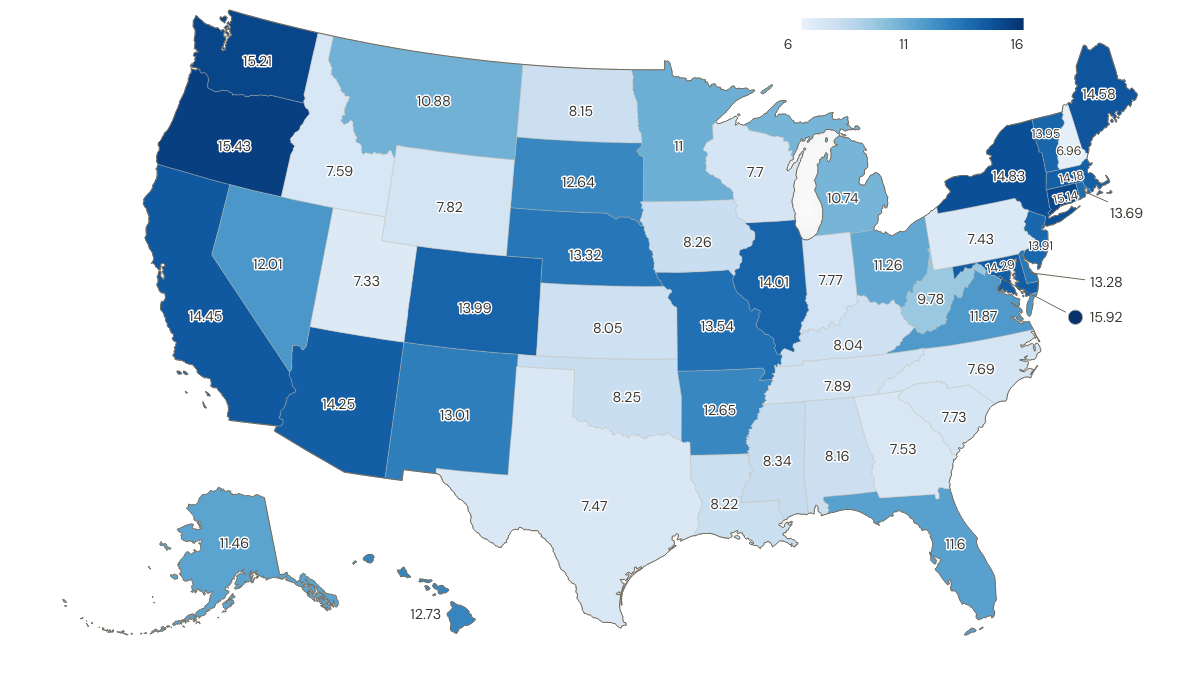
Minimum wage adjusted for regional purchasing power, USA, in 2024, in USD

preview

So it looks like your bang doesn’t go tooo far for your buck even if you live in a LCOL state when you are on minimum wage I guess

Is this useful? What do you think? I honestly don’t know, but seen that I already had the data from this discussion, why not plot it?

I tried to find a map with it, but my searching skills seem to have deteriorated (or search engines aren’t great nowadays)

Data taken from St. Louis Fed’s FRED (Federal Reserve Economic Data) for “Regional Price Parities (RPP): All Items” and “State Minimum Wage Rate”

Latest data available for RPP is 2024, so I used same date for wages. For states with no minimum-wage law or a minimum wage below the federal minimum wage, federal minimum wage was applied like the folks at Economic Policy Institute do

Convertion based on following formula:

real wage = nominal wage * (100 / RPP)

Plotted with ultimaps.com, if anyone has another alternative that shows data + state abbreviation, lmk

What flaws do you see on this map? Where does it fail? I guess metro areas are always complicated and a more granular approach with county data would be more useful, right?

0

Mods & External Programs for Sims 2 [wiki]

preview

<- Back to Wiki Guide

Please Note: This is copied from Reddit’s r/TheSims2Help’s External Programs Wiki page. Any linked headings will be linked back to the Reddit Wiki. In line links should denote where they go (reddit, lemmy, tumbler) anything not mentioned is probably another off reddit guide or .exe file. Most if not all content contained below was created by the Reddit r/Sims2Help team and all credit for this guide goes to them.


External Programs

None of these go in your Downloads folder - they are external programs, which you only run and use when the game is closed.


What is SimPE?

The Sims Package Editor, or SimPE, is an external program created to modify .package files in The Sims 2. It’s possible to edit Sims, neighbourhoods, and make and edit custom content with it. It’s a very powerful tool, but it’s not intuitive to use and requires a lot of practice.

SimPE used to be available on Sims Ambertation, a German website, but the site has been gone for years now. You can see most recent versions on Mod The Sims here and the latest version (SimPE 0.77.69), which is still being maintained by Chris Hatch, is available here. Make sure you don’t download the file with T&A in the name unless you have Chris’s custom (NSFW) pack! SourceForge also hosts older versions of SimPE which is helpful if you can’t get the newer version to work or need a particular version.

There are many tutorials about the various things you can do with it, such as these custom content creation tutorials and this guide about adding memories and this one about changing names. Please backup your files before making any changes. If you’re unsure how to do that, please refer back to the very first section on this post.

If you’re not using any custom content and don’t want to edit your neighbourhood or Sim files, you most likely won’t need SimPE.

Unfortunately, SimPE is only available on Windows so if you’re running The Sims 2 in Bootcamp or Parallels, you will be able to install and use SimPE but you can’t use it on MacOS itself.


What is the BodyShop?

The BodyShop does not come with the Legacy Edition though you can use this installer to install BodyShop for Legacy.

The BodyShop is a program that comes with your game, and can be used to create Sims and custom content without opening the game itself. For Windows on disc, digital repacks and the UC, it’s automatically shipped with the game, but for the Super Collection on MacOS, you need to download the Extras file here or here (alt Google Drive link).

On Windows, your BodyShop application is found in the installation folder of your latest EP (or SP as is the case with Mansion & Garden Stuff). Once you find the application, you can make a shortcut to your desktop to make it easier to start.

For a physical disc game, the path is C:/Program Files (x86)/EA GAMES/(your latest EP or SP)/CSBin.

For the Origin Ultimate Collection, the path is C:\Program Files (x86)\Origin Games\The Sims 2 Ultimate Collection\Fun with Pets\SP9\CSBin.

For the EA App Ultimate Collection, the path is C:\Program Files\EA Games\The Sims 2 Ultimate Collection\Fun with Pets\SP9\CSBin.

For the Games4theworld Ultimate Collection, the path is C:\Program Files\The Sims 2 Ultimate Collection\Fun with Pets\SP9\CSBin

For osab’s Starter Pack/web installer Ultimate Collection, the path is C:\Program Files (x86)\The Sims 2 Starter Pack\Fun with Pets\SP9\CSBin

For MagiPack Ultimate Collection, the path is C:\MagiPacks\The Sims 2\Fun with Pets\SP9\CSBin

For MrDJ’s/Oldgamesdownload version, the path is C:/Program Files (x86)/Mr DJ/The Sims 2 Ultimate Collection/The Sims 2 Mansion and Garden Stuff/CSBin.

Don’t be alarmed if BodyShop takes forever to load. It’s even slower than the game!

You can learn more about the BodyShop here including how to modernise it and make it look similar to the Clean UI as well as how to get it running a little more smoothly.


HCDU

The Hack Conflict Detection Utility will check your Downloads folder for potential conflicting mods in your Downloads folder. It works by scanning every mod and checking which game file the mod edits. If two mods edit the same file, they will be flagged.

Please be advised that this may not necessarily cause a conflict, as some mods can be used together by making sure they load in the correct order.

Please always read mod descriptions before downloading mods.


Hood Checker

You can use Mootilda’s HoodChecker to check on your neighbourhoods for potential issues and fix faulty memories, wants, and fears. However, please be aware that The Sims 2 has a tendency to create temporary “relationships” with inanimate objects such as books, cars and so on. It does this to help the game remember which car the sim used to go to work, for example. They’re safe to delete, but it’s also okay not to. Most things that show up in Hoodchecker (eg. “Invalid relationship with self”) are nothing to worry about.

You can run Hoodchecker occasionally with the Remove button to remove any invalid references it detects, and the game will recreate the ones it needs. Make sure to create a backup before using the Hoodchecker “remove” option because it is modifying the neighbourhood package file and thus could also corrupt it if something goes wrong while it’s writing to the file.

If you have a “Missing Character File” line (or lines), it’s most likely due to an NPC(s) that you have added to the game. People often don’t realise that they have done this because they can be added as objects (eg. the surf mod has an NPC) and not just as sims. Here is an incomplete list of the CC which creates NPCs - it has their GUIDs listed so if you see that in Hoodchecker it’s nothing to worry about.

Even if it’s not listed there, you can simply create a new hood and run the Hoodchecker on it. If the “Missing Character file” error shows with the same number, it’s caused by a custom NPC and not a deleted sim. If you want to remove one of these custom NPCs, you need to copy the character file from the mod to the Characters folder of every hood that you’ve loaded since placing the mod in your game - even if you never used the mod in that hood.


Colour Enable Package (CEP) and Smarter EP Check

A lot of custom content requires you to install CEP (included in MagiPack and osab’s Starter Pack) as well as Smarter EP Check. Please download and install the Smarter EP Check before downloading any mods, and get the CEP if you’re planning to download CC.


Sims 2 Clean Pack Installer (Installing Sims2Pack files)

You can use the Sims 2 Clean Pack Installer to organize your Sims 2 custom content. You should also use the Clean Installer to install any Sims2Pack files - it’s especially important when downloading lots as mods will often tag along with downloads and you need to uncheck these in the clean installer and only install the lot. You don’t need the Clean Installer to install regular package files.


Other Handy Programs

All of Whoward’s programs

Whoward has created tons of the most useful modern programs, from WhatCausedThis to HCDU+ to Outfit Organiser to BHAV Finder, check them all out on his site!

The Compressorizer

Compresses custom content and makes file sizes smaller.

The Wardrobe Wrangler

Useful for people who want to reorganise or modify their CC. You can choose which ages and categories CC will show up for.

Delphy’s Download Organiser

Useful for people who want to organise their CC and delete broken ones. It can tell you what type of file something is - very useful if you’ve got old files or ones with gibberish names.

LotCompressor

Compresses lots by deleting and compressing junk data. Makes your neighbourhood files smaller.

Add Tooltips Automatically

Adds informational text to Body Shop content - useful for players with lots of Body Shop CC, especially old files.

The Sim Randomizer

Gives you randomised Sim ideas. Useful for players who get stuck deciding what kind of Sims to make.

CCMerger

Merges files and shortens loading time. Useful for players with lots of CC and long loading times.

The Scriptorium

Makes installation of custom modular stairs, fireplaces and lighting mods easier.


For CC Creators

HomeCrafter

For creating walls and floors.

AnyGameStarter for UC / for Disks

For creators who want to test their CC in a different game environment, or for those who want to build lots and share them.

Extra TXTR Remover

Removes useless duplicate textures from Body Shop recolour files. Most new Body Shop recolours these days have already been run through the programme, so if you’re creating your recolour in SimPE, you won’t need this. If you’re creating your recolour through Body Shop only, this should be used.

Quick Easy Hair Binner

Sorts hair (and facial hair) recolours into the correct categories: black, brown, blond/e, red, grey. Handy if you’re making your own hair retextures/recolours or have CC hair that is in the Custom colour category.

Blender animation templates

For making your own animations in Blender. Previous versions were buggy and extremely hard and tedious to use.


You might be wondering: why so many external programmes instead of one or a few?

The Sims 2 was released at a time when the Internet and programming in general were much more scattered. Lots of creators made their own sites and ran their own forums instead of everyone being in the same few places. Tumblr, TSR, MTS and Reddit were all in their infancy. So because of that scattered nature, there haven’t been a lot of grand projects to make one singular programme like the TSR Workshop or S3PE for TS3, or Sims4Studio for TS4. A lot of famous and knowledgeable creators have also retired over the years, so the programming scene is quite small.


<- Back to Wiki Guide

<- Back to Wiki Guide

Please Note: This is copied from Reddit’s r/TheSims2Help’s External Programs Wiki page. Any linked headings will be linked back to the Reddit Wiki. In line links should denote where they go (reddit, lemmy, tumbler) anything not mentioned is probably another off reddit guide or .exe file. Most if not all content contained below was created by the Reddit r/Sims2Help team and all credit for this guide goes to them.


External Programs

None of these go in your Downloads folder - they are external programs, which you only run and use when the game is closed.


What is SimPE?

The Sims Package Editor, or SimPE, is an external program created to modify .package files in The Sims 2. It’s possible to edit Sims, neighbourhoods, and make and edit custom content with it. It’s a very powerful tool, but it’s not intuitive to use and requires a lot of practice.

SimPE used to be available on Sims Ambertation, a German website, but the site has been gone for years now. You can see most recent versions on Mod The Sims here and the latest version (SimPE 0.77.69), which is still being maintained by Chris Hatch, is available here. Make sure you don’t download the file with T&A in the name unless you have Chris’s custom (NSFW) pack! SourceForge also hosts older versions of SimPE which is helpful if you can’t get the newer version to work or need a particular version.

There are many tutorials about the various things you can do with it, such as these custom content creation tutorials and this guide about adding memories and this one about changing names. Please backup your files before making any changes. If you’re unsure how to do that, please refer back to the very first section on this post.

If you’re not using any custom content and don’t want to edit your neighbourhood or Sim files, you most likely won’t need SimPE.

Unfortunately, SimPE is only available on Windows so if you’re running The Sims 2 in Bootcamp or Parallels, you will be able to install and use SimPE but you can’t use it on MacOS itself.


What is the BodyShop?

The BodyShop does not come with the Legacy Edition though you can use this installer to install BodyShop for Legacy.

The BodyShop is a program that comes with your game, and can be used to create Sims and custom content without opening the game itself. For Windows on disc, digital repacks and the UC, it’s automatically shipped with the game, but for the Super Collection on MacOS, you need to download the Extras file here or here (alt Google Drive link).

On Windows, your BodyShop application is found in the installation folder of your latest EP (or SP as is the case with Mansion & Garden Stuff). Once you find the application, you can make a shortcut to your desktop to make it easier to start.

For a physical disc game, the path is C:/Program Files (x86)/EA GAMES/(your latest EP or SP)/CSBin.

For the Origin Ultimate Collection, the path is C:\Program Files (x86)\Origin Games\The Sims 2 Ultimate Collection\Fun with Pets\SP9\CSBin.

For the EA App Ultimate Collection, the path is C:\Program Files\EA Games\The Sims 2 Ultimate Collection\Fun with Pets\SP9\CSBin.

For the Games4theworld Ultimate Collection, the path is C:\Program Files\The Sims 2 Ultimate Collection\Fun with Pets\SP9\CSBin

For osab’s Starter Pack/web installer Ultimate Collection, the path is C:\Program Files (x86)\The Sims 2 Starter Pack\Fun with Pets\SP9\CSBin

For MagiPack Ultimate Collection, the path is C:\MagiPacks\The Sims 2\Fun with Pets\SP9\CSBin

For MrDJ’s/Oldgamesdownload version, the path is C:/Program Files (x86)/Mr DJ/The Sims 2 Ultimate Collection/The Sims 2 Mansion and Garden Stuff/CSBin.

Don’t be alarmed if BodyShop takes forever to load. It’s even slower than the game!

You can learn more about the BodyShop here including how to modernise it and make it look similar to the Clean UI as well as how to get it running a little more smoothly.


HCDU

The Hack Conflict Detection Utility will check your Downloads folder for potential conflicting mods in your Downloads folder. It works by scanning every mod and checking which game file the mod edits. If two mods edit the same file, they will be flagged.

Please be advised that this may not necessarily cause a conflict, as some mods can be used together by making sure they load in the correct order.

Please always read mod descriptions before downloading mods.


Hood Checker

You can use Mootilda’s HoodChecker to check on your neighbourhoods for potential issues and fix faulty memories, wants, and fears. However, please be aware that The Sims 2 has a tendency to create temporary “relationships” with inanimate objects such as books, cars and so on. It does this to help the game remember which car the sim used to go to work, for example. They’re safe to delete, but it’s also okay not to. Most things that show up in Hoodchecker (eg. “Invalid relationship with self”) are nothing to worry about.

You can run Hoodchecker occasionally with the Remove button to remove any invalid references it detects, and the game will recreate the ones it needs. Make sure to create a backup before using the Hoodchecker “remove” option because it is modifying the neighbourhood package file and thus could also corrupt it if something goes wrong while it’s writing to the file.

If you have a “Missing Character File” line (or lines), it’s most likely due to an NPC(s) that you have added to the game. People often don’t realise that they have done this because they can be added as objects (eg. the surf mod has an NPC) and not just as sims. Here is an incomplete list of the CC which creates NPCs - it has their GUIDs listed so if you see that in Hoodchecker it’s nothing to worry about.

Even if it’s not listed there, you can simply create a new hood and run the Hoodchecker on it. If the “Missing Character file” error shows with the same number, it’s caused by a custom NPC and not a deleted sim. If you want to remove one of these custom NPCs, you need to copy the character file from the mod to the Characters folder of every hood that you’ve loaded since placing the mod in your game - even if you never used the mod in that hood.


Colour Enable Package (CEP) and Smarter EP Check

A lot of custom content requires you to install CEP (included in MagiPack and osab’s Starter Pack) as well as Smarter EP Check. Please download and install the Smarter EP Check before downloading any mods, and get the CEP if you’re planning to download CC.


Sims 2 Clean Pack Installer (Installing Sims2Pack files)

You can use the Sims 2 Clean Pack Installer to organize your Sims 2 custom content. You should also use the Clean Installer to install any Sims2Pack files - it’s especially important when downloading lots as mods will often tag along with downloads and you need to uncheck these in the clean installer and only install the lot. You don’t need the Clean Installer to install regular package files.


Other Handy Programs

All of Whoward’s programs

Whoward has created tons of the most useful modern programs, from WhatCausedThis to HCDU+ to Outfit Organiser to BHAV Finder, check them all out on his site!

The Compressorizer

Compresses custom content and makes file sizes smaller.

The Wardrobe Wrangler

Useful for people who want to reorganise or modify their CC. You can choose which ages and categories CC will show up for.

Delphy’s Download Organiser

Useful for people who want to organise their CC and delete broken ones. It can tell you what type of file something is - very useful if you’ve got old files or ones with gibberish names.

LotCompressor

Compresses lots by deleting and compressing junk data. Makes your neighbourhood files smaller.

Add Tooltips Automatically

Adds informational text to Body Shop content - useful for players with lots of Body Shop CC, especially old files.

The Sim Randomizer

Gives you randomised Sim ideas. Useful for players who get stuck deciding what kind of Sims to make.

CCMerger

Merges files and shortens loading time. Useful for players with lots of CC and long loading times.

The Scriptorium

Makes installation of custom modular stairs, fireplaces and lighting mods easier.


For CC Creators

HomeCrafter

For creating walls and floors.

AnyGameStarter for UC / for Disks

For creators who want to test their CC in a different game environment, or for those who want to build lots and share them.

Extra TXTR Remover

Removes useless duplicate textures from Body Shop recolour files. Most new Body Shop recolours these days have already been run through the programme, so if you’re creating your recolour in SimPE, you won’t need this. If you’re creating your recolour through Body Shop only, this should be used.

Quick Easy Hair Binner

Sorts hair (and facial hair) recolours into the correct categories: black, brown, blond/e, red, grey. Handy if you’re making your own hair retextures/recolours or have CC hair that is in the Custom colour category.

Blender animation templates

For making your own animations in Blender. Previous versions were buggy and extremely hard and tedious to use.


You might be wondering: why so many external programmes instead of one or a few?

The Sims 2 was released at a time when the Internet and programming in general were much more scattered. Lots of creators made their own sites and ran their own forums instead of everyone being in the same few places. Tumblr, TSR, MTS and Reddit were all in their infancy. So because of that scattered nature, there haven’t been a lot of grand projects to make one singular programme like the TSR Workshop or S3PE for TS3, or Sims4Studio for TS4. A lot of famous and knowledgeable creators have also retired over the years, so the programming scene is quite small.


<- Back to Wiki Guide

0

Whoops! (Astérix & Marsupilami stepped in to the transporter booth together?) [NOTES in post]

preview

Jeff Goldblum previously found out:
https://www.youtube.com/watch?v=iBfCpldPSk4

I first watched this movie with my GF of the time a couple years later. She was absolutely stricken. I was numb and overwhelmed. I reached over to comfort her, and she shrimped away (an MMA technique, haha), which made me feel like… yesterday’s refuse. But later, I got it. You give people the space they need, period.

For me it was an early-ish lesson upon the titration of distance. A valuable lesson in general I’d say, but each person has their own set of boundaries IME, and to me, part of the process when you care about someone is in learning their boundaries, and respecting them at face value. Better yet, that more-probably applies to everyone outside of ourselves, yeah?

HOWEVER– if someone’s a hard smoker, drinker, over-eater or drug-user, then sure, that could seem a hard boundary at first, but is also a signal that something is very off.

(note to self: how did I possibly get on to all that? 😅)


Foof. Evidently this was a tribute (amongst many) to André Franquin, possibly by Uderzo as a tribute to his passing.

0

FAQs, Cheats, Mods, & Game Options [wiki]

preview

<- Back to Wiki Guide

Please Note: This is copied from Reddit’s r/TheSims2Help’s General Info Wiki page. Any linked headings will be linked back to the Reddit Wiki. In line links should denote where they go (reddit, lemmy, tumbler) anything not mentioned is probably another off reddit guide or .exe file. Most if not all content contained below was created by the Reddit r/Sims2Help team and all credit for this guide goes to them.


If you’re just looking to download the game, you can see the Lemmy Download Guide or the, Reddit Download Guide.*

1. General Information & FAQs

Notes

Please regularly backup your saves, your mods, and your EA Games folder in general - it’s the best way to protect things that are important to you in case anything goes wrong! In Windows, the important folder to back up is located in Documents/EA Games (or possibly C:\Users\Public\Documents\EA Games\, if the normal Documents/EA Games folder is empty). If your game is within OneDrive/Documents, you should ensure OneDrive is not actively syncing the game’s files while you play as syncing programs like this can corrupt your hoods - you need to disable OneDrive or stop it from syncing the Documents folder. On MacOS, your save folder is located in ~Library/Containers/com.aspyr.sims2.appstore/Data/Library/Application Support/Aspyr/The Sims 2/ if you have the 64 bit version (which you have if on MacOS Catalina or above) or ~/Library/Application Support/Aspyr/The Sims 2 if you have the 32 bit version - please note this is the hidden Library folder (visible with Cmd + shift + .) not the System Library folder. To back up your folder, right click on it and choose copy. Then navigate to a separate, safe place on your computer (or an external drive, Google Drive, USB stick, etc.) where your backups can live in safety, away from the rest of the game. Right click in the new place and select paste. Your folder will be copied over to the new location.


2. Can I Run It?

See Our Guide

Downloading The Sims 2 Guide Section: Will it Run?

3. Missing Packs

3.1) Legacy Edition / Oldgamesdownload / MrDJ / archive.org repack Missing IKEA Stuff Pack

Oldgamesdownload / MrDJ / archive.org repack If you have downloaded your copy of the game from OldGamesDownload/archive.org/Mr DJ’s repack, it is not the Ultimate Collection, despite the name, it’s the discs bundled together. This version is safe and works the same as any other version of the game - it’s just missing the IKEA stuff pack and has a different file structure to the Ultimate Collection. The IKEA Stuff Pack can be downloaded here. Once the IKEA pack is downloaded, you will need to extract the folder by right clicking and choosing “Extract Here” or similar, and once extracted you will see there is a TSData folder inside. Then go to your install directory, which is C:/Program Files (x86)/Mr DJ/ by default. There is a “The Sims 2 IKEA Home Stuff” folder in here, go into this folder and you will see there are currently two folders - TSData and TSBin. Delete the TSData folder and then from your extracted SP8 folder, move/copy the TSData folder and paste it into this location. You will now have Ikea Stuff correctly installed. However, some people have reported that this doesn’t work for them or it causes issues such as crashing. Clearing your cache files (go to Documents/EA Games/The Sims 2 and delete accessory.cache and groups.cache at the end of the folder) may make the IKEA pack work for you. If you’re unable to install the IKEA Stuff Pack and you really want to have all the packs, you should uninstall the game and install it again using one of the versions we have linked which is the proper Ultimate Collection.

3.2) Legacy Edition

Download the IKEA pack linked above and follow the instructions here.


4. About the Versions

Information regarding the different versions of the game

4.1) A Note on Abandonware

The Sims 2 was previously considered abandonware on Windows, but this is not a legally recognised term. As per Wikipedia “Abandonware is a product, typically software, ignored by its owner and manufacturer, and for which no official support is available. Although such software is usually still under copyright, the owner may not be tracking copyright violations”. The Sims 2 is still, and always has been, under copyright, and thus downloading it is piracy - people who say otherwise are incorrect, though it is a commonly held belief in the Sims community that downloading abandonware is not piracy. This was the case even before EA started selling the Sims 2 Legacy Edition. Although it is piracy, we do recommend doing it anyway and link to downloads for the Ultimate Collection because this is still not available for sale anywhere.

4.2) Why would I break the law when I can buy UC online?

The Sims 2: The Ultimate Collection was only available for free on Origin for a few years. It is not possible to buy The Sims 2 Ultimate Collection, and it never has been. If a seller is advertising The Ultimate Collection for sale, please be advised that it is not a legal copy. To receive this version, they would be selling you an Origin account. This is against EA’s Terms of Service and these accounts are often stolen. The original owners of the account can reclaim it at any time or if EA realizes you bought the account, they could terminate it. If they are not trying to sell you an account, but are instead going to send you a download link for the files, you would be buying pirated files if you pay them - you may as well just download the game by yourself! It is possible to buy the Sims 2 Legacy Edition on the EA App, Steam and Epic Games and you are welcome to do that if you wish, but it is not the Ultimate Collection.

4.3) Well, what about the disks then?

There are about 20 discs in total for the entire collection. You will need to use a program to update the base game files (e.g. Grumpyloader) in order to install the expansions, because you cannot install the expansions without the base game trying to update which will now always fail and cancel the pack install. You will then have to patch the base game and every expansion you install before you move onto the next one. The Sims 2 server was taken down in 2011 which means the disks can no longer patch themselves. You’ll also have to deal with SecuROM (included with the later discs, from either Seasons or Bon Voyage onwards) which is known to cause a whole host of issues, such as disabling disk trays. It also stays on your computer, even when you uninstall Sims 2, and you have to get a special tool to remove it that SecuROM released once they lost a lawsuit. However, you can only remove it once The Sims 2 is uninstalled or by using a NoCD exe as every time you load the game, it will re-install itself (if you don’t ever run the game from the original exe, and always use a cracked one, SecuRom won’t be installed in the first place). If you are determined to use the disks to install, you can follow this guide. However, we do not provide support with getting the discs to install and recommend you use the Ultimate Collection linked above to save yourself from this tedious process, unless you are comfortable with troubleshooting issues yourself.

4.4) Why do I need to apply so many fixes to play the game?

These problems are due to the fact that the game is 20+ years old. It is unable to recognise new hardware and operating systems. These are incredibly common issues that arise on all versions. It doesn’t matter if you got your game on disc, Origin/EA, or if it was an illegal copy. Time is always cruel to old, outdated games.


5. Backing Up & Patches

5.1) Making A Backup / Uninstalling Old Versions Such As Discs

If you have a previous version of The Sims 2 installed on your computer, such as a copy from the disks, but you would like the Ultimate Collection there are a couple of steps to follow. First, if you want to back-up your saves, custom content, and mods, you’ll want to go to Documents/EA Games and right click on The Sims 2 folder. Choose “Copy” and go elsewhere on your computer (or a cloud service like Google Drive or a USB stick), somewhere safe to keep the files. When you’re in the new location, right click and choose “Paste”. Your saves, mods, and custom content will copy over to this new location. Now that you have a back up, you are free to uninstall using this guide. Please follow all of the steps, otherwise you may be unable to reinstall the game. Once you’ve completely uninstalled, follow the directions in the download TS2 section to download our recommended version of the Ultimate Collection. To replace your files, go to Documents/EA Games/The Sims 2 (or The Sims 2 UC/Legacy, depending on what you’ve got). Delete all of the folders inside and then paste in all the folders that you backed up elsewhere.

5.2) Patches

All of the digital downloads for the Sims 2 (from games4theworld, Origin/EA, MrDJ/oldgamesdownload, archive.org, osab’s repacks) are patched already so you do not need to apply the patches. If you have installed from the discs then you should apply the patches as they contain important fixes. You can download them here - you may get a security error from your browser, this is just a precaution and these files are safe to download.


6. Anti-Virus Flags

6.1) Why does my computer or anti-virus say that the download is malicious?

In short: it’s a false positive. Special thanks to Reddit u/Reblyn for this section. Windows flags every program as a virus that isn’t officially “signed”. How do you “sign” a program? You go to Microsoft and ask (i.e. pay) them to do it. Naturally, fan-made mods and arr’d copies of games aren’t signed. This is reserved for official programs and games, which were usually created and published by big corporations, who had the money to go and ask Microsoft to sign their product. That’s all there is to it. This is how false positives happen. Third-party virus scanners such as Virustotal are, quite honestly, complete and utter garbage and shouldn’t be used. Fan-made programs are simply not in their database and will therefore be flagged as potential malware. As you can imagine, their databases are probably also quite lacking. They’ll have most well-known programs in them which don’t need to be checked anyway, for everything else they’re pretty much useless. Programs that have been used by the community for over 10 years are not suddenly going to have viruses in them, otherwise someone would have caught that a long time ago. Viruses don’t float around the internet and attach themselves to files that have been uploaded years ago.


7. All About Saves

7.1) I get a low disk space notification / I have no neighbourhoods when opening the game

If you get a low disk space notification when starting the game, and your disk space isn’t actually low, or if you have no neighbourhoods to choose from on the neighbourhood selection screen, the issue is the TM in the name of “The Sims™ 2 Ultimate Collection” which is only present with the actual Ultimate Collection from Origin/EA App or Games4theworld (osab’s installer removes the TM and the MagiPack UC uses “The Sims 2” as the folder name). The reason it is only an issue for some people and not everyone is to do with the region/locale of the computer you are using; many Japanese simmers have the issue, for example. You can read about the issue and solutions to it here, here, and here - your options are to either remove the TM symbol from the game in the registry or to change your region/locale on your computer.

7.2) My game won't save sims or settings!

If you’re having issues with the game not saving, for example when new sims are created during birth or adoption and then disappear when you reload the game or when you change a setting and it reverts the next time you start the game, you should look at your antivirus and OneDrive. Both of these can interfere with the game’s files. For OneDrive, read this thread (it is about sims 3 but applies to 2 also) about how to disable it to prevent further issues. For your antivirus, you need to add an exception for the game’s files - this is the case even if you only have the generic Windows’ Defender/Security installed. You will need to Google how to add an exception for your particular antivirus as it varies based on the program - just Google “your antivirus name + add exception” and you should find the info. Make sure to add your installation location (e.g. C:/Program Files/The Sims 2 UC or wherever you installed it - see Where Are My Installation Files), your save location (Documents/EA Games) and the game application itself (Sims2EP9.exe, Sims2RPC.exe, Sims2RPCSettings.exe, and Sims2EP9RPC.exe), if that’s an option on your antivirus. Some antivirus software will have an additional setting “Data Protection” (e.g. Norton 360) - make sure to add the game as an exception here too as not doing so may stop the game from saving any progress you make.

7.3) How do I restart the premade neighbourhoods?

Please follow this Fandom guide to reset the premade neighbourhoods to their original state.

7.4) How to Convert Store Edition for Ultimate Collection or Legacy

First, you’ll need SimPE. You can get it here and you can read about it here. So, once you have SimPE downloaded and extracted, do the following: Go to the hood folder - for these instructions, I will use E001 (Belladonna Cove) as the example. Open E001 and right-click on E001_Neighbourhood.package. Click open with… and then click Choose Another App. Check the box which says, “Always use this app to open .package files” at the bottom and then click More Apps. Scroll down, click “Look for another app on this PC,” and locate the SimPe.exe in the 0.75.69 folder you extracted. SimPE will open, note that it takes a while to load - the bottom left will show what’s loading, don’t click anything until there is nothing there. Make sure you click Plugin view along the bottom tabs list, it may be on Details when you first start. In the Resource Tree on the top left, click the ID Number (IDNO) resource. You will now see one resource (ID Number) in the resource list on the top right. Click on it. In the plugin view in the bottom pane, you’ll now see a bunch of info. Look at the required EP and change the dropdown from StoreEdition to MansionGarden. Click commit in the bottom right, then press save (floppy disk in the top left or press Ctrl + s). Close the file and repeat steps 1-5 for all E001_Suburb###.package, E001_Downtown###.package, E001_Vacation###.package and E001_University###.package files for that hood. Repeat for the other hoods.

7.5) What's up with the Main Street Mobile Homes lot?

As mentioned in this thread, there is a bug with the Main Street Mobile Homes apartment lot that ships with Apartment Life where it causes crashing. You can delete the original and use this remake if you want to play the lot without crashes.


8. Cheats & Mods

8.1) Something is messing up my game but it's not corruption!

If you’re having issues with the game that are not technical issues (flickering, black shadow boxes, pink flashing, etc. are covered in the tech support section of the wiki), then you probably have an issue with broken or conflicting custom content. This is a relatively normal thing and it’s nothing to worry about. Sometimes you download custom content that doesn’t work. While it might sometimes look scary, usually it’s a simple fix. If you know which piece of custom content it is, we advise you to take it out! However, if the custom content causing issues is geneticised/townified skins or eyes then you will need to use SimPE to fix each Sim that had the custom content in their DNA before loading the game again, otherwise you will mess up the DNA of the sims. Here is a tutorial. If the custom content is custom food, see the note on custom foods in the mods info section. If it’s a career or a major, you should make all sims using that career or major quit the job/change major before removing the package - but if you don’t, you’ll just need to reset those sims using testing cheats afterwards. If you don’t know what piece of custom content is causing the issue, we recommend the 50/50 method. It’s simple: you remove 50% of the custom content in your folder, boot the game, and see if the issue is gone. If it’s not, you repeat the process with the other half of your custom content. Once you know which half the error is coming from, you can start to narrow down your search and repeat the process until you get down to just one file! This is the quickest way to find problem content, and is far faster than doing it one file at a time.

8.2) Typing out all those cheats is so tiring. Is there something I can do about it?

Yes! If you always want your game to start with certain cheats on, you can create a UserStartup.cheat file. It’s a special file that not only automatically enables cheats when you load up the game, but it can also create shorter codes for your cheats. For example, it can change MoveObjects On so all you have to type in the cheat bear is moo! First of all, some mods create a UserStartup.cheat file for you. It’s best to check that you don’t already have one. So head on over to Documents/EA Games/The Sims 2/Config and have a look for a file called UserStartup.cheat. If you’re on Mac, you’ll need to go to ~/library/Containers/com.aspyr.sims2.appstore/Data/Library/Application Support/Aspyr/The Sims 2/Config. If you have one, great! If you don’t, simply open up Notepad and immediately save the empty file to your desktop. Where it says the name for the file, type “UserStartup.cheat” without the quotes. On the file extension just below it, choose “All Files” from the drop down box. It should look like this. Once it’s saved to your desktop, all you have to do is write in the cheats that you would always like to be enabled. Please remember to write the cheats correctly and only have one cheat per line, like this: boolProp constrainFloorElevation false boolProp ControlPets on boolProp testingCheatsEnabled true boolProp allow45DegreeAngleofRotation true intProp MaxNumOfVisitingSims [number] uintProp LotSkirtSizeIncrease [number] These will be applied every time you start the game, so you won’t have to type them in. One-time cheats, such as kaching and motherlode, will not work in this file. The only cheats that work are ones that can be turned on and off. If you don’t know what the cheat does, please do not apply it! For aliases, it gets a little more tricky. The layout must be as follows: alias TheTextYouWishToUse “CheatCommand” “ShortDescription” “LongDescription” So, if you wanted to shorten MoveObjects On to moo, it would be as follows: alias moo “MoveObjects On” “Move Objects” “Allows the player to place objects anywhere” Some examples: alias test “boolProp testingCheatsEnabled true” alias mon “moveObjects on” alias mof “moveObjects on” alias mot “motiveDecay off” alias m “maxmotives” As you saw above, you do not have to write out either of the descriptions for the file to work. When you type “help” into the cheat bar, the descriptions will be listed next to the cheats to help you remember what they’re associated with. If you don’t think you’ll need them, don’t add them! If you don’t write cheats correctly, the game will stop reading the file and none of the cheats beneath the broken cheat will be read. Also, be aware that the quarter tile placement cheat (setQuarterTilePlacement on/off) must be typed in this format to work in file: boolProp quarterTilePlacementEnabled true You can still create an alias for the regular version of the cheat though. Eg: alias qtileon “setquartertileplacement on” “setquartertileplacement on” “setquartertileplacement on” alias qtileoff “setquartertileplacement off” “setquartertileplacement off” “setquartertileplacement off” Note that this cheat still needs to be toggled in game - use Ctrl + F to turn it on or off. Please also note that the cheat “boolprop AllObjectLightsOn true” will cause crashing on launch if you put it in your userstartup.cheat file as mentioned in this thread. If the above section doesn’t make much sense to you, there is a more in-depth guide here.

8.3) Where can I get safe CC?

There are so many places out there to get custom content, it can be a little overwhelming to start shopping. ModTheSims is an oldie but a goodie, the Pleasant Sims blog has a lot of great resources, and we also have a mods list which links to many other great places! You can find a lot of custom content elsewhere on the internet. Many people upload their creations to Tumblr but you have to be wary when searching through obscure sites. A great way to ensure you don’t click on any misleading links or pictures is to use an adblocker. We recommend Ublock Origin. It is an extension for your browser that will protect you from misleading download buttons and harmful ads. While it is recommended to have an adblocker on at all times for your own safety, Ublock Origin is easy to turn off when you want to support your favourite creators by watching their adverts. Just click on the extension and press the big power off button. Job done!

8.4)Why do some people have a white/black/pink/green user interface?

Greatcheesecakepersona spent two years working on improving and updating the UI of The Sims 2. The Starship UI mod is the dark UI version of the clean UI and is available here. The pink version of the UI is also available at this link, as well as the dark UI for BodyShop. The “Random UI Experiments [Alpha]” folder contains unfinished experimental UIs in several other colours, however, these are likely to have bugs such as parts of the UI being the wrong colour as they are not final release versions.


9. Game Options

9.1) My Config Log is incorrect/I don't understand the values in it!

The config log is a file located in Documents/EA Games/The Sims 2/Logs/<your-pc-name>-config-log.txt which is updated every time you run the game or BodyShop and tells you what configuration the game is using in terms of RAM, graphics card, settings, etc. For Legacy, it is normal for: * the version to be 1.18.0.114 * the OS version to be Windows NT 0.0 * the graphics card to be <<NOT FOUND IN DATABASE!>> * the memory and free memory to be listed as 0MB * the texture memory not to be listed at all For non-Legacy, it is normal for: * the version to be 1.17.0.66 provided you have Mansion & Garden (i.e. all UC + other digital repacks; if you have discs without M&G expect a different version) * the OS version to be Windows NT 6.0 * if you are using the Legacy graphics rules (included in MagiPack + osab’s Starter Pack), it’s okay for the graphics card to have <<NOT FOUND IN DATABASE!>> and not to list the texture memory * if not using Legacy graphics rules, the graphics card should NOT have <<NOT FOUND IN DATABASE!>> and if it does, you need to fix your graphics rules * texture memory should not be 32MB, if it is you need to fix your graphics rules * memory should be 4096 if you have the 4GB patch or 2048 or 1024 if you don’t. The free memory line should ideally match the memory line - if it doesn’t, try closing some programs and restarting your computer before running the game to keep more memory available If you use DXVK, note that your graphics card will be listed as a Nvidia GeForce 7800 GTX regardless of what GPU you actually have. This is intentional and is part of how DXVK works.

9.2) How do I change the game's language?

If you’re playing on MacOS, the supported languages are English, French, Italian, German, Spanish, and Japanese. The language that the game is in will be based on the language of your OS - e.g. if you have your Mac set to use French but want to play in English, you’d have to change your MacOS language to do so. If your Mac is using an unsupported language, the game will default to English. The supported languages are listed in Aspyr’s Super Collection FAQ though the list is unlikely to change at this point. If you’re playing on Windows (or Linux via Proton, Bottles, etc. or Mac via Parallels, Crossover etc.) and you are not using the Legacy Collection via Steam (and possibly Epic), then you can follow this guide to change languages, which also lists all available languages. Ensure you do not mix up decimal and hex values or you will end up with an unexpected language! If you are using the Legacy Collection via Steam (and possibly Epic), then the registry method above will not work for you. Instead, you need to use a launch command. To do this, right click on the game in your library (or click the Settings button if you have the game page selected) and click Properties. In the Launch Options box at the bottom, add the language you want in this format: -l:“English UK” or -l:French Note that languages with spaces must be enclosed in quotation marks. The game does not use standardised language codes for this, it’s based on the game’s locale folder names (if you open the game’s install folder and go to EP9/TSData/Res/Locale you can see all possible options). See this thread discussing this topic.


<- Back to Wiki Guide

<- Back to Wiki Guide

Please Note: This is copied from Reddit’s r/TheSims2Help’s General Info Wiki page. Any linked headings will be linked back to the Reddit Wiki. In line links should denote where they go (reddit, lemmy, tumbler) anything not mentioned is probably another off reddit guide or .exe file. Most if not all content contained below was created by the Reddit r/Sims2Help team and all credit for this guide goes to them.


If you’re just looking to download the game, you can see the Lemmy Download Guide or the, Reddit Download Guide.*

1. General Information & FAQs

Notes

Please regularly backup your saves, your mods, and your EA Games folder in general - it’s the best way to protect things that are important to you in case anything goes wrong! In Windows, the important folder to back up is located in Documents/EA Games (or possibly C:\Users\Public\Documents\EA Games\, if the normal Documents/EA Games folder is empty). If your game is within OneDrive/Documents, you should ensure OneDrive is not actively syncing the game’s files while you play as syncing programs like this can corrupt your hoods - you need to disable OneDrive or stop it from syncing the Documents folder. On MacOS, your save folder is located in ~Library/Containers/com.aspyr.sims2.appstore/Data/Library/Application Support/Aspyr/The Sims 2/ if you have the 64 bit version (which you have if on MacOS Catalina or above) or ~/Library/Application Support/Aspyr/The Sims 2 if you have the 32 bit version - please note this is the hidden Library folder (visible with Cmd + shift + .) not the System Library folder. To back up your folder, right click on it and choose copy. Then navigate to a separate, safe place on your computer (or an external drive, Google Drive, USB stick, etc.) where your backups can live in safety, away from the rest of the game. Right click in the new place and select paste. Your folder will be copied over to the new location.


2. Can I Run It?

See Our Guide

Downloading The Sims 2 Guide Section: Will it Run?

3. Missing Packs

3.1) Legacy Edition / Oldgamesdownload / MrDJ / archive.org repack Missing IKEA Stuff Pack

Oldgamesdownload / MrDJ / archive.org repack If you have downloaded your copy of the game from OldGamesDownload/archive.org/Mr DJ’s repack, it is not the Ultimate Collection, despite the name, it’s the discs bundled together. This version is safe and works the same as any other version of the game - it’s just missing the IKEA stuff pack and has a different file structure to the Ultimate Collection. The IKEA Stuff Pack can be downloaded here. Once the IKEA pack is downloaded, you will need to extract the folder by right clicking and choosing “Extract Here” or similar, and once extracted you will see there is a TSData folder inside. Then go to your install directory, which is C:/Program Files (x86)/Mr DJ/ by default. There is a “The Sims 2 IKEA Home Stuff” folder in here, go into this folder and you will see there are currently two folders - TSData and TSBin. Delete the TSData folder and then from your extracted SP8 folder, move/copy the TSData folder and paste it into this location. You will now have Ikea Stuff correctly installed. However, some people have reported that this doesn’t work for them or it causes issues such as crashing. Clearing your cache files (go to Documents/EA Games/The Sims 2 and delete accessory.cache and groups.cache at the end of the folder) may make the IKEA pack work for you. If you’re unable to install the IKEA Stuff Pack and you really want to have all the packs, you should uninstall the game and install it again using one of the versions we have linked which is the proper Ultimate Collection.

3.2) Legacy Edition

Download the IKEA pack linked above and follow the instructions here.


4. About the Versions

Information regarding the different versions of the game

4.1) A Note on Abandonware

The Sims 2 was previously considered abandonware on Windows, but this is not a legally recognised term. As per Wikipedia “Abandonware is a product, typically software, ignored by its owner and manufacturer, and for which no official support is available. Although such software is usually still under copyright, the owner may not be tracking copyright violations”. The Sims 2 is still, and always has been, under copyright, and thus downloading it is piracy - people who say otherwise are incorrect, though it is a commonly held belief in the Sims community that downloading abandonware is not piracy. This was the case even before EA started selling the Sims 2 Legacy Edition. Although it is piracy, we do recommend doing it anyway and link to downloads for the Ultimate Collection because this is still not available for sale anywhere.

4.2) Why would I break the law when I can buy UC online?

The Sims 2: The Ultimate Collection was only available for free on Origin for a few years. It is not possible to buy The Sims 2 Ultimate Collection, and it never has been. If a seller is advertising The Ultimate Collection for sale, please be advised that it is not a legal copy. To receive this version, they would be selling you an Origin account. This is against EA’s Terms of Service and these accounts are often stolen. The original owners of the account can reclaim it at any time or if EA realizes you bought the account, they could terminate it. If they are not trying to sell you an account, but are instead going to send you a download link for the files, you would be buying pirated files if you pay them - you may as well just download the game by yourself! It is possible to buy the Sims 2 Legacy Edition on the EA App, Steam and Epic Games and you are welcome to do that if you wish, but it is not the Ultimate Collection.

4.3) Well, what about the disks then?

There are about 20 discs in total for the entire collection. You will need to use a program to update the base game files (e.g. Grumpyloader) in order to install the expansions, because you cannot install the expansions without the base game trying to update which will now always fail and cancel the pack install. You will then have to patch the base game and every expansion you install before you move onto the next one. The Sims 2 server was taken down in 2011 which means the disks can no longer patch themselves. You’ll also have to deal with SecuROM (included with the later discs, from either Seasons or Bon Voyage onwards) which is known to cause a whole host of issues, such as disabling disk trays. It also stays on your computer, even when you uninstall Sims 2, and you have to get a special tool to remove it that SecuROM released once they lost a lawsuit. However, you can only remove it once The Sims 2 is uninstalled or by using a NoCD exe as every time you load the game, it will re-install itself (if you don’t ever run the game from the original exe, and always use a cracked one, SecuRom won’t be installed in the first place). If you are determined to use the disks to install, you can follow this guide. However, we do not provide support with getting the discs to install and recommend you use the Ultimate Collection linked above to save yourself from this tedious process, unless you are comfortable with troubleshooting issues yourself.

4.4) Why do I need to apply so many fixes to play the game?

These problems are due to the fact that the game is 20+ years old. It is unable to recognise new hardware and operating systems. These are incredibly common issues that arise on all versions. It doesn’t matter if you got your game on disc, Origin/EA, or if it was an illegal copy. Time is always cruel to old, outdated games.


5. Backing Up & Patches

5.1) Making A Backup / Uninstalling Old Versions Such As Discs

If you have a previous version of The Sims 2 installed on your computer, such as a copy from the disks, but you would like the Ultimate Collection there are a couple of steps to follow. First, if you want to back-up your saves, custom content, and mods, you’ll want to go to Documents/EA Games and right click on The Sims 2 folder. Choose “Copy” and go elsewhere on your computer (or a cloud service like Google Drive or a USB stick), somewhere safe to keep the files. When you’re in the new location, right click and choose “Paste”. Your saves, mods, and custom content will copy over to this new location. Now that you have a back up, you are free to uninstall using this guide. Please follow all of the steps, otherwise you may be unable to reinstall the game. Once you’ve completely uninstalled, follow the directions in the download TS2 section to download our recommended version of the Ultimate Collection. To replace your files, go to Documents/EA Games/The Sims 2 (or The Sims 2 UC/Legacy, depending on what you’ve got). Delete all of the folders inside and then paste in all the folders that you backed up elsewhere.

5.2) Patches

All of the digital downloads for the Sims 2 (from games4theworld, Origin/EA, MrDJ/oldgamesdownload, archive.org, osab’s repacks) are patched already so you do not need to apply the patches. If you have installed from the discs then you should apply the patches as they contain important fixes. You can download them here - you may get a security error from your browser, this is just a precaution and these files are safe to download.


6. Anti-Virus Flags

6.1) Why does my computer or anti-virus say that the download is malicious?

In short: it’s a false positive. Special thanks to Reddit u/Reblyn for this section. Windows flags every program as a virus that isn’t officially “signed”. How do you “sign” a program? You go to Microsoft and ask (i.e. pay) them to do it. Naturally, fan-made mods and arr’d copies of games aren’t signed. This is reserved for official programs and games, which were usually created and published by big corporations, who had the money to go and ask Microsoft to sign their product. That’s all there is to it. This is how false positives happen. Third-party virus scanners such as Virustotal are, quite honestly, complete and utter garbage and shouldn’t be used. Fan-made programs are simply not in their database and will therefore be flagged as potential malware. As you can imagine, their databases are probably also quite lacking. They’ll have most well-known programs in them which don’t need to be checked anyway, for everything else they’re pretty much useless. Programs that have been used by the community for over 10 years are not suddenly going to have viruses in them, otherwise someone would have caught that a long time ago. Viruses don’t float around the internet and attach themselves to files that have been uploaded years ago.


7. All About Saves

7.1) I get a low disk space notification / I have no neighbourhoods when opening the game

If you get a low disk space notification when starting the game, and your disk space isn’t actually low, or if you have no neighbourhoods to choose from on the neighbourhood selection screen, the issue is the TM in the name of “The Sims™ 2 Ultimate Collection” which is only present with the actual Ultimate Collection from Origin/EA App or Games4theworld (osab’s installer removes the TM and the MagiPack UC uses “The Sims 2” as the folder name). The reason it is only an issue for some people and not everyone is to do with the region/locale of the computer you are using; many Japanese simmers have the issue, for example. You can read about the issue and solutions to it here, here, and here - your options are to either remove the TM symbol from the game in the registry or to change your region/locale on your computer.

7.2) My game won't save sims or settings!

If you’re having issues with the game not saving, for example when new sims are created during birth or adoption and then disappear when you reload the game or when you change a setting and it reverts the next time you start the game, you should look at your antivirus and OneDrive. Both of these can interfere with the game’s files. For OneDrive, read this thread (it is about sims 3 but applies to 2 also) about how to disable it to prevent further issues. For your antivirus, you need to add an exception for the game’s files - this is the case even if you only have the generic Windows’ Defender/Security installed. You will need to Google how to add an exception for your particular antivirus as it varies based on the program - just Google “your antivirus name + add exception” and you should find the info. Make sure to add your installation location (e.g. C:/Program Files/The Sims 2 UC or wherever you installed it - see Where Are My Installation Files), your save location (Documents/EA Games) and the game application itself (Sims2EP9.exe, Sims2RPC.exe, Sims2RPCSettings.exe, and Sims2EP9RPC.exe), if that’s an option on your antivirus. Some antivirus software will have an additional setting “Data Protection” (e.g. Norton 360) - make sure to add the game as an exception here too as not doing so may stop the game from saving any progress you make.

7.3) How do I restart the premade neighbourhoods?

Please follow this Fandom guide to reset the premade neighbourhoods to their original state.

7.4) How to Convert Store Edition for Ultimate Collection or Legacy

First, you’ll need SimPE. You can get it here and you can read about it here. So, once you have SimPE downloaded and extracted, do the following: Go to the hood folder - for these instructions, I will use E001 (Belladonna Cove) as the example. Open E001 and right-click on E001_Neighbourhood.package. Click open with… and then click Choose Another App. Check the box which says, “Always use this app to open .package files” at the bottom and then click More Apps. Scroll down, click “Look for another app on this PC,” and locate the SimPe.exe in the 0.75.69 folder you extracted. SimPE will open, note that it takes a while to load - the bottom left will show what’s loading, don’t click anything until there is nothing there. Make sure you click Plugin view along the bottom tabs list, it may be on Details when you first start. In the Resource Tree on the top left, click the ID Number (IDNO) resource. You will now see one resource (ID Number) in the resource list on the top right. Click on it. In the plugin view in the bottom pane, you’ll now see a bunch of info. Look at the required EP and change the dropdown from StoreEdition to MansionGarden. Click commit in the bottom right, then press save (floppy disk in the top left or press Ctrl + s). Close the file and repeat steps 1-5 for all E001_Suburb###.package, E001_Downtown###.package, E001_Vacation###.package and E001_University###.package files for that hood. Repeat for the other hoods.

7.5) What's up with the Main Street Mobile Homes lot?

As mentioned in this thread, there is a bug with the Main Street Mobile Homes apartment lot that ships with Apartment Life where it causes crashing. You can delete the original and use this remake if you want to play the lot without crashes.


8. Cheats & Mods

8.1) Something is messing up my game but it's not corruption!

If you’re having issues with the game that are not technical issues (flickering, black shadow boxes, pink flashing, etc. are covered in the tech support section of the wiki), then you probably have an issue with broken or conflicting custom content. This is a relatively normal thing and it’s nothing to worry about. Sometimes you download custom content that doesn’t work. While it might sometimes look scary, usually it’s a simple fix. If you know which piece of custom content it is, we advise you to take it out! However, if the custom content causing issues is geneticised/townified skins or eyes then you will need to use SimPE to fix each Sim that had the custom content in their DNA before loading the game again, otherwise you will mess up the DNA of the sims. Here is a tutorial. If the custom content is custom food, see the note on custom foods in the mods info section. If it’s a career or a major, you should make all sims using that career or major quit the job/change major before removing the package - but if you don’t, you’ll just need to reset those sims using testing cheats afterwards. If you don’t know what piece of custom content is causing the issue, we recommend the 50/50 method. It’s simple: you remove 50% of the custom content in your folder, boot the game, and see if the issue is gone. If it’s not, you repeat the process with the other half of your custom content. Once you know which half the error is coming from, you can start to narrow down your search and repeat the process until you get down to just one file! This is the quickest way to find problem content, and is far faster than doing it one file at a time.

8.2) Typing out all those cheats is so tiring. Is there something I can do about it?

Yes! If you always want your game to start with certain cheats on, you can create a UserStartup.cheat file. It’s a special file that not only automatically enables cheats when you load up the game, but it can also create shorter codes for your cheats. For example, it can change MoveObjects On so all you have to type in the cheat bear is moo! First of all, some mods create a UserStartup.cheat file for you. It’s best to check that you don’t already have one. So head on over to Documents/EA Games/The Sims 2/Config and have a look for a file called UserStartup.cheat. If you’re on Mac, you’ll need to go to ~/library/Containers/com.aspyr.sims2.appstore/Data/Library/Application Support/Aspyr/The Sims 2/Config. If you have one, great! If you don’t, simply open up Notepad and immediately save the empty file to your desktop. Where it says the name for the file, type “UserStartup.cheat” without the quotes. On the file extension just below it, choose “All Files” from the drop down box. It should look like this. Once it’s saved to your desktop, all you have to do is write in the cheats that you would always like to be enabled. Please remember to write the cheats correctly and only have one cheat per line, like this: boolProp constrainFloorElevation false boolProp ControlPets on boolProp testingCheatsEnabled true boolProp allow45DegreeAngleofRotation true intProp MaxNumOfVisitingSims [number] uintProp LotSkirtSizeIncrease [number] These will be applied every time you start the game, so you won’t have to type them in. One-time cheats, such as kaching and motherlode, will not work in this file. The only cheats that work are ones that can be turned on and off. If you don’t know what the cheat does, please do not apply it! For aliases, it gets a little more tricky. The layout must be as follows: alias TheTextYouWishToUse “CheatCommand” “ShortDescription” “LongDescription” So, if you wanted to shorten MoveObjects On to moo, it would be as follows: alias moo “MoveObjects On” “Move Objects” “Allows the player to place objects anywhere” Some examples: alias test “boolProp testingCheatsEnabled true” alias mon “moveObjects on” alias mof “moveObjects on” alias mot “motiveDecay off” alias m “maxmotives” As you saw above, you do not have to write out either of the descriptions for the file to work. When you type “help” into the cheat bar, the descriptions will be listed next to the cheats to help you remember what they’re associated with. If you don’t think you’ll need them, don’t add them! If you don’t write cheats correctly, the game will stop reading the file and none of the cheats beneath the broken cheat will be read. Also, be aware that the quarter tile placement cheat (setQuarterTilePlacement on/off) must be typed in this format to work in file: boolProp quarterTilePlacementEnabled true You can still create an alias for the regular version of the cheat though. Eg: alias qtileon “setquartertileplacement on” “setquartertileplacement on” “setquartertileplacement on” alias qtileoff “setquartertileplacement off” “setquartertileplacement off” “setquartertileplacement off” Note that this cheat still needs to be toggled in game - use Ctrl + F to turn it on or off. Please also note that the cheat “boolprop AllObjectLightsOn true” will cause crashing on launch if you put it in your userstartup.cheat file as mentioned in this thread. If the above section doesn’t make much sense to you, there is a more in-depth guide here.

8.3) Where can I get safe CC?

There are so many places out there to get custom content, it can be a little overwhelming to start shopping. ModTheSims is an oldie but a goodie, the Pleasant Sims blog has a lot of great resources, and we also have a mods list which links to many other great places! You can find a lot of custom content elsewhere on the internet. Many people upload their creations to Tumblr but you have to be wary when searching through obscure sites. A great way to ensure you don’t click on any misleading links or pictures is to use an adblocker. We recommend Ublock Origin. It is an extension for your browser that will protect you from misleading download buttons and harmful ads. While it is recommended to have an adblocker on at all times for your own safety, Ublock Origin is easy to turn off when you want to support your favourite creators by watching their adverts. Just click on the extension and press the big power off button. Job done!

8.4)Why do some people have a white/black/pink/green user interface?

Greatcheesecakepersona spent two years working on improving and updating the UI of The Sims 2. The Starship UI mod is the dark UI version of the clean UI and is available here. The pink version of the UI is also available at this link, as well as the dark UI for BodyShop. The “Random UI Experiments [Alpha]” folder contains unfinished experimental UIs in several other colours, however, these are likely to have bugs such as parts of the UI being the wrong colour as they are not final release versions.


9. Game Options

9.1) My Config Log is incorrect/I don't understand the values in it!

The config log is a file located in Documents/EA Games/The Sims 2/Logs/<your-pc-name>-config-log.txt which is updated every time you run the game or BodyShop and tells you what configuration the game is using in terms of RAM, graphics card, settings, etc. For Legacy, it is normal for: * the version to be 1.18.0.114 * the OS version to be Windows NT 0.0 * the graphics card to be <<NOT FOUND IN DATABASE!>> * the memory and free memory to be listed as 0MB * the texture memory not to be listed at all For non-Legacy, it is normal for: * the version to be 1.17.0.66 provided you have Mansion & Garden (i.e. all UC + other digital repacks; if you have discs without M&G expect a different version) * the OS version to be Windows NT 6.0 * if you are using the Legacy graphics rules (included in MagiPack + osab’s Starter Pack), it’s okay for the graphics card to have <<NOT FOUND IN DATABASE!>> and not to list the texture memory * if not using Legacy graphics rules, the graphics card should NOT have <<NOT FOUND IN DATABASE!>> and if it does, you need to fix your graphics rules * texture memory should not be 32MB, if it is you need to fix your graphics rules * memory should be 4096 if you have the 4GB patch or 2048 or 1024 if you don’t. The free memory line should ideally match the memory line - if it doesn’t, try closing some programs and restarting your computer before running the game to keep more memory available If you use DXVK, note that your graphics card will be listed as a Nvidia GeForce 7800 GTX regardless of what GPU you actually have. This is intentional and is part of how DXVK works.

9.2) How do I change the game's language?

If you’re playing on MacOS, the supported languages are English, French, Italian, German, Spanish, and Japanese. The language that the game is in will be based on the language of your OS - e.g. if you have your Mac set to use French but want to play in English, you’d have to change your MacOS language to do so. If your Mac is using an unsupported language, the game will default to English. The supported languages are listed in Aspyr’s Super Collection FAQ though the list is unlikely to change at this point. If you’re playing on Windows (or Linux via Proton, Bottles, etc. or Mac via Parallels, Crossover etc.) and you are not using the Legacy Collection via Steam (and possibly Epic), then you can follow this guide to change languages, which also lists all available languages. Ensure you do not mix up decimal and hex values or you will end up with an unexpected language! If you are using the Legacy Collection via Steam (and possibly Epic), then the registry method above will not work for you. Instead, you need to use a launch command. To do this, right click on the game in your library (or click the Settings button if you have the game page selected) and click Properties. In the Launch Options box at the bottom, add the language you want in this format: -l:“English UK” or -l:French Note that languages with spaces must be enclosed in quotation marks. The game does not use standardised language codes for this, it’s based on the game’s locale folder names (if you open the game’s install folder and go to EP9/TSData/Res/Locale you can see all possible options). See this thread discussing this topic.


<- Back to Wiki Guide

0

Japanese numbers

preview

Hey guys. I teach my nephew Japanese every Saturday, and I’m going to teach numbers tomorrow. I made these drawings to help him remember and I thought I’d share with you guys in case you have a beginner you wanna teach too.

They’re only scribbles, though, so you might wanna make them much nicer-looking.

いち - itchy

に - knee

さん - sun

し - shhh

ご - go

ろく - lock

なな - banana

はち - hatch

きゅう - cute

じゅう - jiujitsu

Hey guys. I teach my nephew Japanese every Saturday, and I’m going to teach numbers tomorrow. I made these drawings to help him remember and I thought I’d share with you guys in case you have a beginner you wanna teach too.

They’re only scribbles, though, so you might wanna make them much nicer-looking.

いち - itchy

に - knee

さん - sun

し - shhh

ご - go

ろく - lock

なな - banana

はち - hatch

きゅう - cute

じゅう - jiujitsu

0

Playing Sims 2 on Linux (continued): Lutris & Wine [wiki]

preview

<- Back to Wiki Guide

<-- Back to How to Install on Linux: Intro, Steam & Bottles

Please Note: This is copied from Reddit’s r/TheSims2Help’s Playing on Linux Wiki page. Any linked headings will be linked back to the Reddit Wiki. In line links should denote where they go (reddit, lemmy, tumbler) anything not mentioned is probably another off reddit guide or .exe file. Most if not all content contained below was created by the Reddit r/Sims2Help team and all credit for this guide goes to them.


Linux Continued: Lutris & Wine


6. Lutris


6.1) Installing without Script

1. Download + install Lutris here. 2. Open Lutris + allow it to finish installing any dependencies (bottom left corner) 3. Press the plus button in the top left and select install a Windows game from an executable. Give the game a name and keep installer preset on Windows 10 64-bit. 4. Click install Wine. 5. Select the setup file and click install; it will load for a minute or so. The Sims 2 installer will then pop up. 6. Go through the installer, you can leave everything on the default unless there is something you specifically want to change. Do not select DXVK in the Sims 2 installer (as this is handled by Lutris instead). 7. Once installed, right click on the game in Lutris and click configure - Game options tab - if not using RPC/running from Sims2EP9.exe, you can run in windowed mode by adding -w to arguments in this tab - for executable, click 3 dots button beside it to change it - To launch via RPC: /home/<user-name>/Games/<prefix>/drive_c/MagiPacks/The Sims 2/Fun with Pets/SP9/TSBin/Sims2RPC.exe - To launch RPC settings: /home/<user-name>/Games/<prefix>/drive_c/MagiPacks/The Sims 2/Fun with Pets/SP9/TSBin/Sims2RPCSettings.exe you can change settings (e.g. set to windowed mode, adjust lot imposters, etc.) and then revert to using the RPC executable, the settings will still apply if you pressed save. - you can also edit RPC settings manually in ~/Documents/Sims2RPC/settings.txt or /home/<user-name>/Games/<prefix>/drive_c/users/<user-name>/My Documents/Sims2RPC - System Options tab - select which GPU to use if you have multiple - ‘Prefer system libraries’ in this tab should be enabled. - ‘Disable lutris runtime’ should be disabled (can cause issues). - Runner options tab - Enable DXVK and D3D extras should be enabled. - I kept Wine version on GE-Proton (Latest) (default) though some people use Experimental versions (the screenshot shows Wine-GE-8-26 as I took this screenshot later and had to change versions for the EA App to work) - I recommend leaving it on the default unless you have an issue then try changing it The game did freeze on launch once for me occasionally but quitting via lutris and rerunning, it ran fine.

6.2) Lutris Install Script

You can use the Lutris install script to install if you prefer. It’s available here though all this script really seems to automate is selecting the right exe for the prefix for you. When you click the yellow install button that site, click “Open Link” in the dialog (it may take a few seconds for the button to become clickable). This will open Lutris where you click the green Install button to proceed and then select the setup file and click install. When the installer window is finished, it takes a few seconds to complete on the main window - don’t click abort, just wait and then it will show the final complete window. Click launch to launch the game immediately or close if you don’t want to run it yet. The other things this script does include installing the arial font, which may be required on some machines due to different distros or locales, etc. - I had no issues with fonts in game without using this script/installing the font, though I used Ubuntu for these tests, which may include it already. It also modifies the graphics rules file to increase max res width and height but this shouldn’t be required anymore (if you’re using our downloaded UC or the Legacy Collection) as the repack is using the Legacy Collection graphics rules file.

6.3) Installing via EA App

You can either follow the same steps for installing without script outlined above but using the EA App executable instead of the Sims 2 installer executable, you can use the EA App Lutris Script or you can follow the steps below to use the Lutris ‘sources’ options, though this option was the least stable for me as it kept freezing and failing to actually launch the EA App.

6.4) Install EA App via Lutris Sources

1. In Lutris, under Sources click the person/connect icon beside EA App. 2. Click okay on the popup and click install Wine. 3. Select install directory (default is fine) and select options if you want shortcut. 4. Either click install with the download version or change source from the dropdown on the right to select file and point at your ea app installer file (Windows executable from EA). 5. Login when prompted then close EA app. 6. Wait for lutris install to finish. 7. Click connect icon again beside EA App in Lutris sources + sign in if prompted 8. On EA App tab, once games load, find The Sims 2, click it and click Install and continue through the install. 9. It may fail to launch ea app, or it may launch it but fail to find Sims 2/say you don’t own it. You can just go to Sims 2 in your ea app library and click install instead 10. Once installed, click play from within the app. It will launch as normal Note that I had to change Wine runner to Wine-GE-8-26 under Runner Options for the EA App to work as it was having issues with the default runner.

6.5) Lutris - where are my files?

The prefix name for Lutris depends on the name you entered when you installed the Sims 2 - if you install via the EA App, you must look within the EA App prefix. Save folder path: /home/<user-name>/Games/<prefix-name>/drive_c/users/<user-name>/My Documents/EA Games/The Sims 2 e.g. /home/<user-name>/Games/the-sims-2/drive_c/users/<user-name>/My Documents/EA Games/The Sims 2 Install path: /home/<user-name>/Games/the-sims-2/drive_c/MagiPacks/The Sims 2/Fun with Pets/SP9/TSBin To get the files location, click the up arrow beside the play button in Lutris (or just right click on the game) and click browse files. This brings up a Files window at path /home/<user-name>/Games/<prefix> -> from here drive_c is basically a Windows C drive which will contain your install and save folders. Navigate into drive_c -> users -> steamuser -> Documents -> EA Games -> The Sims 2. this is your save folder and this is where your Downloads folder will go as well.

6.6) Troubleshooting Lutris

Troubleshooting Lutris Reddit Wiki ## gamemodeauto: dlopen failed - libgamemode.so If you get error gamemodeauto: dlopen failed - libgamemode.so: cannot open shared object file: No such file or directory Go to Lutris > Preferences > Global Options > CPU > Enable Feral GameMode and toggle to off. ## libGL error: MESA-LOADER: failed to open iris If you get errors like this libGL error: MESA-LOADER: failed to open iris: /usr/lib/pressure-vessel/overrides/lib/i386-linux-gnu/dri/iris_dri.so: cannot open shared object file: No such file or directory (search paths /usr/lib/pressure-vessel/overrides/lib/x86_64-linux-gnu/dri:/usr/lib/pressure-vessel/overrides/lib/i386-linux-gnu/dri) libGL error: failed to load driver: iris libGL error: MESA-LOADER: failed to open iris: /usr/lib/pressure-vessel/overrides/lib/i386-linux-gnu/dri/iris_dri.so: cannot open shared object file: No such file or directory (search paths /usr/lib/pressure-vessel/overrides/lib/x86_64-linux-gnu/dri:/usr/lib/pressure-vessel/overrides/lib/i386-linux-gnu/dri) libGL error: failed to load driver: iris libGL error: MESA-LOADER: failed to open swrast: /usr/lib/pressure-vessel/overrides/lib/i386-linux-gnu/dri/swrast_dri.so: cannot open shared object file: No such file or directory (search paths /usr/lib/pressure-vessel/overrides/lib/x86_64-linux-gnu/dri:/usr/lib/pressure-vessel/overrides/lib/i386-linux-gnu/dri) libGL error: failed to load driver: swrast X Error of failed request: GLXBadContext Running these commands in terminal should fix it sudo dpkg --add-architecture i386 sudo apt update sudo apt install \ libgl1-mesa-dri:i386 \ libgl1:i386 \ libvulkan1:i386 \ mesa-vulkan-drivers:i386 ## NVidia GPU Get Driver Version if you have a Nvidia GPU, check driver version using the command nvidia-smi which gives output like ±----------------------------------------------------------------------------+ | NVIDIA-SMI 535.154.05 Driver Version: 535.154.05 CUDA Version: 12.2 | ±----------------------------------------------------------------------------+ Run command to get the graphics library package for your driver (make sure to use your driver version, the command below uses 535 matching the driver version from the output of nvidia-smi). sudo apt install libnvidia-gl-535:i386 ## Check vulkan support Use the command vulkaninfo | grep deviceName which gives output like WARNING: [Loader Message] Code 0 : terminator_CreateInstance: Received return code -9 from call to vkCreateInstance in ICD libvulkan_dzn.so. Skipping this driver. deviceName = Intel® UHD Graphics 630 (CFL GT2) deviceName = Quadro RTX 3000 deviceName = llvmpipe (LLVM 20.1.8, 256 bits) # software renderer ## EA App Issues (games CTD, EA App black screen, unresponsive, etc.) For some more information on options you can change in Lutris to increase EA App stability, see this Reddit thread. ## “steam_app_######” is not responding message Please see this Reddit thread for more info if you are getting this message frequently. The command ``gsettings set org.gnome.mutter check-alive-timeout XXXX` can reduce the message frequency by setting the value higher than the default of 5000 (5s), for example change it to 15000 (15s) or 20000 (20s).

7. Lutris: Running Related Programs


7.1) Intro

To run any Sims 2 related program with the game installed via Lutris, you have to run the program inside the same prefix. In Lutris, click The Sims 2 image and then select the up arrow to the left of the Platform text. Click run EXE inside Wine prefix, navigate to the program you want to run and select the executable. The program will launch much like on Windows. There are some more detailed instructions for several common programs below, but these instructions are generally applicable to running any Sims 2 related program. Note that some other programs may require you to install additional dependencies in the prefix.

7.2) BodyShop

In Lutris, click The Sims 2 image and then select the up arrow to the left of the Platform text. Click run EXE inside Wine prefix, navigate to the TS2BodyShop.exe (or BodyShopLauncher.exe if using the BodyShop widescreen UI or if you got the game from our wiki/MagiPacks, as it includes this launcher), and it’ll open the same as on Windows.

7.3) Hoodchecker

Download the Hoodchecker and extract it from the zip archive, which will result in a folder containing the HoodChecker.exe. In Lutris, click The Sims 2 image and then select the up arrow to the left of the Platform text. Click run EXE inside Wine prefix, navigate to the Hoodchecker.exe, and it’ll open the same as on Windows.

7.4) SimPE

Download SimPE - I recommend using the no-install version, i.e. the download without Installer in the name, in this case SimPe_0_77_69.zip. Unzip it and you’ll see the SimPE.exe file inside the folder. In Lutris, click The Sims 2 image and then select the up arrow to the left of the Platform text. Click run EXE inside Wine prefix, navigate to the SimPE.exe and it’ll open the same as on Windows. Note that you need to right click instead of left click on resources in the top right tree in order to see them in the plugin view below.

7.5) Clean installer

Download the Sims2Pack Clean Installer - I recommend using the no-install version, i.e. the download called Sims2PackInstaller_NoInstall.zip. Unzip it and you’ll see the Sims2Pack Clean Installer.exe inside the folder. Update the save game path for the program by opening the S2PCI.ini file in this folder and modifying the SaveGamePath like so: SaveGamePath=“/home/<user-name>/Games/<prefix>/drive_c/users/steamuser/Documents/EA Games/The Sims 2” Make sure to actually put in your user name and the prefix! In my case, the prefix was called the-sims-2 because I chose the name The Sims 2 when installing via Lutris. Click run EXE inside Wine prefix, navigate to the Sims2Pack Clean Installer.exe and it’ll open the same as on Windows. Note that this not how you install sims2pack files, the program does not function this way on any OS which many players find confusing. To install a sims2pack file, you have to “open with” the Clean Installer. On Windows that’s done via the ‘open with’ context menu option or by setting up a file association so you can double click the sims2pack file to install with the Clean Pack installer automatically. How to do this on Linux is detailed below.

7.6) Installing .sims2pack files by double clicking

In terminal, run the commands cd /home/<user-name>/.local/share/applications/ nano CleanInstaller.desktop Copy and paste the following into the file - make sure that you enter your actual user name wherever <user-name> is used, and make sure to change the wine runner used if yours is not wine-ge-8-26-x86_64. [Desktop Entry] Type=Application Name=CleanInstaller Exec=env WINEPREFIX=/home/<user-name>/Games/<prefix>/ /home/<user-name>/.local/share/lutris/runners/wine/wine-ge-8-26-x86_64/bin/wine “/home/<user-name>/Downloads/Sims2Tools/MTS_Mootilda_1164470_Sims2PackInstaller_NoInstall/Sims2Pack Clean Installer/Sims2Pack Clean Installer.exe” %U Terminal=false Categories=Game; MimeType=application/x-sims2pack; You may need to make the file executable for it to show up in the context menu chmod +x /home/<user-name>/.local/share/applications/CleanInstaller.desktop You can now right click on a .sims2pack, choose “Open with” and select “CleanInstaller” in the window that pops up (note that my example image has a bunch of these because I created one for each Linux install method! You only need one) - make sure to click the toggle at the bottom to “always use for this file type” which will then allow you to double click to install sims2pack files in future. You will find a similar tutorial for doing this in this Tumblr post note that it uses the command Exec=WINEPREFIX=“/home/[insert PC name]/Games/the-sims-2/” “/home/[insert PC name]/.local/share/lutris/runners/wine/wine-ge-8-26-x86_64/bin/wine” “[insert path to CleanInstaller.exe]” %U Note that WINEPREFIX alone does not work here on GNOME, it simply won’t show the entry in the ‘open with’ menu. This is why we add env in front of it in the example above. If you are on Fedora, the linked Tumblr version will work for you as it handles mapping the paths differently.

7.7) EA App Install Differences

If you installed the game via the EA app (i.e. your Lutris prefix is for the EA app not the Sims 2), the contents of your Desktop file need to be slightly different. Copy and paste this instead - make sure to put swap in your user name, prefix (ea-app is used here) and wine runner if using a different version. [Desktop Entry] Type=Application Name=CleanInstaller Exec=sh -c ‘WINEPREFIX=/home/<user-name>/Games/ea-app /home/<user-name>/.local/share/lutris/runners/wine/wine-ge-8-26-x86_64/bin/wine “/home/<user-name>/Downloads/Sims2Tools/MTS_Mootilda_1164470_Sims2PackInstaller_NoInstall/Sims2Pack Clean Installer/Sims2Pack Clean Installer.exe” “$(/home/<user-name>/.local/share/lutris/runners/wine/wine-ge-8-26-x86_64/bin/winepath -w “$1”)”’ – %u Terminal=false Categories=Game; MimeType=application/x-sims2pack; You can technically run it without the additional arguments however it requires both the Clean Installer and the sims2pack files you want to install to be located in the prefix or to use a bash script to ensure the correct paths are mapped, so the above method is best as it allows you to install sims2pack files from anywhere and it doesn’t matter where Clean Installer is located.


8. Wine


8.1) Installing

Note: you don’t have to repeat commands like export WINEPREFIX=$HOME/.sims2 if you’re using the same terminal session. I added them in a few places just to be sure anyone following alongs executes commands in the right prefix if they accidentally closed the terminal in between commands. Create a 32-bit prefix export WINEPREFIX=$HOME/.sims2 export WINEARCH=win32 wineboot -u winetricks d3dx9 corefonts wininet wine /path/to/your/setup.exe For that last step, the path looks like wine “/home/<user-name>/Downloads/The_Sims_2_Repack_v5/The Sims 2_Repack_v5_Setup.exe”. Make sure to include quotation marks when the path includes spaces. Running this command will launch the installer - step through it to install game. Download DXVK from the latest release - it’s the tar.gz archive you need to download. Run the commands cd ~/Downloads # or wherever you downloaded DXVK to tar -xzf dxvk-2.7.1.tar.gz # change version if using a newer one cd dxvk-2.7.1 export WINEPREFIX=$HOME/.sims2 cp x32/*.dll $WINEPREFIX/drive_c/windows/system32 To avoid D3DERR_INVALID_CALL on launch, run command winecfg to see the wine config and click the libraries tab. In the dropdown at the top search for and add: d3d9 d3dx9_36 d3dx9_30 Click Apply and close window. Run the game: export WINEPREFIX=$HOME/.sims2 wine “$WINEPREFIX/drive_c/MagiPacks/The Sims 2/Fun with Pets/SP9/TSBin/Sims2EP9.exe” or just wine “$HOME/.sims2/drive_c/MagiPacks/The Sims 2/Fun with Pets/SP9/TSBin/Sims2EP9.exe” To run in windowed mode use wine “$WINEPREFIX/drive_c/MagiPacks/The Sims 2/Fun with Pets/SP9/TSBin/Sims2EP9.exe” -w Note these commands are using Sims2EP9.exe - you can of course swap this out for Sims2RPC.exe to use RPC, though you need to use a different runner. See the section on RPC below for more details. If you have a Nvidia GPU and want to be sure the game uses it, use these commands to run the game export WINEPREFIX=$HOME/.sims2
__NV_PRIME_RENDER_OFFLOAD=1
__GLX_VENDOR_LIBRARY_NAME=nvidia
__VK_LAYER_NV_optimus=NVIDIA_only
wine “C:\MagiPacks\The Sims 2\Fun with Pets\SP9\TSBin\Sims2EP9.exe” You can also make a bash script to run the game, this allows you to run the game using just one command but will execute all the commands in the script for you each time. For example, create the script using nano run-sims2.sh and copy contents: #!/bin/bash export WINEPREFIX=$HOME/.sims2 export __GL_THREADED_OPTIMIZATIONS=1 # only useful for nvidia gpu wine “$WINEPREFIX/drive_c/MagiPacks/The Sims 2/Fun with Pets/SP9/TSBin/Sims2EP9.exe” And then simply using ./run-sims2.sh to run the game in future (as long as you’re in the same folder as script).

8.2 )RPC

If you want to install RPC or if you are using a repack such as MagiPack which includes RPC, you need to download the latest version of GE-Proton, which is 10-34 at the time of writing, and extract it. This is necessary because trying to run with the default wine leads to errors: wine “$WINEPREFIX/drive_c/MagiPacks/The Sims 2/Fun with Pets/SP9/TSBin/Sims2RPC.exe” will give “wine: Unhandled page fault on read access to 78995600 at address 78995600 (thread 011c), starting debugger…” wine “$WINEPREFIX/drive_c/MagiPacks/The Sims 2/Fun with Pets/SP9/TSBin/Sims2RPCSettings.exe” will give 0024:err:mscoree:CLRRuntimeInfo_GetRuntimeHost Wine Mono is not installed And while you can resolve some of these errors by installing dependencies winetricks dotnet48 vcrun2015, this will only resolve the issues with Sims2RPCSettings.exe and will not allow the actual game to run. Likely there is some other dependency missing which is already included in GE-Proton so it is easier to just use that version of wine. You can then use ~/Downloads/GE-Proton10-34/files/bin/wine “/home/<your-name>/.sims2/drive_c/MagiPacks/The Sims 2/Fun with Pets/SP9/TSBin/Sims2RPC.exe” to run via RPC. To run RPC Settings, you need to change to the TSBin directory or you will get a “Can’t find Sims2RPC executable” error when you click “Save and Play”. cd “$WINEPREFIX/drive_c/MagiPacks/The Sims 2/Fun with Pets/SP9/TSBin” ~/Downloads/GE-Proton10-34/files/bin/wine Sims2RPCSettings.exe

8.3) Troubleshooting

D3DERR_INVALID_CALL on launch See step 4 of the install instructions above for how to resolve this error. Installing via the EA App with wine This does not currently work at the moment, or at least not on this distro (Ubuntu) - I tried many solutions and the EA App simply would not install and run currently solely using Wine. The installer will open and run until about 95% completion and then the bar will not proceed any further. Likely there is some dependency issue here as there are similar issues reported with the EA App on WineHQ. If you really want to use the EA App, I recommend picking another method (Steam, Bottles, or Lutris) for installing on Linux. Some useful links if you are attempting to install the EA App with Wine: Gecko Mono-Gecko Install Wine dependecies required for Origin For the EA App, you would need a 64-bit prefix with some additional dependencies export WINEPREFIX=$HOME/.sims2-ea-app export WINEARCH=win64 wineboot -u WINEPREFIX=$HOME/.sims2-ea-app winetricks -q dxvk d3dx9 corefonts wininet d3dcompiler_47 WINEPREFIX=$HOME/.sims2-ea-app winetricks vcrun2022 tahoma arial WINEPREFIX=$HOME/.sims2-ea-app winetricks dotnet48 wget dl.winehq.org/wine/…/wine-gecko-2.47.4-x86.msi # download 32-bit gecko wget dl.winehq.org/…/wine-gecko-2.47.4-x86_64.msi # download 64-bit gecko WINEPREFIX=$HOME/.sims2-ea-app wine msiexec /i wine-gecko-2.47.4-x86.msi # install 32-bit gecko WINEPREFIX=$HOME/.sims2-ea-app wine msiexec /i wine-gecko-2.47.4-x86_64.msi # install 64-bit gecko winetricks -q htmlhelp winhttp webview2 # may not all be required


9. Wine: Running Related Programs


9.1) BodyShop

Use one of the following commands depending on which version of BodyShop you have wine “C:\\MagiPacks\\The Sims 2\\Fun with Pets\\SP9\\CSBin\\TS2BodyShop.exe” wine start /d “C:\\MagiPacks\\The Sims 2\\Fun with Pets\\SP9\\CSBin” BodyShopLauncher.exe wine “$WINEPREFIX/drive_c/MagiPacks/The Sims 2/Fun with Pets/SP9/CSBin/BodyShopLauncher.exe” // only within the prefix in CSBin folder wine “C:\\MagiPacks\\The Sims 2\\Fun with Pets\\SP9\\CSBin\\BodyShopLauncher.exe” // works only within the prefix in CSBin folder

9.2) Hoodchecker

Install the required dotnet dependency winetricks -q dotnet20 Then use this command to run Hoodchecker - note this assumes you’re in the same folder as the exe. If not, cd into the folder or else provide the full path to it. wine HoodChecker.exe ::: spoiler 9.3) SimPE Use this command to run SimPE - note this assumes you’re in the same folder as the exe. If not, cd into the folder or else provide the full path to it. wine SimPE.exe I ran this after Hoodchecker, so I’m not sure if it requires dotnet20 too but if it fails to launch, try install dotnet20.

9.4) CleanInstaller

Use this command to run CleanInstaller- note this assumes you’re in the same folder as the exe. If not, cd into the folder or else provide the full path to it. wine ‘Sims2Pack Clean Installer.exe’ Clean installer also accepts a folder argument which it uses to install all sims2pack files in the folder. For example wine ‘Sims2Pack Clean Installer.exe’ -f …/…/lots The above command passes a relative path to a lots folder which contains sims2pack files. Sims2Pack Clean Installer installs all files in the folder (it will prompt for confirmation for each one though the prompt can be disabled in the ini file). You can also use an absolute rather than a relative path.

9.5) Installing .sims2pack files by double clicking

In terminal, run the commands cd /home/<user-name>/.local/share/applications/ nano CleanInstaller.desktop Copy and paste the following into the file - make sure that you enter your actual user name wherever <user-name> is used, and make sure to change the wine prefix name if yours is not .sim2. [Desktop Entry] Type=Application Name=CleanInstaller Exec=env WINEPREFIX=/home/<user-name>/.sims2 /usr/bin/wine “/home/<user-name>/Downloads/MTS_Mootilda_1164470_Sims2PackInstaller_NoInstall/Sims2Pack Clean Installer/Sims2Pack Clean Installer.exe” %U Terminal=false Categories=Game; MimeType=application/x-sims2pack; This works with Clean Installer and Sims2pack files both inside and outside the prefix. You can now right click on a .sims2pack, choose “Open with” and select “CleanInstaller” in the window that pops up (note that my example image has a bunch of these because I created one for each Linux install method! You only need one) - make sure to click the toggle at the bottom to “always use for this file type” which will then allow you to double click to install sims2pack files in future. Neither the Clean Installer itself nor the .sims2pack files need to be located within the prefix itself with this method.


<- Back to Wiki Guide

<- Back to Wiki Guide

<-- Back to How to Install on Linux: Intro, Steam & Bottles

Please Note: This is copied from Reddit’s r/TheSims2Help’s Playing on Linux Wiki page. Any linked headings will be linked back to the Reddit Wiki. In line links should denote where they go (reddit, lemmy, tumbler) anything not mentioned is probably another off reddit guide or .exe file. Most if not all content contained below was created by the Reddit r/Sims2Help team and all credit for this guide goes to them.


Linux Continued: Lutris & Wine


6. Lutris


6.1) Installing without Script

1. Download + install Lutris here. 2. Open Lutris + allow it to finish installing any dependencies (bottom left corner) 3. Press the plus button in the top left and select install a Windows game from an executable. Give the game a name and keep installer preset on Windows 10 64-bit. 4. Click install Wine. 5. Select the setup file and click install; it will load for a minute or so. The Sims 2 installer will then pop up. 6. Go through the installer, you can leave everything on the default unless there is something you specifically want to change. Do not select DXVK in the Sims 2 installer (as this is handled by Lutris instead). 7. Once installed, right click on the game in Lutris and click configure - Game options tab - if not using RPC/running from Sims2EP9.exe, you can run in windowed mode by adding -w to arguments in this tab - for executable, click 3 dots button beside it to change it - To launch via RPC: /home/<user-name>/Games/<prefix>/drive_c/MagiPacks/The Sims 2/Fun with Pets/SP9/TSBin/Sims2RPC.exe - To launch RPC settings: /home/<user-name>/Games/<prefix>/drive_c/MagiPacks/The Sims 2/Fun with Pets/SP9/TSBin/Sims2RPCSettings.exe you can change settings (e.g. set to windowed mode, adjust lot imposters, etc.) and then revert to using the RPC executable, the settings will still apply if you pressed save. - you can also edit RPC settings manually in ~/Documents/Sims2RPC/settings.txt or /home/<user-name>/Games/<prefix>/drive_c/users/<user-name>/My Documents/Sims2RPC - System Options tab - select which GPU to use if you have multiple - ‘Prefer system libraries’ in this tab should be enabled. - ‘Disable lutris runtime’ should be disabled (can cause issues). - Runner options tab - Enable DXVK and D3D extras should be enabled. - I kept Wine version on GE-Proton (Latest) (default) though some people use Experimental versions (the screenshot shows Wine-GE-8-26 as I took this screenshot later and had to change versions for the EA App to work) - I recommend leaving it on the default unless you have an issue then try changing it The game did freeze on launch once for me occasionally but quitting via lutris and rerunning, it ran fine.

6.2) Lutris Install Script

You can use the Lutris install script to install if you prefer. It’s available here though all this script really seems to automate is selecting the right exe for the prefix for you. When you click the yellow install button that site, click “Open Link” in the dialog (it may take a few seconds for the button to become clickable). This will open Lutris where you click the green Install button to proceed and then select the setup file and click install. When the installer window is finished, it takes a few seconds to complete on the main window - don’t click abort, just wait and then it will show the final complete window. Click launch to launch the game immediately or close if you don’t want to run it yet. The other things this script does include installing the arial font, which may be required on some machines due to different distros or locales, etc. - I had no issues with fonts in game without using this script/installing the font, though I used Ubuntu for these tests, which may include it already. It also modifies the graphics rules file to increase max res width and height but this shouldn’t be required anymore (if you’re using our downloaded UC or the Legacy Collection) as the repack is using the Legacy Collection graphics rules file.

6.3) Installing via EA App

You can either follow the same steps for installing without script outlined above but using the EA App executable instead of the Sims 2 installer executable, you can use the EA App Lutris Script or you can follow the steps below to use the Lutris ‘sources’ options, though this option was the least stable for me as it kept freezing and failing to actually launch the EA App.

6.4) Install EA App via Lutris Sources

1. In Lutris, under Sources click the person/connect icon beside EA App. 2. Click okay on the popup and click install Wine. 3. Select install directory (default is fine) and select options if you want shortcut. 4. Either click install with the download version or change source from the dropdown on the right to select file and point at your ea app installer file (Windows executable from EA). 5. Login when prompted then close EA app. 6. Wait for lutris install to finish. 7. Click connect icon again beside EA App in Lutris sources + sign in if prompted 8. On EA App tab, once games load, find The Sims 2, click it and click Install and continue through the install. 9. It may fail to launch ea app, or it may launch it but fail to find Sims 2/say you don’t own it. You can just go to Sims 2 in your ea app library and click install instead 10. Once installed, click play from within the app. It will launch as normal Note that I had to change Wine runner to Wine-GE-8-26 under Runner Options for the EA App to work as it was having issues with the default runner.

6.5) Lutris - where are my files?

The prefix name for Lutris depends on the name you entered when you installed the Sims 2 - if you install via the EA App, you must look within the EA App prefix. Save folder path: /home/<user-name>/Games/<prefix-name>/drive_c/users/<user-name>/My Documents/EA Games/The Sims 2 e.g. /home/<user-name>/Games/the-sims-2/drive_c/users/<user-name>/My Documents/EA Games/The Sims 2 Install path: /home/<user-name>/Games/the-sims-2/drive_c/MagiPacks/The Sims 2/Fun with Pets/SP9/TSBin To get the files location, click the up arrow beside the play button in Lutris (or just right click on the game) and click browse files. This brings up a Files window at path /home/<user-name>/Games/<prefix> -> from here drive_c is basically a Windows C drive which will contain your install and save folders. Navigate into drive_c -> users -> steamuser -> Documents -> EA Games -> The Sims 2. this is your save folder and this is where your Downloads folder will go as well.

6.6) Troubleshooting Lutris

Troubleshooting Lutris Reddit Wiki ## gamemodeauto: dlopen failed - libgamemode.so If you get error gamemodeauto: dlopen failed - libgamemode.so: cannot open shared object file: No such file or directory Go to Lutris > Preferences > Global Options > CPU > Enable Feral GameMode and toggle to off. ## libGL error: MESA-LOADER: failed to open iris If you get errors like this libGL error: MESA-LOADER: failed to open iris: /usr/lib/pressure-vessel/overrides/lib/i386-linux-gnu/dri/iris_dri.so: cannot open shared object file: No such file or directory (search paths /usr/lib/pressure-vessel/overrides/lib/x86_64-linux-gnu/dri:/usr/lib/pressure-vessel/overrides/lib/i386-linux-gnu/dri) libGL error: failed to load driver: iris libGL error: MESA-LOADER: failed to open iris: /usr/lib/pressure-vessel/overrides/lib/i386-linux-gnu/dri/iris_dri.so: cannot open shared object file: No such file or directory (search paths /usr/lib/pressure-vessel/overrides/lib/x86_64-linux-gnu/dri:/usr/lib/pressure-vessel/overrides/lib/i386-linux-gnu/dri) libGL error: failed to load driver: iris libGL error: MESA-LOADER: failed to open swrast: /usr/lib/pressure-vessel/overrides/lib/i386-linux-gnu/dri/swrast_dri.so: cannot open shared object file: No such file or directory (search paths /usr/lib/pressure-vessel/overrides/lib/x86_64-linux-gnu/dri:/usr/lib/pressure-vessel/overrides/lib/i386-linux-gnu/dri) libGL error: failed to load driver: swrast X Error of failed request: GLXBadContext Running these commands in terminal should fix it sudo dpkg --add-architecture i386 sudo apt update sudo apt install \ libgl1-mesa-dri:i386 \ libgl1:i386 \ libvulkan1:i386 \ mesa-vulkan-drivers:i386 ## NVidia GPU Get Driver Version if you have a Nvidia GPU, check driver version using the command nvidia-smi which gives output like ±----------------------------------------------------------------------------+ | NVIDIA-SMI 535.154.05 Driver Version: 535.154.05 CUDA Version: 12.2 | ±----------------------------------------------------------------------------+ Run command to get the graphics library package for your driver (make sure to use your driver version, the command below uses 535 matching the driver version from the output of nvidia-smi). sudo apt install libnvidia-gl-535:i386 ## Check vulkan support Use the command vulkaninfo | grep deviceName which gives output like WARNING: [Loader Message] Code 0 : terminator_CreateInstance: Received return code -9 from call to vkCreateInstance in ICD libvulkan_dzn.so. Skipping this driver. deviceName = Intel® UHD Graphics 630 (CFL GT2) deviceName = Quadro RTX 3000 deviceName = llvmpipe (LLVM 20.1.8, 256 bits) # software renderer ## EA App Issues (games CTD, EA App black screen, unresponsive, etc.) For some more information on options you can change in Lutris to increase EA App stability, see this Reddit thread. ## “steam_app_######” is not responding message Please see this Reddit thread for more info if you are getting this message frequently. The command ``gsettings set org.gnome.mutter check-alive-timeout XXXX` can reduce the message frequency by setting the value higher than the default of 5000 (5s), for example change it to 15000 (15s) or 20000 (20s).

7. Lutris: Running Related Programs


7.1) Intro

To run any Sims 2 related program with the game installed via Lutris, you have to run the program inside the same prefix. In Lutris, click The Sims 2 image and then select the up arrow to the left of the Platform text. Click run EXE inside Wine prefix, navigate to the program you want to run and select the executable. The program will launch much like on Windows. There are some more detailed instructions for several common programs below, but these instructions are generally applicable to running any Sims 2 related program. Note that some other programs may require you to install additional dependencies in the prefix.

7.2) BodyShop

In Lutris, click The Sims 2 image and then select the up arrow to the left of the Platform text. Click run EXE inside Wine prefix, navigate to the TS2BodyShop.exe (or BodyShopLauncher.exe if using the BodyShop widescreen UI or if you got the game from our wiki/MagiPacks, as it includes this launcher), and it’ll open the same as on Windows.

7.3) Hoodchecker

Download the Hoodchecker and extract it from the zip archive, which will result in a folder containing the HoodChecker.exe. In Lutris, click The Sims 2 image and then select the up arrow to the left of the Platform text. Click run EXE inside Wine prefix, navigate to the Hoodchecker.exe, and it’ll open the same as on Windows.

7.4) SimPE

Download SimPE - I recommend using the no-install version, i.e. the download without Installer in the name, in this case SimPe_0_77_69.zip. Unzip it and you’ll see the SimPE.exe file inside the folder. In Lutris, click The Sims 2 image and then select the up arrow to the left of the Platform text. Click run EXE inside Wine prefix, navigate to the SimPE.exe and it’ll open the same as on Windows. Note that you need to right click instead of left click on resources in the top right tree in order to see them in the plugin view below.

7.5) Clean installer

Download the Sims2Pack Clean Installer - I recommend using the no-install version, i.e. the download called Sims2PackInstaller_NoInstall.zip. Unzip it and you’ll see the Sims2Pack Clean Installer.exe inside the folder. Update the save game path for the program by opening the S2PCI.ini file in this folder and modifying the SaveGamePath like so: SaveGamePath=“/home/<user-name>/Games/<prefix>/drive_c/users/steamuser/Documents/EA Games/The Sims 2” Make sure to actually put in your user name and the prefix! In my case, the prefix was called the-sims-2 because I chose the name The Sims 2 when installing via Lutris. Click run EXE inside Wine prefix, navigate to the Sims2Pack Clean Installer.exe and it’ll open the same as on Windows. Note that this not how you install sims2pack files, the program does not function this way on any OS which many players find confusing. To install a sims2pack file, you have to “open with” the Clean Installer. On Windows that’s done via the ‘open with’ context menu option or by setting up a file association so you can double click the sims2pack file to install with the Clean Pack installer automatically. How to do this on Linux is detailed below.

7.6) Installing .sims2pack files by double clicking

In terminal, run the commands cd /home/<user-name>/.local/share/applications/ nano CleanInstaller.desktop Copy and paste the following into the file - make sure that you enter your actual user name wherever <user-name> is used, and make sure to change the wine runner used if yours is not wine-ge-8-26-x86_64. [Desktop Entry] Type=Application Name=CleanInstaller Exec=env WINEPREFIX=/home/<user-name>/Games/<prefix>/ /home/<user-name>/.local/share/lutris/runners/wine/wine-ge-8-26-x86_64/bin/wine “/home/<user-name>/Downloads/Sims2Tools/MTS_Mootilda_1164470_Sims2PackInstaller_NoInstall/Sims2Pack Clean Installer/Sims2Pack Clean Installer.exe” %U Terminal=false Categories=Game; MimeType=application/x-sims2pack; You may need to make the file executable for it to show up in the context menu chmod +x /home/<user-name>/.local/share/applications/CleanInstaller.desktop You can now right click on a .sims2pack, choose “Open with” and select “CleanInstaller” in the window that pops up (note that my example image has a bunch of these because I created one for each Linux install method! You only need one) - make sure to click the toggle at the bottom to “always use for this file type” which will then allow you to double click to install sims2pack files in future. You will find a similar tutorial for doing this in this Tumblr post note that it uses the command Exec=WINEPREFIX=“/home/[insert PC name]/Games/the-sims-2/” “/home/[insert PC name]/.local/share/lutris/runners/wine/wine-ge-8-26-x86_64/bin/wine” “[insert path to CleanInstaller.exe]” %U Note that WINEPREFIX alone does not work here on GNOME, it simply won’t show the entry in the ‘open with’ menu. This is why we add env in front of it in the example above. If you are on Fedora, the linked Tumblr version will work for you as it handles mapping the paths differently.

7.7) EA App Install Differences

If you installed the game via the EA app (i.e. your Lutris prefix is for the EA app not the Sims 2), the contents of your Desktop file need to be slightly different. Copy and paste this instead - make sure to put swap in your user name, prefix (ea-app is used here) and wine runner if using a different version. [Desktop Entry] Type=Application Name=CleanInstaller Exec=sh -c ‘WINEPREFIX=/home/<user-name>/Games/ea-app /home/<user-name>/.local/share/lutris/runners/wine/wine-ge-8-26-x86_64/bin/wine “/home/<user-name>/Downloads/Sims2Tools/MTS_Mootilda_1164470_Sims2PackInstaller_NoInstall/Sims2Pack Clean Installer/Sims2Pack Clean Installer.exe” “$(/home/<user-name>/.local/share/lutris/runners/wine/wine-ge-8-26-x86_64/bin/winepath -w “$1”)”’ – %u Terminal=false Categories=Game; MimeType=application/x-sims2pack; You can technically run it without the additional arguments however it requires both the Clean Installer and the sims2pack files you want to install to be located in the prefix or to use a bash script to ensure the correct paths are mapped, so the above method is best as it allows you to install sims2pack files from anywhere and it doesn’t matter where Clean Installer is located.


8. Wine


8.1) Installing

Note: you don’t have to repeat commands like export WINEPREFIX=$HOME/.sims2 if you’re using the same terminal session. I added them in a few places just to be sure anyone following alongs executes commands in the right prefix if they accidentally closed the terminal in between commands. Create a 32-bit prefix export WINEPREFIX=$HOME/.sims2 export WINEARCH=win32 wineboot -u winetricks d3dx9 corefonts wininet wine /path/to/your/setup.exe For that last step, the path looks like wine “/home/<user-name>/Downloads/The_Sims_2_Repack_v5/The Sims 2_Repack_v5_Setup.exe”. Make sure to include quotation marks when the path includes spaces. Running this command will launch the installer - step through it to install game. Download DXVK from the latest release - it’s the tar.gz archive you need to download. Run the commands cd ~/Downloads # or wherever you downloaded DXVK to tar -xzf dxvk-2.7.1.tar.gz # change version if using a newer one cd dxvk-2.7.1 export WINEPREFIX=$HOME/.sims2 cp x32/*.dll $WINEPREFIX/drive_c/windows/system32 To avoid D3DERR_INVALID_CALL on launch, run command winecfg to see the wine config and click the libraries tab. In the dropdown at the top search for and add: d3d9 d3dx9_36 d3dx9_30 Click Apply and close window. Run the game: export WINEPREFIX=$HOME/.sims2 wine “$WINEPREFIX/drive_c/MagiPacks/The Sims 2/Fun with Pets/SP9/TSBin/Sims2EP9.exe” or just wine “$HOME/.sims2/drive_c/MagiPacks/The Sims 2/Fun with Pets/SP9/TSBin/Sims2EP9.exe” To run in windowed mode use wine “$WINEPREFIX/drive_c/MagiPacks/The Sims 2/Fun with Pets/SP9/TSBin/Sims2EP9.exe” -w Note these commands are using Sims2EP9.exe - you can of course swap this out for Sims2RPC.exe to use RPC, though you need to use a different runner. See the section on RPC below for more details. If you have a Nvidia GPU and want to be sure the game uses it, use these commands to run the game export WINEPREFIX=$HOME/.sims2
__NV_PRIME_RENDER_OFFLOAD=1
__GLX_VENDOR_LIBRARY_NAME=nvidia
__VK_LAYER_NV_optimus=NVIDIA_only
wine “C:\MagiPacks\The Sims 2\Fun with Pets\SP9\TSBin\Sims2EP9.exe” You can also make a bash script to run the game, this allows you to run the game using just one command but will execute all the commands in the script for you each time. For example, create the script using nano run-sims2.sh and copy contents: #!/bin/bash export WINEPREFIX=$HOME/.sims2 export __GL_THREADED_OPTIMIZATIONS=1 # only useful for nvidia gpu wine “$WINEPREFIX/drive_c/MagiPacks/The Sims 2/Fun with Pets/SP9/TSBin/Sims2EP9.exe” And then simply using ./run-sims2.sh to run the game in future (as long as you’re in the same folder as script).

8.2 )RPC

If you want to install RPC or if you are using a repack such as MagiPack which includes RPC, you need to download the latest version of GE-Proton, which is 10-34 at the time of writing, and extract it. This is necessary because trying to run with the default wine leads to errors: wine “$WINEPREFIX/drive_c/MagiPacks/The Sims 2/Fun with Pets/SP9/TSBin/Sims2RPC.exe” will give “wine: Unhandled page fault on read access to 78995600 at address 78995600 (thread 011c), starting debugger…” wine “$WINEPREFIX/drive_c/MagiPacks/The Sims 2/Fun with Pets/SP9/TSBin/Sims2RPCSettings.exe” will give 0024:err:mscoree:CLRRuntimeInfo_GetRuntimeHost Wine Mono is not installed And while you can resolve some of these errors by installing dependencies winetricks dotnet48 vcrun2015, this will only resolve the issues with Sims2RPCSettings.exe and will not allow the actual game to run. Likely there is some other dependency missing which is already included in GE-Proton so it is easier to just use that version of wine. You can then use ~/Downloads/GE-Proton10-34/files/bin/wine “/home/<your-name>/.sims2/drive_c/MagiPacks/The Sims 2/Fun with Pets/SP9/TSBin/Sims2RPC.exe” to run via RPC. To run RPC Settings, you need to change to the TSBin directory or you will get a “Can’t find Sims2RPC executable” error when you click “Save and Play”. cd “$WINEPREFIX/drive_c/MagiPacks/The Sims 2/Fun with Pets/SP9/TSBin” ~/Downloads/GE-Proton10-34/files/bin/wine Sims2RPCSettings.exe

8.3) Troubleshooting

D3DERR_INVALID_CALL on launch See step 4 of the install instructions above for how to resolve this error. Installing via the EA App with wine This does not currently work at the moment, or at least not on this distro (Ubuntu) - I tried many solutions and the EA App simply would not install and run currently solely using Wine. The installer will open and run until about 95% completion and then the bar will not proceed any further. Likely there is some dependency issue here as there are similar issues reported with the EA App on WineHQ. If you really want to use the EA App, I recommend picking another method (Steam, Bottles, or Lutris) for installing on Linux. Some useful links if you are attempting to install the EA App with Wine: Gecko Mono-Gecko Install Wine dependecies required for Origin For the EA App, you would need a 64-bit prefix with some additional dependencies export WINEPREFIX=$HOME/.sims2-ea-app export WINEARCH=win64 wineboot -u WINEPREFIX=$HOME/.sims2-ea-app winetricks -q dxvk d3dx9 corefonts wininet d3dcompiler_47 WINEPREFIX=$HOME/.sims2-ea-app winetricks vcrun2022 tahoma arial WINEPREFIX=$HOME/.sims2-ea-app winetricks dotnet48 wget dl.winehq.org/wine/…/wine-gecko-2.47.4-x86.msi # download 32-bit gecko wget dl.winehq.org/…/wine-gecko-2.47.4-x86_64.msi # download 64-bit gecko WINEPREFIX=$HOME/.sims2-ea-app wine msiexec /i wine-gecko-2.47.4-x86.msi # install 32-bit gecko WINEPREFIX=$HOME/.sims2-ea-app wine msiexec /i wine-gecko-2.47.4-x86_64.msi # install 64-bit gecko winetricks -q htmlhelp winhttp webview2 # may not all be required


9. Wine: Running Related Programs


9.1) BodyShop

Use one of the following commands depending on which version of BodyShop you have wine “C:\\MagiPacks\\The Sims 2\\Fun with Pets\\SP9\\CSBin\\TS2BodyShop.exe” wine start /d “C:\\MagiPacks\\The Sims 2\\Fun with Pets\\SP9\\CSBin” BodyShopLauncher.exe wine “$WINEPREFIX/drive_c/MagiPacks/The Sims 2/Fun with Pets/SP9/CSBin/BodyShopLauncher.exe” // only within the prefix in CSBin folder wine “C:\\MagiPacks\\The Sims 2\\Fun with Pets\\SP9\\CSBin\\BodyShopLauncher.exe” // works only within the prefix in CSBin folder

9.2) Hoodchecker

Install the required dotnet dependency winetricks -q dotnet20 Then use this command to run Hoodchecker - note this assumes you’re in the same folder as the exe. If not, cd into the folder or else provide the full path to it. wine HoodChecker.exe ::: spoiler 9.3) SimPE Use this command to run SimPE - note this assumes you’re in the same folder as the exe. If not, cd into the folder or else provide the full path to it. wine SimPE.exe I ran this after Hoodchecker, so I’m not sure if it requires dotnet20 too but if it fails to launch, try install dotnet20.

9.4) CleanInstaller

Use this command to run CleanInstaller- note this assumes you’re in the same folder as the exe. If not, cd into the folder or else provide the full path to it. wine ‘Sims2Pack Clean Installer.exe’ Clean installer also accepts a folder argument which it uses to install all sims2pack files in the folder. For example wine ‘Sims2Pack Clean Installer.exe’ -f …/…/lots The above command passes a relative path to a lots folder which contains sims2pack files. Sims2Pack Clean Installer installs all files in the folder (it will prompt for confirmation for each one though the prompt can be disabled in the ini file). You can also use an absolute rather than a relative path.

9.5) Installing .sims2pack files by double clicking

In terminal, run the commands cd /home/<user-name>/.local/share/applications/ nano CleanInstaller.desktop Copy and paste the following into the file - make sure that you enter your actual user name wherever <user-name> is used, and make sure to change the wine prefix name if yours is not .sim2. [Desktop Entry] Type=Application Name=CleanInstaller Exec=env WINEPREFIX=/home/<user-name>/.sims2 /usr/bin/wine “/home/<user-name>/Downloads/MTS_Mootilda_1164470_Sims2PackInstaller_NoInstall/Sims2Pack Clean Installer/Sims2Pack Clean Installer.exe” %U Terminal=false Categories=Game; MimeType=application/x-sims2pack; This works with Clean Installer and Sims2pack files both inside and outside the prefix. You can now right click on a .sims2pack, choose “Open with” and select “CleanInstaller” in the window that pops up (note that my example image has a bunch of these because I created one for each Linux install method! You only need one) - make sure to click the toggle at the bottom to “always use for this file type” which will then allow you to double click to install sims2pack files in future. Neither the Clean Installer itself nor the .sims2pack files need to be located within the prefix itself with this method.


<- Back to Wiki Guide

0

Me reading the Fandom wiki and learning non-canon nonsense against my will

GIF of Rodney shouting "You are a piece of junk!" at a tablet
preview

Stargate Atlantis S2E14 “Grace Under Pressure”

Higher quality WebP: feddit.org/…/a076857f-4292-46c8-8182-f629d82b3403…

In addition to the usual problems with Fandom that can be mitigated by using Ublock Origin filters or sites like antifandom.com, the Stargate Fandom wiki is frustrating because it has all sorts of non-canon information from the extended universe novels, comics, RPG manuals, etc. right alongside everything else in each article. This information even displaces canon information in places (the wiki goes so far as to insist that Michael’s name is actually “Lastlight”, the Gamekeeper is actually an android, and all sorts of other nonsense). At least for the Star Trek Fandom wiki, the non-canon stuff is hidden under the “Apocrypha” section at the bottom of each article. But the Stargate Fandom wiki’s non-canon info is just mixed in with everything else. Any time I see some fact mentioned, I have to check for a citation to see if that fact actually came from an episode or if it came from a novel or something.

Gateworld is often a useful resource for Stargate info, but it definitely has less information about every subject. Even canon information that I genuinely do want to see, the Fandom wiki unfortunately often answers questions for me that the corresponding Gateworld article does not touch upon at all.

0

Police scientifique

preview

[une étude scientifique est présentée, dont une partie du texte est lisible]
RÉSULTATS DE L’ÉTUDE
DONNER DE L’ARGENT AUX PERSONNES DÉMUNIES RÉDUIT PLUS LE CRIME QUE D’INVESTIR CET ARGENT DANS LA POLICE
CONCLUSION
Si vous voulez réduire la criminalité, occupez-vous du bien être matériel de votre communauté plutôt que d’escalader la répression policière

[un personnage orange en costard vient de tamponner un document intitulé PLUS D’ARGENT POUR LES FLICS]
Ha, tu penses qu’on est pas au courant ?

thebad.website/comic/scientific_policing

0

Scientific policing

preview

[a study paper is shown, with some of the text legible]
STUDY RESULTS
GIVING POOR PEOPLE MONEY REDUCES CRIME MORE THAN GIVING COPS THAT SAME AMOUNT OF MONEY
CONCLUSION
If you want to reduce crime, take care of your community’s primary needs instead of funding cops so much

[an orange character in a suit has stamped a paper labeled MORE POLICE FUNDING BILL, and is grinning]
Heh, you think we don’t know?

thebad.website/comic/scientific_policing

0

lemmy.radio upgrading to 0.19.20 (complete)

preview

Doing a big update today in versions. Going from 0.19.17 to 0.19.20

This will include some down time, but nothing more than 5 minutes (fingers crossed). This upgrade will start at 13:00 UTC.

Here are the release notes for the updates:

https://join-lemmy.org/news/2026-04-20_-_Lemmy_Release_v0.19.18

https://join-lemmy.org/news/2026-06-09_-_Lemmy_Release_v0.19.19

https://join-lemmy.org/news/2026-07-27_-Lemmy_Release_v0.19.20-_Reduced_Memory_Usage

This will also include an intensive update to our bot/AI scrapping deterrents. Turns out, bots and AI really love all of your posts and comments! Let’s get 'em out of here! They bring down the site multiple times per day. Working on a better fix for this.

This also may mean upstream issues like we saw in

https://lemmy.radio/post/14907033 via https://lemmy.radio/post/14120844

Over the next few days/weeks, please let me know if any federating issues appear.

73,

w0odl


Completed with notes:

Update’s done, we’re on 0.19.20.

Downtime came in at about 6 minutes, so a little over what I promised. The database took longer to come back than expected. That’s also been fixed, more below.

What changed:

Lemmy 0.19.17 → 0.19.20. Release notes are in the original post. The big one is reduced memory usage, which this little server very much appreciates.

New bot/AI scraper deterrent. I’d been running a hand-rolled version of this since the summer. We’re now on the properly supported setup, which means it gets maintained and updated along with everything else instead of me babysitting it. The rules are better too: known AI crawlers (GPTBot and friends) now get turned away at the door instead of being made to work for it, and the check that real browsers go through is significantly lighter than what I had before. Most of you shouldn’t notice it at all.

Federation. I know this is the one people care about after last month. I tested it before, during, and after the upgrade and it’s clean, comments flowing in from every instance I checked, arriving within a minute or two. That said, if you spot anything odd with posts or comments from other instances over the next few days, tell me.

Bonus fix: the database hiccup that caused today’s extra downtime was going to happen on every future restart, it just hadn’t bitten yet.R estarts went from several minutes to milliseconds. Future maintenance should be a lot less dramatic.